CM-45P - Rückfahrkamera Camos - Kostenlose Bedienungsanleitung
Finden Sie kostenlos die Bedienungsanleitung des Geräts CM-45P Camos als PDF.


Benutzerfragen zu CM-45P Camos
0 Frage zu diesem Gerät. Beantworten Sie die, die Sie kennen, oder stellen Sie Ihre eigene.
Eine neue Frage zu diesem Gerät stellen
Laden Sie die Anleitung für Ihr Rückfahrkamera kostenlos im PDF-Format! Finden Sie Ihr Handbuch CM-45P - Camos und nehmen Sie Ihr elektronisches Gerät wieder in die Hand. Auf dieser Seite sind alle Dokumente veröffentlicht, die für die Verwendung Ihres Geräts notwendig sind. CM-45P von der Marke Camos.
BEDIENUNGSANLEITUNG CM-45P Camos
INTRODUCTION
Thank you for choosing this product.
Please read this manual carefully before using this product for proper installation and application of product.
Note the date of purchase, name of the store on the guarantee card.
- It is difficult to setimate the actual distance since the camera uses an optical lens.
(Check the actually distance by eyes when backing up the vehicle.) - Check occasionally if the camera is installed firmly.
- Do not dissemble the camera in order to prevent water getting inside.
- Do not spray water directly with high pressure during a car-wash.
- Noise on camera display can occur while FM signal is transmitted.
- Clean the lens cover with a soft cloth occasionally for clear view of camera.
- When the headlight or sunlight is exposed to the camera lens for a long time while the vehicle is stopped, afterimages can be formed.
CONTENTS
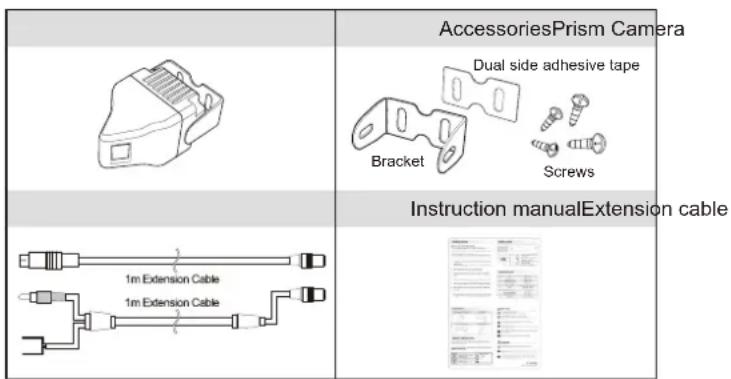
text_image
AccessoriesPrism Camera Dual side adhesive tape Bracket Screws Instruction manualExtension cable 1m Extension Cable 1m Extension CableSAFETY INSTRUCTION
Please pay attention to the warnings and cautions listed in order to prevent the potential risks.
Warning and Caution symbols are divided according to the different level of risk.
Warning

May cause bodily harm or even death if users ignore warnings in the safety rules.
Caution

May cause bodily harm or even death if users ignore cautions in the safety rules.
About signs

"Precautions"

"Do Not"

"Follow directions carefully"
INSTALLATION
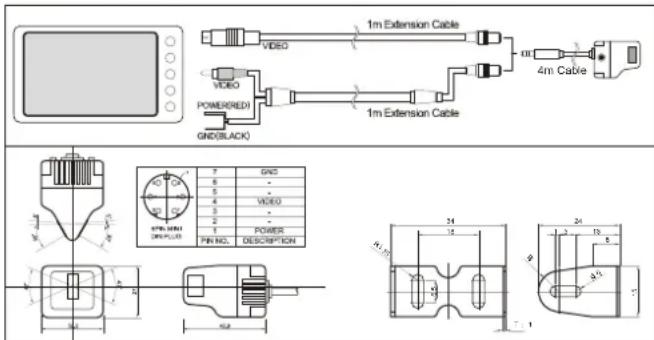
text_image
1m Extension Cable VIDEO VIDEO POWER(RED) GND(BLACK) 1m Extension Cable 4m Cable 7 GND 8 - 5 VIDEO 6 - 2 POWER PR NO. DESCRIPTION SPR-0001 DEP-ULD 24 12 24 3 15 4 25 7 1- Install the camera on the braket for either front or rear view and fix the bracket on the vehicle by using provided screws.
- Test the wire connection.
- When using the camera as rear view camera, the monitor should be able to switch to a MIRROR MODE; (e.g. CAMOS CM-562 or CM-708.)
SPECIFICATION
| NO. | Description | Specifications |
| 1 | Camera system | PAL |
| 2 | Image pickup device | 1/4" IT CCD 512(H) x 492(V) |
| 3 | Image format | 4:3 |
| 4 | Horizontal resolution | 450 TV lines at center |
| 5 | S/N ratio | 46dB(min.) at AGC off |
| 6 | Optical lens | F=2.8, f=3.44mm |
| 7 | Viewing angle | 68(H) x 47.2(V) degree ±3% (L/R +30°, -5°) |
| 8 | Power source | DC 6.0V ~ 15V(single supply voltage) |
| 9 | Dimensions(mm) | 32.2(W) x 27(H) x 42.9(D) |
| 10 | Operating temperature | Operating range -25°C to 75°C |
| 11 | Storage temperature | Storage -40°C to 85°C |
| 12 | Humidity | Less than 90%RH |

Warning

Do not dissemble the device.
- It may cause a fire or malfunction of device.

Do not use bolts or nuts from a parts for vehicle.
- Using bolts or nuts from steering column or break may cause an accident.

Do not install the camera projected out from the vehicle.
- It may harm the pedestrians.

Properly wire the cables.
- It may cause a fire or an accident. Do not let the extension cable pass through the seat rail.

After installing the camera, check if break lamp, head lamp and wipe works properly.

Install this camera to the vehicle with DC 12V OGND.

Caution

Do not install the camera stand on the surface of glass.
- Use the screws to install the camera stand.

When the power cable cord touches a metal case, cover it with a friction tape.
- Short circuit or disconnection of wire may cause a fire or accident.

Let professional engineers or the sale store install the camera.
- It require the experience and skills from professional engineers for proper installation and wiring.