
IP1020 - Telefon ALCATEL - Kostenlose Bedienungsanleitung
Finden Sie kostenlos die Bedienungsanleitung des Geräts IP1020 ALCATEL als PDF.


| Produkttyp | IP-Telefon |
| Marke | Alcatel |
| Modell | IP1020 |
| Farbe | Schwarz |
| Abmessungen (B x T x H) | 210 mm x 170 mm x 90 mm |
| Gewicht | 500 g |
| Stromversorgung | Power over Ethernet (PoE) IEEE 802.3af oder externes Netzteil (5V DC, 1A) |
| Anschlüsse | 1x RJ45 (Netzwerk), 1x RJ9 (Hörer), 1x RJ9 (Headset, optional) |
| Display | LCD-Display, hintergrundbeleuchtet, 2 Zeilen |
| Tastatur | 12 Tasten (Ziffernblock) + Funktionstasten |
| Freisprecheinrichtung | Ja, integriert, mit Lautstärkeregelung |
| Telefonbuch | Bis zu 200 Kontakte |
| Anrufbeantworter | Ja, digital, Aufnahmezeit bis zu 30 Minuten |
| Anrufliste | Ja, 100 Einträge |
| Kurzwahl | Ja, bis zu 10 Kurzwahlspeicher |
| Stummschaltung | Ja, Mikrofon stumm schaltbar |
| Lautstärkeregelung | Ja, Hörer- und Freisprechlautstärke getrennt einstellbar |
| Wandmontage | Möglich (Wandhalterung nicht im Lieferumfang) |
| Reinigung | Mit trockenem, fusselfreiem Tuch reinigen. Keine scharfen Reinigungsmittel. |
| Sicherheitshinweise | Nicht in Wasser tauchen. Bei Beschädigung Netzstecker ziehen. Nur Originalzubehör verwenden. |
| Ersatzteile | Hörer, Kabel, Netzteil über Kundendienst erhältlich. Reparaturen nur durch Fachpersonal. |
| Lieferumfang | Telefon, Hörer, Netzwerkkabel, Kurzanleitung |
| Garantie | 2 Jahre |
Häufig gestellte Fragen - IP1020 ALCATEL
Benutzerfragen zu IP1020 ALCATEL
0 Frage zu diesem Gerät. Beantworten Sie die, die Sie kennen, oder stellen Sie Ihre eigene.
Eine neue Frage zu diesem Gerät stellen
Laden Sie die Anleitung für Ihr Telefon kostenlos im PDF-Format! Finden Sie Ihr Handbuch IP1020 - ALCATEL und nehmen Sie Ihr elektronisches Gerät wieder in die Hand. Auf dieser Seite sind alle Dokumente veröffentlicht, die für die Verwendung Ihres Geräts notwendig sind. IP1020 von der Marke ALCATEL.
BEDIENUNGSANLEITUNG IP1020 ALCATEL
Declaration of conformity for the European Community
ATLINKS declares that Alcatel IP1020/Alcatel IP1020P telephone complies with the relevant basic requirements and provisions of the European directive 1999/5/CE. You can download the declaration of conformity and the user's guide from the following address: www.alcatel-business.com.
The CE logo shown on the products indicates that they are compliant with the basic requirements of all the applicable directives.
CE
Environment
This symbol means that your inoperative electronic appliance must be collected separately and not mixed with the household waste. The European Union has implemented a specific collection and recycling system for which producers' are responsible.
This appliance has been designed and manufactured with high quality materials and components that can be recycled and reused.
Electrical and electronic appliances are liable to contain parts that are necessary in order for the system to work properly but which can become a health and environmental hazard if they are not handed or disposed of in the proper way. Consequently, please do not throw out your inoperative appliance with the household waste. If you are the owner of the appliance, you must deposit it at the appropriate local collection point or leave it with the vendor when buying a new appliance.
(a) - If you are a professional user, please follow your supplier's instructions.
(b) - If the appliance is rented to you or left in your care, please contact your service provider.
Please help us protect the environment in which we live!
Notice of copyright and trademarks
Copyright © 2012 ATLINKS. All rights reserved. ATLINKS reserves the right to change the technical specifications of its products without prior notice, so as to make technical improvements or respect new regulations.
Alcatel are registered trademarks. Alcatel logo and Alcatel name are trademarks of Alcatel Lucent and used under license by ATLINKS.
Phone web interface
- Press → to access main menu.
- Select Status → Network Status. Check IP address
- Open a web browser on your computer. Enter http:// and the IP address in the address bar and confirm
- Default login and password are "admin/0000" for administrator and "userx/0000" for users, where x is handset number
- Minimum config is sip account. Select System → SIP Account Management. Check administrator guide for details. Note: you can also configure sip account using handset keypad. Go to Menu → Settings → VoIP Account Setup
Making a call
+ Pre-ciajing: enter the phone number and press [6].
• Direct dialing: press ☑ Enter the phone number.
+ Handsfree: enter the phone number and press twice.
- Headset: connect the headset to the phone, enter phone number and press.
Note: to place a call from a specific line, make a long press on ☐, select the desired line and press ☐
Accepting a call
- Handset mode press
+ Headset mode press
- Handsfree mode: press 1 twice
Putting a call on hold
- Select Held with navigator and press
• To retrieve the call, select Unhold with navigator and press
Note: with more than one active call, select call with Switch softkey.
3-party conference
- Once in line with 1st caller, press 2nd Call softkey, then select the type of call and press
• Dial 2nd party number or select handset and press
Note: you may be asked to select the line to use for the second call.
Call transfer
Allended transfer
- Once in line with 1st caller, press 2nd Call softkey, then select the type of call and press OK.
• Dial the second telephone number or select handset
- When the call is answered, select Transfer from call options list to complete the transfer
Bind transfer:
- Once in line with 1st caler, press Transfer softkey.
• Dial the destination telephone number and press Transfer soft key.
ALCATEL
Alcatel IP1020/Alcatel IP1020P Quick start guide
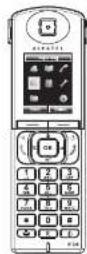
Left soft key: access to call list
Right soft key: access to calendar
OK Navigation key: main menu/OK key
Left: phonebook
Right: volume control
Up: redial
INT Down:intercom
BLF key
End call Power on/off
Accept calls Handstree mode Select line
Hash key: change text input method (upper case/lower case)
Voicemail key
Star key: lock/unlock keypad
Mute key: mute/unmute
Display icon description
| Missed calls | Ringer off | Voicemail | |||
| Hands/free activated | DND | Do not disturb | Headset mode | ||
| Mute | Keypad lock | Alarm on | |||
| Battery charge level ! okBatteries need charging | T_1/2 Y_1 | Good reception qualityBad reception quality | Call in progress (green)Call on hold (red)Call ended (red) | ||
| Call forward |
Base led description
| Steady Amber | Base is connected to network or router |
| Off | Base not yet up or no network connection |
| Alternating Amber and Blue | DECT registration mode |
| Flashing Blue | Software upgrade |
Call forward
- Press ☑ to open main menu. Select Services → Call Forward.
- Select the line for which you want to set call forward.
• Then select the type of call forward. - Set the status to enabled/disabled, fill in destination number and press
Paging and Intercom
• To locate your handsets, press the paging key ☐ on the base. Press again to cancel,
• To make an internal call to another handset, press INT key, select the desired handset from the list and press
Language selection
- Press → to open main menu. Select Settings → Language
- Select the desired language and press
Phonebook
Access phonebook
• Press
• Sensitive Directory type
- Select a contact and press Options soft key to select an operation.
Add new entry
- Press
- Select the Directory type.
- Select Options and press Add soft key to add a new entry.
- Enter first name, last name and numbers.
- Press Save soft key
Redial
- Press
• Highlight a record. - Press ☑ to make the call, you may select the line by long pressing ☑
Do not Disturb
- Press 96, select Services → DND.
- Select the line for which you want to set DND feature.
- Select Activate and press
Voicemail
- Press ☑ to access voice-mail
OR - Go to Menu * Voicemail to check number of messages. Press Call softkey to retrieve your messages.
- Declaration of conformity for the European Community
- CE
- Environment
- Notice of copyright and trademarks
- Phone web interface
- Making a call
- Accepting a call
- Putting a call on hold
- 3-party conference
- Call transfer
- ALCATEL
- Alcatel IP1020/Alcatel IP1020P Quick start guide
- Call forward
- Paging and Intercom
- Language selection
- Phonebook
- Redial
- Do not Disturb
- Voicemail
Marke : ALCATEL
Modell : IP1020
Kategorie : Telefon