
E190 Voice Trio - Telefon ALCATEL - Kostenlose Bedienungsanleitung
Finden Sie kostenlos die Bedienungsanleitung des Geräts E190 Voice Trio ALCATEL als PDF.


| Produkttyp | Schnurgebundenes Festnetztelefon (analog) |
| Modell | E190 Voice Trio |
| Marke | Alcatel |
| Abmessungen (ca.) | 200 x 150 x 100 mm (Basisstation) |
| Gewicht (ca.) | 300 g (Basisstation) |
| Stromversorgung | Über Telefonleitung (kein externes Netzteil erforderlich) |
| Anzeige | LCD-Display mit Hintergrundbeleuchtung (ggf. vorhanden) |
| Tastenfeld | Große, gut lesbare Tasten |
| Wahlwiederholung | Ja (letzte gewählte Nummer) |
| Freisprechen | Ja (Freisprechfunktion) |
| Stummschaltung | Ja (Mikrofon aus) |
| Klingelton | Einstellbar (mehrere Melodien/Lautstärken) |
| Hörerlautstärke | Einstellbar (mehrere Stufen) |
| Anrufbeantworter | Nicht integriert (Modell ohne Anrufbeantworter) |
| Anzahl Mobilteile | 1 (Single-Version), ggf. Trio-Modell mit 3 Mobilteilen |
| Reichweite | Bis zu 50 m im Innenbereich (bei DECT-Modellen) |
| Montage | Tischaufstellung oder Wandmontage |
| Reinigung | Mit einem trockenen oder leicht feuchten Tuch abwischen; keine aggressiven Reinigungsmittel verwenden |
| Sicherheit | Nur für den Innenbereich; vor Feuchtigkeit schützen |
| Reparatur/Ersatzteile | Keine vom Benutzer austauschbaren Teile; bei Defekt Fachhändler kontaktieren |
| Zubehör | Telefonkabel, ggf. Headset-kompatibel |
Häufig gestellte Fragen - E190 Voice Trio ALCATEL
Benutzerfragen zu E190 Voice Trio ALCATEL
0 Frage zu diesem Gerät. Beantworten Sie die, die Sie kennen, oder stellen Sie Ihre eigene.
Eine neue Frage zu diesem Gerät stellen
Laden Sie die Anleitung für Ihr Telefon kostenlos im PDF-Format! Finden Sie Ihr Handbuch E190 Voice Trio - ALCATEL und nehmen Sie Ihr elektronisches Gerät wieder in die Hand. Auf dieser Seite sind alle Dokumente veröffentlicht, die für die Verwendung Ihres Geräts notwendig sind. E190 Voice Trio von der Marke ALCATEL.
BEDIENUNGSANLEITUNG E190 Voice Trio ALCATEL
ALCATEL
home & business phones
€130 / €130 DUD / TRIO €190 / €190 DUD / TRIO
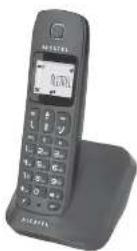
USER'S GUIDE
Charging batteries for the first time
Before you start to use your telephone make sure that all batteries are fully charged for 15 hours.
Important note: This telephone is not designed for Emergency calls when the main power fails.
For Emergency calls you should have a basic phone that operates without mains power, connected to your line so that you can make calls during a power failure.
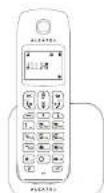
Phone Function Keys
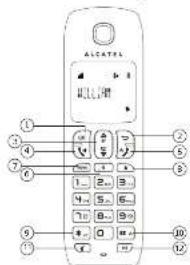
1 OK key
Press to select the function displayed on the handset screen directly above it.
2 Back/clear key
Press to create a digital character in editing mode.
Press and hard to change the handset idle display between handset
Family and Department
3 Navigation key
Press UP to access the ceiling* and press DOWN to choose the phonebook when in idle mode.
Press UP/DOWN to increase or decrease search piece volume during a roll. Press UP/DOWN to increase or decrease handstree volume (E130 only). Scroll up/down a list.
4 Talk key
Handbase (E190 any).
5 Hang-up'Exit key
Press and hard to switch the handset power on/off.
Press to end a call
Press to return to idle mode in other menus
C. Recall (Flash) key
Access to operator services
- Mewich
Press to access the main menu.
- Redlalkey
Press to access the Redall list
- Sirek hau
Press and hold to lock/unlock keypac
Press and hard to toggle between the external and internal calls when
Both are so,
10 Hash key
Press and hard to insert a pink ring with a roll
- 2024年1月15日(星期二)下午13:00
11 Mute key
Press to mulo / unmute the handset microphone.
12 Call transferintercom key
Press to initiate an internal call.
Press to hold the IPO and page editor Refaster during a cat.
- 2023年1月15日中国证券报、上海证券报、证券时报、证券日报、证券日报、证券时报、证券日报、证券时报、证券日报、证券日报、证券时报、证券日报、证券日报、证券时报、证券日报、证券日报、证券时报、证券日报、证券日报、证券时报、证券日报、证券日报、证券时报、证券日报、证券日报、证券时报、证券日报、证券日报、证券时报、证券日报、证券日报、证券时报、证券日报、证券日报、证券时报、证券日报、证券日报、证券时报、证券日报、证券日报、证券时报、证券日报
*Subject to a subscription and availability of the service from the fixed line operator.
Base station
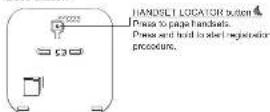
What's on the display?
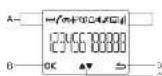
A. Display Icons
B. Displays when in menu mode to confirm your selection.
C. Indicates that more options are available
Use the UP/DOWN keys to send up/unknown
D Displays when I more mode.
Select BACK to learn to be previous field ever.
What the icons mean?
Indicates battery is fully charged.
□ indicates battery is fully discharged
Indicates that an external call is connected or held.
-
10am of the time, the time is being
-
This is a key point that the following is not possible to be
P Indicates you have now missed calls, or the call log is being viewed.
□ Disperse when the phonebook is accessed.
-
Displays upon the alarm clock is activated
-
2017年1月1日
- Display time: 10 seconds, 24 seconds (2.50 GHz).
Displays when finger volumes is turned off.
Indicates that the forecast is registered and within range of the
Icon thinks when the handset is out of range or is searching for a base.
OK Diagnosys were in me to made to confirm your selections.
- Indicates that more options are available.
Use the UP / DOWN keys to scroll up/down
- Disasses when in men, made
Select BACK to return to the previous menu level.
Read First Before Use
Ch—with a site for the base unit and charger pod
If you have a Broadband line
If you connect your telephone to a line with a broadband connection.
you will need to insert a micronber between the searchers and the
telephone and the broadband, which could cause problems.
The base unit and charger pod(s) should be placed on a level surface. In a position where:
- The means adsor plug will reach an easily accessible 230-V AC
замбиная тяга Supply золот - объекту до ведубнист ши золет
- the base will's telephone. The cable will reach you telephone line
socket or extension socket (the charger pod does not have a
(https://e.1000000000000000)
- It is not close to another telephone - this can cause such interference
• It is not clear in a set K, which of similar, or any other kind of which might be very rare.
- it is not close to other electrical equipment - fridges, washing
machines, microwave ovens, fluorescent lights, televisions etc.
- It is away from Hel, humic concisone and wrong sunlight
Radio signals between handset and base unit
To use your handset and base unit together, you must be able to
maintain a radio link between them, be aware that any large motor
objects, like a 10-rotator, a 10-letary system, etc., between the
The following text must be used to create a new, stylized graphic.
Make power connection
IMPOUTABLE - Too have all and consumer deal may be used with
mans adapose supplied with the unit.
Using any other adapter will result in non-compliance with EN60950.
and will investigate any approval given to this approach.
Battery safety - CAUTION
ONLY use the rechargeable batene supplied with the hancock.
DO NOT be non-reversible ballers ex - they may explode and
Союжеттабель на розненности.
CAUTID
RISK OF EXPLOSION IF BATTERY IS REPLACED BY AN
NCORRECT TYPE
DISPOSE OF USED BATTERIES ACCORDING TO THE
INSTRUCTIONS.
Installation and Set-up
Fit the rechargeable batteries in each handset
- Install the AAA batteries (Brand name: CORUN, Capacity: NMH)
1.2v/300mAh, or Brand name GREPO/W, Capacity: NF-M
Heard in accordance with the pelatly market to the written
compartment
- Close the battery compartment cover, sliding into place and
pressing firmly to make sure it is secure.
Connecting AC (electric) power
- Plug the base adaptor curl into the power sink on rear panel of the
base and the other end into a 130-240VSC 50-60Hz electrical outlet.
-
Connoctrephix to the cold into the phone jack on the panel of his base and the other card into a main market.
-
In cases of twin or triple system, plan the chamber power sensor coil
into the power just an rear panel of charge and the other and into a
100-240VAC 95-96-F electrical office.
Before you, the other hand put in the first time, I was given to charge the arteries July.
Leave the hardest on the charging cycle for 15 hours.
CAUTION: Use only the power supply that comes with this unit. Using
other power supplies may damage the unit.
Base and charger power adoption:
Base: 3006V05X050
Incorporation: 2019-06-05
Doutnut: 60 DC (500mV/Box)
EVDC:150mV/Chenoc
Your Telephone Operations
Switching on/off
(2) Pass and hold the HANGUPEXT key for more than 2
3 seconds to switch or off the handset in idle mode.
Note: When the handset is OFF, it cannot be used for making
cells including emergency calls. There will be no ringing
during an incoming call. To answer a call, you will need to switch it back on. It may take some time for the handset to re-establish a radio link with the base unit.
To lock/unlock the keysed
Press and hold the STAR key for 1 second to lock /
unlock the keypad in idle mode.
Note: incoming calls can still be answered even if the keypad was locked.
Set time and data
Note: If you subscribe to the Caller Display service, the time and date will be set automatically when you receive a call, but you may still need to set the correct year.
-
Press MENU key to enter menu selection.
-
Press the Navigation Key to Select CLOCK&ALARM and press
-
Focus OK key in selected DATE/TIME. The best stored clubs is displayed.
Enter the current date (YY-MM-DD), press OK, then enter the time
HH M21
- Press the Navigation key to select AM or PM (1 the time is in 12
Houdet, D. et al., and John, Mark O. by 1254 in A communication here is next.
2014.12.3
Change the display language
-
Press MENU key to enter menu selection.
-
Press the Navigation key to select PERSONAL SET and then press
1.4. 50% in. 2008
-
Clear the Navigation way to select HANDSET NAME and that
-
Press BACK?C FAS key to select the character one by one
Enter the new user updates in 10 choclears and news OK key to
xintm.
A.
Change the display language
-
Texas MTHU Low to enter at
-
2023年1月1日,公司召开2023年第二次临时股东大会,并于2023年3月15日召开的2023年第三次临时股东大会。
-
Please this Navigation key to select PERSONABLE SET 10, this please check in select.
-
Press the Navigation key to select LANGUAGE and then press OK
key to select.
- Press the Navigation key to your desired language and press OK
key to confirm a confirmation deep is prayed.
Note: Once the display language is used, the open blocks on the
The following table provides the information in English:
Make and answer calls
Make a call
Prodialling
Dial the number (maximum 24 digits) and then press TALK key.
Direct dialing
- Press TN K key to base the line and then dial the number
maximum 24 units.
Cell down, arterial tract
Call from October 19
Press the Navigation key to an entry in the rocket list and then
press TALK key
Call from the call log
A. Pons Cell O16, kns in situ
Cross the Navigation key to an entry in the call list and then
press TALK key
Note: You need to subscribe to Call Line Identification service to be
able to see the caller's number or name in the call log.
Coll from the notebook
■ Pass PHONEBOX key in kla mode
Press the Navigation key to an entry in the phonebook and then
press TALK key
Answer and end a call
-
When the phone dogs press TALK key.
-
To end a conversation, press HANG UP/EXIT key.
IMPORTANT NOTE: You can simply place the preview back on its
have station or channel pad to and the call.
Use telephones (only for 510%)
Dance Tàl Kiev at any moment to press them more to help it
handstree made. To deactivate the handstree made, press again the
TALK key to talk in normal
Adjust the sarpiece volume
During a call, press the Navigation key to select from VOLUME 1 to
VOLUME 5.
-
-
-
-
-
-
-
-
-
-
-
-
-
-
-
-
-
-
-
-
-
-
-
-
-
-
-
-
-
-
-
-
-
-
-
-
-
-
-
-
-
-
-
-
-
-
-
-
-
-
-
-
-
-
-
-
-
-
-
-
-
-
-
-
-
-
-
-
-
-
-
-
-
-
-
-
-
-
-
-
-
-
-
-
-
- 99.
-
-
-
-
-
-
-
-
-
-
-
-
-
-
-
-
-
-
-
-
-
-
-
-
-
-
-
-
-
-
-
-
-
-
-
-
-
-
-
-
-
-
-
-
-
-
-
-
-
-
-
-
-
-
-
-
-
-
-
-
-
-
-
-
-
-
-
-
-
-
-
-
-
-
-
-
-
-
-
-
-
-
-
-
моботинные микрополе
When the microphone is missed, the market displays NOTE ON and your calls are sent here you.
□ Duden a cell, once the UITE you be too spill the color-shoe.
4
Psging
The paging feature enables you to locate a missing handset in the
Inches is in range and contains charged batteries.
A few handset I LILA OR any excited at the back of the
Челей майки 345 (государный видачих май 10)
Since retrieved, press any key on the handset or the HANDEET
Cell writing
If you have subscribed to Call Waiting service, the carriage will emit a
boop lono to inform you that there is a second incoming call. The
number or name of the second caller will also be displayed on your
phone I you have subscribed to call the identification service (CLI).
- 2023 年 12 月 1 日, 1956 年 12 月 1 日, 1957 年 12 月 1 日, 1958 年 12 月 1 日, 1959 年 12 月 1 日, 1960 年 12 月 1 日, 1961 年 12 月 1 日, 1962 年 12 月 1 日, 1963 年 12 月 1 日, 1964 年 12 月 1 日, 1965 年 12 月 1 日, 1966 年 12 月 1 日, 1967 年 12 月 1 日, 1968 年 12 月 1 日, 1969 年 12 月 1 日, 1970 年 12 月 1 日,
2017年
Using your phonebook
Your phone can store up to 50 phonebook memories.
How to enter characters
When you select a field in which you can enter text, you can enter the letters that are printed on the keys by pressing the relevant key once or several times.
For example, press 2 on to insert the letter A, press 2 twice
In order, the letter B. and so on... Spaces and other symbols can be
Rosed Hang the 0 | 0 | 1_
Store a contact in the phonebook
-
Press MENU key to enter menu selection.
-
More live mannosino key in select PHONEBOOK and then review
OK key In order
-
Press CK say again to be NEW ENTRY.
-
Enter the name of the exactor (in millions: 12 characters). To edit
press BACK/CLEAR key to delete the last character entered. Press
CK key in colour the cause else
b. Use the number of the constant maximum 26 units are then
where OK key to confirm A prefriction box is played
Lesson checkback
-
Cross PUDVEREOS
-
(321) ONLECH - \$ key for the cost of license the
phone call to: No. 105, you can press the info key.
- From the following items in each LRT and then were OK here to
confirm: The piecework criteria will be listed in orthogonal order.
and you can work. Not making key to recall through the plan program
- Price 6% and to vary the direction of the original price
(1) 2016年, 2017年, 2018年, 2019年, 2020年
Note: Instead of pressing the Navigation way to increase the phonematically
enikes, you can press the human's way corresponding to the first letter
at the entry you wish to local
Modify a phonebook entry
-
Press MLNU key to enter menu selection.
-
Press the Navigation key to select PHONEBOOK and then press
OK key to select
- Press the Navigation key to select EDIT ENTRY and then press OK
ses to select.
- Press the Navising Sets in select any mix in soil and these are
OK say. The current name is displayed. Edit the name and then
press OK key to confirm.
- Edit the number and then press OK say to confirm. A confirmation
beep is played,
Deleis z obouhnek anlty
-
Press MENU key to enter menu selection
-
Trans the biopulation is to select PHONEBOOK and then aware
OK know In color
- Press the Navigation key to select DELETE and then press OK key
la xin h
- Press the Navision key in select security in delete and then access
OK key.
- Press OK say again to confirm. A confirmed best is played.
Delete all entries from the phoneboard list
Before an activation from the photovoltaic list
- Please MELO KEY TO ENTER FIELD selection.
-
Pass the bird habitat involved in a 3D BUDYFROOIS and four years
-
You are the participants who do much. HOMEBOOK will be private.
-
There is a limitation in selection (P1, P2, P3, A1, and then were 51
-
Does the navigation key to select DELETE ALL # 4 then picks on
1.7 016
- Please call any action to confirm. A tax policy is required for purpose.
Direct access memory
There are 2 direct access memories (Keys 1 & 2) in addition to the
phorebook memory. A long press on the keys inside mode will
simmetrically dal the stored price number
Adstudit direct access directory
-
Press MENU key to enter menu selection
-
Faces the registration key to select PHONEBOOK and then access
(2) 100% of the company is a major business entity, including its subsidiaries and related entities.
- Gross the Financing mix in select DIRECT MEN, and then press
OK key to select
- Cross the navigation key to select KEY 1 or KEY 2 and then press
OK key. The stored name is disclosed, or NO NUMBER IF I is
apply. If there is no number signed for the selected key or if you
was to change the name or number currently stained, press MENU
key to write direct memory, then to add a bit the name or member.
- Press the Navigation key to select EDIT NUMBER and then press
OK key to select. The display shows the currently stored name, or
ENTER NAME: there is no number stored. Edit or enter the name
you want and then press OK key. The display shows the currently
stored number, or ENTER NUMBER. I there is no number stored.
Evil or enter the number you want and then press OK key to:
• A commutational map & plan
Delete direct access
-
Press MENU key to enter ma
-
Press the Navigation key to select PHONEBOOK and then press
OK key to select.
- Press the Navigation key to select DIRECT MEM, and then press
OK key to select.
- Press the Navigation key to select KEY 1 or KEY 2 and then press
OK key. The stored name is displayed for NO NUMBER, if it is
already emply).
-
Press MENU key to enter direct memory menu.
-
Press the Navigation key to select DELETE and then press OK by
to select.
Press OK key again to confirm. A confirmation beep is played.
•
Using the redial list
The rental list stores the bad 5 numbers dated.
Access radiol list
- Press BEDIOL
the redal list. The last number cited will appear first in the redal list.
-
Press OK has to view the details of the selected entry.
-
Prior on key is how the costs of the subsidiaries only
Save a redial number into the phonebook
-
Press REDIAL key in idle mode to go to the redial list.
-
Press the Navigation key to select an entry.
-
Press MENU key to display SAVE NUMBER, then press OK key to
display ENTER NAME. Enter the name of the contact (maxima
12 characters] and then press OK key to save the entry, and
return the display to the redial list.
Using the call log
To receive Galer ID you may need to contact your telephone service.
to receive order to you may need to call your destinations to the provider, and thus will inform you also of any charges for it. Caller ID
lets you see the phone numbers of your callers on the handset display
before you answer and in your Call Log afterwards. The Call Log stores
the last 10 external calls, whether or not you answered the call, so you
can call them back is
Only the most recent call is saved if there are repeat calls from the
see number. When the Call Log is full, the next new call will replace
the oldest entry.
If you've got a new call in the Call Log, the Caller Display Icon will
appear on the handset display.
If the received number is the same as one in your phonebook,
came from the phunsbank will display so and so the number.
If a call is from someone who with held their number, the display will
show WITHHOLD ID.
If the call is from someone whose number is unavailable, or if you have
not subscribed to Caller ID but have set the date and time, the display
will show CALLING where it is received and UNAVAILABLE in the Call
Leg.
Access call log
Press CALL LOGUPE key in idn media and news Navigation key to
browse the call list. The calls are displayed in chronological order with
the most recent call at the top of the list.
- Praga OK key to display more details of the call, including the date
and time.
Save call list entry into the phonebook.
-
Press CALL LOGUP buy in idle mode In co In the call list
-
Press the Navigation key to select an entry and then press MENU
key.
- Press the Navigation key to select SAVE NUMBER and then
press OK say to select.
(Enter the name of the portest (mainly an 12 characters) and like
press OK key to confirm
•
Delete a Call Log entry
-
Press CALL LOG[UP] key in idle mode to go to the call list.
-
Press the Navigation key to select an entry and then press MENU
key.
- Press the Navigation key to select DELETE and then press OK key
to select.
(Fress OK key again to confirm. A confirmation heap is played.)
Delete all entries in the Gallon
-
Page CALL LOG (HP) log in its mode to co in the call list
-
Phone CALL EOG (OF) key in the mode to go to the button.
-
Pass the MENU key
-
Press the Navigation
-
Please the Navigation key to select DELETE ALL with all shares of key to spin out
(Press OK) is again in confirm. A configuration has an element
0-Press OR key again to commit. A 6x100mm deep is played.
Using the intercom
Intercom, call transfer and conference are only possible with at least 2
handset registered to the same base station. It allows you to make free
internal calls, transfer external calls from one handed to another, and
set up a 3-way conference with two bandels and an external cell. If
you try to make a call while another handset is already on an external
call, your best
Returns to date.
intercom another handset
Press NT key in idle mode.
Intercom is established immediately if there are only 2
registered handsets.
If there are more than 2 registered handsets, the handset numbers
which are available for intercom, and a ^* , will be displayed. Press the
specific hardset number you wish to call, or press * to ring all
handsets, to start intercom.
Transfer on external cell to another bandet
Transfer an external can to another handset
During the call, press INT key to put the external call on hold
(The letter can no longer near you).
Intercom is established immediately if there are only 2 registered
handsets. If there are more than 2 registered handsets, the handset
numbers which are available for Intercom, and a ^47 , will be displayed.
Press the specific handset number you wish to cast of bestsets to start/index.
at the
Press TALK key on the called handsad to answer the internal soil where both internal values are equal. Intercom is explained
can, where both Internal Bakers can be. Incomis established
Press HANG UP/EXIT key on the first handset to transfer the
7 external call to the called handset. The external call is transferred
Note: If there is no answer from the called handset press INT key to
regume the external call.
- 本报告期公司(含本报告期)财务报表
Answer an external call during Intercom
During intercom, a new call lone is entitled when there is an incoming
exio
Press TALK key to answer the external cell and end the intercom
Connection with the external call is established.
Note: To cut the interest and no hold and swaps the increasing
Note: To put this market as external call, press INT key.
[Non-Text]
Switch between an internal and external call
During the call, press key to switch between an internal
or external call.
Einkshire a three-party preference call
Establish a three-party conference call
THE ISOTOMEN THE REALTY ATTACKS THE GOM/BAI CAN TO BE SUSTED WITH two bandlets in Internet. Two these series can share the
two handcases (in Morocco). The three parties can share the conversation and no additional network substation is required.
Convercation and the abclonal network subscriptions required. During an external call, press INT key to put the external call on
Being an internal car, press INT key to put the internal car on held like code can no longer have you!
If there are more than 2 registered headsets, the headed numbers
If there are more than 2 required thresholds, the minimum numbers which are available for intercom will be deployed. Despite the specific
which is available for intercall on the displayed. Please file special handset number you wish to call to start interior.
- e. Ermes TAI K you on the called handset to answer the integral
Please TAGA May on the curve Manhattan to answer the initial call, where both iqemai ralien can ask. Intercam is relaished
- Can, where both formal care can be more than 100%
UK Prices and hotel Three-party conference
CONFEERENCE will be displiqued on the screen or on the
conference call is established.
重要内容提示:本次会议采取现场
Handset Tone
Set the ring volume
There are 6 ringarvolume options (OFF, LEVEL 1, LEVEL 2, LEVEL 3,
LEVEL 4 and LEVEL 5). The default level is LEVEL
-
Press MENU key to enter menu selection.
-
Press the Navigation key to select PERSONAL SET and then press
OK key to select
- Press the Navigation key to select HANDSET TONE and then press
OK key to select and show RING VOLUME. Press the OK key
again to effect.
- Press the Navigation key to your desired volume level and then
press OK key to confirm. A confirmation heap is played.
Set the ring melody
These are 4 Days me
There are 10 ring modules available on your handset.
-
Press MENU key to enter menu selection.
-
Press the Navigation key to select PERSONAL SET and then press
OK key to select
- Press the Navigation key to select HANDSET TONE and then press
OR key to scise
- Press the Navigation key to select RING TONES and then press
OR 15 9800
- Press the Navigation key to your desired melody
and then press OK key to confirm. A confirmation help is played.
Activate/deactivate key tone
5 single zone is omitted when a key is pressed. You can enable it
discharge the key lane. By default, this key lane is ON.
-
Press MENU key to enter menu selection.
-
Press the Navigation key to select PERSONAL SET and then press
OK key to select.
- Press the Navigation key to select HANDSET TONE and then press
OK key to select.
-
Press the Navigation key to select KEY BEEP and free access OK in
-
Products and Equipment, likely to be sold for the 1st February 2018; select.
-
Press the Navigation key to select ON or OFF and then press OK
key to confirm. A confirmation heap is played.
(1) 2017年1月1日
Activate / desactivate auto hang-up
This function enables you to send a call substantially by simply placing
the handset on the base station. By default, the Auto Hang up feature is ON
15 ON.
- Pross MENU key to enter more selection.
-
Reputing Uninflation Index (REPS)
-
Press the Navigation key to select PERSONAL SET and then press
OR key to select
- Press the Navigation key to select AUTO HANG-UP and then press 264 haw to select
OR key to school
- Press the Navigation key to select ON or OFF and then press OK
key to confirm. A confirmation heap is played.
Red date: Lillyman forward
Set date / time format You can not you get your
- Call to: your preferred details referral for your phone. The daily 41 format is DRIMM and 74 HOURS
cestival offers 15 DBM and 24 HOURS.
Set time format
-
Press MENU key to enter menu selection.
-
Press the Navigation key to select CLOCK&ALARM and then press
OK key to select.
- Press the Navigation key to select SET FORMAT and then press
OK key to select.
-
Press OK key to enter TIME FORMAT. The current setting is displayed.
-
Press the Navigation key to select 12 HOURS or 24 HOURS and
then press OK key to confirm. A confirmation beep is played.
Red date format
-
Доля МРУ
-
Press MEIO's key to other men's selection.
-
Cross the discretion how to select 51.001
-
Press the Navigation key to select CLOCK&ALARM and then press
OR key to select.
- Press the Navigation key to be set SET FORMAT and then press 5% key to order
OR key to select.
- Press the Navigation key to select DATE FORMAT and then press
OK key to select. The current setting is displayed.
- Press the Navigation key to select DD/MM or MM/DD and then
press OK key to confirm. A confirmation beep is played.
Set alarm
The handset has an alarm clock feature, and when the alarm is set, the
Da shown on the handset display.
When the alarm time is reached, the display flashes -ALARM- and
the alarm melody is played for 1 minute or until any handset key is
preseed.
If the alarm is set for ON DAILY and the alarm will sound again on the
next day.
If the alarm was set for ON ONCE, the will be turned off.
-
Press MENU key to enter menu selection.
-
Press the Navigation key to select CLOCK&ALARM and then press
OK buy to select.
- Press the Navigation key to select ALARM and then press OK key
to select.
- Press the Navigation key to select OFF, ON ONCE or ON DAILY
and then press OK key to confirm. If you select ON ONCE or ON
DAILY enter the time (HH-MM) for the alarm and press the UP
DOWN key to select AM or PM if the time is in 12 HOURS format.
- Press OK key to confirm. A confirmation heap is played.
5st alarm topo
-
Dose MEN
-
Press MLNO key to enter menu selection.
-
Press the Navigation key to select CLOCK
-
Prior the recognition key to which CEUCRAALARM is that previous OK how to select
-
Focus the orientation key in select AL ARM TONE and then over
-
Pious the Navy Off buy to select
-
Does the Navigating how to select HELDXY 4, HELDXY 2 or
-
Press the navigation key to select MELODY 1, MELODY 2 or MELODY 3, and then press Off key to confirm 4 confirmation beer
MEESBY 3: It is that present on May to understand. A confirmation help is played.
и прауми.
Advanced use of your telephone
Cleaner Horder PIN
Change Market PIN
THE KASIKI FIN is similar for liquidation and precipitation of samples. The default Master FIN number in 2006
Medical Manager PIN (Manual & Doctor.
Note: If you forget your PIN code, you can reset it to its default 0000
using a handset: Ro
-
Press MENU key to enter menu selection.
-
Press the Navigation key to select ADVANCED SET and then press
OR key to select.
- Press the Navig
OK key to select.
Enter the current Master PIN when prompted and then press OK key to
confirm. As you enter the PIN it will be shown as aularisks (*) on the
screen.(Enter the new PIN and then press OK key to confirm. A
confirmation deep is played.
Register your handset
IMPORTANT: When you are known a school, all students are
IMPORTANT: When you purchase 3 suspensions, so many cases are already registered to the house, so you do not need to register them
Handset registration is only necessary when you buy extra handsets or
if a handset has be
The procedure described below is for E130 or E180. They may be
different if you want to register another here-set model, in which case
you should refer to its user guide.
Additional handsets must be registered to the base unit before you can
use them. Up to 4 handsets can be registered to one base station. The
Master PIN is required before you can register or unregister handsets.
By default, the Master PIN is 000€
On the base station, press and hold the HANDSET LOCATOR key for
approxime
-
On the handset, press MENU key to enter menu selection.
-
Press the Navigation key to select ADVANCED SET and then press
OK buy to select.
- Press the Navigation key to select REGISTRATION and then press
OK key to select.
Note: If no action is taken on the handset within 10 seconds, the
Note 1: This section is taken for the manufacturer's first registration procedure will be shorted. If this happens, repeat the first
step.WAITING is displayed on the screen. A confirmation beep is
played to indicate successful registration, and the handset will return to
Idle mode, with its handset number displayed.
Note: If no base is found within a certain period, an error tone to
indicate failed registration and the handset returns to idle mode, and
you will need to repeat the registration sequence.
Unregistered your handset
-
Focus MENU key to order menu selection
-
PRESS MENU KEY TO CHIRI MENU SELECTOR.
-
Press the Navigation key to select ADVANCED SET and then press OK into options
OR key to select.
-
Please note the registration copy is subject UNREGISTER and then please OK to be select.
-
Enabling Market BV when compiled and then grown £K involved
-
Enter the master PIN when prompted an confirm, the default model PIN is (U170)
SEMIE (the default master PIN is 0005)
- Pleads the navigation may be seen: The magnetic field is integrated and there were OK to confirm
and then please OK, try to be hidden. A confirmation is open in mind to logics success I precalculation
A communication deep is played to increase success of registration.
Note: If no action is taken on the handed within 15 seconds, the
unregistration procedure will be aborted and the hardest returns to idle
mode. You must use another handset to register handsets from the
base.
Change recall time
You may need the R button to send a Recall signal (also called Flash
or Timed Brook Recall) if you are connected to a PBX. You should
normally leave the Recall Time at its default setting of Short (100ms).
as this is the standard recall required in the telephone network, but it
can be changed to Medium (270ms) or Long (600ms) if your telephone
is connected to a PDX that requires a different recall time.
-
Press MENU key to enter menu selection.
-
Press the Navigation key to select ADVANCED SET and then press
OK key to select.
- Press the Navigation key to select RECALL TIME and then press
OK key to select.
- Press the Navigation key to select SHORT, MEDIUM or LONG a
Marke : ALCATEL
Modell : E190 Voice Trio
Kategorie : Telefon