
RUE-4136 - Télécommande ALPINE - Notice d'utilisation et mode d'emploi gratuit
Retrouvez gratuitement la notice de l'appareil RUE-4136 ALPINE au format PDF.

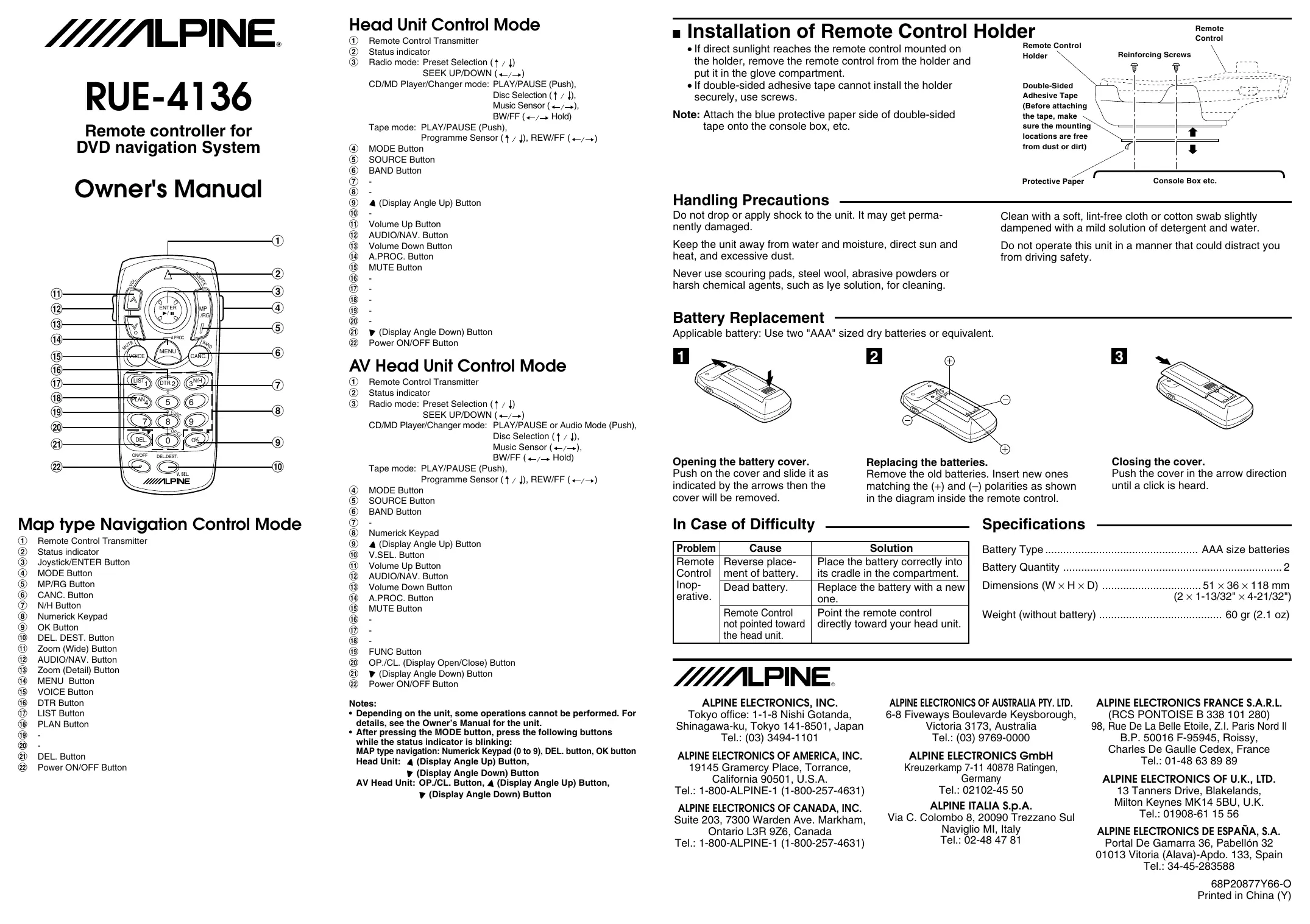
| Type de produit | Télécommande pour système de navigation DVD |
| Marque | ALPINE |
| Modèle | RUE-4136 |
| Dimensions (L × H × P) | 51 × 36 × 118 mm |
| Poids (sans pile) | 60 g |
| Alimentation | 2 piles AAA (1,5 V) |
| Fonctions principales | Commande de navigation (joystick, touches de zoom, mode), commande de radio/CD/lecteur MP3 (lecture/pause, changement de piste, avance/retour rapide), commande de tête AV (réglage angle écran, volume, mute), touches numériques, bouton MODE, SOURCE, BAND |
| Portée | Environ 10 m (infrarouge, pointer vers l'appareil) |
| Entretien et nettoyage | Nettoyer avec un chiffon doux et sec ou légèrement humide (eau savonneuse douce). Ne pas utiliser de produits abrasifs, de laine d'acier ou de solvants |
| Précautions de sécurité | Ne pas utiliser en conduisant (distraction). Éviter chocs, humidité, chaleur excessive, lumière directe du soleil. Remplacer les piles usagées rapidement |
| Pièces détachées et réparabilité | Piles AAA disponibles dans le commerce. Aucune autre pièce détachée fournie ; en cas de panne, contacter le service après-vente ALPINE |
| Informations générales | Télécommande infrarouge compatible avec les systèmes de navigation DVD et autoradios ALPINE (selon modèle). Livrée avec un support de montage (adhésif double face ou vis) |
FOIRE AUX QUESTIONS - RUE-4136 ALPINE
Questions des utilisateurs sur RUE-4136 ALPINE
0 question sur cet appareil. Repondez a celles que vous connaissez ou posez la votre.
Poser une nouvelle question sur cet appareil
Téléchargez la notice de votre Télécommande au format PDF gratuitement ! Retrouvez votre notice RUE-4136 - ALPINE et reprennez votre appareil électronique en main. Sur cette page sont publiés tous les documents nécessaires à l'utilisation de votre appareil RUE-4136 de la marque ALPINE.
MODE D'EMPLOI RUE-4136 ALPINE
RUE-4136
Remote controller for DVD navigation System
Owner's Manual
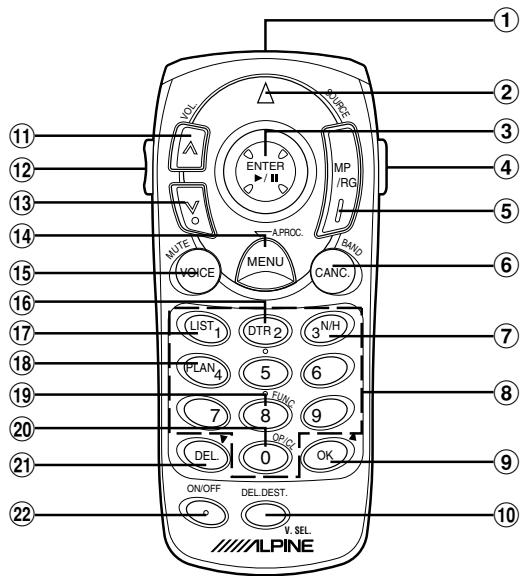
Map type Navigation Control Mode
① Remote Control Transmitter
② Status indicator
③Joystick/ENTER Button
(4) MODE Button
(5) MP/RG Button
CANC. Button
⑦ N/H Button
⑧ Nemerick Keypad
⑨ OK Button
DEL. DEST. Button
⑪ Zoom (Wide) Button
12 AUDIO/NAV. Button
⑬ Zoom (Detail) Button
(14) MENU Button
15 VOICE Button
DTR Button
17 LIST Button
18 PLAN Button
19
20
21 DEL. Button
22 Power ON/OFF Button
Head Unit Control Mode
① Remote Control Transmitter
② Status indicator
③ Radio mode: Preset Selection (↑/↓)
SEEKUP/DOWN ( / - )
CD/MD Player/Changer mode: PLAY/PAUSE (Push),
Disc Selection ( / ) ,
Music Sensor ( / )
BW/FF ( / Hold)
Tape mode: PLAY/PAUSE (Push),
name Sensor (/) , REW/FF (/)
④ MODE Button
⑤ SOURCE Button
⑥ BAND Button
7
8
(9) (Display Angle Up) Button
10
11 Volume Up Button
12 AUDIO/NAV. Button
Volume Down Button
14 A.PROC. Button
15 MUTE Button
(16)
17
18
19
②
21
Display Angle Bow Power ON/OFF Button
AV Head Unit Control Mode
① Remote Control Transmitter
② Status indicator
③ Radio mode: Preset Selection (↑/↓)
SEEK UP/DOWN (←/→)
CD/MD Player/Changer mode: PLAY/PAUSE or Audio Mode (Push),
Disc Selection ( / ) .
Music Sensor ( / )
BW/FF ( / Hold)
Tape mode: PLAY/PAUSE (Push),
Programme Sensor ( / ) , REW/FF ( / )
④ MODE Button
⑤ SOURCE Button
⑥ BAND Button
7
⑧ Numerick Keypad
(9) (Display Angle Up) Button
10 V.SEL. Button
Volume Up Button
⑫ AUDIO/NAV. Button
13 Volume Down Button
14 A.PROC. Button
15 MUTE Button
16
17
18
19 FUNC Button
OP./CL. (Display Open/Close) Button
21 (Display Angle Down) Button
22 Power ON/OFF Button
Notes:
-
Depending on the unit, some operations cannot be performed. For details, see the Owner's Manual for the unit.
-
After pressing the MODE button, press the following buttons while the status indicator is blinking:
MAP type navigation: Nemerick Keypad (0 to 9), DEL. button, OK button
Head Unit: (Display Angle Up) Button,
(Display Angle Down) Button
AV Head Unit: OP./CL. Button, ±bA (Display Angle Up) Button,
(Display Angle Down) Button
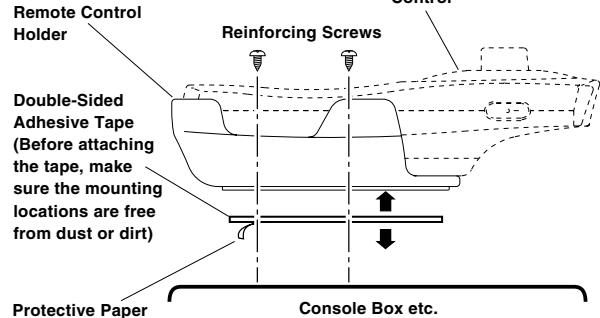
Installation of Remote Control Holder
- If direct sunlight reaches the remote control mounted on the holder, remove the remote control from the holder and put it in the glove compartment.
- If double-sided adhesive tape cannot install the holder securely, use screws.
Note: Attach the blue protective paper side of double-sided tape onto the console box, etc.
Handling Precautions
Do not drop or apply shock to the unit. It may get permanently damaged.
Keep the unit away from water and moisture, direct sun and heat, and excessive dust.
Never use scouring pads, steel wool, abrasive powders or harsh chemical agents, such as lye solution, for cleaning.
Clean with a soft, lint-free cloth or cotton swab slightly dampened with a mild solution of detergent and water.
Do not operate this unit in a manner that could distract you from driving safety.
Battery Replacement
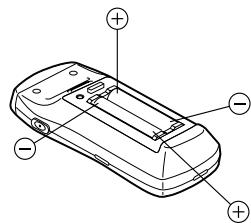
Applicable battery: Use two "AAA" sized dry batteries or equivalent.

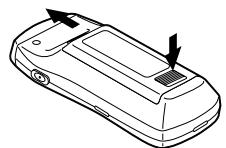
2
3
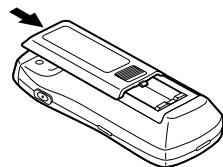
Opening the battery cover.
Push on the cover and slide it as indicated by the arrows then the cover will be removed.
Replacing the batteries.
Remove the old batteries. Insert new ones matching the (+) and (-) polarities as shown in the diagram inside the remote control.
Closing the cover.
Push the cover in the arrow direction until a click is heard.
In Case of Difficulty
| Problem | Cause | Solution |
| Remote Control Inoperative. | Reverse placement of battery. | Place the battery correctly into its cradle in the compartment. |
| Dead battery. | Replace the battery with a new one. | |
| Remote Control not pointed toward the head unit. | Point the remote control directly toward your head unit. |
Specifications
Battery Type. AAA size batteries
Battery Quantity 2
Dimensions (W× H× D) 51x36x118mm (2x1-13/32"x4-21/32")
Weight (without battery) 60 gr (2.1 oz)
ALPINE
ALPINE ELECTRONICS, INC.
Tokyo office: 1-1-8 Nishi Gotanda, Shinagawa-ku, Tokyo 141-8501, Japan Tel.: (03) 3494-1101
ALPINE ELECTRONICS OF AMERICA, INC.
19145 Gramercy Place, Torrance, California 90501, U.S.A.
Tel.: 1-800-ALPINE-1 (1-800-257-4631)
ALPINE ELECTRONICS OF CANADA, INC.
Suite 203, 7300 Warden Ave. Markham Ontario L3R 9Z6, Canada
Tel.: 1-800-ALPINE-1 (1-800-257-4631)
ALPINE ELECTRONICS OF AUSTRALIA PTY. LTD.
6-8 Fiveways Boulevard Keysborough,
Victoria 3173,Australia
Tel.: (03) 9769-0000
ALPINE ELECTRONICS GmbH
Kreuzerkamp 7-11 40878 Ratingen, Germany
Tel.: 02102-4550
ALPINE ITALIA S.p.A.
Via C. Colombo 8, 20090 Trezzano Sul Naviglio MI, Italy
Tel.: 02-48 47 81
ALPINE ELECTRONICS FRANCE S.A.R.L.
(RCS PONTOISE B 338 101 280)
- Rue De La Belle Etoile, Z.I. Paris Nord II
B.P. 50016 F-95945, Roissy,
Charles De Gaulle Cedex, France
Tel.: 01-48 63 89 89
ALPINE ELECTRONICS OF U.K., LT
13 Tanners Drive, Blakelands,
Milton Keynes MK14 5BU, U.K.
Tel.: 01908-61 15 56
ALPINE ELECTRONICS DE ESPANA, S.A.
Portal De Gamarra 36, Pabellón 32
01013 Vitoria (Alava)-Apdo. 133, Spain
Tel.: 34-45-283588
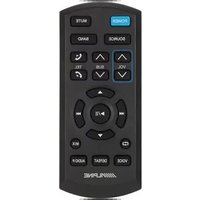

Marque : ALPINE
Modèle : RUE-4136
Catégorie : Télécommande