MPMAN MPF 99 - Lecteur audio portable

MPF 99 - Lecteur audio portable MPMAN - Notice d'utilisation et mode d'emploi gratuit

Retrouvez gratuitement la notice de l'appareil MPF 99 MPMAN au format PDF.

📄 24 pages Français FR Télécharger 💬 Question IA 10 questions ⚙️ Specs
Notice MPMAN MPF 99 - page 1
Voir la notice : Français FR English EN
Choisissez votre langue et indiquez votre email : nous vous enverrons une version traduite specifiquement.
Intitulé Description
Type de produit Lecteur MP3
Capacité de stockage 8 Go
Formats audio supportés MP3, WMA, WAV
Écran Écran LCD 1,8 pouces
Connectivité USB 2.0
Alimentation électrique Batterie lithium-ion rechargeable
Autonomie de la batterie Jusqu'à 10 heures
Dimensions approximatives 9,5 x 4,5 x 1,2 cm
Poids 50 g
Fonctions principales Lecture de musique, radio FM, enregistrement vocal
Entretien et nettoyage Essuyer avec un chiffon doux, éviter l'humidité
Pièces détachées et réparabilité Non spécifié, consulter le service après-vente pour assistance
Garantie 1 an
Informations générales Compatible avec Windows et Mac, logiciel de gestion inclus

FOIRE AUX QUESTIONS - MPF 99 MPMAN

Comment réinitialiser mon MPMAN MPF 99 ?
Pour réinitialiser votre MPMAN MPF 99, maintenez enfoncé le bouton d'alimentation pendant environ 10 secondes jusqu'à ce que l'appareil redémarre.
Pourquoi mon MPMAN MPF 99 ne s'allume-t-il pas ?
Vérifiez si la batterie est chargée. Connectez l'appareil à un chargeur et attendez quelques minutes avant d'essayer de l'allumer à nouveau.
Comment transférer des fichiers sur mon MPMAN MPF 99 ?
Connectez votre MPMAN MPF 99 à votre ordinateur à l'aide d'un câble USB. L'appareil devrait apparaître comme un disque externe, vous permettant de glisser-déposer des fichiers.
Mon MPMAN MPF 99 ne lit pas certains fichiers audio. Que faire ?
Assurez-vous que les fichiers audio sont dans un format compatible, comme MP3 ou WAV. Si le problème persiste, essayez de reformater les fichiers.
Comment augmenter le volume de mon MPMAN MPF 99 ?
Utilisez les boutons de volume sur le côté de l'appareil pour ajuster le niveau sonore. Vous pouvez également vérifier les paramètres de son dans le menu.
Comment mettre à jour le firmware de mon MPMAN MPF 99 ?
Visitez le site officiel de MPMAN pour télécharger la dernière version du firmware. Suivez les instructions fournies pour procéder à la mise à jour.
Que faire si l'écran de mon MPMAN MPF 99 est figé ?
Essayez de redémarrer l'appareil en maintenant le bouton d'alimentation enfoncé pendant environ 10 secondes. Si le problème persiste, réinitialisez-le aux paramètres d'usine.
Comment connecter mon MPMAN MPF 99 à des écouteurs Bluetooth ?
Accédez aux paramètres Bluetooth de votre MPMAN MPF 99, activez le Bluetooth, puis sélectionnez vos écouteurs dans la liste des appareils disponibles.
Mon MPMAN MPF 99 ne se connecte pas à mon ordinateur. Que faire ?
Vérifiez que le câble USB est en bon état et essayez un autre port USB sur votre ordinateur. Assurez-vous également que l'appareil est allumé.
Comment supprimer des fichiers de mon MPMAN MPF 99 ?
Accédez au gestionnaire de fichiers de votre MPMAN MPF 99, sélectionnez les fichiers que vous souhaitez supprimer, puis choisissez l'option 'Supprimer'.

Questions des utilisateurs sur MPF 99 MPMAN

0 question sur cet appareil. Repondez a celles que vous connaissez ou posez la votre.

Poser une nouvelle question sur cet appareil

L'email reste privé : il sert seulement à vous prévenir si quelqu'un répond à votre question.

Aucune question pour l'instant. Soyez le premier à en poser une.

Téléchargez la notice de votre Lecteur audio portable au format PDF gratuitement ! Retrouvez votre notice MPF 99 - MPMAN et reprennez votre appareil électronique en main. Sur cette page sont publiés tous les documents nécessaires à l'utilisation de votre appareil MPF 99 de la marque MPMAN.

MODE D'EMPLOI MPF 99 MPMAN
MPMAN MPF 99 - 1

text_image Close Close Freasy* Love the tender... V102 V103 L=II V20

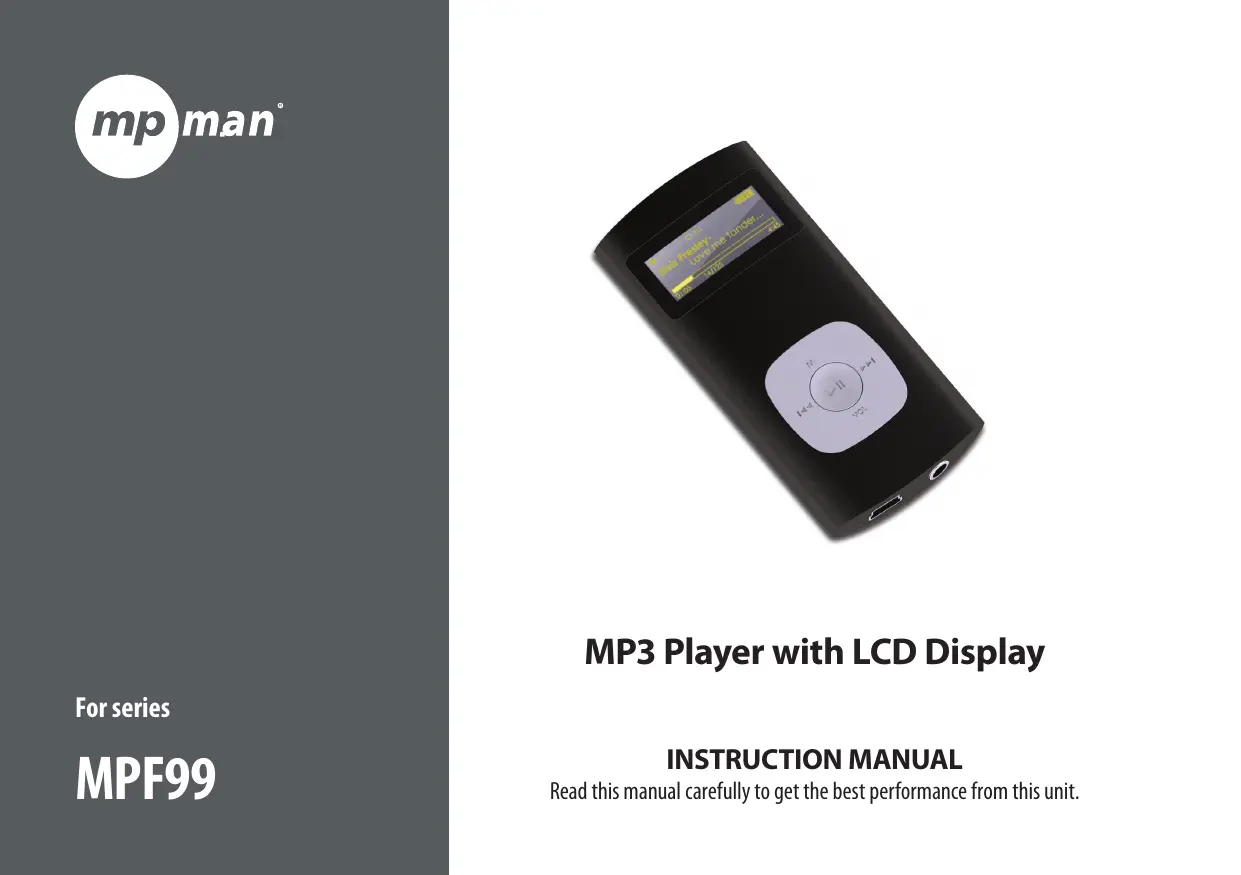
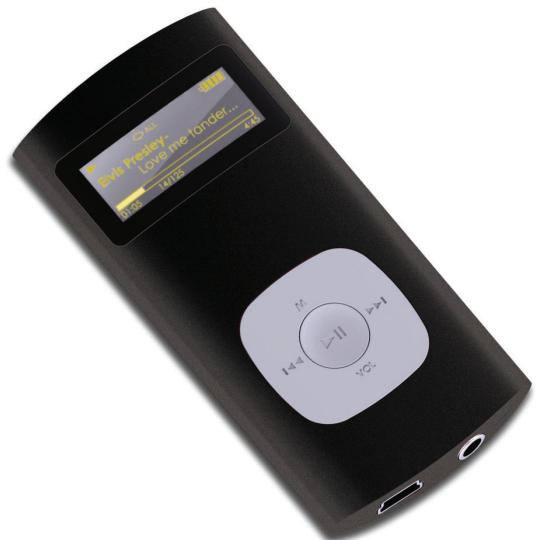
MP3 Player with LCD Display

INSTRUCTION MANUAL

Read this manual carefully to get the best performance from this unit.

MPMAN MPF 99 - INSTRUCTION MANUAL - 1

Table of Contents

THANK YOU....4

Package Contents....4

Features......4

CONTROLS AT A GLANCE....5

GETTING STARTED....6

Charging the Battery....6

Charging with a Computer ....6

Tunning the Player On/Off ....6

PLAY MUSIC MODE......8

Play Music Screen....8

Play Music Controls....8

Repeat A-B Mode 9

Repeat Mode 9

VOICE MODE....10

Voice Playing Screen....10

Voice Playing Controls....10

RECORD MODE....12

Record Controls....12

FOLDER MODE 13

Folder Controls .... 13

SETTING MODE 14

CONNECTING TO A COMPUTER.... 15

Transferring/Managing Files 15

Disconnecting to a Computer 16

MPMANAGER 18

SPECIFICATIONS....19

TROUBLESHOOTING & SUPPORT....20

MPMAN MPF 99 - TROUBLESHOOTING & SUPPORT....20 - 1

Thank You

Congratulations on your purchase of the MP3 player. This manual is designed to help you easily set up and begin using your new player right away. Please read this manual carefully and retain it for future reference.

Package Contents

Please make sure that the items shown below are included in the package. Should an item be missing, please contact the local retailer from which you purchased this product.

★ MP3 player
✦ Professional stereo earphones
USB Cable
✦ Instruction manual & documentation

MPMAN MPF 99 - Package Contents - 1

This package may contain plastic bags or other materials that pose a hazard to children. Be sure to safely dispose of all packing materials after opening.

Features

◆ Plays MP3 and WMA digital music files
✦ Integrated microphone for digital voice recording
✦ Mobile data storage function
USB 2.0 Hi-speed for fast file transfers
✦ Integrated rechargeable battery

MPMAN MPF 99 - Features - 1

Controls at a Glance

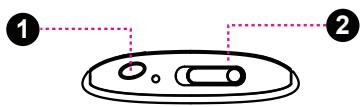
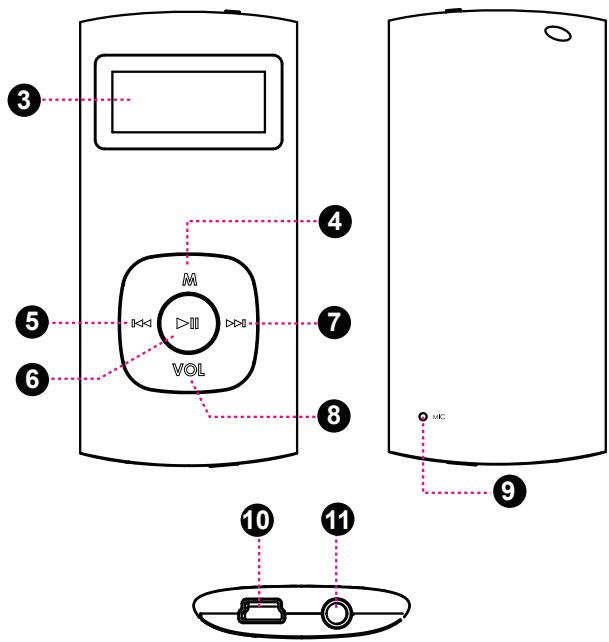
1. Neckstrap Hole
2. Power Switch
3. LCD Display
4. Menu Button
5. Previous/Reverse Button
6. OK/Play/Pause Button<OK>
7. Next/Forward Button
8. Volume Button
9. Integrated Microphone
10. USB Port
11. Headphone output

MPMAN MPF 99 - Controls at a Glance - 1

text_image Diagram of a device with labeled parts, showing two numbered components and a central component.
MPMAN MPF 99 - Controls at a Glance - 2

text_image 3 4 5 6 M VOL 7 8 9 10 11

MPMAN MPF 99 - Controls at a Glance - 3

Getting Started

Charging the Battery

Your player has an integrated rechargeable battery. Upon initial use, the battery should be charged fully to ensure optimal performance and battery life.

If the player has not been used in a while, the battery may need to be recharged overnight (about 8 hours).

MPMAN MPF 99 - Charging the Battery - 1

The battery used in this device may present a fire or chemical burn if mistreated. Do not disassemble, incinerate, or heat the battery. Do not leave the battery in a place subject to direct sunlight, or in a car with its windows closed.

MPMAN MPF 99 - Charging the Battery - 2

Do not connect the player to a power source other than that which is indicated here or on the label as this may result in the risk of fire or electric shock.

Charging with a Computer

Your player can be charged through a USB computer connection. Use the supplied USB cable to connect the player to a high-power USB port of a computer. The computer must be powered on and not in sleep mode.

MPMAN MPF 99 - Charging with a Computer - 1

When the player is connected and charging, a USB symbol will be displayed on the player's screen.

Turning the Player On/Off

To turn the player on, slide the switch to the left side, and then press and hold the button until the LCD turns on.
To turn the player off, press and hold the button until the LCD turns off, and then slide the switch to the right side.

MPMAN MPF 99 - Turning the Player On/Off - 1

The Main Menu gives you access to the different function modes of your player.

To enter the Main Menu from Play Music mode, press and hold
. (From any other mode, simply press .)
To select a function mode in the Main Menu, press or to highlight the mode, and then press to confirm.

MPMAN MPF 99 - Main Menu - 1

text_image Play Music

Play Music

Play your digital MP3 or WMA music files.

MPMAN MPF 99 - Play Music - 1

text_image Voice

Voice

Play the digital voice recordings.

MPMAN MPF 99 - Voice - 1

text_image Record

Record

Make voice recording from the integrated microphone.

MPMAN MPF 99 - Record - 1

text_image Setting

Setting

Set your player's internal options.

MPMAN MPF 99 - Setting - 1

text_image Folder

Folder

Play, view, or delete files from your player.

MPMAN MPF 99 - Folder - 1

Play Music Mode

Enter Play Music mode from the Main menu to play your MP3 or WMA music files.

MPMAN MPF 99 - Play Music Mode - 1

Please refer to the section "Getting Started" to learn how to get music onto your player.

Play Music Screen
MPMAN MPF 99 - Play Music Mode - 2

text_image MP3 006/029 ▶ 02:29 Title: The light of the NOR 128Kb N VOL 22 1 2 3 4 5 6 7 8 9 10
  1. File Type (MP3/WMA)
  2. Current track / Total tracks
  3. Playback Status Indicator (Play/Pause/Stop)
  4. Elapsed Time
  5. Battery Level Indicator
  6. Song Title / File name
  7. Equalizer Indicator
  8. Bitrate
  9. Repeat Mode Indicator
  10. Volume Level

Play Music Controls

Use the following controls during music playback.

KeyFunction
Press <OK>Start/Resume music playback.During playback, press <OK> to pause play-back.
PressPlay the previous track.
PressPlay the next track.
HoldScan in reverse quickly through the current track.
HoldScan forward quickly through the current track.
Press, thenDecrease the volume level.
Press, thenIncrease the volume level.
PressStart Repeat A-B Mode.
HoldReturn to Main Menu.

Repeat A-B Mode

Set a segment of a music track to repeat in a continuous loop. During playback:

To set the starting point "A" of the loop, press

.

To set the end point "B" of the loop, press

again. The loop will now play from point "A" to point "B".
To resume normal playback, press again.

Repeat Mode

The repeat mode options can be changed in the Settings mode menu. Please refer to the "Setting Mode" section of this manual for more information.

MPMAN MPF 99 - Repeat Mode - 1

Voice Mode

Enter Voice mode from the Main menu to play the digital Voice Recording files.

MPMAN MPF 99 - Voice Mode - 1

Please refer to the section "Record" to learn how to make voice recording from your player.

Voice Playing Screen
MPMAN MPF 99 - Voice Mode - 2

text_image WAV 006/029 ▶ 02:29 MIC00006.WAV NOR 032Kb ↻ N VOL 22 1 2 3 4 5 6 7 8 9 10
  1. File Type (WAV)
  2. Current track / Total tracks
  3. Playback Status Indicator (Play/Pause/Stop)
  4. Elapsed Time
  5. Battery Level Indicator
  6. Song Title / File name
  7. Equalizer Indicator
  8. Bitrate
  9. Repeat Mode Indicator
  10. Volume Level

Voice Playing Controls

Use the following controls during voice playback.

KeyFunction
PressStart/Resume voice playback.During playback, pressto pause play-back.
PressPlay the previous track.
PressPlay the next track.
HoldScan in reverse quickly through the current track.
HoldScan forward quickly through the current track.
Press, thenDecrease the volume level.
Press, thenIncrease the volume level.
PressStart Repeat A-B Mode.
HoldReturn to Main Menu.

Repeat A-B Mode

Set a segment of a voice track to repeat in a continuous loop. During playback:

To set the starting point "A" of the loop, press

.
To set the end point "B" of the loop, press again. The loop will now play from point "A" to point "B".
To resume normal playback, press again.

Repeat Mode

The repeat mode options can be changed in the Settings mode menu. Please refer to the "Setting Mode" section of this manual for more information.

MPMAN MPF 99 - Repeat Mode - 1

Record Mode

Enter RECORD mode from the Main Menu to record from the integrated microphone (voice).

Record Controls

Use the following controls in RECORD mode.

Recording will start immediately when RECORD is selected from the Main Menu.

KeyFunction
Press <OK>Start/Resume recording.During recording, press <OK> to pause recording.
Hold <MENU>Stop and save the recording. The player will enter VOICE mode automatically to play the recorded file.

Recordings are saved to the folder "MICIN.DIR".
Recorded voice files are named "MICXXXXX. WAV" where XXXXX corresponds to the numerical sequence in which the recording was made (numbering starts from 00001).

MPMAN MPF 99 - Record Controls - 1

Folder Mode

Enter FOLDER mode to view, play, or delete files on your player.

You can also connect your player to a computer to easily manage your file library.

Folder Controls

A directory tree will be displayed on-screen upon entering FOLDER mode from the Main Menu.

Use the following controls in FOLDER mode.

KeyFunction
PressSelect the next file or folder (down).
PressSelect the previous file or folder (up).
KeyFunction
PressIf a folder is selected, the folder's contents will be displayed.If a file is selected, an option box will be displayed:Select “Play Now” to play the selected file.Select “Delete?” to delete the selected file, and then select “Yes” to confirm the deletion. If the L... icon is selected, the previous folder's contents will be displayed.
PressReturn to Main Menu.

MPMAN MPF 99 - Folder Controls - 1

Setting Mode

Enter SETTING mode from the Main Menu to change your player's internal option settings.

To select an option, press or . To confirm and enter, press .
To exit the Setting Menu, press

.

ItemDescription
EqualizerSet a digital equalizer preset. The options are Normal, Pop, Rock, Classical, Jazz, and Bass.
Repeat ModeSet a Repeat Mode option. The options are Normal, Repeat One, Repeat All, Shuffle Repeat, Dir Normal, Dir All Repeat, Dir Shuffle Repeat.
ContrastSet the contrast level of the display.
BacklightSet the backlight option to change the duration of time (in seconds) that the backlight will remain on after a key press. A setting of “Always Off” will disable the backlight completely. A setting of “Always On” will keep the backlight on continuously.
ItemDescription
Power SetSet the Power Set option to change the duration of time (in minutes) that the player will remain on when it is idle. A setting of “Disable” will turn this power saving feature off.
Record SetSet the Recording Quality level for Voice or FM recordings. The options are 32Kbps (lowest quality), 48Kbps, 64Kbps, and 88Kbps (highest quality). Higher quality recordings will take up more memory than lower quality recordings.
LanguageSet the Language that the menus appear in.
VersionView your player’s firmware information.
InfoView your player’s memory information.

MPMAN MPF 99 - Setting Mode - 1

Connecting to a Computer

Connect the player to a computer with the USB cable provided to:

✦ Transfer files to and from your player
◆ Perform basic file management functions.

Upon connection:

Your computer will automatically recognize the player as a Removable Disk. An icon representing your player will appear under "Devices with Removable Storage" when you open "My Computer".
It may take Windows several minutes to recognize and set up the device the first time it is connected depending on your hardware configuration.

Transferring/Managing Files

The USB 2.0 connection makes it easy to transfer music quickly between the player and your computer. Simply use the player as you would any removable disk using basic operating system commands.

You can also use your player to store video, photo, or any other type of files.

If you need further assistance with transferring and managing files, please refer to your operating system's instruction manual or on-screen help. If you are using media management software such as iTunes, Winamp, or Windows Media Player, please refer to their documentation for support.

MPMAN MPF 99 - Transferring/Managing Files - 1

Do not disconnect or otherwise interrupt the player during file transfer—this could damage or corrupt the player's firmware or your files.

MPMAN MPF 99 - Transferring/Managing Files - 2

For more information and support regarding music transfer and synchronization with Windows Media Player (WMP), please see the help section included with WMP (click "Help > Synchronizing Content to Devices").

Disconnecting from a Computer

Disconnect your player as instructed below to prevent data loss or file/firmware corruption.

Microsoft Windows

  1. Double-click the green arrow in the

taskbar located on the lower-right side of the computer screen (Safely Remove Hardware).

MPMAN MPF 99 - Microsoft Windows - 1

text_image 12:12

2. Safely Remove Hardware:

Select "USB Mass Storage Device" from the list that appears and then click on "Stop".

Stop a Hardware Device:

Select "USB Mass

Storage Device" from the list that appears and then click on "OK".

  1. When the "Safe to Remove Hardware" window appears, click the OK button and disconnect the USB cable from the player and your computer.

MPMAN MPF 99 - Stop a Hardware Device: - 1

text_image Unplug or Eject Hardware Select the device you want to unplug or eject, and then click Stop. When Windows notifies you that it is safe to do so unplug the device from your computer. Hardware devices: USB Mass Storage Device USB Mass Storage MTP Multimedia HD Player Properties Stop Display device components Show Unplug/Eject icon on the taskbar Close

Macintosh OS X

  1. On the left side of the Finder Window, identify the appropriate Removable Disk icon.
  2. Click on the "Eject" arrow on the right of the Removable Disk icon.
  3. Disconnect the USB cable from the player and your computer.

MPMAN MPF 99 - Macintosh OS X - 1

text_image USB Disk Desktop

MPMAN MPF 99 - Macintosh OS X - 2

Specifications

Design, specifications, and manual are subject to change without notice.

MemoryIntegrated Flash Memory
Audio FormatsMP3, WMA, WAV
Recording FormatIMA-ADPCM Encoding
PC InterfaceUSB 2.0 Hi-speed (MSC)
OS SupportWindows 7/Vista/XPMacintosh OS X
Audio InputIntegrated Microphone
Audio Output3.5mm Stereo Headphone
PowerRechargeable BatteryUSB Charge
Music Play Time8 hours*
Unit Dimensions1.23" x 2.60" x 0.54" (WHD)

* Estimated playing time based on a 128kbps MP3 file. Actual time may vary.

MPMAN MPF 99 - Specifications - 1

Mpmanager

For music synchronisation and conversion, please use MPMANAGER software supplied in the CD ROM.

This software can be used also for UPDATE of your player

MPMANAGER manual is included in your CDROM

MPMAN MPF 99 - Mpmanager - 1

Troubleshooting & Support

If you have a problem with this device, please read the troubleshooting guide below.

The player does not turn on.

◆ Ensure that the player is fully charged. Try charging the player overnight (8 hours).
◆ Ensure that the Hold/Lock switch is disengaged.

The buttons do not work.

◆ Ensure that the player is fully charged. Try charging the player overnight (8 hours).
◆ Ensure that the Hold/Lock switch is disengaged.

I cannot transfer files to the player.

◆ Ensure that your computer is running a supported operating system.
If using a USB extension cable, ensure that it is securely attached to the player and the PC, or try using another USB cable.
If you have connected the player through a USB hub, try connecting the player directly to your computer.
Ensure that the player's memory capacity is not full.

◆ Ensure that the Hold/Lock switch is disengaged.

There is no sound during playback.

✨ Check the volume level.
◆ Ensure that the headphones are attached securely to the player.

The sound quality of the music is poor.

Try playing the file on your computer. If the sound quality is still poor, try downloading the file again or re-encoding the file yourself.
◆ Ensure that the bit rate of the file is not too low. The higher the bit rate of the file, the better it will sound. The minimum recommended bitrate is 128kbps for MP3s and 96kbps for WMAs.
★ Try lowering the volume of the player.
◆ Ensure that the headphones are attached securely to the player.

The player will not play my music file.

◆ Ensure that the file is in a compatible format.
The file may be copy-protected and you no longer have authorization to play this file. If you feel this is in error, please contact the service from which you downloaded the file.

For more information please check our website

www.mpmaneurope.com

MPMAN MPF 99 - www.mpmaneurope.com - 1

CE

MPMAN MPF 99 - www.mpmaneurope.com - 2

A pleine puissance, l'écoute prolongée du baladeur peut endommager l'oreille de l'utilisateur

Assistant notice
Powered by Anthropic
En attente de votre message
Informations produit

Marque : MPMAN

Modèle : MPF 99

Catégorie : Lecteur audio portable