
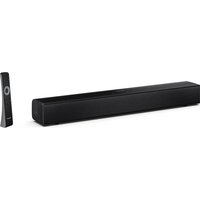
HT-SL70 - Barre de son SHARP - Notice d'utilisation et mode d'emploi gratuit
Retrouvez gratuitement la notice de l'appareil HT-SL70 SHARP au format PDF.

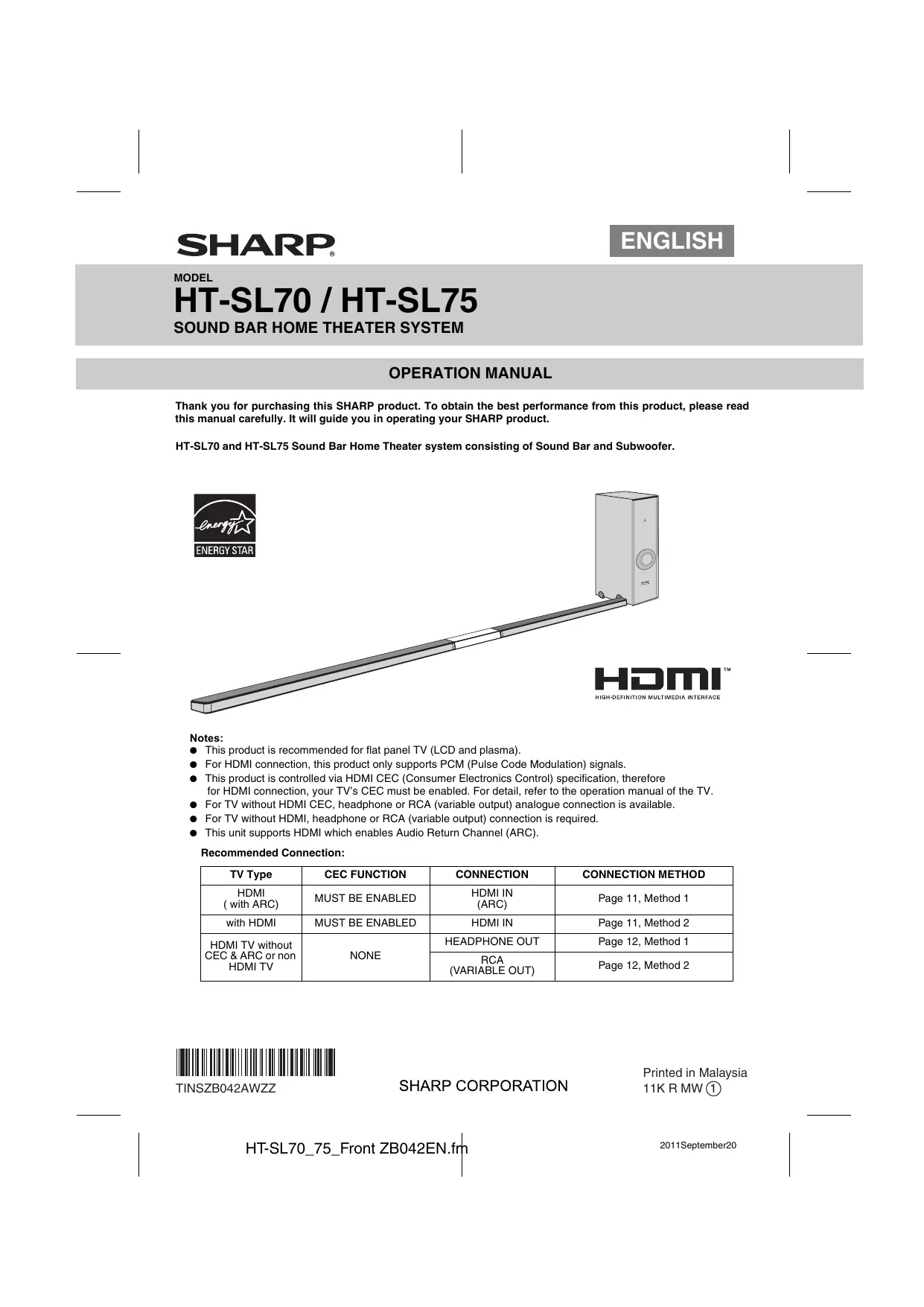

| Type de produit | Barre de son home cinéma avec caisson de basses |
| Marque | SHARP |
| Modèle | HT-SL70 |
| Dimensions de la barre de son (configuration horizontale pour TV 46") | 1071 x 26 x 50 mm (L x H x P) |
| Dimensions de la barre de son (configuration horizontale pour TV 52") | 1204 x 26 x 50 mm (L x H x P) |
| Dimensions du caisson de basses | 115 x 422 x 307 mm (L x H x P) |
| Poids de la barre de son (configuration horizontale pour TV 46") | 1,15 kg |
| Poids de la barre de son (configuration horizontale pour TV 52") | 1,20 kg |
| Poids du caisson de basses | 4,50 kg |
| Alimentation | CA 120 V ~ 60 Hz |
| Consommation électrique | 40 W |
| Puissance de sortie RMS totale | 200 W |
| Puissance avant gauche/droite (RMS) | 50 W par canal sous 3 ohms à 1 kHz, 10 % DHT |
| Puissance du caisson de basses (RMS) | 100 W sous 4 ohms à 100 Hz, 10 % DHT |
| Type de haut-parleurs de la barre | 2.2 x 11.5 cm, pleine gamme |
| Impédance des haut-parleurs de la barre | 3 ohms par canal (4 en parallèle) |
| Type de haut-parleur du caisson | 16 cm (6-5/16") woofer |
| Impédance du caisson | 4 ohms |
| Connectivité HDMI | 1 entrée, 1 sortie avec ARC (Audio Return Channel) |
| Entrée audio analogique | Prise mini-jack stéréo 3,5 mm |
| Formats audio supportés (HDMI) | PCM uniquement |
| Méthodes d'installation | Support horizontal, support vertical, fixation murale |
| Accessoires fournis | Câbles HDMI et audio, supports de barre et caisson, gabarit de perçage, patins |
| Entretien | Nettoyer avec un chiffon doux sec. Ne pas utiliser de produits chimiques. |
| Consignes de sécurité importantes | Ne pas exposer à l'humidité, débrancher en cas d'orage, utiliser sur une surface stable. |
FOIRE AUX QUESTIONS - HT-SL70 SHARP
Questions des utilisateurs sur HT-SL70 SHARP
0 question sur cet appareil. Repondez a celles que vous connaissez ou posez la votre.
Poser une nouvelle question sur cet appareil
Téléchargez la notice de votre Barre de son au format PDF gratuitement ! Retrouvez votre notice HT-SL70 - SHARP et reprennez votre appareil électronique en main. Sur cette page sont publiés tous les documents nécessaires à l'utilisation de votre appareil HT-SL70 de la marque SHARP.
MODE D'EMPLOI HT-SL70 SHARP
MODÈLE
HT-SL70 / HT-SL75
SYSTÈME HOME CINÉMA BARRE DE SON
MANUEL D'UTILISATION
Merci d'avoir acheté ce produit SHARP. Pour obtenir les meilleures performances de ce produit, veuillez lire attentivement ce manuel. Il vous guidera dans l'utilisation de votre produit SHARP.
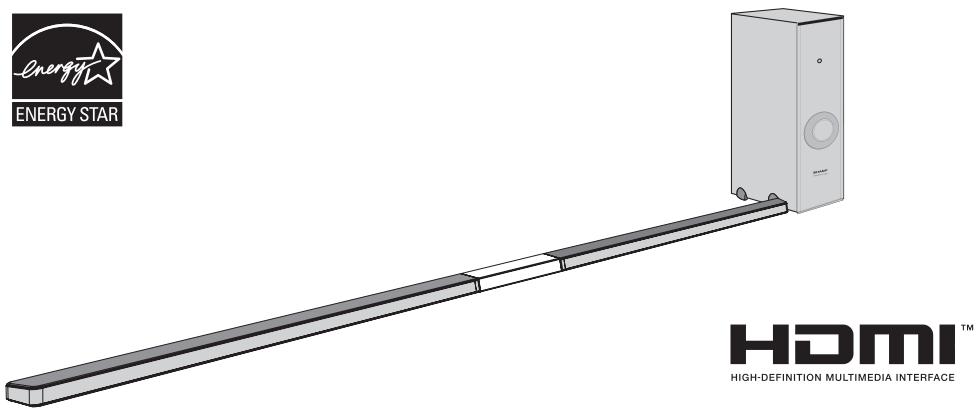
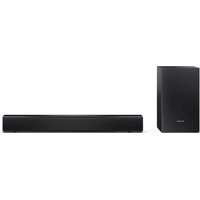
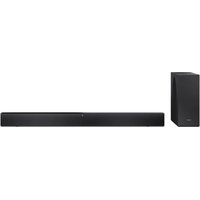
Le système home cinéma à barre de son HT-SL70 et HT-SL75 se compose d'une barre de son et d'un caisson de basses.
Remarques :
- Ce produit est recommandé pour les téléviseurs à écran plat (LCD et plasma).
- Pour la connexion HDMI, ce produit ne prend en charge que les signaux PCM (modulation par impulsions codées).
- Ce produit est contrôlé via la spécification HDMI CEC (Consumer Electronics Control). Par conséquent, pour une connexion HDMI, le CEC de votre téléviseur doit être activé. Pour plus de détails, reportez-vous au manuel d'utilisation du téléviseur.
- Pour les téléviseurs sans HDMI CEC, une connexion analogique par casque ou RCA (sortie variable) est disponible.
- Pour les téléviseurs sans HDMI, une connexion par casque ou RCA (sortie variable) est requise.
- Cet appareil prend en charge HDMI avec retour audio (ARC).
Connexion recommandée :
| TV Type | CEC FUNCTION | CONNECTION | CONNECTION METHOD |
| HDMI( with ARC) | MUST BE ENABLED | HDMI IN(ARC) | Page 11,Method 1 |
| with HDMI | MUST BE ENABLED | HDMI IN | Page 11,Method 2 |
| HDMI TV without CEC & ARC or non HDMI TV | NONE | HEADPHONE OUT | Page 12,Method 1 |
| RCA(VARIABLE OUT) | Page 12,Method 2 |
Accessoires
Les accessoires suivants sont inclus. Ce produit n'a pas de télécommande.
| RCA to Headphone Cable (1pin - 2 pins) x 1 (QCNWGA064AWPZ) | Subwoofer Stand x 2 (GITAUA004AW01) | Audio Cable x 1 (QCNWGA062AWPZ) | HDMI Cable x 1 (QCNWGA065AWPZ) | Wall Mount Bracket x 2 (LHLDZA267AWSA) | ||||
| Wall Mount Angle x 2 (LANGKA225AW01) | Pattern Paper For HT-SL75 only: (TCAUHA028AWZZ) For HT-SL70 only: (TCAUHA027AWZZ) | Speaker Wire For HT-SL75 only: (QCNWHA046AW01) For HT-SL70 only: (QCNWHA043AW01) | Sound Bar Stand x 2 (GITAUA012AW01) | Screw for Brackets x 6 (XEBY830P08000) | Sound Bar Stand Cushion x 2 (PCUSSA190AWZZ) | |||
Pour HT-SL75 uniquement.
| Sound Bar Cover Joint for 60" TV (short) x 1 (GCOVAA331AW01) | Sound Bar Cover Joint for 70" TV (long) x 1 (GCOVAA333AW01) | Stand Cover x 2 (GCOVAA330AW01) | Stand Base x 2 (GDAI-A016AW01) |
Pour HT-SL70 uniquement.
| Sound Bar Cover Joint for 46" TV (short) x 1 (GCOVAA300AW01) | Sound Bar Cover Joint for 52" TV (long) x 1 (GCOVAA302AW01) | Stand Cover x 2 (GCOVAA306AW01) | Stand Base x 2 (GDAI-A013AW01) |
Les illustrations de ce manuel d'utilisation concernent le modèle HT-SL70.

ATTENTION
RISQUE DE CHOC ÉLECTRIQUE NE PAS OUVRIR

ATTENTION : POUR RÉDUIRE LE RISQUE DE CHOC ÉLECTRIQUE, NE PAS RETIRER LE CAPOT (OU LE PANNEAU ARRIÈRE). AUCUNE PIÈCE RÉPARABLE PAR L'UTILISATEUR À L'INTÉRIEUR. CONFIEZ TOUTE RÉPARATION À UN PERSONNEL QUALIFIÉ.
Explication des symboles graphiques :

L'éclair avec une flèche à l'intérieur d'un triangle équilatéral est destiné à alerter l'utilisateur de la présence d'une « tension dangereuse » non isolée à l'intérieur du produit, pouvant être d'une ampleur suffisante pour constituer un risque de choc électrique pour les personnes.

Le point d'exclamation à l'intérieur d'un triangle équilatéral est destiné à alerter l'utilisateur de la présence d'instructions importantes d'utilisation et de maintenance (réparation) dans la documentation accompagnant l'appareil.
AVERTISSEMENT : POUR RÉDUIRE LE RISQUE D'INCENDIE OU DE CHOC ÉLECTRIQUE, N'EXPOSEZ PAS CET APPAREIL À LA PLUIE OU À L'HUMIDITÉ.
POUR VOS DOSSIERS
Pour faciliter le signalement de cet appareil en cas de perte ou de vol, veuillez noter ci-dessous le numéro de modèle et le numéro de série qui se trouvent à l'arrière de l'appareil. Veuillez conserver ces informations.
Numéro de modèle
Numéro de série
Date d'achat
Lieu d'achat
··
REMARQUE
Cet équipement a été testé et déclaré conforme aux limites applicables aux appareils numériques de classe B, conformément à la partie 15 des règles de la FCC. Ces limites sont conçues pour fournir une protection raisonnable contre les interférences nuisibles dans une installation résidentielle. Cet équipement génère, utilise et peut émettre de l'énergie radiofréquence et, s'il n'est pas installé et utilisé conformément aux instructions, peut causer des interférences nuisibles aux communications radio. Cependant, il n'y a aucune garantie que des interférences ne se produiront pas dans une installation particulière. Si cet équipement provoque des interférences nuisibles à la réception radio ou télévision, ce qui peut être déterminé en éteignant et en allumant l'équipement, l'utilisateur est encouragé à essayer de corriger les interférences par une ou plusieurs des mesures suivantes :
- Réorienter ou déplacer l'antenne de réception.
- Augmenter la distance entre l'équipement et le récepteur.
- Brancher l'équipement dans une prise sur un circuit différent de celui auquel le récepteur est connecté.
- Consulter le revendeur ou un technicien radio/TV expérimenté pour obtenir de l'aide.
AVERTISSEMENT
Les règlements de la FCC stipulent que toute modification non autorisée de cet équipement, non expressément approuvée par le fabricant, pourrait annuler le droit de l'utilisateur à utiliser cet équipement.
Informations sur le programme ENERGY STAR®

Les produits qui ont obtenu la certification ENERGY STAR sont conçus pour protéger l'environnement grâce à une efficacité énergétique supérieure.
ENERGY STAR® est une marque déposée aux États-Unis.
HDMI, le logo HDMI et High-Definition Multimedia Interface sont des marques commerciales ou des marques déposées de HDMI Licensing LLC aux États-Unis et dans d'autres pays.
L'électricité est utilisée pour accomplir de nombreuses fonctions utiles, mais elle peut aussi causer des blessures corporelles et des dommages matériels si elle est manipulée de manière inappropriée. Ce produit a été conçu et fabriqué en accordant la priorité absolue à la sécurité. Cependant, une utilisation inappropriée peut entraîner un choc électrique et/ou un incendie. Afin de prévenir tout danger potentiel, veuillez respecter les instructions suivantes lors de l'installation, de l'utilisation et du nettoyage du produit. Pour garantir votre sécurité et prolonger la durée de vie de ce produit, veuillez lire attentivement les précautions suivantes avant utilisation.
1) Lisez ces instructions. 2) Conservez ces instructions. 3) Tenez compte de tous les avertissements. 4) Suivez toutes les instructions. 5) N'utilisez pas cet appareil près de l'eau. 6) Nettoyez uniquement avec un chiffon sec. 7) Ne bloquez aucune ouverture de ventilation. Installez conformément aux instructions du fabricant. 8) N'installez pas près de sources de chaleur telles que radiateurs, bouches de chaleur, poêles ou autres appareils (y compris les amplificateurs) qui produisent de la chaleur. 9) Ne neutralisez pas la fonction de sécurité de la fiche polarisée ou de la fiche de mise à la terre. Une fiche polarisée a deux lames, l'une plus large que l'autre. Une fiche de mise à la terre a deux lames et une troisième broche de mise à la terre. La lame large ou la troisième broche sont fournies pour votre sécurité. Si la fiche fournie ne correspond pas à votre prise, consultez un électricien pour remplacer la prise obsolète. 10) Protégez le cordon d'alimentation afin qu'il ne soit pas piétiné ou pincé, en particulier au niveau des fiches, des prises de courant et de l'endroit où il sort de l'appareil. 11) Utilisez uniquement les accessoires spécifiés par le fabricant. 12) Utilisez uniquement avec le chariot, le support, le trépied, le support mural ou la table spécifié par le fabricant, ou vendu avec l'appareil. Lorsqu'un chariot est utilisé, soyez prudent lors du déplacement de l'ensemble chariot/appareil pour éviter les blessures en cas de basculement. 13) Débranchez cet appareil pendant les orages ou lorsqu'il n'est pas utilisé pendant de longues périodes. 14) Confiez toute réparation à un personnel qualifié. Une réparation est nécessaire lorsque l'appareil a été endommagé de quelque manière que ce soit, par exemple si le cordon d'alimentation ou la fiche est endommagé, si du liquide a été renversé ou si des objets sont tombés dans l'appareil, si l'appareil a été exposé à la pluie ou à l'humidité, s'il ne fonctionne pas normalement ou s'il est tombé.
Informations de sécurité supplémentaires
15) Sources d'alimentation - Ce produit doit être alimenté uniquement par le type de source d'alimentation indiqué sur l'étiquette. Si vous n'êtes pas sûr du type d'alimentation de votre maison, consultez votre revendeur ou la compagnie d'électricité locale. Pour les produits destinés à fonctionner sur batterie ou sur d'autres sources, reportez-vous aux instructions d'utilisation. 16) Surcharge - Ne surchargez pas les prises murales, les rallonges ou les prises intégrées, car cela peut entraîner un risque d'incendie ou de choc électrique.
17) Objets et liquides - Ne jamais insérer d'objets dans ce produit par les ouvertures, car ils pourraient toucher des points de tension dangereux ou provoquer un court-circuit, entraînant un incendie ou un choc électrique. Ne jamais renverser de liquide sur le produit. 18) Dommages nécessitant une réparation - Débranchez ce produit de la prise murale et confiez la réparation à un personnel qualifié dans les conditions suivantes :
a) Si le cordon d'alimentation ou la prise est endommagé, b) Si du liquide a été renversé ou si des objets sont tombés dans le produit, c) Si le produit a été exposé à la pluie ou à l'eau,
d) Si le produit ne fonctionne pas normalement après avoir suivi les instructions d'utilisation. Ne réglez que les commandes couvertes par les instructions d'utilisation, car un réglage incorrect d'autres commandes peut entraîner des dommages et nécessiter souvent un travail important par un technicien qualifié pour rétablir le fonctionnement normal du produit,
e) Si le produit est tombé ou a été endommagé de quelque manière que ce soit, et f) Si le produit présente un changement net de performance - cela indique un besoin de réparation.
19) Pièces de rechange - Lorsque des pièces de rechange sont nécessaires, assurez-vous que le technicien a utilisé des pièces spécifiées par le fabricant ou ayant les mêmes caractéristiques que la pièce d'origine. Des substitutions non autorisées peuvent entraîner un incendie, un choc électrique ou d'autres dangers. 20) Vérification de sécurité - Après toute réparation ou entretien de ce produit, demandez au technicien d'effectuer des vérifications de sécurité pour s'assurer que le produit est en bon état de fonctionnement. 21) Montage mural ou au plafond - Lors du montage du produit sur un mur ou un plafond, assurez-vous de l'installer selon la méthode recommandée par le fabricant. 22) Lignes électriques - Un système d'antenne extérieure ne doit pas être situé à proximité de lignes électriques aériennes ou d'autres circuits d'éclairage ou d'alimentation, ni à un endroit où il pourrait tomber sur ces lignes ou circuits. Lors de l'installation d'un système d'antenne extérieure, il faut faire très attention à ne pas toucher ces lignes ou circuits, car un contact avec eux pourrait être mortel. 23) Fiche de protection - Le produit est équipé d'une fiche avec protection contre les surcharges. C'est une caractéristique de sécurité. Consultez le manuel d'instructions pour le remplacement ou la réinitialisation du dispositif de protection. Si le remplacement de la fiche est nécessaire, assurez-vous que le technicien a utilisé une fiche de remplacement spécifiée par le fabricant et offrant la même protection contre les surcharges que la fiche d'origine. 24) Support - Ne placez pas le produit sur un chariot, un support, un trépied ou une table instable. Placer le produit sur une base instable peut le faire tomber, entraînant des blessures graves et des dommages au produit. Utilisez uniquement un chariot, un support, un trépied, une fixation ou une table recommandés par le fabricant ou vendus avec le produit. Lors du montage du produit sur un mur, suivez les instructions du fabricant. Utilisez uniquement le matériel de montage recommandé par le fabricant.
GARANTIE LIMITÉE DU CONSOMMATEUR
SHARP ELECTRONICS CORPORATION garantit au premier acheteur consommateur que ce produit de marque Sharp (le « Produit »), lorsqu'il est expédié dans son emballage d'origine, sera exempt de défauts de fabrication et de matériaux, et s'engage à son choix, soit à réparer le défaut, soit à remplacer le Produit défectueux ou la pièce défectueuse par un équivalent neuf ou remis à neuf, sans frais pour l'acheteur pour les pièces ou la main-d'œuvre, pendant la ou les périodes indiquées ci-dessous.
Cette garantie ne s'applique pas aux éléments d'apparence du Produit, ni aux éléments exclus supplémentaires énumérés ci-dessous, ni à tout Produit dont l'extérieur a été endommagé ou défiguré, qui a été soumis à une tension inappropriée ou à une autre utilisation abusive, à un service ou à une manipulation anormale, ou qui a été modifié dans sa conception ou sa construction.
Afin de faire valoir les droits prévus par cette garantie limitée, l'acheteur doit suivre les étapes décrites ci-dessous et fournir une preuve d'achat au réparateur.
La garantie limitée décrite dans les présentes s'ajoute aux garanties implicites qui peuvent être accordées aux acheteurs par la loi. TOUTES LES GARANTIES IMPLICITES, Y COMPRIS LES GARANTIES DE QUALITÉ MARCHANDE ET D'ADAPTATION À L'USAGE, SONT LIMITÉES À LA OU AUX PÉRIODES À COMPTER DE LA DATE D'ACHAT INDIQUÉES CI-DESSOUS. Certains États n'autorisent pas les limitations de durée des garanties implicites, de sorte que la limitation ci-dessus peut ne pas s'appliquer à vous.
Ni le personnel de vente du vendeur ni toute autre personne n'est autorisé à accorder des garanties autres que celles décrites dans les présentes, ni à prolonger la durée des garanties au-delà de la période décrite dans les présentes au nom de Sharp.
Les garanties décrites dans les présentes constituent les garanties uniques et exclusives accordées par Sharp et constituent le recours unique et exclusif offert à l'acheteur. La correction des défauts, de la manière et pendant la période décrites dans les présentes, constitue l'exécution complète de toutes les obligations et responsabilités de Sharp envers l'acheteur en ce qui concerne le Produit, et constitue la satisfaction complète de toutes les réclamations, qu'elles soient fondées sur un contrat, une négligence, une responsabilité stricte ou autre. En aucun cas Sharp ne pourra être tenu responsable, ou de quelque manière que ce soit, de tout dommage ou défaut du Produit causé par des réparations ou tentatives de réparation effectuées par une personne autre qu'un réparateur agréé. Sharp ne pourra pas non plus être tenu responsable, ou de quelque manière que ce soit, de tout dommage accessoire ou consécutif, économique ou matériel. Certains États n'autorisent pas l'exclusion des dommages accessoires ou consécutifs, de sorte que l'exclusion ci-dessus peut ne pas s'appliquer à vous.
CETTE GARANTIE VOUS CONFÈRE DES DROITS LÉGAUX SPÉCIFIQUES. VOUS POUVEZ ÉGALEMENT BÉNÉFICIER D'AUTRES DROITS QUI VARIENT D'UN ÉTAT À L'AUTRE.
Section spécifique au modèle
Numéro de modèle et description de votre produit :
Période de garantie pour ce produit :
Élément(s) supplémentaire(s) exclu(s) de la couverture de garantie (le cas échéant) :
Où obtenir le service :
Que faire pour obtenir le service :
Système de cinéma maison Sound Bar HT-SL70 / HT-SL75
(Assurez-vous d'avoir ces informations à disposition lorsque vous avez besoin d'un service pour votre produit.)
Garantie d'un (1) an pièces et main-d'œuvre à compter de la date d'achat.
Accessoires, fournitures et consommables non fonctionnels.
Chez un réparateur agréé Sharp situé aux États-Unis. Pour trouver le réparateur agréé Sharp le plus proche, appelez Sharp au numéro gratuit 1-800-BE-SHARP.
Expédiez en port payé ou apportez votre produit à un réparateur agréé Sharp. Assurez-vous d'avoir une preuve d'achat disponible. Si vous expédiez le produit, assurez-vous qu'il est assuré et emballé de manière sécurisée.
POUR OBTENIR DES INFORMATIONS SUR LES FOURNITURES, ACCESSOIRES OU PRODUITS, APPELEZ LE 1-800-BE-SHARP
SHARP ELECTRONICS CORPORATION
Sharp Plaza, Mahwah, New Jersey 07495-1163
Généralités
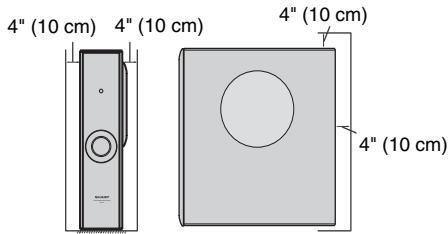
- Assurez-vous que l'équipement est placé dans un endroit bien ventilé et qu'il y a au moins 4 pouces (10 cm) d'espace libre sur les côtés, le dessus et l'arrière de l'équipement.
- Utilisez l'appareil sur une surface ferme et plane, exempte de vibrations.
- Éloignez l'appareil de la lumière directe du soleil, des champs magnétiques puissants, de la poussière excessive, de l'humidité et des équipements électroniques/électriques (ordinateurs domestiques, télécopieurs, etc.) qui génèrent du bruit électrique.
- Ne placez rien sur le dessus du système.
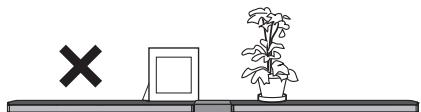
- N'exposez pas l'appareil à l'humidité, à des températures supérieures à 140 °F (60 °C) ou à des températures extrêmement basses.
- Si votre système ne fonctionne pas correctement, débranchez le cordon d'alimentation CA de la prise CA et rebranchez-le.
- En cas d'orage électrique, débranchez l'appareil par sécurité.
- Tenez la fiche du cordon d'alimentation CA par la tête lorsque vous la retirez de la prise de courant, car tirer sur le cordon peut endommager les fils internes. La fiche du cordon d'alimentation CA sert de dispositif de déconnexion et doit toujours rester facilement accessible.
- Ne retirez pas le capot extérieur, car cela pourrait provoquer un choc électrique. Confiez toute réparation interne à votre centre de service SHARP local. Cet appareil ne doit être utilisé que dans une plage de température de 41°F à 95°F (5°C à 35°C).
Avertissements :
- La tension utilisée doit être identique à celle spécifiée sur cet appareil. L'utilisation de ce produit avec une tension supérieure à celle spécifiée est dangereuse et peut provoquer un incendie ou un autre type d'accident entraînant des dommages. SHARP ne pourra être tenu responsable de tout dommage résultant de l'utilisation de cet appareil avec une tension autre que celle spécifiée.
- Pour éviter tout risque d'incendie ou de choc électrique, n'exposez pas cet appareil à des égouttements ou des éclaboussures. Aucun objet rempli de liquide, tel qu'un vase, ne doit être placé sur l'appareil.
Barre de son

VUE ARRIÈRE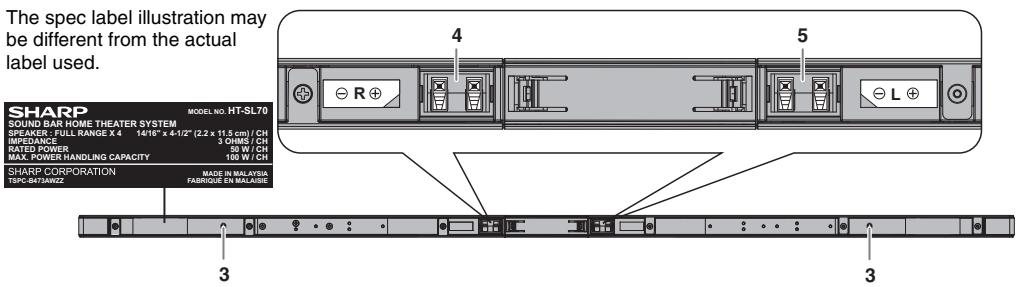
Page de référence
- Borne d'enceinte avant droite (rouge/noir) 10 5. Borne d'enceinte avant gauche (blanc/noir)....10 Borne d'enceinte avant (blanc/noir) . . . 10
- Enceinte avant gauche
- Enceinte avant droite
- Évent bass-reflex
Caisson de basses
VUE DE FACE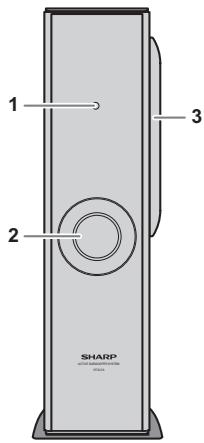
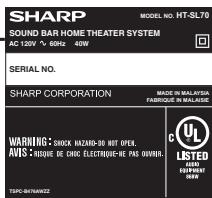
Page de référence VUE ARRIÈRE L'illustration de l'étiquette de spécifications peut être différente de l'étiquette réelle utilisée.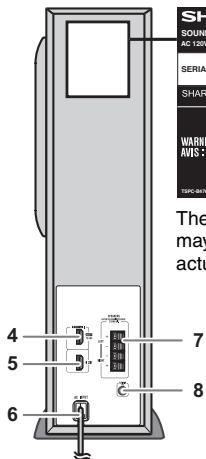
Page de référence
- Voyant de veille
- Évent de réflexion des basses 3. Woofer 4. Borne de sortie HDMI (ARC TV). 11
5. Borne d'entrée HDMI 11 6. Cordon d'alimentation CA 10 7. Borne d'enceinte. 10 8. Borne d'entrée audio (TV) 12
Assurez-vous de débrancher le cordon d'alimentation CA avant d'installer l'appareil ou de changer sa position.
Choisissez l'une des trois méthodes d'installation selon la position préférée.
- Utilisation du support (disposition horizontale)
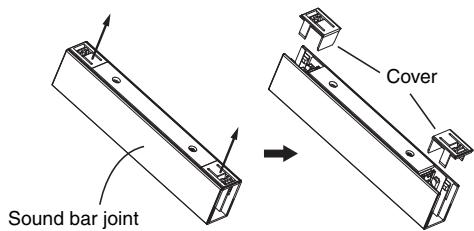
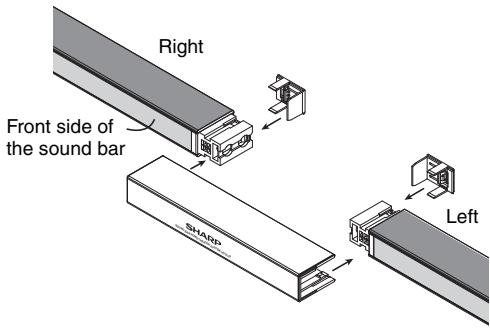
Pour l'assemblage de la barre de son pour téléviseur 52", 60" ou 70".
| For model HT-SL75 | Use Sound bar cover joint (short:369 mm) for 60" TV. |
| Use Sound bar cover joint (long:594 mm) for 70" TV. |
| For model HT-SL70 | Use Sound bar cover joint (long:188 mm) for 52" TV. |
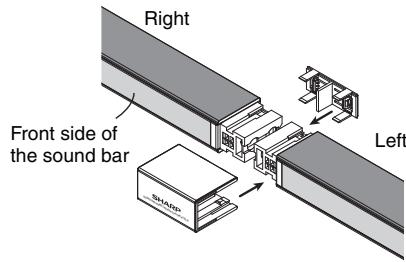
- Tirez les deux capots de jonction comme ci-dessous.
- Placez les deux barres de son l'une près de l'autre et insérez la jonction de barre de son et ses capots comme ci-dessous.
Pour l'assemblage de la barre de son pour téléviseur 46"
| For model HT-SL70 | Use Sound bar cover joint (short:55 mm) for 46" TV. |
- Tirez le capot de jonction comme ci-dessous.
Jonction de barre de son (courte)
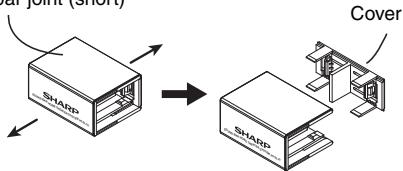
- Placez les deux barres de son côte à côte et insérez la jonction des barres de son ainsi que son cache comme ci-dessous.
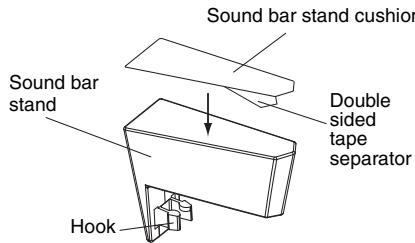
Pour fixer le support de la barre de son
- Retirez le film protecteur du ruban adhésif double face et fixez le coussin du support de la barre de son sur la surface inférieure du support.
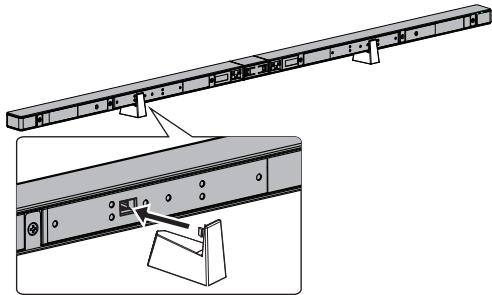
- Fixez le support de la barre de son comme indiqué.
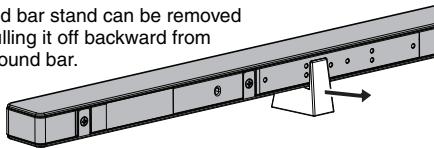
Remarque :
Le support de la barre de son peut être retiré
en le tirant vers l'arrière depuis
la barre de son.
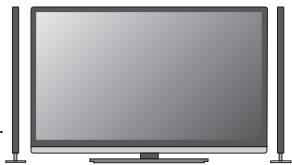
Suggestion d'agencement horizontal des barres de son et du téléviseur LCD.
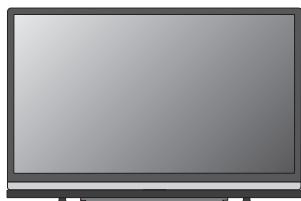
2. Utilisation du support (agencement vertical)
Pour le modèle
HT-SL75
Utilisez le cache du support de la barre de son : 10 - 2 / 16" (257 mm).
Utilisez la base du support : 13 - 7 / 32" (336 mm).
Pour le modèle
HT-SL70
Utilisez le cache du support de barre de son : 6 - 3/32" (155 mm).
Utilisez le socle du support : 6 - 15/16" (176 mm).
- Retirez le cache du support de barre de son comme ci-dessous.
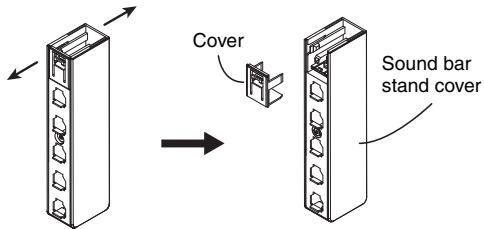
- Insérez la barre de son dans le support et fixez son cache comme indiqué.
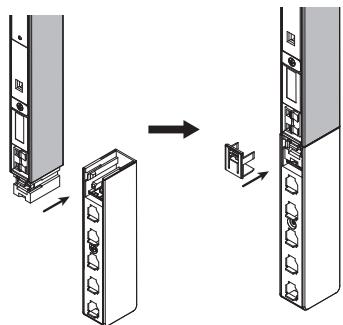
- Insérez la barre de son dans le socle selon la taille de votre téléviseur.
(Pour le modèle HT-SL70)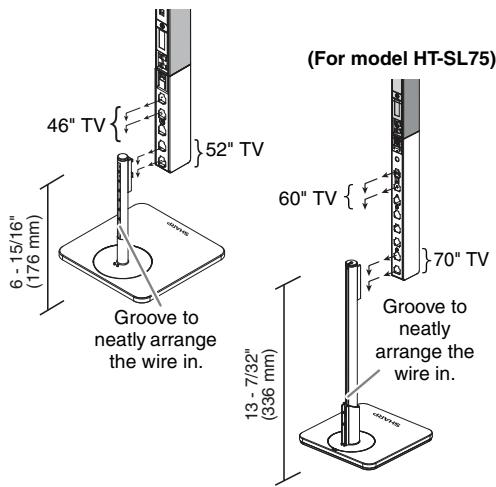
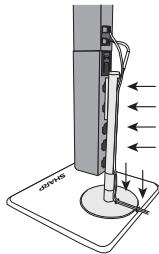
Insérez le fil à l'intérieur de la
rainure ou fente pour un meilleur
rangement des fils.
Suggestion d'agencement des
barres de son et
téléviseurs LCD.
3. Pour monter la barre de son sur le mur
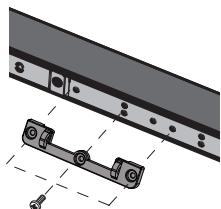
- Fixez les supports aux trous comme indiqué.
(Modèle HT-SL75 : pour téléviseurs 60" et 70")
(Modèle HT-SL70 : pour téléviseurs 52")
(Modèle HT-SL70 : pour téléviseurs 46")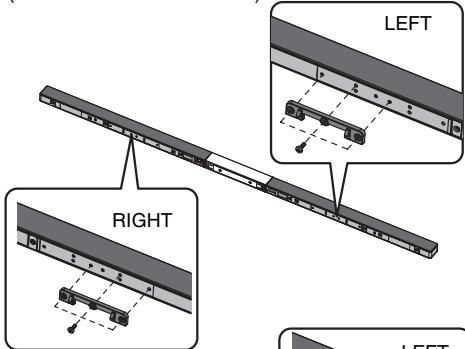
DROITE
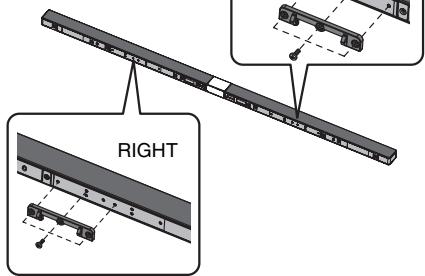
Attention :
Veillez à ne pas
fixer le support
à l'envers.

Attention :
- Soyez très prudent pour empêcher la barre de son de tomber lors du montage mural.
- Avant le montage, vérifiez la résistance du mur. (Ne pas installer sur du plâtre ou un mur blanchi à la chaux. La barre de son pourrait tomber.) En cas de doute, consultez un technicien qualifié.
- Les vis de montage ne sont pas fournies. Utilisez des vis appropriées.
- Vérifiez que toutes les vis d'angle du support mural sont bien serrées.
- Choisissez un bon emplacement. Sinon, des accidents peuvent survenir ou la barre de son peut être endommagée.
- SHARP n'est pas responsable des accidents résultant d'une installation incorrecte.
- Ne laissez pas les enfants se suspendre à la barre de son une fois qu'elle est fixée au mur, car cela peut causer des dommages et des blessures.
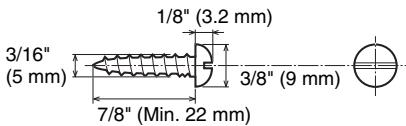
Vis de fixation
SHARP a conçu la barre de son pour que vous puissiez la suspendre au mur. Utilisez des vis appropriées (non fournies). Voir ci-dessous pour la taille et le type.
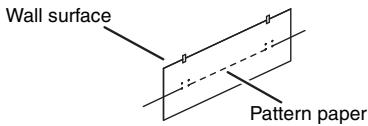
Fixation de l'équerre murale
Fixez le gabarit en papier au mur en position horizontale comme ci-dessous.
2 Percez un trou dans le mur en suivant les repères de vis sur le gabarit en papier à l'aide d'une perceuse.
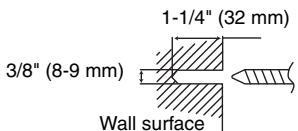
3 Insérez une cheville murale (non fournie) dans le trou à l'aide d'un marteau, jusqu'à ce qu'elle affleure la surface du mur.
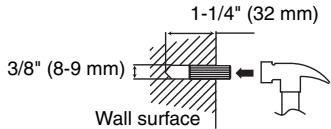
4 Vissez l'équerre murale au mur comme indiqué sur l'illustration. (Total de vis : 4 pièces)
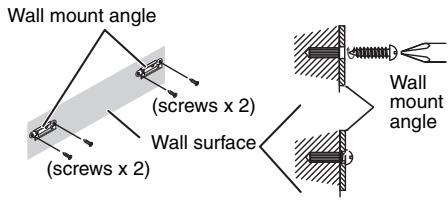
Remarque :
Assurez-vous que toutes les vis sont bien serrées. (les vis ne sont pas fournies)
Installation de la barre de son
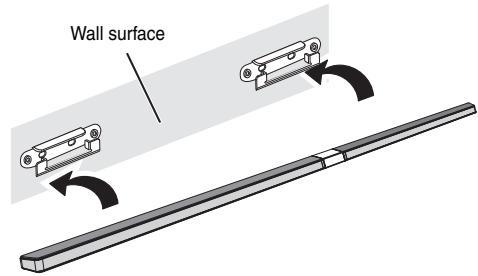
1 Alignez la fente de montage mural de la barre de son avec l'équerre murale. 2 Insérez la barre de son dans l'équerre murale.
3 Fixez-les solidement.
Prévention des chutes
Des câbles de sécurité (non fournis) sont utiles pour empêcher la barre de son de tomber de la table.
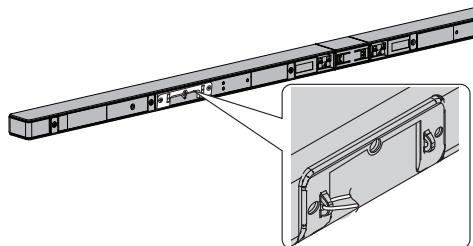
Bouclez les fils de sécurité (non fournis) dans chaque trou comme indiqué et attachez-les au support du téléviseur LCD.
Placement du système
Image d'installation :
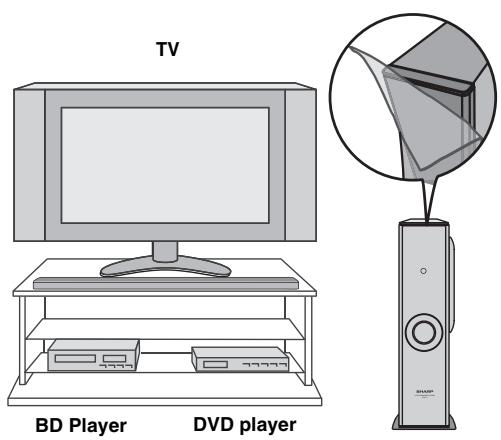
Placez le système comme indiqué.
Retirez le film protecteur recouvrant la barre de son et le caisson de basses avant d'utiliser le système.
Remarques :
- Comme le son du système est omnidirectionnel, vous pouvez placer l'enceinte où vous voulez. Cependant, il est recommandé de la placer aussi près que possible du téléviseur. La face avant de l'enceinte n'est pas amovible.
Attention :
Ne changez pas la direction d'installation lorsque l'appareil est allumé.
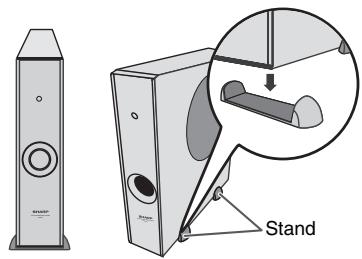
Placement du support
Placez le support comme indiqué.
Connexions du système
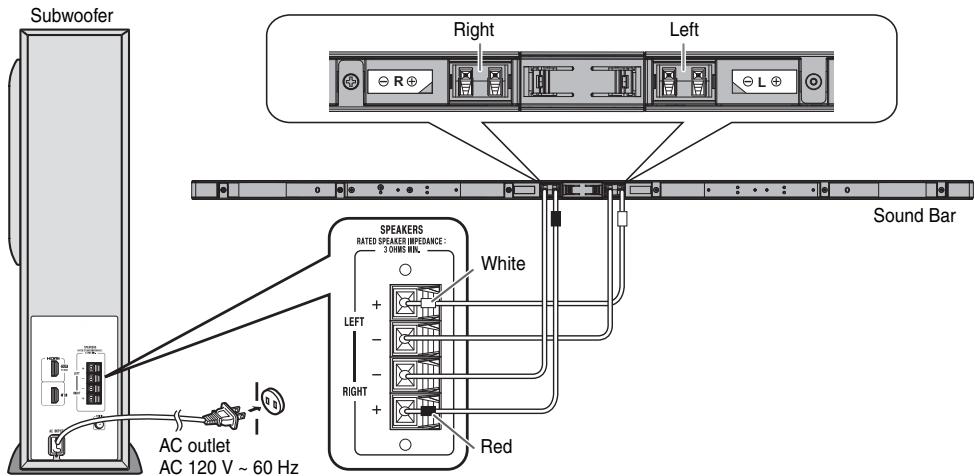
Assurez-vous de débrancher le cordon d'alimentation secteur avant d'effectuer toute connexion.
ATTENTION :
POUR ÉVITER TOUT RISQUE DE CHOC ÉLECTRIQUE, FAITES CORRESPONDRE LA LAME LARGE DE LA FICHE À LA FENTE LARGE, ET INSÉREZ COMPLÈTEMENT.
Connexion des enceintes
Connectez le fil sans tube isolant à la borne moins (-) et le fil avec tube isolant rouge et blanc à la borne plus (+).
Attention :
- Utilisez des enceintes avec une impédance de 3 ohms ou plus, car des enceintes de plus faible impédance peuvent endommager l'appareil.
- Ne vous trompez pas lors de la connexion des enceintes droite et gauche. L'enceinte droite est celle qui se trouve à droite lorsque vous faites face à l'appareil.
- Ne laissez pas les fils d'enceinte dénudés se toucher.
- Ne laissez aucun objet tomber dans ou être placé dans le conduit bass-reflex.
- Ne vous tenez pas debout et ne vous asseyez pas sur le caisson de basses/barre de son. Vous pourriez vous blesser.
INCORRECT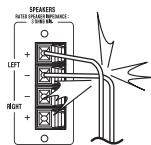
Connexion au téléviseur (avec HDMI)
Attention :
- Éteignez tous les autres appareils avant d'effectuer cette connexion.
- Réglez le volume du téléviseur à un niveau bas avant d'allumer le système.
Remarques :
- Cet appareil prend en charge HDMI, qui permet l'ARC (canal de retour audio).
- Pour activer l'ARC, assurez-vous d'utiliser un câble HDMI haute vitesse (avec ARC). Cette fonction ARC nécessite un téléviseur compatible ARC. Consultez le manuel d'utilisation du téléviseur pour déterminer quelle borne prend en charge l'ARC. Pour écouter le son d'un téléviseur non compatible ARC, connectez la sortie audio du téléviseur à la borne AUDIO IN (TV) de ce système (voir page 12). Cet appareil peut être commandé (marche/arrêt ou volume) via un téléviseur ou un composant compatible HDMI CEC (commande de l'électronique grand public). Si cela ne fonctionne pas, cela ne signifie pas que ce système est défectueux. Consultez le manuel d'utilisation du composant concerné pour savoir comment activer le CEC.
Exemple : allez dans le menu du composant pour rechercher et activer le CEC. Différentes marques peuvent donner des noms différents au CEC. Pour les téléviseurs LCD Sharp, il est nommé AQUOS LINK.
- Pour écouter le son de ce système, vous devrez ajuster les paramètres dans le menu du téléviseur. Pour plus de détails, consultez le manuel d'utilisation du téléviseur.
- Si vous ne pouvez pas sélectionner le réglage du haut-parleur externe dans le menu du téléviseur (par exemple, pour les téléviseurs LCD Sharp, il est nommé AQUOS AUDIO SP), désactivez puis réactivez le CEC.
- Assurez-vous que le réglage de sortie audio du téléviseur LCD est réglé sur PCM, et non sur d'autres formats tels que Dolby Digital, DTS, etc. Pour profiter des images 3D, ce système doit être connecté à un téléviseur et à des composants compatibles 3D (lecteur BD 3D, etc.) via des câbles HDMI haute vitesse. Mettez les lunettes 3D, sinon les images 3D risquent de ne pas être vues correctement.
Choisissez l'une des deux méthodes ci-dessous :
1. Méthode 1
Cette connexion est pour un téléviseur HDMI avec ARC (canal de retour audio).
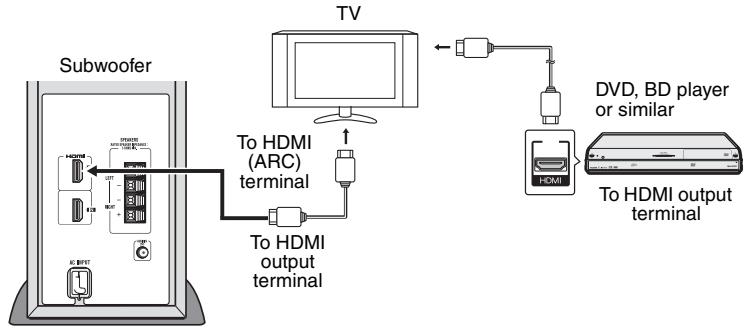
Remarques :
Consultez le manuel d'utilisation de l'équipement à connecter. - Insérez complètement les fiches pour éviter des images floues ou des bruits.
2. Méthode 2
Cette connexion est pour un téléviseur HDMI sans ARC (canal de retour audio).
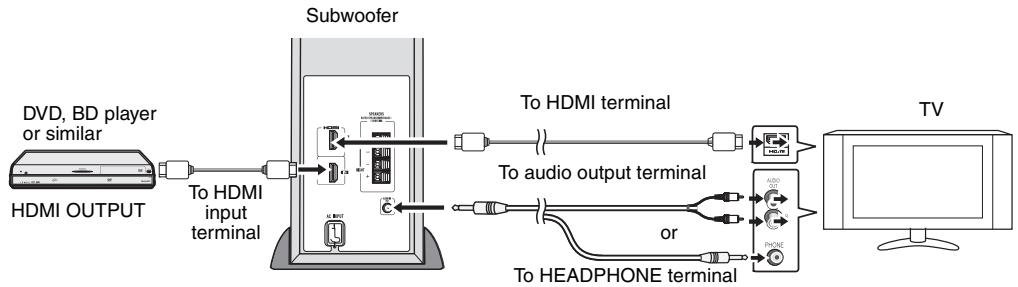
Remarques :
- Pour écouter le son via le téléviseur, éteignez votre lecteur DVD ou Blu-ray connecté ou tout autre composant similaire.
- La connexion via cette méthode peut désactiver les haut-parleurs internes du téléviseur.
Connexion d'un téléviseur (avec AUDIO IN (TV))
Connectez-vous au téléviseur à l'aide d'un câble audio.
- Méthode 1
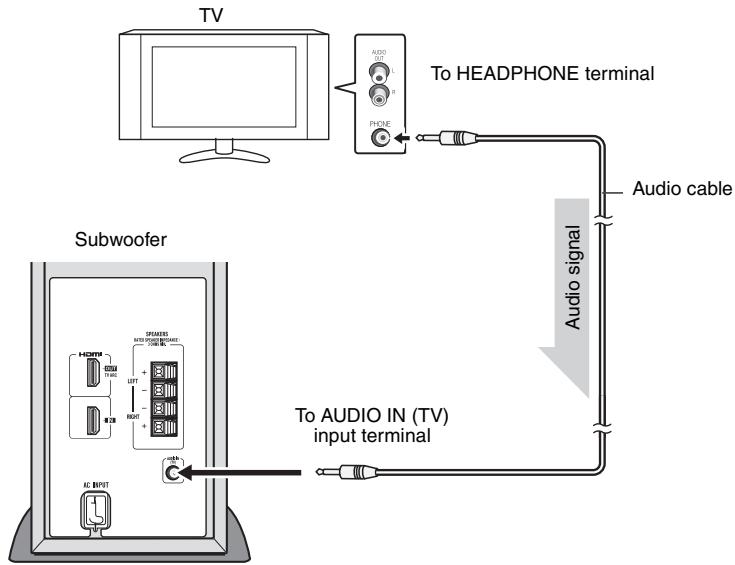
Remarques :
- La connexion via cette méthode peut désactiver les haut-parleurs internes du téléviseur.
- Dans certains cas, un léger bruit de fond peut être émis par la barre de son lorsque vous utilisez la connexion casque avec un téléviseur. Dans ce cas, veuillez passer à la connexion HDMI/ARC ou RCA ! Cet effet dépend de la marque, du modèle et de l'âge du téléviseur utilisé, et ne constitue pas un problème de qualité de la barre de son !
- Méthode 2
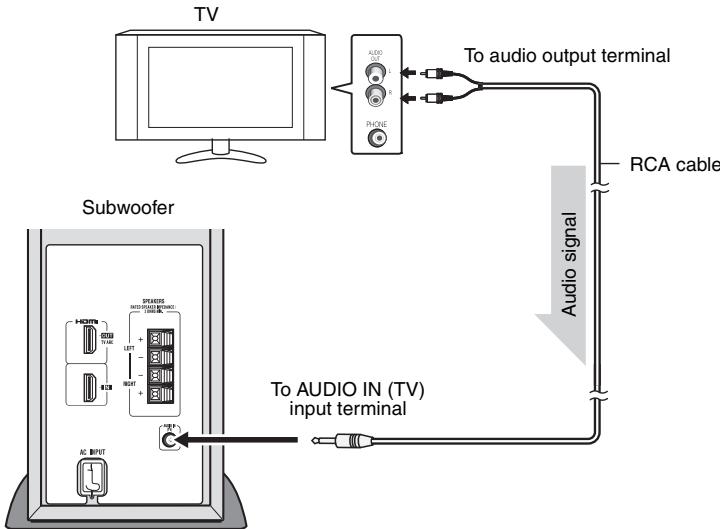
Remarque :
Pour contrôler le volume, certains réglages dans le menu du téléviseur sont nécessaires. Pour plus de détails, reportez-vous au manuel d'utilisation du téléviseur. Exemple : allez dans le menu des paramètres du téléviseur, sélectionnez SORTIE AUDIO et choisissez VARIABLE.
Cependant, si cela ne fonctionne pas, veuillez utiliser la méthode 1.
Assurez-vous d'activer le HDMI CEC lors de la connexion HDMI. Pour plus de détails, reportez-vous au manuel d'utilisation du téléviseur.
Pour mettre l'appareil sous tension
Branchez le cordon d'alimentation secteur dans une prise de courant alternatif ; l'indicateur de veille devient ROUGE.
Cet appareil se mettra automatiquement sous tension si :
- Un téléviseur ou un appareil similaire compatible HDMI CEC est allumé.
- Un signal audio est détecté sur l'entrée audio.
L'indicateur de veille deviendra BLEU si un signal TV est détecté.
Remarques :
- L'entrée HDMI prévaut sur le signal de l'entrée audio.
- L'entrée audio ne fonctionne que lorsqu'il n'y a aucun signal sur l'entrée HDMI.
- Un léger délai audio après la mise sous tension du téléviseur ne signifie pas que le système est défectueux. C'est normal.
- Le message « AQUOS speaker is enabled » s'affichera si le téléviseur LCD SHARP ne détecte pas le HT-SL70 / HT-SL75 lors de la mise sous tension. Cependant, le message « AQUOS audio with AQUOS LINK is enabled » s'affichera dès que le HT-SL70 / HT-SL75 est détecté. Ces messages peuvent varier selon le modèle de téléviseur.
Canal de retour audio (ARC) (sous-menu Audio Return Channel)
Le canal de retour audio (ARC) permet à un téléviseur compatible ARC HDMI d'envoyer le flux audio vers la borne de sortie HDMI du récepteur. Pour utiliser cette fonction, votre téléviseur doit prendre en charge l'ARC. Assurez-vous que le réglage de sortie audio du téléviseur LCD est réglé sur PCM, et non sur d'autres formats tels que Dolby Digital, DTS, etc. Pour plus de détails, reportez-vous au manuel d'utilisation du téléviseur.
Volume
Le volume ne peut être contrôlé qu'à partir de votre téléviseur.
Mise hors tension
Cet appareil passera automatiquement en mode veille (le témoin devient ROUGE) si :
- Le téléviseur ou un appareil similaire compatible HDMI CEC est éteint.
- Aucun signal provenant de l'entrée audio n'est détecté après 20 minutes.
De nombreux problèmes potentiels peuvent être résolus par le propriétaire sans faire appel à un technicien.
Si quelque chose ne va pas avec ce produit, vérifiez les points suivants avant d'appeler votre revendeur SHARP agréé ou le centre de service.
Généralités
| Symptom | Possible cause |
| ● No sound is heard. | ● Is the input signal (selection) set properly?● Is HDMI compliant equipment being used?● Is the HDMI cable connected correctly?● Is the HDMI cable of the correct type being used? (with ARC)● Does the sound input support PCM signal?● Do not connect or disconnect an HDMI cable while power is on. This may lead to operation problems. |
| ● Noise is heard during playback. | ● Move the speaker away from any computers or mobile phones. |
| ● The power is not turned on. | ● Is the unit unplugged?● The protection circuit may be activated. Unplug and plug in the power cord again after 5 minutes or more. |
| ● Volume cannot be controlled. | ● Check if the HDMI CEC is enabled.● For headphone or RCA, TV setting (VARIABLE) is required. |
| ● 3D images not displayed on the TV. | ● Depending on the TV and Video component, 3D images may not be displayed. Check the operation manual of the respective component. |
| ● Background noise appears when connecting with headphone output of TV-Terminal. | ● Please change to HDMI/ARC or RCA-Output terminal from TV-Set. This effect may occur depending on your used TV-Brand, model and age, and it is not the sound bar problem! |
Condensation
Des changements brusques de température, un stockage ou une utilisation dans un environnement extrêmement humide peuvent provoquer de la condensation à l'intérieur du boîtier. La condensation peut entraîner un dysfonctionnement de l'appareil. Si cela se produit, laissez l'appareil sous tension jusqu'à ce que la lecture normale soit possible (environ 1 heure). Essuyez toute condensation sur l'émetteur avec un chiffon doux avant d'utiliser l'appareil.
Si un problème survient pendant le fonctionnement
Lorsque ce produit est soumis à de fortes interférences externes (choc mécanique, électricité statique excessive, tension d'alimentation anormale due à la foudre, etc.) ou s'il est utilisé de manière incorrecte, il peut présenter un dysfonctionnement.
Si l'appareil ne reprend pas son fonctionnement précédent, débranchez-le puis rebranchez-le.
ou
débranchez tous les composants connectés puis rebranchez-les.
Entretien
Nettoyage du meuble
Essuyez périodiquement le meuble avec un chiffon doux.
Attention :
- N'utilisez pas de produits chimiques pour le nettoyage (essence, diluant à peinture, etc.). Cela pourrait endommager la finition du meuble.
- N'appliquez pas d'huile à l'intérieur de chaque composant. Cela pourrait provoquer des dysfonctionnements.
Dans le cadre de notre politique d'amélioration continue, SHARP se réserve le droit de modifier les conceptions et les spécifications pour améliorer le produit sans préavis. Les chiffres de performance indiqués sont des valeurs nominales des unités de production. Il peut y avoir des écarts par rapport à ces valeurs sur certaines unités.
Généralités
| Power source | AC 120 V ~ 60 Hz |
| Power consumption | 40 W |
| Output power | RMS: Total 200 watts RMS: Front Left/Right: 50 watts per channel into 3 ohms at 1 kHz, 10% total harmonic distortion Subwoofer: 100 watts per channel into 4 ohms at 100 Hz, 10% total harmonic distortion FTC: Front (Left/Right): Minimum 35 watts per channel into 3 ohms at 200 Hz to 20 kHz, 1% total harmonic distortion Subwoofer: Minimum 93 watts per channel into 4 ohms at 100 Hz, 1% total harmonic distortion |
| Output terminal | HDMI™ (with Audio Return Channel) output: (audio/video support to 1080p) x 1 |
| Input terminal | Analog input (Audio in): Stereo mini jack Ø 3.5 mm Input impedance: 33 kohms HDMI input: (audio/ video support to 1080p) x 1 |
Caisson de basses
| Type | Subwoofer system 6 - 5/16" (16 cm) woofer |
| Maximum input power | 200 W |
| Rated input power | 100 W |
| Impedance | 4 ohms |
| Dimensions | Width: 4 - 1/2" (115 mm) Height: 16 - 5/8" (422 mm) Depth: 12 - 1/16" (307 mm) |
| Weight | 9.92 lbs. (4.50 kg) |
Barre de son
| Type | Full Range speaker system 7/8" x 4-1/2" (2.2 x 11.5 cm) Full Range |
| Maximum input power | 100 W/CH |
| Rated input power | 50 W/CH |
| Impedance | 3 ohms/CH (4 pieces parallel) |
RÉGLAGE HORIZONTAL
| HT-SL75 | |
| For 60" TV. Dimensions | Width: 54 - 17/32" (1385 mm) Height: 1" (26 mm) Depth: 1 - 31/32" (50 mm) |
| Weight | 2.74 lbs. (1.25 kg) |
| For 70" TV. Dimensions | Width: 63 - 3/8" (1610 mm) Height: 1" (26 mm) Depth: 1 - 31/32" (50 mm) |
| Weight | 2.95 lbs. (1.34 kg) |
| HT-SL70 | |
| For 46" TV. Dimensions | Width: 40 - 3/16" (1071 mm) Height: 1 - 1/32" (26 mm) Depth: 1 - 31/32" (50 mm) |
| Weight | 2.54 lbs. (1.15 kg) |
| For 52" TV. Dimensions | Width: 47 - 13/32" (1204 mm) Height: 1 - 1/32" (26 mm) Depth: 1 - 31/32" (50 mm) |
| Weight | 2.65 lbs. (1.20 kg) |
RÉGLAGE VERTICAL
| HT-SL75 | |
| For 60" TV. Dimensions | Width: 6 - 5/16" (160 mm) Height: 34 - 27/32" (885 mm) Depth: 6 - 5/16" (160 mm) |
| Weight | 3.75 lbs. (1.70 kg)/each |
| For 70" TV. Dimensions | Width: 6 - 5/16" (160 mm) Height: 39 - 3/4" (1010 mm) Depth: 6 - 5/16" (160 mm) |
| Weight | 3.75 lbs. (1.70 kg)/each |
| HT-SL70 | |
| For 46" TV. Dimensions | Width: 6 - 5/16" (160 mm) Height: 27 - 13/16" (706 mm) Depth: 6 - 5/16" (160 mm) |
| Weight | 2.09 lbs. (0.95 kg)/each |
| For 52" TV. Dimensions | Width: 6 - 5/16" (160 mm) Height: 30 - 13/16" (782 mm) Depth: 6 - 5/16" (160 mm) |
| Weight | 2.09 lbs. (0.95 kg)/each |
- HT-SL70 / HT-SL
- MANUEL D'UTILISATION
- REMARQUES
- ACCESSOIRES
- ATTENTION
- POUR VOS DOSSIERS
- REMARQUE
- AVERTISSEMENT
- INFORMATIONS SUR LE PROGRAMME ENERGY STAR®
- INFORMATIONS DE SÉCURITÉ SUPPLÉMENTAIRES
- GARANTIE LIMITÉE DU CONSOMMATEUR
- GÉNÉRALITÉS
- AVERTISSEMENTS
- CAISSON DE BASSES
- POUR FIXER LE SUPPORT DE LA BARRE DE SON
- UTILISATION DU SUPPORT (AGENCEMENT VERTICAL)
- POUR MONTER LA BARRE DE SON SUR LE MUR
- VIS DE FIXATION
- FIXATION DE L'ÉQUERRE MURALE
- INSTALLATION DE LA BARRE DE SON
- PRÉVENTION DES CHUTES
- PLACEMENT DU SYSTÈME
- PLACEMENT DU SUPPORT
- CONNEXIONS DU SYSTÈME
- CONNEXION DES ENCEINTES
- CONNEXION AU TÉLÉVISEUR (AVEC HDMI)
- MÉTHODE
- CONNEXION D'UN TÉLÉVISEUR (AVEC AUDIO IN (TV))
- POUR METTRE L'APPAREIL SOUS TENSION
- CANAL DE RETOUR AUDIO (ARC) (SOUS-MENU AUDIO RETURN CHANNEL)
- VOLUME
- MISE HORS TENSION
- CONDENSATION
- SI UN PROBLÈME SURVIENT PENDANT LE FONCTIONNEMENT
- ENTRETIEN
- NETTOYAGE DU MEUBLE
Marque : SHARP
Modèle : HT-SL70
Catégorie : Barre de son