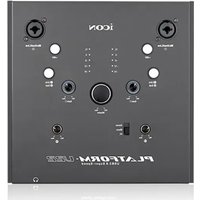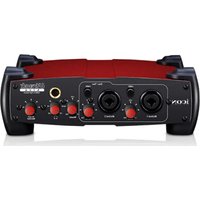
icon Platform D2 - Interface audio

Platform D2 - Interface audio icon - Notice d'utilisation et mode d'emploi gratuit

Retrouvez gratuitement la notice de l'appareil Platform D2 icon au format PDF.

📄 2 pages Français FR Télécharger 💬 Question IA 10 questions ⚙️ Specs
Notice icon Platform D2 - page 1
Choisissez votre langue et indiquez votre email : nous vous enverrons une version traduite specifiquement.
Type de produit Interface de contrôle DAW
Marque icon
Modèle Platform D2
Connectivité USB 2.0
Alimentation 12 V CC (adaptateur secteur inclus)
Module LCD Inclus dans l'emballage
Compatibilité DAW Cubase, Nuendo, Samplitude, Audition, Reaper, Bitwig, FL Studio, Digital Performer, Studio One, Reason, Sonar, Ableton Live, Logic Pro, Pro Tools
Modes de contrôle Mackie Control, HUI
Fonctions principales Contrôle des faders, mute, solo, arm, transport, navigation, assignation
Câbles inclus Câble USB, câble de connexion
Manuel Guide de démarrage rapide inclus
Garantie 2 ans
Entretien et nettoyage Nettoyer avec un chiffon doux et sec
Sécurité Utiliser uniquement l'adaptateur fourni ; éviter l'humidité
Réparabilité Contactez le support icon pour toute réparation

FOIRE AUX QUESTIONS - Platform D2 icon

Comment connecter le Platform D2 à mon ordinateur ?
Connectez le câble USB fourni entre le Platform D2 et votre ordinateur. Branchez ensuite l'adaptateur secteur 12V pour l'alimentation. Votre ordinateur devrait reconnaître le contrôleur automatiquement.
Quels logiciels DAW sont compatibles avec le Platform D2 ?
Le Platform D2 est compatible avec la plupart des DAW : Cubase, Nuendo, Samplitude, Audition, Reaper, Bitwig, FL Studio, Digital Performer, Studio One, Reason, Sonar, Ableton Live, Logic Pro et Pro Tools. Il supporte les protocoles Mackie Control et HUI.
Comment configurer le contrôleur dans Cubase ?
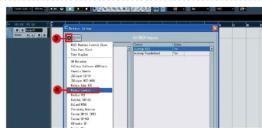
Dans Cubase, allez dans Périphériques > Configuration de la télécommande. Sélectionnez 'Mackie Control' et assignez les entrées MIDI au Platform D2. Le mode 'CUBASE MODE' est disponible sur le contrôleur.
Que faire si le contrôleur n'est pas reconnu par mon ordinateur ?
Vérifiez que le câble USB est bien connecté et que l'adaptateur secteur est branché. Essayez un autre port USB. Redémarrez l'ordinateur et le contrôleur. Si le problème persiste, contactez le support icon.
Comment utiliser le mode Mackie Control ?
Le mode Mackie Control est activé par défaut. Sur le panneau avant, sélectionnez le mode correspondant (généralement 'Mackie Control' ou 'HUI'). Consultez le guide de démarrage rapide pour les combinaisons de touches spécifiques.
Comment mettre à jour le firmware du Platform D2 ?
Téléchargez le dernier firmware depuis le site iconproaudio.com. Connectez le contrôleur en USB, lancez l'utilitaire de mise à jour et suivez les instructions. Ne débranchez pas l'appareil pendant la mise à jour.
Puis-je alimenter le contrôleur uniquement par USB ?
Non, le Platform D2 nécessite une alimentation externe 12V CC. L'USB seul ne fournit pas assez de puissance pour le module LCD et les faders motorisés. Utilisez toujours l'adaptateur fourni.
Comment nettoyer le Platform D2 ?
Débranchez l'appareil. Utilisez un chiffon doux et sec pour essuyer la surface. Évitez les produits chimiques ou solvants qui pourraient endommager les touches et l'écran LCD.
Que faire si un fader ne répond plus ?
Vérifiez qu'aucun objet n'obstrue le fader. Essayez de recalibrer le contrôleur via le menu de configuration. Si le problème persiste, contactez le service après-vente icon pour une réparation.
Comment réinitialiser le Platform D2 aux paramètres d'usine ?
Maintenez enfoncés les boutons '<<' et '>>' tout en mettant l'appareil sous tension. L'écran affichera 'Factory Reset'. Relâchez les boutons pour confirmer. L'appareil redémarrera avec les réglages d'usine.

Questions des utilisateurs sur Platform D2 icon

0 question sur cet appareil. Repondez a celles que vous connaissez ou posez la votre.

Poser une nouvelle question sur cet appareil

L'email reste privé : il sert seulement à vous prévenir si quelqu'un répond à votre question.

Aucune question pour l'instant. Soyez le premier à en poser une.

Téléchargez la notice de votre Interface audio au format PDF gratuitement ! Retrouvez votre notice Platform D2 - icon et reprennez votre appareil électronique en main. Sur cette page sont publiés tous les documents nécessaires à l'utilisation de votre appareil Platform D2 de la marque icon.

MODE D'EMPLOI Platform D2 icon

Platform M+ / Platform X+ / Platform D2

ENGLISH Platform M+ / Platform X+ / Platform D2 Quick Start Guide FRANÇAIS Platform M+ / Platform X+ / Platform D2 Guide de démarrage rapide DEUTSCHE Schnellstartanleitung der Platform M+ / Platform X+ / Platform D2 ITALIANO Platform M+ / Platform X+ / Platform D2 Manuale di utilizzo rápido ESPAÑOL Guía de inicio rápido de Platform M+ / Platform X+ / Platform D2 日本語 Platform M+ / Platform X+ / Platform D2 クイックスタートガイド

icon Platform D2 - Platform M+ / Platform X+ / Platform D2 - 1

Platform M+ / Platform X+
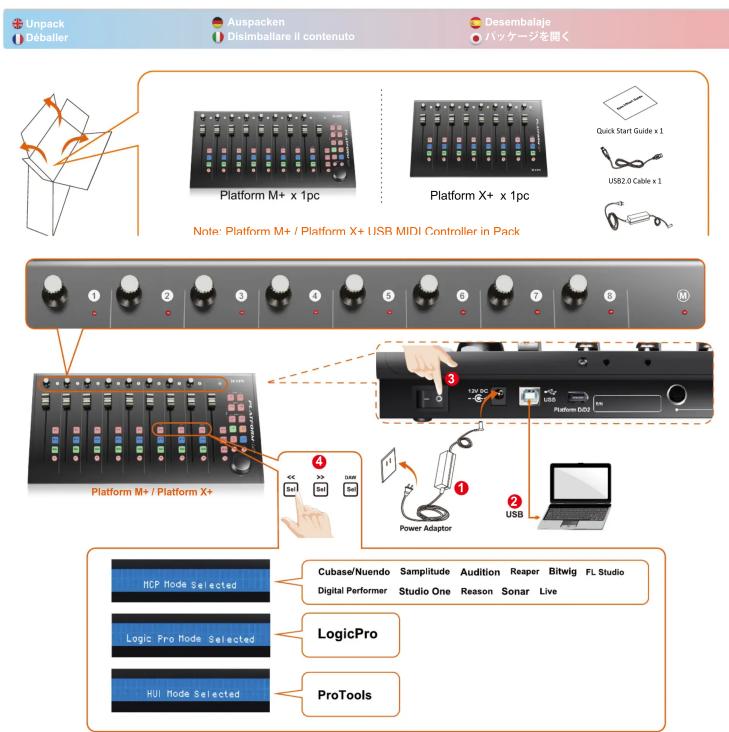
Unpack Deballeer Auspacken Disimballare il contenuto Desembalaje ハッケージを囲く Platform M+ x 1pc Platform X+ x 1pc Quick Start Guide x 1 USB2.0 Cable x 1 Note: Platform M+ / Platform X+ USB MIDI Controller in Pack Platform M+ / Platform X+ Power Adaptor USB 132x 60 USB 120x 50 120x 40 120x 30 120x 20 120…

Platform D2

Unpack Déballer Auspacken Disimballare il contenuto Desembalaje ハッケージを開く Platform D2 x 1pc Quick Start Guide x 1 Connect Cable x 1 Note: LCD module in Pack

Platform M+ / Platform X+ / Platform D2
1 ABCD KON PL-17700A CUBASE MODE cubase mode selected 6 > 500 500 12VDC USB Platform DX3 Power Adaptor 4 USB

For Mackie Control / HUI
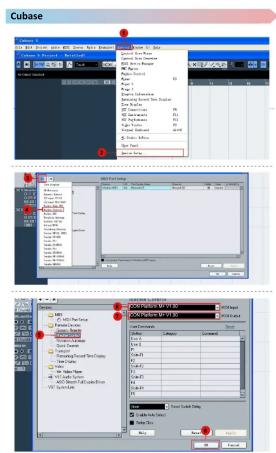
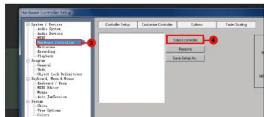
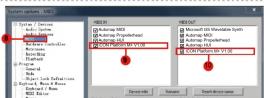
Cubase File Edit View Edit View View Mode View Path View Path View Path View Path View Path View Path View Path View Path View Path View Path View Path View Path View Path View Path View Path View Path View Path View Path View Path View Path View Path View Path View Path View Path View Path View Pat…

Ableton Live C:\Users\My\N LEAF\M30 Map Lab Key Info Computer NTFS Embedded Scale Compression Time Bus Number Search Launch Quantization Search Launch Quantization Search Quantization Parallel Share Module Affinity Data Subfields Data Subfields Data Subfields NTFS Embedded Computation

PMs PD3AV205 www.iconproaudio.com

Samplitude
icon Platform D2 - Platform M+ / Platform X+ / Platform D2 - 7

icon Platform D2 - Platform M+ / Platform X+ / Platform D2 - 8

icon Platform D2 - Platform M+ / Platform X+ / Platform D2 - 9

icon Platform D2 - Platform M+ / Platform X+ / Platform D2 - 10

icon Platform D2 - Platform M+ / Platform X+ / Platform D2 - 11

Studio One
icon Platform D2 - Platform M+ / Platform X+ / Platform D2 - 12

Options Control Locations Audio Total Audio Total Audio Total Audio Total Audio Total Audio Total Audio Total Audio Total Audio Total Audio Total Audio Total Audio Total Audio Total Audio Total Audio Total Audio Total Audio Total Audio Total Audio Total Audio Total Audio Total Audio Total Audio Tota…

Control Con Power: CON POWER BY V1.00 Control Con Power: CON POWER BY V1.00

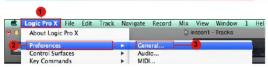
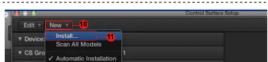
logic pro
icon Platform D2 - Platform M+ / Platform X+ / Platform D2 - 15

Preferences New Advanced Tools EncLK: advanced features, recording project alternative and techniques, basic smarting, acoustic imaging and measurement, audio engineering, audio-based sound effects, and audio simulation features available and set for information updates. Localized Options Audio Audi…

icon Platform D2 - Platform M+ / Platform X+ / Platform D2 - 17

icon Platform D2 - Platform M+ / Platform X+ / Platform D2 - 18

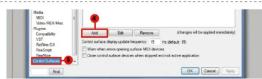
Macgister Korg uAudio Media Designs H2 Media Designs H2: Channel Styles Only H2 Media Designs Logic Control Logic Control Logic Control Logic Control Logic Control Logic Control Logic Control Logic Control Logic Control Logic Control Logic Control Logic Control Logic Control Logic Control Logic Cont…

icon Platform D2 - Platform M+ / Platform X+ / Platform D2 - 20

Reaper
1 2 3 4 5 6 7 8 9 10 11 12 13 14 15 16 17 18 19 20 21 22 23 24 25 26 27 28 29 30 31 32 33 34 35 36 37 38 39 40 41 42 43 44 45 46 47 48 49 50 51 52 53 54 55 56 57 58 59 60 61 62 63 64 65 66 67 68 69 70 71 72 73 74 75 76 77 78 79 80 81 82 83 84 85 86 87 88 89 90 91 92 93 94 95 96 97 98 99 100

icon Platform D2 - Platform M+ / Platform X+ / Platform D2 - 22

icon Platform D2 - Platform M+ / Platform X+ / Platform D2 - 23

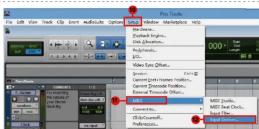
Pro Tools
icon Platform D2 - Platform M+ / Platform X+ / Platform D2 - 24

icon Platform D2 - Platform M+ / Platform X+ / Platform D2 - 25

icon Platform D2 - Platform M+ / Platform X+ / Platform D2 - 26

icon Platform D2 - Platform M+ / Platform X+ / Platform D2 - 27

icon Platform D2 - Platform M+ / Platform X+ / Platform D2 - 28

icon Platform D2 - Platform M+ / Platform X+ / Platform D2 - 29

Reason
icon Platform D2 - Platform M+ / Platform X+ / Platform D2 - 30

icon Platform D2 - Platform M+ / Platform X+ / Platform D2 - 31

icon Platform D2 - Platform M+ / Platform X+ / Platform D2 - 32

Control Panel Setup Name: OK Cancel Control Panel Setup Name: OK Cancel Control Panel Setup Name: OK Cancel Control Panel Setup Name: OK Cancel Control Panel Setup Name: OK Cancel Control Panel Setup Name: OK Cancel Control Panel Setup Name: OK Cancel Control Panel Setup Name: OK Cancel Control Pane…

Nuendo
Top Path Bottom Path

icon Platform D2 - Platform M+ / Platform X+ / Platform D2 - 35

Quick Tools for V1.0 Quick Tools for V2.0 Quick Tools for V3.0 Quick Tools for V4.0 Quick Tools for V5.0 Quick Tools for V6.0 Quick Tools for V7.0 Quick Tools for V8.0 Quick Tools for V9.0 Quick Tools for V10.0 Quick Tools for V11.0 Quick Tools for V12.0 Quick Tools for V13.0 Quick Tools for V14.0 Q…

Bitwig
1.00.00 2.00.00 3.00.00 4.00.00 5.00.00 6.00.00 7.00.00 8.00.00 9.00.00 10.00.00 11.00.00 12.00.00 13.00.00 14.00.00 15.00.00 16.00.00 17.00.00 18.00.00 19.00.00 20.00.00 21.00.00 22.00.00 23.00.00 24.00.00 25.00.00 26.00.00 27.00.00 28.00.00 29.00.00 30.00.00 31.00.00 32.00.00 33.00.00 34.00.00 35.…

icon Platform D2 - Platform M+ / Platform X+ / Platform D2 - 38

Preferences Name: 10.0000000000 File Edit View Insert Modify... Add to the following: Add to the following: Add to the following: Add to the following: Add to the following: Add to the following: Add to the following: Add to the following: Add to the following: Add to the following: Add to the follo…

Sommaire Cliquez un titre pour y accéder
Assistant notice
Powered by Anthropic
En attente de votre message
Informations produit

Marque : icon

Modèle : Platform D2

Catégorie : Interface audio