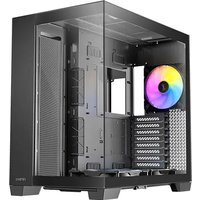
C8 ARGB - Unite Centrale ANTEC - Notice d'utilisation et mode d'emploi gratuit
Retrouvez gratuitement la notice de l'appareil C8 ARGB ANTEC au format PDF.

| Type de produit | Boîtier d'unité centrale (Full Tower) |
| Marque | Antec |
| Modèle | C8 ARGB |
| Facteur de forme | Full Tower |
| Matériaux | Acier, plastique, verre trempé (panneau latéral 4 mm) |
| Dimensions (L x P x H) | 464 x 303 x 476 mm |
| Poids | Environ 12 kg (estimation) |
| Alimentation | Alimentation non incluse ; support pour bloc d'alimentation jusqu'à 210 mm (sans câble) |
| Connecteurs panneau avant | 2 x USB 3.0, 1 x USB Type-C 10 Gbit/s, prise combo casque/micro, boutons power et reset |
| Carte mère compatible | E-ATX (280 mm), ATX, Micro-ATX, ITX |
| Hauteur maxi refroidisseur CPU | 175 mm |
| Longueur maxi carte graphique | 440 mm |
| Emplacements d'extension | 8 |
| Baies de stockage | 2 x 3,5", 4 x 2,5" |
| Ventilateurs inclus | 2 x 160 mm Tranquil Reverse ARGB PWM (bas) + 1 x 140 mm Tranquil ARGB PWM (arrière) |
| Support radiateur (haut/côté/bas/arrière) | Haut : 120/140/240/280/360 mm ; Côté : 120/140/240/280/360 mm ; Bas : 120/140/240/280/360 mm ; Arrière : 120 mm |
| Filtre à poussière | Filtre amovible plein format en bas |
| Éclairage | ARGB intégré via ventilateurs inclus ; hub ARGB/PWM intégré |
| Fonctions principales | Gestion optimisée du flux d'air, panneaux en verre trempé pour exposition des composants, cloisons d'air amovible, gestion des câbles |
| Entretien et nettoyage | Nettoyer le filtre à poussière régulièrement ; utiliser un chiffon doux pour le verre ; éviter les produits abrasifs |
| Sécurité | Panneaux en verre trempé fragiles : éviter les chocs et les chutes ; manipuler avec précaution lors de l'ouverture |
| Pièces détachées et réparabilité | Accessoires inclus : supports de ventilateur, vis, attaches ; composants standard remplaçables individuellement |
| Informations générales | Notice d'utilisation disponible en téléchargement ; compatible avec Windows, Linux ; garantie constructeur standard |
FOIRE AUX QUESTIONS - C8 ARGB ANTEC
Questions des utilisateurs sur C8 ARGB ANTEC
0 question sur cet appareil. Repondez a celles que vous connaissez ou posez la votre.
Poser une nouvelle question sur cet appareil
Téléchargez la notice de votre Unite Centrale au format PDF gratuitement ! Retrouvez votre notice C8 ARGB - ANTEC et reprennez votre appareil électronique en main. Sur cette page sont publiés tous les documents nécessaires à l'utilisation de votre appareil C8 ARGB de la marque ANTEC.
MODE D'EMPLOI C8 ARGB ANTEC

text_image
AntecAntec, Inc. is the global leader in high-performance computer components and accessories for the gaming, PC upgrade and Do-It-Yourself markets.
Founded in 1986, Antec is recognized as a pioneer in the industry and has maintained its position as a worldwide market leader and international provider of quiet, efficient and innovative products.
Antec has also achieved great success in the distribution channel, meeting the demands of quality-conscious system builders, VARs and integrators.
P.2 CONTENTS AND ACCESSORIES
Inhalt Und Zubehör | Contenu Et Accessoires | Contenuto E Accessori | Contenido Y Accesorios | 商品与配件 | 内容物與配件 | 内容物 및 両舎品 | 内容と付属品
P.4 PRODUCT INTRODUCTION
Produktübersicht | Introduction Au Produit | Introduzione Del Prodotto | Presentación Del Producto | 產品介紹 | 产品介紹 | 要物紹介 | 商品紹介
P.10 INSTALLATION GUIDE
Installationsanleitung | Guide D'installation | Guida All'installazione | Guía De Instalación | 安装指南 | 安装指南 | 尘치 안내 | 設置のガイド
CONTENTS AND ACCESSORIES
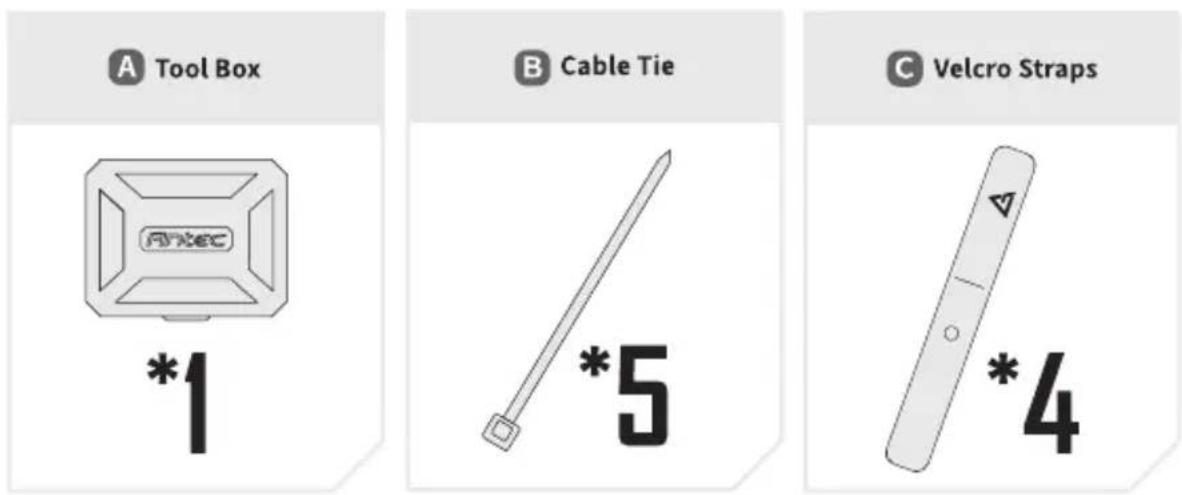
1 ACCESSORY BOX CONTENTS
Packungsinhalt | Contenu de l'Emballage | Contenuto della confezione | Contenido del paquete | 配件盒内容物 | 产品 | 原장 내용물 | バッケージの内容
text_image
A Tool Box *1 B Cable Tie *5 C Velcro Straps *4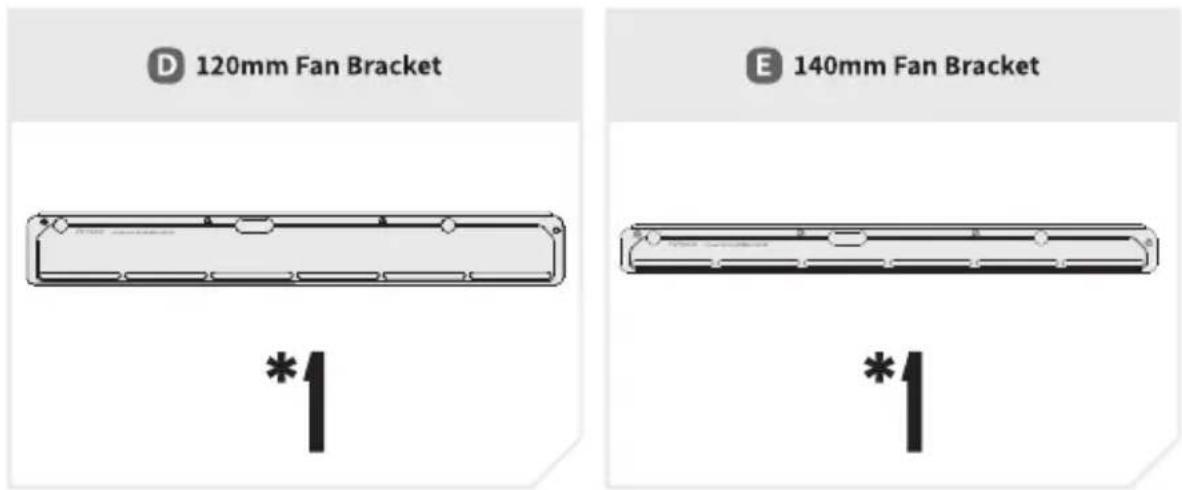
text_image
D 120mm Fan Bracket E 140mm Fan Bracket *1 *1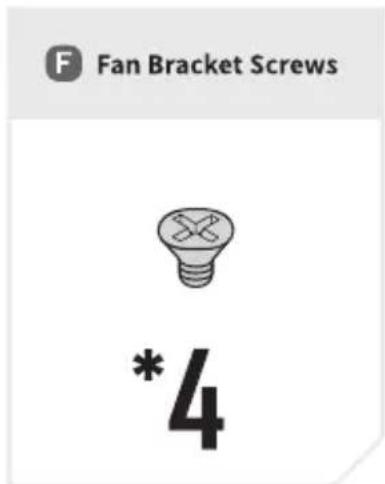
text_image
F Fan Bracket Screws *4Toolbox Contents
text_image
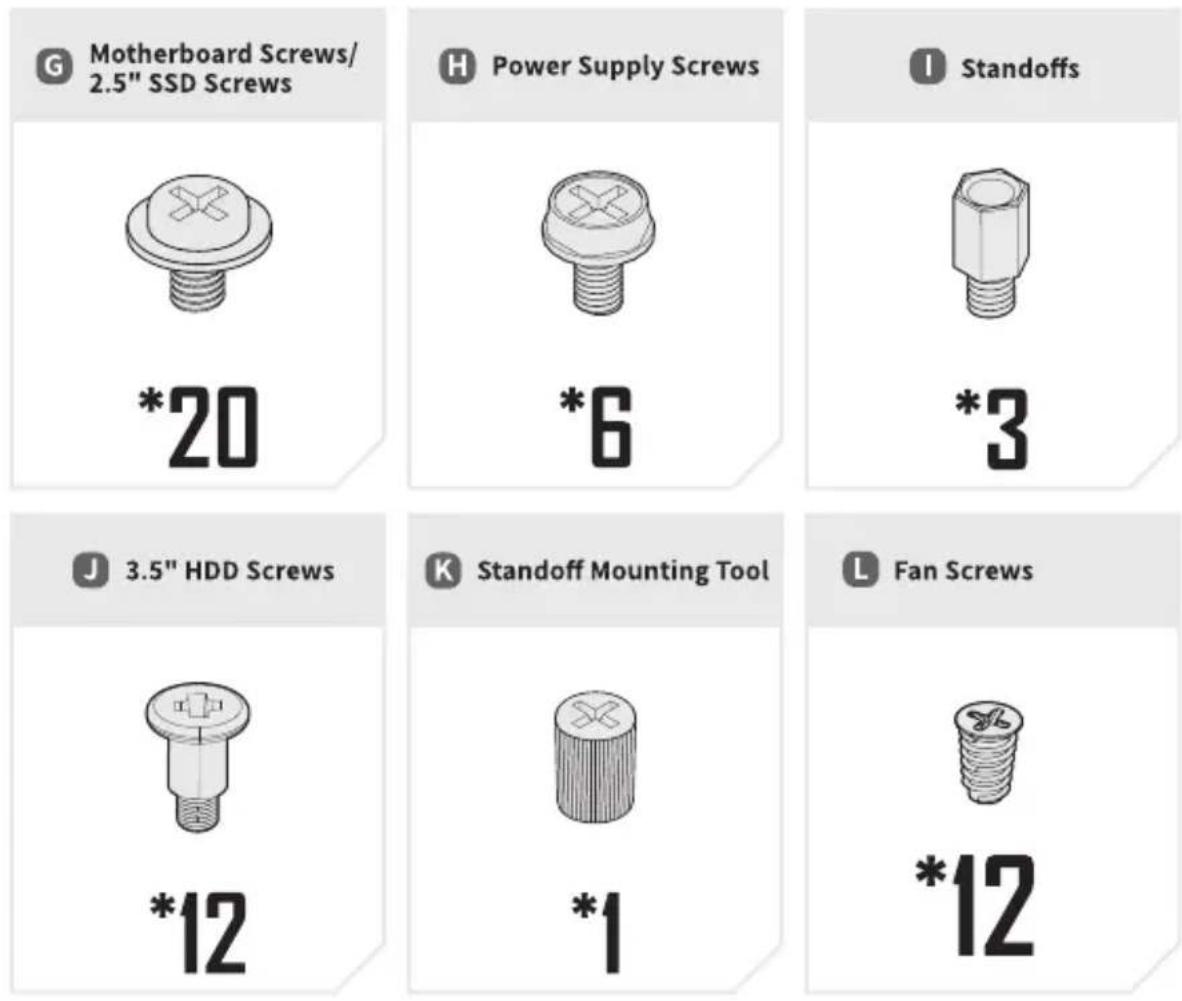
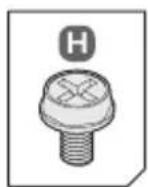
G Motherboard Screws/ 2.5" SSD Screws *20 H Power Supply Screws *6 I Standoffs *3 J 3.5" HDD Screws *12 K Standoff Mounting Tool *1 L Fan Screws *12PRODUCT INTRODUCTION
1 CASE OVERVIEW
Gehäuseübersicht | Vue d'Ensemble du Boîtier | Vista generale del contenitore | Información de la caja | 機箱概述 | 产品特点 | ケ이스 개요 | ケース概要
text_image
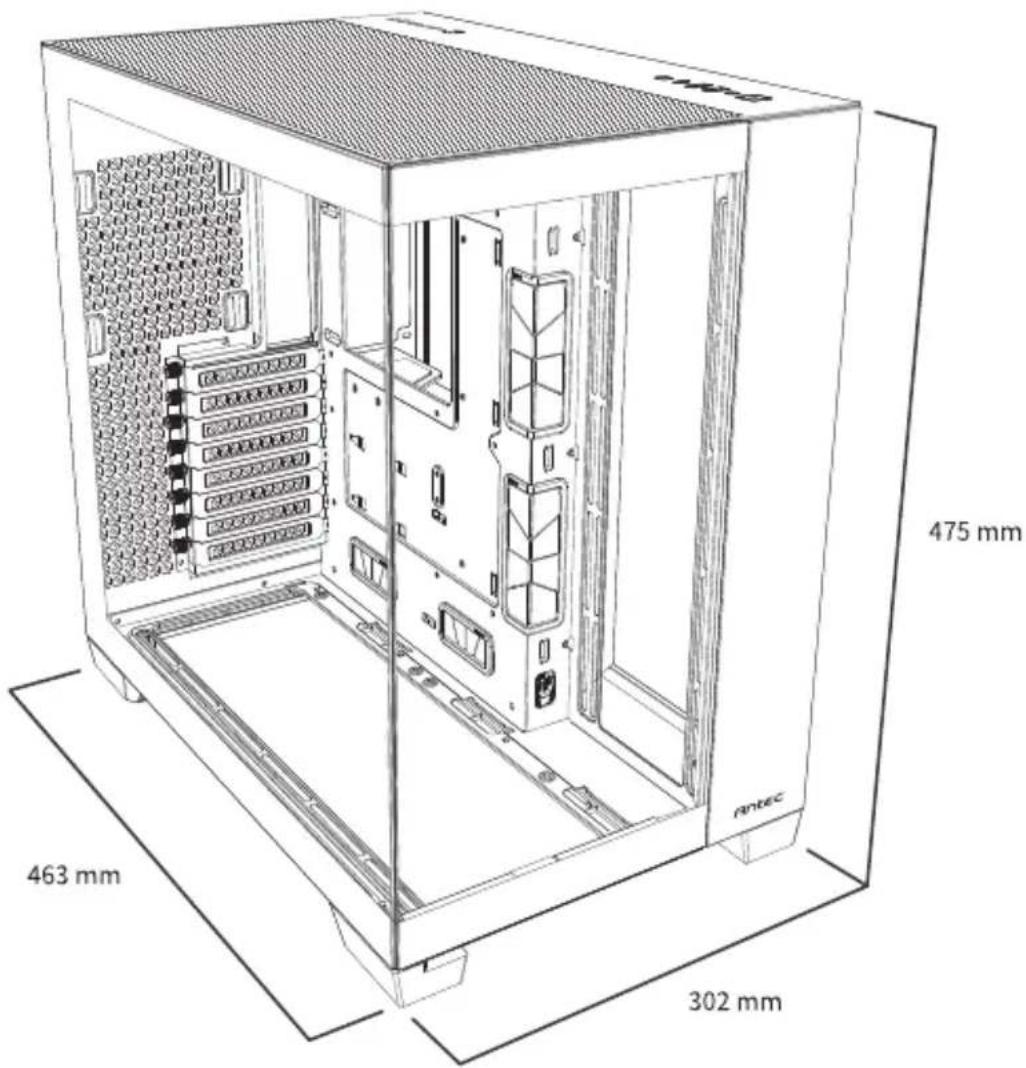
475 mm 463 mm 302 mm antec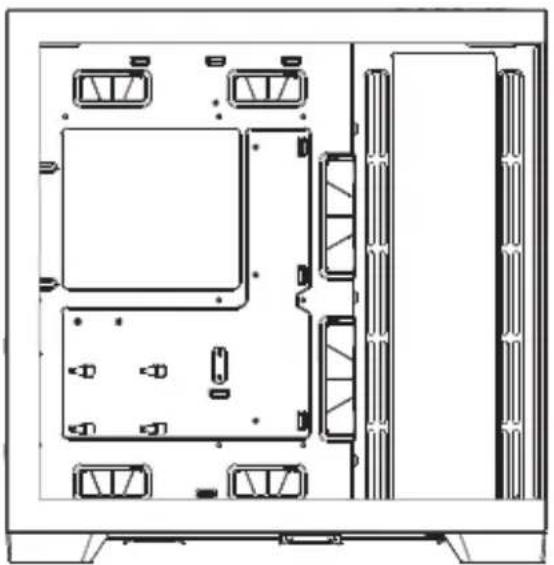
natural_image
Top-down schematic of a computer room layout with storage compartments and ventilation grilles (no text or labels)Left Side
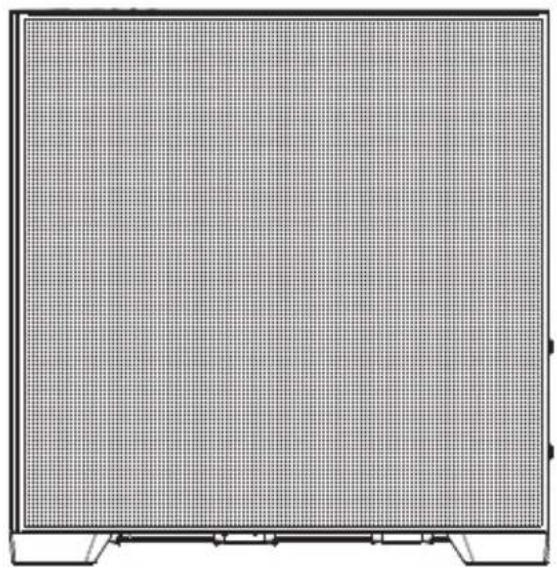
natural_image
Front view of a flat-screen computer monitor with grid pattern (no visible text or symbols)Right Side
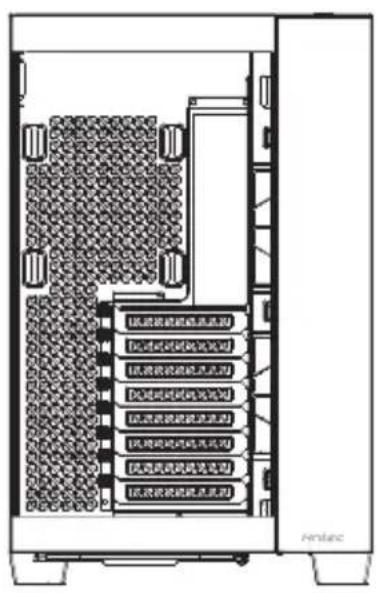
text_image
[此波段被遮阳或遮阳] [此波段被遮阳或遮阳] [此波段被遮阳或遮阳] [此波段被遮阳或遮阳] [此波段被遮阳或遮阳] [此波段被遮阳或遮阳] [此波段被遮阳或遮阳] [此波段被遮阳或遮阳]Front
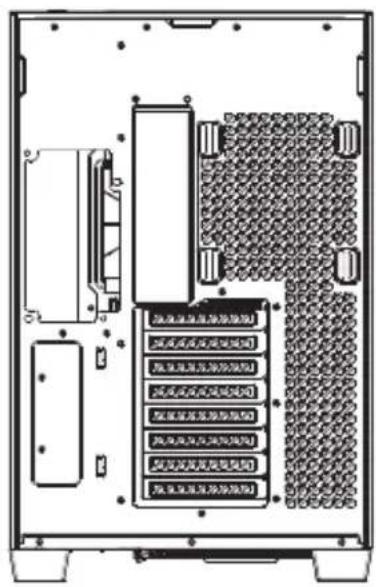
text_image
[未命名] 无限制位移 [未命名] 无限制位移 [未命名] 无限制位移 [未命名] 无限制位移 [未命名] 无限制位移 [未命名] 无限制位移 [未命名] 无限制位移 [未命名] 无限制位移Rear
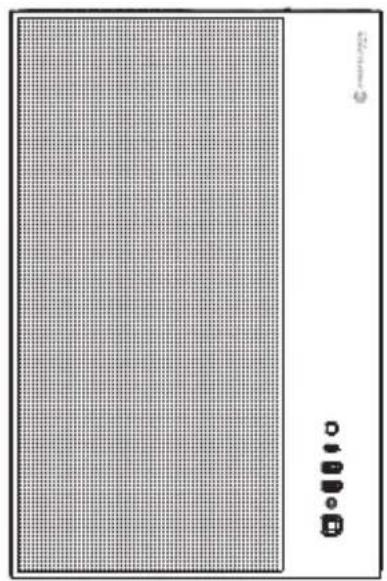
natural_image
Exterior view of a modern office building (no signage)Top
2 I/O PANEL
Anschlüsse und Tasten | Connecteurs et Boutons | Connettori e pulsanti | Conectores y botones | I/O接口 | I/O端口 | マーネット 및 バルト | コネクタとボタン
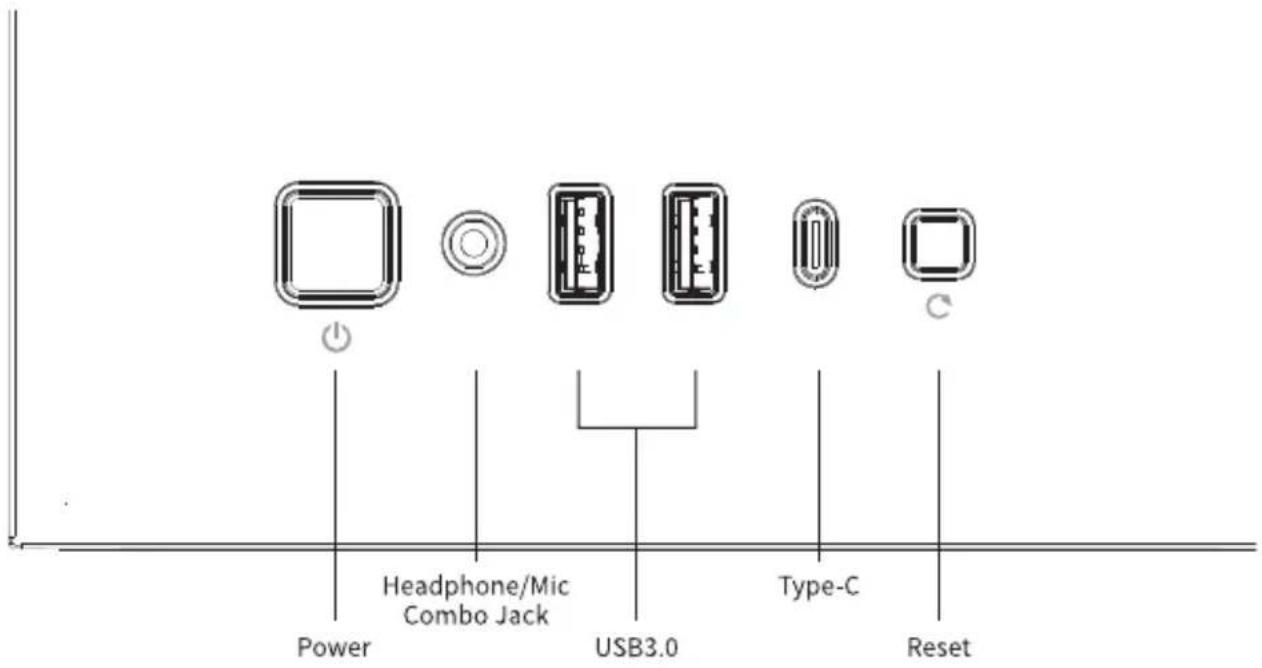
text_image
Power Headphone/Mic Combo Jack USB3.0 Type-C ResetPRODUCT INTRODUCTION
3 PARTS
Komponenten | Pièces | Parti | Partes | 機箱結構 | 机箱结构 | 早品 | 部品
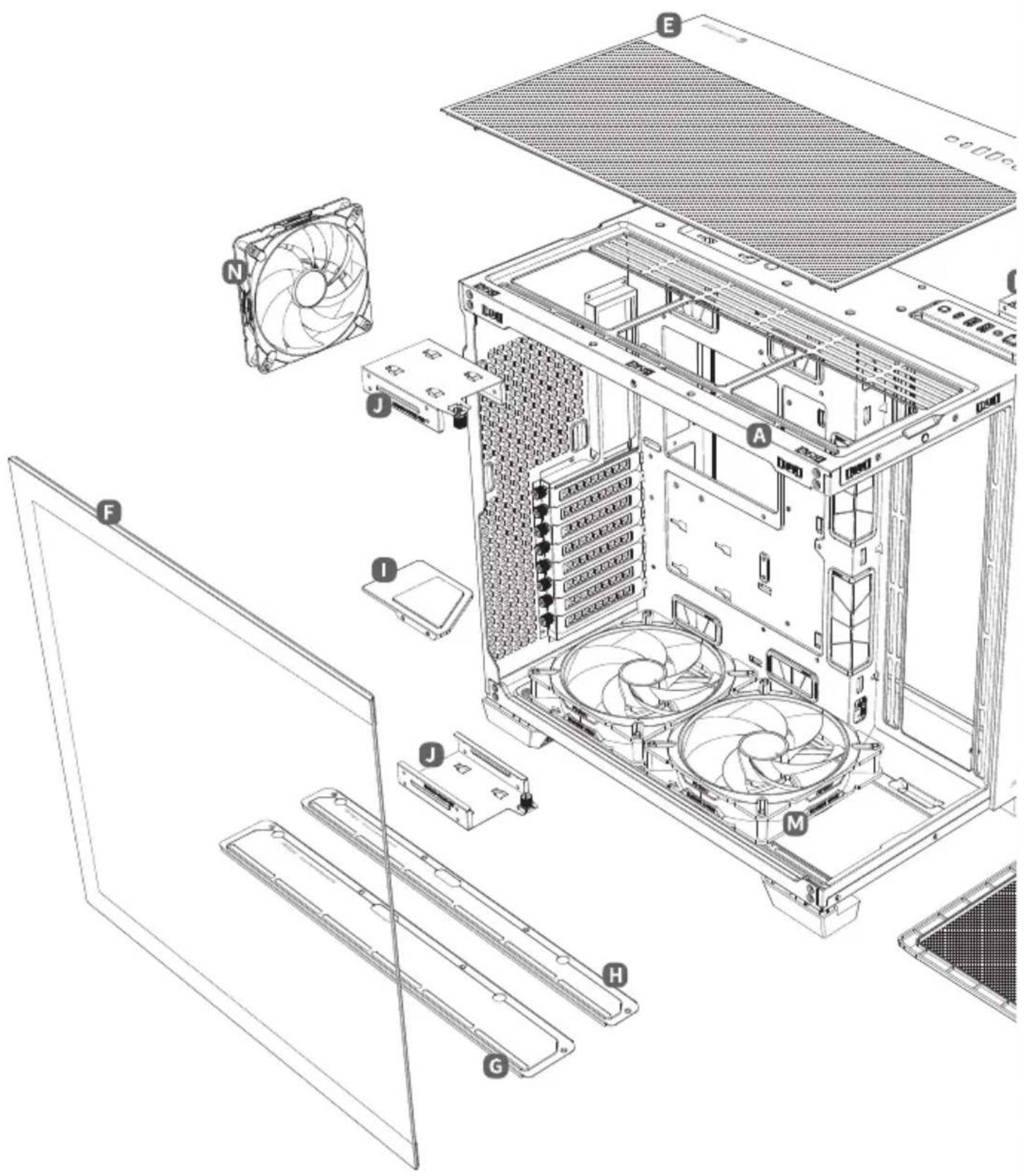
text_image
Exploded view diagram of a desktop computer tower showing fan, drive, and chassis components with labeled parts A through J.A Case Body
Gehäuse | Corps du Boitier | Corpo contenitore | Cuerpo de la caja | 機箱結構 | 机箱 | ケーマス フラ | ケース本体
B Full Mesh Side Panel
Vollmaschiges Seltenteil | Panneau lateral Full Mesh | Pannello laterale full mesh | Panel lateral entero en malla | 全網孔側板 | 全网孔側板 | マチイ 우き ダン | 右側のメッシュパネル
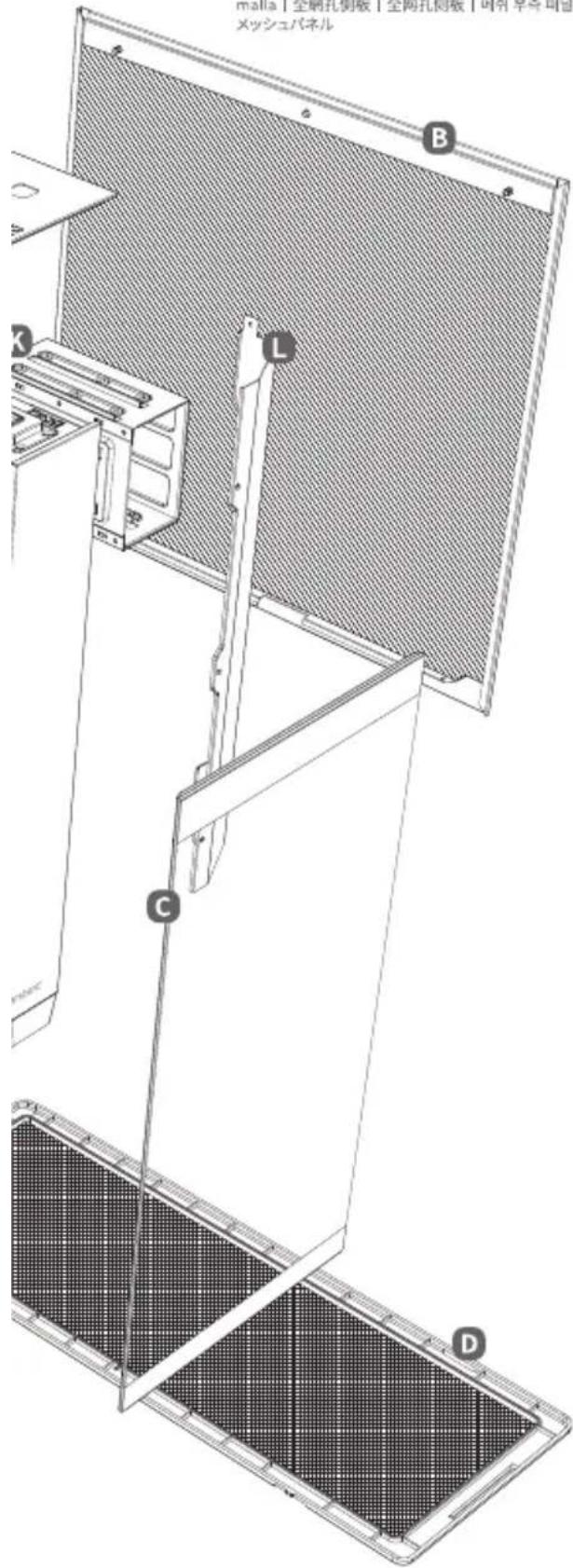
text_image
A3815「全刷孔倒板」全两孔倒板「耐片」半径はり メッシュパネル B L C DC Tempered Glass Front Panel
Frontpanel aus gehärtetem Glas | Face avant verre trempé | Pannello frontale in vetro temperato | Panel frontal de vidrio templado | 玻璃前面板 | 玻璃前面板 | 강화유리 전면 폐널 | 强化ガラスのフロントパネル
D Full-Sized Pull-Out Dust Filter
Ausziehbarer Staubfilter in volter Größe | Filtre à poussières full size amovible | Filtro antipolvere removibile | Filtro del polvo extraible a tamaño completo | 全尺寸前抽滤網 | 全尺寸前抽滤網 | 横 사이즈 하단 승리이딩 먼지 떨터 | 引出し式の大面積フィルター
E Top Panel
Panel oben | Panneau haut | Pannello superiore | Panel de Arriba | 上面板 | 上面板 | 상단 페널 | トップパネル
F Tempered Glass Side Panel
Seitenteil aus gehärtetem Glas | Panneau latéral Verre trempé | Pannello laterale in vetro temperato | Panel lateral de vidrio templado | 玻璃側板 | 玻璃側板 | 강화유리 좌ふ マーネル | 強化ガラスのサイドパネル
G 120mm Fan Bracket
120-mm-Lüfterhalterung | Support de ventilateur 120mm | Staffa per ventola da 120mm | Montaje de ventilador de 120 mm | 120mm 风扇支架 | 120mm 风扇支架 | 120mm 印 ブラーディ | 120mm のケースファン搭載用 ブラケット
H 140mm Fan Bracket
140-mm-Lüfterhalterung | Support de ventilateur 140mm | Staffa per ventola da 140mm | Montaje de ventilador de 140 mm | 140mm 風扇支架 | 140mm 風扇支架 | 140mm マン ブラット | 140mmのケースファン搭載用プラケット
PSU Bracket
Netzteilhalterung | Support d'alimentation | Staffa per alimentatore | Bracket de la PSU | 電源支撑架 | 电源支撑架 | 파워브래킷 | 電源搭載用ブラケット
J 2.5" SSD Tray
2,5-Zoll-SSD-Fach | Plateau SSD 2,5" | Tray SSD da 2,5" | Bandeja de SSD 2,5" | 2.5 吋 SSD 硬盤架 | 2.5 吋 SSD 硬盤架 | 2.5" SSD 트레이 | 2.5インチSSDトレイ
K 3.5" HDD Cage
3,5-Zoll-Festplattenkäfig | Cage pour disque dur 3,5" | Gabbia per HDD da 3,5" | Jaula para disco duro de 3,5" | 3,5吋 HDD 硬錬架 | 3,5吋 HDD 硬盘架 | 3,5" HDD ケイミ | 3,5インチ HDD ケージ
Airflow Partition
Luftstromtrennwand | Séparation flux d'air | Partizione per flusso d'aria | Separación para paso de aire | 廣道隔板 | 风道隔板 | 공기흐름 막이 판 | エアフロー 誘導パネル
M Tranquil Reverse 160mm ARGB PWM Fan
Tranquil Reverse 160mm ARGB-PWM-Lüfter | Ventilateur Tranquil Reverse 160mm ARGB PWM | Ventola PWM ARGB Tranquil Reverse da 160mm | Ventilador Tranquil Reverse 160mm ARGB PWM | Tranquil Reverse 160mm ARGB PWM風扇 | Tranquil Reverse 160mm ARGB PWM風扇 | Tranquil Reverse 160mm ARGB PWM 翔 | Tranquil Reverse 160mm ARGB PWM ファン
N Tranquil 140mm ARGB PWM Fan
Tranquil 140mm ARGB-PWM-Lüfter | Ventilateur Tranquil 140mm ARGB PWM | Ventola PWM ARGB Tranquil da 140mm | Ventilador Tranquil 140mm ARGB PWM | Tranquil 140mm ARGB PWM風扇 | Tranquil 140mm ARGB PWM風扇 | Tranquil 140mm ARGB PWM 燃 | Tranquil 140mm ARGB PWM ファン
PRODUCT INTRODUCTION
4 CASE SPECIFICATIONS
Gehäusespezifikationen | Caractéristiques du Boitier | Specifiche del contenitore | Especificaciones de la caja | 機箱規格 | 机箱規格 | ケ이스사양 | ケース仕様
General
| Form Factor | Full Tower |
| Material(s) | Steel + Plastic + Glass |
| Side Panel Type | 4mm Tempered Glass |
| Access & Controls | Power, Reset, USB 3.0 x 2, Type-C 10Gbps x 1, Headphone/Mic Combo Jack |
| Dimensions | 464 x 303 x 476mm (DWH) |
Compatibility & Clearances
| Mainboard Support | E-ATX (280mm), ATX, Micro-ATX, ITX |
| Max PSU Length | ≤ 210 mm (without cable) |
| Max CPU Cooler Height | ≤ 175 mm |
| Max GPU Length | ≤ 440 mm |
| Radiator (Top) | 120/140/240/280/360mm |
| Radiator (Side) | 120/140/240/280/360mm |
| Radiator (Bottom) | 120/140/240/280/360mm |
| Radiator (Rear) | 120mm |
Expansion Slots & Drive Bays
| Expansion Slots | 8 |
| 3.5" | 2 |
| 2.5" | 4 |
Cooling
| Top | 3 x 120 / 3 x 140 / 2 x 160mm |
| Side | 3 x 120 / 2 x 140mm |
| Bottom | 3 x 120 / 3 x 140 / 2 x 160mm |
| Rear | 120 / 140mm |
| Included Fan(s) | 2 x 160mm Tranquil Reverse ARGB PWM fans at bottom + 1 x 140mm Tranquil ARGB PWM fan at rear |
| Dust Filter | Bottom |
5 FAN SPECIFICATIONS
Lüfterspezifikationen | Spécifications ventilateur | Specifiche della ventola | Especificaciones Del Ventilador | 風扇規格 | 風扇規格 | 副상세 스펙 | ファンの仕様
[A] Tranquil Reverse 160mm ARGB PWM Fan
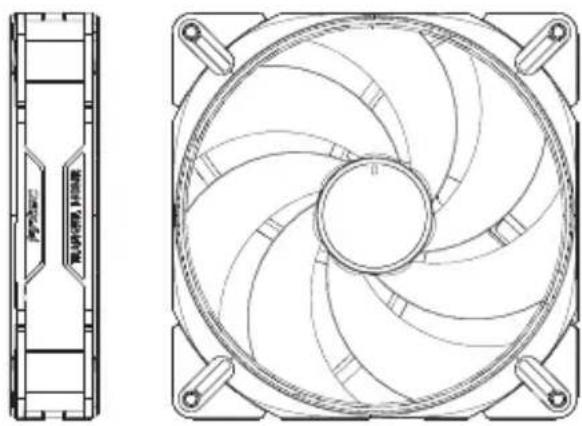
natural_image
Technical line drawing of a CPU fan with internal blades and mounting feet (no text or symbols)Fan Type : PWM Fan
Fan Speed : 450±150\~1500±150 RPM
Rated Voltage : FAN : DC 12 V / LED : DC 5 V
Operating Voltage: DC 7.0\~13.2
Rated Current: FAN: 0.35 A / LED: 0.40 A
[B] Tranquil 140mm ARGB PWM Fan
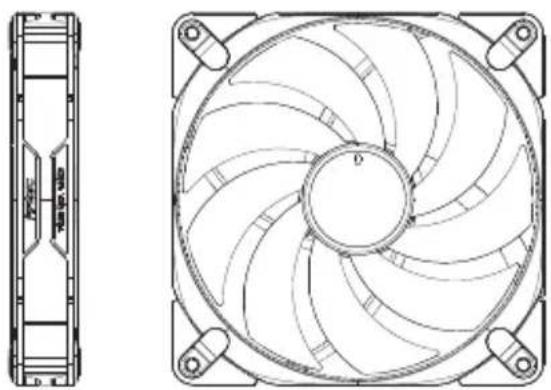
natural_image
Technical line drawing of a computer fan with internal blades and mounting feet (no text or symbols)Fan Type: PWM Fan
Fan Speed : 450±100\~1500±150 RPM
Rated Voltage : FAN : DC 12 V / LED : DC 5 V
Operating Voltage : DC 7\~13.8 V
Rated Current : FAN : 0.22 A / LED : 0.30 A
INSTALLATION GUIDE
1 REMOVE FRONT, TOP & SIDE PANEL
Vorder-, Ober- und Seitenwand entfernen | Retirer les panneaux avant, supérieurs et latéraux | Rimozione pannello anteriore, superiore e laterale | Extraer panel frontal, arriba y lateral | 移除前方、上方和两侧板 | 移除前方、上方和两侧板 | 전면, 상단, 양측 패널 제거 | フロント、トップ、両側のパネルの取り外し
[A] TOP & SIDE PANEL
Ober- und Seitenteil | Panneau supérieur et latéral | Pannello ssuperiore e laterale | Panel de arriba y lateral | 顶板和側板 | 顶板和側板 | 立달 및 압축 패널 | トップヒサイドパネル
![ANTEC C8 ARGB - [A] TOP & SIDE PANEL - 1](/content/2026/04/686574/images/90e54f4ef1c457fd2df079efdec2903312702da7d1f74bbc3db8b6c8b9571a90.jpg)
natural_image
Technical line drawing of a server rack with internal components and mounting features (no text or symbols)[B] FRONT PANEL
Frontpanel | Face avant | Pannello anteriore | Panel frontal | 前面板 | 前面板 | 전면 태널 | フロントパネル
![ANTEC C8 ARGB - [B] FRONT PANEL - 1](/content/2026/04/686574/images/3d902cb58c071efc1f99cef8d720473cd626e912491d6bce21fa6d0bbde36d07.jpg)
natural_image
Technical line drawing of a server rack with internal components and an arrow indicating a specific portion (no text or symbols present)Front panel glass picking groove
![ANTEC C8 ARGB - [B] FRONT PANEL - 2](/content/2026/04/686574/images/6894aa0d25b866498a6220c8dc5e837d761f8ec5b9412d41108bb6993048f1d4.jpg)
natural_image
Technical diagram of a server rack with internal components and a black arrow indicating a specific area (no text or symbols present)Top & side panel picking groove
![ANTEC C8 ARGB - [B] FRONT PANEL - 3](/content/2026/04/686574/images/bf7ea92546586c0e18560a423e5f3fbc674b905007dba36ab7995cca9fd3ef0b.jpg)
natural_image
Technical diagram of a server rack with mounting holes and internal components, showing directional arrows indicating movement (no text or labels present)INSTALLATION GUIDE
2 MOTHERBOARD INSTALLATION
Installation der Hauptplatine | Installation de la Carte-Mère | Istellazione della scheda madre | Instalación de placa base | 安装主機板 | 安装主板 | 麦인보드 설치 | マザーボード設置
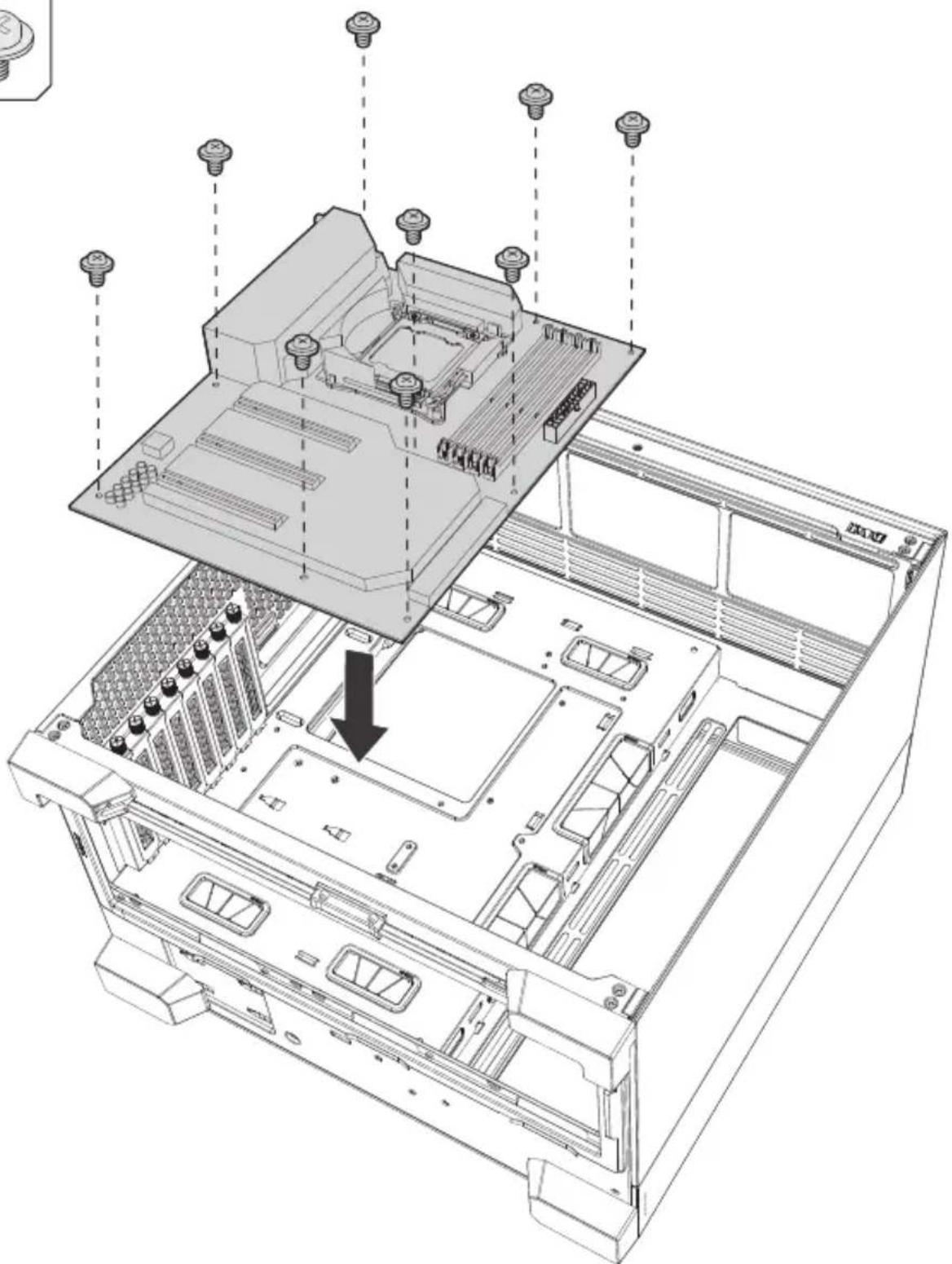
natural_image
Technical line drawing of an open computer chassis with screw holes and internal components (no text or symbols)3 VGA / PCI-EXPRESS CARD INSTALLATION
Installation der VGA/PCI-Express-Karte | Installation de la Carte Graphique | Istallazione della scheda VGA / PCI-Express | Instalación de tarjeta VGA/PCI-Express | 安装VGA/PCI-E卡 | 安装VGA/PCI-E显卡 | VGA / PCI-익스프레스 카드 설치 | VGA / PCI-Eカードの設置
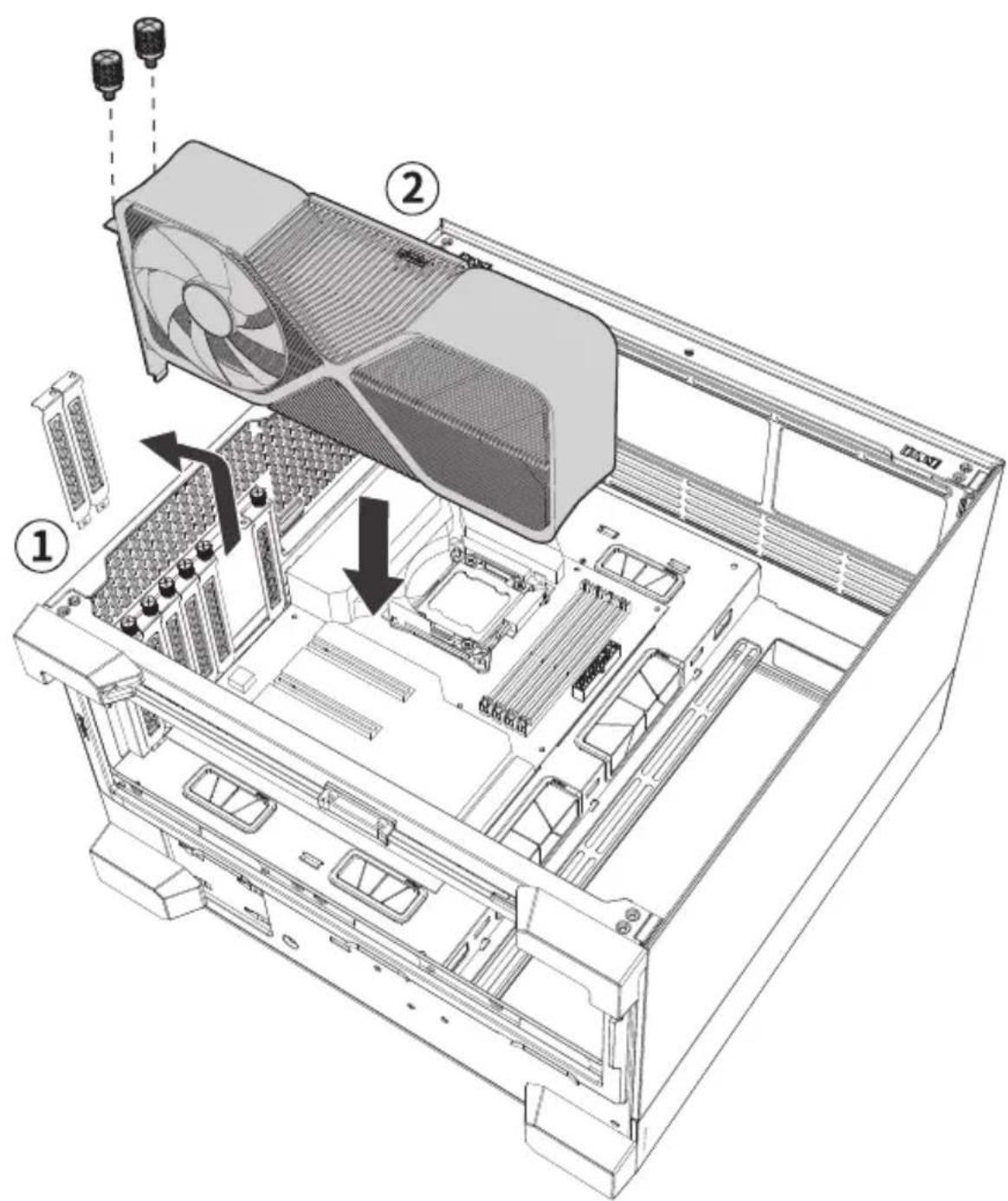
text_image
Technical diagram of a computer tower case with labeled components and directional arrows indicating assembly or installation.INSTALLATION GUIDE
4 AIRFLOW PARTITION REMOVAL
Entfernung der Luftstromtrennwand | Retirer la séparation de flux d'air | Rimozione Partizione Per Flusso D'aria | Extracción de separación para paso de aire | 移除風道隔板 | 移除风道隔板 | 公기흐름 막이 판 제거 | エアフロー誘導パネルの取り外し
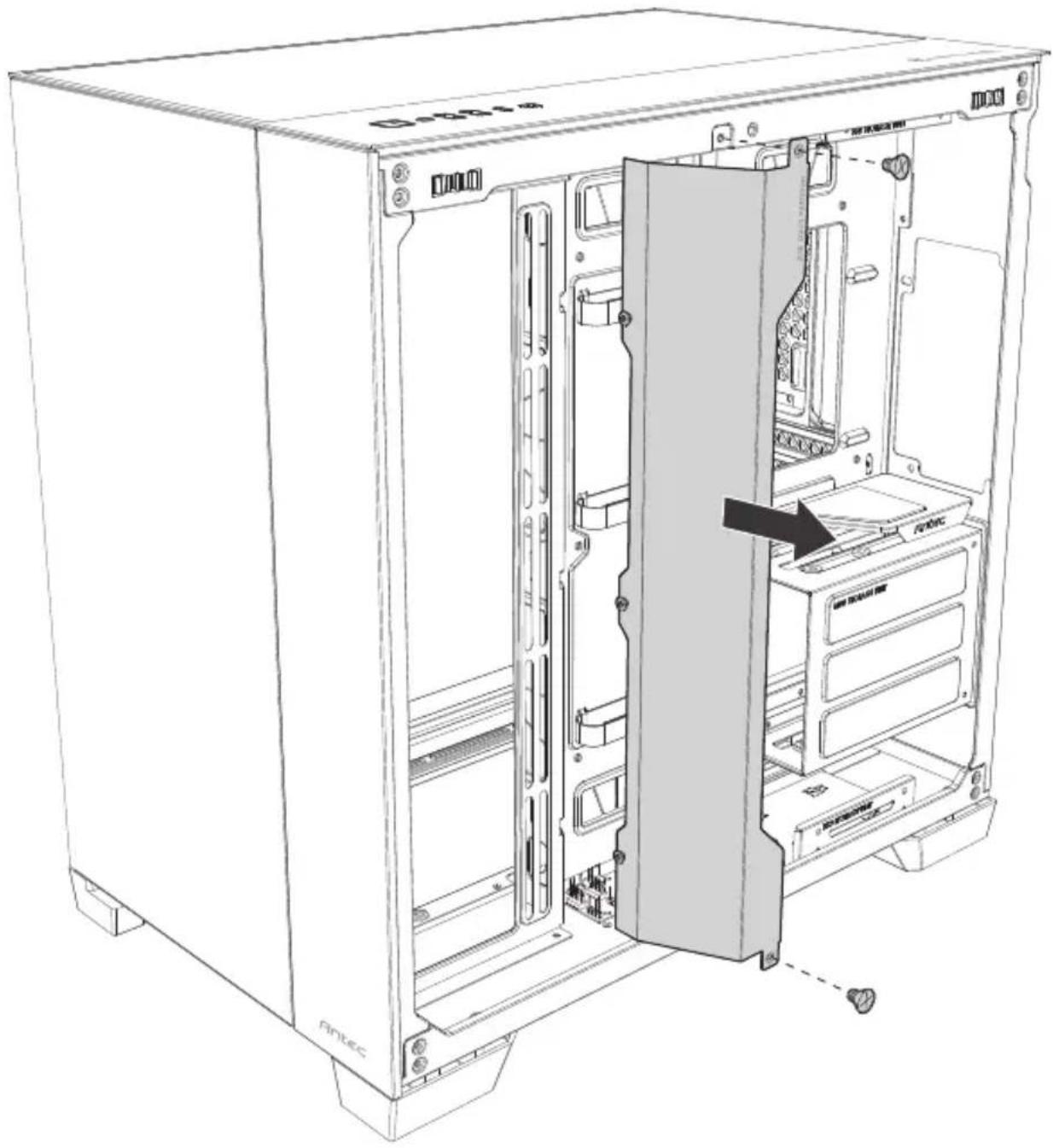
text_image
Fintec G0001.65 POWER SUPPLY INSTALLATION
Installation des Netzteils | Installation du Bloc d'Alimentation | Istallazione dell'alimentatore di rete | Instalación de fuente de alimentación | 安装電源供應器 | 安装電源 | パーワー サルフロー イラービー | 電源設置
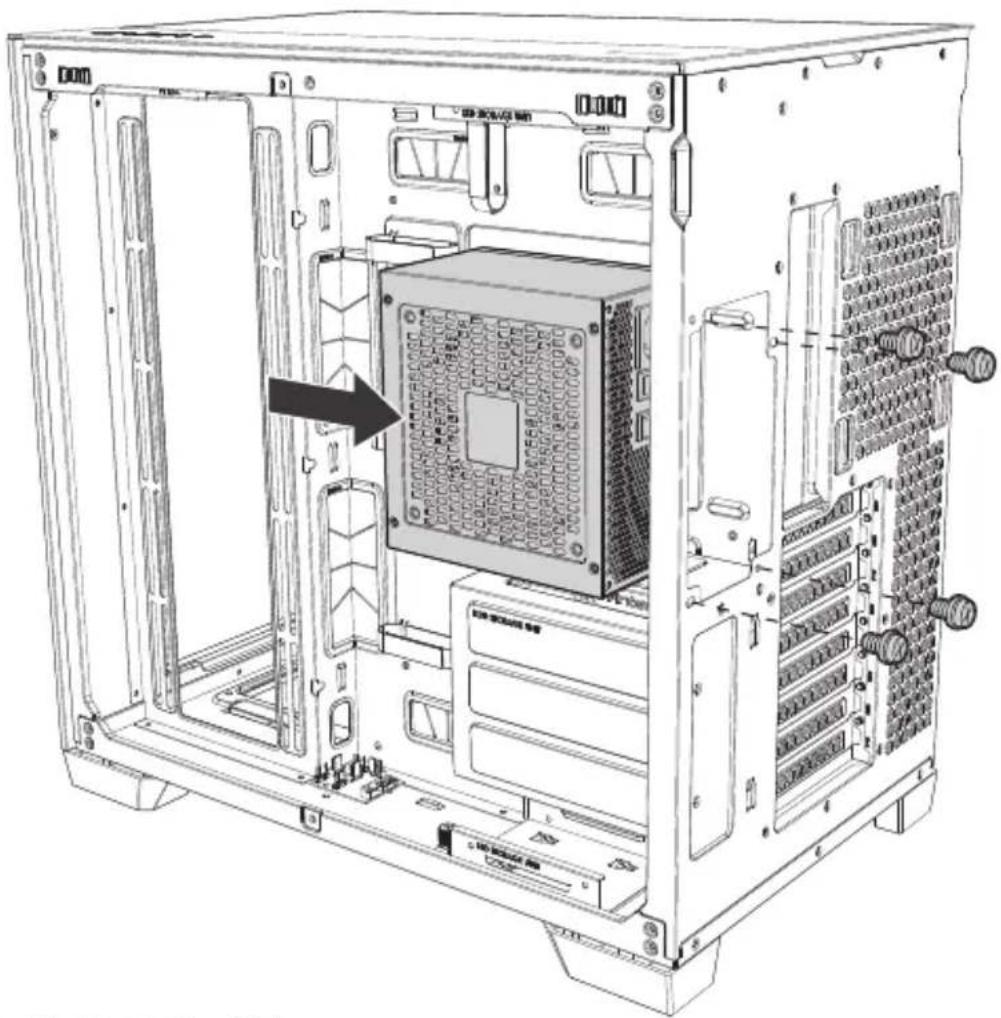
natural_image
Technical line drawing of an internal server rack unit with visible ports and a black arrow indicating a component (no text or symbols present)Compatible with side-interface PSU
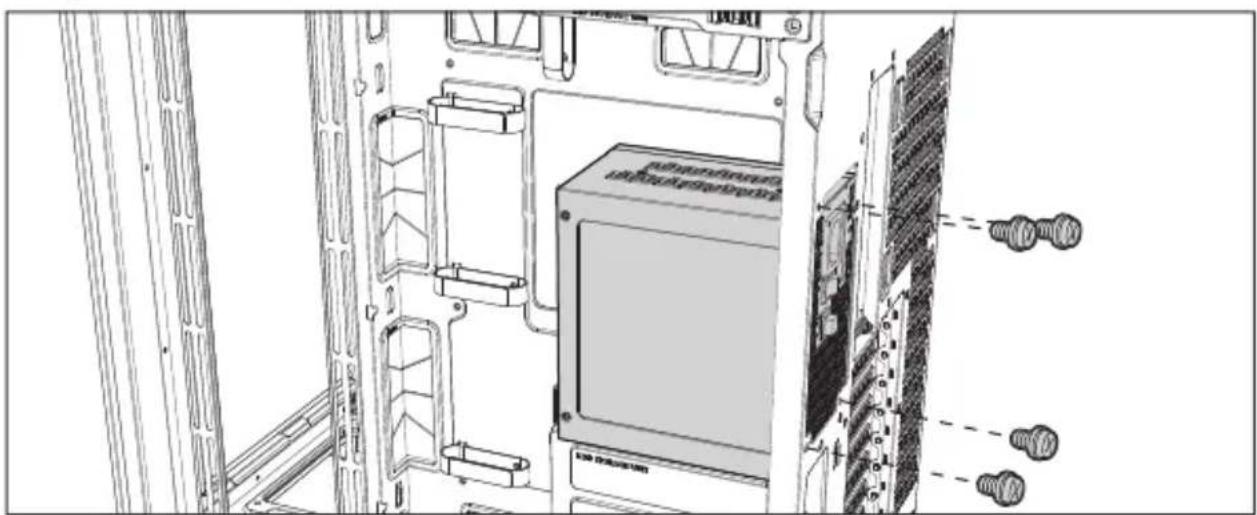
text_image
Technical diagram of a server rack with labeled components and screw connectionsINSTALLATION GUIDE
6 HARD DISK INSTALLATION
Festplatteninstallation | Installation des Disques Durs | Istellazione del disco rigido | Instalación de disco duro | 安装硬碟 | 安装硬盘 | ハドミスコルデイスト | ハードディスクの設置
[A] INSTALLING A 3.5" HARD DISK DRIVE
Installation einer 3,5" Festplatte | Installer un Disque Dur 3,5" | Istallazione di un disco rigido da 3,5" | Instalación de unidad de disco duro de 3,5" | 安装3.5吋HDD硬碟 | 安装3.5吋HDD硬盘 | 3,5" ホドデスクドライバー 설치 | 3.5インチハードディスクの設置
![ANTEC C8 ARGB - [A] INSTALLING A 3.5" HARD DISK DRIVE - 1](/content/2026/04/686574/images/7686b9a5c090864778e055e668243be4fe8c80b93c0014c10a8ef5f6ec9b727f.jpg)
text_image
Technical diagram of a computer tower case with labeled components and internal hardware layout![ANTEC C8 ARGB - [A] INSTALLING A 3.5" HARD DISK DRIVE - 2](/content/2026/04/686574/images/d6a9d42f456743d6d77b3b00db5a210c2c7cb3a43b46c374d3cca6b5de956d4b.jpg)
text_image
HDD[B] INSTALLING A 2.5" SOLID STATE DRIVE
Installation einer 2,5" SSD (Solid State Drive) | Installer un Disque Dur/SSD 2,5" | Installazione di un disco a stato solido da 2,5" | Instalación de disco de estado sólido de 2,5" | 安装2.5吋SSD固態硬碟 | 安装2.5吋SSD固态硬盘 | 2,5" SSD 封치 | 2.5インチソリッドステートドライブの設置
![ANTEC C8 ARGB - [B] INSTALLING A 2.5" SOLID STATE DRIVE - 1](/content/2026/04/686574/images/b86ebbb9096d6075ccaa2c656517c7fb1d080bf73468c36b721cd878a8d250c3.jpg)
text_image
Technical diagram of a desktop computer tower showing internal components and labeled parts with numbered annotations![ANTEC C8 ARGB - [B] INSTALLING A 2.5" SOLID STATE DRIVE - 2](/content/2026/04/686574/images/eb4fec23f98f3818a2edb4b30393b06b540a54a1d3f3f4218b6c237b49470b5a.jpg)
text_image
SSD SSD STORAGE UNIT GINSTALLATION GUIDE
7 FAN INSTALLATION
Installation des Lüfters | Installation des Ventilateurs | Istellazione del ventilatore | Instalación de ventilador | 安装風扇 | 安装风扇 | プン 설치 | ファンの取り付け
[A] SIDE & TOP & REAR FAN
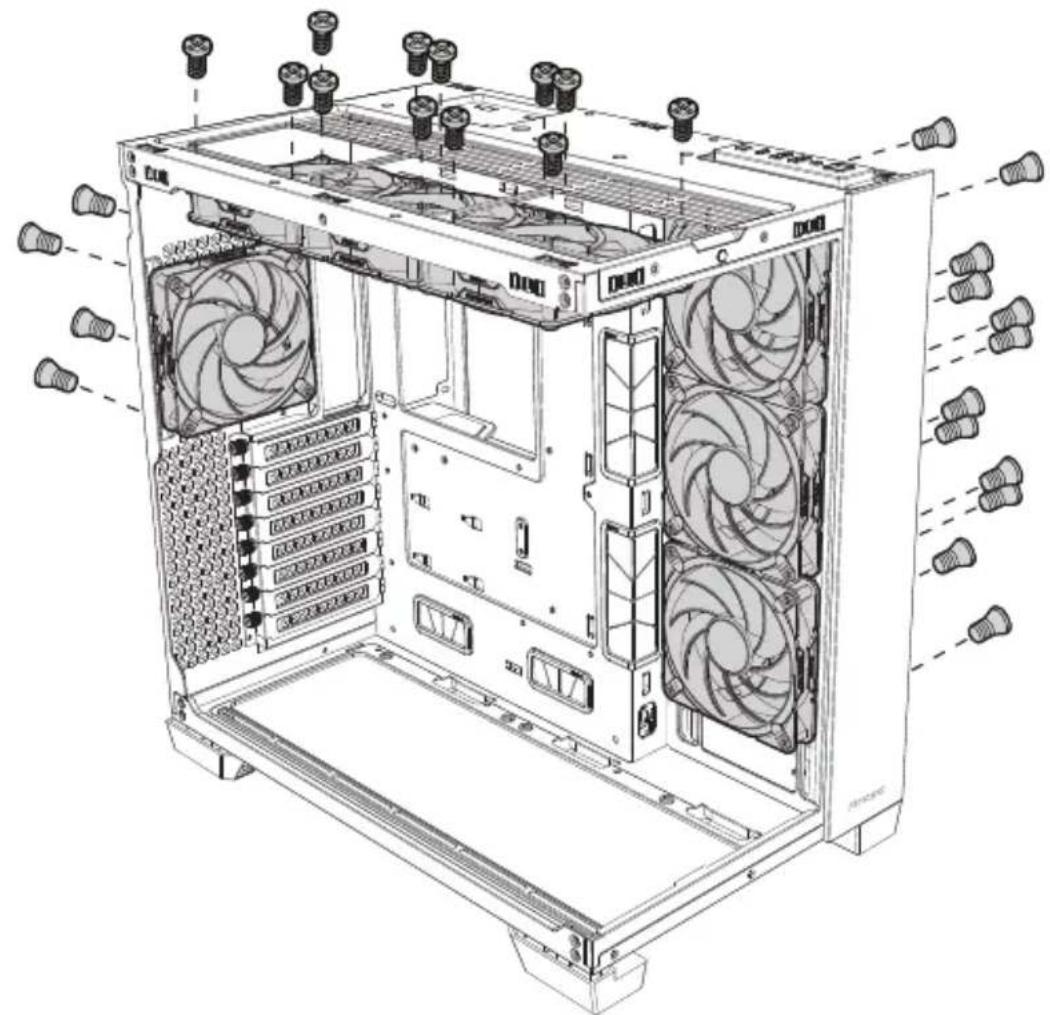
natural_image
Technical line drawing of a desktop computer tower with visible fan and drive bays (no text or labels)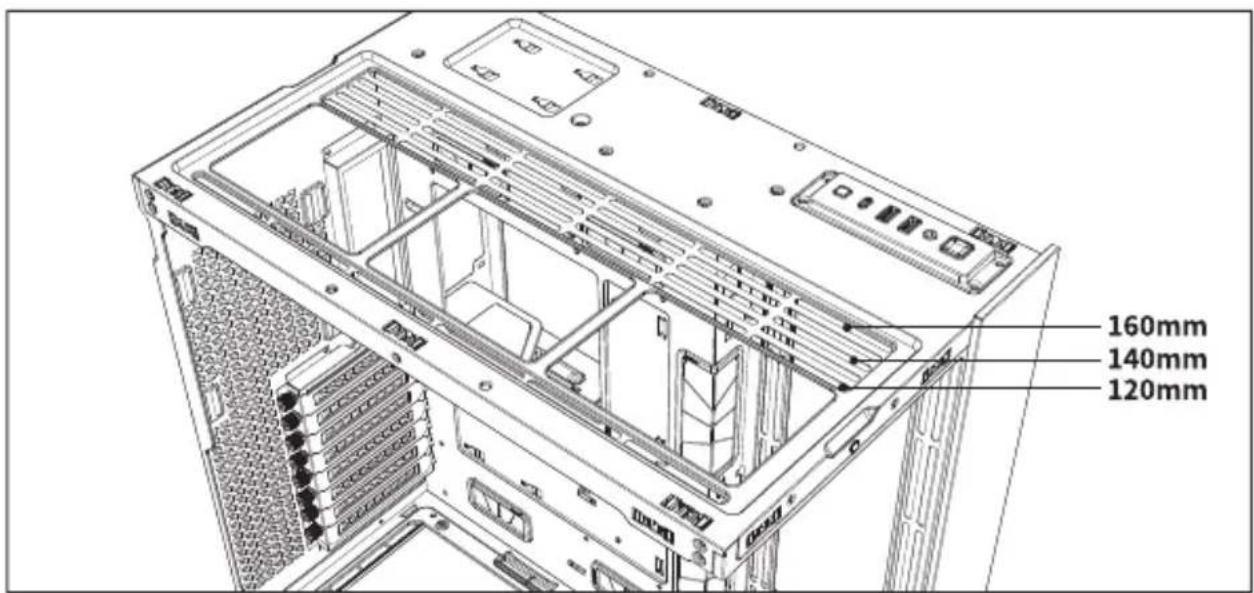
text_image
160mm 140mm 120mm[B] BOTTOM FAN : 120MM
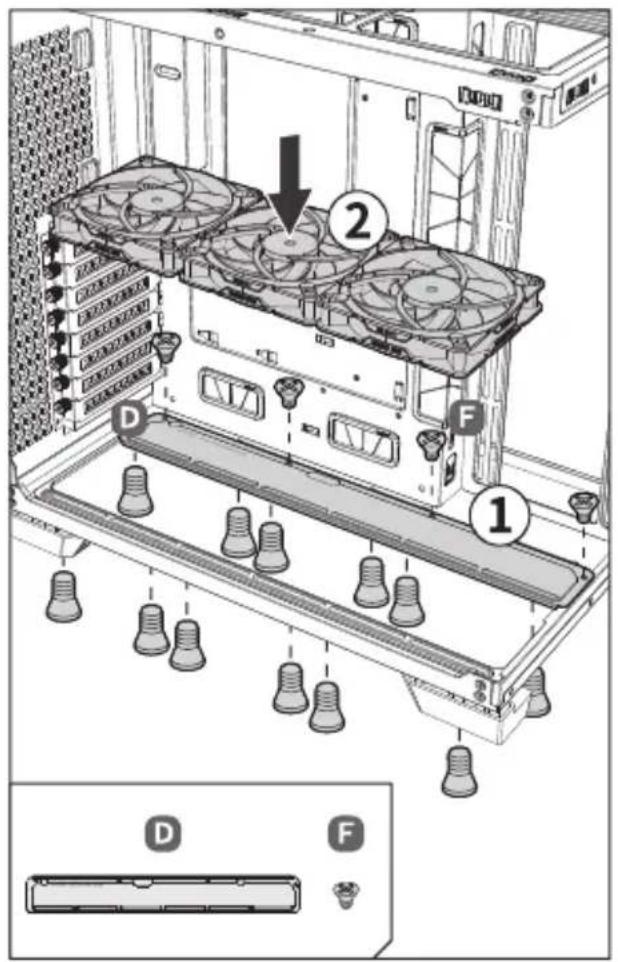
text_image
Diagram of a server rack with labeled components and a magnified view showing component D and F.[C] BOTTOM FAN : 140MM
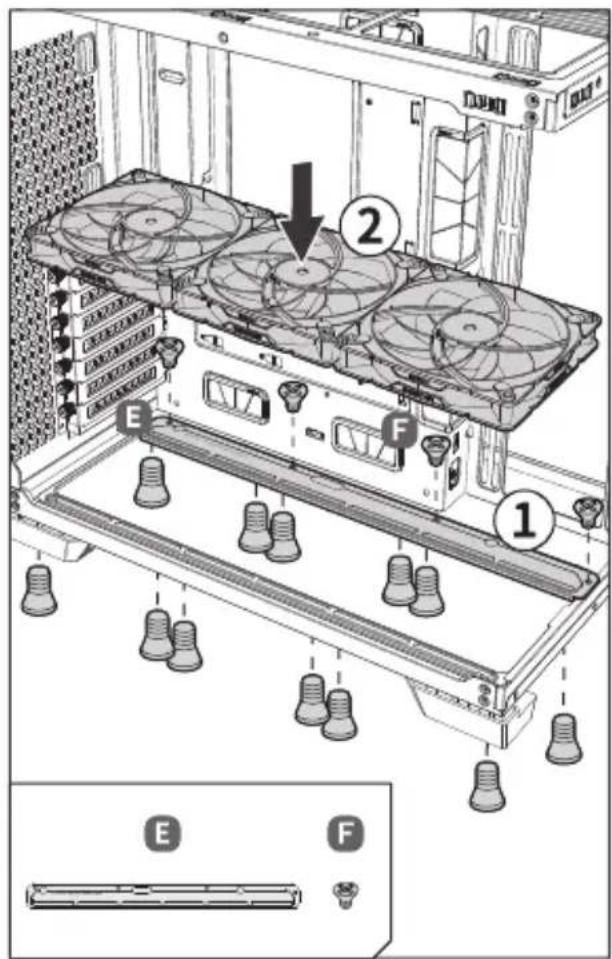
text_image
Technical diagram of a server rack with labeled components and a zoomed-in view showing component E and F.[D] BOTTOM FAN : 160MM
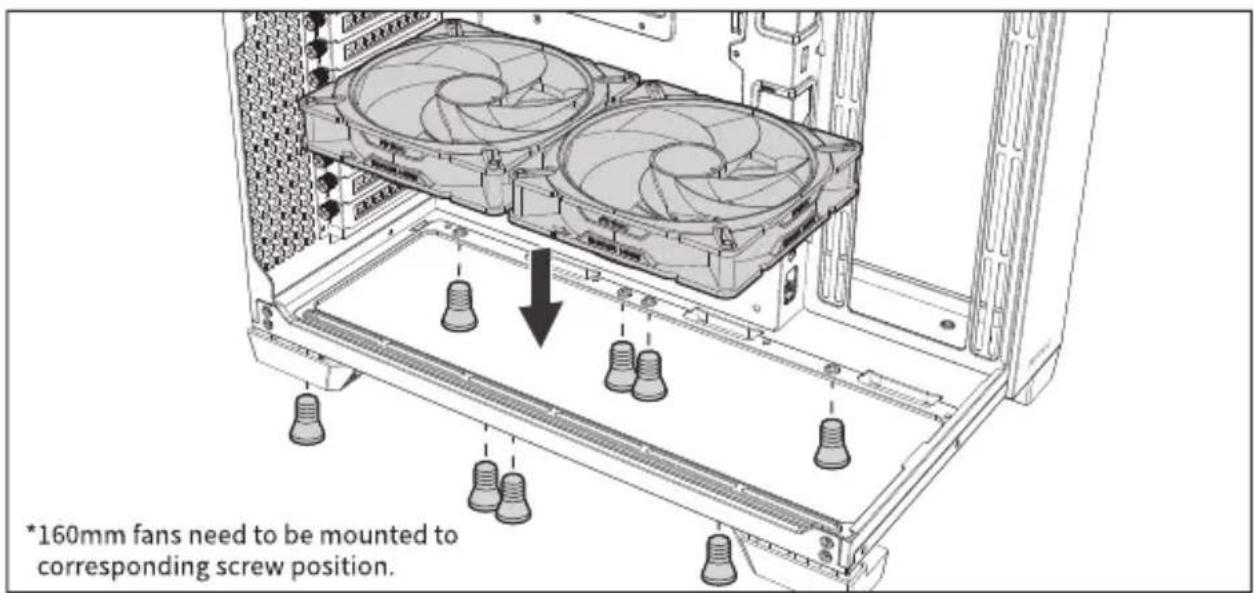
text_image
*160mm fans need to be mounted to corresponding screw position.INSTALLATION GUIDE
8 LIQUID COOLING RADIATOR INSTALLATION
Installation des Kühlers für die Flüssigkeitskühlung | Installation des Radiateurs Watercooling | Istallazione del radiatore di raffreddamento liquido | Instalación de radiador de refrigeración líquida | 安装水冷散热器 | 安装水冷散热器 | 액체 냉각 라디에이터 설치 | 液体冷却ラジエーターの設置
[A] TOP RADIATOR
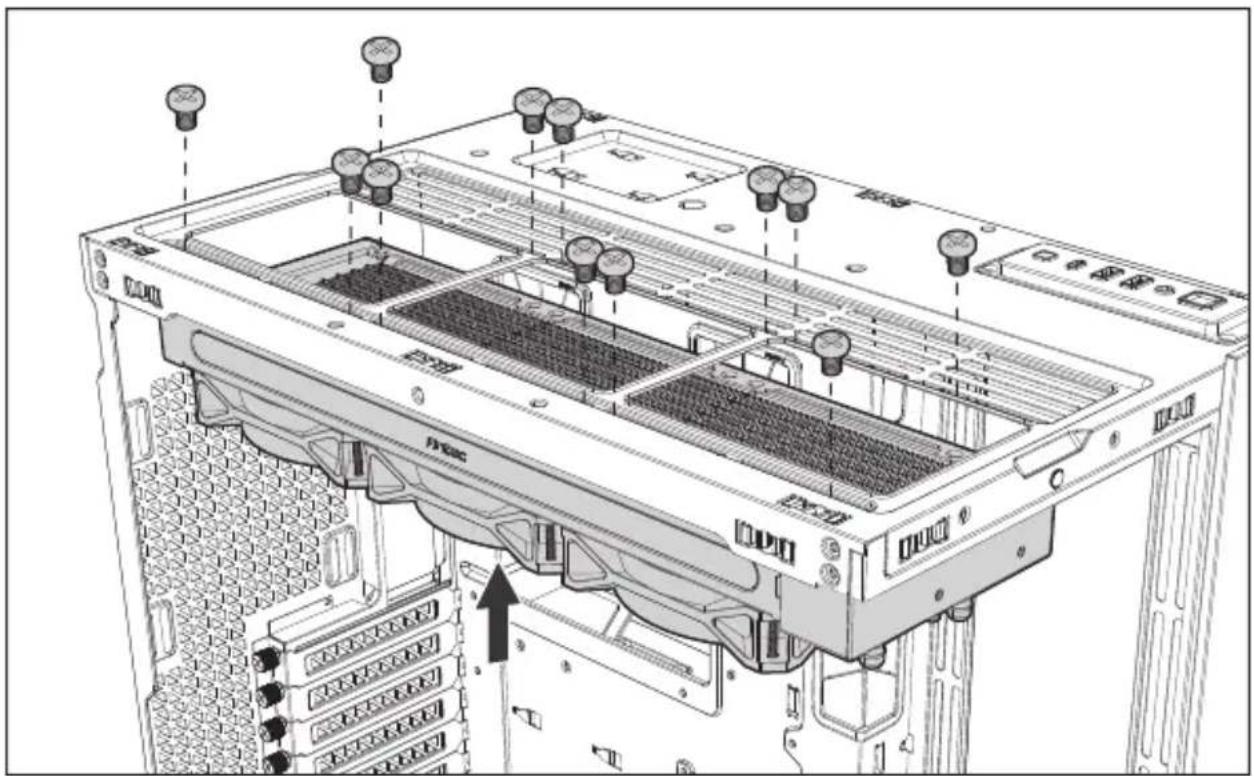
natural_image
Technical diagram of a server rack with multiple ports and connectors, showing internal structure and mounting points (no text or labels)[B] BOTTOM RADIATOR
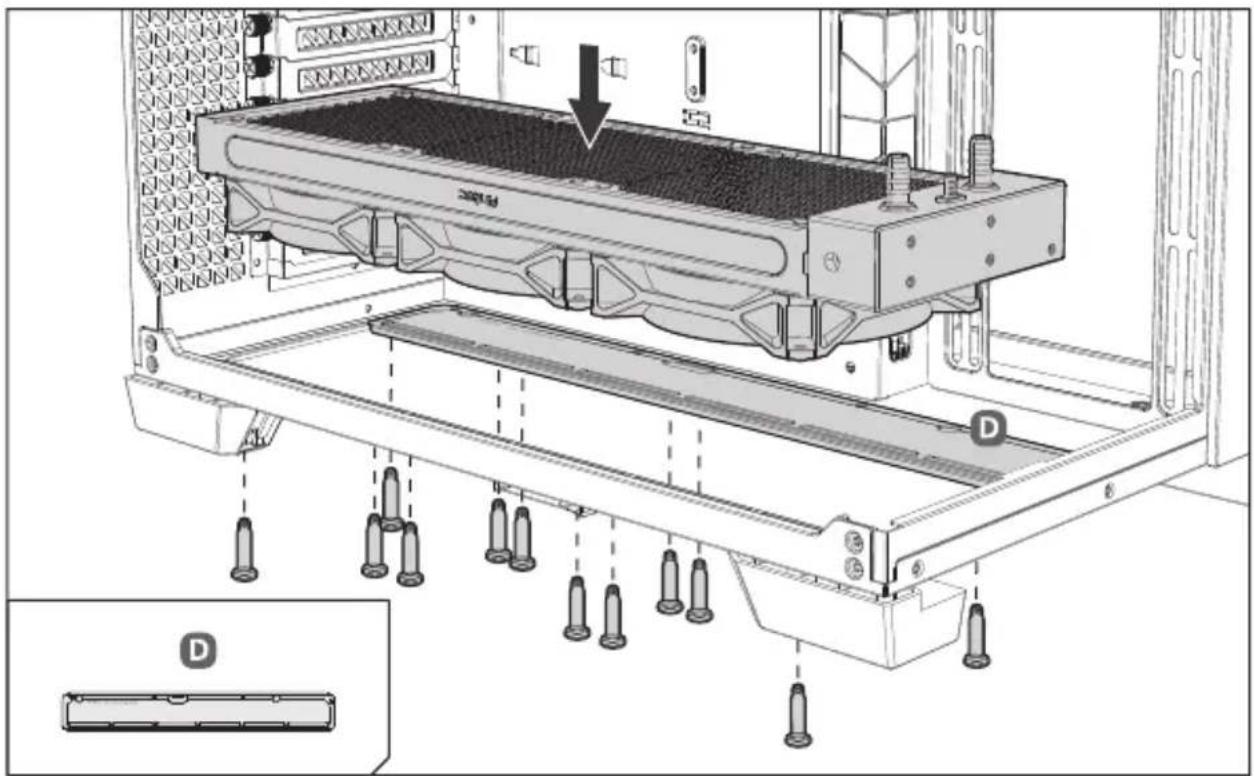
text_image
Technical diagram of a server rack with labeled components and an inset showing component D[C] SIDE RADIATOR
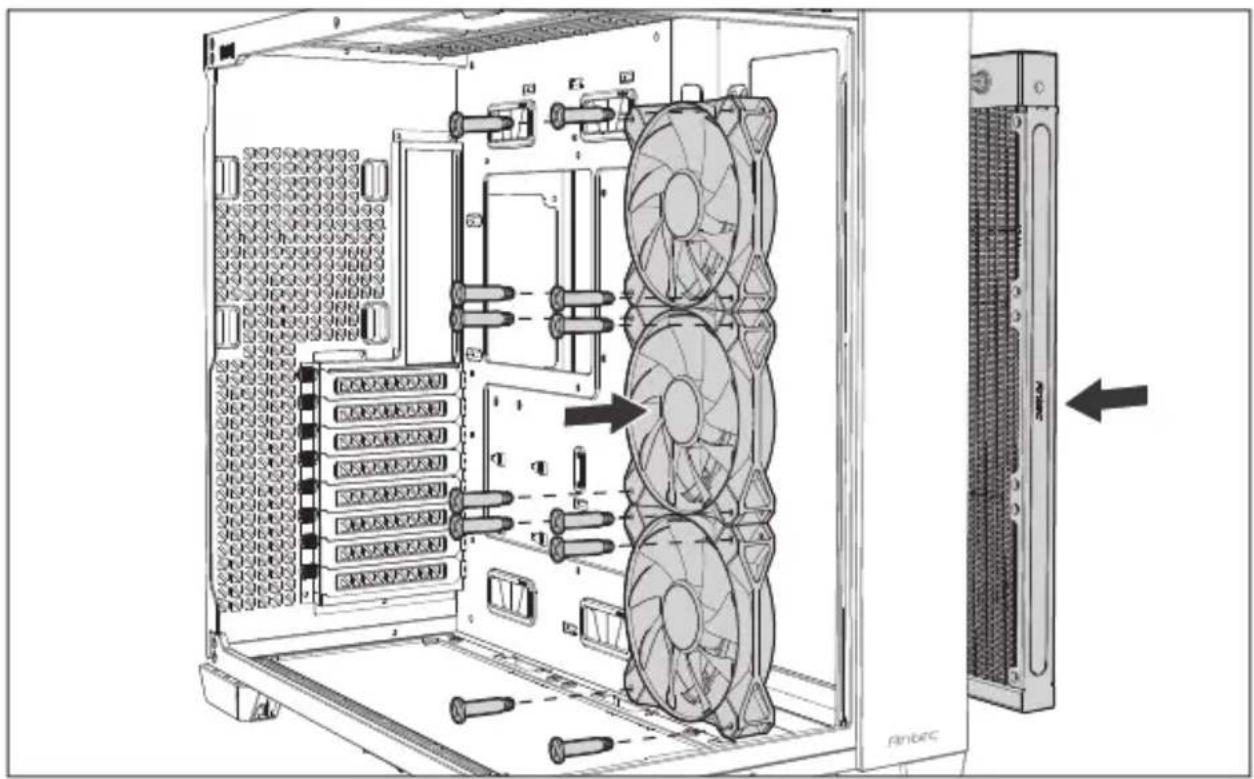
natural_image
Technical diagram of a server rack with multiple fans and drive bays, showing internal components and ventilation ducts (no text or labels)[D] REAR RADIATOR
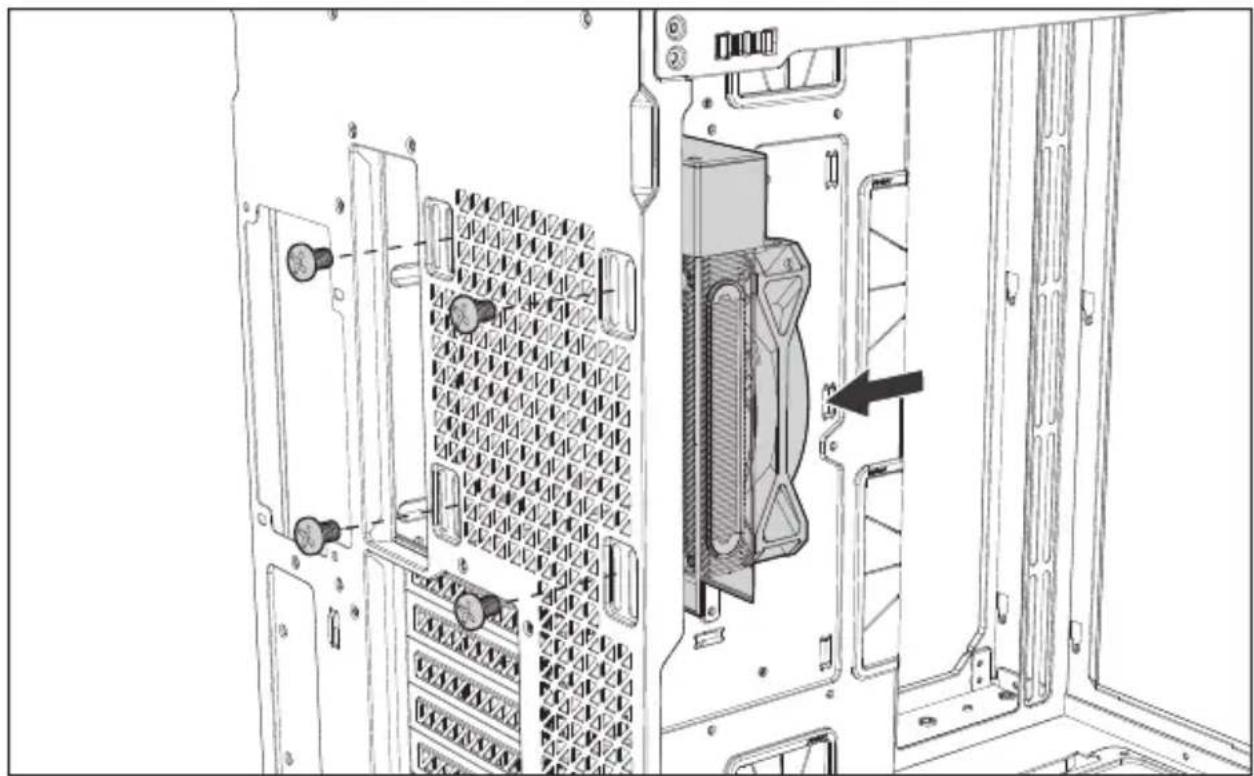
natural_image
Technical diagram of an internal server rack with a highlighted component (no text or symbols)INSTALLATION GUIDE
9 ROUTING SUGGESTION
Vorschlag kabelführung | Suggestions d'installation | Suggerimento percorso cavi | Sugerencia de routing | 整線建議 | 整线建议 | 剧업공정 제한 | おススメの配线
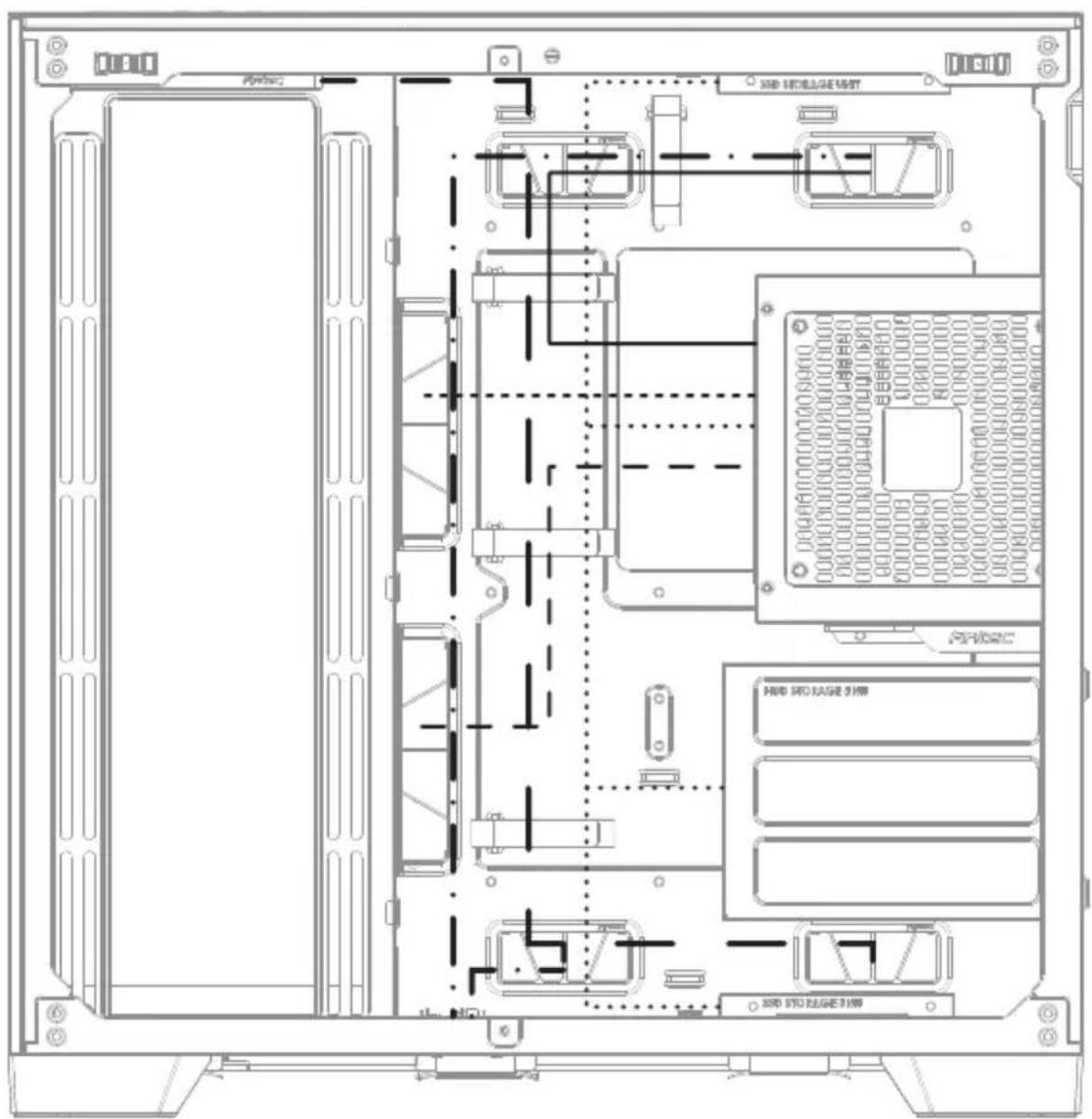
text_image
SIM SIO/EDGE UNIT SIM SIO/EDGE UNIT PROD SIM SIO/EDGE UNIT SIM SIO/EDGE UNIT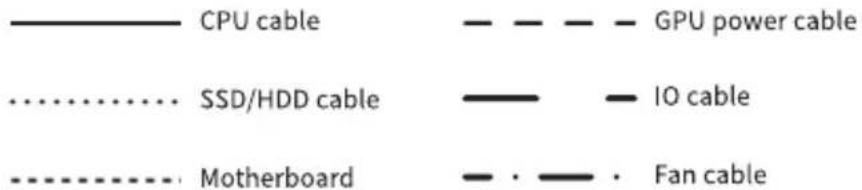
text_image
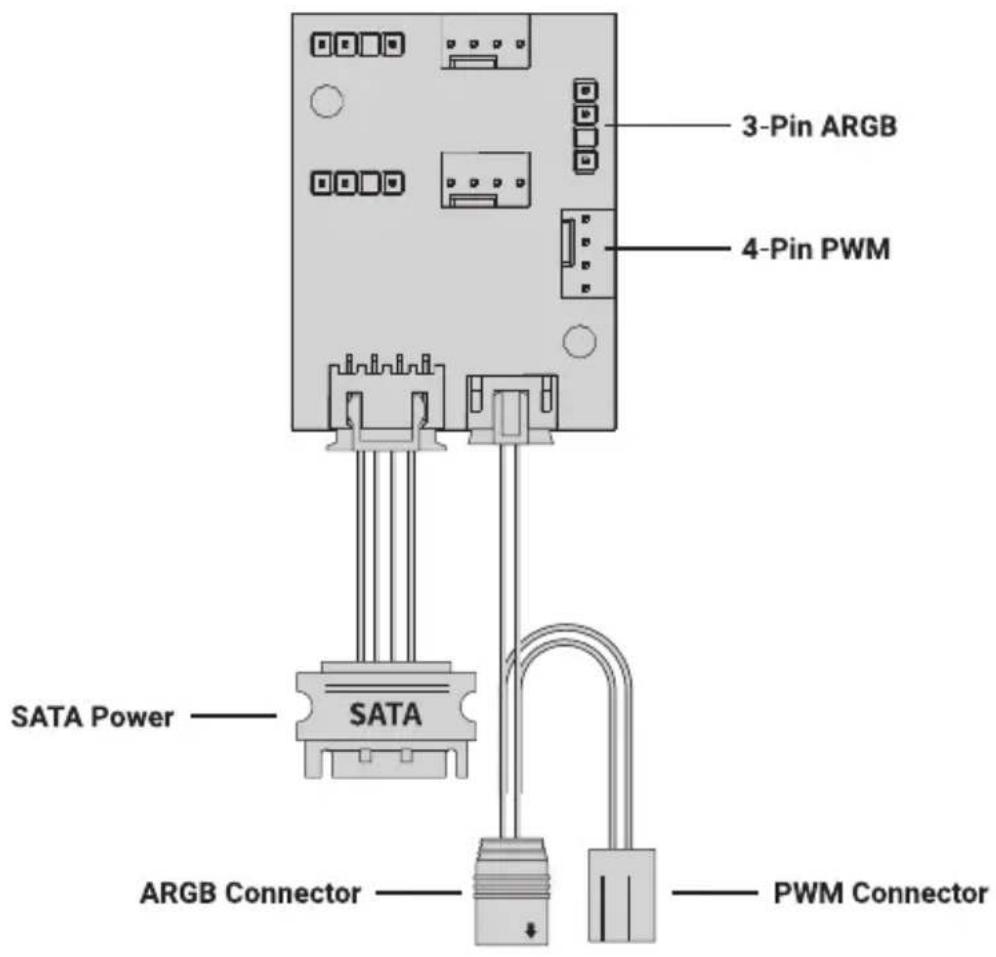
CPU cable GPU power cable SSD/HDD cable IO cable Motherboard Fan cable10 ARGB & PWM FAN HUB CONNECTIONS
Multifunktions-Lüftersteuerung | Contrôleur de ventilateur multifonction | Controller multifunzionale di ventilatore | Controlador de ventilador multifunción | 多功能风扇控制器 | 多功能风扇控制器 | ARGB & PWM 텐 히브 연결방법 | ARGB & PWM ファン接続用のマルチハブ
*2 x 3-Pin ARGB and 2 x 4-Pin PWM headers already connected with the pre-installed fans. For the additional fan connection, the current of each ARGB or PWM connection must be less than 1.5A.
text_image
3-Pin ARGB 4-Pin PWM SATA Power —— SATA ARGB Connector —— PWM Connector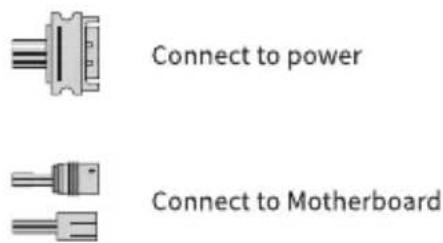
text_image
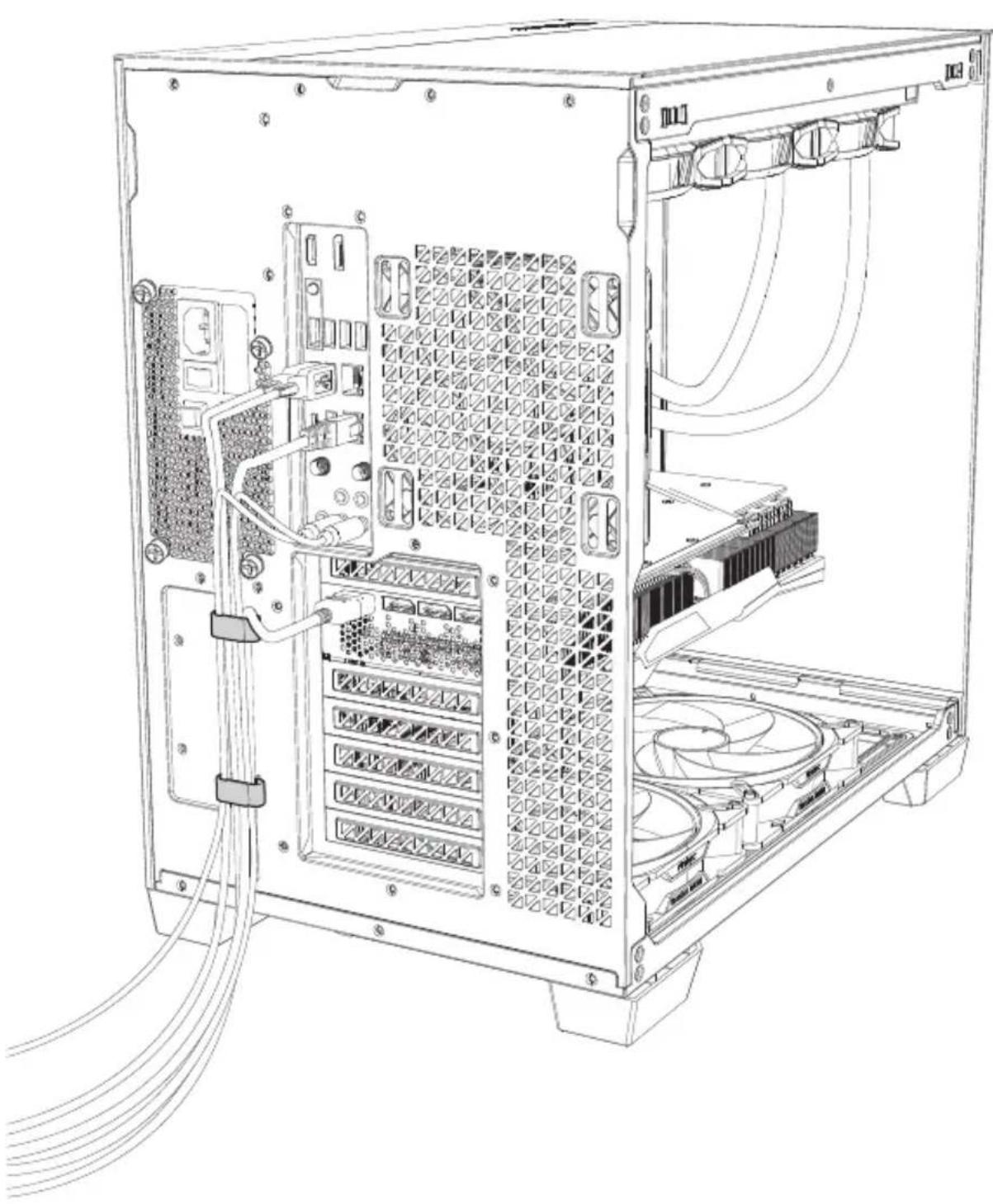
Connect to power Connect to MotherboardCABLE MANAGEMENT IN THE BACK
Kabelmanagement hinten | Cable management arrière | Gestione cavi nella parte posteriore | Organización del cableado atrás | 後方整線區 | 后方整线区 | 후면 선정리 | リアの配线