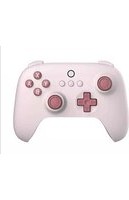
Ultimate C Bluetooth Controller - Contrôleur 8BitDo - Notice d'utilisation et mode d'emploi gratuit
Retrouvez gratuitement la notice de l'appareil Ultimate C Bluetooth Controller 8BitDo au format PDF.

| Marque | 8BitDo |
| Modèle | Ultimate C Bluetooth Controller |
| Catégorie | Contrôleur |
| Type de produit | Manette sans fil Bluetooth |
| Compatibilité | Nintendo Switch (version 3.0 ou ultérieure) |
| Alimentation | Batterie lithium-ion intégrée 480 mAh |
| Autonomie | 16 heures de jeu |
| Temps de charge | Environ 2 heures |
| Indicateur de batterie | LED rouge clignotante (faible), fixe (charge), éteinte (pleine) |
| Connexion sans fil | Bluetooth |
| Connexion filaire | USB-C (nécessite l'activation de la communication filaire dans les paramètres Switch) |
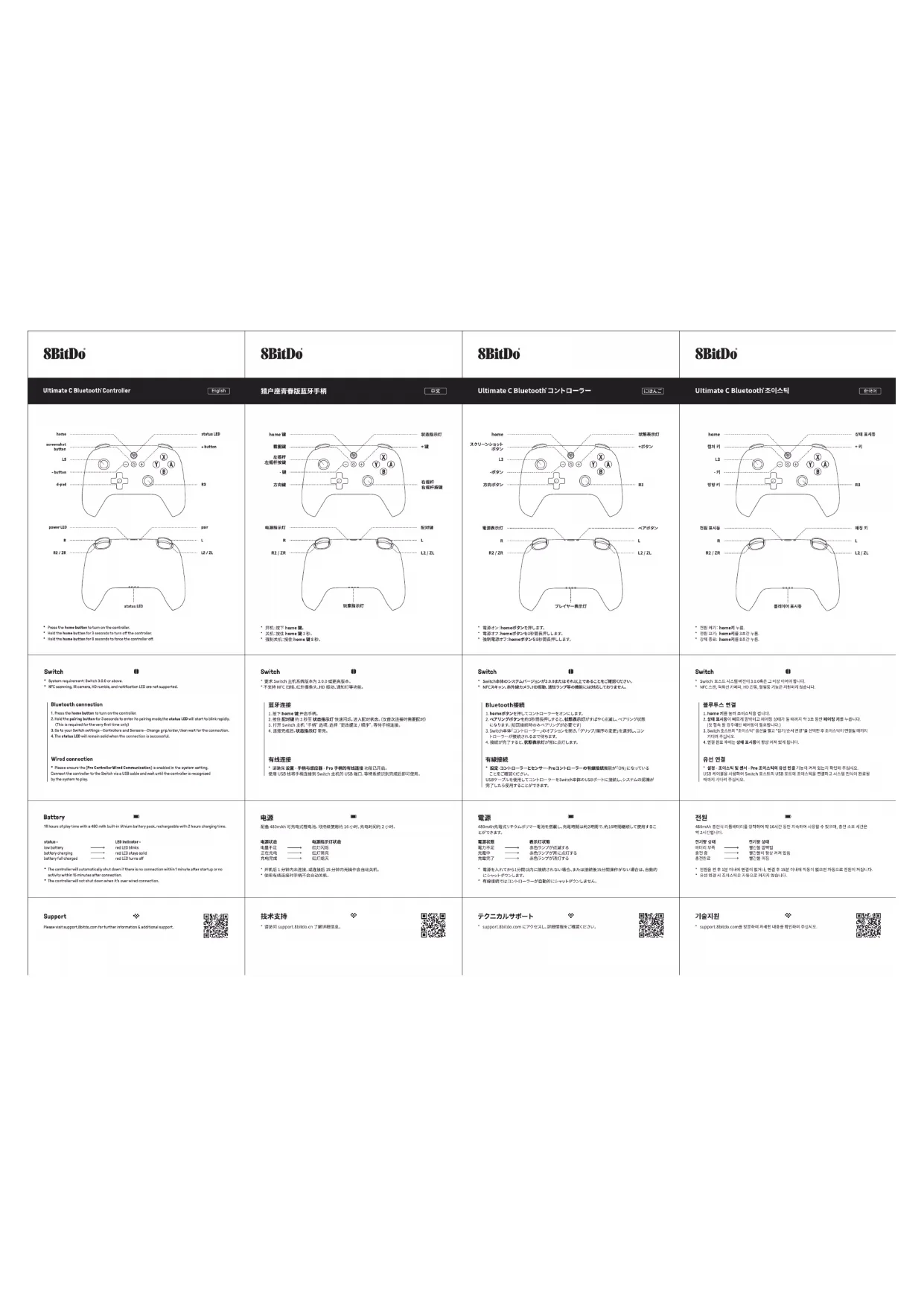
| Fonctions principales | Bouton d'accueil, pavé de direction, boutons A/B/X/Y, gâchettes, joysticks analogiques |
| Mise sous tension | Appuyer sur le bouton d'accueil |
| Mise hors tension | Maintenir le bouton d'accueil enfoncé 3 secondes |
| Extinction forcée | Maintenir le bouton d'accueil enfoncé 8 secondes |
| Appairage Bluetooth (première fois) | Maintenir le bouton de couplage enfoncé 3 secondes jusqu'à clignotement rapide de la LED |
| Mise en veille automatique | Arrêt automatique après 1 min sans connexion ou 15 min d'inactivité |
| Désactivation de la veille en mode filaire | La manette ne s'éteint pas automatiquement lorsqu'elle est connectée par câble |
| Fonctions non supportées | NFC, caméra infrarouge, HD Rumble, LED de notification |
| Support technique | support.8bitdo.com |
FOIRE AUX QUESTIONS - Ultimate C Bluetooth Controller 8BitDo
Questions des utilisateurs sur Ultimate C Bluetooth Controller 8BitDo
0 question sur cet appareil. Repondez a celles que vous connaissez ou posez la votre.
Poser une nouvelle question sur cet appareil
Téléchargez la notice de votre Contrôleur au format PDF gratuitement ! Retrouvez votre notice Ultimate C Bluetooth Controller - 8BitDo et reprennez votre appareil électronique en main. Sur cette page sont publiés tous les documents nécessaires à l'utilisation de votre appareil Ultimate C Bluetooth Controller de la marque 8BitDo.
MODE D'EMPLOI Ultimate C Bluetooth Controller 8BitDo
| 8BitDo | 8BitDo | 8BitDo | 8BitDo |
| Ultimate C Bluetooth ControllerEnglish猎户座青春版蓝牙手柄中文Ultimate C Bluetooth'コントローラーにほんごUltimate C Bluetooth'조이스틱한국어 | |||
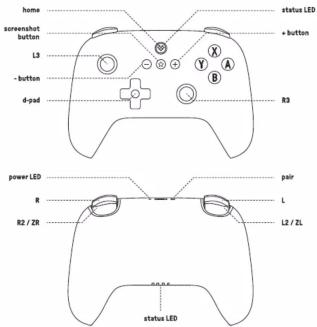 * Press the home button to turn on the controller.* Hold the home button for 3 seconds to turn off the controller.* Hold the home button for 8 seconds to force the controller off. * Press the home button to turn on the controller.* Hold the home button for 3 seconds to turn off the controller.* Hold the home button for 8 seconds to force the controller off. | 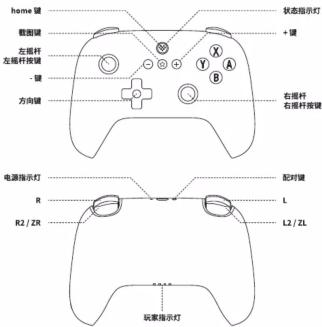 * 开机:按下home器.* 关机:按下home器3秒.* 视制关机:按住home器8秒。 * 开机:按下home器.* 关机:按下home器3秒.* 视制关机:按住home器8秒。 | 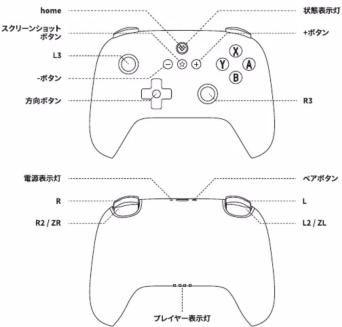 * 音源オンhomeボタン序列します.* 電源オフ.homeボタンを移回操作します.* 強射電源オフ.homeボタンを移回器序列します。 * 音源オンhomeボタン序列します.* 電源オフ.homeボタンを移回操作します.* 強射電源オフ.homeボタンを移回器序列します。 | 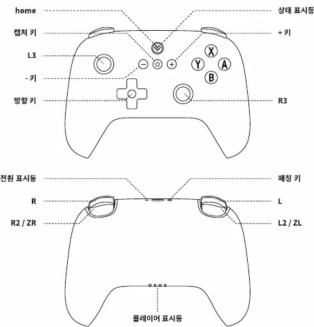 * 전환经纪home卸 Consolidation.com* 전환经纪homeボタンを초감나NCAM* 강제종료.homeボタンを초감나NCAM。 * 전환经纪home卸 Consolidation.com* 전환经纪homeボタンを초감나NCAM* 강제종료.homeボタンを초감나NCAM。 |
| SwitchSystem requirement: Switch 3.0 or above.* MFC scanning, IR camera, HD rumble, and notification LED are not supported.Bluetooth connection1. Press the home button to turn on the controller.2. Hold the passing button for 3 seconds to enter its pairing mode, the status LED will start to blink rapidly.(This is required for the very first time only)3. Go to your Switch settings—Controls and Sensors—Change grid/order, then wait for the connection.4. The status LED will remain sold when the connection is successful.Wired connection* Please ensure the(Pro Controller Wired Communication) is enabled in the system setting. Connect the controller to the Switch via a USB cable and wait until the controller is recognized by the system to play. | Switch* 要求Switch主机系统版本为3.0或要素版本.* 不支持NFC扫描、红外摄像头、HD自动、触控灯等功能。蓝牙连接1. 按下home器可选光接。2. 红色触控灯的FPC软磁感灯快速闪烁,进入配对状态。(仅首次连接时需要配对)3. 打开Switch主机“手柄”选择,选择“软改度法/顺序”,等待手柄连接。4. 连接完成后,软磁感灯常亮。有线连接* 清除保设置:手柄与感应器-Pro手柄的有线连接功能日开启。使用USB线将手柄连接到Switch主机的USB端口,等特系统识别完成后即可使用。 | Switch* Switch本体のシステムバージングが3.0またはその以上であることも確認ください。* NFCスキャン、条件線カメラ、HD自動、連控タイプ等の機関に対応しておりません。Bluetooth接続1. Nameボタンを利用してコンドコーラーをオンにします。2. ベアリングボタンを移回信号なし,すると状態表色打がすればやく点延し、ペアリング状態になります。(如因縫絡時のみペアリングが必要です)3. Switch本体コンドローラーのガオションを開示、「グループ/顺序の変更」を選択し、コンドコーラーが連続されるまでで発見。4. 接続が完了すると状態表色打が焦点に点します。有線接続* 配定コンドローラーとセンサーProコンドローラーの有線接続機能がONになっていることをも確認ください。USBがグループを受信してコンドローラーをSwitch本体のUSBポートに接続し、システムの認進が完了したら使用することができます。 | Switch* Switch오드스사스템변전이3.0或者은그이상이야합니다。* NFC스판、의적선치界面、HD전통、전화를기능은자원하지합니다. |
| 블루투스 연결1. home栏目을위치조의스PI를 Ok나다.2. 전환로시를베치게일반이고마이염성상태가들데지지약초호한폐이해키를 You니다.(자 LinkedIn을장마이해마이이들되합니다.)3. Switch아스스터“조의스PI”을를Call고장마에서연량을전력한후조의스PI이연결을저치지기와의로로우에는설계표서를항상처치하게됩니다.유선 연결* 생계조의스PI 및 센사-Pro조의스PI의응선변정기능의커저있는지限定하십시오.USB coffee일을사용하여Switch오스트肽USB토토에조의스PI를면�하고시스템한식이완료될해마지/사파이주십시오. | |||
| Battery16 hours of play time with a 480 mAh built-in lithium battery pack, rechargeable with 2 hours charging time.status:LED indicator:low batteryred LED lightsbattery chargingred LED stays solidbattery full chargedred LED turns off* The controller will automatically shut down if there is no connection within 1 minute after startup or no activity within 15 minutes after connection.* The controller will not shut down when it's own wired connection. | 电源配置480mAh可充电式锂电池,可持续使用的16小时,充电时间为2小时。电源状态电源状态灯状态充电不足红灯闪烁正在充电红灯常亮充电完成红灯增次* 开机前1分特内未连接,或连接后15分钟内无操作全自动关机。* 使用有线连接时手柄不会自动关机。 | 電源480mAh高電式リタウムポリマー電池を預置し,充電時間は約2時間で,約16時間継続して使用することができます。電源状態表示灯灯照明方式を含有シングブが消滅する充電中含有シングブ当に点灯する充電流 strengths光電流による光電流が消滅する* 電源を入れてから15間以内に接続されない場合,または接続後15間操作がない場合は,自動的にシケットダウンします。* 有線接続ではコンドローラーが自動的にシャットダウンしません。 | 전원480mAh 중전식리플레이를장치하여에16시간동한지속하여사용할수 있으며,중전소요시간은학2시대입니다. |
| 전기상태바이이상태공업을보건물출전물출전물출전물출전물출전물출전물출전물출전물출전물출전물출전물출전물출전물출전물출전물출전물출전물출전물출전물출전물출전물출전물출전물출전물출전물출전물출전물출전물출전물출전물출전물출전물출전물출전物출전물출전물출전물출전물출전물출전물출전물출전물출전물출전물출전물출전물출전물출전물출전물출전물출전물출전물출전물출전물출전물출전물출전물출전물출전물출전물출전물출전물출전물출전물출전물출전물출전물出資金이내용이러지지입합니다. | |||
  | 技术支持* 适用于support.Botdo.cn了解详细信息。 | テクニカルサポート* support.Botdo.comにアクセスし,評価情報をご確認ください。 | 기술지원* support.Botdo.com을방문하여자세한내용을확한하여주십시오。 |
| Ultimate C Bluetooth - JoystickDeutschManette Bluetooth Ultimate CFrenchManico Bluetooth Ultimate CItalianoConsola Bluetooth de Ultimate CEspañol | |||
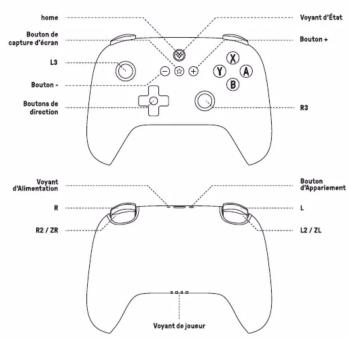 * Sémarrage: appuyez sur le Buten d'accueil.* Arifl: appuyez et maintenze entfoncl le Buten d'accueil pendant 3 secondes.* Arifl foroi: appuyez et maintenze entfoncl le Buten d'accueil pendant 8 secondes. * Sémarrage: appuyez sur le Buten d'accueil.* Arifl: appuyez et maintenze entfoncl le Buten d'accueil pendant 3 secondes.* Arifl foroi: appuyez et maintenze entfoncl le Buten d'accueil pendant 8 secondes. | 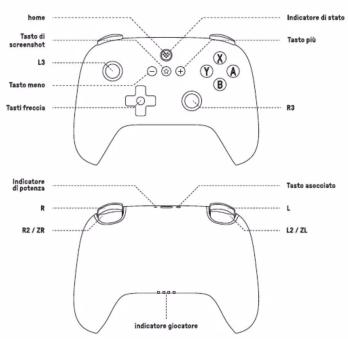 * Accensione: Primero II taste hame.* Spagimento/Tenere premuto II taste hame per 3 secondi.* Spagimento/forzato/Tenere premuto II taste hame per 8 secondi. * Accensione: Primero II taste hame.* Spagimento/Tenere premuto II taste hame per 3 secondi.* Spagimento/forzato/Tenere premuto II taste hame per 8 secondi. | 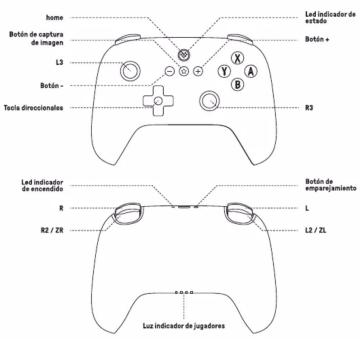 * Encandido: Precision el botón hame.* Apagado: martenga presionado el botón hame durante 3 segundos.* Apagado forzado: martenga presionado el botón hame durante 8 segundos. * Encandido: Precision el botón hame.* Apagado: martenga presionado el botón hame durante 3 segundos.* Apagado forzado: martenga presionado el botón hame durante 8 segundos. | |
| SwitchErfondert Switch-Hostsystem Version 3.0.0 oder höher* MFCScan, Inferrkamere, HD-Vibration, Benachrichtigungspicht usw. werden nicht unterstützt.Bluetooth-Verbindung1. Stückter Sie die Reme-Texte, um den Joystick einzuschalten.2. Harter Sie die Kopplungssteu es 3 Sekunden lang gedrückt, bis die Statusanzeige schnell blinet, umden Kopplungsstatus zu aktivieren. (Pierung ist nur bei der ersten Verbindung erforderlich)3. Ohlen Sie die Option „Griff“ da Switch-Hostsysteme, wählen Sie „Griff/Ortning ändem“ und wartensie, bis der Griff verbunden ist.4. Wenn die Verbindung hergestellt ist, leuchtet die Statusanzeige auf.Verkabelte Verbindung* Stellen Sie sicher, dass die Funktion Kabelgebundene Verbindung im Einstellung- Griff &Basseau - Pro Griff aktiviert ist.Verwenden Sie das USB-Kabel, um den Joystick an den USB-Anschluss Ihres Saftich-Hostsystemsanzuschließen, und warten Sie, bis die Systemenkennung abgeschlossen ist. | 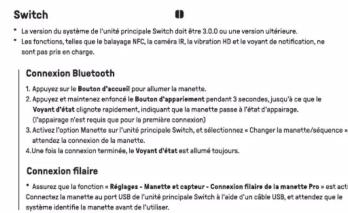 atvia. atvia. | 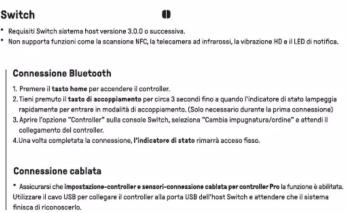 | 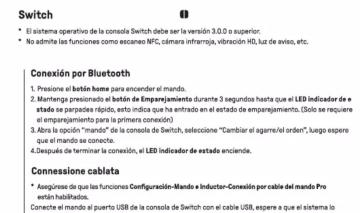 identifique para el uso. identifique para el uso. |
| StromversorgungAusgestafft mit einem wiederaufabaren Li-Iken-Aktu (500 mAh), der für ca. 16 Stunden Dauerbetrieb reichtund in ca. 2 Stunden aufgelsen werden kann.Batterieratata -Unzurechsende LeitungStatus der Anzeige -Rottes Licht blindAufladenRottes Licht leuchtetLeidvergang abgeschlossenRottes Licht aus* Der Joystick schaltet sich automatisch aus, wenn er nicht innerhalb von 1 Minute nach dem Einschahengebschlüssen sind oder wenn innerhalb von 5 Minuten nach dem Anschluss keine Bedeutung erfolgt.* Der Joystick schaltet sich automatic aus, wenn eine kabelgebundene Verbindung verwendet wird. | 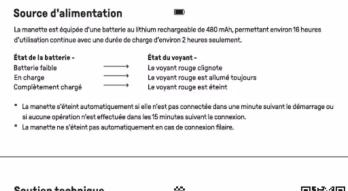 | 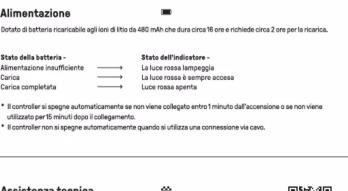 | 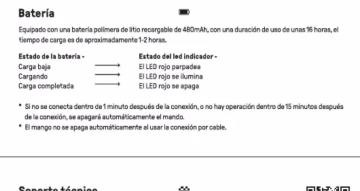 |
| Technische UnterstützungBrite beisuchen Sie support.Bitidis.com für weitere Informationen. |  |  |  |
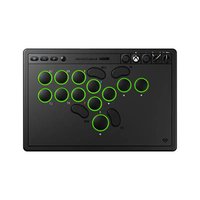
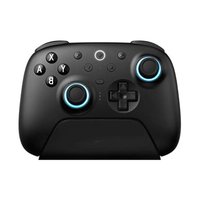
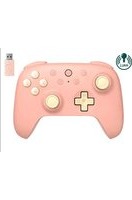
Marque : 8BitDo
Modèle : Ultimate C Bluetooth Controller
Catégorie : Contrôleur