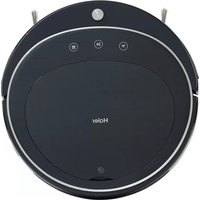
HB-X570LSC - Balayeuse HAIER - Notice d'utilisation et mode d'emploi gratuit
Retrouvez gratuitement la notice de l'appareil HB-X570LSC HAIER au format PDF.


| Type de produit | Balayeuse robot aspirateur et laveur |
| Marque | Haier |
| Modèle | HB-X570LSC |
| Diamètre | 320 mm |
| Épaisseur | 78 mm |
| Poids net | 2,4 kg |
| Alimentation | 14,8 V, batterie lithium-ion 2600 mAh |
| Autonomie | Environ 100 minutes |
| Temps de charge | 240 à 360 minutes (première charge : 12h) |
| Capacité du réservoir à poussière | 600 ml |
| Capacité du réservoir d'eau | 180 ml |
| Modes de nettoyage | Planifié (en zigzag), bordure, ponctuel (via app), aléatoire, traction |
| Fonctions de la télécommande | Marche/arrêt, direction, retour à la base, planification, aspiration, horodatage |
| Type de recharge | Manuelle (adaptateur) ou automatique (station d'accueil) |
| Indicateurs lumineux | Rouge (batterie faible), vert clignotant (en charge), vert fixe (charge complète) |
| Entretien et nettoyage | Nettoyage régulier des brosses, du réservoir, des filtres, des capteurs et des contacts de charge |
| Sécurité | Ne pas utiliser en extérieur, sur des sols humides ou près de flammes ; arrêt automatique en cas de soulèvement |
| Pièces détachées et réparabilité | Brosses latérales, filtres, réservoir à poussière, batterie, roues, module de ventilation |
| Accessoires inclus | Station d'accueil, télécommande, adaptateur, mur virtuel, réservoir d'eau, serpillière, outil de nettoyage |
| Garantie et support | Service après-vente : 4006-515-915, site web : www.haier.com |
FOIRE AUX QUESTIONS - HB-X570LSC HAIER
Questions des utilisateurs sur HB-X570LSC HAIER
0 question sur cet appareil. Repondez a celles que vous connaissez ou posez la votre.
Poser une nouvelle question sur cet appareil
Téléchargez la notice de votre Balayeuse au format PDF gratuitement ! Retrouvez votre notice HB-X570LSC - HAIER et reprennez votre appareil électronique en main. Sur cette page sont publiés tous les documents nécessaires à l'utilisation de votre appareil HB-X570LSC de la marque HAIER.
MODE D'EMPLOI HB-X570LSC HAIER

natural_image
Blue cartoon character illustration with helmet and outfit (no text or symbols)Haier
智能扫地机器人
使用说明
Haier
智能扫地机器人
SMART SWEEPING ROBOTS

感谢您购买海尔出品的智能扫地机器人!
希望我们的产品能为您带来智能便捷的生活方式!
若遇到此说明书无法解决的问题
请联系我们的售后服务中心 4006-515-915
更多详情请登录海尔官方网站 WWW.HAIER.COM
natural_image
Line drawing of a cartoon astronaut character with helmet and body structure (no text or symbols)1. 欢迎使用
2. 安全说明
3. 产品组成
3.1 部件名称
3.2 产品参数
4. 使用说明
4.1 遥控器说明
4.2 操作指南
5. 产品维护
5.1 边刷清理更换
5.2 集尘盒及滤网清理
5.3 拖布底盘清理
5.4 其他组件维护
6. 常见故障
6.1 报警提示
6.1 可替换模组
1. 欢迎使用
2. 安全说明
3. 产品组成
使用本产品前,请阅读以下安全说明并遵循所有常规的安全预防措施。
请仔细阅读本说明书 请保留好本说明书
任何与本说明书不符的操作都有可能导致本产品损坏
主机 充电座 虚拟墙 电源配适器 配件相关安全注意事项
- 切勿自行拆卸修理或改装机器否则将会损坏产品并发生危险。
- 本产品只能使用原装电源配适器否则可能导致产品受损起火。
- 电源插头的金属部分周围附着灰尘时,务必用干布擦拭干净。
- 电源配适器使用100-240V交流电压,请将插头正确插入插座避免孩童触碰。
- 请勿在有可能起火或爆炸的环境中使用本产品。
- 禁止站立或坐在本产品上否则可能造成产品损坏或发生跌倒。
-
为延长电池的使用寿命,长时间不使用时请将电池拔出,为延长电池的使用寿命,长时间不使用时,请将机器电源开关拨至“0”处。
-
产品在运转清扫中,请注意家中幼童长辈安全,避免造成绊倒发生危险,请勿用手触摸车轮及边刷以免绞入造成受伤。 (幼童请特别注意)
-
切勿湿手触碰,否则有可能导致触电。
-
本产品是精密电子设备,应避免长时间在日光下暴晒。
-
请勿将本产品靠近烟头, 打火机及其他明火。
-
请勿将本产品置于易掉落地方, 如桌椅房间高台上。
-
请勿在潮湿环境使用本产品如浴室。
-
请勿用机器清洁建筑垃圾。
4. 使用说明
5.产品维护
6. 常见故障
- 本产品在报废前请将电池从机器上拆下,拆除电池时请确保本产品没有接通电源,请将废弃电池安全环保回收。
- 禁止对主机及电子附件水洗浸泡, 否则将造成短路损坏。
-
垃圾盒已满时请先清空垃圾再使用机器。
18.请勿损伤加工电源线切勿将重物压在电源线上,对电源线加热或强行拉扯弯折电源线,否则将造成电源线的破损火灾触电等。 -
本产品使用温度范围为0℃-40℃,请勿在高温环境下使用。
- 本产品为户内家用产,请勿在户外使用。
- 使用本产品前,请移除地面上所有易损物品如玻璃杯灯具以及有可能缠住边刷和吸风通道的物品,如电线纸片窗帘。
充电电池相关安全注意事项
1.务必使用专用的电池适配器否则将导致漏液发热或破裂。
2. 切勿与项链发夹等金属物品一起运送或保存否则将导致短路而造成漏液发热或破裂。
3. 使用前请仔细检查电源适配器是否已和插座连接好, 否则可能导致电池受损。
- 发生异常(如变色或变形)时请务必停止使用,否则将导致漏液发热或破裂。
- 进行回收再利用或废弃处理时务必使用胶带等将电极部分绝缘。
- 切勿浸入水中或接触到液体否则将导致漏液发热或破裂。
1. 欢迎使用
2. 安全说明
3. 产品组成
- 请在充电结束后对本产品进行清洁。
- 进行充电时若发现异常过热请立即停止使用,否则将导致漏液发热或破裂。
- 切勿使电池短路或拆卸电池否则将导致漏液发热或破裂。
- 禁止对电池组进行拆解,否则将导致电池组破裂电解液流出造成火灾及爆炸等危险。
- 接触其他金属将导致发热破裂或起火,请将废旧电池带去海尔机器人授权的维修服务中心或回收商,或者根据当地法规进行废弃处理。
-
切勿将电池投入火中或对电池加热,否则将导致漏液发热或破裂。
-
发现电池外盒变形膨胀电解液流出时, 禁止进行充电或继续使用, 以免发生危险。
- 切勿在其他设备上使用本产品的充电电池,本电池仅适用于海尔智能扫地机器人。
- 电池漏液接触到皮肤或衣服时务必立即使用清水冲洗,若置之不理将导致皮肤发炎等问题。
- 切勿对电池施以强烈撞击或投掷电池,否则将导致漏液发热或破裂。
- 禁止使用导电材料触碰电池接点, 否则易导致短路发热起火。

natural_image
Simple line drawing of a cartoon astronaut character with helmet and torso (no text or symbols)- 使用说明
5.产品维护
6.常见故障
1. 欢迎使用
2. 安全说明
3. 产品组成
3.1部件名称

natural_image
Simple line drawing of a circular mechanical component with three small holes (no text or symbols)主机

natural_image
Technical line drawing of a mechanical bracket component (no text or symbols)充电座

natural_image
Simple line drawing of a cylindrical object with a protruding rod and a submerged container (no text or symbols)手持吸尘器

遥控器

natural_image
Simple line drawing of a plug with a cord, no text or symbols present电源适配器

natural_image
Simple line drawing of a paintbrush (no text or symbols)清洁工具
natural_image
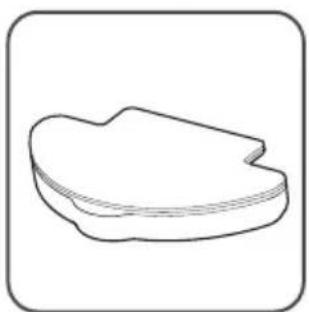
Simple line drawing of a single leaf or seed pod (no text or symbols)水箱组件

natural_image
Two identical mechanical clamping or bracketing diagrams with no text or symbols边刷
natural_image
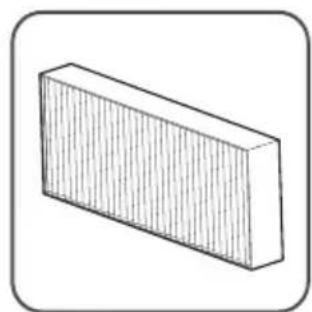
Simple 3D illustration of a rectangular block with vertical lines, no text or symbols present额外高效滤网

natural_image
Illustration of two cylindrical batteries with lightning bolts, no text or symbols present两节7号电池
- 使用说明
5.产品维护
- 常见故障

主机
- 保险杠装饰盖
2.保险杠
3.控制按键
-
面板
-
中盖

主机
1.万向轮 2.充电弹片 3.边刷 4.电池盖 5.吸口 6.底盘 7.边轮 8.水箱/布
1. 欢迎使用
2. 安全说明
3. 产品组成

主机
- 中盖
2.集尘盒
3.DC电源插孔
- 电源开关

集尘盒
1.集尘盒盖
2.初级滤网
3.集尘盒
4.高效滤网
5.集尘盒密封垫
- 使用说明
5.产品维护
- 常见故障
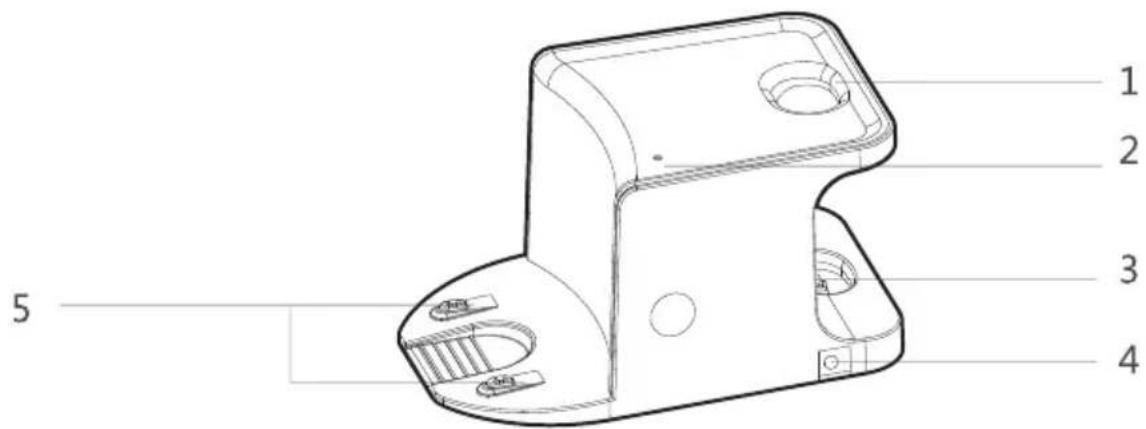
充电基座
1手持座口
- 指示灯
3.手持充电端子
4.DC电源插孔
5.充电端子

手持吸尘器
1吸尘口
-
集尘箱
-
外壳
4.集尘盒开关
5.电源开关
6.充电口
1. 欢迎使用
2. 安全说明
3. 产品组成

水箱组件
- 抹布
2.魔术贴
-
注水口
-
水箱密封盖
3.2产品参数
结构类
| 主机直径 | 320mm |
| 主机厚度 | 78mm |
| 主机净重 | 2.4kg |
电子类
| 电压 | 14.8v |
| 电池容量 | 2600mAh |
| 主机按键类型 | LED触摸按键 |
附件类
| 水箱容量 | 180ml |
| 集尘盒容量 | 600ml |
| 抹布(涤棉) | 316x177x4mm |
运行参数
| 充电类型 | 手动/自动 |
| 一次清扫时长 | 约100min |
| 一次充电时长 | 240-360min |
1. 欢迎使用
2. 安全说明
3. 产品组成
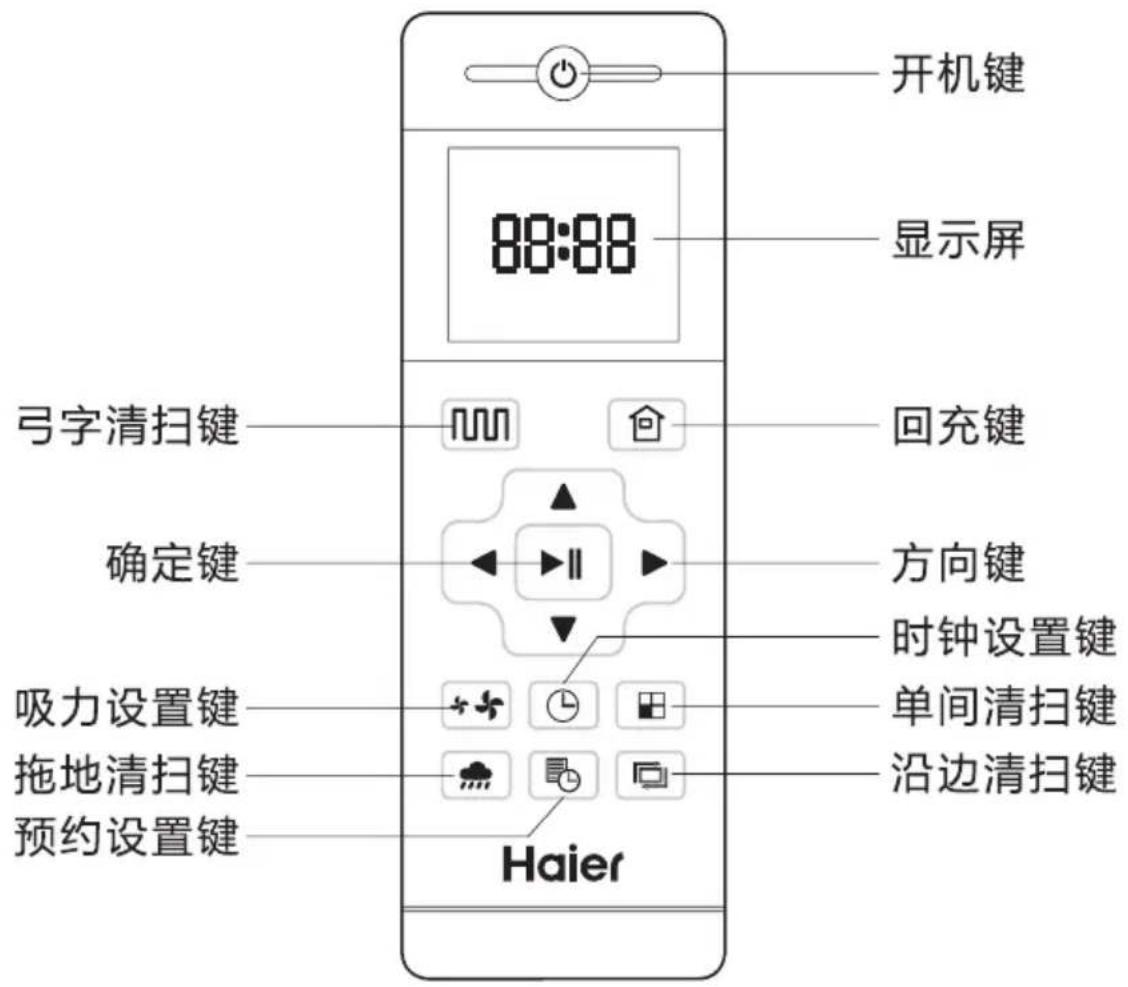
4.1 遥控器说明
4. 使用说明
5.产品维护
6. 常见故障
弓字清扫键
任一清扫模式下,按此键机器进入弓字清扫模式。
回回充键
按此键机器进入回充模式,此时遥控器屏幕显示仓。
▲ 前进键
长按此键机器持续前进,碰到障碍物自动停止。 在预约模式下或时间设置模式下,按此键数字递增。
▼后退键
长按此键机器持续前进,松开后机器暂停。 在预约模式下或时间设置模式下,按此键数字递减。
向左键
长按此键机器持续左转,松开后机器暂停。 在预约模式下或时间设置模式下,按此键数字由分钟切换小时。
▶ 向右键
长按此键机器持续右转,松开后机器暂停。 在预约模式下或时间设置模式下,按此键数字由小时切换分钟。
▶Ⅱ确定键
在工作状态下按此键机器暂停,在暂停状态下机器继续工作。预约设置或时钟设置模式下,按此键保存设置。
吸力设置键
除回充模式与湿拖模式外, 其他模式下, 按此键可以调整吸力大小。
时钟设置键
按此键进入时钟设置模式,按确定键退出。
单间清扫键
按此键机器进入单间清扫模式。
拖地清扫键
按此键机器进入拖地清扫模式。
预约清扫键
在待机模式下,按此键进入预约设置模式,同时显示屏显示图标。
在预约设置下,按此键保存数据并退出预约设置模式,同时显示屏清除图标。
在预约设置下,长按3S预约键,预约功能取消,同时显示屏清除图标。
沿边清扫键
按此键机器进入沿边清扫模式。
键
此三按键可切换吸力大小
-
欢迎使用
-
安全说明
-
产品组成
4.2 操作指南
放置充电座

将充座平坦靠墙放置,左右1M及前方2M内不要放置物品,且不要有镜子等反射面较强物体

natural_image
Line drawing of a circular appliance with a button and a finger pointing to it (no text or symbols)打开机器侧边电源开关 “I” 为开机 “O” 为关机 如果5分钟钟内没有对机器进行操作,机器将会进入睡眠模式。
4. 使用说明
5.产品维护
6. 常见故障
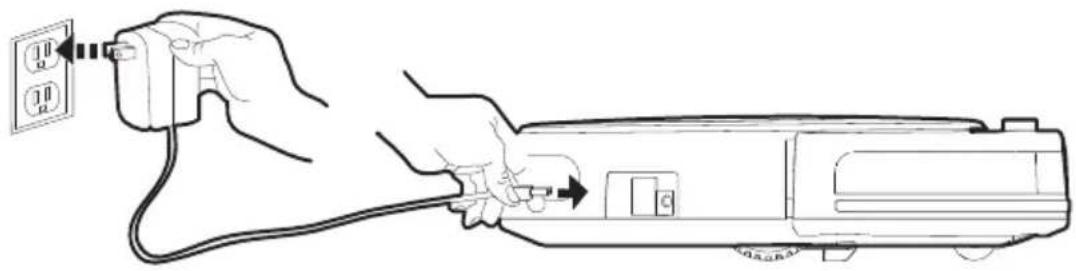
主机充电
natural_image
Line drawing of hands connecting a power outlet to an electrical device (no text or symbols present)对机器充电前请确保电源开关处于打开状态
充电方式A
直接将电源适配器插孔插到机器上,另一头接通电源,对机器进行充电。

natural_image
Top-down line drawing of a circular mechanical component with a rectangular housing and mounting bracket (no text or symbols)对机器充电前请确保电源开关处于打开状态
充电方式B
将主机放至充电座为机器充电,注意对准充电极片。
回充键闪烁表示充电中,常亮表示充电完成,首次使用,请充电12小时以上。
1. 欢迎使用
2. 安全说明
3. 产品组成
自动充电

natural_image
Line drawing of a hand pressing a button on a circular mechanical component (no text or symbols)通过按下主机 Ⓧ 键,机器将自动返回充电座。
清扫完成或者电量过低时,机器会自动开始寻找充电基座充电。
请保持充电基座处于通电状态,否则,机器将无法找到基座进行充电。
注意:此方式充电时,按遥控器的“清扫”键机器将停止充电进行清扫,使用充电配适器充电时则不能进行此操作。
充电注意事项
A.电量不足时 Ⓞ 红灯闪烁一次。
B. 机器充电时 ◎ 绿灯闪烁。
C. 充满电后 Ⓤ 停止闪烁,绿灯常亮。
D. 机器电量用完后请检查机器充电情况。
E.首次充电时,请确保机器充电至少12小时。
F. 若长时间不使用机器,请将电源开关关闭。
G. 日常使用时请将机器放置于充电座上,并确保充电座接通电源。
H. 机器在低电量时会自己寻找充电座充电,请确保充电座周围没有障碍物。

natural_image
Simple line drawing of a cartoon astronaut figure with helmet and backpack (no text or symbols)模式切换
电源开关处于打开状态
键均灭 机器静止状态
待机模式
电源开关处于打开状态 Ⓞ 键常亮 机器静止状态
睡眠模式
电源开关处于打开状态 Ⓤ 键灭, Ⓓ 键闪烁, 机器处于静止状态。
工作模式
机器正在工作当中 ☑ 灯亮 机器进入清扫模式
操作流程
睡眠模式——待机模式——工作模式

natural_image
Pure technical line drawing of a curved mechanical component with three circular features (no text or symbols)开机
确保机器侧边电源开关处于打开的状态,按压机器按键或遥控器上的功能模式键开始工作。
暂停
机器处于工作状态按主机 ⚠️ 键或遥控器 ⚠️ 键暂停工作,再按此键进行工作
睡眠
机器处于停止状态,按键指示灯不亮。
短时间没有操作机器会进入睡眠状态,按遥控器功能模式按键及主机 ⏻ 键唤醒机器。
1. 欢迎使用
2. 安全说明
3. 产品组成
水箱使用

natural_image
Two simple line drawings of a paint palette with cutouts and handles (no text or symbols)
natural_image
Technical line drawing of a car interior with mesh pattern and mechanical components (no text or symbols)充电时请将水箱取下 以免造成危险
水箱组装
水箱底部有对应的粘贴处,将吸水抹布按对应的部位固定在水箱底部,将水箱密封盖打开,装入清水约至1/2、2/3的位置,将水箱密封盖改好。

natural_image
Technical line drawing of a mechanical device with internal components (no text or symbols)充电时请将水箱取下 以免造成危险
水箱安装
将水箱组件按图示方向挂在主机底部,将水箱上的两个柱子套在主机底座的两个孔中让水箱组件与底座紧贴。
4. 使用说明
5.产品维护
6. 常见故障
清扫模式

natural_image
Pure geometric line pattern with no text, numbers, or symbols规划清扫
机器将根据房间环境进行弓字形规划清扫

natural_image
Simple geometric diagram with a square and a small ring (no text or symbols)沿边清扫
机器将沿房间的最大边缘进行清扫

natural_image
Simple spiral diagram with an arrow indicating direction (no text or symbols)定点清扫
定点清扫功能仅适用于APP内操作
1. 欢迎使用
2. 安全说明
3. 产品组成
5.1边刷清理更换

natural_image
Top-down schematic of a vehicle dashboard with three rotary controls labeled L, V, and R (no text or symbols beyond labels)
natural_image
Line drawing of a hand holding a piece of material, with a tool partially visible (no text or symbols)不定时检查边刷状况,查看是否已受损或缠上异物,用清洁工具或抹布清洁边刷当边刷受损无法使用时请及时更换,L和R各自对应。
5.2集尘盒及滤网清理

natural_image
Line drawing of a robotic vacuum cleaner with a hand operating the housing (no text or symbols)将上盖掀开 取出集尘盒 请检查吸风通道是否有异物并清理干净
4. 使用说明
5.产品维护
6. 常见故障

natural_image
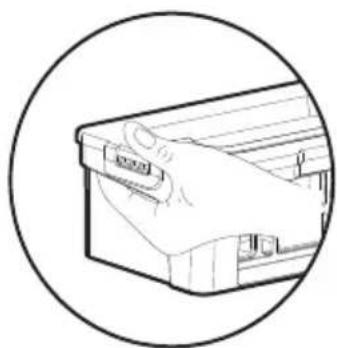
Line drawing of a mechanical device with internal compartments and a lid, showing no text or symbols取出高效滤网
natural_image
Line drawing of a hand holding a tool inside a mechanical device (no text or symbols)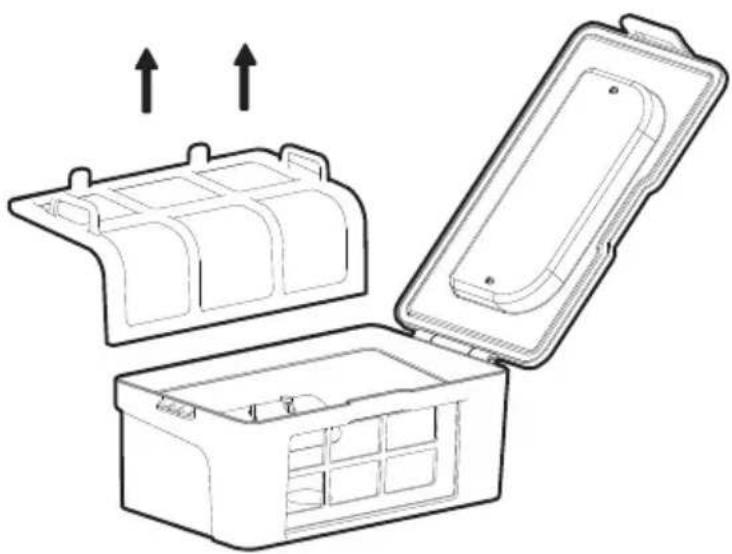
natural_image
Technical line drawing of a mechanical housing with open and closed compartments, showing internal compartments and mounting points (no text or symbols)拉开垃圾盒盖子取出初级滤网
1. 欢迎使用
2. 安全说明
3. 产品组成

natural_image
Line drawing of a hand placing a plastic tray into an open container with granular contents (no text or symbols)放低集尘盒的高度将垃圾倒出
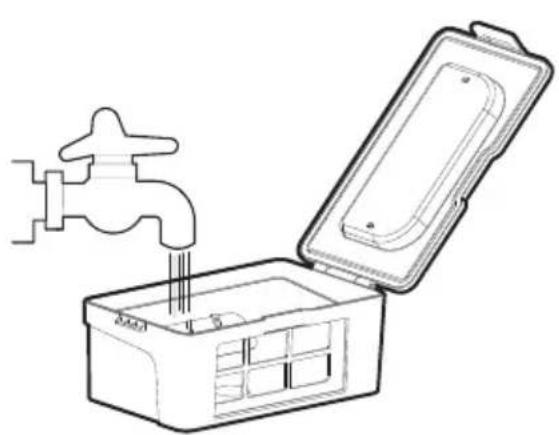
natural_image
Line drawing of a faucet opening into a small storage box (no text or symbols)
natural_image
Line drawing of a hand using a tool to clean or prepare a grid-patterned object (no text or symbols)将集尘盒,高效滤网,初级滤网进行充分清洁,初级滤网使用15-30天后,建议水洗一次,高效滤网建议3-4个月更换新的使用,高效滤网不能用毛刷清洁只能用风筒吹干净或用清水清洁。
4. 使用说明
5.产品维护
6. 常见故障

natural_image
Simple line drawing of a sun with rays (no text or symbols)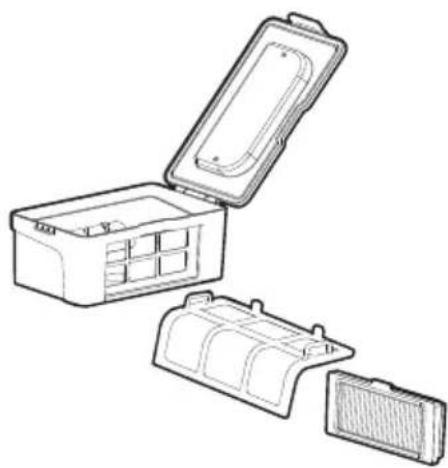
natural_image
Line drawing of a multi-case plastic container with open lid, showing internal compartments and housing (no text or symbols)晾晒各部件直至完全晾干

natural_image
Technical line drawing of a mechanical housing with open and closed compartments, showing internal components and mounting points (no text or symbols)
natural_image
Technical line drawing of a mechanical device with internal compartments and directional arrows indicating movement (no text or symbols)将初级滤网和高效滤网重新装回垃圾盒里
1. 欢迎使用
2. 安全说明
3. 产品组成
5.3拖布底盘清理
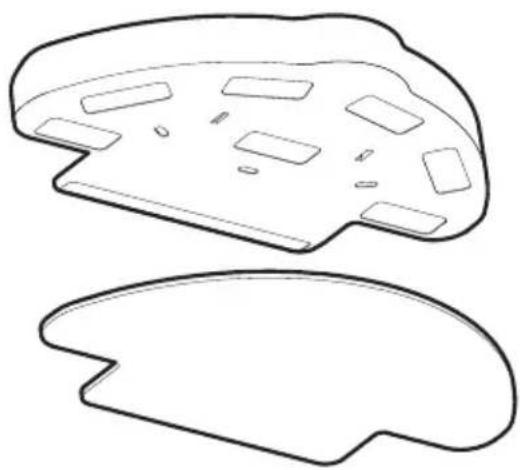
natural_image
Two abstract line drawings of a stylized object with cutouts and rectangular elements, no text or symbols present.如图示取下清洁抹布,冲洗干净并摊平晾晒。
请不要直接使用还在滴水的抹布,以免产品打滑发生危险。
水箱拖布组件适用环境:木质地板、瓷砖地面、大理石地面、油漆过的硬质地板等。
5.4其他组件维护

不定期使用清洁工具或干燥软布轻轻擦拭机器底盘充电电极片及传感器视窗
4. 使用说明
5.产品维护
6. 常见故障
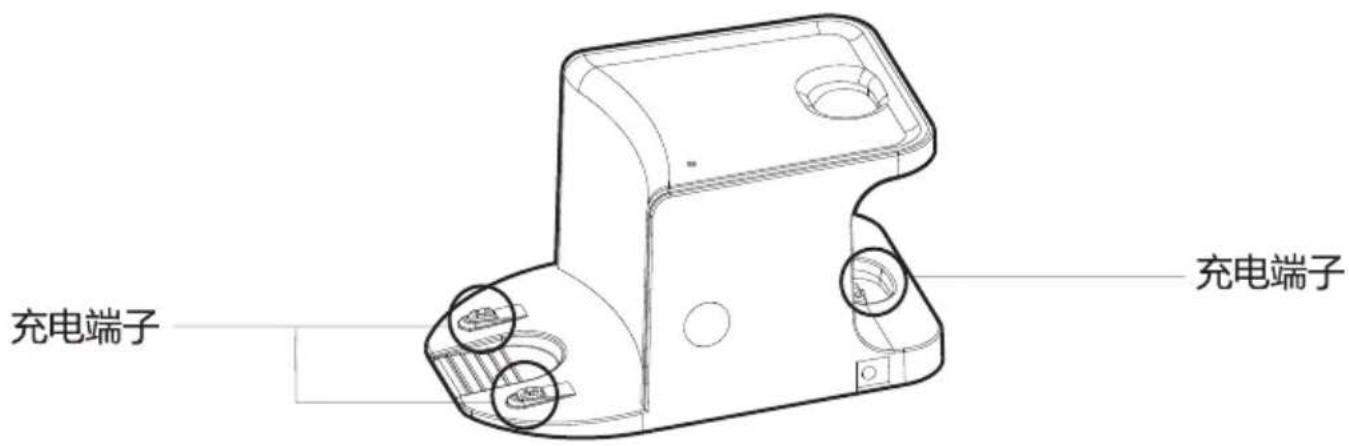
用清洁工具或软布清洁充电基座端子
natural_image
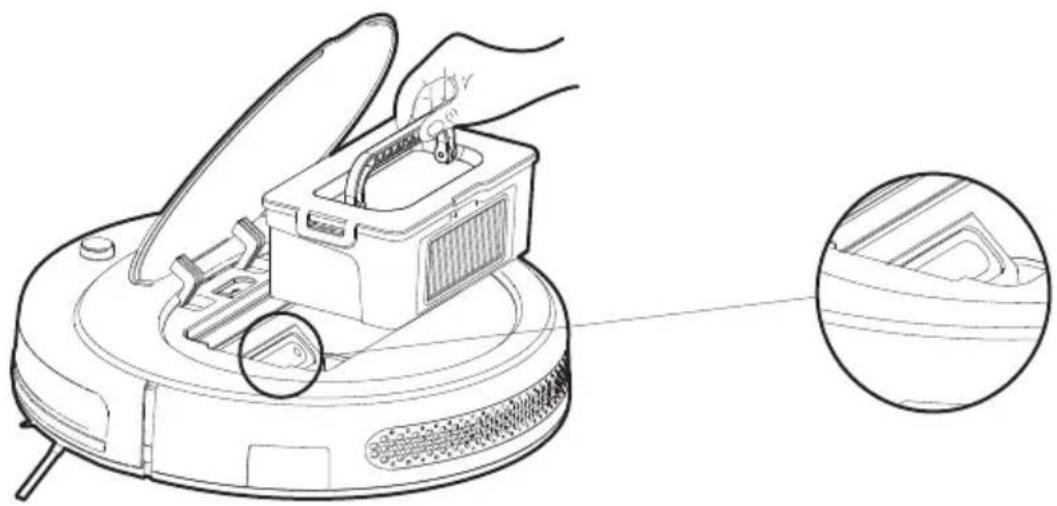
Line drawing of a robotic vacuum cleaner with a hand operating the component, showing a close-up inset (no text or symbols)定期用清洁工具或软布清洁吸风通道
1. 欢迎使用
2. 安全说明
3. 产品组成
6.1 报警提示
| 提示音 | 故障原因 | 解决方案 |
| 轮子离地 | 主机悬空 | 请将主机放回地面并重按清扫键 |
| 尘盒未安装 | 尘盒取出未装回 | 将尘盒装回机器中并重按清扫键 |
| 电池故障 | 电池充电异常 | 联系售后检测电池 |
| 请检查轮子是否卡住 | 轮子堵转 | 检查轮子是否缠绕异物并清理缠绕物 |
| 请检查前撞是否卡住 | 前撞支架卡住 | 检查前撞能否正常回弹 |
| 机器人连接失败 | 机器连接服务器失败 | 检查配网时时连接的无线网能否连接互联网 |
| 电池电量低,请给机器充电 | 电池电量低于20% | 机器自动进入回充模式 |
| 请检查边刷是否缠绕或卡住 | 边刷异常 | 检查边刷是否被线缠绕并清理缠绕物 |
| 请将机器移至空旷区域 | 机器脱困失败 | 请将主机移动到空旷的地方并重按清扫键 |
6.2可替换模组
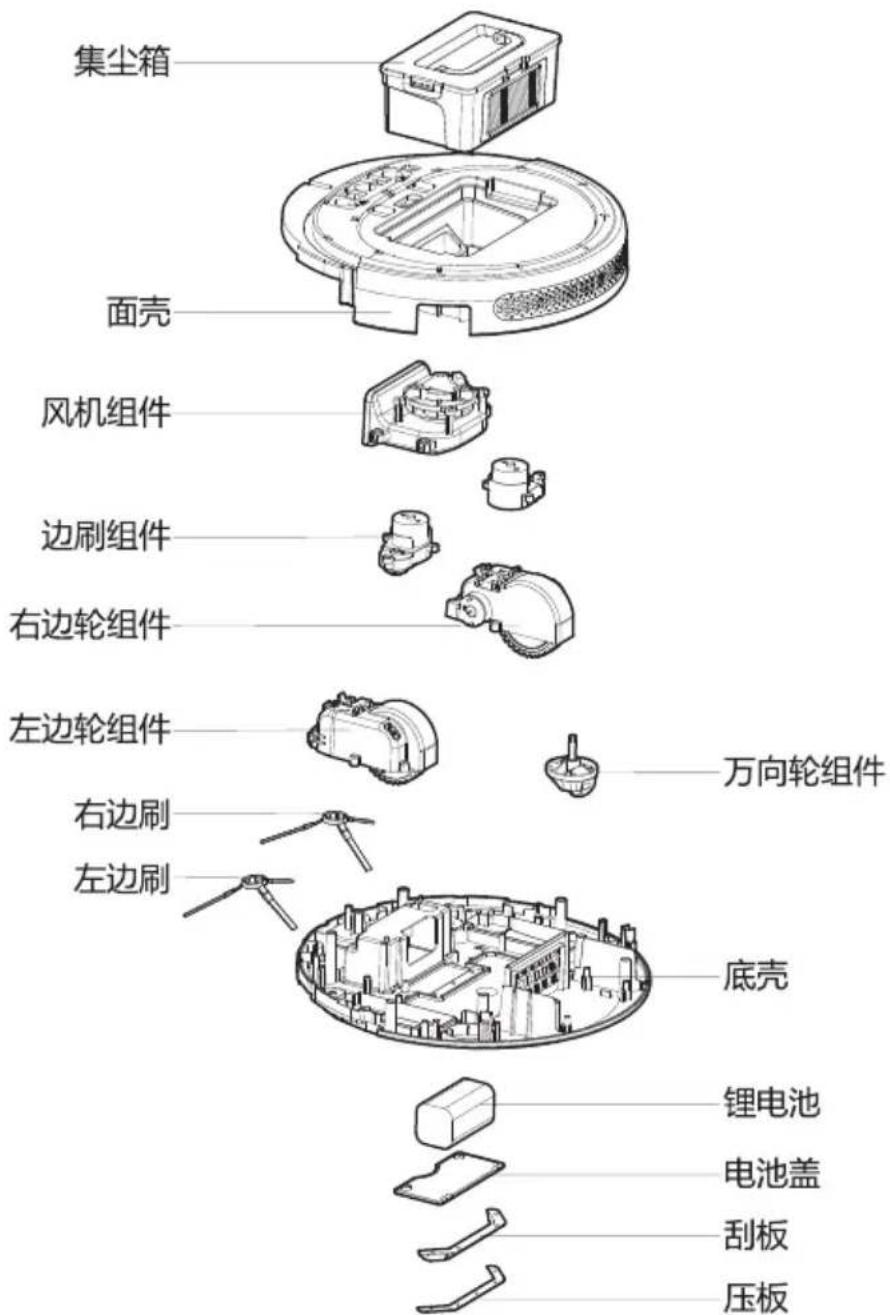
你的生活智慧我的智慧生活
制造公司:海尔信息科技(深圳)有限公司
制造商地址:深圳市南山区高新南一道009号中国科技开发院中科研发园3号楼塔楼21层B4室
公司网址:http://www.haier.com
服务热线:4006515915
咨询时间:周一至周六9:00-18:00
- Haier
- 智能扫地机器人
- 欢迎使用
- 安全说明
- 产品组成
- 使用说明
- 产品维护
- 常见故障
- 主机 充电座 虚拟墙 电源配适器 配件相关安全注意事项
- 5.产品维护
- 充电电池相关安全注意事项
- 3.1部件名称
- 主机
- 集尘盒
- 充电基座
- 手持吸尘器
- 水箱组件
- 3.2产品参数
- 遥控器说明
- 弓字清扫键
- 回回充键
- ▲ 前进键
- ▼后退键
- 向左键
- ▶ 向右键
- ▶Ⅱ确定键
- 吸力设置键
- 时钟设置键
- 单间清扫键
- 拖地清扫键
- 预约清扫键
- 沿边清扫键
- 键
- 操作指南
- 主机充电
- 充电方式A
- 充电方式B
- 自动充电
- 充电注意事项
- 模式切换
- 待机模式
- 睡眠模式
- 工作模式
- 操作流程
- 开机
- 暂停
- 睡眠
- 水箱使用
- 水箱组装
- 水箱安装
- 清扫模式
- 5.1边刷清理更换
- 5.2集尘盒及滤网清理
- 5.3拖布底盘清理
- 5.4其他组件维护
- 6.2可替换模组
Marque : HAIER
Modèle : HB-X570LSC
Catégorie : Balayeuse