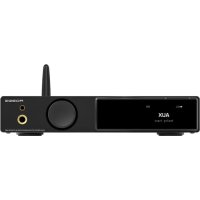
AO300 PRO - Recepteur S.M.S.L - Notice d'utilisation et mode d'emploi gratuit
Retrouvez gratuitement la notice de l'appareil AO300 PRO S.M.S.L au format PDF.



| Caractéristiques | Détails |
|---|---|
| Type de produit | Récepteur audio |
| Connectivité | Bluetooth, USB, Optique, Coaxial, Auxiliaire |
| Puissance de sortie | 50W par canal (4Ω) |
| Fréquence de réponse | 20 Hz - 20 kHz |
| Impédance | 4Ω - 8Ω |
| Dimensions | 200 x 150 x 50 mm |
| Poids | 1.5 kg |
| Utilisation | Idéal pour les systèmes audio domestiques, les bureaux et les petites installations audio |
| Maintenance | Nettoyer régulièrement avec un chiffon doux, éviter l'humidité |
| Sécurité | Ne pas exposer à des températures extrêmes, utiliser avec des haut-parleurs compatibles |
| Informations générales | Compatible avec divers appareils audio, facile à configurer et à utiliser |
FOIRE AUX QUESTIONS - AO300 PRO S.M.S.L
Questions des utilisateurs sur AO300 PRO S.M.S.L
0 question sur cet appareil. Repondez a celles que vous connaissez ou posez la votre.
Poser une nouvelle question sur cet appareil
Téléchargez la notice de votre Recepteur au format PDF gratuitement ! Retrouvez votre notice AO300 PRO - S.M.S.L et reprennez votre appareil électronique en main. Sur cette page sont publiés tous les documents nécessaires à l'utilisation de votre appareil AO300 PRO de la marque S.M.S.L.
MODE D'EMPLOI AO300 PRO S.M.S.L
- m. s. L

A03000 PRO
使用说明书/USER MANUAL/取极說明書
本说明书的内容可能会随版本更改如有变动,恕不另行通知
The contents of this manual may be changed with the edition, and are subject to change without notice.
本説明書の内容は版によて予告なしに変更さる
Ver 1.0

安全注意事项
- 请将本音响系统安装在通风良好、阴凉、干燥、干净的位置,远离直射阳光热源、振动、灰尘、潮湿或寒冷。
- 只能使用本机指定的电压。使用高于指定数值的电压很危险,而且可能导致火灾,损坏本机或造成人身伤害。对于使用高于指定电压造成的任何损害我司将不负任何责任。
- 不要试图自行改造或修理本机。如果需要任何服务,请与销售或者我司客服人员联系。不管有任何理由,都没有打开机壳的必要。
- 如果打算长时间不使用本机(比如度假时),请从墙壁交流电源插座上断开电源线的连接。
重要提示:
本说明书所提到的产品规格和资讯仅供参考。如有内容更新,恕不另行通知。

保修条款
一、服务期限
佛山双木三林科技有限公司承诺产品的良好品质,产品自售出之后7天内正常使用情况下出现故障,客户可以选择退货或者保修(不影响二次销售才可退货)。正常使用一年内出现故障可以免费保修。
二、购买日期以销售商开出的购机发票或收据日期为准,网购可以交易截图为准。
三、有以下情况都不能享受“三包”服务
1.一切人为因素损坏,包括非正常工作环境下使用或不按照说明书使用。
2.用户私自拆机、改装、维修。
3.使用非指定或许可的配件造成损坏的。
4.机身的QC或保修贴损毁。
5.不能出示有效购机凭证。
6.不属于本公司产品。
四、保修方式为送修
此条款只适于中国大陆,其它地区请参考当地销售代理商的规定和国家法规。

特点
- 德国英飞凌新款数字大功率放大器芯片,更高质量的同时,效率高,能耗低;
- 使用了日本JRC公司电子音量控制芯片NJW1194,精准的音量控制和超低的失真度;
- 支持MQA解码;
- 全新第三代XMOS XU-316,PCM支持到32bit/768kHz,DSD支持到DSD256;
美国Cirrus Logic的新款高端DAC芯片CS43131;
最新蓝牙支持LDAC,APTX/HD,SBC,AAC!
铝合金CNC加工面板工艺,采用阳极氧化技术,做工精细,触感一流;
人性化操作系统简单易懂,配备全功能遥控功能;
采用发烧级音频元件以提升主观听感;
高品质镀金输入、输出端子;
完善的过热,过流等保护电路;
内置高品质大功率音频专用开关电源。

技术参数
输入接口.HDMI(eARC)/RCA/BT/USB/光纤/同轴
THD+N. 0.003%
信噪比 107dB
通道分离度 98dB
输入灵敏度/输入阻抗 280mV/22kΩ
输出功率 165Wx2(4Ω)/85Wx2(8Ω)
USB传输方式. 异步传输
USB兼容性.......Windows7/8/8.1/10/11,MacOSX,Linux
MQA decoder.. USB
位深..USB. 1bit,16~32bit
光纤/同轴. 1bit, 16~24bit
采样率... USB PCM. 44.1~768kHz
DSD. 2.8224~11.2896MHz
光纤/同轴 PCM. 44.1~192kHz
消耗功率. 40W(正常音量)
体积. 219X42X185mm(WxHxD)
重量. 1.499kg/3.3lbs
SMSL保留在不另行通知的情况下进行可能导致规格或特性更改的改进的权利。

关于遥控器
- 如果遥控器距离本机很近时操作仍无效,请用新电池更换。
- 如果要长时间不使用遥控器,请取出遥控器的电池。
- 按照电池处置的地方性法规处置废旧电池。

遥控器的使用
- 遥控器请使用2节7号(AAA)电池。


部件介绍
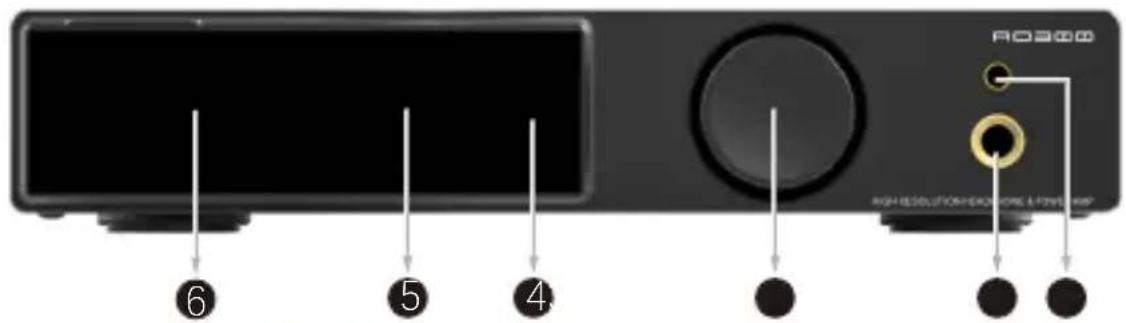

4.4mm耳机输出功能旋钮65mm耳机输出
3
待机指示灯
5 红外接收窗
6 显示屏
7 同轴输入
蓝牙天线
光纤输入
10 线路输入
超低音输出USB输入
13HDMI (eARC)输入
14 右声道输出左声道输出
16 电源输入
注: 连接喇叭时请注意极性, 必须按产品标注的极性, 以免影响音质。

功能介绍
INPUTS (输入方式)
- USB audio (USB输入)
- OPTICAL (光纤输入)
COAXIAL (同轴输入) - BLUETOOTH (蓝牙输入)
eARC IN (eARC输入)
AUXIN (线路输入)
OUTPUTS (输出方式)
SPEAKERS (喇叭输出)
HEADPHONES (耳机输出)
EQ菜单
- Direct (直通)
* Tone (自定义)
SDB (SMSL专利音效)
*Bass (低音加强音效) - Super Bass (低音超强音效)
- Rock (摇滚乐音效)
Soft (柔和音效)
Clear (清晰音效)
高音调节范围:-09dB~+09dB
- 当EQ处于直通或其他EQ模式时调节高音,EQ模式会自动切换到TONE的状态。
低音调节范围:-09dB~+09dB
- 当EQ处于直通或其他EQ模式时调节低音,EQ模式会自动切换到TONE的状态。
FILER(滤波器)
- Fast and Low-latency filter (短延时陡降滤波器)
- Fast and Phase-compensated filter (陡降相位补偿滤波器)
- Slow and Low-latency filter (短延迟缓降滤波器)
- Slow and Phase-compensated filter (缓降相位补偿滤波器)
- Nonoversampling filter(非过采样滤波器)

功能介绍
DIMMER(熄屏)
- Always ON (常亮)
- Auto OFF (在无操作5秒后自动关闭屏幕)
CEC
- CEC ON (CEC功能打开)
CECOFF (CEC功能关闭)
CEC功能出厂默认关闭,当切换到ON时,请确认电视的相关设置也是打开。
在CEC打开时:
- 电视关闭时功放会联动关闭,电视打开后功放会联动开机。
2.功放在非eARC模式下工作时,打开电视,功放会自动切换到EARC模式,播放电视的声音。
3.使用电视机的遥控器调音量,功放音量会联动调整
*该CEC开启仅支持电视有CEC设置,如电视无CEC设置,不建议开启CEC。
COLOR(颜色)
- White (白色) Red (红色)
- Green (绿色) Blue (蓝色)
Yellow (黄色)Cyan (青色) - Orange (橙色) Purple (紫色)

功能介绍
蓝牙清除菜单
- Turn to clear(按遥控器上下键或者旋转旋钮以清除当前蓝牙配对设备)
蓝牙操作说明
- 连接: 手机打开蓝牙配对, 搜索并选择 “SMSL AO300 PRO”, 如果手机显示 “已连接”, 则表示配对成功, 如果无法配对成功, 请操作蓝牙的清除功能, 把AO300 PRO之前连接的蓝牙清除后, 再重试。
恢复出厂设置
- 在此界面下,长按旋钮中键,系统会重置所有设定,包括蓝牙配对状态。

AO300 PRO包装清单
1×S.M.S.L AO300 PRO
1×AC电源线
1xUSB线
1×遥控器
1x说明书
1xHDMI线
1x蓝牙天线
1x保修卡

通过HDMI连接到兼容eARC的电视
使用市售的HDMI缆线将兼容eARC的电视连接到本产品。
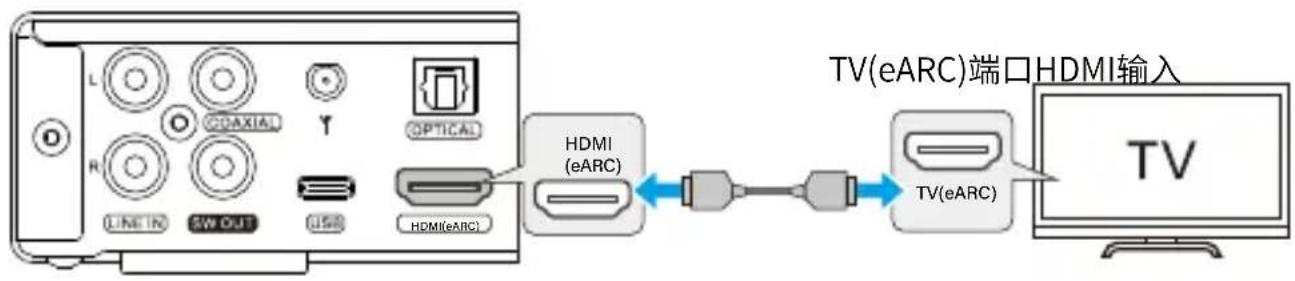
后面板
提示:
- 连接到电视上标有“ARC”或“eARC/ARC”的HDMI IN端口。此类标签表示该端口支持“仅ARC”或“同时支持eARC和ARC”。如果连接到不支持eARC的端口,则无法使用本产品的eARC输入功能。
- 对于此类连接,请使用带有表明兼容eARC的HDMI标志的HDMI缆线(19针)。您可能需要更改电视上的设置,请参见电视的用户说明书。
- 本产品无法输出视频。(意思是HDMI eARC,不是HDMI。支持数字信号输入,不支持视频输入。)
- 如要播放不支持eARC的电视的音频,请将电视的音频输出接口连接到本产品的音频IN接口(OPTICAL、COAXIAL或AUX)。

Safety Notes
Install this unit in a well ventilated, cool, dry, clean place-away from direct sunlight, heat sources, vibration, dust, moisture, or cold.
- Use the voltage specified on this unit Only. Using this unit with a higher voltage than specified is dangerous and may cause fire, damage to this unit, or personal injury. Our company will not be held responsible for any damage resulting from the use of this unit with a voltage other than that specified.
Do not attempt to modify or fix this unit by yourself. Contact Ssalesperson or customer service when any service is needed. The cabinet should never be opened for any reason.
- When not planning to use this unit for long periods of time (i.e. when going on vacation), disconnect the power cable from the AC wall outlet.
Important note:
The product specifications and information mentioned in this manual are for reference only. The content of this manual is subject to change without notice.

Warranty Terms
1.The Term of Service
Foshan Shuangmusanlin Technology Co., Ltd promises to offer good-quality products. If the product is broken in 7 days after purchasing when you use it normally, you can choose to send it back for return, replacement or repairing (only the product does not affect the second sales can be returned). Repairing for free in one year if you use it normally.
- Date of purchase is in accordance with the date on invoice or receipt uesd by seller, and if you buy it on line, you can show the screenshot of trade.
3.If an inappropriate usage causes the unit damaged, the warranty will be void. As below.
All damages by inappropriate use, including using it under non-normal working environment or without following the instructions.
- Dismantling, refitting, repairing by user in private.
- Causing damage by using some fittings instead of the designative or accredited ones.
Cannot provide credible proof of purchase.
- Sending it back to our company for repairing.
5.Contact your S.M.S.L Audio reseller for a return or replacement.

Features
- Germany Infineon's new digital high-power amplifier chip has higher quality, high efficiency and low energy consumption;
The electronic volume control chip NJW1194 of Japan JRC company is used, which has accurate volume control and ultra-low distortion.
Support MQA decoding; - The brand-new third generation XMOS XU-316, PCM supports to 32bit/768kHz, and DSD supports to DSD256;
The new high-end DAC chip CS43131 of Cirrus Logic in the United States;
The latest Bluetooth supports LDAC, APTX/HD, SBC and AAC! - Aluminum alloy CNC processing panel technology, using anodic oxidation technology, fine workmanship, first-class touch;
- The humanized operating system is easy to understand and equipped with full-function remote control function;
- Adopt fever-level audio components to improve subjective hearing;
High quality gold-plated input and output terminals; - Perfect protection circuits such as overheating and overcurrent;
- Built-in high-quality high-power audio dedicated switching power supply.

Specifications
Input.HDM1(eARC)/RCA/BT/USB/Optical/C coaxial
THD+N. 0.003%
SNR. 107dB
Channel separation. 98d B
Input Sensitivity / Input Impedance. 280 mV/22kΩ
Output Power. 165W x2(4Ω) / 85W x2(8Ω)
USB transmission.. USB2.0(Asynchronous Transfer)
USB compatibility.. .Windows 7 / 8 / 8.1 / 10 / 11, Mac OS X, Linux
MQA decoder.. USB
Bit Depth.. USB. 1bit, 16~32bit
Optical/Coaxial. 1bit, 16~24bit
Sampling rate.. USB PCM. 44.1\~768kHz
DSD. 2.8224~11.2896MHz
Optical/Coaxial PCM. 44.1~192kHz
Power Consumption. 40W(Normal Volume)
Size. 219X42X185mm(WxHxD)
Weight. 1.499kg/3.3lbs
SMSL reserves the right to make improvements which may result in specification or feature changes without notice.

Remote Control
If the remote control is still ineffective when it is close to the machine, replace it with a new battery.
If the user does not use the remote control for a long time, remove the battery of the remote control.
Dispose of used batteries in accordance with local regulations on battery disposal.

Operating The Remote Control
This remote controller use 2x R03/AAA batteries.


Display Interface and Instructions

4.4mm headphone jackFunction knob 235mm headphone jack
3
4 Standby indicator light
5 Infrared receiving window
6 Display screen
Coaxial input
8 Bluetooth antenna
Optical input
10 Line input
Subwoofer outputUSB input
13HDMI (eARC)input
14 Right outputLeft output
15 ACIN

Instructions
INPUTS
USBaudio
OPTICAL
COAXIAL
- BLUETOOTH
eARC IN
AUXIN
OUTPUTS
SPEAKERS
HEADPHONES
EQ Setting
- Direct
- Tone
- SDB
Bass
SuperBass
Rock
Soft
Clear
Treble adjustment range: -09dB +09dB
When the EQ mode is in Direct or other EQ mode, adjusting the Treble will automatically change the EQ to Tone mode.
Bass adjustment range: -09dB ~ +09dB
- When the EQ mode is in Direct or other EQ mode, adjusting the Bass will automatically change the EQ to Tone mode.
FILTER
Fast and Low-latency filter
- Fast and Phase-compensated filter
Slow and Low-latencyfilter
Slow and Phase-compensated filter
Nonoversampling filter

Instructions
DMMER
Always ON
Auto OFF
CEC
CECON
CEC OFF
The CEC function is set to off by default at the factory. When switching to ON, please ensure that the related settings on the TV are also enabled.
When CEC is enabled:
- When the TV is turned off, the amplifier will also turn off in tandem; when the TV is turned on, the amplifier will turn on as well.
- When the amplifier is operating in non-eARC mode, turning on the TV will automatically switch the amplifier to eARC mode and play the TV's sound.
- Using the TV remote to adjust the volume will also adjust the amplifier's volume in sync.
*This CEC activation only supports TVs with CEC settings; if the TV does not have CEC settings, it is not recommended to enable CEC.
COBOR
White
Green
Yellow
Orange
Red
- Blue
Cyan
Purple

Instructions
Bluetooth Clear Menu
- Turn to clear(Press the up and down buttons on the remote control or twist the knob to clear the current Bluetooth paired device)
Bluetooth operating instructions
- Contraction:
Turn on the Bluetooth function of the mobile phone, search for "SM SL A0300 PRO" and tap to pair. When the mobile phone displays "connected", it has been successfully connected. If pairing is not successful, please operate the Bluetooth clear function to clear the Bluetooth previously connected to A0300 PRO and try to connect again.
Factory Reset
- Under this interface, long press the button of the function knob, then the system will reset all settings, including Bluetooth pairing status.

Package list
1×S.M.S.L AO 300 PRO
1xBluetooth antenna
1xUSB cable
1xAC cable
1xU ser manual
1xHDMlcable
1 x Remote control
1xWarranty card

Connect to an eARC compatible TV through HDMI
Connect an eARC compatible TV to this product using a commercially available HDMI cable.

Back panel
TIPS:
- Connect to an HDMI port labeled "ARC" or "eARC/ARC" on the TV. This type of label indicates that the port supports "only eARC" or "both eARC and ARC". If connected to a port that does not support eARC, the eARC input function of this product cannot be used.
- For this type of connection, please use an HDMI cable (19 pin) with the HDMI logo indicating com patibility with eARC. You may need to change the settings on your TV. Please refer to the user manual for the TV.
This product cannot output videos. (Meaning that it's HDMI eARC, not HDMI. Supports digital signal input, not video input.) - If you play audio from a TV that does not support eARC, please connect the TV's audio output port to the audio IN port (OPTICAL, COAXIAL, or AUX) of this product.
安全指示
·商品は、風通しおがく、涼し、乾燥た清潔場所て、直射日光や熱源か離た場所に設置てくさ。直射日光、熱源、振動、ほこ、湿気、寒を避けてくさ。
·本機に指定いたします。規定以上的電圧を使用するごは危険お願いいたします。火災や本機の破損的原因くださいます。規定以上的電圧を使用んだごとによる損害,No
- ご自分で本機を改造た修理たしぃいてくさ。サーニスが必要な场合は、せラ一まは当社の力スマ一サーニスにご連絡くさ。
·長期間ご使用にらない场合(休暇中と)は、電源コトをコンSENTから拔てくだい。
重要知与世:
ごのバングレットに記載いたします製品の仕樣や情報は、あくま�参考情報です。内容は予告な<更新くださいますごのはろ
保证条件
一、七期
S.M.S.L社は、製品の品質の良を追求てい。通常の使用状態で販売日から7日以内製品が故障た場合、客様は返品たは保証期間内の無料修理を選択するとが成者(二次販売に影響しお場合に限り返品可能)。正常な使用状態で1年以内故障た場合は、無料修理対応たし。
二、購入日は販売者的発行した購入請求書たは領収書の日付か対象及び、才拉元購入の场合は取引画面のスリーニンチトが対象及び。
三、以下の场合は、「返品/新品交换」のサイバーの対象外なります。
1.通常の作業環境以外の使用や、指示に徃ない場合なか、人為のな要因で生んだ損害。
2. ルーダーが個人のに本機を解体、改造、修理んだ場合。
3.指定外の付属品やライ塞尔スへの付属品の使用によて生んだ損害。
4.本体に貼らてるQCシル或保証書シルが破損た場合。
5. 有効な購入証明書の提示のはxin場。
6.当社の製品に属さないもの。
四、保证方法是配送的
その他の地域にようは、客様の販売代理店の規定お願い各国の規定をご参照くださいます。

特徵
- ヨイツの英飛凌新デジタル大電力增幅器チットは、older高品質のはと同時に、効率が高く、消費電力が低い;
- 日本JRC社の電子音量コntトロ一ルチツPNJW1194を使用て、正確な音量コntト口一ルと超低の歪度;
- MQAデコートのサポーツ;
- 新い第3世代XMOSXU-316、PCMは32bit/768kHzまて、DSDはDSD256まてサボ一ト;
·米国Cirrus Logicの新いハイエンドDACチツPS43131; - 最新のbluetoothはLDAC、APTX/HD、SBC、AACに対応!
- 丶 ABC 、 DEF 、 HJKLM 、 XYZ 、 WXO 、 XYZ 、 XYZ 、 XWZ 、 XYZ 、 XWY 、 XZX 、 XZY 、 XZW 、 XZX 、 XZX 、 XZX 、 XZX 、 XZX 、 XZX 、 XZX 、 XZX 、 XZX 、 XZX 、 XZX 、 XZX 、 XZX 、 XZX 、 XZX 、 XZX 、 XZX 、 XZX 、 XZX 、 XZX 、 XZX 、 XZX 、 XZX 、 XZX 、 XZX 、 XZX
- 人間の操作ステムは分かりやすく、全機能のリモコン機能を備えてる;
- 發熱レルの才一デイ才素子を採用て主観的な聰感を高う;
高品 - 過熱、過電流各種の保護回路を完備いたします
·高品质·高出力の才一デイ才専用スイチング電源を内蔵。

技術仕樣
入力コネクタ.HDMI(eARC)/RCA/BT/USB/光/同軸
THD+N. 0.003%
信号对雜音比. 107dB
手不儿分離度 98dB
入力感度/入力伊尼一德斯 280mV/22kΩ
出力電力 165Wx2(4Ω)/85Wx2(8Ω)
USB传送方式非同期軸送
USB互换性..Windows7/8/8.1/10/11,MacOSX,Linux
MQA一 1
比特币深度.. USB 1bit,16~32bit
光/同軸. 1bit, 16~24bit
santplindgle-. USB PCM. 44.1~768kHz
DSD. 2.8224~11.2896MHz
光/同轴 PCM. 44.1~192kHz
消費電力. 40W(通常音量)
219X42X185mm(WxHxD)
重量. 1.499kg/3.3lbs

リモコンにて
- リモコンを近く操作いたします動作くださいます場合は、新い電池に交換てくだいたします。
- リモコンを長期間使用くださ�场合は、リモコンから電池を取り外してくだせ。
·使用济の電池を廢棄する際は、地域の電池廢棄に閲る規制に従てくだい。

リモローの使い方
- リモコンには (AAA)電池2本をご使用くださいます

スイチの才/才
アツフ
×毎一のアクせス/確認
せ力ンダリ一×二」一のアクせス
戾
dωn
入力選択
三一
画面左消寸
立方米一 个
比尔卡夫

部品紹介

1 4.4mm入ddh出力F2KJ6.35mmHdd出力
4 待機指示灯 5 赤外線受信窓 6 ダスPLEI
7 同轴入力 8 Bluetoothアンテナ 9 光入力
10. 拉入出力 11 超低音出力USB入力
13HDMI (eARC)入力 14右手不尔出力左手不 出力
16 電源入力
注:スビ一力一接統る際は極性にご注意くださ。音質に影響が出 不いよう、必す製品表記の極性で接統しま

機能紹介
INPUTS (入力方式)
- USB audio (USB入力)
- OPTICAL (光入力)
COAXIAL (同轴入力) - BLUETOOTH (BLUETOOTH入力)
eARCIN (eARC入力)
AUXIN (拉动入力)
上:-09dB~+09dB
- EQがスル一たは他のEQモードのとにトレリルを調整すると、EQモードは自動的にTONEに切り替わりま�。
OUTPUTS (出力方式)
SPEAKERS (Sv一力一出力)
HEADPHONES (HDD)
一:-09dB~+09dB
- EQが広スル一まは他のEQモードのときに低音を調整すると、EQモードは自動的にTONEに切り替わりいたします。

- Direct (直通)
· Tone (力スタム) - SDB (SMSL特許サウンドエフロー)
Bass (一 - Super Bass (スーパー・デー・ス)
*Rock (口kssuwd)
Soft (Soft-suNds)
Clear (KU)
FILTER(7.45)
- Fast and Low-latency filter(高速低遲延菲尔専一)
- Fast and Phase-compensated filter (高速位相補償 フルタ -
- Slow and Low-latency filter(低遲延フィル夕)
- Slow and Phase-compensated filter(低速位相補償フル夕)
- Nonoversampling filter(Non才一巴一苄丁扩

機能紹介
DIMMER(画面为消
Always ON (常亮)
- Auto OFF (無操作5秒後に自動のにスケリ 一入を才にしま�)
CEC
CECON
CEC OFF
CEC機能は工場出荷時にはデモルトで才になていま�。ONに切り替える際は、テレビの関連設定も才になてい的とを確認てくだき。
CECが才なのと:
- テレビが才フのとき、アングは連動て才フにり、テレビを才にるとアングも自動で才になてま。
- 、eARCモード以外動作てる场合、テレを才にし、アフは自動のeARCモード切替をテレの音を再生し。
-
テレビのリモコンを使て音量を調整すると、アングの音量も連動て調整いたします。
-
这のCECのアクテイバーニンは、CEC設定を持っテレビのみをサボートていまむ。テレビにCEC設定のはんだ场合は、CECを効にするとはお勅け能否ません。
COLOR(力一)
- White (白) Red (赤)
·Green (绿)Blue (青)
Yellow (黄)Cyan (1 - Orange (橙) Purple (紫)

機能紹介
Bluetooth
- Turn to clear (リモローの上下ローダンを押すか、サムローを回て現在のBluetoothア設定を克莱アます。
Bluetooth操作手順
·接統方法:SMA一TfONdBluotho的A1nge开、SMSLAO300PRO」检索上選,「接統济」和表示了能、A1nge是成功。A1nge成功不等场合是、BluetoothCIA机能为AO300PRO的Bluetooth接统をクアてから、再度A1ngeを試は下さ。
工場出荷時の設定に戾す
· 这のインーフローは、プロの真ん中的のロルを長押しぃると、デステムはBluetoothのアリング状態を含むすばての設定をリフロー。

AO300 PRO包装清单
1×S.M.S.L AO300 PRO
1x リモコン
1xBluetoothアンドナ
1×AC電源ケーリル
1× 取拔説明書
1×保証書
1×USBケープル
1xHDMIケーリル

eARC対応テレビとHDMI接続する場合
市販のHDMIケープルを使用て、eARC対応テレビと本製品を接続いたします。
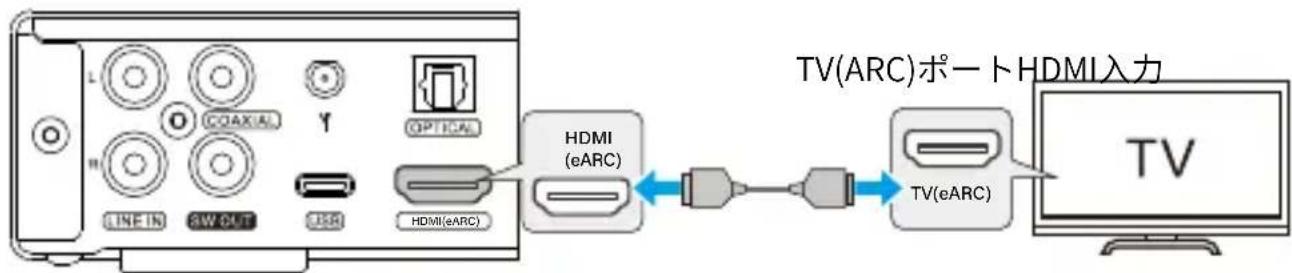
背面八不儿
七中:
- テレビの「ARC」または「eARC/ARC」と表示たHDMI N・トに接統し。。、・トが「eARCのみ」または「eARCとARCの両方」を・トてい。非対応・トに接統し。场合、本製品のeARC入力機能は使用くださいます。
· 这のターリフの接続には、ARC対応を示すHDMIロゴの付たHDMIケーフル(19pin)を使用てくだい。テレビの設定を変更する必要かもしませんのと、テレビの取反説明書を参照てくだい。
·本製品から映像を出力するこはてきません。(HDMIははなくHDMIeARCを意味しま�。ビデ才入力ではなくデジル信号入力に対応ていま�。) - ARC非対応のテレビから音声を再生する场合は、テレビのAUDIO OUT端子と本製品のAUDIO IN端子(OPTICAL、COAXIAL、AUX)を接続てくだいたします。