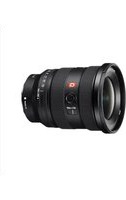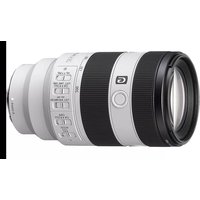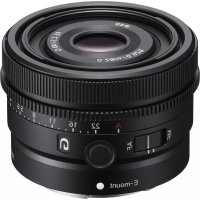
FE 40mm f2.5 G - Objectif photo SONY - Notice d'utilisation et mode d'emploi gratuit
Retrouvez gratuitement la notice de l'appareil FE 40mm f2.5 G SONY au format PDF.

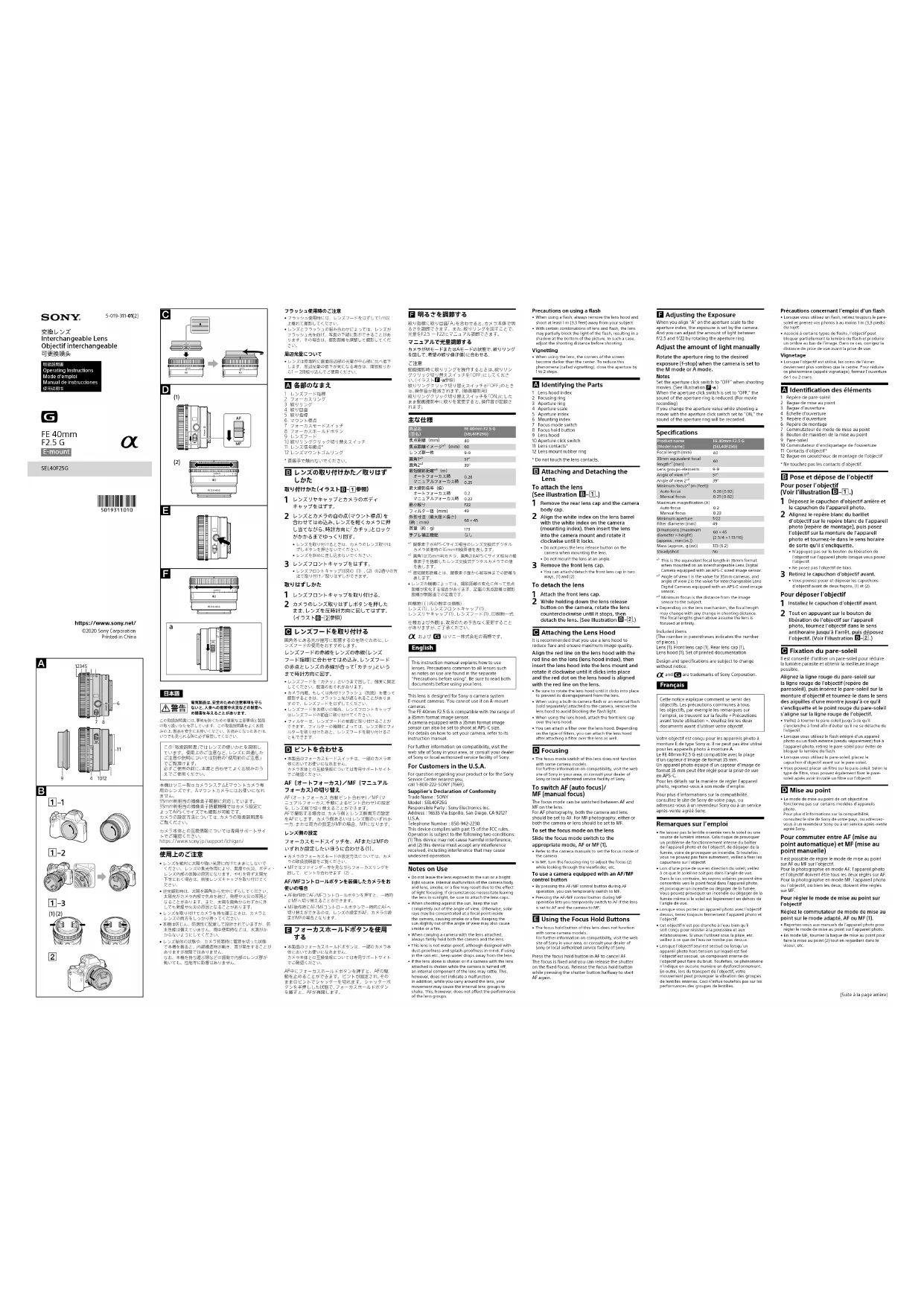
| Type de produit | Objectif interchangeable |
| Marque | Sony |
| Modèle | FE 40mm F2.5 G (SEL40F25G) |
| Monture | Sony E-mount |
| Focale | 40 mm (équivalent 60 mm en APS-C) |
| Ouverture maximale | f/2.5 |
| Ouverture minimale | f/22 |
| Construction optique | 9 lentilles en 9 groupes |
| Angle de champ (plein format) | 57° |
| Angle de champ (APS-C) | 39° |
| Distance minimale de mise au point (AF) | 0,28 m |
| Distance minimale de mise au point (MF) | 0,25 m |
| Grossissement maximal | 0,2x (AF) / 0,23x (MF) |
| Diamètre du filtre | 49 mm |
| Dimensions (diamètre × longueur) | 68 × 45 mm |
| Poids | 173 g |
| Fonctions principales | Bague d'ouverture avec clic, commutateur AF/MF, bouton de maintien de mise au point, pare-soleil fourni |
| Accessoires fournis | Bouchon avant, bouchon arrière, pare-soleil, documents |
| Entretien et nettoyage | Éviter l'exposition directe au soleil ; utiliser un chiffon doux et sec ; ne pas toucher les contacts |
| Sécurité | Ne pas laisser au soleil ; retirer le pare-soleil en cas d'utilisation du flash ; maintenir une distance d'au moins 1 m avec le sujet lors de l'utilisation du flash |
| Résistance aux intempéries | Conception résistante à la poussière et aux éclaboussures (non étanche) |
FOIRE AUX QUESTIONS - FE 40mm f2.5 G SONY
Questions des utilisateurs sur FE 40mm f2.5 G SONY
0 question sur cet appareil. Repondez a celles que vous connaissez ou posez la votre.
Poser une nouvelle question sur cet appareil
Téléchargez la notice de votre Objectif photo au format PDF gratuitement ! Retrouvez votre notice FE 40mm f2.5 G - SONY et reprennez votre appareil électronique en main. Sur cette page sont publiés tous les documents nécessaires à l'utilisation de votre appareil FE 40mm f2.5 G de la marque SONY.
MODE D'EMPLOI FE 40mm f2.5 G SONY
SONY. 5-019-311-01(2)
交換レンズ Interchangeable Lens Objectif interchangeable 可更換镜头

FE 40mm F2.5 G E-mount
α
SEL40F25G

https://www.sony.net/ ©2020 Sony Corporation Printed in China


1-1


1-2
1-3


2





日本語
警告 電気製品は、安全のための注意事項を守らないと、人身への危害や火災などの財産への損害を与えることがあります。
この取扱説明書には、事故を防ぐための重要な注意事項と製品の取り扱いかたを示しています。この取扱説明書をよくお読みの上、製品を安全にお使いください。お読みになったあとはいつでも見られる所に必ず保管してください。
この「取扱説明書」ではレンズの使いかたを説明しています。使用上のご注意など、レンズに共通したご注意や説明については別冊の「使用前のご注意」でご覧頂けます。 必ずご使用の前に、本書と合わせてよくお読みのうえでご使用ください。
本機はソニー製αカメラシステムEマウントカメラ専用のレンズです。Aマウントカメラにはお使いになれません。
35mm判相当の撮像素子範囲に対応しています。 35mm判相当の撮像素子搭載機種ではカメラ設定によってAPS-Cサイズでも撮影が可能です。 カメラの設定方法については、カメラの取扱説明書をご覧ください。
カメラ本体との互換情報については専用サポートサイトでご確認ください。
https://www.sony.jp/support/ichigan/
使用上のご注意
- レンズを絶対に太陽や強い光源に向けたままにしないでください。レンズの集光作用により、発煙や火災、ボディレンズ内部の故障の原因になります。やむを得ず太陽光下等におく場合は、前後レンズキャップを取り付けてください。
- 逆光顔影時は、太陽を画角から充分にずらしてください。太陽光がカメラ内部で焦点を結び、発煙や火災の原因となることがあります。また、太陽を画角からわずかに外
- レンズを取り付けてカメラを持ち運ぶときは、カメラとレンズの両方をしっかり持ってください。
- 本機は防じん、防滴性に配慮して設計されていますが、防水性能は備えていません。雨中使用時などは、水滴がかからないようにしてください。
- レンズ単体の状態や、カメラ装着時に電源を切った状態で本機を振ると、内部構造物が動き、音が発生することがありますが故障ではありません。
なお、本機を持ち運ぶ際などの振動で内部のレンズ群が動いても、性能等に影響はありません。
フラッシュ使用時のご注意
- フラッシュ使用時には、レンズフードをはずして1m以上遅れて撮影してください。
- レンズとフラッシュの組み合わせによっては、レンズがフラッシュ光を妨げ、写真の下部に影ができることがあります。その場合は、撮影距離を調整して撮影してください。
周辺光量について
- レンズは原理的に書面周辺部の光量が中心部に比べ低下します。周辺光量の低下が気になる場合は、開放絞りから1~2段絞り込んでご使用ください。
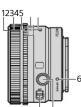
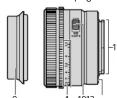
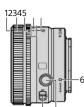
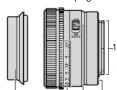
A 各部のなまえ
1 レンズフード指標
3 紞りリンク
4 絞り目盛
5 取り指標 6 マウント標点
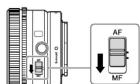
7 フォーカスモードスイッチ
6 フォーガスホールドホタン 9 レンズフード
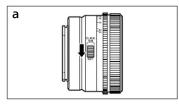
10 絞りリングクリック切り替えスイッチ
11 レフス信号焦点 12 レンズマウントゴムリング
* 直接手で触れないでください
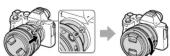
B レンズの取り付けかた/取りはずしかた
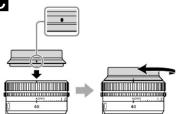
取り付けかた(イラストB-1参照)
1 レンズリヤキャップとカメラのボディ
キャップをはずす。
2 レンズとカメラの白の点(マウント標点)を合わせてはめ込み、レンズを軽くカメラに押し当てながら、時計方向に「カチッ」とロックがかかるまでゆっくり回す。
- レンズを取り付けるときは、カメラのレンズ取りは
- レンズを斜めに差し込まないでください
3 レンズフロントキャップをはずす。
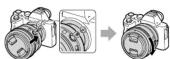
- レンズフロントキャップは図の(1)、(2)の2通りの方法で取り付け/取りはずしができます。
取りはずしかた
1 レンズフロントキャップを取り付ける。
2 カメラのレンズ取りはずしボタンを押した
まま、レンズを反時計方向に回してはずす。
(1) 2014 □ □ 2015
© レンズフードを取り付ける
両角外にある光が描写に影響するのを防ぐために、レンズコードの使用をおすすめします。
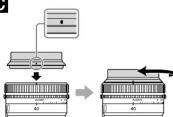
レンズフードの赤線をレンズの赤線(レンズ
フード指標)に合わせてはめ込み、レンズフード
の赤点とレンスの赤線が合って「カチッ」という
▲レンズフードを「カチル」というまで回して、確定に固定
してください。脱落のおそれがあります。
- カメブ内蔵、もしくは外付けブラッシュ(別売)を使うで撮影するときは、フラッシュ光が遮られることがありま
すので、レンズフードをはずしてください。 ・レンズフードをお使いの場合、レンズフロントオケッズ
はレンズフードの前面に取り付けてください。
- フィルターは、レンズフードの前面に取り付けることが
ルターを取り付けたあと、レンズフードを取り付けることもできます。
D ピントを合わせる
- 本製品のフォーカスモードスイッチは、一部のカメラ本
体においてお使いになれません。 カメラ本体との互換情報については専用サポートサイト
どこ確認ください。
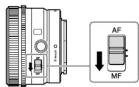
AF (オートフォーガス)/MF (マニュアルフェーカス)の切り替え
ダオカスの朝り首元 DF(オーマフロー カミ自動)
ニュアルフォーカス:手動によるピント合わせ)の設定
を、レンズ側で切り替えることができます。
AFで撮影する場合は、カメラ図とレンズ側両分の設定をAFにします。カメラ側あるいはレンズ側のいずれか
一方、または両方の設定がMF
レンス術の設定
フォーカスモードスイッチを、AFまたはMFの
いすれが設定したいほうに合わせる(1)。
- ガメラのフォーガスモードの設定方法については、カメラの取扱説明書をご覧ください。
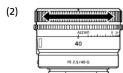
- MFではファインダー等を見ながら
回して、モンドを合わせます(2)。
使いの場合
- AF動作時にAF/MFコントロールボタンを押すと、一時的
- MF動作時にAF/MEコントロールボタンで一時的にAFへ
切り替えができるのは、レンズの設定がAF、カメラの設定がMFの場合となります。
E フォーカスホールドボタンを使用
する
- 本製品のフォーカスホールドボタンは、一部のカメラ本
カメラ本体との互換情報については専用サポートサイト
ご確認
AF中にフォーカスホールドボタンを押すと、AFの駆動を止めることができます。ピンしが囲客され、その
ままのピントでシャッターを切れます。シャッターボ
タンを単押しした状態で、フォーカスホールドホタンを離すと、AFが再開します。
F 明るさを調節する
絞り指標に絞り目盛「A」を合わせると、カメラ本体で明
るさを調節できます。また、殻りリングを回すことで、光量をF2.5~F22にマニュアル調節できます。
マニュアルで光量調節する
カメラがMモードまたはAモードの状態で、絞りリング
を図じて、希望の取り値(1値)に合わせる。
C 注息 動雨混風
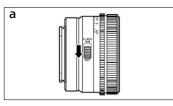
グクリック切り替えスイッチを「OFF」にしてくださ
絞ヒリングクリック切
は、操作音が軽減されます。(動画撮影用)
教のリンサウリサウ切り替えスネッサを「ON」にした 主主動車調影中に絞りを変更すると、操作音が記録さ
れます。
主な仕様
| 商品名 | FE 40mm F2.5 G |
| (型名) | (SEU |
| 焦点距离(mm) | 40 |
| 焦点距离(m)=32*1(mm) | 60 |
| レンズ群一枚 | 9-9 |
| 面角1*2 | 57° |
| 由角2° | 39° |
| 易矩形面积A1 | (√) |
| 最近実施距離(m) | |
| オートフォーカス時 | 0.26 |
| マニュアルフォーカス時 | 0.25 |
| 最大撮影倍率(倍) | |
| オートフォーカス時 | 0.2 |
| マニュアルフォーカス時 | 0.23 |
| 最小数り | F22 |
| 外形寸法(最大径×長さ) | 45 |
| (約:mm) | 68 |
| 質量 (吋:g) | 173 |
| 氏式↓補正機除 | 左↓ |
| 丁-5-6 恒止減能 | 90 |
* 撮像素子がAPS-Cサイズ相当のレンス交換式テジタルカメラ装着時の35mm判換算値を表し、ホオ
*2 画角1は35mm判カメラ、画角2はAPS-Cサイズ相当の愛
像素子を搭載したレンス交換式テシタルカメラでの値を表します。
*3 最短撮影距離とは、撮像素子面から被写体までの距離を
表します。 - レンズの機関によっては、撮影距離の変化に伴って焦点
距離が変化する場合があります。記載の焦点距離は撮影
距離が無限達での定義です。
同植物(1)内の数字は個数
レンズリヤキャップ(1)、レンズフード(1)、印刷物一式
仕様および外観は、改良のため予告なく変更すること
がありますが、こ丁承ください。
α および G はソニー株式会社の商標です。
English
This instruction manual explains how to use lenses. Precautions common to all lenses such as notes on use are found in the separate "Precautions before using". Be sure to read both documents before using your lens.
This lens is designed for Sony α camera system
E mount cameras. You cannot use it on A mount cameras.
The FE 40mm F2.5 G is compatible with the range of a 35mm format image sensor.
A camera equipped with a 35mm format image
sensor can also be set to shoot at AP-3-C size. For details on how to set your camera, refer to its
instruction manual.
For further information on compatibility, visit the web site of Sony in your area, or consult your dealer.
of Sony or local authorized service facility of Sony.
For Customers in the U.S.A
For question regarding your product or for the Sony Service Contemporary
service center nearest you, call 1-800-222-SONY (7669)
Supplier's Declaration of Conformity
Trade Name: SONY Model: SE140526C
Responsible Party : Sony Electronics Inc.
Address : 16535 Via Esprillo, San Diego, CA 92127
Telephone Number: 858-942-2230
This device complies with part 15 of the FCC rules.
(1) This device may not cause harmful interference.
and (2) this device must accept any interference
Received, including interference that may cause undesired operation.
Notes on Use
- Do not leave the lens exposed to the sun or a bright light source. Internal malfunction of the camera body and lens, smoke, or a fire may result due to the effect of light focusing. If circumstances necessitate leaving the lens in sunlight, be sure to attach the lens caps. - When shooting against the sun, leaves the sun
completely out of the angle of view. Otherwise, solar
rays may be concentrated at a focal point inside the camera, covering simply as a fire. Keeping the
sun slightly out of the angle of view may also cause
smoke or a fire.
always firmly hold both the camera and the lens
- This lens is not water-proof, although designed with
last growth and splash growth in wind is using in the rain etc., keep water drops away from the lens.
- If the lens alone is shaken or if a camera with the lens attached is shaken while the camera is turned off.
attached to shaken while the camera is taken an internal component of the lens may rat
however, does not indicate a malfunction.
in addition, while you carry around the lens, your movement may cause the internal lens groups to
shake. This, however, does not affect the performance of the lens groups.
Precautions on using a flash
- When using a flash, always remove the lens hood and shoot at least 1 m (3.3 feet) away from your subject.
• With certain combinations of lens and flash, the lens
may partially block the light of the flash, resulting in a shadowy at the bottom of the picture. In such a case
adjust the shooting distance before shooting.
Vignetting
- When using the lens, the corners of the screen become darker than the center. To reduce this
phenomena [called vignetting], close the aperture by
1 to 2 stops.
A Identifying the Parts
1 Lens hood inde
2 Focusing ring 3 Aperture ring
4 Aperture scale
5 Aperture index 6 Mounting index
7 Focus mo
8 Focus hol
10 Aperture click swite
11 Lens contacts*
12 Lens Mount Fat
DO NOT TOUCH THE LENS CONTACTS.
B Attaching and Detaching the
Lens
To attach the lens
(See illustration B-□.)
1 Remove the rear lens cap and the camera
- body cap
2 Align the white index on the lens bar with the white index on the camera
(mounting index), then insert the lens
into the camera mount
clockwise until it locks.
we have pressed the lens release button on the camera when mounting the lens.
- Do not mount the lens at an angle
3 Remove the front lens cap.
- You can attach/detach the front lens cap in two ways, (1) and (2).
To detach the lens
1 Attach the front is
- While holding down the
button on the camera, rotate the len
counterclockwise until it stops, then
detach the lens. (See illustration B=2.)
© Attaching the Lens Hood
It is recommended that you use a lens hood to
reduce flare and ensure maximum image quality
Align the red line on the lens hood with the
ted line on the lens (lens hood index), then insert the lens hood into the lens mount and
rotate it clockwise until it clicks into place
and the red dot on the lens hood is aligned
with the red line on the lens.
- Be sure to rotate the lens hood until it clicks to prevent its disengagement from the lens.
- When using a built-in camera flash or an external flash (held separately attached to the camera, convering the
(Sold separately) attached to the camera, lens hood to avoid blocking the flash light
- When using the lens hood, attach the front lens cap
• You can attach a
on the type of filters, you can attach the lens hood
after attaching a filter over the lens as well
D Focusing
• The focus mode switch of t
with some camera models. For further information on
site of Sony in your area, or consult your dealer of
Sony of local authorized service facility of Sony.
To switch AF (auto focus)/MF (manual focus)
MI (manual focus)
The focus mode can be switched between Air and MF on the lens.
For AF photography, both the camera and lens
should be set to AF. For MF photography, either of both the camera or lens should be set to MF.
To set the focus mode on the lens
Slide the focus mode switch to the
appropriate mode, AF or MF (1).
• Refer to the camera manuals to set the focus mode of the camera
• In MF, turn the focusing ring to adjust the focus (2)
while looking through the viewfinder, etc.
To use a camera equipped with an AF/MF control button.
• By pressing the AF/ME control button during AF
operation, you can temporarily switch to MF
- Pressing the AF/MF control button during M operation lets you temporarily switch to AF i
is set to AF and the camera to MF.
E Using the Focus Hold Buttons
• The focus hold button of this lens does not function
with some camera models.
For further information on compatibility, visit the site of Sony in your area, or consult your dealer of
Sony or local authorized service facility of Sony.
Press the focus hold button in AF to cancel AF.
The focus is fixed and you can release the shutter on the fixed focus. Release the focus hold button
while pressing the shutter button halfway to start
AF again.
F Adjusting the Exposure
When you align "A" on the aperture scale to the
aperture index, the exposure is set by the camera. And you can adjust the amount of light between
f/2.5 and f/22 by rotating the aperture ring
Adjust the amount of light manually
Rotate the aperture ring to the desired
exposure (f-stop) when the camera is set to
the M mode or A mode.
Notes
Set the aperture click switch to OFF when shooting movies. (See illustration 5-a)
When the aperture click switch is set to "OFF," the
sound of the aperture ring is reduced. (For movie recording)
If you change the aperture value while shooting a
movie with the aperture click switch set to "ON," the sound of the aperture ring will be recorded.
NOTE 2: The sponsor ring will be recovered.
Specifications
Product name FE 40mm F2.5 G
(Model name) (SEL40F25G)
Focal length (mm) 40 35mm equivalent focal
length*1 (mm) 60
Lens groups-elements 9-9 Angle of view 14° 57°
Angle of view 2°² 39°
Minimum focus ^*3 (m (feet))
Auto focus 0.28 (0.92) Manual focus 0.25 (0.82)
Maximum magnification (X)
Auto focus 0.2 Manual focus 0.73
Minimum aperture 1/22
Hilter diameter (mm) 49
DIMENSIONS (Maximum diameter × height) 68 × 45 (2.2×1 - 1.42 #6)
(approx., mm (in.)) (251-714, 12)