
XR-3503MK2 - Autoradio SONY - Notice d'utilisation et mode d'emploi gratuit
Retrouvez gratuitement la notice de l'appareil XR-3503MK2 SONY au format PDF.


| Type de produit | Autoradio avec lecteur cassette |
| Marque | Sony |
| Modèle | XR-3503MK2 |
| Dimensions (L x H x P) | 186 x 57 x 170 mm (approx.) |
| Poids | 1,2 kg (approx.) |
| Alimentation | 12 V CC batterie véhicule (masse négative) |
| Amplificateur intégré | Puissance max. 20 W × 4 canaux (4 ohms) |
| Section tuner | FM (65-74 MHz / 87,5-108 MHz), MW (531-1602 kHz), LW (153-281 kHz) |
| Présélections radio | 30 stations (18 FM, 6 MW, 6 LW) avec mémorisation automatique |
| Lecteur cassette | 4 pistes, 2 canaux stéréo ; réponse 30-15000 Hz ; rapport signal/bruit 55 dB |
| Fonctions principales | Façade avant détachable, alarme antivol, horloge digitale 24h, fonction ATA (activation automatique du tuner), fonction Loudness, arrêt automatique de cassette |
| Réglages sonores | Volume, graves (±8 dB à 100 Hz), aigus (±8 dB à 10 kHz), balance, fader |
| Entretien | Nettoyage des têtes de lecture avec kit de nettoyage Sony ; nettoyage des connecteurs avec un coton-tige imbibé d'alcool |
| Fusible | 15 A (ne pas utiliser un fusible de calibre supérieur) |
| Sécurité | Alarme sonore si la clé de contact est coupée sans avoir retiré la façade avant |
| Périphériques | Sortie antenne motorisée ; entrée antenne externe |
| Accessoires fournis | Étui pour façade avant, clé de démontage, kit d'installation et de connexion |
FOIRE AUX QUESTIONS - XR-3503MK2 SONY
Questions des utilisateurs sur XR-3503MK2 SONY
0 question sur cet appareil. Repondez a celles que vous connaissez ou posez la votre.
Poser une nouvelle question sur cet appareil
Téléchargez la notice de votre Autoradio au format PDF gratuitement ! Retrouvez votre notice XR-3503MK2 - SONY et reprennez votre appareil électronique en main. Sur cette page sont publiés tous les documents nécessaires à l'utilisation de votre appareil XR-3503MK2 de la marque SONY.
MODE D'EMPLOI XR-3503MK2 SONY
Autoradio cassette FM/MW/LW
Mode d'emploi FR
Instrukcja obsługi PL
Инструкция за експлоатация BG
Használati útmutató HU
Инструкция по эксплуатации RU
Pour l'installation et les connexions, reportez-vous au manuel d'installation/connexions fourni.
Informacje o instalacji i podłączeniu należy szukać w załączonej instrukcji instalacji/podłączania.
За инсталиране и свързване на апарата, използвайте приложения наръчник.
A készülék felszereléséről és csatlakoztatásáról részletes tájékoztatást talál a (felszerelési/csatlakoztatási) útmutatóban.
Перед установкой и подключениями обратитесь к прилагаемой инструкции по установке и подключению.
XR-3503MK2
© 1996 by Sony Corporation
Caractéristiques
Généralités
- Le panneau avant amovible vous permet de l'emporter avec vous lorsque vous quittez votre voiture (page 4).
- Une alarme d'avertissement se déclenchera si vous coupez le contact sans avoir retiré le panneau avant de l'appareil.
- L'amplificateur de puissance intégré (puissance max. : 20 W × 4 canaux) vous permet de profiter d'un système à 4 haut-parleurs.
- Horloge numérique 24 heures fournie (page 5).
Section lecteur de cassettes
- ATA (Activation automatique du tuner) pour allumer automatiquement le tuner lors de l'avance rapide ou du rembobinage d'une cassette (page 6).
Section tuner
- Jusqu'à 30 stations peuvent être préréglées : 18 stations en FM, 6 stations en MW et 6 en LW. La fonction de mémorisation automatique mémorise rapidement et facilement un total de 30 stations (page 7).
Précautions
- Si votre voiture est garée en plein soleil et que la température à l'intérieur augmente considérablement, laissez l'appareil refroidir avant de l'utiliser.
- Si l'appareil n'est pas alimenté, vérifiez d'abord les connexions. Si tout est en ordre, vérifiez le fusible.
- Si aucun son ne sort des haut-parleurs d'un système à 2 haut-parleurs, réglez la commande d'atténuation (fader) sur la position centrale.
- Si votre voiture est équipée d'une antenne électrique, notez qu'elle se déploiera automatiquement pendant le fonctionnement de l'appareil.
Si vous avez des questions ou des problèmes concernant votre appareil qui ne sont pas traités dans ce manuel, veuillez consulter votre revendeur Sony le plus proche.
Remarques sur les cassettes
Entretien des cassettes
- Ne touchez pas la surface de la bande d'une cassette, car toute saleté ou poussière contaminera les têtes.
- Gardez les cassettes à l'écart des équipements contenant des aimants intégrés, tels que les enceintes et les amplificateurs, car cela pourrait effacer ou déformer l'enregistrement.
- N'exposez pas les cassettes à la lumière directe du soleil, à des températures extrêmement froides ou à l'humidité.
- Lorsque la bande est lue pendant une longue période, le boîtier de la cassette peut devenir chaud en raison de l'amplificateur de puissance intégré. Ce n'est pas un signe de dysfonctionnement.
Remarques sur les têtes de lecture du lecteur de cassettes
- Une utilisation prolongée des cassettes contamine la tête de lecture, ce qui entraîne une mauvaise qualité sonore ou une perte totale du son. Par conséquent, nous recommandons de nettoyer la tête de lecture environ une fois par mois avec le kit de nettoyage Sony disponible séparément. Si le son ne s'améliore pas après l'utilisation d'une cassette de nettoyage, veuillez consulter votre revendeur Sony le plus proche.
- En cas de cassettes anciennes ou de qualité inférieure, la tête de lecture se contamine beaucoup plus rapidement. Selon la cassette, une ou deux lectures peuvent entraîner une mauvaise qualité sonore.
Cassettes de plus de 90 minutes
L'utilisation de cassettes de plus de 90 minutes n'est pas recommandée, sauf pour une lecture continue de longue durée. Les bandes utilisées pour ces cassettes sont très fines et ont tendance à s'étirer facilement. La lecture et l'arrêt fréquents de ces bandes peuvent les faire tirer dans le mécanisme du lecteur de cassettes.
Table des matières
Détachement et fixation de la face avant. 4 Réglage de l'horloge 5
Fonctionnement du lecteur de cassettes
Écoute de la lecture de la bande 5 Éjection de la cassette 5 Avance rapide de la bande 6 Réception radio pendant l'avance rapide ou le rembobinage d'une bande — Fonction ATA (Activation automatique du tuner) 6
Réception radio
Recherche automatique des stations — Syntonisation automatique 6 Si la réception FM stéréo est médiocre — Mode monaural 6 Syntonisation en ajustant la fréquence — Syntonisation manuelle 7 Mémorisation automatique des stations — Fonction de mémoire automatique 7 Mémorisation uniquement des stations souhaitées 7 Réception des stations mémorisées 7
Autres fonctions
Réglage des caractéristiques sonores 8 Profiter des graves et des aigus à faible volume — Fonction Loudness 8 Désactivation du bip sonore 8
Entretien 8 Démontage de l'appareil 9 Emplacement des boutons 10 Spécifications 11 Guide de dépannage 12
FR
Détachement et fixation de la façade
La façade de cet appareil peut être détachée afin de prévenir le vol.
Détachement de la façade
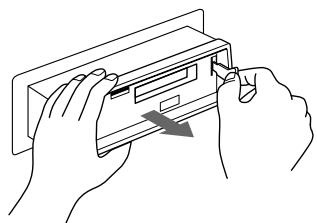
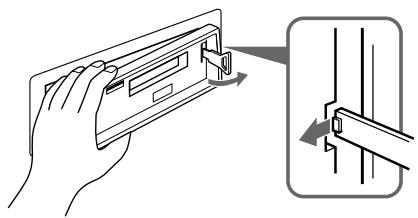
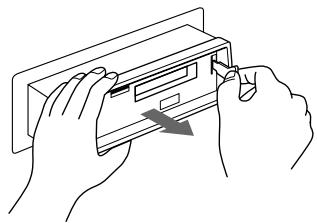
Avant de détacher la façade, assurez-vous d'appuyer d'abord sur la touche . Ensuite, appuyez sur la touche RELEASE pour ouvrir la façade et détachez-la en la tirant vers vous comme illustré.
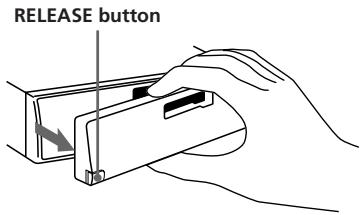
Veillez à ne pas faire tomber la façade après l'avoir détachée de l'appareil.
Fixation de la façade
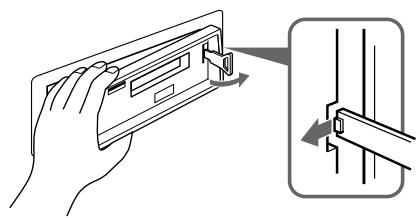
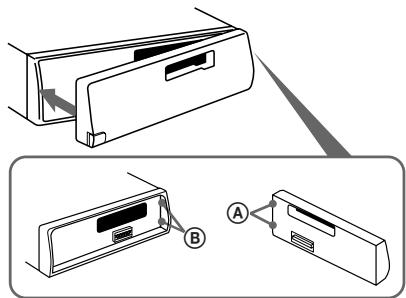
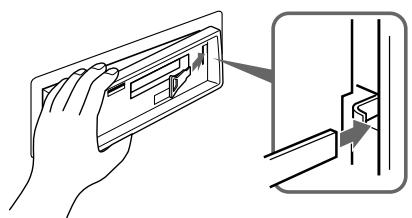
Appliquez le côté droit de la façade sur l'appareil en fixant la partie A de la façade à la partie B de l'appareil comme illustré, puis faites pivoter le côté gauche vers l'appareil jusqu'à ce qu'il s'enclenche.
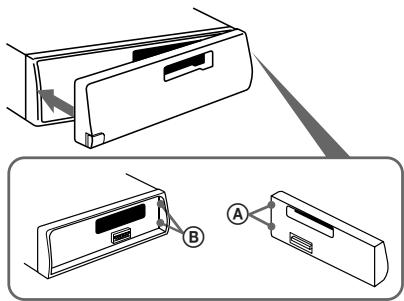
Remarques
- Assurez-vous que la façade est dans le bon sens lors de sa fixation, car elle ne peut pas être fixée à l'envers.
- N'appuyez pas fortement sur la façade lors de sa fixation. Elle peut être facilement fixée en appuyant légèrement contre l'appareil.
- Lorsque vous transportez la façade avant, placez-la dans la housse fournie.
- N'appuyez pas fortement et n'exercez pas de pression excessive sur les fenêtres d'affichage de la façade avant.
- Avant de retirer la façade avant, assurez-vous de couper l'alimentation. Cependant, si vous appuyez sur le bouton RELEASE pour détacher la façade alors que l'appareil est encore allumé, l'alimentation sera automatiquement coupée afin de protéger les haut-parleurs contre tout dommage.
- N'exposez pas la façade avant à la lumière directe du soleil, à des sources de chaleur telles que des conduits d'air chaud, et ne la laissez pas dans un endroit humide. Ne la laissez jamais sur le tableau de bord ou ailleurs dans une voiture garée en plein soleil, où la température à l'intérieur du véhicule peut augmenter considérablement.
Alarme d'avertissement
Si vous tournez la clé de contact sur la position OFF sans retirer la façade avant, l'alarme d'avertissement sera activée et un bip sonore se fera entendre pendant quelques secondes.
Réglage de l'horloge
L'horloge a un affichage numérique sur 24 heures.
Par exemple, réglage sur 10:08
1 Affichez l'heure. (Appuyez sur le bouton pendant le fonctionnement de l'appareil.) 2 Appuyez sur le bouton O pendant plus de deux secondes.
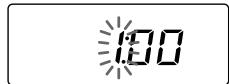
Le(s) chiffre(s) des heures clignote(nt).
Réglez les chiffres des heures.
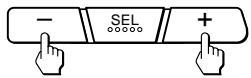
(pour reculer) (pour avancer)
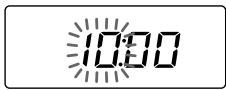
3 Appuyez brièvement sur le bouton.
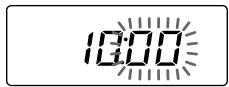
Les chiffres des minutes clignotent.
Réglez les chiffres des minutes.
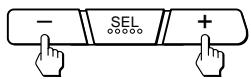
(pour revenir en arrière) (pour avancer)
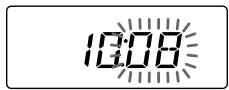
4 Appuyez brièvement sur le bouton DSPL.
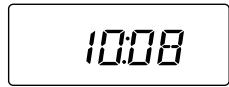
L'horloge s'active.
Remarque
L'horloge ne peut pas être réglée si l'appareil n'est pas sous tension. Réglez l'horloge après avoir allumé la radio ou pendant la lecture d'une cassette.
Utilisation du lecteur de cassettes
Écoute de la lecture d'une cassette
Après avoir inséré la cassette, la lecture démarre automatiquement.
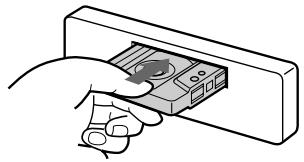
Pour changer le sens de défilement de la cassette, appuyez simultanément sur les boutons et .

Indication du sens de défilement de la cassette
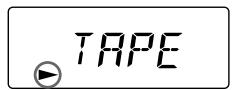
Le côté orienté vers le haut est en cours de lecture.
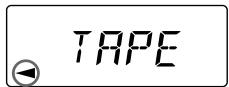
Le côté orienté vers le bas est en cours de lecture.
La lecture de la cassette change automatiquement de sens à la fin de la bande.
Remarque
Avant d'éteindre l'appareil, éjectez la cassette pour éviter d'endommager la bande.
Éjection de la cassette
Appuyez sur la touche 串 pour arrêter la lecture et éjecter la cassette.
Avance et retour rapides de la bande
| Direction indicator* | To advance | To rewind |
| ▲ | ← | ← |
| ▲ | ← | → |
Pour reprendre la lecture, appuyez partiellement sur l'autre touche d'avance ou de retour rapide jusqu'à ce que la touche verrouillée soit libérée.
- L'indicateur ou clignote pendant l'avance ou le retour rapide de la bande.
Réception radio pendant l'avance ou le retour rapide de la cassette
- Fonction ATA (Activation automatique du tuner)
Appuyez sur la touche ATA pendant la lecture. → "ATA" apparaît sur l'afficheur.
Lors de l'avance ou du retour rapide avec les touches ou , le tuner s'allume automatiquement.
Réception radio
Recherche automatique des stations
Réglage automatique
1 Sélectionnez la bande souhaitée.

FM1 → FM2 → FM3 →
PO → GO → FM1
2 Appuyez brièvement sur l'un des côtés du bouton SEEK/MANU pour rechercher la station suivante (réglage automatique).
Pour les fréquences plus basses
Pour les fréquences plus hautes
Le balayage s'arrête lorsqu'une station est captée. Appuyez à plusieurs reprises sur l'un des côtés du bouton jusqu'à ce que la station souhaitée soit captée.
Lorsqu'un programme stéréo FM avec un niveau de signal suffisant est capté,
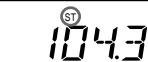
l'indication "ST" apparaît.
Pour éviter que le réglage automatique ne s'arrête trop souvent sur des stations (mode de recherche locale), appuyez brièvement sur le bouton SENS pour obtenir l'indication "LCL".
Seules les stations avec des signaux relativement forts seront captées. Le mode de recherche locale ne fonctionne que lorsque le réglage automatique est en cours.
Si la réception stéréo FM est
Mauvaise — Mode monaural
Appuyez brièvement sur le bouton SENS. → "MONO" apparaît sur l'affichage.
Le son s'améliorera, mais il deviendra monophonique.
Réglage en ajustant la fréquence — Syntonisation manuelle
1 Sélectionnez la bande souhaitée.
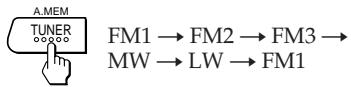
2 Maintenez enfoncé l'un des côtés du bouton SEEK/MANU.
Relâchez le bouton lorsque la station souhaitée est reçue.
Pour les fréquences plus basses
Pour les fréquences plus élevées
PRÉVENEZ LES ACCIDENTS !
Lors de la syntonisation en conduisant, utilisez la syntonisation automatique et la syntonisation par préréglage de mémoire au lieu de la syntonisation manuelle.
Mémorisation automatique des stations
Fonction de mémoire automatique
Les stations avec la réception la plus claire sont automatiquement recherchées et mémorisées sur chaque bande (FM1, FM2, FM3, PO et GO). Jusqu'à 6 stations sur chaque bande peuvent être stockées sur les boutons de préréglage numérotés de 1 à 6 dans l'ordre de la fréquence de la bande.
1 Sélectionnez la bande souhaitée.
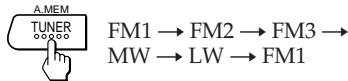
2 Appuyez sur le bouton TUNER/A.MEM pendant plus de deux secondes.

L'appareil commencera à balayer la bande sélectionnée et mémorisera automatiquement les stations syntonisées sur les boutons de préréglage numérotés de 1 à 6.
Mémorisation des stations souhaitées
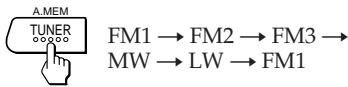
1 Sélectionnez la bande souhaitée. 2 Syntonisez la station que vous souhaitez mémoriser sur le bouton de numéro de préréglage. 3 Appuyez de manière prolongée sur le bouton de numéro de préréglage souhaité (ATA 1 à 6) pendant environ deux secondes jusqu'à ce que vous entendiez un bip sonore.
Le numéro du bouton de préréglage enfoncé apparaît dans la fenêtre d'affichage.
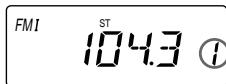
Jusqu'à 6 stations sur chaque bande (FM1, FM2, FM3, MW et LW) peuvent être mémorisées sur les boutons de numéro de préréglage dans l'ordre de votre choix. Par conséquent, 18 stations peuvent être mémorisées en FM.
Si vous essayez de mémoriser une autre station sur le même bouton de numéro de préréglage, la station précédemment mémorisée sera effacée.
Réception des stations mémorisées
1 Sélectionnez la bande souhaitée.
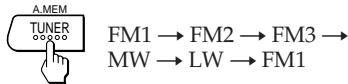
2 Appuyez brièvement sur le bouton de numéro de préréglage (ATA à 6) sur lequel la station souhaitée est mémorisée.
Remarque
Si vous appuyez sur le bouton de numéro de préréglage pendant plus de deux secondes, la station actuellement reçue sera mémorisée. Pour recevoir la station précédemment mémorisée, assurez-vous que le bouton de numéro de préréglage est enfoncé uniquement brièvement.
Autres fonctions
Réglage des caractéristiques sonores
1 Sélectionnez l'élément à régler en appuyant à plusieurs reprises sur le bouton . VOL (volume) → BAS (graves) → TRE (aigus) → BAL (balance) → FAD (atténuateur) → VOL (volume) 2 Réglez l'élément sélectionné en appuyant sur le bouton - ou +.
Réglez dans les trois secondes suivant la sélection. (Après trois secondes, le bouton servira à nouveau de bouton de contrôle du volume.)
Profiter des graves et des aigus à faible volume
— Fonction Loudness
Appuyez sur la touche LOUD. → « LOUD » s'affiche à l'écran.
Les graves et les aigus seront amplifiés. Pour annuler, appuyez à nouveau.
Désactivation du bip sonore
Appuyez sur la touche 5 tout en maintenant la touche SEL enfoncée.
Pour réactiver le bip sonore, appuyez à nouveau sur ces touches.
Entretien
Remplacement du fusible
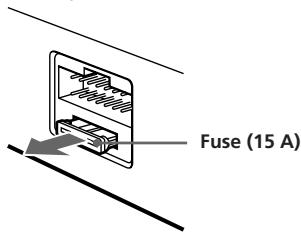
Lors du remplacement du fusible, assurez-vous d'utiliser un fusible dont l'intensité nominale correspond à celle indiquée sur le fusible. Si le fusible saute, vérifiez la connexion d'alimentation et remplacez le fusible. Si le fusible saute à nouveau après remplacement, il peut y avoir un dysfonctionnement interne. Dans ce cas, consultez votre revendeur Sony le plus proche.
Avertissement
N'utilisez jamais un fusible dont l'intensité nominale dépasse celle fournie avec l'appareil, car cela pourrait endommager l'appareil.
Nettoyage des connecteurs
L'appareil peut ne pas fonctionner correctement si les connecteurs entre l'appareil et la façade ne sont pas propres. Pour éviter cela, ouvrez la façade en appuyant sur la touche RELEASE, puis détachez-la et nettoyez-la avec un coton-tige imbibé d'alcool. N'appliquez pas trop de force, sinon le connecteur pourrait être endommagé.
Unité principale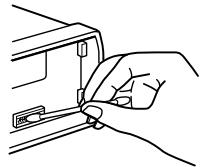
Dos de la façade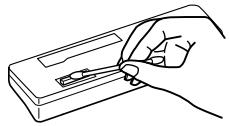
Démontage de l'appareil
1
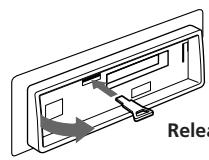
Clé de déverrouillage (fournie)
2
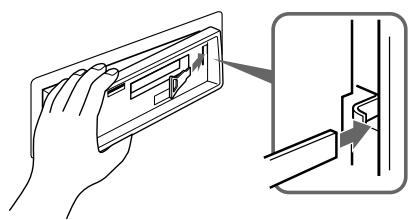
3
4
Emplacement des boutons
FR
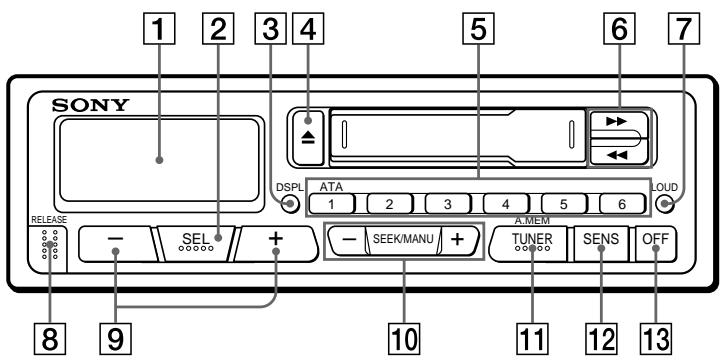
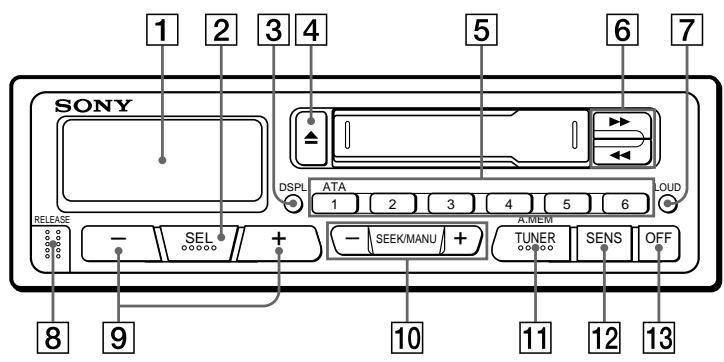
Reportez-vous aux pages indiquées par pour plus de détails.
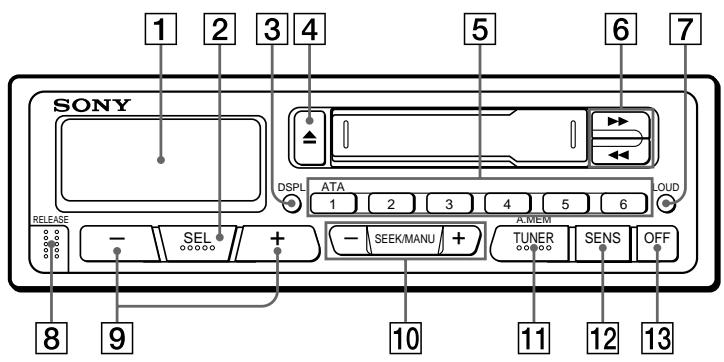
1 Fenêtre d'affichage, bouton SEL (sélection du mode de commande) ⑤, bouton DSPL (changement du mode d'affichage/réglage de l'heure) ⑤, 4 bouton (éjection) 5, en réception radio : boutons de numéros de préréglage
Pendant la lecture de cassette : bouton ATA 1 ATA (activation automatique du tuner) 6
Boutons (avance rapide)/DIR (changement de sens de défilement de la cassette) 7, bouton LOUD (accentuation des graves et des aigus) 8
8 Bouton RELEASE (déverrouillage de la façade) 46, 9 Boutons - + (volume/graves/aigus/balance/atténuateur) ⑤⑧, 10 Boutons SEEK/MANU 67, 11 Bouton TUNER/A.MEM (radio • sélection de bande/mémoire automatique) 67, 12 Bouton SENS (réglage de sensibilité) 3, 13 Bouton OFF 4
Spécifications
Section lecteur de cassettes
Piste de bande 4 pistes, 2 canaux stéréo
Pleurage et scintillement 0,13 % (WRMS)
Réponse en fréquence 30 - 15 000 Hz
Rapport signal/bruit 55 dB
Généralités
Fil de sortie Relais d'antenne électrique
fil de commande
Commandes de tonalité Graves ±8 dB à 100 Hz
Aigus ±8 dB à 10 kHz
Alimentation Batterie de voiture 12 V CC
Env. 186 × 57 × 170 mm (l/h/p)
Dimension de montage Env. 182 × 53 × 155 mm
(l/h/p)
Masse Env. 1,2 kg
Accessoires fournis Pièces pour l'installation et
connexions (1 jeu)
Panneau avant (1)
Section tuner
FM
Plage d'accord 65,0-74,0 MHz
87,5-108,0 MHz
Borne d'antenne
Connecteur d'antenne externe
Fréquence intermédiaire
10,7 MHz
Sensibilité utile
12 dBf
Sélectivité
70 dB à 400 kHz
Rapport signal/bruit
65 dB (stéréo),
68 dB (mono)
Distorsion harmonique à 1 kHz
0,5 % (stéréo),
0,3 % (mono)
Séparation
35 dB à 1 kHz
Réponse en fréquence
30 - 15 000 Hz
Taux de capture
2 dB
PO/GO
Plage d'accord
PO : 531 - 1 602 kHz
GO : 153 - 281 kHz
Antenna terminal
External antenna connector
Intermediate frequency
450 kHz
Sensitivity
MW: 30 µV
LW: 50 µV
Power amplifier section
Outputs
Speaker outputs
(sure seal connectors)
Speaker impedance
4-8 ohms
Maximum power output 20 W × 4 (at 4 ohms)
Design and specifications are subject to change without notice.
Guide de dépannage
La liste de contrôle suivante vous aidera à corriger la plupart des problèmes que vous pourriez rencontrer avec votre appareil.
Avant de parcourir la liste ci-dessous, reportez-vous aux procédures de connexion et d'utilisation.
Généralités
| Problem | Cause/Solution |
| No sound | ·Adjust the volume with the + button. ·Set the fader control to the centre position for 2-speaker systems. |
| Indications do not appear in the display window. | Remove the front panel and clean the connectors. See “Cleaning the Connectors” of “Maintenance” for details. |
Lecture de cassettes
| Problem | Cause/Solution |
| Playback sound is distorted. | Contamination of the tape head. → Clean the head. |
Réception radio
| Problem | Cause/Solution |
| Preset tuning is not possible. | Memorize the correct frequency. The broadcast is too weak. |
| Automatic tuning is not possible. | The broadcast is too weak.→Use the manual tuning. |
| The "ST" indication flashes. | Tune in precisely. The broadcast is too weak.→Press the SENS button to enter the MONO mode. |
Caractéristiques
Généralités
Panneau amovible lors de la sortie du véhicule (page 4). - Alarme d'avertissement si vous oubliez d'éteindre l'appareil en retirant le panneau avant. Amplificateur de puissance intégré (sortie maximale de 20 W × 4 canaux) pour écouter la musique à travers quatre haut-parleurs. - Radio avec horloge numérique 24 heures (page 5).
Lecteur de cassettes
- Fonction ATA (ACTIVATION AUTOMATIQUE DU TUNER) qui active automatiquement la radio lors de l'avance ou du retour rapide de la bande (page 6).
Récepteur radio
L'utilisateur a la possibilité de programmer 30 stations de radio : 18 stations en FM et 6 en MW et 6 en LW. - La fonction de mémoire automatique permet de mémoriser facilement et rapidement jusqu'à 30 stations de radio (page 7).
Consignes de sécurité
- Si l'auto était garée dans un endroit directement exposé au soleil, ce qui a provoqué une augmentation significative de la température à l'intérieur, il faut attendre que l'appareil refroidisse avant de commencer à l'utiliser.
- Si le récepteur n'est pas alimenté, il faut d'abord vérifier toutes les connexions. Lorsque tout est en ordre, veuillez vérifier le fusible.
- Si dans le système à deux haut-parleurs il n'y a pas de son provenant des haut-parleurs, il faut régler la commande des signaux sur la position médiane.
- Si votre voiture est équipée d'un système d'antenne électriquement déployable, elle est automatiquement déployée lors de l'utilisation du récepteur.
Si des questions ou des problèmes de quelque nature que ce soit liés à l'utilisation de cet appareil surviennent et ne sont pas décrits dans ce mode d'emploi, veuillez consulter le point de vente Sony le plus proche.
Remarques concernant les cassettes
Manipulation des cassettes
- Ne touchez pas la surface de la bande, car la saleté ou la poussière pourrait encrasser les têtes. Tenez les cassettes à l'écart des appareils contenant des aimants, comme les haut-parleurs ou les amplificateurs, car l'enregistrement sur la bande peut être effacé ou déformé.
- N'exposez pas les cassettes directement aux rayons du soleil, à des températures extrêmement basses ou à l'humidité.
- Si vous lisez une bande pendant une période prolongée, le boîtier de la cassette peut chauffer en raison de l'amplificateur de puissance intégré. Ce n'est pas un signe de dysfonctionnement de l'appareil.
Remarques sur les têtes de lecture/écriture du magnétophone à cassettes
- Une utilisation prolongée des cassettes entraîne l'encrassement des têtes du magnétophone, ce qui provoque une qualité sonore faible, indistincte ou une perte totale du son. C'est pourquoi nous recommandons de nettoyer les têtes du magnétophone à cassettes environ une fois par mois en utilisant le kit de nettoyage Sony disponible dans le commerce (Sony Cassette Cleaning Set). Si la qualité du son ne s'améliore pas après le nettoyage avec une cassette de nettoyage, veuillez consulter le point de vente Sony le plus proche.
- Dans le cas de bandes anciennes ou de mauvaise qualité, les têtes du magnétophone à cassettes s'encrassent beaucoup plus rapidement. Selon le type de bande, une ou deux lectures de la bande peuvent entraîner une qualité sonore faible, indistincte.
Cassettes d'une durée de lecture supérieure à 90 minutes
Nous déconseillons l'utilisation de cassettes d'une durée de lecture supérieure à 90 minutes, sauf pour une lecture continue. Les bandes utilisées pour ce type de cassettes sont très fines et ont tendance à s'étirer facilement. La lecture et l'arrêt fréquents de ces bandes peuvent provoquer leur étirement par le mécanisme du lecteur.
Retrait et installation de la façade avant ....4
Réglage de l'horloge. 5
Utilisation du lecteur de cassettes
Écoute de la bande 5 Retrait de la cassette 5 Avance rapide de la bande 6 Réception d'un programme radio pendant l'avance ou le retour rapide Fonction ATA (Automatic Tuner Activation = activation automatique du tuner) 6
Réception radio
Recherche automatique des stations. Réglage automatique 6 Si la réception radio sur la bande FM est faible Mode de réception monophonique 7 Réglage avec contrôle de la fréquence. Réglage fin 7 Mémorisation automatique des positions des stations radio Fonction de mémorisation automatique. 7 Mémorisation des stations sélectionnées uniquement .... 8 Réception des stations mémorisées 8
Autres fonctions
Réglage de la courbe de réponse 8 Réception des graves et des aigus même à faible volume Fonction LOUDNESS 8 Coupure du signal sonore 8
Entretien 8 Démontage de l'appareil 9 Emplacement des commandes 10 Caractéristiques techniques 11 Dépannage 12
Retrait et installation de la façade avant
Pour éviter le vol de l'appareil, vous pouvez retirer la façade avant.
Retrait de la façade avant
Avant de retirer la façade avant, il faut appuyer sur la touche OFF. Ensuite, il faut appuyer sur la touche RELEASE pour déverrouiller la façade avant et la tirer vers soi comme illustré ci-dessous.
Bouton RELEASE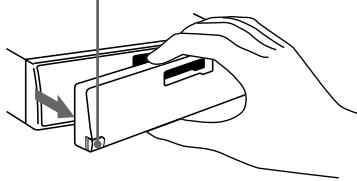
PL
Attention à ne pas faire tomber la façade avant lors de son retrait.
Installation de la façade avant
Fixez le côté droit de la façade avant à la radio en connectant la partie ④ de la façade avant à la partie ⑧ de la radio, comme illustré ci-dessous, et appuyez jusqu'à ce qu'elle s'enclenche.

Remarques
- Assurez-vous toujours que la façade avant est appliquée à la radio du bon côté, car si elle est inversée, elle ne peut pas être installée.
- Lors de l'installation de la façade avant, ne la poussez pas fortement contre l'appareil. Elle peut être facilement installée en la pressant légèrement contre l'appareil.
- Si vous retirez la façade avant, rangez-la dans l'étui prévu à cet effet.
- Ne pas appuyer fortement sur la fenêtre de la console de la façade avant ni la soumettre à une pression excessive.
- Avant de retirer la façade avant, éteignez toujours l'alimentation. Cependant, si vous appuyez sur le bouton RELEASE pour déverrouiller la façade avant alors que la radio est toujours sous tension, l'alimentation se coupe automatiquement pour éviter d'endommager les haut-parleurs.
- Ne pas exposer la façade avant à la lumière directe du soleil ou à des sources de chaleur, comme des conduits de ventilation chauds, et ne pas la laisser dans des endroits très humides. Ne la laissez jamais sur le tableau de bord ou ailleurs dans une voiture garée en plein soleil, car la température à l'intérieur du véhicule peut augmenter considérablement.
Alarme d'avertissement
Si l'on tourne la clé de contact sur OFF sans retirer la paroi avant, l'alarme d'avertissement se déclenche et le signal sonore dure plusieurs secondes.
Réglage de l'horloge
L'horloge utilise un affichage numérique sur 24 heures.
Exemple : réglage de l'heure à 10:08 sur l'horloge
1 Affichage de l'heure. (Appuyez sur la touche DSPL pendant l'utilisation de l'appareil.) 2 Appuyez sur la touche DSPL pendant plus de deux secondes.
Le chiffre indiquant les heures clignote.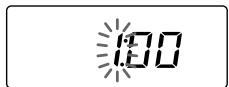
Réglez l'heure.
(vers l'avant)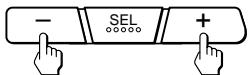
(vers l'arrière)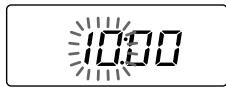
3 Appuyez brièvement sur la touche SEL.
Le chiffre indiquant les minutes clignote.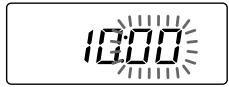
Réglez les minutes.
(vers l'avant)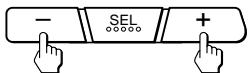
(vers l'arrière)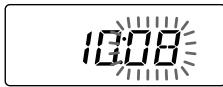
4 Appuyez brièvement sur la touche DSPL.
Zegar ustawia się w połączeniu.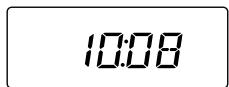
Uwaga
Nie można ustawiać zegara dopóki nie włączy się zasilania. Proszę ustawiać zegar po uprzednim włączeniu radia lub po rozpoczęciu odtwarzania kasety magnetofonowej.
Obsługa odtwarzacza kaset magnetofonowych
Słuchanie taśmy
Po włożeniu kasety włącza się automatyczne odtwarzanie.
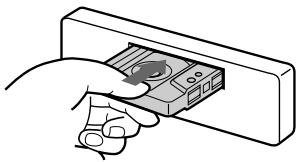
Aby zmienić kierunek odtwarzania taśmy
proszę nacisnąć jednocześnie przycisk i przycisk
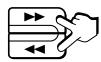
Wskaźnik kierunku przesuwu taśmy. Odtwarzana jest przednia strona taśmy.
Odtwarzana jest tylna strona taśmy.
Kierunek odtwarzania jest automatycznie zmieniany, gdy zakończy się odtwarzanie jednej strony taśmy.
Uwaga
Proszę wyjąć taśmę przed wyłączeniem odbiornika, aby zapobiec jej uszkodzeniu.
Wyjmowanie kasety
Nacisnąć przycisk w celu zatrzymania odtwarzania i wyjęcia kasety.
Avance rapide de la bande
| Wska®nik kierunku odtwarzania* | W celu przejcia do przodu | W celu przejcia do tyu |
| ▲ | ||
| ▲ |
Pour reprendre la lecture, appuyez sur la deuxième touche d'avance rapide jusqu'à ce que la touche enfoncée soit relâchée.
- L'indicateur ou le voyant clignote pendant l'avance rapide de la bande.
FR
Réception d'un programme radio pendant l'avance rapide ou le retour rapide
Fonction ATA (Activation automatique du tuner)
Pendant la lecture, appuyez sur la touche ATA 1. → L'indication « ATA » apparaît sur l'afficheur.
Pendant l'avance rapide ou le retour rapide à l'aide de la touche, la réception d'un programme radio s'active automatiquement.
Réception radio
Recherche automatique des stations – Syntonisation automatique
1 Sélectionnez la bande souhaitée.
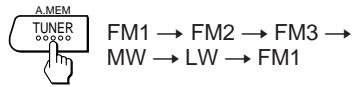
2 Appuyez sur l'un des côtés de la touche SEEK/MANU pour activer la recherche de stations (syntonisation automatique).
Pour les fréquences plus basses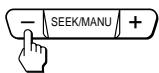
Pour les fréquences plus élevées
La recherche s'arrête dès qu'une station est captée.
Pour régler le récepteur sur une station spécifique, il faut appuyer plusieurs fois sur l'un des côtés de la touche.
Si le récepteur radio s'accorde sur un programme stéréo dans la gamme FM avec un signal suffisamment fort,
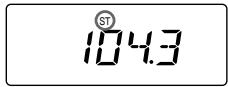
l'inscription « ST » apparaît dans la fenêtre de l'afficheur.
Pour que l'accord automatique ne s'arrête pas trop souvent sur les différentes stations (mode LOCAL SEEK), il faut appuyer brièvement sur la touche SENS, jusqu'à ce que l'inscription « LOC » apparaisse sur l'afficheur.
Le récepteur ne s'accorde alors que sur les stations dont les signaux d'émission sont relativement forts. Le mode LOCAL SEEK ne fonctionne que lorsque l'accord automatique est activé.
Si la réception radio sur la gamme FM est faible,
Mode de réception monophonique
Appuyer brièvement sur la touche SENS. → L'inscription « MONO » apparaît sur l'afficheur.
La qualité du son s'améliore, mais il devient monophonique.
Accord manuel et réglage de la fréquence
Accord manuel
1 Sélectionner la gamme souhaitée.

FM1 → FM2 → FM3 →
MW → LW → FM1
2 Appuyer sur l'un des côtés de la touche SEEK/MANU et le maintenir enfoncé.
Naciśnij przycisk w momencie uzyskania odbioru pożądanej stacji.
Dla mniejszych częstotliwości
Dla większych częstotliwości
ZAPOBIEGANIE WYPADKOM!
Podczas jazdy samochodem należy używać wyłącznie strojenia automatycznego i przycisków do przyłączania stacji zapisanych w pamięci. Nie należy dostrajać radia ręcznie!
Automatyczne zapisywanie w pamięci sprzętu pozycji stacji radiowych
Funkcja automatycznego zapisywania w pamięci sprzętu
Stacje radiowe o wyraźnym odbiorze są automatycznie szukane i zapisywane w pamięci sprzętu dla każdego pasma (FM1, FM2, FM3, MW i LW). Maksymalnie można zapisać dla każdego pasma 6 stacji radiowych, które będą obsługiwane przez przyciski 1 do 6, w kolejności odpowiadającej danym częstotliwościom radiowym.
1 Wybrać pożądane pasmo.

FM1 → FM2 → FM3 →
MW → LW → FM1
2 Naciskać przycisk TUNER/A.MEM przez dłużej niż dwie sekundy.

Rozpoczyna się automatycznie przeszukiwanie pasma i w pamięci sprzętu zapisywana jest pozycja danego odbieranego dostrojonego programu radiowego, pod jednym z przycisków oznaczonych cyframi 1 do 6.
Zapamiętywanie wyłącznie wybranych stacji
1 Wybrać pożądane pasmo.

FM1 → FM2 → FM3 → MW → LW → FM1
2 Régler la station que l'on souhaite mémoriser sous le numéro de touche donné. 3 Appuyer sur la touche numérique choisie (de 1 à 6) pendant environ deux secondes, jusqu'à ce qu'un signal sonore se fasse entendre.
Le numéro de la touche choisie apparaît maintenant dans la fenêtre de la console.
FMI
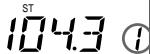
En mémoire, on peut mémoriser sous les touches numériques six stations pour chaque bande (FM1, FM2, FM3, MW et LW). En FM, on peut donc programmer 18 stations. Si une station est déjà mémorisée sous une touche et que l'on souhaite en mémoriser une autre, la précédente mémorisation est effacée.
Réception des stations mémorisées
1 Choisir la bande souhaitée.

FM1 → FM2 → FM3 → MW → LW → FM1
2 Appuyer brièvement sur la touche numérique (de 1 à 6) sous laquelle la station recherchée a été mémorisée.
Remarque : si l'on appuie sur une touche numérique pendant plus de deux secondes, la station actuellement reçue est mémorisée. Pour activer la réception d'une station précédemment mémorisée sous une touche numérique, il suffit d'appuyer brièvement sur cette touche.
Autres fonctions
Réglage de la courbe de réponse
1 Sélectionner le paramètre à régler en appuyant plusieurs fois sur la touche.
VOL (volume) → BAS (basses) → TRE (aigus) → BAL (balance) → FAD (atténuation) → VOL (volume)
2 Effectuer le réglage du paramètre choisi en appuyant sur la touche - ou +.
La régulation des paramètres s'effectue dans les trois secondes qui suivent leur sélection. (Après trois secondes, le bouton sera de nouveau utilisé comme régulateur de volume.)
Réception des graves et des aigus même à faible volume – Fonction LOUDNESS
Appuyez sur la touche LOUD . → Dans la fenêtre de la console, l'indication « LOUD » (fort) apparaît. Les graves et les aigus sont renforcés. Pour désactiver cette fonction, appuyez à nouveau sur la touche.
Appuyez sur la touche 5 tout en appuyant simultanément sur la touche
La restauration du signal sonore s'obtient en appuyant de nouveau sur les touches ci-dessus.
Entretien
Remplacement du fusible
Lors du remplacement du fusible, veillez à respecter son calibre, indiqué sur l'emballage du fusible. Si le fusible est grillé, vérifiez la connexion à l'alimentation et remplacez le fusible. Si le fusible grille à nouveau après remplacement, une panne est survenue dans l'appareil. Dans ce cas, contactez le point de service agréé Sony le plus proche.
Fusible (15 A)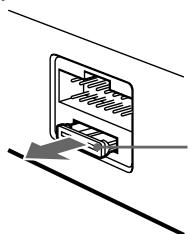
Attention
N'utilisez jamais de fusibles dont le courant nominal dépasse celui du fusible installé en usine dans le récepteur, car cela pourrait endommager l'appareil.
Nettoyage des connecteurs
L'appareil peut ne pas fonctionner correctement si les connecteurs entre le châssis et la face avant ne sont pas propres. Pour éviter cela, retirez la face avant en appuyant sur la touche RELEASE, puis démontez-la et nettoyez les connecteurs à l'aide d'un coton-tige légèrement imbibé d'alcool. Ne pas appuyer trop fort. Dans le cas contraire, cela pourrait endommager les connecteurs.
Châssis de la radio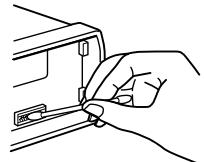
Przednia ścianka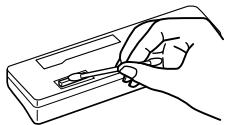
Demontaż urządzenia
1
Klucz zwalniający (załączony)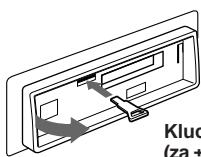
2
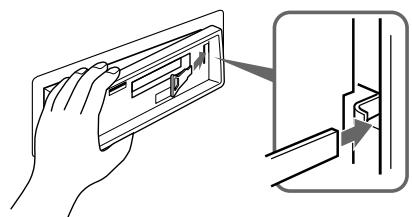
3
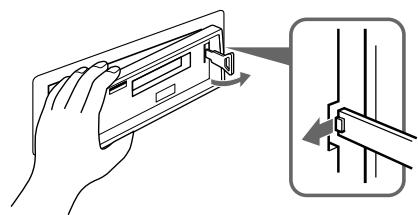
4
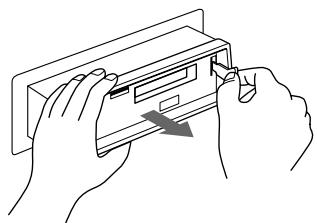
Lokalizacja kontrolek
Szczegółów szukaj na stronach w
PL
1 Okienko konsoli 2 Przycisk SEL (wybór trybu kontrolnego) 58 3 Przycisk DSPL (zmiana trybu wyświetlania/ustawianie czasu) 5 4 Przycisk (wysuwanie kasety) 5 5 Podczas odbioru programów radiowych: Przyciski numeryczne 7
Podczas odtwarzania taśmy:
ATA Przycisk ATA (automatyczne włączanie programu radiowego) 6
6 Przyciski (szybkie przewijanie)/ DIR (zmiana kierunku transportu taśmy) 5 7 Przycisk LOUD (głośność) 8
8 Przycisk RELEASE (odblokowanie przedniej ścianki) 48 9 Przyciski - + (Regulacja siły głosu/basów/tonów wysokich/równowagi/wzmacniania sygnału) 58 10 Przycisk SEEK/MANU 67 11 Przycisk TUNER/A.MEM (radio włączona • wybór pasma/funkcja automatycznego zapisywania w pamięci sprzętu) 67 12 Przycisk SENS (czułość odbiornika) 6 13 Przycisk OFF 4
Caractéristiques techniques
Lecteur de cassettes
Piste de lecture
4 pistes,
2 canaux,
stéréophonique
Pleurage et scintillement (dû à une vitesse de bande irrégulière)
0,13 % (WRMS)
Réponse en fréquence
30 à 15 000 Hz
Rapport signal/bruit pondéré 55 dB
Récepteur radio
FM
Plage d'accord 65,0 à 74,0 MHz
87,5 à 108,0 MHz
Antenne externe avec ± cze
antenne
Fréquence intermédiaire 10,7 MHz
12 dBf
Sélectivité
65 dB (stéréo).
Rapport signal/bruit psychométrique
68 dB (mono)
Distorsion harmonique à 1 kHz
0,5% (stéréo)
0,5% (stéréo)
0,3% (mono)
Séparation 35 dB à 1 kHz
OWA
Réponse en fréquence
30 à 15.000 Hz
Facteur de capture
2 dB
MW/LW
Plage d'accord
MW : 531 à 1 602 kHz
LW : 153 à 281 kHz
Antenne
Connecteur externe
Fréquence intermédiaire
antenne
Sensibilité
MW : 30 µV
LW : 50 µV
Amplificateur de puissance
Sorties
Sorties haut-parleurs
(connecteurs étanches)
Impédance des haut-parleurs
4 à 8 ohms
Puissance de sortie maximale
20 W × 4 (à 4 ohms)
Généralités
Câble de sortie
Câble d'alimentation
Commande d'antenne automatique
Réglage de la tonalité
Graves ±8 dB à 100 Hz
Aigus ±8 dB à
Consommation électrique
10 kHz
Puissance requise
12 V CC provenant de la batterie
de voiture (
masse négative)
Dimensions approx.
186 × 57 × 170 mm
(long./haut./larg.)
Dimensions de montage approx.
182 × 53 × 155 mm
(long./haut./larg.)
Poids approx.
1,2 kg
Accessoires fournis
Éléments fournis
de montage (1 jeu)
Étui pour télécommande
(1)
L'aspect et les caractéristiques techniques peuvent être modifiés sans préavis.
FR
Dépannage
La liste de contrôle suivante peut vous aider à résoudre la plupart des problèmes qui peuvent survenir lors de l'utilisation de l'appareil.
Avant de lire la liste de contrôle suivante, veuillez lire attentivement le manuel d'installation et d'utilisation.
Généralités
| Usterka | Przyczyna/Usuwanie usterki |
| Brak d0wiiku | • WyregulowaÉ si òg osu przyciskiem +. • Proszl ustawiÉ regulator wzmocnienia syrna Üw w pozycji rodkowej dwug o nikowego systemu. |
| W okienku konsoli nie pojawiaz± sil wska0niki. | Zdj±É przydni± ciankí oczy ciÉ ±czniki. SzczegÜ Üw szukaÉ w czl ci ÜCzyszczeneni ±cznikÜw a w rozdziele ÜKonserwacjaám. |
Lecture de la bande
| Usterka | Przyczyna/Usuwanie usterki |
| D®wilk odtwarzany z kasety jest znieksztá cony. | G owica jest zanieczyszczona. → Naleź y j± oczy ciÊ. |
FR
Réception des programmes radio
| Usterka | Przyczyna/Usuwanie usterki |
| Brak odbioru zapamiltanych staci. | • ZapisaÊ wAMIci w a ciw± czístotliwoÊ. • Sygna nadawczy jest za s aby. |
| Automatyczne dostrajanie nie jest moßliwe. | Sygna nadawczy jest za s aby. →Pos uøyÊ sil strojeniem rícznym. |
| Wska®nik ÜSTá miga. | • DostroiÊ dok adnie. • Sygna nadawczy jest za s aby. →Nacisin±Ê przycisk SENS, aby przyejÊ na tryb odbioru monofonicznero. |
Általános tudnivalók
Levehető kezelőlap, melyet magával vihet, ha kiszáll autójából (4. oldal). Ha kikapcsolja a gyújtást, és nem távolítja el a készülék kezelőlapját, úgy aktivizálódik a figyelmeztető funkció. A beépített erősítő (max. teljesítmény: 20 W × 4 csatorna) lehetővé teszi 4-hangszórós rendszer alkalmazását. A készülék órája 24-órás digitális kijelzővel rendelkezik (5. oldal).
Magnó
- Az ATA (Automatic Tuner Activation = Automatikus Rádió Aktivizálás) funkció automatikusan bekapcsolja a rádiót, ha ön előre- vagy hátracsévél egy kazettát (6. oldal).
Hangoló
- A készüléken 30 adót programozhat be: 18 ultrarövidhullámú (FM), 6 középhullámú (MW) és 6 hosszúhullámú (LW) adót.
- Az Automatikus Memória funkció segítségével 30 rádióadót programozhat be egyszerűen és gyorsan (7. oldal).
Biztonsági előírások
Ha autóját napfénynek kitett helyen hagyta, s az autó belső terében felforrósodott a levegő, hagyja lehűlni a készüléket, s csak ezután kapcsolja be. Ha a készülék nem kap áramot, kérjük, ellenőrizze először a csatlakozásokat, s ha ezeknél nem talál rendellenességet, ellenőrizze a biztosítékot. - Ha nem jön hang egy 2 hangszórós rendszerből, állítsa a hangszabályozót a középső állásba. Ha készüléke motoros antennával rendelkezik, úgy az antenna automatikusan kiemelkedik és kiegyenesedik a készülék bekapcsolásakor.
Amennyiben olyan kérdések vagy problémák merülnének fel készülékét illetően, melyekre nem nyújt eligazítást használati útmutató, úgy kérjük, forduljon a legközelebbi Sony márkakereskedőhöz.
Tudnivalók a kazettákról
A kazetták kezelése
- Ne érintse meg a kazettában a szalagot, mert az esetleg rákertülő szennyeződések és a por hatására elpiszkolódnak a fejek. Ügyeljen arra, hogy kazettái ne kerüljenek beépített mágnest tartalmazó egységek (pl. hangszórók vagy erősítők) közelébe, ellenkező esetben ugyanis előfordulhat, hogy a felvétel letörlődik, ill. eltorzul.
- Ne tegye ki kazettáit közvetlen napfénynek, kószónásan alacsony hőmérsékletnek, ill. pára-nak. Ha hosszú időn keresztül hallgat egy kazettát, előfordulhat, hogy az felmelegszik. Ez azonban a beépített erősítő hatására történik, s nem jelent rendellenességet.
Tudnivalók a szalagtovábbító fejek tisztításáról
Les têtes de lecture/écriture de la platine à cassettes se salissent avec le temps lors de l'utilisation des cassettes, ce qui peut entraîner une mauvaise qualité sonore ou des coupures de son. Il est donc recommandé de nettoyer les têtes de lecture/écriture environ une fois par mois à l'aide d'une cassette de nettoyage Sony disponible dans les magasins spécialisés. Si la qualité sonore ne s'améliore pas après l'utilisation de la cassette de nettoyage, veuillez contacter le revendeur Sony le plus proche. - Les têtes de lecture/écriture se salissent plus rapidement lors de l'utilisation de cassettes anciennes ou de mauvaise qualité. Dans ce cas, la qualité sonore peut se dégrader après seulement une ou deux lectures.
Cassettes de plus de 90 minutes
L'utilisation de cassettes de plus de 90 minutes est recommandée uniquement pour une lecture longue et continue. Ces cassettes sont en effet fabriquées avec une bande très fine qui peut facilement s'étirer. Si ces bandes sont souvent démarrées et arrêtées, il peut arriver que la bande soit pincée par les mécanismes.
Table des matières
Retrait et remise en place de la façade ......... 4 Réglage de l'horloge 5
Utilisation de la platine
Lecture d'une cassette 5 Éjection d'une cassette 5 Avance et retour rapides 6 Écoute de la radio pendant l'avance ou le retour rapide ä Fonction ATA (Activation automatique du tuner) .... 6
Écoute de la radio
Recherche automatique des stations ä Syntonisation automatique 6 En cas de réception FM faible, passage en réception monophonique 6 Réglage des stations avec syntonisation fine ä Syntonisation manuelle 6 Programmation automatique des stations ä Fonction mémoire automatique 7 Programmation des stations sélectionnées 7 Écoute des stations programmées. 7
Autres fonctions
Réglage de la tonalité 8 Mise en valeur des aigus et des graves même à faible volume Fonction volume ä Désactivation du signal d'avertissement 8
Entretien de l'appareil 8 Retrait de l'appareil 9 Commandes de l'appareil 10 Caractéristiques techniques 11 Dépannage 12
Retrait et remise en place de la façade
Vous pouvez retirer la façade de l'autoradio et l'emporter avec vous, afin d'éviter tout risque de vol de l'appareil.
Retrait de la plaque de commande
Avant de retirer la plaque de commande de l'appareil, n'oubliez pas d'appuyer sur la touche . Ensuite, déverrouillez la plaque de commande en appuyant sur la touche RELEASE, puis retirez la plaque de commande en la tirant vers vous, comme indiqué sur la figure.
Touche RELEASE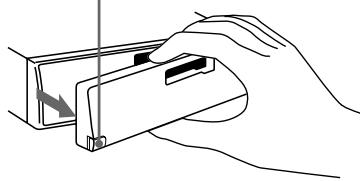
Veillez à ne pas faire tomber la plaque de commande une fois déverrouillée.
Remise en place de la plaque de commande
Alignez le côté droit de la plaque de commande avec l'appareil, de sorte que le point marqué A sur la plaque de commande s'ajuste au point marqué B sur l'appareil (voir figure), puis poussez la plaque de commande contre l'appareil jusqu'à ce qu'elle s'enclenche.
Remarques
Veillez à remettre la plaque de commande dans la bonne position ; elle ne peut pas être insérée à l'envers dans l'appareil. - Lors de l'enclenchement de la plaque de commande, n'exercez pas de pression excessive - elle s'enclenche en place même si vous la poussez très doucement contre l'appareil. Si vous retirez la plaque de commande de l'appareil, rangez-la dans la boîte de rangement fournie avec l'appareil. Ne pas exercer de pression sur la fenêtre d'affichage de la plaque de commande.
Veillez à ne retirer la plaque de commande de l'appareil qu'après avoir appuyé sur la touche OFF. Si vous oubliez de le faire, l'appareil s'éteint automatiquement lorsque vous appuyez sur la touche RELEASE, ce qui évite d'endommager les haut-parleurs. - N'exposez pas la plaque de commande à la lumière directe du soleil, à des sources de chaleur (par exemple, une sortie d'air chaud) et ne la laissez pas dans un endroit humide. Ne laissez jamais la plaque de commande sur le tableau de bord de votre voiture si vous vous garez au soleil, car l'air à l'intérieur peut chauffer.
Signaux d'avertissement
Si vous coupez le contact sans avoir retiré la plaque de commande de l'appareil, la fonction d'avertissement s'active et des signaux d'avertissement se font entendre pendant quelques secondes.
Réglage de l'horloge
L'horloge est dotée d'un affichage numérique sur 24 heures.
Réglage de l'horloge, par exemple sur 10:08
1 Affichage de l'horloge. (Allumez l'appareil, puis appuyez sur la touche DSPL.) 2 Appuyez sur la touche DSPL pendant plus de deux secondes.
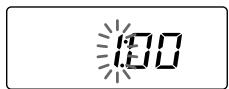
À ce moment, les caractères de l'heure commencent à clignoter.
Réglez l'heure correcte.
(h-tra) (elire)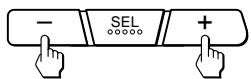
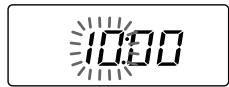
3 Appuyez brièvement sur le bouton.
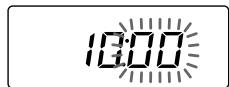
À ce moment, les caractères des minutes commencent à clignoter.
Réglez les minutes correctes.
(elire)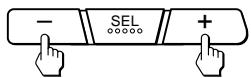
(h-tra)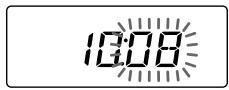
4 Appuyez brièvement sur la touche DSPL.
À ce moment, l'heure s'allume.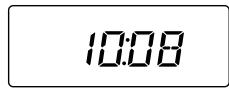
Remarque
L'heure ne peut être réglée qu'après la mise sous tension de l'appareil ; avant le réglage, allumez donc toujours l'appareil ou commencez à lire une cassette.
Utilisation du magnétophone
Lecture de cassette
Après l'insertion de la cassette, l'appareil commence automatiquement la lecture.
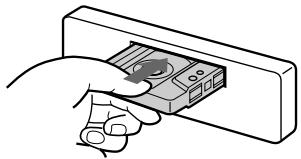
Pour changer le sens de lecture, appuyez simultanément sur les touches et .
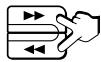
Affichage du sens de lecture de la cassette

L'appareil lit la face supérieure de la cassette.
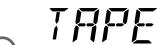
L'appareil lit la face inférieure de la cassette.
Lorsque la cassette est terminée, l'appareil change automatiquement le sens de lecture.
Remarque : Pour éviter d'endommager la cassette, il est recommandé de ne pas la laisser dans l'appareil lorsqu'il est éteint.
Retrait de la cassette
Appuyez sur la touche. L'appareil arrête alors la lecture et éjecte la cassette.
Avance rapide
Indicateurs de direction*
Avance rapide
Retour rapide


Pour reprendre la lecture normale, appuyez sur la touche d'avance rapide dans la direction opposée jusqu'à ce que la touche précédemment enfoncée se relâche.
* Pendant l'avance rapide, l'indicateur de direction ou clignote.
Pendant l'avance rapide ou le retour rapide
ATA (Automatic Tuner Activation = Automatikus Rádió Aktiválás) funkció
ATA: Nyomja meg lejátszás közben az 1 gombot. → A kijelzőn ekkor megjelenik az „ATA” felirat.
Ha gyorscsévélésbe kezd a ill. a gomb segítségével, a rádió automatikusan bekapcsol.
Rádióhallgatás
Automatikus adókeresés
Automatikus hangolás
1. Állítsa be a kívánt sávot.

FM1 → FM2 → FM3 → MW → LW → FM1
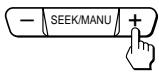
2. Az egyes adók bekereséséhez nyomja meg a SEEK/MANU (keresés/manuális) gomb valamelyik szélét (automata hangolás).
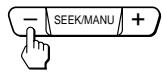
Alacsonyabb frekvenciák irányában
Magasabb frekvenciák irányában
A keresés azonnal megáll, mihelyt beállítódik egy adó. Nyomja le a gomb valamelyik szélét többször egymás után addig, amíg meg nem találja a kívánt adót.
Ha a készülék megfelelő szintű FM sztereó programot hangolt be,
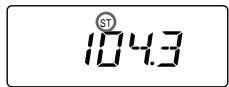
megjelenik az „ST” kijelzés.
Ha el akarja kerülni, hogy az automatikus hangolás az összes adónál - beleértve a túl gyengén fogható adókat is - megálljon, nyomja meg röviden az LCL gombot, amíg a kijelzőn megjelenik az „LCL” felirat. A készülék ekkor „helyi kereső üzemmódba” (local seek mode) vált.
A készülék ekkor csak azokat az adókat hangolja be, amelyekről viszonylag erős jelek érkeznek. A helyi keresés csak automatikus hangoláskor működik.
Gyenge FM-vétel esetén
a mono vétel
Nyomja meg röviden a gombot. → A kijelzőn ekkor megjelenik a „MONO” felirat. Az adót így is csak monóban hallgathatja, de javul a hangminőség.
Az adók beállítása finomhangolással
Manuális hangolás
1. Állítsa be a kívánt sávot.

FM1 → FM2 → FM3 → MW → LW → FM1
2. Nyomja meg és tartsa lenyomva a SEEK/MANU gomb valamelyik szélét.
Engedje el a gombot a keresett adó vételénél.
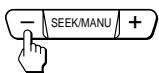
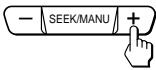
Alacsonyabb frekvenciák irányában
Magasabb frekvenciák irányában
BALESETVESZÉLY! KERÜLJE EL A VEZETÉS KÖZBENI KEZELÉST!
Ha vezetés közben kíván rádiózni, az automatikus hangolást, ill. a programgombokat használja, és ne végezzen manuális hangolást.
Az adók automatikus beprogramozása
Fonction mémoire automatique
Cette fonction programme automatiquement, pour toutes les gammes d'ondes (FM1, FM2, FM3, MW et LW), les stations les mieux captées. L'appareil mémorise pour chaque gamme d'ondes 6 stations sous les touches de programme, dans l'ordre correspondant à leur fréquence.
1. Réglez la gamme d'ondes souhaitée.

FM1 → FM2 → FM3 → MW → LW → FM1
2. Appuyez sur la touche TUNER/A.MEM et maintenez-la enfoncée pendant plus de deux secondes.

L'appareil recherche alors toute la gamme d'ondes réglée et mémorise automatiquement les stations captées sous les touches de programme 1 à 6.
Programmation de stations sélectionnées
1. Réglez la gamme d'ondes souhaitée.

FM1 → FM2 → FM3 → MW → LW → FM1
2. Accordez la station que vous souhaitez mémoriser sous une touche de programme. 3. Maintenez enfoncée la touche de programme souhaitée (1 à 6) pendant environ deux secondes, jusqu'à ce qu'un signal sonore se fasse entendre.
Le numéro de la touche de programme enfoncée s'affiche alors dans la fenêtre d'affichage.
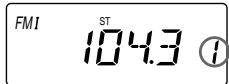
L'appareil peut mémoriser pour chaque gamme d'ondes (FM1, FM2, FM3, MW et LW) jusqu'à 6 stations sous les touches de programme, dans l'ordre déterminé par la fréquence. Pour la gamme FM, on peut donc programmer 18 stations.
Si vous essayez de programmer une station sur une touche de programme déjà occupée, elle remplacera la station précédemment mémorisée.
Écoute de stations mémorisées
1. Réglez la gamme d'ondes souhaitée.

FM1 → FM2 → FM3 → MW → LW → FM1
2 Appuyez brièvement sur la touche de programme (ATA 1 - 6) sous laquelle vous avez programmé la station souhaitée.
Remarque
Si vous maintenez la touche de programme enfoncée pendant plus de deux secondes, l'appareil mémorisera la station en cours. Si vous souhaitez écouter une station programmée, veillez à n'appuyer que très brièvement sur la touche de programme.
Autres fonctions
Réglage du son
1 Sélectionnez la caractéristique à modifier en appuyant plusieurs fois sur la touche.
VOL (volume) → BAS (graves) → TRE (aigus) → BAL (balance) → FAD (sonorité) → VOL (volume)
2 Vous pouvez modifier la caractéristique sélectionnée à l'aide des touches - et +.
Effectuez la modification dans les 3 secondes, sinon les touches ci-dessus redeviennent des touches de réglage du volume normales.
Mise en valeur des aigus et des graves, même à volume faible
Fonction de volume
LOUD Appuyez sur la touche. → L'écran affiche alors le message « LOUD ».
L'appareil met en valeur les graves et les aigus. Si vous souhaitez
continuer la lecture avec un son normal, appuyez à nouveau sur la touche LOUD.
Désactivation du signal d'avertissement
Maintenez la touche enfoncée et appuyez sur la touche.
Pour réactiver les signaux d'avertissement, appuyez à nouveau sur les touches ci-dessus.
Entretien de l'appareil
Remplacement du fusible
Lors du remplacement du fusible, assurez-vous que l'intensité nominale indiquée sur le nouveau fusible correspond à l'intensité nominale du fusible d'origine.
Si le fusible a grillé, vérifiez la connexion du cordon d'alimentation, puis remplacez le fusible. Si le nouveau fusible grille également, il est probable qu'il y ait un dysfonctionnement interne de l'appareil. Dans ce cas, veuillez contacter le revendeur Sony le plus proche.
Fusible (15 A)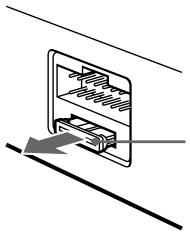
Avertissement
N'utilisez jamais de fusible dont l'intensité nominale dépasse celle du fusible fourni à l'origine avec l'appareil, car cela pourrait endommager l'appareil.
Nettoyage des connecteurs
L'encrassement des connecteurs entre l'appareil et la platine peut entraver le fonctionnement normal de l'appareil. Pour éviter cela,
déverrouillez la platine en appuyant sur la touche RELEASE, soulevez-la de l'appareil,
puis nettoyez les connecteurs avec un coton-tige imbibé d'alcool. Effectuez le nettoyage avec des mouvements doux, sinon vous risquez d'endommager les connecteurs.
Appareil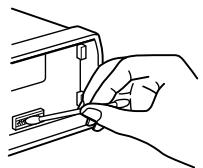
Page de la face arrière de la télécommande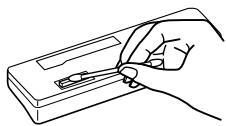
Retrait de la télécommande
1
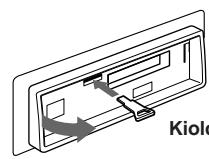
Clé de déverrouillage (accessoire)
2
3
4
H
Boutons de commande de la télécommande
Vous trouverez des informations détaillées sur les pages indiquées dans les cercles noirs ●.
1 Afficheur 2 Bouton SEL (sélection du mode de commande) 58 Bouton DSPL (changement du mode d'affichage/réglage de l'horloge) ⑤ 4 Bouton (éjection de la cassette) 5 5 Boutons de programme pendant l'écoute radio 7
Pendant la lecture d'une cassette :
ATA 1 ATA (activation automatique de la radio) 6
6 Boutons / / (avance/retour rapide)/DIR (changement de sens de lecture) ⑤ ⑥ 7 Bouton LOUD (volume) 8
8 Bouton RELEASE (déverrouillage de la télécommande) 43 9 Boutons - + (volume/graves/aigus/balance/timbre) 56 10 Bouton SEEK/MANU (recherche/manuel) 67 11 Bouton TUNER/A.MEM (mise sous tension de la radio/mémoire automatique) 67 12 Bouton SENS (réglage de sensibilité) 6 13 Bouton OFF (arrêt) 4
Caractéristiques techniques
Magnétophone
Système de bande 4 pistes, 2 canaux
stéréo
Pleurage et scintillement 0,13 % (WRMS)
Réponse en fréquence 30 à 15 000 Hz
Rapport signal/bruit 55 dB
Tuner
FM
Plage de syntonisation 65,0 à 74,0 MHz
87,5 à 108,0 MHz
Entrée d'antenne
Connecteur d'antenne coaxiale
Fréquence intermédiaire
10,7 MHz
12 dBf
Sélectivité
70 dB à 400 kHz
Rapport signal/bruit
65 dB (stéréo)
68 dB (mono)
Distorsion harmonique à 1 kHz
à
0,5 % (stéréo),
0,3 % (mono)
35 dB à 1 kHz
Séparation
30 à 15 000 Hz
Réponse en fréquence
2 dB
Vételi tartomány
MW/LW
Hangolási tartomány
MW: 531 kHz à 1 602 kHz
LW: 153 à 281 kHz
Külső antennacsatlakozó
450 kHz
MW: 30 μV
LW: 50 μV
Érzékenység
Sorties
Sorties haut-parleur
(contact aussi pour faible courant)
contact)
4 à 8 ohm
20 W × 4 (4 ohm
impédance)
Caractéristiques techniques générales
Points de commande Commande d'antenne motorisée
point
Commande de haut-parleurs Graves 100 Hz
± 8 dB
Aigus 10 kHz
± 8 dB
Alimentation 12 V continu
batterie de voiture
masse négative
Dimensions env. 186 × 57 × 170 mm
(L × H × P)
Dimensions approximatives : environ 182 × 53 × 155 mm
(largeur × hauteur × profondeur)
Poids approximatif : 1,2 kg
Accessoires fournis : kit de montage pour
l'installation/
le raccordement
(1 kit)
Boîte contenant le manuel d'utilisation (1)
Nous nous réservons le droit de modifier le design et les spécifications techniques.
Sous réserve de modifications.
Dépannage
La liste ci-dessous vous aide à résoudre la plupart des problèmes qui peuvent survenir lors de l'utilisation de l'appareil.
Avant de consulter le guide de dépannage, veuillez lire le guide de raccordement et le mode d'emploi.
Problèmes généraux
| HibajelensÉg | Ok/Hibaelh·rìt·s |
| Nincs hang | ·jìltsa be a hangerit a + gomb segltsÉgEvel. ·jìltsa a 2-hangszǔrUs rendszer hangszab-lyozǔj·t a k^zÉpsi pozičiUba. |
| Nem jelennek meg a kijelzÉsek a kijelzɪablakban. | T·volltsa el a kezelɪlapot ðs tiszītsa meg a csatlakoz Ükat. Erril rÉszletesebb 'tmutat·st tal-l UA kÉsz,IEk karbantart-saá clm' fejezet ëA csatlakoz Ük tiszīt-saà clmszava alatt. |
Cassette lecteur
| HibajelensÉg | Ok/Hibaelh-rìt·s |
| Torz a hang. | Elpiszkol Üdott a lej・tsz Üfej. → Tisztltsa meg. |
Récepteur
| HibajelensÉg | Ok/Hibaelh·rìt·s |
| Nem m°k^dnek a programgombok. | • Programozza be a helyes frekvenci·t. • T'l gyenge az ad·s. |
| Nem m°k^dik az automatikus hangol·s. | T'l gyenge az ad·s. → A kǐv·nt adŶt manu-lisan kell be-llitani. |
| A kijelziablakban villog az ÜSTá jel. | • Hangolja be pontosan. • T'l gyenge az ad·s. → V-Itson·t MONO-ra a SENS gomb megnyom·s·val. |


- AUTORADIO CASSETTE FM/MW/LW
- CARACTÉRISTIQUES
- GÉNÉRALITÉS
- SECTION LECTEUR DE CASSETTES
- SECTION TUNER
- PRÉCAUTIONS
- REMARQUES SUR LES CASSETTES
- ENTRETIEN DES CASSETTES
- REMARQUES SUR LES TÊTES DE LECTURE DU LECTEUR DE CASSETTES
- CASSETTES DE PLUS DE 90 MINUTES
- TABLE DES MATIÈRES
- FONCTIONNEMENT DU LECTEUR DE CASSETTES
- RÉCEPTION RADIO
- AUTRES FONCTIONS
- DÉTACHEMENT ET FIXATION DE LA FAÇADE
- DÉTACHEMENT DE LA FAÇADE
- FIXATION DE LA FAÇADE
- REMARQUES
- ALARME D'AVERTISSEMENT
- RÉGLAGE DE L'HORLOGE
- REMARQUE
- UTILISATION DU LECTEUR DE CASSETTES
- ÉCOUTE DE LA LECTURE D'UNE CASSETTE
- ÉJECTION DE LA CASSETTE
- AVANCE ET RETOUR RAPIDES DE LA BANDE
- RÉCEPTION RADIO PENDANT L'AVANCE OU LE RETOUR RAPIDE DE LA CASSETTE
- RECHERCHE AUTOMATIQUE DES STATIONS
- SI LA RÉCEPTION STÉRÉO FM EST
- RÉGLAGE EN AJUSTANT LA FRÉQUENCE — SYNTONISATION MANUELLE
- PRÉVENEZ LES ACCIDENTS
- MÉMORISATION AUTOMATIQUE DES STATIONS
- MÉMORISATION DES STATIONS SOUHAITÉES
- RÉCEPTION DES STATIONS MÉMORISÉES
- RÉGLAGE DES CARACTÉRISTIQUES SONORES
- PROFITER DES GRAVES ET DES AIGUS À FAIBLE VOLUME
- DÉSACTIVATION DU BIP SONORE
- ENTRETIEN
- REMPLACEMENT DU FUSIBLE
- AVERTISSEMENT
- NETTOYAGE DES CONNECTEURS
- DÉMONTAGE DE L'APPAREIL
- EMPLACEMENT DES BOUTONS
- FR
- SPÉCIFICATIONS
- FM
- PO/GO
- POWER AMPLIFIER SECTION
- GUIDE DE DÉPANNAGE
- LECTEUR DE CASSETTES
- RÉCEPTEUR RADIO
- CONSIGNES DE SÉCURITÉ
- REMARQUES CONCERNANT LES CASSETTES
- MANIPULATION DES CASSETTES
- REMARQUES SUR LES TÊTES DE LECTURE/ÉCRITURE DU MAGNÉTOPHONE À CASSETTES
- CASSETTES D'UNE DURÉE DE LECTURE SUPÉRIEURE À 90 MINUTES
- RETRAIT ET INSTALLATION DE LA FAÇADE AVANT
- RETRAIT DE LA FAÇADE AVANT
- INSTALLATION DE LA FAÇADE AVANT
- UWAGA
- OBSŁUGA ODTWARZACZA KASET MAGNETOFONOWYCH
- SŁUCHANIE TAŚMY
- ABY ZMIENIĆ KIERUNEK ODTWARZANIA TAŚMY
- WYJMOWANIE KASETY
- AVANCE RAPIDE DE LA BANDE
- RÉCEPTION D'UN PROGRAMME RADIO PENDANT L'AVANCE RAPIDE OU LE RETOUR RAPIDE
- RECHERCHE AUTOMATIQUE DES STATIONS – SYNTONISATION AUTOMATIQUE
- SI LA RÉCEPTION RADIO SUR LA GAMME FM EST FAIBLE
- ACCORD MANUEL ET RÉGLAGE DE LA FRÉQUENCE
- ZAPOBIEGANIE WYPADKOM
- AUTOMATYCZNE ZAPISYWANIE W PAMIĘCI SPRZĘTU POZYCJI STACJI RADIOWYCH
- ZAPAMIĘTYWANIE WYŁĄCZNIE WYBRANYCH STACJI
- RÉGLAGE DE LA COURBE DE RÉPONSE
- RÉCEPTION DES GRAVES ET DES AIGUS MÊME À FAIBLE VOLUME – FONCTION LOUDNESS
- ATTENTION
- DEMONTAŻ URZĄDZENIA
- LOKALIZACJA KONTROLEK
- PL
- CARACTÉRISTIQUES TECHNIQUES
- MW/LW
- AMPLIFICATEUR DE PUISSANCE
- DÉPANNAGE
- ÁLTALÁNOS TUDNIVALÓK
- MAGNÓ
- HANGOLÓ
- BIZTONSÁGI ELŐÍRÁSOK
- TUDNIVALÓK A KAZETTÁKRÓL
- A KAZETTÁK KEZELÉSE
- UTILISATION DE LA PLATINE
- ÉCOUTE DE LA RADIO
- RETRAIT ET REMISE EN PLACE DE LA FAÇADE
- RETRAIT DE LA PLAQUE DE COMMANDE
- REMISE EN PLACE DE LA PLAQUE DE COMMANDE
- SIGNAUX D'AVERTISSEMENT
- UTILISATION DU MAGNÉTOPHONE
- LECTURE DE CASSETTE
- RETRAIT DE LA CASSETTE
- AVANCE RAPIDE
- PENDANT L'AVANCE RAPIDE OU LE RETOUR RAPIDE
- RÁDIÓHALLGATÁS
- AUTOMATIKUS ADÓKERESÉS
- GYENGE FM-VÉTEL ESETÉN
- AZ ADÓK BEÁLLÍTÁSA FINOMHANGOLÁSSAL
- AZ ADÓK AUTOMATIKUS BEPROGRAMOZÁSA
- PROGRAMMATION DE STATIONS SÉLECTIONNÉES
- ÉCOUTE DE STATIONS MÉMORISÉES
- RÉGLAGE DU SON
- SÉLECTIONNEZ LA CARACTÉRISTIQUE À MODIFIER EN APPUYANT PLUSIEURS FOIS SUR LA TOUCHE
- VOUS POUVEZ MODIFIER LA CARACTÉRISTIQUE SÉLECTIONNÉE À L'AIDE DES TOUCHES - ET
- MISE EN VALEUR DES AIGUS ET DES GRAVES, MÊME À VOLUME FAIBLE
- DÉSACTIVATION DU SIGNAL D'AVERTISSEMENT
- ENTRETIEN DE L'APPAREIL
- RETRAIT DE LA TÉLÉCOMMANDE
- BOUTONS DE COMMANDE DE LA TÉLÉCOMMANDE
- MAGNÉTOPHONE
- TUNER
- ÉRZÉKENYSÉG
- CARACTÉRISTIQUES TECHNIQUES GÉNÉRALES
Marque : SONY
Modèle : XR-3503MK2
Catégorie : Autoradio