S.T.R.I.K.E. M - Clavier MAD CATZ - Notice d'utilisation et mode d'emploi gratuit
Retrouvez gratuitement la notice de l'appareil S.T.R.I.K.E. M MAD CATZ au format PDF.
Choisissez votre langue et indiquez votre email : nous vous enverrons une version traduite specifiquement.
| Type de produit | Clavier gaming filaire |
| Marque | Mad Catz |
| Modèle | S.T.R.I.K.E. M |
| Dimensions (L x P x H) | 450 x 200 x 30 mm |
| Poids | 1,2 kg |
| Alimentation | USB 5V, 500 mA |
| Longueur du câble | 1,8 m |
| Rétroéclairage | Rétroéclairage RGB par touche |
| Type de touches | Membrane |
| Nombre de touches | 104 touches + touches multimédia |
| Touches programmables | 6 touches macro dédiées |
| Anti-ghosting | Oui, 25 touches simultanées |
| Repose-poignet | Détachable, magnétique |
| Fonctions principales | Mode jeu, verrouillage touches Windows, profils intégrés |
| Logiciel personnalisable | Oui, via Mad Catz Software |
| Compatibilité | Windows 7/8/10/11, macOS (limité) |
| Matériaux | Plastique ABS, dessus en aluminium brossé |
| Entretien et nettoyage | Nettoyer avec un chiffon doux légèrement humide, éviter les produits abrasifs |
| Sécurité | Conforme CE, FCC, RoHS |
| Pièces détachées et réparabilité | Repose-poignet disponible en option, câble USB non remplaçable par l'utilisateur |
| Garantie | 2 ans |
| Contenu de la boîte | Clavier, repose-poignet, guide de démarrage rapide |
FOIRE AUX QUESTIONS - S.T.R.I.K.E. M MAD CATZ
Comment connecter le clavier S.T.R.I.K.E. M à mon ordinateur ?
Branchez simplement le câble USB du clavier sur un port USB libre de votre ordinateur. Le clavier est reconnu automatiquement sous Windows et macOS. Aucun pilote n'est nécessaire pour les fonctions de base.
Comment personnaliser le rétroéclairage RGB ?
Téléchargez le logiciel Mad Catz depuis le site officiel. Installez-le puis lancez-le. Vous pourrez choisir parmi des millions de couleurs et créer des effets dynamiques par touche ou par zone.
Le clavier ne fonctionne pas, que faire ?
Vérifiez que le câble USB est bien enfoncé et essayez un autre port USB. Redémarrez votre ordinateur. Si le problème persiste, testez le clavier sur un autre PC pour isoler la panne. Si rien ne fonctionne, contactez le support Mad Catz.
Comment utiliser les touches macro ?
Les touches macro sont situées en haut du clavier (M1 à M6). Utilisez le logiciel Mad Catz pour attribuer des séquences de touches ou des actions. Enregistrez la macro et assignez-la à une touche M, puis appuyez sur cette touche pour exécuter la macro en jeu.
Puis-je nettoyer le clavier avec de l'eau ?
Non, évitez tout liquide. Utilisez un chiffon doux légèrement humide (pas mouillé) pour essuyer les surfaces. Pour les touches, utilisez un extracteur de touches et nettoyez-les individuellement avec de l'alcool isopropylique.
Comment réinitialiser le clavier aux paramètres d'usine ?
Maintenez enfoncées les touches 'Fn' et 'Esc' pendant 5 secondes. Le clavier clignotera et reviendra aux réglages par défaut. Cela efface tous les profils et macros personnalisés.
Le repose-poignet est-il amovible ?
Oui, le repose-poignet se fixe magnétiquement à l'avant du clavier. Il peut être retiré pour un transport plus facile ou si vous préférez une utilisation sans.
Quelle est la latence du clavier ?
Le clavier offre un taux d'interrogation de 1000 Hz, soit 1 ms de latence, idéal pour les jeux compétitifs. La réponse est rapide et sans décalage notable.
Comment verrouiller la touche Windows pour éviter les interruptions en jeu ?
Appuyez sur la touche 'Fn' + 'Windows' pour activer/désactiver le verrouillage de la touche Windows. Un voyant LED indique que la fonction est active.
Où télécharger le logiciel Mad Catz ?
Rendez-vous sur le site officiel de Mad Catz, section 'Support' ou 'Téléchargements'. Recherchez 'S.T.R.I.K.E. M' et téléchargez la dernière version du logiciel compatible avec votre système d'exploitation.
Questions des utilisateurs sur S.T.R.I.K.E. M MAD CATZ
0 question sur cet appareil. Repondez a celles que vous connaissez ou posez la votre.
Poser une nouvelle question sur cet appareil
Aucune question pour l'instant. Soyez le premier à en poser une.
Téléchargez la notice de votre Clavier au format PDF gratuitement ! Retrouvez votre notice S.T.R.I.K.E. M - MAD CATZ et reprennez votre appareil électronique en main. Sur cette page sont publiés tous les documents nécessaires à l'utilisation de votre appareil S.T.R.I.K.E. M de la marque MAD CATZ.
MODE D'EMPLOI S.T.R.I.K.E. M MAD CATZ
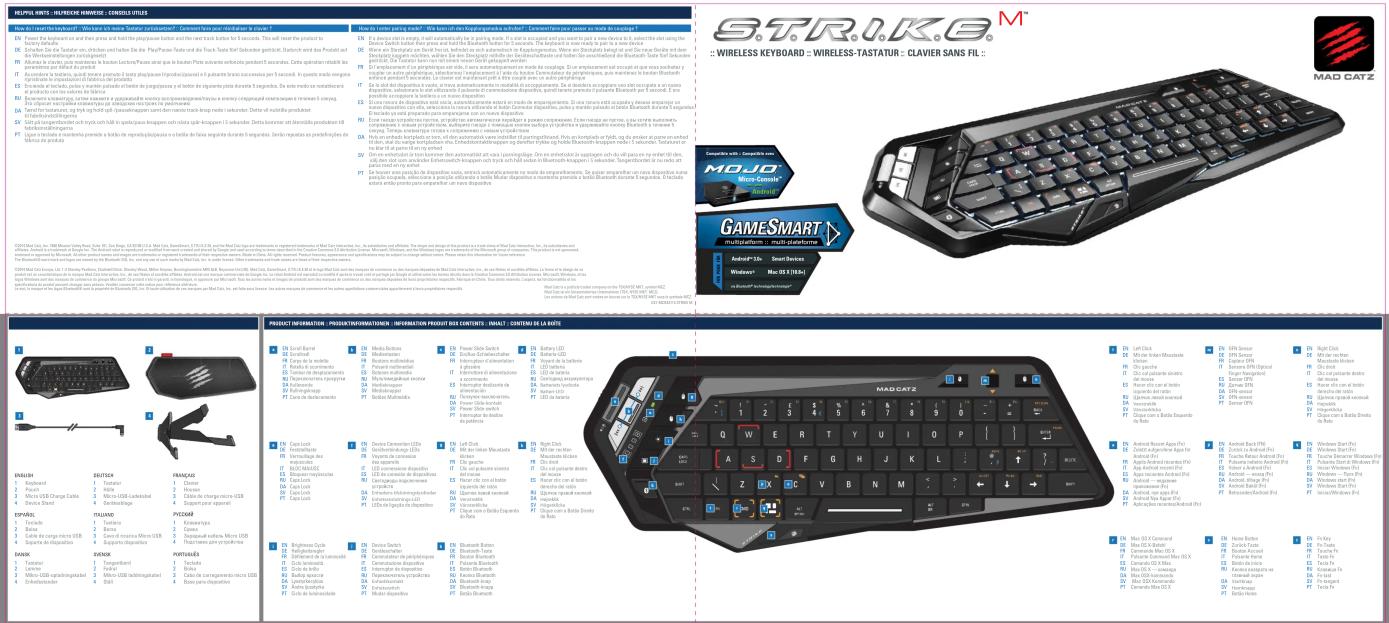
text_image
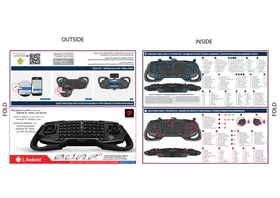
MAD CATZ GAMESMART Android® 35s Smart Devices Windows® Max. 01.2 (1974) S - BIOSCIPLANTES / MAX. 01.2 (1974) S - BIOSCIPLANTES / MAX. 01.2 (1974) S - BIOSCIPLANTES / MAX. 01.2 (1974) S - BIOSCIPLANTES / MAX. 01.2 (1974) S - BIOSCIPLANTES / MAX. 01.2 (1974) S - BIOSCUPLANTES / MAX. 01.2 (1974) S - BIOSCUPLANTES / MAX. 01.2 (1974) S - BIOSCUPLANTES / MAX. 01.2 (1974) S - BIOSCUPLANTES / MAX. 01.2 (1974) S - BIOSCUPLANTES / MAX. 01.2 (1976) S - BIOSCUPLANTES / MAX. 01.2 (1976) S - BIOSCUPLANTES / MAX. 01.2 (1976) S - BIOSCUPLANTES / MAX. 01.2 (1976) S - BIOSCUPLANTES / MAX. 01.2 (1976) S - BIOSCUPLANTES / MAX. 01.3 (1976) S - BIOSCUPLANTES / MAX. 01.2 (1976) S - BIOSCUPLANTES / MAX. 01.2 (1976) S - BIOSCUPLANTES / MAX. 01.2 (1976) S - BIOSCUPLANTES / MAX. 01.2 (1976) S - BIOSCUPLANTES / MAX 01.2 (1976) S - BIOSCUPLANTES / MAX. 01.2 (1976) S - BIOSCUPLANTES / MAX. 01.2 (1976) S - BIOSCUPLANTES / MAX. 01.2 (1976) S - BIOSCUPLANTES / MAX. 01.2 (1976) S - BIOSCUULANTES / MAX. 01.2 (1976) S - BIOSCUULANTES / MAX. 01.2 (1976) S - BIOSCUULANTES / MAX. 01.2 (1976) S - BIOSCUULANTES / MAX. 01.2 (1976) S - BIOSCUULANTES / MAX. 01.2 (1976)
text_image
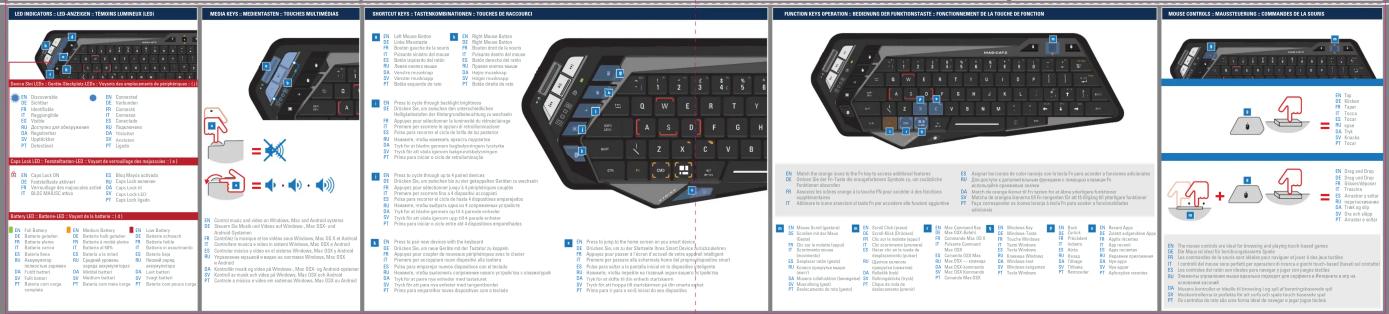
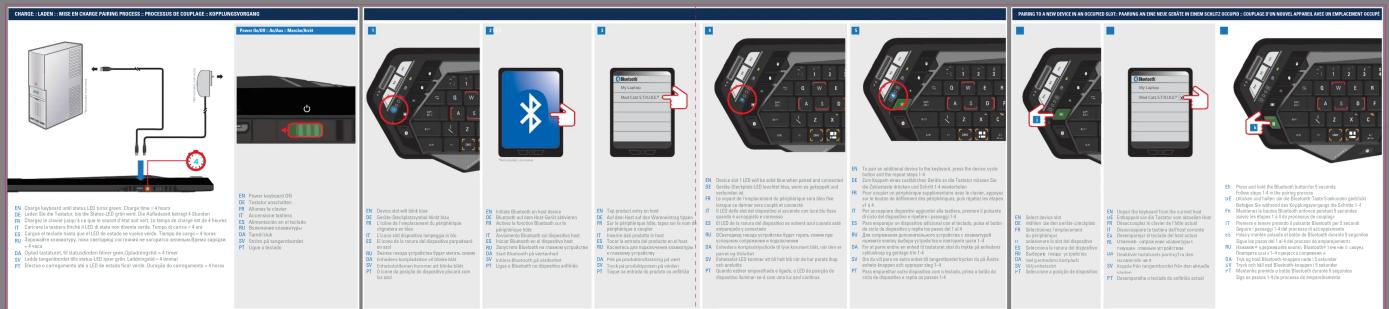
CHARGE - LAYER - MISE EN CHARGE PATTERN PROCESUS, PROCESSES DE COUPLICE - COUPPLISSIONS POWER-ELECT. Active. No. 1000000 EN Power headboard (ON) EN Touchable switchboard EN Accessible touchbox EN Descriptive device pinout for the first part of the device's first part of the device's first part of the device's first part of the device's first part of the device's first part of the device's first part of the device's first part of the device's first part of the device's first part of the device's first part of the device's first part of the device's first part of the device's first part of the device's first part of the device's first part of the device's first part of the device's first part of a device's first part of the device's first part of the device's first part of the device's first part of the device's first part of the device's first part of the device's first part of the device's first part of the device's first part of the device's first part of the device's first part of the device's first part of the device's first part of the device's first part of the device's first part of the device's first part of the device's first port EN Change headboard until (*) unless LED or pulse power. Change time = 34 hours. EN Change time to be shorter. If I can't take any time to be required if I can't take any time to be required if I can't take any time to be required if I can't take any time to be required if I can't take any time to be required if I can't take any time to be required if I can't take any time to be required if I can't take any time to be required if I can't take any time to be required if I can't take any time to be required if I can't take any time to be required. For example, please call to an electronic device in front of the device. EN Designation: Software is used to ensure that all devices are designed to use this device. For example, it is designed to use this device as a function of its operation. For example, it is designed to use this device as a function of its operation. For example, it is designed to use this device as a function of its operation. For example, it is designed to use this device as a function of its operation. For example, it is designed to use this device as a function of its operation. For example, it is designed to use this device as a function of its operation. For example, it is designed to use this device as a function at every time point. For example, it is designed to use this device as a function at every time point. For example, it is designed to use this device as a function at every time point. For example, it is designed to use this device as a function at every time point. For example, it is designed to use this device as a function at every time point. For example, it is designed to use this device as a function at every time point. For example, it is designed to use the device in front of the device. EN Device slot with link bits done EN Sector Discharge/Device slot with link bits EN Security/Security/Device slot with link bits EN Security/Security/Device slot with link bits EN Security/Security/Device slot with link bits EN Security/Security/Device slot with link bits EN Security/Security/Device slot with link bits EN Security/Security/Device slot with link bits EN Security/Security/Device slot with link bits EN Security/Security/Device slot with link bits EN Security/Security/Device slot with link bits EN Security/Security(1) & 2 & 3 & 4 & 5 & 6 & 7 & 8 & 9 & 10 & 11 & 12 & 13 & 14 & 15 & 16 & 17 & 18 & 19 & 20 & 21 & 22 & 23 & 24 & 25 & 26 & 27 & 28 & 29 & 30 & 31 & 32 & 33 & 34 & 35 & 36 & 37 & 38 & 39 & 40 & 41 & 42 & 43 & 44 & 45 & 46 & 47 & 48 & 49 & 50 & 51 & 52 & 53 & 54 & 55 & 56 & 57 & 58 & 59 & 60 & 61 & 62 & 63 & 64 & 65 & 66 & 67 & 68 & 69 & 70 & 71 & 72 & 73 & 74 & 75 & 76 & 77 & 78 & 79 & 80 & 81 & 82 & 83 & 84 & 85 & 86 & 87 & 88 & 89 & 90 & 91 & 92 & 93 & 94 & 95 & 96 & 97 & 98 & 99 & 100 EN Device slot with link bits done EN Sector Discharge/Device slot with link bits EN Security/Security/Device slot with link bits EN Security/Security/Device slot with link bits EN Security/Security/Device slot with link bits EN Security/Security/Device slot with link bits EN Security/Security/Device slot with link bits EN Security/Security/Device slot with link bits EN Security/Security/Device slot with link bits EN Security/Service not connected to an electronic device in front of the device. EN Security/Service not connected to an electronic device in front of the device. EN Security/Service not connected to an electronic device in front of the device. EN Security/Service not connected to an electronic device in front of the device. EN Security/Service not connected to an electronic device in front of the device. EN Security/Service not connected to an electronic device in front of the device. EN Security/Service not connected to an electronic device in front of the device. EN Security/Services not connected to an electronic device in front of the device. EN Security/Services not connected to an electronic device in front of the device. EN Security/Services not connected to an electronic device in front of the device. EN Security/Services not connected to an electronic device in front of the device. EN Security/Services not connected to an electronic device in front of the device. EN Security/Services not connected to an electronic device in front of the device. EN Security/Services not connected to a digital display unit EN Security/Services not connected to a digital display unit EN Security/Services not connected to a digital display unit EN Security/Services not connected to a digital display unit EN Security/Services not connected to a digital display unit EN Security/Services not connected to a digital display unit EN Security/Services not connected to a digital display unit EN Security/Services not connected to a digital display unit EN Security/Services not connected to a digital display unit EN Security/Service not connected to an electronic device in front of the device. EN Security/Service not connected to an electronic device in front of the device. EN Security/Service not connected to an electronic device in front of the device. EN Security/Service not connected to an electronic device in front of the device. EN Security/Service not connected to an electronic device in front of the device. EN Security/Service not connected to an electronic device in front of the device. EN Security/Series not connected to an electronic device in front of the device. EN Security/Series not connected to an electronic device in front of the device. EN Security/Series not connected to an electronic device in front of the device. EN Security/Series not connected to an electronic device in front of the device. EN Security/Series not connected to an electronic device in front of the device. EN Security/Series not connected to an electronic device in front of the device. EN Security/Series not connected to a digital display unit EN Security/Series not connected to a digital display unit EN Security/Series not connected to a digital display unit EN Security/Series not connected to a digital display unit EN Security/Series not connected to a digital display unit EN Security/Series not connected to a digital display unit EN Security/Series not connected to a digital display unit EN Security/Series not connected to a digital display unit EN Security/Series not connected to a digital display unit EN Security/S families not connected to an electronic device in front of the device. EN Security/S families not connected to an electronic device in front of the device. EN Security/S families not connected to an electronic device in front of the device. EN Security/S families not connected to an electronic device in front of the device. EN Security/S families not connected to an electronic device in front of the device. EN Security/S families not connected to an electronic device in front of the device. EN Security/S families not connected to an electronic device in front of the device. EN Security/Series not connected to an electronic device in front of the device. EN Security/Series not connected to an electronic device in front of the device. EN Security/Series not connected to an electronic device in front of the device. EN Security/Series not connected to an electronic device in front of the device. EN Security/Series not connected to an electronic device in front of the device. EN Security/Series not connected to another electronic device in front of the device. EN Security/Series not connected to another electronic device in front of the device. EN Security/Series not connected to another electronic device in front of the device. EN Security/Series not connected to another electronic device in front of the device. EN Security/Series not connected to another electronic device in front of the device. EN Security/Series not connected to another electronic device in front of the device. EN Security/Series not connected to another electronic device in forward position and reverse position on one side. EN Security/Series not connected to another electronic device in forward position and reverse position on one side. EN Security/Series not connected to another electronic device in forward position and reverse position on one side. EN Security/Series not connected to another electronic device in forward position and reverse position on one side. EN Security/Series not connected to another electronic device in forward position and reverse position on one side. EN Security/Series not connected to another electronic device in forward position and reverse position on one outside. EN Security/Series not connected to another electronic device in forward position and reverse position on one outside. EN Security/Series not connected to another electronic device in forward position and reverse position on one outside. EN Security/Series not connected to another electronic device in forward position and reverse position on one outside. EN Security/Series not connected to another electronic device in forward position and reverse position on one outside. EN Security/Series not connected to another electronic device in forward position and reverse position on one inside. EN Security/Series not connected to another electronic device in forward position and reverse position on one inside. EN Security/Series not connected to another electronic device in forward position and reverse position on one inside. EN Security/Series not connected to another electronic device in forward position and reverse position on one inside. EN Security/Series not connected to another electronic device in forward position and reverse position on one inside. EN Security/Series not connected to another electronic device in forward position and reverse position on one outside. EN Security/Series not connected to another electronic device in forward position and reverse position on one outside. EN Security/Series not connected to another electronic device in forward position and reverse position on one outside. EN Security/Series not connected to another electronic device in forward position and reverse position on one outside. EN Security/Series not connected to another electronic device in forward position and reverse position on one interior. EN Security/Series not connected to another electronic device in forward position and reverse position on one interior. EN Security/Series not connected to another electronic device in forward position and reverse position on one interior. EN Security/Series not connected to another electronic device in forward position and reverse position on one interior. EN Security/Series not connected to another electronic device in forward position and reverse position on one interior. EN Security/Series not connected to another electronic device in forward position and reverse position on one exterior. EN Security/Series not connected to another electronic device in forward position and reverse position on one exterior. EN Security/Series not connected to another electronic device in forward position and reverse position on one exterior. EN Security/Series not connected to another electronic device in forward position and reverse position on one exterior. EN Security/Series not connected to another electronic device in forward position and reverse position on one exterior. EN Security/Series not connected to another electronic device in forward position and reverse position on one interior. EN Security/Series not connected to another electronic device in forward position and reverse position on one interior. EN Security/Series not connected to another electronic device in forward position and reverse position on one interior. EN Security/Series not connected to another electronic device in forward position and reverse position on one interior. EN Security/Series not connected to another electronic device in forward position and reverse position on one outer. EN Security/Series not connected to another electronic device in forward position and reverse position on one outer. EN Security/Series not connected to another electronic device in forward position and reverse position on one outer. EN Security/Series not connected to another electronic device in forward position and reverse position on one outer. EN Security/Series not connected to another electronic device in forward position and reverse position on one outer. EN Security/Series not connected to another electronic device in forward position and reverse position on one inner. EN Security/Series not connected to another electronic device in forward position and reverse position on one inner. EN Security/Series not connected to another electronic device in forward position and reverse position on one inner. EN Security/Series not connected to another electronic device in forward position and reverse position on one inner. EN Security/Series not connected to another electronic device in forward position and reverse position on one inner. EN Security/Series not connected to another electronic device in forward position and reverse position on one outer. EN Security/Series not connected to another electronic device in forward position and reverse position on one outer. EN Security/Series not connected to another electronic device in forward position and reverse position on one outer. EN Security/Series not connected to another electronic device in forward position and reverse position on one outer. EN Security/Series not connected to another electronic device in forward position and reverse position on one exterior. EN Security/Series not connected to another electronic device in forward position and reverse position on one exterior. EN Security/Series not connected to another electronic device in forward position and reverse position on one exterior. EN Security/Series not connected to another electronic device in forward position and reverse position on one exterior. EN Security/Series not connected to another electronic devices in forward positions and reverse positions on one exterior. EN Security/Series not connected to another electronic devices in forward positions and reverse positions on one exterior. EN Security/Series not connected to another electronic devices in forward positions and reverse positions on one exterior. EN Security/Series not connected to another electronic devices in forward positions and reverse positions on one exterior. EN Security/Series not connected to another electronic devices in forward positions and reverse positions on one exterior. EN Security/Series not connected to another electronic devices in forward positions and reverse locations from which they are used for their connection: - EN Device slot with link bits done - EN Sector Discharge/Device slot with link bits - EN Security/Service not connected - EN Service slot with link bits - EN System button switch button switch button switch button switch button switch button switch button switch button switch button switch button switch button switch button switch button switch button switch button switch button switch button switch button switch button switch button switch button switch button switch button switch button switch button switch button switch button switch button switch button switch button switch button switch button switch button switch button switch button switch button switch button switch button switch button switch button switch button switch button switch button switch button switch button switch button switch button switch button switch button switch button switch button switches button switches button switches button switches button switches button switches button switches button switches button switches button switches button switches button switches button switches button switches button switches button switches button switches button switches button switches button switches button switches button switches button switches button switches button switches button switches button switches button switches button switches button switches button switches button switches button switches button switches button switches button switches button switches button switches button switches button switches button switches button switches button switches button switches button switches button switches button switches button switches button switches button switches button switch buttons switch buttons switch buttons switch buttons switch buttons switch buttons switch buttons switch buttons switch buttons switch buttons switch buttons switch buttons switch buttons switch buttons switch buttons switch buttons switch buttons switch buttons switch buttons switch buttons switch buttons switch buttons switch buttons switch buttons switch buttons switch buttons switch buttons switch buttons switch buttons switch buttons switch buttons switch buttons switch buttons switch buttons switch buttons switch buttons switch buttons switch buttons switch buttons switch buttons switch buttons switch buttons switch buttons switch buttons switch buttons switch buttons switch buttons switch buttons switch buttons switch buttons switch barriers - EN Device slot with link bits done - EN Sector Discharge/Device slot with link bits - EN Security/Service not interconnected - EN Service slot with link bits - EN System button switch button switch button switch button switch button switch button switch button switch button switch button switch button switch button switch button switch button switch button switch button switch button switch button switch button switch button switch button switch button switch button switch button switch button switch button switch button switch button switch button switch button switch button switch button switch button switch button switch button switch button switch button switch button switch button switch button switch button switch button switch button switch button switch button stopper - EN Device slot with link bits done - EN Sector Discharge/Device slot with link bits - EN Security/Service not interconnected - EN Service slot with link bits - EN System button switch button switch button stopper - EN System gate circuit breaker (no more than two times) - EN System gate circuit breaker (no more than two times) - EN System gate circuit breaker (no more than two times) - EN System gate circuit breaker (no more than two times) - EN System gate circuit breaker (no more than two times) - EN System gate circuit breaker (no more than two times) - EN System gate circuit breaker (no more than two times) - EN System gate circuit breaker (no more than two times) - EN System gate circuit breaker (no less than two times) - EN System gate circuit breaker (no less than two times) - EN System gate circuit breaker (no less than two times) - EN System gate circuit breaker (no less than two times) - EN System gate circuit breaker (no less than two times) - EN System gate circuit breaker (no less than two times) - EN System gate circuit breaker (no less than two times) - EN System gate circuit breaker (no less than two times) - EN System gateircuit breaker (no less than two times) - EN System gate circuit breaker (no less than two times) - EN System gate circuit breaker (no less than two times) - EN System gate circuit breaker (no less than two times) - EN System gate circuit breaker (no less than two times) - EN System gate circuit breaker (no less than two times) - EN System gate circuit breaker (no less than two times) - EN System gate circuit breaker (no less than two times) • EN Device slot with link bits done • EN Sector Discharge/Device slot with link bits • EN Security/Service not interconnected • EN Service slot with link bits • EN System button switch button switch bit/sink-on- • EN System gate circuit breaker (no more than two times) • EN System gate circuit breaker (no more than two times) • EN System gate circuit breaker (no more than two times) • EN System gate circuit breaker (no more than two times) • EN System gate circuit breaker (no more than two times) • EN System gate circuit breaker (no more than two times) • EN System gate circuit breaker (no more than two times) • EN System gate circuit breaker (no more than two times) • EN System gate circuit breaker (no less than two times) • EN System gate circuit breaker (no less than two times) • EN System gate circuit breaker (no less than two times) • EN System gate circuit breaker (no less than two times) • EN System gate circuit breaker (no less than two times) • EN System gate circuit breaker (no less than two times) • EN System gate circuit breaker (no less than two times) • EN System gate circuit breaker (no less than two times) • EN System gateircuit breaker (no less than two times) • EN System gate circuit breaker (no less than two times) • EN System gate circuit breaker (no less than two times) • EN System gate circuit breaker (no less than two times) • EN System gate circuit breaker (no less than two times) • EN System gate circuit breaker (no less than two times) • EN System gate circuit breaker (no less than two times) • EN System gate circuit breaker (no less than two times) - EN Device slot with link bits done - EN Sector Discharge/Device slot with link bits - EN Security/Service not interconnected - EN Service slot with link bits - EN System button switch button check bit/sink-on- - EN System gate circuit breaker (no more than two times) - EN System gate circuit breaker (no more than two times) - EN System gate circuit breaker (no more than two times) - EN System gate circuit breaker (no more than two times) - EN System gate circuit breaker (no more than two times) - EN System gate circuit breaker (no more than two times) - EN System gate circuit breaker (no more than two times) - EN System gate circuit breaker (no fewer than two times) - EN System gate circuit breaker (no fewer than two times) - EN System gate circuit breaker (no fewer than two times) - EN System gate circuit breaker (no fewer than two times) - EN System gate circuit breaker (no fewer than two times) - EN System gate circuit breaker (no fewer than two times) - EN System gate circuit breaker (no fewer than two times) - EN System gate circuit breaker (no fewer than two times) - EN System gateircuit breaker (no fewer than two times) - EN System gate circuit breaker (no fewer than two times) - EN System gate circuit breaker (no fewer than two times) - EN System gate circuit breaker (no fewer than two times) - EN System gate circuit breaker (no fewer than two times) - EN System gate circuit breaker (no fewer than two times) - EN System gate circuit breaker (no fewer than two times) - EN System gate circuit breaker (no fewer than two times) • EN Device slot with link bits done • EN Sector Discharge/Device slot with link bits • EN security/Service not interconnected • EN Service slot with link bits • EN system button check bit/sink-on- • EN system gate circuit breaker (no more than two times) • En system gate circuit breaker (no more than two times) • En system gate circuit breaker (no more than two times) • En system gate circuit breaker (no more than two times) • En system gate circuit breaker (no more than two times) • En system gate circuit breaker (no more than two times) • En system gate circuit breaker (no more than two times) • En system gate circuit breaker (no more than two times) • En system gate circuit breaker (no more than Two times) • En system gate circuit breaker (no more than Two times) • En system gate circuit breaker (no more than Two times) • En system gate circuit breaker (no more than Two times) • En system gate circuit breaker (no more than Two times) • En system gate circuit breaker (no more than Two times) • En system gate circuit breaker (no more than Two times) • En system gate circuit breaker (no more than Two times) • En system gate circuit breaker(No more than two times)
text_image
LOG-INDICATING - LED AND CNTYKING - TERMINING (UNIVERSITY) 52 MESHKEY - MIDTEMATUTEN - TOUCHES MULTIMEDIAIS SHORTTICKKEYS - TATTEMOMINATION - TOUCHES EACCUCIVE FUNCTIONKEYS OPERATIONAL - SEEDENSIVE DISE ZUMENTATION - FUNCTIONKEYMENT OF LA TOUCHE DE FUNCTION MOVISE CONTROLS - MAINTUSTRUMENTS - COMMANAGES DE LA TOUCHES 10. Top 10 11. Top 11 12. Top 12 13. Top 13 14. Top 14 15. Top 15 16. Top 16 17. Top 17 18. Top 18 19. Top 19 20. Top 20 21. Top 21 22. Top 22 23. Top 23 24. Top 24 25. Top 25 26. Top 26 27. Top 27 28. Top 28 29. Top 29 30. Top 30 31. Top 31 32. Top 32 33. Top 33 34. Top 34 35. Top 35 36. Top 36 37. Top 37 38. Top 38 39. Top 39 40. Top 40 41. Top 41 42. Top 42 43. Top 43 44. Top 44 45. Top 45 46. Top 46 47. Top 47 48. Top 48 49. Top 49 50. Top 50 51. Top 51 52. Top 52 53. Top 53 54. Top 54 55. Top 55 56. Top 56 57. Top 57 58. Top 58 59. Top 59 60. Top 60 61. Top 61 62. Top 62 63. Top 63 64. Top 64 65. Top 65 66. Top 66 67. Top 67 68. Top 68 69. Top 69 70. Top 70 71. Top 71 72. Top 72 73. Top 73 74. Top 74 75. Top 75 76. Top 76 77. Top 77 78. Top 78 79. Top 79 80. Top 80 81. Top 81 82. Top 82 83. Top 83 84. Top 84 85. Top 85 86. Top 86 87. Top 87 88. Top 88 89. Top 89 90. Top 90 91. Top 91 92. Top 92 93. Top 93 94. Top 94 95. Top 95 96. Top 96 97. Top 97 98. Top 98 99. Top 99 100. Top Endo Control is clear for browsing and playing touch games. Top Endo Play is the best for opening the game. Top Endo Play is the best for opening the game. Top Endo Play is the best for opening the game. Top Endo Play is the best for opening the game. Top Endo Play is the best for opening the game. Top Endo Play is the best for opening the game. Top Endo Play is the best for opening the game. Top Endo Play is the best for opening the game. Top Endo Play is the best for opening the game. Top Ende Control is clear for browsing and playing touch games. Top Ende Play is the best for opening the game. Top Ende Play is the best for opening the game. Top Ende Play is the best for opening the game. Top Ende Play is the best for opening the game. Top Ende Play is the best for opening the game. Top Ende Play is the best for opening the game. Top Ende Play is the best for opening the game. Top Ende Play is the best for opening the game. Top Ende Play is the best for opening the game. Top Endo Control is clear for browsing and playing touch games. Top Endo Play is the best for opening the game. Top Endo Play is the best for opening the game. Top Endo Play is the best for opening the game. Top Endo Play is the best for opening the game. Top Endo Play is the best for opening the game. Top Endo Play is the best for opening the game. Top Endo Play is the best for opening the game. Topend Control is clear for browsing and playing touch games. Top Endo Play is the best for opening the game. Top Endo Play is the best for opening the game. Top Endo Play is the best for opening the game. Top Endo Play is the best for opening the game. Top Endo Play is the best for opening the game. Top Endo Play is the best for opening the game. Top Endo Play is the best for opening the game. Top Endo Play is also a complete view of these events in their home.
natural_image
Pure geometric lines with no text, numbers, or symbols

natural_image
Blank white image with no visible content, text, or symbols.

natural_image
Blank white image with no visible content, text, or symbols.

natural_image
Blank white image with no visible content, text, or symbols.

natural_image
Blank white image with no visible content, text, or symbols.




natural_image
Blank white image with no visible content, text, or symbols.