Double isolation, protection contre l'humidité, fentes de ventilation
Entretien
Nettoyer avec un chiffon doux légèrement humide, débrancher avant
Garantie
36 mois (pour récepteur DVB-T)
FOIRE AUX QUESTIONS - D2800 ENERGY SISTEM
Comment brancher l'antenne sur le D2800 ?
Branchez le câble d'antenne sur la prise RF IN à l'arrière. Utilisez la sortie RF LOOPTHROUGH pour relier un autre appareil.
Pourquoi n'y a-t-il pas de signal après la recherche des chaînes ?
Vérifiez que l'antenne est correctement branchée et que vous êtes dans une zone couverte par la TNT. Essayez de régler l'alimentation de l'antenne dans le menu Installation.
Comment lire une clé USB avec le D2800 ?
Insérez la clé USB dans le port avant, appuyez sur SOURCE pour basculer en mode USB, puis utilisez le menu Multimédia pour accéder aux fichiers.
Que faire si la télécommande ne fonctionne pas ?
Vérifiez les piles (AAA) et leur sens. Pointez la télécommande vers le capteur avant. Évitez la lumière directe du soleil. La portée est de 7 mètres maximum.
Comment verrouiller une chaîne avec un code parental ?
Allez dans Réglages > Mot de passe (code par défaut 6666). Activez le Verrouillage des chaînes, puis dans la liste des chaînes, sélectionnez la chaîne et choisissez Verrouiller.
Puis-je enregistrer une émission sur une clé USB ?
Oui, insérez une clé USB formatée en FAT32. Dans le menu Multimédia > Mon enregistrement, sélectionnez le support et appuyez sur ENREGISTRER pendant la diffusion.
Comment régler le format d'image (4/3 ou 16/9) ?
Allez dans Réglages > Réglages TV. Choisissez 4:3LB (letterbox), 4:3PS (pan & scan) ou 16:9 selon votre téléviseur.
Le lecteur DVD ne reconnaît pas le disque, que faire ?
Assurez-vous que le disque est propre et inséré correctement, face imprimée vers le haut. Essayez un autre disque. Si le problème persiste, contactez le support technique.
Comment réinitialiser le D2800 aux paramètres d'usine ?
Dans Réglages > Rétablir les valeurs par défaut, confirmez l'opération. Toutes les chaînes et réglages seront effacés.
L'appareil ne s'allume pas, que vérifier ?
Vérifiez que le câble d'alimentation est branché et que la prise fonctionne. Le voyant LED doit s'allumer. Si rien ne se produit, contactez le service après-vente.
Questions des utilisateurs sur D2800 ENERGY SISTEM
0 question sur cet appareil. Repondez a celles que vous connaissez ou posez la votre.
Poser une nouvelle question sur cet appareil
Aucune question pour l'instant. Soyez le premier à en poser une.
Téléchargez la notice de votre Lecteur dvd au format PDF gratuitement ! Retrouvez votre notice D2800 -
ENERGY SISTEM et reprennez votre appareil électronique en main. Sur cette page sont publiés tous les documents nécessaires à l'utilisation de votre appareil D2800 de la marque ENERGY SISTEM.
MODE D'EMPLOI D2800 ENERGY SISTEM
User Manual
1. INTRODUCTION
To ensure your safety and the safety of others, please ensure that you read all the safety information before operating this product.
Keep this information in a safe place for future reference.
This symbol indicates that this product incorporates double insulation between hazardous mains voltage and user accessible parts.
WARNING: To reduce the risk of fire or electric shock, do not expose this apparatus to rain or moisture.
Safety Considerations.
Position the cables so that they cannot be walked on or pinched by items placed on or against them.
Do not use the set top box in humid or damp conditions.
Do not allow the set top box to get wet.
Do not expose the set top box to dripping or splashing.
Do not place water filled objects such as vases on top of the set top box.
Do not place naked flame sources, such as candles, on the top of the set top box.
Ventilation
The slots and openings on the set top box are for ventilation. Do not cover or block them as it may cause overheating.
NEVER let children push anything into the holes or slots on the case.
Servicing
There are no user serviceable parts in this set top box.
Battery Disposal
Please ensure batteries are disposed of safely.
Never dispose of batteries in a fire or with other household waste.
Check with your local authority for disposal regulations.
Cleaning
ALWAYS unplug the set top box before you clean it.
Do not use liquid or aerosol cleaners.
Clean the set top box with a soft, damp (not wet) cloth.
D2800 handling and care
Place the product in a well-ventilated area Don't install it in the cold or under direct sunlight
Leave a minimum 10cm gap all around the product
Do not disassemble, repair,or reorganize the product
Don't place cups with water or other liquids on the top of the product
Don't place objects on the top of the product
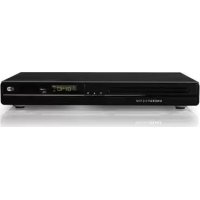
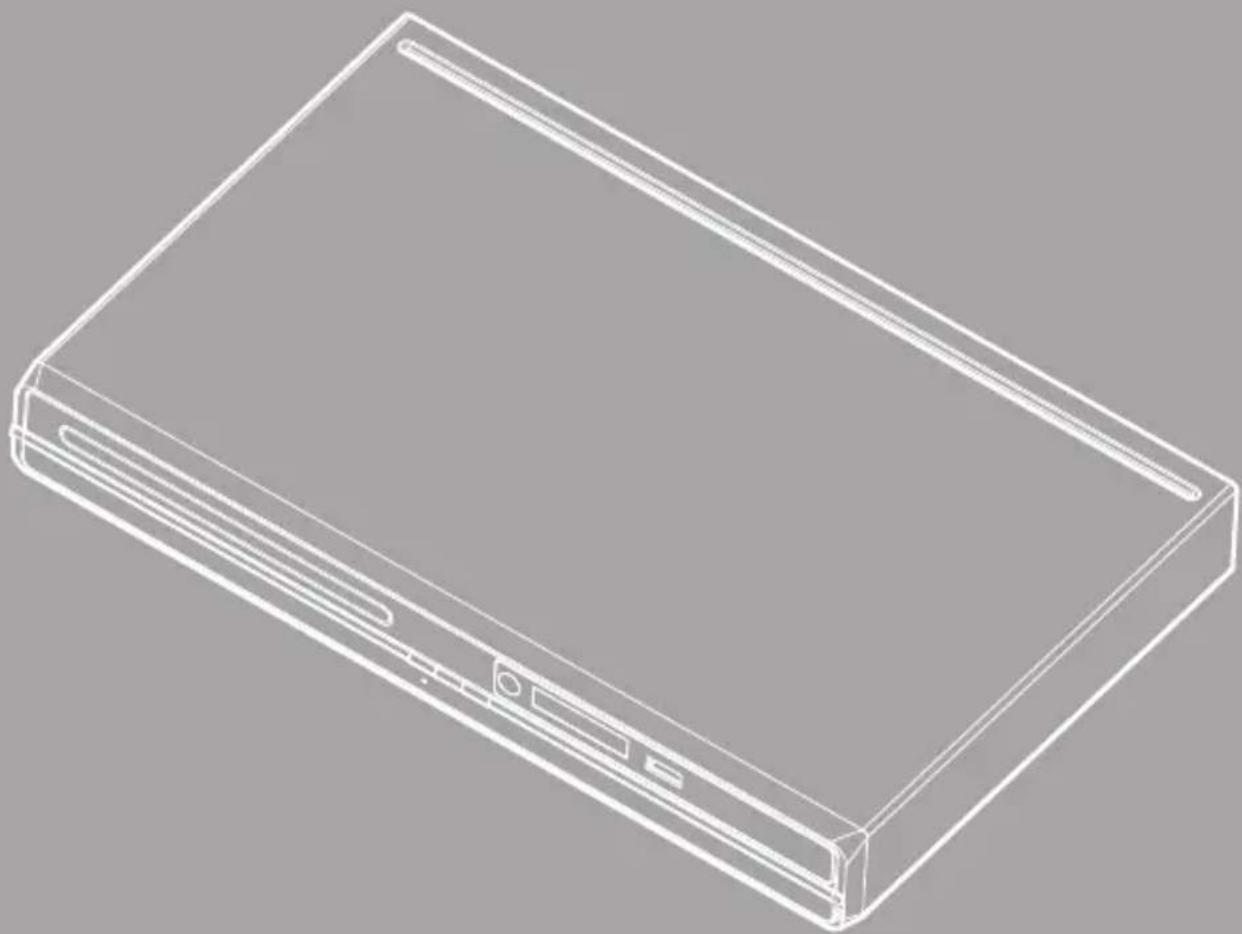
2. FRONT PANEL
DISC TRAY.
POWER: Used to switch the set top box ON or STANDBY.
OPEN/CLOSE button.
PLAY/PAUSE button.
REMOTE CONTROL SENSOR: Used to receive the signal from the Infrared (IR) remote control.
LED display.
USB CONNECTOR: Used to attach your external USB hub/card reader/storage device.
3. REAR PANEL
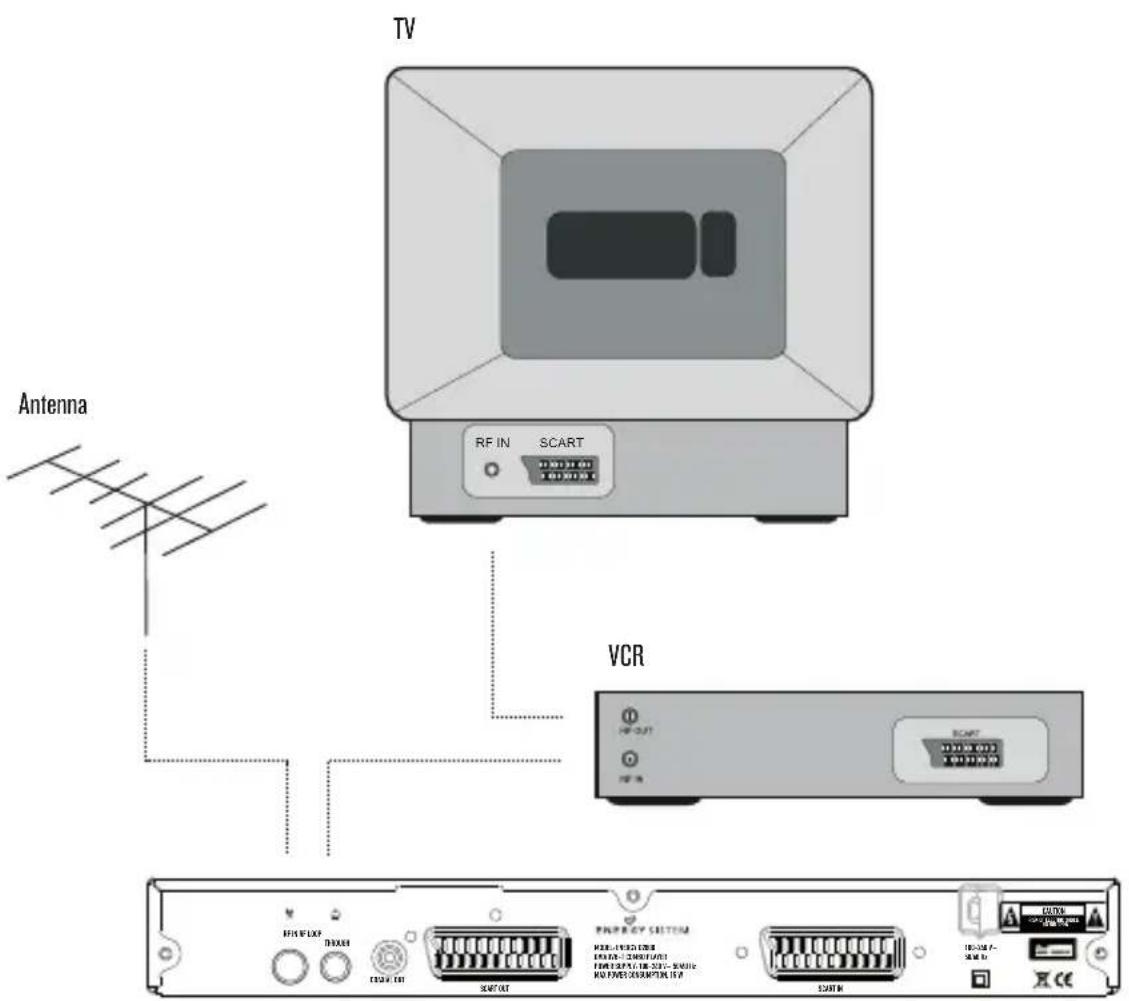
RF IN: This socket connects to your external aerial.
RF LOOPTHROUGH: This socket will bypass the RF signal to either your TV or another video system.
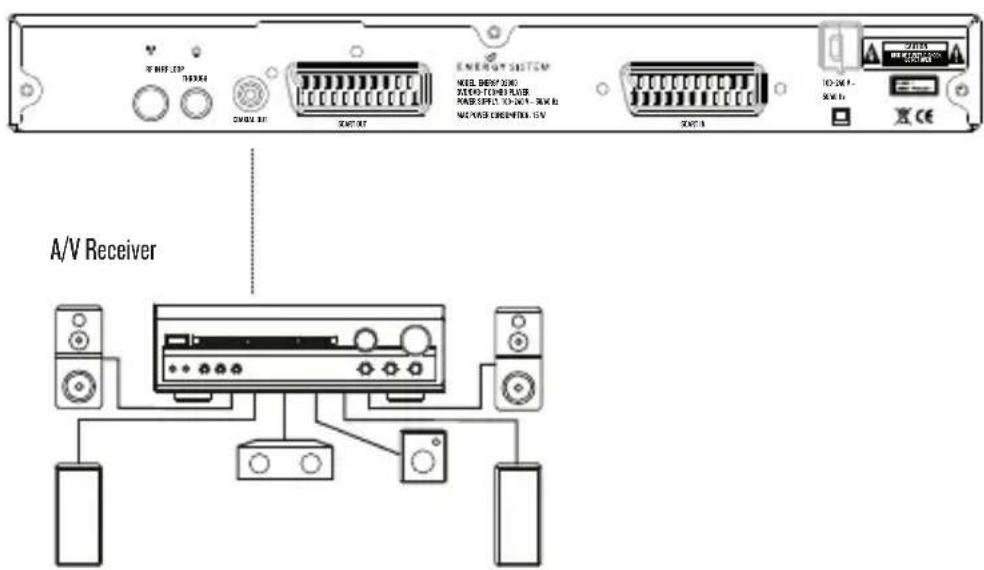
COAXIAL: This socket connects to a S/PDIF RCA socket on your surround sound system.
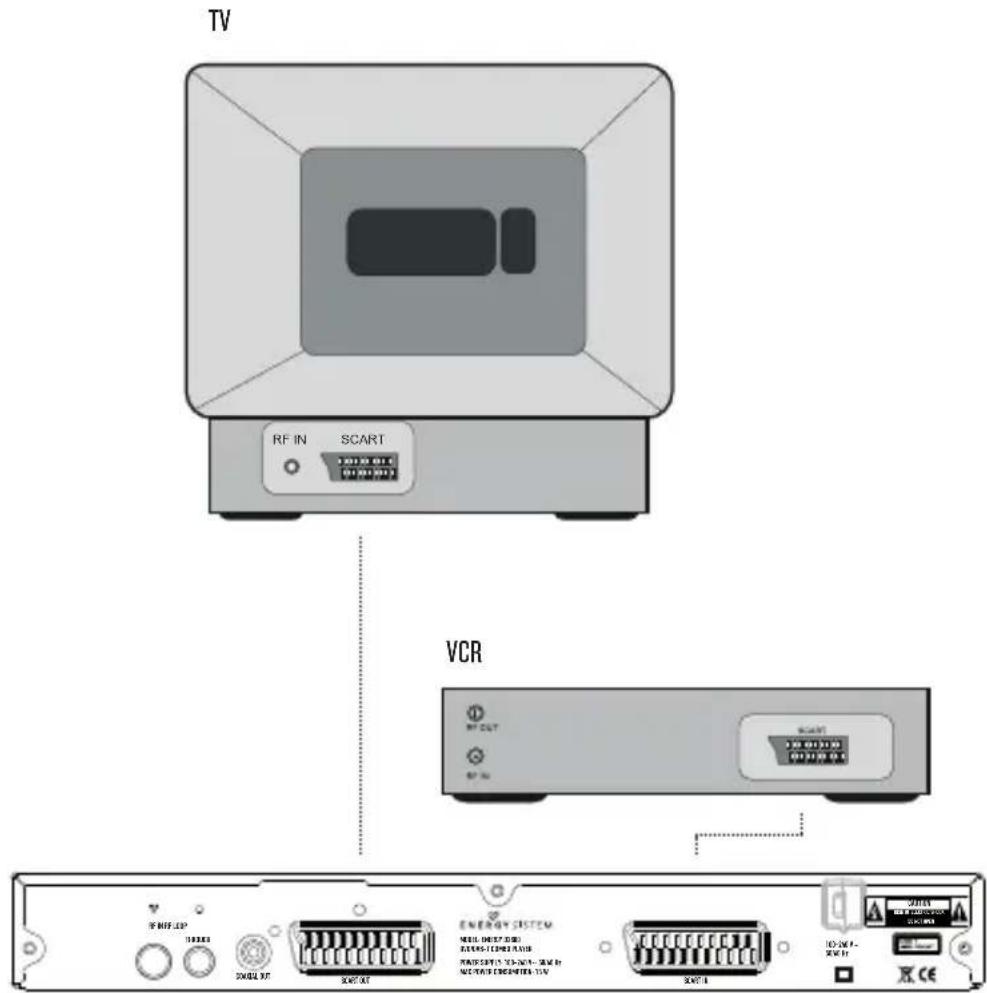
SCART OUT: This socket connects to your TV.
SCART IN: This socket connects to either a VCR or other video system.
MAINS CABLE: This is used to connect to your main power supply.
4. REMOTE CONTROL
4.1. BUTTON DESCRIPTIONS
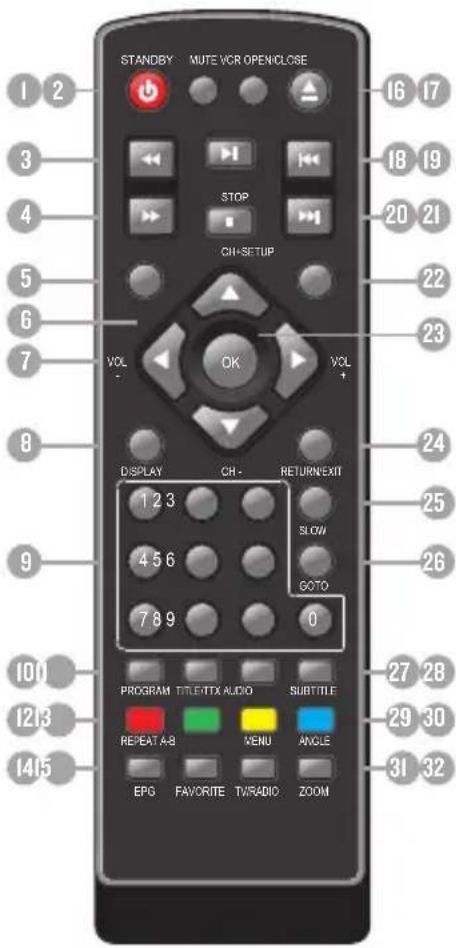
STANDBY: Switch the set top box between on and standby mode.
MUTE: Mute/unmute the sound.
REV: Fast backward at selectable speeds.
FWD: Fast forward at selectable speeds.
SETUP: Open the setup menu window.
CH + / - Move around the menu screens or change the channels in normal play mode.
VOL+/-: Move around the menu screens or change the volume in normal play mode.
DISPLAY: Display information about the channel being viewed or further information about the program when in normal play mode.
NUMBER KEYS: Select channel numbers or input numbers in menus.
PROGRAM: Program the playback order.
II. TITLE/TTX: Title menu in DVD mode / Teletext in DVB-T mode. COLOR KEYS(RED/GREEN/YELLOW/BLUE): Operate different functions in TEXT screen or other menus.
REPEAT: Change between repeat options.
A-B: Define an interval and repeat it.
EPG: Display information about the program being viewed and what's on next.
FAVORITE: Access your favourite channels.
VCR: Switch between SCART input and DVD/DVB-T.
OPEN/CLOSE: Open/close the disc tray.
PLAY/PAUSE: Pause or playback the program being viewed.
PREVIOUS: Go to previous chapter/track/file or to the beginning of the currently playing one.
NEXT: Go to the next chapter/track/file.
STOP: Stop the current recording if exists or stop the playback.
SOURCE: Change between disc and tuner modes.
OK: Confirm a selection within a menu.
RETURN/EXIT: Return to the previous screen or menu.
SLOW: Slow motion playback.
GOTO: Go to time point, title, chapter or file/folder depending on context.
AUDIO: Select the available audio track or set the sound mode as LR(stereo), LL(left), RR(right).
SUBTITLE: Switch among different available subtitles.
MENU/MSM: Main menu in DVD mode / Multiscreen Mosaic in DVB mode.
ANGLE: Selects a DVD camera angle if available.
TV/RADIO: Switch between TV channels and Radio stations.
ZOOM: Enlarges the image.
Note: SUBTITLES/TEXT/AUDIO may not be available for all channels.
4.2. INSTALLING THE BATTERIES
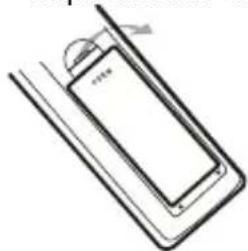
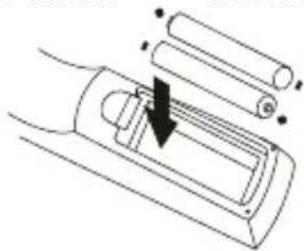
Remove the battery cover from the remote control and put 2xAAA size batteries inside the compartment.
The diagram inside the battery compartment shows the correct way to install the batteries.
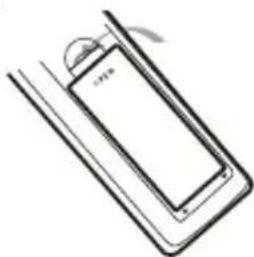
1. Open the cover 2. Install the batteries
3. Close the cover
4.3. USING THE REMOTE CONTROL
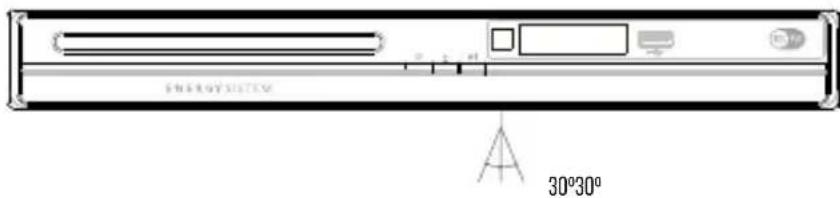
To use the remote control point it towards the front of the digital set top box.
The remote control has a range of up to 7 metres (23 feet) from the set top box at an angle of up to 60 degrees.
The remote control will not operate if its path is blocked.
Sunlight or very bright light will decrease the sensitivity of the remote control.
5. CONNECTIONS
Caution: Make sure to check that the voltage of the wall outlet has the same rating than the receiver. To prevent the risk of electric shock, do not open the cover or the back of the receiver.
When connecting the receiver to other equipment (e.g. TV, VCR and amplifier) make sure to refer to relevant user manual for instruction. Also, make sure you disconnect all the equipments from the mains supply before the connection.
5.1.ANTENNA CONNECTION
5.2. SCART CONNECTION
5.3. CONNECTING TO AN A/V RECEIVER WITH DIGITAL AUDIO INPUT
6. USER INTERFACE - MAIN MENU
Note that the first time you use D2800 it will automatically show the Setup->Installation screen in order to scan for TV and radio channels. Please refer to Setup->Installation in page 10. Once the channel scan is finished and all the channels are stored into the database, you can start to watch the digital terrestrial TV channel or listen to the radio broadcast, some typical operations are given in this chapter.
Press
Autres manuels ENERGY SISTEM
Découvrez d'autres manuels et modes d'emploi de la marque ENERGY SISTEM