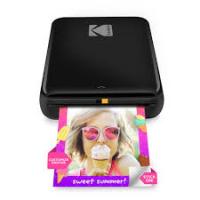
Step - Imprimante KODAK - Notice d'utilisation et mode d'emploi gratuit
Retrouvez gratuitement la notice de l'appareil Step KODAK au format PDF.


| Intitulé | Détails |
|---|---|
| Type de produit | Imprimante photo portable |
| Caractéristiques techniques principales | Impression instantanée, technologie ZINK (Zero Ink), résolution d'impression de 313 x 400 dpi |
| Alimentation électrique | Batterie lithium-ion rechargeable |
| Dimensions approximatives | 12,7 x 8,6 x 2,5 cm |
| Poids | 220 g |
| Compatibilités | Compatible avec iOS et Android via application KODAK |
| Type de batterie | Batterie lithium-ion |
| Tension | 5 V |
| Puissance | 5 W |
| Fonctions principales | Impression de photos à partir de smartphone, filtres et effets d'édition via application |
| Entretien et nettoyage | Nettoyer avec un chiffon doux, éviter l'humidité |
| Pièces détachées et réparabilité | Réparabilité limitée, pièces disponibles via le service client KODAK |
| Informations générales utiles | Impression sans encre, utilisation de papier photo ZINK, connectivité Bluetooth |
FOIRE AUX QUESTIONS - Step KODAK
Questions des utilisateurs sur Step KODAK
0 question sur cet appareil. Repondez a celles que vous connaissez ou posez la votre.
Poser une nouvelle question sur cet appareil
Téléchargez la notice de votre Imprimante au format PDF gratuitement ! Retrouvez votre notice Step - KODAK et reprennez votre appareil électronique en main. Sur cette page sont publiés tous les documents nécessaires à l'utilisation de votre appareil Step de la marque KODAK.
MODE D'EMPLOI Step KODAK
Paeaeaeaeaeaeaeaeaeaeaeaeaeaeaeaeaeaeaeaeaeaeaeaeaeaeaeaeaeaeaeaeaeaeaeaeaeaeaeaeaeaeaeaeaeaeaeaeaeaeaeaeaeae
* Sireure h inghnt better 1 rdd sireure fire anindand
1.2.1.1.1.1.1.1.1.1.1.1.1.1.1.1.1.1.1.1.1.1.1.1.1.1.1.1.1.1.1.1.1.1.1.1.1.1.1.1.1.1.1.1.1.1.1.1.1.1.
ECC/E
16
Installation de la application sur un smartphone intégrant
1.ANDROCID
1) Aiez dans GOOGLE Play Store dans notre smartphone
2) Rechner KODAK Instant Printer
3) Installer "KO0AK Instant Printer" dans voire smartphone.
1.ANDROID
1) ALez dane GC
2)Recherche
3)JstallegX00
- APPLE Device
1) Passes à APP STORE dans=yotre PHONE, IPOO TOUCH or IPAD. - Rescherer "KODAK Instant Printer"
3) Installling Application"KOPAX Instant Printer"clans vote approval - APPLE DOW
1) Passez à APP STORE dans votre IPHONE, IPOCO TOUCH or IPAD.
2) Rachercher "KODAK Instant Printer"
3) Installig I'application"KODAK Instant Printer-dans votre apporel
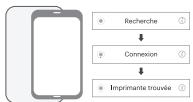
Connexion BLUETOOTH
1) Alumez BLUETOOTH dans voire smartphone
2) Passez à la configuration BLUETOOTH et trouvez "KODAK Instant Printe
3) Selectionne pour connecter imprimante
Puissance et etat actif
-Change
Connexion:GreenBlink/Blutooth Complete:Green
Charge Chargement: Rouge / Chargement Complet: Ver
。
Francais Avant de c 1) Cette impet Chargc H2) Comment a Installation 1.ANDROI. 1)4 dz dans 1) Recherche 3) Instillic "K" 2.APPEAR DAVI 1) Passer Z a f 1) Recherche 3) Instillic I 1) Applicatien 1) 4) Lues BUL 2) Passer z a la 2) Sdjectionne Puissance - ① Charge
serrn
3)Selection of a pour connector (Impedance)
(
1
1
(20
Poussance et etat actif
Stein Bink
中国国
△咔贝元皂皂
- 二三里0三
2.1.1.1.1.1.1.1.1.1.1.1.1.1.1.1.1.1.1.1.1.1.1.1.1.1.1.1.1.1.1.1.1.1.1.1.1.1.1.1.1.1.1.1.1.1.1.1.1.1.1.
3) Pasidinkite nuotraika
4)Pasirinkite norima
nuotraukkiekj
5) Pasinkite spausdinti
* Kritiklike, k.ord Bluetooth sekiiljungen
