
KF 2981 VI - Réfrigérateur combiné MIELE - Notice d'utilisation et mode d'emploi gratuit
Retrouvez gratuitement la notice de l'appareil KF 2981 VI MIELE au format PDF.


| Type de produit | Réfrigérateur combiné avec congélateur en bas |
| Dimensions (niche) | Hauteur : 84 po (2134 mm), Largeur selon niche, Profondeur selon niche |
| Poids (à pleine charge) | Environ 518 kg (1142 lb) |
| Alimentation électrique | 110-120 V, 60 Hz, 10-16 A |
| Classe climatique | SN, N, ST, T (10°C à 43°C) |
| Réfrigérant | R134a (congélateur 90 g, réfrigérateur 175 g) |
| Fonctions principales | SuperCool, SuperFrost, Eco Mode, Vacation Mode, Sabbath Mode, Door Assistant (Push2Open/Pull2Open), Miele@home, machine à glaçons, zone SmartFresh, filtres Active AirClean |
| Température recommandée | Réfrigérateur : 4°C, Congélateur : -18°C, Zone SmartFresh : 0°C |
| Capacité de congélation maximale | Non spécifié, mais grande capacité |
| Entretien et nettoyage | Nettoyer avec eau tiède et détergent doux. Ne pas utiliser de nettoyeur vapeur. Dégivrage automatique. |
| Sécurité | Verrouillage clavier, alarmes de température et de porte, arrêt automatique des fonctions |
| Pièces détachées et réparabilité | Filtres à eau (charbon actif/bypass), filtres Active AirClean, autres accessoires disponibles via Miele. Réparations par service technique Miele. |
| Informations générales | Marque Miele, modèle KF 2981 VI, fabriqué en Turquie |
FOIRE AUX QUESTIONS - KF 2981 VI MIELE
Questions des utilisateurs sur KF 2981 VI MIELE
0 question sur cet appareil. Repondez a celles que vous connaissez ou posez la votre.
Poser une nouvelle question sur cet appareil
Téléchargez la notice de votre Réfrigérateur combiné au format PDF gratuitement ! Retrouvez votre notice KF 2981 VI - MIELE et reprennez votre appareil électronique en main. Sur cette page sont publiés tous les documents nécessaires à l'utilisation de votre appareil KF 2981 VI de la marque MIELE.
MODE D'EMPLOI KF 2981 VI MIELE
Instructions d'utilisation et d'installation : Réfrigérateur-congélateur combiné
Pour éviter les accidents et les dommages à l'appareil, lisez ces instructions avant l'installation ou l'utilisation.
IMPORTANTES CONSIGNES DE SÉCURITÉ 6
Protection de l'environnement 15
Informations d'installation 16
Emplacement d'installation 16
Classe climatique 17
Notes d'installation 17
Capacité de charge du sol de la niche 17
Meubles adjacents 17
Ventilation 17
Spécifications pour le raccordement d'eau 18
Côte à côte 19
Dimensions d'installation 20
Dimensions lorsque la porte de l'appareil est ouverte (angle d'ouverture 90° / 115° 22
Dimensions de la façade du meuble 23
Installation de l'appareil 24
Avant de commencer. 24
Outils requis 24
Poids des façades de meuble 25
Alignement de la niche d'installation 25
Vérification de l'espace d'installation 26
Avant l'installation 26
Préparation de la niche d'installation 27
Insertion de l'appareil dans la niche 30
Alignement de l'appareil 31
Fixation de l'appareil dans la niche 34
Préparation des façades de meuble 35
Fixation et alignement des façades de meuble 38
Montage des supports de retenue 40
Fixation des capots 42
Fixation de la plinthe et du capot 45
Limitation de l'angle d'ouverture des portes de l'appareil 45
Branchement électrique 46
Branchement d'eau 48
Informations sur le branchement d'eau potable 48
Installation du tuyau d'eau sur l'appareil 49
Comment économiser de l'énergie 50
Guide de l'appareil 52
Écran principal 54
Mode réglages 55
Symboles en mode réglages 56
Accessoires 57
Accessoires fournis 57
Accessoires en option 58
Avant la première utilisation 59
Avant la première utilisation 59
Ouverture et fermeture de la porte du compartiment réfrigérateur 59
Collage des étiquettes de la zone SmartFresh 59
Insertion des filtres Active AirClean 60
Utilisation de l'appareil 61
Première mise en service 61
Allumage et extinction 63
Arrêt pour de longues périodes 64
Sélection de réglages supplémentaires 65
Activation ou désactivation du verrouillage des touches 65
Activation ou désactivation du mode Eco 65
Exécution d'un auto-test 66
Activation et désactivation de la protection contre la condensation 67
Activation de l'assistant de porte 68
Désactivation de l'assistant de porte 69
Configuration de Miele@home 70
Désactivation du mode démonstration 74
Réinitialisation des réglages par défaut 74
Activation ou désactivation du mode vacances 76
Activation ou désactivation du mode sabbat 77
Activation, désactivation ou réinitialisation de l'affichage du filtre à eau 78
Activation, désactivation ou réinitialisation de l'affichage du filtre à air actif 80
La température correcte 82
... dans la zone réfrigérateur et dans la zone SmartFresh 82
Circulation d'air froid automatique (DynaCool) 82
dans la zone congélateur 82
Réglage de la température 83
Plage de température 83
Utilisation de SuperCool et SuperFreeze automatiques 84
Alarme de température et de porte 86
Sommaire
Réglage des équipements intérieurs 88
Déplacement des clayettes de la porte 88
Déplacement des clayettes réglables 88
Retrait du tiroir suspendu 89
Retrait des compartiments de la zone réfrigérateur 89
Retrait des paniers du congélateur 90
Retrait de la plaque de séparation (selon le modèle) 90
Retrait du bac à glaçons 91
Conservation des aliments dans la zone réfrigérateur 92
Différentes zones de stockage 92
Aliments non adaptés à la conservation dans la zone réfrigérateur 93
Conseils pour l'achat des aliments 94
Conservation correcte des aliments 94
Stockage des aliments dans la zone SmartFresh 95
Zone SmartFresh 95
Compartiment à humidité contrôlée avec régulateur d'humidité 95
Compartiment sec à basse température 97
Congélation et stockage des aliments 99
Capacité de congélation maximale 99
Que se passe-t-il lorsque vous congelez des aliments frais ? 99
Stockage des aliments congelés 100
Congélation à domicile 100
Placement des aliments dans la zone de congélation 101
Fabrication de glaçons 103
Dégivrage automatique 105
Nettoyage et entretien 106
Produits de nettoyage 106
Avant de nettoyer l'appareil 107
Intérieur et accessoires 107
Nettoyage du joint de porte 108
Nettoyage des grilles de ventilation 108
Après le nettoyage 108
Questions fréquemment posées 109
Causes des bruits 119
Filtre à eau 120
Remplacement du filtre à eau 121
Utilisation d'un filtre à eau externe 122
Certificat sans plomb 124
Service technique 125
Contact en cas de panne 125
Garantie 125
Déclaration de conformité 126
Droits d'auteur et licences 127
IMPORTANTES CONSIGNES DE SÉCURITÉ
Cet appareil est conforme à toutes les exigences légales de sécurité. Veuillez noter qu'une utilisation inappropriée peut entraîner des blessures et des dommages matériels.
Pour éviter tout risque d'accident et de dommage à l'appareil, veuillez lire attentivement ces instructions avant la première utilisation. Elles contiennent des remarques importantes concernant l'installation, la sécurité, l'utilisation et l'entretien.
Miele ne peut être tenu responsable en cas de non-respect de ces instructions.
Conservez ces instructions dans un endroit sûr et assurez-vous que les nouveaux utilisateurs en connaissent le contenu. Transmettez-les à tout futur propriétaire.
Danger de blessure !
Cet appareil est très lourd et peut basculer vers l'avant lorsque la porte est ouverte.
Maintenez la porte de l'appareil fermée jusqu'à ce que l'appareil soit encastré et fixé dans son meuble conformément aux instructions d'utilisation et d'installation.
Utilisation conforme
Cet appareil est destiné à une utilisation dans les ménages domestiques et les environnements résidentiels similaires, tels que : les cuisines du personnel dans les magasins, les bureaux et autres environnements de travail ; les fermes et les clients des hôtels, motels et autres environnements de type résidentiel ; les environnements de type chambre d'hôtes ; la restauration et les applications similaires hors commerce de détail. Cet appareil n'est pas destiné à une utilisation en extérieur, dans des environnements humides ou dans des endroits exposés à la pluie.
Cet appareil est destiné uniquement à un usage domestique pour refroidir et conserver des aliments et des boissons, ainsi que pour stocker des aliments surgelés, congeler des aliments frais et fabriquer de la glace.
Toute autre utilisation n'est pas prise en charge par le fabricant et peut être dangereuse.
Cet appareil ne convient pas au stockage et à la conservation de médicaments, de plasma sanguin, de préparations de laboratoire ou d'autres matériaux ou produits de ce type. Une utilisation incorrecte de l'appareil à ces fins peut entraîner la détérioration des articles stockés. L'appareil ne convient pas à une utilisation dans des zones présentant un risque d'explosion.
Miele ne peut être tenu responsable des dommages résultant d'une utilisation inappropriée ou incorrecte de l'appareil.
- Les personnes (y compris les enfants) qui manquent de capacités physiques, sensorielles ou mentales ou d'expérience avec la machine ne doivent pas l'utiliser sans surveillance ou sans instructions d'une personne responsable.
Sécurité avec les enfants
Pour réduire le risque de blessure, ne laissez pas les enfants jouer dans, sur ou à proximité de l'appareil. Les charnières de porte peuvent causer des blessures. Tenez les enfants éloignés à tout moment. Assurez-vous que tout matériau d'emballage est éliminé en toute sécurité et tenu hors de portée des enfants. DANGER d'étouffement !
Sécurité technique
Le système de réfrigération est testé pour les fuites. Cet appareil est conforme aux exigences de sécurité légales. Pour éviter tout risque de dommage à l'appareil, assurez-vous que les données de raccordement (calibre du fusible, fréquence et tension) sur la plaque signalétique correspondent à l'alimentation du ménage.
Vérifiez que c'est le cas avant de brancher l'appareil. Consultez un électricien qualifié en cas de doute.
CONSIGNES DE SÉCURITÉ IMPORTANTES
La sécurité électrique de l'appareil ne peut être garantie que s'il est correctement mis à la terre. Il est essentiel que cette exigence de sécurité standard soit respectée. En cas de doute, faites vérifier l'installation électrique par un électricien qualifié.
Un fonctionnement fiable et sûr de cet appareil ne peut être assuré que s'il est connecté à l'alimentation électrique. La prise ne doit pas être dissimulée derrière l'appareil et doit être facilement accessible afin que l'appareil puisse être rapidement débranché de l'alimentation électrique en cas d'urgence. Si le cordon d'alimentation est endommagé, il doit être remplacé par un technicien agréé Miele afin de protéger l'utilisateur contre tout danger. La prise électrique doit être correctement mise à la terre. - Ne connectez pas l'appareil à l'alimentation électrique avec une multiprise ou une rallonge. Ceux-ci présentent un risque d'incendie et ne garantissent pas la sécurité requise de l'appareil. Si de l'humidité pénètre dans les composants électriques ou dans le cordon d'alimentation, cela pourrait provoquer un court-circuit. Par conséquent, ne faites pas fonctionner la machine dans des zones où il peut y avoir de l'humidité ou des éclaboussures d'eau (par exemple, garages, buanderies). Cet appareil ne doit pas être installé et utilisé dans des installations mobiles (par exemple sur un navire). N'utilisez pas un appareil endommagé. Cela pourrait être dangereux. Vérifiez que l'appareil ne présente pas de signes visibles de dommages. Pour des raisons de sécurité, cet appareil ne peut être utilisé qu'après avoir été encastré. La machine doit être débranchée de l'alimentation électrique pendant l'installation, l'entretien et les travaux de réparation, ainsi que les travaux d'installation sur le raccordement d'eau douce. La machine n'est complètement isolée de l'alimentation électrique que lorsque : - les fusibles ont été coupés, ou
CONSIGNES DE SÉCURITÉ IMPORTANTES
- le disjoncteur a été complètement retiré, ou
- le cordon d'alimentation a été débranché. Tirez sur la fiche et non sur le cordon d'alimentation pour le débrancher de l'alimentation électrique.
Une installation, une maintenance ou une réparation non autorisée, ou un raccordement d'eau potable défectueux peut présenter un danger considérable pour l'utilisateur. L'installation, la maintenance, les réparations, les travaux de raccordement à l'eau potable et toutes les réparations sur la sortie d'eau/glace doivent être effectués uniquement par un technicien agréé Miele. Toute garantie du fabricant sera annulée si l'appareil n'est pas réparé par un technicien de service agréé Miele. ▷ Les composants défectueux ne doivent être remplacés que par des pièces d'origine Miele. Seules ces pièces permettent au fabricant de garantir la sécurité de l'appareil. Miele ne peut être tenu responsable des dommages causés par un raccordement défectueux à l'alimentation en eau potable. La machine à glaçons doit être raccordée uniquement à une conduite d'eau froide. DANGER de blessure ! Ne manipulez jamais les composants mobiles de la machine à glaçons ni l'élément de la machine à glaçons.
Utilisation conforme
L'appareil est conçu pour une utilisation dans une certaine plage climatique (températures ambiantes) et ne doit pas être utilisé en dehors de cette plage. La plage climatique de votre appareil est indiquée sur la plaque signalétique à l'intérieur de l'appareil. L'installation dans une pièce dont la température ambiante est trop basse, par exemple un garage, entraînera des arrêts plus longs de l'appareil, de sorte qu'il ne pourra pas maintenir la température requise. ▷ AVERTISSEMENT ! DANGER de surchauffe ! Ne couvrez pas et n'obstruez pas les ouvertures de ventilation. Cela pourrait nuire à l'efficacité de l'appareil, augmenter la consommation d'énergie et endommager l'appareil.
CONSIGNES DE SÉCURITÉ IMPORTANTES
Si vous stockez des aliments contenant beaucoup de graisse ou d'huile dans l'appareil, assurez-vous qu'ils n'entrent pas en contact avec des composants en plastique, car cela pourrait provoquer des fissures de contrainte ou casser le plastique. - Ne stockez pas de matières explosives dans l'appareil ni de produits contenant des propulseurs (par exemple des bombes aérosols). Les composants électriques pourraient enflammer les vapeurs inflammables. - DANGER d'incendie et d'explosion. - Ne faites pas fonctionner d'équipement électrique (par exemple une sorbetière électrique) à l'intérieur de l'appareil. - DANGER d'étincelles et d'explosion. - Ne stockez pas de canettes ou de bouteilles contenant des boissons gazeuses ou des liquides qui pourraient geler dans le congélateur. Les canettes ou bouteilles pourraient exploser. DANGER de blessure et de dommage à l'appareil. - Lorsque vous refroidissez rapidement des boissons dans le congélateur, assurez-vous que les bouteilles n'y restent pas plus d'une heure ; sinon elles pourraient éclater, provoquant des blessures ou des dommages. - Ne manipulez jamais des aliments congelés ou les parties métalliques de l'appareil avec les mains mouillées. Vos mains pourraient geler aux aliments congelés ou au métal. DANGER de brûlure par le froid ! Ne sortez pas les glaçons à mains nues et ne mettez jamais de glaçons ou de sucettes glacées directement dans votre bouche en les sortant du congélateur. La température très basse des glaçons ou sucettes congelés peut provoquer des brûlures par le froid aux lèvres et à la langue. DANGER de blessure. Ne recongelez pas des aliments partiellement ou totalement décongelés. Consommez les aliments décongelés dès que possible, car ils perdront leur valeur nutritive et se gâteront s'ils sont laissés trop longtemps. Les aliments décongelés ne peuvent être recongelés qu'après avoir été cuits.
CONSIGNES DE SÉCURITÉ IMPORTANTES
- Lors de la consommation d'aliments stockés, il y a un risque d'intoxication alimentaire. Les durées de conservation dépendent de plusieurs facteurs, notamment la fraîcheur et la qualité des aliments, ainsi que la température à laquelle ils sont stockés. Respectez les dates de péremption et les instructions de conservation du fabricant. Utilisez uniquement des pièces détachées d'origine Miele. Si des pièces ou accessoires d'autres fabricants sont utilisés, la garantie peut devenir invalide.
CONSIGNES DE SÉCURITÉ IMPORTANTES
Nettoyage et entretien
N'utilisez pas d'huile ou de graisse sur les joints de porte. Ils peuvent se détériorer avec le temps. - N'utilisez jamais de nettoyeur vapeur pour nettoyer l'appareil. La vapeur peut atteindre les composants électriques et provoquer un court-circuit. Les objets tranchants ou pointus endommagent l'évaporateur, provoquant des dommages irréversibles à l'appareil. N'utilisez pas d'objets tranchants ou pointus pour - enlever le givre ou la glace, - séparer les aliments congelés ou retirer les bacs à glaçons. - Ne placez jamais de radiateurs électriques ou de bougies dans l'appareil pour le dégivrer. Cela pourrait endommager les pièces en plastique. - N'utilisez pas de sprays de dégivrage ou de dégivrants, car ils pourraient contenir des substances qui pourraient endommager les pièces en plastique ou provoquer une accumulation de gaz et présenter un danger pour la santé.
CONSIGNES DE SÉCURITÉ IMPORTANTES
Transport
Pour éviter d'endommager l'appareil, transportez-le toujours debout et dans son emballage. DANGER de blessure et de dommage. L'appareil est très lourd et doit être transporté par deux personnes.
IMPORTANT SAFETY INSTRUCTIONS
Disposal of your old appliance
Children could become trapped in the machine and could suffocate.
- Remove the machine doors.
- Remove the drawers.
- Leave the adjustable shelves in the machine so children cannot climb inside.
DANGER of electric shock!
- Cut the plug off the power cord.
- Cut the power cord off the old appliance.
Dispose of them separately from the appliance. Ensure that the appliance is not stored in the vicinity of gasoline or inflammable gases and liquids during and after disposal. Make sure that the coolant pipework is not damaged during disposal to avoid uncontrolled leakage of oil and coolant (see data plate for coolant type). Splashes of coolant can cause damage to the eyes. Be careful not to damage any part of the pipework while awaiting disposal, e.g. by
- puncturing the coolant channels in the evaporator,
- kinking any pipework,
- scratching the surface coating.
Disposal of packaging material
The packaging is designed to protect the appliance from damage during transportation. The packaging materials used are selected from materials which are environmentally friendly for disposal and should be recycled.
Assurez-vous que les emballages en plastique, sacs, etc. sont éliminés en toute sécurité et hors de portée des enfants. Retournez l'emballage à votre revendeur.
Élimination de votre ancien appareil
Les appareils électriques et électroniques contiennent des matériaux précieux. Ils contiennent également certaines substances, composés et composants qui étaient essentiels au bon fonctionnement et à l'utilisation sûre de l'équipement. Une manipulation inappropriée de ces matériaux en les éliminant avec vos déchets ménagers peut être nocive pour votre santé et l'environnement. Par conséquent, ne jetez pas votre ancien appareil avec les déchets ménagers ordinaires et respectez les réglementations locales en matière d'élimination.
Consultez les autorités locales, les revendeurs ou Miele pour éliminer et recycler les appareils électriques et électroniques. Miele décline toute responsabilité quant à la suppression des données personnelles laissées sur l'appareil éliminé.
Veillez à ne pas endommager la tuyauterie à l'arrière de votre appareil avant ou pendant le transport vers un centre de collecte agréé et respectueux de l'environnement.
Ainsi, le réfrigérant dans la tuyauterie et l'huile dans le compresseur seront contenus et ne fuiront pas dans l'environnement.
Assurez-vous que votre ancien appareil ne présente pas de danger pour les enfants pendant son stockage avant l'élimination. Voir "CONSIGNES DE SÉCURITÉ IMPORTANTES" pour plus d'informations.
Risque de blessure et de dommage.
Cet appareil doit être encastré, sinon il pourrait basculer.
Gardez la ou les portes de l'appareil fermées jusqu'à ce que l'appareil soit encastré et fixé dans son logement conformément aux instructions d'utilisation et d'installation.
! Risque d'incendie et de dommage.
L'appareil ne doit pas être installé sous une table de cuisson.
Si l'installation à proximité d'une source de chaleur est inévitable, respectez les distances minimales suivantes entre l'appareil et la source de chaleur :
- Au moins 1 1/4" (3 cm) pour les cuisinières électriques ou à gaz
- Au moins 11 3/4" (30 cm) pour les cuisinières à huile ou à charbon
S'il n'est pas possible de respecter ces distances minimales, une plaque isolante doit être installée entre l'appareil et la source de chaleur.
Emplacement d'installation
Cet appareil doit être installé dans une pièce sèche et bien ventilée.
Lors du choix de l'emplacement d'installation, veuillez noter que la consommation d'énergie augmentera si l'appareil est installé à proximité d'un radiateur, d'une cuisinière ou d'un autre appareil dégageant de la chaleur. L'exposition directe au soleil doit également être évitée. Plus la température ambiante est élevée, plus le compresseur doit fonctionner longtemps et plus la consommation d'énergie est élevée.
Lors de l'installation de l'appareil, veuillez noter :
- La prise de courant doit être facilement accessible en cas d'urgence et ne doit pas être dissimulée derrière l'appareil.
- La fiche et le cordon d'alimentation ne doivent pas toucher l'arrière de l'appareil, car ils pourraient être endommagés par les vibrations de l'appareil.
- Ne branchez pas d'autres appareils sur les prises de courant situées derrière cet appareil.
Classe climatique
L'appareil est conçu pour fonctionner dans une certaine plage climatique (températures ambiantes) et ne doit pas être utilisé en dehors de cette plage. La plage climatique de l'appareil est indiquée sur la plaque signalétique à l'intérieur de l'appareil.
| Climate class | Room temperature |
| SN | 50°F to 90°F / 10°C to 32°C |
| N | 60°F to 90°F / 16°C to 32°C |
| ST | 60°F to 100°F / 16°C to 38°C |
| T | 60°F to 109°F / 16°C to 43°C |
Un fonctionnement dans une pièce trop froide entraînera un arrêt trop long du compresseur, ce qui provoquera une augmentation de la température interne de l'appareil et des dommages.
Risque de dommages. Dans les environnements à forte humidité, de la condensation peut apparaître sur les surfaces externes de l'appareil.
Cette condensation peut provoquer de la corrosion sur les panneaux externes de l'appareil.
Pour éviter cela, il est conseillé d'installer l'appareil avec une ventilation suffisante dans une pièce sèche et/ou climatisée.
Après l'installation, assurez-vous que la porte de l'appareil se ferme correctement, que les ouvertures de ventilation ne sont pas obstruées et que l'appareil a été installé conformément à ces instructions d'installation.
Notes d'installation
Capacité de charge du sol de la niche
Le sol de l'espace où l'appareil doit être installé doit être plat et de niveau.
Il doit être constitué d'un matériau solide et rigide.
L'appareil est extrêmement lourd lorsqu'il est complètement chargé, et le sol sur lequel il repose doit pouvoir supporter son poids. Si nécessaire, demandez conseil à un architecte ou à un ingénieur en structure.
Lorsqu'il est complètement chargé, le poids de l'appareil est d'environ :
KF 2981 Vi
1142 lb
(518 kg)
Meubles/éléments adjacents
L'appareil est vissé aux meubles/éléments adjacents sur les côtés et au-dessus. Pour cette raison, il est essentiel que tous les meubles/éléments soient fixés au sol et/ou au mur.
Ventilation
AVERTISSEMENT ! Risque d'incendie ! Le fonctionnement de l'appareil est limité. Maintenez les espaces de ventilation requis libres de toute obstruction.
Le non-respect des dimensions spécifiées pour la grille de ventilation entraînera une mise en marche plus fréquente du compresseur et des périodes de fonctionnement plus longues.
Cela entraîne une consommation d'énergie accrue et une température de fonctionnement du compresseur plus élevée, ce qui peut endommager le compresseur.
Ne pas obstruer les ouvertures de ventilation. Elles doivent également être nettoyées régulièrement pour éliminer la poussière.
Spécifications pour le raccordement à l'eau
- La machine ne peut être raccordée à l'arrivée d'eau que par des techniciens qualifiés.
- Le raccordement au réseau d'eau domestique doit être conforme aux réglementations en vigueur dans le pays où la machine est installée. Tous les appareils et systèmes utilisés pour alimenter la machine en eau doivent également être conformes aux réglementations en vigueur dans le pays concerné.
- La qualité de l'eau doit être conforme aux exigences relatives à l'eau potable dans le pays où la machine est utilisée.
- La pression de l'eau doit être comprise entre 29 et 116 psi (2 et 8 bars).
- L'appareil ne convient que pour un raccordement à une conduite d'eau froide.
- L'appareil ne peut être raccordé directement qu'à une alimentation en eau fraîche afin de garantir la circulation de l'eau dans la conduite d'eau froide.
- Un robinet d'arrêt doit être installé entre la conduite d'eau et l'alimentation en eau du bâtiment afin de pouvoir couper l'alimentation en eau si nécessaire.
- Assurez-vous que le robinet d'arrêt reste accessible après l'installation de l'appareil.
Côte à côte
Cet appareil peut être installé côte à côte avec un autre appareil de réfrigération. L'aperçu suivant vous indique les options de côte à côte disponibles pour votre appareil :
Un kit de jonction côte à côte est nécessaire pour cela. Il est disponible auprès de votre revendeur Miele ou du service technique Miele.
Les instructions pour installer les appareils côte à côte se trouvent dans le manuel d'instructions du kit de jonction côte à côte.
... avec cloison de séparation Le mur a entre les appareils côte à côte doit avoir une épaisseur d'au moins 5/8" (16 mm).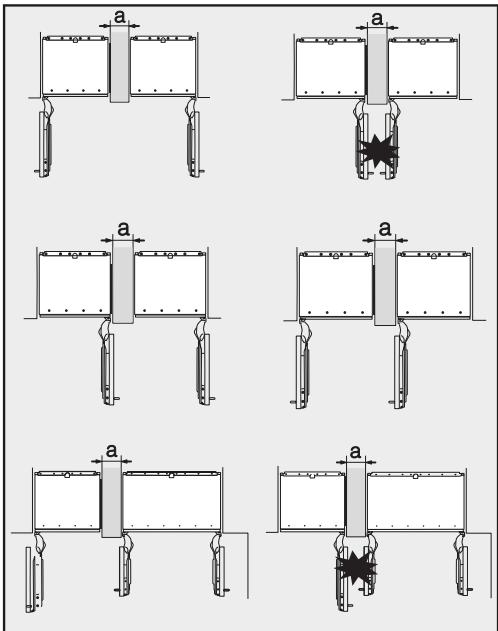
Les appareils sont fixés individuellement dans leur niche à l'aide du matériel de fixation fourni.
Si le mur de séparation a est plus étroit que 6 5/16" (160 mm), vous aurez besoin du panneau chauffant latéral du kit d'installation côte à côte pour éviter la formation de condensation et les dommages qui en résultent.
Si le mur de séparation a est plus épais que 6 5/16" (160 mm), vous n'avez pas besoin du kit d'installation côte à côte, ni du panneau chauffant latéral.
... sans mur de séparation Si les appareils doivent être installés côte à côte sans mur de séparation entre eux, ils devront être reliés entre eux à l'aide du kit d'installation côte à côte. De plus, vous devez installer le panneau chauffant latéral pour éviter la formation de condensation et les dommages qui en résultent.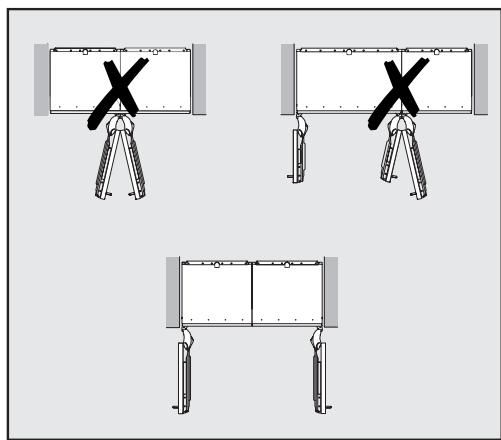
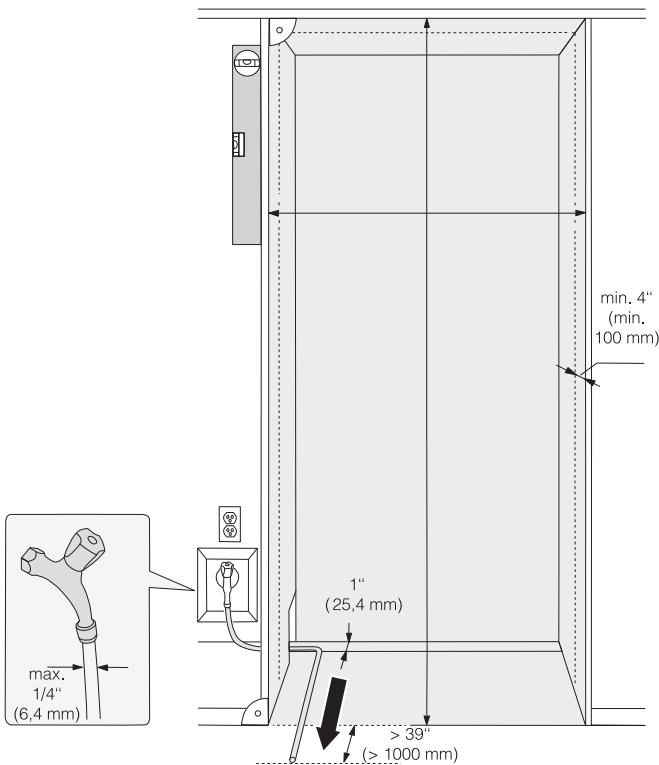
- Le raccordement électrique ne doit pas être positionné à plus de 9" au-dessus du sol.
- Le raccordement d'eau 1/4" (non fourni) ne doit pas être positionné à plus de 2" au-dessus du sol.
La prise électrique ne doit pas être dissimulée derrière l'appareil et doit être facilement accessible en cas d'urgence !
KF 2981 Vi
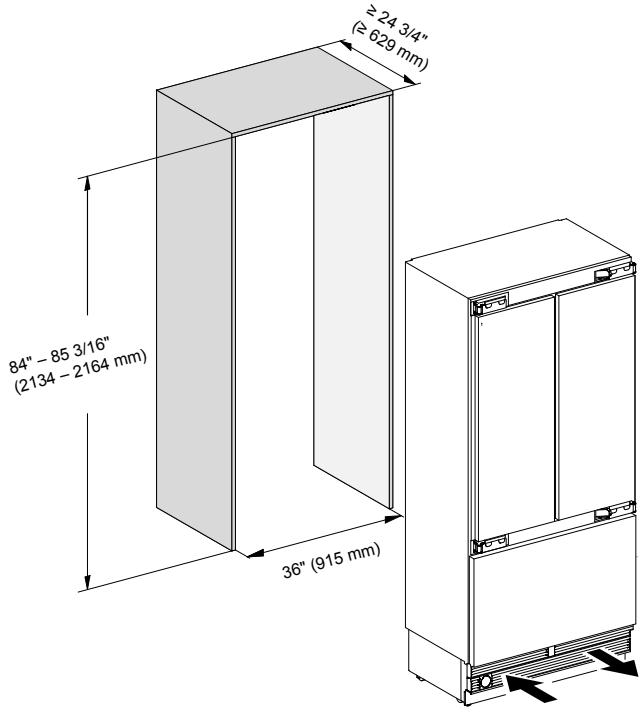
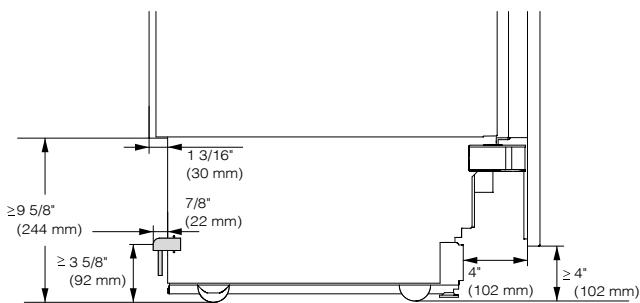
Vue latérale
Dimensions lorsque la porte de l'appareil est ouverte (angle d'ouverture 90° / 115°)
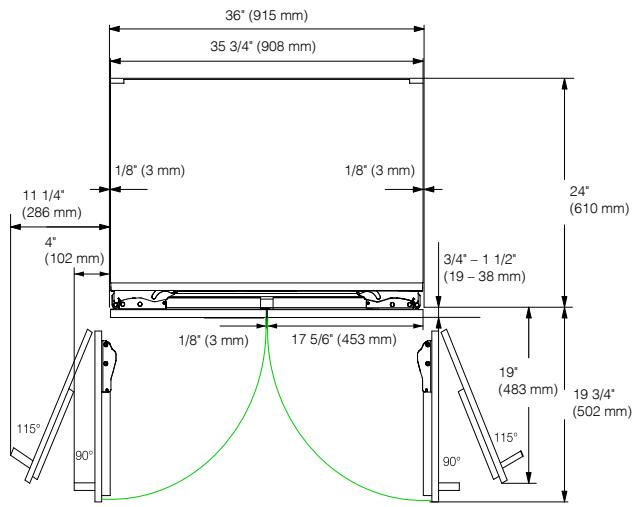
- Les dimensions du panneau de meuble et de la poignée de porte varient selon le design de la cuisine.
KF 2981 Vi
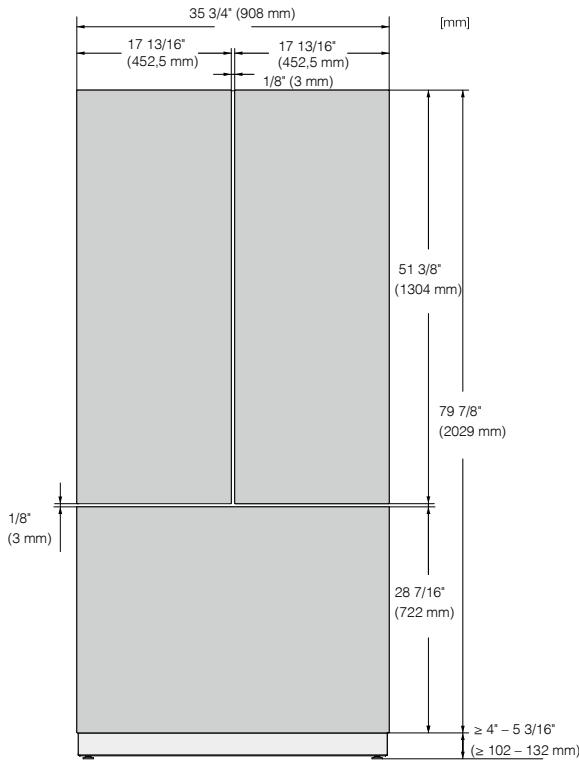
Avant de commencer...
Il est essentiel de lire attentivement ces instructions d'installation avant de commencer l'installation de l'appareil.
L'appareil doit être installé par un professionnel qualifié conformément à ces instructions d'installation. Le fonctionnement sûr de l'appareil n'est assuré que s'il a été installé et raccordé conformément aux instructions d'installation.
Risque de dommages et de blessures !
Cet appareil est très lourd et peut basculer vers l'avant lorsque la porte est ouverte. Maintenez la porte de l'appareil fermée jusqu'à ce que l'appareil ait été encastré et fixé dans son meuble conformément aux instructions d'utilisation et d'installation.
L'appareil est à la fois volumineux et lourd. L'installation doit être effectuée par deux personnes.
L'appareil doit être installé conformément aux réglementations locales. Si les réglementations locales ne sont pas disponibles, les réglementations suivantes doivent être respectées :
- aux États-Unis : le National Electric Code, ANSI/NFPA 70 - dernière édition / les codes d'État et municipaux et/ou les codes locaux.
- au Canada : le Canadian Electric Code C22.1 - dernière édition / les codes provinciaux et municipaux et/ou les codes locaux.
Outils requis
- Perceuse sans fil
- Tournevis TX 20
- Perforateur
- Forets de différentes tailles, selon les matériaux
- Marteau
- Clé à fourche
- Clé à cliquet, douille : 5/16" (8 mm)
- Ruban adhésif
- Couteau utilitaire
- Clé à molette
- Niveau à bulle
- Mètre ruban
- Crayon
Autre
- Escabeau
- Diable
Poids des façades de meuble
Avant d'installer les façades de meuble, assurez-vous qu'elles ne dépassent pas le poids maximal autorisé :
| Appliance | Max. weight of upper cabinet fronts | Max. weight of lower cabinet front |
| KF 2981 Vi | Left 150 lb (68 kg); right 154 lb (70 kg) | 19 lb (9 kg) |
Risque de dommages dû au poids de la façade de meuble.
Les façades de meuble qui dépassent le poids autorisé peuvent endommager les charnières, ce qui peut affecter divers facteurs, tels que le fonctionnement de l'appareil.
Respectez toujours le poids admissible des façades de meuble.
Alignement de la niche d'installation
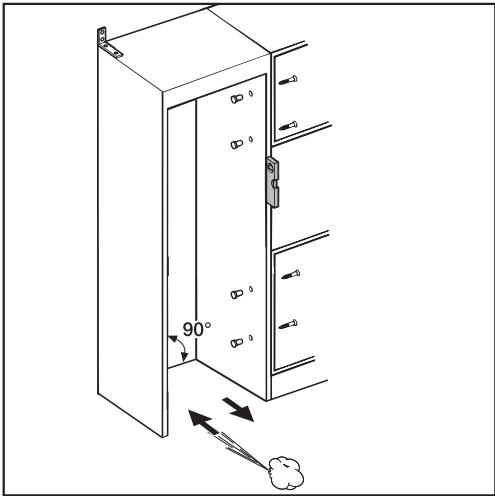
La niche d'installation doit être soigneusement alignée à l'aide d'un niveau avant d'installer l'appareil. Les angles de la niche doivent être à 90° les uns par rapport aux autres, sinon la porte du meuble ne reposera pas correctement sur les quatre coins.
- Les panneaux latéraux de la niche d'installation doivent être de niveau.
- Les parois environnantes de la niche d'installation doivent avoir une épaisseur d'au moins 5/8 po (16 mm).
- Les parois environnantes doivent être solidement fixées au sol ou au mur.
- Les parois latérales raccourcies doivent avoir une épaisseur d'au moins 4 po (100 mm).
- La plinthe doit avoir une épaisseur d'au moins 1/2 po (13 mm) (de préférence 3/4 po (19 mm)).
Vérification de l'espace d'installation
Vérifiez les dimensions d'installation. Vérifiez la position des raccordements électriques et de plomberie. - Vérifiez que tous les meubles/armoires adjacents sont solidement fixés au mur. - Vérifiez les armoires/meubles adjacents pour d'éventuelles collisions lors de l'ouverture des portes (angle d'ouverture de la porte).
Avant l'installation
! Poids lourd !
Cet appareil est très lourd et peut basculer vers l'avant lorsque la porte est ouverte.
Préparez le raccordement d'eau pour l'appareil (voir « Raccordement d'eau »). Avant l'installation, retirez tout accessoire à l'arrière de l'appareil. Vérifiez que l'appareil n'a pas été endommagé pendant le transport.
N'installez pas un appareil endommagé.
- Vérifiez que toutes les pièces à l'arrière de l'appareil ne sont pas obstruées.
- Pour protéger le sol lors de l'installation de l'appareil, fixez une chute de revêtement de sol ou un matériau similaire au sol devant la zone d'installation.
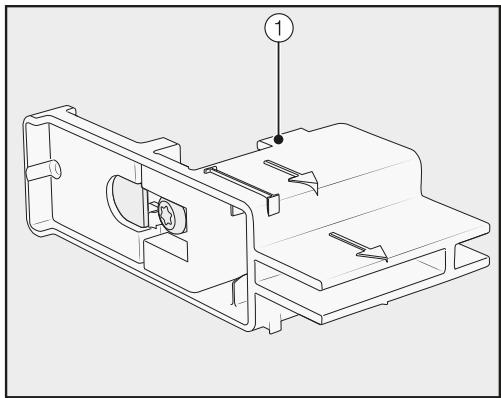
- Ne retirez pas les aides d'installation ① de la porte de l'appareil. Elles seront nécessaires plus tard lors de l'installation de l'appareil dans la niche.
Risque de basculement !
Assurez-vous que l'appareil n'est plus fixé à la palette dès que vous dévissez les supports qui le maintiennent sur la palette.
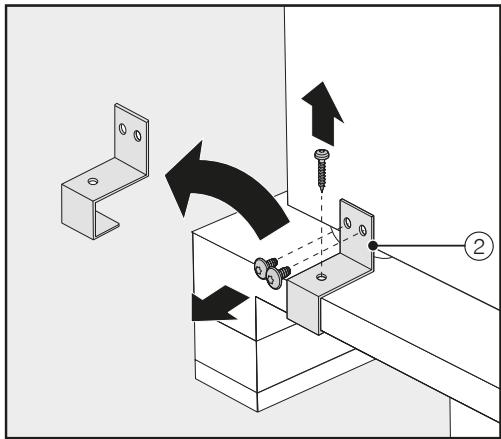
Dévissez les supports ②. - Avec l'aide de plusieurs personnes si nécessaire, soulevez délicatement l'appareil de la palette, en commençant par l'arrière de l'appareil.
Dès que vous avez redressé l'appareil, vous pouvez le déplacer à l'aide des roulettes situées en dessous.
Préparation de la niche d'installation
Gardez la porte de l'appareil fermée jusqu'à ce que l'appareil soit fixé dans la niche ! Risque de basculement !
La niche d'installation doit être fixée au mur derrière elle avec plusieurs vis. Cela seul garantit que l'appareil ne basculera pas après son installation !
Utilisez toujours les supports anti-bascule fournis pour sécuriser la niche.
En raison de la taille et du poids de l'appareil, il faut s'assurer qu'il ne puisse pas basculer vers l'avant une fois installé dans la niche.
Utilisation du matériel d'installation
Les pièces nécessaires à l'installation de l'appareil sont fournies avec l'appareil. Les sachets en plastique fournis sont marqués de lettres pour une identification facile.
- Lors de l'exécution des différentes étapes de montage, observez les lettres spécifiées et utilisez le sachet en plastique correspondant contenant le matériel d'installation requis.
Fixation de la niche d'installation
Les supports anti-bascule fournis ③ assurent la fixation solide de la niche d'installation au mur.

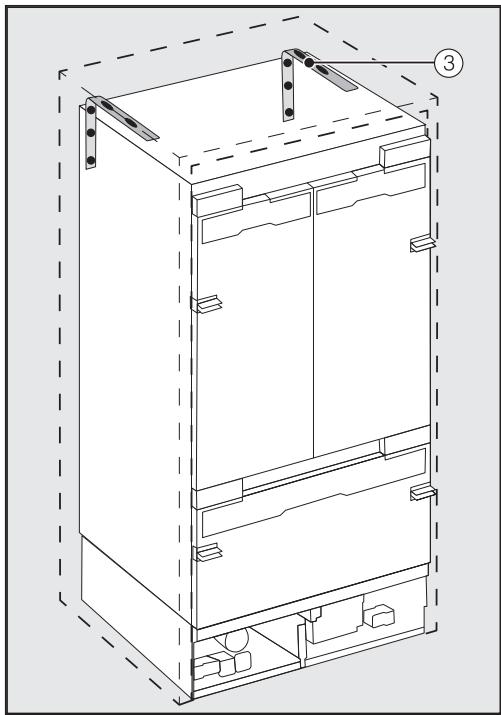
Utilisez 2 supports anti-bascule ③ pour chaque appareil individuel ou 4 supports anti-bascule pour chaque combinaison (côte à côte) de 2 appareils. Positionnez les supports anti-bascule ③ à gauche et à droite de la niche.
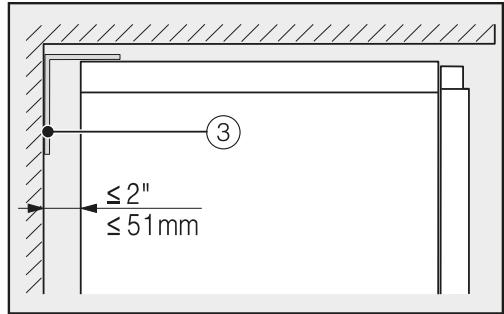
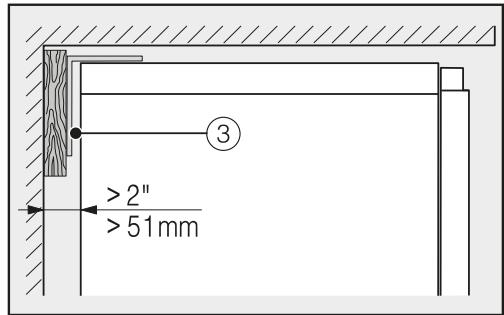
Assurez-vous que l'écart entre la paroi arrière de l'appareil et la niche d'installation ne dépasse pas 2'' (51 mm). - Placez une cale en bois derrière les supports anti-basculement ③ si nécessaire. Tout en maintenant les supports anti-basculement en place, marquez les trous de perçage nécessaires sur la paroi arrière de la niche d'installation.

Des vis de fixation pour différents usages et types de matériaux sont fournies dans le sachet joint :
Fixation sur un mur en béton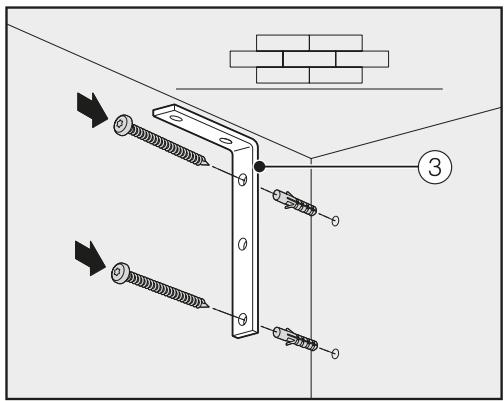
Fixation sur un mur en bois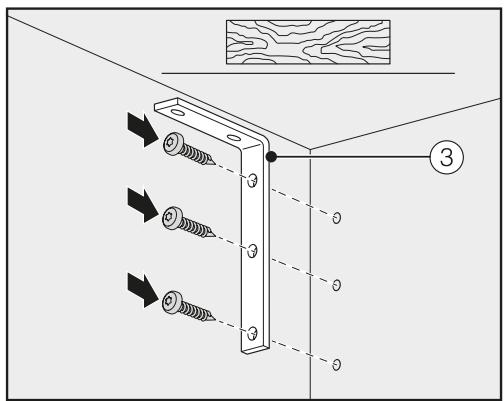
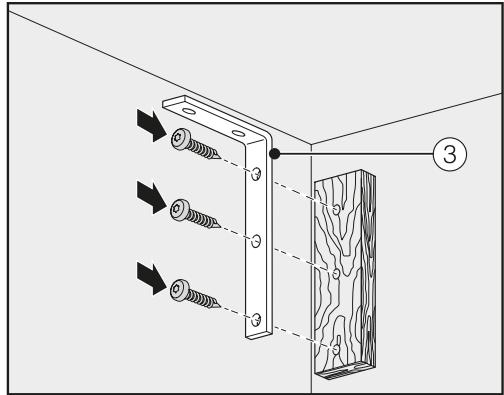
Fixation avec une cale en bois
- Fixez la niche d'installation au mur à l'aide des supports anti-basculement ③. Préparez maintenant le raccordement d'eau pour l'appareil (voir "Raccordement d'eau").
Poussée de l'appareil dans la niche
Poussez l'appareil dans la niche en veillant à ne pas endommager le cordon d'alimentation et les raccordements d'eau.
Si vous installez plusieurs appareils côte à côte, fixez maintenant les appareils les uns aux autres (voir les instructions du kit d'installation côte à côte).
Retirez la plinthe ④ de la plinthe de l'appareil comme suit :
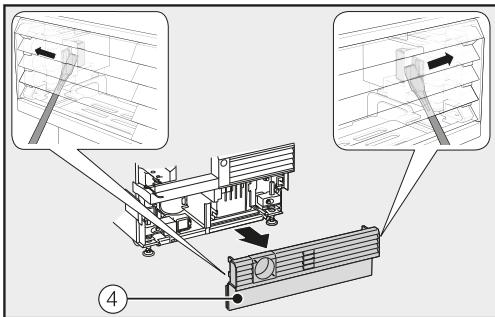
Guidez soigneusement un tournevis plat à travers la grille de la plinthe ④ des deux côtés et utilisez-le pour pousser les loquets en plastique internes vers l'extérieur afin de libérer la plinthe.
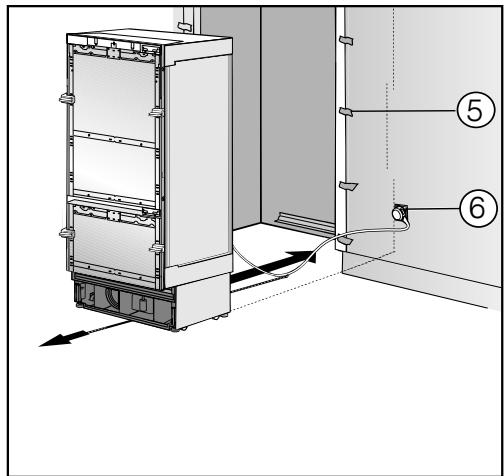
- Fixez la protection des bords ⑤ aux façades des meubles adjacents. Branchez le connecteur à l'arrière de l'appareil (voir "Connexion électrique"). Insérez la fiche ⑥ dans la prise électrique.
La prise électrique doit être proche de l'appareil et facilement accessible !
Sinon, il doit être possible d'allumer et d'éteindre l'appareil à l'aide d'un interrupteur externe omnipolaire avec une distance de contact suffisante !
Risque de court-circuit et de surcharge !
Lors de l'installation d'appareils côte à côte, chaque appareil doit avoir sa propre prise électrique dédiée.
Astuce : sécurisez le cordon d'alimentation pour éviter qu'il ne se coince : attachez un morceau de ficelle au milieu du cordon d'alimentation et, pendant que l'appareil est poussé dans la niche, tirez le cordon vers l'avant sous l'appareil.
Poussez soigneusement l'appareil dans la niche. Si l'appareil ne peut pas être poussé dans la niche (par exemple, parce que le sol est inégal), dévissez légèrement les pieds arrière (voir « Alignement de l'appareil ») et faites glisser l'appareil dans la niche. Retirez la protection des bords ⑤ des façades de meubles adjacentes.
Alignement de l'appareil
Alignez l'appareil avec les façades des meubles adjacents comme décrit ci-dessous.
Épaisseur de la façade du meuble de 3/4'' (19 mm)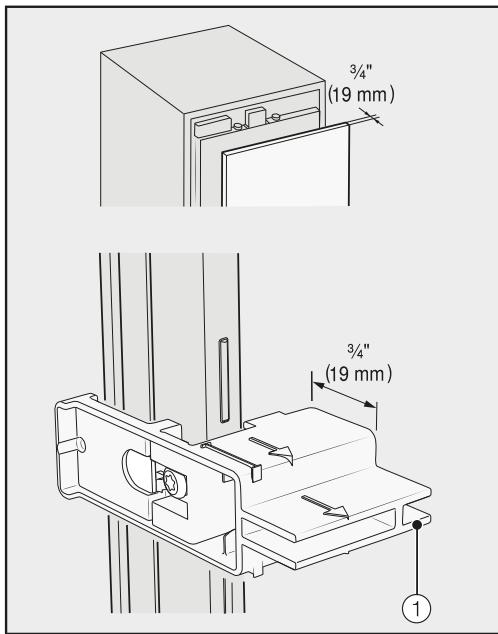
Épaisseur de la façade du meuble de 1 1/2'' (38 mm)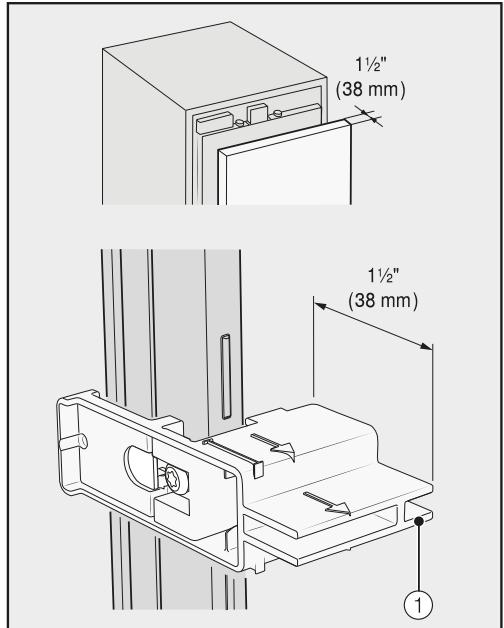
Les aides d'installation ① sur la porte de l'appareil conviennent pour une épaisseur de façade de meuble de 3/4'' (19 mm) ou de 1 1/2" (38 mm).
Encastrement de l'appareil
Les pieds réglables à l'avant et à l'arrière de l'appareil peuvent tous être réglés depuis l'avant :
Risque de dommage !
N'utilisez en aucun cas un tournevis sans fil pour régler les pieds avant et arrière.

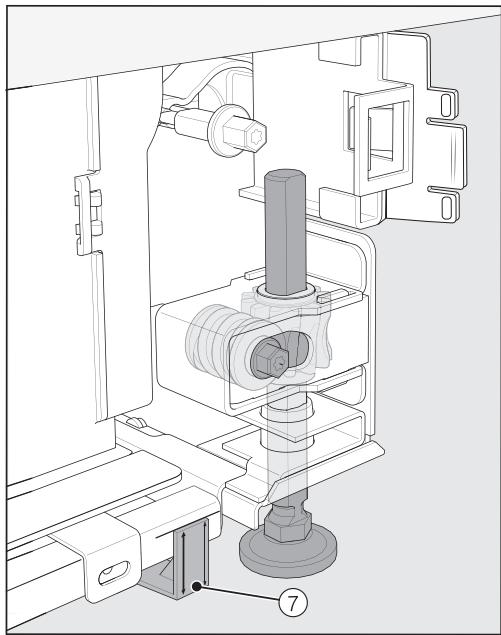
Positionnez les entretoises fournies ⑦ des deux côtés sur les marquages à côté des pieds réglables à l'avant de l'appareil.
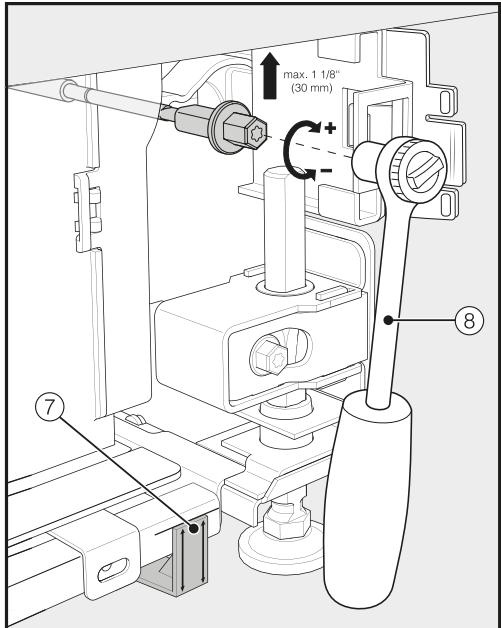
Réglez les pieds avant ⑧ avec une clé à cliquet (embout : douille de 5/16" (8 mm)) ou un tournevis TX 20.
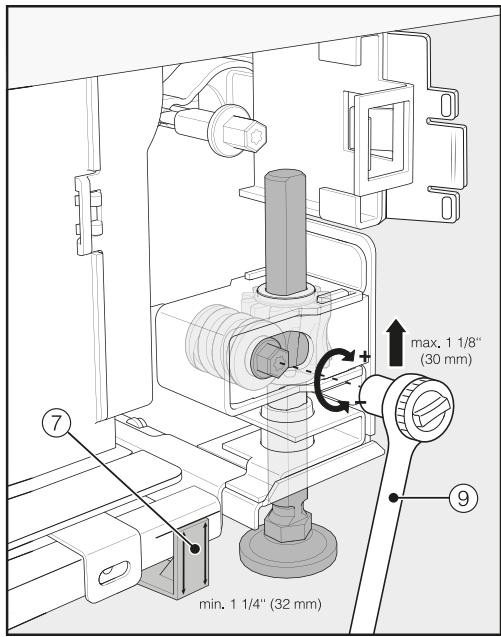
Réglez les pieds arrière ⑨ avec une clé à cliquet (embout : douille de 5/16" (8 mm)) ou un tournevis TX 20.
Conseil : procédez avec précaution lors du réglage des pieds, en alternant entre les pieds gauche et droit.
- Placez un niveau à bulle sur les aides d'installation ① sur la porte de l'appareil pour vérifier l'alignement de l'appareil.
- Dévissez les pieds ⑧ et ⑨ des deux côtés au moins jusqu'à ce que le repère sur la plinthe soit aligné avec la dimension requise de 1 1 / 4" (32 mm) sur l'entretoise ⑦ . La dimension standard de 1 1 / 4" (32 mm) correspond à une hauteur de niche de 84" (2,134 mm) .
Il est important d'aligner les pieds à une hauteur d'au moins 11/4 (32 mm) pour que la ventilation de l'appareil fonctionne correctement via la plinthe.
Risque de dommage !
Dévissez les pieds uniquement jusqu'à ce que le repère sur la plinthe soit aligné à un maximum de 2 7/16" (62 mm) (hauteur de niche max. de 84" (2,164 mm)). Sinon, le réglage du pied arrière sera endommagé.
- Vérifiez à nouveau l'alignement de l'appareil à l'aide des aides d'installation ① et du niveau à bulle.
Fixation de l'appareil dans la niche

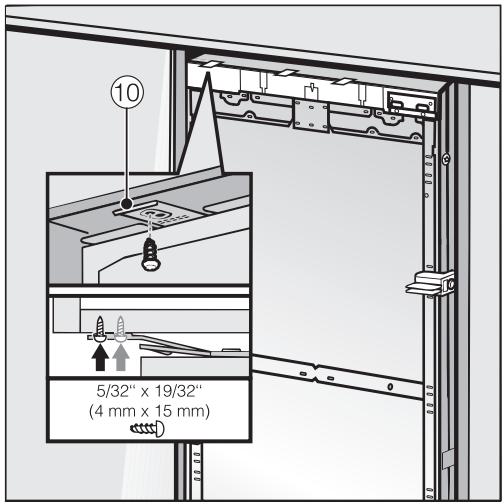
Vissez les pattes de la plaque de fixation 10 dans les armoires/meubles au-dessus de l'appareil.
S'il n'est pas possible de fixer l'appareil en haut, il peut être attaché à la niche avec les plaques de fixation latérales :
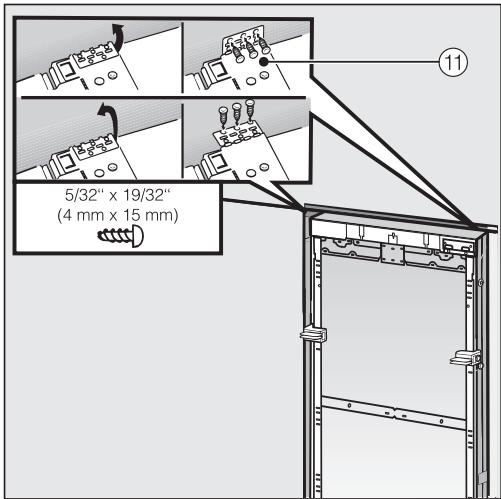
Dépliez les pattes de fixation latérales 1 - Fixez les pattes de fixation latérales ① avec les vis fournies.
Ouvrez les deux portes de l'appareil.
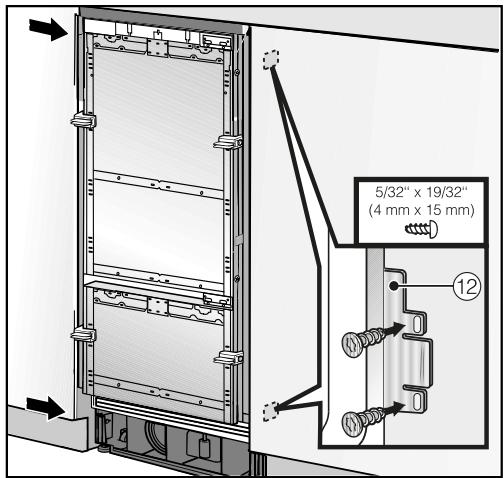
Vissez les pattes de la plaque de montage ⑫ en haut et en bas aux armoires/meubles adjacents à l'appareil.
Dans une combinaison côte à côte, seuls les panneaux extérieurs des deux appareils peuvent être fixés au mur du meuble.
- Connectez l'appareil à l'alimentation en eau domestique (voir "Raccordement à l'eau").
Préparation des façades de meuble
- Ouvrez toutes les portes de l'appareil à fond.
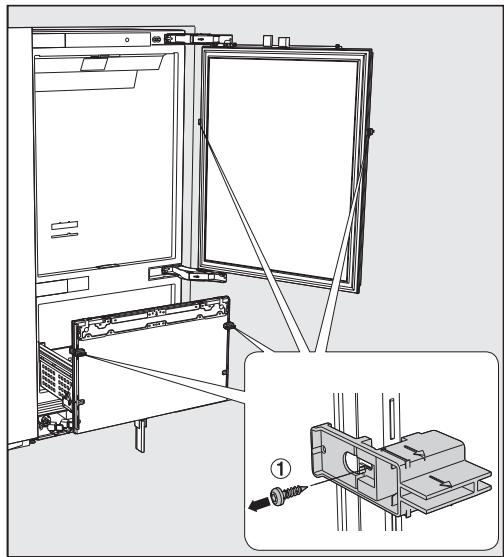
- Dévissez les aides d'installation ① des portes de l'appareil.
Pour un alignement optimal des façades de meuble, il est important d'installer d'abord les façades supérieures, puis la façade inférieure.
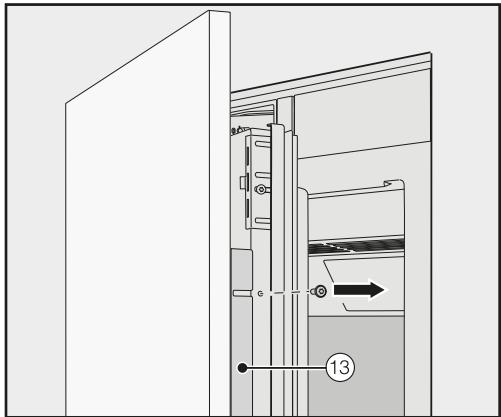
Encastrement de l'appareil
- Des deux côtés, dévissez les équerres ⑬ des portes supérieures de l'appareil et mettez les équerres et les vis de côté – elles seront nécessaires plus tard.
- Fermez les portes supérieures de l'appareil.
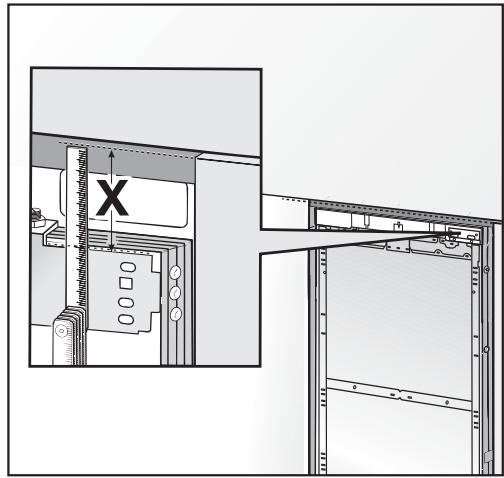
Mesurez l'écart X entre les barres de réglage et le bord supérieur de la façade de meuble adjacente.
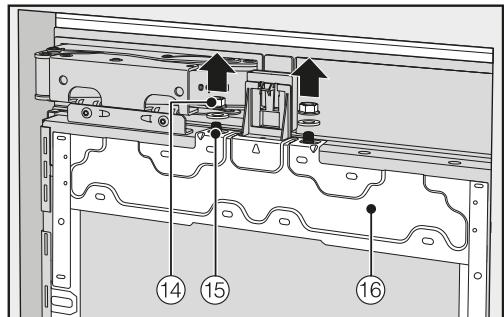
- Sur les deux portes de l'appareil, retirez les écrous et les rondelles ⑭ des boulons filetés ⑮ et rangez-les en lieu sûr – ils seront nécessaires plus tard.
Les cadres de montage ⑥ peuvent maintenant être retirés des portes de l'appareil.
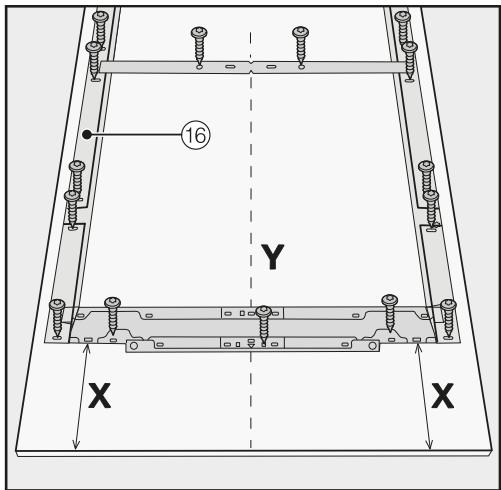
- Placez chaque façade de meuble sur une surface ferme, le côté extérieur vers le bas (posez un tissu ou similaire pour éviter les rayures). ■ Marquez la distance X - 1/8" (3 mm) sur le côté intérieur de la façade. De même, repérez et marquez le point médian Y sur chaque façade. Positionnez chaque cadre de montage 16 selon les marques sur la façade. Pré-percez les trous.

Vissez chaque cadre de montage 16 sur la façade de meuble :
Utilisez au moins une vis pour chaque point de fixation sur le cadre de montage 16.
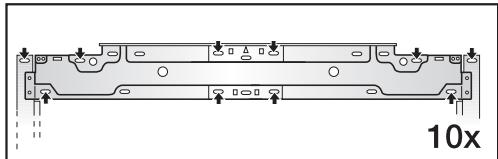
- Fixez le cadre de montage ⑥ en haut de la façade de meuble, en utilisant au moins 10 vis selon la taille.
Les cadres de montage ont plusieurs types de trous pour s'adapter à différentes façades de meuble.
Lors de la fixation du cadre, vissez toujours dans la partie la plus solide de la porte du meuble. Pour ce faire, choisissez des vis légèrement plus courtes que l'épaisseur du panneau avant du meuble.
Vissez les poignées de l'appareil sur les panneaux avant des meubles depuis l'intérieur si nécessaire (pas pour les cuisines sans poignées).
Fixation et alignement des panneaux avant des meubles
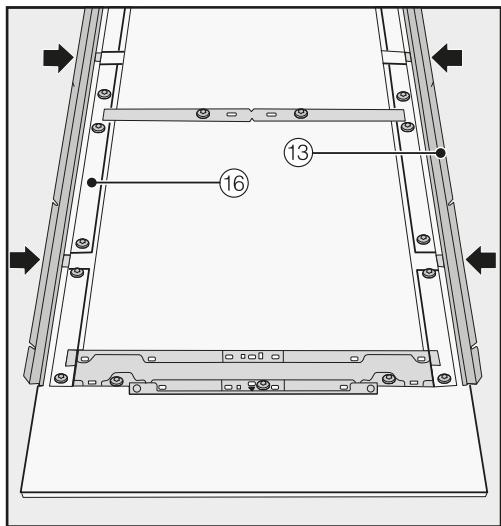
Insérez maintenant les profilés d'angle 13 à fond dans les espaces prévus du cadre de montage 16.
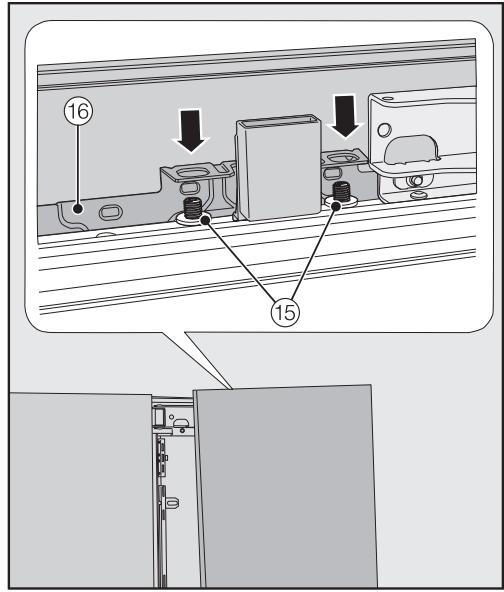
- Ouvrez les deux portes de l'appareil et accrochez chaque panneau avant avec son cadre de montage ⑥ par le haut sur les boulons filetés ⑤.

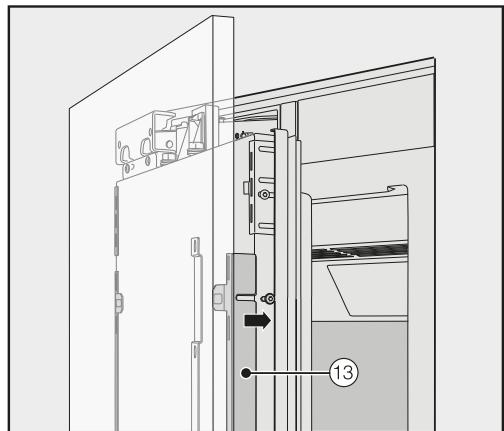
Depuis l'extérieur, pressez les profilés d'angle 13 dans le cadre en plastique blanc des deux côtés et vissez-les
solidement en place. Des vis de rechange sont fournies dans le sachet en plastique marqué de la lettre E.
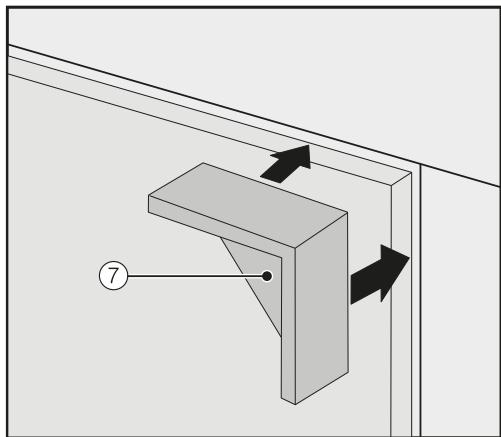
- Placez les entretoises ⑦ depuis l'extérieur sur le dessus du panneau avant des deux côtés.
- Fermez les deux portes de l'appareil et vérifiez la distance entre chaque porte et les portes adjacentes des meubles.
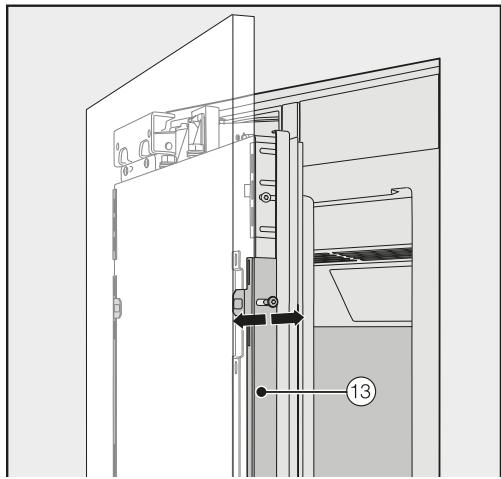
Alignez la profondeur des portes de l'appareil via les fentes des profilés d'angle 13. Vissez ensuite les profilés d'angle 13 en position.
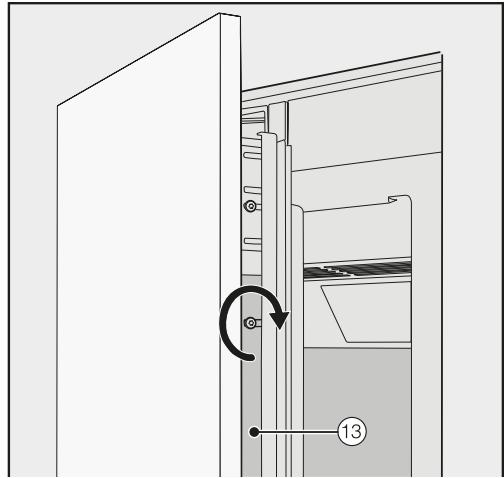
Serrez maintenant les vis dans les profilés d'angle 13.
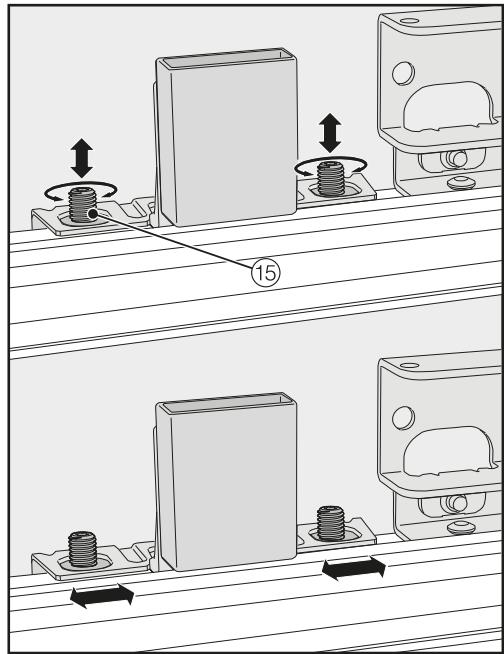
Alignez la hauteur et les côtés des portes de l'appareil à l'aide des boulons filetés 15.
Installation de l'appareil
- Fermez les portes de l'appareil et vérifiez la distance entre chaque porte et les portes adjacentes des meubles.
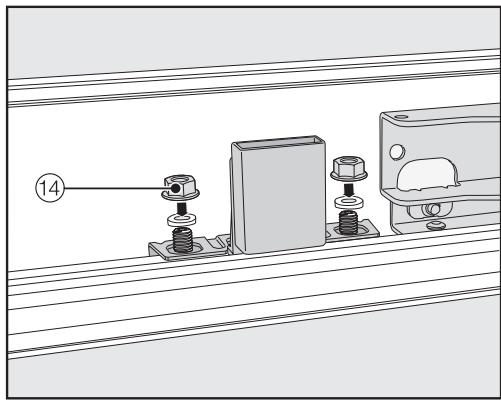
- Replacez les rondelles et les écrous ⑭ en position et serrez les écrous ⑭. Les portes de l'appareil sont maintenant sécurisées. Retirez les entretoises ⑦ des panneaux avant.
La position de la façade du meuble inférieur est alignée avec celle des façades des meubles supérieurs.
Lors de l'installation des façades de meubles, tenez compte des dimensions des façades des meubles supérieurs.
Pour installer la façade du meuble sur la porte de l'appareil inférieur, répétez les étapes à partir de "Préparation à l'installation des façades de meubles".
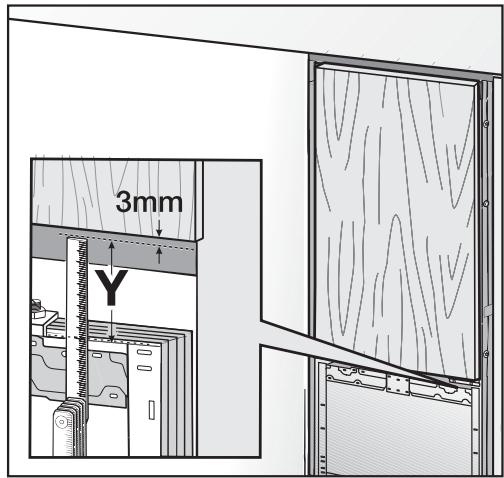
Mesurez l'écart Y entre la barre de réglage de la porte de l'appareil inférieur et les portes des appareils supérieurs. - Maintenez un écart de 1/8" (3 mm) avec les façades des meubles supérieurs.
Montage des supports de retenue

Les supports de retenue servent à fixer en plus les façades de meubles au bas de la porte de l'appareil.
Ne montez pas les supports de retenue tant que l'appareil (ou la combinaison côte à côte, le cas échéant) n'a pas été installé et que les façades de meubles n'ont pas été alignées.
- Ouvrez toutes les portes de l'appareil à fond.
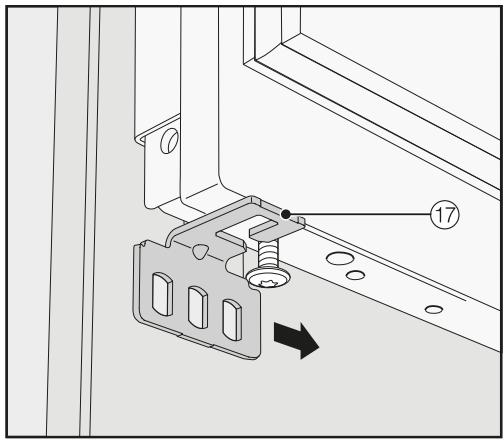
- Faites glisser les supports de retenue supérieur et inférieur ⑦ des deux côtés sur la vis au bas de la porte de l'appareil.
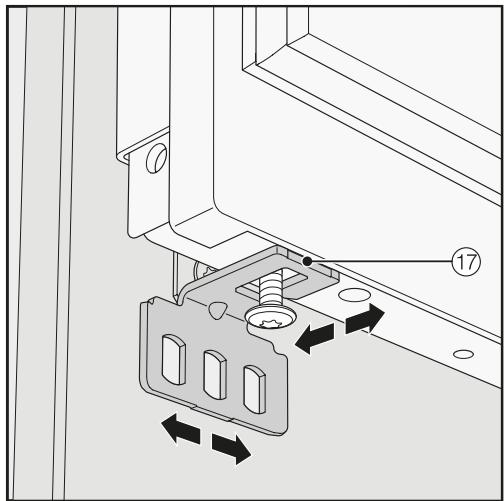
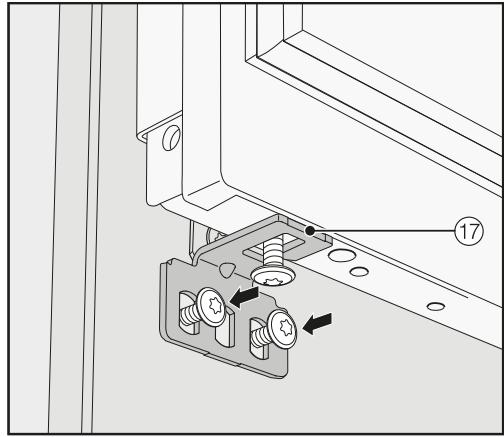
Vissez solidement les supports de retenue ⑦ sur les façades de meubles.
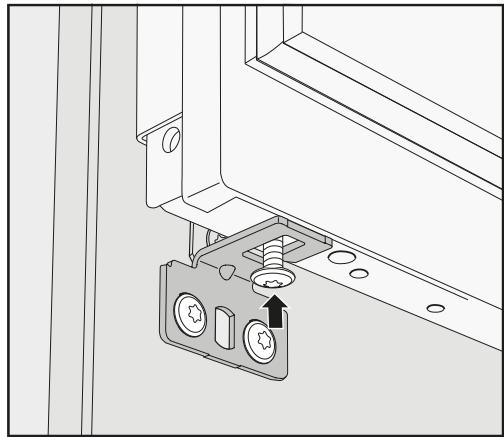
- Serrez les vis au bas de la porte de l'appareil.
- Placez les caches ⑧ sur les supports de retenue ⑦.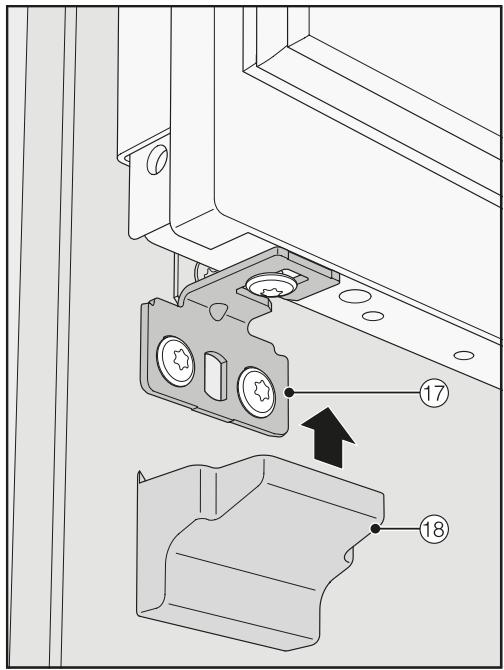
- Encliquetez les caches ⑱ sur les supports de retenue.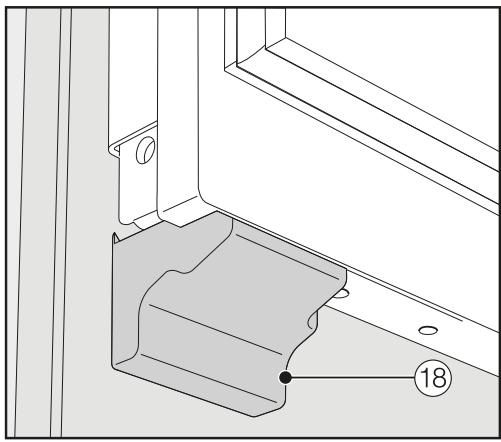
Fixation des caches
Le cache supérieur 19 doit être assemblé comme suit avant de pouvoir être installé :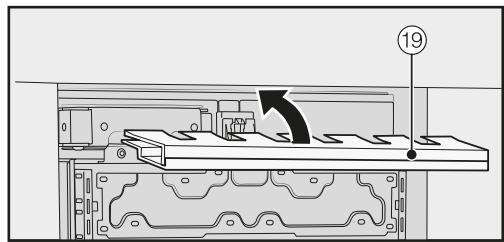
Insérez les deux parties de la façade l'une dans l'autre.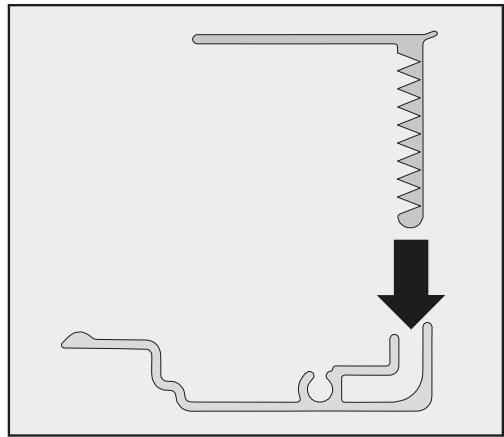
Façade vue de côté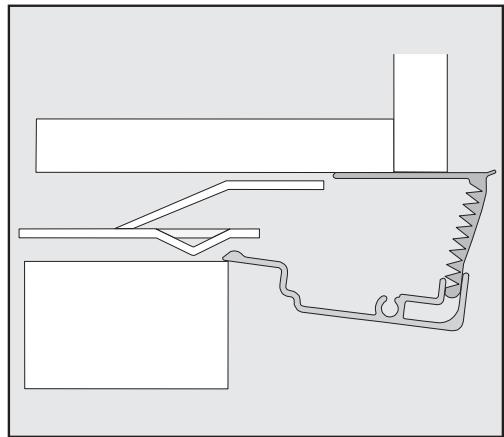
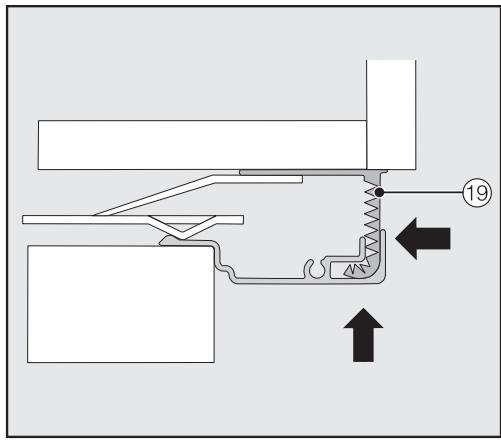
- Placez la façade assemblée ⑲ dans l'espace au-dessus de l'appareil et encliquetez-la. Pendant ce temps, faites glisser les deux parties de la façade l'une contre l'autre si nécessaire.
Montage de la façade dans une combinaison côte à côte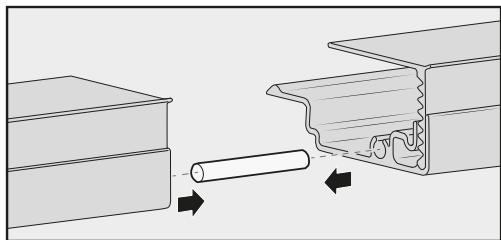
Insérez la cheville de jonction (du kit côte à côte) à mi-chemin dans la rainure de la façade de l'appareil de gauche. - Placez la deuxième façade sur la cheville et pressez les deux façades ensemble. - Encliquetez les deux façades ensemble dans l'encoche au-dessus de l'appareil.
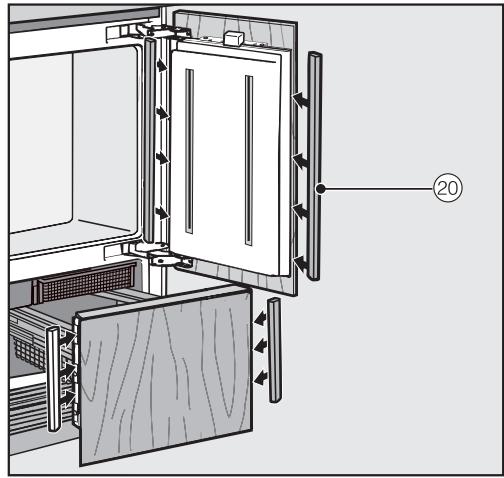
- Sur les portes supérieure et inférieure de l'appareil, montez les caches en plastique ② sur les côtés de la porte de l'appareil en les encliquetant dans l'espace entre la porte de l'appareil et la porte du meuble, en commençant par le bas et en remontant vers le haut.

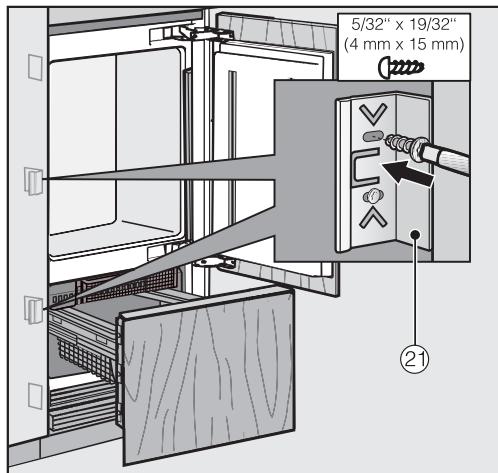
- Fixez les deux côtés de l'appareil à l'aide d'au moins 3 clips ② pour les caches.
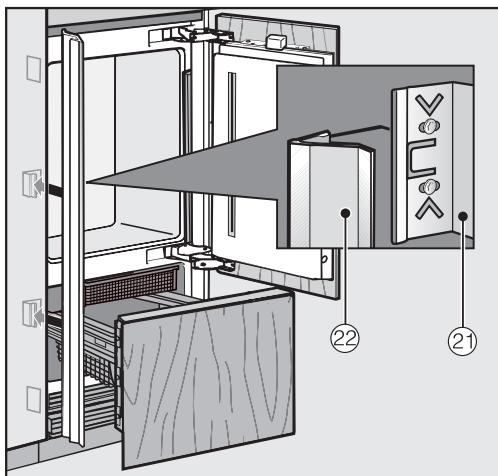
Fixez maintenant les caches 22 sur les clips de retenue 21 des deux côtés. En cas d'installation côte à côte, les caches ne sont nécessaires que sur le côté extérieur.
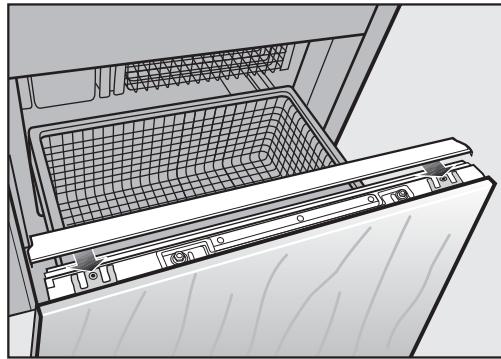
- Faites glisser le cache sur la porte inférieure de l'appareil depuis l'intérieur.
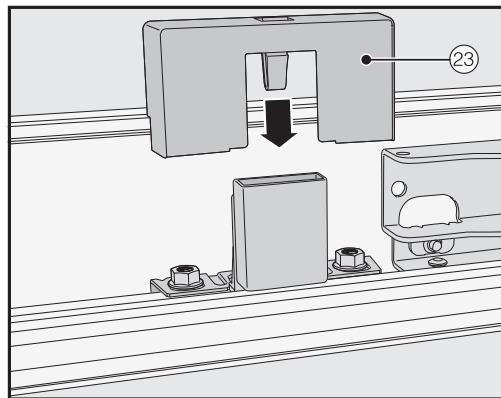
Installez le cache ② sur l'interrupteur à contact de la lumière.
Fixation de la plinthe et du cache
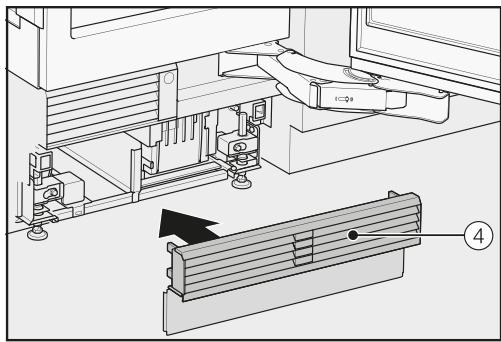
- Encliquetez la plinthe ④ sur le bas de la plinthe de l'appareil.
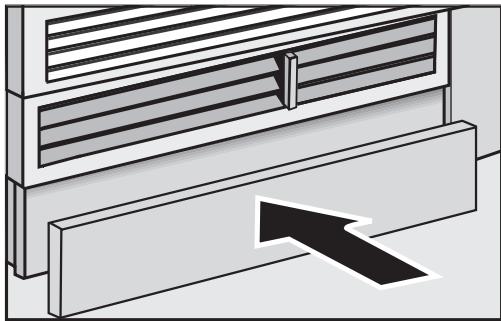
Ne couvrez pas les ouvertures de ventilation de la plinthe de l'appareil. Cela endommagerait l'appareil !
Si nécessaire, coupez le cache de plinthe à la longueur et à la hauteur requises (coupez le long du bord inférieur de la plinthe là où elle touche le sol). - Fixez le cache de plinthe au bas de l'appareil.
Limitation de l'angle d'ouverture des portes de l'appareil

Les charnières des portes sont réglées en usine pour permettre une ouverture complète des portes supérieures de l'appareil.
Si, par exemple, les portes de l'appareil heurtent un mur adjacent lors de leur ouverture, vous devez limiter l'angle d'ouverture des portes à 90° :
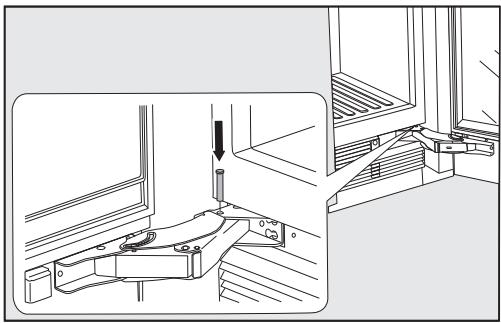
Ouvrez chaque porte de l'appareil. Insérez chaque goupille dans la charnière par le haut.
Cela limitera l'angle d'ouverture des portes de l'appareil à 90°.
Risque de choc électrique !
L'appareil ne doit être mis sous tension que lorsqu'il a été installé conformément aux instructions d'installation.
Mettez l'appareil à la terre.
L'appareil ne doit pas être mis à la terre via un tuyau de gaz.
En cas de doute, faites vérifier par un électricien qualifié et expérimenté que l'installation est conforme aux réglementations en vigueur.
N'installez pas de fusible dans le circuit du neutre ou de mise à la terre.
N'utilisez pas de rallonges ou d'adaptateurs (à deux broches) non mis à la terre.
N'utilisez pas de cordon d'alimentation effiloché ou endommagé.
Risque de choc électrique !
Pour vous protéger contre les chocs électriques, cet appareil est équipé d'une fiche sans polarité protégée contre l'inversion de polarité. La prise électrique doit être correctement mise à la terre.
Ne retirez pas la broche de mise à la terre ronde de la fiche.
Utilisez uniquement une prise avec adaptateur de terre.
Attendez 1 heure après l'installation avant de brancher l'appareil sur l'alimentation électrique. Cela permet au réfrigérant et à l'huile du réfrigérateur de se déposer conformément aux réglementations.
Assurez-vous que la tension de l'alimentation électrique correspond à la tension de connexion de l'appareil. Une alimentation de 110-120 V, 60 Hz et 10-16 A, protégée par un interrupteur ou un fusible, est requise pour faire fonctionner l'appareil.
Le fabricant recommande de faire fonctionner l'appareil sur un circuit dédié pour éviter de surcharger le circuit électrique.
Toutes les réglementations légales pertinentes en matière d'électricité, d'incendie et de construction doivent être respectées lors de l'installation de la prise électrique et/ou de l'appareil.
Dans certains pays, les appareils doivent être connectés à l'alimentation électrique via un interrupteur mural ON/OFF.
Pour éviter tout risque d'incendie, de choc électrique ou d'autres blessures, l'appareil doit être installé et connecté par un électricien qualifié conformément à toutes les réglementations et normes locales et nationales applicables, y compris la prévention des incendies.
La prise ne doit pas être dissimulée derrière l'appareil et doit être facilement accessible afin que l'appareil puisse être rapidement déconnecté de l'alimentation électrique en cas d'urgence.
Si la prise n'est plus accessible après l'installation, un moyen de déconnexion supplémentaire doit être prévu pour tous les pôles. Les moyens de déconnexion appropriés comprennent des interrupteurs avec un dispositif de déconnexion tous pôles avec une ouverture de contact d'au moins 1/8 pouce (3 mm). Il peut s'agir de disjoncteurs, de fusibles et de relais.
La fiche et le cordon d'alimentation ne doivent pas entrer en contact avec l'arrière de l'appareil, car les vibrations peuvent endommager ces composants. Cela pourrait entraîner un court-circuit.
Ne branchez pas d'autres appareils sur la prise électrique située derrière cet appareil.
Ne connectez pas l'appareil à un onduleur autonome, comme ceux utilisés avec une source d'énergie autonome, par exemple l'énergie solaire.
Lorsque l'appareil est allumé, des surtensions peuvent provoquer un déclenchement de sécurité. Cela peut endommager l'électronique. L'appareil ne doit pas non plus être utilisé avec des dispositifs d'économie d'énergie. Ceux-ci réduisent la quantité d'énergie fournie à l'appareil, ce qui peut le faire surchauffer.
Si le cordon d'alimentation doit être remplacé, cela doit être effectué par un technicien qualifié.
Connexion de l'appareil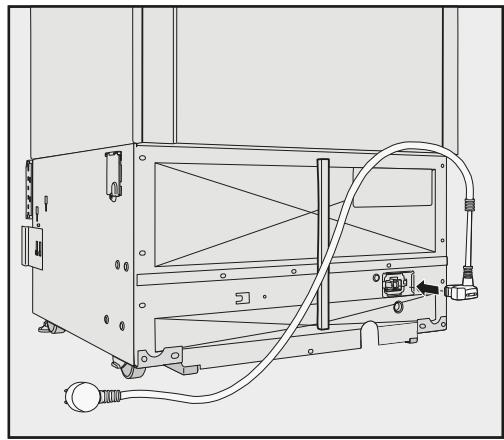
Branchez la fiche à l'arrière de l'appareil.
Assurez-vous que la fiche s'est correctement enclenchée.
Branchez la fiche dans la prise électrique et allumez.
L'appareil est maintenant raccordé à l'alimentation électrique :
Suivez les étapes décrites dans « Mise en marche et arrêt de l'appareil », section « Mise en marche de l'appareil ».
Informations sur le raccordement à l'eau potable
La machine ne peut être raccordée à l'alimentation en eau potable que par des techniciens qualifiés.
Débranchez la machine de l'alimentation électrique avant de la raccorder à l'alimentation en eau potable.
Fermez l'arrivée d'eau avant de raccorder la conduite d'eau pour le bac à glaçons.
La qualité de l'eau doit être conforme aux exigences relatives à l'eau potable dans le pays où la machine est utilisée.
AVERTISSEMENT ! Raccorder uniquement à une alimentation en eau potable.
Le raccordement à l'alimentation en eau de la maison doit être conforme aux réglementations en vigueur dans le pays où la machine est installée. Tous les appareils et systèmes utilisés pour fournir de l'eau à la machine doivent également être conformes aux réglementations en vigueur dans le pays concerné.
L'appareil ne convient que pour un raccordement à une conduite d'eau froide, qui
- est directement reliée à l'alimentation en eau afin de garantir la circulation de l'eau dans la conduite d'eau froide.
Évitez de raccorder l'appareil à une alimentation en eau où l'eau pourrait stagner. Cela peut affecter le goût de l'eau et des glaçons.
- supporte la pression de service.
- respecte les réglementations d'hygiène.
La pression de l'eau doit être comprise entre 29 et 116 psi (2 et 8 bars).
Un robinet d'arrêt doit être installé entre la conduite d'eau et l'alimentation en eau du bâtiment afin de pouvoir couper l'arrivée d'eau si nécessaire.
Assurez-vous que le robinet d'arrêt reste accessible après l'installation de l'appareil.
Risque de dommages !
Si l'arrivée d'eau est bloquée alors que la machine à glaçons est encore en fonctionnement, le tuyau d'arrivée d'eau peut geler.
Éteignez la machine à glaçons si l'arrivée d'eau est interrompue (par exemple, pendant les vacances).
Une pression d'eau excessive dans le circuit peut endommager l'appareil.
Installez un réducteur de pression si la pression de l'eau dans le circuit dépasse 116 psi (8 bars).
N'installez pas le système si la pression de l'eau dépasse 120 psi (8,3 bars). Contactez votre plombier si vous n'êtes pas sûr de votre pression d'eau.
Installation du tuyau d'eau sur l'appareil
Avant d'établir la connexion d'eau, assurez-vous que l'appareil est débranché de l'alimentation électrique.
Lors de l'installation du tuyau d'eau, assurez-vous qu'il n'est ni plié ni endommagé.
À ce stade, la niche d'installation doit déjà être préparée afin que l'appareil puisse simplement y être poussé.
Placez l'appareil légèrement devant la niche d'installation afin que le robinet d'arrêt reste accessible.
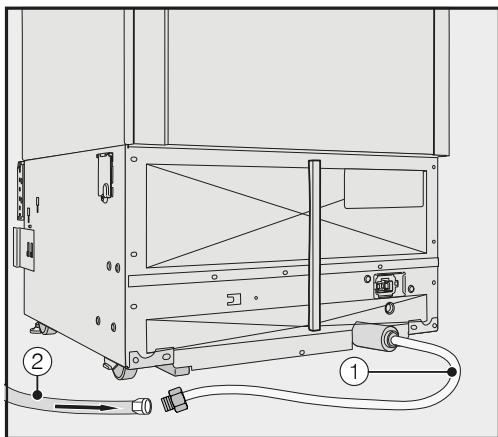
Le raccord d'eau de l'appareil ① est prêt à être connecté à l'arrière de l'appareil.
Installez le tuyau d'eau ② sur le raccord d'eau ① à l'arrière de l'appareil. Assurez-vous que les raccords sont serrés et étanches.
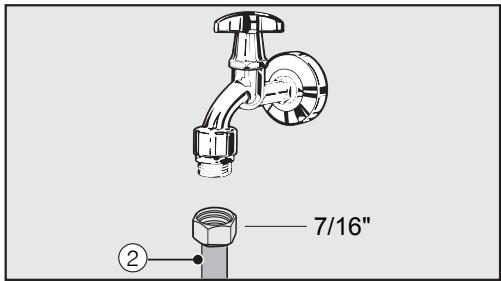
Connectez le tuyau d'eau ② au robinet d'arrêt. Assurez-vous qu'il est correctement vissé. - Ouvrez lentement le robinet d'arrêt de la conduite d'eau et vérifiez l'étanchéité de tout le système d'eau. L'appareil peut maintenant être installé dans la niche (voir "Installation"). L'appareil peut maintenant être branché sur l'alimentation électrique (voir "Branchement électrique").
Comment économiser de l'énergie
| Normal energy consumption | Increased energy consumption | |
| Installation / Maintenance | In a well-ventilated room. | In an enclosed, poorly ventilated room. |
| Protected from direct sunlight. | In direct sunlight. | |
| Away from heat sources (radiator, range/oven). | Near a heat source (radiator, oven). | |
| Where the ideal room temperature is approx. 68°F (20°C). | Where the ambient room temperature is above 77°F (25°C). | |
| Air vents uncovered and dusted regularly. | Where the ventilation openings are blocked and full of dust. | |
| Temperature setting | 39°F to 41°F (4°C to 5°C) in the refrigerator section | The lower the temperature in the appliance, the higher the energy consumption. |
| SmartFresh drawer close to 32°F (0°C) | ||
| 0°F (-18°C) in the freezer section | ||
| Use | The drawers, and shelves are arranged as they were when the appliance was de-livered. | |
| Only open the door when necessary and for as short a time as possible. Store food in an organized way. | Frequent opening of the door for long periods will cause a loss of coldness. The appliance will try to cool down and the compressor will run for longer periods. | |
| When shopping, use a cooler bag and place the food in the appliance as soon as possible. Replace any food removed as quickly as possible, before it warms up too much. Allow hot food and drinks to cool down before placing them in the appliance. | Hot food or food at room temperature raises the temperature inside the refrigeration appliance. The appliance will try to cool down and the compressor will run for longer periods. | |
| Store food well packaged or covered. | The evaporation or condensation of liquids in the refrigerator section will cause a loss of coldness. | |
| Place frozen food in the re-frigerator section to defrost. | ||
| Do not overfill the appliance in order to allow the air to circulate. | Poor air circulation will cause a loss of coldness. |
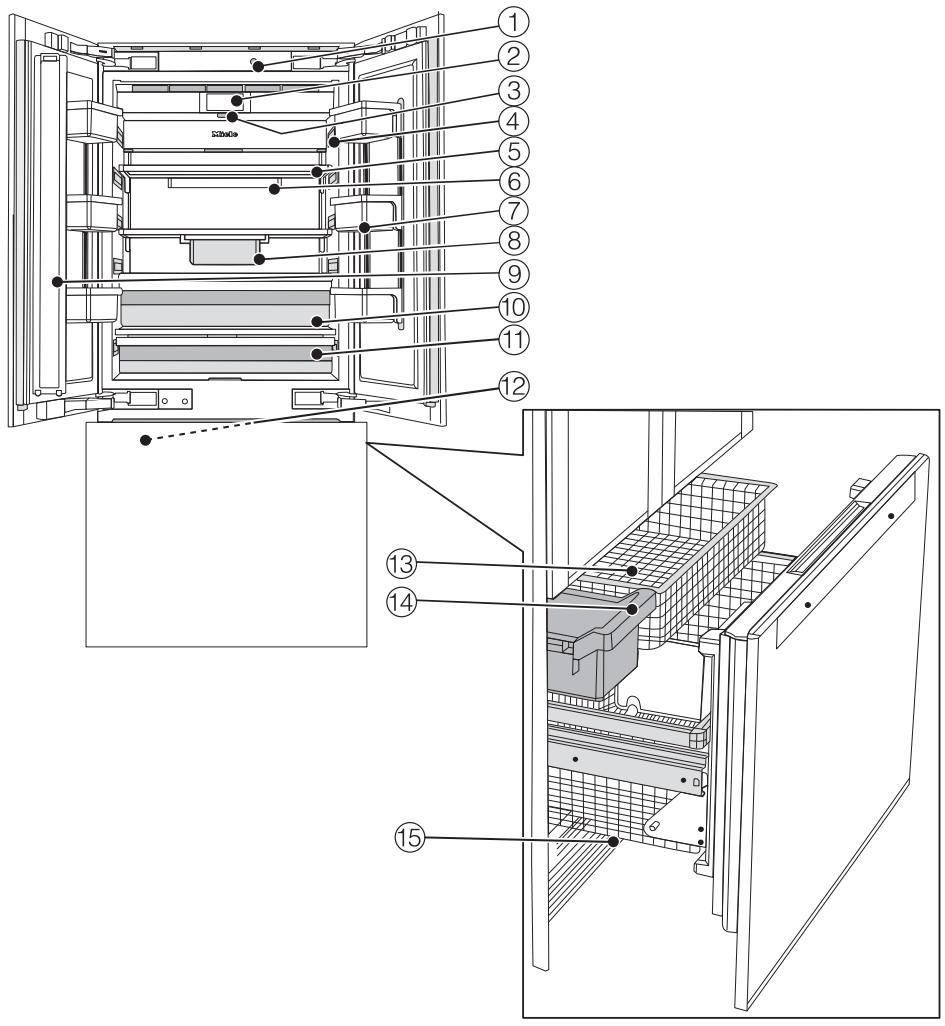
① Ouverture automatique de la porte ② Écran ③ Interrupteur marche/arrêt ④ Éclairage intérieur ⑤ Clayettes ⑥ Support du filtre Active AirClean ⑦ Balconnets de la porte ⑧ Tiroir suspendu
⑨ Montant de porte avec chauffage intégré (protection contre la condensation) ⑩ Compartiment à humidité contrôlée avec régulateur d'humidité pour fruits et légumes ⑪ Compartiment sec à basse température pour les aliments périssables ⑫ Machine à glaçons ⑬ Bacs de congélation ⑭ Bac à glaçons ⑮ Filtre à eau
Le compartiment sec de la zone SmartFresh répond aux exigences d'un compartiment de stockage à froid selon EN ISO 15502.
Écran principal
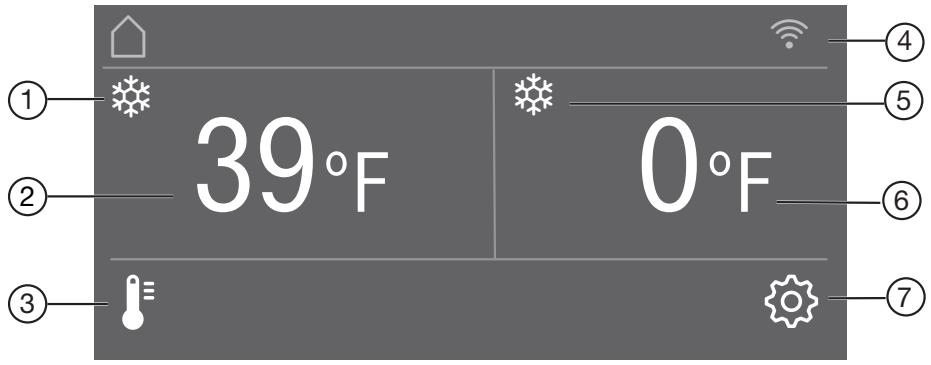
① Affichage SuperCool automatique (visible uniquement lorsque la fonction SuperCool automatique est activée) ② Affichage de la température (température cible) pour le compartiment réfrigérateur. ③ Commande tactile
pour régler la température
④ Affichage de l'état de connexion Miele@home (visible uniquement lorsque Miele@home est configuré) ⑤ Affichage SuperFrost (visible uniquement lorsque la fonction SuperFrost est activée) ⑥ Affichage de la température (température cible) pour le compartiment congélateur. ⑦ Commande tactile
pour régler divers paramètres en mode réglages
Mode réglages
Les icônes suivantes peuvent être sélectionnées en mode réglages :
| Symbol | Function | |
| ■ | Language | Set |
| ▲ | Display Brightness | Adjust (darker to brighter) |
| □ | Color Scheme | Set (dark or bright) |
| ▲▲/▲▲ | Buzzer Tones | Adjust the volume or switch off the Buzzer Tones completely (e.g., for the door alarm) |
| ▲▲▲/▲▲▲ | Keypad Tone | Adjust the volume or switch off the Keypad Tone completely |
| °C/F/C | Temperature Unit | Set (°Fahrenheit or ° Celsius) |
| ○/○ | Keypad Lock | Switch on or off (see “Selecting additional settings”) |
| ○ | Eco Mode | Switch on or off (see “Selecting additional settings”) |
| √ | Self Test | The system restarts and is checked for faults or malfunctions (see “Selecting additional settings”) |
| △△ | Condensation Protection | Switch on or off (see “Selecting additional settings”) |
| □ | Door Assistant | Switch on (Push2Open or Pull2Open) or switch off (see “Selecting additional settings”) |
| @ | Miele@home | Set up, deactivate, or query WLAN connection status (see “Selecting additional settings”) |
| ■* | Demo Mode | Switch off * (only visible when Demo Mode, is switched on see “Selecting additional settings”) |
| ■ | Factory Default | Reset to default settings (see “Selecting additional settings”) |
| ▲ | Vacation | Switch on or off (see “Selecting additional settings”) |
| ▲▲ | Ice Maker | Switch on or off (see “Making ice cubes”) |
Guide de l'appareil
Interrupteur du mode Sabbat : activer ou désactiver (voir « Sélection des réglages supplémentaires »). Affichage du filtre à eau : activer, désactiver ou réinitialiser (voir « Sélection des réglages supplémentaires »). Affichage du filtre Active Air : activer, désactiver ou réinitialiser (voir « Sélection des réglages supplémentaires »).
Symboles en mode réglages
</> Faire défiler en mode réglages ou sélectionner un réglage. -/+ Modifier un réglage (par exemple, luminosité de l'écran). OK Confirmer un réglage. Quitter le niveau de menu.
Accessoires fournis
Fiche de l'appareil
Étiquettes pour la zone SmartFresh
Chaque type d'aliment a ses propres caractéristiques qui déterminent les conditions de stockage spécifiques dont il a besoin.
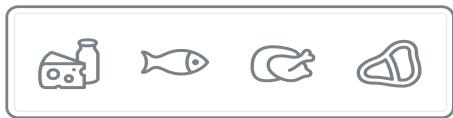
Étiquette du compartiment sec
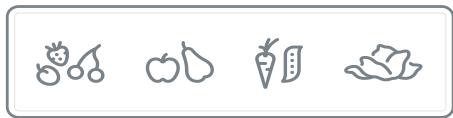
Étiquette du compartiment à humidité contrôlée
Les étiquettes des deux compartiments de la zone SmartFresh vous aident à choisir le bon type d'aliment pour garantir des conditions de stockage idéales.
Collez les étiquettes sur les compartiments de la zone SmartFresh comme décrit dans « Avant la première utilisation » dans « Mise en service initiale ».
Filtre à eau (bypass / filtre à charbon actif)
Le filtre à eau filtre l'eau d'alimentation pour la fabrication de glaçons.
L'appareil est fourni avec un filtre à eau (filtre à charbon actif) qui filtre l'eau d'alimentation pour la fabrication de glaçons.
Filtres Active AirClean
Ces filtres Active AirClean neutralisent les odeurs désagréables dans le compartiment réfrigérateur pour une qualité d'air optimale.
Le support des filtres Active AirClean se trouve dans le compartiment réfrigérateur. Insérez les filtres Active AirClean fournis comme décrit dans la section "Insertion des filtres Active AirClean" du chapitre "Mise en service initiale".
Nous recommandons de remplacer les filtres Active AirClean tous les 6 mois.
Accessoires en option
Une gamme d'accessoires et de produits d'entretien Miele utiles est disponible pour votre appareil.
Filtres Active AirClean
Voir "Accessoires fournis" pour une description.
Filtre à eau (bypass / filtre à charbon actif)
Le filtre à eau filtre l'eau d'alimentation pour la fabrication de glaçons.
L'appareil est fourni avec un filtre à eau (filtre à charbon actif) qui filtre l'eau d'alimentation pour la fabrication de glaçons.
Panneau frontal en acier inoxydable
Les panneaux frontaux en acier inoxydable donnent à votre appareil une apparence de haute qualité.
De plus, vous pouvez commander des plinthes de protection en acier inoxydable.
Kit d'installation côte à côte
Pour installer deux appareils ou plus côte à côte.
Les accessoires peuvent être commandés via la boutique en ligne Miele, directement auprès de Miele (voir au dos pour les coordonnées) ou auprès de votre revendeur Miele.
Avant la première utilisation
Laissez l'appareil reposer pendant environ 1 heure avant de le brancher à l'alimentation électrique.
Cela aidera à prévenir tout dysfonctionnement.
Matériau d'emballage
- Retirez tout le matériau d'emballage de l'intérieur de l'appareil.
Résidus de ruban adhésif.
Retirez toujours tout le matériau d'emballage, y compris le ruban adhésif, avant de mettre l'appareil en marche.
Ouverture et fermeture de la porte de la zone réfrigérée
Risque de dommages dus à une manipulation incorrecte.
Si la porte gauche de la zone réfrigérée est fermée alors que le montant de porte est ouvert (voir "Description du produit"), le montant pourrait se coincer et subir des dommages. Il y a également un risque de dommages à la façade du meuble de la porte droite de la zone réfrigérée.
Assurez-vous que le montant de porte est toujours fermé lors de la fermeture de la porte gauche de la zone réfrigérée.
Nettoyage
Veuillez vous référer aux instructions pertinentes dans "Nettoyage et entretien".
Nettoyez l'intérieur de l'appareil et les accessoires.
Collage des étiquettes de la zone SmartFresh
Les étiquettes fournies pour les deux compartiments de la zone SmartFresh vous aident à choisir le bon type d'aliments pour garantir des conditions de stockage idéales.
Veuillez noter que l'appareil de réfrigération doit être éteint lors du collage des étiquettes, car elles n'adhèrent pas sur une surface froide. De plus, la surface ne doit contenir ni poussière ni graisse.
- Collez les étiquettes comme décrit ci-dessous :
- Compartiment à humidité contrôlée pour fruits et légumes



- Retirez l'étiquette du film et collez-la sur le cadre du compartiment à humidité contrôlée (voir "Description du produit").
- Compartiment sec pour les aliments qui se périment rapidement


Retirez l'étiquette du film et collez-la sur le cadre du compartiment sec (voir "Description du produit").
Astuce : Si vous n'êtes pas satisfait du positionnement des étiquettes, vous pouvez facilement les décoller et les recoller. De plus, elles peuvent être retirées sans laisser de résidus.
Insertion des filtres Active AirClean
Votre appareil de réfrigération est équipé de 2 filtres Active AirClean qui neutralisent les odeurs désagréables dans la zone réfrigérateur.
Le support des filtres Active AirClean est situé sous chacune des clayettes de la zone réfrigérateur.
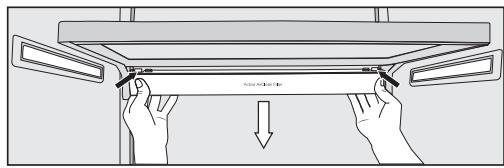
Pour retirer le support des filtres Active AirClean, appuyez sur les fixations des deux côtés du support par l'arrière et tirez le support vers le bas en diagonale depuis la clayette.
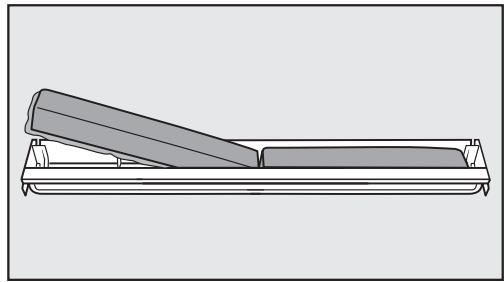
Insérez les deux filtres Active AirClean fournis avec le bord environnant pointant vers le bas dans le support. Pour remplacer le support, appuyez sur les fixations des deux côtés par l'arrière et, à l'aide des fixations, fixez-le dans l'espace sur la clayette par le bas.
Utilisation de l'appareil
L'écran tactile peut être rayé par des objets pointus ou tranchants, par exemple des stylos.
Ne touchez l'écran qu'avec vos doigts.
Si vos doigts sont froids, l'écran tactile peut ne pas réagir.
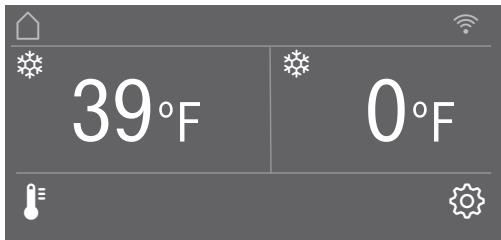
Les symboles sous l'affichage de température peuvent être sélectionnés directement par toucher ; les symboles et textes dans ou au-dessus de l'affichage de température ne peuvent être qu'affichés.
... en mode réglage
- Touchez le symbole pour ouvrir le mode réglage. Utilisez les boutons fléchés < et > pour sélectionner la fonction dont vous souhaitez régler les paramètres. Confirmez votre sélection avec OK.
- Réglez les paramètres à l'aide des boutons fléchés < et > ou des capteurs + et - . Confirmez votre sélection avec OK.
Le réglage avec le fond coloré est toujours le réglage sélectionné ; il peut être confirmé directement avec OK.
- Sélectionnez si vous souhaitez revenir au niveau de menu précédent ou terminer le processus.
Chaque toucher de l'écran est confirmé par un son de touche audible. Vous pouvez désactiver ce son de touche en mode réglage .
Première mise en service
Ouvrez la porte de l'appareil.
Allumez l'appareil en appuyant sur l'interrupteur marche/arrêt.
L'appareil commence à refroidir et l'éclairage intérieur s'allume lorsque la porte de l'appareil est ouverte.
Miele apparaîtra ensuite à l'écran de l'appareil.
- Lors de la première mise en marche de l'appareil, les réglages suivants vous seront demandés :
- (si vous sélectionnez accidentellement la mauvaise langue, revenez au mode réglages et utilisez le symbole pour changer la langue),
Régler la langue
- Régler l'unité de température : ° C (degrés Celsius) ou ° F (degrés Fahrenheit),
- Configurer Miele@home :
- Sélectionnez Continuer si vous souhaitez configurer Miele@home maintenant (pour cela, suivez les instructions de la section « Sélection de réglages supplémentaires », rubrique « Configurer Miele@home »).
- Sélectionnez Ignorer si vous préférez configurer Miele@home plus tard.
- Utilisez les boutons fléchés < et > pour sélectionner le réglage correct et touchez OK pour confirmer votre sélection.
- Sélectionnez ← si vous souhaitez revenir au niveau de menu précédent.
Le message « Configuration terminée avec succès » s'affiche à l'écran.
Confirmez la première utilisation avec OK.
Votre appareil a été configuré avec succès et est prêt à l'emploi.
L'écran principal apparaît sur l'affichage.
Vous ne pouvez pas interrompre le processus de mise en service initial. La seule façon de l'interrompre est d'éteindre l'appareil, mais le processus reprendra lorsque l'appareil sera rallumé.
Allumer l'appareil
Ouvrez la porte de l'appareil.
Allumez l'appareil en appuyant sur l'interrupteur marche/arrêt.
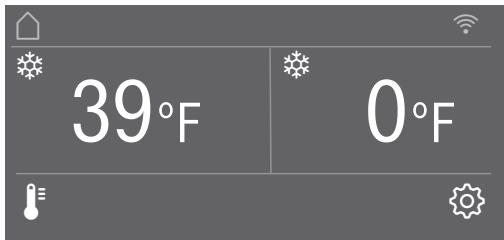
L'appareil commence à refroidir et l'éclairage intérieur s'allume lorsque la porte de l'appareil est ouverte.
Miele apparaît ensuite sur l'écran principal de l'affichage de l'appareil.
Le message Température du congélateur trop élevée. Température max. ° F apparaît à l'affichage lors de la première mise en marche de l'appareil et lorsque la température de congélation sélectionnée a été atteinte.
Un signal sonore d'alarme retentit.
Confirmez le message avec OK.
Le message disparaît de l'affichage et le signal sonore d'alarme s'arrête.
Cependant, le message peut réapparaître à l'affichage après un bref délai.
Dès que la température de congélation sélectionnée a été atteinte, le message disparaît complètement de l'affichage et le signal sonore d'alarme s'arrête.
Pour que la température puisse devenir suffisamment froide à l'intérieur de l'appareil, laissez-le fonctionner pendant quelques heures avant d'y placer des aliments. Ne placez pas d'aliments dans la zone de congélation avant qu'elle n'ait atteint le froid requis (au moins 0 °F / -18 °C).
Mise hors tension de l'appareil
Éteignez l'appareil en appuyant sur l'interrupteur Marche/Arrêt.
Le refroidissement et l'éclairage intérieur sont éteints.
Remarque : L'appareil n'est pas déconnecté de l'alimentation électrique lorsque l'interrupteur Marche/Arrêt est en position « arrêt ».
Mise hors tension pour de longues périodes
Si l'appareil ne doit pas être utilisé pendant une longue période :
éteignez l'appareil, débranchez-le ou coupez le fusible, fermez le robinet d'arrêt de la conduite d'eau (environ 3 heures avant de l'éteindre pour éviter la prolifération de bactéries due à l'eau stagnante), videz le bac à glaçons, nettoyez l'appareil, remplacez le filtre à eau et laissez la porte entrouverte pour aérer l'appareil et éviter l'accumulation d'odeurs à l'intérieur.
Si, lors d'une longue absence, l'appareil est éteint mais pas nettoyé et que la porte est laissée fermée, il y a un risque de prolifération de bactéries à l'intérieur de l'appareil.
En mode réglages, certains réglages peuvent être ajustés et des fonctions sélectionnées, ce qui vous permet d'adapter l'appareil à vos besoins.
La section suivante ne décrit que les fonctions du mode réglages qui nécessitent des explications supplémentaires.
L'alarme de porte et les autres avertissements sont automatiquement désactivés lorsque l'appareil est en mode réglages.
Activation ou désactivation du verrouillage du clavier
Activez le verrouillage du clavier si vous souhaitez protéger votre appareil contre des changements de température indésirables ou d'autres réglages involontaires en mode réglages.
En mode réglages, utilisez les boutons fléchés < et > pour sélectionner Verrouillage du clavier et touchez OK pour confirmer votre sélection. Utilisez les boutons fléchés < et > pour activer ou désactiver le verrouillage du clavier et confirmez votre sélection avec OK. Le verrouillage du clavier ne sera activé qu'une fois la porte de l'appareil fermée.
Rien n'apparaît à l'écran pour indiquer que le verrouillage du clavier est activé.
Le message « Appuyez sur OK pendant 6 secondes pour déverrouiller » s'affiche si vous sélectionnez une commande de capteur alors que le verrouillage du clavier est activé.
Suivez les instructions à l'écran.
L'écran est déverrouillé brièvement afin que vous puissiez régler les paramètres comme souhaité.
La fermeture de la porte de l'appareil réactive le verrouillage du clavier.
Activation ou désactivation du mode Eco
Le mode Eco est utile, par exemple, en cas de vacances, si vous ne souhaitez pas éteindre complètement l'appareil ou si vous n'avez pas besoin d'un refroidissement important. La consommation d'énergie en mode Eco est inférieure à celle du fonctionnement normal.
La zone réfrigérateur est alors régulée à une température de 6 °C (43 °F), le compartiment sec de la zone SmartFresh à environ 3 °C (37 °F).
La zone congélateur est régulée à une température de -16 °C (3 °F).
La production de glaçons est désactivée tant que le mode Eco est activé.
Si les fonctions SuperFroid automatique ou SuperCongélation sont activées, elles seront automatiquement désactivées lors de la sélection du mode Eco.
En mode réglage, utilisez les touches fléchées < et > pour sélectionner le mode Eco, puis touchez OK pour confirmer votre sélection. Utilisez les touches fléchées < et > pour activer ou désactiver le mode Eco et confirmez votre sélection avec OK.
Seules les températures modifiées à l'écran indiquent que le mode Eco est activé.
Risque pour la santé dû à la décomposition des aliments.
La qualité et l'utilisation des aliments dans la zone congélateur peuvent se détériorer si la température reste au-dessus de -18 °C (0 °F) pendant une période prolongée.
N'activez la fonction Eco Mode que pendant une durée limitée.
Lors du passage en Eco Mode, vérifiez que les aliments de la Zone de congélation sont déjà bien congelés.
Ne congelez pas de nouveaux aliments pendant que la fonction Eco Mode est activée.
Exécution d'un autotest
Effectuez un autotest si vous pensez que votre appareil ne fonctionne pas correctement et que vous souhaitez vérifier s'il présente des problèmes.
En mode réglages, utilisez les boutons fléchés < et > pour sélectionner Autotest, puis confirmez avec OK. - Touchez la commande à capteur ← si vous souhaitez interrompre le processus.
L'autotest démarre et l'appareil est vérifié pour détecter tout défaut ou dysfonctionnement.
- Le message Redémarrage du système s'affiche si l'autotest ne détecte aucun défaut ou dysfonctionnement.
- Si l'autotest détecte des défauts ou dysfonctionnements, ils sont indiqués sous forme de messages d'erreur à l'écran.
Une alarme retentit également.
Si vous trouvez l'alarme gênante, vous pouvez la désactiver à l'avance en touchant la commande à capteur. Notez le ou les messages d'erreur affichés. - Contactez le service après-vente et informez-le du ou des messages d'erreur à l'écran. Confirmez le message avec OK.
Redémarrage du système s'affiche à l'écran.
L'appareil s'éteint brièvement puis se rallume automatiquement.
Autotest terminé s'affiche à l'écran.
Confirmez le message avec OK.
L'écran principal réapparaît à l'affichage.
Activation et désactivation de la protection contre la condensation ΔΔ
Le montant de porte de la porte supérieure gauche de l'appareil (voir « Description du produit ») est doté d'un chauffage intégré.
Activez le chauffage si vous constatez de la condensation sur le montant de porte entre les portes du compartiment réfrigérateur ou sur les joints de porte.
Veuillez noter que la consommation d'énergie augmente légèrement lorsque la protection contre la condensation est activée.
En mode réglage, utilisez les boutons fléchés < et > pour sélectionner la protection contre la condensation, puis confirmez avec OK. - Touchez la commande tactile ← si vous souhaitez interrompre le processus. Utilisez les boutons fléchés < et > pour sélectionner Marche ou Arrêt, puis confirmez avec OK.
Activation de l'assistant de porte
Vous pouvez choisir entre les deux assistants de porte Push2Open et Pull2Open. L'assistant de porte par défaut est Push2Open.
L'assistant de porte Push2Open convient aux façades de meubles sans poignées. La porte s'ouvre alors automatiquement lorsque vous appuyez doucement dessus.
L'assistant de porte Pull2Open convient aux façades de meubles avec poignées. La porte de l'appareil peut être ouverte facilement avec peu de force.
Lorsque l'assistant de porte est activé, refermer la porte de l'appareil à plusieurs reprises avant la fin de l'ouverture automatique peut entraîner des dommages ou des dysfonctionnements.
Évitez de tenir ou de fermer la porte de l'appareil pendant que l'ouverture automatique est encore en cours. Si vous avez effectivement fermé la porte, laissez-la fermée pendant 5 minutes. L'ouverture automatique se réinitialise.
Veuillez noter que l'assistant de porte ne peut être utilisé que pour contrôler la porte droite du compartiment réfrigérateur.
Si la fonction Push2Open est activée dans le cas d'une façade de meuble sans poignées, la porte droite du compartiment réfrigérateur doit être ouverte en premier avant que la porte gauche puisse être ouverte.
Activation de Push2Open
En mode réglage, utilisez les boutons fléchés < et > pour sélectionner Door Assistant, puis appuyez sur OK pour confirmer votre sélection.
En mode réglage, utilisez les boutons fléchés < et > pour sélectionner Mode, puis appuyez sur OK pour confirmer votre sélection. Utilisez les boutons fléchés < et > pour sélectionner Push2Open, puis appuyez sur OK pour confirmer votre sélection. - Touchez la commande sensorielle ← pour revenir au niveau de menu précédent.
- Réglage de l'intensité
Vous pouvez également régler l'intensité de la fonction Push2Open. Plus l'intensité est élevée, moins il faut de force pour pousser la porte.
En mode réglage, utilisez les boutons fléchés < et > pour sélectionner Door Assistant, puis appuyez sur OK pour confirmer votre sélection. En mode réglage, utilisez les boutons fléchés < et > pour sélectionner Intensity, puis appuyez sur OK pour confirmer votre sélection. Utilisez les boutons fléchés < et > pour sélectionner l'intensité souhaitée (Low, Medium, High) et touchez OK pour confirmer votre sélection.
- Réglage de la durée de la fonction AutoClose
Vous pouvez également régler la durée pendant laquelle la porte de l'appareil reste ouverte avant de se fermer automatiquement.
En mode réglage, utilisez les boutons fléchés < et > pour sélectionner Door Assistant, puis appuyez sur OK pour confirmer votre sélection. En mode réglage, utilisez les boutons fléchés < et > pour sélectionner AutoClose, puis appuyez sur OK pour confirmer votre sélection.
Utilisez les commandes sensorielles + et - pour sélectionner la durée (5 à 30 secondes) et touchez OK pour confirmer votre sélection.
Pour protéger contre une ouverture involontaire : si vous ne tirez pas l'appareil pour l'ouvrir, il se refermera automatiquement après une durée que vous avez définie (voir "Réglage de la durée AutoClose").
Pull2Open
En mode réglage, utilisez les boutons fléchés < et > pour sélectionner Door Assistant, puis appuyez sur OK pour confirmer votre sélection. Utilisez les boutons fléchés < et > pour sélectionner Mode, puis appuyez sur OK pour confirmer votre sélection. Utilisez les boutons fléchés < et > pour sélectionner Pull2Open, puis appuyez sur OK pour confirmer votre sélection. - Touchez la commande sensorielle ← pour revenir au niveau de menu précédent.
- Réglage de l'intensité
Vous pouvez également régler l'intensité de la fonction Pull2Open. Plus l'intensité est élevée, moins il faut de force pour tirer la porte.
En mode réglage, utilisez les boutons fléchés < et > pour sélectionner Door Assistant, puis appuyez sur OK pour confirmer votre sélection. En mode réglage, utilisez les boutons fléchés < et > pour sélectionner Intensity, puis appuyez sur OK pour confirmer votre sélection.
Utilisez les boutons fléchés < et > pour sélectionner l'intensité souhaitée (Faible, Moyenne, Élevée) et touchez OK pour confirmer votre sélection.
Désactivation de l'assistant de porte
En mode réglages, utilisez les boutons fléchés < et > pour sélectionner Assistant de porte et appuyez sur OK pour confirmer votre sélection. Utilisez les boutons fléchés < et > pour sélectionner Mode et touchez OK pour confirmer votre sélection. Utilisez les boutons fléchés < et > pour sélectionner Arrêt et touchez OK pour confirmer votre sélection. - Touchez la commande sensorielle ↔ pour revenir au niveau de menu précédent.
Configuration de Miele@home @
Votre appareil est équipé d'un module WiFi intégré.
La connectivité est désactivée en usine.
Pour utiliser cette fonction, vous aurez besoin de :
- un réseau WiFi
- l'application Miele@mobile
- un compte utilisateur Miele. Le compte utilisateur peut être créé via l'application Miele@mobile.
L'application Miele@mobile vous guidera lors de la connexion de votre appareil à votre réseau WiFi domestique.
Une fois votre appareil connecté à votre réseau WiFi, vous pouvez utiliser l'application pour effectuer les activités suivantes, par exemple :
- Effectuer certains réglages sur votre appareil
- Afficher des informations sur l'état de fonctionnement de votre appareil
- Configurer un réseau Miele@home avec d'autres appareils Miele compatibles WiFi
La connexion de votre appareil à votre réseau WiFi augmentera la consommation d'énergie, même lorsque l'appareil est éteint.
Assurez-vous que le signal de votre réseau WiFi est suffisamment fort à l'endroit où vous souhaitez installer votre appareil.
Application Miele@mobile
L'application Miele@mobile est disponible en téléchargement gratuit sur l'App Store d'Apple® ou sur Google Play™.

Télécharger sur
App Store


APPLICATION ANDROID SUR
Google Play

Veuillez respecter et suivre les consignes de sécurité et les avertissements de ces instructions d'utilisation, y compris lors de l'utilisation de votre appareil avec l'application Miele@mobile.
Connexion de votre appareil via l'application Miele@mobile
Vous aurez également besoin des éléments suivants pour vous connecter :
- le mot de passe de votre réseau WLAN
- le mot de passe de votre appareil
Le mot de passe de votre appareil est son numéro de série, qui se trouve sur la plaque signalétique.
Vous trouverez la plaque signalétique à l'intérieur de votre appareil.
| E-Nr: MB30L10305/01 PD: 9803 05780000012-Nr: 100001 | ||
| Type KI KBM30USM KF 2811 Vi 228030200298000013 | ||
| BOTTOM FREEZER / CONGELATEUR EN BAS /REFRIGERADOR-CONGELADOR Refrigeration load/Refrigération charge/Carga de refrigeracion 4,00 A Defrost heater load / Dégivir chauflage charge / Deshielko 3,50 A / 350 W | ||
| Ice maker load / Distributeur de glacons charge / Carga fabrica de hiejo 0,40 A Max inel water pressure / la pression maxima de l'air et / entree / P resin maxima de estrada de agua 0,8 Mpa / 8 bar / 115 psi Min inel water pressure / la pression minima de l'air et / entree / P resin minima de estrada de agua 0,2 Mpa / 2 bar / 29 psi | ||
| Refrigerant / Refrigerant /Refrigerante 134A Freezer / Conglador 3,17 oz (90 g) Fridge / Refrigerator 6,17 oz (175 g) Mat.Nr.: 10745780 10,0 A | ||
| Made in Turkey FABRIOE EN TURQUE Hecho en Turquia | ||
| Para uso domestico unicolemente PROTOTYPE TESTING APPLIANCE PC |
Si votre numéro de série est par exemple "78000001", votre mot de passe sera "78000001".
En mode réglages, utilisez les boutons fléchés < et pour sélectionner Miele@home, puis appuyez sur OK pour confirmer votre sélection.
Set up apparaîtra à l'écran.
Confirmez votre sélection avec OK. Utilisez les boutons fléchés < et pour sélectionner via l'application, puis touchez OK pour confirmer votre sélection. - Ouvrez l'application Miele@mobile et suivez les instructions dans l'application.
Dès que votre appareil a été intégré à votre réseau WLAN, le message Connexion réussie apparaît sur l'écran de votre appareil. - Confirmez le processus avec OK à nouveau. Si la connexion WLAN est active, apparaîtra à l'écran.
Connexion de votre appareil via WPS
Votre routeur doit être équipé de la fonction WPS pour cette option de connexion.
En mode réglages, utilisez les boutons fléchés < et pour sélectionner Miele@home, puis appuyez sur OK pour confirmer votre sélection.
Set up apparaîtra à l'écran.
Confirmez votre sélection avec OK. Utilisez les boutons fléchés < et > pour sélectionner via WPS, puis touchez OK pour confirmer votre sélection. Suivez maintenant les instructions à l'écran. Confirmez le processus avec OK.
Pour pouvoir utiliser les fonctions Miele@home, vous devez également enregistrer votre appareil dans l'application.
Dès que votre appareil a été intégré à votre réseau domestique via WPS, le message Connexion réussie apparaît à l'écran. Confirmez le processus avec OK à nouveau.
Si la connexion WLAN est active, apparaîtra à l'écran.
Désactivation de Miele@home
En mode réglages, utilisez les boutons fléchés < et pour sélectionner Miele@home, puis touchez OK pour confirmer votre sélection. Utilisez les boutons fléchés < et pour sélectionner Désactiver, puis touchez OK pour confirmer votre sélection.
La désactivation réussie apparaît à l'écran. Confirmez le message avec OK.
Votre appareil est maintenant déconnecté de votre réseau WLAN.
Le symbole s'éteindra à l'écran.
Activation de Miele@home
Si vous avez déjà activé Miele@home puis déconnecté la connexion, vous pouvez toujours réactiver la connexion.
En mode réglages, utilisez les boutons fléchés < et pour sélectionner Miele@home et touchez OK pour confirmer votre sélection. Utilisez les boutons fléchés < et > pour sélectionner Activer et touchez OK pour confirmer votre sélection.
Activation réussie apparaît à l'écran.
Confirmez le message avec OK.
Si la connexion WLAN est active, apparaîtra à l'écran.
Vérification de l'état de la connexion WLAN
En mode réglages, utilisez les boutons fléchés < et pour sélectionner Miele@home et sélectionnez OK pour confirmer votre sélection. Utilisez les boutons fléchés < et > pour sélectionner État de la connexion et touchez OK pour confirmer votre sélection.
Des informations sur l'état de la connexion WLAN apparaîtront alors à l'écran :
- connecté : il y a une connexion forte,
- connecté : il y a une connexion moyenne,
- connecté : il y a une connexion faible,
- : déconnecté.
Configuration de Miele@home à nouveau
Si vous avez changé votre réseau WiFi, vous pouvez configurer à nouveau Miele@home pour votre appareil.
En mode réglages, utilisez les boutons fléchés < et pour sélectionner Miele@home et confirmez avec OK. Utilisez les boutons fléchés < et pour sélectionner Configurer à nouveau et touchez OK pour confirmer.
Réinitialiser la configuration ? s'affiche à l'écran.
Utilisez les boutons fléchés < et > pour sélectionner Oui ou Non et touchez OK pour confirmer.
Désactivation du mode Démo
Le mode Démo permet de présenter l'appareil en salle d'exposition sans que le système de refroidissement ne soit activé. N'activez pas ce réglage pour un usage domestique.
Si le mode Démo a été activé par défaut, s'affichera à l'écran.
En mode réglages, utilisez les boutons fléchés < et > pour sélectionner Mode Démo et confirmez avec OK.
Appuyez sur OK pendant 4 secondes pour désactiver s'affiche à l'écran.
Suivez les instructions à l'écran et maintenez enfoncée la touche sensorielle OK pendant 4 secondes.
Le compte à rebours Le mode Démo se désactivera dans quelques secondes. s'affichera à l'écran.
Mode Démo désactivé. L'appareil va refroidir. s'affiche à l'écran.
Confirmez le message avec OK.
L'écran principal réapparaît à l'affichage.
Réinitialisation des réglages aux valeurs par défaut
Vous pouvez réinitialiser les réglages de l'appareil à leurs valeurs par défaut.
En mode réglages, utilisez les boutons fléchés < et > pour sélectionner Factory Default (Réglages d'usine) et confirmez votre sélection avec OK. Utilisez les boutons fléchés < et > pour sélectionner Reset (Réinitialiser) et touchez OK pour confirmer votre sélection.
Après un bref délai, Settings Reset (Réinitialisation des réglages) apparaît à l'affichage.
Confirmez le message avec OK.
Le processus de mise en service initiale redémarre (voir "Première mise en service").
Les réglages de l'appareil seront réinitialisés aux valeurs suivantes :
Fonction
Réglages par défaut

Langue
Anglais

Affichage
Valeur moyenne
Luminosité
(4 segments sur 7)

Couleur
Schéma

Buzzer
Sombre

Tonalités
Valeur moyenne
(4 segments sur 7)

Clavier
Tonalité
Valeur moyenne
(4 segments sur 7)

Tempé-
Fahrenheit

Unité de température

Clavier
Verrouillage

Mode éco
Éteint

Protection
anti-conden-
sation

Assistance
de porte

Miele@ho
me

Vacances
Machine à glaçons
Push2open

Sabbat
Mode

Filtre à eau
Affichage

Affichage Air actif
Nettoyer le filtre
Éteint
Allumé
Allumé
Température dans le

réfrigérateur
Zone
Température dans le
Zone
Température dans le
local
compartiment sec
compartiment sec

Température dans le
Température dans le
Zone congélateur
Zone congélateur
37 °F (4 °C)
32 °F (0 °C)
0 °F (-18 °C)
Activer ou désactiver le mode Vacances
Astuce : le mode Vacances est utile lorsque vous partez en vacances, par exemple, si vous ne souhaitez pas éteindre complètement la zone réfrigérateur ou si vous n'avez pas besoin d'un degré de refroidissement élevé.
Les aliments qui ne s'abîment pas rapidement peuvent être conservés dans l'appareil pendant un certain temps à cette température modérée de la zone réfrigérateur, et la consommation d'énergie est inférieure à celle du fonctionnement normal. Cela évite également l'accumulation d'odeurs et de moisissures qui peuvent se produire si la zone réfrigérateur est éteinte et que la porte est fermée.
La zone réfrigérateur est ainsi régulée à une température de 57 °F (14 °C), tout en restant en fonctionnement et en économisant de l'énergie.
La zone congélateur reste allumée à la température précédemment réglée, et la fonction SuperFrost peut toujours être sélectionnée.
La production de glace est désactivée tant que le mode Vacances est activé.
Risque pour la santé causé par la décomposition des aliments.
La qualité et la conservation des aliments dans le compartiment réfrigérateur peuvent se détériorer si la température reste supérieure à 4 °C (39 °F) pendant une période prolongée.
N'activez la fonction Vacances que pour une durée limitée.
Ne stockez pas d'aliments sensibles à la température et périssables tels que fruits, légumes, poisson, viande et produits laitiers pendant cette période.
Activation du mode Vacances
En mode Réglages, utilisez les boutons fléchés < et > pour sélectionner "Vacances" et touchez OK pour confirmer votre sélection. Utilisez les boutons fléchés < et > pour sélectionner "on" et touchez OK pour confirmer votre sélection.
La température affichée pour le compartiment réfrigérateur est maintenant de 14 °C (57 °F).
La température du compartiment réfrigérateur ne peut être réglée à nouveau qu'une fois le mode Vacances désactivé.
Désactivation du mode Vacances
En mode Réglages, utilisez les boutons fléchés < et > pour sélectionner "Vacances" et touchez OK pour confirmer votre sélection. Utilisez les boutons fléchés < et > pour sélectionner "off" et touchez OK pour confirmer votre sélection.
La température que vous aviez réglée précédemment est maintenant affichée dans l'affichage de température du compartiment réfrigérateur.
Désactivation du mode Sabbat
L'appareil propose un mode Sabbat à des fins d'observance religieuse.
Lorsque le mode Sabbat est activé, l'icône correspondante apparaît à l'écran.
Lorsque le mode Sabbat est activé, vous ne pouvez effectuer aucun réglage sur votre appareil.
Assurez-vous que la porte de l'appareil est correctement fermée, car les alarmes visuelles et sonores sont désactivées en mode Sabbat.
En mode réglages, utilisez les boutons fléchés < et pour sélectionner le mode Sabbat et appuyez sur OK pour confirmer votre sélection. Utilisez les boutons fléchés < et pour sélectionner On ou Off et touchez OK pour confirmer votre sélection.
Lorsque le mode Sabbat est activé, il apparaît à l'écran et la luminosité de l'écran est réduite (l'écran ne change pas lorsque la porte de l'appareil est fermée).
Lorsque le mode Sabbat est activé, les fonctions suivantes sont désactivées :
- Assistant de porte (pour les façades de meuble sans poignées, la porte de l'appareil devra être tirée par le bas ou sur le côté)
- Éclairage
- Tous les signaux sonores et visuels,
- Affichage de la température
- La fonction SuperCool automatique (si elle était activée auparavant) et la fonction SuperFrost (si elle était activée auparavant)
- Machine à glaçons (si elle était activée auparavant)
Vous pouvez toujours sélectionner : - La commande tactile pour le mode réglages afin que le mode Sabbat puisse être désactivé.
La fonction mode Sabbat se désactive automatiquement après environ 125 heures.
Activation, désactivation ou réinitialisation de l'affichage du filtre à eau
Selon la quantité de glaçons produits, l'affichage du filtre à eau vous rappellera environ tous les 6 mois que le filtre à eau doit être remplacé (voir « Filtre à eau », section « Remplacement du filtre à eau »).
De nouveaux filtres à eau (filtre de dérivation et filtres à charbon actif) sont disponibles auprès de Miele, de votre revendeur ou sur Internet.
Danger d'intoxication alimentaire !
Toute coupure de courant pendant le mode Sabbat ne sera pas affichée à l'écran. Après une coupure de courant, l'appareil redémarrera en mode Sabbat.
Lorsque le courant est rétabli, aucune notification de la coupure de courant n'apparaîtra à l'écran.
En cas de coupure de courant pendant le mode Sabbat, vérifiez la qualité des aliments.
Activation de l'affichage du filtre à eau
En mode réglages, utilisez les boutons fléchés < et > pour sélectionner Affichage du filtre à eau, puis confirmez avec OK. Utilisez les boutons fléchés < et > pour sélectionner Activé, puis touchez OK pour confirmer.
L'affichage du filtre à eau a été activé.
Désactivation de l'affichage du filtre à eau
Si vous avez remplacé le filtre à charbon OdorFree par un filtre de dérivation, vous pouvez désactiver l'affichage du filtre à eau. Le filtre de dérivation n'a pas besoin d'être changé.
Danger pour la santé !
Ne désactivez pas l'affichage du filtre à eau si vous avez installé un filtre à charbon OdorFree dans l'appareil.
Ce filtre est installé dans l'appareil avant la livraison.
Ne désactivez l'affichage du filtre à eau que si un filtre à eau externe a été installé sur votre alimentation en eau domestique à la place du filtre à charbon OdorFree. Dans ce cas, vous devez également utiliser un filtre à mailles à la place du filtre à charbon OdorFree (voir « Accessoires en option »).
En mode réglage, utilisez les boutons fléchés < et > pour sélectionner Affichage filtre à eau, puis appuyez sur OK pour confirmer votre sélection. Utilisez les boutons fléchés < et > pour sélectionner Arrêt, puis appuyez sur OK pour confirmer votre sélection.
L'affichage du filtre à eau a été désactivé.
Réinitialisation de l'affichage du filtre à eau
Après avoir remplacé le filtre à eau (voir "Filtre à eau", section "Remplacement du filtre à eau"), vous devrez réinitialiser l'affichage du filtre à eau.
En mode réglage, utilisez les boutons fléchés < et > pour sélectionner Affichage filtre à eau, puis appuyez sur OK pour confirmer votre sélection. Utilisez les boutons fléchés < et > pour sélectionner Réinitialiser, puis appuyez sur OK pour confirmer votre sélection.
Le message Remplacer le filtre à eau disparaît de l'écran.
La fonction de rappel pour le prochain changement du filtre à eau est activée.
Activation, désactivation ou réinitialisation de l'affichage du filtre Active AirClean
Environ tous les 6 mois, l'affichage du filtre Active AirClean vous rappellera de changer les filtres Active AirClean (voir "Insertion des filtres Active AirClean" dans "Avant la première utilisation"). Le message Changer le filtre Active AirClean apparaîtra à l'écran.
La première fois que les filtres Active AirClean doivent être changés, l'affichage vous le rappellera automatiquement ; le rappel n'a pas besoin d'être activé séparément.
Après avoir changé les filtres Active AirClean, l'affichage de rappel du filtre Active AirClean doit être réinitialisé (voir "Réinitialisation de l'affichage du filtre Active AirClean").
Si l'affichage de rappel du filtre Active AirClean n'est pas réinitialisé, il réapparaîtra après 7 jours.
Si vous n'avez pas besoin de l'affichage de rappel du filtre Active AirClean, il peut être désactivé (voir "Désactivation de l'affichage du filtre Active AirClean").
De nouveaux filtres Active AirClean sont disponibles auprès du service technique Miele, de votre revendeur Miele ou en ligne.
Activation de l'affichage du filtre Active AirClean
Si le filtre à air actif affiché a été désactivé une fois, il doit être réactivé si nécessaire.
En mode réglage, utilisez les boutons fléchés < et > pour sélectionner Filtre à air actif affiché, puis appuyez sur OK pour confirmer votre sélection. Utilisez les boutons fléchés < et > pour sélectionner Activé, puis touchez OK pour confirmer votre sélection.
Le filtre à air actif affiché a été activé.
Désactivation du filtre à air actif affiché
Si vous n'avez pas besoin du filtre à air actif affiché, vous pouvez le désactiver.
En mode réglage, utilisez les boutons fléchés < et > pour sélectionner Filtre à air actif affiché, puis appuyez sur OK pour confirmer votre sélection. Utilisez les boutons fléchés < et > pour sélectionner Désactivé, puis touchez OK pour confirmer votre sélection.
Le filtre à air actif affiché a été désactivé.
Réinitialisation du filtre à air actif affiché
Le filtre à air actif affiché doit être réinitialisé à chaque remplacement du filtre, afin qu'il soit de nouveau affiché après 6 mois.
En mode réglage, utilisez les boutons fléchés < et > pour sélectionner Filtre à air actif affiché, puis appuyez sur OK pour confirmer votre sélection.
Utilisez les boutons fléchés < et > pour sélectionner Réinitialiser, puis touchez OK pour confirmer votre sélection.
Le message Remplacer le filtre à air actif disparaît de l'écran.
Le filtre à air actif affiché a été réinitialisé.
Il est très important de régler la température correcte pour la conservation des aliments dans l'appareil. Les bactéries provoquent une détérioration rapide des aliments qui ne sont pas stockés à la bonne température. La température influence le taux de croissance de ces bactéries. La réduire diminue leur taux de croissance.
La température dans l'appareil augmentera :
- Plus la porte est ouverte souvent et longtemps,
- Plus il y a d'aliments stockés à l'intérieur,
- Plus les aliments introduits sont chauds,
- Plus la température ambiante est élevée. L'appareil est conçu pour une utilisation dans des températures ambiantes spécifiques (classe climatique). Ne pas utiliser dans des températures ambiantes pour lesquelles il n'est pas conçu.
… dans la zone réfrigérateur et dans la zone SmartFresh
Nous recommandons une température de réfrigérateur de 4 °C (39 °F) dans la zone réfrigérateur.
La température dans le compartiment sec de la zone SmartFresh est régulée automatiquement et maintenue juste au-dessus de 0 °C (32 °F).
Circulation d'air froid automatique (DynaCool)
Le ventilateur s'allume automatiquement lorsque le système de refroidissement du compartiment réfrigérateur se met en marche. Il répartit la température dans le compartiment réfrigérateur uniformément dans toutes les zones, de sorte que tous les aliments à l'intérieur soient refroidis à peu près au même degré.
... dans la zone congélateur
Pour congeler des aliments frais et conserver des aliments surgelés pendant une longue durée, une température de -18 °C (0 °F) est requise. À cette température, la croissance des bactéries est généralement arrêtée. Dès que la température dépasse -10 °C (14 °F), les bactéries redeviennent actives dans les aliments, qui ne peuvent donc pas être conservés aussi longtemps. Pour cette raison, les aliments partiellement décongelés ou décongelés ne doivent pas être recongelés. Les aliments peuvent être recongelés une fois cuits (bouillis ou rôtis), car les températures élevées atteintes lors de la cuisson détruisent la plupart des bactéries.
Réglage de la température
- Touchez le symbole E pour régler la température.
Les températures précédemment réglées des zones réfrigérateur et congélateur sont affichées.
- Utilisez les boutons fléchés < et > pour sélectionner la zone de température dont vous souhaitez ajuster la température, puis touchez OK pour confirmer votre sélection. Réglez la température souhaitée avec les commandes tactiles + et -. En maintenant le doigt sur la commande tactile, la température change en continu.
- Confirmez le réglage de température avec OK ou attendez environ 8 secondes après le dernier contact avec le capteur. Cette température sera automatiquement adoptée.
Astuce : la température nouvellement réglée peut également être confirmée et adoptée en fermant la porte de l'appareil.
L'affichage de température indique toujours la température requise.
Si vous avez ajusté la température, attendez environ 6 heures si l'appareil n'est pas très plein et environ 24 heures si l'appareil est plein avant de vérifier l'affichage de température. Il faudra ce temps pour obtenir une lecture précise.
Si, après ce délai, la température est encore trop élevée ou trop basse, ajustez-la à nouveau.
Plage de température
La température peut être réglée :
De 2 °C (36 °F) à 8 °C (46 °F) dans la zone réfrigérateur - De -14 °C (7 °F) à -24 °C (-11 °F) dans la zone congélateur
La température dans le compartiment sec de la zone SmartFresh est régulée automatiquement et est maintenue juste au-dessus de 0 °C (32 °F) à une température de zone réfrigérateur de 4 °C (37 °F).
Veuillez noter que si la température dans la zone réfrigérateur est plus élevée, la température dans le compartiment sec de la zone SmartFresh augmentera également.
La température ambiante de la pièce et le lieu d'installation peuvent affecter le temps nécessaire à l'appareil pour atteindre la température la plus basse. Si la température ambiante est trop élevée, l'appareil peut ne pas atteindre la température la plus basse.
Fonction SuperCool
La fonction SuperCool peut être utilisée pour réduire rapidement la température dans la zone réfrigérateur à son réglage le plus bas (selon la température ambiante).
SuperCool est particulièrement recommandé pour le refroidissement rapide de grandes quantités d'aliments frais ou de boissons.
Activation de SuperCool
- Touchez le symbole ± sur l'écran pour régler la température.
- Touchez ensuite le symbole 喜 pour activer la fonction SuperCool.
Le symbole est surligné en couleur et la nouvelle température de 36° F (2° C) apparaît à l'écran.
- Confirmez le réglage avec OK ou attendez environ 8 secondes après la dernière pression sur le bouton. Le réglage sera automatiquement adopté.
L'appareil fonctionnera alors à pleine puissance.
Désactivation de SuperCool
- Touchez le symbole ± sur l'écran pour régler la température.
Le symbole est surligné en couleur et une valeur de température de 36°F (2°C) est affichée à l'écran.
- Touchez le symbole 念 pour désactiver la fonction SuperCool.
Le symbole n'est plus surligné en couleur et le réglage de température précédent réapparaît à l'écran.
- Confirmez le réglage avec OK ou attendez environ 8 secondes après la dernière pression sur le bouton. Le réglage sera automatiquement adopté.
L'appareil continuera alors à fonctionner à puissance normale.
Si vous ne désactivez pas la fonction SuperCool, elle s'éteindra automatiquement après environ 6 heures. L'appareil fonctionnera alors à nouveau à puissance normale.
Astuce : Pour économiser de l'énergie, la fonction SuperCool peut être désactivée une fois que les aliments et les boissons sont suffisamment refroidis.
Fonction SuperFrost
Pour de meilleurs résultats, activez la fonction SuperFrost avant de placer des aliments frais dans le congélateur.
Les aliments frais seront congelés rapidement, préservant ainsi leur valeur nutritionnelle, leur teneur en vitamines, leur aspect et leur goût.
Exceptions :
- Placer des aliments déjà congelés dans le congélateur.
- Lors de la congélation de jusqu'à 2 kg (4,4 lb) d'aliments frais par jour.
Activation de SuperFrost
SuperFrost doit être activé 4 à 6 heures avant de placer des aliments dans le congélateur. Pour congeler la quantité maximale d'aliments, la fonction SuperFrost doit être activée 24 heures à l'avance.
- Touchez le symbole de réglage de la température.
- Touchez ensuite le symbole pour activer la fonction SuperFrost.
Le symbole s'illumine en couleur et la nouvelle température réglée de -30 °C (-22 °F) apparaît à l'écran. Confirmez le réglage avec OK ou attendez environ 8 secondes après la dernière pression sur le bouton. Le réglage sera automatiquement adopté.
Le symbole est maintenant allumé à l'écran.
L'appareil fonctionne alors à pleine puissance.
Désactivation de SuperFrost
- Touchez le symbole de réglage de la température. Le symbole s'illumine en couleur et la température de -30 °C (-22 °F) s'affiche à l'écran.
- Touchez le symbole pour désactiver la fonction SuperFrost.
Le symbole n'est plus surligné en couleur et la température précédemment réglée réapparaît à l'écran.
- Confirmez le réglage avec OK ou attendez environ 8 secondes après la dernière pression sur la touche. Le réglage sera adopté automatiquement.
Le symbole disparaît de l'affichage de la température.
L'appareil continue ensuite de fonctionner à puissance normale.
Si vous n'éteignez pas la fonction SuperFrost, elle s'éteindra automatiquement après environ 54 heures. La quantité d'aliments frais placés dans le congélateur déterminera la durée avant que la fonction SuperFrost ne s'éteigne.
L'appareil fonctionnera ensuite à nouveau à puissance normale.
Astuce : pour économiser de l'énergie, vous pouvez éteindre manuellement la fonction SuperFrost une fois que le congélateur atteint une température constante de 0°F (-18°C) ou moins. Surveillez la température dans le congélateur.
L'appareil est équipé d'un système d'alarme qui garantit que la température dans le congélateur ne peut pas augmenter sans être remarquée et évite le gaspillage d'énergie si la porte est laissée ouverte.
Alarme de température
Le message La température du congélateur est trop élevée. Température max. ° C s'affiche si la température dans la zone de congélation devient trop élevée. Une alarme sonore retentit également.
L'affichage de la température indique la température la plus élevée atteinte pendant la période d'augmentation de la température.
Les signaux sonores et visuels sont déclenchés, par exemple :
- Lorsque l'appareil est allumé et que la température à l'intérieur diffère considérablement de la température réglée
- Si beaucoup d'air chaud de la pièce pénètre dans le congélateur lors du chargement, du réarrangement ou du retrait des aliments
- Lors de la congélation de grandes quantités d'aliments en une seule fois
- Lors de la congélation d'aliments frais encore tièdes
- Après une panne de courant prolongée
L'alarme sera désactivée et le message d'erreur à l'écran disparaîtra dès que la cause de l'alarme aura été résolue.
Si la température reste au-dessus de 0 °F (-18 °C) pendant une longue période, vérifiez que les aliments congelés n'ont pas commencé à décongeler. Si c'est le cas, utilisez les aliments dès que possible ou faites-les cuire avant de les recongeler.
Désactivation anticipée de l'alarme de température
Si l'alarme vous dérange, vous pouvez la désactiver à l'avance.
- Touchez le capteur OK sur l'écran.
L'alarme s'arrête et le message disparaît de l'écran.
Alarme de porte
Une alarme retentit si les portes de l'appareil sont restées ouvertes plus de 2 minutes.
Le message Fermez la porte s'affiche également à l'écran.
Dès que les portes sont fermées, l'alarme s'arrête et le message à l'écran disparaît.
Désactivation anticipée de l'alarme de porte
Si l'alarme vous dérange, vous pouvez la désactiver à l'avance.
- Touchez le capteur OK sur l'écran.
L'alarme s'arrête et le message disparaît de l'écran.
Après un certain temps, l'alarme retentit à nouveau et le message réapparaît à l'écran jusqu'à ce que les portes de l'appareil aient été fermées.
Déplacement des clayettes dans la porte de l'appareil
Danger de blessure !
Ne déplacez les clayettes de la porte que lorsqu'elles sont vides.
Les clayettes peuvent être déplacées lors du chargement et du déchargement et pour le nettoyage, ou elles peuvent être retirées complètement :
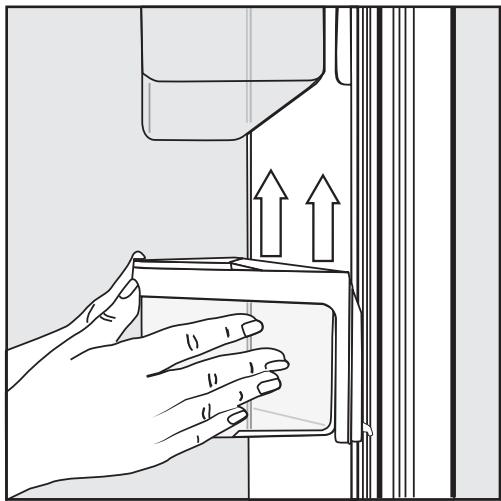
Tenez la clayette par le cadre avec les deux mains et soulevez-la légèrement afin de pouvoir la soulever avec les crochets des deux côtés par-dessus le guide. - Retirez la clayette ou placez-la à l'arrière dans la position requise, avec les crochets dans les guides à la même hauteur. Assurez-vous que la clayette est droite.
Conseil : Pour le chargement, le déchargement ou le nettoyage, les conteneurs encliquetables dans les clayettes peuvent être retirés complètement de leurs supports.
Déplacement des clayettes réglables
Si nécessaire, les clayettes réglables peuvent être retirées ou leur hauteur peut être ajustée :
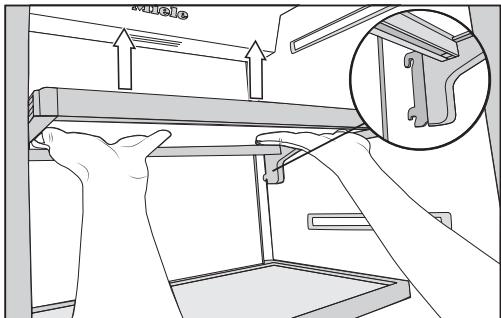
Tenez la clayette des deux côtés et soulevez-la légèrement afin de pouvoir la soulever avec les crochets par-dessus le guide à l'arrière. Tirez la clayette vers l'avant. - Retirez la clayette ou placez-la dans la position requise, avec les crochets engagés à l'arrière. Assurez-vous que la clayette est droite.
Retrait du tiroir suspendu
Le tiroir suspendu peut être déplacé vers la gauche ou la droite si nécessaire.
Pour nettoyer le tiroir suspendu, retirez-le comme suit :
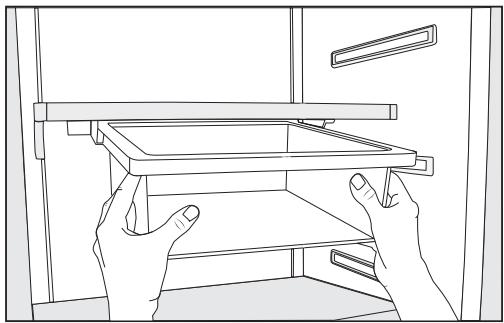
Tirez le tiroir suspendu tout droit pour le soulever par-dessus les butées de sortie. Pour réinsérer le tiroir suspendu, poussez-le tout droit dans le guide.
Retrait des compartiments de la zone réfrigérateur
Les compartiments de la zone réfrigérateur sont montés sur des glissières télescopiques et peuvent être retirés pour les remplir, les vider ou les nettoyer :
Tirez un peu le compartiment vers l'extérieur.
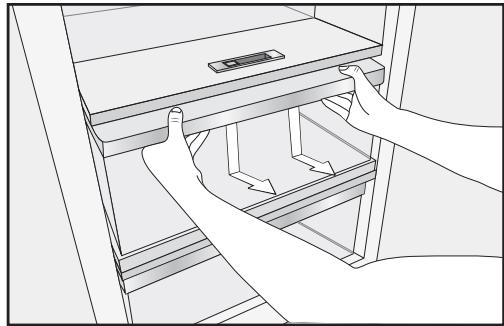
Avec les deux mains, saisissez le cadre du compartiment par le dessous et poussez le compartiment vers le bas afin que l'extrémité arrière se désengage et se soulève. Tirez le compartiment vers l'avant pour le retirer.
Repoussez les glissières pour éviter de les endommager !
Veillez à ne pas éliminer le lubrifiant spécial des glissières télescopiques lors du nettoyage.
Essuyez les glissières télescopiques avec un chiffon humide pour les nettoyer.
Pour réinsérer le compartiment, positionnez-le sur les glissières télescopiques jusqu'à ce qu'il s'enclenche.
Retrait des paniers du congélateur
Les paniers du congélateur peuvent également être retirés si nécessaire (par exemple pour le nettoyage).
- Ouvrez la porte inférieure de l'appareil aussi large que possible. Tirez le panier du congélateur jusqu'à la butée.
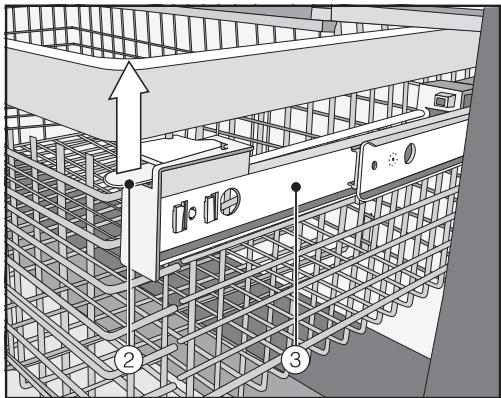
- Soulevez la fixation à encliquetage ② des deux côtés, déclipsez-la, puis soulevez délicatement le panier. Pour le remettre en place, tirez les glissières télescopiques ③ jusqu'à la butée. Replacez le panier du congélateur.
- Repoussez le panier complètement jusqu'à ce qu'il s'enclenche dans la fixation.
Retrait de la plaque de séparation (selon le modèle)
La plaque de séparation dans le panier du congélateur peut être retirée pour le nettoyage :
La cloison de séparation est fixée au panier du congélateur à l'aide de supports.
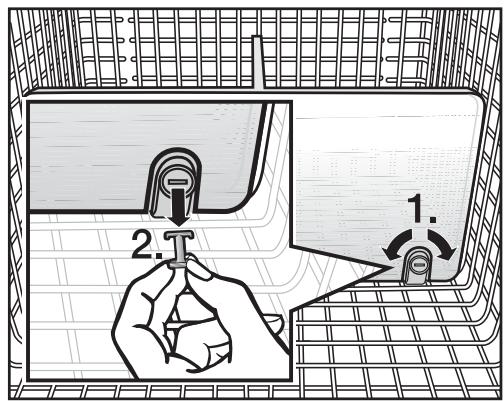
Tirez le panier du congélateur jusqu'à la butée. Pour libérer les supports, utilisez un objet adapté pour tourner les fentes des ergots en position horizontale (1.). Retirez les ergots des supports (2.). Tirez la cloison de séparation vers le haut pour la retirer. Pour réinsérer la cloison, placez les supports en position verticale, puis insérez la cloison dans les supports jusqu'à ce qu'elle s'enclenche. Insérez les ergots dans les supports et, à l'aide d'un objet adapté, tournez les fentes des ergots en position verticale. Repoussez le panier du congélateur complètement à l'intérieur.
Retrait du bac à glaçons
Le bac à glaçons peut être retiré pour le nettoyage :
- Ouvrez la porte inférieure de l'appareil aussi large que possible. Inclinez le bac à glaçons vers l'avant et tirez-le vers le haut et vers l'extérieur pour le retirer.
La production de glaçons ne s'arrête pas lorsque le bac à glaçons est retiré. Des glaçons peuvent tomber dans le panier du congélateur situé en dessous.
Ne retirez le bac à glaçons que pour la durée la plus courte possible ou éteignez au préalable la machine à glaçons (voir "Arrêt de la machine à glaçons" dans "Fabrication de glaçons").
Respectez toujours les consignes de sécurité alimentaire de l'USDA.
Risque d'incendie dû aux appareils électriques.
L'utilisation d'appareils électriques à l'intérieur de l'appareil peut provoquer des étincelles.
N'utilisez aucun appareil électrique à l'intérieur de l'appareil.
Risque d'explosion dû à des mélanges de gaz inflammables.
Les composants électriques peuvent enflammer des mélanges de gaz inflammables.
Ne stockez aucun matériel explosif ni produit contenant des propulseurs inflammables (par exemple, des bombes aérosols) dans l'appareil. Les bombes aérosols concernées peuvent être identifiées par le contenu imprimé sur la bombe ou par un symbole de flamme. Les composants électriques peuvent enflammer les gaz qui s'échappent.
Risque de dommages dû à des aliments gras ou huileux.
Si vous stockez des aliments contenant beaucoup de graisse ou d'huile dans l'appareil ou dans la porte, assurez-vous qu'ils n'entrent pas en contact avec des composants en plastique, car cela pourrait provoquer des fissures de contrainte ou casser le plastique.
Assurez-vous qu'aucune graisse ou huile ne fuit sur les pièces en plastique de l'appareil.
Différentes zones de stockage
En raison de la circulation naturelle de l'air, il existe différentes zones de température dans le compartiment réfrigérateur.
L'air froid et lourd descend vers la partie la plus basse du compartiment réfrigérateur. Utilisez les différentes zones lors du placement des aliments dans l'appareil.
Conseil : Pour permettre une circulation efficace de l'air, ne rangez pas les aliments trop serrés dans le réfrigérateur.
Si la circulation de l'air est insuffisante, les performances de refroidissement diminueront et la consommation d'énergie augmentera.
Ne couvrez pas le ventilateur situé sur la paroi arrière de l'appareil.
Conseil : Ne stockez pas les aliments de manière à ce qu'ils touchent la paroi arrière du compartiment réfrigérateur, car ils pourraient geler contre cette paroi.
Cet appareil est doté de DynamicCooling, qui aide à maintenir une température uniforme lorsque le ventilateur fonctionne. Lorsque DynamicCooling est activé, la différence entre les différentes zones est moins prononcée.
Zone la plus chaude
La zone la plus chaude du compartiment réfrigérateur se trouve dans la partie supérieure de la porte. Utilisez-la pour stocker du beurre afin qu'il reste tartinable et du fromage pour qu'il conserve sa saveur.
Zone la plus froide
La zone la plus froide du compartiment réfrigérateur se trouve à l'intérieur de l'appareil, à l'arrière. La température dans le compartiment sec de la zone SmartFresh est encore plus froide.
Utilisez cette zone du compartiment réfrigérateur et le compartiment sec de la zone SmartFresh pour tous les aliments délicats et très périssables, par exemple :
- Poisson, viande, volaille
- Charcuterie, plats cuisinés, plats ou pâtisseries contenant des œufs ou de la crème
- Pâte fraîche, préparations pour gâteaux, pâte à pizza ou pâte à tarte
- Fromages au lait cru et autres produits au lait cru
- Légumes préemballés et autres aliments frais dont la date de péremption exige une conservation à une température d'au moins 39 °F (4 °C).
Aliments qui ne conviennent pas à la conservation dans le compartiment réfrigérateur
Tous les aliments ne conviennent pas à la réfrigération à des températures inférieures à 41 °F (5 °C) car ils sont sensibles au froid. Selon le type d'aliment, l'apparence, la consistance, la saveur et/ou la teneur en vitamines peuvent être altérées s'ils sont stockés à une température trop basse.
Les aliments sensibles au froid comprennent :
- Ananas, avocats, bananes, grenades, mangues, melons, papayes, fruits de la passion, agrumes tels que citrons, oranges, mandarines, pamplemousses
- Fruits (pas encore mûrs)
- Aubergines, concombres, pommes de terre, poivrons, tomates, courgettes
- Fromages à pâte dure (par exemple, parmesan)
Conseils pour l'achat des aliments
La fraîcheur des aliments lors de leur première mise dans l'appareil est un facteur important pour déterminer combien de temps ils restent frais et combien de temps ils peuvent être conservés dans l'appareil.
Tenez compte de la date de péremption et de la température de conservation appropriée.
Le temps passé hors du réfrigérateur, par exemple lors du transport de nourriture dans une voiture chaude, doit être réduit au minimum.
Conseil : emportez un sac isotherme lors des courses et placez les aliments dans l'appareil dès que possible.
Bien ranger les aliments
Les aliments doivent généralement être conservés couverts ou emballés dans le compartiment réfrigérateur (certaines exceptions s'appliquent dans la zone PerfectFresh - voir ci-dessous). Cela évite que les odeurs des aliments n'affectent d'autres aliments, que les aliments ne se dessèchent et prévient toute contamination croisée par des bactéries. Ceci est particulièrement important pour la conservation des produits d'origine animale. La durée de conservation des aliments peut être considérablement augmentée en réglant la température correcte et en maintenant de bonnes conditions d'hygiène.
Zone SmartFresh
La zone SmartFresh offre des conditions de conservation idéales pour les fruits, les légumes, le poisson, la viande et les produits laitiers. Les aliments restent frais beaucoup plus longtemps tout en conservant leur saveur et leurs vitamines.
La zone SmartFresh comprend un compartiment à humidité contrôlée et un compartiment sec.
- Selon le réglage du régulateur d'humidité, le compartiment à humidité contrôlée est particulièrement adapté à la conservation des fruits et légumes.
- Le compartiment sec convient à la conservation des aliments périssables tels que le poisson, la viande et les produits laitiers.
Compartiment à humidité contrôlée avec régulateur d'humidité
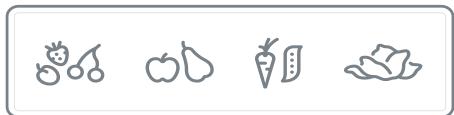
Le niveau d'humidité dans le compartiment à humidité contrôlée peut être réglé approximativement en fonction des aliments stockés. Les aliments conservent leur propre humidité s'ils sont stockés à une humidité plus élevée et ne se dessèchent donc pas aussi rapidement. Cela leur permet de rester croquants et frais plus longtemps.
L'humidité libérée par les aliments stockés est maintenue dans le tiroir du compartiment à humidité contrôlée. Plus l'humidité de l'air dans le compartiment à humidité contrôlée est proche de la teneur en humidité des aliments, plus les aliments restent croquants et frais sur une période plus longue, car la teneur en eau des aliments est largement préservée.
Le niveau d'humidité dépend fortement du type et de la quantité d'aliments stockés, s'ils sont stockés non emballés.
La température dans le compartiment à humidité contrôlée est approximativement équivalente à celle du compartiment réfrigérateur conventionnel.
N'oubliez pas que plus les aliments sont frais lorsqu'ils sont placés dans l'appareil, plus ils resteront frais longtemps !
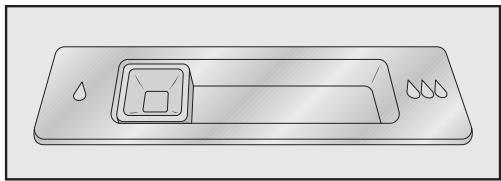
Réglage du curseur sur Δ = humidité légèrement augmentée
Nous recommandons ce réglage Δ si vous stockez de très grandes quantités de fruits et légumes dans le compartiment à humidité contrôlée. Le curseur ferme partiellement les évents du compartiment, ce qui retient une partie de l'humidité présente.
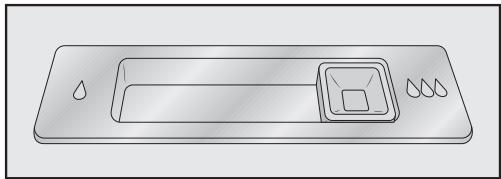
Réglage du curseur sur ΔΔΔ = humidité augmentée
Nous recommandons ce réglage ΔΔΔ si vous stockez des quantités petites à grandes de fruits et légumes dans le compartiment à humidité contrôlée. Le curseur ferme complètement les évents du compartiment, ce qui retient toute l'humidité présente.
Conseil : si le taux d'humidité est trop élevé et que beaucoup d'humidité s'est accumulée dans le compartiment, sélectionnez le réglage Δ.
Si la quantité d'aliments stockés dans ce compartiment est faible, le taux d'humidité peut être trop bas. Si vous ne stockez qu'une petite quantité d'aliments, enveloppez-les dans un emballage hermétique.
Le taux d'humidité dans le compartiment à humidité contrôlée est déterminé par le type et la quantité d'aliments stockés lorsqu'ils ne sont pas emballés.
Une humidité accrue dans le compartiment à humidité contrôlée peut, dans certaines circonstances, provoquer une accumulation de condensat.
Celui-ci doit être éliminé avec un chiffon.
Réglage du taux d'humidité dans le compartiment à humidité contrôlée
Le curseur sert à réguler la quantité d'humidité dans le compartiment à humidité contrôlée, avec des réglages de δ à δδδ.
- Faites glisser le curseur vers la gauche Δ ou vers la droite ΔΔΔ selon le réglage souhaité.
Compartiment sec à basse température
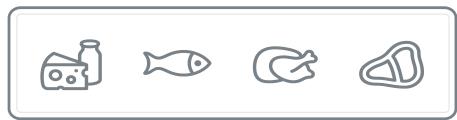
La température dans le compartiment sec est maintenue entre 30 et 37 °F (-1 à 3 °C). Bien que plus basse que la température d'un réfrigérateur standard, c'est la plage de température optimale pour conserver les aliments frais qui ne sont pas sensibles au froid. Le processus de détérioration est ralenti dans cette plage de température, de sorte que les aliments peuvent être conservés sans perte de fraîcheur pendant beaucoup plus longtemps que dans un réfrigérateur standard.
Le taux d'humidité est similaire à celui de la zone réfrigérée conventionnelle.
Le compartiment sec convient au stockage d'aliments périssables tels que :
- Poissons et fruits de mer frais
- Viandes et volailles
- Salades de charcuterie
- Produits laitiers tels que yaourts, fromages, crème, etc.
- Tout type d'aliment peut en fait être stocké dans ce compartiment, à condition qu'il soit emballé.
Veuillez noter que les aliments riches en protéines se détériorent plus rapidement que les autres.
Les fruits de mer, par exemple, se détériorent plus vite que le poisson, et le poisson plus vite que la viande.
Pour des raisons d'hygiène, conservez toujours ces aliments couverts ou emballés dans ce compartiment.
Sortez les aliments du compartiment sec environ 30 à 60 minutes avant de les utiliser. L'arôme et le goût ne se développent pleinement que lorsque l'aliment a atteint la température ambiante.
| Max. load of the humidity-controlled compartment | Max. load of the dry compartment | |
| KF 28x1 Vi /SF | 23 lb (10.5 kg) | 31 lb (14 kg) |
| KF 29x1 Vi /SF | 30 lb (13.5 kg) | 40 lb (18 kg) |
Les conseils suivants peuvent vous aider si vous constatez que les aliments stockés ne se conservent pas bien (par exemple, les aliments se flétrissent ou se dessèchent après une courte période de stockage) :
- Ne placez que des aliments frais dans l'appareil, car l'état initial de l'aliment est crucial pour maintenir la fraîcheur. Nettoyez la zone SmartFresh avant d'y stocker des aliments.
- Les aliments très humides doivent être séchés avant d'être stockés dans le compartiment à humidité contrôlée.
- Ne stockez pas d'aliments sensibles au froid dans le compartiment sec (voir "Aliments non adaptés au stockage dans la zone réfrigérée").
- Attribuez les réglages appropriés aux aliments que vous souhaitez stocker (par exemple, stockage humide ou sec). Stockez les aliments en vrac dans le compartiment à humidité contrôlée.
Un niveau d'humidité élevé dans le compartiment à humidité contrôlée est obtenu grâce à l'humidité présente dans les aliments stockés.
Si le niveau d'humidité n'est pas assez élevé (par exemple, s'il y a trop peu d'aliments stockés), il peut être augmenté en plaçant une éponge humide dans le tiroir.
Si vous pensez que la température dans le compartiment sec est trop élevée ou trop basse, ajustez la température dans la zone réfrigérateur (voir "Réglage de la température" dans "La température correcte"). Si des cristaux de glace commencent à se former sur le fond du compartiment sec, augmentez la température, sinon le froid endommagera les aliments. Si trop d'eau s'accumule au fond du compartiment à humidité contrôlée, séchez-le avec un chiffon. Si nécessaire, séchez les aliments avant de les placer dans l'appareil ou placez une grille au fond du compartiment à humidité contrôlée pour permettre à l'eau de s'écouler.
Respectez toujours les directives de sécurité alimentaire de l'USDA.
Risque d'incendie dû aux appareils électriques.
L'utilisation d'appareils électriques dans l'appareil peut provoquer des étincelles.
N'utilisez aucun appareil électrique à l'intérieur de l'appareil.
Capacité de congélation maximale
Pour garantir que les aliments frais placés dans le congélateur soient congelés à cœur le plus rapidement possible, la capacité de congélation maximale ne doit pas être dépassée. La capacité de congélation maximale pour la congélation sur une période de 24 heures est indiquée sur la plaque signalétique : "Capacité de congélation ....Ibs/24 hrs."
Que se passe-t-il lorsque vous congelez des aliments frais ?
Les aliments frais doivent être congelés le plus rapidement possible afin de préserver leur valeur nutritionnelle, leur teneur en vitamines, leur apparence et leur saveur.
Les aliments qui mettent longtemps à congeler perdent plus d'eau de leurs cellules, qui rétrécissent alors. Pendant le processus de décongélation, seule une partie de cette eau est réabsorbée par les cellules. En pratique, cela signifie que les aliments perdent plus d'humidité. Vous pouvez le constater par la grande quantité d'eau qui s'accumule autour des aliments lors de la décongélation.
Si les aliments sont congelés rapidement, les cellules ont moins de temps pour perdre de l'humidité, donc elles rétrécissent moins. Comme la perte d'humidité est moindre, il est plus facile pour les aliments de la réabsorber pendant le processus de décongélation, et très peu d'eau s'accumule autour des aliments décongelés.
Conservation des aliments congelés
Ne recongelez jamais des aliments partiellement ou entièrement décongelés. Les aliments décongelés ne peuvent être recongelés qu'après avoir été cuits.
Lors de l'achat d'aliments surgelés à stocker dans votre congélateur, assurez-vous de vérifier :
- que l'emballage n'est pas endommagé,
- la date de péremption et
- la température à laquelle les aliments surgelés sont stockés dans le magasin.
La durée de conservation des aliments est réduite s'ils ont été stockés à une température supérieure à 0 °F (-18 °C).
Achetez les aliments surgelés à la toute fin de vos achats. Stockez-les dans le compartiment congélateur dès que possible.
Congélation à la maison
Ne congelez que des aliments frais et en bon état.
Conseils pour la congélation à la maison
- Les types d'aliments suivants conviennent à la congélation à la maison : viande fraîche, volaille, gibier, poisson, légumes, herbes, fruits frais, produits laitiers, produits de boulangerie, restes, jaunes d'œufs, blancs d'œufs et une gamme de plats précuits.
- Les types d'aliments suivants ne conviennent pas à la congélation : laitue, radis, crème sure, mayonnaise, œufs entiers dans leur coquille, oignons, pommes et poires crues entières.
- Pour conserver la couleur, le goût, l'arôme et la vitamine C, les légumes doivent être blanchis avant d'être congelés. Pour ce faire, plongez-les par portions dans de l'eau bouillante pendant 2 à 3 minutes. Ensuite, retirez-les et plongez-les dans de l'eau glacée pour les refroidir rapidement. Laissez les légumes s'égoutter.
- La viande maigre se congèle mieux que la viande grasse et peut être conservée beaucoup plus longtemps.
- Séparez les côtelettes, steaks, escalopes, etc. avec une feuille de film plastique de congélation pour éviter qu'ils ne se collent en un bloc.
- Ne salez pas et n'ajoutez pas d'herbes aux aliments crus ou aux légumes blanchis avant la congélation. Les aliments cuits ne doivent être que légèrement assaisonnés. La saveur de certaines herbes s'intensifie lorsqu'elles sont congelées.
- Placer des aliments ou des boissons chauds dans le congélateur provoque un dégel partiel des aliments déjà congelés et augmente la consommation d'énergie. Laissez refroidir les aliments et boissons chauds avant de les placer dans le congélateur.
Conditionnement des aliments pour la congélation
Congelez les aliments en portions.
- Emballages adaptés
- Emballages inadaptés
- Films plastiques
- Sacs de congélation, papier aluminium
- Contenants de congélation
- Papier d'emballage
- Papier sulfurisé
- Cellophane
- Sacs poubelle
- Sacs en plastique de magasin
- Retirez autant d'air que possible de l'emballage avant de le sceller. Fermez hermétiquement l'emballage avec
- des élastiques,
- des pinces à sac, de la ficelle ou des attaches de sac, ou
- du ruban adhésif pour congélateur.
Astuce : Les sacs de congélation et les tubes en polyéthylène peuvent également être scellés à l'aide de kits de scellage à chaud domestiques.
Étiquetez l'emballage avec le contenu et la date de congélation.
Avant de placer les aliments dans le congélateur
- Lorsque vous congelez plus de 4,4 lb (2 kg) d'aliments frais, activez la fonction SuperFrost quelque temps avant de placer les aliments dans le congélateur (voir "SuperFrost").
Cela aide les aliments déjà stockés dans le congélateur à rester congelés.
Placer les aliments dans la zone de congélation
Les aliments à congeler peuvent être placés n'importe où dans la zone de congélation.
Placez de grandes quantités d'aliments dans le grand panier de congélation.
- Placez les aliments à plat au fond du panier afin qu'ils congèlent jusqu'au cœur le plus rapidement possible.
- Lorsque vous placez des articles dans la zone de congélation, assurez-vous que les emballages et les contenants sont secs pour éviter qu'ils ne gèlent ensemble ou contre les parois. Veuillez suivre les directives du tableau ci-dessous concernant les poids recommandés pour les paniers :
| Upper freezer basket | Lower freezer basket | |
| KF 28x1 Vi/SF | 26 lb (12 kg) | 61 lb (28 kg) |
| KF 29x1 Vi/SF | 40 lb (18 kg) | 79 lb (36 kg) |
Les aliments non congelés ne doivent pas toucher les aliments congelés, car cela ferait commencer à décongeler les aliments congelés.
Durée de conservation des aliments surgelés
La durée de conservation des aliments est très variable, même à une température constante de 0 °F (-18 °C). Des processus de décomposition se produisent également dans les aliments surgelés, bien qu'à une vitesse très réduite. Les graisses peuvent rancir au contact de l'oxygène de l'air, par exemple. C'est pourquoi la viande maigre peut être conservée environ deux fois plus longtemps que la viande grasse.
Les durées de conservation indiquées sont des valeurs indicatives pour la durée de conservation des différents groupes d'aliments dans la zone de congélation.
| Food group | Storage time (Months) |
| Ice cream | 2 to 6 |
| Bread, baked goods | 2 to 6 |
| Cheese | 2 to 4 |
| Fish, oily | 1 to 2 |
| Fish, lean | 1 to 5 |
| Sausage, ham | 1 to 3 |
| Game, pork | 1 to 12 |
| Poultry, beef | 2 to 10 |
| Vegetables, fruit | 6 to 18 |
| Herbs | 6 to 10 |
Si la durée de conservation indiquée sur l'emballage diffère, suivez les conseils de l'emballage.
Décongélation des produits surgelés
Ne recongelez jamais des aliments partiellement ou entièrement décongelés. Les aliments décongelés ne peuvent être recongelés qu'après avoir été cuits.
Les aliments surgelés peuvent être décongelés de différentes manières :
- Au micro-ondes
- Dans un four utilisant le mode "Convection" ou le réglage "Décongélation"
- À température ambiante
- Dans la zone réfrigérée (le froid dégagé par les aliments surgelés aide à maintenir les autres aliments au froid)
- Dans un four à vapeur
Les morceaux plats de viande ou de poisson partiellement décongelés peuvent être placés directement dans une poêle chaude.
La viande et la volaille (par exemple, hamburgers, poulet, poisson) ne doivent pas entrer en contact avec d'autres aliments pendant la décongélation. Récupérez le liquide de décongélation et éliminez-le soigneusement.
Les fruits peuvent être décongelés à température ambiante, dans leur emballage ou dans un bol couvert.
La plupart des légumes peuvent être cuits encore congelés. Il suffit de les plonger directement dans de l'eau bouillante ou de la graisse chaude. Le temps de cuisson est légèrement inférieur à celui des légumes frais en raison des modifications de la structure cellulaire.
Refroidir rapidement les boissons
Lorsque vous refroidissez des boissons au congélateur, assurez-vous que les bouteilles n'y restent pas plus d'une heure. Sinon, elles pourraient éclater.
Pour que la machine à glaçons automatique fonctionne, elle doit être raccordée à une arrivée d'eau (voir « Raccordement à l'eau »).

ATTENTION
Les trois premières fournées de glaçons produits après la mise en marche de la machine à glaçons ne doivent pas être consommées, car l'eau aura servi au premier rinçage de la conduite d'arrivée d'eau.
Cela s'applique à la mise en service initiale ainsi qu'à une nouvelle utilisation de l'appareil après une longue période d'arrêt.
Activation de la machine à glaçons
Assurez-vous que le bac à glaçons est correctement positionné sous la machine à glaçons. En mode réglage, utilisez les boutons fléchés < et > pour sélectionner Ice Maker, puis appuyez sur OK pour confirmer votre sélection. Utilisez les boutons fléchés < et pour sélectionner On, puis touchez OK pour confirmer votre sélection.
Une fois que la zone de congélation a refroidi à la température réglée, la machine à glaçons se remplit d'eau.
Dès que l'eau est gelée, les glaçons tombent de la machine à glaçons dans le bac à glaçons.
La production de glaçons s'arrête automatiquement dès que le bac à glaçons est plein.
La machine à glaçons peut produire jusqu'à 2,9 lb (1,3 kg) de glaçons en 24 heures.
La quantité de glaçons produite par l'appareil dépend de la température dans le congélateur. Plus la température est basse, plus la production de glaçons est importante.
Après la première mise en place de l'appareil, il peut s'écouler jusqu'à 10 heures avant que les premiers glaçons ne tombent de la machine à glaçons et ne se rassemblent dans le bac.
Ne placez aucun biberon ni aliment dans la machine à glaçons pour les refroidir rapidement. La machine à glaçons pourrait se bloquer et, par conséquent, être endommagée.
Videz le bac à glaçons à intervalles réguliers, ou au moins si vous n'avez pas produit de glace depuis plus d'une semaine. Cela garantira que vous ayez toujours des glaçons frais et que les glaçons ne forment pas un bloc.
La production de glaçons ne s'arrête pas lorsque le bac à glaçons a été retiré. Les glaçons peuvent tomber dans le panier du congélateur en dessous.
Ne retirez le bac à glaçons que le moins longtemps possible ou éteignez la machine à glaçons avant de le retirer.
Arrêt de la machine à glaçons
La machine à glaçons peut être éteinte indépendamment de la zone de congélation si vous ne souhaitez pas produire de glaçons.
- Fermez le robinet d'arrêt de la conduite d'eau (environ 3 heures avant d'éteindre l'appareil pour éviter l'accumulation de bactéries due à l'eau stagnante). En mode réglage, utilisez les boutons fléchés < et > pour sélectionner Machine à glaçons, puis confirmez avec OK. Utilisez les boutons fléchés < et > pour sélectionner Arrêt, puis confirmez avec OK.
AVERTISSEMENT ! RISQUE DE BLESSURE ET DE DOMMAGE !
N'utilisez aucun moyen mécanique ou autre non recommandé par le fabricant pour accélérer le processus de dégivrage.
Compartiment réfrigérateur et tiroir SmartFresh
Le compartiment réfrigérateur et le tiroir SmartFresh dégivrent automatiquement.
De la condensation et du givre peuvent se former sur la paroi arrière du compartiment réfrigérateur et du tiroir SmartFresh en cours d'utilisation. Il n'est pas nécessaire de les enlever, car ils dégivrent et s'évaporent automatiquement grâce à la chaleur générée par l'appareil.
Zone de congélation
L'appareil est équipé d'un système "NoFrost". Le congélateur dégivre automatiquement.
L'humidité générée dans l'appareil se condense sur le condenseur et est automatiquement dégivrée et évaporée périodiquement.
Ce système de dégivrage automatique permet au congélateur de rester en permanence sans givre. Cependant, les aliments stockés dans le congélateur ne seront pas décongelés.
AVERTISSEMENT ! DANGER de choc électrique !
Débranchez l'appareil ou coupez le disjoncteur.
AVERTISSEMENT ! Risque d'incendie ! N'endommagez pas la tuyauterie du circuit de refroidissement.
Ne laissez pas l'eau pénétrer dans l'unité électronique ou l'éclairage.
N'utilisez pas de nettoyeur vapeur. La vapeur d'un appareil de nettoyage à vapeur pourrait atteindre les composants électriques et provoquer un court-circuit.
La plaque signalétique située à l'intérieur de l'appareil ne doit pas être retirée. Elle contient des informations nécessaires en cas d'intervention du service après-vente.
Agents de nettoyage
Pour éviter d'endommager les surfaces de votre appareil, n'utilisez pas
- de produits de nettoyage contenant de la soude, de l'ammoniaque, de l'acide ou du chlore, ni de détartrants, ni de produits anticalcaires,
- de produits de nettoyage abrasifs, tels que poudres à récurer, liquides à récurer ou pierres ponces,
- de nettoyants contenant des solvants,
- de nettoyants pour acier inoxydable, ni de détergent pour lave-vaisselle,
- de sprays pour four, de produits de nettoyage pour vitres,
- d'éponges et de brosses dures et abrasives, telles que les tampons à récurer,
- éponges à récurer, grattoirs métalliques pointus.
Les produits de nettoyage et d'entretien utilisés à l'intérieur de l'appareil doivent être adaptés au contact alimentaire.
Utilisez de l'eau tiède et du liquide vaisselle.
Les pages suivantes contiennent des informations importantes sur le nettoyage.
Avant de nettoyer l'appareil
Éteignez complètement l'appareil en appuyant sur l'interrupteur marche/arrêt. Débranchez l'appareil ou coupez le fusible. Sortez tous les aliments de l'appareil et conservez-les dans un endroit frais. Retirez toutes les autres pièces amovibles pour le nettoyage (voir « Réglage des aménagements intérieurs »).
Intérieur et accessoires
Nettoyez l'appareil régulièrement, ou au moins une fois par mois.
Nettoyez immédiatement tout déversement, tache ou résidu alimentaire. Ne les laissez pas sécher et coller à l'appareil.
Nettoyez l'appareil avec une solution d'eau tiède et de liquide vaisselle. Rincez toutes les pièces à la main. Ne les lavez pas au lave-vaisselle. Après le nettoyage, essuyez avec de l'eau propre et séchez avec un chiffon doux. - Laissez la porte ouverte pour aérer suffisamment l'appareil pendant un court moment et éviter l'accumulation d'odeurs.
Cadres en aluminium
Les cadres des clayettes à l'intérieur de l'appareil et des balconnets de porte sont partiellement en aluminium.
L'aluminium est un matériau dynamique. La réflexion et l'apparence de l'aluminium changent selon les lumières, les environnements et l'angle d'observation. Il est également sensible aux rayures.
Les cadres en aluminium peuvent se décolorer ou s'endommager si la saleté reste trop longtemps. Éliminez toute saleté immédiatement.
Nettoyage du joint de porte
N'utilisez pas de graisse ni d'huile sur le joint de porte, car cela pourrait détériorer le joint et le rendre poreux avec le temps.
Le joint de porte doit être nettoyé régulièrement à l'eau claire, puis essuyé soigneusement avec un chiffon doux.
Nettoyage des grilles d'aération
Une accumulation de poussière augmentera la consommation d'énergie de l'appareil.
Les grilles d'aération doivent être nettoyées régulièrement avec une brosse ou un aspirateur (vous pouvez par exemple utiliser la brosse de l'aspirateur Miele).
Après le nettoyage
- Replacez toutes les clayettes et accessoires dans la zone réfrigérée.
- Rebranchez l'appareil et remettez-le en marche. Placez les aliments dans la zone réfrigérée et fermez la porte.
- Activez la fonction SuperFrost pendant un certain temps afin que la zone de congélation refroidisse rapidement. Une fois que la zone de congélation a atteint la température requise, replacez les paniers de congélation contenant les aliments à congeler dans la zone de congélation.
- Désactivez la fonction SuperFrost dès que la température dans la zone de congélation est constante à 0 °F (-18 °C) ou plus froide.
Le guide suivant vous permettra de remédier vous-même aux petits dysfonctionnements de l'appareil, dont certains peuvent résulter d'une mauvaise utilisation, sans avoir à contacter le service après-vente.
Ce guide peut vous aider à trouver la cause du problème et la manière de le corriger.
Pour éviter que le froid ne s'échappe, ouvrez les portes de l'appareil le moins possible jusqu'à ce que le problème soit résolu.
| Problem | Possible cause and solution |
| If you are concerned that your appliance is not working properly, you can perform a Self Test. Your appliance will be checked for any faults or malfunctions. | Any errors identified during the Self Test are shown on the display. ■ Perform a Self Test (see “Additional settings”, section “Performing a Self Test☑”). ■ Contact Technical Service and inform them of the error message(s) on the display. |
| The appliance is not getting cold and the interior lighting does not come on when the appliance door is opened. | The appliance has not been turned on. ■ Turn the appliance on. The temperature appears in the display. The plug is not properly plugged into the electrical outlet. ■ Insert the plug into the outlet. The fuse has tripped. There could be a fault with the appliance, the household electrical wiring, or another appliance. ■ Contact a technician or the Technical Service department. |
| The compressor is switching on more frequently and for longer periods of time, so the temperature in the appliance is dropping. | The ventilation slits in the cabinetry have been covered or become too dusty. ■ Do not block the ventilation slits. ■ Clean the ventilation slits on a regular basis. |
| The doors have been opened too frequently, or a large amount of fresh food has been put in at once for storage or freezing. ■ Only open the doors when necessary and for as short a time as possible. After a while the temperature will return to normal by itself. | |
| The doors are not properly closed. A thick layer of ice may have formed in the freezer. ■ Close the appliance doors. After a while the temperature will return to normal by itself. If a thick layer of ice has formed, it will decrease the cooling capacity and increase the energy consumption. ■ Defrost the appliance and clean it. | |
| The room is too warm. The higher the room temperature, the longer the compressor has to run. ■ See “Installation location”. | |
| The appliance was not properly installed in the niche. ■ See “Installation - Building in the appliance”. | |
| The compressor is switching on more frequently and for longer periods of time, so the temperature in the appliance is dropping. | The temperature setting is too low. ■ Correct the temperature setting. |
| A large amount of food is being frozen at once. ■ See “Freezing and storing food”. | |
| The SuperCool function is still switched on. ■ To save energy, you can turn SuperCool off yourself. | |
| The SuperFreeze function is still switched on. ■ You can turn off the Automatic SuperCool function earlier to save energy. | |
| The compressor comes on less and less often and for shorter periods of time. The temperature in the appliance rises. | This is not a fault. The temperature setting is too high. ■ Correct the temperature setting. ■ Check the temperature again after 24 hours. |
| The food begins to thaw. The room temperature is too low for this appliance. If the room temperature is too low, the compressor will run less frequently. This may cause the freezer to become too warm. ■ See the “Installation location” section in the “Installation information”. ■ Increase the room temperature. | |
| The compressor runs continuously. | Not a fault. To save energy, the compressor runs at a lower speed when less cooling is required. This increases the compressor run time. |
| Food has frozen to-gether or to the wall. | The food packaging was not dry when loaded in the freezer. ■ Use a blunt instrument (such as a spoon handle) to carefully pry them apart. |
| An alarm sounds. | The appliance doors have been open for longer than approx. 2 minutes. ■ Close the appliance doors. |
| No alarm sounds despite the appliance door being open. | You have switched off the audible signal. ■ Switch the audible signal back on using Settings mode Ⓒ. |
| The appliance door cannot be opened. | The Pull2Open Door Assistant is switched on but the appliance has a handle-free cabinet front. ■ For handle-free cabinet fronts, switch on the Push2Open Door Assistant (see “Switching on the Door Assistant” in “Selecting additional settings”). |
| The appliance door cannot be opened. | The Pull2Open Door Assistant is switched on but the appliance has a handle-free cabinet front. ■ For handle-free cabinet fronts, switch on the Push2Open Door Assistant (see “Switching on the Door Assistant” in “Selecting additional settings”). |
Questions fréquemment posées
| Problem | Possible cause and solution |
| The appliance door cannot be opened when Sabbath Mode is switched on. | The Push2Open Door Assistant is switched on at the same time as Sabbath Mode. ■ When Sabbath Mode is switched on, the Door Assistant is deactivated. ■ Pull the appliance door open from below or from the side. |
| The left Fridge Zone door will not open. | The Push2Open Door Assistant is switched on but only the right Fridge Zone door can be controlled with the Door Assistant. ■ Not a fault. If the Push2Open function is activated in the case of a handle-free cabinet front, the right Fridge Zone door must be opened first before the left Fridge Zone door can be opened. |
| The storage life of the food stored in the dry compartment of the SmartFresh zone is reduced. | The temperature in the dry compartment of the SmartFresh zone is possibly too high. The temperature in the dry compartment is controlled by the set temperature in the Fridge Zone. ■ Lower the temperature in the Fridge Zone (see “Setting the temperature” in “The correct temperature”). |
| There is condensation on the door pillar between the Fridge Zone doors or on the door seals. | The combination of high air humidity and low ambient temperature can result in condensation forming on the door pillar between the Fridge Zone doors or on the door seals. ■ Ensure lower humidity or a higher temperature in the room. ■ Switch the Condensation Protection on (see “Switching Condensation Protection on or off” in “Selecting additional settings”). |
| The left Fridge Zone door and the door pill feel warm. | Not a fault. The left-hand appliance door features integrated heating. Switching the heating on prevents condensation on the door pillar and on the door seals. ■ If required, you can switch off the heating (see “Switching Condensation Protection on and off” in “Selecting additional settings”). |
Messages affichés à l'écran
| Message | Possible cause and solution |
| The warning sounds and the message Freezer temperature too high. Max. temperature °F appears in the display. | The temperature in the appliance has risen significantly. This could be due to, for example: - the appliance door being opened too often, or being left open, - a large amount of food being frozen at once, - an extended power failure ■ If you find the alarm disruptive, you can switch it off in advance by touching the sensor control OK. The alarm will stop. ■ Rectify the cause of the alarm. The alarm stops and the error message disappears from the display. The temperature display will show the highest temperature that was reached during the time the temperature in the Freezer Zone rose. ■ Depending on the temperature displayed, you should check whether food in the freezer has started to thaw or has defrosted. If it has, cook it before freezing it again. ■ In the event of a power failure, check whether there are any ice cubes in the ice cube tray and dispose of these. Otherwise, the ice cubes will freeze together and can damage the ice cube container when they expand. |
| The warning sounds and the message Close the door appears in the display. | The appliance door is open. ■ Close the appliance door. ■ If you wish to turn the alarm off early, touch the sensor control OK in the display. The alarm will stop. |
| The temperature display is dark and is shown in the display. | Sabbath Mode is turned on: The interior lighting is turned off and the appliance is cooling down. ■ You can switch off Sabbath Mode at any time (see “Selecting additional settings”, section “Switching Sabbath Mode on and off”). |
Foire aux questions
| Message | Possible cause and solution |
| “F Please contact Miele Technical Service.” appears in the display and an alarm sounds. | There is a fault. ■ Make a note of the fault message if necessary. ■ Contact Technical Service. ■ To turn the alarm off, touch the ⋅ symbol. The error message does not disappear from the display until the error has been rectified. |
| The voltage level is too high/low. ■ Observe the connection data under “Electrical connections”. ■ Contact Technical Service if necessary. ■ To turn the alarm off, touch the ⋅ symbol. The error message does not disappear from the display until the error has been rectified. | |
| ■ is shown in the display. The machine does not get cold, but the machine controls are working. | Demo Mode■ is switched on. Demo mode allows the appliance to be presented in the showroom without the cooling system being turned on. Do not activate this setting for domestic use. ■ Switch off Demo mode■ (see “Selecting additional settings”, section “Switching off Demo Mode■”). |
Problèmes avec la machine à glaçons
| Problem | Possible cause and solution |
| The Ice Maker is not producing any ice cubes. | The appliance and/or the Ice Maker is not turned on. ■ Turn on the appliance and/or the Ice Maker. ■ Check whether the water filter has been inserted correctly (see “Water filter”, section “Changing the water filter”). |
| The plumbed water connection was not installed. ■ Make sure that the plumbed water connection was installed correctly. | |
| The water intake is not open or has not been vented. ■ Open the water intake. ■ Check that the water supply has been vented. | |
| There is a kink in the water hose. ■ Check the water hose and replace it, if necessary. | |
| The temperature in the Freezer Zone is too high. ■ Select a lower temperature. | |
| The appliance door has been opened too frequently, causing the compressor to turn on more often and the Ice Maker has iced up. ■ Only open the door when necessary and for as short a time as possible. | |
| The water pressure is too low. ■ Check that the water pressure is between 29 and 116 psi (2 and 8 bar). ■ Check if an incorrect valve has been installed, making the pressure too low. Remember that it can take up to 10 hours for the production of ice cubes to commence. |
Foire aux questions
| Problem | Possible cause and solution |
| The Ice Maker is pro-ducing only small ice cubes. | Several household appliances connected to the plumbed water connection are in operation, which has reduced the amount of water being taken in. ■ Avoid using the dishwasher, washing machine, etc. at the same time. |
| The water filter is clogged. ■ Check whether the water filter needs to be changed (see “Water filter”). | |
| The water pressure is too low. ■ Check that the water pressure is between 29 and 116 psi (2 and 8 bar). ■ Check if an incorrect valve has been installed. | |
| The ice maker is pro-ducing only a few or de-formed ice cubes. | The water filter is clogged. ■ Check whether the water filter needs to be changed (see “Water filter”). |
| The water pressure is too low. ■ The water pressure must be between 29 and 116 psi (2 and 8 bar). | |
| The temperature in the freezer is too high. ■ Select a lower temperature. | |
| The ice cubes have an unpleasant odor or flavor. | The ice cube container is in constant use and needs to be cleaned regularly. ■ Check if the ice cube container is dirty and clean it if necessary. |
| The ice maker is seldom used. If you do not use it very often, ice cubes that are stored for a long period can absorb the taste and smell of other items. ■ Empty the ice cube container if you are not going to use it for a long time. | |
| There are unsealed packages in the freezer. Ice can absorb the taste and smell of unsealed food. ■ Store only sealed food in the freezer. | |
| The water filter is dirty. ■ Check whether the water filter needs to be changed (see “Water filter”). | |
| Water is flowing out of the appliance. | The water intake is faulty. ■ Close the water shut-off valve immediately! ■ Check the water line for damage. ■ Contact Miele Technical Service. ■ Check whether the water pressure is too high |
| Too high water pressure can cause leakages. ■ Check that the water pressure is between 29 and 116 psi (2 and 8 bar). ■ Check if an incorrect valve has been installed. |
L'éclairage intérieur ne fonctionne pas.
| Problem | Possible cause and solution |
| The interior lighting is not working. | The appliance has not been turned on. ■ Turn the appliance on. |
| Sabbath Mode is switched on: The temperature display is dark and ↑↑ is shown in the display. ■ You can switch off Sabbath Mode at any time via Settings mode Ⓞ. | |
| There is a fault. | |
| Risk of electric shock! There are live electrical components under the lighting cover. The LED lighting may only be repaired or replaced by Technical Service. | |
| Risk of injury from LED lighting! The light intensity corresponds to laser beam class 1/1M. The lighting covers must not be removed or damaged, or be removed due to damage. This could cause injury to your eyes. Do not look into the LED lighting (laser beam class 1/1M) with optical instruments (e.g., a magnifying glass). | |
| ■ Contact Technical Service. | |
| Normal noises | Cause |
| Brrrrr... | A humming noise is made by the motor (compressor). This noise can get louder for brief periods when the motor switches on. |
| Blub, blub... | A gurgling noise can be heard when the coolant circulates through the pipes. |
| Click... | Clicking sounds occur whenever the thermostat switches the motor on or off. |
| Sssrrrrr... | You can sometimes just hear the sound of the fan inside the appliance. |
| Crack... | A cracking sound can be heard when materials expand inside the appliance. |
| Please bear in mind that a certain amount of noise is unavoidable (from the compressor and the coolant circulating through the system). | |
| Noises | Cause and solution |
| Rattling, clinking | The appliance is uneven. Realign the appliance using a level, by raising or lowering the adjustable feet underneath the appliance or placing something underneath it. |
| The appliance is touching another machine or piece of furniture. Move it away. | |
| Drawers, baskets or shelves are jiggling or are stuck. Check all removable parts and refit them correctly if required. | |
| Bottles or containers are touching each other. Separate them a little. |
L'appareil est équipé d'un filtre à eau (filtre à charbon OdorFree) qui filtre l'eau d'alimentation pour la fabrication des glaçons.
Le filtre à charbon OdorFree améliore le goût et l'odeur des glaçons en éliminant le chlore et d'autres substances de l'eau d'alimentation.
Pour garantir une qualité optimale des glaçons, il est essentiel de remplacer régulièrement le filtre à eau.
Veuillez noter :
- Après l'insertion d'un nouveau filtre à eau, jetez tous les glaçons produits dans les 24 heures suivant le changement.
- Si vous n'avez pas beaucoup utilisé l'appareil ou la machine à glaçons au cours des dernières semaines, ou si les glaçons ont une odeur désagréable, installez un nouveau filtre à eau.
- Si un filtre à eau externe est installé sur votre alimentation en eau domestique, utilisez un filtre de dérivation (Bypass) à la place d'un filtre à charbon OdorFree.
Dans ce cas, vous pouvez désactiver l'affichage du filtre à eau (voir "Sélection de réglages supplémentaires", section "Désactivation de l'affichage du filtre à eau").
Les nouveaux filtres à eau (filtres de dérivation et filtres à charbon OdorFree) sont disponibles auprès du service technique Miele, chez votre revendeur ou sur Internet.
Le rappel de remplacement du filtre à eau est émis environ tous les 6 mois, selon la quantité de glaçons produits.
Un rappel de remplacement du filtre à eau apparaît à l'écran : Remplacez le filtre à eau.
Un signal sonore retentit également.
Confirmez le message avec OK. Changez le filtre à eau.
La première fois que le filtre à eau doit être changé, l'écran vous le rappellera automatiquement ; le rappel n'a pas besoin d'être activé séparément.
Le rappel de changement du filtre à eau continue de s'afficher jusqu'à ce que vous changiez le filtre et réinitialisiez l'affichage du filtre à eau (voir « Activation, désactivation ou réinitialisation de l'affichage du filtre à eau » dans « Sélection de réglages supplémentaires »).
Changement du filtre à eau
L'air dans le système peut provoquer des jaillissements d'eau et le filtre peut sauter lors de son retrait. Soyez très prudent lors du changement du filtre à eau.
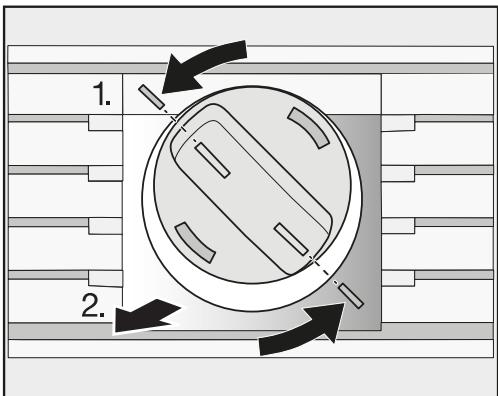
Tournez le capuchon du filtre à eau dans le sens inverse des aiguilles d'une montre jusqu'au repère 1.). Retirez le filtre à eau usagé de l'ouverture du filtre 2.). Retirez le capuchon de sécurité du nouveau filtre à eau.
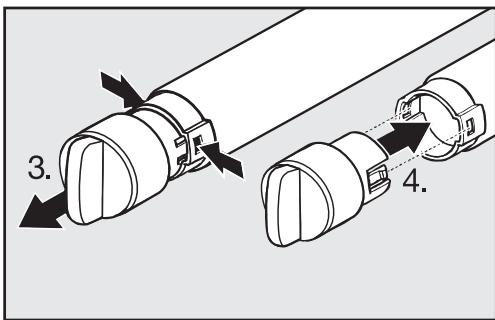
Retirez le capuchon de l'ancien filtre à eau 3.) et placez-le sur le nouveau filtre à eau 4.). Videz l'eau de l'ancien filtre à eau.
Conseil : L'ancien filtre à eau peut être éliminé avec les ordures ménagères.
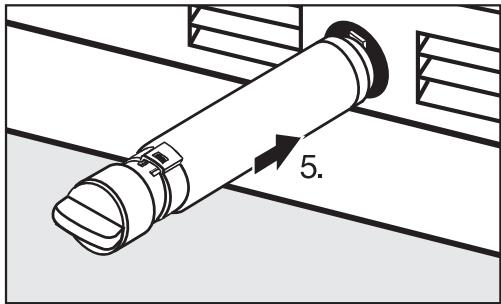
- Insérez le nouveau filtre à eau aussi loin que possible dans l'ouverture du filtre 5.), en veillant à ce que le capuchon soit horizontal.
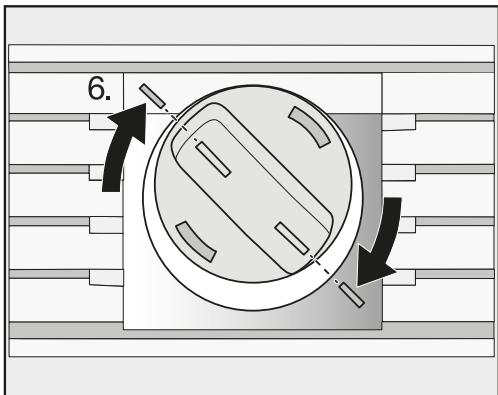
Tournez le capuchon du filtre à eau dans le sens des aiguilles d'une montre jusqu'au repère 6.).
Risque de dommages causés par des jaillissements d'eau.
Si le filtre à eau n'est pas correctement installé, il y a un risque de fuite d'eau de l'appareil.
Lors de l'installation du filtre à eau, assurez-vous de le tourner jusqu'au repère.
Une fois le filtre à eau changé, l'affichage du filtre à eau reste allumé.
Réinitialisez maintenant l'affichage du filtre à eau à l'aide du mode Réglages de l'écran (voir « Sélection de réglages supplémentaires », section « Réinitialisation de l'affichage du filtre à eau »).
Lorsqu'il sera temps de changer à nouveau le filtre à eau, le rappel de l'affichage du filtre à eau apparaîtra à l'écran.
Après avoir inséré un nouveau filtre à eau, jetez tous les glaçons produits dans les 24 heures suivant le changement.
Utilisation d'un filtre à eau externe
Si un filtre à eau externe est installé sur votre alimentation en eau domestique, utilisez un filtre à eau de dérivation à la place d'un filtre à charbon actif.
Dans ce cas, vous pouvez désactiver l'affichage du filtre à eau (voir « Sélection de réglages supplémentaires », section « Désactivation de l'affichage du filtre à eau »).
Fiche technique des performances
Modèle : Miele 07134220
Utiliser la cartouche de remplacement 07134220
La concentration des substances indiquées dans l'eau entrant dans le système a été réduite à une concentration inférieure ou égale à la limite admissible pour l'eau sortant du système, conformément aux normes NSF/ANSI 42 et 53.

Système testé et certifié par NSF International selon les normes NSF/ANSI 42 et 53 pour la réduction des substances déclarées sur la fiche technique des performances.
Capacité : 739,68 gallons (2800 litres)
Réduction des contaminants déterminée par les tests NSF.
| Substance Reduction | Average Influent | NSF specified Challenge Concentration | Avg % Reduction | Average Product Water Concentration | Max Permissible Product Water Concentration | NSF Reduction Requirements | NSF Test Report |
| Chlorine Taste and Odor | 2.1 mg/L | 2.0 mg/L ± 10% | 97.6% | 0.05 mg/L | N/A | ≥ 50% | J-00121313 |
| Nominal Particulate Class I, ≥0.5 to < 1.0 μm | 9,100,000 pts/mL | At least 10,000 particles/mL | 98.8% | 111,817 pts/ml | N/A | ≥85% | J-00099871 |
| Cyst* | 170,000 cysts/L | Minimum 50,000 cysts/L | 99.99% | 0.001 cyst/L | N/A | ≥99.95% | J-00109715 |
- Basé sur l'utilisation d'oocystes de Cryptosporidium parvum
POUR USAGE RÉSIDENTIEL UNIQUEMENT
Directives d'application / Paramètres d'alimentation en eau
| Service Flow | 0.75 gpm (2.83 lpm) |
| Water Supply | Potable Water |
| Water Pressure | 30 -120 psi (207 – 827 kPa) |
| Water Temperature | 33°F - 100°F (0.6°C - 38°C) |
Il est essentiel de respecter les exigences d'installation, d'entretien et de remplacement du filtre recommandées par le fabricant pour que le produit fonctionne comme annoncé. Voir le manuel d'installation pour les informations relatives à la garantie.
Remarque : bien que les tests aient été effectués dans des conditions de laboratoire standard, les performances réelles peuvent varier.
Cartouche de remplacement : 07622430
Pour connaître les coûts estimés des éléments de remplacement, veuillez contacter votre revendeur local, consulter www.miele-shop.com ou appeler le 0180 31 31 340 (0,09 €/min).

AVERTISSEMENT
Lisez le manuel en entier. Le non-respect de toutes les consignes et règles peut entraîner des blessures corporelles ou des dommages matériels.
- Vérifiez auprès de votre service des travaux publics local les codes de plomberie. Vous devez suivre leurs directives lors de l'installation du système de filtration d'eau.
- Votre système de filtration d'eau résistera à une pression d'eau allant jusqu'à 120 livres par pouce carré (psi). Si la pression de votre alimentation en eau est supérieure à 80 psi, installez un réducteur de pression avant d'installer le système de filtration d'eau.
Pour réduire le risque associé à l'ingestion de contaminants :
- NE PAS utiliser avec de l'eau microbiologiquement dangereuse ou de qualité inconnue sans désinfection adéquate avant ou après le système. Les systèmes certifiés pour la réduction des kystes peuvent être utilisés sur de l'eau désinfectée pouvant contenir des kystes filtrables.
AVIS
Pour réduire le risque associé aux fuites d'eau ou aux inondations :
- Lisez et suivez les instructions d'utilisation avant l'installation et l'utilisation de ce système.
- Remplacez la cartouche filtrante jetable tous les six mois ou plus tôt si vous observez une réduction notable du débit d'eau.
- Le non-remplacement de la cartouche filtrante jetable aux intervalles recommandés peut entraîner une réduction des performances du filtre et sa défaillance, provoquant des dommages matériels dus à des fuites d'eau ou à une inondation. Pour toute question ou préoccupation, veuillez contacter le service clientèle au tél. 0180 31 340 (0,09 €/min).
3M est une marque de commerce de 3M Company utilisée sous licence.
NSF est une marque de commerce de NSF International.
© 2017 3M Company. Tous droits réservés.
34-8721-1445-8
Fabriqué par :
3M Purification Inc.
3130 Lexington Avenue South,
Eagan, MN 55121
Certificat sans plomb

Ce produit est testé et certifié par WQA conformément à la norme NSF/ANSI 372 pour la conformité « sans plomb ».
Miele & Cie. KG
Carl-Miele-Strasse 29
D-33332 Gütersloh
Contact en cas de panne
En cas de panne que vous ne pouvez pas réparer vous-même, veuillez contacter votre revendeur Miele ou le service technique Miele.
Les coordonnées du service technique Miele se trouvent à la fin de ce document.
Veuillez indiquer le modèle et le numéro de série de votre appareil lorsque vous contactez Miele. Ces deux informations figurent sur la plaque signalétique.
La plaque signalétique se trouve à l'intérieur de votre appareil.
Garantie
Pour plus d'informations sur les conditions de garantie, veuillez contacter le service technique Miele.
Bande de fréquence 2,412 GHz - 2,462 GHz
Puissance d'émission maximale < 100 mW
Miele utilise des logiciels pour faire fonctionner et contrôler l'appareil.
L'autorisation de copyright de Miele et des autres fournisseurs de logiciels concernés doit être respectée.
Miele et ses fournisseurs se réservent les droits sur les composants logiciels.
En particulier, les actions suivantes sont interdites :
- Copie et distribution
- Modifications et dérivations
- Décompression, ingénierie inverse, désassemblage et autres réductions similaires du logiciel
Des composants soumis à la licence publique générale GNU et à d'autres licences open source sont intégrés au logiciel.
Un aperçu des composants open source intégrés et une copie de la licence en vigueur peuvent être obtenus à l'adresse http://www.miele.com/device-software-licenses. Vous devrez saisir le nom spécifique du produit.
Miele fournira le code source de tous les composants du logiciel sous licence publique générale GNU et sous des licences open source comparables.
Pour les demandes de code source, veuillez envoyer un e-mail à info@miele.com.
Veuillez avoir le modèle et le numéro de série de votre appareil à portée de main lorsque vous contactez le service technique.
États-Unis
Miele, Inc.
Siège social national
9 Independence Way
Princeton, NJ 08540
Téléphone : 800-843-7231
Fax : 609-419-4298
www.mieleusa.com
Service technique et assistance
Téléphone : 800-999-1360
Fax : 888-586-8056
Service technique : TechnicalService@mieleusa.com
Siège international
Miele & Cie. KG
Carl-Miele-Straße 29
33332 Gütersloh
Allemagne

Canada
Importateur
Miele Limited
Siège social et Centre Miele
161 Four Valley Drive
Vaughan, ON L4K 4V8
www.miele.ca
Centre de service à la clientèle
Téléphone : 800-565-6435
905-532-2272
customercare@miele.ca

- INSTRUCTIONS D'UTILISATION ET D'INSTALLATION : RÉFRIGÉRATEUR-CONGÉLATEUR COMBINÉ
- IMPORTANTES CONSIGNES DE SÉCURITÉ
- PROTECTION DE L'ENVIRONNEMENT
- INFORMATIONS D'INSTALLATION
- DIMENSIONS D'INSTALLATION
- DIMENSIONS LORSQUE LA PORTE DE L'APPAREIL EST OUVERTE (ANGLE D'OUVERTURE 90° / 115°
- DIMENSIONS DE LA FAÇADE DU MEUBLE
- INSTALLATION DE L'APPAREIL
- LIMITATION DE L'ANGLE D'OUVERTURE DES PORTES DE L'APPAREIL
- BRANCHEMENT ÉLECTRIQUE
- BRANCHEMENT D'EAU
- COMMENT ÉCONOMISER DE L'ÉNERGIE
- GUIDE DE L'APPAREIL
- ACCESSOIRES
- AVANT LA PREMIÈRE UTILISATION
- ALLUMAGE ET EXTINCTION
- SÉLECTION DE RÉGLAGES SUPPLÉMENTAIRES
- LA TEMPÉRATURE CORRECTE
- UTILISATION DE SUPERCOOL ET SUPERFREEZE AUTOMATIQUES
- SOMMAIRE
- RÉGLAGE DES ÉQUIPEMENTS INTÉRIEURS
- CONSERVATION DES ALIMENTS DANS LA ZONE RÉFRIGÉRATEUR
- STOCKAGE DES ALIMENTS DANS LA ZONE SMARTFRESH
- CONGÉLATION ET STOCKAGE DES ALIMENTS
- FABRICATION DE GLAÇONS
- DÉGIVRAGE AUTOMATIQUE
- NETTOYAGE ET ENTRETIEN
- QUESTIONS FRÉQUEMMENT POSÉES
- CAUSES DES BRUITS
- FILTRE À EAU
- REMPLACEMENT DU FILTRE À EAU
- UTILISATION CONFORME
- SÉCURITÉ AVEC LES ENFANTS
- SÉCURITÉ TECHNIQUE
- CONSIGNES DE SÉCURITÉ IMPORTANTES
- TRANSPORT
- IMPORTANT SAFETY INSTRUCTIONS
- DISPOSAL OF YOUR OLD APPLIANCE
- DISPOSAL OF PACKAGING MATERIAL
- ÉLIMINATION DE VOTRE ANCIEN APPAREIL
- EMPLACEMENT D'INSTALLATION
- CLASSE CLIMATIQUE
- NOTES D'INSTALLATION
- CAPACITÉ DE CHARGE DU SOL DE LA NICHE
- MEUBLES/ÉLÉMENTS ADJACENTS
- VENTILATION
- SPÉCIFICATIONS POUR LE RACCORDEMENT À L'EAU
- CÔTE À CÔTE
- DIMENSIONS LORSQUE LA PORTE DE L'APPAREIL EST OUVERTE (ANGLE D'OUVERTURE 90° / 115°)
- AVANT DE COMMENCER
- OUTILS REQUIS
- AUTRE
- POIDS DES FAÇADES DE MEUBLE
- ALIGNEMENT DE LA NICHE D'INSTALLATION
- VÉRIFICATION DE L'ESPACE D'INSTALLATION
- AVANT L'INSTALLATION
- PRÉPARATION DE LA NICHE D'INSTALLATION
- UTILISATION DU MATÉRIEL D'INSTALLATION
- FIXATION DE LA NICHE D'INSTALLATION
- POUSSÉE DE L'APPAREIL DANS LA NICHE
- ALIGNEMENT DE L'APPAREIL
- ENCASTREMENT DE L'APPAREIL
- FIXATION DE L'APPAREIL DANS LA NICHE
- PRÉPARATION DES FAÇADES DE MEUBLE
- FIXATION ET ALIGNEMENT DES PANNEAUX AVANT DES MEUBLES
- MONTAGE DES SUPPORTS DE RETENUE
- FIXATION DES CACHES
- FIXATION DE LA PLINTHE ET DU CACHE
- INFORMATIONS SUR LE RACCORDEMENT À L'EAU POTABLE
- L'APPAREIL NE CONVIENT QUE POUR UN RACCORDEMENT À UNE CONDUITE D'EAU FROIDE, QUI
- INSTALLATION DU TUYAU D'EAU SUR L'APPAREIL
- ÉCRAN PRINCIPAL
- MODE RÉGLAGES
- SYMBOLES EN MODE RÉGLAGES
- ACCESSOIRES FOURNIS
- FICHE DE L'APPAREIL
- ÉTIQUETTES POUR LA ZONE SMARTFRESH
- FILTRE À EAU (BYPASS / FILTRE À CHARBON ACTIF)
- FILTRES ACTIVE AIRCLEAN
- ACCESSOIRES EN OPTION
- PANNEAU FRONTAL EN ACIER INOXYDABLE
- KIT D'INSTALLATION CÔTE À CÔTE
- MATÉRIAU D'EMBALLAGE
- OUVERTURE ET FERMETURE DE LA PORTE DE LA ZONE RÉFRIGÉRÉE
- NETTOYAGE
- COLLAGE DES ÉTIQUETTES DE LA ZONE SMARTFRESH
- COMPARTIMENT À HUMIDITÉ CONTRÔLÉE POUR FRUITS ET LÉGUMES
- COMPARTIMENT SEC POUR LES ALIMENTS QUI SE PÉRIMENT RAPIDEMENT
- INSERTION DES FILTRES ACTIVE AIRCLEAN
- UTILISATION DE L'APPAREIL
- EN MODE RÉGLAGE
- PREMIÈRE MISE EN SERVICE
- ALLUMER L'APPAREIL
- MISE HORS TENSION DE L'APPAREIL
- MISE HORS TENSION POUR DE LONGUES PÉRIODES
- ACTIVATION OU DÉSACTIVATION DU VERROUILLAGE DU CLAVIER
- ACTIVATION OU DÉSACTIVATION DU MODE ECO
- EXÉCUTION D'UN AUTOTEST
- ACTIVATION ET DÉSACTIVATION DE LA PROTECTION CONTRE LA CONDENSATION ΔΔ
- ACTIVATION DE L'ASSISTANT DE PORTE
- ACTIVATION DE PUSH2OPEN
- RÉGLAGE DE L'INTENSITÉ
- RÉGLAGE DE LA DURÉE DE LA FONCTION AUTOCLOSE
- PULL2OPEN
- DÉSACTIVATION DE L'ASSISTANT DE PORTE
- CONFIGURATION DE MIELE@HOME
- APPLICATION MIELE@MOBILE
- CONNEXION DE VOTRE APPAREIL VIA L'APPLICATION MIELE@MOBILE
- CONNEXION DE VOTRE APPAREIL VIA WPS
- DÉSACTIVATION DE MIELE@HOME
- ACTIVATION DE MIELE@HOME
- VÉRIFICATION DE L'ÉTAT DE LA CONNEXION WLAN
- CONFIGURATION DE MIELE@HOME À NOUVEAU
- DÉSACTIVATION DU MODE DÉMO
- RÉINITIALISATION DES RÉGLAGES AUX VALEURS PAR DÉFAUT
- FONCTION
- RÉGLAGES PAR DÉFAUT
- ACTIVER OU DÉSACTIVER LE MODE VACANCES
- ACTIVATION DU MODE VACANCES
- DÉSACTIVATION DU MODE VACANCES
- DÉSACTIVATION DU MODE SABBAT
- ACTIVATION, DÉSACTIVATION OU RÉINITIALISATION DE L'AFFICHAGE DU FILTRE À EAU
- ACTIVATION DE L'AFFICHAGE DU FILTRE À EAU
- DÉSACTIVATION DE L'AFFICHAGE DU FILTRE À EAU
- RÉINITIALISATION DE L'AFFICHAGE DU FILTRE À EAU
- ACTIVATION, DÉSACTIVATION OU RÉINITIALISATION DE L'AFFICHAGE DU FILTRE ACTIVE AIRCLEAN
- ACTIVATION DE L'AFFICHAGE DU FILTRE ACTIVE AIRCLEAN
- DÉSACTIVATION DU FILTRE À AIR ACTIF AFFICHÉ
- RÉINITIALISATION DU FILTRE À AIR ACTIF AFFICHÉ
- DANS LA ZONE RÉFRIGÉRATEUR ET DANS LA ZONE SMARTFRESH
- CIRCULATION D'AIR FROID AUTOMATIQUE (DYNACOOL)
- DANS LA ZONE CONGÉLATEUR
- RÉGLAGE DE LA TEMPÉRATURE
- PLAGE DE TEMPÉRATURE
- FONCTION SUPERCOOL
- ACTIVATION DE SUPERCOOL
- DÉSACTIVATION DE SUPERCOOL
- FONCTION SUPERFROST
- EXCEPTIONS
- ACTIVATION DE SUPERFROST
- DÉSACTIVATION DE SUPERFROST
- ALARME DE TEMPÉRATURE
- DÉSACTIVATION ANTICIPÉE DE L'ALARME DE TEMPÉRATURE
- ALARME DE PORTE
- DÉSACTIVATION ANTICIPÉE DE L'ALARME DE PORTE
- DÉPLACEMENT DES CLAYETTES DANS LA PORTE DE L'APPAREIL
- DÉPLACEMENT DES CLAYETTES RÉGLABLES
- RETRAIT DU TIROIR SUSPENDU
- RETRAIT DES COMPARTIMENTS DE LA ZONE RÉFRIGÉRATEUR
- RETRAIT DES PANIERS DU CONGÉLATEUR
- RETRAIT DE LA PLAQUE DE SÉPARATION (SELON LE MODÈLE)
- RETRAIT DU BAC À GLAÇONS
- DIFFÉRENTES ZONES DE STOCKAGE
- ZONE LA PLUS CHAUDE
- ZONE LA PLUS FROIDE
- ALIMENTS QUI NE CONVIENNENT PAS À LA CONSERVATION DANS LE COMPARTIMENT RÉFRIGÉRATEUR
- CONSEILS POUR L'ACHAT DES ALIMENTS
- BIEN RANGER LES ALIMENTS
- ZONE SMARTFRESH
- COMPARTIMENT À HUMIDITÉ CONTRÔLÉE AVEC RÉGULATEUR D'HUMIDITÉ
- RÉGLAGE DU CURSEUR SUR Δ = HUMIDITÉ LÉGÈREMENT AUGMENTÉE
- RÉGLAGE DU CURSEUR SUR ΔΔΔ = HUMIDITÉ AUGMENTÉE
- RÉGLAGE DU TAUX D'HUMIDITÉ DANS LE COMPARTIMENT À HUMIDITÉ CONTRÔLÉE
- COMPARTIMENT SEC À BASSE TEMPÉRATURE
- LES CONSEILS SUIVANTS PEUVENT VOUS AIDER SI VOUS CONSTATEZ QUE LES ALIMENTS STOCKÉS NE SE CONSERVENT PAS BIEN (PAR EXEMPLE, LES ALIMENTS SE FLÉTRISSENT OU SE DESSÈCHENT APRÈS UNE COURTE PÉRIODE DE STOCKAGE)
- CAPACITÉ DE CONGÉLATION MAXIMALE
- QUE SE PASSE-T-IL LORSQUE VOUS CONGELEZ DES ALIMENTS FRAIS
- CONSERVATION DES ALIMENTS CONGELÉS
- CONGÉLATION À LA MAISON
- CONSEILS POUR LA CONGÉLATION À LA MAISON
- CONDITIONNEMENT DES ALIMENTS POUR LA CONGÉLATION
- EMBALLAGES ADAPTÉS
- EMBALLAGES INADAPTÉS
- AVANT DE PLACER LES ALIMENTS DANS LE CONGÉLATEUR
- PLACER LES ALIMENTS DANS LA ZONE DE CONGÉLATION
- DURÉE DE CONSERVATION DES ALIMENTS SURGELÉS
- DÉCONGÉLATION DES PRODUITS SURGELÉS
- REFROIDIR RAPIDEMENT LES BOISSONS
- ATTENTION
- ACTIVATION DE LA MACHINE À GLAÇONS
- ARRÊT DE LA MACHINE À GLAÇONS
- COMPARTIMENT RÉFRIGÉRATEUR ET TIROIR SMARTFRESH
- ZONE DE CONGÉLATION
- AGENTS DE NETTOYAGE
- AVANT DE NETTOYER L'APPAREIL
- INTÉRIEUR ET ACCESSOIRES
- CADRES EN ALUMINIUM
- NETTOYAGE DU JOINT DE PORTE
- NETTOYAGE DES GRILLES D'AÉRATION
- APRÈS LE NETTOYAGE
- MESSAGES AFFICHÉS À L'ÉCRAN
- FOIRE AUX QUESTIONS
- PROBLÈMES AVEC LA MACHINE À GLAÇONS
- L'ÉCLAIRAGE INTÉRIEUR NE FONCTIONNE PAS
- VEUILLEZ NOTER
- CHANGEMENT DU FILTRE À EAU
- UTILISATION D'UN FILTRE À EAU EXTERNE
- FICHE TECHNIQUE DES PERFORMANCES
- MODÈLE : MIELE
- POUR USAGE RÉSIDENTIEL UNIQUEMENT
- AVERTISSEMENT
- AVIS
- CERTIFICAT SANS PLOMB
- CONTACT EN CAS DE PANNE
- GARANTIE
- SIÈGE SOCIAL NATIONAL
- SERVICE TECHNIQUE ET ASSISTANCE
- SIÈGE INTERNATIONAL
- CANADA
- IMPORTATEUR
- MIELE LIMITED
- SIÈGE SOCIAL ET CENTRE MIELE
- CENTRE DE SERVICE À LA CLIENTÈLE
Marque : MIELE
Modèle : KF 2981 VI
Catégorie : Réfrigérateur combiné