DEBUT CARBON ESPRIT DC - ESSENTIAL II OM10 - ESSENTIAL II DIGITAL - ESSENTIAL II PHONO USB - Platines vinyles PRO-JECT - Notice d'utilisation et mode d'emploi gratuit
Retrouvez gratuitement la notice de l'appareil DEBUT CARBON ESPRIT DC - ESSENTIAL II OM10 - ESSENTIAL II DIGITAL - ESSENTIAL II PHONO USB PRO-JECT au format PDF.



| Type de produit | Platine vinyle à entraînement par courroie |
| Marque | Pro-Ject |
| Modèles disponibles | Debut Carbon Esprit DC, Essential II OM10, Essential II Digital, Essential II Phono USB |
| Vitesses de rotation | 33 et 45 tr/min (78 tr/min en option) |
| Variation de vitesse | ±0,8 % |
| Pleurage et scintillement | ±0,1 % |
| Rapport signal/bruit | 68 dB |
| Masse effective du bras | 6 g |
| Longueur effective du bras | 8,6 pouces (218,5 mm) |
| Porte-à-faux | 18,5 mm |
| Consommation électrique | 4,5 W (0 W en veille) |
| Tension d'alimentation | Adaptée au pays de livraison |
| Dimensions (L x H x P) | 415 x 118 x 320 mm (capot fermé) |
| Dimensions avec capot ouvert | 415 x 365 x 405 mm |
| Poids | 4,9 kg |
| Cartouche incluse | Ortofon 2M Red (MM) |
| Force d'appui recommandée | 18 mN |
| Poids de la cartouche | 7,2 g |
| Fonctions principales | Bras en carbone, palier magnétique, capot amovible, amortissement Sorbothane |
| Entretien et nettoyage | Chiffon antistatique légèrement humide ; ne pas utiliser de chiffon sec |
| Sécurité | Débrancher avant entretien ; ne pas exposer à l'humidité |
| Pièces détachées et réparabilité | Courroie, contrepoids, anti-skating disponibles ; réparation chez le revendeur agréé |
FOIRE AUX QUESTIONS - DEBUT CARBON ESPRIT DC - ESSENTIAL II OM10 - ESSENTIAL II DIGITAL - ESSENTIAL II PHONO USB PRO-JECT
Questions des utilisateurs sur DEBUT CARBON ESPRIT DC - ESSENTIAL II OM10 - ESSENTIAL II DIGITAL - ESSENTIAL II PHONO USB PRO-JECT
0 question sur cet appareil. Repondez a celles que vous connaissez ou posez la votre.
Poser une nouvelle question sur cet appareil
Téléchargez la notice de votre Platines vinyles au format PDF gratuitement ! Retrouvez votre notice DEBUT CARBON ESPRIT DC - ESSENTIAL II OM10 - ESSENTIAL II DIGITAL - ESSENTIAL II PHONO USB - PRO-JECT et reprennez votre appareil électronique en main. Sur cette page sont publiés tous les documents nécessaires à l'utilisation de votre appareil DEBUT CARBON ESPRIT DC - ESSENTIAL II OM10 - ESSENTIAL II DIGITAL - ESSENTIAL II PHONO USB de la marque PRO-JECT.
MODE D'EMPLOI DEBUT CARBON ESPRIT DC - ESSENTIAL II OM10 - ESSENTIAL II DIGITAL - ESSENTIAL II PHONO USB PRO-JECT
INSTRUCTIONS FOR USE Pro-Ject Debut Carbon Esprit
Pro-Ject Debut Carbon Esprit
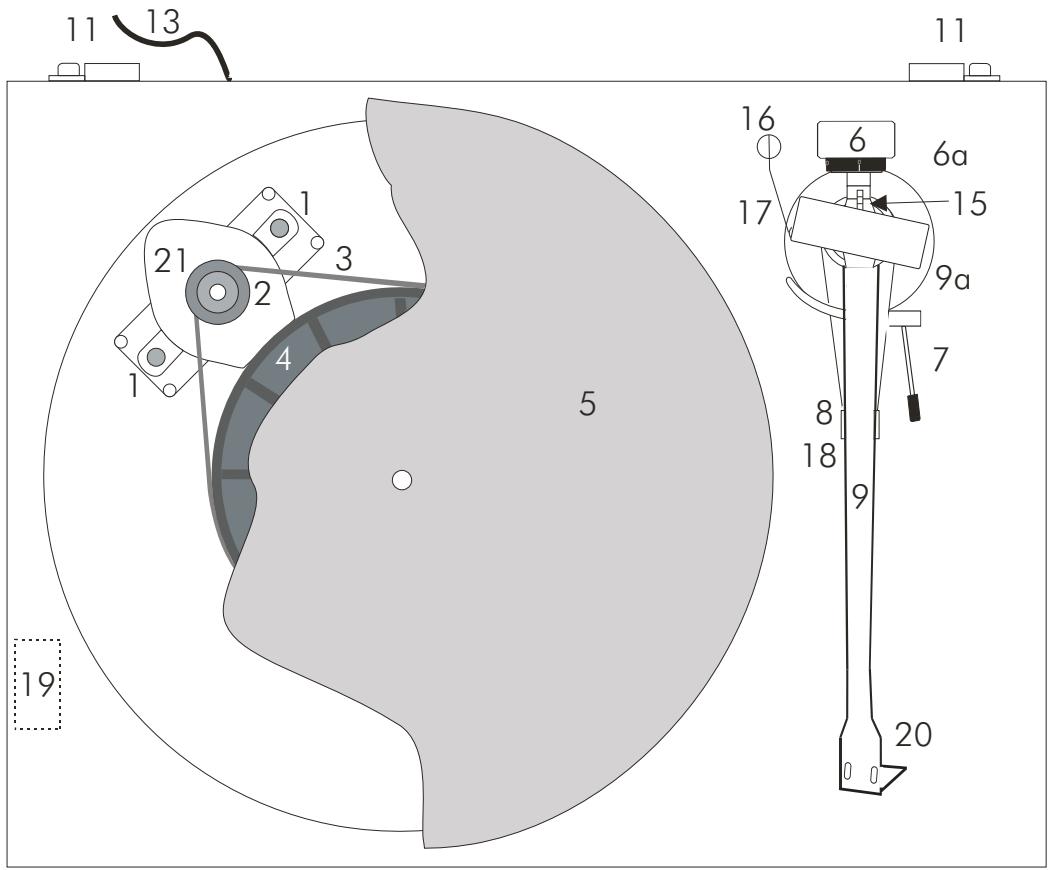
Controls, features and connections
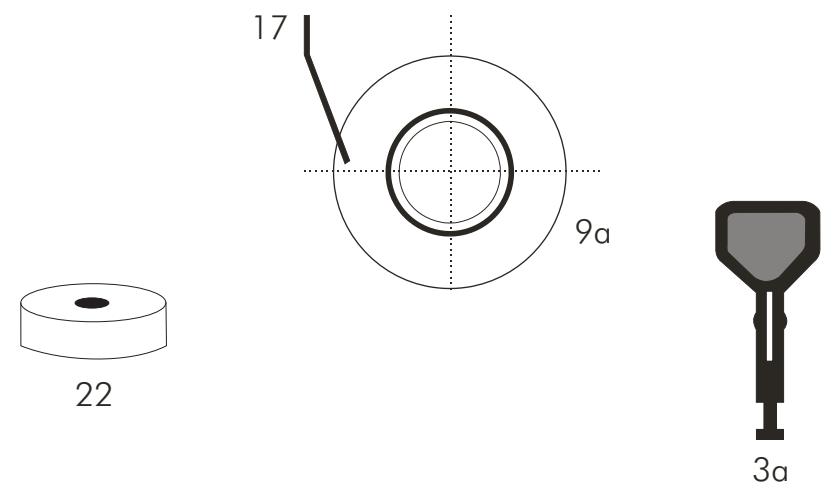
1 Motor brackets with Sorbothane® pads
2 Stepped drive pulley
3 Drive belt * 3a Hook *
4 Hub
5 Platter
6 Tonearm counterweight * 6a Downforce scale
7 Tonearm lift lever
8/18 Tonearm rest and removable transport lock
9 Tonearm tube 9a Tonearm base
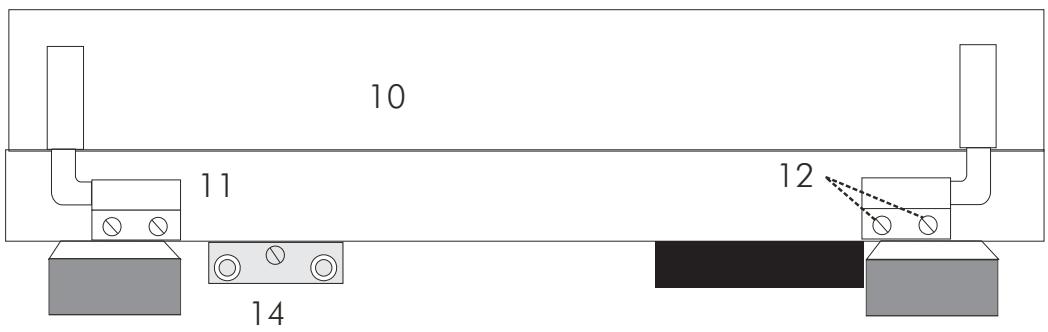
10 Lid*
11 Lid hinges
12 Hinge fasteners
13 Mains lead
14 Phono output sockets and earth connection
15 Anti-skating weight adjustment scale
16 Anti-skating weight *
17 Anti-skating weight support hoop
19 Power switch
20 Headshell with finger lift and fitted Ortofon 2M Red cartridge
21 Motor
22 Single adapter *
Connection cable (not shown) *
Dear music lover,
thank you for purchasing a Pro-Ject Audio record player.
In order to achieve maximum performance and reliability with this record player you should study these instructions for use carefully.

Warning of a hazard for the user, the unit or possible misuse.

Important notice.
** Your turntable has been delivered with a factory fitted and adjusted cartridge, please ignore the cartridge set up instructions unless changing the cartridge at a later date.
During assembly and adjustment of the deck small parts could be lost if not carefully placed in a suitable receptacle. Before starting assembly make yourself acquainted with the parts listed above and correspondingly numbered in the technical drawings above. Separately packed items are marked with an asterisk *.
Safety instructions
AC outlet voltages vary from country to country. Before connecting to the mains, make sure that the voltage in your area meets the voltage requirements printed on a label underneath the unit.
The power cord plug and the power switch (19) are used to disconnect the unit from the mains. Make sure that the plug and the switch are easily accessible at all times. Hold the plug when unplugging the power cord. Never handle the power cord while your hands are wet or damp.
Avoid letting liquids enter the device. Never place any item containing liquid, such as a flower vase on or near the device. Never spill any liquid on the device. Never place any naked flame sources, such as lighted candles on or near the device. The product shall not be used in damp or wet locations, next to a bathtub, sink, swimming pool or any other similar conditions.
Keep plastic bags away from children to prevent any risk of suffocation.

Set-up
The deck is supplied partially disassembled and carefully packaged for safe transport. Carefully remove all parts from the transport packaging.
Make sure the surface you wish to use the turntable on is level (use a spirit level) before placing the turntable on it. Remove the transport lock (18) from the tonearm. Store it in the original packaging so it is available for any future transportation.
Fit the drive belt (3) around the hub (4) and the smaller diameter part of the motor pulley (2). Avoid getting sweat or grease on the belt as these will deteriorate the performance and reduce the belt's lifespan. Use absorbent kitchen paper to remove any oil or grease from the outer edge of the hub and the belt. Fit the platter (5) over the spindle of the hub (4).

Please note: We recommend to use the record player without a mat on the platter.
Cartridge downforce adjustment
The counterweight (6) supplied is suitable for cartridges weighing between 6,5 - 8,5g (weight no. 8). An alternative counterweight for cartridges weighing between 4,5 - 6g (weight no. 80) is available as an accessory part.
Pushing carefully, turn the counterweight (6) onto the rear end of the tonearm tube (9), so that the downforce scale (6a) shows towards the front of the player. Lower the armlift and position the cartridge in the space between arm rest and platter. Carefully rotate the counterweight (6) until the armtube balances out. The arm should return to the balanced position if it is moved up or down. This adjustment must be done carefully. Do not forget to remove the cartridge protection cap if fitted.
Once the arm is correctly balanced return it to the rest. Hold the counterweight (6) without moving it, and gently revolve the downforce scale ring (6a) until the zero is in line with the anti-skating prong (15). Check whether the arm still balances out.
Rotate the counterweight counter clockwise (seen from the front) to adjust the downforce according to the cartridge manufacturer's recommendations. One mark on the scale represents 1 mN ( = 0,1 g / 0,1 Pond) of downforce.

Please note: Adjust the downforce prior to installing the anti-skating weight.
The recommended downforce for the Ortofon 2M Red cartridge is 17,5mN .
Anti-skating force adjustment
The anti-skating force must be adjusted corresponding to the downforce as follows:
Downforce
10-14mN
15 - 19mN
20mN and bigger
Groove in the stub (15)
1^st from bearing rings
2nd 11 11
3rd 11 11
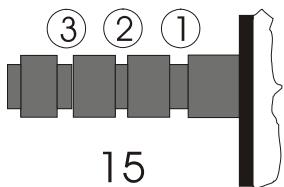
Slip the loop of the anti-skating weight's thread over the second groove of the stub to set the correct anti-skating force for the factory-fitted cartridge. Feed the thread through the loop of the wire support (17).
Connection to the amplifier
The record player has gold plated female RCA phono sockets (14) so you can substitute the interconnect cables supplied with higher quality cables such as the Pro-Ject Connect it interconnect cables for connection to the amplifier if you wish.
Use the Phono input (sometimes labelled gram, disc or RIAA) on your amplifier. Make sure that the phono input offers correct matching and amplification for the type of cartridge used. Line inputs (such as CD, Tuner, Tape or Video) are not suitable.
Take care to connect the left and right channels correctly. The right channel is usually marked red, the left channel black or white. Check the manual supplied with your amplifier for relevant information. The earthing wire of the tonearm lead should be connected to the earth terminal on your amplifier (if provided).
If your amplifier does not have an input suitable for phono cartridges you will require a separate phono amplifier stage for MM or MC cartridges which is then connected between the record player and a free line level input of the amplifier.
For detailed product information regarding Pro-Ject Audio interconnect cables and phono amplifiers please refer to the Pro-Ject web site www.project-audio.com.

The recommended load impedance for the factory fitted cartridges is: 47kohms/MM-input
Mains power connection
Connect the mains lead to the mains.
Fitting the lid
Fit the lid (dust cover 10) carefully over the hinge prongs and adjust the screws (12) until the lid stays open where you want it to without being too stiff to open or close.
Switching on and off
Pressing the power switch (19) alternately starts or stops the motor.
Changing replay speed
To play records at 45 r.p.m. first remove the platter (5). Using the accessory tool provided (3a), hook the belt (3) over the larger diameter part of the motor pulley (2). Refit the platter. To revert to 33 r.p.m. repeat the proceedings using the smaller step on the pulley.
When the Pro-Ject Speed Box SE is used speed change between 33 and 45 r.p.m. is electronic. There is no need to move the belt manually.
In addition, 78 r.p.m. is available after fitting a special pulley, which may be purchased as an optional extra.
For detailed product information please refer to the Pro-Ject web site www.project-audio.com.
Useful tips
The record player should be positioned on a low-resonance surface such as wood or multiple layer ply board to avoid structural vibrations disturbing replay.
Adjusting the azimuth
** The cartridge needle must be vertical in the record groove in order to trace the groove wall modulations correctly.
A small screw at the bearing end of the arm allows incorrect azimuth to be corrected if your needle is not mounted exactly perpendicular to the cartridge body (which is often the case).
Slacken off the screw just enough to be able to revolve the arm tube without applying force. Please note: do not remove the screw completely!
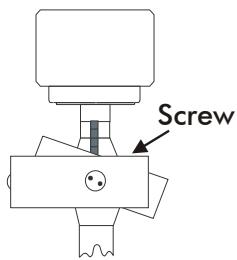
With the aid of a good magnifying glass adjust the needle until it is vertical in the groove (i.e. perpendicular to the record's surface). Ideally this should correspond to the top surface of the cartridge body being parallel to the record surface.
When you are satisfied that the needle is vertical retighten the screw carefully.

Please note: Under no circumstances should the arm tube be adjusted with the needle still in the record groove! Irreparable damage may be caused to the cantilever suspension! The arm must be lifted to make each adjustment and lowered afterwards to check it.
Fitting and connecting the cartridge
** All cartridges with half inch mounting holes can be fitted. Leaving the needle's protection cover on, fit the cartridge to the headshell using the screws supplied with the cartridge by passing one screw through each slot in the headshell (20). Do not tighten the nuts yet.
Connect the tonearm wires to the cartridge pins as follows:
white left channel positive (L + )
red right channel pos. (R+)
green right channel return (R-)
blue left channel return (L -)
The full sound quality of the record player can only be achieved if the cartridge is correctly adjusted. Particular tools like the Pro-Ject alignment tool are required to accomplish this job properly.
If you are not well acquainted with the adjustment of cartridges you are advised to call upon the willing help of your Pro-Ject dealer to accomplish this task for you.

Please note: Adjusting a cartridge and tonearm calls for the greatest care in order to avoid damaging the cartridge or tonearm bearings. Leave this work to your dealer if you are in any way unsure of the necessary steps and precautions to be taken.
Maintenance and cleaning
Your record player requires little or no regular maintenance. Remove dust with a slightly moistened antistatic cloth. Never use a dry cloth because this will create static electricity which attract more dust! Antistatic cleaning fluids are available at specialist stores but must be applied sparingly to avoid damage to rubber parts. It is recommended to fit the needle cover before cleaning or maintenance is carried out to avoid damage.
If the player is not used over a long period of time the drive belt can be removed to prevent unequal stretching.

Always disconnect the record player from the mains power supply as a precaution before maintenance!
Technical specifications Pro-Ject Debut Carbon Esprit / Pro-Ject 8.6cc
| Nominal speeds | 33/45 r.p.m.. *** 78 r.p.m. optional |
| Speed variance | ±0,8% |
| Wow and flutter | ±0,1% |
| Signal to noise | 68dB |
| Effective tonearm mass | 6g |
| Effective tonearm length | 8,6'' (218,5mm) |
| Overhang | 18,5mm |
| Power consumption | 4,5W, 0W in Stand-By |
| Voltage | suitable for your country's mains supply |
| Dimensions (W x H x D) | 415 x 118 x 320mm, dust cover open 415 x 365 x 405mm |
| Weight | 4,9kg |
Technical specifications MM-Cartridge Ortofon 2M Red
| Frequency range | 20-22.000Hz |
| Channel separation | 22dB/1kHz |
| Output voltage | 5,5mV |
| Recommended load impedance | 47kohms/amplifier connection – MM-input |
| Compliance/stylus type | 20μm/mN – elliptical |
| Recommended tracking force | 18mN |
| Weight | 7,2g |
Potential incorrect use and fault conditions
Pro-Ject turntables are manufactured to the highest standards and undergo strict quality controls before leaving the factory. Faults that may possibly occur are not necessarily due to material or production faults but can sometimes be caused by incorrect use or unfortunate circumstances. Therefore the following list of common fault symptoms is included.
The platter doesn't turn although the unit is switched on:
The unit is not connected to the mains power supply.
No mains at the socket.
Drive belt is not fitted or has slipped off.
No signal through one or other channel or both channels:
No signal contact from the cartridge to the internal tonearm wiring or from that to the arm lead or from that to the phono box or between that and the amplifier. This could be due to a faulty plug, broken wire or solder joint or simply loose plug/socket connection.
Phono input not selected at amplifier.
Amplifier not switched on.
Amplifier or speakers defective or muted.
No connection to the loudspeakers.
Strong hum on phono input:
No earth connection from cartridge or arm or arm cable to amplifier, or earth loop.
Distorted or inconsistent sound from one or both channels:
Record player is connected to wrong input of amplifier, or MM/MC switch incorrectly set.
Needle or cantilever damaged.
Wrong r.p.m., drive belt overstretched or dirty, platter bearing without oil, dirty or damaged.
Service
Should you encounter a problem which you are not able to alleviate or identify despite the above information, please contact your dealer for further advice. Only when the problem cannot be resolved there should the unit be sent to the responsible distributor in your country.
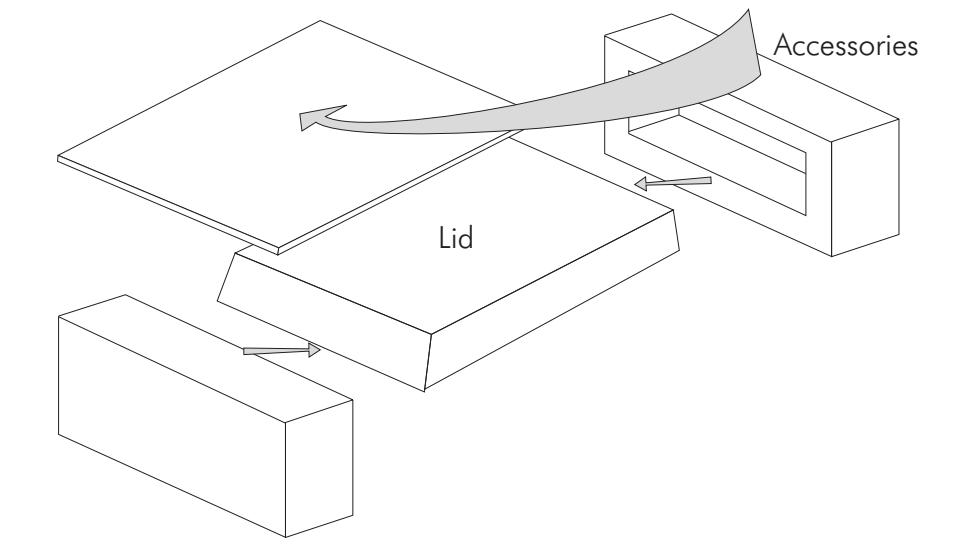
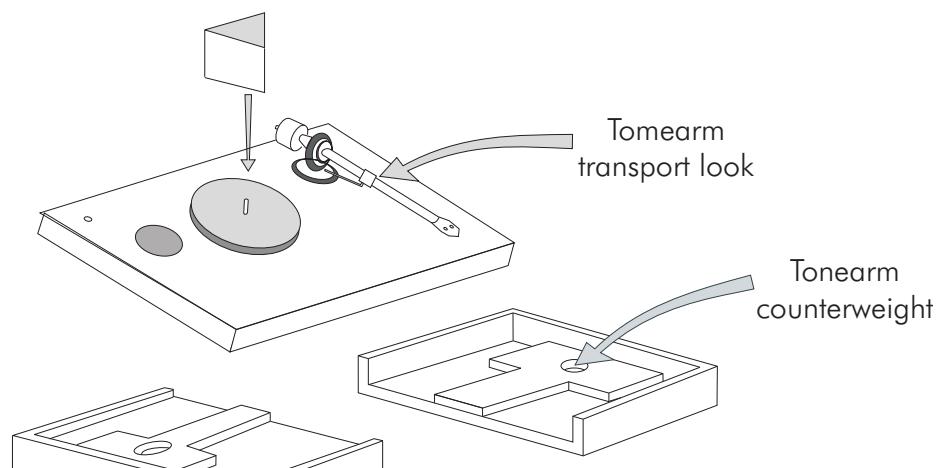
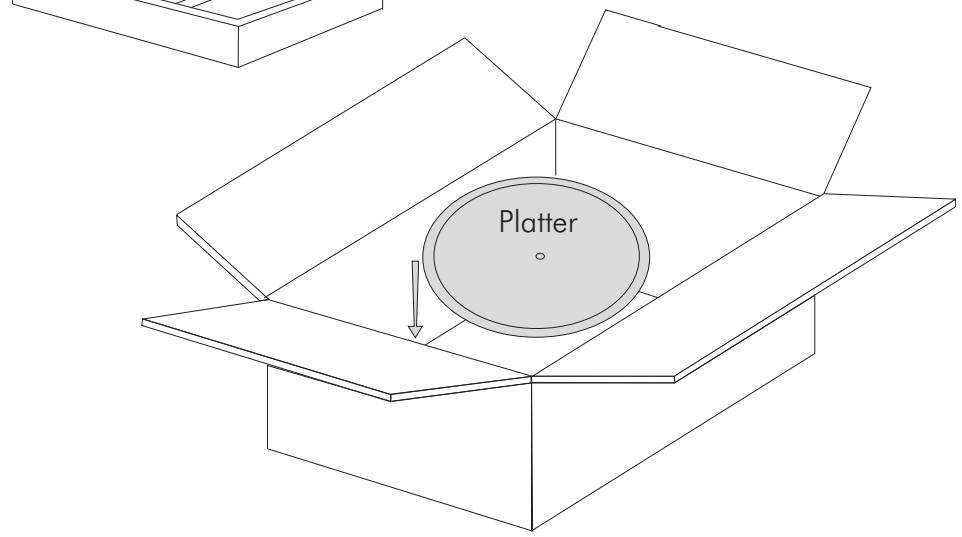
Guarantee repairs will only be effected if the unit is returned correctly packaged. For this reason we recommend keeping the original packaging. Never return a record player without making sure that is it safely disassembled and correctly packaged in the original packaging according to the diagrams on the last page of this user guide. Please remove these parts and pack them separately: lid (10), counterweight (6), anti-skating weight (16) platter (5) and belt (3). Fit the cartridge protection cap. Insert the transport lock for the tonearm (18) prior to carefully packaging the record player.
Warranty

The manufacturer accepts no responsibility for damage caused by not adhering to these instructions for use and/or by transportation without the original packaging. Modification or change to any part of the product by unauthorized persons release the manufacturer from any liability over and above the lawful rights of the customer.
Copyright
PRO-JECT is a Registered Trademark of H. Lichtenegger.
This guide was produced by: Audio Trade GmbH Copyright © 2012. All rights reserved.
The information was correct at the time of going to press. The manufacturer reserves the right to make changes to the technical specification without prior notice as deemed necessary to uphold the ongoing process of technical development.