BT2000 - Enceinte bluetooth PHILIPS - Notice d'utilisation et mode d'emploi gratuit
Retrouvez gratuitement la notice de l'appareil BT2000 PHILIPS au format PDF.


| Type de produit | Enceinte Bluetooth |
| Marque | Philips |
| Modèle | BT2000 |
| Dimensions (L × H × P) | 99 × 77 × 93 mm |
| Poids | 0,15 kg |
| Alimentation | USB 5 V ⎓ 0,5 A |
| Type de batterie | Li-polymère 3,7 V, 500 mAh |
| Autonomie de la batterie | Variable selon l'utilisation |
| Temps de charge | Environ 2 heures (estimation) |
| Version Bluetooth | V3.0 |
| Profils Bluetooth | A2DP, AVRCP |
| Portée Bluetooth | 10 m (espace libre) |
| Entrée audio auxiliaire | Jack 3,5 mm |
| Puissance de sortie | 2 W RMS |
| Réponse en fréquence | 80 - 16000 Hz, ±3 dB |
| Rapport signal/bruit | >70 dBA |
| Impédance du haut-parleur | 4 Ω |
| Haut-parleur | 4,5 cm large bande |
| Sensibilité | >81 dB/m/W |
| Indicateur LED | Bleu (Bluetooth), blanc (AUDIO IN) |
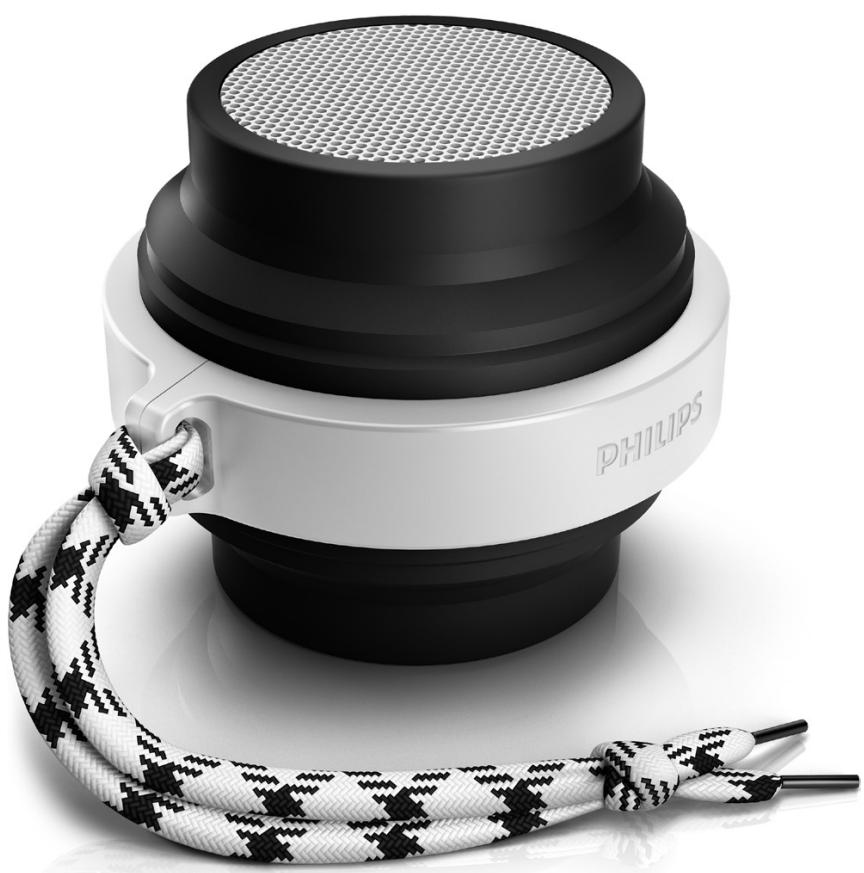
| Pliable | Oui |
| Accessoires inclus | Kit de démarrage rapide, câble USB, cordon de transport, manuel |
| Entretien et nettoyage | Nettoyer avec un chiffon sec. Ne pas utiliser de liquides. |
| Sécurité | Ne pas exposer à l'humidité, aux flammes ou à la chaleur excessive. |
FOIRE AUX QUESTIONS - BT2000 PHILIPS
Questions des utilisateurs sur BT2000 PHILIPS
0 question sur cet appareil. Repondez a celles que vous connaissez ou posez la votre.
Poser une nouvelle question sur cet appareil
Téléchargez la notice de votre Enceinte bluetooth au format PDF gratuitement ! Retrouvez votre notice BT2000 - PHILIPS et reprennez votre appareil électronique en main. Sur cette page sont publiés tous les documents nécessaires à l'utilisation de votre appareil BT2000 de la marque PHILIPS.
MODE D'EMPLOI BT2000 PHILIPS
Always there to help you
Register your product and get support at www.philips.com/support
Question?
Contact
Philips
BT2000
User manual
PHILIPS
Contents
1 Important 2
2 Your Bluetooth speaker 3
Introduction 3
What's in the box 3
Overview of the speaker 4
3 Get started 5
Attach the string 5
Charge the built-in battery 5
Turn on/off 5
4 Play 6
Play from Bluetooth devices 6
Play from external devices 6
Fold or unfold the speaker 7
Adjust volume 7
5 Product information 8
Specifications 8
6 Troubleshooting 9
General 9
About Bluetooth device 9
7 Notice 10
Compliance 10
Care of the environment 10
Trademark notice 11
1 Important

Warning
- Never remove the casing of this speaker.
- Never lubricate any part of this speaker.
- Never place this speaker on other electrical equipment.
-
Keep this speaker away from direct sunlight, naked flames or heat.
-
Make sure that there is enough free space around the speaker for ventilation.
- Only use attachments or accessories specified by the manufacturer.
- The battery shall not be exposed to excessive heat such as sunshine, fire or the like.
- The speaker shall not be exposed to dripping or splashing.
- Do not place any sources of danger on the speaker (e.g. liquid filled objects, lighted candles).

Note
- The type plate is located on the bottom of the product.
2 Your Bluetooth speaker
Congratulations on your purchase, and welcome to Philips! To fully benefit from the support that Philips offers, register your product at www.philips.com/welcome.
Introduction
With this speaker, you can enjoy audio from your Bluetooth-enabled devices, or other external audio devices.
What's in the box
Check and identify the contents of your package:
Speaker
USB cable for charging
String for carrying
Short user manual
Safety and notice leaflet
Overview of the speaker
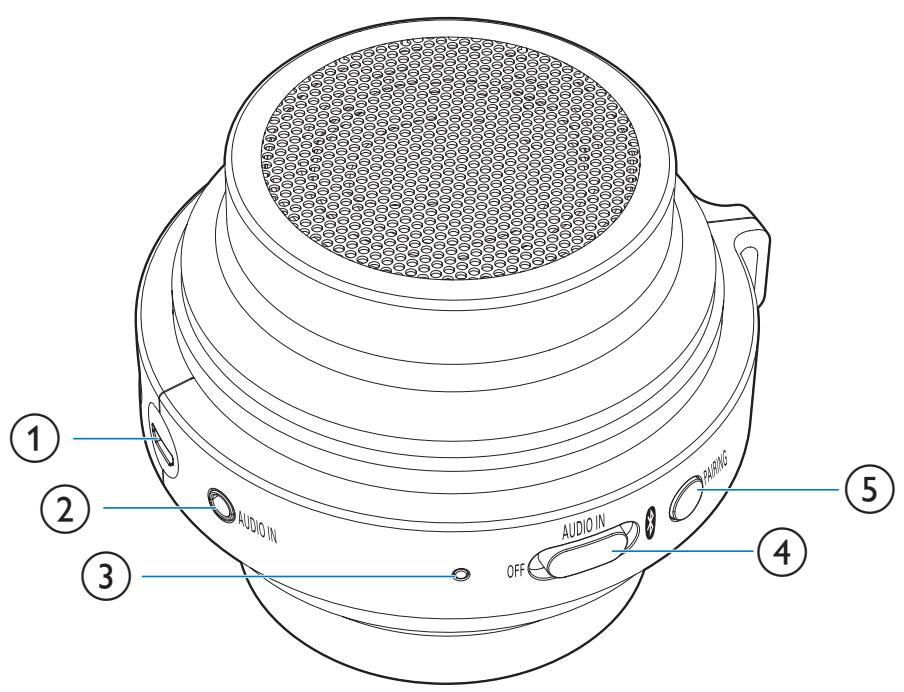
1 DC IN
- Recharge the built-in battery with a USB cable.
(2) AUDIO IN
- Connect an external audio device.
③ LED indicator
4 OFF/AUDIO IN/ 8
- Select Bluetooth or AUDIO IN source.
- Turn the speaker off.
(5) PAIRING
- Disconnect Bluetooth connection.
- Enter Bluetooth pairing mode.
3 Get started
Always follow the instructions in this chapter in sequence.
Attach the string
For easy carrying, attach the supplied string to this speaker as illustrated.

Charge the built-in battery
The speaker is powered by a built-in rechargeable battery.

Note
Before use, fully charge the built-in battery.
- The micro USB socket is for charging only.
- Rechargeable battery has a limited number of charge cycles. Battery life and number of charge cycles vary by use and settings.
Connect the supplied USB cable between
- the DC IN socket on the speaker, and
a USB socket of a computer.
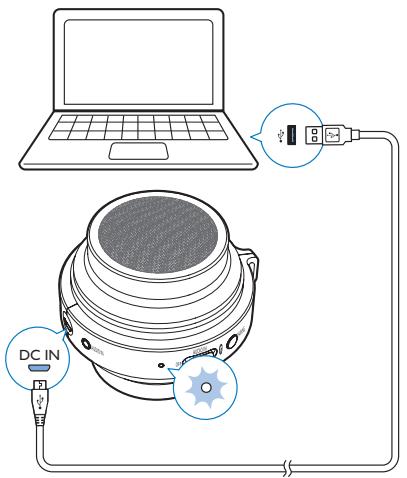
Charging indicator status
The LED indicator indicates the battery status.
| Under charging | Fully charged | |
| "OFF" mode | Flashing white | Off |
| "AUDIO IN" mode | Flashing white | Solid white |
| "Bluetooth" mode | Flashing blue or solid blue (depending on Bluetooth connection status) | Flashing blue or solid blue (depending on Bluetooth connection status) |
Turn on/off
To turn the speaker on, slide the OFF/AUDIO IN/ switch to or AUDIO IN.
-
: Listen to an external Bluetooth device through Bluetooth connection.
AUDIO IN: Listen to an external device through an audio input cable. -
To turn the speaker off, slide the switch to OFF.
4 Play
Play from Bluetooth devices
With this speaker, you can listen to audio from Bluetooth-enabled devices.
Play from Bluetooth devices

Note
- Make sure that your Bluetooth device is compatible with this speaker.
- Before pairing a device with this speaker, read its user manual for Bluetooth compatibility.
- The speaker can memorize a maximum of 4 paired devices.
- Make sure that Bluetooth function is enabled on your device, and your device is set as visible to all other Bluetooth devices.
- Any obstacle between this speaker and a Bluetooth device can reduce the operational range.
- Keep away from any other electronic device that may cause interference.
- The operational range between this speaker and a Bluetooth device is approximately 10 meters (30 feet).
1 Slide the OFF/AUDIO IN/ switch to
The LED indicator flashes blue.
2 On your Bluetooth device, enable Bluetooth and search for Bluetooth devices that can be paired (refer to the user manual of the device).
3 When [Philips BT2000] is displayed on your device, select it to start pairing and connection. If necessary, input "0000" as the pairing password.
After successful connection, the speaker beeps twice, and the LED indicator turns solid blue.
4 Play audio on the Bluetooth device.
Audio streams from your Bluetooth device to the speaker.
To disconnect the Bluetooth-enabled device:
- Press and hold PAIRING for two seconds;
- Disable Bluetooth on your device; or
- Move the device beyond the communication range.
The LED indicator flashes blue.
To reconnect the Bluetooth device:
Next time you turn on the speaker, the speaker will reconnect the last connected device automatically; or
- On your Bluetooth device, select "Philips BT2000" on your Bluetooth menu to start connection.
To connect another Bluetooth-enabled device:
1 Press and hold PAIRING for two seconds to disconnect the currently connected device;
The speaker enters Bluetooth pairing mode.
2 Connect another Bluetooth device.
| LED indicator | Description |
| Flashing blue | Connecting; Waiting for pairing |
| Solid blue | Connected |
Play from external devices
With this speaker, you can also listen to an external audio device such as an MP3 player.
1 Connect an audio input cable (not supplied) with a 3.5 ~mm connector on both ends to
- the AUDIO IN socket on this speaker, and
- the headphone socket on the external device.

2 Slide the OFF/AUDIO IN/ switch to AUDIO IN.
The LED indicator becomes white.
3 Play audio on the external device (refer to its user manual).
Fold or unfold the speaker
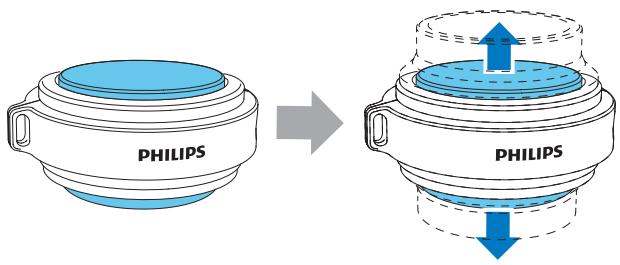
To achieve better bass effect, unfold the speaker as illustrated.
To make the speaker smaller, fold the speaker.
Adjust volume
During play, use the volume control on your Bluetooth or external device to adjust volume.
5 Product information

Note
- Product information is subject to change without prior notice.
| General information | |
| Power Supply (through USB socket) | 5 V = 0.5 A |
| Built-in Battery | Li-polymer battery (3.7V, 500 mAh) |
| Dimensions - Main Unit (W × H × D) | 99 × 77 × 93 mm |
| Weight - Main Unit | 0.15 kg |
Specifications
| Amplifier | |
| Rated Output Power | 2 W RMS |
| Frequency Response | 80 -16000 Hz, ±3 dB |
| Signal to Noise Ratio | >70 dBA |
| Audio-in Input | 300mV RMS |
| Speaker | |
| Speaker Impedance | 4 ohm |
| Speaker Driver | 4.5 cm full range |
| Sensitivity | >81dB/m/W±3dB/m/W |
| Bluetooth | |
| Bluetooth Version | V3.0 |
| Bluetooth Profile | A2DP,AVRCP |
| Bluetooth Frequency Brand | 2.4 GHz ~ 2.48 GHz |
| Bluetooth Range | 10 m (Free space) |
6 Troubleshooting

Warning
- Never remove the casing of this device.
To keep the warranty valid, never try to repair the system yourself.
If you encounter problems when using this device, check the following points before requesting service. If the problem remains unsolved, go to the Philips Web page (www.philips.com/support). When you contact Philips, make sure that the device is nearby and the model number and serial number are available.
General
No power
- Recharge your speaker.
No sound or poor sound - Adjust volume on the connected device.
No response from the speaker - Restart the speaker.
About Bluetooth device
The audio quality is poor after connection with a Bluetooth-enabled device.
- The Bluetooth reception is poor. Move the device closer to this product or remove any obstacle between them.
Cannot connect with the device.
- The Bluetooth function of the device is not enabled. Refer to the user manual of the device for how to enable the function.
This product is already connected with another Bluetooth-enabled device. Disconnect that device and then try again.
The paired device connects and disconnects constantly.
- The Bluetooth reception is poor. Move the device closer to this product or remove any obstacle between them.
- For some devices, Bluetooth connection may be deactivated automatically as a power-saving feature. This does not indicate any malfunction of this product.
7 Notice
Any changes or modifications made to this device that are not expressly approved by WOXX Innovations may void the user's authority to operate the equipment.
Compliance
€0700
Hereby, WOOX Innovations declares that this product is in compliance with the essential requirements and other relevant provisions of Directive 1999/5/EC. You can find the Declaration of Conformity on www.philips.com/support.
Care of the environment
Disposal of your old product and battery

Your product is designed and manufactured with high quality materials and components, which can be recycled and reused.
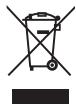
This symbol on a product means that the product is covered by European Directive 2012/19/EU.

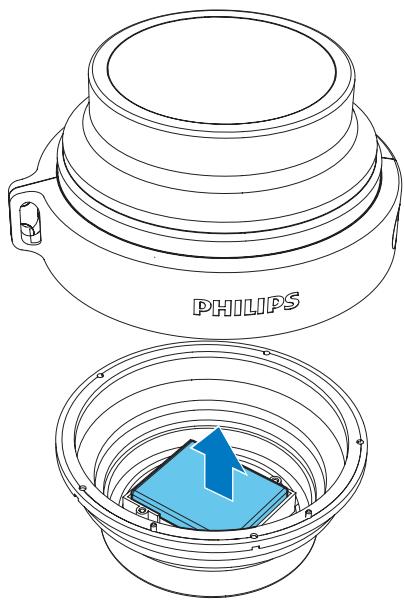
This symbol means that the product contains a built-in rechargeable battery covered by European Directive 2013/56/EU which cannot be disposed of with normal household waste. We strongly advise you to take your product to
an official collection point or a Philips service centre to have a professional remove the rechargeable battery.
Inform yourself about the local separate collection system for electrical and electronic products and rechargeable batteries. Follow local rules and never dispose of the product and rechargeable batteries with normal household waste. Correct disposal of old products and rechargeable batteries helps prevent negative consequences for the environment and human health.

Caution
- Removal of the built-in battery invalidates the warranty and may destroy the product.
Always bring your product to a professional to remove the built-in battery.
Environmental information
All unnecessary packaging has been omitted. We have tried to make the packaging easy to separate into three materials: cardboard (box), polystyrene foam (buffer) and polyethylene (bags, protective foam sheet.) Your system consists of materials which can be recycled and reused if disassembled by a specialized company. Please observe the local regulations regarding the disposal of packaging materials, exhausted batteries and old equipment.
Trademark notice
Bluetooth
The Bluetooth® word mark and logos are registered trademarks owned by Bluetooth SIG, Inc. and any use of such marks by WOOX Innovations is under license.

2014 © WOOX Innovations Limited. All rights reserved.
Philips and the Philips' Shield Emblem are registered trademarks of Koninklijke Philips N.V. and are used by WOOX Innovations Limited under license from Koninklijke Philips N.V.
BT2000_00.um_V1.0