
BO76SYW - Four électrique GORENJE - Notice d'utilisation et mode d'emploi gratuit
Retrouvez gratuitement la notice de l'appareil BO76SYW GORENJE au format PDF.



| Type de produit | Four électrique encastrable |
| Marque | Gorenje |
| Modèle | BO76SYW |
| Dimensions (L x H x P) | Environ 595 x 595 x 550 mm |
| Poids | Environ 35 kg |
| Alimentation | 230 V, 50 Hz, puissance max environ 3,5 kW |
| Capacité | Environ 77 L |
| Nombre de modes de cuisson | 12 modes manuels + 11 modes automatiques |
| Modes de cuisson manuels | Chaleur tournante, chaleur tournante + sole, gril, gril grand, gril ventilé, chaleur sole + ventilateur, chaleur voûte + sole, décongélation, nettoyage aqua, préchauffage rapide, cuisson économique (Eco), sole + ventilateur |
| Modes automatiques (par type d'aliment) | Biscuits, pizza, poulet, côtelettes, poisson, décongélation, pâtisserie, conservation, pain, nettoyage |
| Plage de température | 35 °C à 275 °C selon le mode |
| Minuterie | Minuteur, durée de cuisson, fin de cuisson différée, arrêt automatique |
| Fonctions de sécurité | Verrouillage enfant, interrupteur de porte, verrouillage de porte (optionnel), système de refroidissement |
| Nettoyage | Nettoyage manuel, fonction Aqua Clean, inserts catalytiques en option |
| Éclairage | Ampoule halogène G9 25 W ou ampoule E14 25 W (selon version) |
| Accessoires fournis | Grille, plaque à pâtisserie, lèchefrite, plat en verre, sonde de cuisson |
| Pièces détachées | Ampoules, vitre de porte, joints, guides, inserts catalytiques |
| Réparabilité | Indice de réparabilité non fourni par le fabricant |
| Informations générales | Notice d'utilisation disponible en PDF; classe énergétique non précisée |
FOIRE AUX QUESTIONS - BO76SYW GORENJE
Questions des utilisateurs sur BO76SYW GORENJE
0 question sur cet appareil. Repondez a celles que vous connaissez ou posez la votre.
Poser une nouvelle question sur cet appareil
Téléchargez la notice de votre Four électrique au format PDF gratuitement ! Retrouvez votre notice BO76SYW - GORENJE et reprennez votre appareil électronique en main. Sur cette page sont publiés tous les documents nécessaires à l'utilisation de votre appareil BO76SYW de la marque GORENJE.
MODE D'EMPLOI BO76SYW GORENJE
INSTRUCTIONS DÉTAILLÉES
POUR L'UTILISATION DU FOUR ÉLECTRIQUE
Simplicité
COLLECTION
Nous vous remercions de votre
confiance et de l'achat de notre appareil.
Ce manuel d'instructions détaillé est fourni pour faciliter l'utilisation de ce produit. Les instructions devraient vous permettre de découvrir votre nouvel appareil le plus rapidement possible.
Assurez-vous d'avoir reçu un appareil non endommagé. Si vous constatez des dommages de transport, veuillez contacter le vendeur auprès duquel vous avez acheté l'appareil, ou l'entrepôt régional qui l'a fourni. Le numéro de téléphone se trouve sur la facture ou sur le bon de livraison.
Les instructions d'installation et de raccordement sont fournies sur une feuille séparée.
Les instructions d'utilisation sont également disponibles sur notre site Web :
www.gorenje.com / < http://www.gorenje.com />

Informations importantes
Astuce, remarque
| 4 IMPORTANT SAFETY INSTRUCTIONS 5 Before connecting the appliance ...... 6 THE ELECTRIC OVEN 9 Information on the appliance - rating plate (depending on the model) 10 Control unit | INTRODUCTION |
| 11 BEFORE USING THE APPLIANCE FOR THE FIRST TIME ...... 12 SWITCHING ON THE APPLIANCE FOR THE FIRST TIME 12 Setting the clock | PREPARING THE APPLIANCE FOR THE FIRST USE |
| 13 STEPS OF THE COOKING PROCESS (1-6) 13 Step 1: CHOOSING THE COOKING SYSTEM 16 Step 2: CHOOSING THE SETTINGS 17 Step 3: TIMER FUNCTIONS 19 Step 4: SELECTING ADDITIONAL FUNCTIONS/EXTRAS 22 Step 5: START THE COOKING PROCESS 22 Step 6: END THE COOKING PROCESS AND SWITCHING OFF THE OVEN ...... 23 DESCRIPIONS OF SYSTEMS (COOKING MODES) AND COOKING TABLES | COOKING STEPS |
| 39 MAINTENANCE & CLEANING 40 Conventional oven cleaning 41 Using the aqua clean function to clean the oven 42 Removing and cleaning wire and telescopic extendible guides 43 Installing the catalytic inserts 44 Removing and inserting the oven door (depending on the model) 47 Removing and inserting the oven door glass pane 48 Replacing the bulb | MAINTENANCE & CLEANING |
| 49 TROUBLESHOOTING TABLE | TROUBLESHOOTING |
| 50 DISPOSAL | OTHER |
LISEZ ATTENTIVEMENT LES INSTRUCTIONS ET CONSERVEZ-LES POUR RÉFÉRENCE FUTURE.
Cet appareil peut être utilisé par des enfants âgés de 8 ans et plus et par des personnes ayant des capacités physiques, sensorielles ou mentales réduites ou manquant d'expérience et de connaissances, si elles ont été supervisées ou instruites sur l'utilisation de l'appareil en toute sécurité et comprennent les dangers encourus. Les enfants ne doivent pas jouer avec l'appareil. Le nettoyage et l'entretien par l'utilisateur ne doivent pas être effectués par des enfants sans surveillance.
AVERTISSEMENT : L'appareil et ses parties accessibles deviennent chauds pendant l'utilisation. Il faut faire attention à ne pas toucher les éléments chauffants. Les enfants de moins de 8 ans doivent être tenus à distance, sauf s'ils sont sous surveillance continue.
AVERTISSEMENT : Les parties accessibles peuvent devenir chaudes pendant l'utilisation. Les jeunes enfants doivent être tenus à distance.
Pendant l'utilisation, l'appareil devient chaud. Il faut faire attention à ne pas toucher les éléments chauffants à l'intérieur du four.
Utilisez uniquement la sonde de température recommandée pour ce four.
AVERTISSEMENT : Assurez-vous que l'appareil est éteint avant de remplacer l'ampoule pour éviter tout risque de choc électrique.
N'utilisez pas de nettoyants abrasifs ou de grattoirs métalliques tranchants pour nettoyer la vitre de la porte du four ou la vitre des couvercles articulés de la table de cuisson (selon le cas), car ils peuvent rayer la surface, ce qui peut entraîner le bris du verre.
N'utilisez pas de nettoyeurs vapeur ou de nettoyeurs haute pression pour nettoyer l'appareil, car cela peut provoquer un choc électrique.
Des moyens de déconnexion doivent être incorporés dans le câblage fixe conformément aux règles de câblage.
Si le cordon d'alimentation est endommagé, il doit être remplacé par le fabricant, son service après-vente ou une personne de qualification similaire afin d'éviter tout danger (uniquement pour les appareils fournis avec un cordon de connexion).
L'appareil ne doit pas être installé derrière une porte décorative afin d'éviter toute surchauffe.
L'appareil est destiné à un usage domestique. Ne l'utilisez pas à d'autres fins, comme le chauffage d'une pièce, le séchage d'animaux domestiques ou d'autres animaux, de papier, de tissus, d'herbes, etc. Cela pourrait entraîner des blessures ou un risque d'incendie.
L'appareil ne peut être raccordé au réseau électrique que par un technicien de service agréé ou un expert. Toute manipulation de l'appareil ou toute réparation non professionnelle peut entraîner un risque de blessure grave ou de dommage au produit.
Si les cordons d'alimentation d'autres appareils situés à proximité de cet appareil sont coincés dans la porte du four, ils peuvent être endommagés, ce qui peut entraîner un court-circuit. Par conséquent, maintenez les cordons d'alimentation des autres appareils à une distance sûre.
Ne tapissez pas les parois du four avec du papier d'aluminium et ne placez pas de plaques de cuisson ou d'autres ustensiles sur le fond du four. Le papier d'aluminium empêcherait la circulation de l'air dans le four, entraverait le processus de cuisson et endommagerait l'émail.
La porte du four devient très chaude pendant le fonctionnement. Une troisième vitre est installée pour une protection supplémentaire, réduisant la température de la surface extérieure (uniquement sur certains modèles).
Les charnières de la porte du four peuvent être endommagées en cas de charge excessive. Ne placez pas de casseroles lourdes sur la porte du four ouverte et ne vous appuyez pas sur la porte du four ouverte lors du nettoyage de la cavité du four. Ne montez jamais sur la porte du four ouverte et ne laissez pas les enfants s'asseoir dessus.
Ne soulevez pas l'appareil en le tenant par la poignée de la porte.
Le fonctionnement de l'appareil est sûr avec ou sans les guides de plaques.
Assurez-vous que les évents ne sont jamais recouverts ou obstrués de quelque manière que ce soit.
Des différences de nuances de couleur entre différents appareils ou composants d'une même gamme peuvent survenir en raison de divers facteurs, tels que les différents angles sous lesquels les appareils sont observés, les différents fonds colorés, les matériaux et l'éclairage de la pièce.
AVANT DE BRANCHER L'APPAREIL

Lisez attentivement les instructions d'utilisation avant de brancher l'appareil. Toute réparation ou réclamation sous garantie résultant d'une connexion ou d'une utilisation incorrecte de l'appareil ne sera pas couverte par la garantie.
LE FOUR ÉLECTRIQUE
(DESCRIPTION DU FOUR ET DE L'ÉQUIPEMENT - SELON LE MODÈLE)
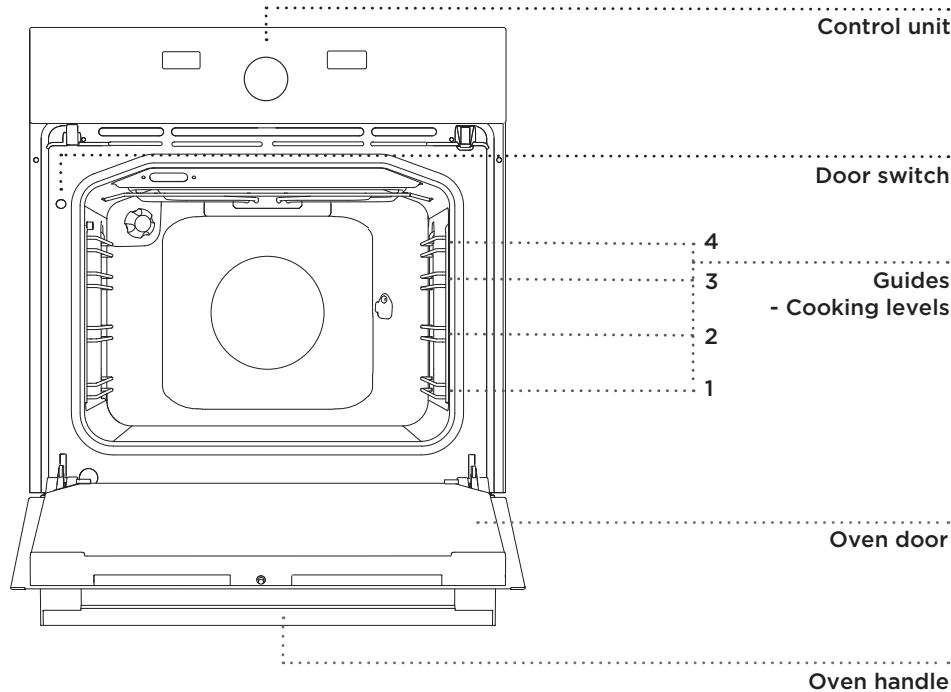
La figure représente l'un des modèles d'appareils encastrables. Étant donné que les appareils pour lesquels ces instructions ont été rédigées peuvent avoir un équipement différent, certaines fonctions ou équipements peuvent être décrits dans le manuel qui peuvent ne pas être présents sur votre appareil.
VOYANTS DE CONTRÔLE
Lorsqu'une fonction est sélectionnée, le cadran de la manette sélectionnée s'allume.
L'éclairage du four s'allume automatiquement lorsque le système de cuisson est sélectionné.
GUIDES DE FIL
Les guides de fil permettent la préparation des aliments sur quatre niveaux (veuillez noter que les niveaux/guides sont comptés de bas en haut). Les guides 3 et 4 sont destinés au gril.
COULISSES TÉLESCOPIQUES
Des coulisses télescopiques peuvent être installées pour les 2e, 3e et 4e niveaux.
Les coulisses peuvent être à extension partielle ou totale.
INTERRUPTEUR DE PORTE DU FOUR
L'interrupteur désactive le chauffage du four et le ventilateur lorsque la porte du four est ouverte pendant la cuisson. Lorsque la porte est fermée, l'interrupteur réactive les éléments chauffants.
VENTILATEUR DE REFROIDISSEMENT
L'appareil est équipé d'un ventilateur de refroidissement qui refroidit le boîtier et le panneau de commande.
ÉQUIPEMENT ET ACCESSOIRES DU FOUR



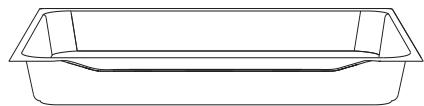
Le PLAT DE CUISSON EN VERRE est utilisé pour la cuisson avec tous les modes de cuisson. Il peut également servir de plat de service.
La GRILLE est utilisée pour griller ou comme support pour une casserole, une plaque de cuisson ou un plat avec les aliments.
La grille est munie d'un dispositif de sécurité. Par conséquent, soulevez légèrement la grille à l'avant lors de son retrait du four.
La PLAQUE DE CUISSON PEU PROFONDE est utilisée pour la cuisson de pâtisseries et de gâteaux.
Le PLAT DE CUISSON PROFOND est utilisé pour rôtir la viande et cuire des pâtisseries humides. Il peut également être utilisé comme lèchefrite.
- Ne placez jamais le plat de cuisson profond sur le premier guide pendant la cuisson, sauf pour griller des aliments ou utiliser la broche, et uniquement si vous utilisez le plat comme lèchefrite.
Les accessoires de cuisson peuvent se déformer en chauffant. Cela n'affecte pas leur fonctionnalité et ils reprennent leur forme initiale en refroidissant.
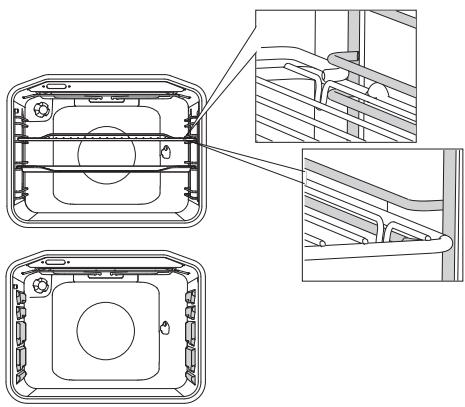
La grille ou la plaque doit toujours être insérée dans la rainure entre les deux profilés métalliques.
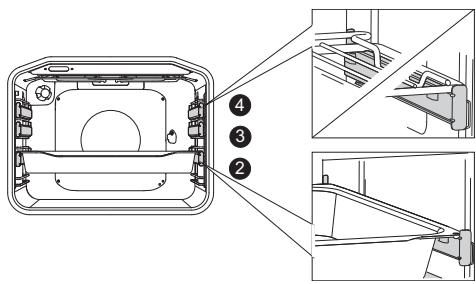
Avec les glissières télescopiques, sortez d'abord les glissières d'un niveau et placez la grille ou la plaque de cuisson dessus. Ensuite, poussez-les à la main aussi loin qu'elles peuvent aller.

Fermez la porte du four lorsque les glissières télescopiques sont complètement rentrées dans le four.
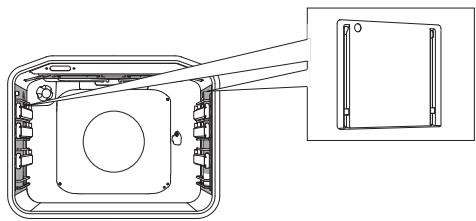
Les inserts catalytiques empêchent la graisse projetée de coller aux parois de la cavité du four.
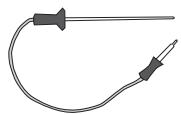
Sonde pour rôtir de gros morceaux de viande.

L'appareil et certaines parties accessibles ont tendance à chauffer pendant la cuisson. Utilisez des gants de cuisine.
INFORMATIONS SUR L'APPAREIL - PLAQUE SIGNALÉTIQUE (SELON LE MODÈLE)

A Numéro de série B Code/ID C Type D Marque E Modèle F Données techniques G Symboles de conformité
La plaque signalétique indiquant les informations de base sur l'appareil se trouve sur le bord du four et est visible lorsque la porte du four est ouverte.
UNITÉ DE COMMANDE

AVANT LA PREMIÈRE UTILISATION DE L'APPAREIL
À la réception de l'appareil, retirez toutes les pièces, y compris tout équipement de transport, du four.
Nettoyez tous les accessoires et ustensiles avec de l'eau tiède et un détergent ordinaire. N'utilisez pas de nettoyants abrasifs.
Avant d'utiliser le four pour la première fois, chauffez-le avec le système de chauffage supérieur et inférieur à 200 °C pendant environ une heure. L'odeur caractéristique de "nouvel appareil" se dégagera ; assurez-vous que la pièce est bien ventilée.
ALLUMAGE DE L'APPAREIL POUR LA PREMIÈRE FOIS
RÉGLAGE DE L'HORLOGE
Après avoir branché votre appareil ou après une panne de courant prolongée, 12:00 clignote à l'écran et le symbole s'allume.
Réglez l'heure.
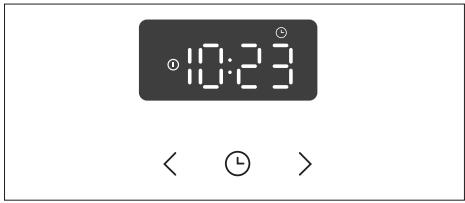
1 Touchez les touches < ou > pour régler l'horloge. Réglez d'abord les minutes. Confirmez le réglage en appuyant sur la touche ①. Ensuite, réglez les heures. Après trois secondes, le réglage sera enregistré.
Le four fonctionnera également si l'horloge n'est pas réglée. Cependant, les fonctions de minuterie ne seront pas disponibles dans ce cas (voir le chapitre RÉGLAGE DES FONCTIONS DE MINUTERIE).
MODIFICATION DU RÉGLAGE DE L'HORLOGE
L'horloge (heure) peut être réglée sur tous les systèmes sauf la préchauffe rapide. Touchez la touche HORLOGE et maintenez-la enfoncée pendant 5 secondes jusqu'à ce que le symbole apparaisse sur l'écran.
L'horloge peut également être réglée lorsque la fonction de minuterie est active ; cependant, le réglage de l'horloge réinitialisera les réglages de la minuterie.
Après quelques minutes d'inactivité, l'appareil passera en mode veille.
ÉTAPES DE LA CUISSON
PROCESSUS (1-6)
ÉTAPE 1 : CHOIX DU SYSTÈME DE CUISSON
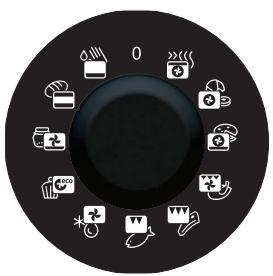
Tournez le bouton (à gauche et à droite) pour sélectionner le système de cuisson ou le type d'aliment souhaité. Le symbole du système de cuisson sélectionné s'allumera. La température préréglée et le temps de fonctionnement ajustable seront indiqués sur l'écran (à gauche et à droite).

Les réglages peuvent également être modifiés pendant le processus de cuisson.
| SYSTEM | DESCRIPTION | SUGGESTED TEMPERATURE °C |
| COOKING SYSTEMS | ||
| RAPID PREHEAT Use this function if you wish to heat the oven to the desired temperature as quickly as possible. This function is not appropriate for cooking food. When the oven heats up to the desired temperature, the heating process is completed. | 180 | |
| UPPER AND BOTTOM HEATER The heaters in the bottom and in the ceiling of the oven cavity will radiate heat evenly into the oven interior. Pastry or meat can only be baked/roasted at a single height level. | 180 | |
| GRILL Only grill heater, a part of the large grill set, will operate. This system is used for grilling a smaller amount of open sandwiches or beer sausages, and for toasting bread. | 210 | |
| LARGE GRILL The upper heater and the grill heater will operate. The heat is radiated directly by the grill heater installed in the oven ceiling. To boost the heating effect, the upper heater is activated as well. This combination is used for grilling a smaller amount of open sandwiches, meat or beer sausages, and for toasting bread. | 230 | |
| GRILL WITH FAN Grill heater and the fan will operate. This combination is used to grill meat and to roast larger chunks of meat or poultry at a single height level. It is also appropriate for dishes au gratin and for browning to a crispy crust. | 210 | |
| HOT AIR AND BOTTOM HEATER The bottom heater, the round heater, and the hot air fan will operate. This is used to bake pizza, moist pastry, fruitcakes, leavened dough and shortcrust on several levels simultaneously. | 210 | |
| HOT AIR Round heater and the fan will operate. The fan installed in the back wall of the oven cavity makes sure the hot air constantly circulates around the roast or pastry. This mode is used for roasting meat and baking pastry at several levels simultaneously. | 170 | |
| eco | ECO COOKING 1) In this mode, power consumption during the cooking process is optimized. This mode is used for roasting meat and baking pastry. | 180 |
| BOTTOM HEATER AND FAN This is used for baking leavened but low-rising pastry and for preserving fruit and vegetables. | 180 | |
| AQUA CLEAN Only the bottom heater will radiate heat. Use this function to remove stains and food residues from the oven. The program takes 30 minutes. | 70 | |
| DEFROSTING The air circulates with no heaters activated. Only the fan will be activated. This is used to slowly thaw frozen food. | 35 | |
Il est utilisé pour déterminer la classe d'efficacité énergétique conformément à la norme EN 60350-1. Dans ce mode, la température réelle dans le four n'est pas affichée en raison d'un algorithme de fonctionnement spécial de l'appareil et de l'utilisation de la chaleur résiduelle.
CUISSON PAR SÉLECTION DU TYPE D'ALIMENT (mode Auto)
| SYMBOL | TYPE OF FOOD/FUNC-TION | PRESET TEMPERATURE (°C) | MAX. POSSIBLE TEMPE-RATURE SETTING (°C) | PRESET COOKING TIME (H/MIN) | AMOUNT (KG) | GUIDE (FROM THE BOTTOM) | WARNING | PRESENT SYSTEM |
| Preheating | 180 | 275 | - | - | - | This mode is not appropriate for cooking. It is designed to quickly reach the desired temperature. | ||
| Biscuits, cookies" | 170 | 275 | 0.20 | 2x0,3 | 2,3 | Cooking/baking in shallow trays on two levels simultaneously. | ||
| Pizza | 210 | 275 | 0:20 | 1x0,5 | 2 | Cooking/baking in a shallow tray. | ||
| Chicken | 210 | 275 | 1:00 | 1 | 2 | Cooking chicken on the grid in the second guide; the drip tray should be placed in the lower guide. | ||
| "Cutlets/chops, fish (larger servings)" | 230 | 275 | 0:18 | 4x0,2 | 4, 3* | Cooking on a grid on the 4th or 3rd* guide; the drip tray should be placed in the 2nd guide and the door should be closed. Turn the meat halfway through the cooking time. | ||
| "Cutlets/chops, fish* (smaller servings)"" | 210 | 275 | 0:18 | 2x0,2 | 4, 3* | Cooking on a grid on the 4th or 3rd* guide; the drip tray should be placed in the 2nd guide and the door should be closed. Turn the meat halfway through the cooking time. | ||
| Defrosting | 35 | - | 1:00 | - | 2 | Place the food onto the grid and insert the drip tray onto the lower guide. | ||
| Pastries | 180 | - | 0.30 | - | 2 | Gentle and even cooking in a single level. | ||
| Preservation | 180 | 230 | 0:30 | - | 2 | Suitable for canning/preserving fruit and vegetables. | ||
| Bread | 180 | 275 | 1.00 | 1 | 2 | Cooking/baking in a shallow tray. | ||
| Cleaning | 70 | 90 | 0:30 | - | 2 | Pour 0.5l water into a baking tray and place it in the lower guide. After 30 minutes, food residues on the oven enamel walls will soften and they will be easy to clean with a damp cloth. |
Un astérisque (*) à côté du type d'aliment indique qu'un préchauffage est requis. Le temps de cuisson préréglé n'inclut pas le temps nécessaire au préchauffage.
ÉTAPE 2 : CHOIX DES RÉGLAGES
RÉGLAGE DE LA TEMPÉRATURE DE CUISSON
< °C >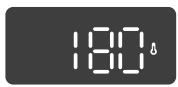
1 Tournez le BOUTON pour sélectionner le SYSTÈME DE CUISSON. La température préréglée clignote sur l'écran pendant 10 secondes.
2 Utilisez les touches pour sélectionner la valeur souhaitée. Le réglage est enregistré automatiquement, ou vous pouvez le confirmer en appuyant sur la touche ° C.
ÉTAPE 3 : FONCTIONS DE MINUTERIE
Tournez d'abord le BOUTON SÉLECTEUR DE SYSTÈME DE CUISSON ; puis, réglez la température.
Touchez la touche MINUTERIE plusieurs fois pour sélectionner la fonction de minuterie souhaitée.
Le symbole de la fonction de minuterie sélectionnée s'allume et l'heure de fin de cuisson réglable clignote sur l'écran.
Lorsque le système de cuisson, la température et l'interrupteur de minuterie sont réglés, activez le processus de cuisson.
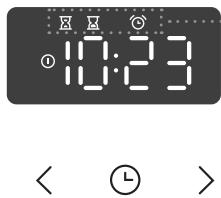
Affichage de la fonction de minuterie
Réglage du temps de cuisson
Dans ce mode, vous pouvez spécifier la durée de fonctionnement du four (temps de cuisson).
Réglez la durée de cuisson souhaitée.
Après quelques secondes, la valeur réglée est confirmée.
Réglage du départ différé
Dans ce mode, vous pouvez spécifier la durée du processus de cuisson (temps de cuisson) et l'heure à laquelle vous souhaitez que le processus de cuisson s'arrête (heure de fin). Assurez-vous que l'horloge est réglée avec précision sur l'heure actuelle.
Exemple :
Heure actuelle : midi
Temps de cuisson : 2 heures
Fin de la cuisson : 18 h
Tout d'abord, réglez le temps de cuisson (durée de cuisson) (par exemple 2 heures). Touchez à nouveau deux fois la touche HORLOGE pour sélectionner FIN DE CUISSON. L'heure de fin de cuisson apparaît sur l'écran.
Réglez l'heure de fin de cuisson (18:00).
Le minuteur attendra le début du processus de cuisson. Le symbole sera allumé. Le four s'allume automatiquement (à 16 h) et cesse de fonctionner à l'heure sélectionnée (à 18 h).
Le refroidissement et le ventilateur du four sont activés immédiatement (selon le système de cuisson sélectionné) lorsque vous tournez le bouton, indépendamment de tout réglage de départ différé du four.

Réglage du minuteur
Le minuteur peut être utilisé indépendamment du fonctionnement du four. Touchez la touche et le symbole apparaîtra sur l'écran. Le réglage maximal possible est de 24 heures. Le réglage est enregistré automatiquement après quelques secondes.
Pendant la dernière minute, le minuteur est affiché en secondes.

Lorsque le temps réglé est écoulé, le four s'arrête automatiquement (fin de cuisson). « End » s'affiche sur l'écran. Un signal sonore retentit, qui peut être désactivé en touchant n'importe quelle touche. Après deux minutes, le signal sonore s'éteint automatiquement.
Les fonctions de minuterie peuvent être annulées en réglant le temps sur « 0 ». Toute fonction de minuterie peut également être rapidement annulée en appuyant simultanément sur les touches < et > et en les maintenant enfoncées pendant un certain temps.
ÉTAPE 4 : SÉLECTION DES FONCTIONS/EXTRAS SUPPLÉMENTAIRES
Activez/désactivez les fonctions en appuyant sur la touche souhaitée ou sur une combinaison de touches.
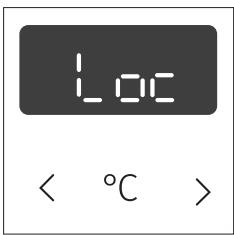
SÉCURITÉ ENFANTS ! (3 s < et >)
« Loc » s'affiche sur l'écran pendant 3 secondes. Touchez à nouveau les touches et maintenez-les enfoncées pendant 3 secondes pour désactiver la sécurité enfants.
Si la sécurité enfants est activée sans qu'aucune fonction de minuterie ne soit engagée (seule l'heure est affichée), le four ne fonctionnera pas. Si la sécurité enfants est activée après qu'une fonction de minuterie a été réglée, le four fonctionnera normalement ; cependant, il ne sera pas possible de modifier les réglages.
Lorsque la sécurité enfants est activée, les systèmes peuvent être modifiés, mais il n'est pas possible de modifier les fonctions supplémentaires. Le processus de cuisson peut être terminé en tournant le sélecteur sur « 0 ». La sécurité enfants reste active après l'extinction du four. Pour sélectionner un nouveau système, la sécurité enfants doit d'abord être désactivée.
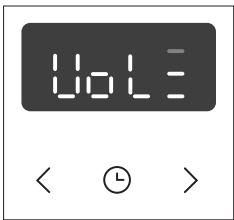
RÉGLAGE DU VOLUME DU SIGNAL SONORE (5 s <)
Le volume du signal sonore peut être réglé lorsqu'aucune fonction de minuterie n'est activée (seule l'heure est affichée).
Appuyez sur la touche < et maintenez-la enfoncée pendant cinq secondes. D'abord, « Vol » s'affiche sur l'écran, suivi de deux barres pleines. Touchez les touches < et > pour choisir l'un des trois niveaux de volume (une, deux ou trois barres). Après trois secondes, le réglage est automatiquement enregistré et l'heure s'affiche.
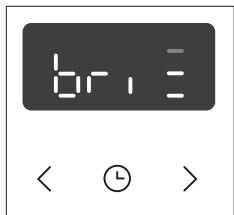
RÉGLAGE DE LA LUMINOSITÉ DE L'ÉCRAN (5 s >)
Le sélecteur de système de cuisson doit être en position « 0 ». Maintenez la touche > enfoncée pendant 5 secondes. D'abord, « bri » s'affiche sur l'écran, suivi de deux barres pleines. Touchez les touches < et > pour régler la luminosité de l'écran (une, deux ou trois barres). Après trois secondes, le réglage est automatiquement enregistré.
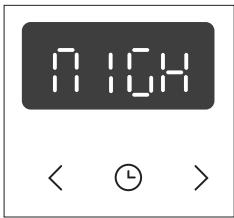
ÉCRAN - MODE NUIT
Cette fonction réduit automatiquement la luminosité de l'écran en la faisant passer du niveau 3 au niveau 2 entre 20 h et 6 h.
Le réglage peut être effectué lorsque le sélecteur de mode de cuisson est en position « 0 ».
Pour désactiver le mode nuit de l'unité d'affichage, appuyez simultanément sur les touches < et > et maintenez-les enfoncées pendant 5 secondes. NIGH apparaîtra sur l'unité d'affichage.
Appuyez sur les touches < et > pour sélectionner On ou Off.
Après 10 secondes, le réglage sera automatiquement enregistré.
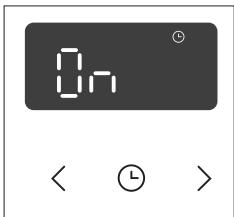
VEILLE
Cette fonction active ou désactive automatiquement l'affichage de l'horloge. Le réglage peut être effectué lorsque le sélecteur de mode de cuisson est en position « 0 ».
Pour désactiver l'affichage de l'horloge, appuyez simultanément sur les touches < et ⊙ et maintenez-les enfoncées pendant 5 secondes. Appuyez sur les touches < et > pour sélectionner On ou Off. Après 10 secondes, le réglage sera automatiquement enregistré.

ÉCLAIRAGE DU FOUR
L'éclairage du four s'allume automatiquement à chaque sélection d'un système de cuisson.
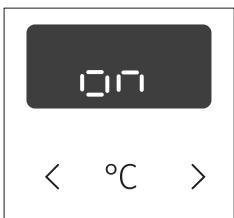
FONCTION ADAPTATIVE
Cette fonction permet d'ajuster la température de cuisson réglée et le temps de cuisson. La fonction est activée par défaut en usine, mais elle peut également être désactivée.
Lorsque la fonction est activée, la température la plus fréquemment réglée pour le système sélectionné et le temps de cuisson seront affichés.

Les réglages des cinq dernières sessions de cuisson d'au moins 1 heure sont pris en compte.
Pour désactiver la fonction, tournez le bouton sur la position O. Appuyez sur la touche < et maintenez-la enfoncée pendant 3 secondes. OFF apparaîtra sur l'unité d'affichage. Suivez la même procédure pour activer la fonction. Lorsque la fonction est activée, On apparaîtra sur l'unité d'affichage.
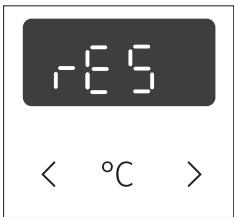
Réinitialisation de la fonction adaptative - réglages d'usine
Tournez la manette sur la position O. Appuyez sur la touche et maintenez-la enfoncée pendant 3 secondes jusqu'à ce que rES apparaisse sur l'écran.

Après une coupure de courant ou après l'extinction de l'appareil, les réglages des fonctions supplémentaires restent mémorisés pendant quelques minutes au maximum. Ensuite, tous les réglages, à l'exception du signal sonore et de la sécurité enfants, sont réinitialisés aux valeurs d'usine.
ÉTAPE 5 : DÉMARRER LA CUISSON
Après 10 secondes, une fois le système, la température et la minuterie réglés, le four commence à fonctionner. Un signal sonore est émis.
ÉTAPE 6 : TERMINER LA CUISSON ET ÉTEINDRE LE FOUR
Un signal sonore est émis lorsque la cuisson est terminée. Tournez le sélecteur de MODE DE CUISSON sur la position "O".
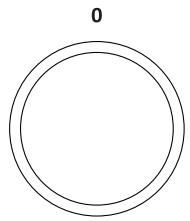
Après la cuisson, tous les réglages de la minuterie sont également arrêtés et supprimés, à l'exception de la minuterie de rappel. L'heure (horloge) s'affiche. Après l'utilisation du four, il peut rester de l'eau dans le canal de condensation (sous la porte). Essuyez le canal avec une éponge ou un chiffon.
DESCRIPTIONS DES SYSTÈMES (MODES DE CUISSON) ET TABLEAUX DE CUISSON
Si l'aliment souhaité ne figure pas dans le tableau de cuisson, recherchez des informations pour un aliment similaire. Les informations affichées s'appliquent à une cuisson sur un seul niveau.
Une plage de température suggérée est indiquée. Commencez par un réglage de température plus bas et augmentez-le si vous constatez que les aliments ne sont pas suffisamment dorés.
Les temps de cuisson sont des estimations approximatives et peuvent varier selon certaines conditions.
Ne préchauffez le four que si la recette ou les tableaux de ce manuel d'instructions l'exigent. Chauffer un four vide consomme beaucoup d'énergie. Par conséquent, cuire plusieurs pâtisseries ou plusieurs pizzas successivement permet d'économiser beaucoup d'énergie car le four est déjà préchauffé.
Utilisez des plaques et plateaux de cuisson de couleur sombre, recouverts de silicone noir ou émaillés, car ils conduisent très bien la chaleur.
Lorsque vous utilisez du papier sulfurisé, assurez-vous qu'il résiste aux températures élevées.
Lors de la cuisson de gros morceaux de viande ou de pâtisseries, beaucoup de vapeur se forme à l'intérieur du four, ce qui peut se condenser sur la porte du four. C'est un phénomène normal qui n'affecte pas le fonctionnement de l'appareil. Après la cuisson, essuyez la porte et la vitre de la porte.
Éteignez le four environ 10 minutes avant la fin de la cuisson pour économiser de l'énergie en utilisant la chaleur accumulée.
Ne refroidissez pas les aliments dans un four fermé pour éviter la condensation (buée).
Niveaux de cuisson standard et température à cœur finale recommandée pour différents types de viande
| Type of food | Food core temperature (℃) | Meat colour on cross-section, and colour of juices |
| BEEF | ||
| Rare | 40-45 | meaty red, like raw meat, little juice |
| Medium rare | 55-60 | light red, a lot of light red juice |
| Medium | 65-70 | pink, small amount of pale pink juice |
| Well done | 75-80 | evenly greyish brown, little colourless juice |
| VEAL | ||
| Well done | 75-85 | red-brown |
| PORK | ||
| Medium | 65-70 | light pink |
| Well done | 75-85 | yellow-brown |
| LAMB | ||
| Well done | 79 | grey, pinkish juice |
| MUTION | ||
| Rare | 45 | meaty red |
| Medium rare | 55-60 | light red |
| Medium | 65-70 | pink in the middle |
| Well done | 80 | grey |
| GOAT MEAT | ||
| Medium | 70 | pale pink, pink juices |
| Well done | 82 | grey, juices only slightly pink |
| POULTRY | ||
| Well done | 82 | light grey |
| FISH | ||
| Well done | 65-70 | white to grey-brown |
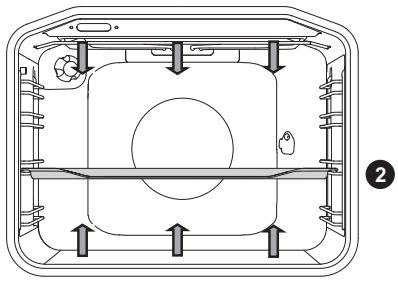
Les résistances situées en bas et en haut de la cavité du four rayonnent la chaleur uniformément à l'intérieur du four.
Rôtissage de la viande :
Utilisez un plat ou une plaque en émail, en verre trempé, en terre cuite ou en fonte. Les plaques en acier inoxydable ne conviennent pas car elles réfléchissent fortement la chaleur.
Utilisez un plat ou une plaque en émail, en verre trempé, en terre cuite ou en fonte. Les plaques en acier inoxydable ne conviennent pas car elles réfléchissent fortement la chaleur.
| Type of food | Weight (g) | Guide (from the bottom) | Temperature (℃) | Cooking time (minutes) |
| MEAT | ||||
| Pork roast | 1500 | 2 | 180-200 | 90-110 |
| Pork shoulder | 1500 | 2 | 180-200 | 100-120 |
| Pork roulade | 1500 | 2 | 180-200 | 120-140 |
| Meat loaf | 1500 | 2 | 200-210 | 60-70 |
| Beef roast | 1500 | 2 | 170-190 | 120-140 |
| Veal roulade | 1500 | 2 | 180-200 | 90-120 |
| Lamb sirloin | 1500 | 2 | 180-200 | 80-100 |
| Rabbit loin | 1500 | 2 | 180-200 | 50-70 |
| Deer shank | 1500 | 2 | 180-200 | 100-120 |
| Pizza* | / | 2 | 200-220 | 20-30 |
| Chicken | 1500 | 2 | 190-210 | 70-90 |
| FISH | ||||
| Braised fish | 1000 | 2 | 210 | 50-60 |
Utilisez ce système pour rôtir le poulet, si l'appareil ne dispose pas de ce système.
Utilisez ce système pour cuire la pizza, si l'appareil ne dispose pas de ce système.
Le symbole * signifie que le four doit être préchauffé avec le système de cuisson sélectionné.
Cuisson des pâtisseries
Utilisez uniquement un seul niveau et des plaques ou plateaux de cuisson sombres. Sur les plaques ou plateaux de couleur claire, le brunissement des pâtisseries sera moins bon, car ces équipements réfléchissent la chaleur. Placez toujours les plaques de cuisson sur la grille. Si vous utilisez la plaque fournie, retirez la grille. Le temps de cuisson sera plus court si le four est préchauffé.
| Type of food | Guide (from the bottom) | Temperature (°C) | Cooking time (minutes) |
| PASTRY | |||
| Vegetable soufflé | 2 | 190-200 | 30-35 |
| Sweet soufflé | 2 | 190-200 | 30-35 |
| Rolls* | 2 | 190-210 | 20-30 |
| White bread* | 2 | 180-190 | 50-60 |
| Buckwheat bread* | 2 | 180-190 | 50-60 |
| Whole grain bread* | 2 | 180-190 | 50-60 |
| Rye bread* | 2 | 180-190 | 50-60 |
| Spelt bread* | 2 | 180-190 | 50-60 |
| Walnut cake | 2 | 170-180 | 50-60 |
| Sponge cake* | 2 | 160-170 | 25-30 |
| Cheesecake | 2 | 170-180 | 65-75 |
| Cupcakes | 2 | 170-180 | 25-30 |
| Small pastries made with yeast dough | 2 | 200-210 | 20-30 |
| Cabbage pirozhki | 2 | 185-195 | 25-35 |
| Fruitcake | 2 | 150-160 | 40-50 |
| Meringue cookies | 2 | 80-90 | 120-130 |
| Jelly-filled rolls (Buchtel) | 2 | 170-180 | 30-40 |
Le symbole * signifie que le four doit être préchauffé avec le système de cuisson sélectionné.
| Tip | Use |
| Is the cake done? | ·Pierce the cake at the top with a wooden toothpick or skewer. If there are no traces on the pick or the skewer when pulled out, the cake is done. |
| Did the cake collapse? | ·Check the recipe. ·Next time, use less liquid. ·Note the mixing time when using small mixers, blenders etc. |
| The cake is too light at the bottom? | ·Use a dark-coloured baking sheet or tray. ·Place the baking sheet one guide lower and switch on the lower heater towards the end of the cooking progress. |
| Cake with moist stuffing is underdone? | ·Increase temperature and extend baking time. |

N'insérez pas la plaque profonde dans le premier guide.
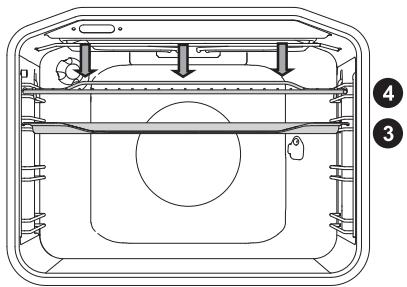
Lors de la cuisson au gril avec le grand gril, la résistance supérieure et la résistance du gril situées au plafond de la cavité du four fonctionnent.
Lors de la cuisson au gril, le chauffage supérieur et le chauffage du gril situés au plafond de la cavité du four fonctionneront.
Température maximale autorisée : 230 °C
Préchauffez le chauffage infrarouge (gril) pendant cinq minutes.
Surveillez le processus de cuisson en permanence. La viande peut brûler rapidement en raison de la température élevée.
La cuisson au gril convient pour une cuisson croustillante et faible en gras des saucisses, des morceaux de viande et du poisson (steaks, escalopes, darnes de saumon ou filets, etc.) ou du pain grillé.
Lorsque vous grillez directement sur la grille, enduisez-la d'huile pour empêcher la viande d'y coller et insérez-la dans le 4e guide. Insérez la lèchefrite dans le 1er ou le 2e guide. Lorsque vous grillez dans un plat allant au four, assurez-vous qu'il y a suffisamment de liquide dans le plat pour éviter de brûler. Retournez la viande pendant la cuisson.
Après la cuisson au gril, nettoyez le four, les accessoires et les ustensiles.
Tableau de cuisson au gril - petit gril
| Type of food | Weight (g) | Guide (from the bottom) | Temperature (℃) | Cooking time (minutes) |
| MEAT | ||||
| Beefsteak, rare | 180 g/piece | 3 | 230 | 15-20 |
| Pork neck fillet | 150 g/piece | 3 | 230 | 18-22 |
| Cutlets/chops | 280 g/piece | 3 | 230 | 20-25 |
| Grill sausages | 70 g/piece | 3 | 230 | 10-15 |
| TOASTED BREAD | ||||
| Toast | / | 4 | 230 | 3-6 |
| Open sandwiches | / | 4 | 230 | 3-6 |
Tableau de cuisson au gril - grand gril
| Type of food | Weight (g) | Guide (from the bottom) | Temperature (°C) | Cooking time (minutes) |
| MEAT | ||||
| Beefsteak, rare | 180 g/piece | 3 | 230 | 15-20 |
| Beefsteak, well done | 180 g/piece | 3 | 230 | 18-25 |
| Pork neck fillet | 150 g/piece | 3 | 230 | 20-25 |
| Cutlets/chops | 280 g/piece | 3 | 230 | 20-25 |
| Veal escalope | 140 g/piece | 3 | 230 | 20-25 |
| Grill sausages | 70 g/piece | 3 | 230 | 10-15 |
| Spam (Leberkäse) | 150 g/piece | 3 | 230 | 10-15 |
| FISH | ||||
| Salmon steaks/fillets | 200 g/piece | 3 | 230 | 15-25 |
| TOASTED BREAD | ||||
| Toast | / | 4 | 230 | 1-3 |
| Open sandwiches | / | 4 | 230 | 2-5 |
Lorsque vous grillez dans un plat allant au four, assurez-vous qu'il y a suffisamment de liquide dans le plat pour éviter de brûler. Retournez la viande pendant la cuisson.
Lorsque vous faites cuire de la truite, séchez le poisson avec un essuie-tout. Assaisonnez l'intérieur, enduisez l'extérieur d'huile et placez-le sur la grille. Ne retournez pas le poisson pendant la cuisson au gril.

Gardez toujours la porte du four fermée lorsque vous utilisez le chauffage du gril (infrarouge).
Le chauffage du gril, la grille et les autres accessoires du four deviennent très chauds pendant la cuisson au gril. Par conséquent, utilisez des gants de cuisine et des pinces à viande.

Dans ce mode de fonctionnement, le chauffage du gril et le ventilateur fonctionnent simultanément. Convient pour griller de la viande, du poisson et des légumes.
(Voir les descriptions et les conseils pour GRILL.)
| Type of food | Weight (g) | Guide level (from the bottom) | Temperature (℃) | Cooking time (min) |
| MEAT | ||||
| Duck | 2000 | 2 | 150-170 | 80-100 |
| Pork roast | 1500 | 2 | 160-170 | 60-85 |
| Pork shoulder | 1500 | 2 | 150-160 | 120-160 |
| Pork shank | 1000 | 2 | 150-160 | 120-140 |
| Half of chicken | 700 | 2 | 190-210 | 50-60 |
| Chicken | 1500 | 2 | 190-210 | 60-90 |
| FISH | ||||
| Trout | 200 g/piece | 2 | 200-220 | 20-30 |
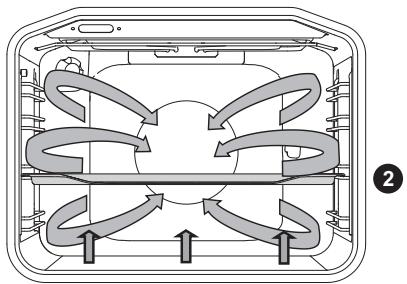
Le chauffage inférieur, le chauffage circulaire et le ventilateur d'air chaud fonctionneront. Convient pour cuire des pizzas, des tartes aux pommes et des cakes aux fruits.
(Voir les descriptions et conseils pour CHALEUR SUPÉRIEURE et INFÉRIEURE.)
| Type of food | Guide (from the bottom) | Temperature (℃) | Cooking time (minutes) |
| Cheesecake, short crust | 2 | 150-160 | 65-80 |
| Pizza * | 2 | 200-210 | 15-20 |
| Quiche Lorraine, shortcrust | 2 | 180-200 | 35-40 |
| Apple pie, leavened dough | 2 | 150-160 | 35-40 |
| Apple strudel, phyllo dough | 2 | 170-180 | 45-65 |
Le symbole * signifie que le four doit être préchauffé avec le système de cuisson sélectionné.
Rôtissage avec une sonde à viande (selon le modèle)
Dans ce mode, réglez la température souhaitée du cœur de l'aliment. Le four fonctionne jusqu'à ce que le cœur de l'aliment atteigne la température réglée. La température du cœur est mesurée par la sonde de température.
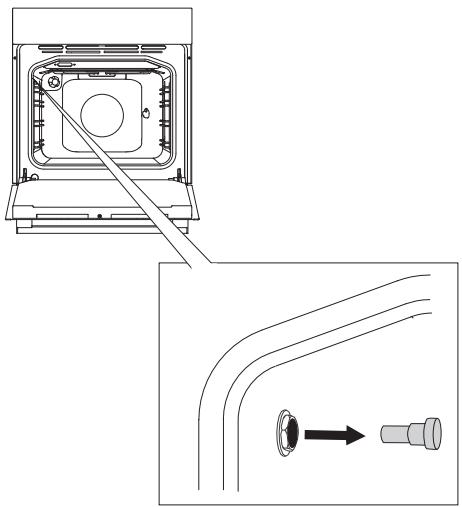
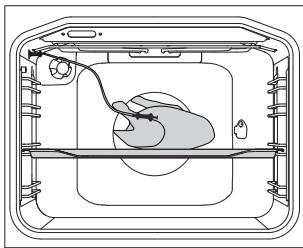
1 Retirez le capuchon métallique (la prise se trouve dans le coin supérieur avant de la paroi droite du four).
2 Connectez la fiche de la sonde à la prise et insérez la sonde dans l'aliment. "Prob." apparaîtra sur l'écran de droite pendant quelques secondes.
Si des réglages de minuterie étaient activés, ils seront annulés.
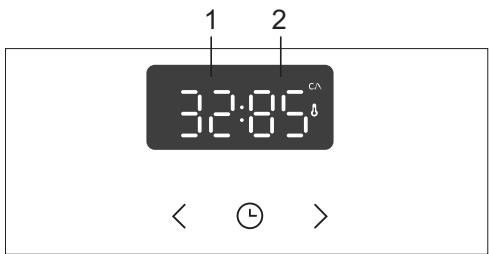
3 Tournez le SÉLECTEUR DE SYSTÈME DE CUISSON (air chaud et chauffage inférieur). Le symbole, la température préréglée, la température actuelle et la température réglée apparaîtront sur l'écran. Si la température de la sonde est inférieure à 30 °C, l'écran affichera "---: 80".
1 Température actuelle 2 Température réglée

Pendant la cuisson, la température actuelle et la température réglée dans le four seront affichées. La température peut être ajustée pendant le fonctionnement.
Lorsque la température du cœur réglée est atteinte, le processus de cuisson s'arrête. "End" apparaîtra sur l'écran.
Un signal sonore se fera entendre, que vous pouvez désactiver en touchant n'importe quelle touche. Après une minute, le signal sonore s'éteindra automatiquement.
L'horloge apparaîtra sur l'écran.
Après la cuisson, remettez le capuchon de protection de la prise de la sonde à viande.

Utilisez uniquement la sonde prévue pour votre four.
Assurez-vous que la sonde ne touche pas la résistance pendant la cuisson.
Après la cuisson, la sonde sera très chaude. Faites attention à ne pas vous brûler.
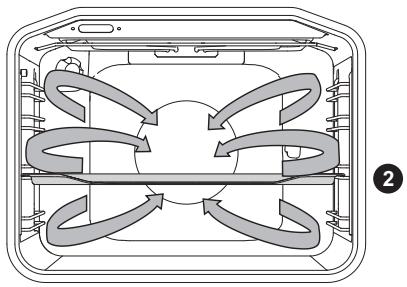
La résistance circulaire et le ventilateur fonctionneront. Le ventilateur installé dans la paroi arrière de la cavité du four assure une circulation constante de l'air chaud autour du rôti ou de la pâtisserie.
Rôtissage de la viande :
Utilisez un plat ou une lèchefrite en émail, en verre trempé, en terre cuite ou en fonte. Les plats en acier inoxydable ne conviennent pas car ils réfléchissent fortement la chaleur.
Ajoutez suffisamment de liquide pendant la cuisson pour éviter que la viande ne brûle. Retournez la viande pendant la cuisson. Le rôti restera plus juteux si vous le couvrez.
| Type of food | Weight (g) | Guide (from the bottom) | Temperature (℃) | Cooking time (minutes) |
| MEAT | ||||
| Pork roast, including skin | 1500 | 2 | 170-180 | 140-160 |
| Duck | 2000 | 2 | 160-170 | 120-150 |
| Goose | 4000 | 2 | 150-160 | 180-200 |
| Turkey | 5000 | 2 | 150-170 | 180-220 |
| Chicken breast | 1000 | 3 | 180-200 | 60-70 |
| Stuffed chicken | 1500 | 2 | 170-180 | 90-110 |
Cuisson des pâtisseries
Le préchauffage est recommandé.
Les biscuits et cookies peuvent être cuits sur des plaques peu profondes à plusieurs niveaux simultanément (2e et 3e).
Notez que le temps de cuisson peut varier même si les plaques utilisées sont identiques. Les biscuits sur la plaque supérieure peuvent être prêts plus tôt que ceux sur la plaque inférieure.
Placez toujours les plaques de cuisson sur la grille. Si vous utilisez la plaque de cuisson fournie, retirez la grille.
Pour une dorure uniforme, assurez-vous que les biscuits ont la même épaisseur.
| Type of food | Guide (from the bottom) | Temperature (°C) | Cooking time (minutes) |
| PASTRY | |||
| Sponge cake | 2 | 150-160 | 25-35 |
| Crumble cake | 2 | 160-170 | 25-35 |
| Fruit cake, sponge | 2 | 150-160 | 45-65 |
| Sponge roll* | 2 | 160-170 | 15-25 |
| Fruit cake, short crust | 2 | 160-170 | 50-70 |
| Apple strudel | 2 | 170-180 | 40-60 |
| Biscuits, short crust* | 2 | 150-160 | 15-25 |
| Biscuits, pressed* | 2 | 140-150 | 15-25 |
| Cookies, leavened | 2 | 170-180 | 20-35 |
| Cookies, phyllo dough | 2 | 170-180 | 20-30 |
| PASTRY - FROZEN | |||
| Apple and cottage cheese strudel | 2 | 170-180 | 50-70 |
| Pizza | 2 | 170-180 | 20-30 |
| Fried potatoes, oven-ready | 2 | 170-180 | 20-35 |
| Croquettes, oven-baked | 2 | 170-180 | 20-35 |
Le symbole * signifie que le four doit être préchauffé avec le mode de cuisson sélectionné.

N'insérez pas la lèchefrite dans le premier guide.
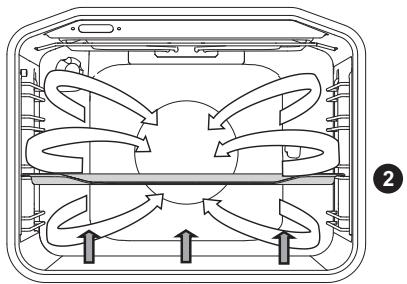
Ce mode est utilisé pour la cuisson de pâtisseries levées mais à faible montée, ainsi que pour la conservation de fruits et légumes. Utilisez le deuxième guide en partant du bas et une plaque de cuisson assez peu profonde pour permettre à l'air chaud de circuler sur le dessus du plat.
CONSERVATION
Préparez les aliments à conserver et les bocaux comme d'habitude. Utilisez des bocaux avec un joint en caoutchouc et un couvercle en verre. N'utilisez pas de bocaux avec des couvercles filetés ou en métal, ni de boîtes métalliques. Assurez-vous que les bocaux sont de taille égale, remplis du même contenu et bien fermés.
Versez 1 litre d'eau chaude (environ 70 °C) dans la plaque profonde et placez 6 bocaux d'un litre dans la plaque. Placez la plaque dans le four sur le deuxième guide.
Pendant la conservation, surveillez les aliments et faites cuire jusqu'à ce que le liquide dans les bocaux commence à frémir - lorsque des bulles apparaissent dans le premier bocal.
| Type of food | Guide (from the bottom) | Temperatu- re (℃) | Time to simmer (min) | Tempera- ture and time after the start of simmer | Resting time in the oven (min) |
| FRUIT | |||||
| Strawberries | 2 | 160-180 | 30-45 | / | 20-30 |
| Stone fruits | 2 | 160-180 | 30-45 | / | 20-30 |
| Fruit mush | 2 | 160-180 | 30-45 | / | 20-30 |
| VEGETABLES | |||||
| Pickled gherkins | 2 | 160-180 | 30-45 | / | 20-30 |
| Beans/carrots | 2 | 160-180 | 30-45 | 120°C, 45-60 min | 20-30 |
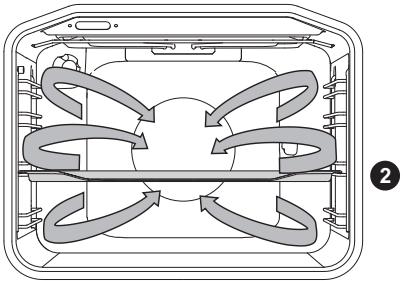
La résistance circulaire et le ventilateur fonctionneront. Le ventilateur installé dans la paroi arrière de la cavité du four assure une circulation constante de l'air chaud autour du rôti ou de la pâtisserie.
| Type of food | Guide (from the bottom) | Temperature (°C) | Cooking time (min.) |
| MEAT | |||
| Pork roast, 1 kg | 2 | 180 | 140-160 |
| Pork roast, 2 kg | 2 | 180 | 150-180 |
| Beef roast, 1 kg | 2 | 190 | 120-140 |
| FISH | |||
| Whole fish, 200 g/piece | 2 | 180 | 40-50 |
| Fish fillet, 100 g/piece | 2 | 190 | 25-35 |
| PASTRY | |||
| Piped cookies | 2 | 160 | 20-25 |
| Small cupcakes | 2 | 170 | 25-35 |
| Sponge roll | 2 | 170 | 25-30 |
| Fruit cake, short crust | 2 | 170 | 55-65 |
| GRATINS | |||
| Potatoes au gratin | 2 | 170 | 40-50 |
| Lasagne | 2 | 180 | 40-50 |
| FROZEN FOOD | |||
| French fries, 1 kg | 2 | 200 | 25-40 |
| Chicken nuggets, 0.7 kg | 2 | 200 | 25-35 |
| Fish sticks, 0.6 kg | 2 | 200 | 20-30 |

N'insérez pas la plaque de cuisson profonde dans le premier guide.
Dans ce mode, l'air circule sans qu'aucun élément chauffant ne fonctionne.
Les aliments adaptés à la décongélation comprennent les gâteaux avec de la crème épaisse ou de la crème au beurre, les gâteaux et pâtisseries, le pain et les petits pains, et les fruits surgelés.
Dans la plupart des cas, il est recommandé de retirer les aliments de leur emballage (n'oubliez pas de retirer les attaches ou clips métalliques).
À mi-temps de la décongélation, les morceaux doivent être retournés, remués et séparés s'ils étaient congelés ensemble.

Assurez-vous de débrancher l'appareil de l'alimentation électrique et d'attendre qu'il refroidisse.
Les enfants ne doivent pas nettoyer l'appareil ni effectuer des tâches de maintenance sans une supervision appropriée.
Finition aluminium
Nettoyez la finition aluminium avec des nettoyants liquides non abrasifs conçus pour ces surfaces. Appliquez le nettoyant sur un chiffon humide et nettoyez la surface. Ensuite, rincez la surface à l'eau. N'appliquez pas le nettoyant directement sur la finition aluminium.
N'utilisez pas de nettoyants abrasifs ni d'éponges abrasives.
Remarque : la surface ne doit pas entrer en contact avec les sprays de nettoyage pour four, car cela peut entraîner des dommages visibles et permanents.
Plaque en acier inoxydable sur la face avant du boîtier
Selon le modèle)
Nettoyez cette surface uniquement avec un détergent doux (eau savonneuse) et une éponge douce qui ne rayera pas la finition. N'utilisez pas de nettoyants abrasifs ni de nettoyants contenant des solvants, car ils pourraient endommager la finition du boîtier.
Surfaces laquées et pièces en plastique
Selon le modèle)
Ne nettoyez pas les boutons, les poignées de porte, les autocollants et les plaques signalétiques avec des nettoyants abrasifs ou des matériaux abrasifs, des nettoyants à base d'alcool ou de l'alcool. Enlevez immédiatement toute tache avec un chiffon doux non abrasif et un peu d'eau, afin d'éviter d'endommager la surface.
Vous pouvez également utiliser des nettoyants et des matériaux de nettoyage destinés à ces surfaces, conformément aux instructions de leurs fabricants respectifs.

Les surfaces revêtues d'aluminium ne doivent pas entrer en contact avec les sprays de nettoyage pour four, car cela peut entraîner des dommages visibles et permanents.
NETTOYAGE CONVENTIONNEL DU FOUR
Vous pouvez utiliser la procédure de nettoyage standard pour éliminer la saleté tenace dans le four (à l'aide de nettoyants ou d'un spray pour four). Après un tel nettoyage, rincez soigneusement les résidus de nettoyant.
Nettoyez le four et les accessoires après chaque utilisation pour empêcher la saleté de brûler sur la surface. Le moyen le plus simple d'éliminer la graisse est d'utiliser de l'eau savonneuse tiède pendant que le four est encore chaud.
Pour la saleté et la crasse tenaces, utilisez des nettoyants pour four conventionnels. Rincez soigneusement le four à l'eau claire pour éliminer tout résidu de nettoyant.
N'utilisez jamais de nettoyants agressifs, de nettoyants abrasifs, d'éponges abrasives, de détachants ou de produits antirouille, etc.
Nettoyez les accessoires (plaques de cuisson, lèchefrites, grilles, etc.) à l'eau chaude et avec un détergent.
Le four, la cavité du four et les plaques de cuisson sont recouverts d'un émail spécial qui offre une surface lisse et résistante. Cet émail spécial facilite le nettoyage à température ambiante.
UTILISATION DE LA FONCTION AQUA CLEAN POUR NETTOYER LE FOUR
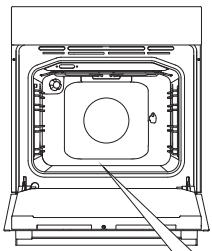
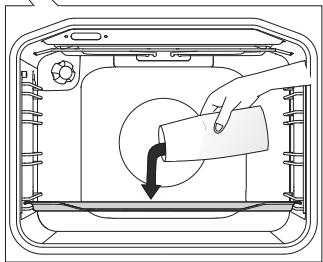
1. Tournez le bouton du sélecteur de mode de cuisson sur Aqua Clean. 2. Réglez le bouton de température sur 70 °C.
Versez 0,6 litre d'eau dans un plat en verre ou un plat peu profond et insérez-le dans le guide inférieur.
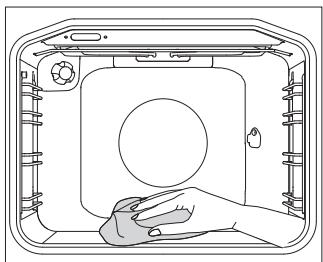
Après 30 minutes, les résidus alimentaires sur les parois émaillées du four auront ramolli et pourront être facilement nettoyés avec un chiffon humide.

Utilisez le système Aqua Clean lorsque le four a complètement refroidi.
RETRAIT ET NETTOYAGE DES GRILLES MÉTALLIQUES ET DES GUIDES TÉLESCOPIQUES
Utilisez uniquement des nettoyants conventionnels pour nettoyer les guides.
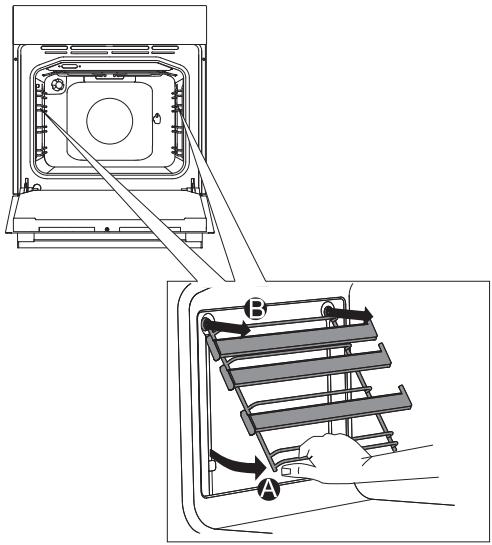
A. Tenez les guides par le côté inférieur et tirez-les vers le centre de la cavité du four.
B. Retirez-les des ouvertures en haut.
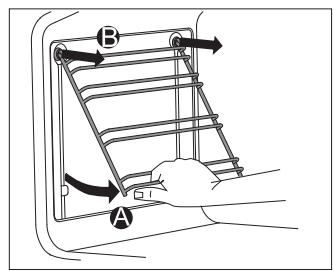

Ne nettoyez pas les guides télescopiques au lave-vaisselle.
INSTALLATION DES INSERTS CATALYTIQUES
Utilisez uniquement des nettoyants conventionnels pour nettoyer les guides.
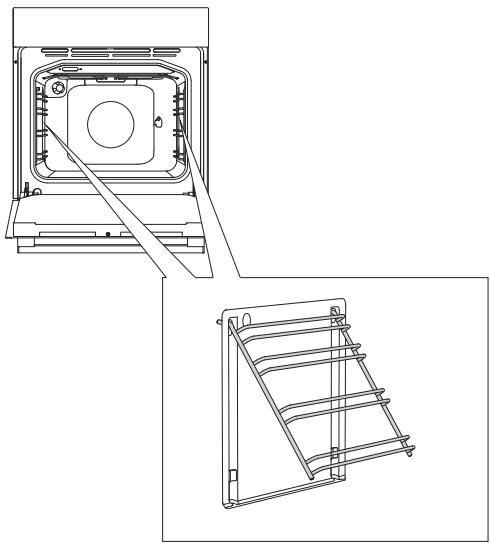
Retirez les grilles métalliques ou les guides télescopiques.
1 Montez les guides sur l'insert catalytique.
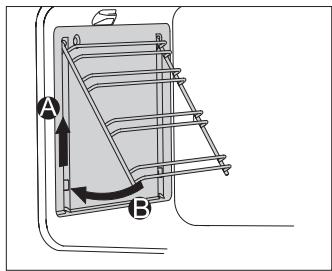
2 Accrochez les inserts avec les guides à l'aide des trous prévus, puis tirez vers le haut.
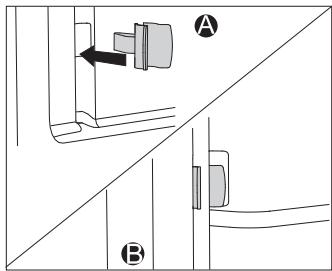
Lors de l'installation de guides entièrement extractibles avec inserts catalytiques, insérez une extrémité des verrous à encliquetage fournis dans les ouvertures en bas de la paroi de la cavité du four et insérez l'autre extrémité des verrous dans les guides.
Le but des verrous à encliquetage est de maintenir les guides plus fermement en place.

Ne lavez pas les inserts catalytiques au lave-vaisselle.
RETRAIT ET INSERTION DE LA PORTE DU FOUR
(selon le modèle)
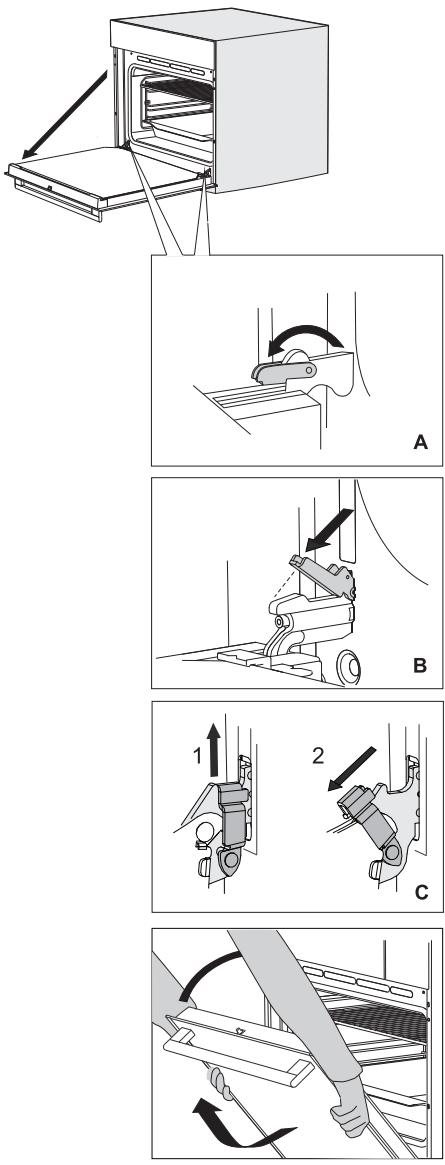
1 Tout d'abord, ouvrez complètement la porte (à fond). 2 A Faites pivoter les butées complètement vers l'arrière (en cas de fermeture conventionnelle). B Si l'appareil est équipé du système GentleClose, rabattez les loquets de la porte à un angle de 90° (Figure 2). C Si l'appareil est équipé du système GentleClose, soulevez légèrement les loquets de la porte et tirez-les vers vous.
3 Fermez lentement la porte jusqu'à ce que les loquets soient alignés avec les fentes. Soulevez légèrement la porte et retirez-la des deux fentes de charnière sur l'appareil.
Pour remettre la porte, suivez l'ordre inverse. Si la porte ne s'ouvre ou ne se ferme pas correctement, assurez-vous que les encoches sur les charnières sont alignées avec les logements de charnière.

Lors de la remise en place de la porte, assurez-vous toujours que les dispositifs de retenue des charnières sont correctement placés dans les logements de charnière pour éviter une fermeture soudaine de la charnière principale qui est reliée à un ressort principal puissant. Si le ressort principal est engagé, il y a un risque de blessure.
VERROU DE PORTE (selon le modèle)
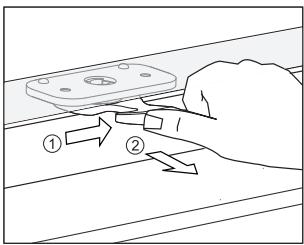
Pour l'ouvrir, poussez-le doucement vers la droite avec votre pouce et tirez la porte vers l'extérieur en même temps.
Lorsque la porte du four est fermée, le verrou de porte revient automatiquement à sa position initiale.
DÉSACTIVATION ET ACTIVATION DU VERROU DE PORTE
Le four doit être complètement refroidi.
1 Ouvrez d'abord la porte du four.
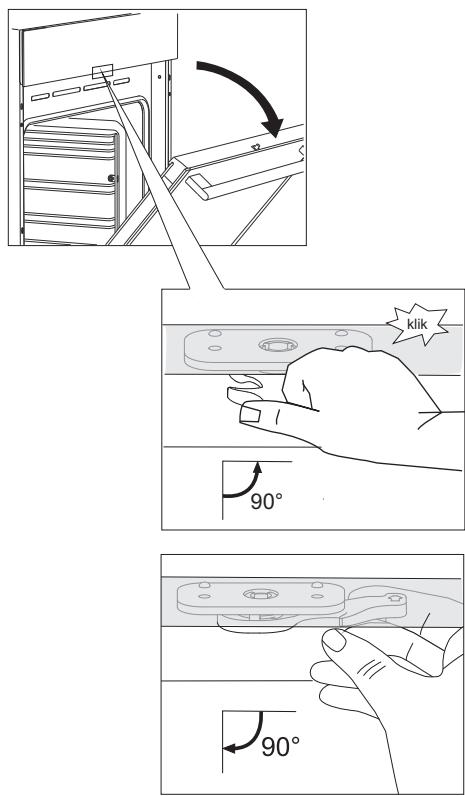
Poussez la serrure de la porte vers la droite à 90° avec votre pouce jusqu'à ce que vous sentiez un clic. La serrure de la porte n'est pas désactivée.
3 Pour réactiver la serrure de la porte, ouvrez la porte du four et utilisez l'index de votre main droite pour tirer le levier vers vous.
FERMETURE DOUCE DE LA PORTE (selon le modèle)
La porte du four est équipée d'un système qui amortit la force de fermeture de la porte à partir d'un angle de 75 degrés. Il permet une fermeture simple, silencieuse et douce de la porte. Une légère poussée (jusqu'à un angle de 15 degrés par rapport à la position fermée) suffit pour que la porte se ferme automatiquement et en douceur.

Si la force appliquée pour fermer la porte est trop forte, l'effet du système est réduit ou le système est contourné pour des raisons de sécurité.
RETRAIT ET INSERTION DE LA VITRE DE LA PORTE DU FOUR
La vitre de la porte du four peut être nettoyée de l'intérieur, mais elle doit d'abord être retirée. Retirez la porte du four (voir le chapitre "Retrait et remplacement de la porte du four").
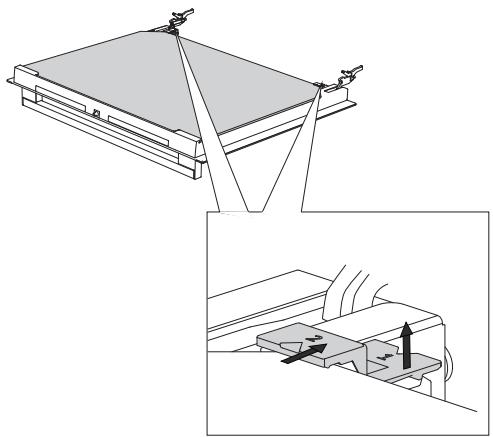
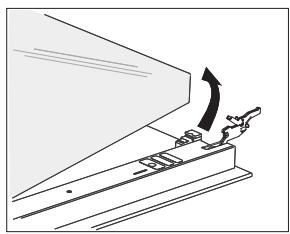

1 Soulevez légèrement les supports sur les côtés gauche et droit de la porte (repère 1 sur le support) et tirez-les loin de la vitre (repère 2 sur le support). 2 Tenez la vitre par le bord inférieur ; soulevez-la légèrement pour qu'elle ne soit plus fixée au support ; puis retirez-la. 3 Pour retirer la troisième vitre (uniquement sur certains modèles), soulevez-la et retirez-la. Retirez également les joints en caoutchouc sur la vitre. Pour remettre la vitre en place, suivez l'ordre inverse. Les repères (demi-cercle) sur la porte et la vitre doivent se chevaucher.
REMPLACEMENT DE L'AMPOULE
L'ampoule est un consommable et n'est donc pas couverte par la garantie. Avant de changer l'ampoule, retirez les plateaux, la grille et les guides.
(Lampe halogène : G9, 25 W, 230 V ; ampoule standard E14, 25 W, 230 V)
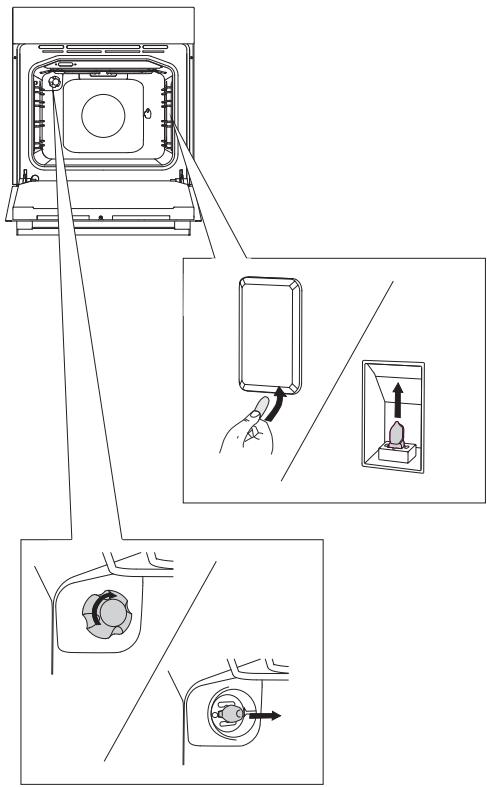
Utilisez un tournevis plat pour libérer le couvercle de l'ampoule et le retirer. Retirez l'ampoule.

Faites attention à ne pas endommager l'émail.
Dévissez le couvercle de l'ampoule et retirez l'ampoule.

Utilisez une protection pour éviter les brûlures.
TABLEAU DE DÉPANNAGE
| Problem/error | Cause |
| There is no response of the sensors; the display is frozen. | Disconnect the appliance from the power mains for a few minutes (undo the fuse or switch off the main switch); then, reconnect the appliance and switch it on. |
| The main fuse in your home trips often. | Call a service technician. |
| The oven lighting does not work. | The process of changing the light bulb is described in the chapter Cleaning and Maintenance. |
| The pastry is underdone. | Did you choose the right temperature and heating system? Is the oven door closed? |
Si les problèmes persistent malgré le respect des conseils ci-dessus, faites appel à un technicien agréé. Les réparations ou toute réclamation sous garantie résultant d'une connexion ou d'une utilisation incorrecte de l'appareil ne seront pas couvertes par la garantie. Dans ce cas, l'utilisateur prendra en charge les frais de réparation.

Avant la réparation, débranchez l'appareil du secteur (en retirant le fusible ou en débranchant la fiche de la prise murale).
L'emballage est fabriqué à partir de matériaux respectueux de l'environnement qui peuvent être recyclés, éliminés ou détruits sans danger pour l'environnement. À cette fin, les matériaux d'emballage sont étiquetés de manière appropriée.
Le symbole sur le produit ou son emballage indique que le produit ne doit pas être traité comme un déchet ménager normal. Le produit doit être déposé dans un centre de collecte agréé pour le traitement des déchets d'équipements électriques et électroniques.
Une élimination correcte du produit contribuera à prévenir les effets négatifs sur l'environnement et la santé humaine qui pourraient survenir en cas d'élimination incorrecte du produit. Pour des informations détaillées sur l'élimination et le traitement du produit, veuillez contacter l'organisme municipal compétent en charge de la gestion des déchets, votre service d'élimination des déchets ou le magasin où vous avez acheté le produit.
Nous nous réservons le droit de modifier les instructions d'utilisation et de corriger toute erreur éventuelle.
- INSTRUCTIONS DÉTAILLÉES
- SIMPLICITÉ
- NOUS VOUS REMERCIONS DE VOTRE
- LISEZ ATTENTIVEMENT LES INSTRUCTIONS ET CONSERVEZ-LES POUR RÉFÉRENCE FUTURE
- AVANT DE BRANCHER L'APPAREIL
- LE FOUR ÉLECTRIQUE
- (DESCRIPTION DU FOUR ET DE L'ÉQUIPEMENT - SELON LE MODÈLE)
- VOYANTS DE CONTRÔLE
- GUIDES DE FIL
- COULISSES TÉLESCOPIQUES
- INTERRUPTEUR DE PORTE DU FOUR
- VENTILATEUR DE REFROIDISSEMENT
- ÉQUIPEMENT ET ACCESSOIRES DU FOUR
- INFORMATIONS SUR L'APPAREIL - PLAQUE SIGNALÉTIQUE (SELON LE MODÈLE)
- UNITÉ DE COMMANDE
- AVANT LA PREMIÈRE UTILISATION DE L'APPAREIL
- ALLUMAGE DE L'APPAREIL POUR LA PREMIÈRE FOIS
- RÉGLAGE DE L'HORLOGE
- MODIFICATION DU RÉGLAGE DE L'HORLOGE
- ÉTAPES DE LA CUISSON
- PROCESSUS (1-6)
- ÉTAPE 1 : CHOIX DU SYSTÈME DE CUISSON
- ÉTAPE 2 : CHOIX DES RÉGLAGES
- RÉGLAGE DE LA TEMPÉRATURE DE CUISSON
- ÉTAPE 3 : FONCTIONS DE MINUTERIE
- RÉGLAGE DU TEMPS DE CUISSON
- RÉGLAGE DU DÉPART DIFFÉRÉ
- RÉGLAGE DU MINUTEUR
- ÉTAPE 4 : SÉLECTION DES FONCTIONS/EXTRAS SUPPLÉMENTAIRES
- SÉCURITÉ ENFANTS ! (3 S < ET >)
- RÉGLAGE DU VOLUME DU SIGNAL SONORE (5 S
- RÉGLAGE DE LA LUMINOSITÉ DE L'ÉCRAN (5 S >)
- ÉCRAN - MODE NUIT
- VEILLE
- ÉCLAIRAGE DU FOUR
- FONCTION ADAPTATIVE
- RÉINITIALISATION DE LA FONCTION ADAPTATIVE - RÉGLAGES D'USINE
- ÉTAPE 5 : DÉMARRER LA CUISSON
- ÉTAPE 6 : TERMINER LA CUISSON ET ÉTEINDRE LE FOUR
- DESCRIPTIONS DES SYSTÈMES (MODES DE CUISSON) ET TABLEAUX DE CUISSON
- RÔTISSAGE DE LA VIANDE
- CUISSON DES PÂTISSERIES
- RÔTISSAGE AVEC UNE SONDE À VIANDE (SELON LE MODÈLE)
- CONSERVATION
- FINITION ALUMINIUM
- PLAQUE EN ACIER INOXYDABLE SUR LA FACE AVANT DU BOÎTIER
- SURFACES LAQUÉES ET PIÈCES EN PLASTIQUE
- NETTOYAGE CONVENTIONNEL DU FOUR
- UTILISATION DE LA FONCTION AQUA CLEAN POUR NETTOYER LE FOUR
- RETRAIT ET NETTOYAGE DES GRILLES MÉTALLIQUES ET DES GUIDES TÉLESCOPIQUES
- INSTALLATION DES INSERTS CATALYTIQUES
- RETRAIT ET INSERTION DE LA PORTE DU FOUR
- VERROU DE PORTE (SELON LE MODÈLE)
- DÉSACTIVATION ET ACTIVATION DU VERROU DE PORTE
- FERMETURE DOUCE DE LA PORTE (SELON LE MODÈLE)
- RETRAIT ET INSERTION DE LA VITRE DE LA PORTE DU FOUR
- REMPLACEMENT DE L'AMPOULE
- TABLEAU DE DÉPANNAGE
Marque : GORENJE
Modèle : BO76SYW
Catégorie : Four électrique