
DOSF6920N1 - Four encastrable SMEG - Notice d'utilisation et mode d'emploi gratuit
Retrouvez gratuitement la notice de l'appareil DOSF6920N1 SMEG au format PDF.


| Type de produit | Four encastrable |
| Marque | SMEG |
| Modèle | DOSF6920N1 |
| Dimensions (L x H x P) | 595 x 595 x 548 mm |
| Poids | Environ 35 kg |
| Alimentation | 220-240 V ~ 50/60 Hz |
| Puissance totale | 3000 W (estimation) |
| Capacité du four principal | 70 L (estimation) |
| Capacité du four auxiliaire | 30 L (estimation) |
| Fonctions de cuisson principales | Statique, Gril, Chaleur tournante, Turbo, Circulaire, Sole, Gril ventilé, Petit gril, Décongélation, Levée, Shabbat, Programmes automatiques |
| Nettoyage assisté | Vapor Clean (nettoyage à la vapeur) |
| Éclairage intérieur | Ampoule halogène 40 W |
| Sécurité | Arrêt automatique de la cuisson, porte à ouverture sécurisée, verrouillage des commandes (Shabbat) |
| Pièces détachées | Disponibles auprès du service après-vente SMEG |
| Réparabilité | Indice de réparabilité non communiqué, pièces disponibles |
| Accessoires fournis | Grilles, lèchefrite, plat profond, support de plat |
| Informations générales | Notice d'utilisation disponible en plusieurs langues, manuel en ligne |
FOIRE AUX QUESTIONS - DOSF6920N1 SMEG
Questions des utilisateurs sur DOSF6920N1 SMEG
0 question sur cet appareil. Repondez a celles que vous connaissez ou posez la votre.
Poser une nouvelle question sur cet appareil
Téléchargez la notice de votre Four encastrable au format PDF gratuitement ! Retrouvez votre notice DOSF6920N1 - SMEG et reprennez votre appareil électronique en main. Sur cette page sont publiés tous les documents nécessaires à l'utilisation de votre appareil DOSF6920N1 de la marque SMEG.
MODE D'EMPLOI DOSF6920N1 SMEG
Contents
1 Instructions 40
1.1 General safety instructions 40
1.2 Manufacturer liability 41
1.3 Appliance purpose 41
1.4 Disposal 41
1.5 Identification plate 42
1.6 This user manual 42
1.7 How to read the user manual 42
2 Description 43
2.1 General Description 43
2.2 Control panel 44
2.3 5 Other parts 44
2.4 Available accessories 45
3 Use 46
3.1 Instructions 46
3.2 First use 46
3.3 Using the accessories 46
3.4 Auxiliary oven 47
3.5 Main oven with display 47
3.6 Cooking advice 54
3.7 Special functions and automatic programs 55
3.8 Secondary menu 60
4 Cleaning and maintenance 64
4.1 Instructions 64
4.2 Cleaning the surfaces 64
4.3 Ordinary daily cleaning 64
4.4 Food stains or residues 64
4.5 Removing the door 64
4.6 Cleaning the door glazing 65
4.7 Removing the internal glass panels 65
4.8 Cleaning the inside of the oven 66
4.9 Vapor Clean: Assisted oven cleaning (on some models only) 67
4.10 Extraordinary maintenance 69
5 Installation 71
5.1 Electrical connection 71
5.2 Cable replacement 72
5.3 Positioning 72
1 Instructions
1.1 General safety instructions
Risk of personal injury
- During use the appliance and its accessible parts become very hot.
- Never touch the heating elements during use.
- Keep children under eight years of age at a safe distance if they are not constantly supervised.
- Children must never play with the appliance.
- Never rest metallic objects such as knives, forks, spoons and lids on the appliance during use.
- Switch the appliance off immediately after use.
- Never try to put out a fire or flames with water: turn off the appliance and smother the flames with a fire blanket or other appropriate cover.
- The appliance must never be cleaned by unsupervised children.
-
Have qualified personnel carry out installation and assistance interventions according to the standards in force.
-
Do not modify this appliance.
- Do not insert pointed metal objects (cutlery or utensils) into the slots in the appliance.
- Do not try to repair the appliance yourself or without the intervention of a qualified technician.
- If the power supply cable is damaged, contact technical support immediately and they will replace it.
Risk of damaging the appliance
- Do not use abrasive or corrosive detergents on glass parts (e.g. powder products, stain removers and metallic sponges).
- Use wooden or plastic utensils.
- Do not seat on the appliance.
- Do not use steam jets for cleaning the appliance.
- Do not obstruct ventilation openings and heat dispersal slots.
- Never leave the appliance unattended during cooking operations where fats or oils could be released.
- Never leave objects on the cooking surface.
- Do not use the appliance to heat rooms for any reason.
For this appliance
- Ensure that the appliance is switched off before replacing the bulb.
- Do not rest any weight or sit on the open door of the appliance.
Take care that no objects are stuck in the doors.
1.2 Manufacturer liability
The manufacturer declines all liability for damage to persons or property caused by:
- use of the appliance other than the one envisaged;
- non-observation of the user manual provisions;
- tampering with any part of the appliance;
- use of non-original spare parts.
1.3 Appliance purpose
- This appliance is intended for cooking food in the home environment. Every other use is considered improper.
- This appliance may be used by children aged at least 8 and by people of reduced physical and mental capacity, or lacking in experience in the use of electrical appliances, as long they are supervised or instructed by adults who are responsible for their safety.
- The appliance is not designed to operate with external timers or with remote-control systems.
1.4 Disposal

This appliance must be disposed of separately from other waste (Directives 2002/95/EC, 2002/
96/EC, 2003/108/EC). The appliance does not contain substances in quantities sufficient to be considered hazardous to health and the environment, in accordance with current European directives.
To dispose of the appliance:
- Cut the power supply cable and remove it along with the plug.

Power voltage Danger of electrocution
- Disconnect the main power supply.
-
Disconnect the power cable from the electrical system.
-
Consign the appliance to the appropriate selective collection centres for electrical and electronic equipment waste, or deliver it back to the retailer when purchasing an equivalent product, on a one for one basis.
Instructions
Our appliances are packed in non-polluting and recyclable materials.
- Consign the packing materials to the appropriate selective collection centres.

Plastic packaging Danger of suffocation
- Do not leave the packaging or any part of it unattended.
- Do not let children play with the packaging plastic bags.
1.5 Identification plate
The identification plate bears the technical data, serial number and brand name of the appliance. Do not remove the identification plate for any reason.
1.6 This user manual
This user manual is an integral part of the appliance and must therefore be kept in its entirety and in an accessible place for the whole working life of the appliance.
Read this user manual carefully before using the appliance.
1.7 How to read the user manual
This user manual uses the following reading conventions:
Instructions

General information on this user manual, on safety and final disposal.
Description

Description of the appliance and its accessories.
Use

Information on the use of the appliance and its accessories, cooking advice.
Cleaning and maintenance

Information for proper cleaning and maintenance of the appliance.
Installation

Information for the qualified technician: installation, operation and inspection.

Safety instructions

Information

Advice
-
Use instruction sequence.
-
Single use instruction.
2 Description
2.1 General Description
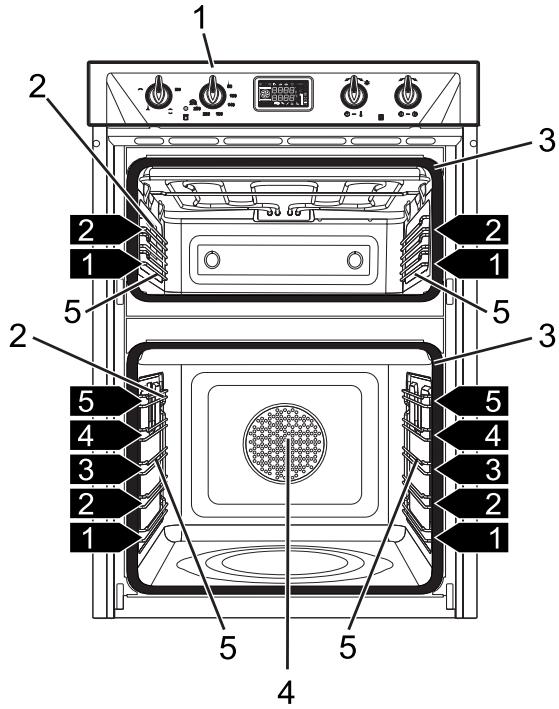
1 Control panel
2 Oven light
3 Oven seal
4 Main oven fan
5 Rack/tray support frames
1,2,3... Frame shelf
2.2 Control panel
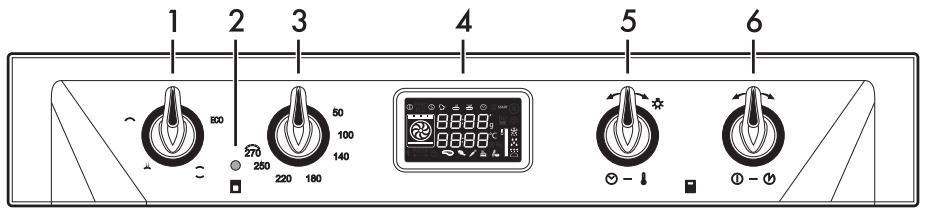
1 Auxiliary oven function knob
The oven's various functions are suitable for different cooking modes. After selecting the required function, set the cooking temperature using the temperature knob.
2 Auxiliary oven thermostat indicator light
The thermostat indicator light remains lit when the oven is heating up. Once the oven has reached the selected temperature the indicator light switches off.
3 Auxiliary oven temperature knob
This knob allows you to select the cooking temperature.
Turn the knob clockwise to the required value, between the minimum and maximum settings.
4 Main oven display
Displays the current time, the selected cooking temperature and function and any time set.
5 Main oven temperature knob
This knob allows you to select the cooking time and temperature, set programmed cooking and the current time as well as turn the light inside the oven on and off.
6 Main oven function knob
This knob allows you to turn the appliance on and off and select the cooking function.
2.3 5 Other parts
Shelves
The appliance features shelves for positioning trays and racks at different heights. The insertion heights are indicated from the bottom upwards (see 2.1 General Description).
Cooling fan
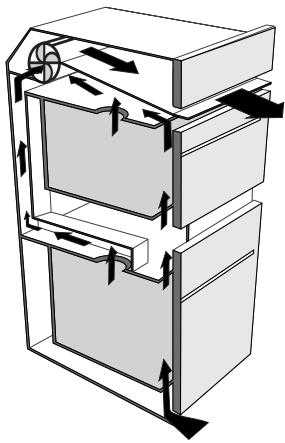
The fan cools the oven and comes into operation during cooking.
The fan causes a steady outflow of air from above the door which may continue for a brief period of time even after the appliance has been turned off.
Interior lighting
The oven light comes on when the door is opened or any function is selected.
Turn the temperature knob briefly to the right to activate or deactivate internal lighting.
2.4 Available accessories

Some models are not provided with all accessories.
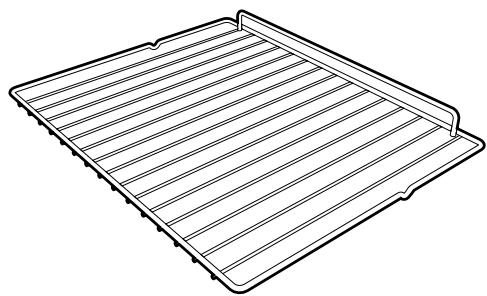
Racks
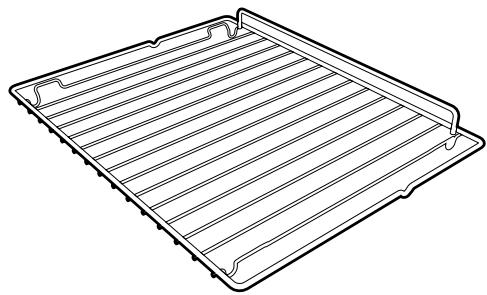
Useful for supporting containers with food during cooking.
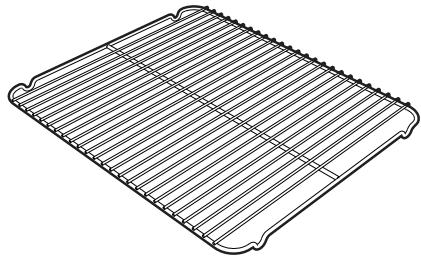
Tray rack
To be placed over the top of the oven tray; for cooking foods which may drip.
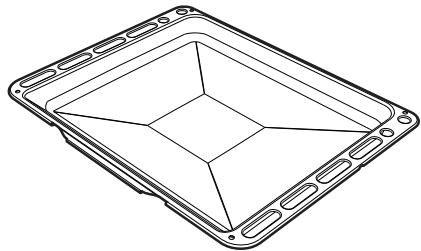
Deep tray
Useful for collecting fat from foods placed on the rack above and for cooking pies, pizzas and baked desserts.

The oven accessories intended to come into contact with food are made of materials that comply with the provisions of current legislation.

Original supplied and optional accessories can be requested to Authorised Assistance Centres. Use only original accessories supplied by the manufacturer.
3 Use
3.1 Instructions

High temperature inside the oven during use
Danger of burns
- Keep the oven door closed during cooking.
- Protect your hands wearing heat resistant gloves when moving food inside the oven.
- Do not touch the heating elements inside the oven.
- Do not pour water directly onto very hot trays.
- Do not allow children to get near the oven when it is in operation.

High temperature inside the oven during use
Danger of fire or explosion
- Do not spray any spray products near the oven.
- Do not use or leave flammable materials near the oven.
- Do not use plastic kitchenware or containers when cooking food.
- Do not put sealed tins or containers in the oven.
- Do not leave the oven unattended during cooking operations where fats or oils could be released.
- Remove all trays and racks which are not required during cooking.

Improper use Risk of damage to enamelled surfaces
- Do not cover the bottom of the cooking compartment with aluminium or tin foil sheets.
- If you wish to use greaseproof paper, place it so that it will not interfere with the hot air circulation inside the oven.
- Do not place pans or trays directly on the bottom of the cooking compartment.
- Do not pour water directly onto very hot trays.
3.2 First use
- Remove any protective film from the outside or inside of the appliance, including accessories.
- Remove any labels (apart from the technical data plate) from the accessories and from the cooking compartment.
- Remove and wash all the appliance accessories (see 4 Cleaning and maintenance).
- Heat the empty oven at the maximum temperature to burn off any residues left by the manufacturing process.
3.3 Using the accessories
Racks and trays
Racks and trays have to be inserted into the side guides until they come to a complete stop.
- The mechanical safety locks that prevent the rack from being taken out accidentally have to face downwards and towards the oven back.
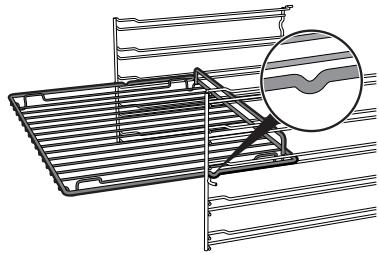
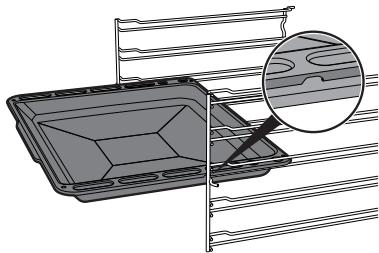

Gently insert racks and trays into the oven until they come to a stop.

Clean the trays before using them for the first time to remove any residues left by the manufacturing process.
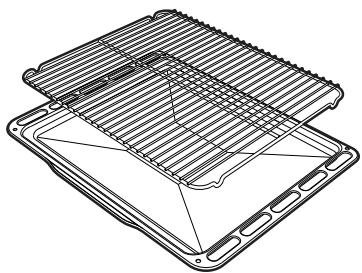
Tray rack
The tray rack has to be inserted into the tray. In this way fat can be collected separately from the food which is being cooked.
3.4 Auxiliary oven

The two ovens can be used at the same time, except for the Pyrolytic function.
To switch the auxiliary oven on:
- Select the cooking function using the function knob.
- Select the temperature using the temperature knob.
3.5 Main oven with display

The display only refers to the main oven. It has no control of the auxiliary oven.
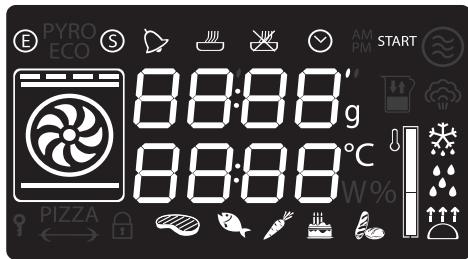

Clock indicator light

Minute minder timer indicator light

Timed cooking with delayed start indicator light

Timed cooking indicator light

Showroom indicator light

Eco logic indicator light
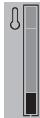
Temperature level reached
Operating modes
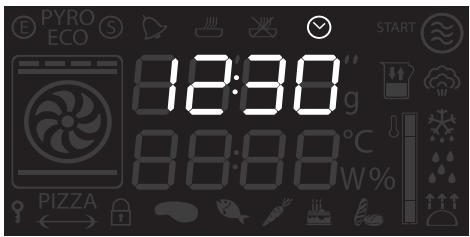
Stand-by: When no function is selected, the display shows the current time and the symbol.
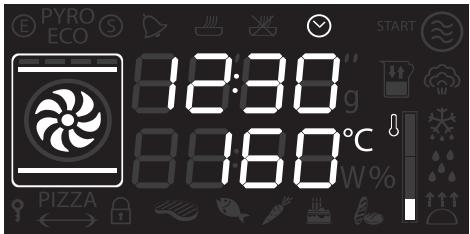
ON: When a function is activated, the display shows the parameters set such as temperature, duration and temperature reached.
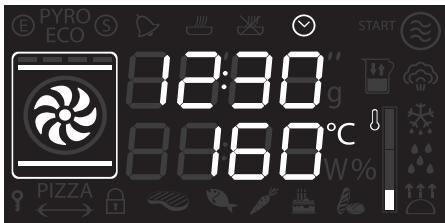
Each time the temperature knob is pressed during a function, the parameters will be cycled through in the following order. In all modes it is possible to modify the value by turning the temperature knob to the left or right. Keep the knob turned to produce a faster increase or decrease.

- Temperature
- Minute minder timer duration
- Function duration
- Programmed cooking duration (if timed cooking has been selected)
- Time display
Setting the time
On the first use, or after a power failure, will be flashing on the appliance's display. To be able to start any cooking function, the current time must be set.
- Turn the temperature knob to set the displayed time (keep the knob turned to produce a faster increase or decrease).
- Press the temperature knob.
- Turn the temperature knob to set the minutes (keep the knob turned to produce a faster increase or decrease).
- Press the temperature knob to finish adjustment.

It may become necessary to change the current time, for example for daylight saving time. From the stand-by position, keep the temperature knob turned to the right or left until the hours flash. It is not possible to change the time if the oven is ON.
Cooking functions
- Select a traditional cooking function with the function knob.
- Press the temperature knob if you wish to change the default temperature.
- Turn the knob to set the temperature.
- Press the function knob to start traditional cooking.
Preheating stage
In the combined and traditional functions, cooking itself is preceded by a preheating stage, which allows the oven to reach the cooking temperature more quickly.
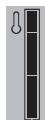
The temperature level reached indication flashes to indicate that this stage is in progress.
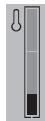
When the preheating stage is complete, temperature level reached indication will remain lit steadily and a buzzer sounds to indicate that the food can be placed inside the oven.

Cooking can be interrupted at any time by pressing and holding the function knob down for at least 3 seconds.
Functions list

Static
As the heat comes from above and below at the same time, this system is particularly suitable for certain types of food. Traditional cooking, also known as static cooking, is suitable for cooking just one dish at a time. Perfect for all types of roasts, bread and cakes, and in any case, particularly suitable for fatty meats such as goose and duck.

Grill
The heat coming from the grill element gives perfect grilling results above all for thin and medium thickness meat and, in combination with the rotisserie (where fitted), gives the food an even browning at the end of cooking. Perfect for sausages, spare ribs and bacon. This function enables large quantities of food, particularly meat, to be grilled evenly.

Lower element
The heat coming just from the bottom allows you to complete the cooking of foods that require a higher bottom temperature, without affecting their browning. Perfect for cakes, pies, tarts and pizzas.

Fan assisted
The operation of the fan, combined with traditional cooking, ensures consistent cooking even with complex recipes. Perfect for biscuits and cakes, even when simultaneously cooked on several levels. (For multiple-level cooking, we recommend using the 2^nd and 4^th shelves).

Fan with grill
The air produced by the fan softens the strong heatwave generated by the grill, grilling perfectly even very thick foods. Perfect for large cuts of meat (e.g. shin of pork).

Fan + bottom
The combination of the fan with just the lower heating element allows cooking to be completed more rapidly. This system is recommended for sterilising or for finishing off the cooking of foods which are already well-cooked on the surface, but not inside, which therefore need a little more heat. Perfect for any type of food.

Circulaire
The combination of the fan and the circulaire heating element (incorporated in the rear of the oven) allows you to cook different foods on several levels, as long as they need the same temperatures and type of cooking. Hot air circulation ensures instant and even distribution of heat. It will be possible, for instance, to cook fish, vegetables and biscuits simultaneously (on different levels) without odours and flavours mingling.

Turbo
The combination of fan assisted cooking and traditional cooking allows different foods to be cooked on several levels extremely quickly and efficiently, without odours and flavours mingling. Perfect for large volumes that call for intense cooking.

Small grill
Using only the heat released from the central element, this function allows you to grill small portions of meat and fish for making kebabs, toasted sandwiches and any types of grilled vegetable side dishes.
Minute minder

This function only activates the buzzer, without stopping cooking.

The minute minder can be activated both during cooking and when the appliance is in standby.
- Press the temperature knob once (twice if cooking is already in progress). The display shows 0000 and the indicator light flashes.
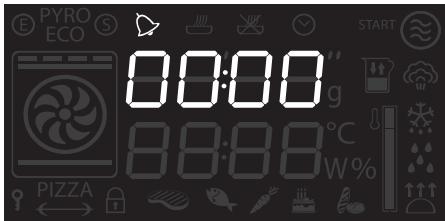
- Turn the knob to set the duration (from 1 minute to 4 hours). After a few seconds, the indicator light stops flashing and the countdown starts.
- Select the required cooking function and wait for the buzzer to sound, indicating that the cooking time is over. The indicator light flashes.
- Turn the knob to select another minute minder. Or else press the temperature knob to stop the buzzer.

You must set the value to zero to remove the minute minder.
Timed cooking

Timed cooking is the function which allows a cooking operation to be started and then ended after a specific length of time set by the user.

Activation of timed cooking cancels any minute minder timer which may previously have been set.
- After selecting a cooking function and temperature, press the temperature knob three times. The display shows 00:00 and the indicator light flashes.
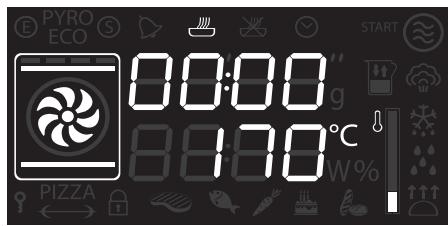
- Turn the temperature knob right or left to set the cooking duration from 00:01 to 12:59. Keep the knob turned to produce a faster increase or decrease.
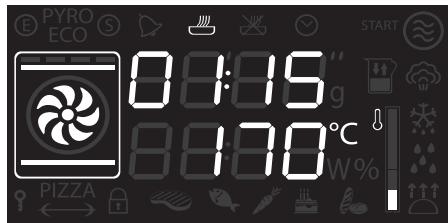
-
A few seconds after the required duration is set, the indicator light stops flashing and timed cooking starts.
-
At the end of the cooking time STOP appears on the display and a buzzer sounds that can be deactivated by pressing the temperature knob.
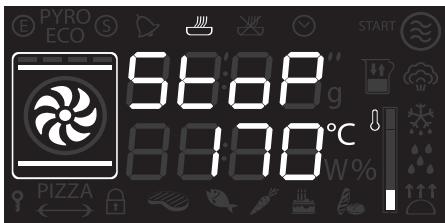

To select a further timed cooking, turn the temperature knob right or left again.

To extend the cooking time manually, press the temperature knob again. The appliance resumes its normal operation with the previously selected cooking settings.

Press and hold the function knob down to switch off the appliance.
Modifying the data set during timed cooking
During operation, it is possible to modify timed cooking duration:
- When the indicator light is steady and cooking is in progress inside the appliance, press the temperature knob twice. The indicator light starts flashing.
- Turn the temperature knob right or left to alter the pre-set cooking time.
Programmed cooking

Programmed cooking is the function which allows cooking to be stopped at an established time depending on the time set by the user, after which the oven will switch off automatically.
- After selecting a cooking function and temperature, press the temperature knob three times. The display shows 00:00 and the indicator light flashes.
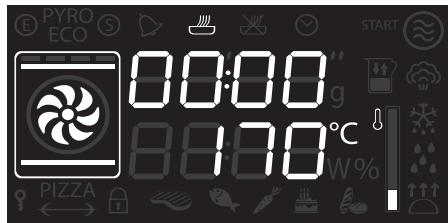
- Turn the knob right or left to set the cooking duration from 00:01 to 12:59. Keep the knob turned for a fast increase or decrease.
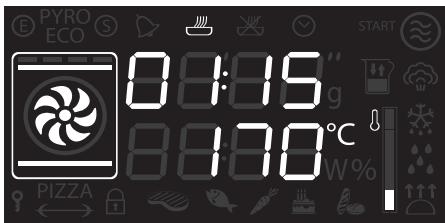
- Press the temperature knob a fourth time. The indicator light flashes. Turn the knob right or left to set the cooking end time.
- After a few seconds the indicator lights stop flashing. The appliance waits for the set start time.
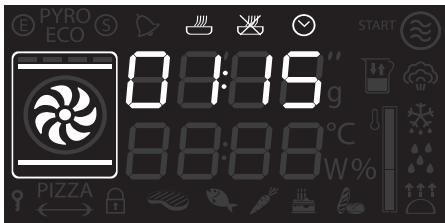
- At the end of the cooking time STOP appears on the display and a buzzer sounds that can be deactivated by pressing the temperature knob.
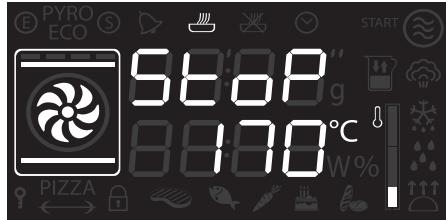

To extend the cooking time manually, press the temperature knob again. The appliance resumes its normal operation with the previously selected cooking settings.

Press and hold the function knob down to switch off the appliance.

For safety reasons, it is not possible to set the end of cooking time by itself without setting the cooking duration.
Modifying the data set during programmed cooking

After modifying the cooking duration, the end of cooking time must be re-set.
During operation, it is possible to modify programmed cooking duration:
- When the indicator lights are lit steadily and the appliance is waiting for cooking to start, press the temperature knob twice. The indicator light starts flashing.
- Turn the temperature knob right or left to alter the pre-set cooking time.
- Press the temperature knob again. The indicator light switches off and the indicator light starts flashing. The display shows the cooking end time.
- Turn the temperature knob right or left to delay the cooking end time.
- After a few seconds the indicator lights stop flashing and programmed cooking restarts its operation with the new settings.
3.6 Cooking advice
General advice
- Use a fan assisted function to achieve consistent cooking at several levels.
- It is not possible to shorten cooking times by increasing the temperature (the food could be overcooked on the outside and undercooked on the inside).
Advice for cooking meat
- Cooking times vary according to the thickness and quality of the food and to consumer taste.
- Use a meat thermometer when roasting meat, or simply press on the roast with a spoon. If it is hard, it is ready; If not, it needs another few minutes cooking.
Advice for cooking with the Grill and the Fan with grill
- Meat can be grilled even when it is put into the cold oven or into the preheated oven if you wish to change the effect of the cooking.
- With the Fan with grill function, we recommend that you preheat the oven before grilling.
We recommend placing the food at the centre of the rack.
Advice for cooking desserts/pastries and biscuits
- Use dark metal moulds: They help to absorb the heat better.
- The temperature and the cooking time depend on the quality and consistency of the dough.
- To check whether the dessert is cooked right through: At the end of the cooking time, put a toothpick into the highest point of the dessert. If the dough does not stick to the toothpick, the dessert is cooked.
- If the dessert collapses when it comes out of the oven, on the next occasion reduce the set temperature by about 10^ , selecting a longer cooking time if necessary.
Advice for defrosting and proving
- Place frozen foods without their packaging in a lidless container on the first shelf of the oven.
- Avoid overlapping the food.
- To defrost meat, use the rack placed on the second level and a tray on the first level. In this way, the liquid from the defrosting food drains away from the food.
- The most delicate parts can be covered with aluminium foil.
- For successful proving, a container of water should be placed in the bottom of the oven.
To save energy
- Stop cooking a few minutes before the time normally used. Cooking will continue for the remaining minutes with the heat which has accumulated inside the oven.
- Reduce any opening of the door to a minimum to avoid heat dispersal.
- Keep the inside of the appliance clean at all times.
- (Where fitted) When it is not being used, remove the pizza plate and put the cover back in its slot.
3.7 Special functions and automatic programs
Timed defrosting
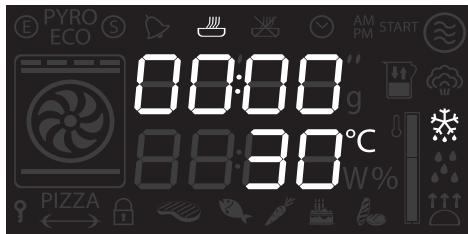
- Place the food inside the oven.
- Select the timed defrosting function, indicated by the symbol, using the function knob.
- Press the temperature knob to set the duration.
- Turn the knob to adjust the value (from 5 seconds to 99 minutes).
- Press the function knob to start defrosting.
- At the end, the word STOP will be displayed.
Proving
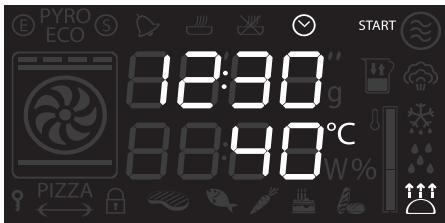

It is not possible to modify the temperature of the proving function.

For successful proving, a container of water should be placed in the bottom of the oven.
- Position the dough for proving on the second shelf.
- Press the function knob to select and activate proving.
- At the end of preheating, the text "START" flashes.
- Put the food to cook into the oven and press the function knob to start cooking.
Shabbat
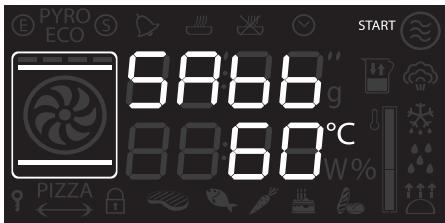

This function allows food to be cooked in accordance with the provisions of the Jewish religion day of rest.

This function results in the appliance operating in a particular way:
- Cooking can proceed indefinitely, it is not possible to set any time.
- No preheating will be performed.
- The cooking temperature which can be selected varies between 60 - 100^ C .
- The oven light remains turned off, any action such as opening the door or manually activating the oven does not turn the lamp on.
- The internal fan remains turned off.
- Knob illumination and audible prompts remain disabled.

After activating the Shabbat function the settings cannot be altered.
Any action on the knobs will produce no effect; only the function knob remains active to allow the appliance to be turned off.
- Press the function knob to select the Shabbat function.
- Press the temperature knob.
- Turn the temperature knob to change the re-heating time.
- Press the function knob to confirm the settings and start the Shabbat function.
- Once completed press and hold the function knob down for at least 3 seconds to turn the appliance off.
Defrosting by weight
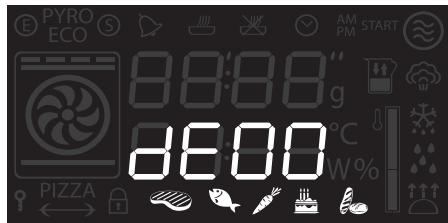

This function defrosts foods on the basis of the type and weight of the frozen product.
- Place the food inside the oven.
- Press the function knob to select defrosting by weight, marked by "dEOO" and the illuminated food symbols.
- Turn the function knob to select the type of food to defrost.
- Turn the temperature knob to select the weight (in grams) of the food to defrost.
- Press the function knob to confirm the parameters and start defrosting.
- At the end, the word STOP will be displayed.
Preset parameters:
| dE | Type | Weight (g) | Time (min) | |
| 01 | Meat | 500 | 105 | |
| 02 | Fish | 400 | 40 | |
| 03 | Fruit | 300 | 45 | |
| 04 | Bread | 300 | 20 | |
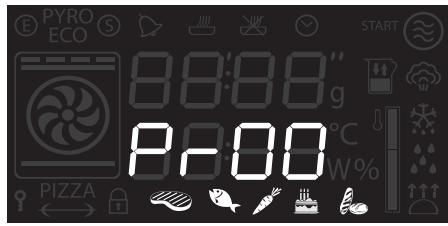
Automatic programs
The automatic cooking programs are divided by the type of food to be cooked.
- Press the function knob to select cooking with automatic programs.
- Turn the function knob to select the required program (see Automatic programs table).
Automatic programs table

The times indicated in the tables do not include the preheating times.

MEATS (01 - 05)
| Subcategory | Weight (g) | Level | Function | Temp. (°C) | Time (minutes) | |
| 01 | Roast beef | 1000 | 2 | Circulaire | 200 | 50 |
| 02 | Pork loin | 1000 | 2 | Turbo | 190 | 75 |
| 03 | Lamb | 1000 | 2 | Turbo | 190 | 100 |
| 04 | Veal | 1000 | 2 | Fan assisted | 190 | 65 |
| 05 | Roast chicken | 1000 | 2 | Turbo | 200 | 64 |

FISH (06-07)
| Subcategory | Weight (g) | Level | Function | Temp. (°C) | Time (minutes) | |
| 06 | Fresh fish | 500 | 2 | Fan assisted | 160 | 35 |
| 07 | Frozen fish | 500 | 2 | Circulaire | 160 | 45 |

VEGETABLES (08 - 10)
| Subcategory | Weight (g) | Level | Function | Temp. (°C) | Time (minutes) | |
| 08 | Mixed grilled | 500 | 4 | Grill | 250 | 25 |
| 09 | Roasted | 1000 | 2 | Circulaire | 200 | 45 |
| 10 | Roast potatoes | 1000 | 2 | Turbo | 220 | 40 |

DESSERTS (11 - 13)
| Subcategory | Weight (g) | Level | Function | Temp. (°C) | Time (minutes) | |
| 11 | Biscuits | 600 | 2 | Turbo | 160 | 18 |
| 12 | Muffins | 500 | 2 | Circulaire | 160 | 18 |
| 13 | Tart | 800 | 2 | Static | 170 | 40 |

BREAD - PIZZA - PASTA (14-20)
| Subcategory | Weight (g) | Level | Function | Temp. (°C) | Time (minutes) | |
| 14 | Leavened bread | 1000 | 2 | Circulaire | 200 | 30 |
| 15 | Pan baked pizza | 1000 | 1 | Fan assisted | 280 | 7 |
| 16 | Stone baked pizza | 500 | 1 | Fan assisted | 280 | 4 |
| 17 | Pasta bake | 200 | 1 | Static | 220 | 40 |
| 18 | Lasagne | 200 | 1 | Static | 230 | 35 |
| 19 | Paella | 500 | 2 | Fan assisted | 190 | 25 |
| 20 | Quiche | 1000 | 1 | Static | 200 | 40 |
3.8 Secondary menu
The appliance also has a drop-down secondary menu allowing the user to:
- Activate or deactivate Showroom mode (which disables all the heating elements so that only the control panel works).
- Activate or deactivate Low Power mode (Eco-Logic).
- (some models only) Activate or deactivate Keep Warm mode.
- Activate or deactivate light timing (Eco light).
With the appliance in Stand-By status
- Activate the internal light by turning the temperature knob quickly.
- Press and hold the temperature knob down for at least 5 seconds.
- Turn the temperature knob right or left to change the setting status (ON/OFF).
- Press the temperature knob to move to the next mode.
Showroom mode (for exhibitors only):
This mode allows the appliance to deactivate all heating elements, while keeping the control panel active.
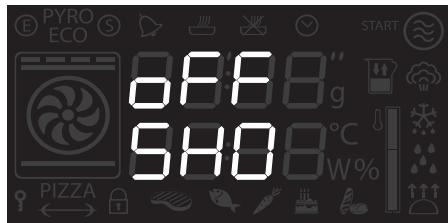
To use the appliance normally, set this mode to OFF.
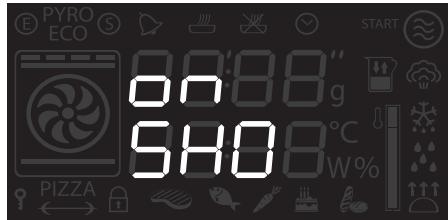

If the mode is active, the ⑤ indicator light lights up on the display.
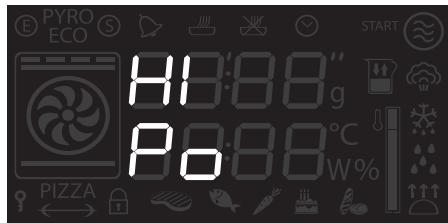
Low Power mode: This mode allows the appliance to limit the power used.
Indicated for use of multiple appliances at the same time on circuits with limited maximum power.
HI: normal power.
LO: low power.
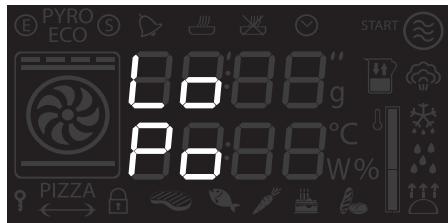

Activating low power mode means that preheating and cooking times may be extended.

If the mode is active, the ⑤ indicator light lights up on the display.
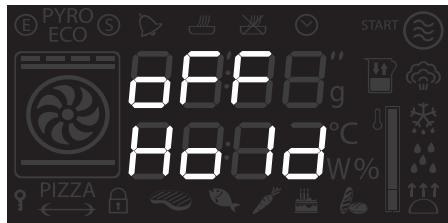
Keep Warm Mode (some models only):
This mode allows the appliance to keep cooked food warm (at low temperatures) for around an hour after cooking finishes with a cooking cycle for which a duration has been set (if this is not manually interrupted).
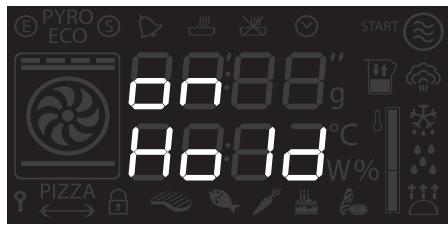
Light timing mode
For greater energy savings, the light is automatically deactivated one minute from the start of cooking.
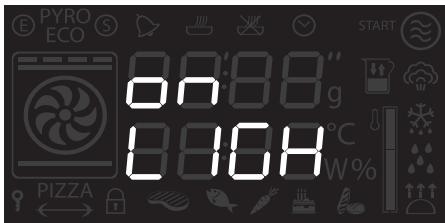
To stop the appliance from automatically deactivating the light after one minute, set this mode to OFF.
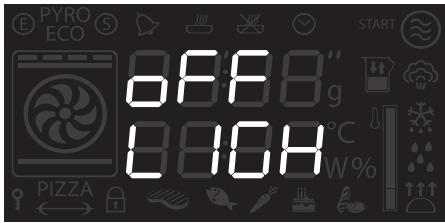

The manual off/on control is always available with both settings by turning the temperature knob to the right.
Auxiliary oven cooking information table
| Food | Weight (Kg) | Function | Runner position from the bottom | Temperature (°C) | Time (minutes) | |
| Lasagne | 3 / 4 | Static | 1 or 2 | 220 - 230 | 50 - 60 | |
| Pasta bake | 2 | Static | 1 or 2 | 220 - 230 | 40 | |
| Roast veal | 1 | Static | 2 | 180 - 190 | 70 - 80 | |
| Pork loin | 1 | Static | 2 | 180 - 190 | 70 - 80 | |
| Pork shoulder | 1 | Static | 2 | 180 - 190 | 90 - 100 | |
| Roast rabbit | 1 | Static | 2 | 180 - 190 | 70 - 80 | |
| Turkey breast | 1.5 | Static | 2 | 180 - 190 | 89 - 90 | |
| Roast chicken | 1 | Static | 2 | 190 - 200 | 55 - 60 | |
| 1stsurface | 2ndsurface | |||||
| Pork chops | 1 | Grill | 4 | 250 - 280 | 7 - 9 | 5 - 7 |
| Pork fillet | 1 | Grill | 3 | 250 - 280 | 9 - 11 | 5 - 9 |
| Sausages | 1 | Grill | 3 | 250 - 270 | 7 - 9 | 5 - 6 |
| Bacon | 0.8 | Grill | 1/2/3/4 | 270 | 6 - 7 | 3 - 4 |
| Salmon trout | 1 | Static | 1 | 250 - 270 | 14 - 16 | |
| Pizza | 1 | Static | 1 | 280 | 8 | |
| Focaccia | 0.8 | Static | 2 | 180 - 190 | 15 - 20 | |
| Fruit tart | Static | 1 | 170 - 180 | 35 - 40 | ||
| Short pastry | Static | 1 | 170 - 180 | 20 - 25 | ||
| Rice pudding | 1 | Static | 1 | 170 - 180 | 50 - 60 | |
| Apple pie | 0.5 | Static | 2 | 180 | 60 | |
The times indicated in the table do not include preheating times and are provided as a guide only.
4 Cleaning and maintenance
4.1 Instructions

Improper use
Risk of damage to surfaces
- Do not use steam jets for cleaning the appliance.
- Do not use cleaning products containing chlorine, ammonia or bleach on steel parts or parts with metallic finishes on the surface (e.g. anodizing, nickel- or chromium-plating).
- Do not use abrasive or corrosive detergents on glass parts (e.g. powder products, stain removers and metallic sponges).
- Do not use rough or abrasive materials or sharp metal scrapers.
4.2 Cleaning the surfaces
To keep the surfaces in good condition, they should be cleaned regularly after use. Let them cool first.
4.3 Ordinary daily cleaning
Always use only specific products that do not contain abrasives or chlorine-based acids.
Pour the product onto a damp cloth and wipe the surface, rinse thoroughly and dry with a soft cloth or a microfibre cloth.
4.4 Food stains or residues
Do not use metallic sponges or sharp scrapers as they will damage the surfaces. Use ordinary non-abrasive products with the aid of wooden or plastic utensils if necessary. Rinse thoroughly and dry with a soft cloth or a microfibre cloth.
Do not allow residues of sugary foods (such as jam) to set inside the oven. If left to set for too long, they might damage the enamel lining of the oven.
4.5 Removing the door
For easier cleaning, the door can be removed and placed on a canvas.
To remove the door proceed as follows:
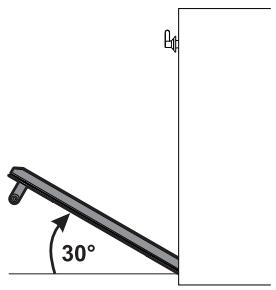
- Open the door completely and insert two pins into the holes on the hinges indicated in the figure.
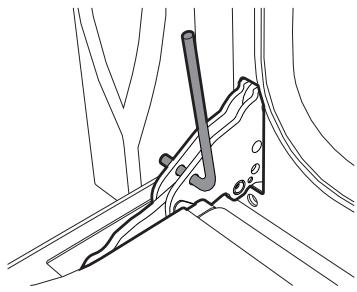
- Grasp the door on both sides with both hands, lift it forming an angle of around 30^ and remove it.
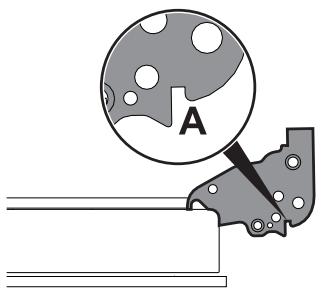
- To reassemble the door, put the hinges in the relevant slots in the oven, making sure that grooved sections A are resting completely in the slots. Lower the door and once it is in place remove the pins from the holes in the hinges.
4.6 Cleaning the door glazing
The glass in the door should always be kept thoroughly clean. Use absorbent kitchen roll. In case of stubborn dirt, wash with a damp sponge and an ordinary detergent.

We recommend the use of cleaning products distributed by the manufacturer.
4.7 Removing the internal glass panels
For easier cleaning the door internal glass panels can be disassembled.
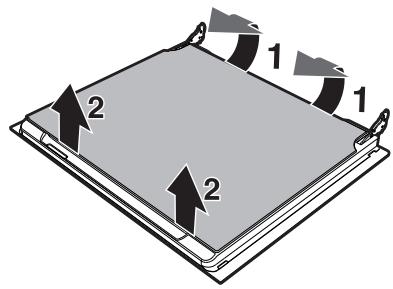
- Remove the internal glass panel by pulling the rear part gently upwards, following the movement indicated by the arrows (1).
- Then, pull the front part upwards (2). In this way, the 4 pins attached to the glass detach from their housings in the oven door.
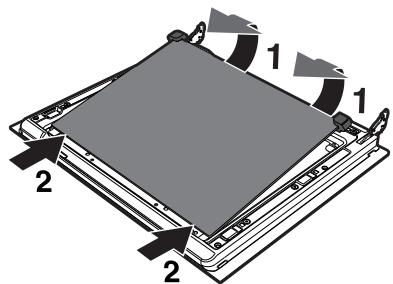
- Some models have an intermediate glass panel. Remove the intermediate glass panel by lifting it upwards.
- Clean the external glass panel and the panels previously removed. Use absorbent kitchen roll. In case of stubborn dirt, wash with a damp sponge and neutral detergent.
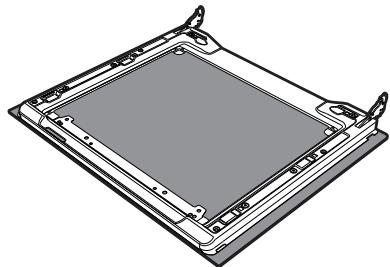
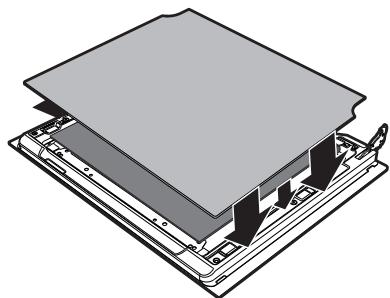
- Refit the panels in the reverse order in which they were removed.
- Reposition the internal glass panel. Take care to centre and insert the 4 pins into their housings in the oven door by applying slight pressure.
4.8 Cleaning the inside of the oven
For the best oven upkeep, clean it regularly after having allowed it to cool.
Take out all removable parts.
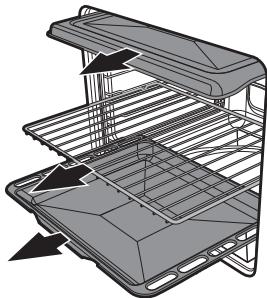
Clean the oven racks with warm water and non-abrasive detergent. Carefully rinse and dry the damp parts.

The oven should be operated at the maximum temperature for about 15-20 minutes after the use of specific products, to burn off the residues left inside the oven.

For easier cleaning, remove the door.
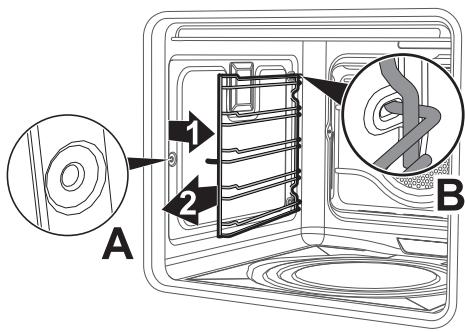
Removing racks/trays support frames
Removing the guide frames enables the sides to be cleaned more easily. This operation should be performed each time the automatic cleaning cycle is used (on some models only).
To remove the guide frames: Pull the frame towards the inside of the oven to unhook it from its groove A, then slide it out of the seats B at the back.
When cleaning is complete, repeat the above procedures to put the guide frames back in.
4.9 Vapor Clean: Assisted oven cleaning (main oven only)

Vapor Clean is an assisted cleaning procedure which facilitates the removal of dirt. Thanks to this process, it is possible to clean the inside of the oven very easily. The dirt residues are softened by the heat and water vapour for easier removal afterwards.

Improper use Risk of damage to surfaces
- Remove any food residues or large spills from previous cooking operations from the inside of the oven.
- Carry out assisted oven cleaning operations only when the oven is cold.
Preliminary operations
Before starting the Vapor Clean function:
- Completely remove all accessories from inside the oven. The upper guard can be left inside the oven.
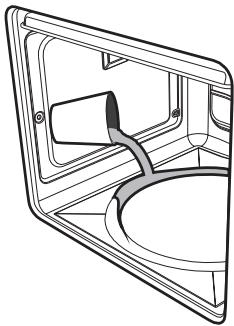
- Pour approx. 40~cc of water onto the floor of the oven. Make sure it does not overflow out of the cavity.
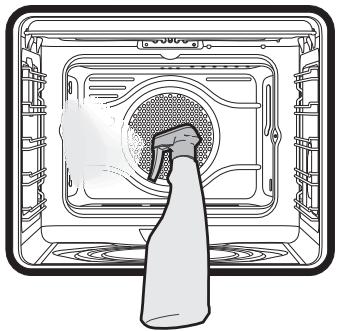
- Spray a water and washing up liquid solution inside the oven using a spray nozzle. Direct the spray against the sidewalls, upwards, downwards and towards the deflector.
- Close the door.

We recommend spraying approx. 20 times at the most.
Vapor Clean setting
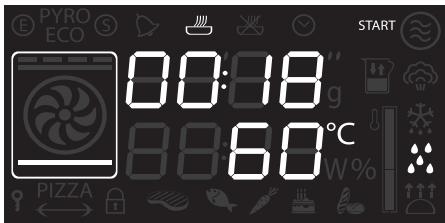

If the internal temperature is greater than that required for the Vapor clean function, the cycle will be stopped immediately and STOP will appear on the display. Let the appliance cool down before activating the assisted cleaning cycle.
- Select the symbol using the function knob.
- The duration and temperature of the cleaning cycle will appear on the display.
- Press the temperature knob to start the cycle.
- A buzzer will indicate the end of the Vapor Clean cycle.

The temperature and time parameters cannot be modified by the user.
End of the Vapor Clean cycle
- Open the door and wipe away the less stubborn dirt with a microfibre cloth.
- Use an anti-scratch sponge with brass filaments on tougher encrustations.
- In case of grease residues use specific oven cleaning products.
- Remove the water left inside the oven.
For improved hygiene and to avoid food being affected by any unpleasant odours, we recommend that the oven is dried using a fan assisted function at 160^ for approximately 10 minutes.

We recommend wearing rubber gloves for these operations.

For easier manual cleaning of the parts difficult to reach, we recommend removing the door.
4.10 Extraordinary maintenance

Live parts Danger of electrocution
- Disconnect the oven power supply.
Replacing the internal light bulb
- Completely remove all accessories from inside the oven.
- Remove the racks/trays support frames.
- Remove the bulb cover using a tool (e.g. a screwdriver).
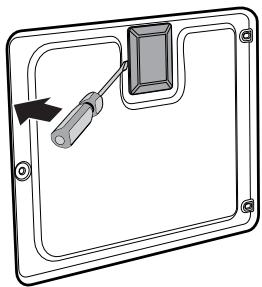
- Slide out and remove the lamp.
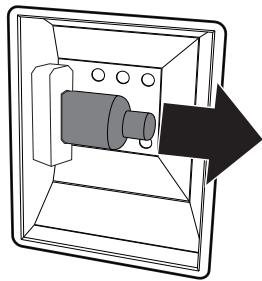

Do not touch the halogen lamp directly with your fingers, but wrap it in an insulating material.
- Replace the lamp with one of the same type (40W).
- Refit the cover correctly, so that the moulded part of the glass is facing the door.
- Press the cover completely down so that it attaches perfectly to the bulb support.
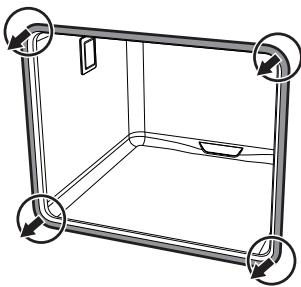
Removing the door seal
To permit thorough cleaning of the oven, the door seal may be removed. There are fasteners on all four sides to attach it to the edge of the oven. Pull the 4 edges of the seal outwards to detach the fasteners.
5 Installation
5.1 Electrical connection

Power voltage Danger of electrocution
- Have the electrical connection performed by authorised technical personnel.
- The appliance must be connected to earth in compliance with electrical system safety standards.
- Disconnect the main power supply.
General information
Check the grid characteristics against the data indicated on the plate.
The identification plate bearing the technical data, serial number and brand name is visibly positioned on the appliance.
Do not remove this plate for any reason. The appliance works at 220 - 240 ~V^ .
Use a three-core cable 3 × 1.5 mm^2 cable, referring to the cross section of the internal conductor).
Perform the ground connection using a wire that is 20mm longer than the other wires.
Connection modes:
220-240 V 1N~
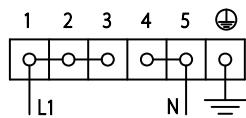
Use a 3 × 4 ~mm^2 three-core cable.
380-415 V2N~
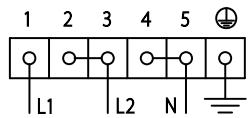
Use a 4 × 2.5 ~mm^2 four-core cable.
380-415 V 3N~
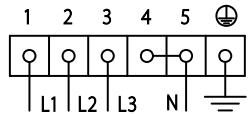
Use a 5 × 2.5 ~mm^2 five-core cable.
Fixed connection
Fit the power line with an omnipolar circuit breaker in compliance with installation regulations.
The circuit breaker should be located near the appliance and in an easily reachable position.
Connection with plug and socket
Make sure that the plug and socket are of the same type.
Avoid using adapters and shunts as these could cause overheating and a risk of burns.
5.2 Cable replacement

Power voltage Danger of electrocution
-
Disconnect the main power supply.
-
Unscrew the fastening screws 2 of the terminal board cover.
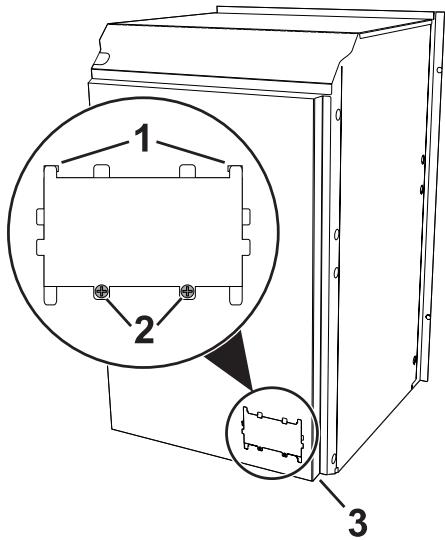
- Slide the tabs 1 of the terminal board cover out of the grooves;
- Loosen the screw of the cable retention bracket in the right lower part of the oven back 3;
- Make sure that the cables (for the oven or any hob) follow the best route in order to avoid any contact with the appliance.
5.3 Positioning

Heavy appliance Danger of crush injuries
- Place the appliance into the piece of furniture with the aid of a second person.

Pressure on the open door Risk of damages to the appliance
- Never use the oven door to lever the appliance into place when fitting.
- Avoid exerting too much pressure on the oven door when open.

Heat production during appliance operation Risk of fire
- Check that the piece of furniture material is heat resistant.
- Check that the piece of furniture has the required slots.
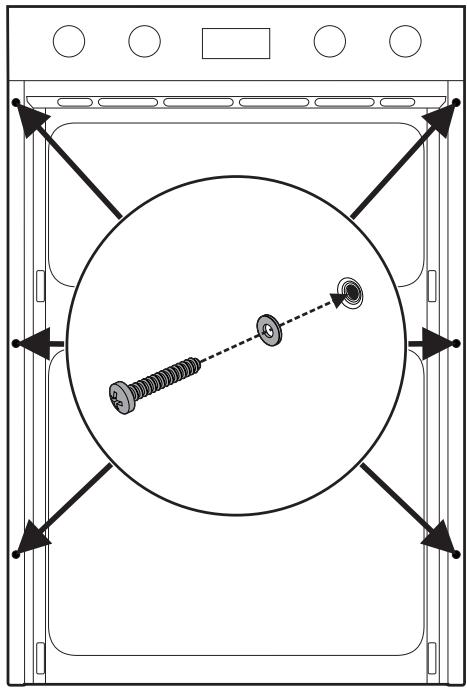
Fixing
To secure the appliance to the counter, screw in 6 screws through the holes in the frame.
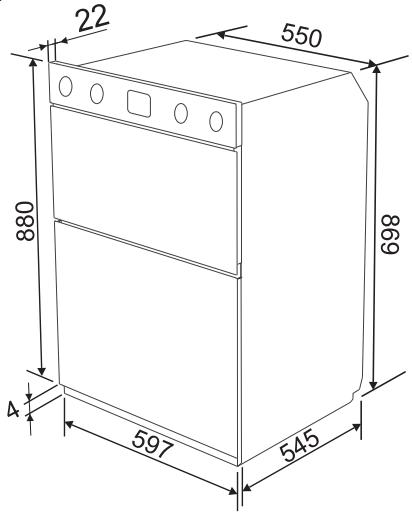
Appliance overall dimensions (mm)
Mounting (mm)
The oven is designed for mounting into any piece of furniture as long as it is heat-resistant. Respect the unit dimensions and the oven overall dimensions for positioning. Depending on the type of installation a slot should be foreseen for ventilating the appliance.
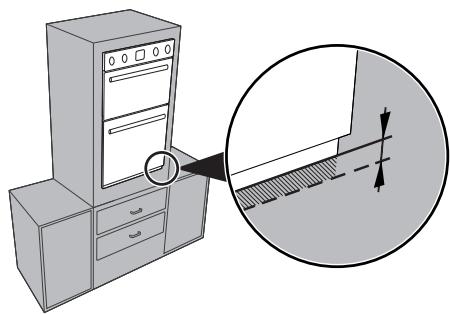

To be able to open the door completely, any unit protuberance should be at a distance of at least 1 cm from the oven.
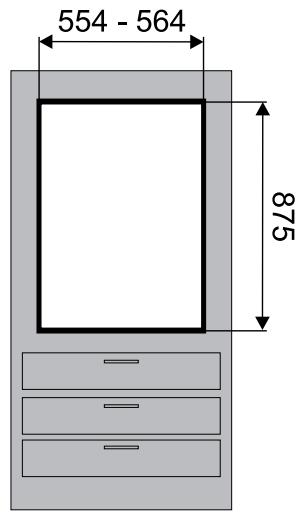
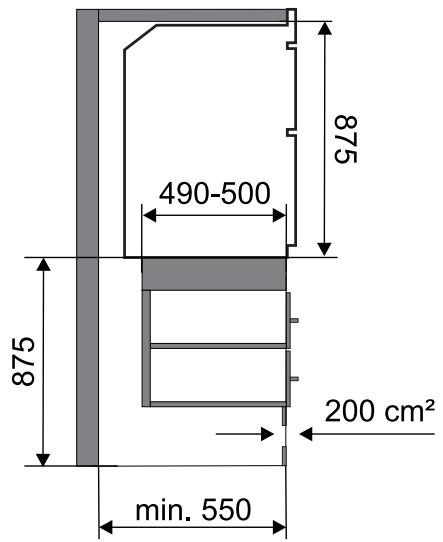

Create an opening with a total surface area of at least 200~cm^2 in the bottom front part of the unit.
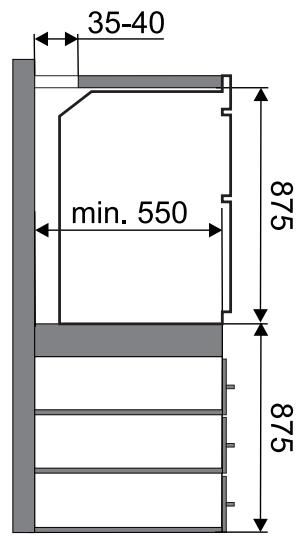

Create an opening 35 - 40 ~mm deep in the top rear part of the unit.
- Contents
- Instructions 40
- Description 43
- Use 46
- Cleaning and maintenance 64
- Installation 71
- Instructions
- General safety instructions
- Risk of personal injury
- Risk of damaging the appliance
- For this appliance
- Manufacturer liability
- Appliance purpose
- Disposal
- Power voltage Danger of electrocution
- Instructions
- Plastic packaging Danger of suffocation
- Identification plate
- This user manual
- How to read the user manual
- Description
- Use
- Cleaning and maintenance
- Installation
- Description
- General Description
- Control panel
- Auxiliary oven function knob
- Auxiliary oven thermostat indicator light
- Auxiliary oven temperature knob
- Main oven display
- Main oven temperature knob
- Main oven function knob
- 5 Other parts
- Shelves
- Cooling fan
- Interior lighting
- Available accessories
- Use
- Instructions
- First use
- Using the accessories
- Racks and trays
- Tray rack
- Auxiliary oven
- Main oven with display
- Operating modes
- Setting the time
- Cooking functions
- Preheating stage
- Functions list
- Static
- Grill
- Lower element
- Fan assisted
- Fan with grill
- Fan + bottom
- Circulaire
- Turbo
- Small grill
- Minute minder
- Timed cooking
- Modifying the data set during timed cooking
- Programmed cooking
- Modifying the data set during programmed cooking
- Cooking advice
- General advice
- Advice for cooking meat
- Advice for cooking with the Grill and the Fan with grill
- Advice for cooking desserts/pastries and biscuits
- Advice for defrosting and proving
- To save energy
- Special functions and automatic programs
- Timed defrosting
- Proving
- Shabbat
- Defrosting by weight
- Automatic programs table
- BREAD - PIZZA - PASTA (14-20)
- Secondary menu
- Showroom mode (for exhibitors only):
- Keep Warm Mode (some models only):
- Light timing mode
- Cleaning and maintenance
- Instructions
- Improper use
- Risk of damage to surfaces
- Cleaning the surfaces
- Ordinary daily cleaning
- Food stains or residues
- Removing the door
- Cleaning the door glazing
- Removing the internal glass panels
- Cleaning the inside of the oven
- Removing racks/trays support frames
- Vapor Clean: Assisted oven cleaning (main oven only)
- Improper use Risk of damage to surfaces
- Preliminary operations
- Vapor Clean setting
- End of the Vapor Clean cycle
- Extraordinary maintenance
- Replacing the internal light bulb
- Removing the door seal
- Installation
- Electrical connection
- General information
- Fixed connection
- Connection with plug and socket
- Cable replacement
- Positioning
- Heavy appliance Danger of crush injuries
- Pressure on the open door Risk of damages to the appliance
- Heat production during appliance operation Risk of fire
- Fixing
- Mounting (mm)
Marque : SMEG
Modèle : DOSF6920N1
Catégorie : Four encastrable