MODE D'EMPLOI FXJP6 HOTPOINT-ARISTON

natural_image
Simple line icon of a computer monitor with a blank screen, enclosed in a rounded square frame (no text or symbols)
USER MANUAL
SAFETY INSTRUCTIONS
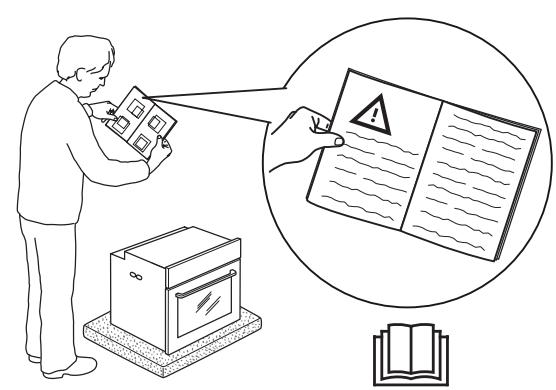
Before using the appliance, read these safety instructions. Keep them nearby for future reference.
These instructions and the appliance itself provide important safety warnings, to be observed at all times. The manufacturer declines any liability for failure to observe these safety instructions, for inappropriate use of the appliance or incorrect setting of controls.
⚠️ Very young children (0-3 years) should be kept away from the appliance. Young children (3-8 years) should be kept away from the appliance unless continuously supervised. Children from 8 years old and above and persons with reduced physical, sensory or mental capabilities or lack of experience and knowledge can use this appliance only if they are supervised or have been given instructions on safe use and understand the hazards involved. Children must not play with the appliance. Cleaning and user maintenance must not be carried out by children without supervision.
⚠ WARNING: The appliance and its accessible parts become hot during use. Care should be taken to avoid touching heating elements. Children less than 8 years of age must be kept away unless continuously supervised.
⚠ Do not touch the oven during pyrolytic cycle (self cleaning) - risk of burns. Keep children and animals away during and after the pyrolytic cycle (until the room has been fully ventilated). Excess spillage, especially fats and oils, must be removed from the oven cavity before initiating the pyrolytic cycle. Do not leave any accessory or material within the oven cavity during the pyrolitic cycle.
⚠️ If the oven is installed below a hob, make sure that all burners or electric hotplates are switched off during the pyrolytic cycle. - risk of burn.
⚠️ Never leave the appliance unattended during food drying. If the appliance is suitable for probe usage, only use a temperature probe recommended for this oven - risk of fire.
⚠️ Keep clothes or other flammable materials away from the appliance, until all the components have cooled down completely - risk of fire. Always be vigilant when cooking foods rich in fat, oil or when adding alcoholic beverages - risk of fire. Use oven gloves to remove pans and accessories. At the end of cooking, open the door with caution, allowing hot air or steam to escape gradually before accessing the cavity - risk of burns. Do not obstruct hot air vents at the front of the oven - risk of fire.
⚠ Exercise caution when the oven door is in the open or down position, to avoid hitting the door.
IMPORTANT TO BE READ AND OBSERVED
PERMITTED USE
⚠️ CAUTION: The appliance is not intended to be operated by means of an external switching device, such as a timer, or separate remote controlled system.
This appliance is intended to be used in household and similar applications such as: staff kitchen areas in shops, offices and other working environments; farm houses; by clients in hotels, motels, bed & breakfast and other residential environments.
⚠️ No other use is permitted (e.g. heating rooms).
⚠ This appliance is not for professional use. Do not use the appliance outdoors.
⚠️ Do not store explosive or flammable substances (e.g. gasoline or aerosol cans) inside or near the appliance - risk of fire.
INSTALLATION
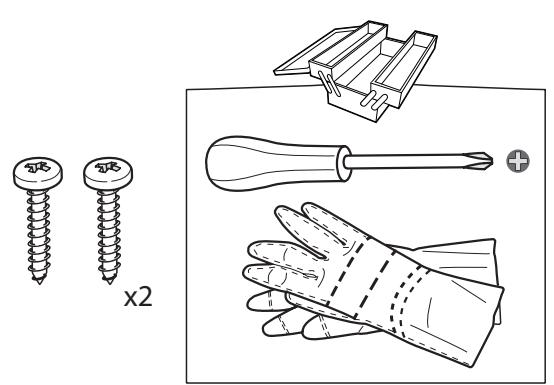
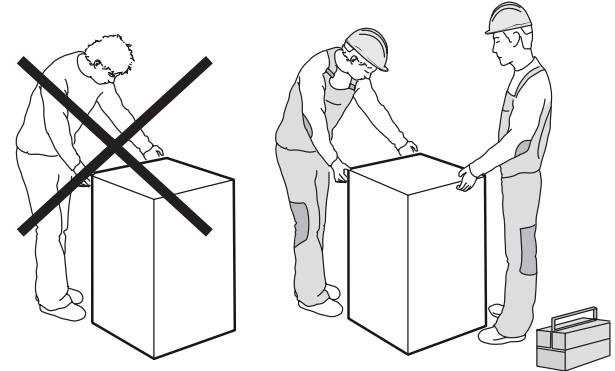
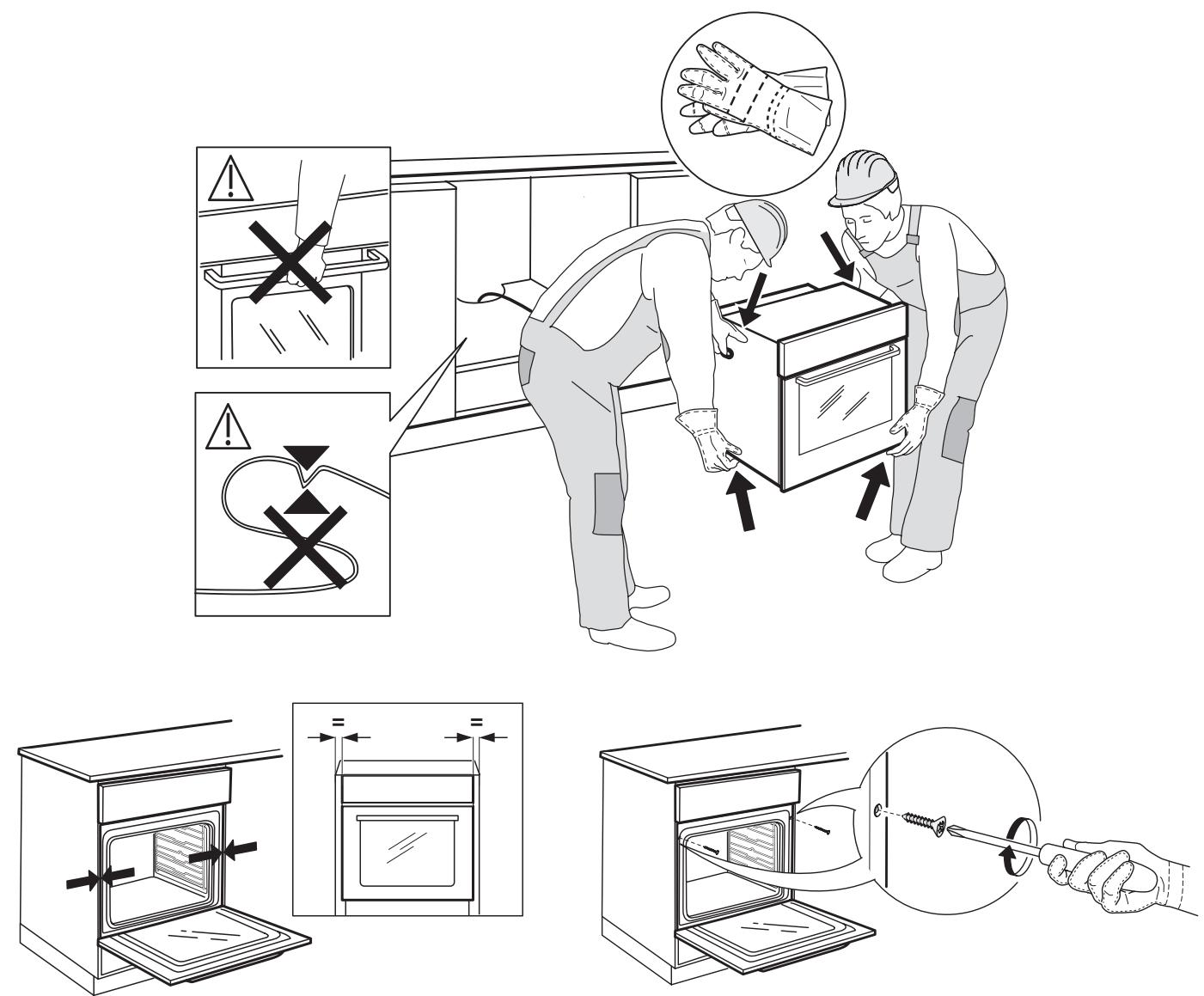
⚠ The appliance must be handled and installed by two or more persons - risk of injury. Use protective gloves to unpack and install - risk of cuts.
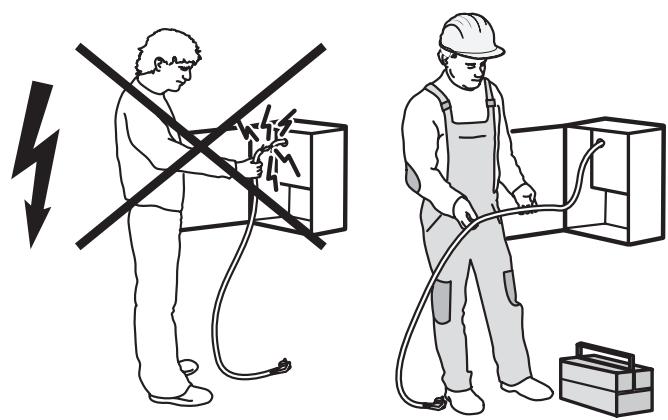
⚠️ Installation, including water supply (if any) and electrical connections, and repairs must be carried out by a qualified technician. Do not repair or replace any part of the appliance unless specifically stated in the user manual. Keep children away from the installation site. After unpacking the appliance, make sure that it has not been damaged during transport. In the event of problems, contact the dealer or your nearest After-sales Service. Once installed, packaging waste (plastic, styrofoam parts etc.) must be stored out of reach of children - risk of suffocation. The appliance must be disconnected from the power supply before any installation operation - risk of electrical shock. During installation, make sure the appliance does not damage the power cable - risk of fire or electrical shock. Only activate the appliance when the installation has been completed.
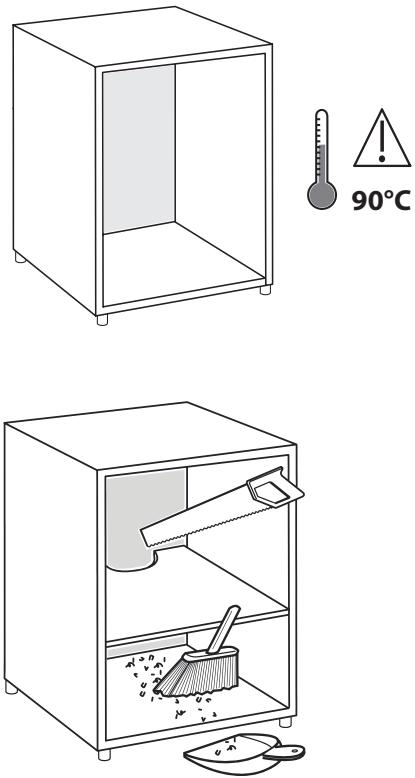
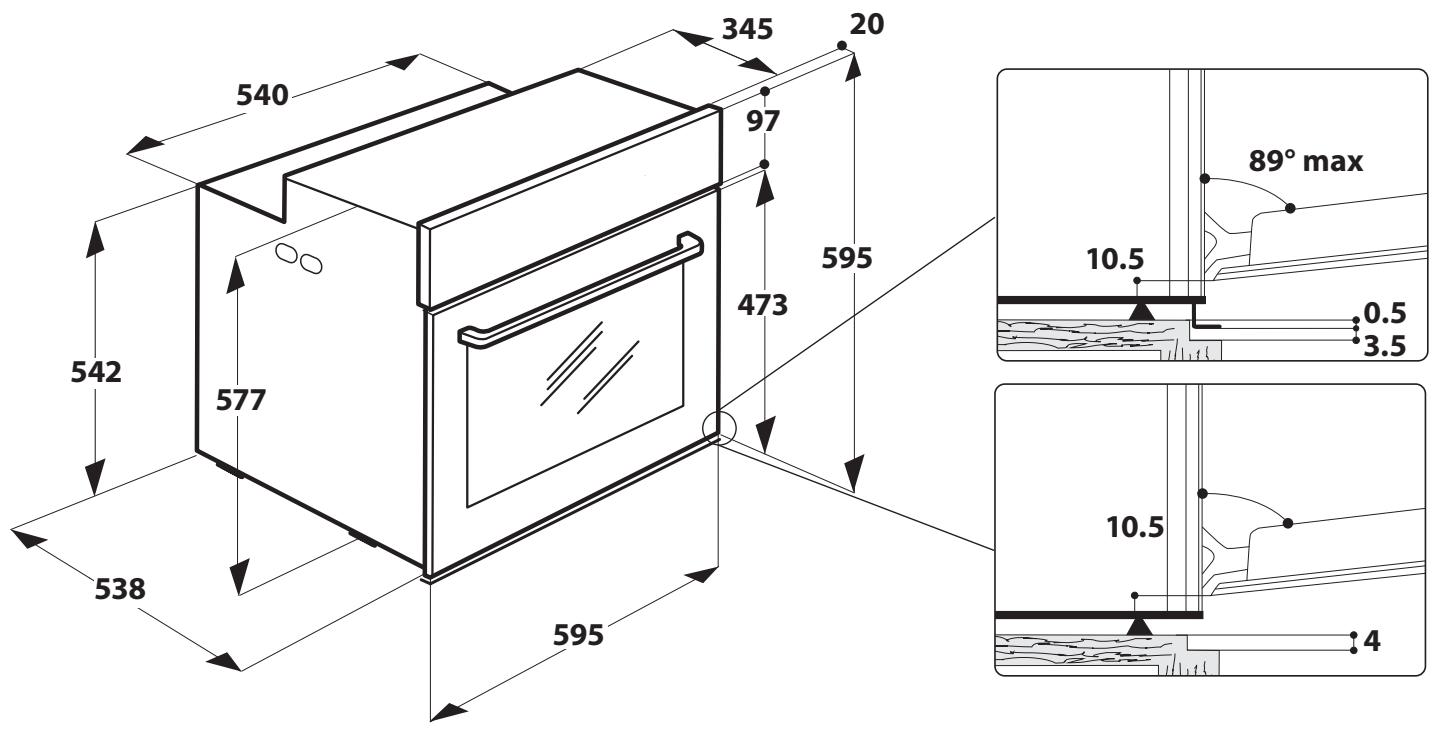
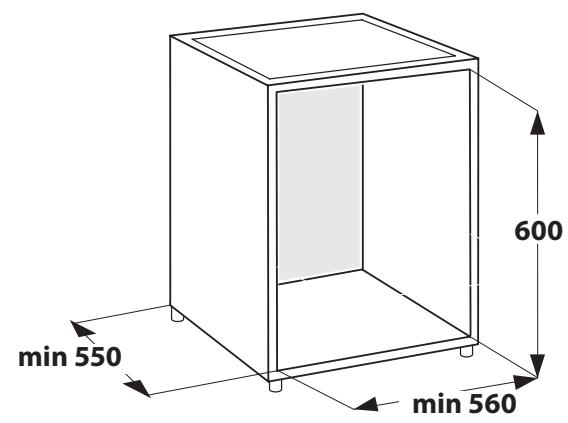
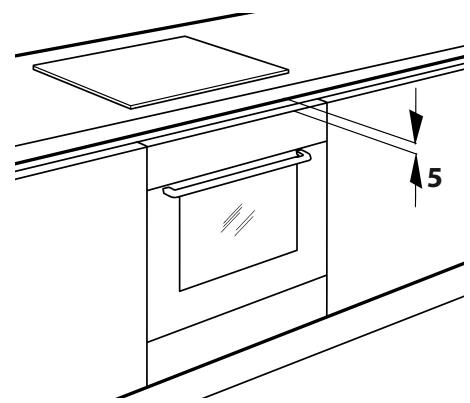
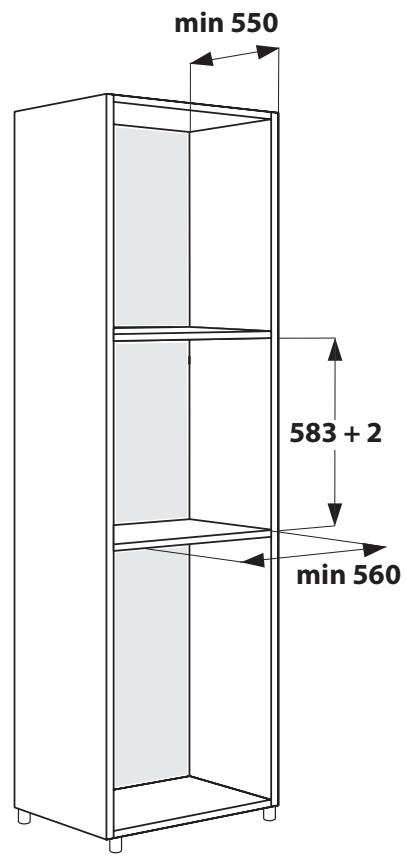
⚠️ Carry out all cabinet cutting works before fitting the appliance in the furniture and remove all wood chips and sawdust. Do not obstruct the minimum gap between the worktop and the upper edge of the oven - risk of burns.
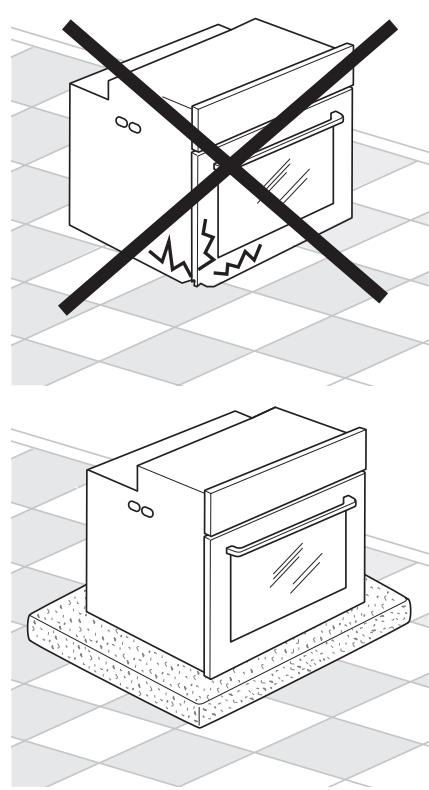
Do not remove the oven from its polystyrene foam base until the time of installation.
⚠️ After installation, the bottom of the appliance must no longer be accessible - risk of burn.
⚠ Do not install the appliance behind a decorative door - risk of fire.
ELECTRICAL WARNINGS
⚠️ The rating plate is on the front edge of the oven (visible when the door is open).
⚠ It must be possible to disconnect the appliance from the power supply by unplugging it if plug
is accessible, or by a multi-pole switch installed upstream of the socket in accordance with the wiring rules and the appliance must be earthed in conformity with national electrical safety standards.
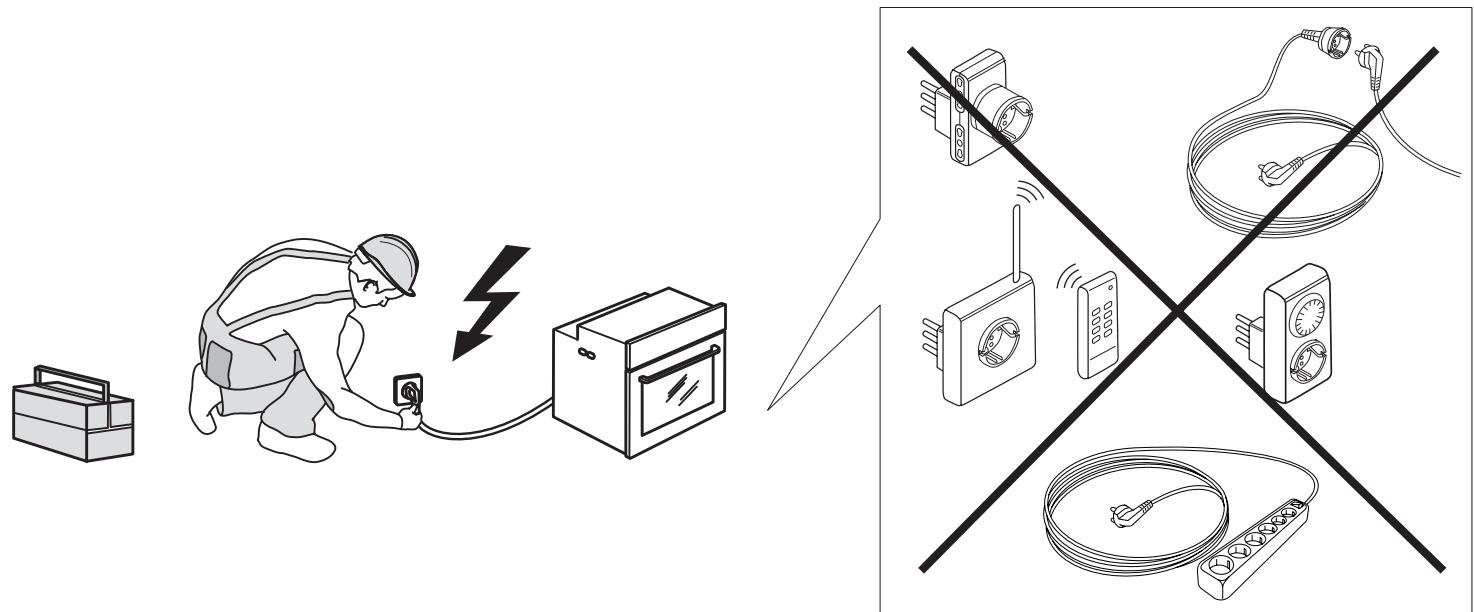
⚠ Do not use extension leads, multiple sockets or adapters. The electrical components must not be accessible to the user after installation. Do not use the appliance when you are wet or barefoot. Do not operate this appliance if it has a damaged power cable or plug, if it is not working properly, or if it has been damaged or dropped.
⚠️ If the supply cord is damaged, it must be replaced with an identical one by the manufacturer, its service agent or similarly qualified persons in order to avoid a hazard - risk of electrical shock.
⚠ In case of replacement of power cable, contact an authorized service center.
CLEANING AND MAINTENANCE
⚠ WARNING: Ensure that the appliance is switched off and disconnected from the power supply before performing any maintenance operation; never use steam cleaning equipment - risk of electric shock.
⚠️ Do not use harsh abrasive cleaners or metal scrapers to clean the door glass since they can scratch the surface, which may result in shattering of the glass.
⚠ Ensure the appliance is cooled down before any cleaning or maintenance. - risk of burn.
⚠ WARNING: Switch off the appliance before replacing the lamp - risk of electrical shock.
DISPOSAL OF PACKAGING MATERIALS
The packaging material is 100% recyclable and is marked with the recycle symbol 📋. The various parts of the packaging must therefore be disposed of responsibly and in full compliance with local authority regulations governing waste disposal.
DISPOSAL OF HOUSEHOLD APPLIANCES
This appliance is manufactured with recyclable or reusable materials. Dispose of it in accordance with local waste disposal regulations. For further information on the treatment, recovery and recycling of household electrical appliances, contact your local authority, the collection service for household waste or the store where you purchased the appliance. This appliance is marked in compliance with European Directive 2012/19/EU, Waste Electrical and Electronic Equipment (WEEE). By ensuring this product is disposed of correctly, you will help prevent negative consequences for the environment and human health.
The symbol on the product or on the accompanying documentation indicates that it should not be treated as domestic waste but must be taken to an appropriate collection center for the recycling of electrical and electronic equipment.
ENERGY SAVING TIPS
Only preheat the oven if specified in the cooking table or your recipe. Use dark lacquered or enamelled baking trays as they absorb heat better. Food requiring prolonged cooking will continue to cook even once the oven is switched off.
Standard cycle (PYRO): which is suitable for cleaning a very dirty oven. Energy-saving cycle (PYRO EXPRESS/ECO) - only in some models -: which consumes approximately 25% less energy than the standard cycle. Select it at regular intervals (after cooking meat on 2 or 3 consecutive occasions).
ECO DESIGN DECLARATION
This appliance meets the Eco Design requirements of European Regulations n.65/2014 and 66/2014 in conformity to the European standard EN 60350-.
PRODUCT DESCRIPTION
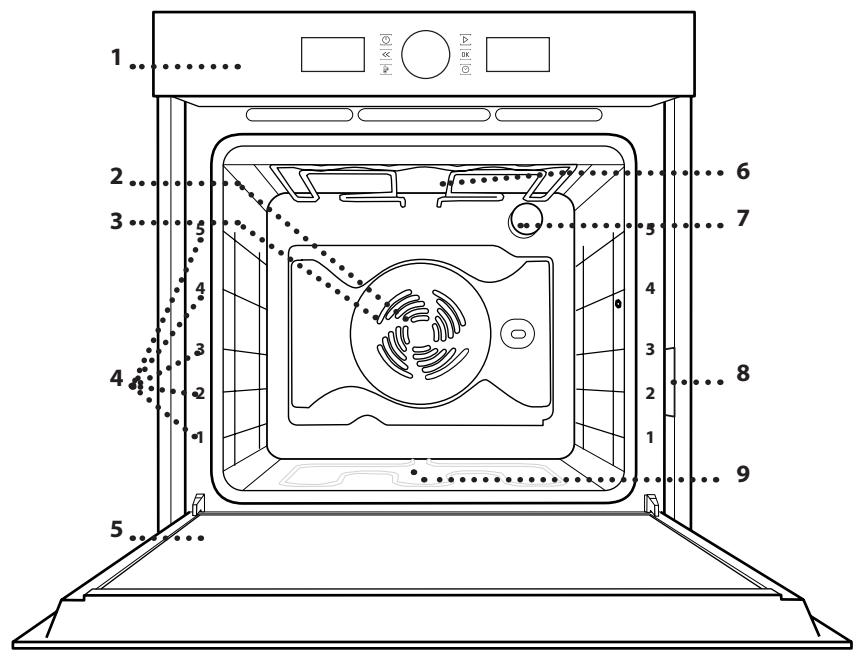
- Control panel
- Fan
- Circular heating element (non-visible)
- Shelf guides
(the level is indicated on the front of the oven)
- Door
- Upper heating element/grill
- Lamp
- Identification plate (do not remove)
- Bottom heating element (non-visible)
Please note:
The cooling fan may switch itself on every so often during cooking in order to reduce energy consumption.
Once cooking is complete and the oven has been switched off, the cooling fan may continue to run for a certain period of time.
When the oven door is opened during cooking, the heating elements switch off.
FUNCTIONS

AUTOMATIC FUNCTIONS

CASSEROLE
The function automatically selects the best cooking mode and temperature for baking any preparation based on pasta (lasagna, cannelloni, ecc). The temperature may be modified in a given range to perfectly fit different recipes and personal tastes. Use the 3rd shelf. The oven doesn't have to be preheated.

MEAT
The function automatically selects the best cooking mode and temperature for roasting any type of meat (poultry, beef, veal, pork, lamb, ecc). The temperature may be modified in a given range to perfectly fit different recipes and personal tastes. This function uses discontinuous, delicate fan assistance, which prevents excessive drying of foods. Use the 3rd shelf. The oven doesn't have to be preheated before cooking.

MAXI COOKING
The function automatically selects the best cooking mode and temperature to cook large joints of meat (above 2.5 kg). It is advisable to turn the meat over during cooking for more even browning. It is best to baste the meat every now and again to prevent it from drying out.
Use the 1st or 2nd shelves, depending on the size of the joint. The oven doesn't have to be preheated before cooking.

BREAD
The function automatically selects the best cooking mode and temperature for baking any type of bread (baguettes, small breads, sandwich loaf, ecc). The temperature may be modified in a given range to perfectly fit different recipes and personal tastes. Use the 2nd or 3rd shelf. The oven doesn't have to be preheated.

PIZZA
The function automatically selects the best cooking mode and temperature for baking any type of pizza (thin pizza, homestyle pizza, focaccia, ecc). The temperature may be modified in a given range to perfectly fit different recipes and personal tastes. Use the 2nd shelf. The oven doesn't have to be preheated.

PASTRY CAKES
The function automatically selects the best cooking mode and temperature for baking any sweet preparation (biscuits, leavened cakes, fruit tarts, ecc). The temperature may be modified in a given range to perfectly fit different recipes and personal tastes. Use the 2nd or 3rd shelf. The oven does not have to be preheated.

CONVENTIONAL
For cooking any kind of dish on one shelf only.
Use the 3rd shelf.
To cook pizza, savoury pies and sweets with liquid fillings, use the 1st or 2nd shelf.
Preheat the oven before placing food inside.

GRILL
For grilling steaks, kebabs and sausages,
cooking vegetables au gratin or toasting bread. It is advisable to place food on the 4th or 5th shelf. When grilling meat, we recommend using a drip tray to collect the cooking juices: Position the tray on any of the levels below the wire shelf and add 500 ml of drinking water.
The oven does not have to be preheated. During cooking the oven door must remain closed.

FORCED AIR
For cooking different foods that require the
same cooking temperature on several shelves (maximum three) at the same time. This function can be used to cook different foods without odours being transferred from one food to another. Use the 3rd level to cook on one shelf only, 1st and 4th level to cook on two shelves, 1st, 3rd, 5th level to cook on three shelves.
Wait the end of preheating before placing food inside the oven.

CONVECTION BAKE
For cooking meat and cakes with juicy fillings
(savoury or sweet) on single shelf. Use the 3rd shelf. Preheat the oven before cooking.
ACCESSORIES
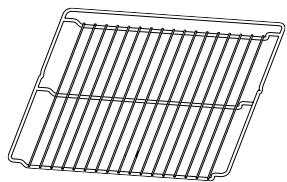
WIRE SHELF
natural_image
Line drawing of a rectangular grid structure with parallel lines, no text or symbols present

For use in cooking food or as a support for pans, baking pans and other ovenproof cooking receptacles.
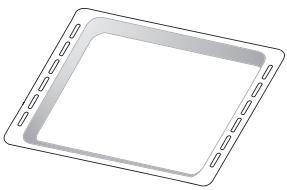
DRIP TRAY
natural_image
Simple line drawing of a square frame with side notches (no text or symbols)
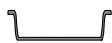
For use as an oven tray for cooking meat, fish, vegetables, focaccia, etc. or to collect cooking juices when positioned under the wire shelf.
BAKING TRAY
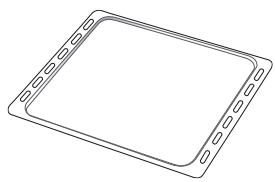
natural_image
Line drawing of a rectangular tray with evenly spaced slots (no text or symbols)

For use in cooking bread and pastry products, but also for meat, fish en papillotte, etc.
SLIDING RUNNERS *
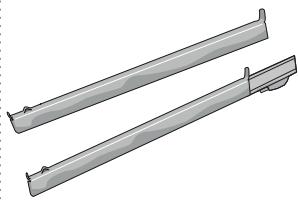
natural_image
Two metallic mechanical components with mounting brackets (no text or symbols visible)
To facilitate inserting or removing accessories.
TURNSPIT *
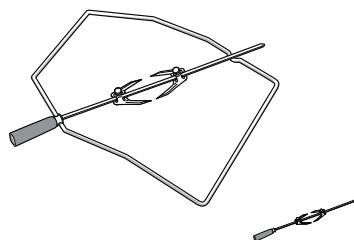
natural_image
Simple line drawing of a triangular frame with two tools, one holding a handle and the other extending a wire (no text or symbols)
For roasting large pieces of meat and poultry. uniformly in conjunction with the "Turbo grill" function.
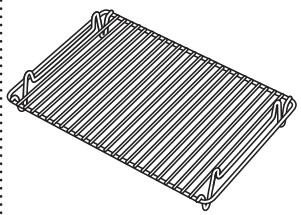
GRILL PAN SET *
natural_image
Line drawing of a rectangular metal grate or rack with evenly spaced handles (no text or symbols)
To be placed inside the drip tray, creating a useful set for grilling meat, fish or vegetables.
*Available only on certain models.
The number of accessories may vary depending on which model is purchased.
Other accessories that are not supplied can be purchased separately from the After-Sales Service.
INSERTING THE WIRE SHELF AND OTHER ACCESSORIES
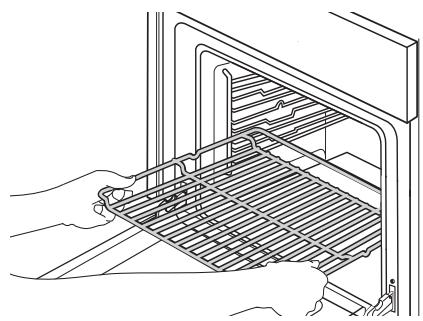
- Insert the wire shelf horizontally by sliding it across the shelf guides, making sure that the side with the raised edge is facing upwards.
natural_image
Line drawing of hands installing or maintaining a grid inside an oven (no text or symbols)
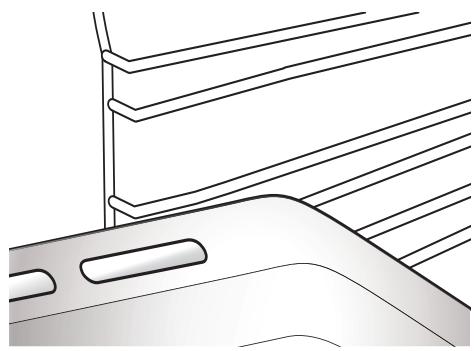
- Other accessories, such as the drip tray and the baking tray, are inserted horizontally in the same way as the wire shelf.
natural_image
Line drawing of a car's front and side panels with horizontal lines indicating lanes or structural elements (no text or symbols)
USING THE TURNSPIT
(IF PRESENT)
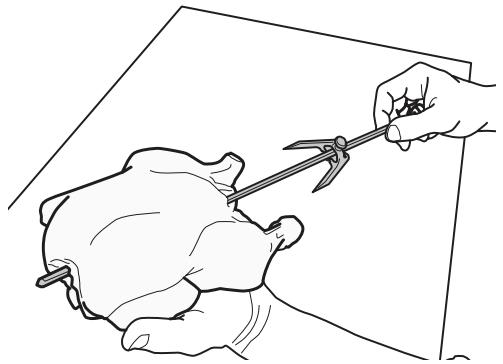
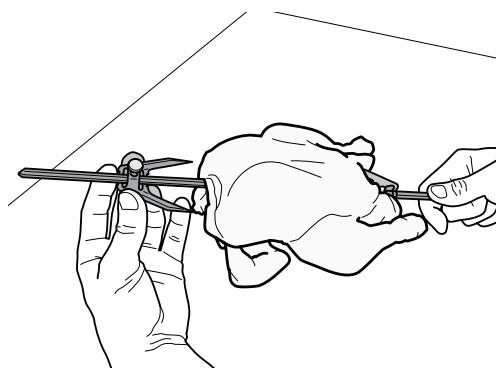
- Insert the skewer into the centre of the meat and slide it in until it is held firmly in place on the fork.
natural_image
Line drawing of a hand using a tool to draw or trim a piece of bread (no text or symbols)
- Push the second fork onto the skewer and slide it on until it holds the meat firmly in place.
natural_image
Line drawing of two hands holding a tool, one with a pen and the other holding a tool (no text or symbols)
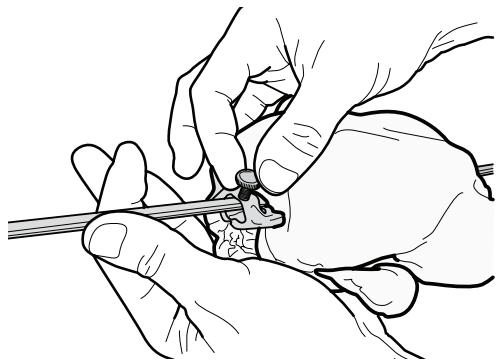
- Tighten the fixing screw to secure it in position.
natural_image
Illustration of hands performing a medical procedure on a patient's hand (no text or symbols present)
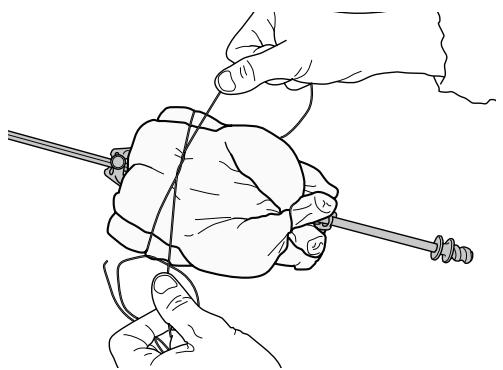
- If cooking poultry, be sure to secure the meat with twine.
natural_image
Line drawing of two hands holding a rope or cable, no text or symbols present
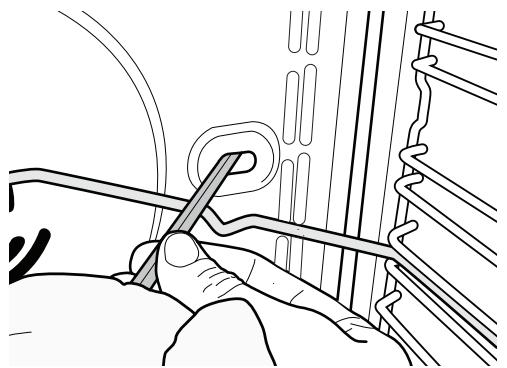
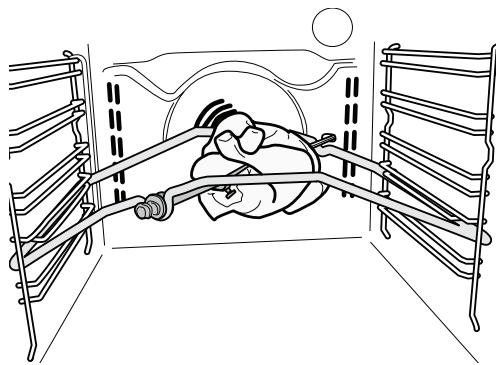
- Insert the support at the second level, then insert the tip of the skewer in the seating located on the rear wall of the oven compartment.
natural_image
Line drawing of a person using a tool to adjust or install a component, no text or symbols present
- Rest the round part of the skewer on the relevant support.
natural_image
Line drawing of a person in a bed with ladder and rope, no text or symbols present
To use the turnspit, select the "Turbo grill" function. To collect the cooking juices, position the drip tray below the meat and add 500 ml of water.
To avoid burning yourself, manipulate the hot skewer with the plastic handle (which must be removed before cooking).
REMOVING AND REFITTING THE SHELF GUIDES
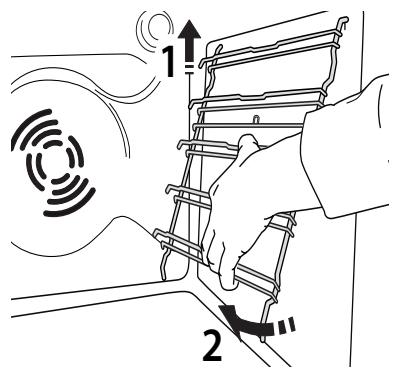
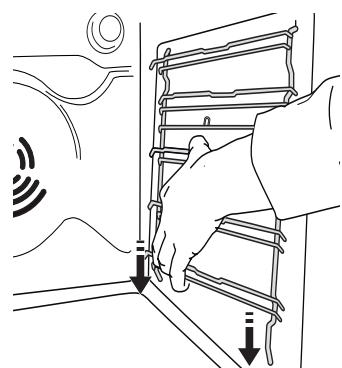
- To remove the shelf guides, lift the guides up (1) and then gently pull the lower part out of its seating (2): the shelf guides can now be removed.
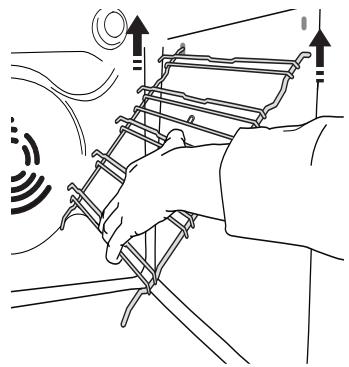
- To refit the shelf guides, first fit them back into their upper seating.
natural_image
Illustration of hands assembling a ladder with motion indicators (no text or symbols)
- Keep them raised as you bring them nearer to the compartment.
natural_image
Line drawing of a hand using a tool to interact with a vehicle (no text or symbols present)
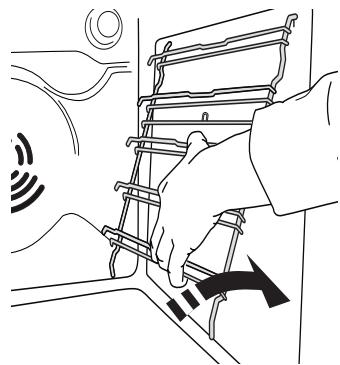
- Position them into the lower seatings.
natural_image
Illustration of a hand adjusting a ladder with directional arrows indicating motion (no text or symbols)
FITTING THE SLIDING RUNNERS (ONLY IN SOME MODELS)
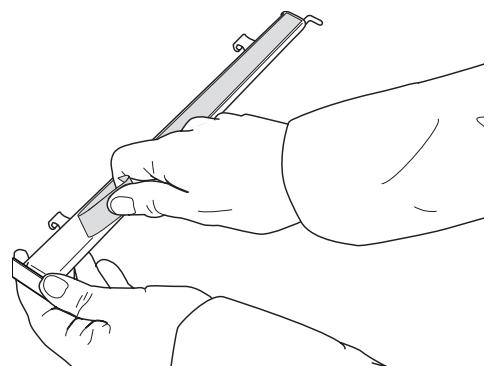
- Remove the shelf guides.
- Remove the plastic protection from the sliding runners.
natural_image
Line drawing of a hand holding a pen or tool, no text or symbols present
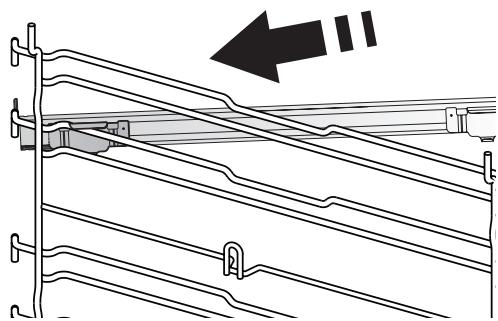
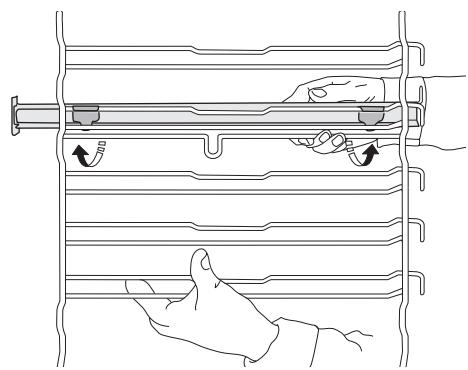
- Fasten the upper clip of the runner to the shelf guide and slide it along as far as it will go. (fig. A); lower the other clip into position.
natural_image
Technical line drawing of a mechanical assembly with no visible text or symbols
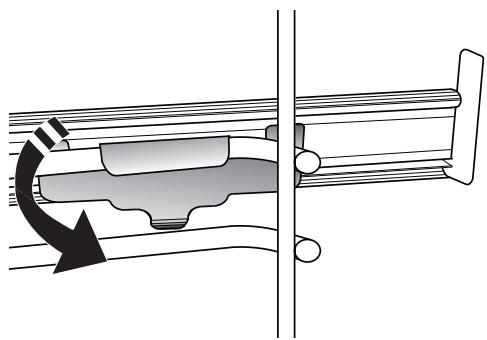
- To secure the guide, press the lower portion of the clip firmly against the shelf guide. Make sure that the runners can move freely.
natural_image
Mechanical assembly diagram showing a rotating component with directional arrow (no text or labels)
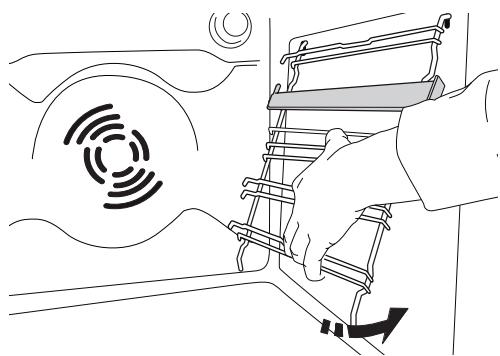
- Repeat these steps on the other shelf guide on the same level. The sliding runners can be fitted on any level.
natural_image
Line drawing of a hand holding a rack with arrows indicating motion or movement (no text or symbols)
- Refit the shelf guides.
natural_image
Line drawing of a hand using a device to interact with a circular signal icon (no text or symbols present)
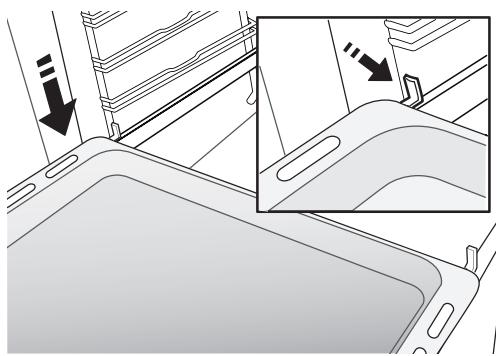
- Position the accessories on the shelf guides.
natural_image
Interior view of a car intake tray with directional arrows indicating movement or flow (no text or symbols)
FUNCTIONS

AUTOMATIC FUNCTIONS

CASSEROLE
The function automatically selects the best cooking mode and temperature for baking any preparation based on pasta (lasagna, cannelloni, ecc). The temperature may be modified in a given range to perfectly fit different recipes and personal tastes. Use the 3rd shelf. The oven doesn't have to be preheated.

MEAT
The function automatically selects the best cooking mode and temperature for roasting any type of meat (poultry, beef, veal, pork, lamb, ecc). The temperature may be modified in a given range to perfectly fit different recipes and personal tastes. This function uses discontinuous, delicate fan assistance, which prevents excessive drying of foods. Use the 3rd shelf. The oven doesn't have to be preheated before cooking.

MAXI COOKING
The function automatically selects the best cooking mode and temperature to cook large joints of meat (above 2.5 kg). It is advisable to turn the meat over during cooking for more even browning. It is best to baste the meat every now and again to prevent it from drying out.
Use the 1st or 2nd shelves, depending on the size of the joint. The oven doesn't have to be preheated before cooking.

BREAD
The function automatically selects the best cooking mode and temperature for baking any type of bread (baguettes, small breads, sandwich loaf, ecc). The temperature may be modified in a given range to perfectly fit different recipes and personal tastes. Use the 2nd or 3rd shelf. The oven doesn't have to be preheated.

PIZZA
The function automatically selects the best cooking mode and temperature for baking any type of pizza (thin pizza, homestyle pizza, focaccia, ecc). The temperature may be modified in a given range to perfectly fit different recipes and personal tastes. Use the 2nd shelf. The oven doesn't have to be preheated.

PASTRY CAKES
The function automatically selects the best cooking mode and temperature for baking any sweet preparation (biscuits, leavened cakes, fruit tarts, ecc). The temperature may be modified in a given range to perfectly fit different recipes and personal tastes. Use the 2nd or 3rd shelf. The oven does not have to be preheated.

CONVENTIONAL
For cooking any kind of dish on one shelf only.
Use the 3rd shelf.
To cook pizza, savoury pies and sweets with liquid fillings, use the 1st or 2nd shelf.
Preheat the oven before placing food inside.

GRILL
For grilling steaks, kebabs and sausages,
cooking vegetables au gratin or toasting bread. It is advisable to place food on the 4th or 5th shelf. When grilling meat, we recommend using a drip tray to collect the cooking juices: Position the tray on any of the levels below the wire shelf and add 500 ml of drinking water.
The oven does not have to be preheated. During cooking the oven door must remain closed.

FORCED AIR
For cooking different foods that require the
same cooking temperature on several shelves (maximum three) at the same time. This function can be used to cook different foods without odours being transferred from one food to another. Use the 3rd level to cook on one shelf only, 1st and 4th level to cook on two shelves, 1st, 3rd, 5th level to cook on three shelves.
Wait the end of preheating before placing food inside the oven.

CONVECTION BAKE
For cooking meat and cakes with juicy fillings
(savoury or sweet) on single shelf. Use the 3rd shelf. Preheat the oven before cooking.

SPECIAL FUNCTIONS

FAST PREHEATING
For preheating the oven quickly. To preheat the oven rapidly. At the end of preheating, the oven automatically selects the conventional function. Wait the end of preheating before placing food inside.

TURBO GRILL
For roasting large joints of meat (legs, roast beef, chicken). Position the food on the middle shelves. We recommend using a Baking tray to collect the cooking juices: position it on the 1st or 2nd level, adding approx. half a litre of water. The oven does not have to be preheated. During cooking, the oven door must remain closed.

ECO FORCED AIR\*
For cooking stuffed roasting joints and fillets of meat on a single shelf. Food is prevented from drying out excessively by gentle, intermittent air circulation. When this ECO function is in use, the light will remain switched off during cooking. To use the ECO cycle and therefore optimise power consumption, the oven door should not be opened until the food is completely cooked.

KEEP WARM
For keeping just-cooked food hot and crisp (e.g: meat, fried food or flans). Place the food on the middle shelf.

RISING
For helping sweet or savoury dough to rise effectively. Place the dough on the 2nd shelf. The oven does not have to be preheated. To maintain the quality of proving, do not activate the function if the oven is still hot following a cooking cycle.

AUTOMATIC CLEANING - PYRO
For eliminating cooking spatters using a cycle at very high temperature (approx. 500 °C). Two selfcleaning cycles are available: A complete cycle (PYRO) and a shorter cycle (ECO). We recommend using the quicker cycle at regular intervals and the complete cycle only when the oven is heavily soiled.
USING THE APPLIANCE FOR THE FIRST TIME
1. SET THE TIME
You will need to set the time when you switch on the oven for the first time.
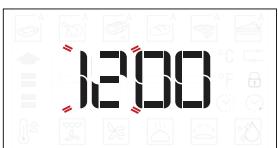
The two digits for the hour will start flashing: Turn the knob to set the hour and press OK to confirm.
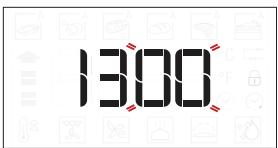
The two digits for the minutes will start flashing. Turn the knob to set the minutes and press OK to confirm.
Please note: To change the time at a later point, press and hold ☑ for at least one second while the oven is off and repeat the steps above.
You may need to set the time again following lengthy power outages.
2. HEAT THE OVEN
A new oven may release odours that have been left behind during manufacturing: this is completely normal.
Before starting to cook food, we therefore recommend heating the oven with it empty in order to remove any possible odours.
Remove any protective cardboard or transparent film from the oven and remove any accessories from inside it.
Heat the oven to 200 °C for around one hour, ideally using a function with air circulation (e.g. "Forced Air" or "Convection Bake").
Follow the instructions for setting the function correctly.
Please note: It is advisable to air the room after using the appliance for the first time.
1. SELECT A FUNCTION
When the oven is off, only the time is shown on the display. Press and hold ⏻ to switch the oven on. Turn the knob to view the main functions available on the left-hand display. Select one and press OK.
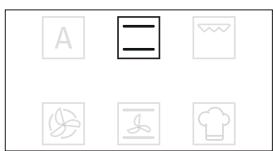
To select a sub-function (where available), select the main function and then press OK to confirm and go to the function menu.
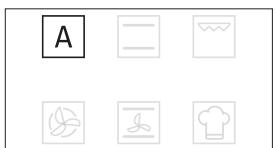
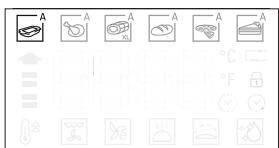
Turn the knob to view the sub-functions available on the right-hand display. Select one and press OK to confirm.
2. SET THE FUNCTION
After having selected the function you require, you can change its settings.
The display will show the settings that can be changed in sequence.
TEMPERATURE/GRILL LEVEL
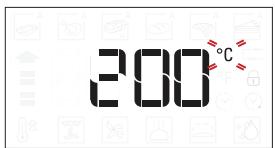
When the °C/°F icon flashes on the display, turn the knob to change the value, then press OK to confirm and continue to alter the settings that follow (if possible).
You can also set the grill level (3 = high, 2 = medium, 1 = low) at the same time.
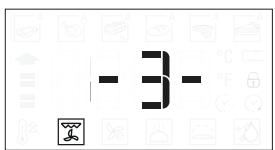
Please note: Once the function has started, you can change the temperature or the grill level by pressing 📐 or by turning the knob directly.
DURATION
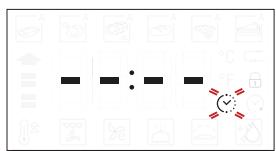
When the ⚙️ icon flashes on the display, use the adjustment knob to set the cooking time you require and then press to confirm.
You do not have to set the cooking time if you want to manage cooking manually: Press ▶ to confirm and start the function.
In this case, you cannot set the end cooking time by programming a delayed start.
Please note: You can adjust the cooking time that has been set during cooking by pressing ☑ : Turn the knob to change the hour and press OK to confirm.
SETTING THE END COOKING TIME/DELAYED START
In many functions, once you have set a cooking time you can delay starting the function by programming its end time.
Where you can change the end time, the display will show the time the function is expected to finish while the Ⓧ icon flashes.
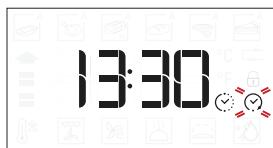
If necessary, turn the knob to set the time you want cooking to end, then press ▶ to confirm and start the function.
Place the food in the oven and close the door: The function will start automatically after the period of time that has been calculated in order for cooking to finish at the time you have set.
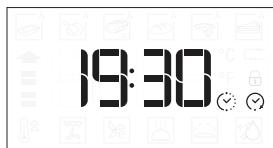
Please note: Programming a delayed cooking start time will disable the oven preheating phase. The oven will reach the temperature you require gradually, meaning that cooking times will be slightly longer than those listed in the cooking table.
During the waiting time, you can use the knob to change the programmed end time.
Press 📄 or ⬤ to change the temperature and cooking time settings. Press OK to confirm when finished.
3. ACTIVATE THE FUNCTION
Once you have applied the settings you require, press ▶ to activate the function.
You can press and hold ⏻ at any time to pause the function that is currently active.
4. PREHEATING
Some functions have an oven preheating phase: Once the function has started, the display indicates that the preheating phase has been activated.
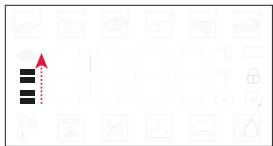
Once this phase has finished, an audible signal will sound and the display will indicate that the oven has reached the set temperature.
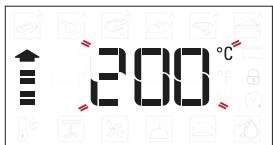
At this point, open the door, place the food in the oven, close the door and start cooking by pressing ▶.
Please note: Placing the food in the oven before preheating has finished may have an adverse effect on the final cooking result.
Opening the door during the preheating phase will pause it. The cooking time does not include a preheating phase.
You can always change the temperature you want to reach using the knob.
5. END OF COOKING
An audible signal will sound and the display will indicate that cooking is complete.
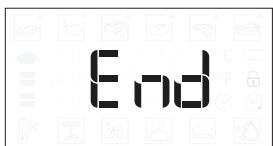
To extend the cooking time without changing the settings, turn the knob to set a new cooking time and press ▶.
. AUTOMATIC FUNCTIONS
TEMPERATURE RECOVERY
If the temperature inside the oven decreases during a cooking cycle because the door is opened, a special function will be activated automatically to restore the original temperature.
While the temperature is being restored, the display will show a "snake" animation until the set temperature has been reached.
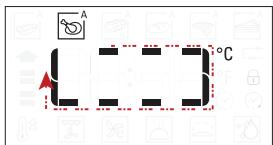
While a programmed cooking cycle is in progress, the cooking time will be increased according to how long the door was open in order to guarantee best results.
. SPECIAL FUNCTIONS
AUTOMATIC CLEANING - PYRO
Do not touch the oven during the Pyro cycle.
Keep children and animals away from the oven during and after (until the room has finished airing) running the Pyro cycle.
Remove all accessories from the oven before running the Pyro function.
If the oven is installed below a hob, make sure that all the burners or electric hotplates are switched off while running the self-cleaning cycle.
For optimum cleaning results, remove the worst soiling with a damp sponge before using the Pyro function. Only run the Pyro function if the appliance contains heavy soiling or gives off bad odours during cooking.
Access special functions 📋 and turn the knob to select 🌐 from menu. Then press OK to confirm.
Press ▷ to start immediately the cleaning cycle or turn the knob to select the shorten cycle (ECO).
Press ▷ to start immediately the cleaning cycle, or press OK to set the end time/start delayed.
The oven will start the cleaning cycle and the door will be locked automatically.
The oven door cannot be opened while pyrolytic cleaning is in progress: It will remain locked until the temperature has returned to an acceptable level.
Air the room during and after running the Pyro cycle.
Please note: The duration and temperature of cleaning cycle cannot be set.
. KEY LOCK
To lock the keypad, press and hold for at least 5 seconds.
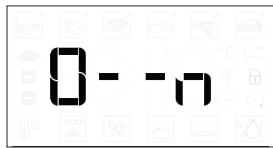
Do this again to unlock the keypad.
Please note: The key lock can also be activated while cooking is in progress.
For safety reasons, the oven can be switched off at any time by pressing ⏻.
USEFUL TIPS
HOW TO READ THE COOKING TABLE
The table lists the best function, accessories and level to use to cook various different types of food. Cooking times start from the moment food is placed in the oven, excluding preheating (where required).
Cooking temperatures and times are approximate and depend on the amount of food and the type of accessory used.
Use the lowest recommended settings to begin with and, if the food is not cooked enough, then switch to higher settings.
Use the accessories supplied and preferably dark-coloured metal cake tins and baking trays. You can also use Pyrex or stoneware pans and accessories, but bear in mind that cooking times will be slightly longer.
COOKING DIFFERENT FOODS AT THE SAME TIME
The “Forced Air” function enables you to cook different foods (such as fish and vegetables) on different shelves at the same time.
Remove the food which requires a shorter cooking time and leave the food which requires a longer cooking time in the oven.
DESSERTS
Cook delicate desserts with the conventional function on one shelf only.
Use dark-coloured metal baking pans and always place them on the wire shelf supplied.
To cook on more than one shelf, select the "Forced Air" function and position the cake tins on different shelves to facilitate the circulation of hot air.
To check whether a leavened cake is fully cooked, insert a wooden toothpick into the centre of the cake. If the toothpick comes out clean, the cake is ready.
If using non-stick baking pans, do not butter the edges as the dessert may not rise evenly around the edges.
If the item “swells” during baking, use a lower temperature next time and consider reducing the amount of liquid you add or stirring the mixture more gently.
Desserts with moist fillings (cheesecake or fruit pies) require the use of the "Convection Bake" function.
If the base of the cake is soggy, lower the shelf and sprinkle the bottom of the cake with breadcrumbs or biscuit crumbs before adding the filling.
PIZZA
Lightly grease the trays to ensure the pizza has a crispy base.
Scatter the mozzarella over the pizza two thirds of the way through cooking.
PROVING
It is always best to cover the dough with a damp cloth before placing it in the oven.
Dough proving time with this function is reduced by approximately one third compared to proving at room temperature (20-25°C).
The rising time for pizza starts at around one hour for 1 kg of dough.
MEAT
Use any kind of oven tray or pyrex dish suited to the size of the piece of meat being cooked.
For roast meat, it is best to add some stock to the bottom of the pan, basting the meat during cooking for added flavour. When the roast is ready, let it rest in the oven for another 10-15 minutes, or wrap it in aluminium foil.
When you want to grill meat, choose cuts with an even thickness all over in order to achieve uniform cooking results. Very thick pieces of meat require longer cooking times. To prevent the meat from burning on the outside, lower the position of the wire shelf, keeping the food farther away from the grill. Turn the meat two-thirds of the way through cooking.
To collect the cooking juices, place a drip tray with half a litre of water directly under the grill on which the meat is placed. Top-up when necessary.
COOKING TABLE
| RECIPE | FUNCTION | PREHEAT. | TEMPERATURE(°C) | DURATION(Min.) | SHELF AND ACCESSORIES |
| Leavened cakes |  | — | 160 - 180 | 30 - 90 | 2/3 |
 | Yes | 160 - 180 | 30 - 90 | 4 1 |
| Filled cakes(cheesecake, strudel, apple pie) |  | — | 160 - 200 | 30 - 85 | 3 |
 | Yes | 160 - 200 | 35 - 90 | 4 1 |
| Biscuits / Tartlets |  | — | 170 - 180 | 15 - 45 | 3 |
 | Yes | 160 - 170 | 20 - 45 | 4 1 |
| [YC2S] | Yes | 160 - 170 | 20 - 45 *** | 5 3 1 |
| Choux buns |  | — | 180 - 200 | 30 - 40 | 3 |
 | Yes | 180 - 190 | 35 - 45 | 4 1 |
 | Yes | 180 - 190 | 35 - 45 *** | 5 3 1 |
| Meringues |  | Yes | 90 | 110 - 150 | 3 |
| [34SC] | Yes | 90 | 130 - 150 | 4 1 |
 | Yes | 90 | 140 - 160 *** | 5 3 1 |
| Pizza (Thin, thick, focaccia) |  | — | 220 - 250 | 20 - 40 | 2 |
 | Yes | 220 - 240 | 20 - 40 | 4 1 |
 | Yes | 220 - 240 | 25 - 50 *** | 5 3 1 |
| Bread loaf 0.5 kg |  | — | 180 - 220 | 50 - 70 | 2 |
| Small bread |  | — | 180 - 220 | 30 - 50 | 2 |
| Bread |  | Yes | 180 - 200 | 30 - 60 | 4 1 |
| Frozen pizza | [S48S] | — | 250 | 10 - 20 | 2 |
 | Yes | 250 | 10 - 20 | 4 1 |
| Savoury pies(vegetable pie,quiche) |  | Yes | 180 - 190 | 45 - 60 | 2 |
| [K7BW] | Yes | 180 - 190 | 45 - 60 | 4 1 |
 | Yes | 180 - 190 | 45 - 70 *** | 5 3 1 |
| Vols-au-vent / Puff pastry crackers |  | Yes | 190 - 200 | 20 - 30 | 3 |
 | Yes | 180 - 190 | 20 - 40 | 4 1 |
 | Yes | 180 - 190 | 20 - 40 *** | 5 3 1 |
| Lasagne / Flans |  | — | 190 - 200 | 40 - 65 | 3 |
| Baked pasta / Cannelloni |  | — | 190 - 200 | 25 - 45 | 3 |
| Lamb / Veal / Beef / Pork 1 kg |  | — | 190 - 200 | 60 - 90 | 3 |
| Roast pork with crackling 2 kg |  | — | 170 | 110 - 150 | 2 |
| Chicken / Rabbit / Duck 1 kg |  | — | 200 - 230 | 50 - 80 ** | 3 |
| Turkey / Goose 3 kg |  | — | 190 - 200 | 90 - 150 | 2 |
| Baked fish / en papillote (fillets, whole) |  | Yes | 180 - 200 | 40 - 60 | 3 |
| Stuffed vegetables (tomatoes, courgettes, aubergines) |  | Yes | 180 - 200 | 50 - 60 | 2 |
| Toast |  | — | 3 (High) | 3 - 6 | 5 |
| Fish fillets / Steaks |  | — | 2 (Mid) | 20 - 30 * | 4 3 |
| Sausages / Kebabs / Spare ribs / Hamburgers |  | — | 2 - 3 (Mid - High) | 15 - 30 * | 5 4 |
| Roast chicken 1-1.3 kg |  | — | 2 (Mid) | 55 - 70 ** | 2 1 |
| Roast beef rare 1 kg |  | — | 2 (Mid) | 35 - 50 ** | 3 |
| Leg of lamb / Shanks |  | — | 2 (Mid) | 60 - 90 ** | 3 |
| Roast potatoes |  | — | 2 (Mid) | 35 - 55 ** | 3 |
| Vegetable gratin |  | — | 3 (High) | 10 - 25 | 3 |
| Lasagna & Meat |  | Yes | 200 | 50 - 100 *** | 4 1 |
| Meat & Potatoes |  | Yes | 200 | 45 - 100 *** | 4 1 |
| Fish & Vegetables |  | Yes | 180 | 30 - 50 *** | 4 1 |
| Complete meal: Fruit tart (level 5)/ lasagne (level 3)/meat (level 1) |  | Yes | 190 | 40 - 120 *** | 5 3 1 |
| Stuffed roasting joints |  | — | 200 | 80 - 120 *** | 3 |
| Cuts of meat (rabbit, chicken, lamb) |  | — | 200 | 50 - 100 *** | 3 |
* Turn food halfway through cooking.
** Turn food two thirds of the way through cooking (if necessary).
*** Estimated length of time: dishes can be removed from the oven at different times depending on personal preference.
| FUNCTIONS |  |  |  |  |  |  |
| Conventional | Grill | Turbo Grill | Forced Air | Convection Bake | Eco Forced Air |
| AUTOMATIC FUNCTIONS |  Casserole Casserole |  Meat Meat |  Maxi Cooking Maxi Cooking |  Bread Bread |  Pizza Pizza |  Pastry / Cakes Pastry / Cakes |
| ACCESSORIES |  ...Wire shelf ...Wire shelf |  Oven tray or cake tinon wire shelf Oven tray or cake tinon wire shelf | Drip tray / Baking trayor oven tray on wire shelf | Drip tray / Baking tray | Drip tray / Baking tray |  Drip tray with500 ml of water Drip tray with500 ml of water |
| Wire shelf | Oven tray or cake tin on wire shelf | Drip tray / Baking tray or oven tray on wire shelf | Drip tray / Baking tray | Drip tray with 500 ml of water |
TESTED RECIPES
Compiled for the certification authorities in accordance with the standard IEC 60350-1
| RECIPE | FUNCTION | PREHEAT | shelf | TEMP. (°C) | DURATION(Min.) | ACCESSORIES* AND NOTES |
| Shortbread |  | - | 3 | 150 | 35 - 50 | Drip tray / baking tray |
 | Yes | 3 | 150 | 25 - 40 | Drip tray / baking tray |
 | Yes | 1 - 4 | 150 | 25 - 35 | Shelf 4: baking tray |
| Shelf 1: drip tray / baking tray |
|
| Small cakes |  | - | 3 | 170 | 25 - 35 | Drip tray / baking tray |
 | Yes | 3 | 160 | 20 - 30 | Drip tray / baking tray |
| [BH4W] | Yes | 1 - 4 | 160 | 25 - 35 | Shelf 4: baking tray |
| Shelf 1: drip tray / baking tray |
|
| Fatless sponge cake |  | - | 2 | 170 | 30 - 40 | Cake tin on wire shelf |
 | Yes | 2 | 160 | 30 - 40 | Cake tin on wire shelf |
 | Yes | 1 - 4 | 160 | 35 - 45 | Shelf 4: cake tin on wire shelf |
| Shelf 1: cake tin on wire shelf |
|
| 2 Apple pies |  | - | 2 | 185 | 70 - 90 | Cake tin on wire shelf |
 | Yes | 2 | 175 | 70 - 90 | Cake tin on wire shelf |
 | Yes | 1 - 4 | 175 | 75 - 95 | Shelf 4: cake tin on wire shelf |
| Shelf 1: cake tin on wire shelf |
|
| Toast |  | - | 5 | 3 (High) | 4 - 6 | Wire shelf |
|
| Hamburgers | [ADSK] | - | 5 | 3 (High) | 18 - 30 | Shelf 5: wire shelf (turn foodhalfway through cooking) |
| Shelf 4: drip tray with water |
* You can obtain any accessories that are not supplied from our After-sales service.
The indications in the table are without use of sliding runners. Do the tests without these.
Energy efficiency class (according to standard IEC 60350-1): to carry out the test, use the specific table.
Preheating the empty oven (according to IEC 60350-1): test "CONVENTIONAL", "FORCED AIR", "FAST PREHEAT" functions.
Please note: Pastry function uses upper and lower heating elements only, without forced air circulation. It doesn't require preheating.
| FUNCTIONS |  |  |  |  |
| Pastry Cakes | Convection bake | Forced Air | Grill |
CLEANING
| Do not use steam cleaning equipment. | Carry out the required operations with the oven cold. | Do not use wire wool, abrasive scourers or abrasive/corrosive cleaning agents, as these could damage the surfaces of the appliance. |
| Use protective gloves during all operations. | Disconnect the oven from the power supply. |
EXTERIOR SURFACES
Clean the surfaces with a damp microfibre cloth. If they are very dirty, add a few drops of pH-neutral detergent. Finish off with a dry cloth.
Do not use corrosive or abrasive detergents. If any of these products inadvertently comes into contact with the surfaces of the appliance, clean immediately with a damp microfibre cloth.
INTERIOR SURFACES
- After every use, start cooling down the oven and then clean it while it is still a bit warm, removing any deposits or stains caused by food residues. To dry any condensation that has formed as a result of cooking food with a high water content, cool the oven completely and then wipe it with a cloth or sponge.
- Clean the glass door with a suitable liquid detergent.
- The oven door can be removed to facilitate cleaning.
ACCESSORIES
Soak the accessories in a washing-up liquid solution after use, handling them with oven gloves if they are still hot.
Food residues can be removed using a washing-up brush or a sponge.
CLEANING THE COOKING COMPARTMENT WITH THE PYRO CYCLE
Do not touch the oven during the Pyro cycle.
Keep children and animals away from the oven
during and after (until the room has finished airing) running the Pyro cycle.
This function enables you to eliminate cooking spatters using a temperature of approx. 500°C. At this temperature, food residues turn into deposits that can be easily wiped away with a damp sponge once the oven has cooled down.
If the oven is installed below a hob, make sure that all the burners or electric hotplates are switched off while running the self-cleaning cycle.
Remove all accessories from the oven before running the Pyro function (including the shelf guides).
For optimum cleaning results, remove the larger bits of dirt with a damp sponge before using the Pyro function.
The oven has two different pyrolytic cleaning functions: The standard cycle (PYRO) provides thorough cleaning if the oven is heavily soiled, while the economic cycle (PYRO EXPRESS) is shorter and consumes less energy than the standard cycle, which makes it suitable for use at regular intervals.
It is advisable to run the Pyro function only when the appliance is very dirty or gives off bad odours during cooking.
Please note: The oven door cannot be opened while pyrolytic cleaning is in progress. It will remain locked until the temperature has returned to an acceptable level.
Ventilate the room during and after the pyrolytic cleaning cycle (until the room has been completely aired out).
MAINTENANCE
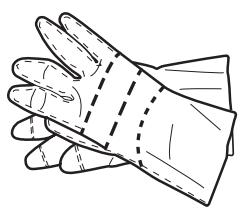
Use protective gloves during all operations.
Carry out the required operations with the oven cold.
Disconnect the oven from the power supply.
REMOVING THE DOOR
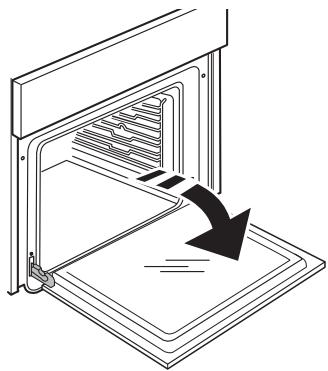
- Open the door fully.
natural_image
Line drawing of an oven with a downward arrow indicating cooling or ventilation (no text or symbols)
natural_image
Line drawing of a pair of gloves with dashed lines indicating measurement or alignment (no text or symbols)
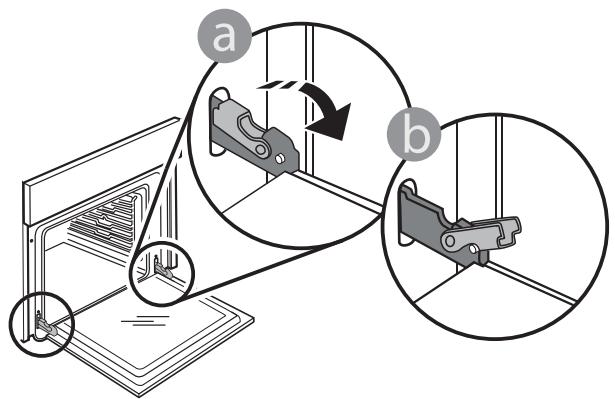
- Lower the catches as far as they will go.
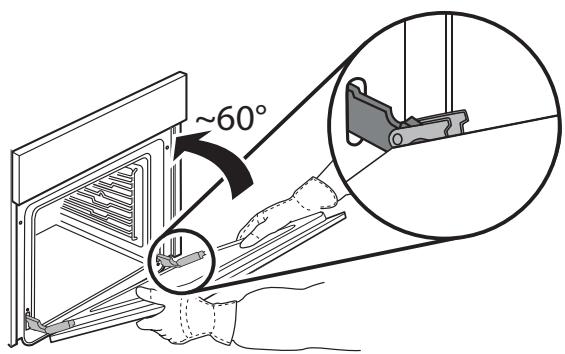
- Close the door as much as you can.
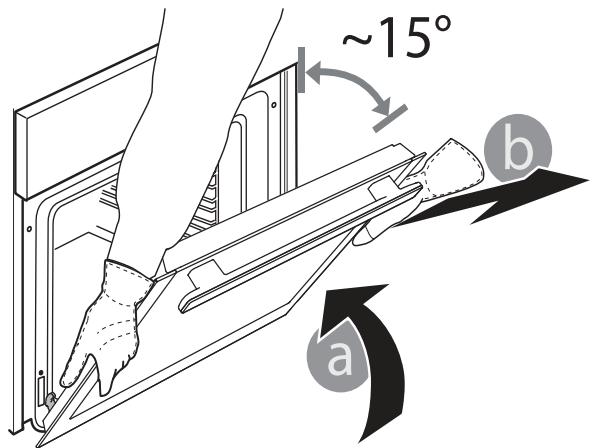
- Take a firm hold of the door with both hands – do not hold it by the handle.
Simply remove the door by continuing to close it while pulling it upwards at the same time until it is released from its seating.
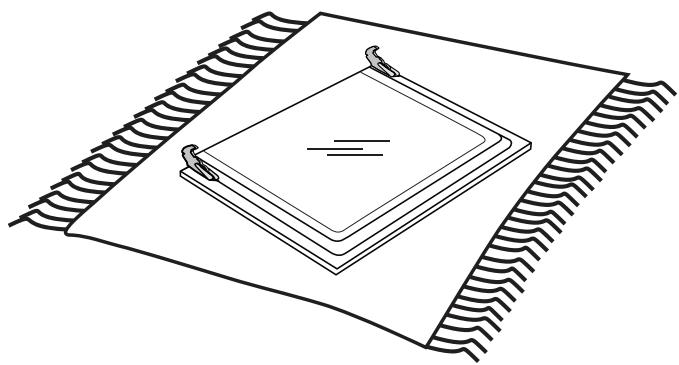
- Put the door to one side, resting it on a soft surface.
natural_image
Technical line drawing of a layered electronic component or circuit board with no visible text or symbols
REFITTING THE DOOR
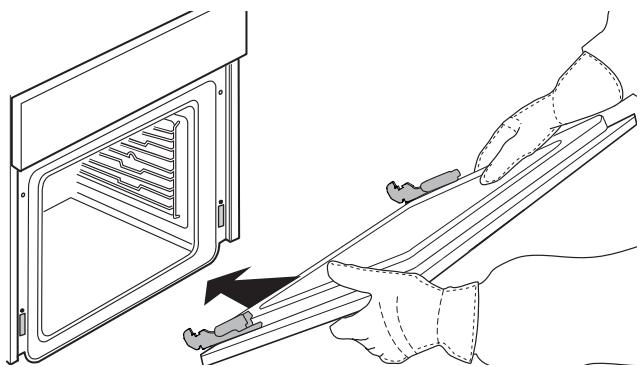
- Hold the door near the oven and line up the hinge hooks with their seatings.
natural_image
Line drawing of a kitchen appliance with a hand holding a tool, showing internal structure and a black arrow indicating motion (no text or symbols)
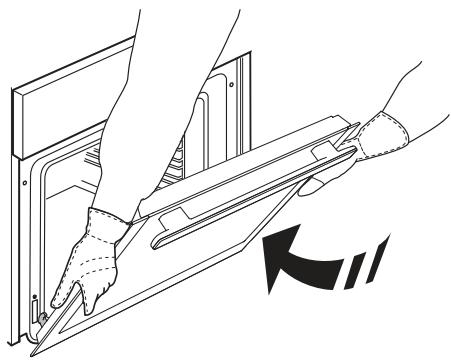
- Fasten the upper part to the slots.
natural_image
Illustration of hands using a tool to adjust or install a device into a rack (no text or symbols present)
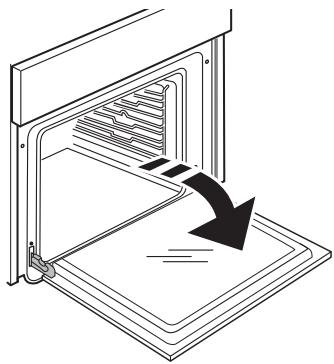
- Lower the door and then open it fully.
natural_image
Line drawing of an oven with a downward arrow indicating cooling or ventilation (no text or symbols)
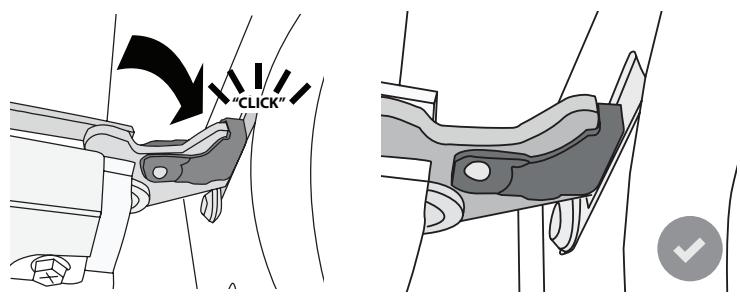
- Lower the catches into their original position: make sure that you lower them down completely.
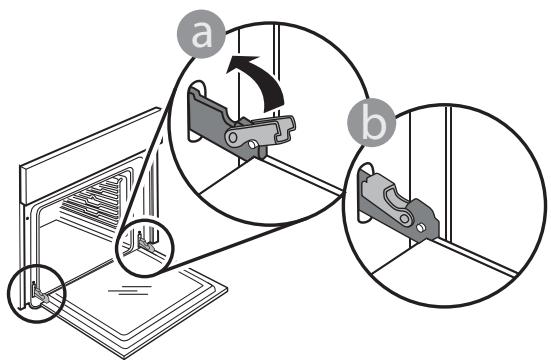
- Apply gentle pressure to check that the catches are in the correct position.
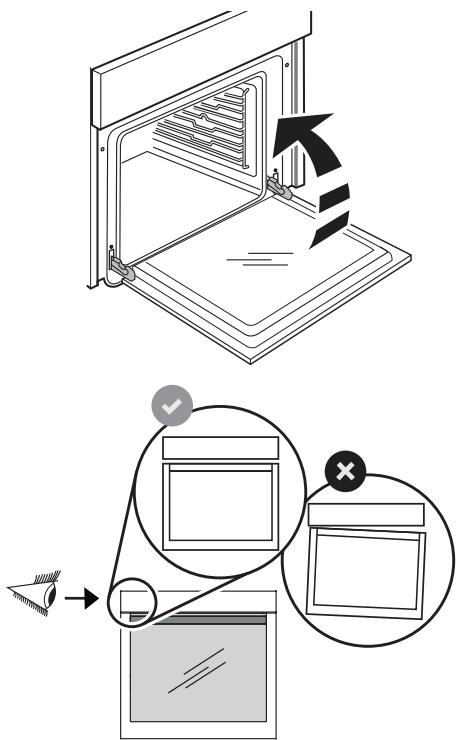
- Try closing the door and check to make sure that it lines up with the control panel. If it does not, repeat the steps above: the door could become damaged if it does not work properly.
REPLACING THE LAMP
- Disconnect the oven from the power supply.
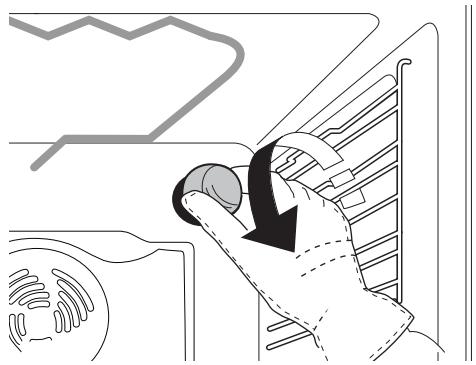
- Unscrew the cover from the light, replace the bulb and screw the cover back on the light.
natural_image
Line drawing of a hand pressing down on a kitchen appliance with a downward arrow indicating motion (no text or symbols)
- Reconnect the oven to the power supply.
Please note: Only use 20-40 W/230 V type G9, T300°C halogen bulbs.
The bulb used in the product is specifically designed for domestic appliances and is not suitable for general room lighting within the home (EC Regulation 244/2009).
Light bulbs are available from our After-Sales Service.
- If using halogen bulbs, do not handle them with your bare hands as your fingerprints could cause damage. Do not use the oven until the light cover has been refitted.
TROUBLESHOOTING
Any problems that arise or faults that occur can often be resolved easily.
Before contacting the After-sales Service, check the following table to see whether you can resolve the problem yourself.
If the problem persists, contact your nearest After-sales Service Centre.

Read the safety instructions carefully before carrying out any of the following work
| PROBLEM | POSSIBLE CAUSE | REMEDY |
| The oven is not working. | Power cut.Disconnection from the mains.Malfunction. | Check for the presence of mains electrical power and whether the oven is connected to the electricity supply.Turn off the oven and restart it to see if the problem persists. |
| The oven is not heating up. | Function selected. | Select a different function. Turn off the oven and restart it to see if the fault persists. |
| Door open. | Close the door and see if the fault persists. |
| The time is flashing. | Power cut. | You need to reset the time: Follow the instructions given in the “Using the appliance for the first time” section. |
| The display shows the letter “F” followed by a number. | Fault. | Contact you nearest Client After-sales Service Centre and state the number following the letter “F”. |
| The door will not open. | Cleaning cycle is activated. | Please wait until the function ends and the oven cools down. |
| The door lock is malfunctioning. | Turn off the oven and restart it to see if the problem persists. |
| The door will not close properly. | The safety catches are in the wrong position. | Make sure that the safety catches are in the correct position by following the instructions for removing and refitting the door in the “Maintenance” section. |
| Cooking will not start and/or an audible signal sounds. | The selected function is not compatible with the action you wish to perform. | Select the function again. Remove and then reinsert the meat probe. |
| The light switches off during cooking. | ECO mode activated. | Go to the “SETTING” menu to deactivate ECO mode. |
| “Eco forced air” function selected. | Select a different function. |
| The light is not working. | The bulb needs replacing. | Follow the instructions for replacing the bulb given in the “Maintenance” section. |
| The brightness of the display is reduced. | ECO mode activated. | Go to the “SETTING” menu to deactivate ECO mode. |
| Nothing is happening when the buttons are pressed. | Oven OFF.Keypad lock activated.The control panel is dirty. | Press and hold ➊ to switch on the oven and see whether the problem persists.Deactivate the keypad lock by pressing the OK select and << buttons at the same time.Clean the surface of the control panel with a microfibre cloth (see “Cleaning” section). |
| The oven is making noises, even when it is switched off. | Cooling fan active. | Open the door or wait until the cooling process has finished. |
TECHNICAL DATA
A complete product specification, including the energy efficiency ratings for this oven, can be read and downloaded from our website docs.hotpoint.eu
AFTER-SALES SERVICE
BEFORE CONTACTING OUR AFTER-
SALES SERVICE
-
Check whether you can resolve the problem yourself using any of the measures described in the Troubleshooting section.
-
Turn off the oven and restart it to see if the problem persists.
IF THE PROBLEM PERSISTS AFTER HAVING PERFORMED ALL OF THE NECESSARY CHECKS, CONTACT YOUR NEAREST AFTER-SALES SERVICE CENTRE.
To receive assistance, call the number given on the warranty leaflet enclosed with the product or follow the instructions on our website. Be prepared to provide:
• a brief description of the problem;
• the exact model type of your product;
- the assistance code (the number following the word SERVICE on the identification plate attached to the product, which can be seen on the left-hand inside edge when the oven door is open);
- your full address;
• a contact telephone number.
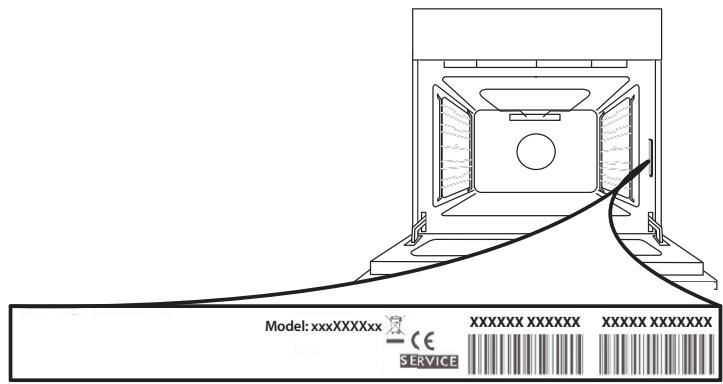
Please note: If repairs are required, contact an authorised service centre that is guaranteed to use original spare parts and perform repairs correctly.
Please refer to the enclosed warranty leaflet for more information on the warranty.
natural_image
Illustration of various screw and hand tools including a screwdriver, clamped bracket, and gloves (no text or symbols)
natural_image
Illustration showing two workers handling boxes with a crossed-out box and a toolbox nearby (no text or symbols)
natural_image
Illustration showing two workers: one using a power tool with a lightning bolt symbol, the other operating a safety drill with equipment (no text or symbols present)
natural_image
Two technical illustrations of a box with a cross symbol, one showing a broken lid and the other a flat base (no text or symbols present)
natural_image
Technical line drawing of a window frame with a 5mm dimension label (no text or symbols beyond the label)
400010902130