
S1 - Détecteur de fumée BLAUPUNKT - Notice d'utilisation et mode d'emploi gratuit
Retrouvez gratuitement la notice de l'appareil S1 BLAUPUNKT au format PDF.

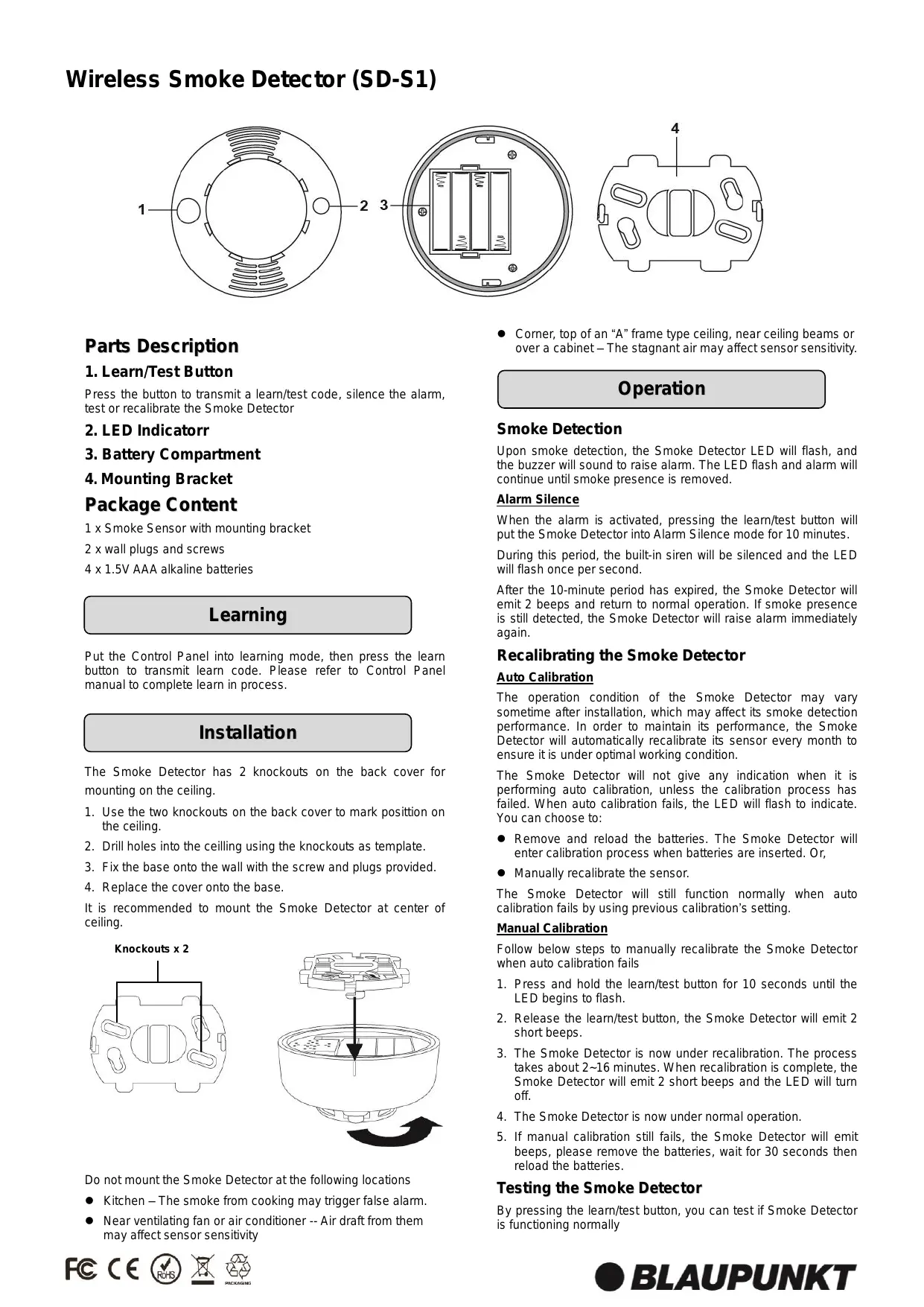
| Type de produit | Détecteur de fumée sans fil |
| Modèle | S1 (SD-S1) |
| Marque | Blaupunkt |
| Alimentation | 4 piles AAA 1,5 V alcalines |
| Fréquence radio | 868 MHz |
| Température de fonctionnement | -10°C à 40°C |
| Humidité de fonctionnement | 85% HR sans condensation |
| Autonomie estimée des piles | Environ 1 an (selon usage) |
| Détection | Détection de fumée par capteur optique |
| Alarme sonore | Buzzer intégré, 2 tonalités |
| Indicateur LED | Fonctionnement normal (éteint), transmission (allumé), batterie faible (clignotement lent), auto-calibrage (clignotement rapide) |
| Fonction silence | 10 minutes (LED clignote 1 fois/seconde) |
| Auto-calibrage | Tous les mois (automatique) |
| Calibrage manuel | Appui long 10s sur bouton test |
| Test de fonctionnement | Appui court sur bouton test |
| Montage | Au plafond, au centre de préférence |
| Emballage inclus | Capteur avec support, 2 chevilles et vis, 4 piles AAA alcalines |
| Entretien | Nettoyer avec un chiffon sec ; éviter les produits chimiques |
| Réparabilité | Remplacement des piles par l'utilisateur ; pas de pièces détachées disponibles |
| Sécurité | Conforme aux normes européennes ; ne pas installer dans la cuisine ou près d'un ventilateur |
FOIRE AUX QUESTIONS - S1 BLAUPUNKT
Questions des utilisateurs sur S1 BLAUPUNKT
0 question sur cet appareil. Repondez a celles que vous connaissez ou posez la votre.
Poser une nouvelle question sur cet appareil
Téléchargez la notice de votre Détecteur de fumée au format PDF gratuitement ! Retrouvez votre notice S1 - BLAUPUNKT et reprennez votre appareil électronique en main. Sur cette page sont publiés tous les documents nécessaires à l'utilisation de votre appareil S1 de la marque BLAUPUNKT.
MODE D'EMPLOI S1 BLAUPUNKT
Wireless Smoke Detector (SD-S1)
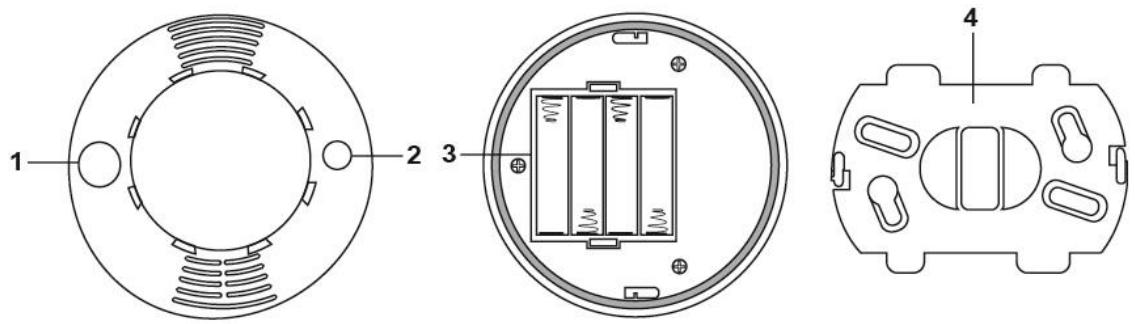
Parts Description
1. Learn/Test Button
Press the button to transmit a learn/test code, silence the alarm, test or recalibrate the Smoke Detector
2. LED Indicator
3. Battery Compartment
4. Mounting Bracket
Package Content
1 x Smoke Sensor with mounting bracket
2 x wall plugs and screws
4 x 1.5V AAA alkaline batteries
Learning
Put the Control Panel into learning mode, then press the learn button to transmit learn code. Please refer to Control Panel manual to complete learn in process.
Installation
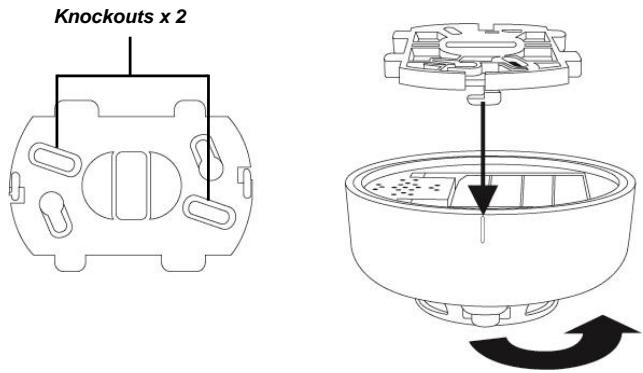
The Smoke Detector has 2 knockouts on the back cover for mounting on the ceiling.
- Use the two knockouts on the back cover to mark position on the ceiling.
- Drill holes into the ceiling using the knockouts as template.
- Fix the base onto the wall with the screw and plugs provided.
- Replace the cover onto the base.
It is recommended to mount the Smoke Detector at center of ceiling.
Do not mount the Smoke Detector at the following locations
- Kitchen - The smoke from cooking may trigger false alarm.
-
Near ventilating fan or air conditioner -- Air draft from them may affect sensor sensitivity
-
Corner, top of an "A" frame type ceiling, near ceiling beams or over a cabinet - The stagnant air may affect sensor sensitivity.
Operation
Smoke Detection
Upon smoke detection, the Smoke Detector LED will flash, and the buzzer will sound to raise alarm. The LED flash and alarm will continue until smoke presence is removed.
Alarm Silence
When the alarm is activated, pressing the learn/test button will put the Smoke Detector into Alarm Silence mode for 10 minutes.
During this period, the built-in siren will be silenced and the LED will flash once per second.
After the 10-minute period has expired, the Smoke Detector will emit 2 beeps and return to normal operation. If smoke presence is still detected, the Smoke Detector will raise alarm immediately again.
Recalibrating the Smoke Detector
Auto Calibration
The operation condition of the Smoke Detector may vary sometime after installation, which may affect its smoke detection performance. In order to maintain its performance, the Smoke Detector will automatically recalibrate its sensor every month to ensure it is under optimal working condition.
The Smoke Detector will not give any indication when it is performing auto calibration, unless the calibration process has failed. When auto calibration fails, the LED will flash to indicate. You can choose to:
- Remove and reload the batteries. The Smoke Detector will enter calibration process when batteries are inserted. Or,
- Manually recalibrate the sensor.
The Smoke Detector will still function normally when auto calibration fails by using previous calibration's setting.
Manual Calibration
Follow below steps to manually recalibrate the Smoke Detector when auto calibration fails
- Press and hold the learn/test button for 10 seconds until the LED begins to flash.
- Release the learn/test button, the Smoke Detector will emit 2 short beeps.
- The Smoke Detector is now under recalibration. The process takes about 2~16 minutes. When recalibration is complete, the Smoke Detector will emit 2 short beeps and the LED will turn off.
- The Smoke Detector is now under normal operation.
- If manual calibration still fails, the Smoke Detector will emit beeps, please remove the batteries, wait for 30 seconds then reload the batteries.
Testing the Smoke Detector
By pressing the learn/test button, you can test if Smoke Detector is functioning normally
If the Smoke Detector is functioning normally, the LED will turn on for 2 Sec. It will then sound a 2-tone beep.
If the buzzer sounds 3 beeps, it means the Optical Chamber in the Smoke Detector is either dirty or out-of-order.
If the LED does not light up and no beep is sounded, it means the Smoke Detector is either out-of-order or battery depleted.
LED Indicator
| Off | Normal Operation |
| On | Transmitting signal |
| Slow Flash (every 30 seconds) | Low battery |
| Quick Flash | Self-calibrating process |
Battery
The PIR uses four 1.5V alkaline batteries as its power source. It also features low battery detection function to notify the Control Panel when battery voltage is low.
When the Smoke Detector is on low battery, follow the procedure below to change the batteries.
- Detach the Smoke Detector from the mounting bracket.
- Open the back cover.
- Remove the old batteries.
- Press the learn/test button several times to fully discharge.
- Insert the new batteries observing correct polarity. The Smoke Detector will enter self-calibrating process for 8-22 minutes after inserting batteries.
- Replace the back cover.
- Replace the Smoke Detector on the mounting bracket
Specification
Environmental Condition
-10^ to 40^ , relative humidity 85% non-condensing.
Radio
868 MHz
- Wireless Smoke Detector (SD-S1)
- Parts Description
- Learn/Test Button
- LED Indicator
- Battery Compartment
- Mounting Bracket
- Package Content
- Learning
- Installation
- Operation
- Smoke Detection
- Alarm Silence
- Recalibrating the Smoke Detector
- Auto Calibration
- Manual Calibration
- Testing the Smoke Detector
- Battery
- Specification
- Environmental Condition
- Radio
Marque : BLAUPUNKT
Modèle : S1
Catégorie : Détecteur de fumée