
ZOU30602XK - Four encastrable ZANUSSI - Notice d'utilisation et mode d'emploi gratuit
Retrouvez gratuitement la notice de l'appareil ZOU30602XK ZANUSSI au format PDF.


| Type de produit | Four encastrable |
| Marque | Zanussi |
| Modèle | ZOU30602XK |
| Volume utile | 57 L |
| Masse | 26,8 kg |
| Classe d'efficacité énergétique | A |
| Consommation énergétique (mode conventionnel) | 0,83 kWh/cycle |
| Consommation énergétique (mode chaleur tournante) | 0,75 kWh/cycle |
| Source d'alimentation | Électrique |
| Nombre de fonctions de cuisson | 7 |
| Fonctions de cuisson | Chaleur tournante, Convection naturelle, Sole, Turbo gril, Gril rapide, Gril, Cuisson humide |
| Type de commande | Manuelle avec boutons rétractables |
| Affichage | Numérique avec fonctions d'horloge |
| Nombre de niveaux de grille | 4 |
| Accessoires fournis | Grille métallique, plaque de cuisson |
| Éclairage intérieur | Ampoule halogène remplaçable |
| Type de porte | Double vitrage amovible pour nettoyage |
| Sécurité | Thermostat de sécurité, refroidissement automatique |
| Nettoyage | Nettoyage manuel, supports de grille amovibles, porte démontable |
| Réparabilité | Pièces de rechange disponibles via service agréé |
| Garantie | Consulter les conditions de garantie Zanussi |
FOIRE AUX QUESTIONS - ZOU30602XK ZANUSSI
Questions des utilisateurs sur ZOU30602XK ZANUSSI
0 question sur cet appareil. Repondez a celles que vous connaissez ou posez la votre.
Poser une nouvelle question sur cet appareil
Téléchargez la notice de votre Four encastrable au format PDF gratuitement ! Retrouvez votre notice ZOU30602XK - ZANUSSI et reprennez votre appareil électronique en main. Sur cette page sont publiés tous les documents nécessaires à l'utilisation de votre appareil ZOU30602XK de la marque ZANUSSI.
MODE D'EMPLOI ZOU30602XK ZANUSSI

Manuel d'utilisation
POUR COMMENCER ?
FACILE.
ZOU25612XU
FR Manuel d'utilisation Four
ZANUSSI
Avant l'installation et l'utilisation de l'appareil, lisez attentivement les instructions fournies. Le fabricant n'est pas responsable des blessures ou des dommages résultant d'une installation ou d'une utilisation incorrecte. Conservez toujours les instructions dans un endroit sûr et accessible pour référence future.
SÉCURITÉ DES ENFANTS ET DES PERSONNES VULNÉRABLES
- Cet appareil peut être utilisé par des enfants âgés de 8 ans et plus et par des personnes ayant des capacités physiques, sensorielles ou mentales réduites ou manquant d'expérience et de connaissances, si elles ont été supervisées ou instruites sur l'utilisation de l'appareil en toute sécurité et comprennent les dangers encourus.
- Les enfants entre 3 et 8 ans et les personnes présentant des handicaps très étendus et complexes doivent être tenus à l'écart, sauf s'ils sont sous surveillance continue.
- Les enfants de moins de 3 ans doivent être tenus à l'écart, sauf s'ils sont sous surveillance continue.
- Ne laissez pas les enfants jouer avec l'appareil.
- Gardez tous les emballages hors de portée des enfants et éliminez-les de manière appropriée.
- Gardez les enfants et les animaux domestiques à l'écart de l'appareil lorsqu'il fonctionne ou lorsqu'il refroidit. Les parties accessibles sont chaudes.
- Si l'appareil est équipé d'un dispositif de sécurité enfants, il doit être activé.
- Les enfants ne doivent pas effectuer le nettoyage ni l'entretien de l'appareil sans surveillance.
SÉCURITÉ GÉNÉRALE
- Seule une personne qualifiée doit installer cet appareil et remplacer le câble.
- Le panneau de commande doit être connecté à l'unité de chauffage spécifiée avec des connecteurs de couleurs correspondantes, afin d'éviter tout danger potentiel.
- AVERTISSEMENT : L'appareil et ses parties accessibles deviennent chauds pendant l'utilisation. Il faut faire attention à ne pas toucher les éléments chauffants.
- Utilisez toujours des gants de cuisine pour retirer ou mettre en place des accessoires ou des plats.
- Avant toute opération d'entretien, débranchez l'appareil de l'alimentation électrique.
- Assurez-vous que l'appareil est éteint avant de remplacer l'ampoule pour éviter tout risque de choc électrique.
- N'utilisez pas de nettoyeur vapeur pour nettoyer l'appareil.
- N'utilisez pas de nettoyants abrasifs agressifs ni de racloirs métalliques tranchants pour nettoyer la porte en verre, car ils peuvent rayer la surface, ce qui pourrait entraîner le bris du verre.
- Si le câble d'alimentation est endommagé, il doit être remplacé par le fabricant, son service après-vente agréé ou des personnes qualifiées afin d'éviter tout danger électrique.
- Pour retirer les supports de grille, tirez d'abord sur l'avant du support, puis sur l'arrière pour le dégager des parois latérales. Installez les supports de grille dans l'ordre inverse.
- Le moyen de déconnexion doit être incorporé dans le câblage fixe conformément aux règles de câblage.
CONSIGNES DE SÉCURITÉ
INSTALLATION

AVERTISSEMENT ! Seule une personne qualifiée doit installer cet appareil.
- Retirez tout l'emballage.
- N'installez pas et n'utilisez pas un appareil endommagé.
- Suivez les instructions d'installation fournies avec l'appareil. Soyez toujours prudent lors du déplacement de l'appareil, car il est lourd. Portez toujours des gants de sécurité et des chaussures fermées.
- Ne tirez pas l'appareil par la poignée.
- Le meuble de cuisine et l'évidement doivent avoir des dimensions appropriées.
- Respectez la distance minimale par rapport aux autres appareils et éléments.
- Installez l'appareil dans un endroit sûr et approprié qui répond aux exigences d'installation.
- Certaines parties de l'appareil sont sous tension. Fermez l'appareil avec du mobilier pour éviter tout contact avec les parties dangereuses.
BRANCHEMENT ÉLECTRIQUE

AVERTISSEMENT ! Risque d'incendie et de choc électrique.
- Toutes les connexions électriques doivent être effectuées par un électricien qualifié. L'appareil doit être mis à la terre.
- Assurez-vous que les paramètres de la plaque signalétique sont compatibles avec les caractéristiques électriques de l'alimentation secteur. Utilisez toujours une prise de courant avec mise à la terre correctement installée.
- N'utilisez pas de multiprises et de câbles prolongateurs.
- Veillez à ne pas endommager la fiche d'alimentation et le câble d'alimentation. Si le câble d'alimentation doit être remplacé, cela doit être effectué par notre service après-vente agréé.
- Ne laissez pas les câbles d'alimentation toucher ou s'approcher de la porte de l'appareil, surtout lorsque la porte est chaude.
- La protection contre les chocs électriques des pièces sous tension et isolées doit être fixée de manière à ne pas pouvoir être retirée sans outils.
- Branchez la fiche d'alimentation sur la prise de courant uniquement à la fin de l'installation. Assurez-vous que
l'accès à la fiche d'alimentation est possible après l'installation.
- Si la prise de courant est desserrée, ne branchez pas la fiche d'alimentation.
- Ne tirez pas sur le câble d'alimentation pour débrancher l'appareil. Tirez toujours sur la fiche d'alimentation.
- Utilisez uniquement des dispositifs d'isolation corrects : disjoncteurs de protection de ligne, fusibles (fusibles à vis retirés du porte-fusible), disjoncteurs différentiels et contacteurs.
- L'installation électrique doit comporter un dispositif d'isolation qui permet de débrancher l'appareil de l'alimentation sur tous les pôles. Le dispositif d'isolation doit avoir une ouverture de contact d'au moins 3 mm. Cet appareil est conforme aux directives de la C.E.E.
UTILISATION

AVERTISSEMENT ! Risque de blessures, de brûlures, de choc électrique ou d'explosion.
Cet appareil est réservé à un usage domestique uniquement. - Ne modifiez pas les spécifications de cet appareil. - Assurez-vous que les ouvertures de ventilation ne sont pas obstruées. - Ne laissez pas l'appareil sans surveillance pendant son fonctionnement. - Désactivez l'appareil après chaque utilisation. - Soyez prudent lorsque vous ouvrez la porte de l'appareil pendant son fonctionnement. De l'air chaud peut s'échapper. - Ne faites pas fonctionner l'appareil avec les mains mouillées ou lorsqu'il est en contact avec de l'eau. - N'appliquez pas de pression sur la porte ouverte. - N'utilisez pas l'appareil comme surface de travail ou de rangement. - Ouvrez la porte de l'appareil avec précaution. L'utilisation d'ingrédients contenant de l'alcool peut provoquer un mélange d'alcool et d'air. - Ne laissez pas des étincelles ou des flammes nues entrer en contact avec l'appareil lorsque vous ouvrez la porte. - Ne placez pas de produits inflammables ou d'articles mouillés avec des produits inflammables dans, près ou sur l'appareil.

AVERTISSEMENT ! Risque de dommages à l'appareil.
- Pour éviter d'endommager ou de décolorer l'émail :
- ne placez pas de plats allant au four ou d'autres objets directement sur le fond de l'appareil.
- ne placez pas de papier d'aluminium directement sur le fond de la cavité de l'appareil.
- ne versez pas d'eau directement dans l'appareil chaud. Ne laissez pas de plats humides ou d'aliments dans l'appareil après la cuisson.
- soyez prudent lors du retrait ou de l'installation des accessoires.
- La décoloration de l'émail ou de l'acier inoxydable n'affecte pas les performances de l'appareil. Utilisez un plat profond pour les gâteaux humides. Les jus de fruits provoquent des taches qui peuvent être permanentes.
- Cet appareil est destiné uniquement à la cuisson. Il ne doit pas être utilisé à d'autres fins, par exemple pour chauffer une pièce. Cuisinez toujours avec la porte du four fermée.
ENTRETIEN ET NETTOYAGE

AVERTISSEMENT ! Risque de blessure, d'incendie ou de dommage à l'appareil.
- Avant l'entretien, désactivez l'appareil et débranchez la fiche de la prise secteur. Assurez-vous que l'appareil est froid. Il y a un risque que les panneaux de verre se brisent.
- Remplacez immédiatement les panneaux de verre de la porte s'ils sont endommagés. Contactez le service après-vente agréé.
- Soyez prudent lorsque vous retirez la porte de l'appareil. La porte est lourde !
- Nettoyez régulièrement l'appareil pour éviter la détérioration du matériau de surface.
- Nettoyez l'appareil avec un chiffon doux et humide. Utilisez uniquement des détergents neutres. N'utilisez pas de produits abrasifs, de tampons à récurer abrasifs, de solvants ou d'objets métalliques. Si vous utilisez un spray pour four, suivez les instructions de sécurité sur son emballage.
- Ne nettoyez pas l'émail catalytique (si applicable) avec un quelconque détergent.
ÉCLAIRAGE INTÉRIEUR

AVERTISSEMENT ! Risque de choc électrique.
- Le type d'ampoule ou de lampe halogène utilisé pour cet appareil est réservé aux appareils électroménagers. Ne l'utilisez pas pour l'éclairage domestique.
- Avant de remplacer la lampe, débranchez l'appareil de l'alimentation électrique.
- Utilisez uniquement des lampes ayant les mêmes spécifications.
SERVICE
- Pour réparer l'appareil, contactez un service après-vente agréé.
Utilisez uniquement des pièces de rechange d'origine.
MISE AU REBUT

AVERTISSEMENT ! Risque de blessure ou de suffocation.
- Débranchez l'appareil de l'alimentation secteur.
- Coupez le câble électrique secteur près de l'appareil et jetez-le.
- Retirez la poignée de la porte pour empêcher les enfants ou les animaux de se retrouver piégés dans l'appareil.
DESCRIPTION DU PRODUIT
VUE D'ENSEMBLE
ACCESSOIRES
- Grille métallique
Pour les ustensiles de cuisine, moules à gâteau, rôtis.
PANNEAU DE COMMANDE
BOUTONS POUR LES ZONES DE CUISSON
Vous pouvez utiliser la table de cuisson avec les boutons pour les zones de cuisson.

Vous devez lire les chapitres sur la sécurité dans le manuel de l'utilisateur de la table de cuisson.
RÉGLAGES DE CHALEUR
| Knob indication | Function |
| 0 | Off position |
| 1 - 9 | Heat settings |
| ◎ | Double zone switch |
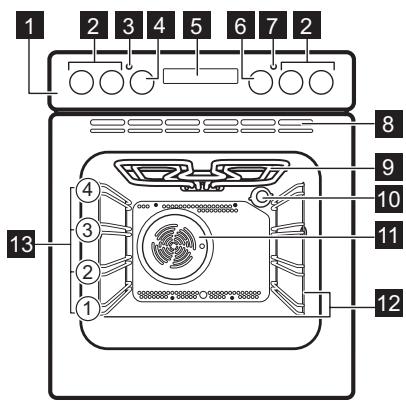
1 Panneau de commande Boutons pour la table de cuisson 3 Voyant / symbole d'alimentation 4 Bouton pour les fonctions de chauffage Affichage 6 Bouton de commande (pour la température) 7 Indicateur / symbole de température Bouches d'aération pour le ventilateur de refroidissement Élément chauffant 10 Lampe 11 Ventilateur 12 Support de grille, amovible 13 Positions des grilles
Plaque de cuisson
Pour les gâteaux et les biscuits.
- Tournez la manette jusqu'au réglage de chaleur nécessaire.
- Pour terminer la cuisson, tournez la manette sur la position d'arrêt.
UTILISATION DE LA DOUBLE ZONE (SI DISPONIBLE)

Pour activer la double zone, tournez la manette dans le sens des aiguilles d'une montre. Ne la tournez pas au-delà de la position d'arrêt.
- Tournez la manette dans le sens des aiguilles d'une montre jusqu'à la position 9.
- Tournez lentement la manette jusqu'au symbole jusqu'à ce que vous entendiez un clic. Les deux zones de cuisson sont allumées.
- Pour régler le niveau de chaleur nécessaire, reportez-vous à la section « Réglages de chaleur ».
BOUTONS
| Sensor field / Button | Function | Description |
| - | MINUS | To set the time. |
| ① | CLOCK | To set a clock function. |
| + | PLUS | To set the time. |
AFFICHAGE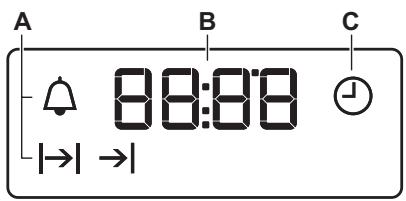
A. Fonctions de l'horloge B. Minuteur C. Fonction horloge
AVANT LA PREMIÈRE UTILISATION

AVERTISSEMENT ! Reportez-vous aux chapitres sur la sécurité.

Pour régler l'heure, reportez-vous au chapitre « Fonctions de l'horloge ».
NETTOYAGE INITIAL
Retirez tous les accessoires et les supports de grille amovibles du four.

Reportez-vous au chapitre « Entretien et nettoyage ».
Nettoyez le four et les accessoires avant la première utilisation.
UTILISATION QUOTIDIENNE

AVERTISSEMENT ! Reportez-vous aux chapitres sur la sécurité.
BOUTONS ESCAMOTABLES
Pour utiliser l'appareil, appuyez sur le bouton. Le bouton sort.
Remettez les accessoires et les supports de grille amovibles à leur position initiale.
PRÉCHAUFFAGE
Préchauffez le four vide avant la première utilisation.
- Réglez la fonction . Réglez la température maximale.
- Laissez le four fonctionner pendant 1 heure.
- Réglez la fonction. Réglez la température maximale.
- Laissez le four fonctionner pendant 15 minutes.
- Éteignez le four et laissez-le refroidir.
Les accessoires peuvent devenir plus chauds que d'habitude. Le four peut dégager une odeur et de la fumée. Assurez-vous que la circulation de l'air dans la pièce est suffisante.
RÉGLAGE D'UNE FONCTION DE CHAUFFE
- Tournez la manette des fonctions de chauffe pour sélectionner une fonction de chauffe.
- Tournez la manette de commande pour sélectionner la température.
La lampe s'allume lorsque le four fonctionne.
- Pour éteindre le four, tournez la manette des fonctions de chauffe sur la position d'arrêt.
FONCTIONS DU FOUR
| Oven func-tion | Application |
| Off posi-tion | The oven is off. |
| Fan Cook-ing | To roast or roast and bake food with the same cooking temperature on more than one shelf position, without flavour transference. |
| Conven-tional Cooking (Top / Bot-tem Heat) | To bake and roast food on one shelf position. |
| Bottom Heat | To bake cakes with crispy bot-tem and to preserve food. |
| Turbo Grill-ing | To roast larger meat joints or poultry with bones on one shelf position. To make gratins and to brown. |
| Fast Grill-ing | To grill flat food in large quantities and to toast bread. |
| Oven func-tion | Application |
| Grilling | To grill flat food and to toast bread. |
| Moist Bak-ing | This function is designed to save energy during cooking. For the cooking instructions re-fer to "Hints and tips" chapter, Moist Baking. The oven door should be closed during cook-ing so that the function is not interrupted and to ensure that the oven operates with the highest energy efficiency pos-sible. When you use this func-tion, the temperature in the cavity may differ from the set temperature. The heating pow-er may be reduced. For general energy saving recommenda-tions refer to "Energy Efficien-cy" chapter, Energy Sav-ing.This function was used to comply with the energy effi-ciency class according to EN 60350-1. |
FONCTIONS DE L'HORLOGE
TABLEAU DES FONCTIONS DE L'HORLOGE
| Clock function | Application | |
| ⊕ | TIME OF DAY | To set, change or check the time of day. |
| |→| | DURATION | To set how long the appliance operates. |
| →| | END | To set when the appliance deactivates. |
| |→| →| | TIME DELAY | To combine DURATION and END function. |
| ◇ | MINUTE MINDER | To set countdown time. This function has no effect on the operation of the appliance. You can set the MINUTE MINDER at any time, also when the appliance is off. |
RÉGLAGE DE L'HEURE. CHANGEMENT DE L'HEURE
Vous devez régler l'heure avant d'utiliser le four.
Le symbole ① clignote lorsque vous branchez l'appareil sur l'alimentation électrique, en cas de coupure de courant ou lorsque la minuterie n'est pas réglée.
Appuyez sur + ou - pour régler l'heure correcte.
Après environ cinq secondes, le clignotement s'arrête et l'affichage indique l'heure que vous avez réglée.
Pour changer l'heure, appuyez à plusieurs reprises jusqu'à ce que le symbole commence à clignoter.
RÉGLAGE DE LA DURÉE
- Réglez une fonction du four et la température.
- Appuyez sur 1 à plusieurs reprises jusqu'à ce que |→| commence à clignoter.
- Appuyez sur + ou – pour régler la DURÉE.
L'écran affiche |→ |.
- Lorsque le temps est écoulé, |→| clignote et un signal sonore retentit. L'appareil se désactive automatiquement.
- Appuyez sur n'importe quel bouton pour arrêter le signal sonore.
- Tournez le bouton des fonctions du four et le bouton de température sur la position d'arrêt.
RÉGLAGE DE LA FIN
- Réglez une fonction du four et la température.
- Appuyez sur ① à plusieurs reprises jusqu'à ce que → | commence à clignoter.
- Appuyez sur + ou – pour régler l'heure. L'écran affiche →|.
- Lorsque le temps est écoulé, → clignote et un signal sonore retentit. L'appareil se désactive automatiquement.
- Appuyez sur n'importe quel bouton pour arrêter le signal.
- Tournez la manette des fonctions du four et la manette de température sur la position arrêt.
RÉGLAGE DU DÉPART DIFFÉRÉ
- Sélectionnez une fonction du four et une température.
- Appuyez plusieurs fois sur jusqu'à ce que |→| clignote.
- Appuyez sur + ou - pour régler la durée.
- Appuyez sur ①.
- Appuyez sur + ou - pour régler l'heure de fin.
- Appuyez sur ① pour confirmer.
L'appareil s'allume automatiquement plus tard, fonctionne pendant la durée réglée et s'arrête à l'heure de fin réglée. À l'heure réglée, un signal sonore retentit.
- L'appareil s'éteint automatiquement. Appuyez sur n'importe quelle touche pour arrêter le signal.
- Tournez la manette des fonctions du four et la manette de température sur la position arrêt.
RÉGLAGE DE LA MINUTERIE
- Appuyez plusieurs fois sur ① jusqu'à ce que clignote.
- Appuyez sur + ou - pour régler le temps nécessaire. La minuterie démarre automatiquement après 5 secondes.
- Lorsque la durée réglée est écoulée, un signal sonore retentit. Appuyez sur n'importe quelle touche pour arrêter le signal sonore.
- Tournez la manette des fonctions du four sur la position d'arrêt.
ANNULATION DES FONCTIONS HORLOGE
- Appuyez à plusieurs reprises sur ① jusqu'à ce que le voyant de la fonction souhaitée commence à clignoter.
- Maintenez enfoncé
La fonction horloge s'éteint après quelques secondes.

AVERTISSEMENT ! Reportez-vous aux chapitres concernant la sécurité.
INSERTION DES ACCESSOIRES
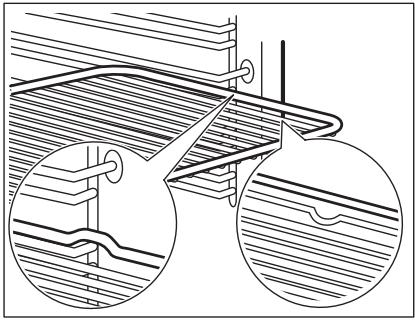
Grille métallique :
Poussez la grille entre les barres de guidage du support de grille et assurez-vous que les pieds sont orientés vers le bas.
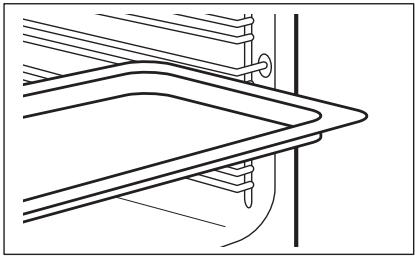
Plaque de cuisson :
Poussez la plaque de cuisson entre les barres de guidage du support de grille.
FONCTIONS SUPPLÉMENTAIRES
VENTILATEUR DE REFROIDISSEMENT
Lorsque le four fonctionne, le ventilateur de refroidissement s'allume automatiquement pour maintenir les surfaces du four au frais. Si vous éteignez le four, le ventilateur de refroidissement peut continuer à fonctionner jusqu'à ce que le four refroidisse.
CONSEILS ET ASTUCES

AVERTISSEMENT ! Reportez-vous aux chapitres sur la sécurité.
Grille métallique et plaque de cuisson ensemble :
Poussez la plaque de cuisson entre les barres de guidage du support de grille et la grille métallique sur les barres de guidage au-dessus.
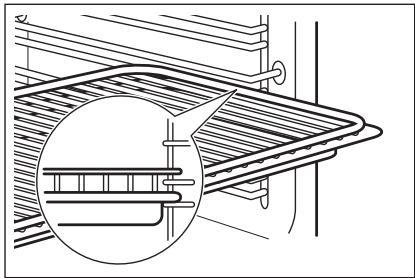

La petite encoche en haut augmente la sécurité. Les encoches servent également de dispositifs anti-basculement. Le rebord élevé autour de la grille empêche les ustensiles de cuisson de glisser de la grille.
THERMOSTAT DE SÉCURITÉ
Une utilisation incorrecte du four ou des composants défectueux peuvent provoquer une surchauffe dangereuse. Pour éviter cela, le four est équipé d'un thermostat de sécurité qui coupe l'alimentation électrique. Le four se rallume automatiquement lorsque la température baisse.

Les températures et les temps de cuisson dans les tableaux ne sont que des indications. Ils dépendent des recettes et de la qualité et de la quantité des ingrédients utilisés.
RECOMMANDATIONS DE CUISSON
Le four dispose de quatre positions de grille.
Comptez les positions de grille à partir du bas de la sole du four.
Votre four peut cuire ou rôtir différemment de votre ancien four. Les tableaux ci-dessous vous fournissent les réglages standard pour la température, le temps de cuisson et la position de la grille.
Si vous ne trouvez pas les réglages pour une recette spéciale, cherchez une recette similaire.
Le four dispose d'un système spécial qui fait circuler l'air et recycle constamment la vapeur. Avec ce système, vous pouvez cuisiner dans un environnement humide et garder les aliments moelleux à l'intérieur et croustillants à l'extérieur. Cela réduit le temps de cuisson et la consommation d'énergie.
Cuisson de gâteaux
N'ouvrez pas la porte du four avant que les 3/4 du temps de cuisson réglé ne soient écoulés.
Si vous utilisez deux plaques de cuisson en même temps, laissez un niveau vide entre elles.
Cuisson de la viande et du poisson
Laissez reposer la viande environ 15 minutes avant de la découper afin que le jus ne s'écoule pas.
Pour éviter trop de fumée dans le four pendant la cuisson, ajoutez un peu d'eau dans la lèchefrite. Pour éviter la condensation de la fumée, ajoutez de l'eau à chaque fois qu'elle s'évapore.
Temps de cuisson
Les temps de cuisson dépendent du type d'aliment, de sa consistance et de son volume.
Au début, surveillez la cuisson lorsque vous cuisinez. Trouvez les meilleurs réglages (position de chauffe, temps de cuisson, etc.) pour vos ustensiles, recettes et quantités lorsque vous utilisez cet appareil.
TABLEAU DE CUISSON ET DE RÔTISSAGE
Gâteaux
| Food | Top / Bottom Heat | Fan Cooking | Time (min) | Comments | ||
| Temperature (℃) | Shelf position | Temperature (℃) | Shelf position | |||
| Whisked recipes | 170 | 2 | 165 | 2 (1 and 3) | 45 - 60 | In a cake mould |
| Short-bread dough | 170 | 2 | 160 | 2 (1 and 3) | 20 - 30 | In a cake mould |
| Butter-milk cheese cake | 170 | 1 | 165 | 2 | 70 - 80 | In a 26 cm cake mould |
| Apple cake (Ap-ple pie) | 170 | 1 | 160 | 2 (1 and 3) | 80 - 100 | In two 20 cm cake moulds on a wire shelf |
| Strudel | 175 | 2 | 150 | 2 | 60 - 80 | In a baking tray |
| Jam-tart | 170 | 2 | 160 | 2 (1 and 3) | 30 - 40 | In a 26 cm cake mould |
| Fruit cake | 170 | 2 | 155 | 2 | 50 - 60 | In a 26 cm cake mould |
| Sponge cake (Fat-less sponge cake) | 170 | 2 | 160 | 2 | 90 - 120 | In a 26 cm cake mould |
| Christmas cake / Rich fruit cake | 170 | 2 | 160 | 2 | 50 - 60 | In a 20 cm cake mould |
| Plum cake1) | 170 | 2 | 165 | 2 | 20 - 30 | In a bread tin |
| Small cakes | 170 | 3 | 166 | 3 (1 and 3) | 25 - 35 | In a baking tray |
| Biscuits1) | 150 | 3 | 140 | 3 (1 and 3) | 30 - 35 | In a baking tray |
| Meringues | 100 | 3 | 115 | 3 | 35 - 40 | In a baking tray |
| Buns1) | 190 | 3 | 180 | 3 | 80 - 100 | In a baking tray |
| Choux1) | 190 | 3 | 180 | 3 (1 and 3) | 15 - 20 | In a baking tray |
| Plate tarts | 180 | 3 | 170 | 2 | 25 - 35 | In a 20 cm cake mould |
| Victoria sandwich | 180 | 1 or 2 | 170 | 2 | 45 - 70 | Left + right in a 20 cm cake mould |
| Rich fruit cake | 160 | 1 | 150 | 2 | 110 - 120 | In a 24 cm cake mould |
| Victoria sand-wich1) | 170 | 1 | 160 | 1 | 50 - 60 | In a 20 cm cake mould |
1) Préchauffez le four pendant 10 minutes.
Pain et pizza
| Food | Top / Bottom Heat | Fan Cooking | Time (min) | Comments | ||
| Temperature (℃) | Shelf position | Temperature (℃) | Shelf position | |||
| White bread1) | 190 | 1 | 195 | 1 | 60 - 70 | 1 - 2 pieces, 500 gr per piece |
| Rye bread | 190 | 1 | 190 | 1 | 30 - 45 | In a bread tin |
| Bread rolls1) | 190 | 2 | 180 | 2 (1 and 3) | 25 - 40 | 6 - 8 rolls in a baking tray |
| Pizza1) | 190 | 1 | 190 | 1 | 20 - 30 | On a deep pan |
| Scones1) | 200 | 3 | 190 | 2 | 10 - 20 | In a baking tray |
1) Préchauffez le four pendant 10 minutes.
Flans
| Food | Top / Bottom Heat | Fan Cooking | Time (min) | Comments | ||
| Temperature (℃) | Shelf posi- tion | Temperature (℃) | Shelf posi- tion | |||
| Pasta flan | 180 | 2 | 180 | 2 | 40 - 50 | In a mould |
| Vegetable flan | 200 | 2 | 200 | 2 | 45 - 60 | In a mould |
| Quiches | 190 | 1 | 190 | 1 | 40 - 50 | In a mould |
| Lasagne | 200 | 2 | 200 | 2 | 25 - 40 | In a mould |
| Cannelloni | 200 | 2 | 200 | 2 | 25 - 40 | In a mould |
| Yorkshire pudding1) | 220 | 2 | 210 | 2 | 20 - 30 | 6 pudding mould |
1) Préchauffez le four pendant 10 minutes.
Viande
| Food | Top / Bottom Heat | Fan Cooking | Time (min) | Comments | ||
| Temperature (℃) | Shelf posi- tion | Temperature (℃) | Shelf posi- tion | |||
| Beef | 200 | 2 | 190 | 2 | 50 - 70 | On a wire shelf and a deep pan |
| Pork | 180 | 2 | 180 | 2 | 90 - 120 | On a wire shelf and a deep pan |
| Veal | 190 | 2 | 175 | 2 | 90 - 120 | On a wire shelf and a deep pan |
| English roast beef rare | 210 | 2 | 200 | 2 | 44 - 50 | On a wire shelf and a deep pan |
| English roast beef medium | 210 | 2 | 200 | 2 | 51 - 55 | On a wire shelf and a deep pan |
| English roast beef well done | 210 | 2 | 200 | 2 | 55 - 60 | On a wire shelf and a deep pan |
| Shoulder of pork | 180 | 2 | 170 | 2 | 120 - 150 | On a deep pan |
| Shin of pork | 180 | 2 | 160 | 2 | 100 - 120 | 2 pieces on a deep pan |
| Lamb | 190 | 2 | 190 | 2 | 110 - 130 | Leg |
| Chicken | 200 | 2 | 200 | 2 | 70 - 85 | Whole |
| Turkey | 180 | 1 | 160 | 1 | 210 - 240 | Whole |
| Duck | 175 | 2 | 160 | 2 | 120 - 150 | Whole |
| Goose | 175 | 1 | 160 | 1 | 150 - 200 | Whole |
| Rabbit | 190 | 2 | 175 | 2 | 60 - 80 | Cut in pieces |
| Hare | 190 | 2 | 175 | 2 | 150 - 200 | Cut in pieces |
| Pheasant | 190 | 2 | 175 | 2 | 90 - 120 | Whole |
Poisson
| Food | Top / Bottom Heat | Fan Cooking | Time (min) | Comments | ||
| Temperature (℃) | Shelf posi- tion | Temperature (℃) | Shelf posi- tion | |||
| Trout / Sea bream | 190 | 2 | 175 | 2 (1 and 3) | 40 - 55 | 3 - 4 fishes |
| Tuna fish / Salmon | 190 | 2 | 175 | 2 (1 and 3) | 35 - 60 | 4 - 6 fillets |
GRILLADE
Réglez la température à 250 °C.
Préchauffez le four pendant 10 minutes.
Utilisez la troisième position.
| Food | Quantity | Time (min) | ||
| Pieces | Quantity (kg) | 1st side | 2nd side | |
| Fillet steaks | 4 | 0.8 | 12 - 15 | 12 - 14 |
| Beef steaks | 4 | 0.6 | 10 - 12 | 6 - 8 |
| Sausages | 8 | - | 12 - 15 | 10 - 12 |
| Pork chops | 4 | 0.6 | 12 - 16 | 12 - 14 |
| Chicken (cut in 2) | 2 | 1 | 30 - 35 | 25 - 30 |
| Kebabs | 4 | - | 10 - 15 | 10 - 12 |
| Breast of chicken | 4 | 0.4 | 12 - 15 | 12 - 14 |
| Hamburger | 6 | 0.6 | 20 - 30 | - |
| Fish fillet | 4 | 0.4 | 12 - 14 | 10 - 12 |
| Toasted sandwiches | 4 - 6 | - | 5 - 7 | - |
| Toast | 4 - 6 | - | 2 - 4 | 2 - 3 |
GRILLADE TURBO
Utilisez la troisième position de grille.
Réglez la température maximale à 200 °C.
| Food | Quantity | Time (min) | ||
| Pieces | (kg) | 1st side | 2nd side | |
| Rolled joints (turkey) | 1 | 1 | 30 - 40 | 20 - 30 |
| Chicken (cut in two) | 2 | 1 | 25 - 30 | 20 - 30 |
| Chicken drum-sticks | 6 | - | 15 - 20 | 15 - 18 |
| Quail | 4 | 0.5 | 25 - 30 | 20 - 25 |
| Vegetable gratin | - | - | 20 - 25 | - |
| Scallops | - | - | 15 - 20 | - |
| Mackerel | 2 - 4 | - | 15 - 20 | 10 - 15 |
| Fish slices | 4 - 6 | 0.8 | 12 - 15 | 8 - 10 |
CUISSON HUMIDE

Pour de meilleurs résultats, suivez les suggestions
listées dans le tableau ci-dessous.
| Food | Accessories | Temperature (℃) | Shelf posi- tion | Time (min) |
| Sweet rolls, 12 pieces | baking tray or dripping pan | 180 | 2 | 35 - 40 |
| Rolls, 9 pieces | baking tray or dripping pan | 180 | 2 | 35 - 40 |
| Pizza, frozen, 0.35 kg | wire shelf | 220 | 2 | 35 - 40 |
| Swiss roll | baking tray or dripping pan | 170 | 2 | 30 - 40 |
| Brownie | baking tray or dripping pan | 180 | 2 | 30 - 40 |
| Souffle, 6 pieces | ceramic ramekins on wire shelf | 200 | 3 | 30 - 40 |
| Sponge flan base | flan base tin on wire shelf | 170 | 2 | 20 - 30 |
| Victoria Sand- wich | baking dish on wire shelf | 170 | 2 | 35 - 45 |
| Poached fish, 0.3 kg | baking tray or dripping pan | 180 | 3 | 35 - 45 |
| Whole fish, 0.2 kg | baking tray or dripping pan | 180 | 3 | 35 - 45 |
| Fish fillet, 0.3 kg | pizza pan on wire shelf | 180 | 3 | 35 - 45 |
| Poached meat, 0.25 kg | baking tray or dripping pan | 200 | 3 | 40 - 50 |
| Shashlik, 0.5 kg | baking tray or dripping pan | 200 | 3 | 25 - 35 |
| Cookies, 16 pieces | baking tray or dripping pan | 180 | 2 | 20 - 30 |
| Macaroons, 20 pieces | baking tray or dripping pan | 180 | 2 | 40 - 45 |
| Muffins, 12 pieces | baking tray or dripping pan | 170 | 2 | 30 - 40 |
| Savory pastry, 16 pieces | baking tray or dripping pan | 170 | 2 | 35 - 45 |
| Short crust bis- cuits, 20 pieces | baking tray or dripping pan | 150 | 2 | 40 - 50 |
| Tartlets, 8 pieces | baking tray or dripping pan | 170 | 2 | 20 - 30 |
| Poached vege- tables, 0.4 kg | baking tray or dripping pan | 180 | 3 | 35 - 40 |
| Vegetarian ome-lette | pizza pan on wire shelf | 200 | 3 | 30 - 45 |
| Vegetables, mediterrean 0.7 kg | baking tray or dripping pan | 180 | 4 | 35 - 40 |
INFORMATIONS POUR LES INSTITUTS DE TEST
Tests selon la norme IEC 60350-1.
| Food | Function | Accesso-ries | Shelf position | Tempera-ture (℃) | Time (min) | Comments |
| Small cake | Conven- tional Cooking | Baking tray | 3 | 170 | 20 - 30 | Put 20 small cakes per one baking tray. |
| Apple pie | Conven- tional Cooking | Wire shelf | 1 | 170 | 80 - 120 | Use 2 tins (20 cm diameter), diago- nally shifted. |
| Sponge cake | Conven- tional Cooking | Wire shelf | 2 | 170 | 35 - 45 | Use a cake mould (26 cm diameter). |
| Short bread | Conven- tional Cooking | Baking tray | 3 | 150 | 20 - 35 | Preheat the oven for 10 minutes. |
| Toast 4 - 6 pieces | Grilling | Wire shelf | 3 | max. | 2 - 4 minutes first side; 2 - 3 minutes sec- ond side | Preheat the oven for 3 minutes. |
| Beef bur- ger 6 pieces, 0.6 kg | Grilling | Wire shelf and dripping pan | 3 | max. | 20 - 30 | Put the wire shelf on the third level and the dripping pan on the sec- ond level of the oven. Turn the food halfway through the cook- ing time. Preheat the oven for 3 minutes. |
ENTRETIEN ET NETTOYAGE

AVERTISSEMENT : Reportez-vous aux chapitres sur la sécurité.
CONSEILS DE NETTOYAGE
Nettoyez la façade du four avec un chiffon doux imbibé d'eau tiède et d'un produit de nettoyage doux.
Pour nettoyer les surfaces métalliques, utilisez un produit de nettoyage spécifique.
Nettoyez l'intérieur du four après chaque utilisation. L'accumulation de graisse ou d'autres résidus alimentaires peut provoquer un incendie.
Nettoyez tous les accessoires après chaque utilisation et laissez-les sécher. Utilisez un chiffon doux avec de l'eau tiède et un produit de nettoyage. Ne lavez pas les accessoires au lave-vaisselle.
Nettoyez les saletés tenaces avec un nettoyant spécial pour four.
Si vous avez des accessoires antiadhésifs, ne les nettoyez pas avec des produits agressifs, des objets tranchants ou au lave-vaisselle. Cela pourrait endommager le revêtement antiadhésif.
De l'humidité peut se condenser dans le four ou sur les vitres de la porte. Pour réduire la condensation, faites fonctionner le four pendant 10 minutes avant la cuisson.
Nettoyez l'humidité de la cavité après chaque utilisation.
FOURS EN ACIER INOXYDABLE OU EN ALUMINIUM
Nettoyez la porte du four uniquement avec un chiffon humide ou une éponge. Séchez-la avec un chiffon doux.
N'utilisez pas de laine d'acier, d'acides ou de matériaux abrasifs car ils peuvent endommager la surface du four. Nettoyez le panneau de commande du four avec les mêmes précautions.
NETTOYAGE DU JOINT DE PORTE
Vérifiez régulièrement le joint de porte. Le joint de porte se trouve autour du cadre de la cavité du four. N'utilisez pas le four si le joint de porte est endommagé.
Contactez un centre de service agréé.
Pour nettoyer le joint de porte, reportez-vous aux informations générales sur le nettoyage.
RETRAIT DES SUPPORTS DE GRILLE
Pour nettoyer le four, retirez les supports de grille.

ATTENTION ! Soyez prudent lorsque vous retirez les supports de grille.
- Tirez la partie avant du support de grille loin de la paroi latérale.
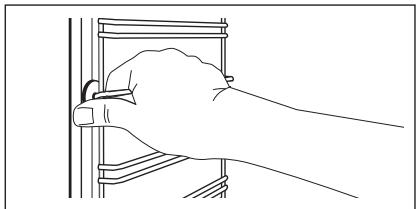
- Tirez l'extrémité arrière du support de grille loin de la paroi latérale et retirez-le.
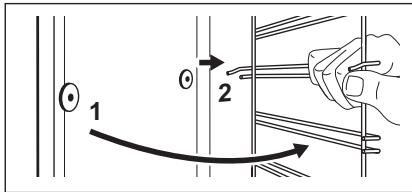
Installez les accessoires retirés dans l'ordre inverse.
RETRAIT ET INSTALLATION DE LA PORTE
La porte du four comporte deux panneaux de verre. Vous pouvez retirer la porte du four et le panneau de verre interne pour les nettoyer. Lisez l'intégralité des instructions "Retrait et installation de la porte" avant de retirer les panneaux de verre.

La porte du four peut se fermer si vous essayez de retirer le panneau de verre interne avant d'avoir retiré la porte du four.

ATTENTION ! N'utilisez pas le four sans le panneau de verre interne.
- Ouvrez la porte complètement et tenez les deux charnières.
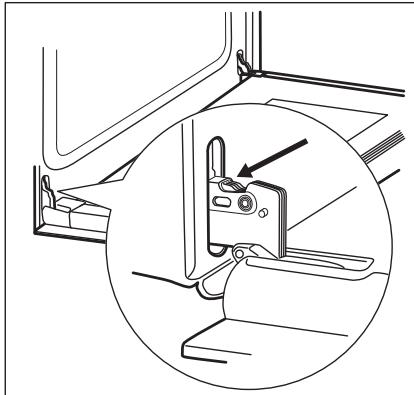
- Soulevez et tournez complètement les leviers sur les deux charnières.
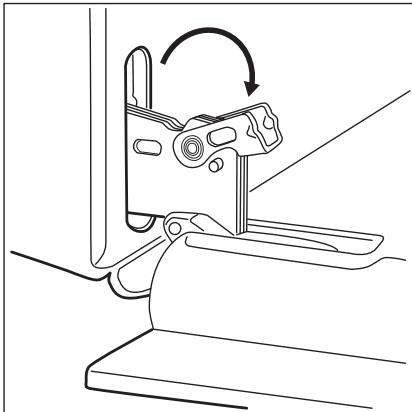
- Fermez la porte du four à moitié jusqu'à la première position d'ouverture. Soulevez ensuite, tirez vers l'avant et retirez la porte de son logement.
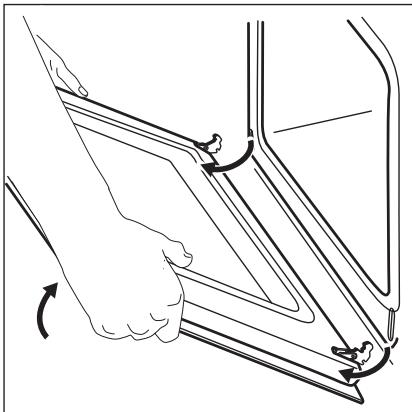
- Placez la porte sur un chiffon doux sur une surface stable.
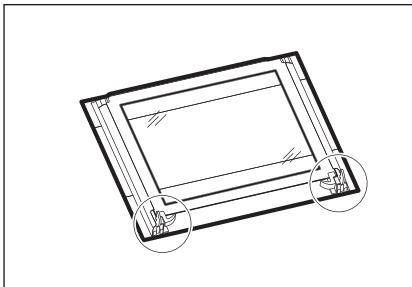
- Déverrouillez le système de verrouillage pour retirer le panneau de verre interne.
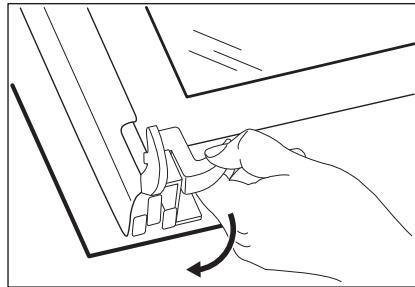
- Tournez les deux attaches de 90° et retirez-les de leurs logements.
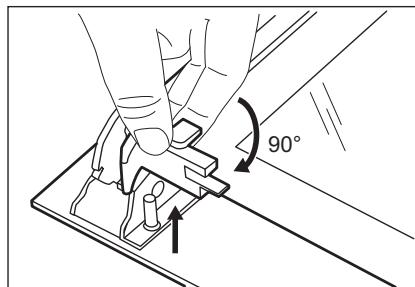
- Soulevez d'abord délicatement, puis retirez le panneau de verre.
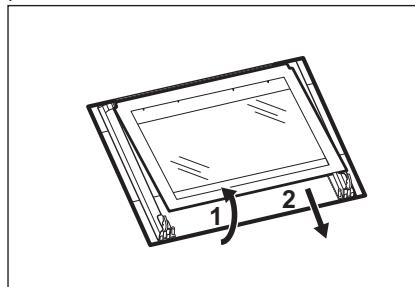
- Nettoyez les panneaux de verre avec de l'eau et du savon. Séchez soigneusement les panneaux de verre. Ne nettoyez pas les panneaux de verre au lave-vaisselle.
Une fois le nettoyage terminé, installez le panneau de verre et la porte du four.
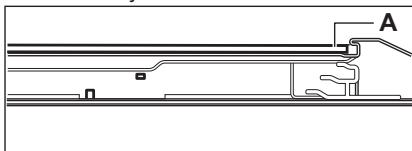
Lorsqu'elle est installée correctement, la garniture de porte s'enclenche.
Assurez-vous d'installer correctement le panneau de verre interne dans les logements.
- Éteignez le four. Attendez que le four soit refroidi.
- Débranchez le four de la prise secteur.
- Placez un chiffon au fond de la cavité.
La lampe arrière
- Tournez le couvercle en verre de la lampe pour le retirer.
- Nettoyez la vitre.
- Remplacez la lampe par une lampe adaptée résistant à la chaleur de 300 °C.
- Installez la vitre.
DÉPANNAGE

AVERTISSEMENT ! Reportez-vous aux chapitres concernant la sécurité.
QUE FAIRE SI...
| Problem | Possible cause | Remedy |
| The cooking zones do not operate. | Refer to the operating instructions for the built-in cooking surface. | |
| You cannot activate or operate the oven. The display shows "400" and an acoustic signal sounds. | The oven is incorrectly connected to an electrical supply. | Check if the oven is correctly connected to the electrical supply (refer to the connection diagram if available). |
| The oven does not heat up. | The oven is deactivated. | Activate the oven. |
| The oven does not heat up. | The clock is not set. | Set the clock. |
| The oven does not heat up. | The necessary settings are not set. | Make sure that the settings are correct. |
| The oven does not heat up. | The fuse is blown. | Make sure that the fuse is the cause of the malfunction. If the fuse is blown again and again, contact a qualified electrician. |
| The lamp does not operate. | The lamp is defective. | Replace the lamp. |
| Steam and condensation settle on the food and in the cavity of the oven. | You left the dish in the oven for too long. | Do not leave the dishes in the oven for longer than 15 - 20 minutes after the cooking process ends. |
| The display shows "12.00". | There was a power cut. | Reset the clock. |
DONNÉES DE SERVICE
Si vous ne trouvez pas de solution au problème vous-même, contactez votre revendeur ou un centre de service agréé.
Les données nécessaires pour le centre de service figurent sur la plaque signalétique. La plaque signalétique se trouve sur le cadre avant de
la cavité du four. Ne retirez pas la plaque signalétique de la cavité du four.
Nous vous recommandons de noter les données ici :
| Model (MOD.) | .................. |
| Product number (PNC) | .................. |
| Serial number (S.N.) | .................. |
INSTALLATION

AVERTISSEMENT ! Reportez-vous aux chapitres concernant la sécurité.
ENCASTRÉ SOUS UN PLAN DE TRAVAIL

ATTENTION ! Seule une personne qualifiée et compétente doit effectuer l'installation de l'appareil. Si vous ne contactez pas une personne qualifiée ou compétente, la garantie devient invalide en cas de dommage.
Avant d'installer l'appareil, équipez-le de la table de cuisson applicable indiquée dans le tableau.
| Type | Maximum power |
| ZEE 6041 | 7000 W |
| ZEV 6040 | 6000 W |
| ZEV 6041 | 6400 W |
| ZEV 6046 | 7600 W |
RACCORDEMENT ÉLECTRIQUE AVEC LA TABLE DE CUISSON
La prise de connexion de la table de cuisson se trouve en haut du caisson du four. La table de cuisson possède des fils de connexion pour les zones de cuisson et le câble de terre. Les fils sont munis de connecteurs enfichables. Pour connecter la table de cuisson au four, branchez les connecteurs dans les prises correspondantes du four. La conception des fiches et des prises empêche les connexions incorrectes.
INSTALLATION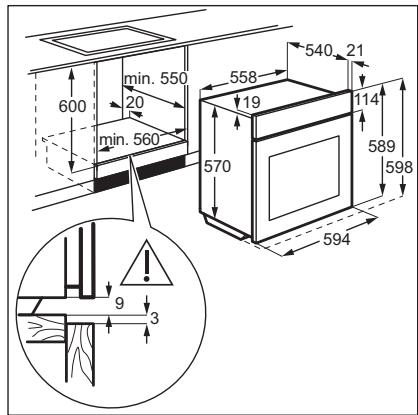
FIXATION DE L'APPAREIL AU MEUBLE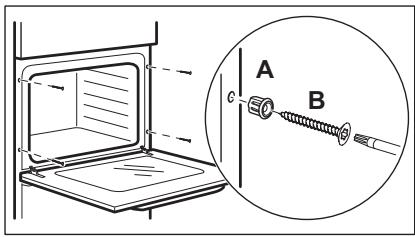
INSTALLATION ÉLECTRIQUE

Le fabricant n'est pas responsable si vous ne respectez pas les précautions de sécurité des chapitres sur la sécurité.
Cet appareil est fourni sans fiche principale ni câble principal.
CÂBLE
Types de câbles applicables pour l'installation ou le remplacement :
H07 RN-F, H05 RN-F, H05 RRF, H05 VV-F, H05 V2V2-F (T90), H05 BB-F
Pour la section du câble, reportez-vous à la puissance totale indiquée sur la plaque signalétique.
CONNEXION AU BORNIER
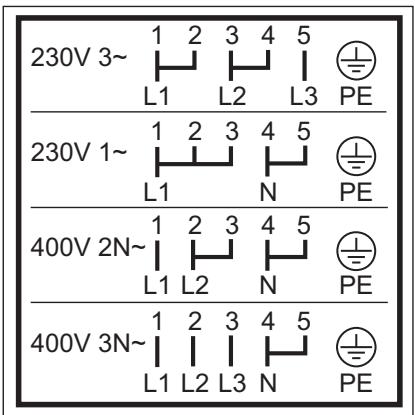
L'appareil possède un bornier à six pôles. Les ponts (cavaliers) sont réglés pour un fonctionnement en triphasé 400 V avec neutre.
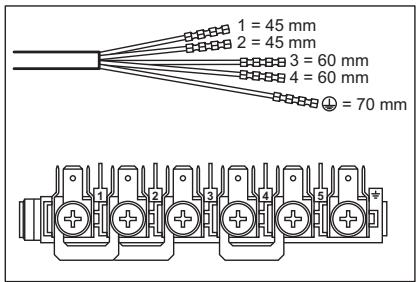
L 1 - 2 - 3 = câbles de phase
N 4 = fil neutre

= fil de terre
Si la tension du secteur est différente, réorganisez les cavaliers sur le bornier (reportez-vous au schéma de connexion ci-dessous). Connectez le câble de terre à la borne. Après avoir connecté le câble d'alimentation au bornier, fixez-le avec un collier de serrage.
EFFICACITÉ ÉNERGÉTIQUE
schéma de connexion ci-dessous). Connectez le câble de terre à la borne. Après avoir connecté le câble d'alimentation au bornier, fixez-le avec un collier de serrage.

FICHE PRODUIT ET INFORMATIONS SELON LE RÈGLEMENT UE 65-66/2014
| Supplier's name | Zanussi |
| Model identification | ZOU25612XU |
| Energy Efficiency Index | 94.9 |
| Energy efficiency class | A |
| Energy consumption with a standard load, conventional mode | 0.83 kWh/cycle |
| Energy consumption with a standard load, fan-forced mode | 0.75 kWh/cycle |
| Number of cavities | 1 |
| Heat source | Electricity |
| Volume | 57 I |
| Type of oven | Built-Under Oven |
| Mass | 26.8 kg |
EN 60350-1 - Appareils électroménagers de cuisson électriques - Partie 1 : Cuisinières, fours, fours à vapeur et grils - Méthodes de mesure des performances.
ÉCONOMIE D'ÉNERGIE

Le four contient des fonctionnalités qui vous aident à économiser de l'énergie lors de la cuisson quotidienne.
Conseils généraux
Assurez-vous que la porte du four est bien fermée lorsque le four fonctionne. N'ouvrez pas la porte trop souvent pendant la cuisson. Gardez le joint de porte propre et assurez-vous qu'il est bien fixé à sa place.
Utilisez des plats en métal pour améliorer les économies d'énergie.
Si possible, ne préchauffez pas le four avant d'y placer les aliments.
Lorsque la durée de cuisson dépasse 30 minutes, réduisez la température du four au minimum
PRÉOCCUPATIONS ENVIRONNEMENTALES
Recyclez les matériaux portant le symbole . Déposez les emballages dans les conteneurs appropriés pour les recycler. Aidez à protéger l'environnement et la santé humaine en recyclant les déchets d'appareils électriques et électroniques. Ne jetez pas les appareils marqués
3 à 10 minutes avant la fin du temps de cuisson, selon la durée de cuisson. La chaleur résiduelle à l'intérieur du four continuera la cuisson. Utilisez la chaleur résiduelle pour réchauffer d'autres plats. Gardez les pauses entre les cuissons aussi courtes que possible lorsque vous préparez peu de plats à la fois.
Cuisson avec ventilateur
Lorsque c'est possible, utilisez les fonctions de cuisson avec ventilateur pour économiser de l'énergie.
Garder les aliments au chaud
Choisissez le réglage de température le plus bas possible pour utiliser la chaleur résiduelle et garder un repas au chaud.
Cuisson humide
Fonction conçue pour économiser de l'énergie pendant la cuisson.
avec le symbole avec les déchets ménagers. Retournez le produit à votre installation de recyclage locale ou contactez votre bureau municipal.
WWW.ZANUSSI.COM/SHOP





- POUR COMMENCER
- FACILE
- SÉCURITÉ DES ENFANTS ET DES PERSONNES VULNÉRABLES
- SÉCURITÉ GÉNÉRALE
- CONSIGNES DE SÉCURITÉ
- INSTALLATION
- BRANCHEMENT ÉLECTRIQUE
- UTILISATION
- AVERTISSEMENT ! RISQUE DE BLESSURES, DE BRÛLURES, DE CHOC ÉLECTRIQUE OU D'EXPLOSION
- AVERTISSEMENT ! RISQUE DE DOMMAGES À L'APPAREIL
- ENTRETIEN ET NETTOYAGE
- AVERTISSEMENT ! RISQUE DE BLESSURE, D'INCENDIE OU DE DOMMAGE À L'APPAREIL
- ÉCLAIRAGE INTÉRIEUR
- AVERTISSEMENT ! RISQUE DE CHOC ÉLECTRIQUE
- SERVICE
- MISE AU REBUT
- DESCRIPTION DU PRODUIT
- VUE D'ENSEMBLE
- ACCESSOIRES
- PANNEAU DE COMMANDE
- BOUTONS POUR LES ZONES DE CUISSON
- UTILISATION DE LA DOUBLE ZONE (SI DISPONIBLE)
- AVANT LA PREMIÈRE UTILISATION
- NETTOYAGE INITIAL
- UTILISATION QUOTIDIENNE
- BOUTONS ESCAMOTABLES
- PRÉCHAUFFAGE
- RÉGLAGE D'UNE FONCTION DE CHAUFFE
- FONCTIONS DE L'HORLOGE
- RÉGLAGE DE L'HEURE. CHANGEMENT DE L'HEURE
- RÉGLAGE DE LA DURÉE
- RÉGLAGE DE LA FIN
- RÉGLAGE DU DÉPART DIFFÉRÉ
- RÉGLAGE DE LA MINUTERIE
- ANNULATION DES FONCTIONS HORLOGE
- INSERTION DES ACCESSOIRES
- FONCTIONS SUPPLÉMENTAIRES
- VENTILATEUR DE REFROIDISSEMENT
- CONSEILS ET ASTUCES
- THERMOSTAT DE SÉCURITÉ
- RECOMMANDATIONS DE CUISSON
- CUISSON DE GÂTEAUX
- CUISSON DE LA VIANDE ET DU POISSON
- TEMPS DE CUISSON
- TABLEAU DE CUISSON ET DE RÔTISSAGE
- GRILLADE
- GRILLADE TURBO
- CUISSON HUMIDE
- INFORMATIONS POUR LES INSTITUTS DE TEST
- CONSEILS DE NETTOYAGE
- FOURS EN ACIER INOXYDABLE OU EN ALUMINIUM
- NETTOYAGE DU JOINT DE PORTE
- RETRAIT DES SUPPORTS DE GRILLE
- RETRAIT ET INSTALLATION DE LA PORTE
- LA LAMPE ARRIÈRE
- DÉPANNAGE
- DONNÉES DE SERVICE
- ENCASTRÉ SOUS UN PLAN DE TRAVAIL
- RACCORDEMENT ÉLECTRIQUE AVEC LA TABLE DE CUISSON
- INSTALLATION ÉLECTRIQUE
- CÂBLE
- CONNEXION AU BORNIER
- EFFICACITÉ ÉNERGÉTIQUE
- ÉCONOMIE D'ÉNERGIE
- CONSEILS GÉNÉRAUX
- PRÉOCCUPATIONS ENVIRONNEMENTALES
- CUISSON AVEC VENTILATEUR
- GARDER LES ALIMENTS AU CHAUD
- WWW.ZANUSSI.COM/SHOP
Marque : ZANUSSI
Modèle : ZOU30602XK
Catégorie : Four encastrable