
STUDIOPHILE AV 30 - Enceintes de monitoring M-AUDIO - Notice d'utilisation et mode d'emploi gratuit
Retrouvez gratuitement la notice de l'appareil STUDIOPHILE AV 30 M-AUDIO au format PDF.

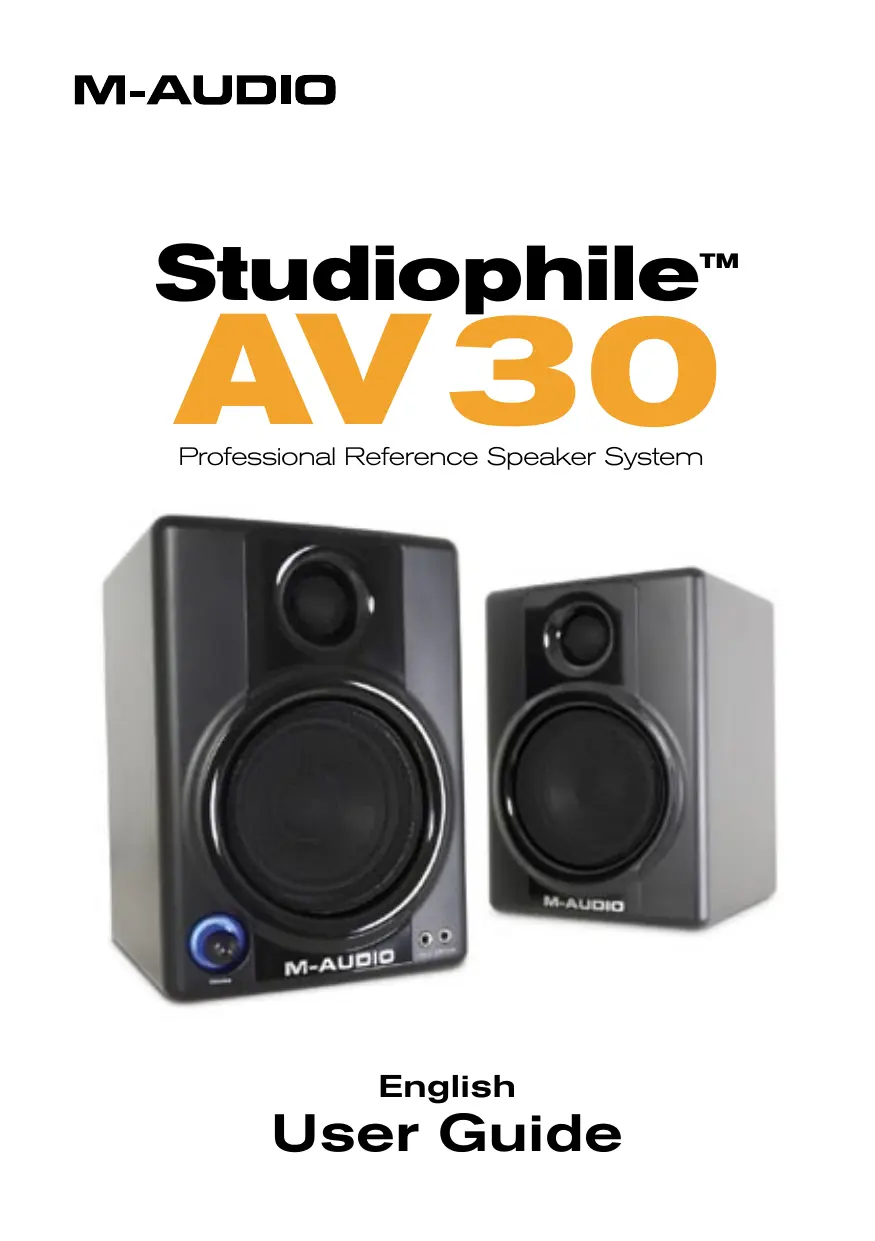

| Type de produit | Enceintes de monitoring actives 2 voies |
| Marque | M-Audio |
| Modèle | Studiophile AV 30 |
| Dimensions (H x L x P) | 20 x 14 x 16 cm |
| Poids | 4,3 kg (paire) |
| Alimentation | 100-240 V, 50/60 Hz (sélecteur de tension) |
| Puissance de sortie | 10 W RMS par canal |
| Réponse en fréquence | 90 Hz - 20 kHz |
| Fréquence de coupure | 3,3 kHz |
| Haut-parleur grave | 3 pouces, blindé magnétiquement, cône en papier traité polypropylène |
| Haut-parleur aigu | 3/4 pouce, dôme en soie traité, blindé magnétiquement |
| Entrées audio | RCA stéréo (principale), mini-jack 3,5 mm stéréo (auxiliaire) |
| Sortie casque | Mini-jack 3,5 mm stéréo (avant) |
| Contrôle des basses | Interrupteur Bass Boost (2 positions) |
| Matériau du coffret | MDF stratifié vinyle |
| Blindage magnétique | Oui (protection moniteur) |
| Accessoires inclus | Câble RCA, câble mini-jack, câble enceinte, patins acoustiques, manuel |
| Entretien et nettoyage | Débrancher avant nettoyage ; utiliser un chiffon doux et sec ; éviter produits abrasifs |
| Sécurité | Ne pas exposer à l'humidité ; utiliser sur une surface stable ; ne pas obstruer le port bass-reflex |
| Pièces détachées et réparabilité | Contacter le support M-Audio ou un centre agréé pour les pièces détachées |
FOIRE AUX QUESTIONS - STUDIOPHILE AV 30 M-AUDIO
Questions des utilisateurs sur STUDIOPHILE AV 30 M-AUDIO
0 question sur cet appareil. Repondez a celles que vous connaissez ou posez la votre.
Poser une nouvelle question sur cet appareil
Téléchargez la notice de votre Enceintes de monitoring au format PDF gratuitement ! Retrouvez votre notice STUDIOPHILE AV 30 - M-AUDIO et reprennez votre appareil électronique en main. Sur cette page sont publiés tous les documents nécessaires à l'utilisation de votre appareil STUDIOPHILE AV 30 de la marque M-AUDIO.
MODE D'EMPLOI STUDIOPHILE AV 30 M-AUDIO
Studiophile™ AV3O
Professional Reference Speaker System
English
User Guide
Introduction
1
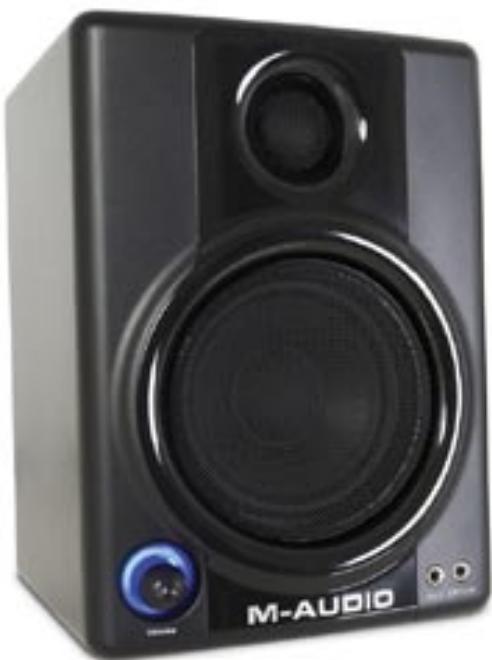
Thank you for choosing the Stadiophile AV 30 professional desktop multimedia audio monitors. Top recording engineers and producers in studios around the world use M-Audio monitors. Now, with the Stadiophile AV 30 monitors, you can enjoy the same professional standard of audio quality right on your desktop.
The Stadiophile AV 30 has been designed and tested by veteran audio engineers to meet your needs in a desktop audio monitoring environment. Custom-tuned cabinets, optimized speaker design, and advanced crossover technology deliver the best sound you can get in monitors this size. Complete with magnetic shielding for desktop use, Stadiophile AV 30 delivers great audio experiences from your music and multimedia applications. The Stadiophile AV 30 monitor is self-powered, directly accepting a line-level signal from a variety of sources.
What's in the Box?
2
Your Stadiophile AV 30 box contains:
Two Stadiophile AV 30 speakers (Left and Right)
Left: built-in amp and power supply; volume control, headphone jack, and auxiliary stereo input on the front; main RCA stereo input, and right channel signal output on the back
Right: audio connection from left speaker on back
One 1/8" stereo mini-to-RCA audio cable for use with the main inputs
2-conductor standard (keyed) power cable
1/8" stereo to 1/8" stereo audio cable (black color) for use with the "Aux" input
Tinned bare wire audio cable to send right channel audio to the right speaker (transparent color)
Acoustic/traction pads for speakers
Owner's manual
Studiophile AV 30 Features
3
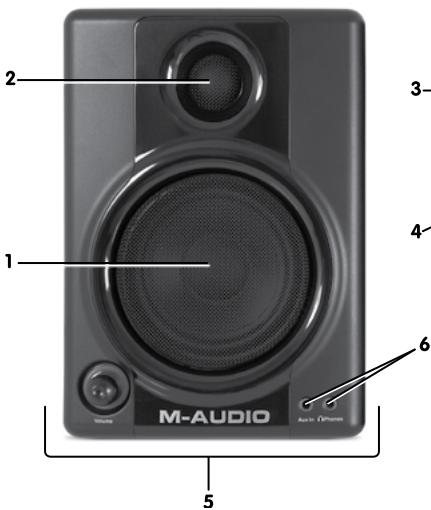
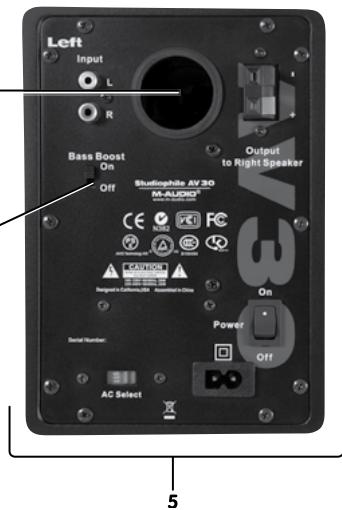
1. Woofer
The woofer unit is 3" in diameter and is magnetically shielded to protect your computer video monitor from interference. It includes a high-temperature voice coil and 3" polypropylene treated paper cone. The woofer delivers balanced mid- and low-frequency response.
2. Tweeter
By employing a specially developed 3/4'' treated silk dome with protective magnetic shielding, the tweeter can deliver an extremely natural response. It minimizes resonance by adapting a unique internal damping technology.
3. Bass Reflex Port
The hole in the rear panel is a bass reflex port. It is designed to discharge very low frequency signals and enhance the overall bass response.
4. Bass-Boost Control
The back panel Bass-Boost control on the Stadiophile AV 30 gives you additional low-frequency gain and makes the monitors versatile for different spaces and listening preferences.
5. Enclosure
Along with the other components, the Stadiophile AV 30's enclosure plays an important role. In order to provide more stable performance, we used a special medium-density fiberboard (MDF) and unique interior reinforcement designed to absorb vibration and impact generated under extreme conditions. Additionally, our innovative speaker monitor cabinet includes carefully placed acoustic material that makes the Stadiophile AV 30 sound much bigger than it is—resulting in a smooth, natural bass response.
6. Stereo Auxiliary Input and Headphone Output
For maximum flexibility, we have included a stereo "Aux" input which allows you to plug in a secondary audio source (such as your portable music player) in addition to the main RCA inputs in the back. The volume control works on all inputs simultaneously. Additionally, there is a stereo headphone output next to the "Aux" jack that mutes the sound coming out of the speakers and redirects it to your headphones.
7. Network & Power Amplifiers
The power amplifiers and crossover network, for the Stadiophile AV 30 are specially designed for this woofer and tweeter. The network distributes low-, mid-, and high-frequency audio signals to the proper components in order to minimize distortion and to achieve a balanced sound.
Installation
4
For optimal performance of the Stadiophile AV 30, please read the following directions carefully before installation.
Precautions
Connections: Your Stadiophile AV 30 monitors have a variety of inputs for use with a multitude of devices. Soundcards or other devices with RCA line outputs (e.g., M-Audio Delta Audiophile 24/96) can be connected to the RCA inputs on your left speaker's back panel. If your soundcard or portable music player has an 1/8 output, you can connect it to the front panel aux input, using the provided 1/8 to 1/8 cable.
Correct Power Operation: Since the Stadiophile AV 30 contains amplifiers, it must be connected to a power outlet using the detachable AC cable that is provided. Before connecting power, please make sure that the On/Off switch on the back of the Stadiophile AV 30 is set to the off position.
WARNING! - Use of improper voltage may result in hazardous conditions and/or damage to speaker components not covered by speaker warranty. Please make sure the voltage is set appropriately by checking the the position of the red "AC Select" switch on the back before powering on your speakers.
Acoustic/Traction Pads
In order to minimize vibrations and maximize physical stability, we recommend you use the provided acoustic/traction pads on the bottoms of the Stadiophile AV 30 monitors.
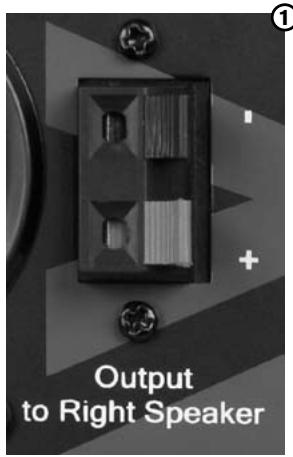
Speaker Wire Connections ①
Use the transparent tinned bare wire cable included in the Stadiophile AV 30 package to connect the Left and Right speakers via the red /black spring-clip terminals on the back of each speaker.
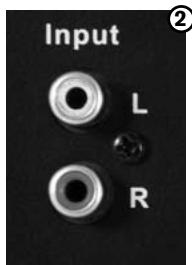
Connecting to a Computer Sound Card or Other Audio Output Device ②
Before connecting the Stadiophile AV 30 monitors, make sure the power from the computer or other output device has been turned off and the Stadiophile AV 30 system is also turned off.
Connect the RCA input jacks to the corresponding output connectors of a computer sound card, portable music player, etc. You can also use the black 1/8" stereo mini cable to connect a secondary audio device to the "Aux" input on the front of the Studiophile AV 30.
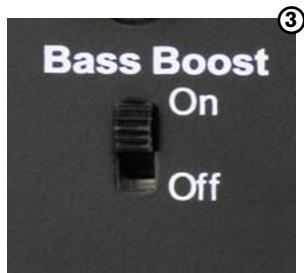
Setting the "Bass Boost" EQ Switch ③
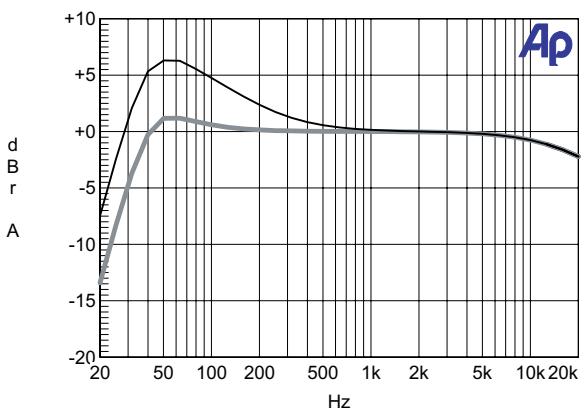
This 2-position switch provides a subtle increase in bass response. The On mode increases the low-frequency gain slightly via the woofer and bass-reflex port. The Off mode produces a natural, even response for most listening conditions.
Please see Appendix C for the "Bass Boost" frequency response curve.
Placing the Stodiophile AV 30
5
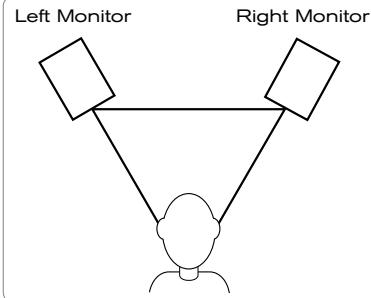
The way you position your speaker monitors can greatly affect the way they sound. Please refer to the following description for correct Stadiophile AV 30 placement.
- The two speaker monitors and the listener should align to form an equilateral triangle.
- Ideally, the tops of the woofers should be level with the listener's ears.
Your Stodiophile AV 30 Warranty
6
Warranty Terms
M-Audio warrants products to be free from defects in materials and workmanship, under normal use and provided that the product is owned by the original, registered user. Visit www.m-audio.com/warranty for terms and limitations applying to your specific product.
Warranty Registration
Immediately registering your new M-Audio product entitles you to full warranty coverage and helps M-Audio develop and manufacture the finest quality products available. Register online at www.m-audio.com/register to receive FREE product updates and for the chance to win M-Audio giveaways.
Appendices
7
Appendix A - Technical Specifications
| Type: | Two-way desktop reference monitor |
| LF Driver: | 3" diameter, magnetically shielded with high-temperature voice coil |
| HF Driver: | 3/4" diameter, magnetically shielded silk dome tweeter |
| Frequency Response: | 90 Hz - 20 kHz |
| Crossover Frequency: | 3.3 kHz |
| RMS SPL: | 101.5dB @ 1 meter |
| S/N Ratio: | >90dB (typical, A-weighted) |
| Input Connectors: | left and right RCA Line input and 1/8" aux input |
| Polarity: | positive signal at “+” input produces outward low-frequency cone displacement |
| Dynamic Power: | 10 watts continuous, per channel into 4 Ω |
| Input Impedance: | 10 k Ω unbalanced, 20 k Ω balanced |
| Input Sensitivity: | 100 mV pink noise input produces 90 dBA output SPL at 1 meter with volume control at maximum |
| Protection: | RF interference, output current limiting, over temperature, turn on/off transient, subsonic filter |
| Indicator: | Blue power LED ring around volume knob on front panel |
| Power Requirements: | 100-120V/~50/60Hz, 220~240V/~50/60Hz; powered via detachable 2-conductor line cord |
| Cabinet: | Vinyl-laminated MDF |
| Dimensions: | 7.87" (H) x 5.5" (W) x 6.3" (D) |
| Weight: | 9.5 lbs./4.3 kg |
Specifications subject to change without notice
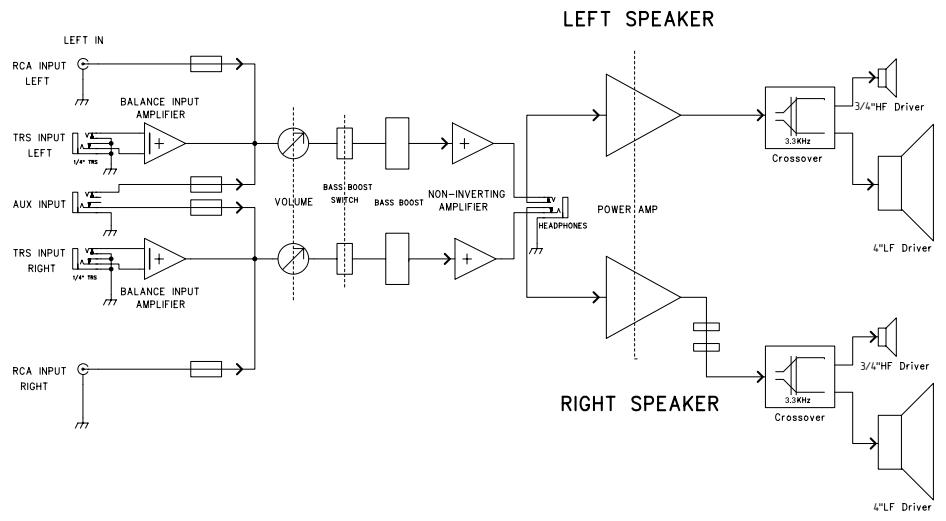
Appendix B - Block Diagram
Appendix C - "Bass Boost" Frequency Response Curve
| M-Audio USA 5795 Martin Rd., Irwindale, CA 91706 | |
| Technical Support | |
| web: | www.m-audio.com/tech |
| tel (pro products): | (626) 633-9055 |
| tel (consumer products): | (626) 633-9066 |
| fax (shipping): | (626) 633-9032 |
| Sales | |
| e-mail: | sales@m-audio.com |
| tel: | 1-866-657-6434 |
| fax: | (626) 633-9070 |
| Web | www.m-audio.com |
| M-Audio U.K. Floor 6, Gresham House, 53 Clarenden Road, Watford WD17 1LA, United Kingdom | |
| Technical Support | |
| e-mail: | support@maudio.co.uk |
| tel:(Mac support): | +44 (0)1765 650072 |
| tel: (PC support): | +44 (0)1309 671301 |
| Sales | |
| tel: | +44 (0)1923 204010 |
| fax: | +44 (0)1923 204039 |
| Web | www.maudio.co.uk |
| M-Audio France Floor 6, Gresham House, 53 Clarenden Road, Watford WD17 1LA, United Kingdom | |
| Renseignements Commerciaux | |
| tel : | 0 810 001 105 |
| e-mail : | info@m-audio.fr |
| Assistance Technique | |
| PC : | 0 0820 000 731 |
| MAC : | 0 0820 391 191 |
| Assistance Technique | |
| e-mail : | support@m-audio.fr mac@m-audio.fr |
| fax : | +33 (0)01 72 72 90 52 |
| Site Web | www.m-audio.fr |
| M-Audio Germany Kuhallmand 34, D-74613 Ohringen, Germany | |
| Technical Support | |
| e-mail: | support@m-audio.de |
| tel: | +49 (0)7941 - 9870030 |
| fax: | +49 (0)7941 98 70070 |
| Sales | |
| e-mail: | info@m-audio.de |
| tel: | +49 (0)7941 98 7000 |
| fax: | +49 (0)7941 98 70070 |
| Web | www.m-audio.de |
| M-Audio Canada 1400 St-Jean Baptiste Ave. #150, Quebec City, Quebec G2E 5B7, Canada | |
| Technical Support | |
| email: | techcanada@m-audio.com |
| phone: | (418) 872-0444 |
| fax: | (418) 872-0034 |
| Sales | |
| e-mail: | infocanada@m-audio.com |
| phone: | (866) 872-0444 |
| fax: | (418) 872-0034 |
| Web | www.m-audio.ca |
| M-Audio Japan アビットデイロリフロー株式会社|工庁一デイ才事業部 € 460-0002 愛知県名古屋市中区丸の内2-18-10 Avid Technology K.K. 2-18-10 Marunouchi, Naka-Ku, Nagoya, Japan 460-0002 | |
| カスタマーメート (Technical Support) | |
| e-mail: | win-support@m-audio.jp |
| e-mail(Macintosh 環境専用): | mac-support@m-audio.jp |
| tel: | 052-218-0859 (10:00~12:00/13:00~17:00) |
| セールスに開るお題い綜合せ (Sales) | |
| e-mail: | info@m-audio.jp |
| tel: | 052-218-3375 |
| fax: | 052-218-0875 |
| Web | www.m-audio.jp |
- Studiophile™ AV3O
- User Guide
- Introduction
- 1
- What's in the Box?
- 2
- Studiophile AV 30 Features
- 3
- Woofer
- Tweeter
- Bass Reflex Port
- Bass-Boost Control
- Enclosure
- Stereo Auxiliary Input and Headphone Output
- Network & Power Amplifiers
- Installation
- 4
- Precautions
- Acoustic/Traction Pads
- Speaker Wire Connections ①
- Connecting to a Computer Sound Card or Other Audio Output Device ②
- Setting the "Bass Boost" EQ Switch ③
- Placing the Stodiophile AV 30
- 5
- Your Stodiophile AV 30 Warranty
- 6
- Warranty Terms
- Warranty Registration
- Appendices
- 7
- Appendix A - Technical Specifications
- Appendix B - Block Diagram
- Appendix C - "Bass Boost" Frequency Response Curve
Marque : M-AUDIO
Modèle : STUDIOPHILE AV 30
Catégorie : Enceintes de monitoring