MP220 - Enceintes Bluetooth EDIFIER - Notice d'utilisation et mode d'emploi gratuit
Retrouvez gratuitement la notice de l'appareil MP220 EDIFIER au format PDF.


| Caractéristiques | Détails |
|---|---|
| Type de produit | Enceinte portable Bluetooth |
| Caractéristiques techniques principales | Son stéréo, technologie Bluetooth 5.0, haut-parleurs de 2 x 5W |
| Alimentation électrique | Batterie lithium-ion rechargeable |
| Dimensions approximatives | 150 x 70 x 70 mm |
| Poids | 500 g |
| Compatibilités | Compatible avec tous les appareils Bluetooth |
| Type de batterie | Batterie lithium-ion |
| Tension | 5V |
| Puissance | 10W (2 x 5W) |
| Fonctions principales | Lecture de musique sans fil, microphone intégré pour appels |
| Entretien et nettoyage | Essuyer avec un chiffon doux, éviter l'eau |
| Pièces détachées et réparabilité | Pas de pièces détachées disponibles, réparation limitée |
| Sécurité | Ne pas exposer à l'humidité, éviter les températures extrêmes |
| Informations générales | Idéale pour une utilisation en extérieur, autonomie de 10 heures |
FOIRE AUX QUESTIONS - MP220 EDIFIER
Questions des utilisateurs sur MP220 EDIFIER
0 question sur cet appareil. Repondez a celles que vous connaissez ou posez la votre.
Poser une nouvelle question sur cet appareil
Téléchargez la notice de votre Enceintes Bluetooth au format PDF gratuitement ! Retrouvez votre notice MP220 - EDIFIER et reprennez votre appareil électronique en main. Sur cette page sont publiés tous les documents nécessaires à l'utilisation de votre appareil MP220 de la marque EDIFIER.
MODE D'EMPLOI MP220 EDIFIER
Editie
THE AUDIO ARTIST
English
Français
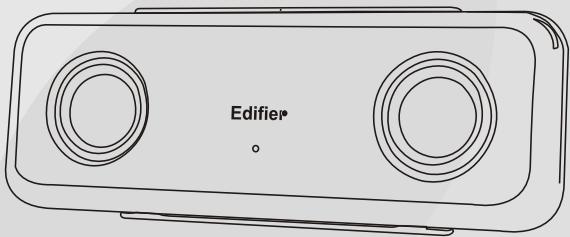
MP220
Multimedia Speaker
User Manual
Please read this manual carefully before operating the Speaker System
Editier
Introduction
Congratulations on the purchase of the Edifier MP220 speaker system. With the right care and attention, it will give you many years of trouble free operation.
Before operating the system, please read this manual fully to obtain the best results from your new product, and retain it carefully for future reference.
The lightning flash with arrowhead, within an equilateral triangle, is intended to alert the user to the presence of un-insulated dangerous voltage within the product's enclosure that may be of a sufficient magnitude to constitute a risk of electric shock to persons.



CAUTION: TO PREVENT THE RISK OF ELECTRIC SHOCK, DO NOT REMOVE COVER (OR BACK). NO USER-SERVICEABLE PARTS INSIDE. REFER SERVICING TO QUALIFIED SERVICE PERSONNEL ONLY.
The exclamation point within an equilateral triangle is intended to alert the user to the presence of important operating and maintenance (servicing) instructions in the literature accompanying the product.
SAFETY INSTRUCTIONS
Please read all the instructions herein. Please retain this manual safely for future reference. Please heed all safety warnings. Please Install in accordance with the Manufacturer's instructions. Please adjust the volume control to a comfortable level to avoid damaging your hearing and the system.
WARNING:
TO REDUCE THE RISK OF ELECTRIC SHOCK:
Do not expose this apparatus to rain or moisture.
Do not use the speakers near water, and do not immerse them in any liquid or pour any liquid on them. Do not block the openings in the speaker cabinets, never push objects into speaker vents or slots because of fire or electric shock hazards, and provide sufficient space around the speakers for proper ventilation. Do not install near any heat sources such as radiators, heat registers, stoves, or other apparatus (including amplifiers) that produce heat.
Do not defeat the safety purpose of the polarized plug. A polarized plug has two blades with one wider than the other. The wider blade is provided for your safety. If the provided plug does not fit into your outlet, consult an electrician for replacement of the obsolete outlet. Protect the power cord from being walked on or pinched particularly at plugs, convenience receptacles, and the point where they exit from the apparatus.
For added protection during lightning storms, unplug the speakers from the electrical outlet and turn off the computer.
Unplug this apparatus when unused for long periods of time.
Heat--- Place the speakers away from all heat sources, such as heat registers, stoves, and direct sunlight. Ventilation --- Do not block the openings in the speaker cabinets, never push objects into speaker vents or slots because of fire or electric shock hazards, and provide sufficient space around the speakers for proper ventilation.
Location --- Place the speakers in a stable location so that it will not fall causing damage to the speakers or bodily harm. Cleaning --- Unplug the speakers from the computer and from the electrical outlet before cleaning them with a damp cloth. Lightning --- For added protection during lightning storms, unplug the speakers from the electrical outlet and turn off the computer. Servicing is required when the apparatus has been damaged in any way, such as the power-supply cord or plug is damaged, liquid has been spilled or objects have fallen into the apparatus, the apparatus has been exposed to rain or moisture, does not operate normally, or has been dropped. Refer all servicing to qualified service personnel only.
Editor
Opening the packing
Please check the speaker Model number marked on the packing carton. Please contact the seller as soon as possible if you find the speaker is the incorrect model or has sustained shipping damage.
MP220 packing list:
- 1 x Speaker (With stands)
- 1 x USB-DC converter cable
- 1 x Power Adapter DC 8V
- 2 x Audio Connecting Cable with 3.5mm Stereo headphone plug
- 1 x User Manual
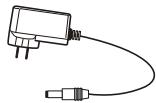
Power Adapter

USB-DC converter cable.
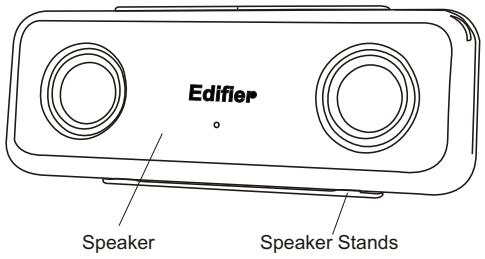

Audio Connecting Cable

Editor
Diagram and Function Description
- Speaker connector socket (figure a, b):
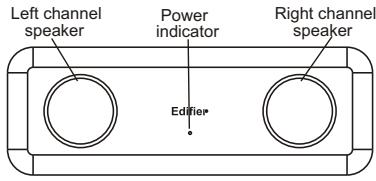
Figure a Front View
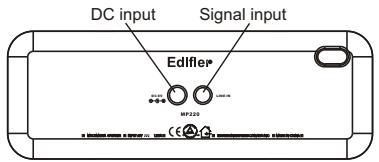
Figure b Rear view
-
Stand installation:
-
Remove the stands from the front of the speaker as in Figure 1a and 1b
- Install the stand from rear as in (Figure 2a,2b)
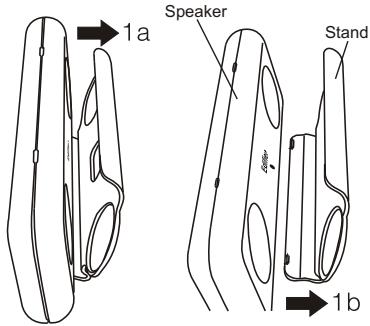
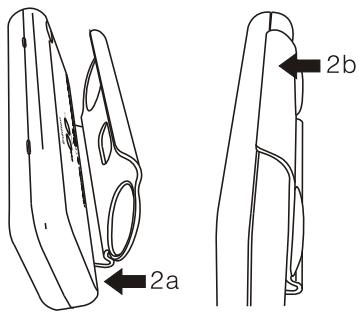
Speaker connections
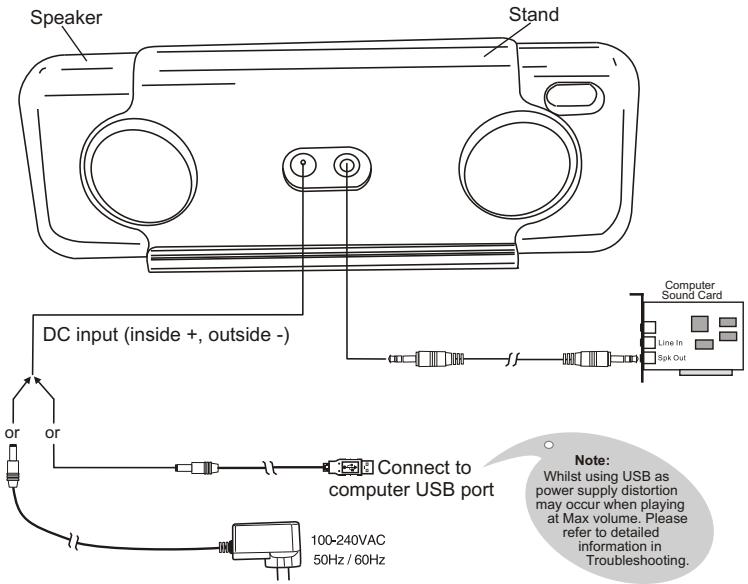
Connection Diagram:
Editor
Specifications
Specifications:
Amplifier power output: RMS 3Wx2 (THD=10%, fo=1KHz)
Signal to noise ratio (Amplifier): ≥ 90 dBA
Amplifier distortion: THD + N < 0.5%
Input Impedence: 10K Ohm
Input Sensitivity: 350mV(+/- 50mV)
Speaker Driver: 1.5 inch (40mm), Magnetically Shielded, 8 Ohm.
Volume Control: Computer internal volume control.
Power Input: DC 8V 1.25A
Dimension: 200(W)x70(H)x25(D) mm (Not include speaker stand)
Weight: approx. 0.55kg
Edifier One Year Limited Warranty
Edfier warrants to the end user that all of its computer speaker systems are free from defects in materials and workmanship in the course of normal and reasonable use for a term of one year from the date of purchase.
This warranty is the exclusive and only warranty in effect relative to Edifier multimedia speaker systems and any other warranties, either expressed or implied, are invalid. Neither Edifier nor any authorized Edifier reseller is responsible for any incidental or consequential damages incurred in the use of the speakers. (This limitation of incidental or consequential damage is not applicable where prohibited.)
Edifier's obligation under this warranty does not apply to any defect, malfunction or failure as a result of misuse, abuse, improper installation, use with faulty or improper equipment, or the use of the speaker systems with any equipment for which they were not intended.
The terms of this warranty apply only to speaker systems when such speakers are returned to the respective authorized Edifier reseller where they were purchased.
Under the terms of this warranty, the original consumer purchaser has certain legal rights and may have other rights, which vary worldwide.
Notice
Edifier and Edifier logo are owned by Edifier Enterprises Canada Inc. and may be registered. Other Brand names and trademarks are the property of their owners. Edifier assumes no responsibility for any errors that may appear in this manual. Information contained herein is subject to change without notice.
Editor
Troubleshooting Guide
Sound from only one speaker
Please ensure all speaker cable connections are correct. Please try an alternate sound source such as a CD player, MP3 or other player. If both speakers now work correctly, the original sound source is at fault.
No sound from any of the speakers
- Please ensure AC adapter is plugged in and power outlet is switched on.
- Please ensure speaker audio cable connections are correct.
- Please ensure sound source equipment is working correctly.
- Speaker has distortion when volume set on Max whilst using computer USB as a power supply.
This tends to occur due to the fact the USB output cannot supply sufficient power for the speaker system. Please adjust your volume to the correct level accordingly.
- When playing CD from computer, only one speaker has sound
Mostly this phenomenon tends to occur with a new computer - only one satellite works when playing an audio CD, but all work correctly when running a WAV file or playing a Game. The reason for this is the CD-ROM is not matched with the Soundcard, or one signal channel maybe shorted to a ground wire. Also please refer to the CD-ROM user manual to adjust the jumpers.
- Speakers exhibit excessive noise
Edifier speakers are of a very low noise circuit design. Some source equipment may have a poor signal to noise ratio. Therefore, please unplug the input audio cable, and check if the noise is from the CD/DVD player or the Computer Soundcard etc.
- If you have any further questions or concerns regarding Edifier Products
please visit our website at: www.edifier.com ,
or email Edifier Support for further assistance at: main@edifier.com
If you prefer, you may contact us by phone Toll Free: 1-877-EDIFIER (334-3437).
Copyright © 2005
All Rights Reserved.
Manual Edition 1.2,Aug.2005
Printed in CHINA
Editor
www.edifier.com
EDIFIER ENTERPRISES CANADA INC.
Made in China