
CASQUE GAMING KRAKEN PRO VERT - Casque gaming RAZER - Notice d'utilisation et mode d'emploi gratuit
Retrouvez gratuitement la notice de l'appareil CASQUE GAMING KRAKEN PRO VERT RAZER au format PDF.


| Type de produit | Casque gaming filaire |
| Marque | Razer |
| Modèle | Kraken Pro VERT |
| Couleur | Vert |
| Connectivité | Jack 3.5 mm combiné audio+micro |
| Haut-parleurs | 40 mm avec aimants néodyme |
| Réponse en fréquence (casque) | 20 - 20 000 Hz |
| Impédance | 32 Ω |
| Sensibilité du casque | 110 ± 4 dB |
| Microphone | Rétractable unidirectionnel |
| Réponse en fréquence (micro) | 100 - 10 000 Hz |
| Sensibilité du microphone | -40 ± 4 dB |
| Rapport signal/bruit (micro) | 52 dB |
| Longueur de câble | 1,3 m + adaptateur 2 m |
| Poids | Environ 300 g |
| Commandes intégrées | Molette de volume, sourdine micro |
| Type d'oreillettes | Circum-auriculaires en similicuir |
| Diamètre intérieur des oreillettes | 50 mm |
| Arceau | Rembourré réglable |
| Pliable | Oui |
| Garantie | 1 an limitée |
| Accessoires inclus | Adaptateur séparateur audio/micro, guide de produit important |
FOIRE AUX QUESTIONS - CASQUE GAMING KRAKEN PRO VERT RAZER
Questions des utilisateurs sur CASQUE GAMING KRAKEN PRO VERT RAZER
0 question sur cet appareil. Repondez a celles que vous connaissez ou posez la votre.
Poser une nouvelle question sur cet appareil
Téléchargez la notice de votre Casque gaming au format PDF gratuitement ! Retrouvez votre notice CASQUE GAMING KRAKEN PRO VERT - RAZER et reprennez votre appareil électronique en main. Sur cette page sont publiés tous les documents nécessaires à l'utilisation de votre appareil CASQUE GAMING KRAKEN PRO VERT de la marque RAZER.
MODE D'EMPLOI CASQUE GAMING KRAKEN PRO VERT RAZER
The perfect balance of weight, functionality, and performance, the Razer Kraken Pro is undisputedly the most comfortable gaming headset out there.
On top of being optimized for extended wear, the Razer Kraken Pro is outfitted with a fully retractable microphone, in-line volume controls and mute toggle, giving you easy access to all its features. Powered by large, high-quality drivers, this full-sized headset provides you with immersive gaming audio for hours on end. The 3.5mm combined audio jack and splitter cable ensure that you have mic support on your mobile devices as well as full connectivity to any gaming setup, so you never have to switch headsets, wherever you are.
TABLE OF CONTENTS
- PACKAGE CONTENTS / HARDWARE REQUIREMENTS 2
- REGISTRATION / TECHNICAL SUPPORT 3
- TECHNICAL SPECIFICATIONS 4
- DEVICE LAYOUT 5
- USING YOUR RAZER KRAKEN PRO 6
- SAFETY AND MAINTENANCE 8
- LEGALESE 9
1. PACKAGE CONTENTS / HARDWARE REQUIREMENTS
PACKAGE CONTENTS
Razer Kraken Pro Analog Gaming Headset
Audio / Mic Splitter Adapter Cable
- Important Product Information Guide
HARDWARE REQUIREMENTS
Audio Usage
Devices with 3.5mm audio jack
Audio + Microphone Usage
Devices with 3.5mm audio + mic combined jack (Works with all portable audio/mobile/computing devices including the iPod, iPhone, iPad, Kindle Fire, Android phones, Razer Blade, MacBook Pro, or today's newer Ultrabooks.)
Audio / Mic Splitter Adapter Usage
Devices with separate 3.5mm audio and microphone jacks (Works with most laptop and desktop computers)
2. REGISTRATION / TECHNICAL SUPPORT
REGISTRATION
Sign up now for a Razer Synapse account to get real-time information on your product's warranty status. To learn more about Razer Synapse and all its features, visit www.razerzone.com/synapse.
If you are already a Razer Synapse user, register your product by clicking on your email address at the Razer Synapse application and select Warranty Status from the dropdown list.
To register your product online, visit www.razerzone.com/registration. Please note that you will not be able to view your warranty status if you register via the website.
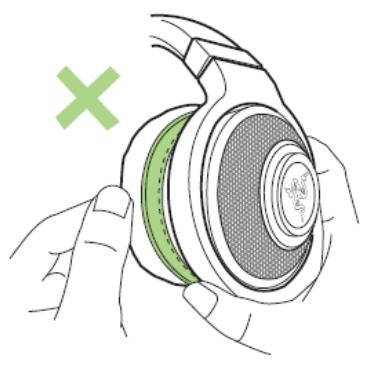
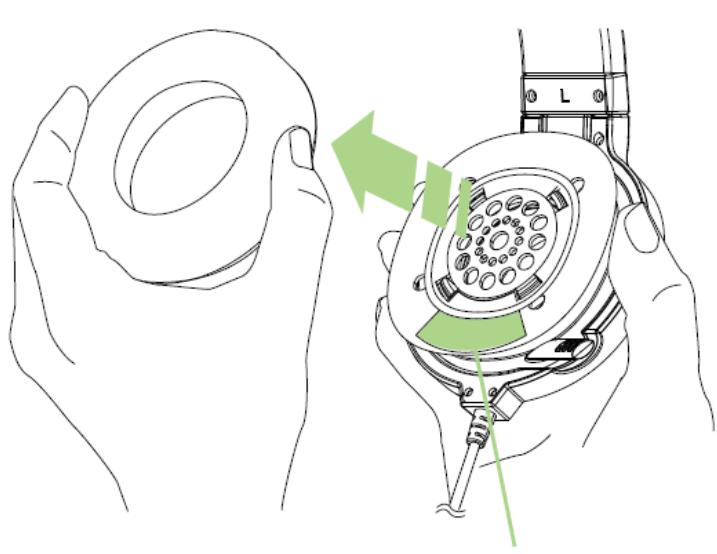
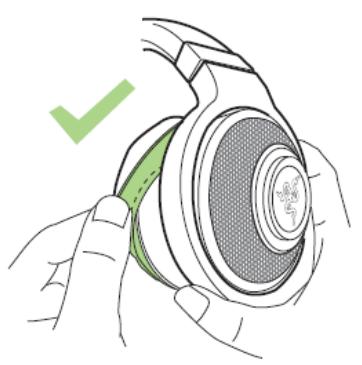
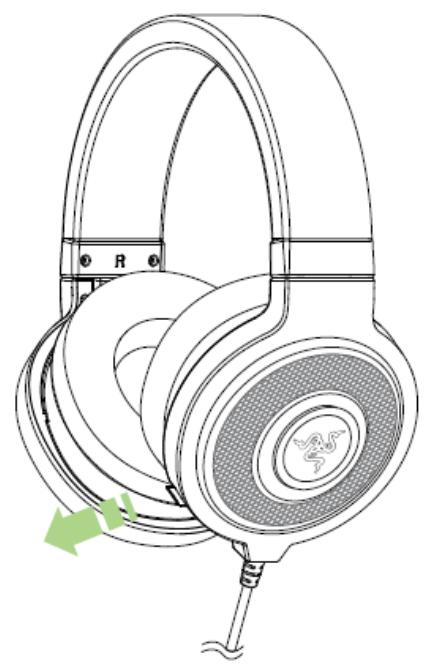
Your product's serial number can be found inside the leatherette ear cup, as shown here.
TECHNICAL SUPPORT
What you'll get:
- 1 year limited manufacturer's warranty,
- Free online technical support at www.razersupport.com.
3. TECHNICAL SPECIFICATIONS
HEADPHONES
Frequency response: 20 - 20,000 ~Hz
- Impedance: 32 at 1 kHz
- Sensitivity (@1kHz, 1V/Pa): 110 ± 4 dB at 1 kHz max
- Input power: 50 ~mW
- Drivers: 40 ~mm , with neodymium magnets
- Inner ear cup diameter: 50 ~mm / 0.16 ft
- Cable length: 1.3 ~m / 4.27 ft plus 2 ~m / 6.6 ft splitter adapter
- Approximate weight: 300 ~g / 0.66 ~lbs
- Connector: Analog 3.5 mm combined jack (headphone and mic)
MICROPHONE
Frequency response: 100 - 10,000 ~Hz
- Signal-to-noise ratio: 52 dB
- Sensitivity (@1 kHz, 1 V/Pa): -40 ± 4 dB
Pick-up pattern: Unidirectional
IN-LINE CONTROL
- Analog volume control wheel
- Microphone quick mute toggle
4. DEVICE LAYOUT
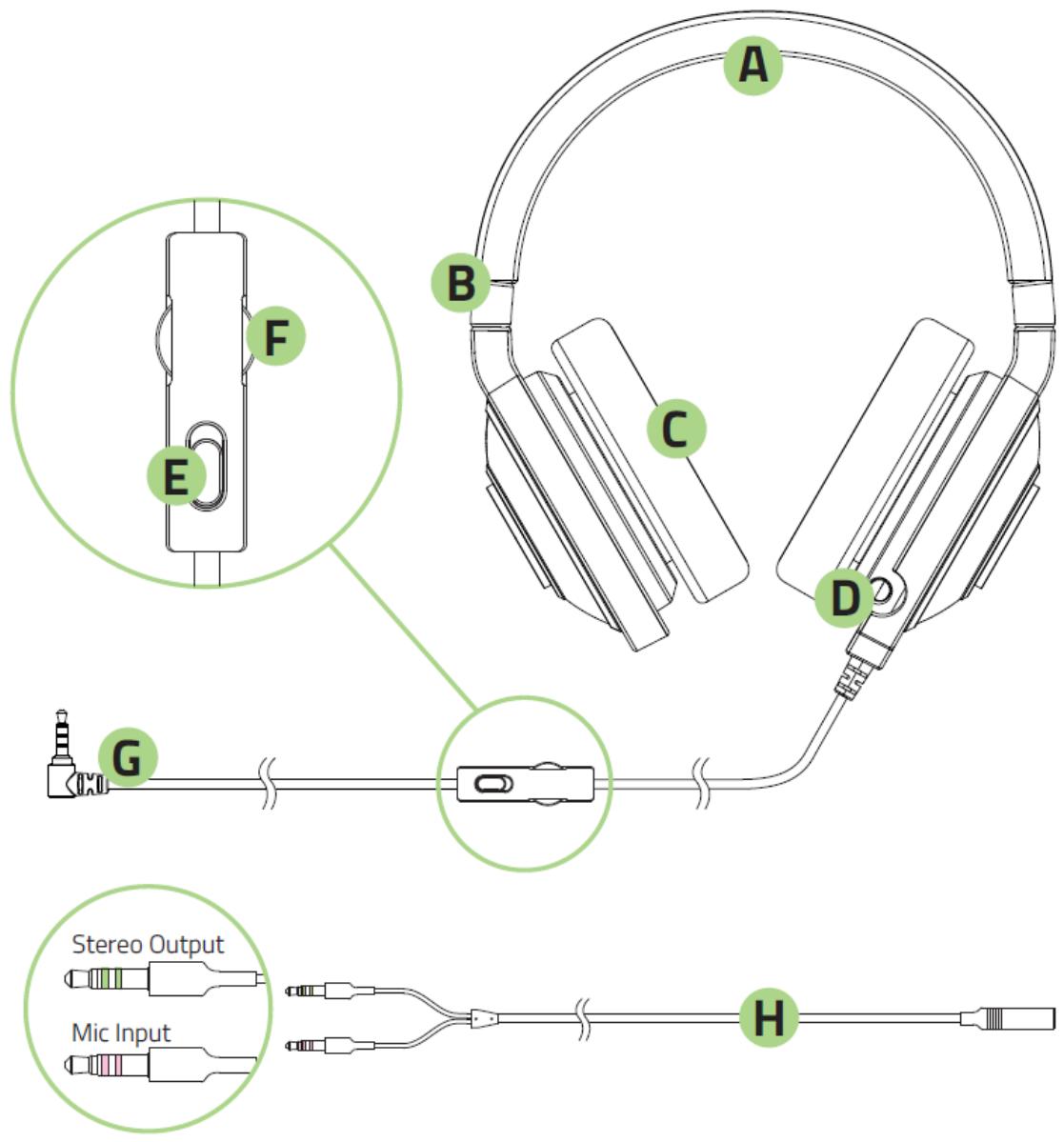
A. Adjustable Padded Headband
B. Foldable Ear Cup Design
C. Circumaural, Leatherette Ear Cushions
D. Retractable Microphone
E. Microphone Mute Toggle
F. Volume Control Wheel
G. 3.5mm Audio + Mic Jack
H. Audio / Mic Splitter Adapter Cable
5. USING YOUR RAZER KRAKEN PRO
USING THE RETRACTABLE MICROPHONE
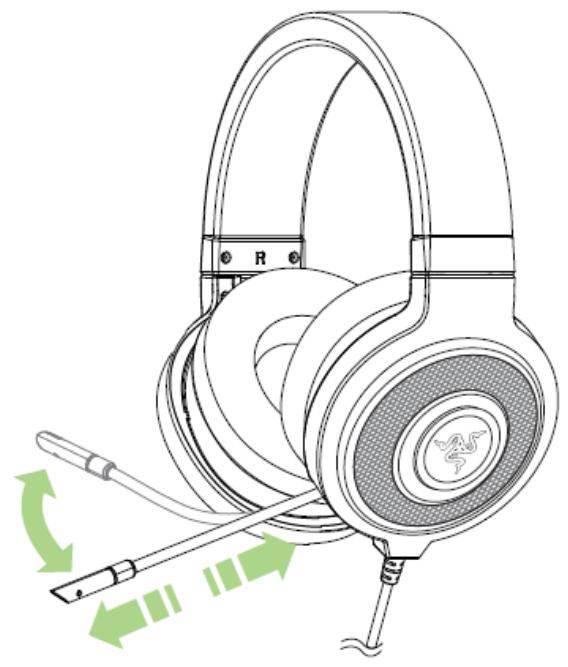
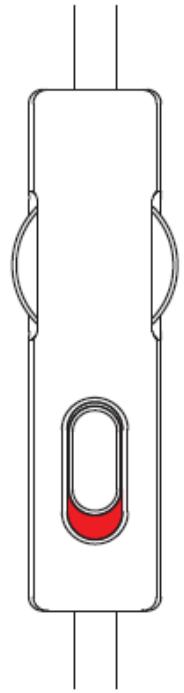
Microphone Muted
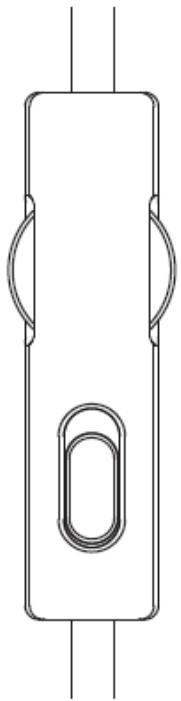
Microphone Active
ADJUSTING THE VOLUME
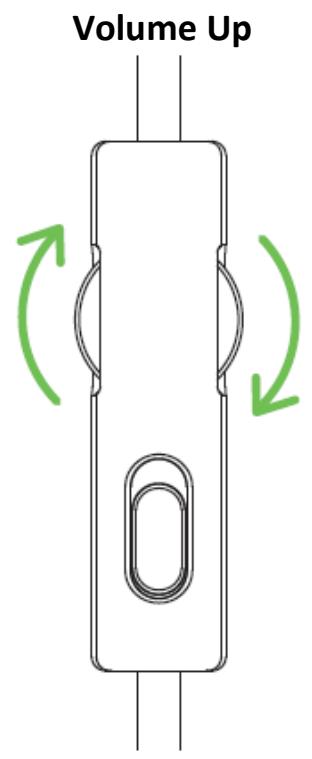
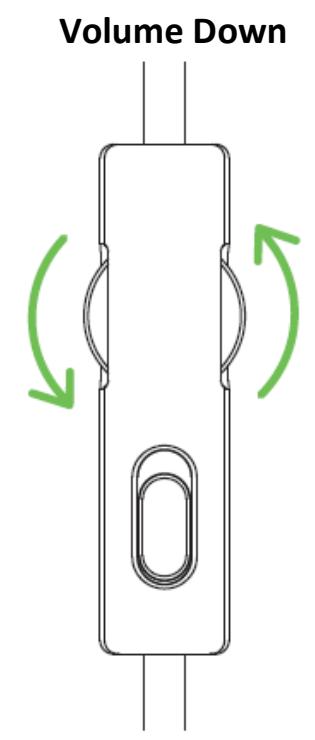
EXTENDING YOUR HEADPHONE'S LIFESPAN

We recommend stretching the headphones gently apart before placing them over your head to minimize headband stress. However, please avoid overstretching the headphones beyond its technical limits.
6. SAFETY AND MAINTENANCE
SAFETY GUIDELINES
In order to achieve maximum safety while using your Razer Kraken Pro, we suggest that you adopt the following guidelines:
- Should you have trouble operating the device properly and troubleshooting does not work, unplug the device and contact the Razer hotline or go to www.razersupport.com for support. Do not attempt to service or fix the device yourself at any time.
- Do not take apart the device (doing so will void your warranty) and do not attempt to service it yourself or operate it under abnormal current loads.
- Keep your device away from liquid, humidity or moisture. Operate your device only within the specified temperature range of 0^ ( 32^ ) to 40^ ( 104^ ). Should you operate it in a temperature that is beyond this range, unplug and switch off the device in order to let the temperature stabilize within the optimal temperature range.
- The device isolates external ambient sounds even at low volumes, resulting in lowered awareness of your external surroundings. Please remove the device when engaging in any activities that requires active awareness of your surroundings.
- Listening to excessively loud volumes over extended periods of time can damage your hearing. Furthermore, legislation of certain countries permits a maximum sound level of 86db to affect your hearing for 8 hours a day. We therefore recommend that you reduce the volume to a comfortable level when listening for prolonged periods of time. Please, take good care of your hearing.
MAINTENANCE AND USE
The Razer Kraken Pro requires minimum maintenance to keep it in optimum condition. Once a month we recommend you unplug the device and clean it using a soft cloth or cotton swab with a bit of warm water to prevent dirt buildup. Do not use soap or harsh cleaning agents.
7. LEGALESE
COPYRIGHT AND INTELLECTUAL PROPERTY INFORMATION
Copyright © 2012-2015 Razer Inc. All rights reserved. Razer, For Gamers By Gamers, and the triple-headed snake logo are trademarks or registered trademarks of Razer Inc. and/or affiliated companies in the United States or other countries. Razer Inc. ("Razer") may have copyright, trademarks, trade secrets, patents, patent applications, or other intellectual property rights (whether registered or unregistered) concerning the product in this Master Guide. Furnishing of this Master Guide does not give you a license to any such copyright, trademark, patent or other intellectual property right. The Razer Kraken Pro (the "Product") may differ from pictures whether on packaging or otherwise. Razer assumes no responsibility for such differences or for any errors that may appear. Information contained herein is subject to change without notice.
LIMITED PRODUCT WARRANTY
For the latest and current terms of the Limited Product Warranty, please visit www.razerzone.com/warranty.
LIMITATION OF LIABILITY
Razer shall in no event be liable for any lost profits, loss of information or data, special, incidental, indirect, punitive or consequential or incidental damages, arising in any way out of distribution of, sale of, resale of, use of, or inability to use the Product. In no event shall Razer's liability exceed the retail purchase price of the Product.
COSTS OF PROCEDURE
For the avoidance of doubt, in no event will Razer be liable for any costs of procurement unless it has been advised of the possibility of such damages, and in no case shall Razer be liable for any costs of procurement liability exceeding the retail purchase price of the Product.
GENERAL
These terms shall be governed by and construed under the laws of the jurisdiction in which the Product was purchased. If any term herein is held to be invalid or unenforceable, then such term (in so far as it is invalid or unenforceable) shall be given no effect and deemed to be excluded without invalidating any of the remaining terms. Razer reserves the right to amend any term at any time without notice.
- TABLE OF CONTENTS
- PACKAGE CONTENTS / HARDWARE REQUIREMENTS
- PACKAGE CONTENTS
- HARDWARE REQUIREMENTS
- REGISTRATION / TECHNICAL SUPPORT
- REGISTRATION
- TECHNICAL SUPPORT
- TECHNICAL SPECIFICATIONS
- HEADPHONES
- MICROPHONE
- IN-LINE CONTROL
- DEVICE LAYOUT
- USING YOUR RAZER KRAKEN PRO
- USING THE RETRACTABLE MICROPHONE
- ADJUSTING THE VOLUME
- EXTENDING YOUR HEADPHONE'S LIFESPAN
- SAFETY AND MAINTENANCE
- SAFETY GUIDELINES
- MAINTENANCE AND USE
- LEGALESE
- COPYRIGHT AND INTELLECTUAL PROPERTY INFORMATION
- LIMITED PRODUCT WARRANTY
- LIMITATION OF LIABILITY
- COSTS OF PROCEDURE
- GENERAL
Marque : RAZER
Modèle : CASQUE GAMING KRAKEN PRO VERT
Catégorie : Casque gaming