
WTK-G - Carte réseau sans fil SMC - Notice d'utilisation et mode d'emploi gratuit
Retrouvez gratuitement la notice de l'appareil WTK-G SMC au format PDF.

| Norme Wi-Fi | IEEE 802.11b/g |
| Débit maximal | Jusqu'à 54 Mbps |
| Modes supportés | Point d'accès, Pont Ethernet, Répéteur, Pont Point-à-Point, Pont Point-à-Multipoint |
| Installation | Assistant d'installation EZ |
| Alimentation | Alimentation USB, pas d'adaptateur nécessaire |
| Fonction Plug-and-Play | Oui, sans pilote |
| Compatibilité système | Windows 98SE/ME/2000/XP |
| Ports Ethernet | 1 port RJ-45 10/100 Mbps |
| Fonction répéteur | Oui, via WDS |
| Fonction pont Ethernet sans fil | Convertit tout appareil Ethernet en sans fil |
| Sécurité | Connexions sans fil hautement sécurisées |
| Dimensions | Compact, facile à transporter |
| Accessoires inclus | Câble USB, adaptateur secteur, câble Ethernet, CD d'installation, guide rapide |
| Utilisation recommandée | Voyageurs d'affaires, extension réseau local sans fil |
FOIRE AUX QUESTIONS - WTK-G SMC
Questions des utilisateurs sur WTK-G SMC
0 question sur cet appareil. Repondez a celles que vous connaissez ou posez la votre.
Poser une nouvelle question sur cet appareil
Téléchargez la notice de votre Carte réseau sans fil au format PDF gratuitement ! Retrouvez votre notice WTK-G - SMC et reprennez votre appareil électronique en main. Sur cette page sont publiés tous les documents nécessaires à l'utilisation de votre appareil WTK-G de la marque SMC.
MODE D'EMPLOI WTK-G SMC
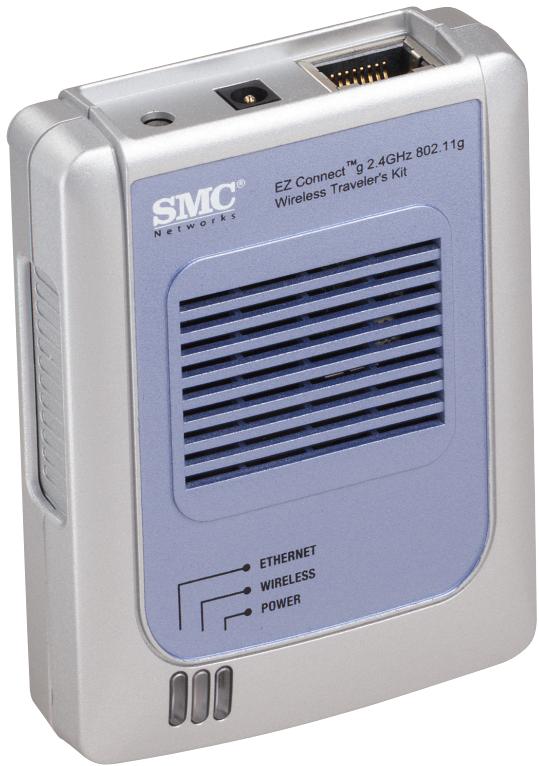
After unpacking the SMCWTK-G EZ Connect™ g 2.4GHz 802.11g Wireless Traveler's Kit, check the contents of the box to be sure you have received the following components:
- 1 SMCWTK-G device
- 1 USB Cable
- 1 Power Adapter
- 1 Cat-5 Ethernet Cable
- 1 EZ Installation Wizard and Documentation CD
1 Quick Installation Guide
Immediately inform your dealer in the event of any incorrect, missing or damaged parts. If possible, please retain the carton and original packing materials in case there is a need to return the product.
Please register this product and upgrade the product warranty at SMC's Web site: http://www.smc.com
System Requirements
- Internet Explorer/Netscape Navigator 5.0 or higher
PC running Windows 98SE/ME/2000/XP - CD-ROM drive
- An AC power outlet or an available USB port to supply power to the SMCWTK-G
- An available RJ-45 port on a 10/100 Mbps Ethernet hub or switch
- Another IEEE 802.11b or 802.11g compliant device installed on your network such as the Barricade™ g Wireless Broadband Router with USB Print Server (SMC2804WBRP-G) or another wireless adapter such as the EZ Connect™ g Wireless Cardbus Adapter (SMC2835W)
From U.S.A. and Canada
(24 hours a day, 7 days a week)
(800) SMC-4-YOU; Phn: (949) 679-8000;
Fax: (949) 679-1481
From Europe: Contact details can be found on www.smc-europe.com or www.smc.com
http://www.smc.com/
http://www.smc-europe.com/
If you are looking for further contact
information, please visit
www.smc.com or www.smc-europe.com.
INTERNET
E-mail addresses:
techsupport@smc.com
european.techsupport@smc-europe.com
Driver updates:
http://www.smc.com/index.cfm?action tech
support drivers downloads
38 Tesla
Irvine, CA 92618
Phone: (949) 679-8000
Model Number: SMCWTK-G
Hardware Description
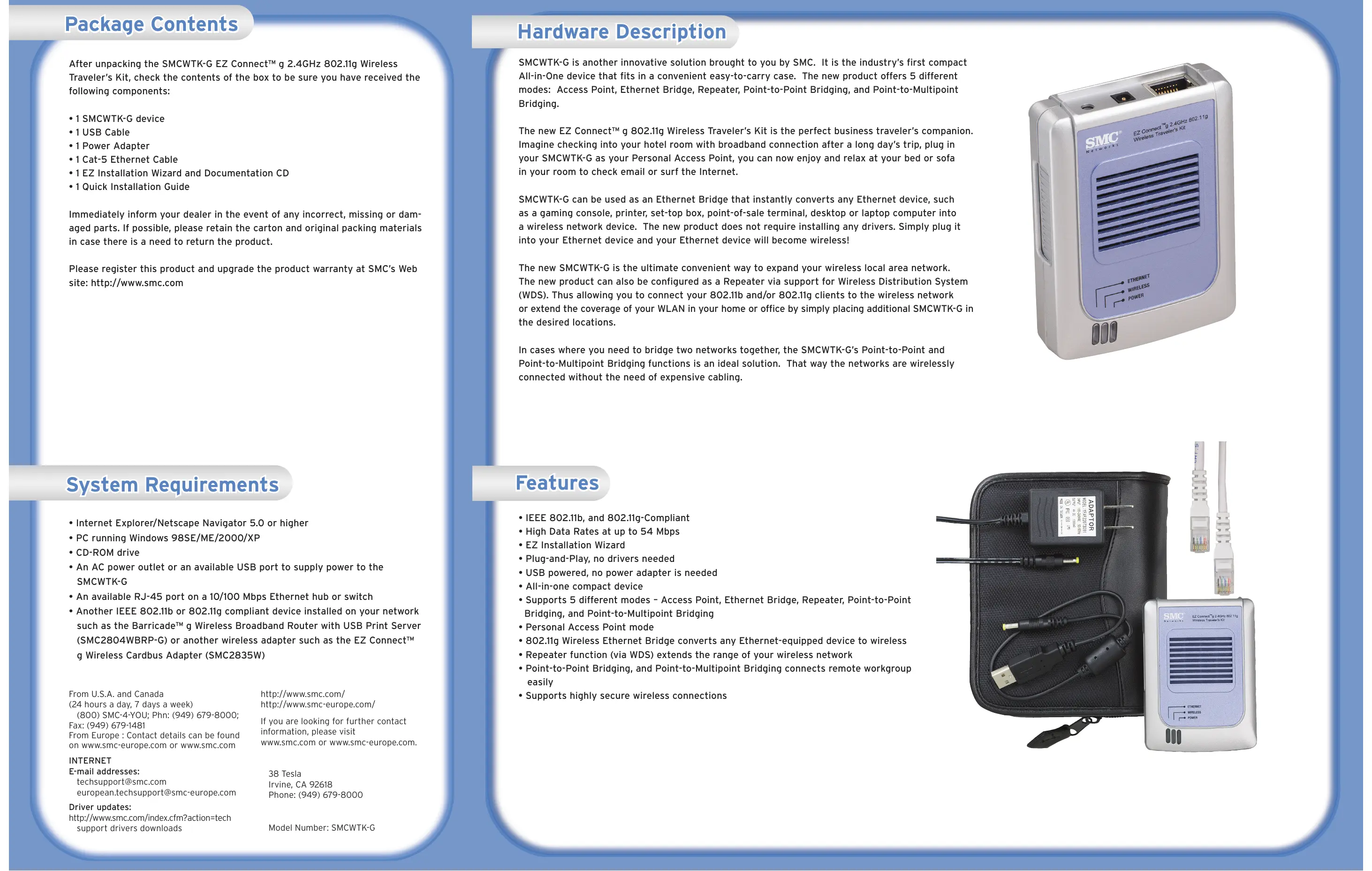
SMCWTK-G is another innovative solution brought to you by SMC. It is the industry's first compact All-in-One device that fits in a convenient easy-to-carry case. The new product offers 5 different modes: Access Point, Ethernet Bridge, Repeater, Point-to-Point Bridging, and Point-to-Multipoint Bridging.
The new EZ Connect™ g 802.11g Wireless Traveler's Kit is the perfect business traveler's companion. Imagine checking into your hotel room with broadband connection after a long day's trip, plug in your SMCwTK-G as your Personal Access Point, you can now enjoy and relax at your bed or sofa in your room to check email or surf the Internet.
SMCWTK-G can be used as an Ethernet Bridge that instantly converts any Ethernet device, such as a gaming console, printer, set-top box, point-of-sale terminal, desktop or laptop computer into a wireless network device. The new product does not require installing any drivers. Simply plug it into your Ethernet device and your Ethernet device will become wireless!
The new SMCWTK-G is the ultimate convenient way to expand your wireless local area network. The new product can also be configured as a Repeater via support for Wireless Distribution System (WDS). Thus allowing you to connect your 802.11b and/or 802.11g clients to the wireless network or extend the coverage of your WLAN in your home or office by simply placing additional SMCWTK-G in the desired locations.
In cases where you need to bridge two networks together, the SMCWTK-G's Point-to-Point and Point-to-Multipoint Bridging functions is an ideal solution. That way the networks are wirelessly connected without the need of expensive cabling.
Features
- IEEE 802.11b, and 802.11g-Compliant
High Data Rates at up to 54 Mbps
EZ Installation Wizard - Plug-and-Play, no drivers needed
- USB powered, no power adapter is needed
- All-in-one compact device
- Supports 5 different modes - Access Point, Ethernet Bridge, Repeater, Point-to-Point Bridging, and Point-to-Multipoint Bridging
- Personal Access Point mode
- 802.11g Wireless Ethernet Bridge converts any Ethernet-equipped device to wireless
- Repeater function (via WDS) extends the range of your wireless network
- Point-to-Point Bridging, and Point-to-Multipoint Bridging connects remote workgroup easily
Supports highly secure wireless connections
EZ Connect™ q Wireless Traveler's Kit
Quick Installation Guide
Using the EZ Installation Wizard
The installation method makes the process as simple as possible.
1. Connect the SMCWTK-G to a PC using the Cat-5 Ethernet Cable.
2. Plug in the 4V power supply or use the supplied USB cable to plug into an available USB port on the PC.
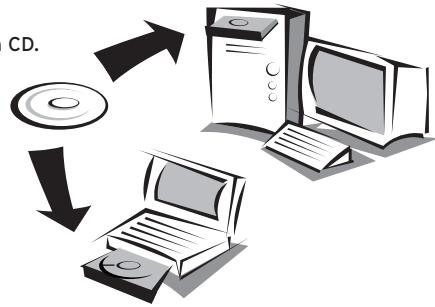
3. Insert the EZ Installation Wizard and Documentation CD.
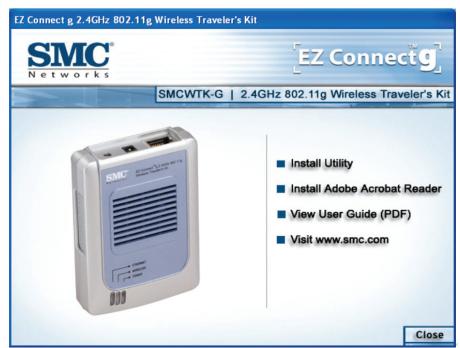
- Select "Install Utility".
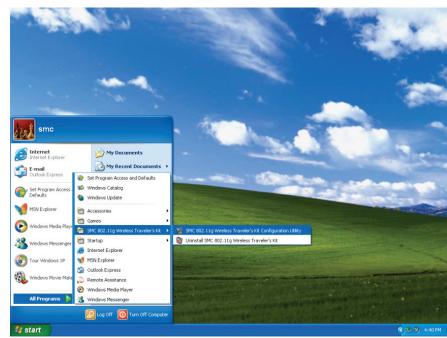
- The Scan/Configuration Utility is now installed. Go to "Start", then "Programs", select "SMC 802.11g Wireless Traveler's Kit", and then "SMC 802.11g Wireless Traveler's Kit Configuration Utility" to start the SMCwTK-G Scan/Configuration Utility Program.
- The Scan/Configuration automatically scans for SMCwTK-G on the network.
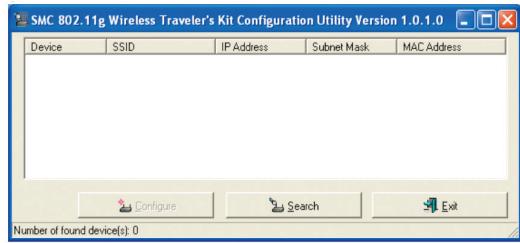
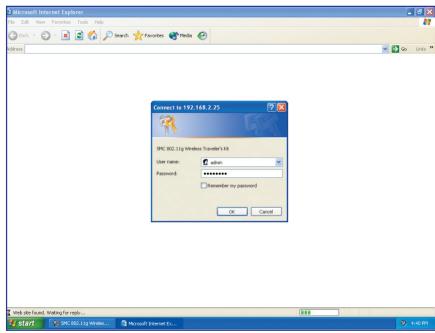
- Highlight the SMCWTK-G that you would like to configure and click "Configure". If your PC has the same IP address subnet range as the SMCWTK-G, then the login screen will appear. Enter the username and password. The default IP address of the SMCWTK-G is 192.168.2.25. The username is "admin" and the password is "smcadmin". Skip to Step 10.
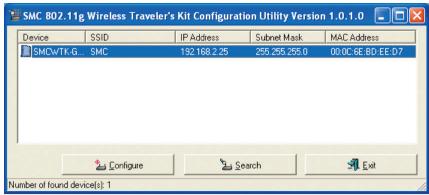
- From Scan/Configuration Utility, select the SMCWTK-G that you would like to configure and click "Configure". You will be asked to enter the username and password to configure the SMCWTK-G. By default, the username is "admin" and the password is "smcadmin". Enter this information and click OK.
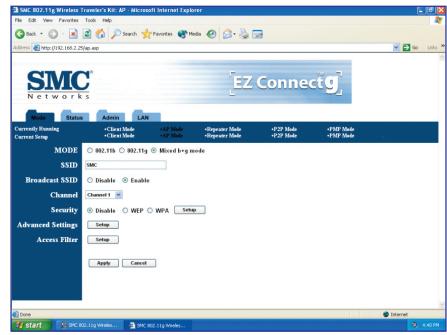
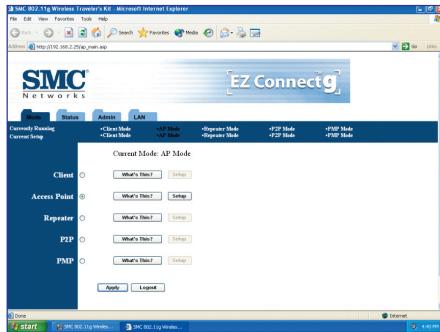
- Then go to the Mode page and click Setup. Configure the applicable properties for that mode, such as the SSID, Channel, and Security.
- The SMCwTK-G is now ready to use.
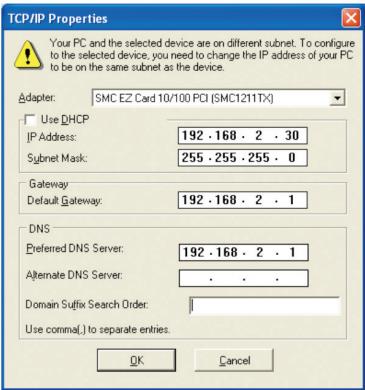
- Make sure the PC has an IP address on the 192.168.2.xxx subnet, such as 192.168.2.30. If not, the IP window will appear, as shown below. From this window, set the static IP address of the PC to be in the same subnet as the SMCWTK-G, e.g. 192.168.2.30. Set the "Subnet Mask" to be "255.255.255.0". Default Gateway is usually the IP address of your router, e.g. 192.168.2.1. Click OK. Your PC may require a reboot after changing the IP address. Click "Yes" to reboot PC if prompted.
- The default mode of SMCWTK-G is Access Point (AP) mode. To switch to Client, Repeater, Point-to-Point Bridging (P2P), or Point-to-Multipoint Bridging (PMP) mode, go to the Mode Page and select the desired mode. Click Apply.
Information furnished by SMC Networks, Inc. (SMC) is believed to be accurate and reliable. However, no responsibility is assumed by SMC for its use, nor for any infringements of patents or other rights of third parties, which may result from its use. No license is granted by implication or otherwise under any patent or patent rights of SMC. SMC reserves the right to change specifications at any time without notice.
SMC Networks, Inc. 38 Tesla Irvine, CA 92618
Copyright © SMC Networks, Inc., 2004. All rights reserved.
SMC is a registered trademark; EZ Connect and Barricade are trademarks of SMC Networks, Inc.
Other product and company names are trademarks or registered trademarks of their respective holders.