
PS-828X - Table de mixage audio GEMINI - Notice d'utilisation et mode d'emploi gratuit
Retrouvez gratuitement la notice de l'appareil PS-828X GEMINI au format PDF.


| Type de produit | Table de mixage audio |
| Marque | GEMINI |
| Modèle | PS-828X |
| Nombre de canaux | 4 canaux stéréo |
| Entrées | 5 lignes, 2 phono (sélecteur PH/LN) |
| Sorties | Master RCA, Record RCA, XLR balancés, casque 1/4" |
| Égaliseur par canal | 3 bandes (Low, Mid, High) avec fonction coupure |
| Crossfader | Rail Glide™ remplaçable (modèle RG-45) |
| Entrée micro | 1/4" jack avec égalisation et talkover |
| Fonctions de monitoring | Cue séparé par canal, volume cue/PGM, VU mètres |
| Dimensions | 254 x 84 x 304 mm (10 x 3,3 x 12 pouces) |
| Poids | 2,94 kg (6,5 lbs) |
| Alimentation | AC 15V, 500 mA |
| Réponse en fréquence | 20 Hz - 20 kHz ± 2 dB |
| Distorsion harmonique | < 0,02 % |
| Rapport signal/bruit | > 85 dB |
| Impédance casque | 8 Ohms |
| Entretien | Nettoyer avec un chiffon doux et sec. Éviter solvants et produits volatils. |
| Sécurité | Ne pas exposer à l'eau ou à l'humidité. Débrancher avant entretien. |
| Pièces détachées | Crossfader RG-45 disponible chez revendeurs Gemini. |
| Garantie | 1 an (hors crossfader : 90 jours) |
FOIRE AUX QUESTIONS - PS-828X GEMINI
Questions des utilisateurs sur PS-828X GEMINI
0 question sur cet appareil. Repondez a celles que vous connaissez ou posez la votre.
Poser une nouvelle question sur cet appareil
Téléchargez la notice de votre Table de mixage audio au format PDF gratuitement ! Retrouvez votre notice PS-828X - GEMINI et reprennez votre appareil électronique en main. Sur cette page sont publiés tous les documents nécessaires à l'utilisation de votre appareil PS-828X de la marque GEMINI.
MODE D'EMPLOI PS-828X GEMINI
12.5” 4 Channel Mixer
PS-828X
OPERATIONS MANUAL
MANUAL DE INSTRUCCIONES
MANUEL D'INSTRUCTIONS
BEDIENUNGSHANDBUCH
FOR ENGLISH READERS
PARA LECTORES EN ESPÁÑOL
UTILISATEURS FRANCAIS
FÜR DEUTSCHE LESER
Page 2~Page 5
Págin6\~Página9
Page 10~Page 13
Seite 14 ~ Seite 17
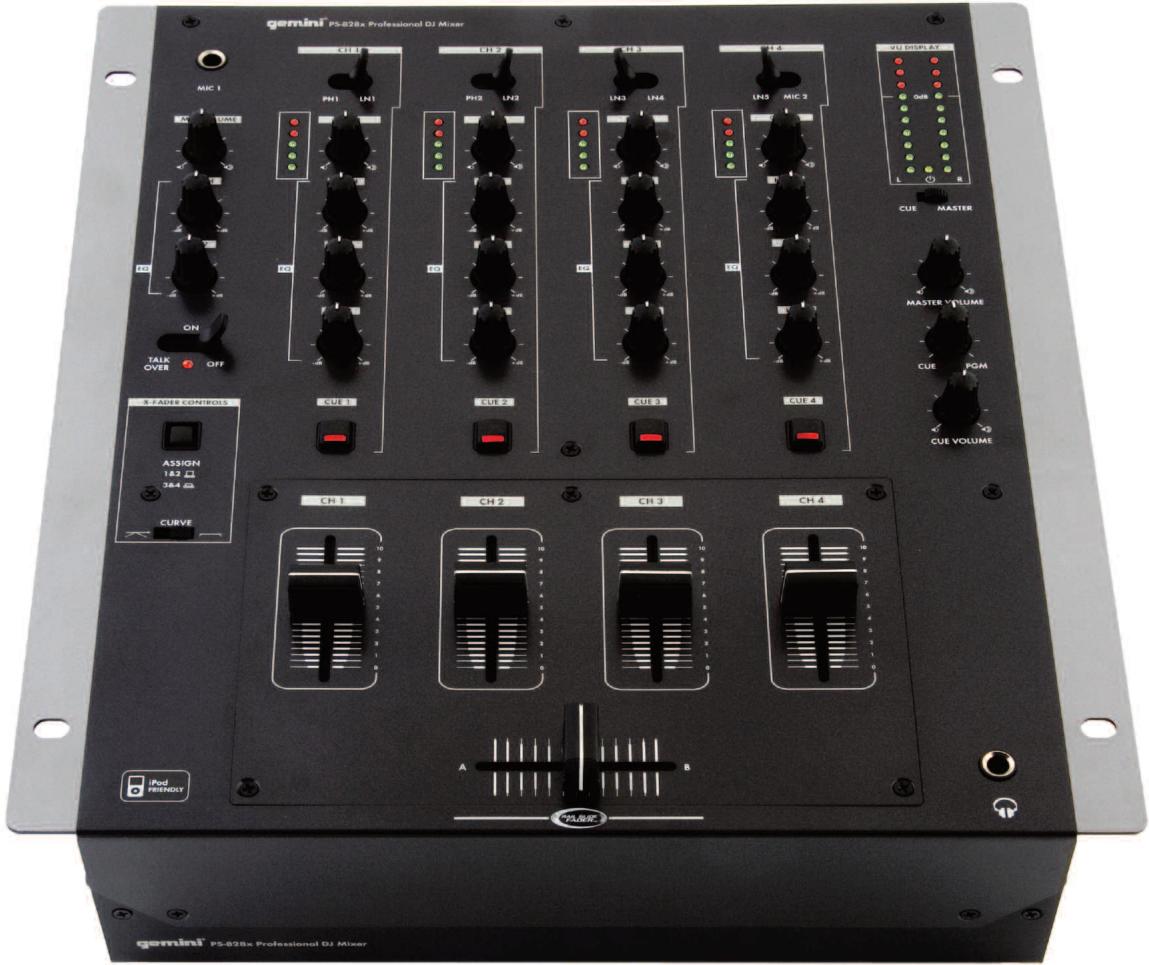
PLEASE READ BEFORE USING APPLIANCE IMPORTANT WARNING AND SAFETY INSTRUCTIONS!








CAUTION: This product satisfies FCC regulations when shielded cables and connectors are used to connect the unit to other equipment. To prevent electromagnetic interference with electric appliances such as radios and televisions, use shielded cables and connectors for connections.
The exclamation point within an equilateral triangle is intended to alert the user to the presence of important operating and maintenance (servicing) instructions in the literature accompanying the appliance.
The lightening flash with arrowhead symbol, within an equilateral triangle, is intended to alert the user to the presence of uninsulated "dangerous voltage" within the product's enclosure that may be of sufficient magnitude to constitute a risk of electric shock to persons.
READ INSTRUCTIONS: All the safety and operating instructions should be read before the product is operated.
REtain INSTRUCTIONS: The safety and operating instructions should be retained for future reference.
HEED WARNINGS: All warnings on the product and in the operating instructions should be adhered to.
FOLLOW INSTRUCTIONS: All operating and use instructions should be followed.
CLEANING: The product should be cleaned only with a polishing cloth or a soft dry cloth. Never clean with furniture wax, benzine, insecticides or other volatile liquids since they may corrode the cabinet.
ATTACHMENTS: Do not use attachments not recommended by the product manufacturer as they may cause hazards.
WATER AND MOISTURE: Do not use this product near water, for example, near a bathtub, wash bowl, kitchen sink, or laundry tub; in a wet basement; or near a swimming pool; and the like.
ACCESSORIES: Do not place this product on an unstable cart, stand, tripod, bracket, or table. The product may fall, causing serious injury to a child or adult, and serious damage to the product. Use only with a cart, stand, tripod, bracket, or table recommended by the manufacturer, or sold with the product. Any mounting of the product should follow the manufacturer's instructions, and should use a mounting accessory recommended by the manufacturer.
CART: A product and cart combination should be moved with care. Quick stops, excessive force, and uneven surfaces may cause the product and cart combination to overturn. See Figure A.
VENTILATION: Slots and openings in the cabinet are provided for ventilation and to ensure reliable operation of the product and to protect it from overheating, and these openings must not be blocked or covered. The openings should never be blocked by placing the product on a bed, sofa, rug, or other similar surface. This product should not be placed in a built-in installation such as a bookcase or rack unless proper ventilation is provided or the manufacturer's instructions have been adhered to.
POWERSOURCES: This product should be operated only from the type of power source indicated on the marking label. If you are not sure of the type of power supply to your home, consult your product dealer or local power company.
LOCATION: The appliance should be installed in a stable location.
NON-USE PERIODS: The power cord of the appliance should be unplugged from the outlet when left unused for a long period of time.
GROUNDING OR POLARIZATION:
- If this product is equipped with a polarized alternating current line plug (a plug having one blade wider than the other), it will fit into the outlet only one way. This is a safety feature. If you are unable to insert the plug fully into the outlet, try reversing the plug. If the plug should still fail to fit, contact your electrician to replace your obsolete outlet. Do not defeat the safety purpose of the polarized plug.
- If this product is equipped with a three-wire grounding type plug, a plug having a third (grounding) pin, it will only fit into a grounding type power outlet. This is a safety feature. If you are unable to insert the plug into the outlet, contact your electrician to replace your obsolete outlet. Do not defeat the safety purpose of the grounding type plug.

Fig. A
Power-CORD PROTECTION: Power-supply cords should be routed so that they are not likely to be walked on or pinched by items placed upon or against them, paying particular attention to cords at plugs, convenience receptacles, and the point where they exit from the product.
OUTDOOR ANTENNA GROUNDING: If an outside antenna or cable system is connected to the product, be sure the antenna or cable system is grounded so as to provide some protection against voltage surges and built-up static charges. Article 810 of the National Electrical Code, ANSI/NFPA 70, provides information with regard to proper grounding of the mast and supporting structure, grounding of the lead-in wire to an antenna discharge unit, size of grounding conductors, location of antenna-discharge unit, connection to grounding electrodes, and requirements for the grounding electrode. See Figure B.
Lightning: For added protection for this product during a lightening storm, or when it is left unattended and unused for long periods of time, unplug it from the wall outlet and disconnect the antenna or cable system. This will prevent damage to the product due to lightening and power-line surges.
POWERS: An outside antenna system should not be located in the vicinity of overhead power lines or other electric light or power circuits, or where it can fall into such power lines or circuits. When installing an outside antenna system, extreme care should be taken to keep from touching such power lines or circuits as contact with them might be fatal.
OVERLOADING: Do not overload wall outlets, extension cords, or integral convenience receptacles as this can result in a risk of fire or electric shock.
OBJECT AND LIQUID ENTRY: Never push objects of any kind into this product through openings as they may touch dangerous voltage points or short-out parts that could result in a fire or electric shock. Never spill liquid of any kind on the product.
SERVICING: Do not attempt to service this product yourself as opening or removing covers may expose you to dangerous voltage or other hazards. Refer all servicing to qualified service personnel.
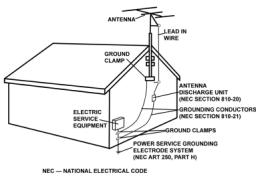
Fig.B
DAMAGE REQUIRING SERVICE: Unplug this product from the wall outlet and refer servicing to qualified service personnel under the following conditions:
- When the power-supply cord or plug is damaged.
- If liquid has been spilled, or objects have fallen into the product.
- If the product has been exposed to rain or water.
- If the product does not operate normally by following the operating instructions. Adjust only those controls that are covered by the operating instructions as an improper adjustment of other controls may result in damage and will often require extensive work by a qualified technician to restore the product to its normal operation.
- If the product has been dropped or damaged in any way.
- When the product exhibits a distinct change in performance, this indicates a need for service.
REPLACEMENT PARTS: When replacement parts are required, be sure the service technician has used replacement parts specified by the manufacturer or have the same characteristics as the original part. Unauthorized substitutions may result in fire, electric shock, or other hazards.
SAFETY CHECK: Upon completion of any service or repairs to this product, ask the service technician to perform safety checks to determine that the product is in proper operat ing condition.
WALL OR CEILING MOUNTING: The product should not be mounted to a wall or ceiling.
HEAT: The product should be situated away from heat sources such as radiators, heat registers, stoves, or other products (including amplifiers) that produce heat.
TOP
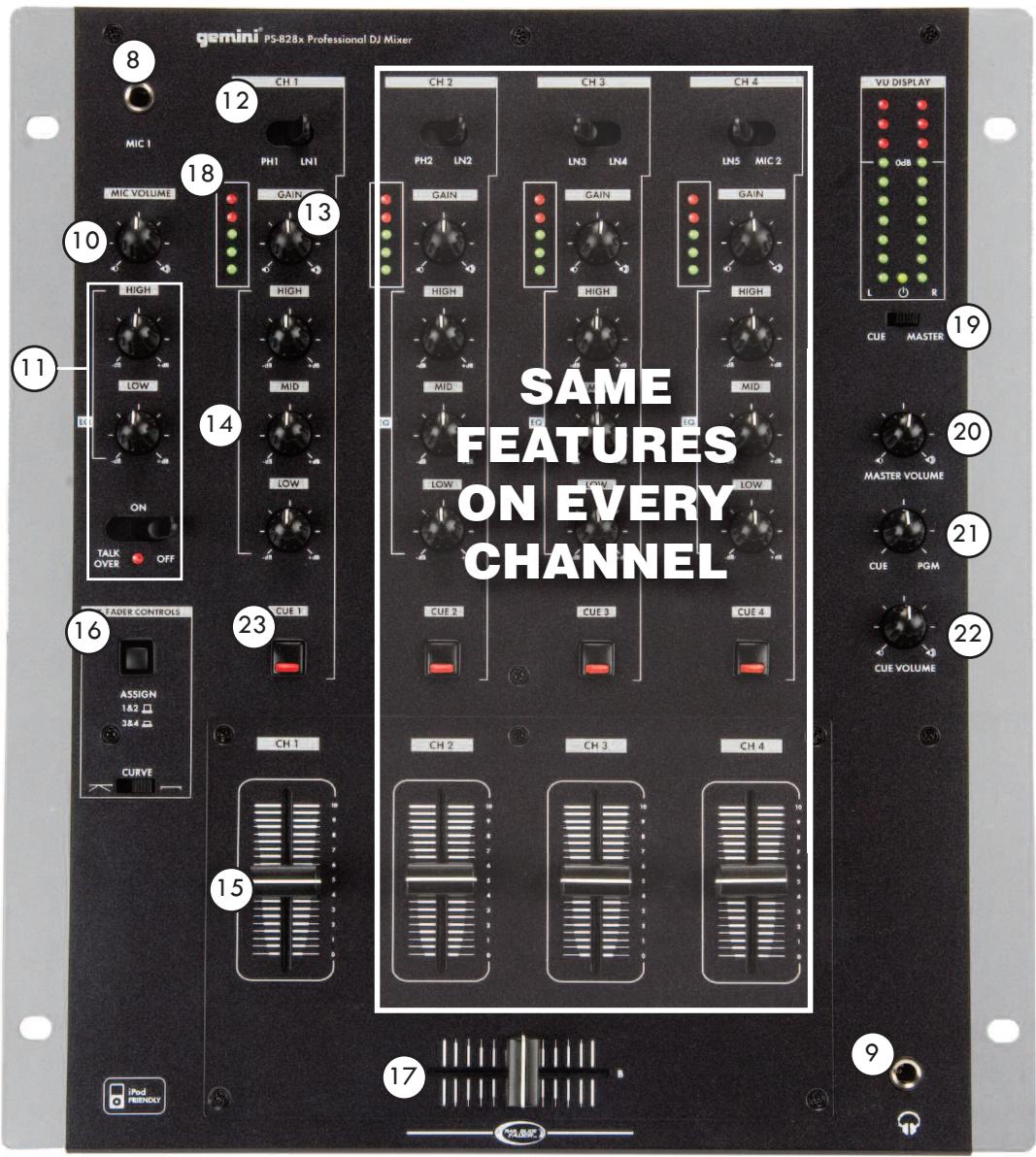
BACK
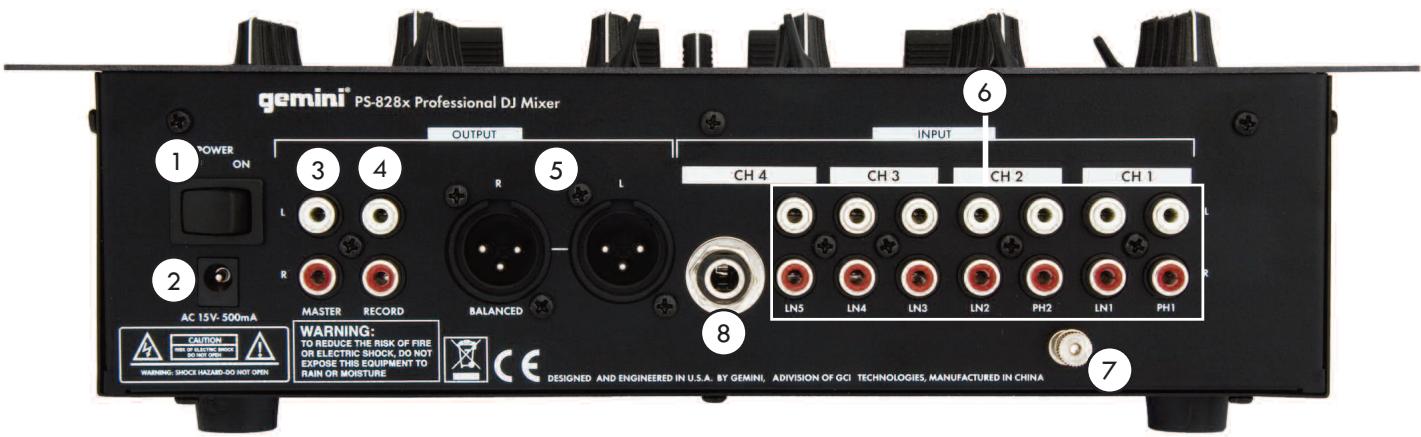
INTRODUCTION:
Congratulations on your purchase of Gemini PS-828X 10" 3 channel stereo mixer. This-state-of-the-art mixer features the latest technological advances and is backed by a 1 year warranty, excluding the cross fader. The cross fader is backed by a separate 90 day warranty. Prior to use we suggest that you carefully read all the instructions.
FEATURES:
- 12.5" 4 Stereo channel mixer
- 5 line, 2 Phono 3 Line Level
- 3 band rotary line EQ with cut feature & rotary gain channel control
- Sperate Cue Switch for each channel
- Rotary cue volume, CUE/PGM rotary knob
- VU meter on each channel
- Talkover switch
- Removable face plate for user replaceable Rail Glide cross fader
PRECAUTIONS:
- All instructions should be read before using this equipment.
- To reduce the risk of electrical shock, do not open the unit. Please refer all servicing needs to a Gemini-qualified service technician.
IN THE USA ~ IF YOU EXPERIENCE PROBLEMS WITH THIS UNIT CALL GEMINI CUSTOMER SERVICE AT: 1 (732) 346-0061. DO NOT ATTEMPT TO RETURN THIS EQUIPMENT TO YOUR DEALER.
- Do not expose this unit to direct sunlight or a heat source such as a radiator or stove.
- This unit should be cleaned only with a damp cloth. Avoid solvents or other cleaning detergents.
- When moving this equipment it should be placed in its original carton and packaging. This will reduce the risk of damage during transit.
- DO NOT EXPOSE THIS UNIT TO RAIN OR MOISTURE.
- DO NOT USE SPRAY CLEANERS OR LUBRICANTS ON CONTROLS, SURFACES OR SWITCHES.
CONNECTIONS:

Ensure that the POWER SWITCH
is in the OFF position prior to making any connections.

POWER SUPPLY
This unit comes with a POWER SUPPLY. Plug in to the rear panel POWER SUPPLY socket before plugging it in to a proper power source.

The MASTER RCA OUTPUT
connects the mixer to your main amplifier using standard audio cables with RCA-type connectors.

The RECORD RCA OUTPUT
The RECORD output jacks can be used to connect the mixer to the record input of your recording unit, thus enabling you to record your mix with RCA cables.

BALANCED OUTPUTS
The PS-828X has balanced XLR outputs controlled by the master output rotary.

The PS-828X has 2 PHONO (PH/LN) and 5 LINE RCA INPUTS each channel has two corresponding lines and can be chosen via the channel line switches (see 12) When switched to the PH position you may use any Turntable with a magnetic cartridge, remember to connect your ground wire (see GROUNDING SCREW) or there may be a system hum.
And when the switch is in the LN position you may connect any line level device as described before (Mp3, CD, Tape etc).
NOTE: CONNECTING A LINE LEVEL DEVICE TO A PH INPUT MAY CAUSE THAT MIXER CHANNEL TO OVERLOAD AND OR DISTORT.
Now you may plug the RCA's from your playable medium into each input to be connected to their respective CHANNELS (CH).

GROUNDING SCREW
When using (a) turntable(s), you will need to ground the RCA cable(s) by screwing in the grounding fork(s) to the GROUNDING SCREW located on the rear panel of the PS-828X mixer.
Attach a PHONO (Turntable) ground line to the silver GROUND THUMB SCREW that is situated at the bottom middle of the rear panel.

MIC (MICROPHONE) INPUT
The main MIC or Microphone input is located in back right hand corner of the PS-828X and will accept a standard 1/4" connector. You can control the gain and even set the low's and the high's for the mic (See CONTROLS).

HEADPHONE OUTPUT
The HEADPHONE OUTPUT located at the front bottom right hand corner of the PS-828X will accept any headphone with a standard 1 / 4" connector and or adapter and will allow you to CUE your music program before you play it, you can adjust the volume and PGM mix of the HEADPHONE (see CONTROLS).

Then when all of your connections have been made turn on the mixer by pressing the POWER SWITCH.
CONTROLS:

MICROPHONE VOLUME
Allows you to adjust the volume of the microphone signal.

MICROPHONE EQ and TALKOVER SWITCH
The MICROPHONE EQ Let's you to control the low frequency and the high frequency of the microphone signal. The TALKOVER switch allows you to quickly attenuate the main output so the microphone can be heard over the main music program.
MIXER CHANNEL
(NOTE: ALL 4 CHANNELS HAVE THE SAME FEATURES)

CHANNEL INPUT SELECTOR
The CHANNEL INPUT SELECTOR switches allow you to choose which input will be controlled by that channels corresponding volume FADER.
For example on CHANNEL (1) the INPUT SELECTOR allows you to choose between PHONO 1 and LINE 1, on CHANNEL (2) the INPUT SELECTOR SWITCH will let you choose between PHONO 2 and LINE 2 and on CHANNEL (3) you can choose between LINE 3 and the LINE 4 input, and on CHANNEL (4) you can choose between LINE 4 and LINE 5.
CONTROLS: (CONTINUED)
CHANNEL ROTARY GAIN
The CHANNEL ROTARY GAIN allows you to boost the signal of each individual channel depending on how low or high its input level is
3 BAND EQUALIZER
The 3 BAND EQUALIZER adjust the tone of each CHANNEL by giving you a choice 3 frequencies (BANDS) to adjust, from LOW, MIDRANGE (MID) and HIGH's, you can use the adjustment knobs to higher or lower the 3 separate frequencies till the sound of the music program is appropriate for your listening environment.
CHANNEL VOLUME FADER
After you have chosen which input you will use with the INPUT SE-LECTOR the corresponding CHANNEL FADER will allow you to adjust the volume for that particular CHANNEL.
CROSSFADER ASSIGNMENT/ADJUSTMENT SWITCHES
The fader assignment push button allows you to assign which two channel faders will be controlled by the CROSSFADER in the UP position the CROSSFADER will fade between channels (1) and (2), in the down or pushed in position the CROSSFADER will fade between channels (3) and (4). The CURVE ADJUSTMENT selector lets you choose between two fader CURVE settings, positioning the switch to the left will give you a gradual CROSSFADE and positioning the switch to the right will give you a quick CROSSFADE.
CROSS FADER
The CROSS FADER allows you to mix evenly from one source to another. On the PS-828X The CROSSFADER is assignable between either channels (1) and (2) or channels (3) and (4) depending on the position of the fader assignment push button (see above). The CROSS FADER on the PS-828X is also removable and if the need arises can be replaced. The RG-45 (RAILGLIDE™)
DUAL-RAIL CROSS FADER, which has internal dual stainless steel rails that allow the slider to ride smoothly and accurately from end to end can be purchased from your local GEMINI dealer.
NOTE: WHEN USING THE CROSS FADER LIGHTLY GLIDE THE FADER BACK AND FORTH. PRESSING DOWN ON THE CONTROLS CAN BEND CONTACTS AND CAUSE A LOSS OF SOUND.
CHANNEL AND MASTER VU METERS
The PS-828X has a VU METER on each channel that allows you to monitor the decibel levels of its input, you also have a master output VU METER that lets you monitor the decibel levels of the LEFT and RIGHT MASTER output.
CUE MASTER SWITCH
The VU METER has two display modes, in CUE mode it will display the level of the channel you are cueing, in MASTER mode it displays the main MASTER output.
MASTER VOLUME ROTARY
The MASTER VOLUME ROTARY knob adjust the volume of the MAIN output
CUE/PGM ROTARY
The CUE/PGM ROTARY determines the mix between the chosen CHANNEL CUE SELECTOR and the MAIN OUTPUT mix.
CUE VOLUME ROTARY KNOB
The CUE VOLUME ROTARY KNOB adjusts your HEADPHONE MONITOR OUTPUT'S volume.
CHANNEL CUE SELECTOR SWITCH
The CHANNEL CUE SELECTOR SWITCH allows you to choose which channel you wish to monitor in your headphones by pressing this switch on any channel you will be able to listen to that channels input in your headphones multiple CHANNEL SWITCHES can be pressed to monitor more than on input at a time.
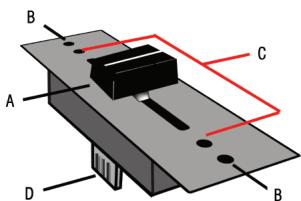
FADER REPLACEMENT:
-
UNSCREW THE FADER (B) SCREWS. DO NOT TOUCH INSIDE SCREWS (C) CAREFULLY REMOVE OLD CROSS FADER AND UNPLUG CABLE (D)
-
PLUG IN THE NEW CROSS FADER INTO CABLE (D) AND PLACE BACK INTO MIXER.
-
SCREW THE CROSS FADER TO MIXER WITH THE FADER PLATE SCREWS (B)
-
REPLACE THE FACE OF THE MIXER AND SCREW THE FOUR SCREWS BACK IN AND REPLACE THE FADER KNOBS.
SPECIFICATIONS:
INPUTS:
Phono. 3mV,47 K Ohm
Line. 150 mV, 27 K Ohm
MIC. 1.5 mV, 1 KOhm Balanced
OUTPUTS:
Max. 20V Peak-to Peak
Rec. 225 mV, 5 K Ohm
GENERAL:
Frequency Response. 20Hz - 20KHz +/- 2dB
Distortion. < 0.02%
S/N Ratio. Better than 85 dB
Headphone impedance. 8 Ohm
Power Source AC 15v 500mA
Unit dimensions. 10" x 3.3" x 12"
(254 x 84 x 304 mm)
Weight. 6.5 lbs (2.94 kg)
SPECIFICATIONS SUBJECT TO CHANGE WITHOUT NOTIFICATION FOR IMPROVEMENT
- 12.5” 4 Channel Mixer
- PS-828X
- PLEASE READ BEFORE USING APPLIANCE IMPORTANT WARNING AND SAFETY INSTRUCTIONS!
- GROUNDING OR POLARIZATION:
- TOP
- BACK
- INTRODUCTION:
- FEATURES:
- PRECAUTIONS:
- CONNECTIONS:
- CONTROLS:
- CONTROLS: (CONTINUED)
- CHANNEL ROTARY GAIN
- BAND EQUALIZER
- CHANNEL VOLUME FADER
- CROSSFADER ASSIGNMENT/ADJUSTMENT SWITCHES
- CROSS FADER
- CHANNEL AND MASTER VU METERS
- CUE MASTER SWITCH
- MASTER VOLUME ROTARY
- CUE/PGM ROTARY
- CUE VOLUME ROTARY KNOB
- CHANNEL CUE SELECTOR SWITCH
- FADER REPLACEMENT:
- SPECIFICATIONS:
- INPUTS:
- OUTPUTS:
- GENERAL:
Marque : GEMINI
Modèle : PS-828X
Catégorie : Table de mixage audio