
BTM60 - Module Bluetooth DUAL - Notice d'utilisation et mode d'emploi gratuit
Retrouvez gratuitement la notice de l'appareil BTM60 DUAL au format PDF.


| Type de produit | Module Bluetooth pour autoradio |
| Marque | DUAL |
| Modèle | BTM60 |
| Dimensions (approx.) | Environ 5 x 3 x 2 cm |
| Poids (approx.) | Environ 30 g |
| Alimentation | 12 V CC via connecteur dédié |
| Fonctions principales | Mains-libres Bluetooth, appels entrants/sortants, affichage de l'ID de l'appelant, mise en attente, rejet d'appel |
| Portée Bluetooth | Environ 10 m (sans obstacles) |
| Microphone | Intégré, orienté vers le conducteur |
| Compatibilité | Autoradios DUAL compatibles : XDM6400, XDMA6700, XDMA6855, XDMA7715 |
| Installation | Montage sur pare-soleil avec clip, câble le long du montant A |
| Entretien et nettoyage | Essuyer avec un chiffon sec et doux. Ne pas utiliser de produits abrasifs. |
| Sécurité | Éviter l'exposition à l'humidité et aux températures extrêmes. Ne pas ouvrir le module. |
| Pièces détachées et réparabilité | Non réparable par l'utilisateur. Contacter le service après-vente agréé. |
| Garantie | 1 an, limitée aux défauts de fabrication. Contacter le SAV au 1-866-382-5476 ou cs@dualav.com |
FOIRE AUX QUESTIONS - BTM60 DUAL
Questions des utilisateurs sur BTM60 DUAL
0 question sur cet appareil. Repondez a celles que vous connaissez ou posez la votre.
Poser une nouvelle question sur cet appareil
Téléchargez la notice de votre Module Bluetooth au format PDF gratuitement ! Retrouvez votre notice BTM60 - DUAL et reprennez votre appareil électronique en main. Sur cette page sont publiés tous les documents nécessaires à l'utilisation de votre appareil BTM60 de la marque DUAL.
MODE D'EMPLOI BTM60 DUAL
natural_image
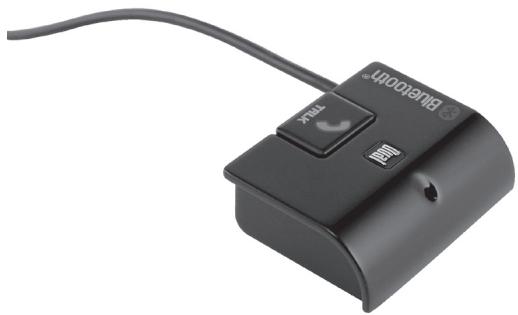
Close-up of a black Bluetooth device with a switch and cable, no visible text or symbols on the device itself.BTM60
INSTALLATION/QUICK START GUIDE
Wireless Bluetooth Module

Bluetooth®
Typical Installation
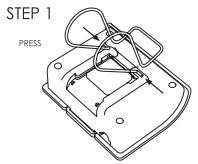
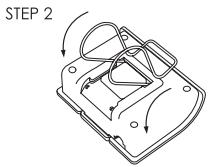
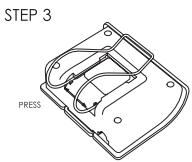
Installation Quick Reference
- Insert the mounting clip into the guide holes, and attach to the BTM60 module as seen in the picture above.
- Mount the BTM60 onto the visor using the using the mounting clip, ensuring the microphone is facing the driver. Refer to the picture below for reference.
- Carefully route the connection cable down the A-pillar of the vehicle, then to the back of your Dual Bluetooth® ready head unit.
- Plug the BTM60 connector into the back of the head unit, making sure to line up the arrows before connecting. Refer to the head unit owner's manual for more information.
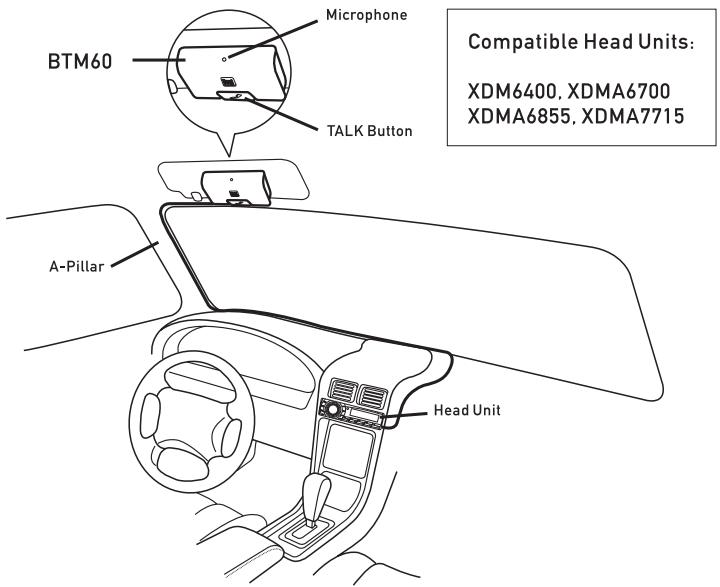
Quick Start Guide
Note: You must first pair and connect your Bluetooth® mobile device to the BTM60 to place and receive calls. Refer to your head unit owner's manual for pairing and detailed operation instructions.
Receiving a Call
- When the BTM60 detects an incoming call, your head unit will automatically switch to Bluetooth mode, and display the caller ID phone number.
- To receive an incoming call, press 📋 on the BTM60 or your head unit when the phone is ringing.
- During a phone call, press ↗ to activate the call waiting feature. Press ↗ once more to return to the original call.
- To reject an incoming call or to end the current call, press and hold MUTE on the head unit for 3 seconds.
Placing a Call
- To make a call using the head unit, first press ↗ or MODE to change to Bluetooth standby mode.
- While in Bluetooth standby mode, press ↗ to enter the dialing screen.
- From the dialing screen, enter the phone number using 0-9, *, # on the front panel of the head unit.
- Once the number is entered, press ↗ to place the call.
Note: Due to the differences in Bluetooth technology, some mobile devices may be incompatible or function improperly when used with the BTM60.
Limited One Year Warranty
This warranty gives you specific legal rights. You may also have other rights which vary from state to state.
Dual Electronics Corp. warrants this product to the original purchaser to be free from defects in material and workmanship for a period of one year from the date of the original purchase.
Dual Electronics Corp. agrees, at our option, during the warranty period, to repair any defect in material or workmanship or to furnish an equal new, renewed or comparable product (whichever is deemed necessary) in exchange without charges, subject to verification of the defect or malfunction and proof of the date of purchase. Subsequent replacement products are warranted for the balance of the original warranty period.
Who is covered? This warranty is extended to the original retail purchaser for products purchased and used in the U.S.A.
What is covered? This warranty covers all defects in material and workmanship in this product. The following are not covered:
installation/removal costs, damage resulting from accident, misuse, abuse, neglect, product modification, improper installation, incorrect line voltage, unauthorized repair or failure to follow instructions supplied with the product, or damage occurring during return shipment of the product.
What to do?
-
Before you call for service, check the troubleshooting guide in your owner's manual. A slight adjustment of any custom controls may save you a service call.
-
If you require service during the warranty period, you must carefully pack the product (preferably in the original package) and ship it by prepaid transportation with a copy of the original receipt from the retailer to an authorized service center.
-
Please describe your problem in writing and include your name, a return UPS shipping address (P.O. Box not acceptable), and a daytime phone number with your shipment.
-
For more information and for the location of the nearest authorized service center please contact us by one of the following methods:
• Call us toll-free at 1-866-382-5476
• E-mail us at cs@dualav.com
Exclusion of Certain Damages: This warranty is exclusive and in lieu of any and all other warranties, expressed or implied, including without limitation the implied warranties of merchantability and fitness for a particular purpose and any obligation, liability, right, claim or remedy in contract or tort, whether or not arising from the company's negligence, actual or imputed. No person or representative is authorized to assume for the company any other liability in connection with the sale of this product. In no event shall the company be liable for indirect, incidental or consequential damages.
Dual Electronics Corp. Toll Free: 1-866-382-5476