
UA10 - Carte mère ABIT - Notice d'utilisation et mode d'emploi gratuit
Retrouvez gratuitement la notice de l'appareil UA10 ABIT au format PDF.


| Type de produit | Interface audio USB externe 5.1 canaux |
| Marque | ABIT |
| Modèle | UA10 |
| Connectivité | USB 1.1 (type B), sortie G9 pour enceintes 5.1 |
| Convertisseur numérique-analogique | 6 canaux, 24 bits, suréchantillonnage 128x, échantillonnage jusqu'à 96 kHz |
| Performances audio | Rapport signal/bruit : 100 dB, THD+N : -90 dB |
| Contrôle du volume | Numérique, par canal individuel |
| Systèmes d'exploitation supportés | Windows 98, Windows ME, Windows 2000 |
| Logiciels inclus | InterVideo WinDVD 2000, InterVideo WinRip |
| Configuration minimale requise | PC avec port USB disponible, processeur 400 MHz minimum |
| Accessoires optionnels | Télécommande infrarouge WinDVD (kit optionnel) |
| Alimentation | Via bus USB (auto-alimenté) |
| Dimensions (approx.) | 10 cm x 5 cm x 2 cm (taille de poche) |
| Poids (approx.) | 100 g |
| Contenu de l'emballage | UA10, câble USB, câble G9 6 canaux, CD d'installation et manuel |
| Entretien et nettoyage | Débranchez l'appareil avant nettoyage. Utilisez un chiffon doux et sec. Évitez les liquides et l'humidité. |
| Sécurité | Ne pas exposer à la pluie, à l'humidité ou à des températures extrêmes. Utilisez uniquement avec des câbles fournis. |
| Réparabilité et pièces détachées | Aucune pièce réparable par l'utilisateur. Contactez votre revendeur ou le support ABIT en cas de panne. |
| Informations générales | Permet de transformer un PC en système home cinéma Dolby Digital 5.1. Installation plug-and-play sans redémarrage. |
FOIRE AUX QUESTIONS - UA10 ABIT
Questions des utilisateurs sur UA10 ABIT
0 question sur cet appareil. Repondez a celles que vous connaissez ou posez la votre.
Poser une nouvelle question sur cet appareil
Téléchargez la notice de votre Carte mère au format PDF gratuitement ! Retrouvez votre notice UA10 - ABIT et reprennez votre appareil électronique en main. Sur cette page sont publiés tous les documents nécessaires à l'utilisation de votre appareil UA10 de la marque ABIT.
MODE D'EMPLOI UA10 ABIT
Copyright and Warranty Notice
The information in this document is subject to change without notice and does not represent a commitment on part of the vendor, who assumes no liability or responsibility for any errors that may appear in this manual.
No warranty or representation, either expressed or implied, is made with respect to the quality, accuracy or fitness for any particular part of this document. In no event shall the manufacturer be liable for direct, indirect, special, incidental or consequential damages arising from any defect or error in this manual or product.
Product names appearing in this manual are for identification purpose only and trademarks and product names or brand names appearing in this document are the property of their respective owners.
This document contains materials protected under International Copyright Laws. All rights reserved. No part of this manual may be reproduced, transmitted or transcribed without the expressed written permission of the manufacturer and authors of this manual.
If you do not properly set the settings of this product, causing this product to malfunction or fail, we cannot guarantee any responsibility.
| As of December 31, | ||
| 2017 | 2016 | |
| (In thousands) | ||
| Amounts Payable and Commitments: | ||
| Amounts payable to NagraStar | 1,548,938 | 1,548,938 |
UA10 USB Audio Interface User's Manual
Index
CHAPTER 1. INTRODUCTION 1-1
1-1. SPECIFICATIONS. 1-1
1-2. WHAT'S IN THE BOX? (PACKAGE LIST) 1-2
CHAPTER 2. HARDWARE CONNECTION AND DRIVER INSTALLATION 2-1
2-1. HARDWARE CONNECTION 2-1
2-2. DRIVER INSTALLATION 2-3
CHAPTER 3. INTERVIDEO WINRIP™ SOFTWARE APPLICATION 3-1
3-1. WINRIP INSTALLATION 3-1
3-2. WINRIP CONFIGURATION 3-4
CHAPTER 4. INTERVIDEO WINDVD™ 2000 SOFTWARE APPLICATION 4-1
4-1. WINDVDTM 2000 INSTALLATION 4-1
4-2. REMOTE CONTROL KIT (OPTIONAL) 4-2
4-3. REMOTE CONTROLLER (OPTIONAL) 4-3
APPENDIX A. GLOSSARY. 4-1
APPENDIX B. HOW TO GET TECHNICAL SUPPORT. B-1
Chapter 1. Introduction
UA10 is a palm-sized USB device that enables your PC or Notebook to become a complete Dolby Digital Home Theater 5.1 audio system. Simply connect the USB cable to your PC and the G9 cable to your speaker system, and you are on the way to the digital high-fidelity heaven.
1-1. Specifications
1. USB Steaming Controller
- USB Specification version 1.1 compatible
- USB Audio Specification version 1.1 compatible
Support 12Mb/s data rate (full speed) - Support Suspend/Resume
2. 6 Channel 24-bit DAC
128X over sampling
- Sampling rate up to 96KHz
24 bit 8 times digital filter
- On-chip Switched-Capacitor Filter
- Dynamic range, S/N: 100dB
- THD+N: -90dB
- Individual channel digital volume control
3. Bundled Software
- WinDVD software DVD player support Dolby
- WinRip MP3 recording 5.1ch playback application
4. Games Compatibility
- Compatible with all standard Windows games
5. Inputs/Outputs
- USB Type B connector
G9 speaker output
6. OS Compatibility
- Windows 98, Windows ME, Windows 2000
7. Remote Control Kit (optional)
To operate the WinDVD wirelessly
8. Recommended Accessory
- ABIT Home Theater 5.1 Speaker System
9. System Requirement
-
PC/Notebook with one available USB port
Minimum CPU speed: 400MHz -
Specifications and information contained in this manual are subject to change without notice.
1-2. What's In The Box? (Package List)
Check the following list. If there is any item damaged or missing, please contact your local dealer.
(1) UA10
(1) UA10 Installation and Utility Disc (CD-Title)
(1) G9 6-Channel Cable Red jack: To connect Front speakers White jack: To connect Rear speakers Black jack: To connect Center speaker/Subwoofer
(1) This User's Manual
(1) USB Connection Cable
WinDVD Remote Controller Kit (Optional)
Chapter 2. Hardware Connection and Driver Installation
2-1. Hardware Connection
It is very easy to add this USB device, no need to power off or to reboot the system before and after the installation. Please refer to the diagram below to connect this USB device to your 5.1 channel audio system.
A G9-G9 cable connection with Abit SP-50 speaker system:
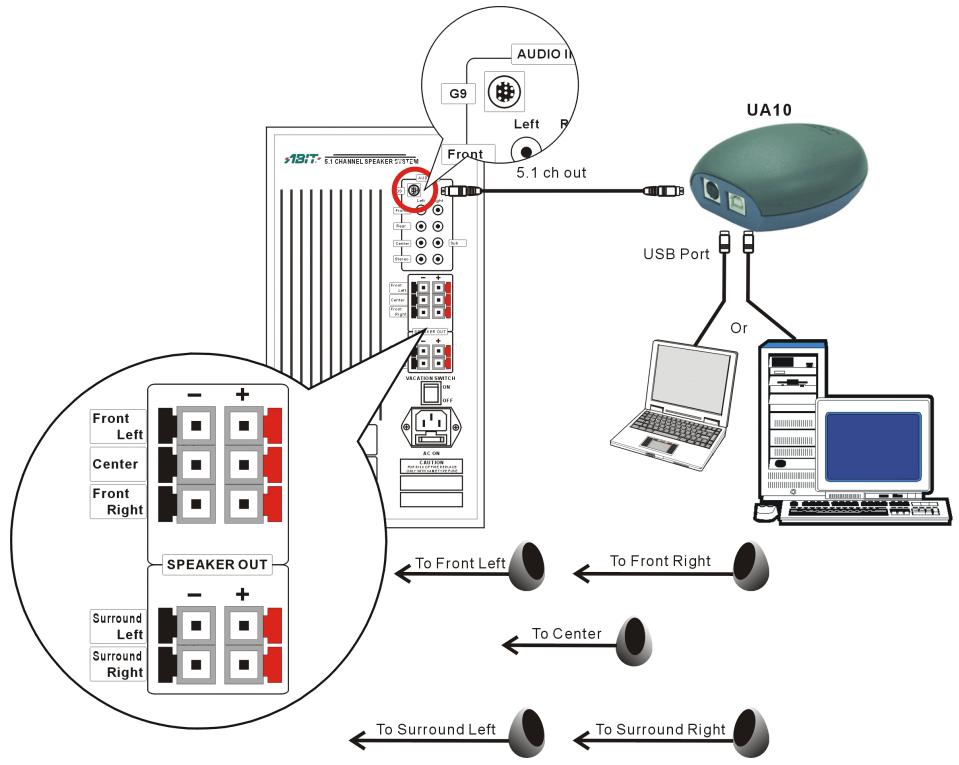
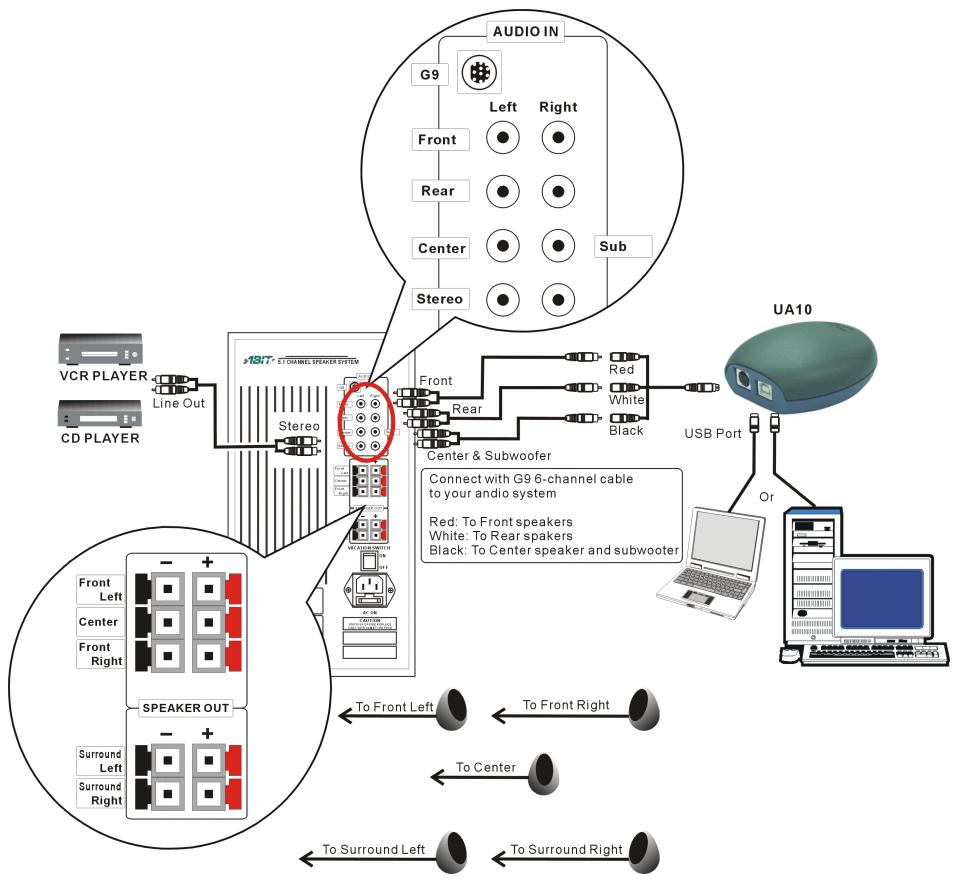
A G9 6-channel cable connection with Abit SP-50 speaker system:
2-2. Driver Installation
It is very easy to add this USB Audio Device, no need to power off and reboot the system before and after the installation.
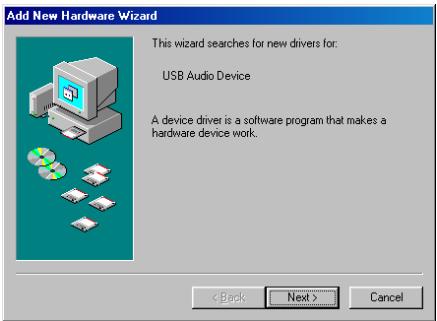
- Windows detects the USB device. Click "Next>" to go on.
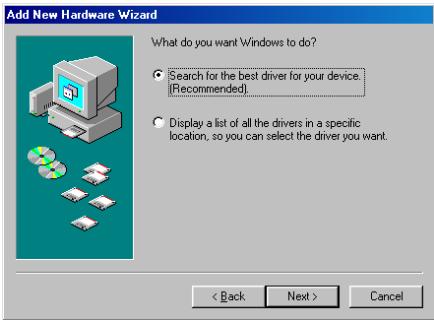
- Enable the "Search for the best driver for your device. [Recommended]", and click "Next>" to go on.
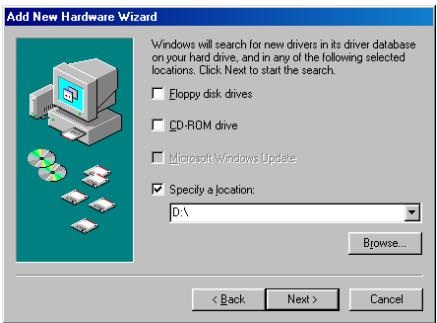
- Specify the path where Windows 98SE disc located, and click "Next>" to search the driver.
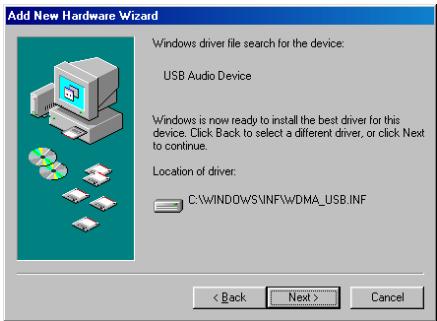
- Click "Next" to go on.
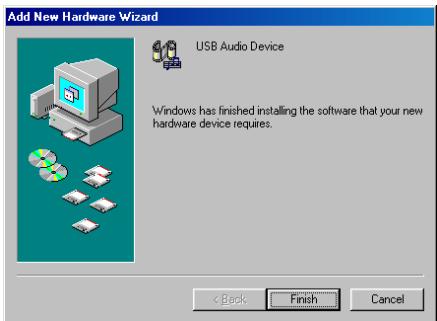
- Click "Finish" to end the installation.
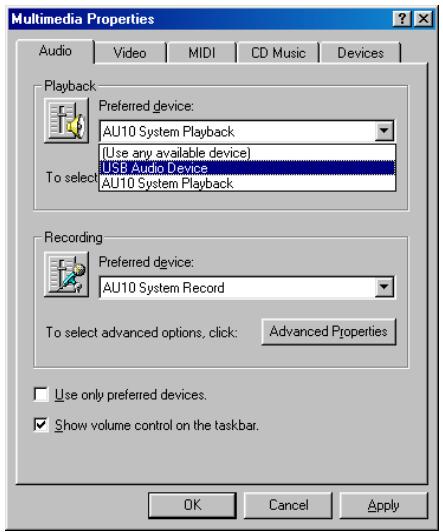
- In case there is another audio device on board or installed, you may have to select the preferred device. Please enter the "Multimedia Properties" through the "Control Panel Multimedia". Select "USB Audi Device" as your preferred device, and click "OK" to exit.
Chapter 3. InterVideo WinRip™ Software Application
WinRip is application software developed by InterVideo to provide you with a complete audio playback and recording environment for all currently available audio formats, including the MP3, MP2, WAVE, MIDI, and Audio CD formats for Abit's 5.1 channel playing device. WinRip enables you to swap and convert between these formats freely.
Insert the UA10 CD-Title into the CD-ROM drive, it should execute the program automatically. If not, execute the execution file at the main directory of this CD-Title. After it has been executed, enter the page of driver installation, the installation wizard appears:
3-1. WinRip Installation
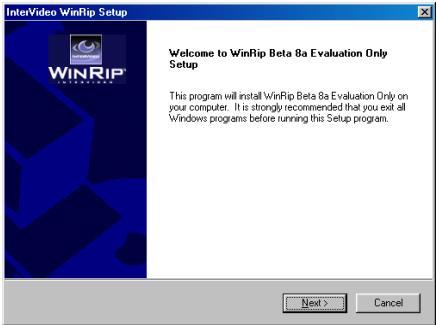
1. The welcome screen appears. Click "Next" to go on.
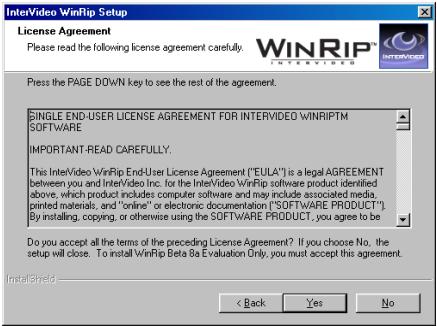
2. Please read the License Agreement and click "Yes" to go on.
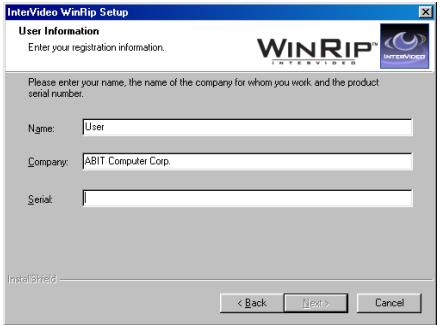
3. Type in your name, company name, and serial number of this software. Click "Next" to go on.
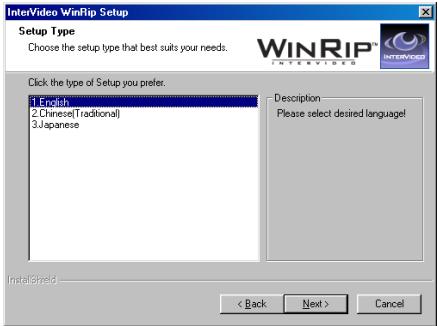
4. Select your desired setup language. Click "Next" to go on.

- Choose the destination location you want by entering the "Browse..." button, or you may click "Next" to go on.
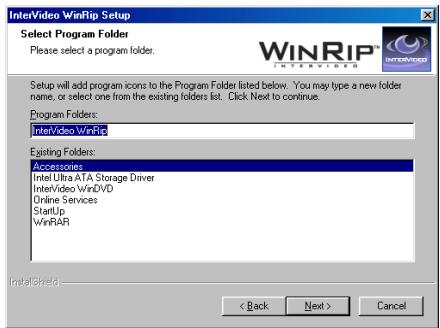
- Type the new folder name you want. Or you may click "Next" to go on.
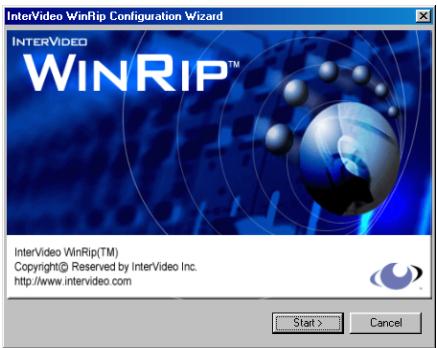
- Click "Start" to go on.
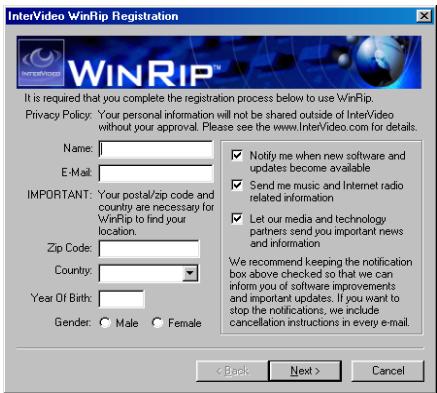
- Type in your registration information and click "Next" to go on. Or you may click "Cancel" to skip this step, finish the registration later, and jump directly to steps 13 to complete the installation.
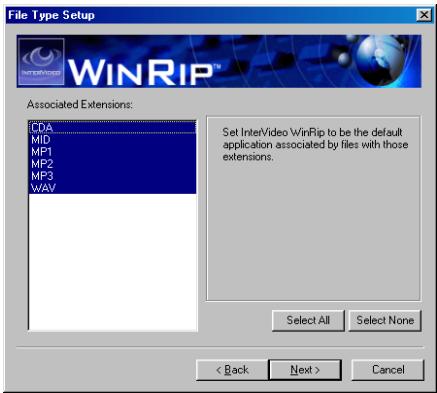
- Select the extensions names associated with WinRip, and click "Next" to go on.
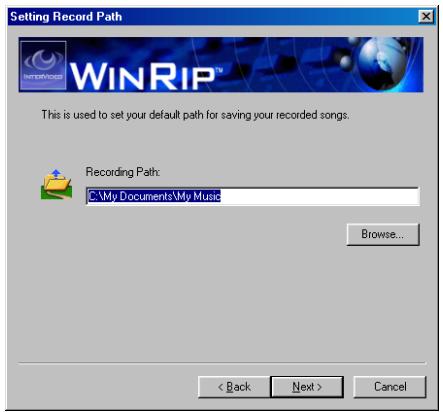
- Type in the recording path of your recorded songs, or you may click "Next" to go on with the default path.
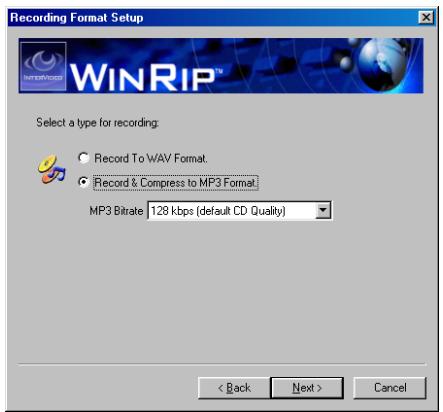
- Check the type of recording. There are 128 (default), 160, 192, 224, 256, and 320 kbps options to select. Click "Next" to go on.
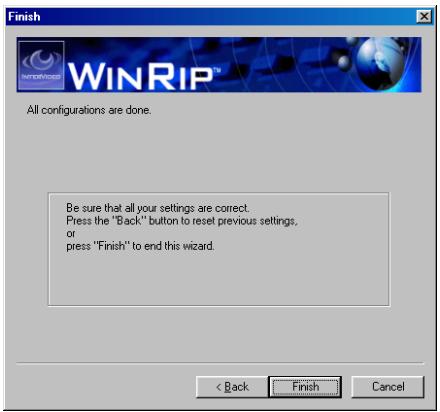
- Click "Finish" to end the installation.

- Windows has finished installing WinRip. Enable the check box if you want to view the Readme file, or click "Finish" to go on.
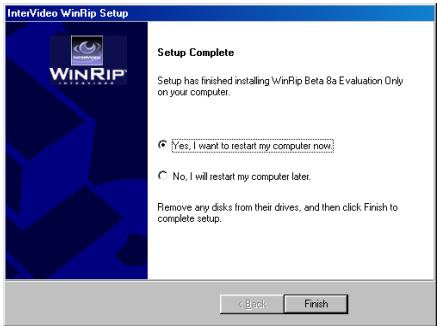
- Enable the check box of "Yes, I want to restart my computer now", and click "Finish" to complete the setup.
3-2. WinRip Configuration
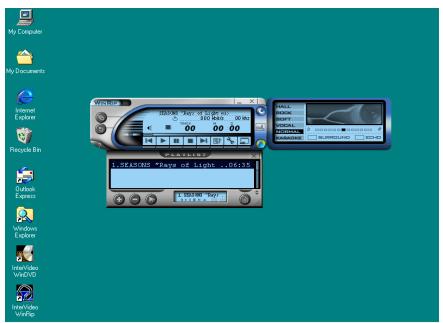
1. Double-click on the WipRip icon on the desktop.
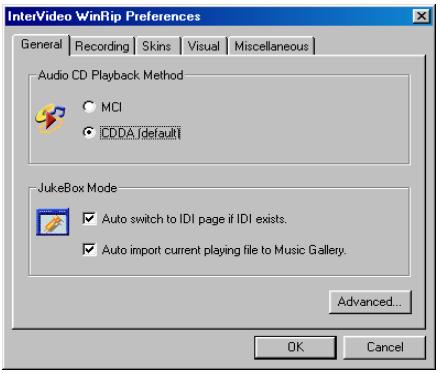
2. Click the "Advanced..." button to go on.
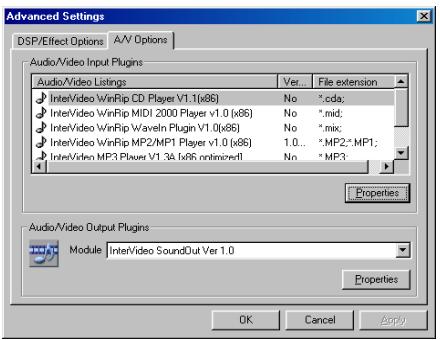
3. Select the A/V Options tab, and click the "Properties" button of Audio/Video Output Plugins to go on.
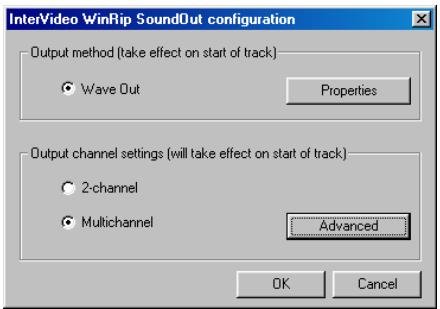
4. Enable the checkbox of the "Multichannel" and click the "Advance" button.
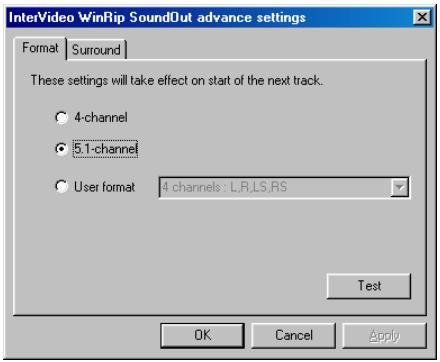
5. Choose 5.1-channel and click "OK" button.
You will have to click "OK" button for three more times in the next three steps, which are the same screen with step 4 to step 2.
The output channel settings will be taking effect immediately on the start of next track.
Chapter 4. InterVideo WinDVD™ 2000 Software Application
4-1. WinDVD™ 2000 Installation
Note
It is recommended to install the latest version of DirectX to obtain 5.1 channel audio output.
The WinDVD™ 2000 is a software developed by InterVideo for playing VCD/DVD on your DVD-ROM of your computer. Please insert the AC10 CD-Title into the DVD-ROM drive; it should execute the program automatically. Or you may double-click the execution file at the main directory of this CD-Title, and then follow the on-screen instruction for the rest of the installation procedure.
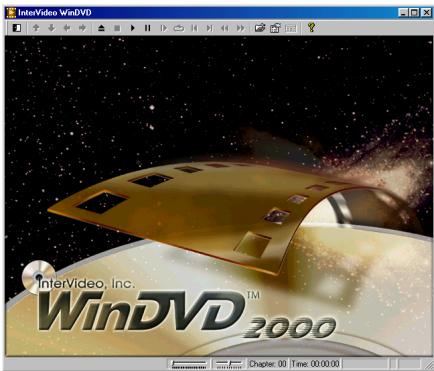
After finishing the installation, the wizard asks you to restart your computer. Restart it and go to "Start Program InterVideo WinDVD InterVideo WinDVD", or you may start it by double clicking the WinDVD icon on your desktop. Then you will see the screen as shown left.
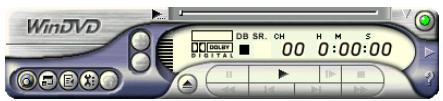
You can also play DVD movies by using the DVD player control panel as shown left.
For more detailed information about how to operate it, you may refer to the Help File in the InterVideo WinDVD program group.
Note
The WinDVD2000 on Windows® 2000 operating system currently only provide stereo mode output. Please link to InterVideo (www.intervideo.com) for software update.
4-2. Remote Control Kit (Optional)
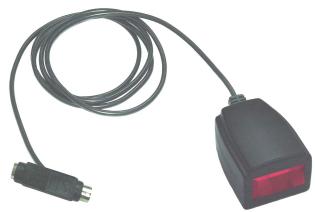
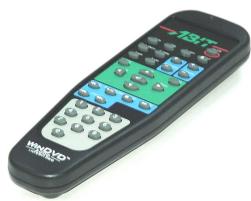
Remote Control Kit
Receiver Cable
Remote Controller
This optional IR remote control kit replaces the keyboard and mouse when you are watching DVD/VCD movies with the WinDVD2000 software.
This remote control kit not only controls the WinDVD playback function but also used as a pointing device for Microsoft® PowerPoint™ presentation software.
The installation procedure:
Step 1. Remove the keyboard from the PS/2 port on your motherboard.
Step 2. Connect one end of the receiver cable to the PS/2 Keyboard port on your motherboard.
Step 3. Connect your PS/2 keyboard connector to the other end of the receiver cable.
Step 4. Place the IR receiver to the most convenient location facing towards you. Please avoid having any obstacle in between to block the IR transmission.
Note
This IR remote control kit only works with the version of WinDVD2000 software bundled together with ABIT's multimedia system.
4-3. Remote Controller (Optional)
- On/Off: Power On/Off
- Eject: Ejects the disk from the drive
- Screen: Select the size of viewing screen.
- Title: Opens a submenu showing you all of the titles available on the DVD disc currently being played and allows you to select a new title to play back.
- Subtitle: Displays the subtitle menu. If multiple language subtitles are available, use this menu to select your choice.
- Audio: Displays the audio track options. If multiple audio tracks or language are available, use this menu to select your choice.
- Mute: Mutes the sound on the disk currently playing
- Chap Menu: Shows the Chapter menu
- Angle: When available, select the angle to view from a list of optional angles.
Volume: Increase or decrease audio output - Brightness: Increase or decrease the brightness of the video output
- Menu: shows menu selections
- Up/Down/Right/Left: Use the directional buttons just as you would the mouse button or Tab key
- Enter/Play: Enter Plays the current title, restores play after a pause
- ESC: To escape from the Menu selection
- Fast Forward: Plays the disk in fast forward mode
- Stop: Stops the current playback
- Pause: Pauses the current playback
- Fast Backward: Plays the disk in fast reverse mode
- Previous Chapter: Jump to the previous chapter
- Next Chapter: Jump to the next chapter
- Chapter: Opens a submenu showing you the chapter currently being played. You can select another chapter from this menu.
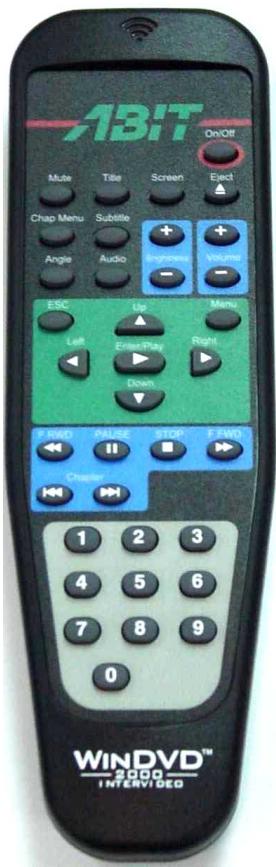
- Numeric Keypad: The numeric keypad provides you with a method of selecting numbers. This is more likely to be used while playing a Video CD than a DVD disc. Any time that you enter a numeric value, click the corresponding key on the numeric keypad and then click the enter button to accept that number
Appendix A. Glossary
Center Channel (Speaker)
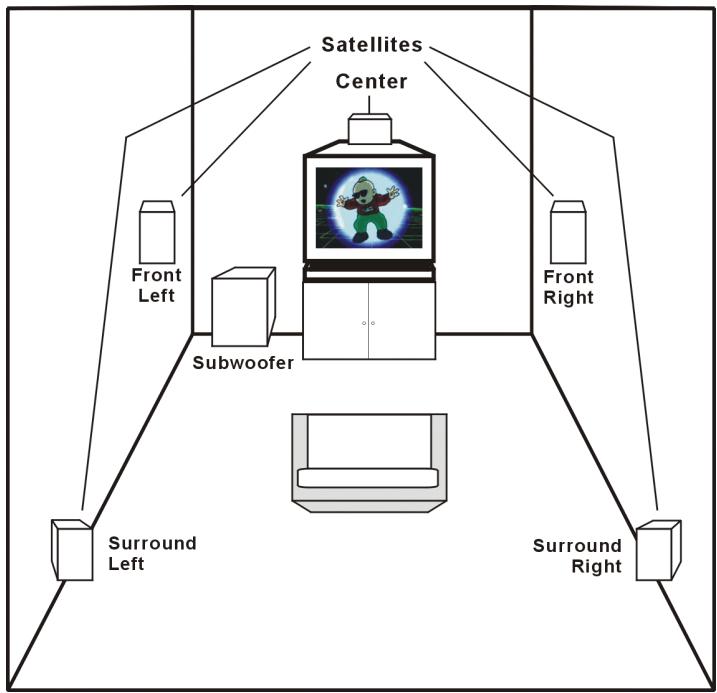
The center channel speaker is used to produce the voices and dialogue in surround sound movies. This is commonly referred to as the most important speaker in a home theater system because it produces approximately 80% of all the sound heard in an average movie. In movie theaters, the center channel speakers are placed behind the screen, directly in front of the viewer. In a home setting it is preferable to have the center channel speaker either directly on top of, or directly below, your television. Note: In an ideal situation, your center channel speaker will be the exact same make and model as you right and left front speakers. At the very least it should be the same brand as your right and left front speakers.
Decibel (dB)
The unit commonly used to compare signal levels. Decibel is used as a measure of response in all types of electrical circuits, and is also used as a measure of sound level in audio systems (relative to a reference level). The decibel scale is logarithmic. This means that two signals, for example S1 and S2, will differ in by the following formula:
$$ 1 0 \bullet \log \left(\frac {\mathrm {W} _ {\mathrm {S} 1}}{\mathrm {W} _ {\mathrm {S} 2}}\right) = 1 0 \bullet \log \left(\frac {\mathrm {V} _ {\mathrm {S} 1} ^ {2}}{\mathrm {V} _ {\mathrm {S} 2} ^ {2}} / \mathrm {R} _ {\mathrm {S} 1}\right) $$
Digital Theater Systems (DTS)
An 8-channel sound format used in commercial movie theaters. Only 6 channels are used, and the sound is run off CD's. DTS Coherent Acoustics is expected to follow Home Theater.
Digital Verstaile Disc (DVD)
Previously known as Digital Video Disc, this represents the latest in home theater. It is a purely digital format for MPEG-1 and/or MPEG-2 compression. This may result in pixelation. The format also supports multiple aspect ratios, as well as different versions of a movie with several different captions as well as Dolby Digital sound. Each disc consists of two layers so that when the end of one layer is reached, the laser beam focuses down to the next layer for a seamless layer change. Be sure to see the article on DVD's for more information.
Dolby Digital (Dolby AC-3)
Dolby AC-3 is the old name for the popular 5.1-channel home theater sound system—now called Dolby Digital. It consists of front left/right speakers, a center speaker, left/right surround speakers, and a Low Frequency Effects (LFE) channel, usually used with a subwoofer.
Dolby Pro-Logic
This is the most popular surround-sound format almost every receiver nowadays uses it. This system uses matrixed surround in order to encode four sound channels: left/right front channels, a center channel, and one surround channel. However, it is common to see two speakers used for the one surround channel, as well as a subwoofer to supplement the speakers.
Frequency Response
This is a measure of what frequencies can be reproduced and how accurately they are reproduced. A measurement of 20 to 20,000Hz± 3 dB means that frequencies between 20Hz and 20,000Hz can be reproduced no more than 3 dB too loud (twice as loud) or 3 dB too soft (half as loud).
Front Speakers
These are the two speakers (right and left) placed in the front of the listening position. The front speakers handle most of the musical soundtrack of a movie as well as special audio effects. In a typical surround sound system, the left and right front speakers should form an angle of approximately 45 degrees to the listening position. This simulates the speaker arrangement used both for mixing surround soundtracks and for a center seat about two-thirds of the way back in a well-designed movie theater. The left & right channel speakers should also be capable of reproducing the full frequency range.
Hertz
The unit of frequency named after the physicist Heinrich Hertz (1857-1894). 1 hertz (Hz) is equal to 1 cycle/second. Other units of frequency commonly encountered are the kilohertz (kHz) = 1,000Hz and the megahertz (MHz) = 1,000,000Hz .
Impedance
This is a complex reaction of resistance to AC in an electrical circuit.
LCD Liquid Crystal Display
An LCD is an alphanumeric display using the unique properties of liquid crystal to form characters.
MPEG-2
MPEG-2 is an expanded MPEG-1 specification with additional extensions for more digital and audio applications. It was targeted at high-speed all-digital transmission of broadcast quality video and supports a data transfer rate of 4 to 9 megabits/second. It is used in DVD players for maximum compression of video and audio.
NTSC
The standard by which TV is broadcast in the US. It has a theoretical maximum resolution of 525 lines and an aspect ratio of 4:3 or 1.33:1.
Ohm
Unit of measurement of the resistance in an electrical circuit.
PAL
The standard by which TV is broadcast in Europe. It has a theoretical maximum resolution of 625 lines and an aspect ratio of 4:3/1.33:1, and in some places 16:9/1.78:1.
RMS
Root Mean Square. It is used to measure average power levels.
Signal-to-Noise Ratio
A measure of how much louder the signal (such as music) is, in comparison to the noise (such as hiss). Larger numbers are better.
Subwoofer
A subwoofer is a (usually powered) speaker that produces very deep booming bass sounds. Subwoofer
are responsible for reproducing the LFE track in a 5.1 Dolby Digital or DTS soundtrack. They are typically a cube shape with a large single woofer either pointing directly at the ground or directly at the listener. Usually, subwoofoers are placed in the corner of the room. Ideally, a subwoofer should be placed where it is impossible to determine the direction of where the sound is coming from.
Surround Speaker
This type of speaker diffuses the sound so as to make it harder to discern where the sound is coming from. Two popular types are bipoles and dipoles.
THD
Or Total Harmonic Distortion. Harmonic Distortion is a means of measuring Nonlinear Distortion. Nonlinear Distortion is a form of signal processing error that creates signals at frequencies that are not necessarily present in the input. THD is determined by measuring the size of each of the new frequencies that are created by the source of the distortion. The new frequencies are called "harmonics" because they exist at frequencies that are integer multiples of the input signal.
Watt (W)
The basic unit of power. In audio systems, the output power of a stereo amplifier is rated in watts per channel, e.g. 2 × 30W .
Appendix B. How to Get Technical Support
(From our website) http://www.abit.com.tw
(In North America) http://www.abit-usa.com
(In Europe) http://www.ubit.nl
Thank you for choosing ABIT products. ABIT sells all our products through distributors, resellers and system integrators, we have no direct sales to end-users. Before sending email for tech support please check with your resellers or integrators if you need any services, they are the ones who sold you your system and they should know best as to what can be done, how they serve you is a good reference for future purchases.
We appreciate every customer and would like to provide the best service to you. Providing fast service to our customers is our top priority. However we receive many phone calls and a huge amount of email from all over the world. At the present time it is impossible for us to respond to every single inquiry. Therefore it is quite possible that if you send an email to us that you may not receive a response.
We have done many compatibility tests and reliability tests to make sure our products have the best quality and compatibility. In case you need service or technical support, please understand the constraint we have and always check with the reseller who sold the product to you first.
To expedite service, we recommend that you follow the procedures outlined below before contacting us. With your help, we can meet our commitment to provide the best service to the greatest number of ABIT customers:
- Check the Manual. It sounds simple but we have taken a lot of care in making a well-written and thorough manual. It is full of information that doesn't only pertain to motherboards. The CD-ROM included with your board will have the manual as well as drivers. If you don't have either one go to our Program Download Area of the Website or FTP server at:
http://www.ubit.com.tw/download/index.htm - Download latest BIOS, software or drivers. Please go to our Program Download area on our Website to check to see if you have the latest BIOS. They are developed over periods of time to fixes bugs or incompatibilities. Also please make sure you have the latest drivers from your peripheral cards makers!
-
Check the ABIT Technical Terms Guide and FAQ on our Website. We are trying to expand and make the FAQs more helpful and information rich. Let us know if you have any suggestions. For hot topics check out our HOT FAQ!
-
Internet Newsgroups. They are a great source of information and many people there can offer help. ABIT's Internet News group, alt.comp.perips.mainboard.abit, is an ideal forum for the public to exchange information and discuss experiences they have had with ABIT products. Many times you will see that your question has already been asked before. This is a public Internet news group and it is reserved for free discussions. Here is a list of some of the more popular ones:
alt.comp.perips.mainboard.abit
comp.sysibm.pc.hardware.chips
alt.comp.hardware.overclocking
alt.comp.hardware.homebuilt
alt.comp.hardware.pc-homebuilt
- Ask your reseller. Your ABIT authorized distributor should be able to provide the fastest solution to your technical problem. We sell our products through distributors who sell to resellers and stores. Your reseller should be very familiar with your system configuration and should be able to solve your problem much more efficiently than we could. After all, your reseller regards you as an important customer who may purchase more products and who can urge your friends to buy from him or her as well. They integrated and sold the system to you. They should know best what your system configuration is and your problem. They should have reasonable return or refund policies. How they serve you is also a good reference for your next purchase.
- Contacting ABIT. If you feel that you need to contact ABIT directly you can send email to the ABIT technical support department. First, please contact the support team for the branch office closest to you. They will be more familiar with local conditions and problems and will have better insight as to which resellers offer what products and services. Due to the huge number of emails coming in every day and other reasons, such as the time required for problem reproduction, we will not be able to reply to every email. Please understand that we are selling through distribution channels and don't have the resources to serve every end-user. However, we will try to do our best to help every customer. Please also remember that for many of our technical support team English is a second language, you will have a better chance of getting a helpful answer if your question can be understood in the first place. Be sure to use very, simple, concise language that clearly states the problem, avoid rambling or flowery language and always list your system components. Here is the contact information for our branch offices:
In North America and South America please contact:
ABIT Computer (USA) Corporation
46808 Lakeview Blvd.
Fremont, California 94538, U.S.A.
sales@abit-usa.com
technical@abit-usa.com
Tel: 1-510-623-0500
Fax: 1-510-623-1092
In the UK and Ireland:
ABIT Computer Corporation Ltd.
Unit 3, 24-26 Boulton Road
Stevenage, Herts SG1 4QX, UK
abituksales@compuserve.com
abituktech@compuserve.com
Tel: 44-1438-228888
Fax: 44-1438-226333
In Germany and Benelux (Belgium, Netherlands, Luxembourg) countries:
AMOR Computer B.V. (ABIT's European Office)
Van Coehoornstraat 7,
5916 PH Venlo, The Netherlands
sales@abit.nl
technical@abit.nl
Tel: 31-77-3204428
Fax: 31-77-3204420
All other territories not covered above please contact:
Taiwan Head Office
When contacting our headquarters please note we are located in Taiwan and we are 8+ GMT time. In addition, we have holidays that may be different from those in your country.
ABIT Computer Corporation
3F-7, No. 79, Sec. 1, Hsin Tai Wu Rd.
Hsi Chi, Taipei Hsien, Taiwan
sales@abit.com.tw
market@abit.com.tw
technical@abit.com.tw
Tel: 886-2-2698-1888
Fax: 886-2-2698-1811
- RMA Service. If your system has been working but it just stopped, but you have not installed any new software or hardware recently, it is likely that you have a defective component. Please contact the reseller from whom you bought the product. You should be able to get RMA service there.
- Reporting Compatibility Problems to ABIT. Because of tremendous number of email messages we receive every day, we are forced to give greater weight to certain types of messages than to others. For this reason, any compatibility problem that is reported to us, giving detailed system configuration information and error symptoms will receive the highest priority. For the other questions, we regret that we may not be able to reply directly. But your questions may be posted to the Internet news group in order that a larger number of users can have the benefit of the information. Please check the news group from time to time.
- Fill out the Technical Support Form: If you encounter any problems and need help from our technical staff, please take the time to fill out the Technical Support Form and send it to your dealer or our technical support mailbox. The mailbox address is: technical@abit.com.tw. We will try to solve your problem as soon as possible. You must provide specific information on your equipment. Also please describe in detail the problems you encountered. It's helpful and enables our technicians to analyze your problems more quickly. Information on items marked with an asterisk “*” on the Technical Support Form are required.

Technical Support Form
Company Name:
Phone Number:
Contact Person:
Fax Number:
E-mail Address:
| Product Name | * | Product Software and Driver Version | * |
| Motherboard Manufacturer, Model Name and Chipset type | |||
| Operating System Type | * | ||
| Hardware Name | Type | Specifications | |
| CPU Type and Speed | * | ||
| HDD IDE1IDE2 | |||
| CD-ROM-Drive IDE1IDE2 | |||
| System Memory Size (SDRAM) | |||
| Add-On CARD | |||
Problem Description:
Thank you, ABIT Computer Corporation http://www.abit.com.tw

- Copyright and Warranty Notice
- UA10 USB Audio Interface User's Manual
- CHAPTER 1. INTRODUCTION 1-1
- CHAPTER 2. HARDWARE CONNECTION AND DRIVER INSTALLATION 2-1
- CHAPTER 3. INTERVIDEO WINRIP™ SOFTWARE APPLICATION 3-1
- CHAPTER 4. INTERVIDEO WINDVD™ 2000 SOFTWARE APPLICATION 4-1
- APPENDIX A. GLOSSARY. 4-1
- APPENDIX B. HOW TO GET TECHNICAL SUPPORT. B-1
- Chapter 1. Introduction
- 1-1. Specifications
- USB Steaming Controller
- 6 Channel 24-bit DAC
- Bundled Software
- Games Compatibility
- Inputs/Outputs
- OS Compatibility
- Remote Control Kit (optional)
- Recommended Accessory
- System Requirement
- 1-2. What's In The Box? (Package List)
- Chapter 2. Hardware Connection and Driver Installation
- 2-1. Hardware Connection
- 2-2. Driver Installation
- Chapter 3. InterVideo WinRip™ Software Application
- 3-1. WinRip Installation
- 3-2. WinRip Configuration
- Chapter 4. InterVideo WinDVD™ 2000 Software Application
- 4-1. WinDVD™ 2000 Installation
- Note
- 4-2. Remote Control Kit (Optional)
- The installation procedure:
- 4-3. Remote Controller (Optional)
- Appendix A. Glossary
- Center Channel (Speaker)
- Decibel (dB)
- Digital Theater Systems (DTS)
- Digital Verstaile Disc (DVD)
- Dolby Digital (Dolby AC-3)
- Dolby Pro-Logic
- Frequency Response
- Front Speakers
- Hertz
- Impedance
- LCD Liquid Crystal Display
- MPEG-2
- NTSC
- Ohm
- PAL
- RMS
- Signal-to-Noise Ratio
- Subwoofer
- Surround Speaker
- THD
- Watt (W)
- Appendix B. How to Get Technical Support
- In North America and South America please contact:
- ABIT Computer (USA) Corporation
- In the UK and Ireland:
- ABIT Computer Corporation Ltd.
- In Germany and Benelux (Belgium, Netherlands, Luxembourg) countries:
- AMOR Computer B.V. (ABIT's European Office)
- All other territories not covered above please contact:
- Taiwan Head Office
- ABIT Computer Corporation
- Technical Support Form
- Thank you, ABIT Computer Corporation http://www.abit.com.tw
Marque : ABIT
Modèle : UA10
Catégorie : Carte mère