SPIDER II - Amplificateur de guitare LINE 6 - Notice d'utilisation et mode d'emploi gratuit
Retrouvez gratuitement la notice de l'appareil SPIDER II LINE 6 au format PDF.

| Type de produit | Amplificateur de guitare électrique |
|---|---|
| Caractéristiques techniques principales | Modélisation analogique, 12 amplis modélisés, 7 effets intégrés |
| Alimentation électrique | Adaptateur secteur inclus |
| Dimensions approximatives | 43 x 32 x 22 cm |
| Poids | 6,5 kg |
| Compatibilités | Compatible avec la plupart des guitares électriques |
| Type de batterie | Non applicable (fonctionne sur secteur) |
| Tension | 230 V |
| Puissance | 15 Watts |
| Fonctions principales | Amplification, effets intégrés, réglages de tonalité |
| Entretien et nettoyage | Essuyer avec un chiffon doux, éviter l'humidité |
| Pièces détachées et réparabilité | Disponibilité limitée des pièces, consulter un professionnel pour les réparations |
| Informations générales utiles | Idéal pour les débutants et les guitaristes intermédiaires, léger et portable |
FOIRE AUX QUESTIONS - SPIDER II LINE 6
Questions des utilisateurs sur SPIDER II LINE 6
0 question sur cet appareil. Repondez a celles que vous connaissez ou posez la votre.
Poser une nouvelle question sur cet appareil
Téléchargez la notice de votre Amplificateur de guitare au format PDF gratuitement ! Retrouvez votre notice SPIDER II - LINE 6 et reprennez votre appareil électronique en main. Sur cette page sont publiés tous les documents nécessaires à l'utilisation de votre appareil SPIDER II de la marque LINE 6.
MODE D'EMPLOI SPIDER II LINE 6
SpiderII
Pilot's Guide
40-00-0018 Electrophonic Limited Edition available @ www.line6.com Rev C

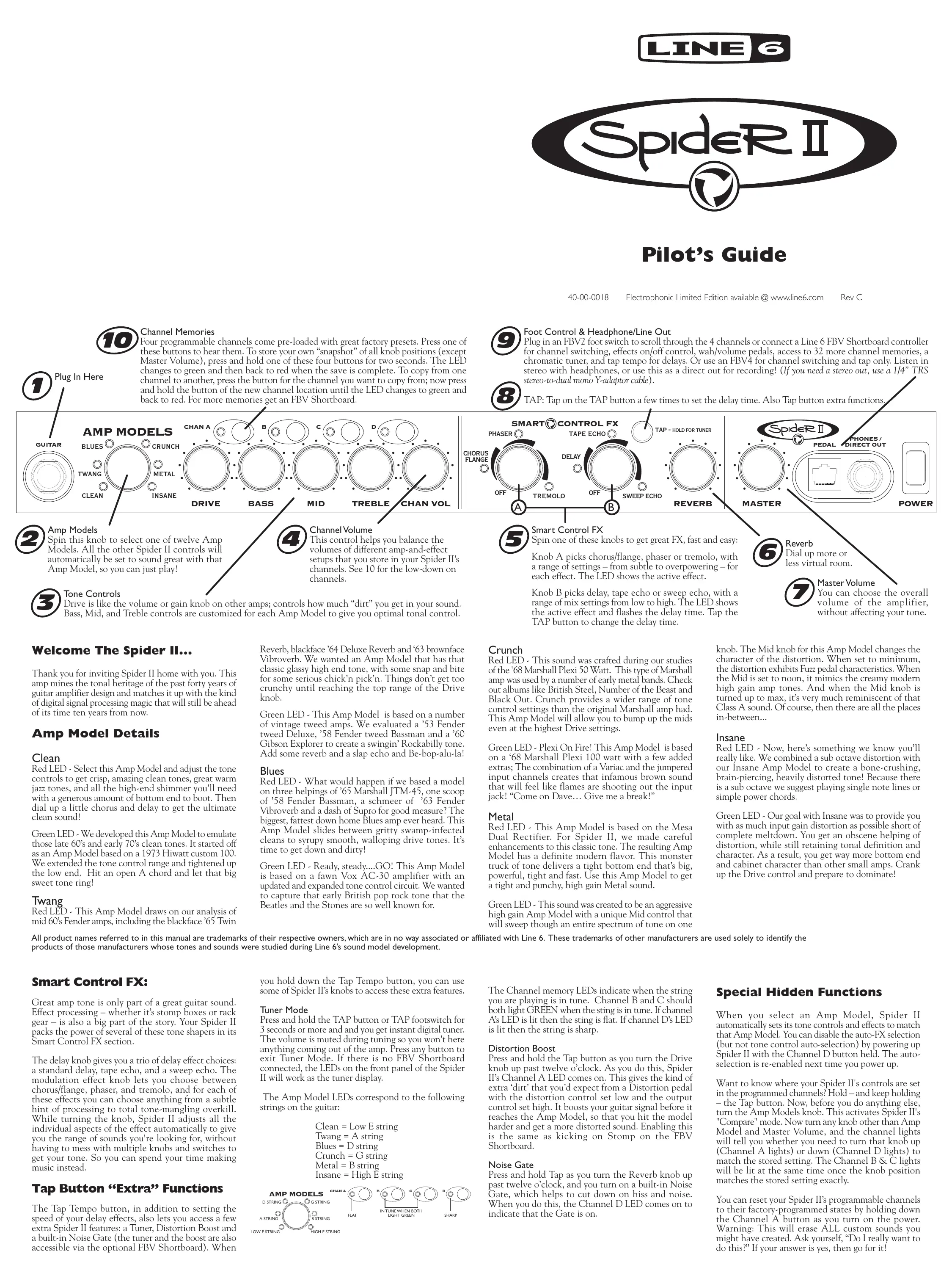
Channel Memories
Four programmable channels come pre-loaded with great factory presets. Press one of these buttons to hear them. To store your own "snapshot" of all knob positions (except Master Volume), press and hold one of these four buttons for two seconds. The LED changes to green and then back to red when the save is complete. To copy from one channel to another, press the button for the channel you want to copy from; now press and hold the button of the new channel location until the LED changes to green and back to red. For more memories get an FBV Shortboard.

, Plug In Here

Amp Models
Spin this knob to select one of twelve Amp Models. All the other Spider II controls will automatically be set to sound great with that Amp Model, so you can just play!
Tone Controls
Drive is like the volume or gain knob on other amps; controls how much "dirt" you get in your sound. Bass, Mid, and Treble controls are customized for each Amp Model to give you optimal tonal control.
Welcome The Spider II...
Thank you for inviting Spider II home with you. This amp mines the tonal heritage of the past forty years of guitar amplifier design and matches it up with the kind of digital signal processing magic that will still be ahead of its time ten years from now.
Amp Model Details
Clean
Red LED - Select this Amp Model and adjust the tone controls to get crisp, amazing clean tones, great warm jazz tones, and all the high-end shimmer you'll need with a generous amount of bottom end to boot. Then dial up a little chorus and delay to get the ultimate clean sound!
Green LED - We developed this Amp Model to emulate those late 60's and early 70's clean tones. It started off as an Amp Model based on a 1973 Hiwatt custom 100. We extended the tone control range and tightened up the low end. Hit an open A chord and let that big sweet tone ring!
Twang
Red LED - This Amp Model draws on our analysis of mid 60's Fender amps, including the blackface '65 Twin
All product names referred to in this manual are trademarks of their respective owners, which are in no way associated or affiliated with Line 6. These trademarks of other manufacturers are used solely to identify the products of those manufacturers whose tones and sounds were studied during Line 6's sound model development.
Smart Control FX:
Great amp tone is only part of a great guitar sound. Effect processing – whether it's stomp boxes or rack gear – is also a big part of the story. Your Spider II packs the power of several of these tone shapers in its Smart Control FX section.
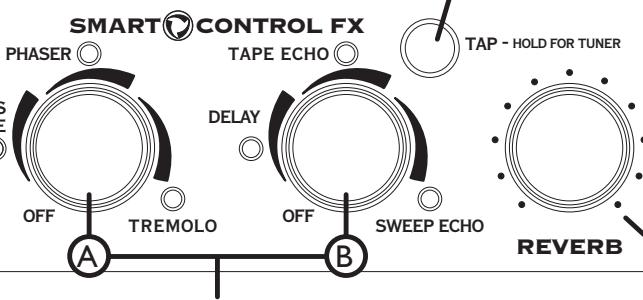
The delay knob gives you a trio of delay effect choices: a standard delay, tape echo, and a sweep echo. The modulation effect knob lets you choose between chorus/flange, phaser, and tremolo, and for each of these effects you can choose anything from a subtle hint of processing to total tone-mangling overkill. While turning the knob, Spider II adjusts all the individual aspects of the effect automatically to give you the range of sounds you're looking for, without having to mess with multiple knobs and switches to get your tone. So you can spend your time making music instead.
Tap Button "Extra" Functions
The Tap Tempo button, in addition to setting the speed of your delay effects, also lets you access a few extra Spider II features: a Tuner, Distortion Boost and a built-in Noise Gate (the tuner and the boost are also accessible via the optional FBV Shortboard). When
Reverb, blackface '64 Deluxe Reverb and '63 brownface Vibroverb. We wanted an Amp Model that has that classic glassy high end tone, with some snap and bite for some serious chick'n pick'n. Things don't get too crunchy until reaching the top range of the Drive knob.
Green LED - This Amp Model is based on a number of vintage tweed amps. We evaluated a '53 Fender tweed Deluxe, '58 Fender tweed Bassman and a '60 Gibson Explorer to create a swingin' Rockabilly tone. Add some reverb and a slap echo and Be-bop-alu-la!
Blues
Red LED - What would happen if we based a model on three helpings of '65 Marshall JTM-45, one scoop of '58 Fender Bassman, a schmeer of '63 Fender Vibroverb and a dash of Supro for good measure? The biggest, fattest down home Blues amp ever heard. This Amp Model slides between gritty swamp-infected cleans to syrupy smooth, walloping drive tones. It's time to get down and dirty!
Green LED - Ready, steady...GO! This Amp Model is based on a fawn Vox AC-30 amplifier with an updated and expanded tone control circuit. We wanted to capture that early British pop rock tone that the Beatles and the Stones are so well known for.
you hold down the Tap Tempo button, you can use some of Spider II's knobs to access these extra features.
Tuner Mode
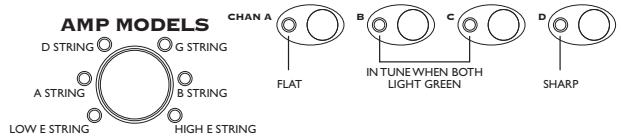
Press and hold the TAP button or TAP footswitch for 3 seconds or more and and you get instant digital tuner. The volume is muted during tuning so you won't here anything coming out of the amp. Press any button to exit Tuner Mode. If there is no FBV Shortboard connected, the LEDs on the front panel of the Spider II will work as the tuner display.
The Amp Model LEDs correspond to the following strings on the guitar:
Clean = Low E string
Twang = A string
Blues = D string
Crunch = G string
Metal = B string
Insane = High E string

Foot Control & Headphone/Line Out
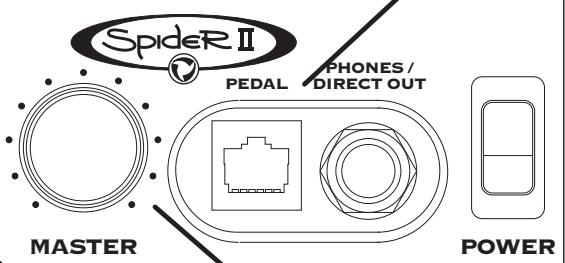
Plug in an FBV2 foot switch to scroll through the 4 channels or connect a Line 6 FBV Shortboard controller for channel switching, effects on/off control, wah/volume pedals, access to 32 more channel memories, a chromatic tuner, and tap tempo for delays. Or use an FBV4 for channel switching and tap only. Listen in stereo with headphones, or use this as a direct out for recording! (If you need a stereo out, use a 1/4" TRS stereo-to-dual mono Y-adaptor cable).

TAP: Tap on the TAP button a few times to set the delay time. Also Tap button extra functions

Smart Control FX
Spin one of these knobs to get great FX, fast and easy:
Knob A picks chorus/flange, phaser or tremolo, with a range of settings – from subtle to overpowering – for each effect. The LED shows the active effect.
Knob B picks delay, tape echo or sweep echo, with a range of mix settings from low to high. The LED shows the active effect and flashes the delay time. Tap the TAP button to change the delay time.

Reverb
Dial up more or
less virtual room.

MasterVolume
You can choose the overall volume of the amplifier, without affecting your tone.
Crunch
Red LED - This sound was crafted during our studies of the '68 Marshall Plexi 50 Watt. This type of Marshall amp was used by a number of early metal bands. Check out albums like British Steel, Number of the Beast and Black Out. Crunch provides a wider range of tone control settings than the original Marshall amp had. This Amp Model will allow you to bump up the mids even at the highest Drive settings.
Green LED - Plexi On Fire! This Amp Model is based on a '68 Marshall Plexi 100 watt with a few added extras; The combination of a Variac and the jumpered input channels creates that infamous brown sound that will feel like flames are shooting out the input jack! "Come on Dave... Give me a break!"
Metal
Red LED - This Amp Model is based on the Mesa Dual Rectifier. For Spider II, we made careful enhancements to this classic tone. The resulting Amp Model has a definite modern flavor. This monster truck of tone delivers a tight bottom end that's big, powerful, tight and fast. Use this Amp Model to get a tight and punchy, high gain Metal sound.
Green LED - This sound was created to be an aggressive high gain Amp Model with a unique Mid control that will sweep though an entire spectrum of tone on one
knob. The Mid knob for this Amp Model changes the character of the distortion. When set to minimum, the distortion exhibits Fuzz pedal characteristics. When the Mid is set to noon, it mimics the creamy modern high gain amp tones. And when the Mid knob is turned up to max, it's very much reminiscent of that Class A sound. Of course, then there are all the places in-between...
Insane
Red LED - Now, here's something we know you'll really like. We combined a sub octave distortion with our Insane Amp Model to create a bone-crushing, brain-piercing, heavily distorted tone! Because there is a sub octave we suggest playing single note lines or simple power chords.
Green LED - Our goal with Insane was to provide you with as much input gain distortion as possible short of complete meltdown. You get an obscene helping of distortion, while still retaining tonal definition and character. As a result, you get way more bottom end and cabinet character than other small amps. Crank up the Drive control and prepare to dominate!
The Channel memory LEDs indicate when the string you are playing is in tune. Channel B and C should both light GREEN when the sting is in tune. If channel A's LED is lit then the sting is flat. If channel D's LED is lit then the string is sharp.
Distortion Boost
Press and hold the Tap button as you turn the Drive knob up past twelve o'clock. As you do this, Spider II's Channel A LED comes on. This gives the kind of extra 'dirt' that you'd expect from a Distortion pedal with the distortion control set low and the output control set high. It boosts your guitar signal before it reaches the Amp Model, so that you hit the model harder and get a more distorted sound. Enabling this is the same as kicking on Stomp on the FBV Shortboard.
Noise Gate
Press and hold Tap as you turn the Reverb knob up past twelve o'clock, and you turn on a built-in Noise Gate, which helps to cut down on hiss and noise. When you do this, the Channel D LED comes on to indicate that the Gate is on.
Special Hidden Functions
When you select an Amp Model, Spider II automatically sets its tone controls and effects to match that Amp Model. You can disable the auto-FX selection (but not tone control auto-selection) by powering up Spider II with the Channel D button held. The auto-selection is re-enabled next time you power up.
Want to know where your Spider II's controls are set in the programmed channels? Hold – and keep holding – the Tap button. Now, before you do anything else, turn the Amp Models knob. This activates Spider II's "Compare" mode. Now turn any knob other than Amp Model and Master Volume, and the channel lights will tell you whether you need to turn that knob up (Channel A lights) or down (Channel D lights) to match the stored setting. The Channel B & C lights will be lit at the same time once the knob position matches the stored setting exactly.
You can reset your Spider II's programmable channels to their factory-programmed states by holding down the Channel A button as you turn on the power. Warning: This will erase ALL custom sounds you might have created. Ask yourself, "Do I really want to do this?" If your answer is yes, then go for it!
Using Your Feet
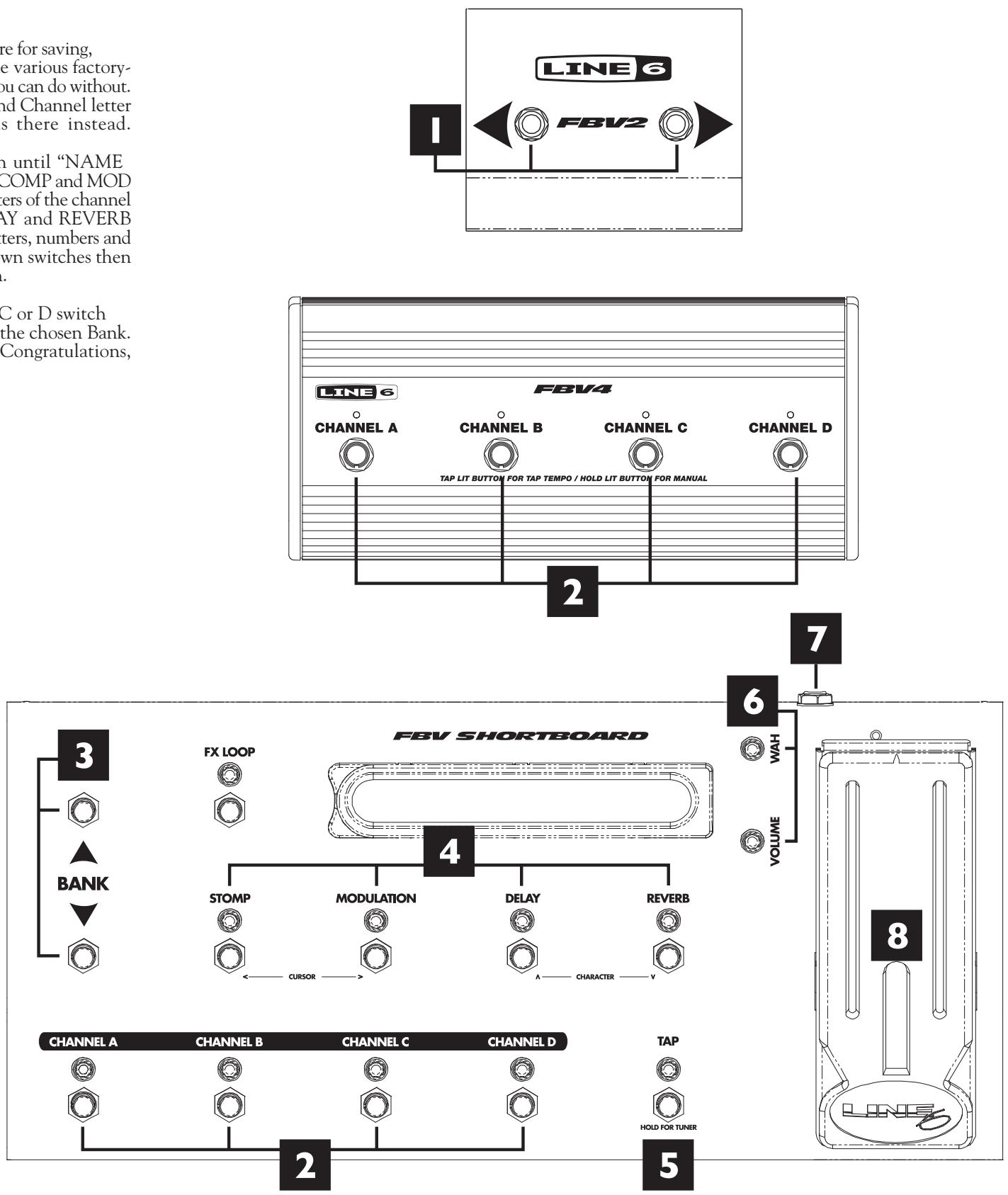
The FBV series of foot controllers includes the original FBV—with its extensive effects controls for the Line 6 Vetta amps—and the more-compact FBV Shortboard, which includes all the controls needed for the Spider II. Also available are the FBV4 for channel switching and tap and FBV2 for channel scroll. Note that the Line 6 Floor Board and FB4 foot controllers will not work with Spider II.
FBV footcontrollers come with an included RJ-45 cable. Connect this cable between the front panel of the Spider II and the side of the FBV. If you ever need a replacement cable, look for a Category 5, 10 Base-T or RJ-45 cable with male connectors on both ends. These can be found at almost any computer supply retailer.
I.FBV2: The FBV2 functions as a two button channel scroll foot switch. This foot switch allows you to scroll through the 4 channels (the A,B,C & D buttons) of your Spider II.
-
Channel A, B, C & D: Select from the four Channel Memories. Note: On the FBV4, you can also use your active channel to change your Tap Tempo setting. Just Tap the channel button twice to the drummer's beat and presto - you're locked in!
-
Bank Up - Bank Down: The FBV Shortboard gives you 9 banks of 4 channels each. Bank 1 is the same 4 memories you get from the Spider II front panel A,B,C,D buttons when no FBV is connected.
-
STOMP/MOD/DELAY/REVERB: You guessed it! These switch the Spider II effects MOD, DELAY and REVERB on and off kinda like they were stomp boxes on a pedal board. STOMP engages the DISTORTION BOOST (see Tap Button extra functions)
-
Tap/Tuner: Tap a couple beats to set the tempo. Or press and hold this switch until you see the tuner on the pedal's display. Press it again to exit tuner mode.
6.Wah and Volume Lights: These light to show that a pedal is ready to control Wah or Volume. Note: Press the pedal fully forward to click the toe-switch, switching the pedal to control Wah or Volume. If a separate expression pedal is connected to the Shortboard's rear panel 1/4-inch jack, the Shortboard pedal controls Wah only, with the toe switch toggling the Wah on/off.
-
External Pedal Jack: You can connect an expression pedal (such as the Line 6 EX-1) to the Shortboard's rear panel 1/4-inch jack, and the connected pedal will control Volume, while the Shortboard pedal controls Wah only.
-
FBV Pedal: Press the pedal forward to click the toe-switch, turning the pedal from Volume to Wah.
Saving with FBV Shortboard: To prepare for saving, it's a good idea to browse through the various factory-stored preset sounds to decide which you can do without. Make a note of their Bank number and Channel letter so you can save your own sounds there instead.
Save: Step on the FX LOOP switch until "NAME EDIT" is displayed. The Shortboard's COMP and MOD switches then select one of the characters of the channel name so you can edit it. The DELAY and REVERB switches choose from the available letters, numbers and symbols. The Bank Up and Bank Down switches then pick a Bank you'd like to save within.
Complete the Save: Press the A, B, C or D switch to store to that Channel Memory in the chosen Bank. The display will show "SAVING". Congratulations, you're all done!
Line 6, Spider II, FBV, FBV Shortboard, FBV4, FBV2 and Vetta are trademarks of Line 6, Inc. All other product names, trademarks, and artists' names are the property of their respective owners, which are in no way associated or affiliated with Line 6. Product names, images, and artists' names are used solely to identify the products whose tones and sounds were studied during Line 6's sound model development for this product. The use of these products, trademarks, images, and artists' names does not imply any cooperation or endorsement.
CAUTION: This equipment has been tested and found to comply with the limits for a Class B digital device pursuant to Part 15 of FCC Rules. Operation is subject to the following two conditions: (1) This device may not cause harmful interference, and (2) this device must accept any interference received, including interference that may cause undesired operation.
WARNING: To reduce the risk of fire or electric shock, do not expose this appliance to rain or moisture.
CAUTION: To reduce the risk of fire or electric shock, do not remove screws. No user-serviceable parts inside. Refer servicing to qualified service personnel.

The exclamation point within a triangle means "caution!" Please read the information next to all caution signs.

The lightning symbol within a triangle means "electrical caution!" It indicates the presence of information about operating voltage and potential risks of electrical shock.

This symbol within a triangle means "caution! hot surface!" It is placed in areas that may become to hot to touch when device is in operation.
Spider II Pilot's Guide © 2003, Line 6, Inc.
WARRANTY INFORMATION
In advance for filling out your registration card and sending it to us. And good luck in your music!
Line 6, Inc. (hereinafter "Line 6") warrants that your new Line 6 product, when purchased at an authorized Line 6 dealer in the United States of America ("USA") or Canada, shall be free of defects in materials and workmanship for a period of one (1) year from the original date of purchase. Please contact your dealer for information on warranty and service outside of the USA and Canada.
During the warranty period, Line 6 shall, at its sole option, either repair or replace any product that proves to be defective upon inspection by Line 6. Line 6 reserves the right to update any unit returned for repair and to change or improve the design of the product at any time without notice. Line 6 reserves the right to use reconditioned parts and assemblies as warranty replacements for authorized repairs.
This warranty is extended to the original retail purchaser. This warranty can be transferred to anyone who may subsequently purchase this product provided that such transfer is made within the applicable warranty period and Line 6 is provided with all of the following items: (i) all warranty registration information (as set forth on the registration card) for the new owner; (ii) proof of the transfer within thirty (30) days of the transfer purchase, and (iii) a photocopy of the original sales receipt. Warranty coverage shall be determined by Line 6 in its sole discretion.
This is your sole warranty. Line 6 does not authorize any third party, including any dealer or sales representative, to assume any liability on behalf of Line 6 or to make any warranty for Line 6.
Line 6 may, at its option, require proof of original purchase date in the form of a dated copy of original authorized dealer's invoice or sales receipt. Service and repairs of Line 6 products are to be performed only at the Line 6 factory or a Line 6 authorized service center. Line 6 may require advanced authorization of repairs to authorized service centers. Unauthorized service, repair or modification will void this warranty.
DISCLAIMER AND LIMITATION OF WARRANTY
THE FOREGOING WARRANTY IS THE ONLY WARRANTY GIVEN BY LINE 6 AND IS IN LIEU OF ALL OTHER WARRANTYES. ALL IMPLIED WARRANTY, INCLUDING WARRANTY OF MERCHANTABILITY AND FITNESS FOR ANY PARTICULAR PURPOSE, EXCEEDING THE SPECIFIC PROVISIONS OF THIS WARRANTY ARE HEREBY DISCLAIMED AND EXCLUDING FROM THIS WARRANTY. UPON EXIPATION OF THE APPLICABLE EXPRESS WARRANTY PERIOD (1 YEAR), LINE 6 SHALL HAVE NO FURTHER WARRANTY OBLIGATION OF ANY KIND, EXPRESS OR IMplied, LINE 6 SHALL IN NO EVENT BE LIABLE FOR ANY SPECIAL, INCIDENTAL OR CONSEQUENTIAL DAMAGES SUFFERED BY THE PURCHASER OR ANY THIRD PARTY, INCLUDING WITHOUT LIMITATION, DAMAGES FOR LOSS OF PROFITS OR BUSINESS, OR DAMAGES RESULTING FROM USE OR PERFORMANCE OF THE PRODUCT, WHETHER IN CONTRACT OR IN TORT. LINE 6 SHALL NOT BE LIABLE FOR ANY EXPENSES, CLAIMS, OR SUITS ARISING OUT OF OR RELATING TO ANY OF THE FOREGOING. Some states do not allow the exclusion or limitation of implied warranties so some of the above limitations and exclusions may not apply to you. This warranty gives you specific legal rights, and you may also have other rights, which vary from state to state. This warranty only applies to products sold and used in the USA and Canada. Line 6 shall not be liable for damages or loss resulting from the negligent or intentional acts of the shipper or its contracted affiliates. You should contact the shipper for proper claims procedures in the event of damage or loss resulting from shipment.

You should read these Important Safety Instructions. Keep these instructions in a safe place.

Before using your Spider II, carefully read the applicable items of these operating instructions and the safety suggestions.
Obey all warnings on the amp and in the Spider II Manual.
-
Connect only to AC power outlets rated 100-120V or 200-240V 47-63Hz (depending on voltage range of the unit; refer to back panel).
-
Do not perform service operations beyond those described in the Spider II Manual. Service is required when the apparatus has been damaged in any way, such as:
-
power-supply cord or plug is damaged
liquid has been spilled or objects have fallen into the apparatus
the unit has been exposed to rain or moisture
the unit does not operate normally or changes in performance in a significant way
the unit is dropped or the enclosure is damaged. -
The bottom of the metal chassis can get hot during operation. Do not touch during operation or shortly after.
- Do not place near heat sources, such as radiators, heat registers, or appliances which produce heat. Keep the rear of the unit at least three inches from walls or other items that might block heat radiation.
- Do not block any of the ventilation openings or use in an enclosed space.
- Guard against objects or liquids entering the enclosure. Do not use or place unit near water.
- Do not step on power cords. Do not place items on top of power cords so that they are pinched or leaned on. Pay particular attention to the cord at the plug end and the point where it connects to the amp.
- Unplug the amp when not in use for extended periods of time. Unplug the amp during lightning storms.
- Clean only with a damp cloth.
- Do not defeat the safety purpose of the grounding type plug. A grounding type plug has two blades and a third grounding prong. The third prong is provided for your safety. When the provided plug does not fit into your outlet, consult an electrician for replacement of the obsolete outlet.
- Only use attachments/accessories specified by the manufacturer.
- Prolonged listening at high volume levels may cause irreparable hearing loss and/or damage. Always be sure to practice "safe listening."
CUSTOMER SERVICE
Before contacting the Line 6 Customer Service team, please take the time to look through this publication to see if it can answer your questions. Additional helpful information is on the Support page of the Line 6 web site (www.line6.com), including the searchable FAQTRAQ system which is often the fastest and easiest way to go answers.
Need to talk to an actual human on the Line 6 Customer Service team by phone? Have your serial number handy and take some notes for yourself before you call, so you remember everything you want to ask about. In the USA or Canada, you can contact Line 6 at (818) 575-3600, 8AM to 5PM Monday through Friday (Pacific Time). Outside the USA and Canada, please contact your distributor directly to arrange service. The list of Line 6 distributors is available on the Internet at www.line6.com.
To obtain factory service:
If a member of the Line 6 Customer Service Team determines that your Spider II needs to be sent to Line 6 for service, you will be given a return authorization (RA) number. Products returned without an RA number will be returned to you at your sole expense. Pack the product in its original shipping carton and attach a description of the problem along with your name and a phone number where Line 6 can contact you if necessary. Ship the product insured and freight prepaid to:
Line 6 Customer Service
6033 De Soto Avenue,
Woodland Hills, CA 91367