
PAGEPRO 4650EN - Imprimante laser KONICA - Notice d'utilisation et mode d'emploi gratuit
Retrouvez gratuitement la notice de l'appareil PAGEPRO 4650EN KONICA au format PDF.


| Type de produit | Imprimante laser monochrome |
| Marque | Konica Minolta |
| Modèle | PagePro 4650EN |
| Vitesse d'impression | Jusqu'à 35,7 pages par minute |
| Résolution | 1200 x 1200 dpi |
| Processeur | 500 MHz |
| Mémoire standard | 128 Mo (extensible à 384 Mo) |
| Cycle d'utilisation maximal | 150 000 pages par mois |
| Dimensions (L x P x H) | 421,8 x 465,4 x 404,3 mm |
| Poids | 23 kg (avec consommables) |
| Alimentation électrique | 120-240 VAC, 50/60 Hz |
| Consommation électrique | 623 W en fonctionnement, 135 W en veille |
| Formats de papier supportés | Lettre, A4, A5, A6, B5, B6, enveloppes, cartes postales, jusqu'à 215,9 x 900 mm (bac multifonction) |
| Capacité papier standard | 550 feuilles + bac multifonction 150 feuilles |
| Capacité papier maximale | 1 800 feuilles (avec options) |
| Impression recto-verso | Optionnelle (duplexeur automatique) |
| Interfaces réseau | Gigabit Ethernet, USB 2.0, parallèle, port USB hôte |
| Compatibilité systèmes | Windows, Mac OS X, Linux |
| Émulations langages | PostScript 3, PCL 6, XPS, PDF Direct Print |
| Cartouche toner | Cartouche tout-en-un (noir) : 6 000 pages (de série), 10 000 ou 18 000 pages (rechange) |
| Garantie | 1 an sur site |
| Niveau sonore | ≤53,6 dB(A) en fonctionnement, ≤27 dB(A) en veille |
| Sécurité | SSL, IPsec, IEEE 802.1x, filtre d'adresse MAC |
| Gestion à distance | PageScope Web Connection, Net Care, Status Monitor |
FOIRE AUX QUESTIONS - PAGEPRO 4650EN KONICA
Questions des utilisateurs sur PAGEPRO 4650EN KONICA
0 question sur cet appareil. Repondez a celles que vous connaissez ou posez la votre.
Poser une nouvelle question sur cet appareil
Téléchargez la notice de votre Imprimante laser au format PDF gratuitement ! Retrouvez votre notice PAGEPRO 4650EN - KONICA et reprennez votre appareil électronique en main. Sur cette page sont publiés tous les documents nécessaires à l'utilisation de votre appareil PAGEPRO 4650EN de la marque KONICA.
MODE D'EMPLOI PAGEPRO 4650EN KONICA
pagepro 4650EN
DO BUSINESS BETTER
_MONOCHROME _LASER _PRINTER
KONICA MINOLTA
CONNECT_
COMMUNICATE_
CONTROL_

natural_image
Close-up of a yellow lily flower with visible stamens and petals (no text or symbols)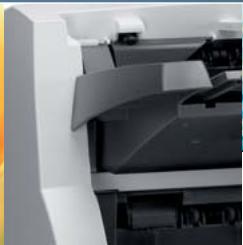
natural_image
Close-up of a printer's internal structure showing paper sheets and folders (no visible text or symbols)

natural_image
Portrait of a bald man in a suit smiling (no text or symbols visible)BETTER. FASTER. SMARTER.
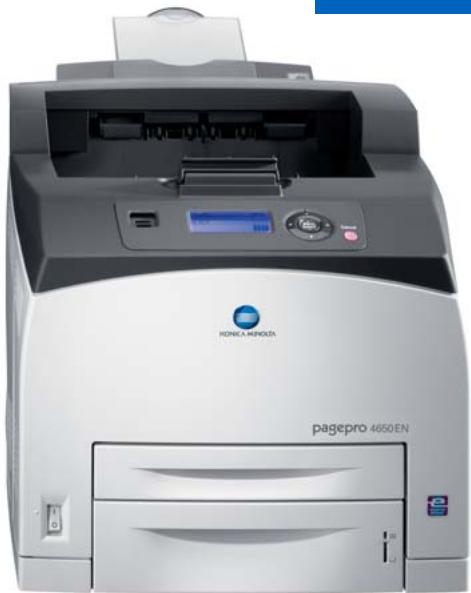
Rock-solid reliability and high-powered performance come together in the fast pagepro™ 4650EN workgroup laser printer. Packed with a 500 MHz processor and optimized Emperor™ technology, the printer hits speeds of 35.7 pages per minute—first pages out in as fast as 8.8 seconds—and cranks out up to 150,000 prints per month. All varieties of approved paper, including envelopes and special media, can be used. A multiprotocol Gigabit Ethernet interface and suite of management tools make network integration easy. PC, Mac and Linux users are well supported. For fast-paced companies, the pagepro 4650EN is THE choice to keep business on track.
pagepro 4650EN
35.7 PPM FOR FAST NETWORK PRINTING
1200 X 1200 DPI DELIVERS CRISP BLACK TEXT, CLEAR DETAILED GRAPHICS
EMPERON™ PRINT SYSTEM ENSURES VERSATILITY AND HIGH PERFORMANCE
128 MB RAM, OPTIONAL 40 GB HARD DRIVE FOR ENHANCED FUNCTIONS
POSTSCRIPT 3 AND PCL 6 EMULATIONS, MULTI-PLATFORM COMPATIBLE
DIRECT PRINT PDF, XPS, JPEG & TIFF FILES
NATIVE XPS INTERPRETER FOR WINDOWS VISTA, INCLUDING WSD SUPPORT
GIGABIT ETHERNET, USB 2.0, AND PARALLEL INTERFACES
POSTCARD TO LEGAL PRINT SIZES SUPPORTED
▶ HIGH-CAPACITY PAPER OPTIONS FOR WORKGROUP REQUIREMENTS
▶ ROBUST 150,000 PAGE-PER-MONTH MAXIMUM DUTY CYCLE
▶ PAGESCOPE SOFTWARE SUITE SIMPLIFIES NETWORK MANAGEMENT
INFOLINE-STYLE FEATURE PROVIDES AT-A-GLANCE PRINTER STATUS

natural_image
Black-and-white portrait of a smiling woman and a man in business attire (no text or symbols visible)
natural_image
Close-up of a white daisy flower with yellow center (no text or symbols)
natural_image
Stack of rolled-up paper sheets in dark tones, no visible text or symbols
DO BUSINESS_BETTER
natural_image
Front view of a HP 4650 EN printer with brand logo and control panel (no visible text or symbols beyond branding)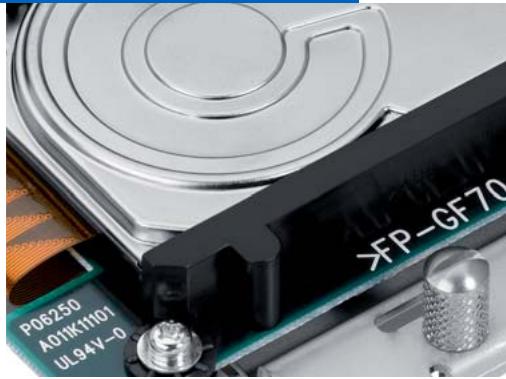
natural_image
Close-up of a hard disk drive with visible circuit board and sensor components (no readable text or symbols)pagepro
RELIABILITY THROUGHOUT
In it for the long haul. Outstanding reliability is a critical element of a workgroup resource and the pagepro 4650EN rises to the challenge. Quality is evident throughout the printer's design. Proven laser technology provides dependable service and long-lasting printed documents. And the well-constructed pagepro engine supports an impressive duty cycle of 150,000 pages per month with low operational costs for years of valuable service.
PERFORMANCE DRIVEN
Fast and Productive. The combination of Emperor technology, an advanced 500 MHz processor, and performance-based engine keeps print jobs moving efficiently. Expect first pages in as fast as 8.8 seconds. Entire jobs run up to 35.7 ppm. The pagepro 4650EN comes standard with 128 MB RAM that can be expanded to 384 MB RAM. Advanced functions, such as direct print and secure print services, are supported by an optional 40 GB hard drive.
MORE PAPER OPTIONS
Versatile media support. The pagepro 4650EN offers great output quality and loads of paper handling options. Text is sharp and graphics are beautifully detailed. Great-looking documents come in all varieties. Select thick or thin paper, recycled or new, labels, envelopes, and even transparencies. In fact, use different stocks in each of the printer's two paper trays.
Documents delivered your way. Save time restocking the printer by adding optional trays and more than double the capacity to 1,800 sheets. The print driver offers settings for collation, booklets and n-up printing. A 500-sheet stacker/sorter unit is available to keep multiple documents in neat order. For paper conservation, use the optional duplex unit and cut paper use in half.
NETWORK READY
Workteam ready. The pagepro 4650EN contains an embedded Gigabit Ethernet interface to handle all varieties of computers and applications and multiple protocols—including TCP/IP v6, IPsec and SSL—for the latest in network and security standards. Integration is seamless. A comprehensive suite of PageScope utilities make network installation and printer management fast and easy.
FEATURES, OPTIONS & BENEFITS
Supports mixed computing networks. The pagepro 4650EN handles the diverse range of today's computing environments—PCs, Macs, and Linux—with support for TCP/IP, EtherTalk, NetWare, and NetBEUI protocols and PostScript 3, PCL 6, XPS, and PDF page description languages.
Papers for your business ventures. Business documents come in all sizes. Postcards to legal-size, and even banner paper, can be used safely in the printer. Other media can be used too. Try letterhead, cardstock, and other approved paper types to give projects a custom look.
Direct print options. Conveniently located, the USB 1.1 Host Port enables direct printing of PDF, XPS, JPEG, and TIFF files from a USB flash drive. No computer or additional software required. Or drag and drop files for print using your desktop PageScope Direct Print utility.
Advanced print functions. The printer's powerful 40 GB hard disk (optional) is used to store fonts and forms; retains jobs for easy reprinting; provides secure printing with a 4-digit PIN verification; assists with collation jobs; enables direct print functionality; and holds proof copy for review before printing. An optional Compact Flash Card also supports many of these advanced functions.
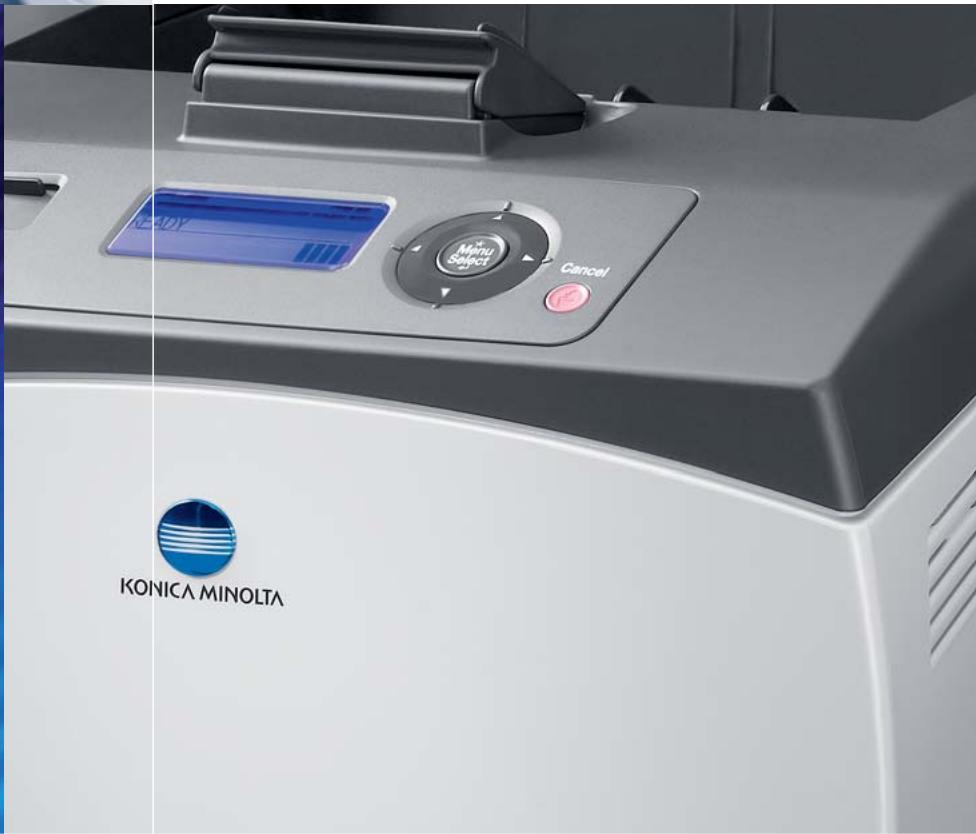
Office-friendly design. The pagepro 4650EN features modest proportions and quiet operation—even when duplexing—to fit nicely into any professional environment. The front keypad is easy to read and clearly communicates helpful messages. Printer readiness is shown by the innovative InfoLine-style feature.
Simple setup and operation. The pagepro 4650EN is easy to use and maintain. A single all-in-one toner cartridge is the only consumable. The printer driver is simple to install and understand. Intelligent PageScope network utilities are provided for advanced administration.
Free US-based technical support. With a 1-year on-site warranty and toll-free, US-based support free for five years, the pagepro 4650EN is a printer you can count on.
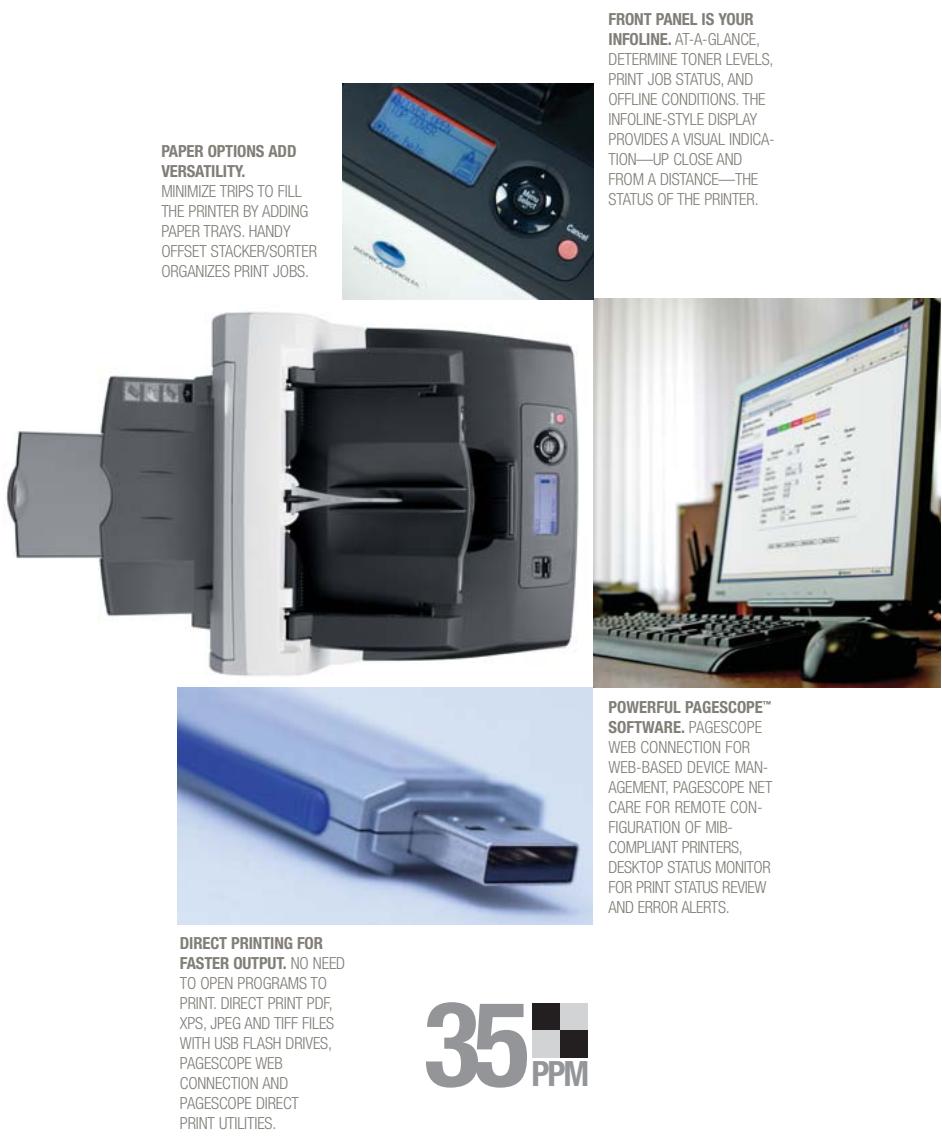
MINIMIZE TRIPS TO FILL THE PRINTER BY ADDING PAPER TRAYS. HANDY OFFSET STACKER/SORTER ORGANIZES PRINT JOBS.
INFOLINE. AT-A-GLANCE, DETERMINE TONER LEVELS, PRINT JOB STATUS, AND OFFLINE CONDITIONS. THE INFOLINE-STYLE DISPLAY PROVIDES A VISUAL INDICATION—UP CLOSE AND FROM A DISTANCE—THE STATUS OF THE PRINTER.
SOFTWARE. PAGESCOPE WEB CONNECTION FOR WEB-BASED DEVICE MANAGEMENT, PAGESCOPE NET CARE FOR REMOTE CONFIGURATION OF MIB-COMPLIANT PRINTERS, DESKTOP STATUS MONITOR FOR PRINT STATUS REVIEW AND ERROR ALERTS.
FASTER OUTPUT. NO NEED TO OPEN PROGRAMS TO PRINT. DIRECT PRINT PDF, XPS, JPEG AND TIFF FILES WITH USB FLASH DRIVES, PAGESCOPE WEB CONNECTION AND PAGESCOPE DIRECT PRINT UTILITIES.
VERSATILE\_OPTIONS
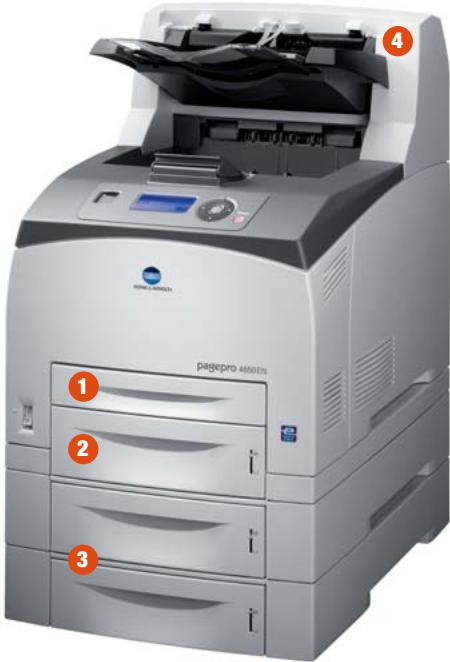
150-sheet multipurpose cassette supports media up to 8.5" x 35.4".
2 550-sheet cassette eliminates frequent paper replenishing.
3 550-sheet cassettes (optional) add up to two for 1,800-sheet max paper input.
4 500-sheet stacker/sorter (optional) keeps multi-page collated documents in order.
Also Available
▶ Automatic duplexer for convenient, two-sided printing.
▶ 70-sheet face-up output tray great for thick stocks.
natural_image
Two-panel image showing a circuit board and printer with a person silhouette, both without readable text or symbols.
pagepro 4650EN
GENERAL SPECIFICATIONS
PRINTING PROCESS
PRINT METHOD:
Electrophotographic Laser
PRINT SPEED\*:
35.7 ppm
*Exact print speed differs depending on system configuration, software application, driver, and document complexity.
WARM-UP TIME:
≤20 seconds
FIRST-PAGE OUTPUT TIME:
8.8 seconds
RESOLUTION:
1200 x 1200 dpi
600 x 600 dpi
MAXIMUM MONTHLY DUTY CYCLE:
150,000 prints
HARDWARE AND SOFTWARE CAPABILITIES
PROCESSOR:
500 MHz
MEMORY:
128 MB
Upgradeable to 384 MB
HARD DISK DRIVE (optional):
40 GB
COMPACT FLASH CARD (optional)\*:
256 MB, 512 MB, 1 GB, 2 GB, 4 GB
*Requires Compact Flash Card adapter. Cannot be
installed at the same time as Hard Drive option.
pagepro


PAGESCOPE



© 2009 KONICA MINOLTA BUSINESS SOLUTIONS U.S.A., INC. All rights reserved. Reproduction in whole or in part without written permission is prohibited. Konica Minolta and The essentials of imaging are trademarks of KONICA MINOLTA HOLDINGS, INC. PageScope and pagepro are trademarks of KONICA MINOLTA BUSINESS TECHNOLOGIES, INC.. All other brands and product names are registered trademarks or trademarks of their respective owners.
Design and specifications are subject to change without notice.

KONICA MINOLTA
KONICA MINOLTA
BUSINESS SOLUTIONS U.S.A., INC.
100 Williams Drive
Ramsey, NJ 07446
(800) 523-2696
www.kmbs.konicaminolta.us
www.kmbs.konicaminolta.us/solutions
OPERATING SYSTEM COMPATIBILITY:
Windows Vista
Windows Vista x64
Windows Server 2003
Windows Server 2003 x64
Windows XP
Windows XP x64
Windows 2000
Macintosh OS X (v10.2+)
Macintosh OSX (Intel 10.4+)
Linux Red Hat 9
Linux SuSE 8.2
PRINTER EMULATIONS:
PostScript 3
PCL 6
XPS Direct Print*
PDF 1.6 Direct Print**
JPEG/TIFF Direct Print**
*Requires optional Hard Drive
**Requires optional Hard Drive or Compact Flash Card
PRINTER MANAGEMENT:
PageScope Net Care
PageScope Web Connection
PageScope Network Setup
PageScope Peer-to-Peer Printing Tool
PageScope EMS Plug-ins:
Tivoli NetView (2.0)
CA Unicenter 2.0
HP OpenView
Microsoft Management Console (MMC)
HP Web JetAdmin Plug-in
PageScope Plug and Print
PageScope NDPS Gateway
PageScope Direct Print
PageScope Data Administrator
Print Monitor
Status Monitor
Download Manager
INTERFACE SUPPORT
Gigabit Ethernet (10/100/1000BaseTX)
IEEE 1284 Parallel
USB 2.0
USB 1.1. Host Port
ETHERNET PROTOCOLS:
TCP/IP (IPv4/IPv6, IPsec, SSL, IEEE802.1x)
AppleTalk / EtherTalk
IPX/SPX (Netware 4/5/6), NDS Bindery, NDPS
ARP, Ping
Bonjour
DHCP, AutolP, BOOTP
FTP
HTTP, HTTPS
IPP1.1
LPR/LPD
NetBEUI, SMB
RAW Socket
SMTP
SNMP (v1/2/3)
SNTP
SLP
UDP
WSD
PAPER HANDLING
STANDARD PAPER INPUT:
150-sheet multipurpose cassette
550-sheet cassette
OPTIONAL PAPER INPUT:
550-sheet cassettes (add up to 2)
STANDARD PAPER OUTPUT:
500-sheet face-down output tray
OPTIONAL PAPER OUTPUT:
70-sheet face-up output tray
500-sheet stacker/sorter
OPTIONAL AUTOMATIC DUPLEXER:
For two-sided printing (plain paper only)
PAPER SIZES SUPPORTED:
Letter
Legal
Executive
Folio
Govt. Letter
Govt. Legal
Statement
A4, A5, A6
B5, B6
Envelopes:* Monarch, Com 10, DL, B5 (ISO), C6
*Envelopes not supported through optional duplexer
Custom sizes:
Multipurpose cassette*:
(W) 3"-8.5" to (L) 5"-35.4"
(W) 76.2-215.9 mm to (L) 127-900 mm
*Banners in tray 1 only
All other cassettes:
(W) 3.87"-8.5" to (L) 5.83"-14"
(W) 98.4-215.9 mm to (L) 148-355.6 mm
PRINTABLE AREA:
0.17" (4.2 mm) from all edges
35.1" maximum print length
PAPER WEIGHTS:
Plain paper: 16-28 lb. Bond (60-105 g/m ^2 )*
Thick Stock: Up to 80 lb. Cover (106-216 g/m²)*
*Simplex and duplex printing
PRINT MEDIA:
Plain Paper
Recycled Paper
Letterhead
Thick Stock
Transparencies
Laser Quality Labels
Envelopes
Postcards
PHYSICAL
TYPE:
Laser printer with Emperor Print System
DIMENSIONS (WXDXH):
16.6" x 18.3" x 15.9"
(421.8 x 465.4 x 404.3 mm)
WEIGHT:
50.2 lbs. (23 kg) - w/ consumables
46.5 lbs. (21 kg) - w/o consumables
60.1 lbs. (27.3 kg) - as shipped
ELECTRICAL
POWER REQUIREMENTS:
120 VAC, 50/60 Hz
220-240 VAC, 50/60 Hz
POWER CONSUMPTION:
Operating: 623W or less, 1,015W Max.
Standby: 135W or less
ENVIRONMENTAL
TEMPERATURE REQUIREMENTS:
Operating: 50° to 90° F (10° to 32° C)
Non-Operating: 32° to 95° F (0° to 35° C)
HUMIDITY:
Operating: 15% to 85% RH
Non-operating: 15% to 80% RH
NOISE LEVELS:
Operating: ≤53.6 dB(A)
Standby: ≤27 dB(A)
REGULATORY/SAFETY CONFORMITY:
UL
cUL
CDRH
CSA
DOC
FCC-B
CONSUMABLE\*:
In-box Toner: Black (yields 6,000 prints @
5% coverage)
Replacement Toner: Black (yields 10,000
prints or 18,000 prints @ 5% coverage
declared yield value in accordance with
ISO/IEC 19752)
*The stated life expectancy of each consumable is based on printing under specific operating conditions such as page coverage for a particular page size (5% coverage of letter/A4). The actual consumable's life will vary depending on the use and other printing variables including page coverage, page size, media type, continuous or intermittent printing, ambient temperature, and humidity.
TYPEFACES:
137 resident PostScript fonts
93 PCL fonts
10 line printer fonts
WARRANTY:
1-year on-site
[Non-Text]
[Non-Text]
[Non-Text]
[Non-Text]
[Non-Text]
[Non-Text]
[Non-Text]
[Non-Text]
[Non-Text]
[Non-Text]
[Non-Text]
[Non-Text]