
PU007V2 - Carte électronique SWEEX - Notice d'utilisation et mode d'emploi gratuit
Retrouvez gratuitement la notice de l'appareil PU007V2 SWEEX au format PDF.


| Type de produit | Adaptateur USB vers Ethernet |
| Caractéristiques techniques principales | Supporte les vitesses de transfert jusqu'à 1000 Mbps, conforme à la norme IEEE 802.3/802.3u/802.3ab |
| Alimentation électrique | Alimentation par bus USB, aucune alimentation externe requise |
| Dimensions approximatives | 10 x 3 x 2 cm |
| Poids | 150 g |
| Compatibilités | Compatible avec Windows, macOS, Linux |
| Type de connexion | USB 2.0 et USB 3.0 |
| Fonctions principales | Connexion réseau via câble Ethernet, amélioration de la connectivité Internet |
| Entretien et nettoyage | Essuyer avec un chiffon doux, éviter l'exposition à l'humidité |
| Pièces détachées et réparabilité | Non spécifié, produit généralement non réparable |
| Informations générales utiles | Vérifier la compatibilité avec votre système d'exploitation avant l'achat |
FOIRE AUX QUESTIONS - PU007V2 SWEEX
Questions des utilisateurs sur PU007V2 SWEEX
0 question sur cet appareil. Repondez a celles que vous connaissez ou posez la votre.
Poser une nouvelle question sur cet appareil
Téléchargez la notice de votre Carte électronique au format PDF gratuitement ! Retrouvez votre notice PU007V2 - SWEEX et reprennez votre appareil électronique en main. Sur cette page sont publiés tous les documents nécessaires à l'utilisation de votre appareil PU007V2 de la marque SWEEX.
MODE D'EMPLOI PU007V2 SWEEX
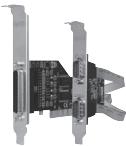
PU007V2 SweeX 1 port Parallel & 2 Port Serial PCI Card
Introduction
- Do not expose the PU007V2 to extreme temperatures. Do not place the device in direct sun light or close to heating elements.
- Do not use the PU007V2 in extremely dusty or moist environments.
- Prevent hard shocks or impacts of the device, as this can cause damage to the internal electronics.
Hardware Installation
- Make sure the computer is turned off and that there is no power connected.
- Also remove the printer and monitor cable, because these have their own power supply.
- Now unscrew the computer casing.
- Make sure that you undo yourself of possible static electricity. This can be done by grabbing a (naked) central heating pipe or an unpainted water pipe. Pay attention not to use a magnetic screwdriver. Briefly touch the iron frame of the PC casing. Avoid direct contact with the contact points of the PCI slot and contact points on the graphics card.
- Locate a free PCI slot and remove the metal protection plate that is in the computer casing for the intended slot. Consult the manual of your computer to find the PCI slot.
- When possible fasten the card with screws so it can not move.
- When the card is mounted successfully, check if the other cards are still fitted properly in their expansion slot. It can happen that when a new card is added the other cards rise a little with as result that the card, or even the entire computer, may not work.
- Close the computer casing and reconnect all cables properly.
- Turn on the computer.
Installation Windows 2000 and XP
After detection of the hardware, Windows shows the following screen;
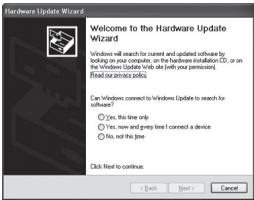
Click "Cancel".
Place the Sweex CD-ROM in the computer. It will start automatically. Choose install drivers and continue the installation.
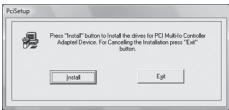
Click "Install" to start the installation.
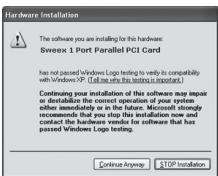
It is possible that Windows will notify you that the driver is not certified. This is not a problem for correct functioning of the card. All Sweex products and relevant drivers are tested thoroughly. Choose the option "Continue Anyway".
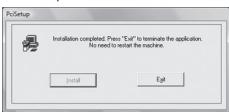
Press "Exit" to finish.
After installing the drives the window underneath will be appear. When this window does not appear automatically, restart the computer.
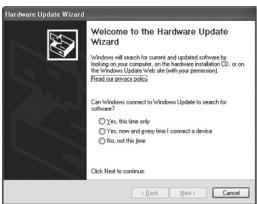
Choose the option "No, not this time" and Press "Next".
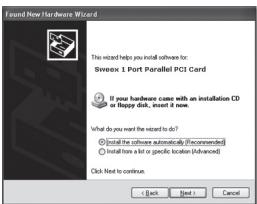
Choose "Install the software automatically" and click "Next". Follow the remaining instructions to complete the installation.
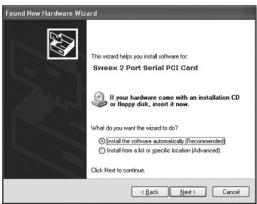
Choose "Install the software automatically" and click "Next".
Follow the remaining instructions to complete the installation. It is possible that you have to accept the last window twice.
Installation Windows Vista
After detection of the hardware, Windows shows the following screen;
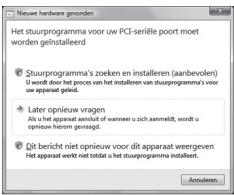
Click "Cancel".
Place the Sweex CD-ROM in the computer. It will start automatically. Choose install drivers and continue the installation.
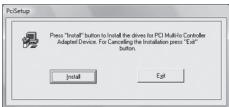
Click "Install" to start the installation.
It is possible that Windows will notify you that the driver is not certified. This is not a problem for correct functioning of the card. All Sweex products and relevant drivers are tested thoroughly. Choose the option "Continue Anyway".
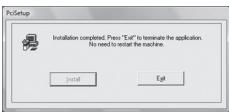
Click "Exit" to finish and restart the computer.
Port settings Parallel
The settings of the LPT port can be viewed and adjusted as follows:
Go to START -> settings -> control panel
In this window open "System". Go to the tab "Hardware" -> "device manager".
In the device manager open the "Ports (COM & LPT)" list and select: Sweex 1 Port Parallel PCI Card
Open the settings by right clicking it.
The following screen appears:
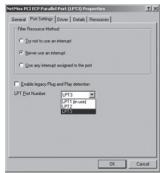
Select the "Port settings" tab.
Here you can view or change your LPT port. Be aware that you do not choose a port that is already being used by the computer.
This can result in a conflict.
Port settings Serial
The settings of the COM ports can be viewed and adjusted as follows:
Go to START -> settings -> control panel
In this window open "System". Go to the tab "Hardware" "device manager".
In the device manager open the "Ports (COM & LPT)" list and select: PU007V2 Sweex 2 Port Serial (COMxx)
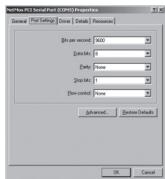
Open the settings by right clicking it.
The following screen appears:
Select the tab "Port settings" and click "Advanced...".
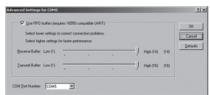
Select the tab "Port settings" and click "Advanced...".
Here you can view or change your COM port. Be aware that you do not choose a port that is already being used by the computer. This can result in a conflict.
This product is not suitable for all hardware key dingles.
Warranty
For most Sweeex products a warranty period of 3 years applies. On Graphics Cards and Consumer Electronics Sweeex offers 2 years of warranty. We do not give support or warranty on supplied software, rechargeable batteries and batteries. Transaction of warranty only takes place at the sales point where the product is bought.
All brand names and associated rights mentioned in this manual are and stay property of the rightful owner.