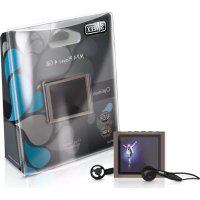
MP476 - Lecteur multimédia SWEEX - Notice d'utilisation et mode d'emploi gratuit
Retrouvez gratuitement la notice de l'appareil MP476 SWEEX au format PDF.


| Intitulé | Description |
|---|---|
| Type de produit | Lecteur MP3 |
| Capacité de stockage | 8 Go |
| Formats audio supportés | MP3, WMA, WAV, FLAC |
| Écran | Écran LCD de 1,8 pouces |
| Autonomie de la batterie | Jusqu'à 10 heures |
| Type de batterie | Batterie lithium-ion rechargeable |
| Connectivité | USB 2.0 |
| Dimensions approximatives | 90 x 40 x 10 mm |
| Poids | 50 g |
| Fonctions principales | Lecture audio, enregistrement vocal, radio FM |
| Entretien et nettoyage | Nettoyer avec un chiffon doux, éviter l'humidité |
| Pièces détachées et réparabilité | Réparabilité limitée, pièces non disponibles en vente |
| Compatibilités | Compatible avec Windows et Mac OS |
| Sécurité | Ne pas exposer à des températures extrêmes, éviter l'eau |
| Informations générales | Idéal pour les utilisateurs recherchant un lecteur MP3 compact et léger |
FOIRE AUX QUESTIONS - MP476 SWEEX
Questions des utilisateurs sur MP476 SWEEX
0 question sur cet appareil. Repondez a celles que vous connaissez ou posez la votre.
Poser une nouvelle question sur cet appareil
Téléchargez la notice de votre Lecteur multimédia au format PDF gratuitement ! Retrouvez votre notice MP476 - SWEEX et reprennez votre appareil électronique en main. Sur cette page sont publiés tous les documents nécessaires à l'utilisation de votre appareil MP476 de la marque SWEEX.
MODE D'EMPLOI MP476 SWEEX
Introduction
- Do not expose the Sweex Vidi MP4 Player to extreme temperatures. Do not place the device in direct sunlight or in the direct vicinity of heating elements.
- Do not use the Sweex Vidi MP4 Player in extremely moist or dusty surroundings.
- Protect the device against powerful shocks and falls - they may damage the internal electronics.
- Never attempt to open the device yourself, there are no serviceable parts inside. Opening the device will cause the warranty to lapse.
Software installation
Software is supplied with the Sweex Vidi MP4 Player . This software is freeware and Sweex does not give support on it .
With the software several sorts of video files can be converted to AMV, so these can be played on the Sweeex Vidi MP4 Player; AVI, MPG, MPEG, VOB, RM, MOV, QT.
Install the software by putting the Sweex CD in the CD player. The CD will start automatically. Choose "Install Software Utilities".
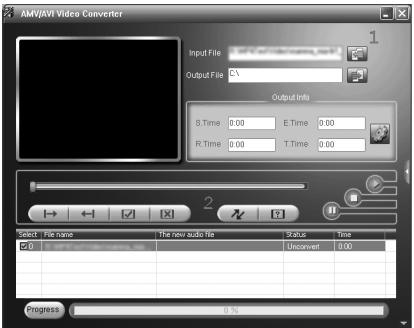
- Press 1 ("add file") to select your video file.
- Press 2 ("begin") to start converting.
Transferring files to the Sweex Vidi MP4 Player
Connect the Sweex MP4 Player with the supplied USB cable to the computer. Windows will detect the device, give it a drive letter, and indicate it as a removable disc with the name "Sweex Vidi MP4 Player". You can now manage your music and video files through windows explorer. You can also save other sorts of files and documents on the Sweex MP4 Player. This way you can also use it as an USB memory stick.
Operation
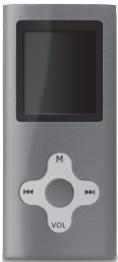
Buttons:
Menu : Open menu, select menu option,
: Next menu option, fast forward
: Previous menu option, rewind
0 :On/off,play/pause,exit from menu
VOL :Volume
Switching on the Sweex MP4 Player.
On the upper side there is a main switch. Switch it to "ON". By briefly pressing the O Button you turn on the Sweex MP4 Player. After turning on the Sweex MP4 Player you are in the main menu. To directly enter the main menu at any time press the menu button Menu for three seconds.
The menu
The menu of the Sweex MP4 Player is available in multiple languages. Go to "Setup" and choose the third line by pressing twice ("Language"). The following languages are available: Chinese (simple & traditional), Czech, Danish, Dutch, English, French, German, Hungarian, Italian, Japanese, Korean, Polish, Portuguese, Russian, Spanish, Swedish, Thai.
Scroll through the menu with the and buttons. Use Menu to choose the menu option and go one step back by pressing "Exit" or 0.
The options in the main menu are:
Setup : Device settings and information
Movie : Play video files
Music : Play music files
Record : Record sound
Voice :Playback sound recordings
Photo : View photos
E-Book : Reading text files
Playback of sound and video files
For music go to the menu option "Music". For movie go to "Movie". Press Menu to access your files. Press O to play back. Also use O to stop or pause. With the buttons and you can go to the previous or next file.
In pause mode you can enter the menu with the Menu button to select different options such as: deleting files and playing files out of a different folder.
During playback of music you can enter the menu with the Menu button to change different options such as: repeat (repeat function) and equalizer settings.
To change the volume during playback of music or video files press the volume button. Now you can change the volume with the and buttons. When you playback a video there is no indication of the volume level, but you can still adjust the volume after pressing the volume button.
Recording sound
To record sound go the menu option "Record". Press the Menu button to choose "Rec type" in the menu and to determine the format of the recording.
Fine REC = WAV 32 Kbps
Long REC = WAV 8 Kbps
Fine VOR = ACT 32 Kbps
Long VOR = ACT 8 Kbps
To start recording press 0 . To pause and continue recording use the same O button. To stop recording press the O button for 3 seconds. The recorded files are saved numbered in the "Record" folder of the player. Playing back the recorded files can be done by choosing the option "Voice" in the main menu.
Switching off
Switching off the Sweex Vidi MP4 Player is done by pressing the O button for 3 seconds. You can use the main switch on the top of the device to prevent the player from being switched off accidentally.
Charging
Charging the Sweex Vidi MP4 Player is done with the supplied USB cable through a free USB port on your computer.
Warranty
Thank you for purchasing this Sweeex product. Sweeex devotes ample attention and care to the quality, reliability, functionality, durability and user friendliness of all its products. In this way Sweeex distinguishes itself in the market and can we convince you as a buyer to continue purchasing products of the Sweeex brand. We wish you a lot of pleasure with your purchase.
An important extra advantage for you is the possibility of product registration.
You can register the product you purchased online on www.sweex.com/productregistration.
By registering your product Sweex offers you a number of important yet equally useful advantages.
For example, if you wish so, you are regularly informed by us of the latest developments in our assortment by means of a digital newsletter.
Where applicable, you also automatically receive the latest drivers and/or firmware from us for the product you purchased to preserve or improve the compatibility and the performance.
Moreover, our support desk can assist you faster in case of possible support questions about the product if you registered the product.
Sweeex warranty conditions.
2-year standard warranty within the EU
- In a standard manner a warranty period of 2 years as from the purchase date is available for this Sweex product within the EU.
- Should you wish to invoke this warranty within the first 2 years after the purchase then you can directly apply to the point of sale where you purchased the product for the conditions and procedures.
Matters that are excluded from the warranty
- The warranty of Sweex only covers manufacturing defects. Excluded from the warranty are accessories like batteries, rechargeable batteries and also supplied software, where applicable.
- The liability of Sweex is limited to the costs of repair and/or replacement of the product covered by the warranty.
- The standard warranty is null and void if the product has been opened, changes have been made, physical damage was caused to the product and if the product is used for another purpose than for which it is originally meant.
All brand names and associated rights mentioned in this manual are and remain the sole property of the rightful claimant.