
CD005 - Câble informatique SWEEX - Notice d'utilisation et mode d'emploi gratuit
Retrouvez gratuitement la notice de l'appareil CD005 SWEEX au format PDF.


| Type de produit | Câble adaptateur USB vers série RS-232 |
| Marque | Sweex |
| Modèle | CD005 |
| Connecteur USB | USB-A mâle |
| Connecteur série | DB9 mâle (9 broches) |
| Chipset | Prolific PL-2303 |
| Longueur du câble | 1 mètre |
| Poids | 50 g |
| Systèmes d'exploitation supportés | Windows 98SE, 2000, XP, Vista |
| Alimentation | Alimenté par USB (bus-powered) |
| Fonctions principales | Convertir un port USB en port série RS-232 |
| Installation du pilote | Requis avant connexion |
| Logiciel inclus | Pilotes sur CD-ROM |
| Protection | Éviter températures extrêmes, humidité, chocs |
| Garantie | 3 ans |
| Couleur | Noir |
| Norme USB | USB 1.1 et 2.0 |
FOIRE AUX QUESTIONS - CD005 SWEEX
Questions des utilisateurs sur CD005 SWEEX
0 question sur cet appareil. Repondez a celles que vous connaissez ou posez la votre.
Poser une nouvelle question sur cet appareil
Téléchargez la notice de votre Câble informatique au format PDF gratuitement ! Retrouvez votre notice CD005 - SWEEX et reprennez votre appareil électronique en main. Sur cette page sont publiés tous les documents nécessaires à l'utilisation de votre appareil CD005 de la marque SWEEX.
MODE D'EMPLOI CD005 SWEEX
natural_image
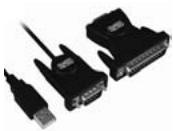
Two black VGA connectors with USB cable, no visible text or symbolsCD005 Sweex USB to Serial Cable
Introduction
First of all, many thanks for purchasing this Sweex USB to Serial Cable. This cable enables you to simply turn a USB port on your PC or laptop into a serial port. This only requires 1 free USB port.
To ensure this product operates correctly, we advise you to carefully read this manual first. If despite this manual you still experience problems during installation or operation of this product, go to www.sweex.com and look under the heading service & support.
In order to fully enjoy the Sweex USB to Serial Cable, it is important to observe a number of things:
- Do not expose the Sweex USB to Serial Cable to extreme temperatures. Do not place the cable in direct sunlight or in the direct vicinity of heating elements.
- Do not use the Sweex USB to Serial Cable in extremely dusty or moist surroundings.
- Protect the cable against powerful shocks or jolts - they may damage the internal electronics.
- Never attempt to open the device yourself - it will cause the warranty to lapse.
Important!
Install the driver prior to connecting the Sweex USB to Serial Cable!
Software installation under Windows 98SE
We advise you to ensure the operating system is up-to-date before starting the installation. This is easy to check by starting up Internet Explorer and selecting the option "Windows Update" in the "Extra" menu.
Insert the Sweex CD-ROM in the CD-ROM player. The autorun menu will start automatically.

Drivers Windows 98SE, 2000, XP and Vista
In this menu, select "Drivers Windows 98SE, 2000, XP and Vista"
In the event that the autorun menu does not appear, the driver installation process can also be started manually. In order to do this, open 'My computer' and go to X:\driver\ (X being the letter of your CD-ROM drive). Here the 'Setup.exe' file will be located, double-click this file and follow the instructions.
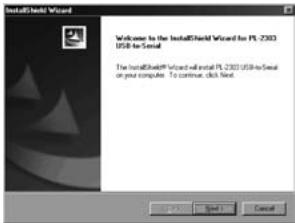
The following screen appears:
text_image
InstallShield Wizard Welcome to the InstallShield Wizard for PL 2300 USB to serial The InstallShield Wizard will install PL 2300 USB to serial or your computer. To continue, click Next.Click "Next" and "Finish". Now connect the Sweex USB to Serial Cable to the PC or laptop. Windows will automatically install the Sweex USB to Serial Cable.
Software Installation under Windows 2000, XP and Vista
We advise you to ensure the operating system is up-to-date before starting the installation. This is easy to check by starting up Internet Explorer and selecting the option "Windows Update" in the "Extra" menu.
Insert the Sweex CD-ROM in your CD-ROM player. The autorun menu will start automatically. In this menu, select "Drivers Windows 98SE, 2000, XP and Vista".

Drivers Windows 98SE, 2000, XP and Vista
In the event that the autorun menu does not appear, the driver installation process can also be started manually. In order to do this, open 'My computer' and go to X:\driver\ (X being the letter of your CD-ROM drive). Here the 'Setup.exe' file will be located, double-click this file and follow the instructions.
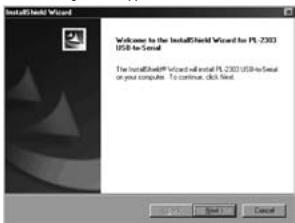
The following screen appears:
text_image
InstallShield Wizard Welcome to the InstallShield Wizard for PL 2300 USB to Serial The InstallShield Wizard will install PL 2300 USB to serial on your computer. To continue, click Next.Click "Next" and "Finish". Now connect the Sweex USB to Serial Cable to the PC or laptop. Windows will automatically install the Sweex USB to Serial Cable.
Port settings Serial
The settings of the COM port can be viewed and changed as follows:
Go to START → "Control Panel"
Or, if the Windows classic style is used:
Go to START → "Settings" → "Control Panel"
In this window, open "System". Go to the tab titled "Hardware" → "Device Manager".
In this window, open "Ports (COM & LPT)" ("Ports (COM & LPT") by clicking on the plus sign (+). Here, select: 'Prolific USB-to-Serial Comm Port'.
Open its features by right-clicking.
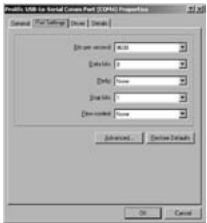
The following screen appears:
text_image
Profile USB to Social Camera Port (OSPC) Properties General / Film Settings / Drive / Display [0 pt sec] [A,B] Drive: 0 Delete: None Display: 0 Down control: None [Default] [Cancel]The values shown in this screen only serve as an example; if the device to be connected uses different values, look them up in the manual supplied with that device.
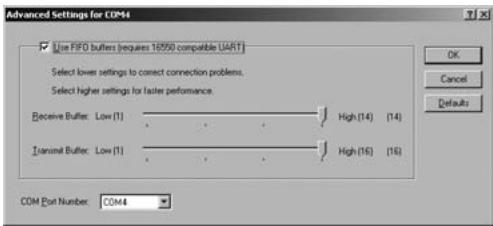
Select the tab "Port settings" and then click "Advanced...".
text_image
Advanced Settings for COM44 Use FIFO buffers (requires 16550 compatible UART) Select lower settings to correct connection problems. Select higher settings for faster performance. Receive Buffer: Low (1) High (14) (14) transmit Buffer: Low (1) High (16) (16) COM Port Number: COM4Here you can view the current COM port and select a different one, if so required. Please remember not to select a port already in use by the computer. This may result in a conflict.
Warranty
All products under the Sweex brand are warranted for a period of three years. We do not grant support or warranties for any software and/or (rechargeable) batteries included. Settlement of guarantee only takes place via the dealer where you have purchased the product in question.
The rightful owner has and retains title to all brand names and related rights mentioned in this manual.