
M3 - Appareil photo argentique LEICA - Notice d'utilisation et mode d'emploi gratuit
Retrouvez gratuitement la notice de l'appareil M3 LEICA au format PDF.


| Type de produit | Appareil photo argentique télémétrique |
| Marque | LEICA |
| Modèle | M3 |
| Format de film | 35 mm (24 x 36 mm) |
| Monture d'objectif | Leica M (baïonnette) |
| Obturateur | Plan focal, vitesses de 1 s à 1/1000 s + pose B |
| Synchro flash | Deux prises : électronique (1/50 s) et ampoules classe M (toutes vitesses) |
| Retardateur | Mécanique, réglable de 5 à 10 secondes |
| Télémètre | Couplé, méthodes de coïncidence et d'image brisée |
| Viseur | Cadres lumineux pour 50 mm, 90 mm, 135 mm, compensation de parallaxe |
| Compteur de vues | Automatique, retour à zéro lors du retrait de la bobine réceptrice |
| Alimentation | Aucune pile nécessaire (fonctionnement entièrement mécanique) |
| Dimensions (approx.) | 138 x 77 x 33 mm |
| Poids (approx.) | 580 g (boîtier nu) |
| Matériau | Alliage métallique |
| Fonctions principales | Visée télémétrique, objectifs interchangeables, retardateur, synchro flash |
| Entretien et nettoyage | Nettoyer avec une brosse douce ou un chiffon propre ; utiliser un filtre UV protecteur |
| Pièces détachées et réparabilité | Objectifs et accessoires disponibles sur le marché de l'occasion ; réparation par spécialiste |
| Informations générales | Appareil légendaire fabriqué par Ernst Leitz GmbH, Allemagne |
FOIRE AUX QUESTIONS - M3 LEICA
Questions des utilisateurs sur M3 LEICA
0 question sur cet appareil. Repondez a celles que vous connaissez ou posez la votre.
Poser une nouvelle question sur cet appareil
Téléchargez la notice de votre Appareil photo argentique au format PDF gratuitement ! Retrouvez votre notice M3 - LEICA et reprennez votre appareil électronique en main. Sur cette page sont publiés tous les documents nécessaires à l'utilisation de votre appareil M3 de la marque LEICA.
MODE D'EMPLOI M3 LEICA
Ce manuel d'instructions
contient tout ce que vous devez savoir sur votre LEICA M3. Veuillez prendre le temps de le lire attentivement et de vous entraîner aux opérations simples — sans film, pour commencer. Vous prendrez le coup plus vite que vous ne le pensez. Le LEICA est un appareil photo haut de gamme avancé, mais néanmoins — ou plutôt à cause de cela — étonnamment simple à utiliser.
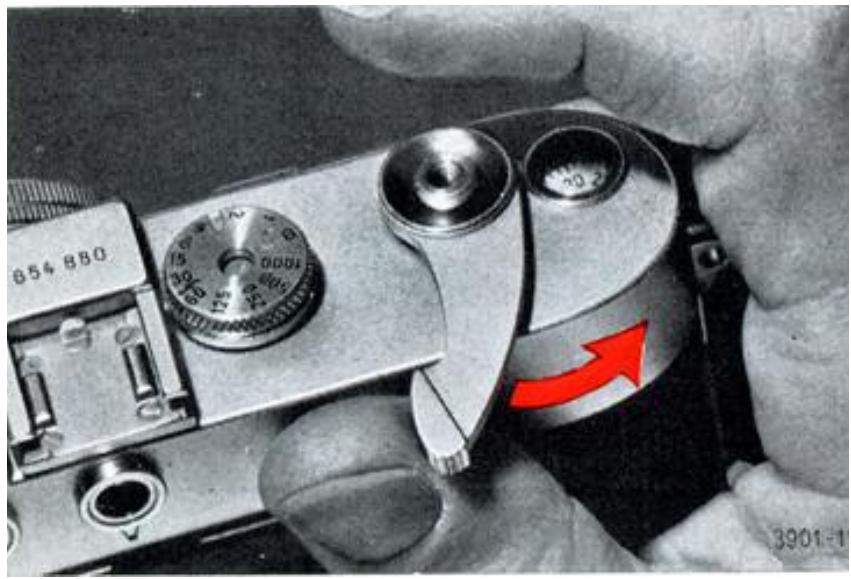
Le levier de transport
Tenez l'appareil à deux mains et, avec le pouce droit, poussez le levier de transport vers la droite jusqu'à la butée. Le mouvement du levier arme l'obturateur à rideaux du LEICA et fait avancer le film d'une image. Vous pouvez également actionner le levier d'avancement du film par plusieurs courses courtes — si cela vous semble plus pratique.
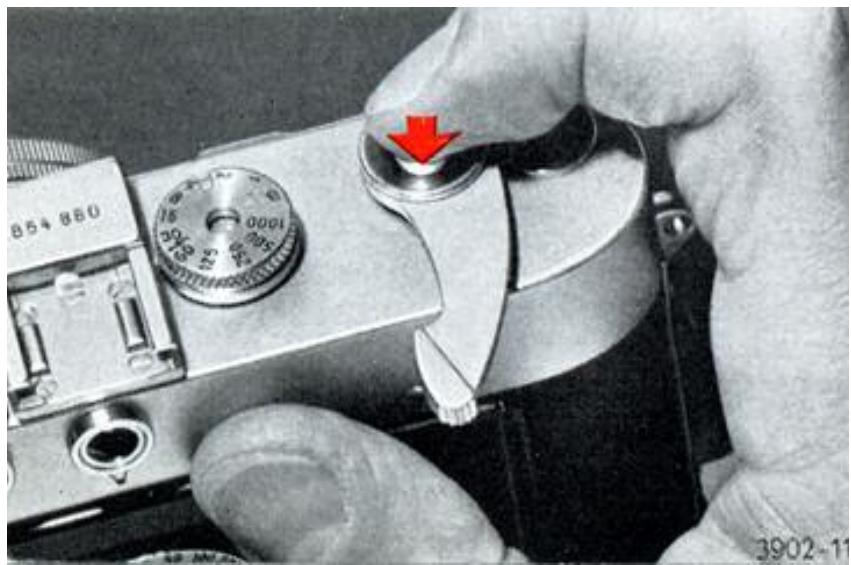
Le déclencheur
Avec l'index droit, appuyez doucement sur le déclencheur — ne le secouez jamais ! Vous entendrez un clic lorsque l'obturateur se déclenche. Un film dans l'appareil aurait alors été exposé, autrement dit vous auriez pris une photo. Relâchez le déclencheur (retirez le doigt), et vous pouvez à nouveau actionner le levier de transport pour armer l'obturateur et faire avancer le film.
R = déposé
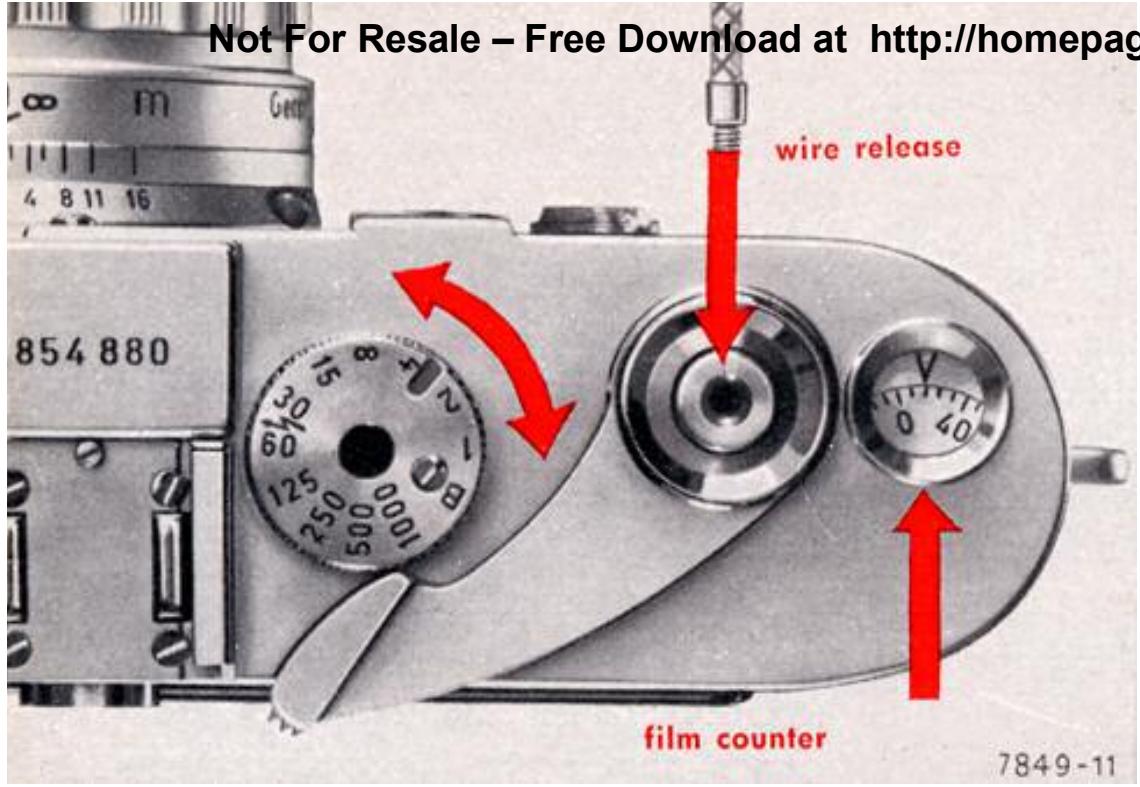
Pour les expositions à des vitesses d'obturation lentes, vous devez bien sûr avoir un support stable. Un trépied est idéal en combinaison avec un déclencheur souple à verrouillage. Vissez le déclencheur souple sans appuyer sur le bouton. Le pratique trépied de table LEITZ est très utile en voyage.
Le compteur de vues
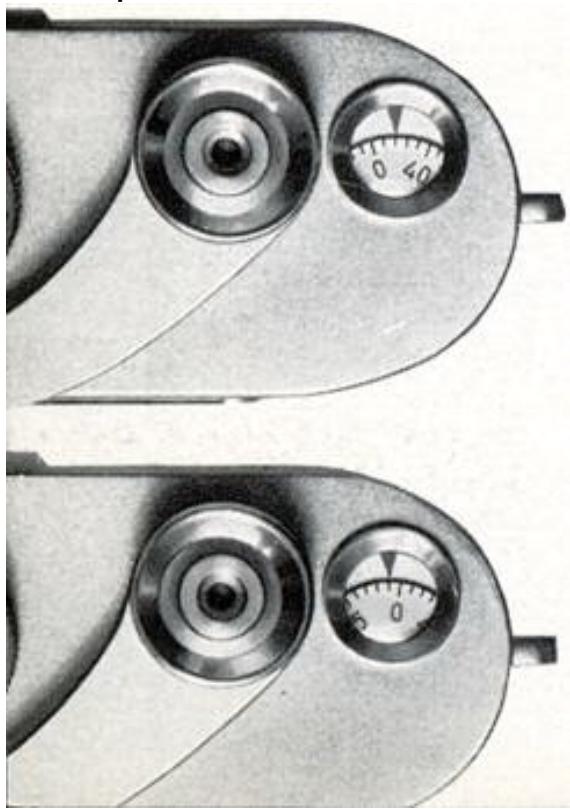
est couplé au levier de transport. Si le film a été correctement chargé (voir les notes aux pages 24-26), le compteur de vues indique le nombre de photos prises. Le compteur s'arrête à 40 et revient automatiquement à sa position initiale lorsque vous retirez la bobine réceptrice.
L'obturateur
La molette des vitesses
contrôle les temps de pose. Les chiffres gravés représentent des fractions de seconde : 1000 indique 1/1000 de seconde, 125 est 1/125 de seconde, 4 est 1/4 de seconde, et 1 représente 1 seconde. La molette s'enclenche à chaque position lorsque les vitesses réglées sont en face du petit repère, et reste à ce réglage. Vous pouvez donc régler ou lire les vitesses aussi bien avant qu'après l'armement de l'obturateur. Réglée sur "B", l'obturateur reste ouvert tant que le déclencheur est enfoncé.
Des vitesses intermédiaires peuvent être réglées dans la plage de 1 à 1/8 de seconde, également entre 1/15 et 1/30 de seconde, et de 1/60 à 1/1000 de seconde (ou de 1/60 à 1/1000 de seconde). La molette des vitesses comporte des crans d'arrêt à tous les réglages gravés.
La cellule photoélectrique LEICAMETER "MC" se couple à la molette des vitesses comme indiqué aux pages 19-21.
Le diaphragme à iris
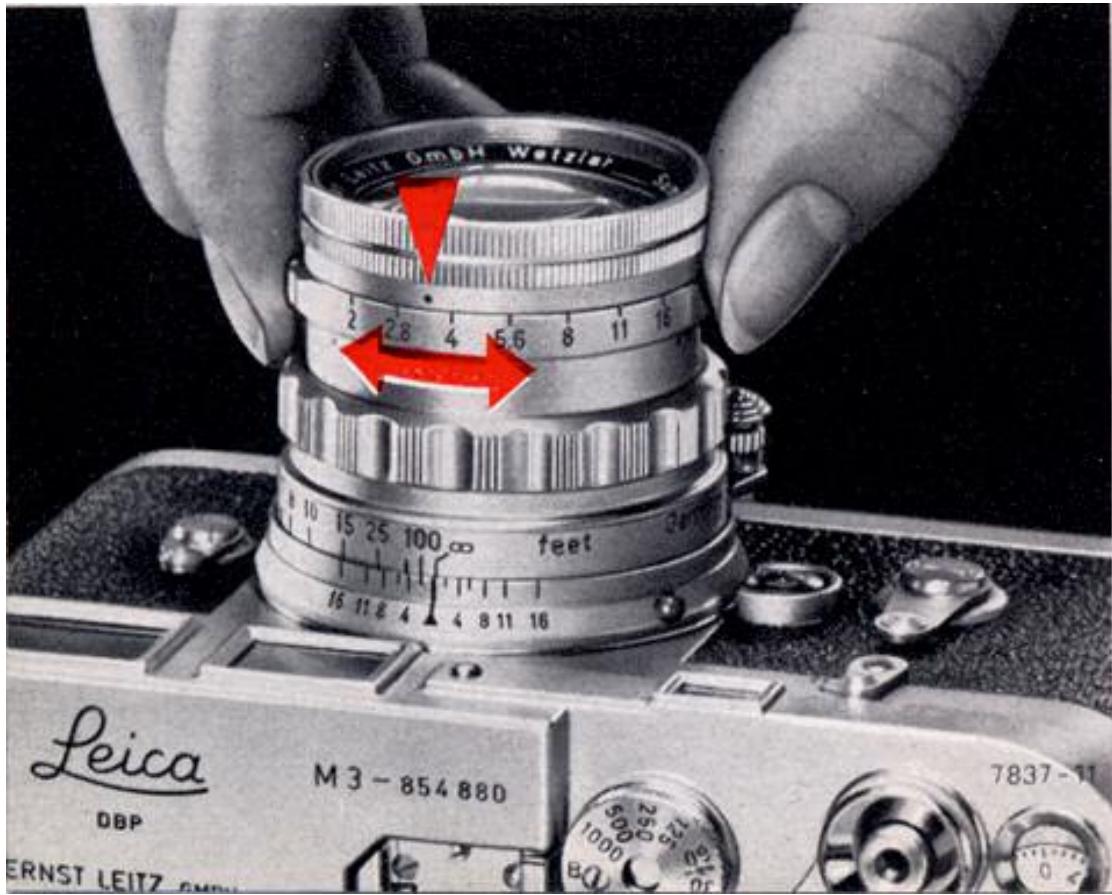
Tenez l'objectif de votre LEICA devant votre œil et tournez la bague des diaphragmes. Vous pouvez alors voir à travers les lentilles comment le diaphragme à iris s'ouvre et se ferme. Il fonctionne ainsi un peu comme l'iris de votre œil, qui s'ouvre ou se ferme pour s'adapter à une lumière plus faible ou plus forte. Le diaphragme à iris de l'objectif a un but similaire : réduire la lumière très vive en « fermant » le diaphragme, c'est-à-dire en utilisant une ouverture plus petite. Inversement, en cas de faible luminosité, l'utilisation d'une plus grande ouverture laisse passer plus de lumière vers le film. En même temps, la profondeur de champ change.
Les ouvertures ou nombres f 1,4—2—2,8—4—5,6—8—11—16—22—32* ) sont une mesure de la quantité de lumière atteignant le film. Ils sont choisis de telle sorte que
fermer le diaphragme d'un nombre au suivant réduit la lumière de moitié. De même, en ouvrant, chaque ouverture laisse passer deux fois plus de lumière que la suivante plus petite. Rappelez-vous donc : un nombre d'ouverture élevé signifie une petite ouverture, et vice-versa.
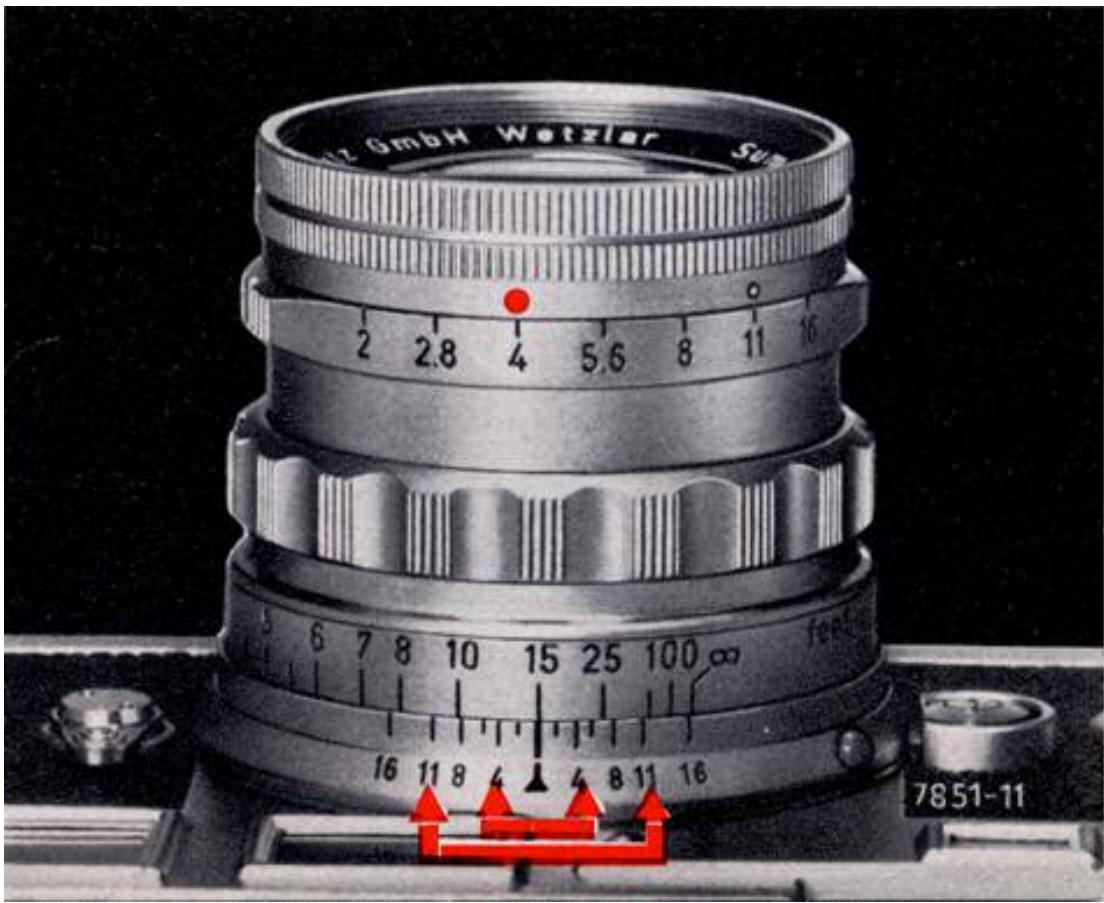
L'échelle de profondeur de champ
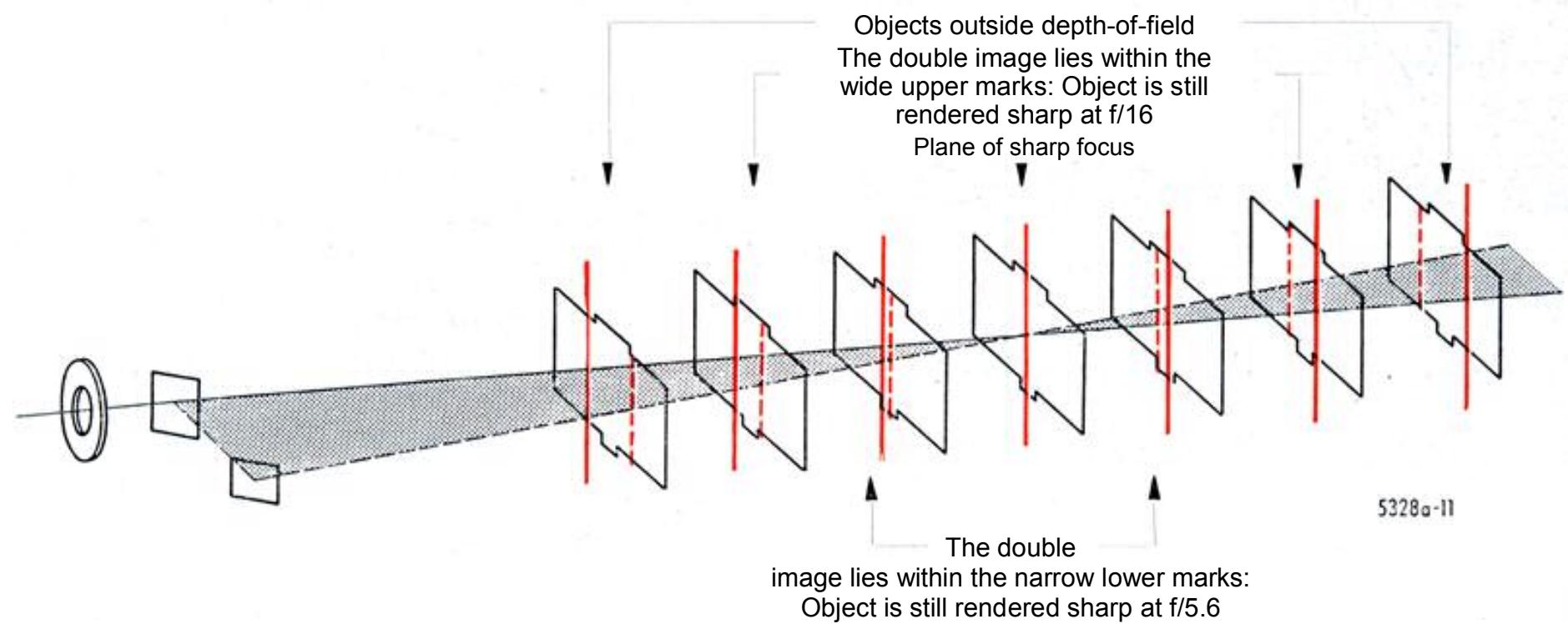
L'image reproduit avec le plus de netteté les parties de la scène qui se trouvent à la distance exacte – dans un plan parallèle au film – sur laquelle l'objectif est mis au point. Cette netteté maximale diminue progressivement devant et derrière cette distance de mise au point, ce qui donne une certaine zone dans laquelle tout est encore acceptablement net. L'étendue de cette zone de netteté – la « profondeur de champ » – dépend de la distance du sujet, de la focale de l'objectif et de l'ouverture. Fermer le diaphragme augmente la zone de netteté, ce qui est souhaitable pour la plupart des sujets qui s'étendent en profondeur. Cela explique aussi l'importance du contrôle de l'ouverture en photographie.
Pour trouver les limites de cette zone, regardez l'échelle de profondeur de champ de votre objectif. La zone nette est celle comprise entre deux lignes de repère portant le même nombre d'ouverture. Par exemple, si vous avez réglé votre objectif SUMMICRON de 50 mm sur 15 pieds, la profondeur de champ disponible avec une
ouverture de f/4 (voir les flèches rouges dans l'illustration) s'étend d'environ 12 1/2 à 20 pieds. Si, en revanche, vous fermez à f/11, la zone de netteté couvre un champ d'environ 9 à 40 pieds. (Lorsque vous modifiez l'ouverture, veillez à ajuster le temps de pose en conséquence.)
Le télémètre à cadre lumineux
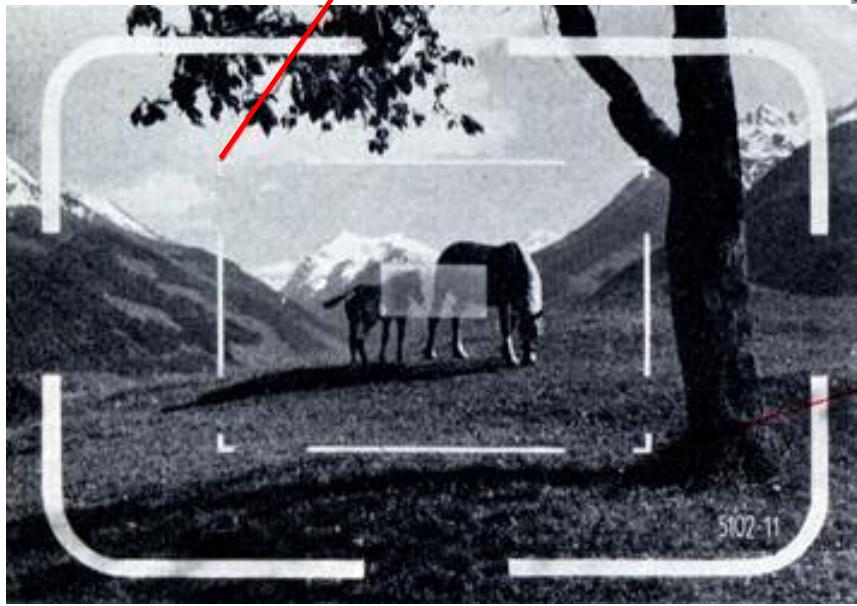
du LEICA M3 est conçu pour fonctionner à la fois comme un viseur particulièrement efficace et comme un télémètre couplé très précis. Tout ce qui est visible dans le cadre lumineux est enregistré sur le film avec l'objectif standard de 50 mm. Cela reste vrai même si vous êtes pressé et que vous regardez obliquement à travers le viseur. Le cadre lumineux est couplé au mouvement de mise au point et se déplace automatiquement sur toute la plage de mise au point. Cela compense les erreurs de parallaxe dues aux positions différentes des axes optiques de l'objectif et du viseur.
Le viseur montre l'image presque à sa taille naturelle. Ainsi, même si vous ouvrez occasionnellement l'autre œil pour observer le champ, vous ne serez pas surpris par un changement soudain d'échelle. La luminosité du cadre lumineux est suffisante pour montrer les limites du champ aussi clairement avec des sujets sombres. Un avantage supplémentaire est que le sujet reste visible même pendant l'exposition.
Au centre du viseur, le champ télémétrique rectangulaire net est visible. Il apparaît plus lumineux que la zone environnante du viseur. Le champ télémétrique disparaît si vous couvrez la petite fenêtre du télémètre avec votre doigt. Cela est utile lorsque vous voulez observer l'effet de votre sujet uniquement dans l'image du viseur.
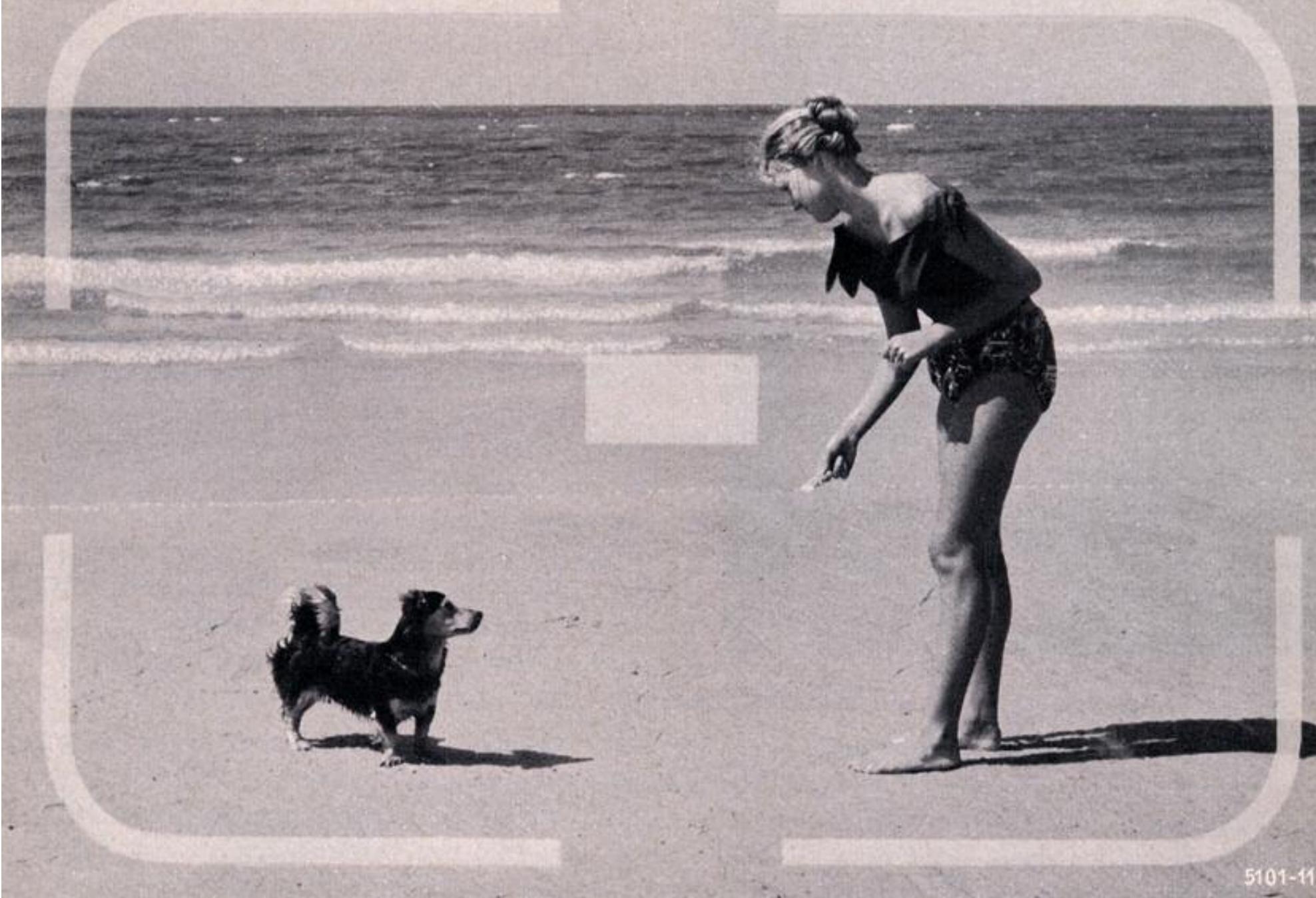
C'est ainsi que le sujet apparaît dans le viseur à cadre lumineux avec un objectif de 50 mm en position.
La distance
peut être réglée sur l'échelle des distances gravée sur chaque objectif, ou à l'aide de l'image télémétrique visible dans le viseur. Certains objectifs se verrouillent en position infini ; pour faire la mise au point sur des distances plus proches, ce verrouillage doit être libéré en enfonçant le cran d'infini.
N'oubliez jamais de déplier et de verrouiller le barillet des objectifs télescopiques (voir aussi page 16). Si vous tournez maintenant la molette de mise au point ou la monture de l'objectif, une échelle de nombres défile devant l'index de mise au point fixe et indique la distance en pieds et/ou en mètres. Cette méthode de mise au point est moins importante, car vous pouvez régler la distance beaucoup plus précisément à l'aide du télémètre couplé intégré. L'échelle est cependant utile pour lire la profondeur de champ disponible et pour des sujets spéciaux où le télémètre ne peut pas être utilisé.
La pratique de l'utilisation du télémètre est importante pour développer une technique de mise au point efficace, et c'est aussi très amusant. Réglez l'objectif sur l'infini et observez, par exemple, une fenêtre à quelques mètres à travers le télémètre. Vous verrez un rectangle lumineux et net au centre de la zone du viseur. Tenez le LEICA de manière que la barre verticale de la fenêtre coupe ce champ télémétrique rectangulaire. À l'intérieur du champ télémétrique, vous verrez une double image ; c'est-à-dire que la barre de la fenêtre apparaît comme une seconde image à gauche de l'image principale. Cela indique que l'objectif n'est pas correctement mis au point sur le film. Maintenant, ajustez l'objectif tout en continuant à regarder à travers
le viseur ; la seconde image se déplace vers la droite jusqu'à ce qu'elle coïncide avec le contour fixe dans le champ télémétrique. Vous avez alors mesuré la distance par ce qu'on appelle la méthode de coïncidence.
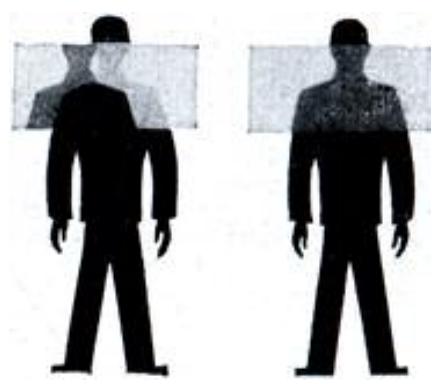
Chaque fois que des lignes verticales coupent le champ télémétrique, vous pouvez également mesurer la distance par la méthode de l'image scindée. Cela est rendu particulièrement facile par la limite nette du champ télémétrique. La partie du sujet qui est déplacée latéralement dans ce champ se déplace pendant la mise au point jusqu'à ce que l'image devienne continue à travers la limite du cadre.
En mesurant la distance, vous avez en même temps réglé l'objectif exactement sur cette distance.
Le fonctionnement de l'indicateur optique de profondeur de champ dans le champ de mesure du télémètre à champ combiné :
Réglage automatique du viseur pour les objectifs de 90 mm et 135 mm
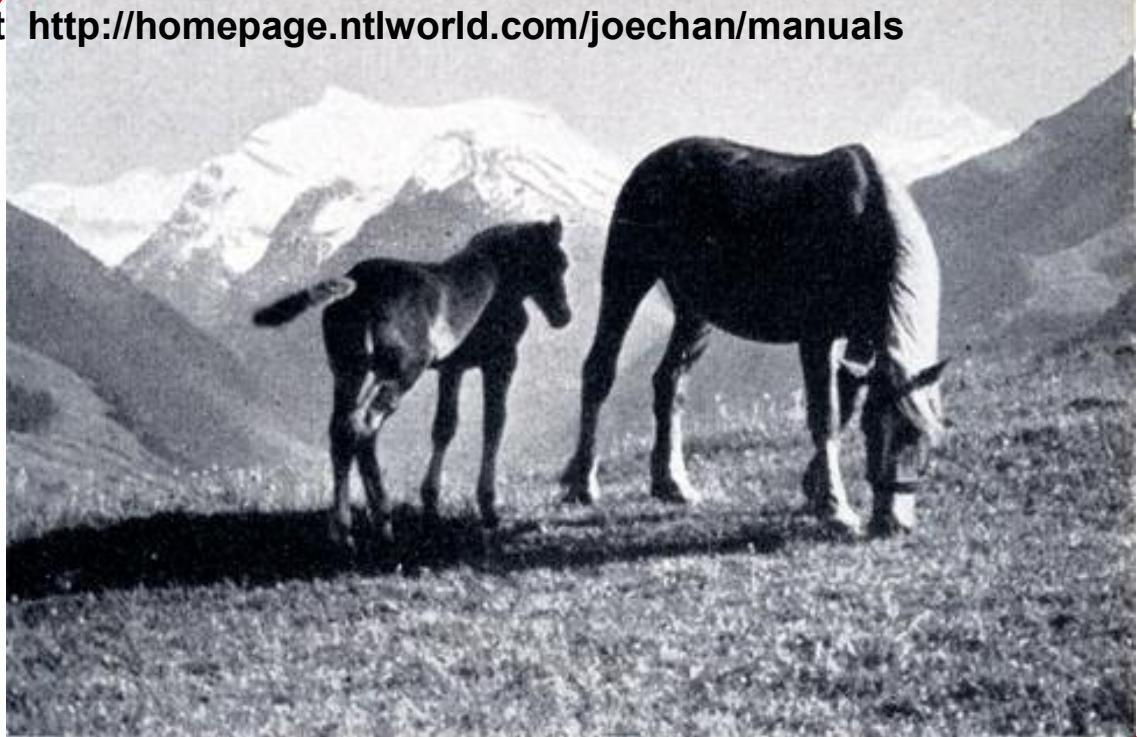
Champ de vision avec un objectif LEICA de 90 mm. La zone du sujet couverte par la focale plus longue est indiquée par le cadre lumineux supplémentaire à l'intérieur du grand cadre lumineux montrant le champ de vision de l'objectif de 50 mm, qui reste visible en permanence.
Objectifs de 90 mm
Montez un objectif LEICA de 90 mm sur votre LEICA M3, verrouillez-le en position, et regardez à nouveau à travers le télémètre. Vous verrez alors un cadre de visée lumineux supplémentaire qui indique le champ couvert par l'objectif de 90 mm à l'intérieur du champ de l'objectif standard de 50 mm, et reproduit sur le film avec un agrandissement de 1,8 fois. Un point important est que la zone environnante du sujet reste visible dans le viseur, de sorte que vous pouvez facilement suivre des sujets en mouvement et les amener dans le champ du viseur de 90 mm. De la même manière, le viseur indique automatiquement le champ de l'objectif de 135 mm lorsque vous montez le 135 mm ELMAR sur l'appareil. De plus, l'erreur de parallaxe est
automatiquement compensée lors de la mise au point - tout comme avec l'objectif de 50 mm - sur toute la plage de mise au point. Les cadres d'image visibles dans le viseur tiennent également compte de la réduction du champ de vision due au fait que l'angle couvert par l'objectif diminue aux distances rapprochées. Les cadres d'image sont conçus pour inclure le champ complet pris par le film même aux distances de sujet les plus courtes pouvant être réglées sur les objectifs LEICA couplés.
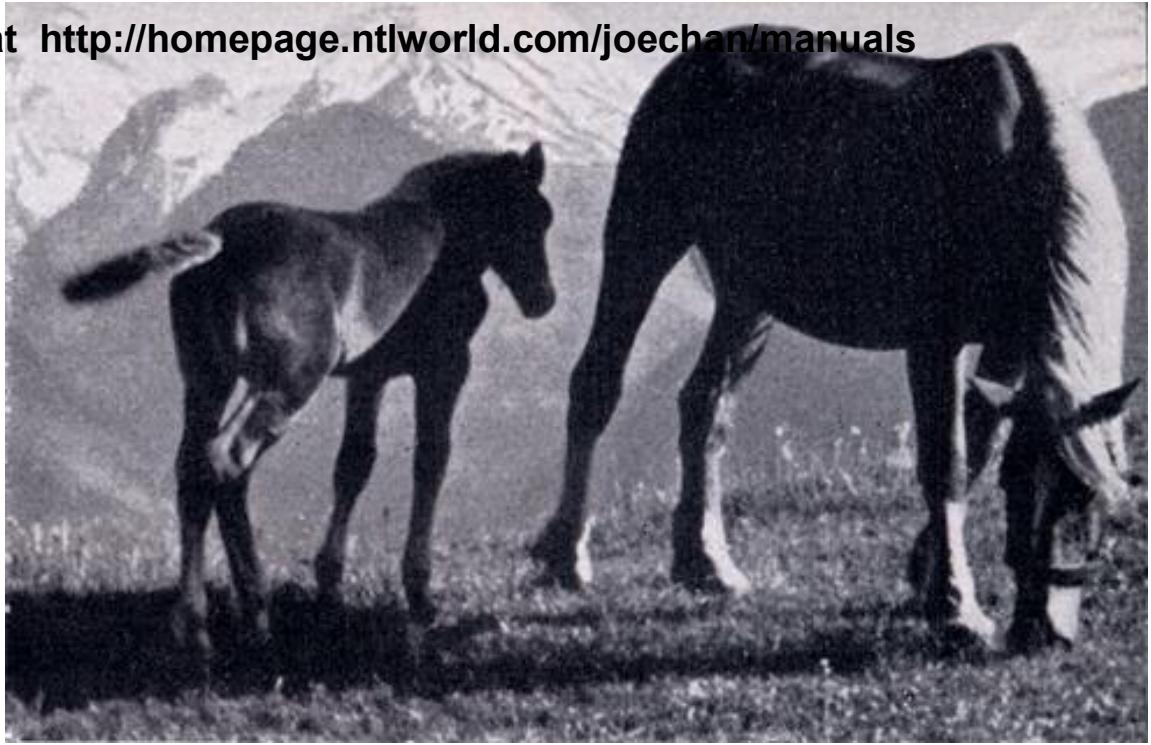
Champ de vision avec l'objectif 135 mm HEKTOR qui donne un agrandissement de 2,7 fois par rapport à l'objectif standard de 50 mm.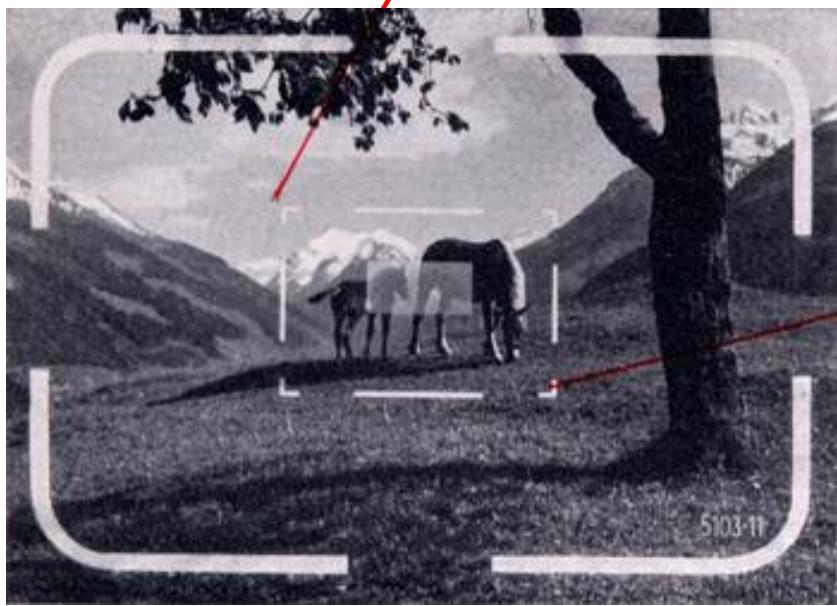
À des distances de sujet plus grandes, l'objectif couvre donc un angle de champ légèrement plus large que celui montré dans le viseur.
Lorsque vous montez l'un des objectifs grand angle LEICA de 35 mm avec viseur intégré M 3 sur l'appareil, le viseur est automatiquement converti pour la photographie grand angle.
Levier en position normale : champ de vision pour l'objectif de 50 mm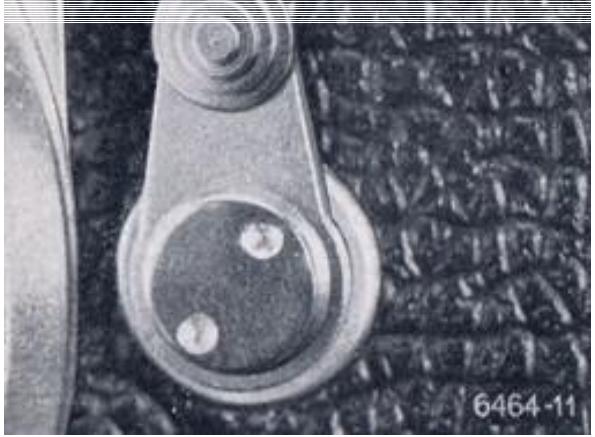
Levier pointant vers l'intérieur : champ de vision pour l'objectif de 90 mm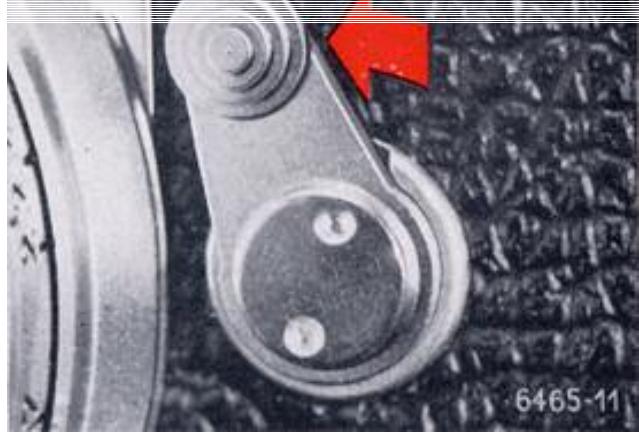
Levier pointant vers l'extérieur : champ de vision pour l'objectif de 135 mm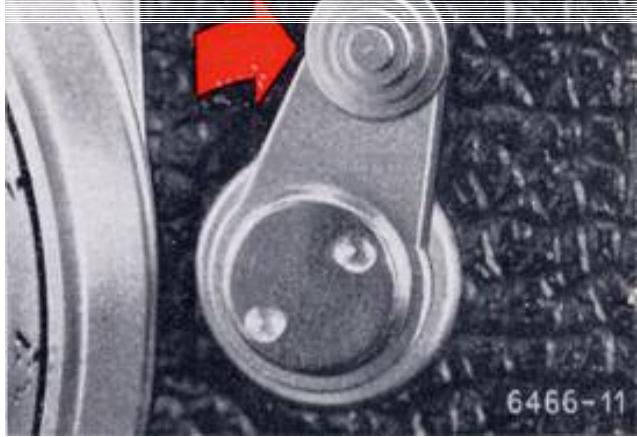
Le sélecteur de cadre de visée
Avec le petit levier sur le devant du boîtier, vous pouvez rendre visibles les cadres de visée de 90 mm et 135 mm dans le viseur même lorsque, par exemple, l'objectif standard de 50 mm est monté sur l'appareil. Vous voyez alors immédiatement si un sujet donné est mieux pris avec un objectif de focale différente. Si vous relâchez le levier, il revient à sa position d'origine et le cadre de visée supplémentaire disparaît. Lorsqu'aucun objectif n'est monté sur l'appareil, le cadre de visée pour l'objectif de 135 mm apparaît à l'intérieur du cadre pour l'objectif de 50 mm.
Tenue de l'appareil
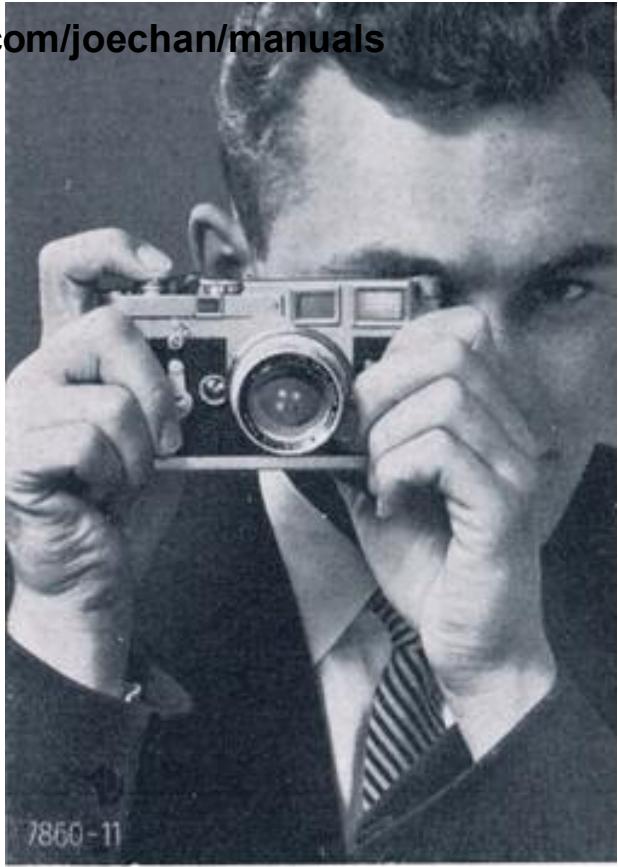
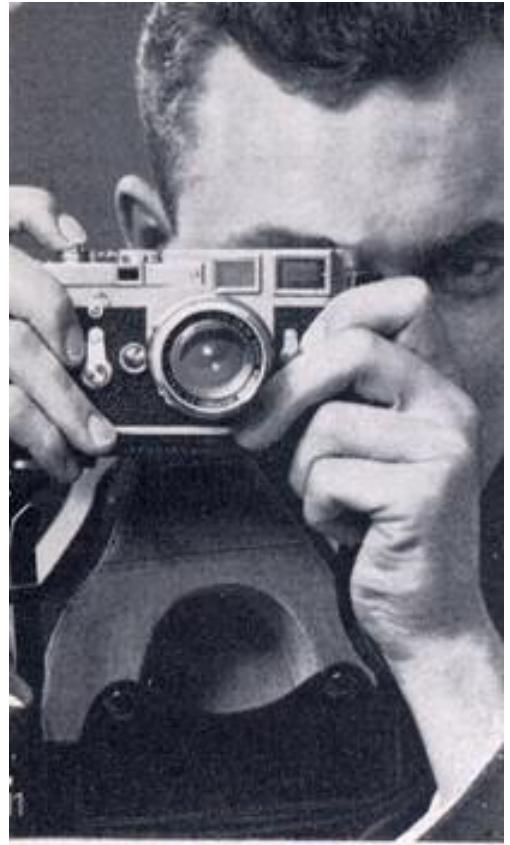
Une bonne prise en main de l'appareil est la meilleure assurance contre le bougé. Tenez le LEICA M3 de sorte que la base repose dans les paumes des deux mains, le pouce contre le levier de transport, et l'index reposant légèrement sur le déclencheur. Utilisez la main gauche pour actionner le levier de mise au point de l'objectif. Gardez l'œil droit près de l'oculaire du viseur et du télémètre afin que l'œil gauche, lorsqu'il est ouvert, puisse embrasser tout le champ. Entraînez-vous à tenir l'appareil
de manière à ce qu'il soit soutenu autant que possible contre le visage ; l'appareil, la tête et les mains doivent ne former qu'un seul bloc. Le but de tout cela est d'assurer une position vraiment stable de l'appareil. Cela évitera le bougé et vous donnera ce haut niveau de netteté qui a toujours été la marque des objectifs LEICA hautement corrigés.
Appuyez sur le déclencheur de manière douce et régulière, ne le frappez jamais. Ne bougez que l'index, pas toute la main.
Au début, essayez d'exposer avec des vitesses d'obturation de 1/60 s ou plus rapides ; après un peu de pratique, vous pourrez éventuellement faire des prises de vue plus lentes sans bougé. Si vous trouvez cela plus pratique, l'œil gauche convient tout aussi bien que le droit pour viser.
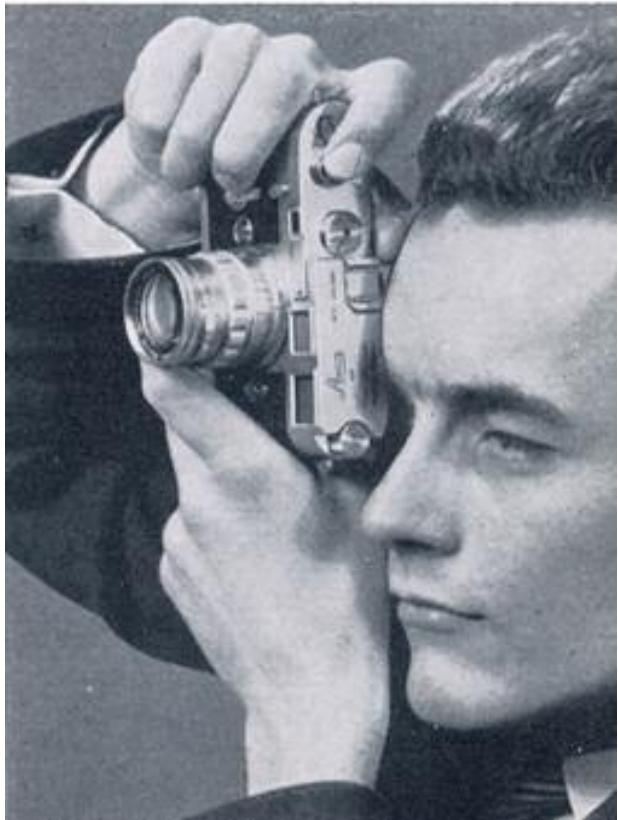
Lorsque vous voulez passer d'une prise de vue horizontale à verticale, tournez le LEICA à la verticale autour de l'axe optique du télémètre-viseur. La tenue de l'appareil ne change pas beaucoup. Saisissez le LEICA de la même manière que pour les vues horizontales.
Vous pouvez également, pour les photos verticales, abaisser la main droite et déclencher avec le pouce. Tenez l'appareil de sorte que le bout du pouce repose sur le déclencheur et que les doigts exercent une contre-pression sur le boîtier. Faites la mise au point avec la main gauche et soutenez la partie supérieure de l'appareil contre votre front. Cette prise en main assure un déclenchement et un avancement du film particulièrement fluides. Que vous preniez des photos verticales ou horizontales, vous ne devez jamais quitter l'appareil des yeux, même pour des séries de photos.
Les photos en gros plan peuvent être prises avec l'appareil tenu à la main ou monté sur un trépied, l'image étant mise au point automatiquement grâce au télémètre couplé. Comme la profondeur de champ est fortement réduite à de telles distances rapprochées, l'objectif doit être fermé à au moins f/8 ou f/11.
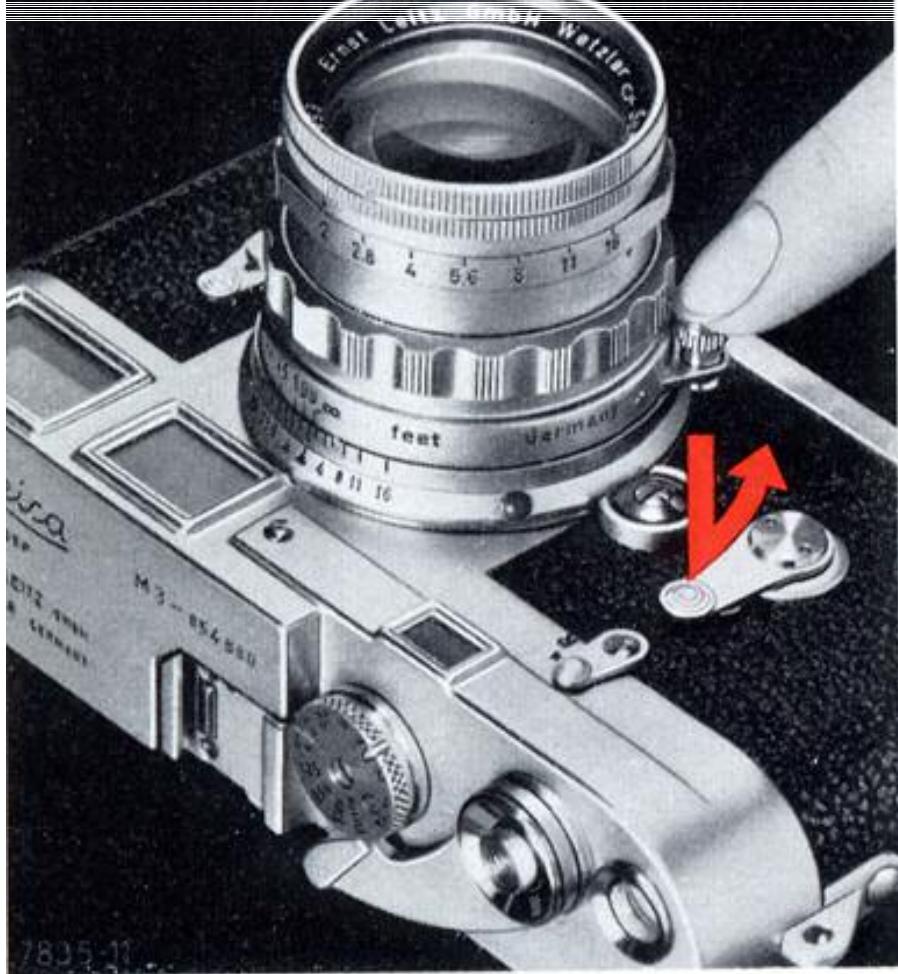
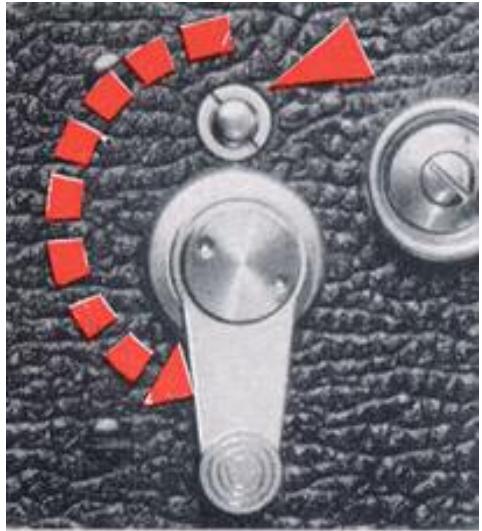
Le retardateur
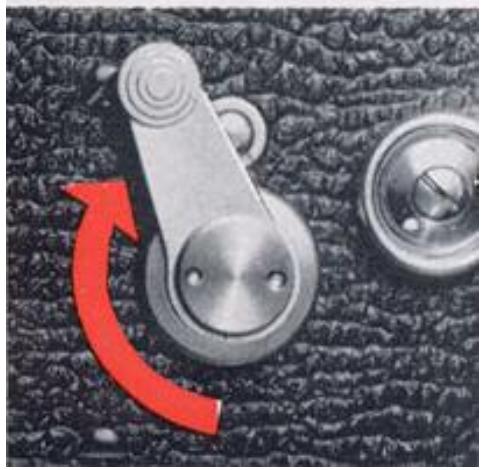
Tirez le levier du retardateur vers le bas. L'obturateur du LEICA peut déjà être armé, sinon armez-le maintenant. Pour déclencher, cependant, n'appuyez pas sur le déclencheur, mais sur le petit bouton au-dessus du levier du retardateur. Vous entendrez alors le mécanisme de retardement se dérouler tandis que le levier du retardateur remonte lentement, libérant l'obturateur juste avant que le levier n'atteigne sa position d'origine. Si vous observez le levier pendant qu'il revient, vous pouvez non seulement entendre le moment de l'exposition, mais aussi le voir ; cela se produit lorsque le levier pointe obliquement vers le haut à gauche.
Le déclenchement à retardement fonctionne avec toutes les vitesses d'obturation de 1 à 1/1000 seconde. Avec le levier du retardateur complètement abaissé, le délai est d'environ 10 secondes ; à mi-course, il est de 5 secondes. Les positions intermédiaires donnent des délais intermédiaires. Vous avez donc amplement le temps de vous mettre dans la photo vous-même. Le retardateur est également utile pour déclencher de longues expositions sur trépied.
Les objectifs interchangeables du LEICA M3
Vous avez le choix entre des focales de 21 à 400 mm et disposez de deux objectifs à l'ouverture exceptionnelle de f/1,4. Avec cette gamme, vous pouvez choisir votre point de vue à volonté et avoir un contrôle total sur le champ de vision et la perspective. Vous pouvez épuiser toutes les possibilités picturales.
21 mm Super-Angulon f/4
28 mm Summaron f/5,6
35 mm Summaron f/2,8
35 mm Summicron f/2
35 mm Summilux f/1,4
50 mm Elmar f/2,8
50 mm Summicron f/2
50 mm Summilux f/1,4
65 mm Elmar f/3,5**
90 mm Elmar f/4*
90 mm Elmarit f/2,8*
90 mm Summicron f/2*
125 mm Hektor f/2.5**
135 mm Elmar f/4*
200 mm Telyt f/4*
280 mm Telyt f/4.8**
400 mm Telyt f/5**
- Ces objectifs sont couplés au télémètre, mais ils peuvent également être utilisés avec le VISOFLEX II.
** Ces objectifs doivent être utilisés avec le boîtier reflex VISOFLEX I ou II, à l'exception du 65 mm ELMAR qui ne peut être utilisé qu'avec le VISOFLEX II.
Changement d'objectif
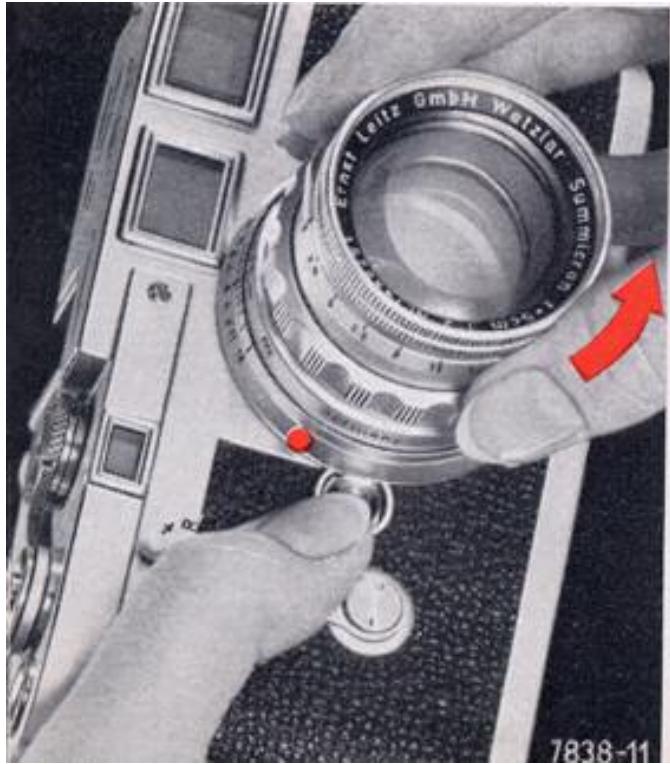
Pour retirer l'objectif, tenez l'appareil dans la main gauche, en appuyant sur le bouton du verrou de baïonnette avec le pouce. Saisissez l'objectif par la bague de mise au point avec la main droite, aussi près que possible du boîtier, et tournez dans le sens inverse des aiguilles d'une montre pour le dégager. L'objectif peut alors être soulevé hors de la monture. Les objectifs équipés d'un verrou d'infini doivent être verrouillés à l'infini avant le changement.
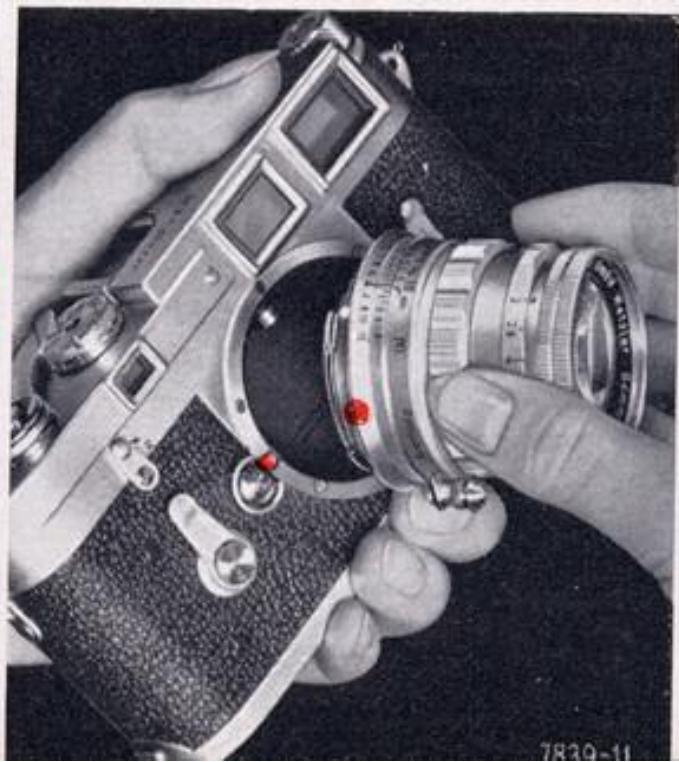
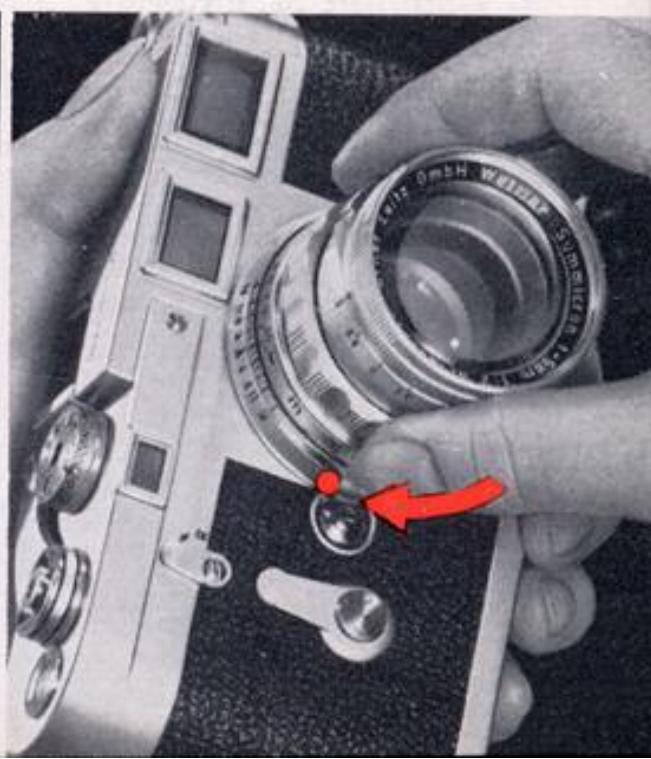
Un point rouge est visible à côté du bouton de verrouillage de la baïonnette. Pour insérer un autre objectif, placez-le avec le point rouge de la monture d'objectif en face du point rouge du boîtier. Ensuite, fixez l'objectif en tournant dans le sens des aiguilles d'une montre jusqu'à ce que le verrou de baïonnette s'enclenche avec un clic audible.
Évitez de changer d'objectif en pleine lumière directe. Tournez le dos au soleil et tenez l'ouverture de l'appareil vers votre corps. Si vous gardez l'appareil et l'objectif séparément, utilisez un capuchon de protection pour chacun. Des capuchons arrière sont disponibles pour tous les objectifs LEICA.
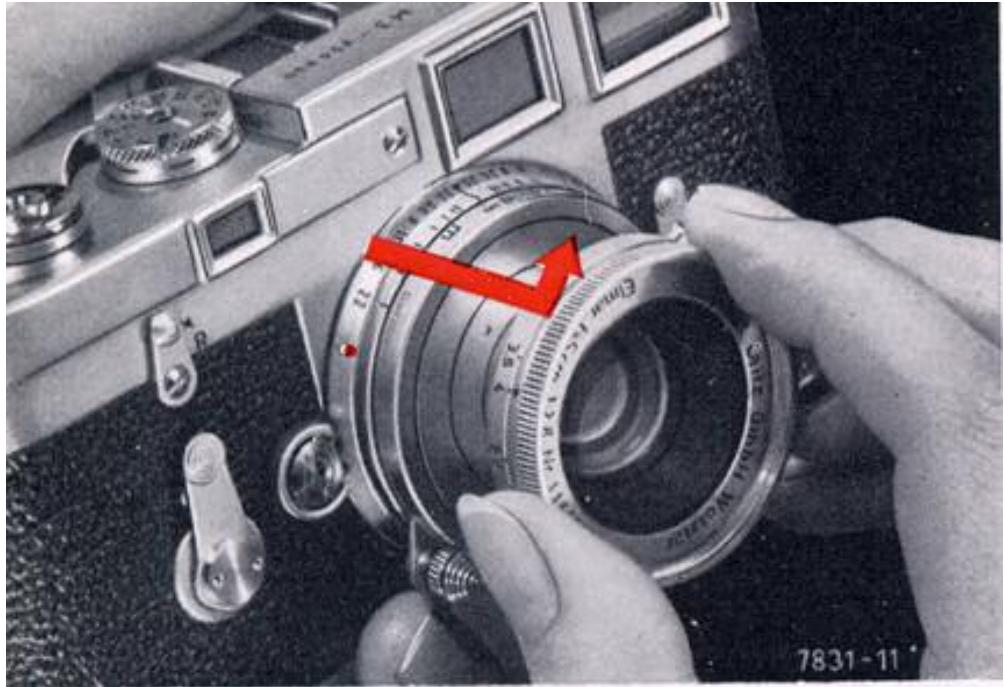
Les objectifs rétractables
Lorsqu'ils ne sont pas utilisés, certains objectifs LEICA (par exemple le 50 mm ELMAR f/2.8 et le 90 mm ELMAR f/4 rétractable) peuvent être déverrouillés en tournant légèrement la partie avant dans le sens inverse des aiguilles d'une montre et en la poussant dans le boîtier. Pour l'utilisation, déployez complètement l'objectif et verrouillez-le en tournant vers la droite. (Le 90 mm ELMAR f/4 rétractable ne peut être mis au point que lorsqu'il est correctement déployé et verrouillé.) Avec tout objectif, n'oubliez jamais de retirer le capuchon d'objectif.
Traitement des lentilles
Les objectifs LEICA modernes traités présentent un reflet coloré sur la surface, dû à une couche antireflet qui augmente sensiblement la brillance et la netteté de l'image. Les surfaces extérieures sont traitées dures et résistent donc à un nettoyage soigneux.
Outre son nom, chaque objectif LEICA porte également son propre numéro de série gravé sur la monture avant. Notez ce numéro ainsi que celui de votre LEICA ; ils peuvent s'avérer très utiles en cas de perte.
Entretien de l'objectif
Tout objectif de haute qualité ne peut donner son meilleur rendement que si les deux surfaces de verre extérieures sont en parfait état. Il est bien préférable de les garder propres que de les nettoyer souvent. Un filtre jaune clair (avec un film noir et blanc) ou un filtre ultraviolet incolore (pour les photos en couleur), laissé en permanence sur l'objectif, protégera la surface contre les influences extérieures (par exemple le sable fin au bord de la mer). Le pare-soleil protège également l'objectif contre tout contact accidentel avec les doigts et contre les éclaboussures d'eau par temps de pluie. Pour enlever la poussière de la surface de l'objectif, utilisez une brosse douce en poil de chameau ou, en cas d'urgence, un chiffon en lin propre préalablement lavé avec du savon pur. (Tout autre agent de lavage ou de nettoyage peut laisser des résidus chimiques nocifs.)
Le SUMMICRON 50 mm à double plage
Cette version de l'objectif SUMMICRON 50 mm possède deux plages de mise au point : 1. La plage normale de l'infini à 3 pieds 1/2 (1 mètre) ; 2. La plage rapprochée d'environ 35 à 19 pouces (88 à 48 cm) du plan du film.
Un viseur optique supplémentaire se fixe sur le dessus de la monture de l'objectif pour une utilisation dans la plage rapprochée. Cela adapte le télémètre couplé pour la mise au point rapprochée. L'objectif agit ainsi en même temps comme une monture de mise au point rapprochée avec compensation de parallaxe. L'objectif s'insère dans le LEICA M3 — sans le viseur supplémentaire — de la manière habituelle, en alignant les points rouges sur la monture et le boîtier l'un en face de l'autre, puis en tournant dans le sens des aiguilles d'une montre pour verrouiller.
Mise au point entre l'infini et 3 pieds 1/2 (1 mètre). Sur cette plage, l'objectif s'utilise comme tout autre objectif LEICA. À 3 pieds 1/2 (1 mètre), le mouvement de mise au point est limité par une butée. Mise au point entre 35 et 19 pouces (88 et 48 cm). Les distances sont mesurées depuis l'arrière de l'appareil jusqu'au sujet. Réglez la monture de mise au point de l'objectif sur sa limite rapprochée de 3 pieds 1/2 (1 mètre), comme indiqué sur la figure 1, tirez vers l'extérieur et déplacez-la au-delà de la butée jusqu'à la position 35 pouces (88 cm) (figure 2). L'objectif reste verrouillé dans cette position jusqu'à ce que le viseur optique supplémentaire soit complètement enfoncé dans son logement spécial, libérant ainsi le mouvement de mise au point pour la plage rapprochée (figure 3).
Fig. 1 Fig. 2 Fig. 3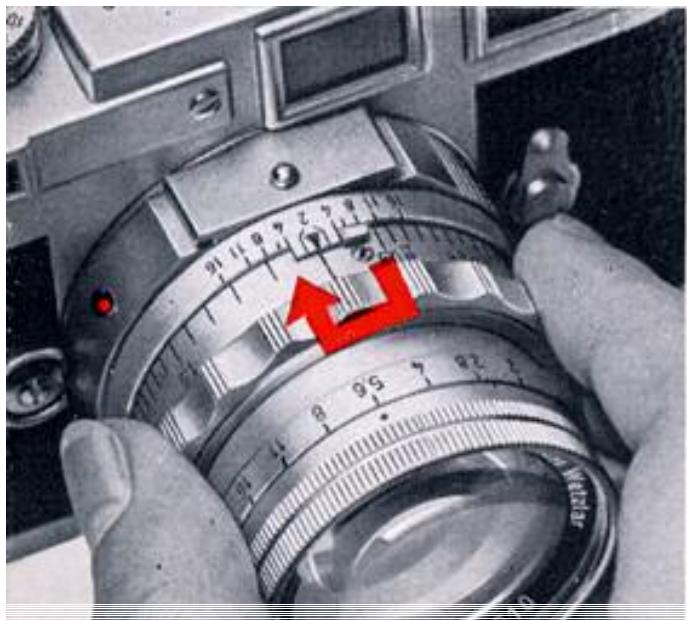
Dans son étui prêt à l'emploi
le LEICA M3 est protégé contre les intempéries et les petits chocs, tout en étant toujours prêt à l'action. Le couvercle de l'étui est articulé de manière à ne pas gêner même pour les prises de vue verticales et ne peut pas obstruer l'objectif.
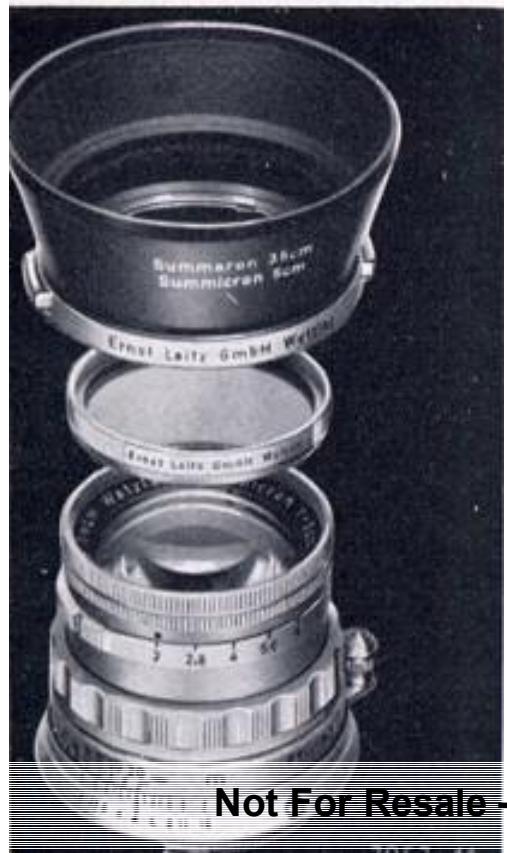
Filtres LEICA
Améliore la reproduction des tons dans les photographies en noir et blanc. Les filtres jaune et orange, par exemple, produisent des effets nuageux picturaux. Les filtres polarisants LEITZ atténuent les reflets gênants provenant du verre, de l'eau et des surfaces polies (autres que métalliques) et augmentent le contraste des nuages par rapport au ciel. Ils sont également utiles en photographie couleur. Tous les filtres pour le LEICA M3 se vissent sur la monture avant de l'objectif. Pour des besoins particuliers, deux filtres peuvent même être utilisés ensemble (avec toutefois un risque de vignettage si une grande ouverture est utilisée).
Pare-soleil
Protègent l'objectif contre les rayons directs de sources lumineuses intenses qui pourraient provoquer des reflets, ainsi que contre la pluie et la neige. Tenez le pare-soleil de manière à enfoncer les deux clips à ressort, placez-le sur l'objectif et laissez-le s'enclencher. Le pare-soleil et le filtre peuvent être combinés ; à condition d'utiliser le pare-soleil adapté à l'objectif, il ne provoquera pas de vignettage (assombrissement des coins du négatif).
Si vous utilisez l'étui prêt-à-photographier pour le LEICA M3, le pare-soleil peut être inversé sur un certain nombre d'objectifs LEICA, et des capuchons de pare-soleil spéciaux sont fournis pour protéger la surface avant de l'objectif.

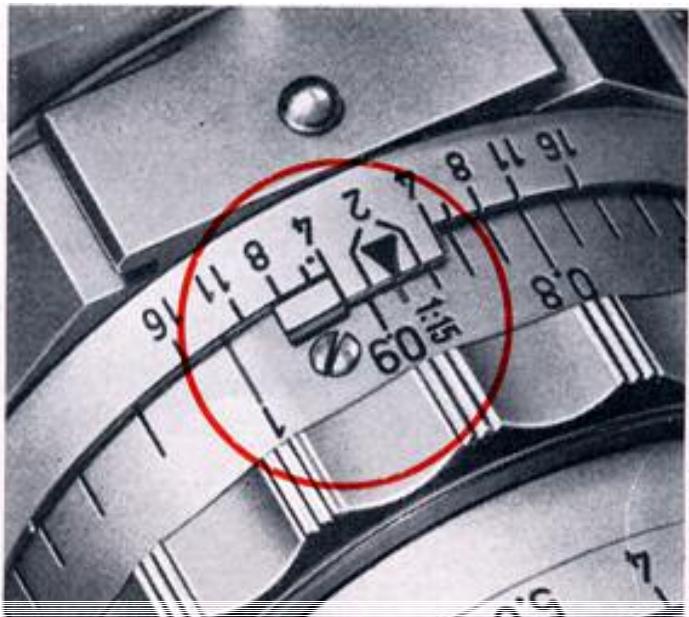
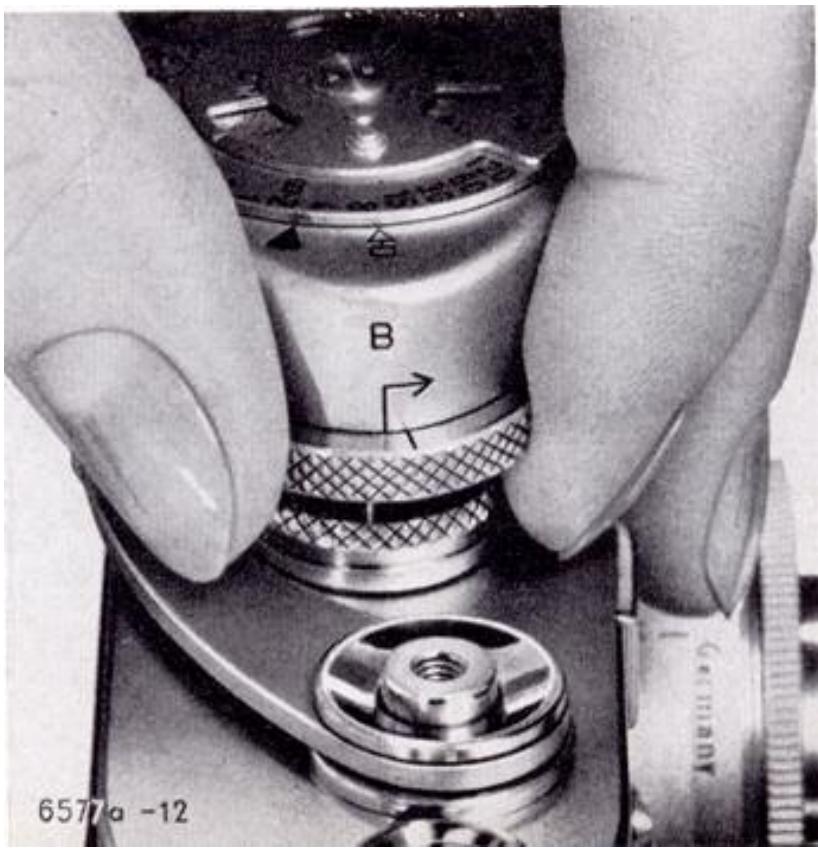
Avant de monter le LEICAMETER "MC", réglez la molette de vitesse d'obturation du LEICA M3 sur "B". Ensuite, tournez la bague de réglage moletée du posemètre dans le sens de la flèche jusqu'à la butée. La ligne de repère sur la bague doit coïncider avec la ligne de repère sur le boîtier du posemètre, comme le montre clairement l'illustration en bas de la page 21. Soulevez maintenant la bague et continuez à tourner dans le sens de la flèche. Le repère triangulaire sur le dessus du posemètre sera alors en face de l'un des chiffres entre 4 et 120.
Le
LEICAMETER "MC"
est un posemètre accessoire d'un nouveau type qui se couple avec l'obturateur à plan focal du LEICA M3. Vous avez donc le choix d'utiliser votre appareil LEICA avec le posemètre couplé pour garantir des expositions correctes à chaque fois, ou sans le posemètre de la manière habituelle. Les détails complets sur les nombreuses applications du LEICAMETER "MC" sont donnés dans les instructions spéciales publiées par le fabricant, Metrawott AG de Nuremberg.
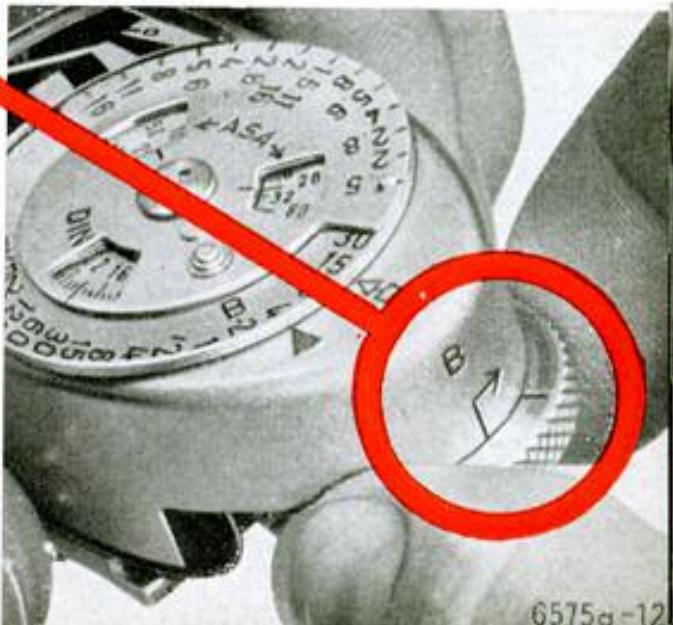
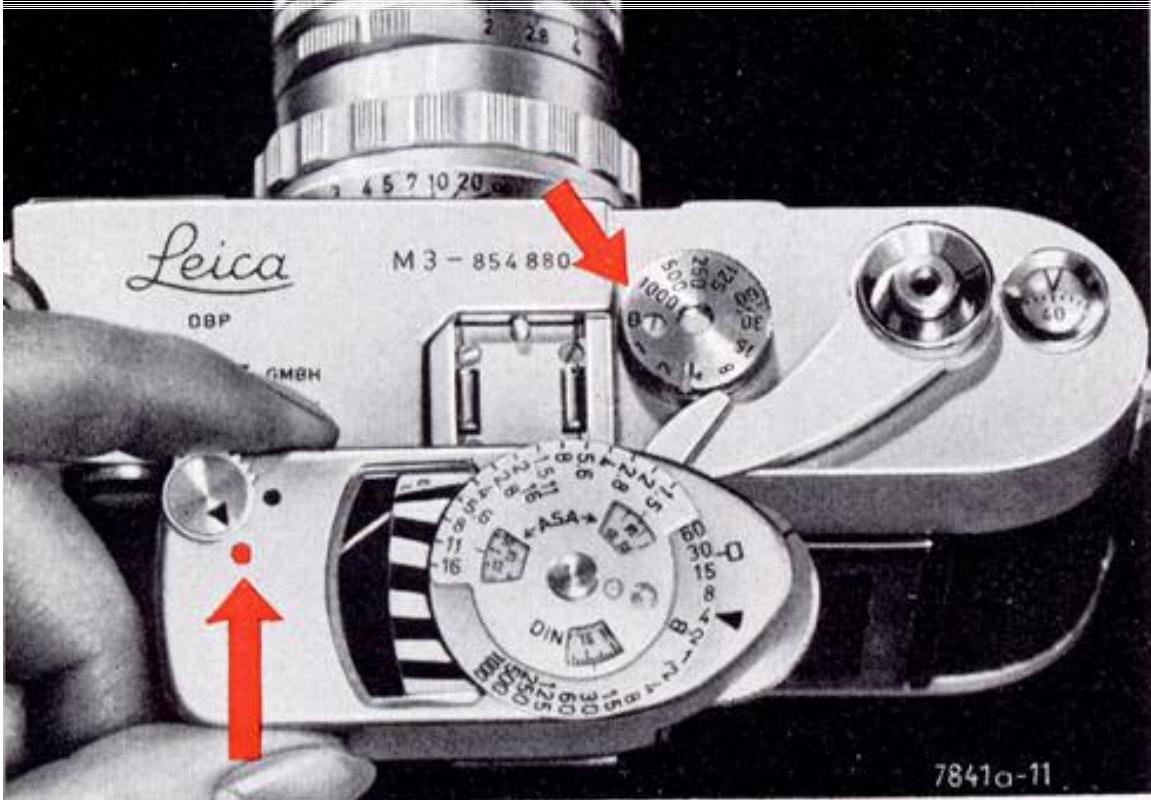
Ensuite, poussez le LEICAMETER "MC" dans la griffe porte-accessoires de l'appareil jusqu'à la butée. Tournez la bague de réglage moletée du posemètre en arrière, contre le sens de la flèche, jusqu'à ce qu'elle s'enclenche de manière audible dans la molette de vitesse d'obturation de l'appareil. L'appareil est maintenant couplé au posemètre. Pour retirer le LEICAMETER "MC", découplez la bague de réglage moletée de la molette de vitesse d'obturation en la réglant sur "B", en la soulevant et en tournant dans le sens de la flèche (voir l'illustration à droite) jusqu'à ce que le repère triangulaire soit en face de l'un des chiffres entre 4 et 120.
Le posemètre vous aide grandement à éviter les expositions incorrectes, surtout avec un film couleur qui nécessite une exposition très précise. Mais l'instrument est tout aussi précieux pour les films noir et blanc, car il garantit des négatifs parfaits de qualité uniforme et faciles à agrandir.
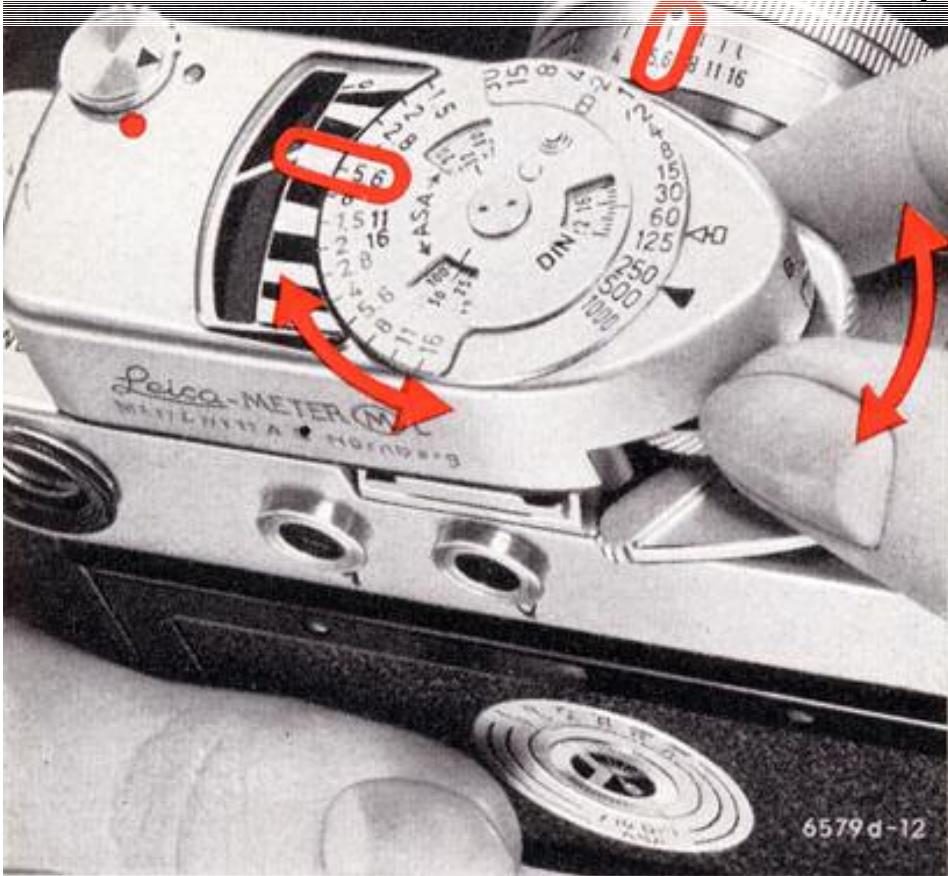
Le LEICAMETER MC doit être réglé sur la sensibilité du film utilisé. Il dispose de deux plages de mesure intégrées (indiquées par des points noirs et rouges sur l'instrument) et d'une troisième plage, pour les très faibles luminosités, obtenue à l'aide d'une cellule amplificatrice en option (voir instructions spéciales). Les lectures d'exposition directes peuvent être obtenues de deux manières différentes : (1) Réglez la vitesse d'obturation souhaitée en face du triangle noir en haut du posemètre. Observez l'ouverture indiquée par l'aiguille mobile et réglez la bague des diaphragmes de l'objectif en conséquence. (2) Réglez l'ouverture souhaitée et tournez la molette de réglage moletée jusqu'à ce que cette ouverture sur le cadran du posemètre apparaisse en face de l'aiguille mobile ; la vitesse d'obturation correcte est alors automatiquement réglée. Si la lumière est insuffisante pour obtenir une lecture sur l'échelle d'ouvertures noire, placez le sélecteur de plage sur le point rouge et utilisez l'échelle d'ouvertures rouge. Notez que les deux premières ouvertures de l'échelle rouge (f/1,5 et f/2) chevauchent les deux dernières de l'échelle noire (f/11 et f/16). La valeur correcte est déterminée par la position du levier sélecteur de plage.
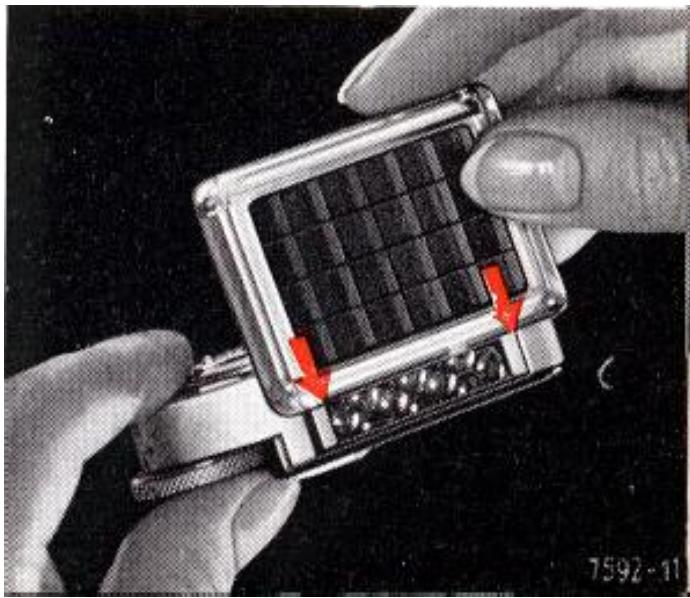
L'écran diffuseur pour les lectures en lumière incidente se fixe à l'avant du posemètre et se signale par une languette saillante. Consultez les instructions spéciales du manuel LEICAMETER MC avant d'utiliser cette technique de mesure.
Pour des temps de pose de 2 à 120 secondes, tournez la bague de réglage moletée du posemètre sur « B », puis soulevez-la pour la désolidariser avant de continuer à tourner dans le sens de la flèche (sur le côté droit du posemètre). La lecture s'effectue comme décrit ci-dessus, sauf que le déclencheur doit être maintenu enfoncé (de préférence avec un déclencheur souple à verrouillage) pendant toute la durée requise. Pour les lectures avec cellule amplificatrice, observez d'abord la vitesse d'obturation en face du petit symbole carré, puis réglez cette vitesse en face du triangle noir avant de prendre la photo. N'oubliez pas que le triangle noir en haut du LEICAMETER MC indique toujours la vitesse à laquelle l'obturateur est réglé. Dans l'illustration ci-dessus, vous remarquerez que l'obturateur est réglé sur 1/250 s, tandis que le symbole carré apparaît en face de 1/60 s. Si cette lecture avait été effectuée avec la cellule amplificatrice, il aurait été nécessaire de transférer la valeur 1/60 s sur le triangle noir.
Chargement du LEICA
Les cassettes pour lumière du jour et les cassettes « M » correctement chargées et fermées (type N) sont étanches à la lumière. Néanmoins, évitez de charger ou de décharger l'appareil en plein soleil ou sous une forte lumière artificielle. En extérieur, même l'ombre de votre corps offre une protection adéquate. Ne laissez pas non plus de cassettes exposées ou non exposées traîner, mais conservez-les dans leurs boîtes jusqu'à ce que vous soyez prêt à les utiliser ou à les développer. Avant d'ouvrir l'appareil, assurez-vous qu'il ne contient pas déjà un film en tirant la manivelle de rembobinage et en la tournant dans le sens de la flèche. Si vous sentez une résistance, rembobinez d'abord complètement le film, puis déchargez-le.
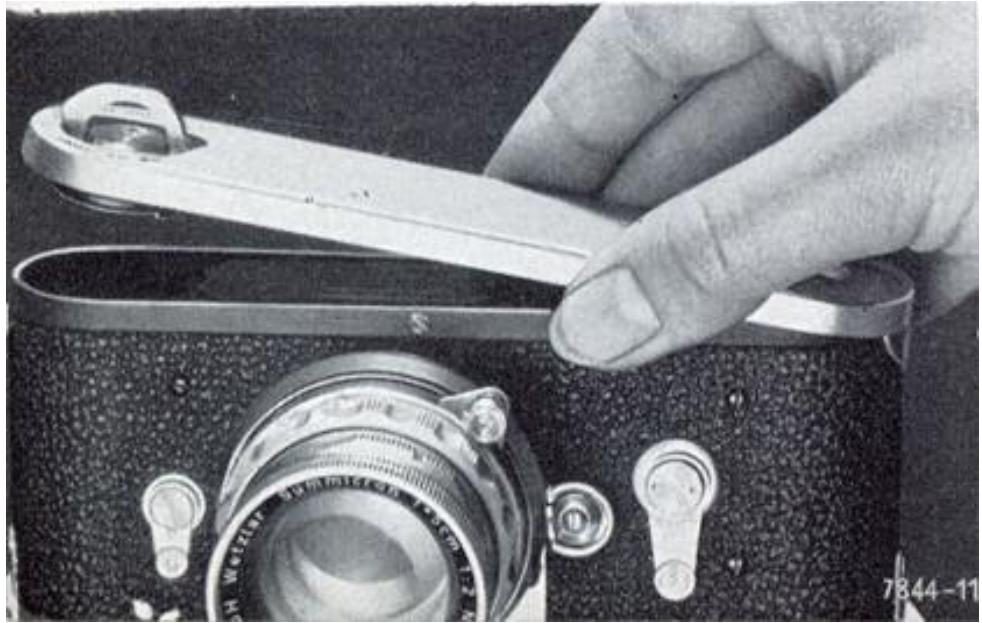
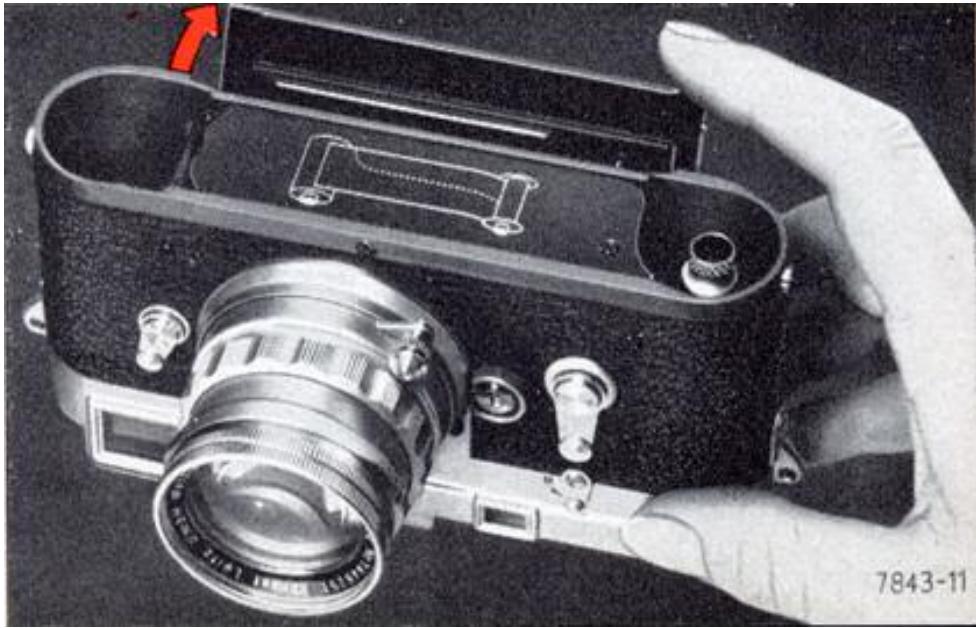
La caméra telle que décrite à la page 27. Tournez la clé dans la plaque de base dans le sens indiqué par « auf — open », et soulevez. La cassette de film et la bobine réceptrice peuvent maintenant être facilement retirées. Ouvrez le dos articulé de la caméra, et placez la caméra devant vous sur la table, la base ouverte vers le haut et l'objectif face à vous.
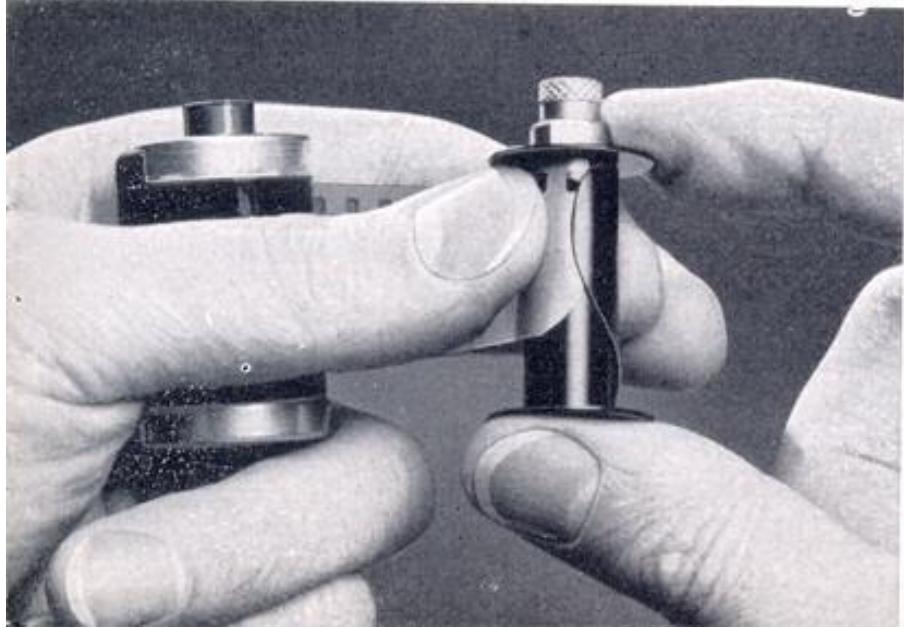
Tenez la bobine réceptrice dans la main droite et la cassette dans la main gauche, toutes deux avec les molettes vers le haut. Poussez maintenant le début du film sous la pince
à ressort de la bobine réceptrice aussi loin qu'il ira. Le bord perforé du film doit reposer droit contre la collerette de la bobine, comme illustré ci-dessous.
Ensuite, tirez juste assez de l'amorce du film hors de la cassette pour pouvoir insérer les deux parties — la cassette et la bobine réceptrice — dans la caméra. Les molettes moletées doivent toujours pointer vers le haut et rester visibles pendant que le film glisse dans la fente prévue à l'avant du dos ouvert de la caméra.
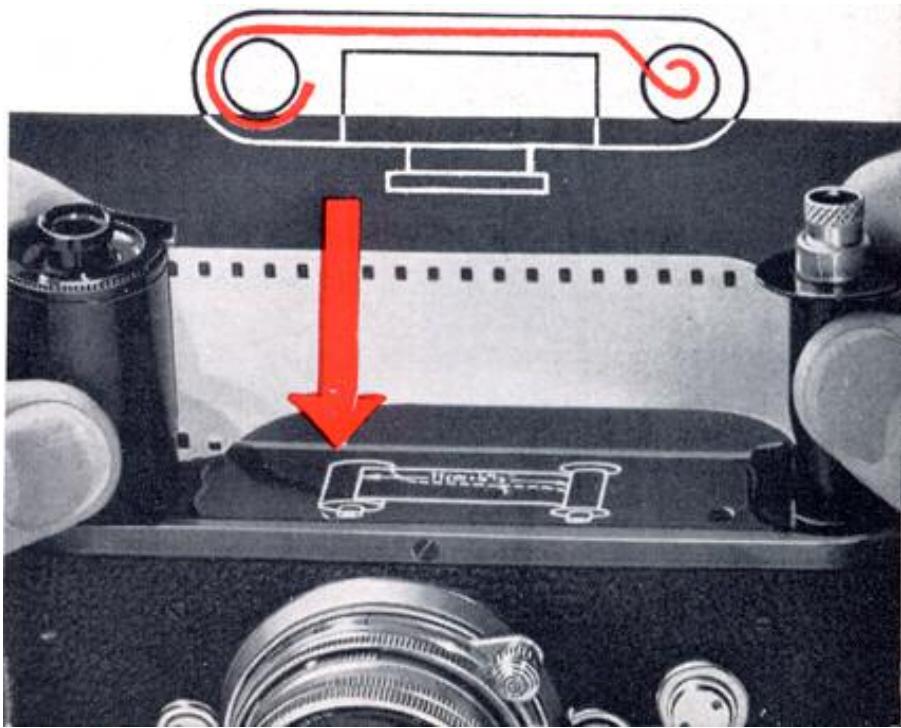
La cassette de film et la bobine réceptrice doivent être complètement enfoncées pour garantir que le film repose correctement entre les guides.
Vérifiez que la position du film correspond à celle du schéma. Le côté mat de l'émulsion doit faire face à l'objectif et à l'obturateur focal ; la bobine réceptrice enroule le film avec le côté émulsion vers l'extérieur.
Les dents du tambour d'entraînement doivent s'engager dans les perforations du film (si nécessaire, actionnez lentement le levier d'avance jusqu'à ce que les dents s'engagent).
Fermez le dos de la caméra, remettez la plaque de base et verrouillez-la, fermant ainsi la caméra hermétiquement à la lumière.
Le compteur de vues revient automatiquement à sa position de départ — deux divisions avant zéro — lorsque la bobine réceptrice est retirée. La longueur de film entre
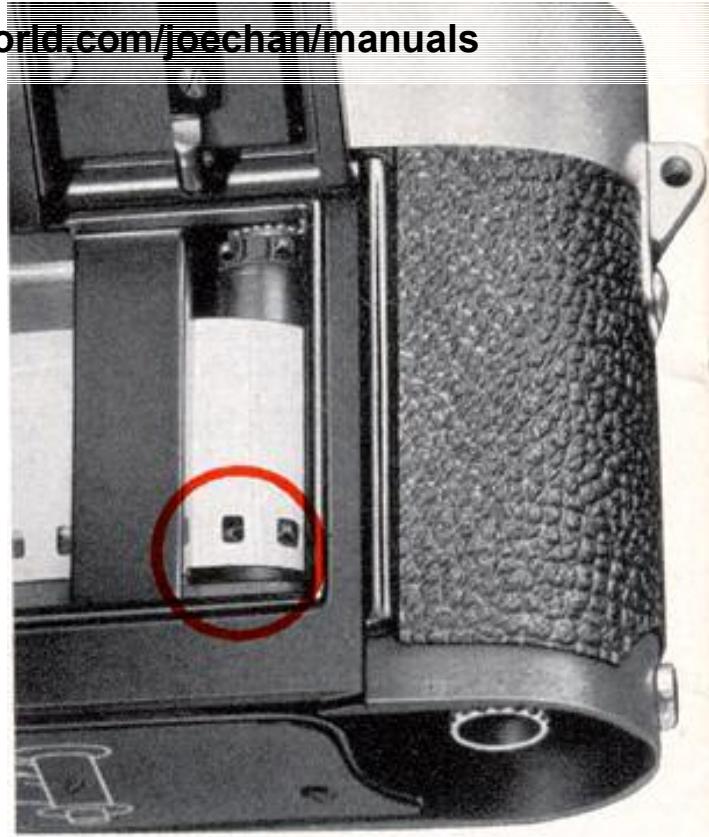
la cassette et la bobine réceptrice est, bien sûr, déjà voilée et inutilisable pour la prise de vue.
Elle doit donc être avancée à l'intérieur de la caméra fermée pour amener une portion neuve et non exposée du film en position de prise de vue. Avancez le film en actionnant le levier d'avance, puis déclenchez l'obturateur. Répétez ces étapes et avancez à nouveau le film pour que le compteur indique le numéro 1. Vous êtes maintenant prêt pour la première exposition.
Le bon fonctionnement de l'avance du film se reconnaît au fait que les points rouges sur l'axe central de la manivelle de rembobinage tournent pendant l'avance du film.
Pour régler l'indicateur de type de film
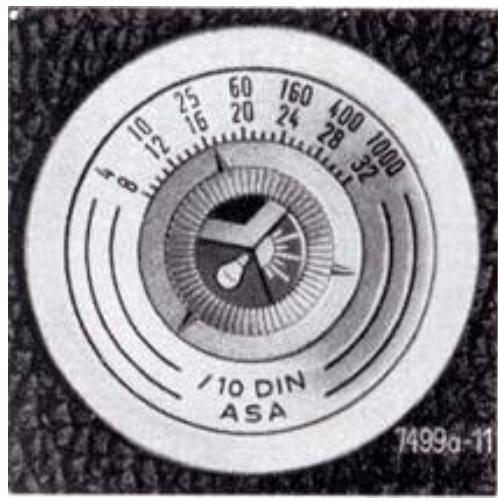
sur le dos de la caméra, appuyez légèrement avec un doigt sur le centre, et tournez-le vers le type et la vitesse du film chargé dans la caméra. L'une des trois aiguilles à côté du symbole approprié (chevron noir et blanc pour film noir et blanc, soleil sur fond rouge pour film couleur lumière du jour, ou lampe sur fond rouge pour film couleur lumière artificielle) doit pointer vers la vitesse de film requise en ASA ou DIN. Cela montre d'un coup d'œil quel film est chargé dans la caméra.
Déchargement du film
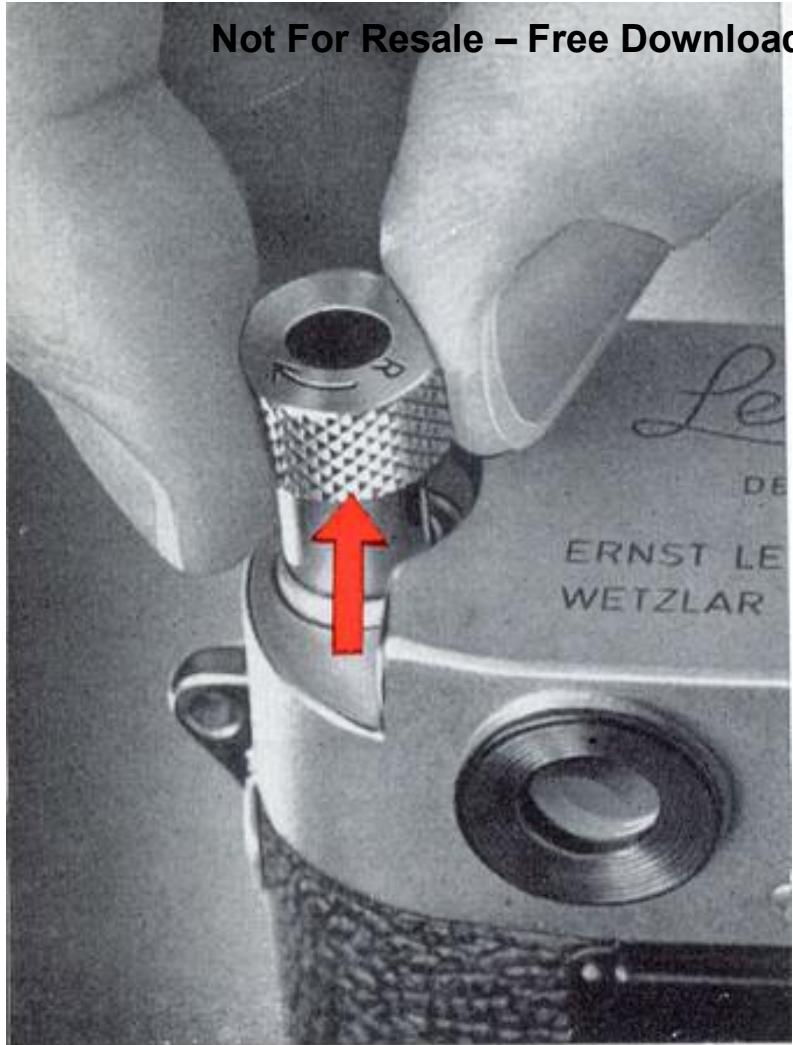
Lorsque vous avez exposé tout le film, le levier de transport ne peut plus être actionné ; c'est le signe que le film doit être réenroulé dans sa cassette. Placez le levier d'inversion sur le devant de l'appareil sur "R", tirez le bouton de rembobinage (voir l'illustration à la page 24), et tournez-le dans le sens de la flèche jusqu'à ce que vous sentiez une résistance. Dépasser la résistance, puis donnez encore environ un tour au bouton de rembobinage. Le film se sera alors détaché de la bobine réceptrice, mais un petit bout devrait encore dépasser de la cassette. Vous pouvez alors ouvrir l'appareil (voir page 24) et retirer la cassette avec le film exposé. Il n'est pas conseillé de rembobiner complètement le film dans la cassette, car le morceau qui dépasse rend la cassette plus étanche à la lumière. Notez cependant sur ce morceau que le film est exposé.
Vous pouvez également exposer partiellement le film, par exemple les dix premières vues, le rembobiner et le remplacer par un autre film (par exemple couleur). Lors du rechargement du premier film, procédez comme pour un film non exposé, puis déclenchez et faites avancer le film avec le bouchon d'objectif sur l'objectif, jusqu'à ce que le compteur de vues indique le numéro 12. Il est nécessaire de laisser un espace d'une vue complète pour éviter tout chevauchement.
Films LEICA
Le film 35 mm double perforation, tel qu'il est utilisé dans le LEICA, est fourni par les fabricants de films du monde entier dans plusieurs conditionnements et une large gamme d'émulsions noir et blanc et couleur. Les cassettes de chargement en lumière du jour consistent en une coque étanche à la lumière contenant une longueur de film pour 36, 20 ou parfois moins de négatifs ou de diapositives 24 × 36 mm. Les recharges pour la lumière du jour (non disponibles aux États-Unis) contiennent les mêmes longueurs de film enroulées sur une bobine et protégées de la lumière par une bande de papier "amorce". Elles sont destinées à être chargées dans des cassettes 35 mm vides (ou des cassettes LEICA), après quoi elles sont manipulées exactement comme des cassettes de chargement en lumière du jour. Les chargements en vrac de film 35 mm sont disponibles en différentes longueurs pour un chargement en chambre noire dans des cassettes de chargement en lumière du jour ou des cassettes LEICA étanches à la lumière.
Les films couleur sont soit des films inversibles, pour des diapositives couleur positives, soit des films négatifs couleur destinés principalement aux tirages papier. Les films inversibles couleur sont fournis soit pour la lumière du jour, soit pour divers types de sources de lumière artificielle telles que les lampes flash ou les lampes à incandescence. Il est important de noter le type de film couleur avant le chargement (en réglant l'indicateur de type de film à l'arrière du LEICA en conséquence) et de suivre les instructions du fabricant concernant l'exposition et la filtration, car les films couleur ont une latitude d'exposition étroite.
De nombreux types de films noir et blanc sont disponibles pour le LEICA, mais les matériaux n&b les plus couramment utilisés sont les films négatifs destinés à produire des agrandissements positifs. Ces films peuvent être divisés en trois grandes catégories :
1 - Les films à vitesse moyenne, d'une sensibilité d'environ 80 à 160 ASA, sont des matériaux polyvalents idéaux pour la photographie noir et blanc générale. Ils produisent des images nettes, un grain fin, une bonne résolution et une grande latitude d'exposition. Leurs négatifs permettent d'excellents agrandissements.
2 - Les films à haute vitesse, d'une sensibilité de 250 ASA ou plus, sont des matériaux spéciaux pour la photographie en lumière ambiante dans des conditions difficiles, qui sacrifient la finesse du grain et le pouvoir de résolution pour offrir une sensibilité accrue. Ils conviennent parfaitement pour des scènes nocturnes et des intérieurs faiblement éclairés, mais ne sont pas recommandés pour un usage général en plein jour.
3 - Les films lents, parfois appelés "films à émulsion mince", ont des sensibilités ASA d'environ 20 à 64. Ils offrent une netteté d'image maximale grâce à une combinaison de pouvoir de résolution élevé, de netteté des contours et d'un grain extraordinairement fin. Ils sont idéaux pour les grands agrandissements, la reproduction et les applications techniques, ainsi que pour toute situation où la reproduction ultime des détails fins est requise.
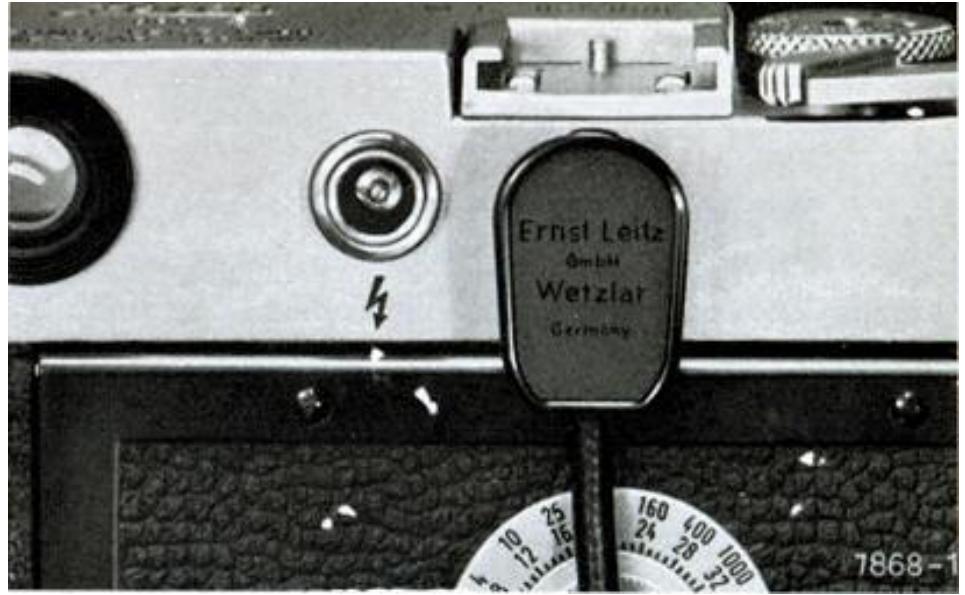
Le tableau de flash
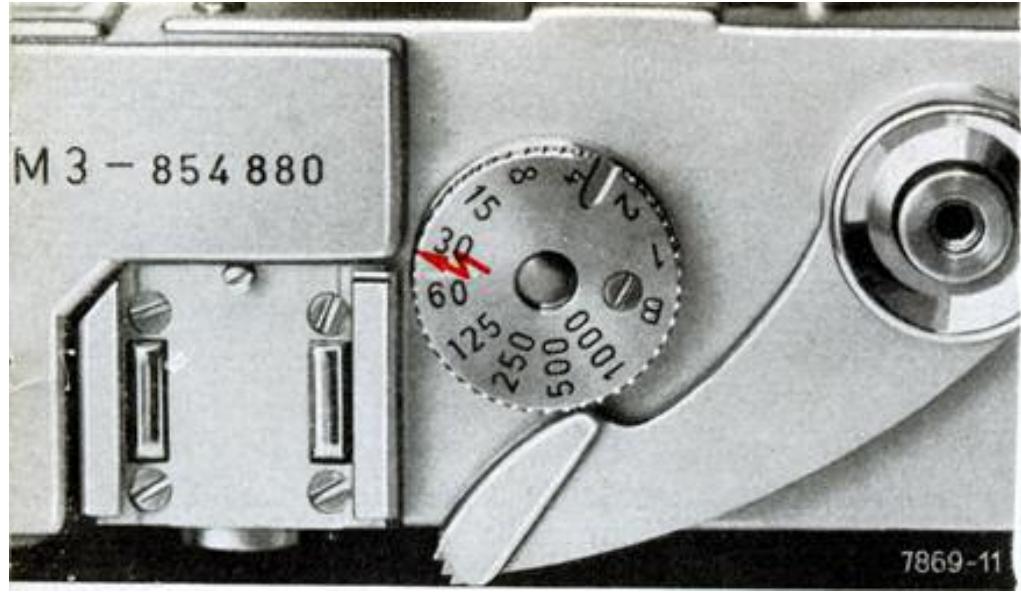
Tous les flashs électroniques et la plupart des types d'ampoules flash peuvent être facilement synchronisés avec le LEICA M3. La prise de gauche, marquée , est destinée aux flashs électroniques et aux ampoules flash de type F. Avec un flash électronique, vous pouvez régler n'importe quelle vitesse d'obturation entre 1 seconde et la flèche rouge qui correspond à 1 / 50 seconde. Le temps d'exposition effectif est déterminé par la durée du flash électronique (généralement environ 1 / 1000 seconde).
La prise de droite est utilisée pour synchroniser les ampoules flash de classe M. L'utilisation d'ampoules flash à plan focal est recommandée car elles permettent d'utiliser toutes les vitesses d'obturation jusqu'à 1 / 1000 seconde. De plus, les flashs électroniques et les ampoules flash peuvent être connectés au M3 en même temps, car les deux circuits fonctionnent indépendamment l'un de l'autre.
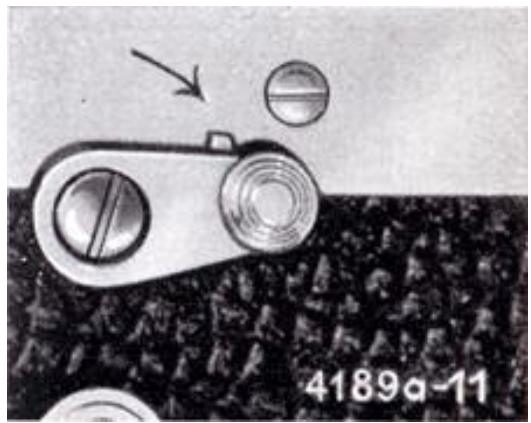
Des bouchons de protection sont disponibles pour couvrir les deux prises de flash à l'arrière de l'appareil. Conseil utile : ne laissez découverte que la prise en cours d'utilisation. Une connexion à la mauvaise prise de flash est une cause fréquente d'échec des photos au flash.
Utilisation du flash
Des détails sur les ampoules flash, les nombres guides et les vitesses d'obturation appropriées sont donnés dans le tableau de flash fourni avec le LEICA M3.
Remarque : les nombres guides ne sont que des indications approximatives. Ils sont basés sur l'utilisation d'un réflecteur assez plat et mat, et ne sont valables que pour des sujets à réflectivité moyenne, en tenant compte d'une certaine lumière réfléchie par les murs et les plafonds intérieurs.
Conseils pratiques pour les photos en couleur
Avec un film inversible couleur de type lumière du jour, utilisez uniquement un flash électronique ou des ampoules flash à enrobage bleu.
Avec un film inversible couleur de type lumière artificielle, utilisez des ampoules flash à enrobage jaune.
Avec un film négatif couleur, vous pouvez utiliser des ampoules flash claires ou un flash électronique, car une correction des couleurs est possible lors du tirage. Cependant, seules les ampoules flash à enrobage bleu ou le flash électronique conviennent comme éclairage d'appoint pour les photos en couleur prises en plein jour.
Les ampoules flash à revêtement bleu ont un nombre-guide inférieur à celui des ampoules claires du même type.
La grande variété de films couleurs disponibles et la nécessité d'une exposition exacte rendent impossible de donner des nombres-guide spécifiques. Nous suggérons donc de faire d'abord quelques essais avec la combinaison flash et film choisie.
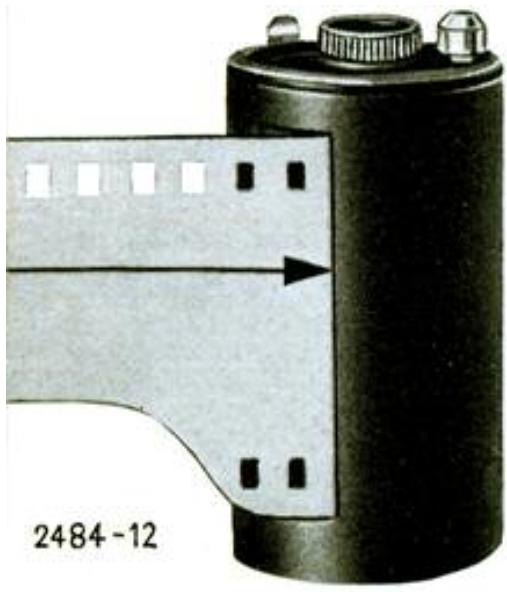
Cassettes pour le LEICA M 3
Dans ces instructions, nous montrons le chargement de l'appareil avec une cassette à lumière du jour disponible dans le commerce. Ces cassettes sont très pratiques, mais de nombreux photographes préfèrent acheter leur film en longueurs en vrac et le charger eux-mêmes dans la cassette spéciale LEITZ. Une telle cassette a l'avantage d'être absolument étanche à la lumière, facile à nettoyer, et de ne jamais rayer le film, car elle s'ouvre automatiquement à l'intérieur de l'appareil. La méthode de chargement est décrite dans une notice spéciale.
(Conception sujette à modifications sans préavis.)

ERNST LEITZ GMBH WETZLAR ALLEMAGNE
Filiale : Ernst Leitz (Canada) Ltd., Midland, Ontario.
Liste 11-3e/Engl. Imprimé en Allemagne XI/61/FY/SD


- CE MANUEL D'INSTRUCTIONS
- LE LEVIER DE TRANSPORT
- LE DÉCLENCHEUR
- LE COMPTEUR DE VUES
- L'OBTURATEUR
- LA MOLETTE DES VITESSES
- LE DIAPHRAGME À IRIS
- L'ÉCHELLE DE PROFONDEUR DE CHAMP
- LE TÉLÉMÈTRE À CADRE LUMINEUX
- LA DISTANCE
- OBJECTIFS DE 90 MM
- LE SÉLECTEUR DE CADRE DE VISÉE
- TENUE DE L'APPAREIL
- LE RETARDATEUR
- LES OBJECTIFS INTERCHANGEABLES DU LEICA M
- CHANGEMENT D'OBJECTIF
- LES OBJECTIFS RÉTRACTABLES
- TRAITEMENT DES LENTILLES
- ENTRETIEN DE L'OBJECTIF
- LE SUMMICRON 50 MM À DOUBLE PLAGE
- DANS SON ÉTUI PRÊT À L'EMPLOI
- FILTRES LEICA
- PARE-SOLEIL
- LE
- LEICAMETER "MC
- CHARGEMENT DU LEICA
- POUR RÉGLER L'INDICATEUR DE TYPE DE FILM
- DÉCHARGEMENT DU FILM
- FILMS LEICA
- LE TABLEAU DE FLASH
- UTILISATION DU FLASH
- CONSEILS PRATIQUES POUR LES PHOTOS EN COULEUR
- CASSETTES POUR LE LEICA M
- ERNST LEITZ GMBH WETZLAR ALLEMAGNE
Marque : LEICA
Modèle : M3
Catégorie : Appareil photo argentique