
P-791R V2 - Routeur ADSL ZYXEL - Notice d'utilisation et mode d'emploi gratuit
Retrouvez gratuitement la notice de l'appareil P-791R V2 ZYXEL au format PDF.


| Intitulé | Description |
|---|---|
| Type de produit | Routeur ADSL |
| Caractéristiques techniques principales | Norme ADSL2/2+, 4 ports Ethernet 10/100 Mbps, Wi-Fi 802.11g |
| Alimentation électrique | Adaptateur secteur 12V DC |
| Dimensions approximatives | 200 x 130 x 30 mm |
| Poids | 500 g |
| Compatibilités | Compatible avec la plupart des fournisseurs d'accès ADSL |
| Fonctions principales | Partage de connexion Internet, pare-feu intégré, gestion de la bande passante |
| Entretien et nettoyage | Nettoyer avec un chiffon doux, éviter les produits chimiques agressifs |
| Pièces détachées et réparabilité | Réparabilité limitée, pièces détachées disponibles auprès du fabricant |
| Sécurité | WPA/WPA2 pour la sécurité Wi-Fi, filtrage d'adresses MAC |
| Informations générales | Configuration via interface web, support de plusieurs langues |
FOIRE AUX QUESTIONS - P-791R V2 ZYXEL
Questions des utilisateurs sur P-791R V2 ZYXEL
0 question sur cet appareil. Repondez a celles que vous connaissez ou posez la votre.
Poser une nouvelle question sur cet appareil
Téléchargez la notice de votre Routeur ADSL au format PDF gratuitement ! Retrouvez votre notice P-791R V2 - ZYXEL et reprennez votre appareil électronique en main. Sur cette page sont publiés tous les documents nécessaires à l'utilisation de votre appareil P-791R V2 de la marque ZYXEL.
MODE D'EMPLOI P-791R V2 ZYXEL
ZyXEL

natural_image
Three business professionals in a meeting setting, one seated at a desk with a laptop and documents, another standing and conversing, and a third observing (no visible text or symbols)Internet Access with Fast Symmetric Connection
natural_image
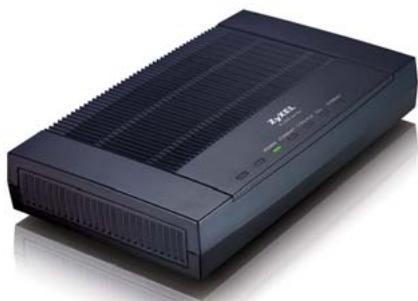
Black electronic device with ventilation grille and control panel (no visible text or symbols)■ G.SHDSL.bis Compliance
■ Symmetric Data Rate of up to 5.69 Mbps
■ Auto Fail-over and Fall-back WAN Backup Solution
■ Web Based Configuration for Easy Deployment
Benefits
High Speed Symmetric Data Transmission
The P-791R v2 is a high performance SHDSL.bis router for small/medium office to have Internet access and LAN-to-LAN application over the existing copper line. The P-791R v2 makes full use of the advanced G.SHDSL.bis technology, its symmetric transmission data rate can be up to 5.69 Mbps.
UPnP Support
The P-791R v2 supports UPnP discovery and UPnP NAT traversal. By using the standard TCP/IP protocol, the P-791R v2 can dynamically join a network and obtain an IP address as well as convey its capabilities and learn about other devices on a network.
Auto Fail-over and Fall-back WAN Backup Solution
The P-791R v2 features a fail-over and fall-back WAN backup solution for complete reliability. When the DSL connection fails, traffic is forwarded to either a backup ISDN or analog modem to maintain data exchange. When the DSL connection is re-established, traffic will be fully restored. The P-791R v2 also performs backup functions by redirecting traffic to a specific gateway to ensure availability of the Internet connection. The WAN backup solution saves device maintenance cost and reduces loss from daily operation.
G.SHDSL.bis Router
P-791R U2



ROUTER
Specifications
System Specifications
G.SHDSL Compliance
• ITU-T 991.2 G.SHDSL and G.SHDSL.bis
- Symmetric data transmission speed up to 5.69 Mbps
- Auto-negotiation rate adaptation and manually rate configuration
- Server/Client mode selectable
ATM Protocol
• ATM Forum UNI 3.1/4.0 PVC
• Support up to 8 PVCs
• RFC 1483/2684 Multiple Protocol over AAL5
• RFC 2364 PPP over AAL5
• RFC 2516 PPP over Ethernet
• LLC and VC Multiplexing
- ITU-T1.610 OAM F4/F5
• ATM QoS CBR, UBR, VBR-nrt
Firewall Security
- Packet Filtering
- User Authentication (PAP, CHAP) with PPP (RFC 1334, RFC 1994)
- Microsoft CHAP
Network Protocol
• IEEE 802.1d Transparent Bridging
• IP Routing: TCP, UDP, ICMP, ARP
- RIP v1 and RIP v2
• IP Multicast IGMP v1/v2
IP Management
• SUA/Multi-NAT Internet Sharing
• NAT server (Port forwarding)
• VPN (IPSec, PPTP) Pass-through
- SIP ALG Pass-through
• Multimedia Applications Support
• DHCP Server/Relay/Client
- DNS Proxy
- Dynamic DNS
- UPnP Support
Network Management
• Web-based Configuration
- FTP/TFTP for Firmware and Configuration Upgrade/Backup
- Telnet Management
- SNMP Support
• Built-in Diagnostic Tools
Advanced Features
- Dial Backup
- Traffic redirect
Hardware Specifications
- DSL interface: RJ-11 Connector for G.SHDSL Connection
• LAN interface: One Ethernet port, 10/100M Auto MDI/MDIX - Reset Button
- Console/Aux: RJ-45 Connector for Local Management and Dial Backup
- Status LED Indicator: POWER, ETHERNET, CON/AUX, DSL, INTERNET
- Power: 9 V AC
Physical Specifications
• Dimensions: 180 (W) x 127 (D) x 36 (H) mm
- Weight: 286.5 g
Environmental Specifications
Operation Environment
• Temperature: 0^ C \~ 40^ C
• Humidity: 20% \~ 85%
Storage Environment
• Temperature: -20°C \~ 60°C
• Humidity: 20% \~ 90%
• Temperature: -20°C \~ 60°C
• Humidity: 20% \~ 90%
Application Diagram
Back to Back Application
Broadband Internet Access
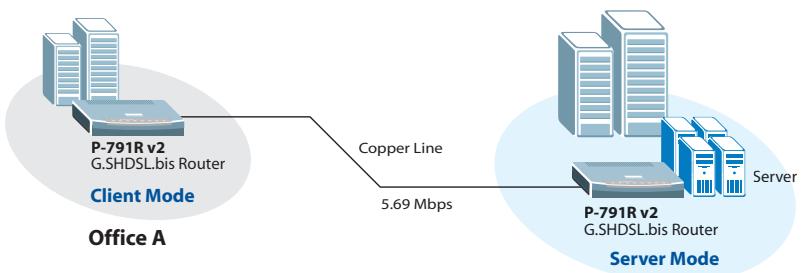
flowchart
graph LR
    A["Office A"] -->|P-791R v2 G.SHDSL.bis Router| B["Copper Line"]
    B -->|5.69 Mbps| C["Server"]
Office B
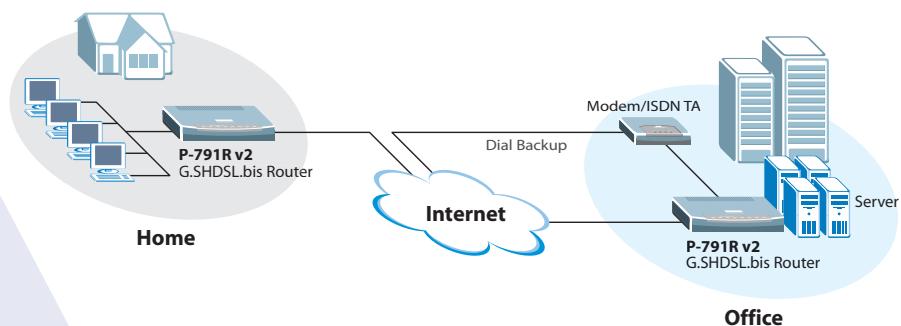
flowchart
graph LR
    A["Home"] --> B["P-791R v2 G.SHDSL.bis Router"]
    B --> C["Internet"]
    C --> D["Modem/ISDN TA"]
    D --> E["P-791R v2 G.SHDSL.bis Router"]
    E --> F["Server"]
    style A fill:#f9f,stroke:#333
    style B fill:#ccf,stroke:#333
    style C fill:#cfc,stroke:#333
    style D fill:#fcc,stroke:#333
    style E fill:#cff,stroke:#333
    style F fill:#ffc,stroke:#333
- ZyXEL
- Internet Access with Fast Symmetric Connection
- Benefits
- High Speed Symmetric Data Transmission
- UPnP Support
- Auto Fail-over and Fall-back WAN Backup Solution
- Specifications
- System Specifications
- G.SHDSL Compliance
- ATM Protocol
- Firewall Security
- Network Protocol
- IP Management
- Network Management
- Advanced Features
- Hardware Specifications
- Physical Specifications
- Environmental Specifications
- Operation Environment
- Storage Environment
- Application Diagram
- Back to Back Application
- Broadband Internet Access
Marque : ZYXEL
Modèle : P-791R V2
Catégorie : Routeur ADSL