
P-662H - Routeur ADSL ZYXEL - Notice d'utilisation et mode d'emploi gratuit
Retrouvez gratuitement la notice de l'appareil P-662H ZYXEL au format PDF.


| Type de produit | Routeur ADSL |
| Marque | ZYXEL |
| Modèle | P-662H |
| Catégorie | Routeur ADSL |
| Dimensions (L x P x H) | 180 x 128 x 36 mm |
| Poids net | 360 g |
| Alimentation | 12V AC |
| Normes ADSL supportées | ANSI T1.413, G.dmt, G.lite, ADSL2, ADSL2+, RE ADSL |
| Vitesse ADSL2+ maximale | 24 Mbps (réception) |
| Ports LAN | 4 ports 10/100M Auto MDI/MDIX |
| Port ADSL | 1 x RJ-11 ou RJ-45 (selon modèle) |
| Antenne | 5 dBi détachable (modèle P-662HW) |
| Fonctions de routage | NAT/SUA, DHCP, DNS Proxy, Dynamic DNS, UPnP, IGMP Proxy |
| Sécurité firewall | Stateful Packet Inspection, protection DoS/DDoS, DMZ, filtrage de mots-clés |
| VPN IPSec | 20 tunnels, chiffrement AES, NAT Traversal, PKI, keep-alive |
| Sécurité sans fil (modèle HW) | WEP 64/128/256 bits, WPA-PSK/TKIP, WPA2, filtrage MAC, IEEE 802.1x |
| Gestion | Interface Web, CLI, Telnet, SNMP, FTP/TFTP, TR-069 |
| Fonction de sauvegarde WAN | Fail-over et fall-back sur modem ISDN ou analogique |
| Certifications | FCC, CE |
| Garantie | 2 ans |
| Température de fonctionnement | 0°C à 40°C |
| Humidité de fonctionnement | 20% à 85% (sans condensation) |
| Entretien et nettoyage | Nettoyer avec un chiffon doux et sec. Ne pas utiliser de solvants. |
| Pièces détachées et réparabilité | Appareil non réparable par l'utilisateur. Contacter le support ZYXEL. |
FOIRE AUX QUESTIONS - P-662H ZYXEL
Questions des utilisateurs sur P-662H ZYXEL
0 question sur cet appareil. Repondez a celles que vous connaissez ou posez la votre.
Poser une nouvelle question sur cet appareil
Téléchargez la notice de votre Routeur ADSL au format PDF gratuitement ! Retrouvez votre notice P-662H - ZYXEL et reprennez votre appareil électronique en main. Sur cette page sont publiés tous les documents nécessaires à l'utilisation de votre appareil P-662H de la marque ZYXEL.
MODE D'EMPLOI P-662H ZYXEL
ZyXEL

natural_image
Man smiling while using a phone on a laptop in a modern living room (no visible text or symbols)Robust, Ultra High-speed ADSL2+ Security Gateway for SOHO Networks
natural_image
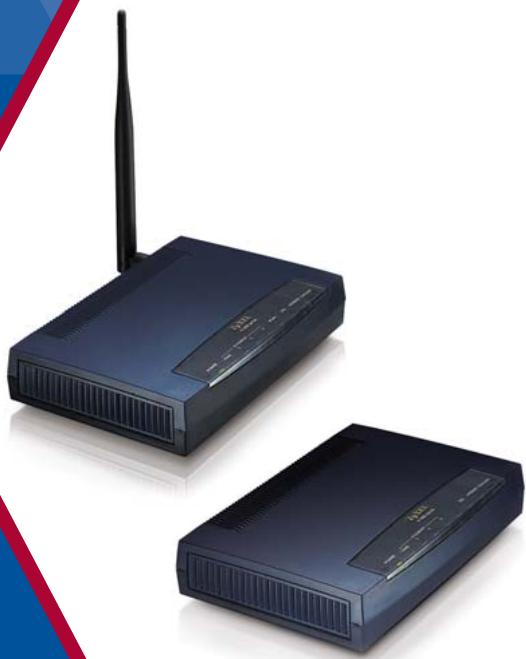
Two wireless devices with visible ports and antennas, one emitting a signal from the antenna (no text or symbols)■ ADSL2/2+ READSL Support
■ Firewall and IPSec VPN Security
■ Auto Fail-over and Fall-back WAN Backup
Benefits
Advanced ADSL2+ High-Speed Internet Access
The P-662H/HW-D Series is compatible with high-speed ADSL, ADSL2 and ADSL2+ interfaces over existing copper lines. With speeds of up to 12Mbps (ADSL2) or 24Mbps (ADSL2+), the P-662H/HW-D series offers higher data transfer rates and better bandwidth than traditional ADSL gateways. It also supports RE ADSL (Reach Extended ADSL) for higher speed and longer distance. For Wireless model is empowered by ZyXEL Wireless g+ SuperSpeed Technology, the P-662HW-D Series delivers the higher wireless transmission rate that makes extending wired network with efficiency and mobility.
Robust Firewall Security and IPSec VPN
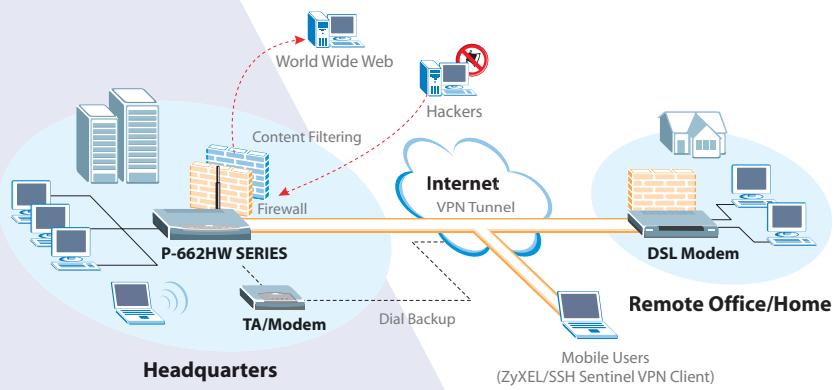
The ICSA-compliant ZyNOS operating system ensures state-of-art firewall performance and robust security on the P-662H/HW-D Series. Based on Stateful Packet Inspection, DoS (Denial of Service) and DDoS features, it provides the first line of defense against hackers, network intruders, and other malicious threats. Furthermore, its VPN feature supports data encryption over the Internet to ensure secure data transmission between two sites, and replaces expensive leased lines, allowing global interconnectivity with minimal expense.
Auto Fail-over and Fall-back WAN Backup Solution
The P-662H/HW-D Series features a Fail-over and Fall back WAN Backup Solution for complete reliability. When the DSL connection fails, traffic is forwarded to either a backup ISDN or analog modem to maintain data transfer. When the DSL connection is re-established, traffic is fully restored. The P-662H/HW-D Series also performs backup functions by redirecting traffic to a specific gateway to ensure availability of the Internet. The WAN Backup Solution saves device maintenance cost and reduces loss from daily operation.
ADSL2+ 4-port Security Gateway
P-662H/HW-D SERIES


ROUTER
Specifications
ADSL
- Support Multi-Mode standard (ANSI T1.413, Issue 2; G.dmt (G.992.1); G.lite (G992.2))
• EOC specified in ITU-T G.992.1
• ADSL2 G.dmt.bis (G.992.3)
• ADSL2 G.lite.bis (G.992.4) - ADSL2+ (G.992.5)
- Reach-ExtendedADSL (RE ADSL)
Router
• IEEE 802.1d Transparent Bridging
• IP Routing: TCP, UDP, ICMP, ARP
- RIP1v1 and RIPv2
• IP Multicast IGMP v1/v2
IP Management
• SUA/Multi-NAT Internet Sharing
• Multimedia Support
• DHCP Server/Relay/Client
- DNS Proxy
- Dynamic DNS
- UPnP Support
Network Management
- Web based Configuration
• Command-line Interpreter (CLI)
• Telnet Remote Management - SNMP Support
- FTP/TFTP firmware upgrade and configuration backup/restore
• Built-in Diagnostic Tool
Wireless
(For P-662HW-D series only)
• 802.11g Compliance
• 802.11g+ support
- Wired Equivalent Privacy (WEP) Data Encryption 64/128/256 bit
• Dynamic WEP Key
- MAC Address filter
• WPA, WPA-PSK/TKIP, WPA2
• Support IEEE 802.1x
• Stateful packet Inspection
- Prevent DoS, DDoS
• DMZ for public server
- Keyword blocking
Firewall Security
Virtual Private Network
• 20 IPSec VPN tunnels
• AES
• NETBIOS pass-through for IPSec
- IPSec VPN keep-alive
- IPSec NAT Traversal
- IPSec PKI
Other Features
- Zero configuration
- Traffic Redirect
- Dial backup
- Support IGMP proxy
• Multilingual Web Configurator
• TR-069 compliance
• Media Bandwidth Management (MBM) - Content Access Control
Hardware
• ADSL: One RJ-11 or RJ-45 Port
• LAN: 4-Port Switch, 10/100M Auto MDI/MDIX
- Antenna: 5dBi detachable antenna 1
- Console/AUX: RJ45 Port
- CON/AUX Switch
- Reset Button
- Status LEDs Indicator
- Power: 12V AC
Physical Specifications
• Dimensions: 180 (W) x 128 (D) x 36 (H) mm
- Net Weight: 360 g
Environmental Specifications
• Operation Environment
- Temperature: 0^ C \~ 40^ C
- Humidity: 20% \~ 85% (non condensing)
- Storage Environment
- Temperature: -20°C \~ 60°C
- Humidity: 10% \~ 90% (non condensing)
Certifications and Warranty
• Certifications: FCC, CE
- Warranty: Two years
* When the Wireless g+ SuperSpeed technology is enabled, the theoretical data rate can reach up to 125Mbps among Wireless g+ SuperSpeed-enabled access points and clients. Actual performance may vary depending on different operating environments.
Product Description
P-662H-D1
ADSL2+ 4-port Security Gateway over POTS
P-662H-D3
ADSL2+ 4-port Security Gateway over ISDN
P-662HW-D1
802.11g Wireless ADSL2+ 4-port Security Gateway over POTS
P-662HW-D3
802.11g Wireless ADSL2+ 4-port Security Gateway over ISDN
Application Diagram
■ Firewall/VPN Application
flowchart
graph TD
    A["P-662HW SERIES"] -->|Firewall| B["Internet VPN Tunnel"]
    B --> C["DSL Modem"]
    C --> D["Remote Office/Home"]
    D --> E["Mobile Users (ZyXEL/SSH Sentinel VPN Client)"]
    F["World Wide Web"] -->|Content Filtering| B
    G["Hackers"] -->|Dial Backup| B
    H["TA/Modem"] --> B
    I["Desktop"] --> B
    J["Desktop"] --> B
    K["Desktop"] --> B
    L["Desktop"] --> B
    M["Desktop"] --> B
    N["Desktop"] --> B
    O["Desktop"] --> B
- ZyXEL
- Robust, Ultra High-speed ADSL2+ Security Gateway for SOHO Networks
- Benefits
- Advanced ADSL2+ High-Speed Internet Access
- Robust Firewall Security and IPSec VPN
- Auto Fail-over and Fall-back WAN Backup Solution
- Specifications
- ADSL
- Router
- IP Management
- Network Management
- Wireless
- (For P-662HW-D series only)
- Firewall Security
- Virtual Private Network
- Other Features
- Hardware
- Physical Specifications
- Environmental Specifications
- Certifications and Warranty
- Product Description
- P-662H-D1
- P-662H-D3
- P-662HW-D1
- P-662HW-D3
- Application Diagram
Marque : ZYXEL
Modèle : P-662H
Catégorie : Routeur ADSL