Delta 8000 TA BUS & RF - Thermostat DELTA DORE - Notice d'utilisation et mode d'emploi gratuit
Retrouvez gratuitement la notice de l'appareil Delta 8000 TA BUS & RF DELTA DORE au format PDF.


Questions des utilisateurs sur Delta 8000 TA BUS & RF DELTA DORE
0 question sur cet appareil. Repondez a celles que vous connaissez ou posez la votre.
Poser une nouvelle question sur cet appareil
Téléchargez la notice de votre Thermostat au format PDF gratuitement ! Retrouvez votre notice Delta 8000 TA BUS & RF - DELTA DORE et reprennez votre appareil électronique en main. Sur cette page sont publiés tous les documents nécessaires à l'utilisation de votre appareil Delta 8000 TA BUS & RF de la marque DELTA DORE.
MODE D'EMPLOI Delta 8000 TA BUS & RF DELTA DORE
Delta 8000 TA BUS & RF
EN Zone thermostat for Delta 8000 system
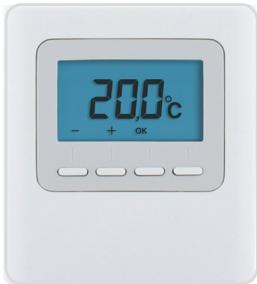
Instructions for use
Technical characteristics
• TA Bus : Supply by the bus, 24V
• TA RF : Power supplied by 2 batteries:
- Alcaline 1.5V, LR03/AAA, battery life 5 years or
- Lithium 1.5 V, LR03/AAA, 1200 mAh, battery life 10 years
• TA Bus: 2 cable bus input/output
- TA RF : Wireless range up to 300 metres in an open field, variable depending on the paired equipment (the range can vary depending on the installation conditions and the electromagnetic environment)
- Type 1 automatic action
• III Class III insulation
- Wall mounted or fitted on flush-mounted box
• Dimensions: 81 x 88 x 21 mm
• Protection index: IP 30
- Operating temperature: 0 to +40 °C
- Storage temperature: -10°C to +70°C
- Rated impulse withstand voltage: 0,33 kVac
- Installation in an environment with normal pollution levels
Contents
EN
1/ Description 12
2/ Use 14
2.1 Waking up the screen 14
2.2 Setting temperature settings 14
2.3 Locking down settings 15
3/ Help 17
1/ Description
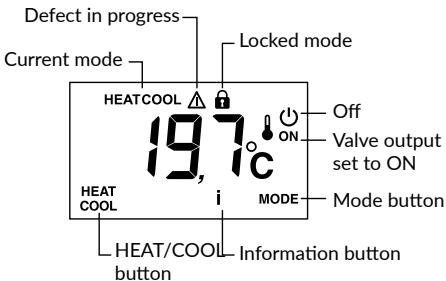
HEAT/COOL button: appears in OFF mode, if the thermostat is 'Master' and according to the system's configuration. Press and hold the button to switch from one mode to another.
MODE button: Toggles from OFF to ON mode. If a 'Master' thermostat is used, press 3 seconds.
i button: tap the button repeatedly to display the temperature values (setting or measured) and any defects.
ON valve output: this display is only available if it has been configured (CF04 = 1).
Controlled mode: 'OFF' is displayed when the Shutdown mode is controlled(e.g. with a programmer or Master thermostat) or if it is a Master thermostat.
HEAT or COOL mode: is displayed for the Heat/Cool production type (reversible heat pump).
2.1 Waking up the screen
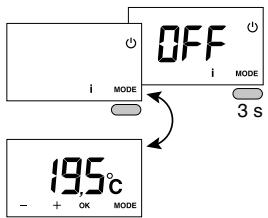
The screen goes to 'Sleep' after a 10-second time-out period (if CF11=0).
To wake it up, press any button.
2.2 Setting temperature settings
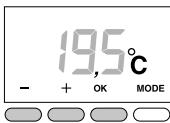
Press + or - to set the value.
Press OK to confirm.
2.3 Locking down settings
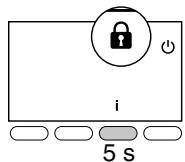
Press and hold the 'i' button for 5 seconds.
The 🔒 symbol appears.
Release.
In this mode:
- settings are deactivated,
- only the temperature
display is authorised.
To unlock, press and hold the i button for 5 seconds.
3/ Help
When a defect is detected on the system, the symbol ⚠️ flashes on the thermostat display. Press ‘i’ to display the type of defect.
Error messages
| E-32 | Address error. Several products were assigned to the same output (CF20). |
| E-33 | Thermostat internal sensor shorted. |
| E-34 | Thermostat internal sensor cut off. |
EN

www.deltadore.com
05/24

2704575 Rev.03
Marque : DELTA DORE
Modèle : Delta 8000 TA BUS & RF
Catégorie : Thermostat