
1100 - Imprimante DELL - Notice d'utilisation et mode d'emploi gratuit
Retrouvez gratuitement la notice de l'appareil 1100 DELL au format PDF.

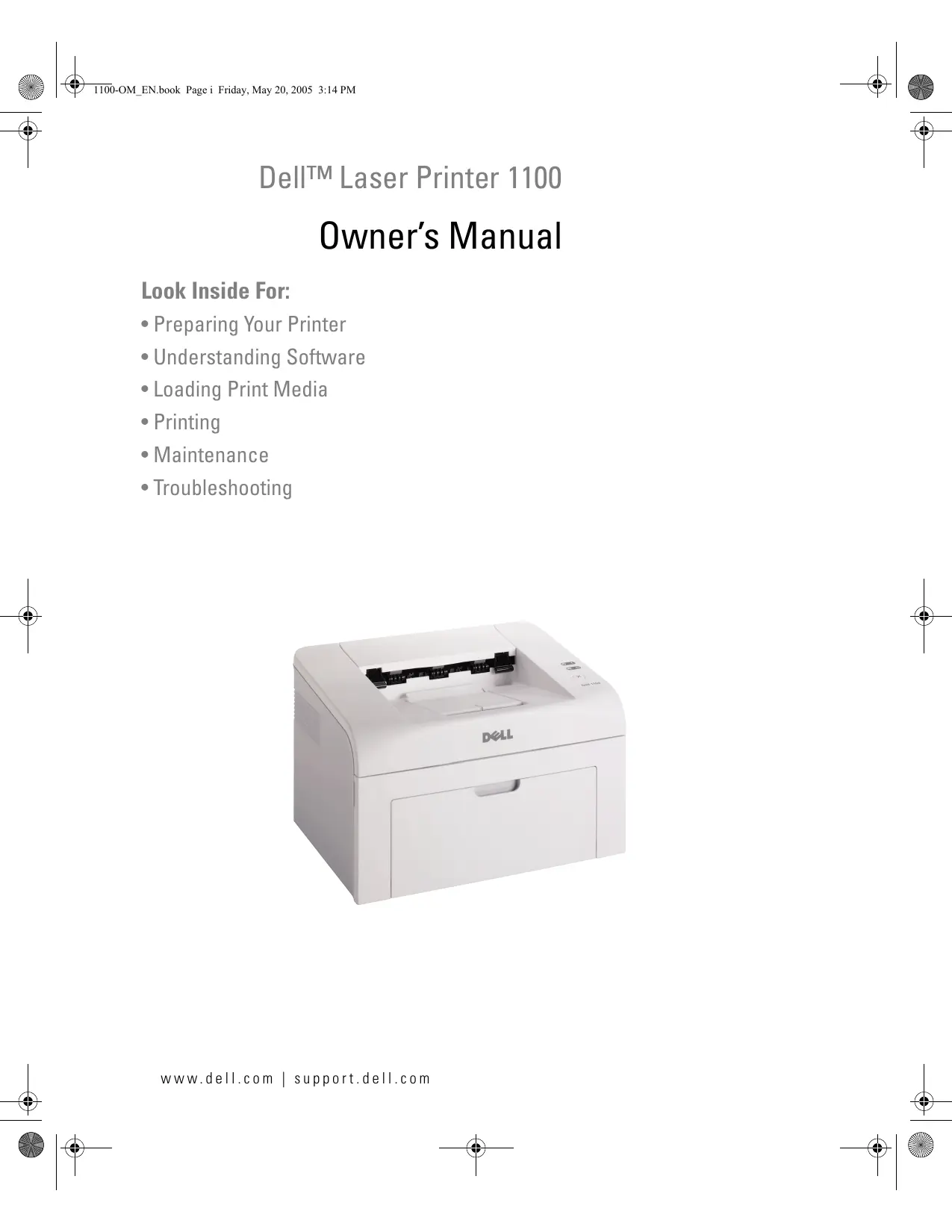

| Marque | DELL |
| Modèle | 1100 |
| Type de produit | Imprimante laser monochrome |
| Résolution d'impression | 600 x 600 dpi |
| Formats de papier supportés | Lettre, A4, A5, A6, Legal, Exécutif, JIS B5, ISO B5, Oficio, US Folio, Enveloppes (n°10, DL, C5, C6, Monarch), Étiquettes, Transparents, Cartes postales |
| Capacité du bac d'alimentation | 150 feuilles (80 g/m²) |
| Alimentation électrique | 110-240 V CA, 50/60 Hz, 4,0 A |
| Consommation électrique | En veille : environ 10 W, en impression : environ 300 W |
| Température de fonctionnement | 10 à 32 °C |
| Humidité de fonctionnement | 20 à 80 % HR |
| Niveau sonore | Moins de 50 dB(A) en impression |
| Interface | USB 2.0 (type B) |
| Cartouche toner | Référence J9833 (2 000 pages) |
| Cycle d'utilisation mensuel recommandé | Jusqu'à 5 000 pages |
| Fonctions spéciales | Alimentation manuelle, impression recto verso manuelle, correction haute altitude |
| Entretien | Nettoyage extérieur avec un chiffon doux et humide ; nettoyage intérieur lors du changement de cartouche |
| Sécurité | Produit laser Classe 1, mise à la terre obligatoire |
| Accessoires inclus | CD des pilotes et utilitaires, guide de démarrage, câble USB (selon région) |
FOIRE AUX QUESTIONS - 1100 DELL
Questions des utilisateurs sur 1100 DELL
0 question sur cet appareil. Repondez a celles que vous connaissez ou posez la votre.
Poser une nouvelle question sur cet appareil
Téléchargez la notice de votre Imprimante au format PDF gratuitement ! Retrouvez votre notice 1100 - DELL et reprennez votre appareil électronique en main. Sur cette page sont publiés tous les documents nécessaires à l'utilisation de votre appareil 1100 de la marque DELL.
MODE D'EMPLOI 1100 DELL
Dell™ Laser Printer 1100
Owner's Manual
Look Inside For:
Preparing Your Printer
- Understanding Software
- Loading Print Media
- Printing
- Maintenance
- Troubleshooting
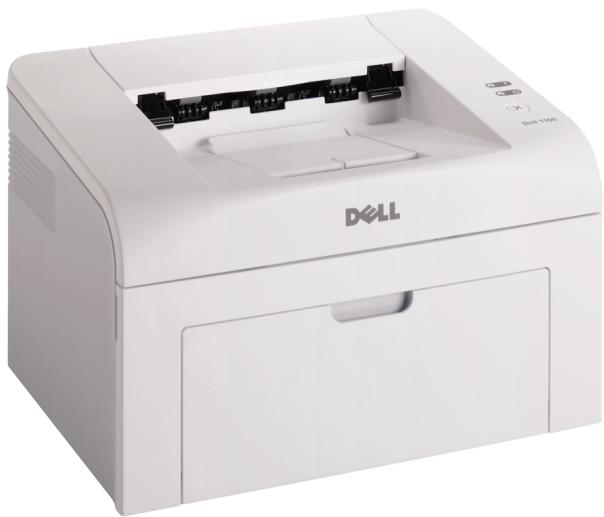
Order Toner Cartridges
Dell™ toner cartridges are available only through Dell. You can order toner cartridges online at www.dell.com/supplies or by phone.
| USA | 877-INK-2-YOU |
| Australia | 1300 303 290 |
| Austria | 08 20 - 24 05 30 35 |
| Belgium | 02.713 1590 |
| Canada | 877-501-4803 |
| Chile | 800-202874 |
| 1230-020-3947 | |
| China | 800-858-2425 |
| Colombia | 01800-9-155676 |
| Czech | 420 225 372 711 |
| Denmark | 3287 5215 |
| Finland | 09 2533 1411 |
| France | 0825387247 |
| Germany | 0800 2873355 |
| Ireland | 1850 707 407 |
| Italy | 800602705 |
| Japan | 044-556-3551 |
| Luxembourg | 02.713 1590 |
| Malaysia | 1800 88 0553 |
| Mexico | 866-851-1754 |
| Netherlands | 020 - 674 4881 |
| Norway | 231622 64 |
| Portugal | 21 4220710 |
| Puerto Rico | 866-851-1760 |
| Singapore | 1800 394 7425 |
| South Africa | 0860 102 591 |
| Spain | 902120385 |
| Sweden | 08 587 705 81 |
| Switzerland | 0848 335 599 |
| UK | 0870 907 4574 |

NOTE: If your country is not listed, contact your Dell distributor to order supplies.
| Toner Cartridge | Part Number |
| 2,000 page toner | J9833 |
Understanding the Printer
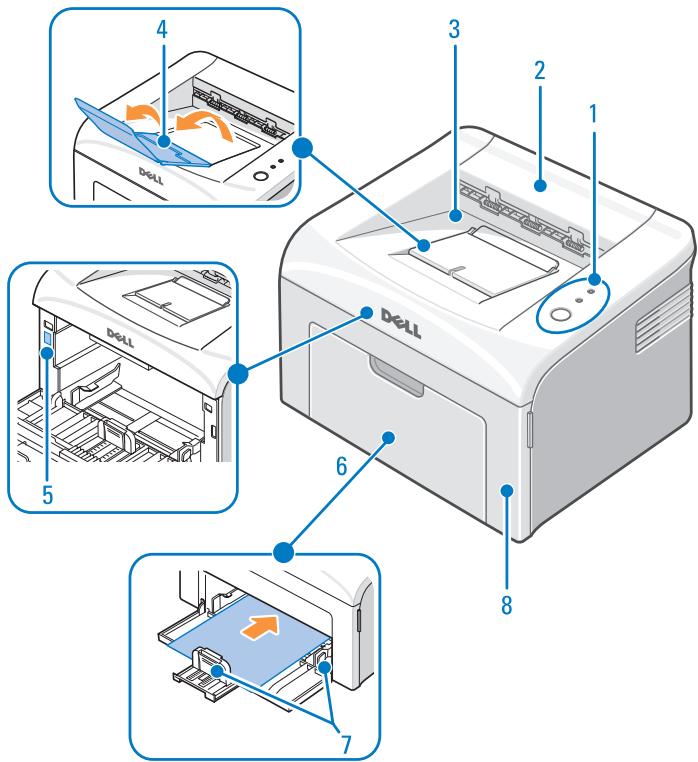
| # | Use the: | When you want to: |
| 1 | Operator Panel | Operate the printer and check the status of your printer. |
| 2 | Top Cover | Open to remove the paper jams. |
| 3 | Paper Output Tray | Stack printed document face down. |
| 4 | Paper Output Extension | Keep print media from falling off the paper output tray. |
| 5 | Express Service Code | Identify your printer when you use support.dell.com or contact technical support. Enter the Express Service Code to direct your call when contacting technical support. The Express Service Code is not available in all countries. |
| 6 | Paper Input Tray | Load up to 150 sheets of paper or other media, or a single sheet of paper or other media. |
| 7 | Paper Guides | Adjust the length and width of the media in the paper input tray. |
| 8 | Front Cover | Access the toner cartridge. |
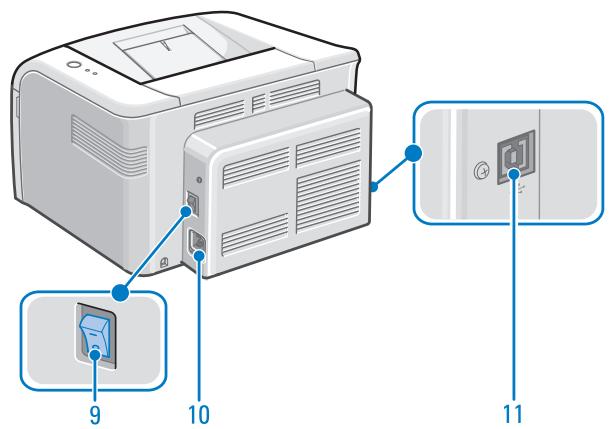
| # | Use the: | When you want to: |
| 9 | Power Switch | Power your printer on or off. |
| 10 | Power Cord Connector | Plug your printer into a properly grounded electrical outlet with the power cord (after all peripherals have been connected). |
| 11 | USB Cable Connector | Insert the USB cable. |
Accessing Your User's Guide
To access your User's Guide, click Start Programs Dell Printers Dell Laser Printer 1100 User's Guide.
Notes, Notices, and Cautions
NOTE: A NOTE indicates important information that helps you make better use of your printer.
NOTICE: A NOTICE indicates either potential damage to hardware or loss of data and tells you how to avoid the problem.
CAUTION: A CAUTION indicates a potential for property damage, personal injury, or death.
Information in this document is subject to change without notice.
© 2005 Dell Inc.. All rights reserved.
Reproduction in any manner whatsoever without the written permission of Dell Inc. is strictly forbidden.
Trademarks used in this text: Dell, DELL logo, and Dell Toner Management System are trademarks of Dell Inc.; Microsoft and Windows are registered trademarks of Microsoft Corporation.
Adobe is a registered trademark of Adobe Systems Incorporated.
Other trademarks and trade names may be used in this document to refer to either the entities claiming the marks or the names of their products. Dell Inc. disclaims any proprietary interest in trademarks and trade names other than its own.
Contents
Understanding the Printer 3
Accessing Your User's Guide iv
CAUTION: SAFETY INFORMATION. 1
WAARSCHUWING:VEILIGHEIDSINFORMATIE 2
FORSIGTIG: Sikkerhedsoplysninger 3
VAROITUS: TURVALLISUUSTIEDOT 4
FORSIKTG: SIKKERHETSINFORMASJON 5
WARNING: sakerhetsinformation 6
IPEyIpyEKeJHHe: INΦOPMALIЯ O B63OПАСHOCTI . . . . . 7
DIKKAT: Güvenlik bilgileri 9
CUIDADO: INFORMAÇÃO DE SEGURANÇA. 10
UPOZORNENI: BEZPECNOSTNI INFORMACE 11
PRZESTROGA: INFORMACJE O BEZPIECZENSTWIE 12
1 Preparing Your Printer
Setting Up the Printer 13
Using the Operator Panel 13
2 Understanding Software
Software Overview 15
Installing Dell Software 15
Uninstalling Dell Software 16
3 Loading Print Media
Print Media Guidelines 17
Pint Media Types, Sizes, and Support 17
Loading Paper in the Paper Tray. 19
Loading Paper Using Manual Feed Mode 21
Loading Special Materials. 22
4 Printing
Basic Printing 25
Accessing Printer Properties. 25
Setting High Altitude Correction 25
Sharing Your Printer Locally. 26
In Windows 98/Me 26
In Windows 2000/XP 27
5 Maintenance
Ordering Supplies 29
Replacing the Toner Cartridge. 30
Cleaning Your Printer 33
Cleaning the Exterior 33
Cleaning the Interior 33
6 Troubleshooting
Clearing Jams in the Paper Tray. 35
Paper Feed Jam. 35
Paper Exit Jam 36
Fuser Area Jam. 38
Tips for Avoiding Paper Jams. 39
Understanding the Operator Panel LEDs 40
LED Status Legend 40
More Troubleshooting 41
7 Contacting Dell
Technical Assistance 43
Automated Order-Status Service 44
Contacting Dell 44
8 Appendix
U.S Terms and Conditions of Sales 61
Limited Warranties and Return Policy 65
Limited Warranty for Dell-Branded Hardware Products (U.S. Only). 65
Total Satisfaction Return Policy (U.S. Only) 68
Limited Warranty Terms for Dell-Branded Hardware Products
(Canada Only). 69
Total Satisfaction Return Policy (Canada Only) 72
DellTM Software and Peripherals (Canada Only). 73
1-Year End-User Manufacturer Guarantee
(Latin America and the Caribbean Only) 73
Dell Inc.
Ink and Toner Cartridges Limited Warranties 75
Ink and Toner Cartridges Limited Warranty (U.S. and Canada Only) 75
Ink and Toner Cartridges Limited Warranty (Latin America Only) 76
Dette skema er alene anvendeligt for horske konsumenter 77
ANGREFRISTSKJEMA 77
Generelle betingelser for return: 77
Regulatory Notices 78
FCC Notices (U.S. Only). 79
NOM Information (Mexico Only) 80
Export Regulations 80
DellTM Software License Agreement 81
Limited Warranty. 82
U.S.Government Restricted Rights 82
General 83

CAUTION: SAFETY INFORMATION
Use the following safety guidelines to help ensure your own personal safety and to help protect your system and working environment from potential damage.
- This printer is certified as a "Class 1" laser product under the U.S. Department of Health and Human Services (DHHS) Radiation Performance Standard according to the Radiation control for Health and Safety Act of 1968.
Since radiation emitted inside the printer is confined within protective housings and external covers, the laser beam cannot escape during normal user operation.

CAUTION: Use of controls or adjustments or performance of procedures other than those specified herein may result in hazardous radiation exposure.
- Your product uses a printing process that heats the print media, and heat can cause certain media to release emissions. You must understand the section in your operating instructions that discusses the guidelines for selecting appropriate print media to avoid the possibility of harmful emissions.

CAUTION: If your product is not marked with this symbol , it must be connected to an electrical outlet that is properly grounded.
- The power cord must be connected to an electrical outlet that is near the product and easily accessible.
- Refer service or repairs, other than those described in the operating instructions, to a professional service person.
- This product is designed to meet safety standards with the use of specific Dell-authorized components. The safety features of some parts may not always be obvious. Dell disclaims liability associated with use of non-Dell-authorized components.

CAUTION: Do not use this product during a lightning storm.

WAARSCHUWING: VEILIGHEIDSINFORMATIE
Volg de onderstaande verilgheidsrichtlijnen om uw persoonlijke verilgheid te garanderen en uw systemen en werkomgeving gegen möglichke schade te beschemen.
- Deze printer is gecertificeerd als een "Klasse 1" laserproduct volgens de stralingsnorm gehanteerd door het Amerikaanse Department van Gezondheid en Welzijn (DHHS: Department of Health and Human Services) en zoals opgenomen in de Amerikaanse wet op stralingsbescherming voor gezondheid en verilgheid uit 1968.
- Omdat de straling die in de printer optreedt, opgesloten zit in beschermende behuizingen en externe kappen, kan de laserstraal Niet vrijkomenijdens normala gebruik.

WAARSCHUWING: Het gebruik van sturingen of instellenen of het uitvoeren van procedures die afwijken van deze hier vermeld kan resulteren in gevaarlijke blootstelling aan straling.
- Uw product maakt gebruik van een afdrukproces dat de afdrukmedia verhit, en de但它 kan bij sommige media aanleiding geben tot emissies. U moet de passage in uw bedieningsinstrumenties begrijpen dat handelt over de richtlijnen inzake het selecteren van geschikte afdrukmedia om de möglichkheid van schadelijke emissies te vermijden.

WAARSCHUWING: Als uw product Niet gemarkeerd is met dit symbol , dan moet u het aansluiten op een stopcontact met correcte aarding.
- Plug de stekker van het netsnoer in een stopcontact dat zich in de nabijheid van het product bevindt en makkelijk toegankelijk is.
- Laat onderhoud of reparations die afwijken van deze beschreiben in de bedieningsinstructies over aan gekwalificeerd onderhoudspersoneel.
- Dit product is ontworpen om aan de veiligheidsnormen te voldoen met behulp van specifieke componenten die door de Dell zichn goedgekeurd. De veiligheidseigenschappen van sommige onderdelen zichn nicht alkijd vanzelfsprekend. Dell kan nicht verantwoordelijk worden gesteld in geval van gebruik van componenten die nicht door Dell zichn goedgekeurd.

WAARSCHUWING: Gebruik dit product Niet tijdens een onweer.

FORSIGTIG: Sikkerhedsoplysninger
Brug falgende sikkerhedsvejledning til at sikre din egen personlige sikkerhed og til t beskytte dit arbejdsomrade mod eventuelle skader.
- Printeren er certificeret som laserprodukt i classe 1 under USA's Department of Health and Human Services (DHHS) Radiation Performance Standard i henhold til Radiation control for Health and Safety Act of 1968.
- Da stråling, der udsendes inden i printeren, holdes inde af beskyttende afdækning og udvendige dæksler, kan laserstrålen ikke slippe ud ved normal brug.

FORSIGTIG: Anvendelse af kontrolfunktioner erler justering ell er udforelse af procedurer, der icke er angivet i donne manual, kan resultere i farlig bestråling.
- Printeren bruger en udskrivningsproces, hvorved udskrivningsmediet opvarmes, og varmen kan medfore, at visse medier frigiver straler. Du skal forsta afsnittet i betjeningsvejledningen, der beskriver, hvordan egnede udskriftmedier vaelges, sä risikoen for farlig bestråling undgås.

FORSIGTIG: Hvis din printer/DD er mærket med dette symbol , skal den tilsluttes et elektrisk stik, som er jordet.
- Ledningen skal sættes i et elektrisk stik, som er iærheden af printeren, og som er let atkommen til.
- Service eller reparation, som ikke er beskret i betjeningsvejledningen, skal udføres af en uddannet servicerepræsentant.
- Denne printer er udviklet, sö den opfylder sikkerhedsstandarderne med brug af særlige Dell-autoriseredekomponenter. Sikkerhedsfunktionerne i nogle dele er ikke altid synlige. Dell fraskriver sig ansvaret i forbindelse med brugen af ikke-Dell-autoriseredekomponenter.

FORSIGTIG: Printeren mä ikke benyttes i tordenvejr.

VAROITUS: TURVALLISUUSTIEDOT
Toimi seuraavien turvaohjeiden mukaan oman turvallisuutesi varmistamiseksi ja valttäaksisi järjestelmän ja työmpäristón mahdollisen vahingoittumisen.
- Tämä tulostin on luokiteltu "Luokan 1" laserlaitteeksi DHHS:n sateilystandardin (Department of Health and Human Services Radiation Performance Standard) mukaisesti Yhdysvaltain sateilyn rajoitusta koskevaa lainsäädäntöä (Radiation control for Health and Safety Act, 1968) noudattaen.
- Koska tulostimen sisallä syntyvä sateily jää suojakotelon ja kansien sisälle, lasersäteitä ei pääse ulos normalaizin kayton yhteydessä.

VAROITUS: Laitteen käytö tai säätö muulla kuin tassä käytöoppaassa mainitulla ravalla saattaa altistaa vaaralliselle sateilyle.
- Tulostimessa käytetään tulostusprosessia, joka kuumentaa tulostusmaterialiaalia, ja lampö aiheuttaa päästöjä joillain materiaialella. Sinun on ymmärrettävä käyttooppaan osa, jossa kuvataan sopivien tulostusmaterialiaalien valinta, mahdollisten Haitallisten päästöjen välttämiseksi.

VAROITUS: Jos laitteessa ei ole symbolia , se on kytkettävä asianmukaisesti maadoitettuun pistorasiaan.
Virtajto on liitettavpistorasiaan, joka on lahellalaitetta ja johon paaee helposti kaskisi.
- Jatä muut kuin käytöoppaassa kuvatut huolto- ja korjaustoimet ammattilaisure.
Tämä laite on suunnitelu tayttamään turvallisuusstandardit, kun sitä käytetaan yhdessä Dellin hyväksymien componenttien kanssa. Joidenkin turvallisuominaisuudet eivat valttamattä ole itsestään selviä. Dell kiistäa vastuun muiden kuin Dellin hyväksymien componenttien käytösta.

VAROITUS: Älä käytä tata laitetta ukonilman aikana.

FORSIKTIG: SIKKERHETSINFORMASJON
Ved Å følge retningslinjene for sikkerhet nedenfor trygger du din egen personlige sikkerhet i tillegg til at du bidrar til Å beskytte systemet og arbeidsmiljøet mot mulig skade.
- Skriveren er tertifisert som et laserprodukt i "Class 1" ifolge U.S. Department of Health and Human Services (DHHS) Radiation Performance Standard, basert på "Radiation control for Health and Safety Act" fra 1968.
- Siden strålingen som avgisinne i skriveren er avgrenset av et beskytende kabinett og ytre deksler, kan ikke laserstrålen unnslippe under vanlig bruk av skriveren.

FORSIKTIG: Bruk av anordninger erller justeringer ullforelse av andre prosedyrer enn de som er beskrevet her, kan fere til at det avgis farlig stråling.
- Produktet anvender en utskriftsproess der utskriftsmediet blir varmet opp, og varmen kan före til at visse utskriftsmedier avgir utslipp. Du må vårfortrolig med den delen av bruksanvisingen der disse retningslinjene blir omtalt forå kinne velge egnede utskriftsmedier og dermed unngå muligheten for skadelige utslipp.

FORSIKTIG: Hvis produktene ikke er merket med symbolet , på det kobles til et strømuttak som er forsvarlig jordet.
- Strømledningen på kobles til et strømuttak som befinner seg iærheten avprodukter og som erlett tilgengelig.
Overlat andre former for service og reparasjoner enn det som er beskrevet i bruksanvisningen, til en profesjonell servicetekniker. - Dette Produktet er konstruert for a oppfylle sikkerhetsstandardene ved bruk av bestemte komponenter som er godkjent av Dell. Sikkerhetsfunksjonene ved noen deler er ikke alltid(APpenbar. Dell fraskriver seg ansvar knyttet til bruk av komponenter som ikke er godkjent av Dell.

FORSIKTIG: Dette Produktet skal ikke brukes i tordenvær.
VARNING: sökerhetsinformation
Följ anvisingarna har nedan for att skydda dig själv, systemet och arbetsmiljon mot skador.
- Skrivaren har certifierats vara en laserprodukt av klass 1,enligt den amerikanska standarden Department of Health and Human Services (DHHS) Radiation Performance Standard, i enlighet med statuten Radiation control for Health and Safety Act fraan 1968.
- Eftersom strålningen som slapps ut i skrivaren inte tränger ut genom skyddskaporna och de externa luckorna, gär laserstrålen inte att komma Åt under normala omständigheter.
WARNING: Kontroller, justeringar eller proceduren annat an de som beskrivs har kan leda till farlig bestrånlng.
- Skrivarens utskriffsprocessinnebarattutskriftsmedietvarmsupp,ochdetkangoraatt amnen frigorsfran det.Lasoch ta till dig det avsnitti handboken dar det finns riktlinjer om hur du valjer lampliga utskriffsmedier for att slippa att skadliga amnen frigors.
WARNING: Om Produkten inte ar märkt med symbolen , maste den anslutas till ett jordat vagguttag.
Natsladden maste anslutas till ettag nara intill skrivaren, och det ske vara latt att komma at.
- Låt参加会议的人员在会议开始前,应先了解会议的内容。
- Låt参加会议的人员在会议开始前,应先了解会议的内容。
- Produktten uppyller tillampliga sakerhetsfreskrifter om enbart de componenter som Dell har godkant anvands. Det kan vara svart att avgora om vissa reservdeler ar sakra. Dell fransager sig allt ansvar for skador som uppkommen på grund av att du anvander componenter som Dell inte har godkant.
WARNING: Använd inteprodukten)när det äskar.
ПЕДУПЕЖДECHNE:ИнФОРMAЦЯ OБE3ОПACHOCTN
CJIeIyIte IINBHeIeHHbIM HnKke Yka3aHnM IO MEPAM 6e30IacHocTH, YTO6bI o6ecIeHTb BaIHy JInuhyo 6e30IacHocTb IN36eKaTb BO3MOKhBx IOBpeKJdeHn BAIIErO o6OpyIOBaHHa.
-Даньл пиHTep ceTнфицрOBaHΚк Ла3ернь пpoIyKT KJIacca 1 NO CTaHДapTy Ha yPoBHH N3ЛуЧЕпЯ MHHNCTePcTBa ЗдраBOOxpaHeHЯ N coIIaJIbHOrO obecIeHЯ CIIIA, pa3pa6OTaHHOMY B COOTBeTcTBHn C 3aKOHOM O KOHTpOJIe NaД paINaIeN B INHTepecax ЗдраBOOxpaHeHЯ N 6e3ОПaChOCTn 1968 r.
- IocKoJIbKy H3JyueHHe, co3JaBaemoe BHyTpHn IIpHHTepa, IIIOJIHOCTbI0 3aKpbIto 3aIIHTbIMN KOJyXAMN IN BHEIIHMN KpbIIKMamH, JIA3epHbI IIyOK Hn IIpH KaKNx YCJIOBHX He MOKeT BbIITn H3 IIpHHTepa HApJyK.
I PENEYPPEXJEHNE: IcnoJIb3OBAHne 3JeMeENTOB ynpaBHeHnHa HAcTpoEKNII BbIOJHHeHne OepaCn, He ONICaHHbIX B HaCTOaCem pyKOBoDcTBe, MOxET npINBeCTN K OnaCHOMy paDaIauNoHHOMy o6bUyeHnO.
B IIpoIeCE PteaTH IprHnTep HaIpeBaet HocHTeJIb. B pe3yJIbTaTe HaIpeBa HeKOTOpbIe HocHTeJIH MOryt BblJeJIaTb pa3JIuHbIe BeIeCTBa. BHNMaTeJIbHO IprOHTaIe pa3JdeJI PykoBOcTBA, IIOCBaIeHHbI Bbl6OpY HocHTeJIa, YTO6bI N36eKaTb BO3MOJHO BblJeHnB VpeINbIX BeIeCTB.
I PNEyPEXJEHNE: EcIn Ha yctpoiCTBe HET 3NaUka ,ero Heo6xOIMo NOKJIouaTb K 3JeKtpuyeCKoN pO3eTKe C 3a3EmJHeHem.
- IIIHyp ПИТАнгуЖНО ПОДКЛЮЧаь K уДБНО распОлJOKEHHо 3JIeKTPчecко розтke ряДOM C yCTрОИСТВOM.
Pa60tI IO 6cJIyKHBAHHIO HpeMOHTy, He OINcaHHbIe B PyKOBOCTBE IIOJIb3OBaTeJ, cJIeIyET NOpUHaTb KBaJIInΦIIINpOBAHOMY cIeIIHaJIHCTV. - ΘTOT ПОДУКТ YДОВЛЕТВОРЯЕ ВСЕ CTAHДAPТAM NO 6e3OПаСHOCTH Иpr yCЛOBИН ИПОЛБЗОВАнЯ KOMПОHETOB, cePTNФИПОВАньIx Dell. Heo6xOДИМье Меры ПОобеспчЕнЮ 6e3OПаСHOCTH Иpr ИПОЛьЗОВАньИ НЕКOTOPьIx DeTajEIM OMYT 6bITb HEочEBИнБI. Dell He IprINHMaET Ha ce6Я OTBETCTBEHHOCTb 3a ИСПОЛьЗОВАн�е KOMПОHETOB, He cePTNФИПОВАньIx Dell.
I PPEyIpyEKeHHe: He noJIb3yIteCb daHHbIM yCTpoIcTBOM BO BpeMra rpo3bl.
Jalil cllg:
Jnnnnnnnnnnnnnnnnnnnnnnnnnnnnnnnnnnnnnnnnnnnnnnnnnnnnnnnnnnnnnnnnnnnnnnnnnnnnnnnnnnnnnnnnnnnnnnnnnnnnnnnnnnnnnnnnnnn
aall 1 jg lgl g 11111111111111111111111111111111111111111111111111111 0.968 p
y 1 y 1 y 1 y 1 y 1 y 1 y 1 y 1 y 1 y 1 y 1 y 1 y 1 y 1 y 1 y 1 y 1 y 1 y 1 y 1 y 1 y 1 y 1 y 1 y 1 y 1 y 1 y
a a a a a a a a a a a a a a a a a a a a a a a a a a a a a a a a a a a a a a a a
a 111111111111111111111111111111111111111111
#
•
#
i 1
AaI Jgssg jgsy gaaal no yjg yjg jy jy jy jy jy jy jy jy
y 1 y
a 1 a a a a a a a a a a a a a a a a a a a a a a a a a a a a a a a a a a a a a a a a a a a a a a a a a a a
•
•
•
Ae jll gall 1i iial
#
DIIKKAT: Güvenlik bilgileri
Kisisel guvenliginizi saglamak ve ayni zamanda sisteminizi ve calisma ortaminizi muhtemel ariza ve hasarllidan korumak icin asagidaki emniyet kurallarina uyun.
A.B.D. Sağhk ve İnsan Hizmetleri Bakanlıgün (DHHS) 1968 yüzanda yırkış Güren Sağhk ve Güvenlik icin Radyasyon kontrlükanununa,gore, bu yazı bir "Class 1" lazer ürün olarak onaylanmistr.
Normal kullanim sirasinda yazicinin icerisinden yayimlanan radyasyon, koruyucu muhafazalar ve diş kapakla kapatildigindan lazer isiniylaogrudan temas mumkun degildir.
! DİKKAT: Burada belirlenden farklı sekilde kontrollerin, ayarlamaların vya kullanı prosedürlerinin uygulanması kişilerin tehlükleri radyasyona maruz kalmasina neden olabilir.jjjs
- Ürünüz yazdirma malzemesini istan bir yazdirma ilemi uygulamaktadir. Bu isi bazı yazdirma malzemelerinin çeşitli emisyonlar Yaymasın neden olabilir. Zararlı emisyonların onlenmesi icin kullanim talimatarlınizda bulunan yazdirma malzemelerinin seçilmesi ile ilgili bolümü iyi sekilde anlamaniz gerekir.
DIIKKAT: Ürününüz bu simge ❶ ile isaretlidehyilse, uygün sekilde topraklanmşbir prizetakilması gerekir.
- Elektrik kablosu urunun yaninda bulunan ve kolay erisilebilir bir prize takilmalidir.
- Kullanim talimatlarinda belirtilenlerin disindaki bakim ve onarimali icin profesyonel bir servis personeline basvurun.
- Bu urun, Dell tarafindan onaylanmş belli parçalarin kullanimiyla güvenlik standartlarin karsilamak uzere tasarlanmştr. Bazı parçalarin güvenlik özellikleri her zaman çokalık degildir. Dell tarafindan onaylanmş parçalarin kullanimi sonucu ortaya çıkabilecek durumlarda Dell sorumluluk kabul etmez.
! DIKKAT: Bu urunu firtinali gunjlerde kullanmayin.
CUIDADO: INFORMAÇÃO DE SEGURANÇA
Siga as orientações de segurança abaixo para o fazer a garantir a sua segurança pessoal e a proteger o Sistema e ambiente de trabalho contra danos potenciais.
- Esta impressora está certificada como produto laser de "Classe 1", segundo a norma Radiation Performance (Desempenho das radiações) do U.S. Department of Health and Human Services (DHHS - Departamento de Saúde e serviços humanos dos Estados Unidos), em conformidade com o controlo de radiação da Health and Safety Act (Lei sobre Saúde e segurarça) de 1968.
- Como a radiação emitida no interior da impressora fica limitada às estruturas de proteção e tampas externas, o raio laser não sai da boaina durante o seu functimento normal.
CUIDADO: A utilização de controlos ou os ajustes, ou mesmo a execuição de procedimentos não especificados neste manual, pode resultar em exposicao perigosa a radiações.
- A sua Máquina utilizes um processo para imprimir que aquece o material de impressão; o calor pode fazer com que o material de impressão produza emissões. Tem de comprehender a sequção das instruções que descreve as orientações para escolher o material de impressão adequado e para fazer a correência de emissões prejudicials à Saúde.
CUIDADO: Se a sua boaina não tiver o síbolo , tem de ser ligada a uma tomada com ligaçao a terra.
- O cabo de alimentação tem de ser ligado a uma tomada que esteja perto da区内 e sera de fácil accesso.
- A operações de manutenção e reparação que não esteam descritas nas instruções devem ser efectuadas por um专业技术 professional.
-Estaquinafoiconcebida pararespeitarasnormasdeseguranca,utilizando componentesspecificos autorizadospela Dell.Asfuncoesdeseguranca dealgumaspeçaspodemnemsperse evidentes.A Dell nao se responsabilizaelautilizaçãodecomponentesnainorazidospeladell.
CUIDADO: Não utilize esta Máquina em caso de trovoada.
UPOZORNÉNÍ: BEZPEČNOSTNÍ INFORMACE
Následujác bezpečnostníPokyny vám pomohou zajistit vastné osobné bezpečnost a chránit vaše zařizení a pracovní prostředí prěd možnám poškozením.
- Tato tiskárna je klasifikována jako laserove zařizení "tridy 1" podle normy pro vyzařováne vydané Ministerstven zdravotnictvá a verejných služeb USA v souladu s kontrolou zařeni pro Zák o zdraví a bezpečnosti z r. 1968.
Protoze zareni vyzarované uvnit tiskárny je uzavreno ochrannymi pouzdry a vnějsimi kryty, laserovy paprsek nemuže uniknout pri normalním uživatském provozu.
UPOZORNENI: Použivání jin'ych ovladacích prvkú nebo nastavení, nebo provádení jin'ych postupù než těch, které jsou uvedeny v tétó priručce, mûze zpùsobit vystavení nebezpečnému zářeni.
Vase zařizení používa tiskový proces, ktery zahríva tisková média, a vysoká teplota muže způsobit, ze určita media budou uvolnovat emise. Musite si podrobně nastudovat kapitolu v navodu k obsluze, kde jsouPokyny pro vyber správnych tiskovychmedii, aby se predešlo možnám škodlivém emisim.
UPOZORNÉNÍ: jestliže vaše zařízení není označeno tímto symbolem , musí být pripojeno k elektrické zásuvice, ktera je Čradsné uzeměna.
- Prívodní snūrǔ musí byt zapojena do elektrické zásuvky, ktera je blízko zařizení a je snadno pristupné.
- Opravářé a udržbové práce, které nejsou popsány v námodu k obsluze, prěnechte profesonánlímu servisínu technikovi.
- Tento vyrobek je zkonstruován tak, aby splnoval bezpečnostní normy pri použití konkrétnich componentů autorizovaněch společností Dell. Bezepčnostní charakteristiký některych dílů nemusi být vždy zřejné. Společnost Dell nepřebrá odpovednost spojenou s použitím componentů, které nejsou společností Dell autorizovány.
UPOZORNENI: Nepoužívejte toto zařizení prí boudce.
PRZESTROGA: INFORMACJE OBEZPIECZENSTWIE
Aby zapewnić sobre bezpiecieństwo osobiste oraz uchronic system iŚrodkowisko przy przy potencjalnymi uszkodzeniami,NSEZY przy bezpiecieństwa.
- Niniejsza drukarka uzyskała certyfikat produktu laserowej pierwssszej klasy w Rozumieni u normy Radiation Performance Standard amerykanskiego Departamento Zdrowia i Uslug Obywatelskich (DHHS), zgodnie z ustawo kontroli promieniowania dla celów zdrowotnych i bezpieczność (Radiation control for Health and Safety Act) z roku 1968.
- Ponieważ promieniowanie emitowane we wnętrzu drukarki jest ograniczone osłonami ochronnymi i zewétrzną obudowa, w trakcie normalné uzytkowania promién laseraNie powinien wydostać są na zewnatrz.
! PRZESTROGA: Regulacja i dopasowywanie urzadzenia oraz postopowanie wedlug procedur innych nit wskazane w niniejszym dokumencie mogaN narazić uzytkownika na kontakzt niebepezpieczna dawk promieniowania.
- Drukarka w procesie druku nagrzewa material do drukowania, a wydzielane cieplo要去 spowodować emitowanie promieniowania przy czȩtość materialy. Aby uniknac ryzyka emitomania szkodliwogo promieniowania sąȩ zapoznać są z sekcjä w instrukcji obstrugi omawiajacć doxor odpowiednic materialów do drukowania.
PRZESTROGA: Jesli drukarka nie jest oznaczona symbolem , musi zostac podłuczona do prawidlowo uziemnionego zródrza zasilania.
- Kabel zasilania powinien zostac podlaczony do gniażda sieci elektrycznej, znajduźego są w poplizu drukarki i latwo dostepnégo.
- Serwisowanie i naprawy urzadzenia innie niz opisane w instrukcji obslugi powinny byc powierzane kompetentnenu serwisantomi.
- Drukarka została zaprojektowana w sposob spelniajcy standardy bezpiecznych przy załozenia okreslonych elementów firmy Dell. Zabepieczenia niedtorych czeci mogaNie byc oczywiste.Firma Dell wypla z odpowiedzialnosc zwiazana z uzywaniem elementow przy nią niezatzwierdzonych.
PRZESTROGA: Drukkari nie nalezy uzywac w czasie burzy.
Preparing Your Printer
Setting Up the Printer
If you have not already done so, follow the steps on the Setup Diagram (poster) to complete the hardware and software installation.
Using the Operator Panel
The operator panel on the top right side of your printer has two LEDs and one button.
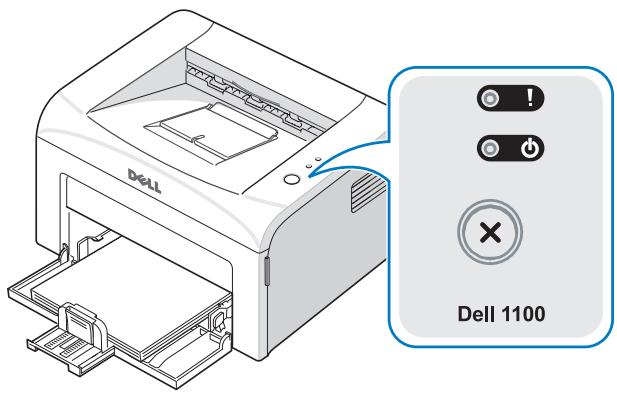
LEDs
| LED | Description |
| ! | The operator panel LEDs signify different things, depending on their sequence. LEDs that are off, on, and/or blinking indicate printer conditions, such as printer status, intervention (for example, out of paper and jammed paper), or service. For more information on what the LEDs sequence means and what you can do, see “Understanding the Operator Panel LEDs” on page 40. |
Button
| Item | Description |
| To print a demo page | In Ready mode, press and hold Ⓒ for 2 seconds until both LEDs blink slowly, and release. |
| Manual feeding | Press Ⓒ each time you load a sheet of paper in the tray, when you select Manual Feed for Source from your software application. For detailed information, see “Loading Paper Using Manual Feed Mode” on page 21. |
| To cancel a print job | Press Ⓒ during printing. Ⓒ! blinks red while the print job is cleared from both the printer and the computer, and the printer then returns to Ready mode. This may take some time depending on the size of the print job. In Manual Feed mode, you can’t cancel the print job by pressing Ⓒ. |
| Manual Duplex feeding | Press Ⓒ each time you load the paper back in the tray after the first side of your job has printed while manual duplex printing. For detailed information, see the HTML User’s Guide. |
Understanding Software
Software Overview
After setting up your printer and connecting it to your computer, you must install the drivers and utilities from the Drivers and Utilities CD included with your printer. If you purchased a Dell™ computer and your printer at the same time, the drivers and utilities are automatically installed. You don't need to install them. The Drivers and Utilities CD contains the following:
- Dell Printer Driver- allows your computer to communicate with your printer. To use your printer as a printer in Windows, you must install the printer driver. For information about installing the printer driver in Windows, see page 15.
- Dell Toner Management System™ - displays the status of the printer and the name of the job when you send a job to print. The Dell Toner Management System™ window also displays the level of toner remaining and allows you to order replacement toner cartridges.
- User's Guide- HTML documentation provides detailed information about using your printer.
Installing Dell Software
A printer driver is software that lets your computer communicate with your printer. The procedure to install drivers depends on the operating system you are using.

NOTE: If you attach a USB printer cable while your printer and computer are powered on, the Windows hardware wizard launches immediately. Cancel the screen and use the Drivers and Utilities CD to install the Dell software.
1 Make sure that the printer is connected to your computer and powered on. Close all unnecessary programs.

NOTE: If the printer is not connected to your computer when you install the CD-ROM, the No Printer Found screen appears. Follow the instructions to install the software.
2 Insert the Drivers and Utilities CD.
3 If necessary, select a language by pressing the Language button on the main screen.
4 Select Typical Installation to install the User's Guide, the printer driver, and Dell Toner Management System™ as the default settings.
To choose an individual component to install, select Custom Installation. You can also change the destination folder.
5 When the installation has been completed, you may print a test page. Click Finish to complete the installation and close the wizard. You are now ready to print.
Uninstalling Dell Software
You should remove the printer driver if you are upgrading the software or if your driver installation fails. You can remove the software using the Drivers and Utilities CD or the Windows uninstall.

NOTE: Close all programs before uninstalling software.
1 From the Start menu, select Programs Dell Printers Dell Laser Printer 1100 Dell Printer Software uninstall.
2 Select the software you want to remove and click Next. The selected driver and all of its components are removed from your computer.
3 Click Finish.
Loading Print Media
Print Media Guidelines
Printer media includes paper, card stock, transparencies, labels, and envelopes. Your printer provides high quality printing on a variety of print media. Selecting the appropriate print media for your printer helps you avoid printing problems. To get the best possible print quality, use only high-quality, copier-grade paper.
The following table provides information on the input source, including the print media types and sizes you can select and supported weights.
Pint Media Types, Sizes, and Support
| Paper | Dimensionsa | Weight | Capacityb |
| Plain Paper | |||
| Letter | 8.5 x 11 in. (216 x 279 mm) | ||
| A4 | 8.27 x 11.7 in. (210 x 297 mm) | ||
| A5 | 5.83 x 8.27 in. (148 x 210 mm) | ||
| Executive | 7.25 x 10.5 in. (184.2 x 266.7 mm) | 60 to 90 g/m2bond (16 to 24 lb) for the paper tray | 150 sheets of 75 g/m2bond (20 lb) paper for the paper tray |
| Legal | 8.5 x 14 in. (215.9 x 355.6 mm) | 60 to 165 g/m2bond (16 to 43 lb) for manual feed mode | 1 sheet of paper for manual feed mode |
| JIS B5 | 7.17 x 10.1 in. (182 x 257 mm) | ||
| ISO B5 | 6.93 x 9.84 in. (176 x 250 mm) | ||
| A6 | 4.13 x 5.85 in. (105 x 148.5 mm) | ||
| Oficio | 8.50 x 13.50 in. (216 x 343 mm) | ||
| US Folio | 8.5 x 13 in. (216 x 330 mm) | ||
| Envelopes | |||
| No.10 | 4.12 x 9.5 in. (105 x 241mm) | ||
| DL | 4.33 x 8.66 in. (110 x 220 mm) | 75 to 90 g/m2bond (20 to 24 lb) for manual feed mode | 1 sheet of paper for manual feed mode |
| C5 | 6.38 x 9.01 in. (162 x 229 mm) | ||
| C6 | 4.5 x 6.4in. (114 x 162 mm) | ||
| Monarch | 3.875 x 7.5in. (98.4 x 190.5 mm) | ||
| Labels | |||
| Letter | 8.5 x 11 in. (216 x 279 mm) | 120 to 150 g/m2bond | |
| A4 | 8.3 x 11.7 in. (210 x 297 mm) | ||
| Transparencies | |||
| Letter | 8.5 x 11 in. (216 x 279 mm) | 138 to 146 g/m2bond | |
| A4 | 8.3 x 11.7 in. (210 x 297 mm) | 1 sheet of paper for manual feed mode | |
| Card Stock | |||
| Post Card | 4 x 6 in. (101.6 x 152.4 mm) | 90 to 163 g/m2bond (16 to 43 lb) for manual feed mode | |
| Minimum Size (custom) | 3 x 5 in. (76 x 127 mm) | 60 to 165 g/m2bond (16 to 43lb) for manual feed mode | |
| Maximum Size (Legal) | 8.5 x 14 in. (216 x 356 mm) |
a The printer supports a wide range of media sizes.
b Capacity may vary depending on print materials' weight and thickness, and environmental conditions.
Loading Paper in the Paper Tray
Load up to 150 sheets of plain paper in the paper tray.
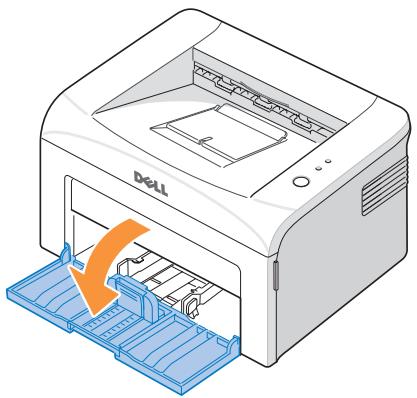
1 Open the paper input tray. Pull on the length and width guides to extend the tray.
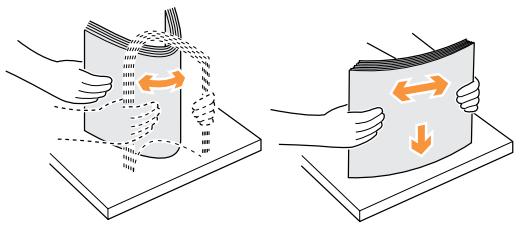
2 Flex the sheets back and forth to loosen them, and then fan them out. Do not fold or crease the print media. Align the edges on a level surface.
3 Load paper in the paper tray with the side to be printed on facing up.
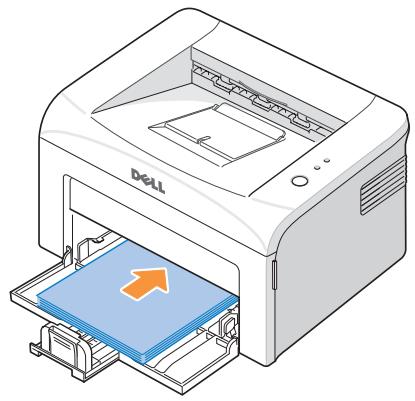
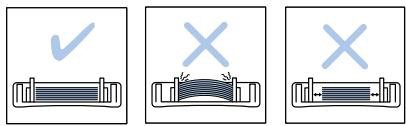
Make sure that all four corners are flat in the tray.
4 Be careful not to overload the paper tray. Overloading may cause paper jams.
Squeeze the length guide and slide it until it lightly touches the end of the paper stack. Squeeze the width guide and move it toward the stack of paper until it lightly touches the side of the stack.
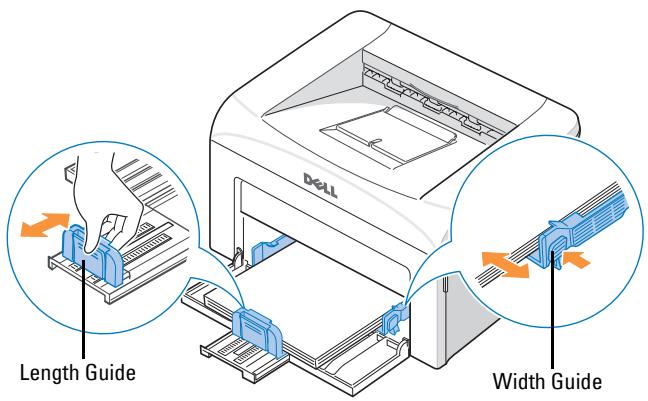

NOTE: Improper adjustment of paper guides can result in paper jams.
Loading Paper Using Manual Feed Mode
If you select Manual Feed in the Source option in your software application, you can manually load a sheet of print material in the tray. Manually loading paper can be helpful when you want to check the print quality after each page is printed.
Use the manual feed mode to print transparencies, labels, envelopes, or postcards in addition to paper types or sizes that are not currently loaded in the paper tray.
NOTE: Flatten any curl on postcards, envelopes, and labels before loading them into the paper tray.
1 Load a sheet of print material in the paper tray with the side to be printed on facing up.
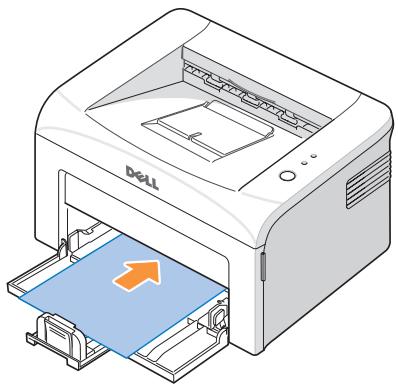
2 Adjust the paper length and width guides against the print material without bending the paper.
3 To print a document in Manual Feed mode, you must select Manual Feed for Source from the software application, and then select the appropriate paper size and type. For details, see the HTML User's Guide.
4 Press on the printer's operator panel to start feeding.
Printing starts.
NOTE: If you don't press the button after a pause, the paper will be automatically fed into the printer.
5 If you are printing multiple pages, load the next sheet after the first page prints out, and press .
Repeat this step for every page to be printed.
Loading Special Materials
1 Open the paper input tray.
2 Load the print material in the paper input tray. Do not mix types.
3 Adjust the length and width guides against the print material without bending it.
4 To print on special material, you must select Manual Feed for Source from the software application, and then select the appropriate paper size and type. For details, see the HTML User's Guide.
5 Press to start.
See the following directions to load each type of print material.
- Load an envelope in the tray with the flap side down and the stamp area on the top left side. The end of the envelope with the stamp area enters the printer first, from the center of the tray.
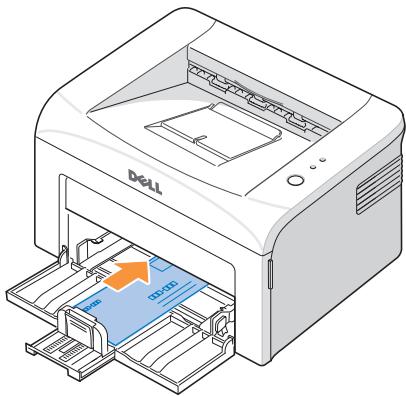

NOTICE: Never load envelopes with stamps, clasps, snaps, windows, coated linings, or self-stick adhesives. These envelopes may severely damage the printer. The stamp is shown in the illustration only for placement.

CAUTION: If you print 20 envelopes in succession, the surface of the top cover may become hot. Please exercise caution.
- Load a sheet of labels in the tray with the side to be printed on facing up.
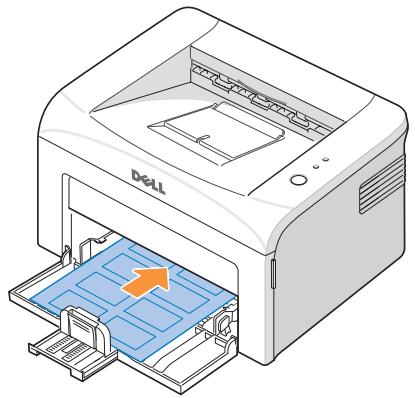
NOTE: To prevent labels from sticking to each other, do not let the printed label sheets stack up as they are printed out.
- Load a transparency in the tray with the side to be printed on facing up, and the top with the adhesive strip inserted first.
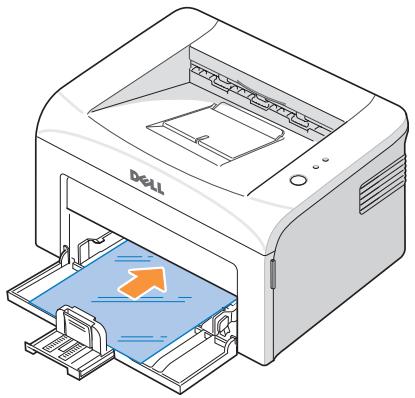
NOTE: To prevent transparencies from sticking to each other, do not let the printed sheets stack up as they are printed out.
NOTE: Place transparencies on a flat surface after removing them from the printer.
NOTE: Do not use transparencies that are separating from the backing sheet.
- Load a sheet of card stock with the side to be printed on facing up, short edge first, from the center of the tray.
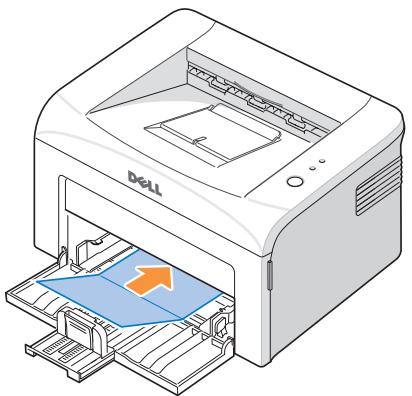
NOTE: Do not print on media smaller than 3.0 in. (76 mm) wide or 5.0 in. (127 mm) long.
- Load a letterhead in the tray with the design face up, top edge toward the printer.
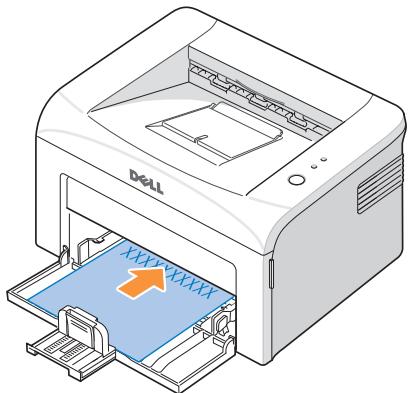
NOTE: Before you load letterhead, verify that the ink on the paper is dry. During the fusing process, wet ink can come off preprinted paper.
Printing
Basic Printing
1 Load paper. See page 19.
2 With your document open, click File Print. Make sure that your printer is selected.
3 To change the printer settings, click Properties, Preferences, Options, or Setup, depending on the program or operating system.
The printer properties window displays.
4 From the five tabs on the top of the printer properties window, confirm the selections.
5 Click OK until the Print window appears.
6 Click OK or Print, depending on the program or operating system, to start printing.

NOTE: Press on the operator panel to cancel a print job. In Manual Feed mode, you can't cancel a print job by pressing .
Accessing Printer Properties
Change printer settings in the printer properties tabs. The printer properties window differs, depending on your operating system.
1 With your document open, click File Print.
The Print window appears.
2 In the Print window, click Properties, Preferences, Options, or Setup, depending on your
program or operating system.
3 For details about the printer properties tabs, please refer to the HTML User's Guide.
Setting High Altitude Correction
If your printer is going to be used at an altitude above 2,500m (8,200 ft), you can optimize the print quality for those circumstances using the High Altitude Correction option.
1 Click the Windows Start menu.
2 Click Settings and then Printer, or Printers and Faxes.
3 Select the Dell Laser Printer 1100 icon.
4 Right-click on the printer icon and select Properties.
5 Click the Printer tab and select the High Altitude Correction checkbox.
Sharing Your Printer Locally
You can connect the printer directly to a selected computer, called the "host computer," on a network using a USB cable. Your printer can be shared by other users on the network through a Windows 98, Me, 2000, or XP network printer connection. Before you can share your printer, you must first setup a Microsoft Windows network.
In Windows 98/Me
Setting Up the Host Computer
1 Start Windows.
2 Click the Start button, select Control Panel, and double-click the Network icon.
3 Click the File and Print Sharing box, check the box next to I want to be able to allow others to print to my printer, and click OK.
4 Click Start and select Printers from Settings. Double-click your printer name.
5 Click Properties in the Printer menu.
6 Click the Sharing tab and check the Shared As box. Fill in the Share Name field and then click OK.
Setting Up the Client Computer
1 Right-click the Start button and select Explore.
2 Open your network folder in the left column.
3 Right-click the shared name and click Capture Printer Port.
4 Select the port you want, check the Reconnect at log on box, and then click OK.
5 Click the Start button and select Settings and then Printers.
6 Double-click your printer icon.
7 Click the Printer menu and point to Properties.
8 Click the Details tab, select the printer port, and then click OK.
In Windows 2000/XP
Setting Up the Host Computer
1 Start Windows.
2 For Windows 2000, click the Start button Settings Printers. For Windows XP, click the Start button and select Printers and Faxes.
3 Double-click your printer icon.
4 Click the Printer menu and select Sharing.
5 For Windows 2000, check the Shared As box. For Windows XP, check the Share this printer box.
6 Fill in the Share Name field and click OK.
Setting Up the Client Computer
1 Right-click the Start button and select Explore.
2 Open your network folder in the left column.
3 Click the shared name. If you can't find the shared name, make sure that the user account for the client computer is registered on the host computer.
4 For Windows 2000, from the Start button, click Settings and select Printers. For Windows XP, from the Start button, click and select Printers and Faxes.
5 Double-click your printer icon.
6 Click the Printer menu and select Properties.
7 Click the Ports tab and select Add Port.
8 Click Local Port and select New Port.
9 Fill in the Enter a port name field and enter the shared name.
10 Click OK and select Close.
11 Click Apply and select OK.
Maintenance
Ordering Supplies
You can order supplies using the Dell™ Toner Management System or by contacting Dell at www.dell.com/supplies.
In addition to the toner level indicator that is displayed in the Printing Status window each time you send a job to print, the printer's operator panel LED sequences tell you about the status of your supplies. When lights orange, your toner cartridge is low and you should order a new toner cartridge.
1 Double-click the Dell Toner Reorder Program icon on your desktop.
OR
From the Start menu, click Programs Dell Printers Dell Laser Printer 1100 Dell Toner Reorder Program.
OR
In the Printing Status window, click the Order Supplies button.
2 The Order Toner Cartridges window appears.
Click Visit Dell's cartridge ordering web site to order supplies online.
If ordering by phone, call the number that appears under the By Telephone heading.
Replacing the Toner Cartridge

CAUTION: Before performing any of the procedures listed in this section, read and follow the safety information on page 1.

CAUTION: Do not touch the green underside of the toner cartridge. Use the handle on the cartridge to avoid touching this area.
When the toner cartridge is near the end of its life, on the operator panel lights orange. Additional pages may be printed, but white streaks or light print will occur. Gently shake the toner cartridge from side-to-side 5 or 6 times to distribute the toner evenly and temporarily improve print quality.
When the toner eventually runs out, only blank pages print. At this stage, the toner cartridge needs to be replaced.
To order more toner, go to www.dell.com/supplies.

CAUTION: For best results, use Dell toner cartridges. Print quality and printer reliability are not guaranteed if you do not use Dell supplies.
To replace the toner cartridge:
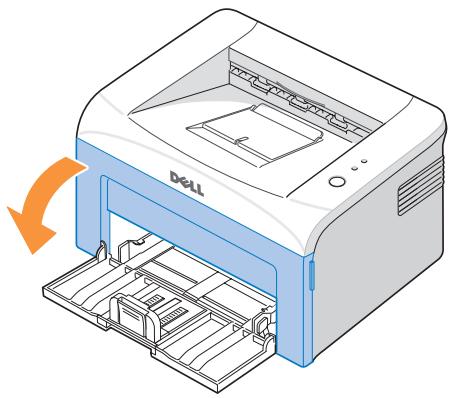
1 Open the front cover.
2 Pull the used toner cartridge out and lift it up and away from the printer.
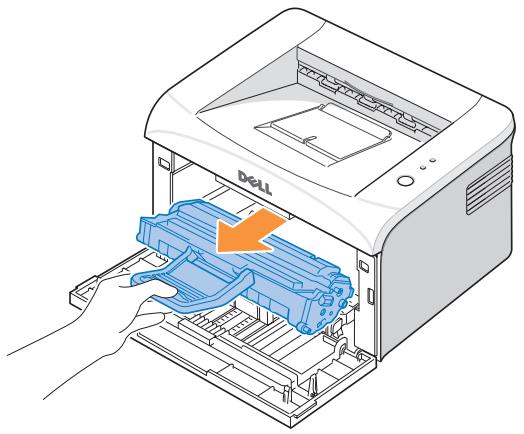
CAUTION: Avoid reaching too far into the printer. The fusing area may be hot.
3 Unpack a new toner cartridge. Hold the cartridge carefully and gently shake it from side-to-side 5 or 6 times to distribute the toner.
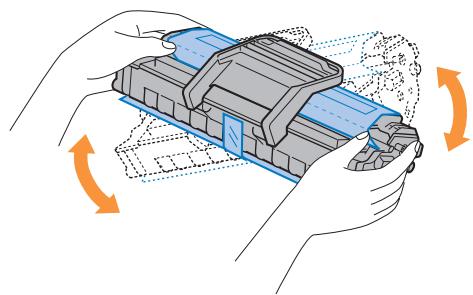
NOTE: If toner comes into contact with your clothing, wipe the toner off with a dry cloth and wash your clothing in cold water. Hot water sets toner into fabric.
CAUTION: Do not touch the green underside of the toner cartridge. Use the handle on the cartridge to avoid touching this area.
CAUTION: To prevent damage to the toner cartridge, do not expose it to light for more than a few minutes.
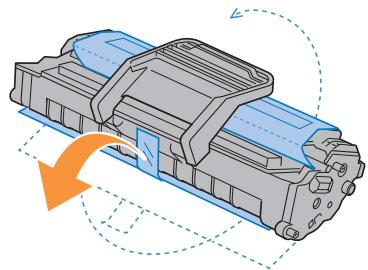
4 Pull the tape to remove the protective paper.
5 Locate the cartridge slot inside the printer, one on each side.
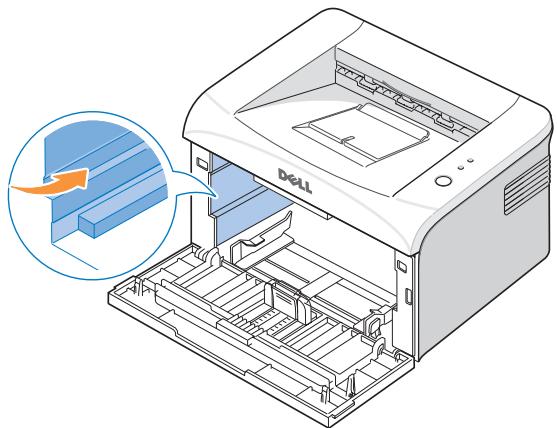
6 Unfold the toner cartridge handle and grasp it. Insert the cartridge into the printer until it snaps into place.
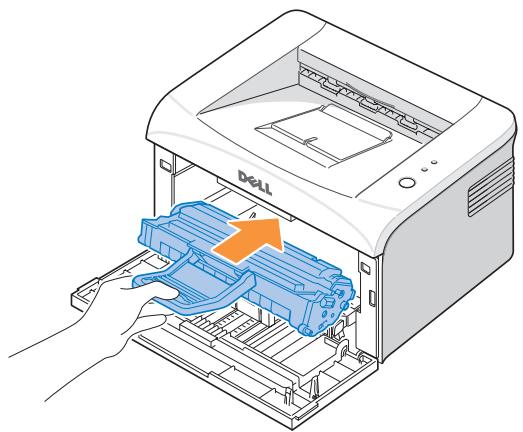
7 Close the front cover. Make sure that the cover is securely closed. If it is not firmly closed, printing errors may occur.
Cleaning Your Printer
To maintain print quality, follow the cleaning procedures below, each time the toner cartridge is replaced or if print quality problems occur.
NOTE: Do not touch the transfer roller located under the toner cartridge when cleaning inside the printer. Oil from your fingers may cause print quality problems.
CAUTION: Cleaning solvents that contain alcohol or other strong substances may discolor or crack the printer cabinet.
Cleaning the Exterior
Clean the printer cabinet with a soft, damp, and lint-free cloth. Do not let water drip onto the printer or inside the printer.
Cleaning the Interior
Paper, toner, and dust particles can accumulate inside the printer and cause print quality problems, such as smearing or toner specks. Clean inside the printer to prevent these problems.
1 Power the printer off and unplug the power cord. Wait approximately 10 minutes for the printer to cool down.
2 Open the front cover.
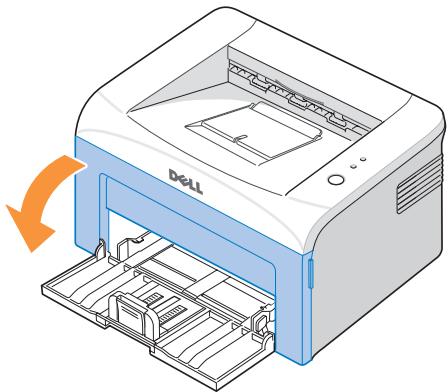
3 Gently pull the toner cartridge out, being careful not to scratch against the printer, and lift it up and away from the printer. Set it on a clean flat surface.
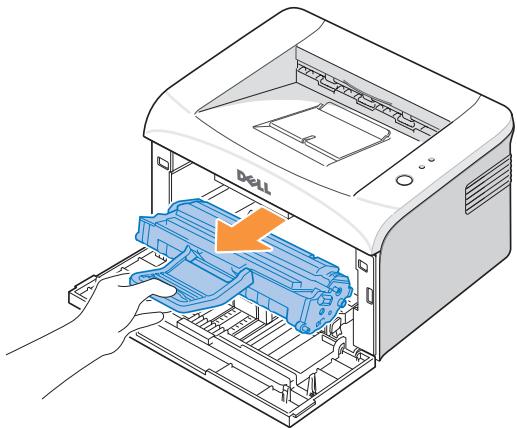
CAUTION: To prevent damage to the toner cartridge, do not expose the toner cartridge to light for more than a few minutes.
CAUTION: Do not touch the green underside of the toner cartridge. Use the handle on the cartridge to avoid touching this area.
4 With a dry and lint-free cloth, wipe away any dust and spilled toner from the toner cartridge area and the toner cartridge cavity.
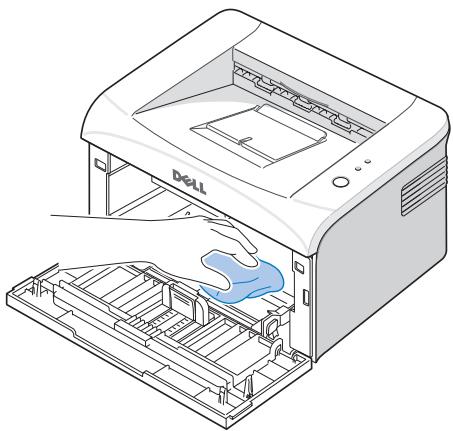
CAUTION: Do not touch the transfer roller inside the printer. Oil from your fingers may cause print quality problems.
5 Reinsert the toner cartridge and close the front cover.
6 Plug in the power cord and power the printer on.
Troubleshooting
Clearing Jams in the Paper Tray
If a paper jam occurs, ! on the operator panel lights red. Find and remove the jammed paper. If you cannot see it, look inside the printer.
To avoid tearing the paper, pull the jammed paper out gently and slowly. Follow the steps below to clear the jam.
Paper Feed Jam
1 Remove any misfed paper by pulling it out by its visible edge. Make sure that all of the paper is properly aligned in the tray.
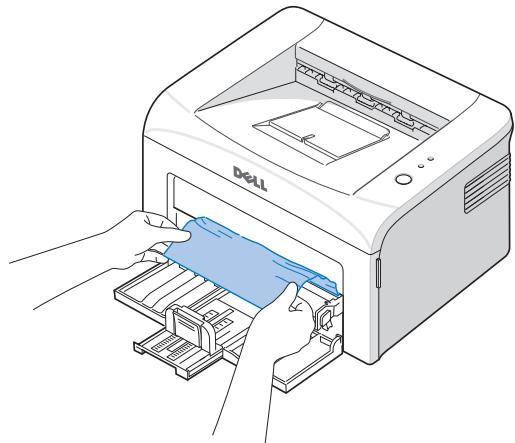
2 Open and close the front or top cover to resume printing the document from failed pages.
Paper Exit Jam

NOTE: Paper jams in this area may result in loose toner on the page. If you get any toner on your clothes, wash them in cold water as hot water will set the toner into the fabric.
1 If the paper jams as it exits to the output tray and a long portion of the paper is visible, pull the paper straight out.
Open and close the front or top cover to resume printing.
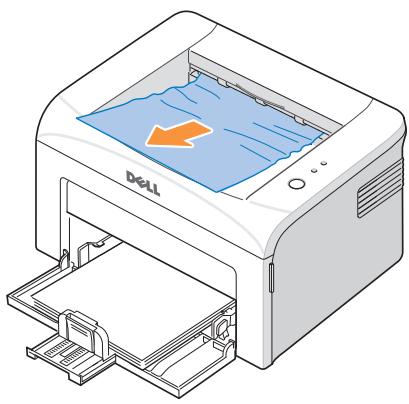

NOTE: Failed pages will not reprint. Reprint the failed pages.
2 If you cannot see the paper in the output tray or the paper does not move when pulled, stop pulling and open the top cover and the inner cover.
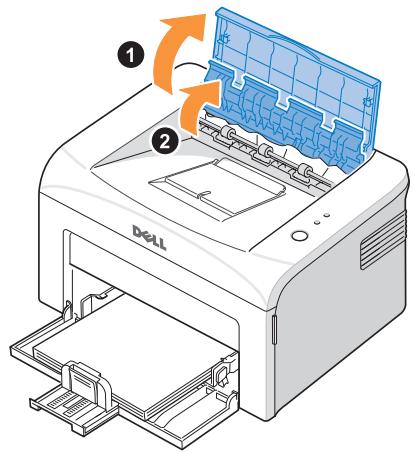

CAUTION: The top and inner cover themselves may also be hot due to the heat roller (located underneath the inner cover). Allow the printer to cool before opening the covers.
3 Loosen the paper if it is caught in the heat roller. Then remove the paper by gently pulling it out.
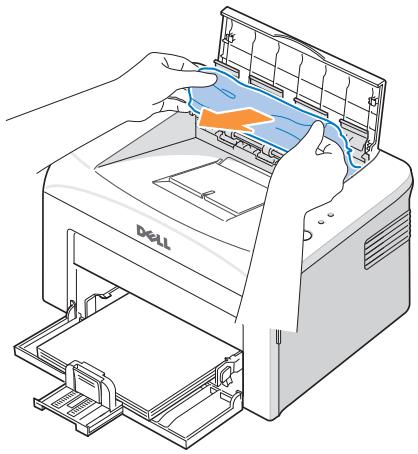

CAUTION: When removing jammed paper, be careful not to touch the heat roller (located underneath the inner cover). It is hot and could cause burns!
4 Close the inner cover and the top cover. Printing resumes automatically.
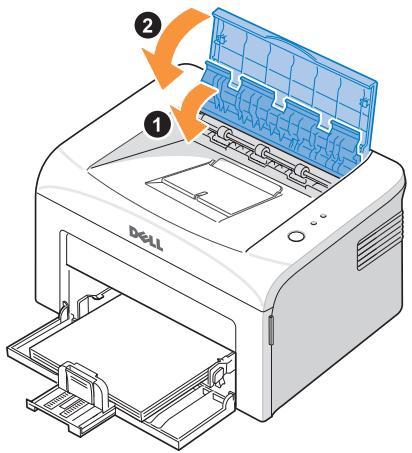

NOTE: Failed pages will not reprint. Reprint the failed pages.
Fuser Area Jam

NOTICE: The fuser area is hot. Take care when removing paper from the printer.
1 Open the front cover.
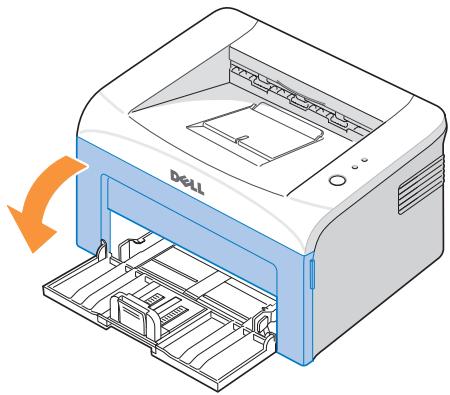
2 Gently pull the toner cartridge out, being careful not to scratch against the printer, and lift it up and away from the printer.
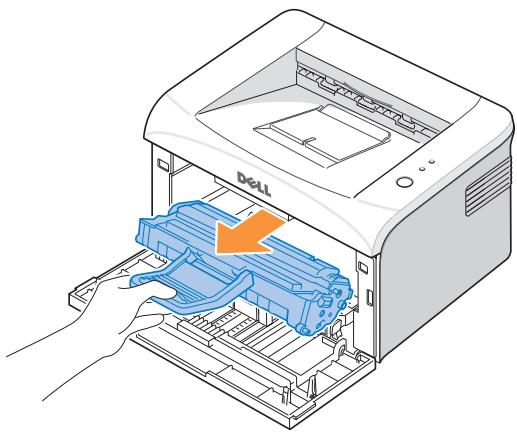
3 Remove the paper by gently pulling it toward you.
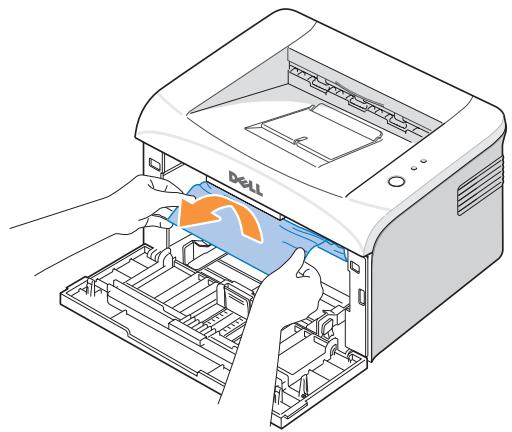
4 Check that there is no other paper in the printer.
5 Reinstall the toner cartridge and close the front cover. Your printer resumes printing the document from failed pages.
Tips for Avoiding Paper Jams
By selecting the correct paper types, most paper jams can be avoided. When a paper jam occurs, follow the steps outlined in "Clearing Jams in the Paper Tray" on page 35.
- Follow the procedures in "Loading Paper in the Paper Tray" on page 19. Ensure that the adjustable guides are correctly positioned.
- Do not overload the paper tray.
- Do not remove the paper from the tray while your printer is printing.
- Do not add paper to the tray while your printer is printing.
- Flex, fan, and straighten the paper before loading.
- Do not use creased, damp, or curled paper.
- Do not mix paper types in the paper tray.
Use only recommended print materials. See page 17. - Ensure that the recommended print side of print materials is facing up in the paper tray.
Understanding the Operator Panel LEDs
The operator panel LEDs signify different things, depending on their sequences. LEDs that are off, on, and/or blinking indicate printer conditions such as printer status, intervention (for example, out of paper and jammed paper), or service.
The following table shows the most common LED sequences. Find the LED pattern below that matches the printer LED pattern and check the meaning and solution.
LED Status Legend

symbol for "light off"

symbol for "light on"

symbol for "light blinking"
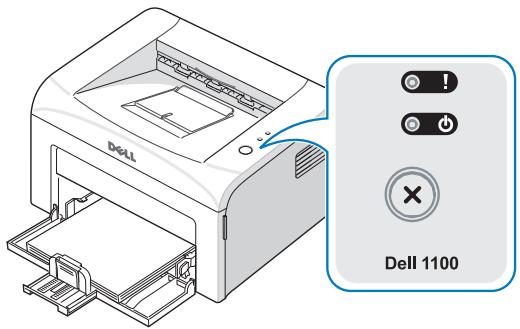
| LED Pattern | Meaning and Suggested Solution | |
| ! | (Red) | Your printer has some problems. If this problem occurs, contact your service representative. |
| ! | (Green) | |
| ! | (Red) | · A paper jam has occurred. To solve the problem, see “Clearing Jams in the Paper Tray” on page 35. |
| ! | · The front cover is open. Close the front cover. | |
| · The top cover is open. Close the top cover. | ||
| · A toner cartridge is not installed. Install a toner cartridge. See “Replacing the Toner Cartridge” on page 30. | ||
| ! | · If the printer is receiving data, ◆blinks green slowly. | |
| (Green) | · If the printer is printing received data, ◆blinks green quickly. | |
| LED Pattern | Meaning and Suggested Solution |
| (Red) | You pressed Ⓒ while the printer was receiving data. In Manual Duplex mode, the first side of your job has printed. Load the paper back into the tray with the already-printed side down and the top of the page toward the front of the tray. Then press Ⓞ to start printing. For details, see the HTML User's Guide. You print in 600 dpi resolution and your printer does not have enough memory to print the current job. When the Printing Status window appears, select one of the following options: - Click Cancel. An Internal error sheet prints and the current job automatically clears. Try simplifying the page layout and removing unnecessary graphics from your document. - Click Print. Your printer prints the current job in 300 dpi resolution. If a memory shortage occurs again, the Printing Status window will appear again and an Internal error sheet will print. The current job automatically clears. Try simplifying the page layout and removing unnecessary graphics from your document. |
| (Orange) | In Manual Feed mode, there is no paper in the paper tray. Load paper into the tray and press Ⓒ to start printing. |
| (Orange) | The toner cartridge is nearly empty. Redistribute the toner to temporarily extend the life of the toner cartridge. If this does not improve print quality, install a new toner cartridge. See page 30. |
More Troubleshooting
For more information about printing problems, see your HTML User's Guide.
Contacting Dell
Technical Assistance
If you need help with a technical problem, Dell is ready to assist you.
1 Call technical support from a telephone near or at the printer so that technical support can assist you with any necessary procedures. When calling Dell, use your Express Service Code to help expedite the routing of your call to the proper support personnel.
If you open the front cover, the Express Service Code is located on the front left side of the printer, as shown below.
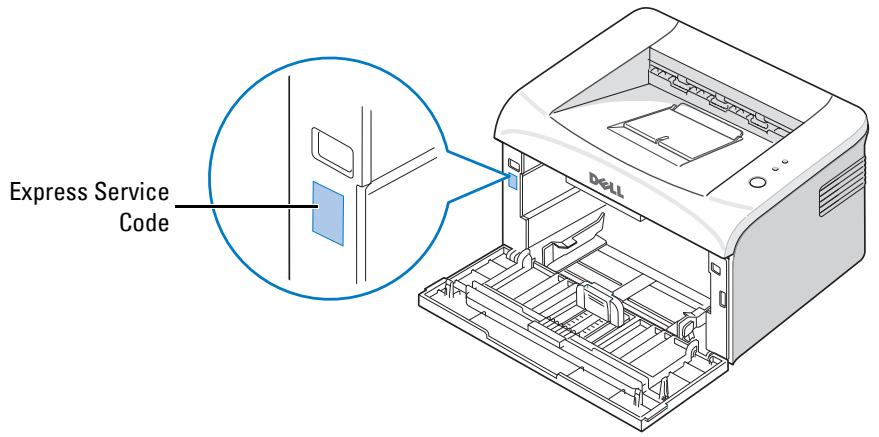
NOTE: Dell's Express Service Code system may not be available in all countries.
2 In the U.S., Business customers should call 1-877-459-7298, and Consumer (Home and Home Office) customers should call 1-800-624-9896.
If you are calling from a different country or are in a different Service area, see "Contacting Dell" on page 44 for your local telephone number.
3 Follow the menu prompts in the automated telephone system to speak with a technical support representative.
Automated Order-Status Service
To check on the status of any Dell™ products that you have ordered, you can go to support.dell.com, or you can call the automated order-status service. A recording prompts you for the information needed to locate and report on your order. See "Contacting Dell" for the telephone number to call for your region.
Contacting Dell
To contact Dell electronically, you can access the following websites:
www.dell.com
- support.dell.com (technical support)
- premiersupport.dell.com (technical support for educational, government, healthcare, and medium/large business customers, including Premier, Platinum, and Gold customers)
For specific web addresses for your country, find the appropriate country section in the table below.
NOTE: Toll-free numbers are for use within the country for which they are listed.
When you need to contact Dell, use the electronic addresses, telephone numbers, and codes provided in the following table. If you need assistance in determining which codes to use, contact a local or an international operator.
| Country (City) International Access Code Country Code City Code | Department Name or Service Area, Website and E-Mail Address | Area Codes, Local Numbers, and Toll-Free Numbers |
| U.S.A. (Austin, Texas) | Automated Order-Status Service | toll-free: 1-800-433-9014 |
| International Access Code: 011 | AutoTech (portable and desktop computers) | toll-free: 1-800-247-9362 |
| Country Code: 1 | Consumer (Home and Home Office) | |
| Technical Support | toll-free: 1-800-624-9896 | |
| Customer Service | toll-free: 1-800-624-9897 | |
| DellNet™ Service and Support | toll-free: 1-877-Dellnet (1-877-335-5638) | |
| Employee Purchase Program (EPP) Customers | toll-free: 1-800-695-8133 | |
| Financial Services website: www.dellfinancialservices.com | ||
| Financial Services (lease/loans) | toll-free: 1-877-577-3355 | |
| Financial Services (Dell Preferred Accounts [DPA]) | toll-free: 1-800-283-2210 | |
| Business | ||
| Customer Service and Technical Support | toll-free: 1-877-459-7298 | |
| Employee Purchase Program (EPP) Customers | toll-free: 1-800-695-8133 | |
| Printers and Projectors Technical Support | toll-free: 1-877-459-7298 | |
| Public (government, education, and healthcare) | ||
| Customer Service and Technical Support | toll-free: 1-800-456-3355 | |
| Employee Purchase Program (EPP) Customers | toll-free: 1-800-234-1490 | |
| Dell Sales | toll-free: 1-800-289-3355 | |
| or toll-free: 1-800-879-3355 | ||
| Dell Outlet Store (Dell refurbished computers) | toll-free: 1-888-798-7561 | |
| Software and Peripherals Sales | toll-free: 1-800-671-3355 | |
| Spare Parts Sales | toll-free: 1-800-357-3355 | |
| Extended Service and Warranty Sales | toll-free: 1-800-247-4618 | |
| Fax | toll-free: 1-800-727-8320 | |
| Dell Services for the Deaf, Hard-of-Hearing, or Speech-Impaired | toll-free: 1-877-DELLTTY (1-877-335-5889) | |
| Anguilla | General Support | toll-free: 800-335-0031 |
| Antigua and Barbuda | General Support | |
| Argentina (Buenos Aires) | Website: www.dell.com.ar | |
| International Access Code: 00 | E-mail: us_latin-services@dell.com | |
| Country Code: 54 | E-mail for desktop and portable computers: la- techsupport@ Dell.com | |
| City Code: 11 | E-mail for servers and EMC: la-enterprise@ dell.com | |
| Customer Care | toll-free: 0-800-444-0730 | |
| Tech Support | toll-free: 0-800-444-0733 | |
| Tech Support Services | toll-free: 0-800-444-0724 | |
| Sales | 0-810-444-3355 | |
| Aruba | General Support | toll-free: 800-1578 |
| Australia (Sydney) | E-mail (Australia): au_tech_support@ dell.com | |
| International Access Code: 0011 | E-mail (New Zealand): nz_tech_support@ dell.com | |
| Country Code: 61 | Home and Small Business | 1-300-65-55-33 |
| City Code: 2 | Government and Business | toll-free: 1-800-633-559 |
| Preferred Accounts Division (PAD) | toll-free: 1-800-060-889 | |
| Customer Care | toll-free: 1-800-819-339 | |
| Corporate Sales | toll-free: 1-800-808-385 | |
| Transaction Sales | toll-free: 1-800-808-312 | |
| Fax | toll-free: 1-800-818-341 | |
| Austria (Vienna) | Website: support.euro.dell.com | |
| International Access Code: 900 | E-mail: tech_support_central_europe@ dell.com | |
| Country Code: 43 | Home/Small Business Sales | 0820 240 530 00 |
| City Code: 1 | Home/Small Business Fax | 0820 240 530 49 |
| Home/Small Business Customer Care | 0820 240 530 14 | |
| Preferred Accounts/Corporate Customer Care | 0820 240 530 16 | |
| Home/Small Business Technical Support | 0820 240 530 14 | |
| Preferred Accounts/Corporate Technical Support | 0660 8779 | |
| Switchboard | 0820 240 530 00 | |
| Bahamas | General Support | toll-free: 1-866-278-6818 |
| Barbados | General Support | 1-800-534-3066 |
| Belgium (Brussels) | Website: support.euro.dell.com | |
| International Access Code: 00 | E-mail: tech_be@dell.com | |
| Country Code: 32 | E-mail for French Speaking Customers: support.euro.dell.com/be/fr/emaildell/ | |
| City Code: 2 | Technical Support | 02 481 92 88 |
| Customer Care | 02 481 91 19 | |
| Corporate Sales | 02 481 91 00 | |
| Fax | 02 481 92 99 | |
| Switchboard | 02 481 91 00 | |
| Bermuda | General Support | 1-800-342-0671 |
| Bolivia | General Support | toll-free: 800-10-0238 |
| Brazil | Website: www.dell.com.br | |
| International Access Code: 00 | Customer Support, Technical Support | 0800 90 3355 |
| Country Code: 55 | Tech Support Fax | 51 481 5470 |
| City Code: 51 | Customer Care Fax | 51 481 5480 |
| Sales | 0800 90 3390 | |
| British Virgin Islands | General Support | toll-free: 1-866-278-6820 |
| Brunei | Customer Technical Support (Penang, Malaysia) | 604 633 4966 |
| Country Code: 673 | Customer Service (Penang, Malaysia) | 604 633 4949 |
| Transaction Sales (Penang, Malaysia) | 604 633 4955 | |
| Canada (North York, Ontario) | Online Order Status: www.dell.ca/ostatus | |
| International Access Code: 011 | AutoTech (automated technical support) | toll-free: 1-800-247-9362 |
| TechFax | toll-free: 1-800-950-1329 | |
| Customer Care (Home Sales/Small Business) | toll-free: 1-800-847-4096 | |
| Customer Care (med./large business, government) | toll-free: 1-800-326-9463 | |
| Technical Support (Home Sales/Small Business) | toll-free: 1-800-847-4096 | |
| Technical Support (med./large bus., government) | toll-free: 1-800-387-5757 | |
| Sales (Home Sales/Small Business) | toll-free: 1-800-387-5752 | |
| Sales (med./large bus., government) | toll-free: 1-800-387-5755 | |
| Spare Parts Sales & Extended Service Sales | 1 866 440 3355 | |
| Cayman Islands | General Support | 1-800-805-7541 |
| Chile (Santiago) | Sales, Customer Support, and Technical Support | toll-free: 1230-020-4823 |
| Country Code: 56 | ||
| City Code: 2 | ||
| China (Xiamen) | Tech Support website: support.dell.com.cn | |
| Country Code: 86 | Tech Support E-mail: cn_support@dell.com | |
| City Code: 592 | Customer Care E-mail: customer_cn@dell.com | |
| Technical Support Fax | 592 818 1350 | |
| Technical Support (DellTM DimensionTM and InspironTM) | toll-free: 800 858 2969 | |
| Technical Support (OptiPlexTM, LatitudeTM, and Dell PrecisionTM) | toll-free: 800 858 0950 | |
| Technical Support (servers and storage) | toll-free: 800 858 0960 | |
| Technical Support (projectors, PDAs, switches, printers, routers, and so on) | toll-free: 800 858 2920 | |
| Technical Support (printers) | 86 592 818 3144 or toll-free: 800 858 2311 | |
| Customer Care | toll-free: 800 858 2060 | |
| Customer Care Fax | 592 818 1308 | |
| Home and Small Business | toll-free: 800 858 2222 | |
| Preferred Accounts Division | toll-free: 800 858 2557 | |
| Large Corporate Accounts GCP | toll-free: 800 858 2055 | |
| Large Corporate Accounts Key Accounts | toll-free: 800 858 2628 | |
| Large Corporate Accounts North | toll-free: 800 858 2999 | |
| Large Corporate Accounts North Government and Education | toll-free: 800 858 2955 | |
| Large Corporate Accounts East | toll-free: 800 858 2020 | |
| Large Corporate Accounts East Government and Education | toll-free: 800 858 2669 | |
| Large Corporate Accounts Queue Team | toll-free: 800 858 2527 | |
| Large Corporate Accounts South | toll-free: 800 858 2355 | |
| Large Corporate Accounts West | toll-free: 800 858 2811 | |
| Large Corporate Accounts Spare Parts | toll-free: 800 858 2621 | |
| Colombia | General Support | 980-9-15-3978 |
| Costa Rica | General Support | 0800-012-0435 |
| Czech Republic (Prague) | Website: support.euro.dell.com | |
| International Access Code: 00 | E-mail: czech_dell@dell.com | |
| Country Code: 420 | Technical Support | 02 2186 27 27 |
| City Code: 2 | Customer Care | 02 2186 27 11 |
| Fax | 02 2186 27 14 | |
| TechFax | 02 2186 27 28 | |
| Switchboard | 02 2186 27 11 | |
| Denmark (Copenhagen) | Website: support.euro.dell.com | |
| International Access Code: 00 | E-mail: support.euro.dell.com/dk/da/emaildell/ | |
| Country Code: 45 | Technical Support | 7023 0182 |
| Customer Care (Relational) | 7023 0184 | |
| Home/Small Business Customer Care | 3287 5505 | |
| Switchboard (Relational) | 3287 1200 | |
| Switchboard Fax (Relational) | 3287 1201 | |
| Switchboard (Home/Small Business) | 3287 5000 | |
| Switchboard Fax (Home/Small Business) | 3287 5001 | |
| Dominica | General Support | toll-free: 1-866-278-6821 |
| Dominican Republic | General Support | 1-800-148-0530 |
| Ecuador | General Support | toll-free: 999-119 |
| El Salvador | General Support | 01-899-753-0777 |
| Finland (Helsinki) | Website: support.euro.dell.com | |
| International Access Code: 990 | E-mail: support.euro.dell.com/fi/fi/emaildell/ | |
| Country Code: 358 | Technical Support | 09 253 313 60 |
| City Code: 9 | Customer Care | 09 253 313 38 |
| Fax | 09 253 313 99 | |
| Switchboard | 09 253 313 00 | |
| France (Paris) (Montpellier) | Website: support.euro.dell.com | |
| International Access Code: 00 | E-mail: support.euro.dell.com/fr/fr/emaildell/ | |
| Country Code: 33 | Home and Small Business | |
| City Codes: (1) (4) | Technical Support | 0825 387 270 |
| Customer Care | 0825 823 833 | |
| Switchboard | 0825 004 700 | |
| Switchboard (calls from outside of France) | 04 99 75 40 00 | |
| Sales | 0825 004 700 | |
| Fax | 0825 004 701 | |
| Fax (calls from outside of France) | 04 99 75 40 01 | |
| Corporate | ||
| Technical Support | 0825 004 719 | |
| Customer Care | 0825 338 339 | |
| Switchboard | 01 55 94 71 00 | |
| Sales | 01 55 94 71 00 | |
| Fax | 01 55 94 71 01 | |
| Germany (Langen) | Website: support.euro.dell.com | |
| International Access Code: 00 | E-mail: tech_support_central_europe@ Dell.com | |
| Country Code: 49 | Technical Support | 06103 766-7200 |
| Home/Small Business Customer Care | 0180-5-224400 | |
| Global Segment Customer Care | 06103 766-9570 | |
| Preferred Accounts Customer Care | 06103 766-9420 | |
| Large Accounts Customer Care | 06103 766-9560 | |
| Public Accounts Customer Care | 06103 766-9555 | |
| Switchboard | 06103 766-7000 | |
| Greece | Website: support.euro.dell.com | |
| International Access Code: 00 | E-mail: support.euro.dell.com/gr/en/emaildell/ | |
| Country Code: 30 | Technical Support | 080044149518 |
| Gold Technical Support | 08844140083 | |
| Switchboard | 2108129800 | |
| Sales | 2108129800 | |
| Fax | 2108129812 | |
| Grenada | General Support | toll-free: 1-866-540-3355 |
| Guatemala | General Support | 1-800-999-0136 |
| Guyana | General Support | toll-free: 1-877-270-4609 |
| Hong Kong | Website: support.ap.dell.com | |
| International Access Code: 001 | Technical Support E-mail: apsupport@dell.com | |
| Country Code: 852 | Technical Support (Dimension and Inspiron) | 2969 3188 |
| Technical Support (OptiPlex, Latitude, and Dell Precision) | 2969 3191 | |
| Technical Support (PowerAppTM, PowerEdgeTM, PowerConnectTM, and PowerVaultTM) | 2969 3196 | |
| Customer Care | 3416 0910 | |
| Large Corporate Accounts | 3416 0907 | |
| Global Customer Programs | 3416 0908 | |
| Medium Business Division | 3416 0912 | |
| Home and Small Business Division | 2969 3105 | |
| India | Technical Support | 1600 33 8045 |
| Sales (Large Corporate Accounts) | 1600 33 8044 | |
| Sales (Home and Small Business) | 1600 33 8046 | |
| Ireland (Cherrywood) | Website: support.euro.dell.com | |
| International Access Code: 16 | E-mail: dell_direct_support@dell.com | |
| Country Code: 353 | Technical Support | 1850 543 543 |
| City Code: 1 | U.K. Technical Support (dial within U.K. only) | 0870 908 0800 |
| Home User Customer Care | 01 204 4014 | |
| Small Business Customer Care | 01 204 4014 | |
| U.K. Customer Care (dial within U.K. only) | 0870 906 0010 | |
| Corporate Customer Care | 1850 200 982 | |
| Corporate Customer Care (dial within U.K. only) | 0870 907 4499 | |
| Ireland Sales | 01 204 4444 | |
| U.K. Sales (dial within U.K. only) | 0870 907 4000 | |
| Fax/SalesFax | 01 204 0103 | |
| Switchboard | 01 204 4444 | |
| Italy (Milan) | Website: support.euro.dell.com | |
| International Access Code: 00 | E-mail: support.euro.dell.com/it/it/emaildell/ | |
| Country Code: 39 | Home and Small Business | |
| City Code: 02 | Technical Support | 02 577 826 90 |
| Customer Care | 02 696 821 14 | |
| Fax | 02 696 821 13 | |
| Switchboard | 02 696 821 12 | |
| Corporate | ||
| Technical Support | 02 577 826 90 | |
| Customer Care | 02 577 825 55 | |
| Fax | 02 575 035 30 | |
| Switchboard | 02 577 821 | |
| Jamaica | General Support (dial from within Jamaica only) | 1-800-682-3639 |
| Japan (Kawasaki) | Website: support.jp.dell.com | |
| International Access Code: 001 | Technical Support (servers) | toll-free: 0120-198-498 |
| Country Code: 81 | Technical Support outside of Japan (servers) | 81-44-556-4162 |
| City Code: 44 | Technical Support (Dimension and Inspiron) | toll-free: 0120-198-226 |
| Technical Support outside of Japan (Dimension and Inspiron) | 81-44-520-1435 | |
| Technical Support (Dell Precision, OptiPlex, and Latitude) | toll-free: 0120-198-433 | |
| Technical Support outside of Japan (Dell Precision, OptiPlex, and Latitude) | 81-44-556-3894 | |
| Technical Support (PDAs, projectors, printers, routers) | toll-free: 0120-981-690 | |
| Technical Support outside of Japan (PDAs, projectors, printers, routers) | 81-44-556-3468 | |
| Faxbox Service | 044-556-3490 | |
| 24-Hour Automated Order Service | 044-556-3801 | |
| Customer Care | 044-556-4240 | |
| Business Sales Division (up to 400 employees) | 044-556-1465 | |
| Preferred Accounts Division Sales (over 400 employees) | 044-556-3433 | |
| Large Corporate Accounts Sales (over 3500 employees) | 044-556-3430 | |
| Public Sales (government agencies, educational institutions, and medical institutions) | 044-556-1469 | |
| Global Segment Japan | 044-556-3469 | |
| Individual User | 044-556-1760 | |
| Switchboard | 044-556-4300 | |
| Korea (Seoul) | Technical Support | toll-free: 080-200-3800 |
| International Access Code: 001 | Sales | toll-free: 080-200-3600 |
| Country Code: 82 | Customer Service (Seoul, Korea) | toll-free: 080-200-3800 |
| City Code: 2 | Customer Service (Penang, Malaysia) | 604 633 4949 |
| Fax | 2194-6202 | |
| Switchboard | 2194-6000 | |
| Latin America | Customer Technical Support (Austin, Texas, U.S.A.) | 512 728-4093 |
| Customer Service (Austin, Texas, U.S.A.) | 512 728-3619 | |
| Fax (Technical Support and Customer Service) (Austin, Texas, U.S.A.) | 512 728-3883 | |
| Sales (Austin, Texas, U.S.A.) | 512 728-4397 | |
| SalesFax (Austin, Texas, U.S.A.) | 512 728-4600 or 512 728-3772 | |
| Luxembourg | Website: support.euro.dell.com | |
| International Access Code: 00 | E-mail: tech_be@dell.com | |
| Country Code: 352 | Technical Support (Brussels, Belgium) | 3420808075 |
| Home/Small Business Sales (Brussels, Belgium) | toll-free: 080016884 | |
| Corporate Sales (Brussels, Belgium) | 02 481 91 00 | |
| Customer Care (Brussels, Belgium) | 02 481 91 19 | |
| Fax (Brussels, Belgium) | 02 481 92 99 | |
| Switchboard (Brussels, Belgium) | 02 481 91 00 | |
| Macao | Technical Support | toll-free: 0800 105 |
| Country Code: 853 | Customer Service (Xiamen, China) | 34 160 910 |
| Transaction Sales (Xiamen, China) | 29 693 115 | |
| Malaysia (Penang) | Website: support.ap.dell.com | |
| International Access Code: 00 | Technical Support (Dell Precision, OptiPlex, and Latitude) | toll-free: 1 800 88 0193 |
| Country Code: 60 | Technical Support (Dimension, Inspiron, and Electronics and Accessories) | toll-free: 1 800 88 1306 |
| City Code: 4 | Technical Support (PowerApp, PowerEdge, PowerConnect, and PowerVault) | toll-free: 1800 88 1386 |
| Customer Service (Penang, Malaysia) | 04 633 4949 | |
| Sales | toll-free: 1 800 88 0553 | |
| Mexico | Customer Technical Support | 001-877-384-8979 |
| International Access Code: 00 | or 001-877-269-3383 | |
| Country Code: 52 | Sales | 50-81-8800 |
| or 01-800-888-3355 | ||
| Customer Service | 001-877-384-8979 | |
| or 001-877-269-3383 | ||
| Main | 50-81-8800 | |
| or 01-800-888-3355 | ||
| Montserrat | General Support | toll-free: 1-866-278-6822 |
| Netherlands Antilles | General Support | 001-800-882-1519 |
| Netherlands (Amsterdam) | Website: support.euro.dell.com | |
| International Access Code: 00 | Technical Support | 020 674 45 00 |
| Country Code: 31 | Technical Support Fax | 020 674 47 66 |
| City Code: 20 | Home/Small Business Customer Care | 020 674 42 00 |
| Relational Customer Care | 020 674 43 25 | |
| Home/Small Business Sales | 020 674 55 00 | |
| Relational Sales | 020 674 50 00 | |
| Home/Small Business Sales Fax | 020 674 47 75 | |
| Relational Sales Fax | 020 674 47 50 | |
| Switchboard | 020 674 50 00 | |
| Switchboard Fax | 020 674 47 50 | |
| New Zealand | E-mail (New Zealand): nz_tech_support@dell.com | |
| International Access Code: 00 | E-mail (Australia): au_tech_support@dell.com | |
| Country Code: 64 | Technical Support (for desktop and portable computers) | toll-free: 0800 446 255 |
| Technical Support (for servers and workstations) | toll-free: 0800 443 563 | |
| Home and Small Business | 0800 446 255 | |
| Government and Business | 0800 444 617 | |
| Sales | 0800 441 567 | |
| Fax | 0800 441 566 | |
| Nicaragua | General Support | 001-800-220-1006 |
| Norway (Lysaker) | Website: support.euro.dell.com | |
| International Access Code: 00 | E-mail: support.euro.dell.com/no/no/emaildell/ | |
| Country Code: 47 | Technical Support | 671 16882 |
| Relational Customer Care | 671 17575 | |
| Home/Small Business Customer Care | 231 62298 | |
| Switchboard | 671 16800 | |
| Fax Switchboard | 671 16865 | |
| Panama | General Support | 001-800-507-0962 |
| Peru | General Support | 0800-50-669 |
| Poland (Warsaw) | Website: support.euro.dell.com | |
| International Access Code: 011 | E-mail: pl_support_tech@dell.com | |
| Country Code: 48 | Customer Service Phone | 57 95 700 |
| City Code: 22 | Customer Care | 57 95 999 |
| Sales | 57 95 999 | |
| Customer Service Fax | 57 95 806 | |
| Reception Desk Fax | 57 95 998 | |
| Switchboard | 57 95 999 | |
| Portugal | Website: support.euro.dell.com | |
| International Access Code: 00 | E-mail: support.euro.dell.com/pt/en/emaildell/ | |
| Country Code: 351 | Technical Support | 707200149 |
| Customer Care | 800 300 413 | |
| Sales | 800 300 410 or 800 300 411 or 800 300 412 or 21 422 07 10 | |
| Fax | 21 424 01 12 | |
| Puerto Rico | General Support | 1-800-805-7545 |
| St. Kitts and Nevis | General Support | toll-free: 1-877-441-4731 |
| St. Lucia | General Support | 1-800-882-1521 |
| St. Vincent and the Grenadines | General Support | toll-free: 1-877-270-4609 |
| Singapore (Singapore) | Website: support.ap.dell.com | |
| International Access Code: 005 | Technical Support (Dimension, Inspiron, and Electronics and Accessories) | toll-free: 1800 394 7430 |
| Country Code: 65 | Technical Support (OptiPlex, Latitude, and Dell Precision) | toll-free: 1800 394 7488 |
| Technical Support (PowerApp, PowerEdge, PowerConnect, and PowerVault) | toll-free: 1800 394 7478 | |
| Customer Service (Penang, Malaysia) | 604 633 4949 | |
| Sales | toll-free: 1 800 394 7425 | |
| Slovakia (Prague) | Website: support.euro.dell.com | |
| International Access Code: 00 | E-mail: czech_dell@dell.com | |
| Country Code: 421 | Technical Support | 02 5441 5727 |
| Customer Care | 420 22537 2707 | |
| Fax | 02 5441 8328 | |
| Tech Fax | 02 5441 8328 | |
| Switchboard (Sales) | 02 5441 7585 | |
| South Africa (Johannesburg) | Website: support.euro.dell.com | |
| International Access Code: | E-mail: dell_za_support@dell.com | |
| 09/091 | Technical Support | 011 709 7710 |
| Country Code: 27 | Customer Care | 011 709 7707 |
| City Code: 11 | Sales | 011 709 7700 |
| Fax | 011 706 0495 | |
| Switchboard | 011 709 7700 | |
| Southeast Asian and Pacific Countries | Customer Technical Support, Customer Service, and Sales (Penang, Malaysia) | 604 633 4810 |
| Spain (Madrid) | Website: support.euro.dell.com | |
| International Access Code: 00 | E-mail: support.euro.dell.com/es/es/emailldell/ | |
| Country Code: 34 | Home and Small Business | |
| City Code: 91 | Technical Support | 902 100 130 |
| Customer Care | 902 118 540 | |
| Sales | 902 118 541 | |
| Switchboard | 902 118 541 | |
| Fax | 902 118 539 | |
| Corporate | ||
| Technical Support | 902 100 130 | |
| Customer Care | 902 118 546 | |
| Switchboard | 91 722 92 00 | |
| Fax | 91 722 95 83 | |
| Sweden (Upplands Vasby) | Website: support.euro.dell.com | |
| International Access Code: 00 | E-mail: support.euro.dell.com/se/sv/emailddell/ | |
| Country Code: 46 | Technical Support | 08 590 05 199 |
| Relational Customer Care | 08 590 05 642 | |
| City Code: 8 | Home/Small Business Customer Care | 08 587 70 527 |
| Employee Purchase Program (EPP) Support | 20 140 14 44 | |
| Technical Support Fax | 08 590 05 594 | |
| Sales | 08 590 05 185 | |
| Switzerland (Geneva) | Website: support.euro.dell.com | |
| International Access Code: 00 | E-mail: swisstech@dell.com | |
| Country Code: 41 | E-mail for French-speaking HSB and Corporate Customers: support.euro.dell.com/ch/fr/emailddell/ | |
| City Code: 22 | Technical Support (Home and Small Business) | 0844 811 411 |
| Technical Support (Corporate) | 0844 822 844 | |
| Customer Care (Home and Small Business) | 0848 802 202 | |
| Customer Care (Corporate) | 0848 821 721 | |
| Fax | 022 799 01 90 | |
| Switchboard | 022 799 01 01 | |
| Taiwan | Website: support.ap.dell.com | |
| International Access Code: 002 | E-mail: ap_support@dell.com | |
| Country Code: 886 | Technical Support (OptiPlex, Latitude, Inspiron, Dimension, and Electronics and Accessories) | toll-free: 00801 86 1011 |
| Technical Support (PowerApp, PowerEdge, PowerConnect, and PowerVault) | toll-free: 00801 60 1256 | |
| Transaction Sales | toll-free: 00801 65 1228 | |
| Corporate Sales | toll-free: 00801 65 1227 | |
| Thailand | Website: support.ap.dell.com | |
| International Access Code: 001 | Technical Support (OptiPlex, Latitude, and Dell Precision) | toll-free: 1800 0060 07 |
| Country Code: 66 | Technical Support (PowerApp, PowerEdge, PowerConnect, and PowerVault) | toll-free: 1800 0600 09 |
| Customer Service (Penang, Malaysia) | 604 633 4949 | |
| Corporate Sales | toll-free: 1800 006 009 | |
| Transaction Sales | toll-free: 1800 006 006 | |
| Trinidad/Tobago | General Support | 1-800-805-8035 |
| Turks and Caicos Islands | General Support | toll-free: 1-866-540-3355 |
| U.K. (Bracknell) | Website: support.euro.dell.com | |
| International Access Code: 00 | Customer Care website: support.euro.dell.com/uk/en/ECare/Form/Home.asp | |
| Country Code: 44 | ||
| City Code: 1344 | E-mail: dell_direct_support@ Dell.com | |
| Technical Support (Corporate/Preferred Accounts/PAD [1000+ employees]) | 0870 908 0500 | |
| Technical Support (direct/PAD and general) | 0870 908 0800 | |
| Global Accounts Customer Care | 01344 373 186 | |
| Home and Small Business Customer Care | 0870 906 0010 | |
| Corporate Customer Care | 01344 373 185 | |
| Preferred Accounts (500–5000 employees) | 0870 906 0010 | |
| Customer Care | ||
| Central Government Customer Care | 01344 373 193 | |
| Local Government & Education Customer Care | 01344 373 199 | |
| Health Customer Care | 01344 373 194 | |
| Home and Small Business Sales | 0870 907 4000 | |
| Corporate/Public Sector Sales | 01344 860 456 | |
| Home and Small Business Fax | 0870 907 4006 | |
| Uruguay | General Support | toll-free: 000-413-598-2521 |
| Venezuela | General Support | 8001-3605 |
Appendix
U.S Terms and Conditions of Sales
These terms and conditions ("Agreement") apply to your purchase of computer systems and/or related products and/or services and support sold in the United States ("Product") by the Dell entity named on the invoice or acknowledgement ("Dell") provided to you. By accepting delivery of the Product, you accept and are bound to the terms and conditions of this Agreement. If you do not wish to be bound by this Agreement, you must notify Dell immediately and return your purchase pursuant to Dell's Total Satisfaction Return Policy.
(See: http://support.dell.com/ContactUs/ByPhone.aspx?c=us&l=en&s=gen for our contact information.) If returned, Product(s) must remain in the boxes in which they were shipped. THIS AGREEMENT SHALL APPLY UNLESS (I) YOU HAVE A SEPARATE PURCHASE AGREEMENT WITH DELL, IN WHICH CASE THE SEPARATE AGREEMENT SHALL GOVERN; OR (II) OTHER DELL TERMS AND CONDITIONS APPLY TO THE TRANSACTION.
1 Other Documents.
This Agreement may NOT be altered, supplemented, or amended by the use of any other document(s) unless otherwise agreed to in a written agreement signed by both you and Dell. If you do not receive an invoice or acknowledgement in the mail, via e-mail, or with your Product, information about your purchase may be obtained at http://support.dell.com/dellcare/Invoice.aspx or by contacting your sales representative.
2 Payment Terms; Orders; Quotes; Interest.
Payment terms are within Dell's sole discretion, and, unless otherwise agreed to by Dell, payment must be made at the time of purchase. Payment for Product may be made by credit card, wire transfer, or some other prearranged payment method. Dell may invoice parts of an order separately. Your order is subject to cancellation by Dell, at Dell's sole discretion. Unless you and Dell have agreed to a different discount, Dell's standard pricing policy for Dell™-branded systems, which include both hardware and services in one discounted price, allocates the discount off list price applicable to the service portion of the system to be equal to the overall calculated percentage discount off list price on the entire system. Dell is not responsible for pricing, typographical, or other errors, in any offer by Dell and reserves the right to cancel any orders resulting from such errors.
3 Shipping Charges; Taxes; Title; Risk of Loss.
Shipping and handling are additional unless otherwise expressly indicated at the time of sale. Loss or damage that occurs during shipping by a carrier selected by Dell is Dell's responsibility. Loss or damage that occurs during shipping by a carrier selected by you is your responsibility. You must notify Dell within 30 days of the date of your invoice or acknowledgement if you believe any part of your purchase is missing, wrong or damaged. Unless you provide Dell with a valid and correct tax exemption certificate applicable to your purchase of Product and the Product ship-to location, you are responsible for sales and other taxes associated with the order. Shipping dates are estimates only. Title to software will remain with the applicable licensor(s).
4 Warranties.
THE LIMITED WARRANTYES APPLICABLE TO DELL-BRANDED HARDWARE PRODUCT CAN BE FOUND AT http://www.dell.com/policy/legal/warranty.htm OR IN THE DOCUMENTATION DELL PROVIDES WITH THE PRODUCT. DELL MAKES NO WARRANTYES FOR SERVICE, SOFTWARE, OR NON-DELL BRANDED PRODUCT. SUCH PRODUCT IS PROVIDED BY DELL "AS IS." WARRANTY AND SERVICE FOR NON-DELL BRANDED PRODUCT, IF ANY, IS PROVIDED BY THE ORIGINAL MANUFACTURER, NOT BY DELL. DELL MAKES NO EXPRESS WARRANTYES EXCEPT THOSE STATED IN DELL'S APPLICABLE WARRANTY STATEMENT IN EFFECT ON THE DATE OF THE INVOICE, PACKING SLIP OR ACKNOWLEDGEMENT. WARRANTYES AND SERVICE WILL BE EFFECTIVE, AND DELL WILL BE OBLIGATED TO HONOR ANY SUCH WARRANTYES AND SERVICES, ONLY UPON DELL'S RECEIPT OF PAYMENT IN FULL FOR THE ITEM TO BE WARRANTED OR SERVICED.
5 Software.
All software is provided subject to the license agreement that is part of the software package and you agree that you will be bound by such license agreement.
6 Return Policies; Exchanges.
New and refurbished Product that you purchase directly from Dell (and not a third party) you may return or exchange only in accordance with Dell's return policy in effect on the date of the invoice or acknowledgement. Any returns or exchanges will be made in accordance with Dell's exchange policies in effect on the date of the return or exchange. You must contact us directly before you attempt to return Product to obtain a Return Material Authorization Number for you to include with your return. You must return Product to us in their original or equivalent packaging. You are responsible for risk of loss, shipping and handling fees for returning or exchanging Product. Additional fees may apply. Dell's return policy for Dell-branded Product can be found at: http://www.dell.com/policy/legal/warranty.htm. Non-Dell branded software and peripheral return policies can be found at: http://rcommerce.us.dell.com/rcomm/include/dw_policies.htm.
Refurbished Product return policies can be found at:
http://www.dell.com/us/en/dfh/topics/segtopic nav_info_002_info.htm. If you fail to follow the return or exchange instructions and policies provided by Dell, Dell is not responsible whatsoever for Product that is lost, damaged, modified or otherwise processed for disposal or resale. If you are returning all components in an order, you will be credited the full amount paid for the order. At Dell's discretion, credit for partial returns may be less than invoice or individual component prices due to bundled or promotional pricing.
7 Changed or Discontinued Product.
Dell's policy is one of ongoing update and revision. Dell may revise and discontinue Product at any time without notice to you and this may affect information saved in your online "cart." Dell will ship Product that has the functionality and performance of the Product ordered, but changes between what is shipped and what is described in a specification sheet or catalog are possible. Parts used in repairing or servicing Product may be new, equivalent-to-new, or reconditioned.
8 Service and Support.
Service offerings may vary from Product to Product. If you purchase optional services and support from Dell, Dell and/or your third-party service provider will provide such service and support to you in the United States in accordance with the terms and conditions located at
http://www.dell.com/us/en/gen/services/service_service Contracts.htm or as mailed to you. You may contact Dell for more information, see http://www1.us.dell.com/content/topics/segtopic.aspx/contact/contact?c=us&l=en&s=gen for contact information. Dell and/or the third-party service provider may at their discretion, revise their general and optional service and support programs and the terms and conditions that govern them without prior notice to you. Dell has no obligation to provide service or support until Dell has received full payment for the Product or service/support contract you purchased. Dell is not obligated to provide service or support you purchase through a third party and not Dell.
9 Limitation of Liability.
DELL DOES NOT ACCEPT LIABILITY BEYOND THE REMEDIES SET FORTH HEREIN, INCLUDING BUT NOT LIMITED TO ANY LIABILITY FOR PRODUCT NOT BEING AVAILABLE FOR USE, LOST PROFITS, LOSS OF BUSINESS OR FOR LOST OR CORRUPTED DATA OR SOFTWARE, OR THE PROVISION OF SERVICES AND SUPPORT. EXCEPT AS EXPRESSLY PROVIDED HEREIN, DELL WILL NOT BE LIABLE FOR ANY CONSEQUENTIAL, SPECIAL, INDIRECT, OR PUNITIVE DAMAGES, EVEN IF ADVISED OF THE POSSIBILITY OF SUCH DAMAGES, OR FOR ANY CLAIM BY ANY THIRD PARTY. YOU AGREE THAT FOR ANY LIABILITY RELATED TO THE PURCHASE OF PRODUCT, DELL IS NOT LIABLE OR RESPONSIBLE FOR ANY AMOUNT OF DAMAGES ABOVE THE AMOUNT INVOCED FOR THE APPLICABLE PRODUCT. NOTWITHSTANDING ANYTHING IN THIS AGREEMENT TO THE CONTRARY, THE REMEDIES SET FORTH IN THIS AGREEMENT SHALL APPLY EVEN IF SUCH REMEDIES FAIL THEIR ESSENTIAL PURPOSE. DELL IS NOT LIABLE TO YOU FOR WARRANTYES, SUPPORT, OR SERVICE MADE BY OR PURCHASED FROM A THIRD PARTY AND NOT DIRECTLY FROM DELL. DELL IS NOT RESPONSIBLE FOR REPRESENTATIONS OR OMISSIONS MADE BY A THIRD PARTY.
10 Applicable Law; Not For Resale or Export.
You agree to comply with all applicable laws and regulations of the various states and of the United States. You agree and represent that you are buying only for your own internal use only, and not for resale or export. Dell has separate terms and conditions governing resale of Product by third parties and transactions outside the United States. Terms and conditions for resale are located at: http://www.dell.com/policy/legal/termsofsale.htm.
11 Governing Law.
THIS AGREEMENT AND ANY SALES THERE UNDER SHALL BE GOVERNED BY THE LAWS OF THE STATE OF TEXAS, WITHOUT REGARD TO CONFLICTS OF LAWS RULES.
12 Headings.
The section headings used herein are for convenience of reference only and do not form a part of these terms and conditions, and no construction or inference shall be derived there from.
13 Binding Arbitration.
ANY CLAIM, DISPUTE, OR CONTROVERSY (WHETHER IN CONTRACT, TORT, OR OTHERWISE, WHETHER PREEXISTING, PRESENT OR FUTURE, AND INCLUDING STATUTORY, COMMON LAW, INTENTIONAL TORT AND EQUITABLE CLAIMS) BETWEEN CUSTOMER AND DELL, its agents, employees, principals, successors, assigns, affiliates (collectively for purposes of this paragraph, "Dell") arising from or relating to this Agreement, its interpretation, or the breach, termination or validity thereof, the relationships which result from this Agreement (including, to the full extent permitted by applicable law, relationships with third parties who are not signatories to this Agreement), Dell's advertising, or any related purchase SHALL BE RESOLVED EXCLUSIVELY AND FINALLY BY BINDING ARBITRATION ADMINISTERED BY THE NATIONAL ARBITRATION FORUM (NAF) under its Code of Procedure then in effect (available via the Internet at http://www.arb-forum.com , or via telephone at 1-800-474-2371). The arbitration will be limited solely to the dispute or controversy between customer and Dell. NEITHER CUSTOMER NOR DELL SHALL BE ENTITLED TO JOIN OR CONSOLIDATE CLAIMS BY OR AGAINST OTHER CUSTOMERS, OR ARBITRATE ANY CLAIM AS A REPRESENTATIVE OR CLASS ACTION OR IN A PRIVATE ATTORNEY GENERAL CAPACITY. This transaction involves interstate commerce, and this provision shall be governed by the Federal Arbitration Act 9 U.S.C. sec. 1-16 (FAA). Any award of the arbitrator(s) shall be final and binding on each of the parties, and may be entered as a judgment in any court of competent jurisdiction. Dell will be responsible for paying any arbitration filing fees and fees required to obtain a hearing to the extent such fees exceed the amount of the filing fee for initiating a claim in the court of general jurisdiction in the state in which you reside. Each party shall pay for its own costs and attorneys' fees, if any. However, if any party prevails on a statutory claim that affords the prevailing party attorneys' fees, or if there is a written agreement providing for fees, the Arbitrator may award reasonable fees to the prevailing party, under the standards for fee shifting provided by law. Information may be obtained and claims may be filed with the NAF at PO.Box 50191, Minneapolis, MN 55405. (REV 4/04)
Limited Warranties and Return Policy
Dell-branded hardware products purchased in the U.S. or Canada come with either a 90-day, 1-year, 2-year, 3-year, or 4-year limited warranty. To determine which warranty came with your hardware product(s), see your packing slip or invoice. The following sections describe the limited warranties and return policy for the U.S., the limited warranties and return policy for Canada and the manufacturer guarantee for Latin America and the Caribbean.
Limited Warranty for Dell-Branded Hardware Products (U.S. Only)
Dell-branded hardware products purchased in the U.S. come with either a 90-day, 1-year, 2-year, 3-year, or 4-year limited warranty depending on the product purchased. To determine which warranty came with your hardware product(s), see your packing slip or invoice.
What is covered by this limited warranty?
This limited warranty covers defects in materials and workmanship in your—our end-user customer's—Dell-branded hardware products, including Dell-branded peripheral products.
What is not covered by this limited warranty?
This limited warranty does not cover:
- Software, including the operating system and software added to the Dell-branded hardware products through our factory-integration system, third-party software, or the reloading of software
Non-Dell-branded and Solution Provider Direct products and accessories - Problems that result from:
External causes such as accident, abuse, misuse, or problems with electrical power
Servicing not authorized by Dell
Usage that is not in accordance with product instructions
- Failure to follow the product instructions or failure to perform preventive maintenance
- Problems caused by using accessories, parts, or components not supplied by Dell
- Products with missing or altered Service Tags or serial numbers
- Products for which Dell has not received payment
THIS WARRANTY GIVES YOU SPECIFIC LEGAL RIGHTS, AND YOU MAY ALSO HAVE OTHER RIGHTS WHICH VARY FROM STATE TO STATE (OR JURISDICTION TO JURISDICTION). DELL'S RESPONSIBILITY FOR MALFUNCTIONS AND DEFECTS IN HARDWARE IS LIMITED TO REPAIR AND REPLACEMENT AS SET FORTH IN THIS WARRANTY STATEMENT. ALL EXPRESS AND IMPLIED WARRANTYES FOR THE PRODUCT, INCLUDING BUT NOT LIMITED TO ANY IMPLIED WARRANTYES AND CONDITIONS OF MERCHANTABILITY AND FITNESS FOR A PARTICULAR PURPOSE, ARE LIMITED IN TIME TO THE TERM OF THE LIMITED WARRANTY PERIOD REFLECTED ON YOUR PACKING SLIP OR INVOICE. NO WARRANTYES, WHETHER EXPRESS OR IMPLIED, WILL APPLY AFTER THE LIMITED WARRANTY PERIOD HAS EXPIRED. SOME STATES DO NOT ALLOW LIMITATIONS ON HOW LONG AN IMPLIED WARRANTY LASTS, SO THIS LIMITATION MAY NOT APPLY TO YOU.
WE DO NOT ACCEPT LIABILITY BEYOND THE REMEDIES PROVIDED FOR IN THIS LIMITED WARRANTY OR FOR CONSEQUENTIAL OR INCIDENTAL DAMAGES, INCLUDING, WITHOUT LIMITATION, ANY LIABILITY FOR THIRD-PARTY CLAIMS AGAINST YOU FOR DAMAGES, FOR PRODUCTS NOT BEING AVAILABLE FOR USE, OR FOR LOST DATA OR LOST SOFTWARE. OUR LIABILITY WILL BE NO MORE THAN THE AMOUNT YOU PAID FOR THE PRODUCT THAT IS THE SUBJECT OF A CLAIM. THIS IS THE MAXIMUM AMOUNT FOR WHICH WE ARE RESPONSIBLE.
SOME STATES DO NOT ALLOW THE EXCLUSION OR LIMITATION OF INCIDENTAL OR CONSEQUENTIAL DAMAGES, SO THE ABOVE LIMITATION OR EXCLUSION MAY NOT APPLY TO YOU.
How long does this limited warranty last?
This limited warranty lasts for the time period indicated on your packing slip or invoice, except for the following Dell-branded hardware:
Portable computer batteries carry a 1-year limited warranty.
- Projector lamps carry a 90-day limited warranty.
Memory carries a lifetime limited warranty.
- Monitors carry the longer of either a 3-year limited warranty or the remainder of the warranty for the Dell™ computer to which the monitor will be connected.
PDAs, MP3 players, earphones, remote inline controls, and AC adapters carry a 1-year limited warranty.
- Other add-on hardware carries the longer of either a 1-year limited warranty for new parts and a 90-day limited warranty for reconditioned parts or, for both new and reconditioned parts, the remainder of the warranty for the Dell computer on which such parts are installed.
The limited warranty on all Dell-branded products begins on the date of the packing slip or invoice. The warranty period is not extended if we repair or replace a warranted product or any parts. Dell may change the availability of limited warranties, at its discretion, but any changes will not be retroactive.
What do I do if I need warranty service?
Before the warranty expires, please call us at the relevant number listed in the following table. Please also have your Dell Service Tag or order number available.
| Web Support | support.dell.com/ContactUs/ContactUsHome.aspx?c=us&l=en&s=gen |
| Individual Home Consumers: | U.S. Only |
| Technical Support | 1-800-624-9896 |
| Customer Service | 1-800-624-9897 |
| Individual Home Consumers who purchased through an Employee Purchase Program: | |
| Technical Support and Customer Service | 1-800-822-8965 |
| Home and Small Business Commercial Customers: | |
| Technical Support and Customer Service | 1-800-456-3355 |
| Medium, Large, or Global Commercial Customers, Healthcare Customers, and Value-Added Resellers (VARs): | |
| Technical Support and Customer Service | 1-800-822-8965 |
| Government and Education Consumers: | |
| Technical Support and Customer Service | 1-800-234-1490 |
| Dell-Branded Memory | 1-888-363-5150 |
What will Dell do?
During the 90 days of the 90-day limited warranty and the first year of all other limited warranties: During the 90 days of the 90-day limited warranty and the first year of all other limited warranties, we will repair any Dell-branded hardware products returned to us that prove to be defective in materials or workmanship. If we are not able to repair the product, we will replace it with a comparable product that is new or refurbished.
When you contact us, we will issue a Return Material Authorization Number for you to include with your return. You must return the products to us in their original or equivalent packaging, prepay shipping charges, and insure the shipment or accept the risk if the product is lost or damaged in shipment. We will return the repaired or replacement products to you. We will pay to ship the repaired or replaced products to you if you use an address in the United States (excluding Puerto Rico and U.S. possessions and territories). Otherwise, we will ship the product to you freight collect.
If we determine that the issue is not covered under this warranty, we will notify you and inform you of service alternatives that are available to you on a fee basis.

NOTE: Before you ship the product(s) to us, make sure to back up the data on the hard drive(s) and any other storage device(s) in the product(s). Remove any confidential, proprietary, or personal information and removable media such as floppy disks, CDs, or PC Cards. We are not responsible for any of your confidential, proprietary, or personal information; lost or corrupted data; or damaged or lost removable media.
During the remaining years: For the remaining period of the limited warranty, we will replace any defective part with new or refurbished parts, if we agree that it needs to be replaced. When you contact us, we will require a valid credit card number at the time you request a replacement part, but we will not charge you for the replacement part as long as you return the original part to us within 30 days after we ship the replacement part to you. If we do not receive the original part within 30 days, we will charge to your credit card the then-current standard price for that part.
We will pay to ship the part to you if you use an address in the United States (excluding Puerto Rico and U.S. possessions and territories). Otherwise, we will ship the part freight collect. We will also include a prepaid shipping container with each replacement part for your use in returning the replaced part to us.

NOTE: Before you replace parts, make sure to back up the data on the hard drive(s) and any other storage device(s) in the product(s). We are not responsible for lost or corrupted data.
What if I purchased a service contract?
If your service contract is with Dell, service will be provided to you under the terms of the service agreement. Please refer to that contract for details on how to obtain service.
If you purchased through us a service contract with one of our third-party service providers, please refer to that contract for details on how to obtain service.
How will you fix my product?
We use new and refurbished parts made by various manufacturers in performing warranty repairs and in building replacement parts and systems. Refurbished parts and systems are parts or systems that have been returned to Dell, some of which were never used by a customer. All parts and systems are inspected and tested for quality. Replacement parts and systems are covered for the remaining period of the limited warranty for the product you bought. Dell owns all parts removed from repaired products.
May I transfer the limited warranty?
Limited warranties on systems may be transferred if the current owner transfers ownership of the system and records the transfer with us. The limited warranty on Dell-branded memory may not be transferred. You may record your transfer by going to Dell's website:
- If you are an Individual Home Consumer, go to www.dell.com/us/en/dhs/topics/sbtopic_015_care.htm
- If you are a Home Office, Small, Medium, Large, or Global Commercial Customer, go to www.dell.com/us/en/biz/topics/sbtopic_ccare/nav_015_care.htm
- If you are a Government, Education, or Healthcare Customer, or an Individual Home Consumer who purchased through an Employee Purchase Program, go to www.dell.com/us/en/pub/topics/sbtopic_015_care.htm
If you do not have Internet access, call your customer care representative or call 1-800-624-9897.
All requests to transfer ownership are at Dell's sole discretion. All such transfers will be subject to the terms and conditions of the original service or limited warranty agreement and Dell's terms and conditions of sale located at www.dell.com. Dell cannot guarantee the authenticity of the products, limited warranties, service or support, or the accuracy of the listings of products you purchase from a third party.
Total Satisfaction Return Policy (U.S. Only)
We value our relationship with you and want to make sure that you are satisfied with your purchases. That is why we offer a Total Satisfaction return policy for most products that you, the end-user customer, purchase directly from Dell. Under this policy, you may return to Dell products that you purchased directly from Dell for a credit or a refund of the purchase price paid, less shipping and handling and applicable return fees as follows:
New Hardware Products and Accessories — Unless you have a separate agreement with Dell, all hardware, accessories, peripherals, parts, and unopened software still in its/their sealed package, excluding the products listed below, may be returned within twenty-one (21) days from the date on the packing slip or invoice.
Exclusions from the foregoing return policy:
- New Dell PowerEdge™, Dell PowerConnect™, and Dell PowerVault™ products (excluding PowerVault 160T tape libraries) may be returned within thirty (30) days from the date on the packing slip or invoice, except that new PowerEdge SC servers and n series products purchased from the Small and Medium Business Sales Division may only be returned within fourteen (14) days from the date on the packing slip or invoice.
- Application software or an operating system that has been installed by Dell may not be returned unless you return the entire computer under the 21-day return policy, if applicable to your purchase (if not applicable to your purchase, you may not return application software or an operating system).
- Nondefective third-party and Dell-branded software, peripheral, electronics and accessory products (for example: televisions, printers, projectors, MP3 players, PDAs, battery chargers, un-preinstalled third-party software, wireless cards/access points/routers), including but not limited to those sold by or through Dell's "Software & Peripherals" or "Electronics & Accessories" groups, may be returned within twenty-one (21) days from the date on the packing slip or invoice, but a fifteen percent (15%) return fee may be deducted from any refund or credit.
- Dell | EMC storage products, EMC-branded products, Unisys-branded products, PowerVault 160T tape libraries, enterprise software, non-Dell-branded enterprise products, software and/or software licenses, or any non-Dell-customized hardware and/or software product(s) may not be returned at any time.
Reconditioned or Refurbished Dell-Branded Hardware Products and Parts — All reconditioned or refurbished PowerEdge, PowerConnect, and PowerVault products may be returned within thirty (30) days from the date on the packing slip or invoice. All other reconditioned or refurbished Dell-branded hardware products and parts may be returned within fourteen (14) days of the date on the packing slip or invoice.
How to Return — To return products, e-mail or call Dell customer service to receive a Credit Return Authorization Number within the return policy period applicable to the product you want to return. You must obtain a Credit Return Authorization Number in order to return the product. See "Contacting Dell" or "Getting Help" in your customer documentation (or go to www.dell.com/us/en/gen/contact.htm) to find the appropriate contact information for obtaining customer assistance.
You must ship the products to Dell within five (5) days of the date that Dell issues the Credit Return Authorization Number. You must also return the products to Dell in their original packaging, in as-new condition along with any media, documentation, and all other items that were included in the original shipment, prepay shipping charges, and insure the shipment or accept the risk of loss or damage during shipment.

NOTE: Before you ship the product(s) to us, make sure to back up the data on the hard drive(s) and any other storage device(s) in the product(s). Remove any confidential, proprietary, or personal information and removable media such as floppy disks, CDs, or PC Cards. We are not responsible for any of your confidential, proprietary, or personal information; lost or corrupted data; or damaged or lost removable media.
Limited Warranty Terms for Dell-Branded Hardware Products (Canada Only)
Dell-branded hardware products purchased in Canada come with either a 90-day, 1-year, 2-year, 3-year, or 4-year limited warranty depending on the product purchased. To determine which warranty came with your hardware product(s), see your packing slip or invoice.
What is covered by this limited warranty?
This limited warranty covers defects in materials and workmanship in your—our end-user customer's—Dell-branded hardware products, including Dell-branded peripheral products.
What is not covered by this limited warranty?
This limited warranty does not cover:
- Software, including the operating system and software added to the Dell-branded hardware products through our factory-integration system, or the reloading of the software
Non-Dell-branded and Solution Provider Direct products and accessories - Problems that result from:
External causes such as accident, abuse, misuse, or problems with electrical power
Servicing not authorized by Dell
Usage that is not in accordance with product instructions
- Failure to follow the product instructions or failure to perform preventive maintenance
- Problems caused by using accessories, parts, or components not supplied by Dell
- Products with missing or altered Service Tags or serial numbers
- Products for which Dell has not received payment
THIS WARRANTY GIVES YOU SPECIFIC LEGAL RIGHTS, AND YOU MAY ALSO HAVE OTHER RIGHTS WHICH VARY FROM PROVINCE TO PROVINCE. DELL'S RESPONSIBILITY FOR MALFUNCTIONS AND DEFECTS IN PRODUCT IS LIMITED TO REPAIR AND REPLACEMENT AS SET FORTH IN THIS WARRANTY STATEMENT, FOR THE TERM OF THE WARRANTY PERIOD REFLECTED ON YOUR PACKING SLIP OR INVOICE. EXCEPT FOR THE EXPRESS WARRANTYES CONTAINED IN THIS WARRANTY STATEMENT, DELL DISCLAIMS ALL OTHER WARRANTYES AND CONDITIONS, EXPRESS OR IMPLIED, INCLUDING WITHOUT LIMITATION IMPLIED WARRANTYES AND CONDITIONS OF MERCHANTABILITY AND FITNESS FOR A PARTICULAR PURPOSE, STATUTORY OR OTHERWISE.
SOME PROVINCES DO NOT ALLOW THE EXCLUSION OF CERTAIN IMPLIED WARRANTYES OR CONDITIONS, OR LIMITATIONS ON HOW LONG AN IMPLIED WARRANTY OR CONDITION LASTS. THEREFORE, THE FOREGOING EXCLUSIONS AND LIMITATIONS MAY NOT APPLY TO YOU.
WE DO NOT ACCEPT LIABILITY BEYOND THE REMEDIES PROVIDED FOR IN THIS WARRANTY STATEMENT OR FOR SPECIAL, INDIRECT, CONSEQUENTIAL, OR INCIDENTAL DAMAGES, INCLUDING, WITHOUT LIMITATION, ANY LIABILITY FOR THIRD-PARTY CLAIMS AGAINST YOU FOR DAMAGES, FOR PRODUCTS NOT BEING AVAILABLE FOR USE, OR FOR LOST DATA OR LOST SOFTWARE. OUR LIABILITY WILL BE NO MORE THAN THE AMOUNT YOU PAID FOR THE PRODUCT THAT IS THE SUBJECT OF A CLAIM. THIS IS THE MAXIMUM AMOUNT FOR WHICH WE ARE RESPONSIBLE.
SOME PROVINCES DO NOT ALLOW THE EXCLUSION OR LIMITATION OF SPECIAL, INDIRECT, INCIDENTAL, OR CONSEQUENTIAL DAMAGES, SO THE ABOVE LIMITATION OR EXCLUSION MAY NOT APPLY TO YOU.
How long does this limited warranty last?
This limited warranty lasts for the time period indicated on your packing slip or invoice, except that the limited warranty on Dell-branded batteries lasts only 1 year and the limited warranty on the lamps for Dell-branded projectors lasts only 90 days. The limited warranty begins on the date of the packing slip or invoice. The warranty period is not extended if we repair or replace a warranted product or any parts. Dell may change the terms and availability of limited warranties, at its discretion, but any changes will not be retroactive (that is, the warranty terms in place at the time of purchase will apply to your purchase).
What do I do if I need warranty service?
Before the warranty expires, please call us at the relevant number listed in the following table. Please also have your Dell Service Tag or order number available.
| Web Support | support.dell.com/ContactUs/ContactUsHome.aspx?c=us&l=en&s=gen |
| Individual Home Consumers; Home Office and Small Business Customers: | Canada Only |
| Technical Support and Customer Service | 1-800-847-4096 |
| Medium, Large, and Global Commercial Customers; Government, Education, and Healthcare Customers; and Value-Added Resellers (VARs): | |
| Technical Support | 1-800-387-5757 |
| Customer Service | 1-800-326-9463 |
| Government or Education Consumers, or Individual Home Consumers who purchased through an Employee Purchase Program: | |
| Technical Support | 1-800-387-5757 |
| Customer Service | 1-800-326-9463 (Extension 8221 for Individual Consumers) |
| Dell-Branded Memory | 1-888-363-5150 |
| Printers, Wireless, Projection Devices and TVs, Handhelds, and Digital Jukebox | 1-877-335-5767 |
What will Dell do?
During the 90 days of the 90-day limited warranty and the first year of all other limited warranties: During the 90 days of the 90-day limited warranty and the first year of all other limited warranties, we will repair any Dell-branded hardware products returned to us that prove to be defective in materials or workmanship. If we are not able to repair the product, we will replace it with a comparable product that is new or refurbished.
When you contact us, we will issue a Return Material Authorization Number for you to include with your return. You must return the products to us in their original or equivalent packaging, prepay shipping charges, and insure the shipment or accept the risk if the product is lost or damaged in shipment. We will return the repaired or replacement products to you. We will pay to ship the repaired or replaced products to you if you use an address in Canada. Otherwise, we will ship the product to you freight collect.
If we determine that the issue is not covered under this warranty, we will notify you and inform you of service alternatives that are available to you on a fee basis.

NOTE: Before you ship the product(s) to us, make sure to back up the data on the hard drive(s) and any other storage device(s) in the product(s). Remove any confidential, proprietary, or personal information and removable media such as floppy disks, CDs, or PC Cards. We are not responsible for any of your confidential, proprietary, or personal information; lost or corrupted data; or damaged or lost removable media.
During the remaining years following the first year of all limited warranties: We will replace any defective part with new or refurbished parts, if we agree that it needs to be replaced. When you contact us, we will require a valid credit card number at the time you request a replacement part, but we will not charge you for the replacement part as long as you return the original part to us within 30 days after we ship the replacement part to you. If we do not receive the original part within 30 days, we will charge to your credit card the then-current standard price for that part.
We will pay to ship the part to you if you use an address in Canada. Otherwise, we will ship the part freight collect. We will also include a prepaid shipping container with each replacement part for your use in returning the replaced part to us.

NOTE: Before you replace parts, make sure to back up the data on the hard drive(s) and any other storage device(s) in the product(s). We are not responsible for lost or corrupted data.
What if I purchased a service contract?
If your service contract is with Dell, service will be provided to you under the terms of the service contract. Please refer to that contract for details on how to obtain service. Dell's service contracts can be found online at www.dell.ca or by calling Customer Care at 1-800-847-4096. If you purchased through us a service contract with one of our third-party service providers, please refer to that contract (mailed to you with your packing slip or invoice) for details on how to obtain service.
How will you fix my product?
We use new and refurbished parts made by various manufacturers in performing warranty repairs and in building replacement parts and systems. Refurbished parts and systems are parts or systems that have been returned to Dell, some of which were never used by a customer. All parts and systems are inspected and tested for quality.
Replacement parts and systems are covered for the remaining period of the limited warranty for the product you bought. Dell owns all parts removed from repaired products.
May I transfer the limited warranty?
Limited warranties on systems may be transferred if the current owner transfers ownership of the system and records the transfer with us. The limited warranty on Dell-branded memory may not be transferred. You may record your transfer by going to Dell's website.
For Canada-purchased computers (in-country transfers) and to transfer from one customer to another, go to www.dell.ca/ca/en/gen/topics/segtopic ccare nav 013 ccare.htm
- For out-of-country transfers (outside of the original country of purchase), go to www.dell.com/us/en/biz/topics/sbtopic ccare nav 016 ccare.htm
If you do not have Internet access, call Dell at 1-800-847-4096 (Home Consumer customers) or 1-800-326-9463 (Corporate Commercial or Government customers).
All requests to transfer ownership are at Dell's sole discretion. All such transfers will be subject to the terms and conditions of the original service or limited warranty agreement and Dell's terms and conditions of sale located at www.dell.com. Dell cannot guarantee the authenticity of the products, limited warranties, service or support, or the accuracy of the listings of products you purchase from a third party.
Total Satisfaction Return Policy (Canada Only)
If you are an end-user customer who bought new products directly from Dell, you may return them to Dell up to 30 days after you receive them for a refund or credit of the product purchase price. If you are an end-user customer who bought reconditioned or refurbished products from Dell, you may return them to Dell within 14 days after the date on the packing slip or invoice for a refund or credit of the product purchase price. In either case, the refund or credit will not include any shipping and handling charges shown on your packing slip or invoice and will be subject to a fifteen percent (15%) restocking fee, unless otherwise prohibited by law. If you are an organization that bought the products under a written agreement with Dell, the agreement may contain different terms for the return of products than specified by this policy.
To return products, you must call Dell Customer Service at 1-800-847-4096 to receive a Credit Return Authorization Number. To expedite the process of your refund or credit, Dell expects you to return the products to Dell in their original packaging within 5 days of the date that Dell issues the Credit Return Authorization Number. You must also prepay shipping charges and insure the shipment or accept the risk of loss or damage during shipment. You may return software for a refund or credit only if the sealed package containing the diskette(s) or CD(s) is unopened. Returned products must be in as-new condition, and all of the manuals, diskette(s), CD(s), power cables, and other items included with a product must be returned with it. For customers who want to return, for refund or credit only, either application or operating system software that has been installed by Dell, the whole system must be returned, along with any media and documentation that may have been included in the original shipment.
The "Total Satisfaction" Return Policy does not apply to Dell | EMC storage products. It also does not apply to products purchased through Dell's Software and Peripherals division. For those products, please instead refer to Dell's Software and Peripheral's then-current return policy (see the following section, "Dell Software and Peripherals [Canada Only]").
Dell™ Software and Peripherals (Canada Only)
Third-Party Software and Peripherals Products
Similar to other resellers of software and peripherals, Dell does not warrant third-party products. Third-party software and peripheral products are covered by the warranties provided by the original manufacturer or publisher only. Third-party manufacturer warranties vary from product to product. Consult your product documentation for specific warranty information. More information may also be available from the manufacturer or publisher.
While Dell offers a wide selection of software and peripheral products, we do not specifically test or guarantee that all of the products we offer work with any or all of the various models of Dell computers, nor do we test or guarantee all of the products we sell on the hundreds of different brands of computers available today. If you have questions about compatibility, we recommend and encourage you to contact the third-party software and peripheral product manufacturer or publisher directly.
Dell-Branded Peripheral Products
Dell does provide a limited warranty for new Dell-branded peripheral products (products for which Dell is listed as the manufacturer) such as monitors, batteries, memory, docking stations, and projectors. To determine which limited warranty applies to the product you purchased, see the Dell packing slip or invoice and/or the product documentation that accompanied your product. Descriptions of Dell's limited warranties are described in preceding sections.
1-Year End-User Manufacturer Guarantee (Latin America and the Caribbean Only)
Guarantee
Dell Inc. ("Dell") warrants to the end user in accordance with the following provisions that its branded hardware products, purchased by the end user from a Dell company or an authorized Dell distributor in Latin America or the Caribbean, will be free from defects in materials, workmanship, and design affecting normal use, for a period of 1 year from the original purchase date. Products for which proper claims are made will, at Dell's option, be repaired or replaced at Dell's expense. Dell owns all parts removed from repaired products. Dell uses new and reconditioned parts made by various manufacturers in performing repairs and building replacement products.
Exclusions
This Guarantee does not apply to defects resulting from: improper or inadequate installation, use, or maintenance; actions or modifications by unauthorized third parties or the end user; accidental or willful damage; or normal wear and tear.
Making a Claim
Claims must be made in Latin America or the Caribbean by contacting the Dell point of sale within the guarantee period. The end user must always supply proof of purchase, indicating name and address of the seller, date of purchase, model and serial number, name and address of the customer, and details of symptoms and configuration at the time of malfunction, including peripherals and software used. Otherwise, Dell may refuse the guarantee claim. Upon diagnosis of a warranted defect, Dell will make arrangements and pay for ground freight and insurance to and from Dell's repair/replacement center. The end user must ensure that the defective product is available for collection properly packed in original or equally protective packaging together with the details listed above and the return number provided to the end user by Dell.
Limitation and Statutory Rights
Dell makes no other warranty, guarantee or like statement other than as explicitly stated above, and this Guarantee is given in place of all other guarantees whatsoever, to the fullest extent permitted by law. In the absence of applicable legislation, this Guarantee will be the end user's sole and exclusive remedy against Dell or any of its affiliates, and neither Dell nor any of its affiliates shall be liable for loss of profit or contracts, or any other indirect or consequential loss arising from negligence, breach of contract, or howsoever.
This Guarantee does not impair or affect mandatory statutory rights of the end user against and/or any rights resulting from other contracts concluded by the end user with Dell and/or any other seller.
Dell World Trade LP
One Dell Way, Round Rock, TX 78682, USA
Dell Computadores do Brasil Ltda (CNPJ No. 72.381.189/0001-10)
Avenida Industrial Belgraf, 400
92990-000 - Eldorado do Sul - RS - Brasil
Dell Computer de Chile Ltda
Coyancura 2283, Piso 3-Of.302
Providencia, Santiago - Chile
Dell Computer de Colombia Corporation
Carrera 7 #115-33 Oficina 603
Bogota, Colombia
Dell Computer de Mexico SA de CV
Paseo de la Reforma 2620 - 11^ Piso
Col. Lomas Altas
11950 Mexico, D.F.
Dell Inc. Ink and Toner Cartridges Limited Warranties
The following sections describe the limited warranty for ink and toner cartridges for the U.S., Canada, and Latin America. Refer to the appropriate limited warranty accordingly.
Ink and Toner Cartridges Limited Warranty (U.S. and Canada Only)
Dell Inc. warrants to the original purchaser of genuine Dell-branded toner cartridges that they will be free from defects in material and workmanship for the life of the cartridge and that for genuine Dell-branded ink cartridges they will be free from defects in material and workmanship for two years beginning on the date of invoice. If this product proves defective in either material or workmanship, it will be replaced without charge during the limited warranty period if returned to Dell. You must first call our toll-free number to get your return authorization. In the U.S., call 1-800-822-8965; in Canada, call 1-800-387-5757. If we are not able to replace the product because it has been discontinued or is not available, we will either replace it with a comparable product or reimburse you for the cartridge purchase cost, at Dell's sole option. This limited warranty does not apply to ink or toner cartridges that have been refilled or improperly stored or due to problems resulting from misuse, abuse, accident, neglect, mishandling, incorrect environments, or wear from ordinary use.
THIS WARRANTY GIVES YOU SPECIFIC LEGAL RIGHTS, AND YOU MAY ALSO HAVE OTHER RIGHTS WHICH VARY FROM STATE TO STATE (OR JURISDICTION TO JURISDICTION). DELLS RESPONSIBILITY FOR MALFUNCTIONS AND DEFECTS IN HARDWARE IS LIMITED TO REPLACEMENT AS SET FORTH IN THIS WARRANTY STATEMENT. FOR CANADIAN CUSTOMERS, EXCEPT FOR THE EXPRESS WARRANTYES CONTAINED IN THIS WARRANTY STATEMENT, DELL DISCLAIMS ALL OTHER WARRANTYES AND CONDITIONS, EXPRESS OR IMPLIED, STATUTORY OR OTHERWISE, FOR THE PRODUCT. FOR U.S. CUSTOMERS, ALL EXPRESS AND IMPLIED WARRANTYES FOR THE PRODUCT, INCLUDING BUT NOT LIMITED TO ANY IMPLIED WARRANTYES AND CONDITIONS OF MERCHANTABILITY AND FITNESS FOR A PARTICULAR PURPOSE ARE LIMITED IN TIME TO THE TERM OF THIS LIMITED WARRANTY. NO WARRANTYES, WHETHER EXPRESS OR IMPLIED, WILL APPLY AFTER THE LIMITED WARRANTY PERIOD HAS EXPIRED. SOME STATES OR JURISDICTIONS DO NOT ALLOW THE EXCLUSION OF CERTAIN IMPLIED WARRANTYES OR CONDITIONS, OR LIMITATIONS ON HOW LONG AN IMPLIED WARRANTY OR CONDITION LASTS, SO THIS LIMITATION MAY NOT APPLY TO YOU. THIS WARRANTY COVERAGE TERMINATES IF YOU SELL OR OTHERWISE TRANSFER THIS PRODUCT TO ANOTHER PARTY.
DELL DOES NOT ACCEPT LIABILITY BEYOND THE REMEDIES PROVIDED FOR IN THIS LIMITED WARRANTY OR FOR SPECIAL, INDIRECT, CONSEQUENTIAL OR INCIDENTAL DAMAGES, INCLUDING, WITHOUT LIMITATION, ANY LIABILITY FOR THIRD-PARTY CLAIMS AGAINST YOU FOR DAMAGES, FOR PRODUCTS NOT BEING AVAILABLE FOR USE, OR FOR LOST DATA OR LOST SOFTWARE. DELL'S LIABILITY WILL BE NO MORE THAN THE AMOUNT YOU PAID FOR THE PRODUCT THAT IS THE SUBJECT OF A CLAIM. THIS IS THE MAXIMUM AMOUNT FOR WHICH DELL IS RESPONSIBLE.
SOME STATES OR JURISDICTIONS DO NOT ALLOW THE EXCLUSION OR LIMITATION OF SPECIAL, INDIRECT, INCIDENTAL OR CONSEQUENTIAL DAMAGES, SO THE ABOVE LIMITATION OR EXCLUSION MAY NOT APPLY TO YOU.
Ink and Toner Cartridges Limited Warranty (Latin America Only)
Dell Inc. warrants to the original purchaser of genuine Dell-branded toner cartridges that the cartridges will be free from defects resulting from material or manufacturing process for the life of the cartridge. For the original purchaser of genuine Dell-branded ink cartridges, Dell warrants that the cartridges will be free from defects resulting from material or manufacturing process for one year beginning from the date of delivery.
If this product presents defects resulting from either material or manufacturing process, it will be replaced without charge during the limited warranty period if returned to Dell.
In order to obtain the necessary information to enable the replacement, call the appropriate toll-free number. In Mexico, call 001-877-533-6230; in Puerto Rico, call 1-877-839-5123. In cases in which either the production of the cartridge has been discontinued or the cartridge is not available, Dell reserves the right, at its sole discretion, to choose between replacing it by a similar product or reimbursing you for the purchase cost.
This limited warranty does not apply to ink or toner cartridges that have been refilled or to defects resulting from misuse, abuse, accident, negligence, mishandling, improper storage or exposure to inappropriate environments.
Dell's liability for the malfunction or defect of hardware after the period of the legal warranty (and specifically the period of the legal warranty of defective products stated in the consumer protections rules), is limited to either the substitution of the product or the reimbursement as stated above. This warranty coverage terminates if you sell or otherwise transfer this product to a third party.
Dell does not accept any additional liability for patrimonial, emotional or any other kind of damage caused to the consumer and/or to a third party, which exceeds the established liability either in this limited warranty or in legal rules that may apply.
Dette skema er alene anvendeligt for norske konsumerter
ANGREFRISTSKJEMA
Kjare Kunde.
Du har kjopt produit fra DELL (Produkt) som vi har sendt deg med frakt. Dette defineres som en distansavtale og underlegges normalt angrefristloven som gir deg 14 dagers returrett.
Dersom du ikke er formøyd med de Produkt du har mottatt, eller av andere ørsaker ikke ønsker Å beholde din Produkt ber vi deg fylle ut skjemaet nedenfor og legger dette i returpakken.
Generelle betingelser for retr:
1 Returskjemaet under mæ være utfylt og vedlapt returpakken for at angefristen gjelder.
2 Angrefristen gjelder fra den dag pakken mottas fra transportør. Senest pa dag 14 fra utlevering av dit Produkt skal skriftlig meddelese til DELL om utnyttelese av angeretten gives. Bekreftelseller kvittering fra transportør med dato for utleveringen ma ligge ved returskjemaet nedenfor. Kopi av fakturaen fra DELL skal ogsa vare vedlagt. DELL foranstalter avhentning af Produkt after meddeelse om utnyttelese af angeretten.
3 Produkt mä tilbakeleveres i original emballasje uten at denen er skadet. Produkt mä fremstå som nye og ikke tatt i bruk.
4 Dersom retur skjer p.g.a. defekt erler mangel ved varen ma feilbeskrivelse fra deg folge med.
5 Du er ansvarlig for Produkt til den er utlevert fra transportør.
6 Dell tilbakebetaler ici frakt som palop ved utsendelse erer retur av varen.
7 Det innrømnes ikke retur på programvare, medindre dette skjer p.g.a. at du ikke kan akseptere licensbetingelsene. Dette av hensyn til kopiering og lisensregler.
8 Skriver gis kun retur på dersom den er ubrukt, d.v.s. at toner/blekkpatron ikke er apnet.
9 Angrefristen gjelder jegveed naeringskjop.
Kundensnavn:
Faktura nummer:Ordrenummer
Kontonummer: |||||||||||_ (Manglende kontonummer medfør geby!)
Jeg bekrefter med dette at det jeg returnerer er i samme stand som da jeg mottok det.
Vedlapt er kvittering fra transportør som viser nár jeg mottok forsendelsen samt kopi av fakturaen fra DELL som er angitt med nummer over.
Jeg er kjent med betingelsene for returnreten og har meddelt at jeg ønsker at returnere iht. til disse innen de 14 dagene jeg har som frist til dette.
Sted:
Dato:
Signatur:
Regulatory Notices
Electromagnetic Interference (EMI) is any signal or emission, radiated in free space or conducted along power or signal leads, that endangers the functioning of a radio navigation or other safety service or seriously degrades, obstructs, or repeatedly interrupts a licensed radio communications service. Radio communications services include but are not limited to AM/FM commercial broadcast, television, cellular services, radar, air-traffic control, pager, and Personal Communication Services (PCS). These licensed services, along with unintentional radiators such as digital devices, including printers, contribute to the electromagnetic environment.
Electromagnetic Compatibility (EMC) is the ability of items of electronic equipment to function properly together in the electronic environment. While this printer has been designed and determined to be compliant with regulatory agency limits for EMI, there is no guarantee that interference will not occur in a particular installation. If this equipment does cause interference with radio communications services, which can be determined by turning the equipment off and on, you are encouraged to try to correct the interference by one or more of the following measures:
Reorient the receiving antenna.
- Relocate the printer with respect to the receiver.
- Move the printer away from the receiver.
- Plug the printer into a different outlet so that the printer and the receiver are on different branch circuits.
If necessary, consult a Dell Technical Support representative or an experienced radio/television technician for additional suggestions.
Dell™ printers are designed, tested, and classified for their intended electromagnetic environment. These electromagnetic environment classifications generally refer to the following harmonized definitions:
Class A is typically for business or industrial environments.
Class B is typically for residential environments.
Information Technology Equipment (ITE), including devices, expansion cards, printers, input/output (I/O) devices, monitors, and so on, that are integrated into or connected to the printer should match the electromagnetic environment classification of the printer.
A Notice About Shielded Signal Cables: Use only shielded cables for connecting devices to any Dell device to reduce the possibility of interference with radio communications services. Using shielded cables ensures that you maintain the appropriate EMC classification for the intended environment. For parallel printers, a cable is available from Dell. If you prefer, you can order a cable from Dell on the World Wide Web at accessories.us.dell.com/sna/category.asp?category_id=4117.
Most Dell printers are classified for Class B environments. However, the inclusion of certain options can change the rating of some configurations to Class A. To determine the electromagnetic classification for your printer or device, see the following sections specific for each regulatory agency. Each section provides country-specific EMC/EMI or product safety information.
FCC Notices (U.S. Only)
Most Dell printers are classified by the Federal Communications Commission (FCC) as Class B digital devices. To determine which classification applies to your printer, examine all FCC registration labels located on the bottom, side, or back panel of your printer, on card-mounting brackets, and on the cards themselves. If any one of the labels carries a Class A rating, your entire printer is considered to be a Class A digital device. If all labels carry an FCC Class B rating as distinguished by either an FCC ID number or the FCC logo, (FC), your printer is considered to be a Class B digital device.
Once you have determined your printer's FCC classification, read the appropriate FCC notice. Note that FCC regulations provide that changes or modifications not expressly approved by Dell could void your authority to operate this equipment.
This device complies with Part 15 of the FCC Rules. Operation is subject to the following two conditions:
This device may not cause harmful interference.
This device must accept any interference received, including interference that may cause undesired operation.
Class A
This equipment has been tested and found to comply with the limits for a Class A digital device pursuant to Part 15 of the FCC Rules. These limits are designed to provide reasonable protection against harmful interference when the equipment is operated in a commercial environment. This equipment generates, uses, and can radiate radio frequency energy and, if not installed and used in accordance with the manufacturer's instruction manual, may cause harmful interference with radio communications. Operation of this equipment in a residential area is likely to cause harmful interference, in which case you will be required to correct the interference at your own expense.
Class B
This equipment has been tested and found to comply with the limits for a Class B digital device pursuant to Part 15 of the FCC Rules. These limits are designed to provide reasonable protection against harmful interference in a residential installation. This equipment generates, uses, and can radiate radio frequency energy and, if not installed and used in accordance with the manufacturer's instruction manual, may cause interference with radio communications. However, there is no guarantee that interference will not occur in a particular installation. If this equipment does cause harmful interference to radio or television reception, which can be determined by turning the equipment off and on, you are encouraged to try to correct the interference by one or more of the following measures:
Reorient or relocate the receiving antenna.
- Increase the separation between the equipment and the receiver.
- Connect the equipment into an outlet on a circuit different from that to which the receiver is connected.
- Consult the dealer or an experienced radio/television technician for help.
FCC Identification Information
The following information is provided on the device or devices covered in this document in compliance with FCC regulations:
Model number: Dell Laser Printer 1100
Company name:
Dell Inc.
One Dell Way
Round Rock, Texas 78682 USA
512-338-4400
NOM Information (Mexico Only)
The following information is provided on the device(s) described in this document in compliance with the requirements of the official Mexican standards (NOM):
| Exporter: | Dell Inc. One Dell Way Round Rock, TX 78682 |
| Importer: | Dell Computer de México, S.A. de C.V. Paseo de la Reforma 2620 - 11° Piso Col. Lomas Altas 11950 México, D.F. |
| Ship to: | Dell Computer de México, S.A. de C.V. al Cuidado de Kuehne & Nagel de México S. de R.L. Avenida Soles No. 55 Col. Peñon de los Baños 15520 México, D.F. |
| Model number: | Dell Laser Printer 1100 |
| Supply voltage: | 110~127 VAC |
| Frequency: | 50 Hz/60 Hz |
| Current Consumption: | 4.0 Arms |
| Output voltage: | +5 VDC, +24 VDC, |
| Output current: | 0.8 Arms (+5 VDC), 1.5 Arms (+24 VDC) |
Export Regulations
Customer acknowledges that these Products, which may include technology and software, are subject to the customs and export control laws and regulations of the United States ("U.S.") and may also be subject to the customs and export laws and regulations of the country in which the Products are manufactured and/or received. Customer agrees to abide by those laws and regulations. Further, under U.S. law, the Products may not be sold, leased or otherwise transferred to restricted end-users or to restricted countries. In addition, the Products may not be sold, leased or otherwise transferred to, or utilized by an end-user engaged in activities related to weapons of mass destruction, including without limitation, activities related to the design, development, production or use of nuclear weapons, materials, or facilities, missiles or the support of missile projects, and chemical or biological weapons.
Dell™ Software License Agreement
This is a legal agreement between you, the user, and Dell Products L.P ("Dell"). This agreement covers all software that is distributed with the Dell product, for which there is no separate license agreement between you and the manufacturer or owner of the software (collectively the "Software"). This agreement is not for the sale of Software or any other intellectual property. All title and intellectual property rights in and to Software is owned by the manufacturer or owner of the Software. All rights not expressly granted under this agreement are reserved by the manufacturer or owner of the Software. By opening or breaking the seal on the Software packet(s), installing or downloading the Software, or using the Software that has been preloaded or is embedded in your product, you agree to be bound by the terms of this agreement. If you do not agree to these terms, promptly return all Software items (disks, written materials, and packaging) and delete any preloaded or embedded Software.
You may use one copy of the Software on only one computer at a time. If you have multiple licenses for the Software, you may use as many copies at any time as you have licenses. "Use" means loading the Software in temporary memory or permanent storage on the computer. Installation on a network server solely for distribution to other computers is not "use" if (but only if) you have a separate license for each computer to which the Software is distributed. You must ensure that the number of persons using the Software installed on a network server does not exceed the number of licenses that you have. If the number of users of Software installed on a network server will exceed the number of licenses, you must purchase additional licenses until the number of licenses equals the number of users before allowing additional users to use the Software. If you are a commercial customer of Dell or a Dell affiliate, you hereby grant Dell, or an agent selected by Dell, the right to perform an audit of your use of the Software during normal business hours, you agree to cooperate with Dell in such audit, and you agree to provide Dell with all records reasonably related to your use of the Software. The audit will be limited to verification of your compliance with the terms of this agreement.
The Software is protected by United States copyright laws and international treaties. You may make one copy of the Software solely for backup or archival purposes or transfer it to a single hard disk provided you keep the original solely for backup or archival purposes. You may not rent or lease the Software or copy the written materials accompanying the Software, but you may transfer the Software and all accompanying materials on a permanent basis as part of a sale or transfer of the Dell product if you retain no copies and the recipient agrees to the terms thereof. Any transfer must include the most recent update and all prior versions. You may not reverse engineer, decompile or disassemble the Software. If the package accompanying your computer contains compact discs, 3.5" and/or 5.25" disks, you may use only the disks appropriate for your computer. You may not use the disks on another computer or network, or loan, rent, lease, or transfer them to another user except as permitted by this agreement.
Limited Warranty
Dell warrants that the Software disks will be free from defects in materials and workmanship under normal use for ninety (90) days from the date you receive them. This warranty is limited to you and is not transferable. Any implied warranties are limited to ninety (90) days from the date you receive the Software. Some jurisdictions do not allow limits on the duration of an implied warranty, so this limitation may not apply to you. The entire liability of Dell and its suppliers, and your exclusive remedy, shall be (a) return of the price paid for the Software or (b) replacement of any disk not meeting this warranty that is sent with a return authorization number to Dell, at your cost and risk. This limited warranty is void if any disk damage has resulted from accident, abuse, misapplication, or service or modification by someone other than Dell. Any replacement disk is warranted for the remaining original warranty period or thirty (30) days, whichever is longer.
Dell does NOT warrant that the functions of the Software will meet your requirements or that operation of the Software will be uninterrupted or error free. You assume responsibility for selecting the Software to achieve your intended results and for the use and results obtained from the Software.
DELL, ON BEHALF OF ITSELF AND ITS SUPPLIERS, DISCLAIMS ALL OTHER WARRANTYES, EXPRESS OR IMPLIED, INCLUDING, BUT NOT LIMITED TO, IMPLIED WARRANTYES OF MERCHANTABILITY AND FITNESS FOR A PARTICULAR PURPOSE, FOR THE SOFTWARE AND ALL ACCOMPANYING WRITTEN MATERIALS. This limited warranty gives you specific legal rights; you may have others, which vary from jurisdiction to jurisdiction.
IN NO EVENT SHALL DELL OR ITS SUPPLIERS BE LIABLE FOR ANY DAMAGES WHATSOEVER (INCLUDING, WITHOUT LIMITATION, DAMAGES FOR LOSS OF BUSINESS PROFITS, BUSINESS INTERRUsION, LOSS OF BUSINESS INFORMATION, OR OTHER PECUNIARY LOSS)ARISING OUT OF USE OR INABILITY TO USE THE SOFTWARE, EVEN IF ADVISED OF THE POSSIBILITY OF SUCH DAMAGES. Because some jurisdictions do not allow an exclusion or limitation of liability for consequential or incidental damages, the above limitation may not apply to you.
U.S. Government Restricted Rights
The software and documentation are "commercial items" as that term is defined at 48 C.F.R. 2.101, consisting of "commercial computer software" and "commercial computer software documentation" as such terms are used in 48 C.F.R. 12.212. Consistent with 48 C.F.R. 12.212 and 48 C.F.R. 227.7202-1 through 227.7202-4, all U.S. Government end users acquire the software and documentation with only those rights set forth herein. Contractor/manufacturer is Dell Products, L.P., One Dell Way, Round Rock, Texas 78682.
General
This license is effective until terminated. It will terminate upon the conditions set forth above or if you fail to comply with any of its terms. Upon termination, you agree that the Software and accompanying materials, and all copies thereof, will be destroyed. This agreement is governed by the laws of the State of Texas. Each provision of this agreement is severable. If a provision is found to be unenforceable, this finding does not affect the enforceability of the remaining provisions, terms, or conditions of this agreement. This agreement is binding on successors and assigns. Dell agrees and you agree to waive, to the maximum extent permitted by law, any right to a jury trial with respect to the Software or this agreement. Because this waiver may not be effective in some jurisdictions, this waiver may not apply to you. You acknowledge that you have read this agreement, that you understand it, that you agree to be bound by its terms, and that this is the complete and exclusive statement of the agreement between you and Dell regarding the Software.
Index
B
Bezpeenostní informace, 11
G
Güvenlik bilgileri, 9
M
maintenance, 29
manual feed mode, using, 21
C
canceling
print, 25
card stock, loading, 24
cartridge
ordering, 29
cleaning
exterior, 33
interior, 33
clearing
paper jams, 35
components, iii
contacting, Dell, 44
control panel, 13
H
hardware setup, 13
1
,7
informação de segurarça, 10
Informacao o
bezpieczelnstwie, 12
installing, software, 15
J
jam,clearing,35
0
operator panel, 13
ordering supplies, 29
P
paper jams,clearing,35
paper, loading, 19
R
replacing, toner cartridge, 30
D
Dell
contacting, 44
L
labels, loading, 23
LEDs, 13
letterhead, loading, 24
loading
paper
in the manual feed
mode, 21
in the paper tray, 19
S
safety information, 1
sakerhetsinformation,6
setup, 13
Sikkerhedsoplysninger, 3
Sikkerhetsinformasjon, 5
software
installing, 15
uninstalling, 16
supplies, ordering, 29
E
envelopes
loading, 22
envelopes, print, 22
errors, solving, 40
support contacting Dell, 44
toner cartridge, replacing, 30 toner ordering, ii transparencies, loading, 23 troubleshooting, 35 Turvallisuustiedot, 4
Uninstalling, software, 16
V Veiligheidsinformatie, 2
- Dell™ Laser Printer 1100
- Owner's Manual
- Look Inside For:
- Order Toner Cartridges
- Understanding the Printer
- Accessing Your User's Guide
- Notes, Notices, and Cautions
- Contents
- Preparing Your Printer
- Understanding Software
- Loading Print Media
- Printing
- Maintenance
- Troubleshooting
- Contacting Dell
- Appendix
- Dell Inc.
- CAUTION: SAFETY INFORMATION
- CAUTION: Use of controls or adjustments or performance of procedures other than those specified herein may result in hazardous radiation exposure.
- CAUTION: If your product is not marked with this symbol , it must be connected to an electrical outlet that is properly grounded.
- WAARSCHUWING: VEILIGHEIDSINFORMATIE
- FORSIGTIG: Sikkerhedsoplysninger
- VAROITUS: TURVALLISUUSTIEDOT
- FORSIKTIG: SIKKERHETSINFORMASJON
- VARNING: sökerhetsinformation
- WARNING: Kontroller, justeringar eller proceduren annat an de som beskrivs har kan leda till farlig bestrånlng.
- WARNING: Om Produkten inte ar märkt med symbolen , maste den anslutas till ett jordat vagguttag.
- WARNING: Använd inteprodukten)när det äskar.
- ПЕДУПЕЖДECHNE:ИнФОРMAЦЯ OБE3ОПACHOCTN
- Jalil cllg:
- #
- DIIKKAT: Güvenlik bilgileri
- ! DİKKAT: Burada belirlenden farklı sekilde kontrollerin, ayarlamaların vya kullanı prosedürlerinin uygulanması kişilerin tehlükleri radyasyona maruz kalmasina neden olabilir.jjjs
- DIIKKAT: Ürününüz bu simge ❶ ile isaretlidehyilse, uygün sekilde topraklanmşbir prizetakilması gerekir.
- ! DIKKAT: Bu urunu firtinali gunjlerde kullanmayin.
- CUIDADO: INFORMAÇÃO DE SEGURANÇA
- UPOZORNÉNÍ: BEZPEČNOSTNÍ INFORMACE
- UPOZORNENI: Použivání jin'ych ovladacích prvkú nebo nastavení, nebo provádení jin'ych postupù než těch, které jsou uvedeny v tétó priručce, mûze zpùsobit vystavení nebezpečnému zářeni.
- UPOZORNÉNÍ: jestliže vaše zařízení není označeno tímto symbolem , musí být pripojeno k elektrické zásuvice, ktera je Čradsné uzeměna.
- UPOZORNENI: Nepoužívejte toto zařizení prí boudce.
- PRZESTROGA: INFORMACJE OBEZPIECZENSTWIE
- ! PRZESTROGA: Regulacja i dopasowywanie urzadzenia oraz postopowanie wedlug procedur innych nit wskazane w niniejszym dokumencie mogaN narazić uzytkownika na kontakzt niebepezpieczna dawk promieniowania.
- PRZESTROGA: Jesli drukarka nie jest oznaczona symbolem , musi zostac podłuczona do prawidlowo uziemnionego zródrza zasilania.
- PRZESTROGA: Drukkari nie nalezy uzywac w czasie burzy.
- Preparing Your Printer
- Setting Up the Printer
- Using the Operator Panel
- Understanding Software
- Software Overview
- Installing Dell Software
- Uninstalling Dell Software
- Loading Print Media
- Print Media Guidelines
- Loading Paper in the Paper Tray
- Loading Paper Using Manual Feed Mode
- Loading Special Materials
- Printing
- Basic Printing
- Accessing Printer Properties
- Setting High Altitude Correction
- Sharing Your Printer Locally
- In Windows 98/Me
- Setting Up the Host Computer
- Setting Up the Client Computer
- In Windows 2000/XP
- Maintenance
- Ordering Supplies
- Replacing the Toner Cartridge
- Cleaning Your Printer
- Cleaning the Exterior
- Cleaning the Interior
- Troubleshooting
- Clearing Jams in the Paper Tray
- Paper Feed Jam
- Paper Exit Jam
- Fuser Area Jam
- Tips for Avoiding Paper Jams
- Understanding the Operator Panel LEDs
- LED Status Legend
- More Troubleshooting
- Contacting Dell
- Technical Assistance
- Automated Order-Status Service
- Appendix
- U.S Terms and Conditions of Sales
- Other Documents.
- Payment Terms; Orders; Quotes; Interest.
- Shipping Charges; Taxes; Title; Risk of Loss.
- Warranties.
- Software.
- Return Policies; Exchanges.
- Changed or Discontinued Product.
- Service and Support.
- Limitation of Liability.
- Applicable Law; Not For Resale or Export.
- Governing Law.
- Headings.
- Binding Arbitration.
- Limited Warranties and Return Policy
- Limited Warranty for Dell-Branded Hardware Products (U.S. Only)
- What is covered by this limited warranty?
- What is not covered by this limited warranty?
- How long does this limited warranty last?
- What do I do if I need warranty service?
- What will Dell do?
- What if I purchased a service contract?
- How will you fix my product?
- May I transfer the limited warranty?
- Total Satisfaction Return Policy (U.S. Only)
- Limited Warranty Terms for Dell-Branded Hardware Products (Canada Only)
- Total Satisfaction Return Policy (Canada Only)
- Dell™ Software and Peripherals (Canada Only)
- Third-Party Software and Peripherals Products
- Dell-Branded Peripheral Products
- 1-Year End-User Manufacturer Guarantee (Latin America and the Caribbean Only)
- Guarantee
- Exclusions
- Making a Claim
- Limitation and Statutory Rights
- Dell Inc. Ink and Toner Cartridges Limited Warranties
- Ink and Toner Cartridges Limited Warranty (U.S. and Canada Only)
- Ink and Toner Cartridges Limited Warranty (Latin America Only)
- Dette skema er alene anvendeligt for norske konsumerter
- ANGREFRISTSKJEMA
- Kjare Kunde.
- Generelle betingelser for retr:
- Regulatory Notices
- FCC Notices (U.S. Only)
- Class A
- Class B
- FCC Identification Information
- NOM Information (Mexico Only)
- Export Regulations
- Dell™ Software License Agreement
- Limited Warranty
- U.S. Government Restricted Rights
- General
- Index
- B
- G
- M
- C
- H
- 1
- J
- 0
- P
- R
- D
- L
- S
- E
Marque : DELL
Modèle : 1100
Catégorie : Imprimante