
TV FOR MAC - Logiciel de télévision PINNACLE - Notice d'utilisation et mode d'emploi gratuit
Retrouvez gratuitement la notice de l'appareil TV FOR MAC PINNACLE au format PDF.


| Type de produit | Logiciel de télévision |
| Marque | Pinnacle |
| Modèle | TV for Mac |
| Compatibilité | Mac |
| Système d'exploitation requis | Mac OS X |
| Fonctions principales | Réception TV, navigation des chaînes, télécommande infrarouge |
| Télécommande incluse | Oui, télécommande infrarouge |
| Alimentation de la télécommande | 2 piles AAA (non incluses) |
| Portée de la télécommande | Environ 5 mètres |
| Contenu de l'emballage | Logiciel, télécommande, notice d'utilisation |
| Langues de la notice | Français, Anglais |
| Nombre de pages de la notice | 5 pages |
| Entretien et nettoyage | Nettoyer la télécommande avec un chiffon doux et sec |
| Sécurité | Ne pas exposer la télécommande à l'humidité ou à des températures extrêmes |
| Pièces détachées et réparabilité | Télécommande remplaçable ; logiciel téléchargeable |
| Informations générales | Notice disponible gratuitement en ligne au format PDF |
| Recyclage | Ne pas jeter les composants électroniques dans les ordures ménagères |
FOIRE AUX QUESTIONS - TV FOR MAC PINNACLE
Questions des utilisateurs sur TV FOR MAC PINNACLE
0 question sur cet appareil. Repondez a celles que vous connaissez ou posez la votre.
Poser une nouvelle question sur cet appareil
Téléchargez la notice de votre Logiciel de télévision au format PDF gratuitement ! Retrouvez votre notice TV FOR MAC - PINNACLE et reprennez votre appareil électronique en main. Sur cette page sont publiés tous les documents nécessaires à l'utilisation de votre appareil TV FOR MAC de la marque PINNACLE.
MODE D'EMPLOI TV FOR MAC PINNACLE
Pinnacle TV for Mac Remote Control
Pinnacle TV for Mac Remote Control
GB 07/2007
© 2003 - 2007 Pinnacle Systems, Inc.
All rights reserved.
No part of this manual may be reproduced or transferred to other media without explicit written permission from Pinnacle Systems, Inc.
All brand or product names are trademarks or registered trademarks of their respective holders.
Pinnacle Systems, Inc. has written this manual to the best of its knowledge, but does not guarantee that the programs/systems will fulfill the users' intended applications.
No warranty is made as to the specifications of features.
Pinnacle Systems, Inc. retains the right to make alterations to the content of the manual without obligation to inform third parties.
All quotes, sales, supply and manufacturing contracts from Pinnacle Systems, Inc., including consulting, installation and other contractual services are subject exclusively to the General Sales and Delivery Terms of Pinnacle Systems, Inc.

Disposal and Recycling
Do not dispose of electric components in the garbage. Either return defective or unwanted devices to the retailer or take them to an appropriate recycling station!
Installation
- Please insert the batteries into the remote control.
- Please ensure that you are pointing the remote control directly towards the stick housing.
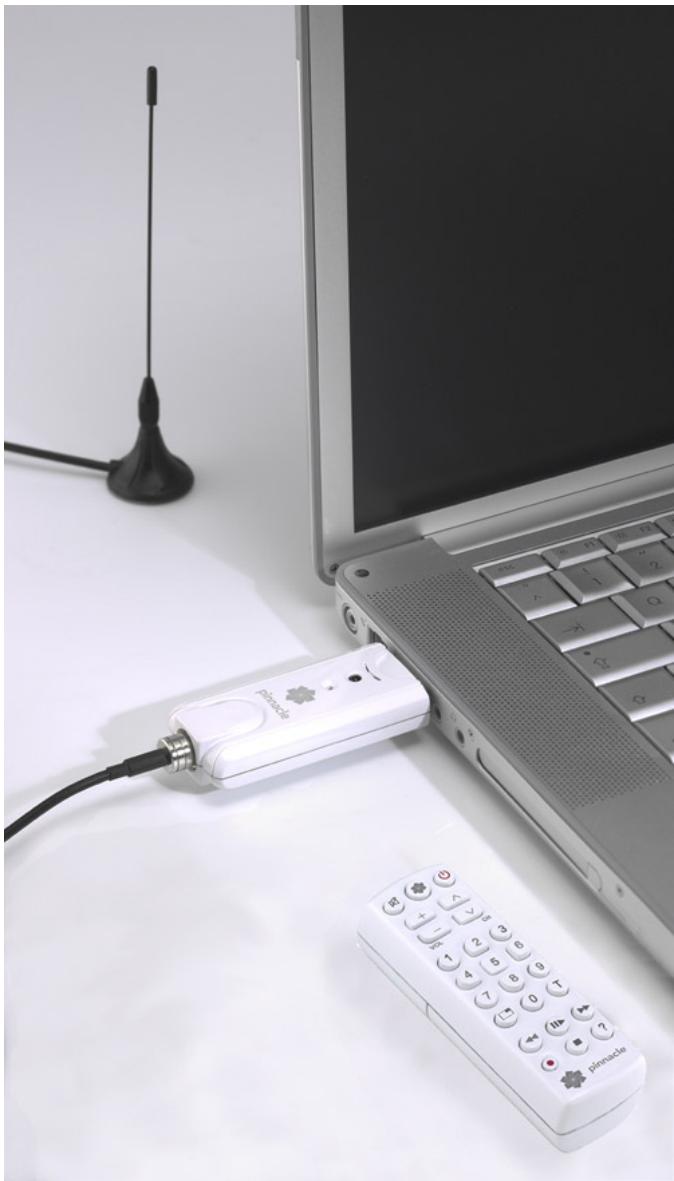
illustrations are samples
Remote Control Button Assignments
The following diagram shows you an overview of the individual functions for the remote control:
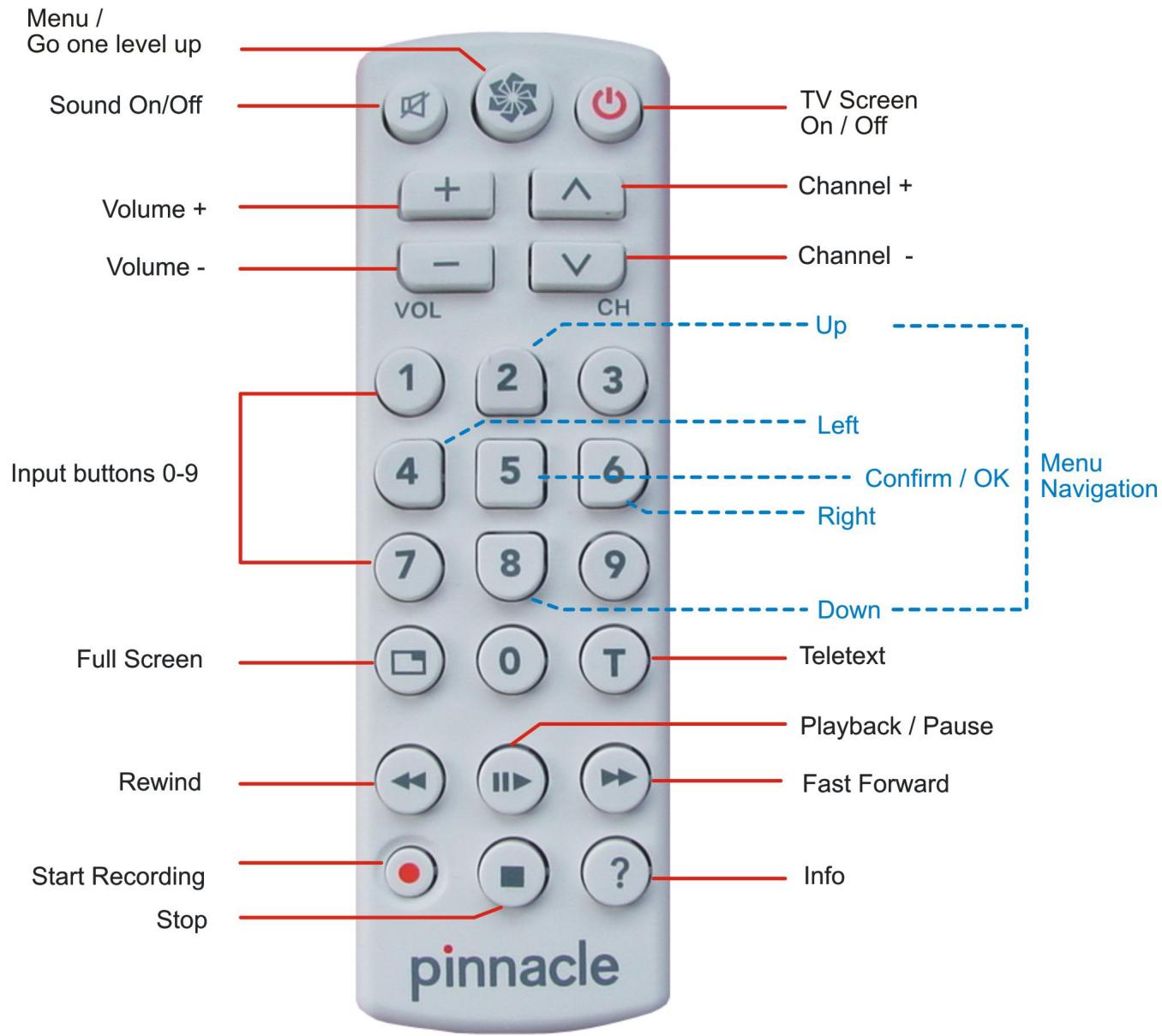

For details on how to use the input buttons and navigate the menu, please see the next page.
Functions of the Input Buttons
Numeric input
Use the input buttons 0-9 to enter numbers, e.g. to select a TV station directly.

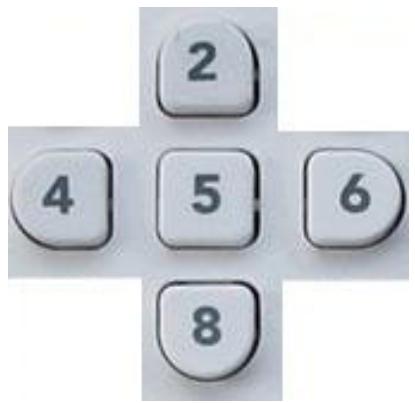
Menu navigation
When you have opened a menu, you can use the buttons 2, 4, 6 and 8 as arrow keys (similar to cursor control keys) in order to navigate the menu. The currently selected menu item is highlighted in colour.
To start the selected function, press button 5.

Marque : PINNACLE
Modèle : TV FOR MAC
Catégorie : Logiciel de télévision