
RFX-300 - Effets audio ZOOM - Notice d'utilisation et mode d'emploi gratuit
Retrouvez gratuitement la notice de l'appareil RFX-300 ZOOM au format PDF.


| Type de produit | Processeur d'effets audio numérique |
| Marque | ZOOM |
| Modèle | RFX-300 |
| Nombre d'effets | 22 presets (11 x 2 banques) |
| Fréquence d'échantillonnage | 44,1 kHz |
| Conversion A/N | 18 bits, suréchantillonnage 64x |
| Conversion N/A | 18 bits, suréchantillonnage 8x |
| Processeur DSP | ZOOM ZFx-2 |
| Entrées | 2× jack mono (L/MONO, R) + 2× RCA (L, R) |
| Impédance d'entrée (jack) | 22 kΩ |
| Niveau d'entrée nominal (jack ligne) | -10 dBm |
| Niveau d'entrée nominal (jack micro) | -56 dBm |
| Sorties | 2× jack mono (L, R) + 2× RCA (L, R) |
| Impédance de charge de sortie | 100 Ω ou plus |
| Niveau de sortie max. | +6 dBm |
| Alimentation | Adaptateur secteur 9 V CC centre négatif (AD-0006) ou 6 piles R6 (AA) alcalines |
| Autonomie sur piles (alcalines) | Environ 10 h |
| Dimensions | 168 × 170 × 59 mm |
| Poids | 550 g |
| Fonctions principales | Reverb, delay, chorus, flanger, phaser, pitch, compresseur, simulateur micro, simulateur enceinte, effets multi, effets mixdown, bypass, tap tempo |
| Nettoyage | Chiffon doux et sec, éventuellement légèrement humide ; pas de solvants ni abrasifs |
| Sécurité | Utiliser uniquement l'adaptateur spécifié, éviter l'humidité et les chocs, ne pas ouvrir le boîtier |
| Entretien | Retirer les piles en cas d'inutilisation prolongée, nettoyer les contacts en cas de fuite |
FOIRE AUX QUESTIONS - RFX-300 ZOOM
Questions des utilisateurs sur RFX-300 ZOOM
0 question sur cet appareil. Repondez a celles que vous connaissez ou posez la votre.
Poser une nouvelle question sur cet appareil
Téléchargez la notice de votre Effets audio au format PDF gratuitement ! Retrouvez votre notice RFX-300 - ZOOM et reprennez votre appareil électronique en main. Sur cette page sont publiés tous les documents nécessaires à l'utilisation de votre appareil RFX-300 de la marque ZOOM.
MODE D'EMPLOI RFX-300 ZOOM
RFX-300
DIGITAL REVERB & MULTI EFFECTS
OPERATION MANUAL
Introduction
Thank you for selecting the ZOOM RFX-300 (hereafter simply called the "RFX-300"). The RFX-300 is a sophisticated multi-effect processor with the following features and functions.
- Ideal for use with a multi-track recorder
A total of 22 high-quality preset effects using a sampling frequency of 44.1kHz and 18-bit A/D and D/A converters are built in. This includes reverb effects such as Hall, Room, Plate, and Ambience, delay/modulation type effects as well as combination effects, mixdown effects for changing the overall mood of a song. Any effect can be called up quickly and without fuss. The unit is designed to be especially useful for recording and mixdown on a multi-track recorder.
- Easy operation
The main parameters of preset effects can be adjusted directly with convenient knobs on the top panel. This allows quick fine-tuning for optimum sound.
- Integrated tap input function
Tap input lets you set time-based parameters simply by tapping a key in the desired interval. This makes it a snap to match delay time or modulation rate to the tempo of a song.
- Versatile input/output configuration
The inputs and outputs of the RFX-300 accommodate both standard phone plugs and RCA type phono plugs. Electronic instruments, multi-track recorders, various audio components and a wide range of other equipment can be connected without hassle. The phone jack input is equipped with a gain switch, allowing connection of microphones as well. You can use the RFX-300 as a portable vocal effect device or as a microphone preamp for recording.
- Dual power supply design
The dual power supply principle allows the unit to be powered from an AC adapter or six IEC R6 (size AA) batteries. This is convenient for example when using the unit on stage.
Please take the time to read this manual carefully so as to get the most out of your RFX-300 and to ensure optimum performance and reliability. Retain this manual, the warranty card and all other documentation for future reference.
Contents
Safety Precautions/Usage Precautions 2
Controls and Features 3
Top Panel 3
Rear Panel 3
Getting Connected 4
To Operate the Unit on Batteries 5
Turning the Unit On 5
Adjusting the Sound of an Effect 6
Using the Bypass Function 6
Effects and Parameters 7
Troubleshooting
Specifications
Safety Precautions
In this manual, symbols are used to highlight warnings and cautions for you to read so that accidents can be prevented. The meanings of these symbols are as follows:

Warning
This symbol indicates explanations about extremely dangerous matters. If users ignore this symbol and handle the device the wrong way, serious injury or death could result.

Caution
This symbol indicates explanations about dangerous matters. If users ignore this symbol and handle the device the wrong way, bodily injury and damage to the equipment could result.
Please observe the following safety tips and precautions to ensure hazard-free use of the RFX-300.

- Power requirements
Since power consumption of this unit is fairly high, we recommend the use of an AC adapter whenever possible. When powering the unit from a battery, use only an alkaline type.
[AC adapter operation]
- Be sure to use only an AC adapter which supplies 9 V DC, 300mA and is equipped with a "center minus" plug (Zoom AD-0006). The use of an adapter other than the specified type may damage the unit and pose a safety hazard.
- Connect the AC adapter only to an AC outlet that supplies the rated voltage required by the adapter.
- When disconnecting the AC adapter from the AC outlet, always grasp the adapter itself and do not pull at the cable.
- When not using the unit for an extended period, disconnect the AC adapter from the AC outlet.
[Battery Powered Operation]
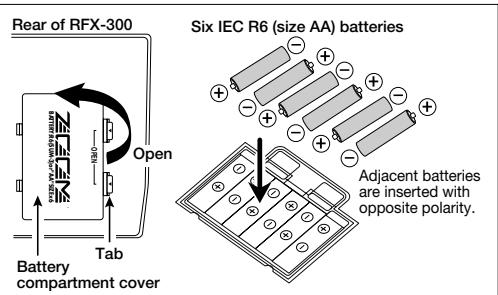
- Use six IEC R6 (size AA) 1.5V batteries (alkaline).
- The RFX-300 cannot be used for recharging.
Pay close attention to the labelling of the battery to make sure you choose the correct type. - When not using the unit for an extended period, remove the batteries from the unit.
- If battery leakage has occurred, wipe the battery compartment and the battery terminals carefully to remove all remnants of battery fluid.
- While using the unit, the battery compartment cover should be closed.
![ZOOM RFX-300 - [Battery Powered Operation] - 1](/content/2025/01/152242/images/eb4962b978da4a54cc6b5e5257a595063d1f4f207e6a67263961c166b3449074.jpg)
- Environment
Avoid using your RFX-300 in environments where it will be exposed to:
- Extreme temperature
High humidity or moisture - Excessive dust or sand
- Excessive vibration or shock
Handling
Since the RFX-300 is a precision electronic device, avoid applying excessive force to the switches and buttons. Also take care not to drop the unit, and do not subject it to shock or excessive pressure.
Alterations
Never open the case of the RFX-300 or attempt to modify the product in any way since this can result in damage to the unit.
Connecting cables and input and output jacks
You should always turn off the power to the RFX-300 and all other equipment before connecting or disconnecting any cables. Also make sure to disconnect all cables and the AC adapter before moving the RFX-300.
Usage Precautions
- Electrical interference
For safety considerations, the RFX-300 has been designed to provide maximum protection against the emission of electromagnetic radiation from inside the device, and protection from external interference. However, equipment that is very susceptible to interference or that emits powerful electromagnetic waves should not be placed near the RFX-300, as the possibility of interference cannot be ruled out entirely.
With any type of digital control device, the RFX-300 included, electromagnetic interference can cause malfunctioning and can corrupt or destroy data. Care should be taken to minimize the risk of damage.
- Cleaning
Use a soft, dry cloth to clean the RFX-300. If necessary, slightly moisten the cloth. Do not use abrasive cleanser, wax, or solvents (such as paint thinner or cleaning alcohol), since these may dull the finish or damage the surface.
Please keep this manual in a convenient place for future reference.
Top Panel
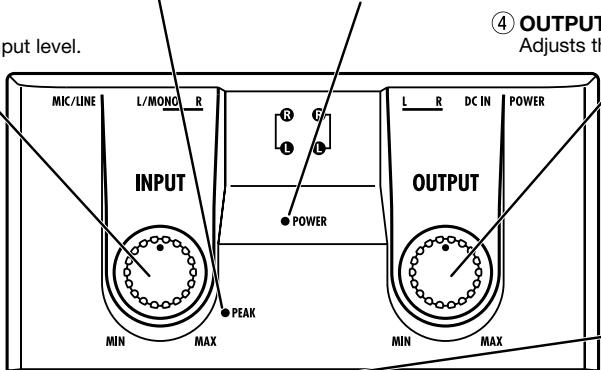
② PEAK indicator
Lights up in red when the signal is approaching the clipping level.
③ POWER indicator
When the RFX-300 is on, this LED indicator is lit. When the unit is powered from the batteries, the indicator begins to flash when battery voltage becomes low.
① INPUT control
Adjusts the signal input level.
④ OUTPUT control
Adjusts the signal output level.
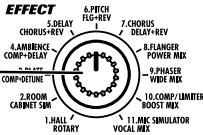
⑤ EFFECT selector
Together with the BANK keys (⑦), this selector allows the user to choose one of 22 different effects.
⑥ BYPASSkey
Sets the unit to the bypass mode, where the effects are temporarily turned off.
⑦ BANK keys
Serve to select the effect bank A or B.
BFX-300
DIGITAL REVERB & MULTI EFFECTS
EFFECT

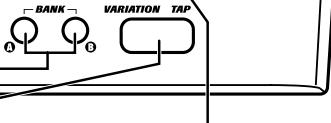
8 VARIATION/TAP key
Serves to switch among variations of an effect and allows "tap input" of time based parameters by detecting the interval in which the key is operated.
⑨ VARIATION/TAP indicator
These LED indicators show the function of the VARIATION/TAP key (8).
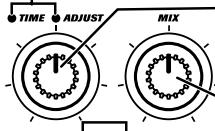
10 TIME/ADJUST
indicator
This LED indicator shows which parameter can be adjusted with the TIME/ADJUST control (11).
① TIME/ADJUST
control
Allows adjustment of effect parameters.
12 MIX control
Adjusts the balance between original sound and effect sound, or adjusts a second effect parameter.
Rear Panel
⑬ DC9V jack
When powering the unit with the optional AC adapter, the cable from the adapter must be plugged in here.
16 POWER switch
Serves to turn the unit on and off.
17 OUTPUT jacks
Stereo output for phone plugs.
14 OUTPUT jacks
Stereo output for RCA type phono plugs.
15 INPUT jacks
Stereo input for RCA type phono plugs. This input cannot be used at the same time as the phone INPUT jacks (18).
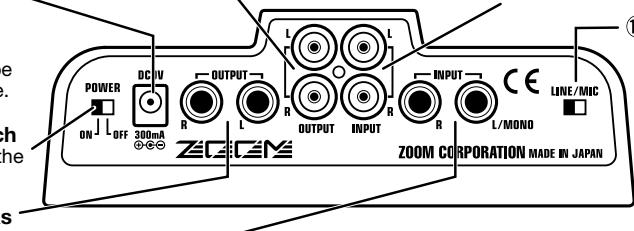
18 INPUT jacks
Phone type input which can handle signals ranging from microphone level to line level. The signal from instruments with high-impedance outputs such as electric guitar should be routed through a preamp or guitar effect.
19 LINE/MIC switch
Selects the gain for the signal supplied to the phone INPUT jacks (18).
Connection to a line-level device such as a synthesizer
LINE/MIC

Microphone connection
LINE/MIC

Recording (1) (Insert)
Rhythm machine, synthesizer or similar
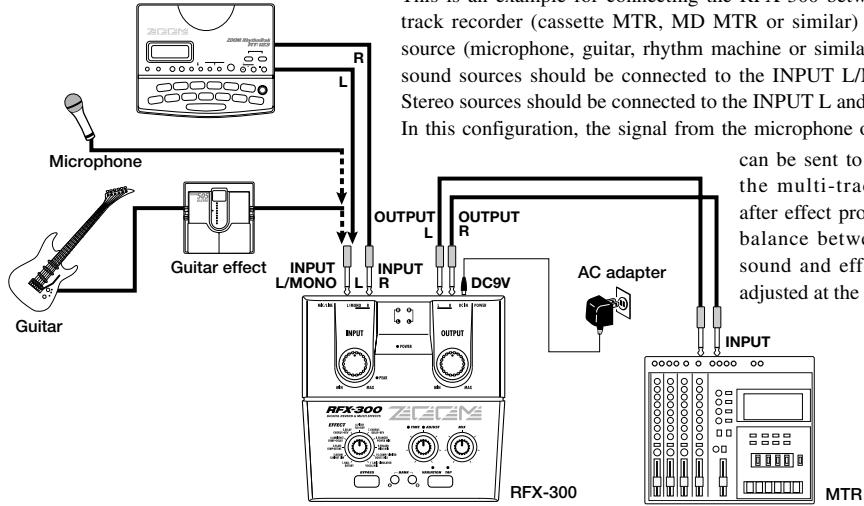
This is an example for connecting the RFX-300 between a multitrack recorder (cassette MTR, MD MTR or similar) and a sound source (microphone, guitar, rhythm machine or similar). Monaural sound sources should be connected to the INPUT L/MONO jack. Stereo sources should be connected to the INPUT L and R jacks. In this configuration, the signal from the microphone or instrument
can be sent to the input of the multi-track recorder after effect processing. The balance between original sound and effect sound is adjusted at the RFX-300.
Recording (2) (Send/Return)
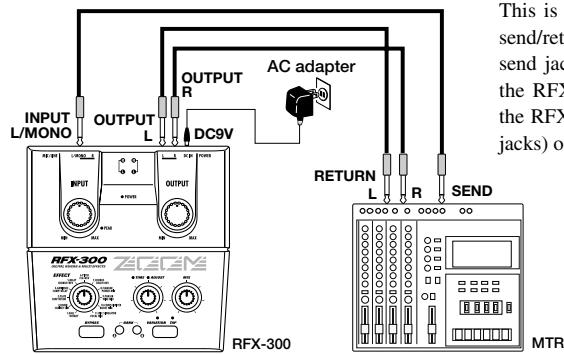
This is an example for connecting the RFX-300 to the send/return jacks of a multi-track recorder. Connect the send jack of the MTR to the INPUT L/MONO jack of the RFX-300, and connect the OUTPUT L/R jacks of the RFX-300 to the return jacks (or the stereo line input jacks) of the MTR.
In this configuration, the RFX-300 should be set its outputs send only the effect sound, and the balance between original sound and effect sound is adjusted at the multi-track recorder. If the multi-track recorder is equipped with stereo send jacks, it is also possible to input a stereo send signal to the RFX-300.
Mixdown
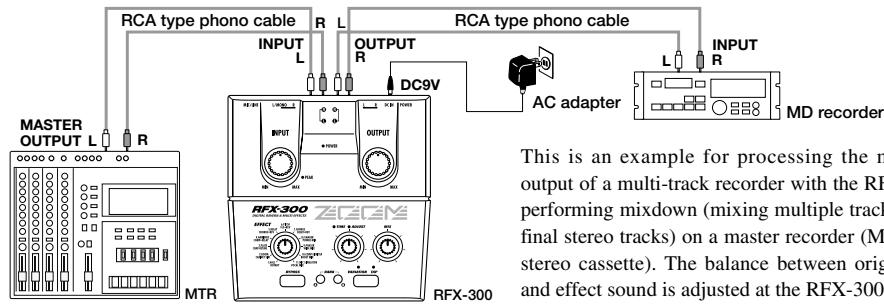
This is an example for processing the master L/R output of a multi-track recorder with the RFX-300 and performing mixdown (mixing multiple tracks onto two final stereo tracks) on a master recorder (MD, DAT, or stereo cassette). The balance between original sound and effect sound is adjusted at the RFX-300.
Live Performance
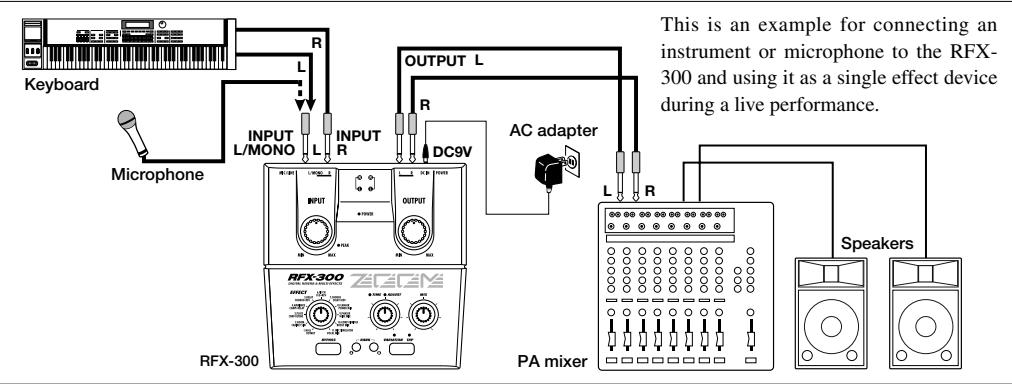
To Operate the Unit on Batteries
Besides using an AC adapter, the RFX-300 can also be powered from six IEC R6 (size AA) alkaline batteries. When the unit is running on battery power, the POWER indicator on the top panel begins to flash when the batteries
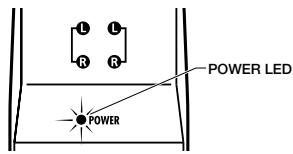
are nearing depletion. In such a case, replace the batteries as soon as possible.
Turning the Unit On
- Verify that the AC adapter, sound source, and playback equipment are correctly connected to the RFX-300.
- Turn on the system in the following order: sound source RFX-300 playback equipment.
The INPUT control and OUTPUT control of the RFX-300 and the volume control of the playback equipment should be set to minimum before turning the system on.
- Turn up the INPUT control to adjust the input level.
When the sound source output is at maximum, the PEAK indicator should flash occasionally.
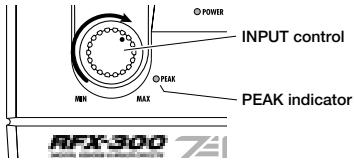
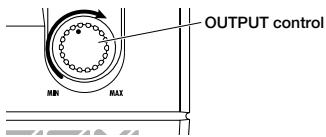
- Adjust the OUTPUT control and the volume control of the playback equipment to obtain a suitable playback volume.
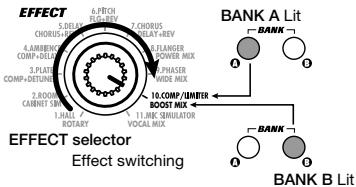
- Use the BANK keys and the EFFECT selector to choose the desired effect.
When the BANK key A is lit, the effects printed in the upper line are selected. When the BANK key B is lit, the effects printed in the lower line are selected.
To Make the Adjustment
The sound of effects provided by the RFX-300 can be modified by using the following controls.
① TIME/ADJUST control
Adjusts the main effect parameter. Which parameter this is depends on the currently selected effect.
When TIME indicator is lit
TIME ADJUST Lit
The control can be used to adjust a time-based parameter such as delay time, reverber time, etc.
When ADJUST indicator
is lit
O TIME ADJUST Lit
The control can be used to adjust another parameter.

TIME ADJUST
O O VARIATION TAP
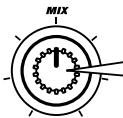
②MIX control
Adjusts the mixing ratio of original sound and effect sound, and also serves to adjust other parameters. Which parameter this is depends on the currently selected effect.
For information on effects and adjustable parameters, please refer to page 7.
③ VARIATION/TAP key
This key is used to select effect variations and it also serves for the "tap input" function by which the unit detects the key-press interval. The key operation depends on the currently selected effect.
When VARIATION indicator is lit
Lit O
VARIATION TAP
Each push of the key toggles between variation 1 (VARIATION/TAP key is out) and variation 2 (VARIATION/TAP key is lit).
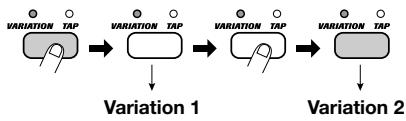
When TAP indicator is lit

Time-based parameters such as delay time or flanger modulation cycle can be easily input by tapping the key in the desired interval (tap input).
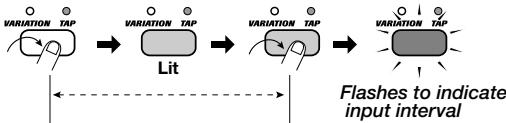
(1) After TAP key is pressed for the first time...
(2) Time until TAP key is pressed for the second time is measured, and the parameter is set accordingly.
If the key-press interval is larger than the maximum possible setting for the current parameter, the parameter is set to the maximum value of the tap input range.
Using the Bypass Function
The effects of the RFX-300 can be temporarily turned off. This is called the bypass mode.
1. To set the RFX-300 to the bypass mode, press the BYPASS key.
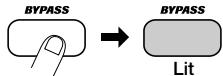
The RFX-300 has two different bypass states, depending on the currently selected effect. (For information on which effects use which bypass type, please refer to pages 7 - 11.)
WET MUTE
In this condition, only the effect sound is muted. The effects (A1 - A9) using the connection as described in "Recording (2) (Send/Return)" on page 4 operate in this way. The original sound output
level depends on the MIX control position.
In bypass mode...
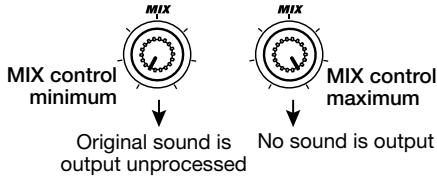
- DRY THRU
The original sound is output without any processing. The setting of the MIX control has no effect.
2. To return the RFX-300 to the normal state, press the BYPASS key once more.
This section explains all effects and adjustable parameters.
Table of Effects
The following table shows the effect parameters that are adjustable with the VARIATION/TAP key, TIME/ADJUST control, and MIX control for each effect.
| EFFECT | PARAMETER | BYPASS | ||||
| VARIATION/TAP | TIME/ADJUST | MIX | ||||
| TAP | VARIATION | |||||
| A1 | HALL | Warm / Clear | Reverb Time | Dry-Wet Balance | Wet Mute | |
| A2 | ROOM | Warm / Clear | Reverb Time | Dry-Wet Balance | Wet Mute | |
| A3 | PLATE | Warm / Clear | Reverb Time | Dry-Wet Balance | Wet Mute | |
| A4 | AMBIENCE | Warm / Clear | Reverb Time | Dry-Wet Balance | Wet Mute | |
| A5 | DELAY | Delay Time | Delay Time | Dry-Wet Balance | Wet Mute | |
| A6 | PITCH | Up / Down | Shift | Dry-Wet Balance | Wet Mute | |
| A7 | CHORUS | Warm / Clear | Depth & Rate | Dry-Wet Balance | Wet Mute | |
| A8 | FLANGER | Rate | Rate | Dry-Wet Balance | Wet Mute | |
| A9 | PHASER | Rate | Rate | Dry-Wet Balance | Wet Mute | |
| A10 | COMP/LIMITER | Compressor / Limiter | Release | Threshold | Dry Thru | |
| A11 | MIC SIMULATOR | Vocal / Instrument | Threshold | Enhance | Dry Thru | |
| B1 | ROTARY | Rate | Rate | Intensity | Dry Thru | |
| B2 | CABINET SIM | Combo / Stack | Presence | Depth | Dry Thru | |
| B3 | COMP+DETUNE | Compressor / Limiter | Comp Threshold | Detune Mix | Dry Thru | |
| B4 | COMP+DELAY | Delay Time | Delay Time | Comp Threshold | Dry Thru | |
| B5 | CHORUS+REV | Warm / Clear | Chorus Mix | Reverb Mix | Dry Thru | |
| B6 | FLG+REV | Flanger Rate | Flanger Rate | Reverb Mix | Dry Thru | |
| B7 | DELAY+REV | Delay Time | Delay Time | Reverb Mix | Dry Thru | |
| B8 | POWER MIX | Short Reverb / Long Reverb | Intensity | Reverb Mix | Dry Thru | |
| B9 | WIDE MIX | Short Reverb / Long Reverb | Intensity | Reverb Mix | Dry Thru | |
| B10 | BOOST MIX | Short Reverb / Long Reverb | Intensity | Reverb Mix | Dry Thru | |
| B11 | VOCAL MIX | Short Reverb / Long Reverb | Intensity | Reverb Mix | Dry Thru | |
Effect Details
Reverb
This group comprises high-quality stereo reverb effects. The two available variations are a basic sound (Warm) suitable for vocals and general instrumentation, and a clear sound (Clear) suitable mainly for drums and percussion.
Effects of this section are best for use in configurations such as shown in the connection example "Recording (2) (Send/Return)" on page 4.
| Effect | Description | |||
| A1 | HALL | This effect simulates the acoustic characteristics of a large concert hall. | ||
| A2 | ROOM | This effect simulates the acoustic space of a medium-size live venue. | ||
| A3 | PLATE | This effect simulates the so-called "plate reverb" (as produced by a pickup mounted to a large, free-hanging iron plate). Especially the "Clear" variation is great for percussion. | ||
| A4 | AMBIENCE | Adds natural ambience to the sound source without changing the basic sound character. | ||
| Common to A1 | A4 | VARIATION/TAP | TIME/ADJUST | MIX | BYPASS |
| VARIATION (Warm / Clear) | Reverb Time | Dry-Wet Balance | Wet Mute | |
| Selects reverb variation (Warm or Clear). | Adjusts reverb time. | Adjusts the balance between original sound and effect sound. | In bypass mode, only the effect sound is muted. | |
| [Setting Example] HALL Natural sounding hall reverber that can be used both for male and female vocals. The MIX parameter setting in this example is for the send/return onfiguration. | [Setting Example] PLATE Great for percussion. This setting gives a bright, lively reverb. The MIX parameter setting in this example is for the send/return onfiguration. | |||
Single Effects
This section comprises various single effects to alter delay, modulation, and dynamics. Effects of this section are best for track recording in configurations such as shown in the connection example "Recording (1) (Insert)" on page 4.
Effects A5 - A9 can also be used in configurations such as shown in "Recording (2) (Send/Return)".
| Effect | Description | |||
| A5 | DELAY | Stereo delay with a maximum delay time of 700 ms. The delay time can be easily matched to the tempo of a song by performing tap input with the TAP key. | ||
| VARIATION/TAP | TIME/ADJUST | MIX | BYPASS | |
| TAP(Delay Time) | Delay Time | Dry-Wet Balance | Wet Mute | |
| Serves for tap input of delay time. | Serves for knob adjustment of delay time. | Adjusts the balance between original sound and effect sound. | In bypass mode, only the effect sound is muted. | |
| A6 | PITCH | This is a pitch effect with a wide range, from slight pitch detuning to +1 octave pitch shift. | ||
| VARIATION/TAP | TIME/ADJUST | MIX | BYPASS | |
| VARIATION(Up / Down) | Shift | Dry-Wet Balance | Wet Mute | |
| Selects the pitch effect variation (upward pitch shift or downward pitch shift). | Controls the amount of pitch shift (detune 3 steps to +12 semitones). | Adjusts the balance between original sound and effect sound. | In bypass mode, only the effect sound is muted. | |
| A7 | CHORUS | This is a stereo chorus effect that periodically shifts the pitch up or down and adds a wide spatial dimension to the sound. Two variations are available: soft sound (Warm) and clear sound (Clear). | ||
| VARIATION/TAP | TIME/ADJUST | MIX | BYPASS | |
| VARIATION(Warm / Clear) | Depth & Rate | Dry-Wet Balance | Wet Mute | |
| Selects the chorus variation (Warm or Clear). | Simultaneously controls the modulation depth and rate. | Adjusts the balance between original sound and effect sound. | In bypass mode, only the effect sound is muted. | |
| A8 | FLANGER | This effect adds a slightly delayed component to the original sound while periodically varying the delay time, which produces an undulating sound. The basic principle resembles the chorus effect, but since the effect also uses feedback, the resulting sound has a strong and unique character that is typical of a flanger. | ||
| VARIATION/TAP | TIME/ADJUST | MIX | BYPASS | |
| TAP(Rate) | Rate | Dry-Wet Balance | Wet Mute | |
| Serves for tap input of modulation cycle. | Serves for knob adjustment of modulation cycle. | Adjusts the balance between original sound and effect sound. | In bypass mode, only the effect sound is muted. | |
| [Setting Example] Produces a jet type sound with distortion. TIME/ADJUST VARIATION TAP TIME/ADJUST MIX | ||||
| A9 | PHASER | This effect adds a phase shifted component to the original sound while periodically varying the phase of the effect sound, thereby producing a surging sound. It is especially suitable for electric guitar and electric piano. | ||
| VARIATION/TAP | TIME/ADJUST | MIX | BYPASS | |
| TAP(Rate) | Rate | Dry-Wet Balance | Wet Mute | |
| Serves for tap input of modulation cycle. | Serves for knob adjustment of modulation cycle. | Adjusts the balance between original sound and effect sound. | In bypass mode, only the effect sound is muted. | |
| [Setting Example ] Suitable for chord backing by electric guitar and electric piano. TIME/ADJUST VARIATION TAP TIME/ADJUST MIX | ||||
| A10 | COMP/LIMITER | This effect processes the dynamic range of the sound, for keeping the signal level within a certain range. There are two variations: the compressor which raises signals below a certain threshold level and attenuates signals above a certain level, and the limiter which only attenuates signals above a certain level. | ||
| VARIATION/TAP | TIME/ADJUST | MIX | ||
| VARIATION (Compressor/Limiter) | Release | Threshold | ||
| Selects the effect variation (Compressor or Limiter). | Adjusts the time lag between the point where the signal falls below the threshold level and the end of compressor action. Should be short for single instruments and longer for ensembles. | Adjusts the threshold level where the compressor/limiter becomes active. | ||
| [Setting Example] | O TIME ADJUST | [Setting Example] | ||
| Compressor with pronounced attack. | VARIATION TAP | O TIME ADJUST | MIX | |
| Limiter for preventing sudden level changes. | ||||
Microphone simulator
When recording vocals or acoustic instruments with a dynamic microphone, this effect can be used to achieve characteristics resembling those of a high-quality condenser mike. The simulator also provides limiter and enhancer effects specially geared for microphone recording. Effects of this section are best for track recording in configurations such as shown in the connection example "Recording (1) (Insert)" on page 4.
| Effect | Description | |||
| A11 | MIC SIMULATOR | This effect allows you to achieve condenser mike characteristics while using economical dynamic microphones. The available variations are "Vocal" with a full and well-rounded midrange and natural treble, and "Instrument" with the delicate sound of a condenser mike. | ||
| VARIATION/TAP | TIME/ADJUST | MIX | BYPASS | |
| VARIATION(Vocal/Instrument) | Threshold | Enhance | Dry Thru | |
| Selects the variation (Vocal or Instrument). | Adjusts the limiter sensitivity. | Adjusts the high-range enhancer depth. | In bypass mode, only the unprocessed original sound is output. | |
| [Setting Example]This setting gives depth and impact to rock vocals. | O TIME O ADJUST MIX | [Setting Example]Suitable for recording the natural sound of an acoustic guitar. | O TIME O ADJUST MIX | |
Guitar & Organ
Comprises a rotary effect that is essential for great organ sound, as well as a speaker cabinet simulator and other effects suitable for electric guitar and organ.
| Effect | Description | |||
| B1 | ROTARY | Simulates a rotary speaker turned by mechanical means. The rotation speed can be varied by tap input. | ||
| VARIATION/TAP | TIME/ADJUST | MIX | BYPASS | |
| TAP (Rate) | Rate | Intensity | Dry Thru | |
| Serves for tap input of rotation speed. | Serves for knob adjustment of rotation speed. | Adjusts the depth of the effect sound. | In bypass mode, only the unprocessed original sound is output. | |
| B2 | CABINET SIM | This effect adds a speaker cabinet character to the sound of an electric guitar that has been processed by distortion effects or a multi-effect device, resulting in realistic amplifier sound. The available variations are "Combo" (combocomp amplifier sound) and "Stack" (stack amplifier sound). | ||
| VARIATION/TAP | TIME/ADJUST | MIX | BYPASS | |
| VARIATION (Combo/Stack) | Presence | Depth | Dry Thru | |
| Selects the effect variation (Combo or Stack). | Adjusts the level of the ultra-high range. | Adjusts the depth of the cabinet effect. | In bypass mode, only the unprocessed original sound is output. | |
| [Setting Example] This setting is optimized to produce a stack amplifier sound for a signal that has been processed by a distortion effect. | TIME/ADJUST MIX | |||
Multi-Effects
Using a combination of multiple effects like a single effect is called multi-effect operation. This is most suitable when the RFX-300 is used as an insert effect device during recording or as a stand-alone effect during a live performance.
| Effect | Description | |||
| B3 | COMP+DETUNE | This is a combination of a compressor that evens out sound level differences and a detuning effect with a slightly pitch-shifted component added to the original sound. | ||
| VARIATION/TAP | TIME/ADJUST | MIX | BYPASS | |
| VARIATION(Compressor/Limiter) | Comp Threshold | Detune Mix | Dry Thru | |
| Selects the compressor variation (Compressor or Limiter). | Adjusts the threshold for the compressor/limiter action. | Adjusts the balance between original sound and effect sound (detune). | In bypass mode, only the unprocessed original sound is output. | |
| [Setting Example] This yields a "double tracking" effect that is great for pop songs. | ○TIME □ADJUST □MIX | |||
| B4 | COMP+DELAY | This is a combination of compressor and delay. The effect is most suitable for vocals with echo. | ||
| VARIATION/TAP | TIME/ADJUST | MIX | BYPASS | |
| TAP(Delay Time) | Delay Time | Comp Threshold | Dry Thru | |
| Serves for tap input of delay time. | Serves for knob adjustment of delay time. | Adjusts the threshold for the compressor/limiter action. | In bypass mode, only the unprocessed original sound is output. | |
| B5 | CHORUS+REV | This is a combination of chorus and reverb, suitable for example for chord backing by acoustic guitar or electric piano. | ||
| VARIATION/TAP | TIME/ADJUST | MIX | BYPASS | |
| VARIATION(Warm/Clear) | Chorus Mix | Reverb Mix | Dry Thru | |
| Selects the effect variation (Warm or Clear tone). | Adjusts the chorus mix amount. | Adjusts the reverb mix amount. | In bypass mode, only the unprocessed original sound is output. | |
| B6 | FLG+REV | This is a combination of flanger with strong modulation and reverb. It can be used for example with electric guitar leads, arpeggios, or for other sound effects. | ||
| VARIATION/TAP | TIME/ADJUST | MIX | BYPASS | |
| TAP(Flanger Rate) | Flanger Rate | Reverb Mix | Dry Thru | |
| Serves for tap input of flanger modulation rate. | Serves for knob adjustment of flanger modulation rate. | Adjusts the reverb mix amount. | In bypass mode, only the unprocessed original sound is output. | |
| [Setting Example] This setting gives light, floating feeling that is great for playing arpeggios. | ○TIME □ADJUST □MIX | |||
| B7 | DELAY+REV | A great combination of effects for vocals. Can also be used for lead guitar and electric piano solos. | ||
| VARIATION/TAP | TIME/ADJUST | MIX | BYPASS | |
| TAP(Delay Time) | Delay Time | Reverb Mix | Dry Thru | |
| Serves for tap input of delay time. | Serves for knob adjustment of delay time. | Adjusts the reverb mix amount. | In bypass mode, only the unprocessed original sound is output. | |
Mixdown Effects
These effects are best suited for mixdown of multiple MTR tracks to stereo or for mastering (fine-tuning the sound and level of a final 2-track mix). They should be used in configurations such as shown in the connection example "Mixdown" on page 4.
| Effect | Description | |||
| B8 | POWER MIX | This effect gives strong bass and adds a powerful punch to the sound. It is most suitable for rock numbers. The reverb sound variations are "Short Reverb" and "Long Reverb". | ||
| VARIATION/TAP | TIME/ADJUST | MIX | BYPASS | |
| VARIATION(Short Reverb/Long Reverb) | Intensity | Reverb Mix | Dry Thru | |
| Selects the reverb variation(Short Reverb or Long Reverb). | Adjusts the bass emphasis. | Adjusts the reverb mix amount. | In bypass mode, only the unprocessed original sound is output. | |
| [Setting Example] Heavy rock sound with strong drive. | ||||
| B9 | WIDE MIX | Mixdown effect which stresses the stereo spread. Suitable especially for songs with emphasis on instrumental sound. | ||
| VARIATION/TAP | TIME/ADJUST | MIX | BYPASS | |
| VARIATION(Short Reverb/Long Reverb) | Intensity | Reverb Mix | Dry Thru | |
| Selects the reverb variation(Short Reverb or Long Reverb). | Adjusts the left/right spread. | Adjusts the reverb sound mixing ratio. | In bypass mode, only the unprocessed original sound is output. | |
| [Setting Example] Prominent ambience in addition to reverb components. | ||||
| B10 | BOOST MIX | Mixdown effect with tight low end and lively highs, ideal for rock and pop. Also allows compensation for losses at the extreme ends of the frequency spectrum that tend to occur when recording on a cassette MTR. | ||
| VARIATION/TAP | TIME/ADJUST | MIX | BYPASS | |
| VARIATION(Short Reverb/Long Reverb) | Intensity | Reverb Mix | Dry Thru | |
| Selects the reverb variation(Short Reverb or Long Reverb). | Adjusts the low-range/high-range volume. | Adjusts the reverb mix amount. | In bypass mode, only the unprocessed original sound is output. | |
| [Setting Example] Produces the sound of live recording. | ||||
| B11 | VOCAL MIX | This mixdown effect achieves a warm and rich vocal sound by stressing the midrange and adding plate type reverb. Optimal for ballads and other songs with emphasis on the vocals. | ||
| VARIATION/TAP | TIME/ADJUST | MIX | BYPASS | |
| VARIATION(Short Reverb/Long Reverb) | Intensity | Reverb Mix | Dry Thru | |
| Selects the reverb variation(Short Reverb or Long Reverb). | Adjust the band level to emphasize vocal clarity and timbre. | Adjusts the reverb mix amount. | In bypass mode, only the unprocessed original sound is output. | |
| [Setting Example] A setting for ballads which uses reverb to stress the appeal of vocals. | ||||
Troubleshooting
| Symptom | Check | Remedy |
| No sound or very low volume. | ·Is specified AC adapter connected and power switch set to ON? | Follow the instructions in "Turning the Unit On". |
| ·Is sound source connected correctly to INPUT jacks and are OUTPUT jacks connected correctly to playback equipment? | Follow the instructions in "Getting Connected". | |
| ·Are all shielded cables used for the connection okay? | Try replacing the shielded cables. | |
| ·Is the amplifier switched on? Is the volume at the sound source and amplifier set to proper position? | Turn amplifier on. Adjust volume of sound source. | |
| ·Is INPUT control or OUTPUT control turned down? | Adjust INPUT control and OUTPUT control. | |
| ·Are the batteries exhausted? | Replace batteries. | |
| ·Is MIX control set to maximum in bypass mode? | Adjust MIX control. | |
| Input sound breaks up or is distorted. | ·Is input signal level too high? | Adjust volume of sound source and set INPUT control to a suitable position. |
| ·Is input signal supplied both to phone jacks and RCA type phono jacks? | Phone jack input and RCA type phono jack input cannot be used simultaneously. Connect a sound source only to one input. | |
| ·Is LINE/MIC switch set to MIC? | Set LINE/MIC switch to LINE. | |
| No effect sound | ·Is MIX control turned fully to direct sound side? | Adjust MIX control to achieve proper balance between direct sound and effected sound. |
| ·Is unit set to bypass mode? | Cancel bypass mode. |
Specifications
| Number of Effect Programs | 11 x 2 banks | Outputs | |
| Sampling Frequency | 44.1 kHz | L, R | standard monaural phone jacks |
| Analog/Digital Conversion | 18 bit, 64 times oversampling | L, R | RCA type phono jacks |
| Digital/Analog Conversion | 18 bit, 8 times oversampling | Output load impedance: | 100 ohms or more |
| Max. output: | +6 dBm | ||
| DSP | ZOOM original ZFx-2 | ||
| Power Requirements | Supplied AC adapter 9 V DC, center negative (AD-0006) | ||
| Inputs | |||
| L/MONO, R | Standard monaural phone jack x 2 | Battery: IEC R6 (size AA) x 6 | |
| Input impedance: | 22 kilohms | Battery life: approx. 10 h (with alkaline batteries) | |
| Rated input level: | -10 dBm (Line) | ||
| -56 dBm (Mike) | Dimensions | 168 (W) x 170 (D) x 59 (H) mm | |
| L, R | RCA type phono jacks | Weight | 550 g |
| Input impedance: | 22 kilohms | ||
| Rated input level: | -10 dBm | * 0 dBm = 0.775 Vrms | |
- RFX-300
- DIGITAL REVERB & MULTI EFFECTS
- OPERATION MANUAL
- Introduction
- - Ideal for use with a multi-track recorder
- - Easy operation
- - Integrated tap input function
- - Versatile input/output configuration
- - Dual power supply design
- Contents
- Safety Precautions
- - Power requirements
- [AC adapter operation]
- [Battery Powered Operation]
- - Environment
- Handling
- Alterations
- Connecting cables and input and output jacks
- Usage Precautions
- - Electrical interference
- - Cleaning
- Top Panel
- ② PEAK indicator
- ③ POWER indicator
- ① INPUT control
- ④ OUTPUT control
- ⑤ EFFECT selector
- ⑥ BYPASSkey
- ⑦ BANK keys
- BFX-300
- VARIATION/TAP key
- ⑨ VARIATION/TAP indicator
- TIME/ADJUST
- indicator
- ① TIME/ADJUST
- control
- MIX control
- Rear Panel
- ⑬ DC9V jack
- POWER switch
- OUTPUT jacks
- OUTPUT jacks
- INPUT jacks
- INPUT jacks
- LINE/MIC switch
- Recording (1) (Insert)
- Recording (2) (Send/Return)
- Mixdown
- Live Performance
- To Operate the Unit on Batteries
- Turning the Unit On
- To Make the Adjustment
- ① TIME/ADJUST control
- When TIME indicator is lit
- When ADJUST indicator
- ②MIX control
- ③ VARIATION/TAP key
- When VARIATION indicator is lit
- When TAP indicator is lit
- Using the Bypass Function
- To set the RFX-300 to the bypass mode, press the BYPASS key.
- WET MUTE
- In bypass mode...
- - DRY THRU
- To return the RFX-300 to the normal state, press the BYPASS key once more.
- Table of Effects
- Effect Details
- Reverb
- Single Effects
- Microphone simulator
- Guitar & Organ
- Multi-Effects
- Mixdown Effects
- Troubleshooting
- Specifications
Marque : ZOOM
Modèle : RFX-300
Catégorie : Effets audio