
TALEA TOUCH PLUS - Machine à café automatique SAECO - Notice d'utilisation et mode d'emploi gratuit
Retrouvez gratuitement la notice de l'appareil TALEA TOUCH PLUS SAECO au format PDF.



| Type de produit | Machine à café automatique |
| Marque | SAECO |
| Modèle | TALEA TOUCH PLUS |
| Dimensions (L x H x P) | 313 x 372 x 426 mm |
| Poids | 9 kg |
| Tension nominale | 120 V (modèle US) |
| Puissance nominale | Environ 1400 W |
| Pression pompe | 15 bar |
| Capacité réservoir eau | 1,7 L |
| Capacité réservoir grains | 250 g |
| Matériau du moulin | Céramique |
| Type de café utilisable | Grains entiers et café moulu |
| Fonctions principales | Espresso, café long, eau chaude, vapeur, cappuccino, 2 tasses simultanées |
| Réglages personnalisables | Aroma (Opti-Dose), mouture, température, prélibation, volume café, dureté de l'eau |
| Écran tactile | Oui, avec icônes et texte |
| Programmation des boissons | Jusqu'à 20 boissons personnalisables |
| Système d'adaptation | Saeco Adapting System (auto-réglage) |
| Filtre à eau | Intenza (optionnel, avec indicateur de remplacement) |
| Entretien automatique | Cycle de rinçage, nettoyage groupe d'infusion, détartrage |
| Sécurité | Double thermostat de sécurité, arrêt automatique, verrouillage écran |
| Accessoires inclus | Filtre Intenza, test de dureté, lubrifiant, cuillère doseuse, clé de réglage mouture |
| Longueur du câble | 1200 mm |
| Garantie | 2 ans (standard constructeur) |
FOIRE AUX QUESTIONS - TALEA TOUCH PLUS SAECO
Questions des utilisateurs sur TALEA TOUCH PLUS SAECO
0 question sur cet appareil. Repondez a celles que vous connaissez ou posez la votre.
Poser une nouvelle question sur cet appareil
Téléchargez la notice de votre Machine à café automatique au format PDF gratuitement ! Retrouvez votre notice TALEA TOUCH PLUS - SAECO et reprennez votre appareil électronique en main. Sur cette page sont publiés tous les documents nécessaires à l'utilisation de votre appareil TALEA TOUCH PLUS de la marque SAECO.
MODE D'EMPLOI TALEA TOUCH PLUS SAECO
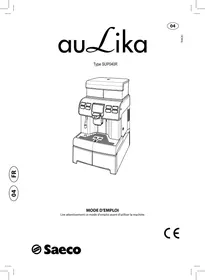
Talea
Touch Plus
Manuel d'utilisation et d'entretien
Avant d'utiliser la machine, veuillez lire les instructions d'utilisation ci-jointes.
Lisez attentivement les consignes de sécurité.
CE
POUR USAGE DOMESTIQUE UNIQUEMENT
GARANTIES IMPORTANTES
Lors de l'utilisation d'appareils électriques, des précautions de sécurité de base doivent toujours être suivies, notamment les suivantes :
- Lisez toutes les instructions.
- Ne touchez pas les surfaces chaudes. Utilisez les poignées ou les boutons.
- Pour vous protéger contre les incendies, les chocs électriques et les blessures, n'immergez pas le cordon, les fiches ou l'appareil dans l'eau ou tout autre liquide.
- Une surveillance étroite est nécessaire lorsque l'appareil est utilisé par ou à proximité d'enfants.
- Débranchez l'appareil lorsqu'il n'est pas utilisé et avant de le nettoyer. Laissez-le refroidir avant de mettre ou retirer des pièces, et avant de nettoyer l'appareil.
- Ne faites pas fonctionner un appareil avec un cordon ou une fiche endommagés, ou après un dysfonctionnement, ou s'il a été endommagé de quelque manière que ce soit. Retournez l'appareil au centre de service agréé le plus proche pour examen, réparation ou réglage.
- L'utilisation d'accessoires non recommandés par le fabricant de l'appareil peut provoquer un incendie, une décharge électrique ou des blessures.
- Ne pas utiliser à l'extérieur.
- Ne laissez pas le cordon pendre du bord d'une table ou d'un comptoir, ni toucher des surfaces chaudes.
- Ne placez pas l'appareil sur ou à proximité d'un brûleur à gaz ou électrique chaud, ni dans un four chauffé.
- Branchez toujours la fiche sur l'appareil d'abord, puis branchez le cordon dans la prise murale. Pour débrancher, mettez toute commande sur « arrêt », puis retirez la fiche de la prise murale.
- N'utilisez pas l'appareil pour un usage autre que celui prévu. 13. Conservez ces instructions.
CONSERVEZ CES INSTRUCTIONS
ATTENTION
Cet appareil est réservé à un usage domestique uniquement. Toute réparation, autre que le nettoyage et l'entretien par l'utilisateur, doit être effectuée par un centre de service agréé. N'immergez pas la machine dans l'eau. Pour réduire les risques d'incendie ou de décharge électrique, ne démontez pas la machine. Aucune pièce à l'intérieur de la machine ne peut être réparée par l'utilisateur. Les réparations doivent être effectuées uniquement par un personnel de service agréé.
1. Vérifiez que la tension indiquée sur la plaque signalétique correspond à votre tension. 2. N'utilisez jamais d'eau tiède ou chaude pour remplir le réservoir d'eau. Utilisez uniquement de l'eau froide. 3. Pendant le fonctionnement, tenez vos mains et le cordon éloignés des parties chaudes de l'appareil. 4. Ne nettoyez jamais avec des poudres à récurer ou des nettoyants agressifs. Utilisez simplement un chiffon doux humidifié avec de l'eau. 5. Pour un goût optimal de votre café, utilisez de l'eau purifiée ou en bouteille. Un détartrage périodique est toujours recommandé tous les 2 à 3 mois. 6. N'utilisez pas de café aromatisé ou caramélisé.
INSTRUCTIONS POUR LE CORDON D'ALIMENTATION
A. Un cordon d'alimentation court (ou un cordon d'alimentation amovible) doit être fourni pour réduire les risques d'enchevêtrement ou de trébuchement sur un cordon plus long. B. Des cordons d'alimentation amovibles plus longs ou des rallonges sont disponibles et peuvent être utilisés si l'on fait preuve de prudence. C. Si un cordon d'alimentation amovible long ou une rallonge est utilisé,
- La puissance nominale électrique indiquée sur le cordon d'alimentation amovible ou la rallonge doit être au moins égale à la puissance nominale de l'appareil.
- Si l'appareil est de type mis à la terre, la rallonge doit être un cordon à 3 fils de type mise à la terre, et
- Le cordon plus long doit être disposé de manière à ne pas pendre sur le comptoir ou la table où il pourrait être tiré par des enfants ou faire trébucher.
2 SOMMAIRE
INFORMATIONS GÉNÉRALES 3
DONNÉES TECHNIQUES 3
APPAREIL 4
ACCESSOIRES 4
INSTALLATION 5
MISE EN MARCHE DE LA MACHINE 5
RÉGLAGE DE LA LANGUE 6
RÉGLAGE DE LA DURETÉ DE L'EAU 6
LE FILTRE À EAU INTENZA 7
PANNEAU DE COMMANDE 8
RÉGLAGES 9
AROMA OPTI-DOSE (RÉGLAGE DE LA DOSE DE CAFÉ PAR TASSE) 9
INTENSITÉ DU CAFÉ 9
RÉGLAGE DE LA HAUTEUR DU BAC ÉGOUTTOIR 10
SYSTÈME D'ADAPTATION SAECO 10
RÉGLAGE DU MOULIN À CAFÉ 11
DISTRIBUTION DES BOISSONS 12
PRÉPARATION AVEC DES GRAINS ENTIERS 12
PRÉPARATION AVEC DU CAFÉ MOULU 13
DISTRIBUTION D'EAU CHAUDE 14
DISTRIBUTION DE VAPEUR 15
CAPPUCCINO 16
ÎLE À LAIT (EN OPTION) 17
RÉGLAGES DES BOISSONS 18
MENU DE PROGRAMMATION DES BOISSONS 18
RÉGLAGES DU CAFÉ 19
PROGRAMMATION DE LA MACHINE 20
RÉGLAGES DE LA MACHINE 21
LANGUE
CONTRASTE
MACHINE PRÊTE
TONALITÉ DES TOUCHES
SURFACE DE CHAUFFE DES TASSES
RINÇAGE
FILTRE À EAU
DURETÉ DE L'EAU
Réglages des boissons 23
PRÉ-INFUSION
TEMPERATURE
ARÔME (OPTI-DOSE)
VOLUME DE CAFÉ
RÉGLAGES DATE/HEURE 24
RÉGLER L'HORLOGE
RÉGLAGES DE LA DATE
RÉGLAGES DE VEILLE
MISE EN MARCHE/ARRÊT DE LA MACHINE
RÉGLAGES D'ENTRETIEN 26
COMPTEURS DE PRODUITS
CYCLE DE NETTOYAGE
CYCLE DE DÉTARTRAGE DE LA CHAUDIÈRE
VERROUILLAGE DE L'ÉCRAN
RÉGLAGES D'USINE 29
NETTOYAGE ET ENTRETIEN 30
ENTRETIEN PENDANT LE FONCTIONNEMENT 30
NETTOYAGE GÉNÉRAL DE LA MACHINE 30
NETTOYAGE DU GROUPE D'INFUSION 31
CODES D'ERREUR 32
RÈGLES DE SÉCURITÉ 35
INFORMATIONS GÉNÉRALES
Cette machine à café est conçue pour préparer un café expresso à partir de grains de café, et elle est équipée d'un dispositif pour distribuer de la vapeur et de l'eau chaude.
La machine est destinée uniquement à un usage domestique et ne convient pas à un usage intensif ou professionnel.
Avertissement : aucune responsabilité n'est assumée pour tout dommage causé par :
- une utilisation incorrecte non conforme aux usages prévus ;
- des réparations effectuées par des centres de service après-vente non agréés ;
- une altération du cordon d'alimentation ;
- une altération de toute pièce de la machine ;
- l'utilisation de pièces de rechange et d'accessoires non d'origine ;
- l'absence de détartrage de la machine ou une utilisation à des températures inférieures à 0 °C (32 °F)
DANS CES CAS, LA GARANTIE N'EST PAS VALABLE.

LE TRIANGLE D'AVERTISSEMENT INDIQUE TOUTES LES INSTRUCTIONS IMPORTANTES POUR LA SÉCURITÉ DE L'UTILISATEUR. VEUILLEZ SUIVRE CES INSTRUCTIONS ATTENTIVEMENT POUR PRÉVENIR DES BLESSURES GRAVES !
COMMENT UTILISER CES INSTRUCTIONS D'UTILISATION.
Conservez ces instructions d'utilisation dans un endroit sûr et mettez-les à la disposition de toute autre personne susceptible d'utiliser la machine à café. Pour plus d'informations ou en cas de problème, veuillez vous adresser à tout centre de service agréé. Pour le service client Saeco, appelez le 1-800-933-7876 aux États-Unis, ou le 1-514-385-5551 au Canada.
DONNÉES TECHNIQUES
| Nominal voltage | See label on the appliance |
| Power rating | See label on the appliance |
| Power supply | See label on the appliance |
| Shell material | ABS - Thermoplastic |
| Size (w x h x d) | 313 x 372 x 426 mm - 12.60 x 14.57 x 15.75 in |
| Weight | 9 Kg - 19.8 lbs |
| Cable length | 1200 mm - 47.24 in |
| Control panel | Front |
| Water tank | 1.7 liters - 57.5 oz (removable) |
| Coffee bean hopper capacity | 250 grams - 8.9 oz of coffee beans |
| Pump pressure | 15 bar |
| Boiler | Stainless steel |
| Coffee grinder | Ceramic |
| Quantity of ground coffee | 7 - 10.5 grams / 0.25 - 0.37 oz. |
| Dreg drawer | 14 portions |
| Safety devices | Boiler pressure safety valve - Double safety thermostat. |
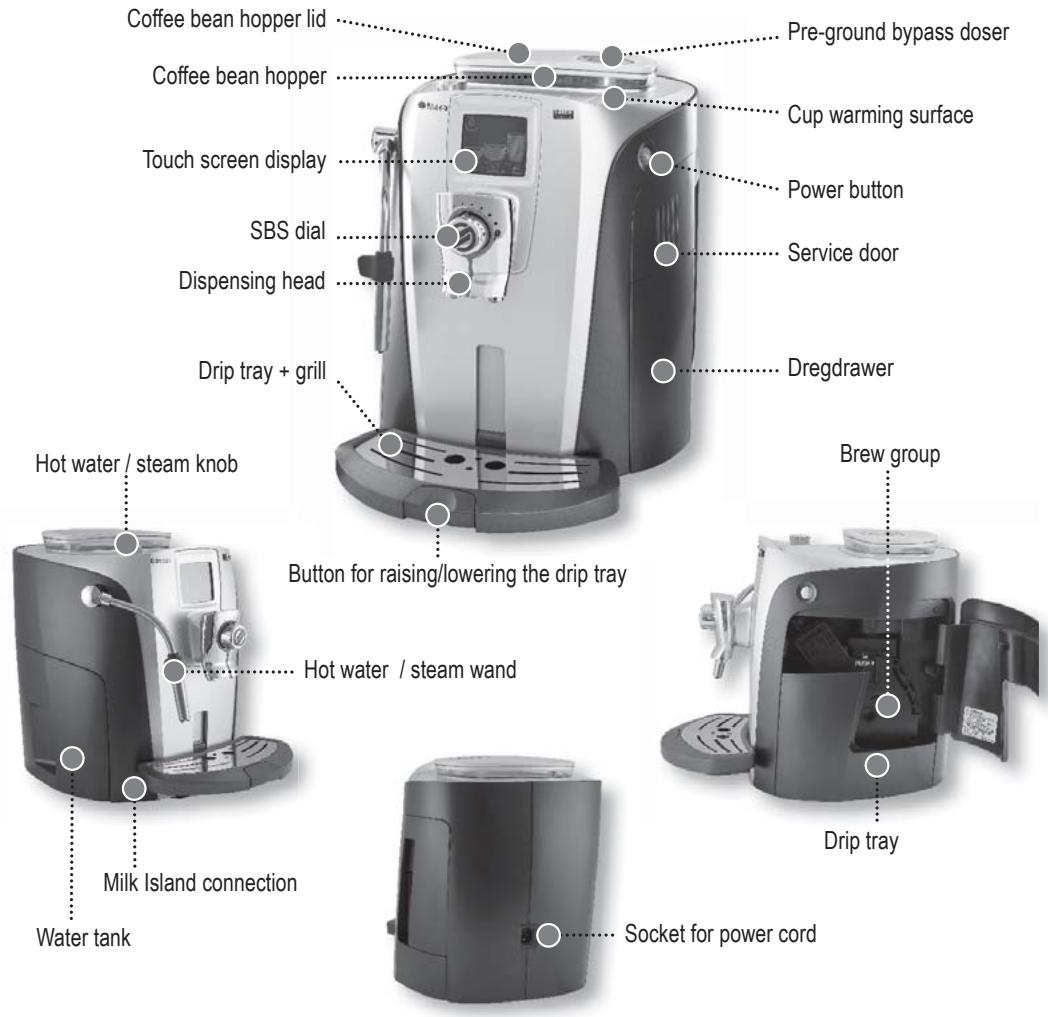
ACCESSOIRES
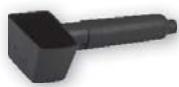
Cuillère doseuse pour café moulu et clé de réglage du moulin
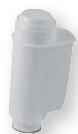
Filtre à eau Intenza
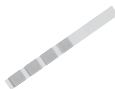
Bandelette de test de dureté de l'eau
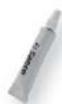
Lubrifiant pour le groupe d'infusion

Cordon d'alimentation
MISE EN MARCHE DE LA MACHINE
Assurez-vous que le bouton d'alimentation n'est pas enfoncé et que la machine est éteinte. Vérifiez les caractéristiques de la machine sur l'étiquette située en bas de l'appareil.
Retirez le couvercle du réservoir à grains de café. Remplissez le réservoir avec des grains de café.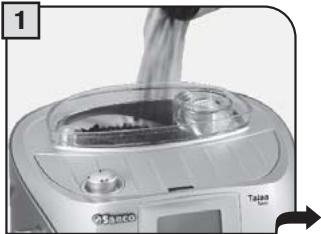
Fermez le couvercle en le poussant complètement vers le bas.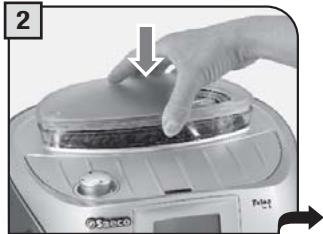
Retirez le réservoir d'eau. Installez le filtre à eau comme recommandé à la page 7.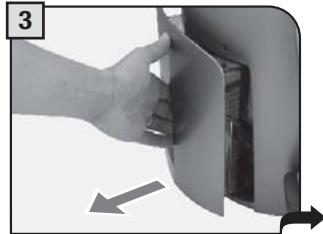
Remplissez le réservoir avec de l'eau potable fraîche. Ne dépassez pas le niveau "max" indiqué sur le réservoir d'eau. Une fois rempli, replacez le réservoir dans la machine.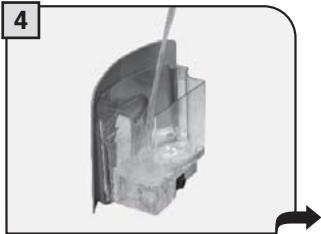
Insérez la fiche dans la prise située à l'arrière de la machine et insérez l'autre extrémité dans une prise de courant avec une intensité appropriée.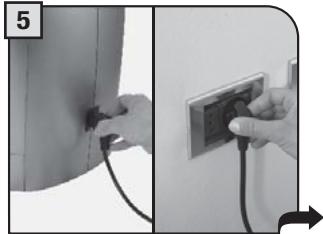
Placez un récipient sous la buse vapeur / eau chaude.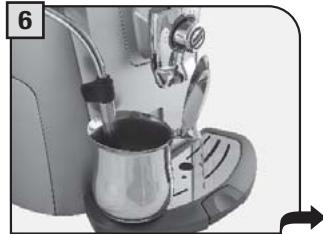
Appuyez sur le bouton d'alimentation principal pour le mettre en position "ON".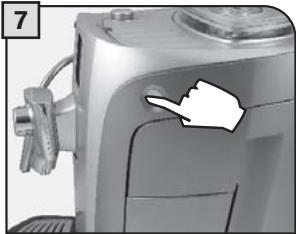
Lorsque la température correcte est atteinte, la machine effectue un amorçage du circuit d'eau et un cycle de rinçage des circuits internes. Une petite quantité d'eau est distribuée. Attendez que ce cycle se termine automatiquement. (Voir page 22 pour activer/désactiver la fonction de rinçage.)
RÉGLAGE DE LA LANGUE
Lors de la première mise sous tension de la machine, la sélection de la langue souhaitée est requise. Cela permet d'adapter les paramètres de la boisson aux paramètres typiques du pays où la machine est utilisée. C'est pourquoi certaines langues sont également différenciées par pays.
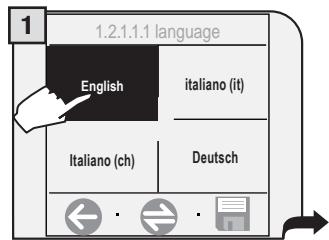
Sélectionnez la langue souhaitée. Si nécessaire, appuyez sur la touche pour afficher des langues supplémentaires.
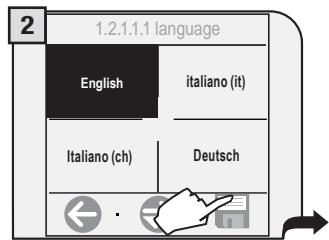
Appuyez sur
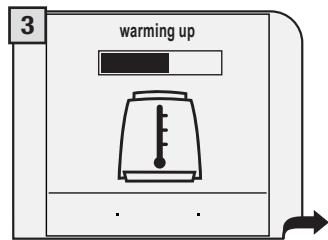
Attendez que la machine termine la phase de chauffe.
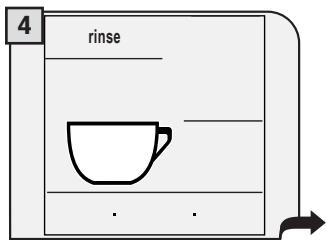
Lorsque la température correcte est atteinte, la machine effectue un cycle de rinçage des circuits internes.
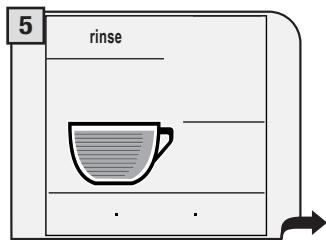
Une petite quantité d'eau est distribuée. Attendez que ce cycle se termine automatiquement. Reportez-vous à la page 22 pour activer/désactiver la fonction de rinçage.
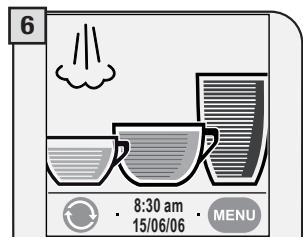
L'écran principal de sélection des boissons s'affiche. Réglez l'horloge et le calendrier de la machine comme indiqué à la page 24.
RÉGLAGE DE LA DURETÉ DE L'EAU
La bandelette de test ne peut être utilisée que pour une seule mesure.
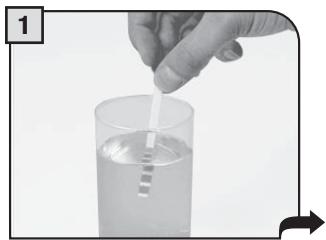
Immergez la bandelette de test de dureté de l'eau dans l'eau pendant 1 seconde.
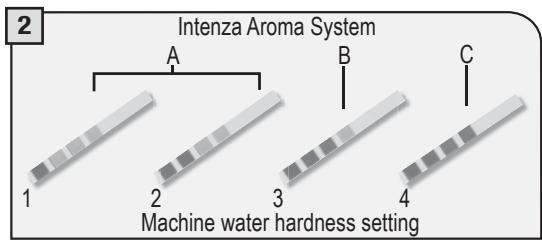
Vérifiez la valeur de dureté de l'eau et réglez :
- le niveau de dureté de l'eau de la machine (page 22) ;
- le système Intenza Aroma (page 7).
FILTRE À EAU INTENZA
Pour améliorer la qualité de l'eau utilisée et prolonger la durée de vie de votre machine, il est recommandé d'installer le filtre à eau. Après l'installation, sélectionnez la fonction filtre à eau dans le menu des réglages de la machine (voir page 22). En réglant le statut du filtre à eau sur ON, la machine informe l'utilisateur lorsque le filtre doit être remplacé.
Retirez le filtre à eau de son emballage, plongez-le verticalement (ouverture vers le haut) dans de l'eau froide et pressez doucement ses côtés pour laisser s'échapper les bulles d'air.
Retirez le petit filtre blanc du réservoir et rangez-le dans un endroit sec à l'abri de la poussière.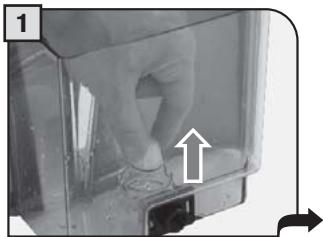
Réglez le système Intenza Aroma :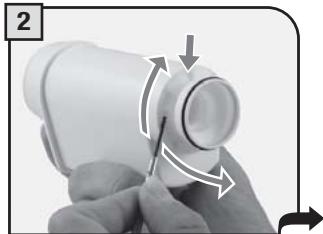
A = Eau douce
B = Eau moyenne (standard)
C = Eau dure
Insérez le filtre dans le réservoir vide. La marque de référence et la rainure doivent correspondre. Appuyez fermement jusqu'à ce qu'il soit complètement inséré.
Remplissez le réservoir avec de l'eau potable fraîche et réinsérez-le dans la machine.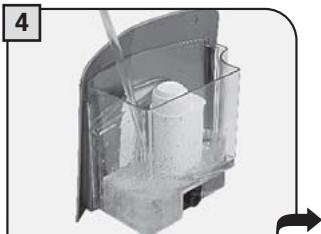
Placez un récipient sous la buse vapeur / eau chaude.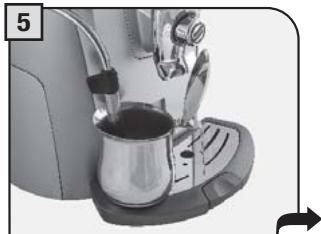
Accédez au menu des réglages de la machine (voir pages 20 et 22). Appuyez sur "réglages eau". Appuyez sur "filtre à eau".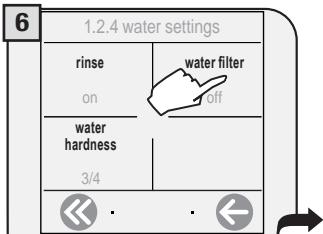
Appuyez sur "recharger le filtre à eau".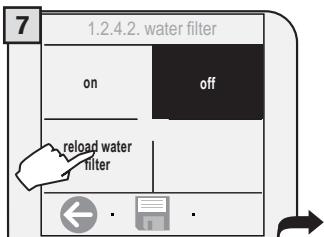
Appuyez sur la touche pour confirmer et activer le nouveau filtre à eau.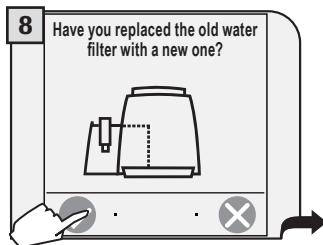
Tournez le bouton jusqu'à la position souhaitée. La distribution d'eau commence.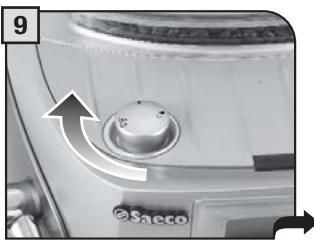
Une fois terminé, le message "fermer le bouton vapeur" s'affiche à l'écran. Tournez le bouton en position de repos (●). Remplissez le réservoir d'eau si nécessaire.
La machine est maintenant prête à être utilisée et le filtre à eau est activé (voir page 22).
REMARQUE : si le filtre à eau Intenza n'est pas utilisé, insérez le petit filtre blanc précédemment retiré (voir étape 1) dans le réservoir.
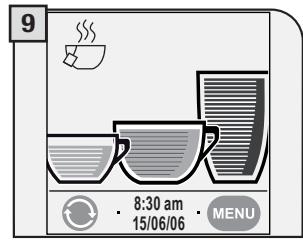
Il est possible de changer le type d'affichage entre le format icônes et le format texte.
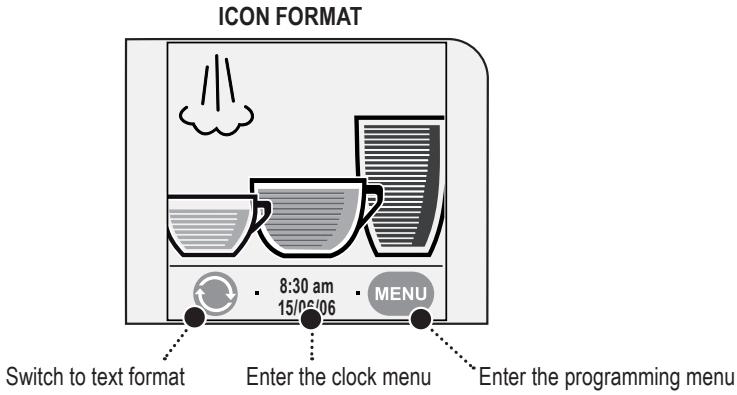
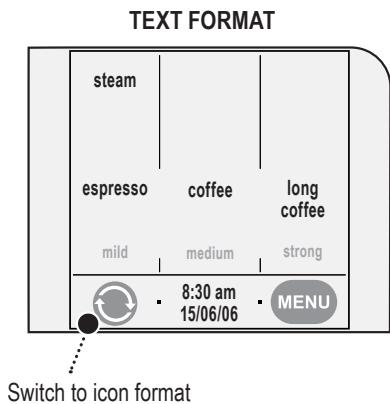
- Pour préparer le café souhaité, appuyez sur le symbole correspondant sur l'écran. La machine effectue automatiquement toutes les opérations nécessaires.
- Appuyez deux fois sur l'icône pour faire 2 tasses.

AROMA OPTI-DOSE (RÉGLE LA DOSE DE CAFÉ PAR TASSE)
L'intensité de la couleur de l'icône indique l'arôme - la quantité de café à moudre pour chaque boisson. Plus la quantité de café moulu est grande, plus le café aura un goût fort.
léger
moyen
fort
pré-moulu
INTENSITÉ DU CAFÉ
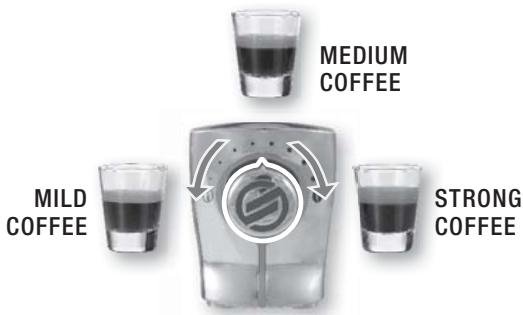
Le bouton SBS a été soigneusement conçu pour donner à votre café la plénitude et l'intensité que vous désirez. Il suffit de tourner le bouton et vous remarquerez que le café préparé s'ajustera au réglage sélectionné.
SBS - SYSTÈME D'INFUSION SAECO
SBS ajuste la plénitude du café infusé. Le café peut même être ajusté pendant l'infusion. Cet ajustement a un effet immédiat sur le type d'infusion sélectionné.
RÉGLAGE DE LA HAUTEUR DU BAC ÉGOUTTOIR
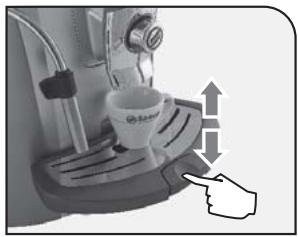
Réglez le bac égouttoir à la taille de tasse appropriée avant de sélectionner la boisson.
Pour relever le bac égouttoir, appuyez légèrement sur la partie inférieure du bouton. Pour l'abaisser, appuyez légèrement sur la partie supérieure du bouton. Relâchez le bouton lorsque la hauteur souhaitée est atteinte.
SYSTÈME D'ADAPTATION SAECO
Le café est un produit naturel et ses caractéristiques peuvent changer selon son origine, son mélange et sa torréfaction. La machine à café Saeco est équipée d'un système d'auto-ajustement qui permet l'utilisation de tous les types de grains de café disponibles sur le marché (à l'exclusion des grains aromatisés ou caramélisés).
- La machine s'ajuste automatiquement afin d'optimiser l'extraction du café, assurant une compression parfaite des grains pour obtenir un espresso crémeux qui libère tous les arômes, quel que soit le type de café utilisé.
- Le processus d'optimisation est un processus d'apprentissage qui nécessite la préparation d'un certain nombre de cafés pour permettre à la machine d'ajuster la compacité du café moulu.
- Une attention particulière doit être portée aux mélanges spéciaux, qui nécessitent des réglages du moulin pour optimiser l'extraction du café (voir page 11).
RÉGLAGE DU MOULIN À CAFÉ
La machine permet un léger réglage du moulin à café. Le café peut être moulu selon vos propres goûts.
Le réglage doit être effectué à l'aide de la petite goupille située à l'intérieur de la trémie à grains de café.
Elle doit être enfoncée et tournée uniquement à l'aide de la clé de réglage du moulin fournie. Appuyez et tournez la goupille d'un cran à la fois. Vous devrez préparer 2 à 3 tasses de café avant de percevoir une différence.
Les repères situés à l'intérieur de la trémie à grains indiquent le réglage de la mouture.
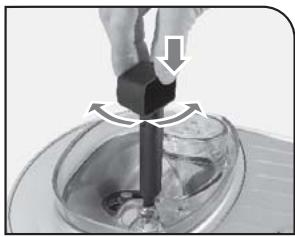
MOUTURE GROSSIÈRE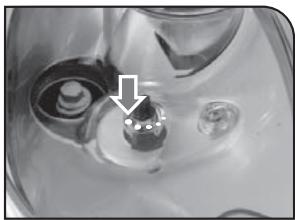
MOUTURE MOYENNE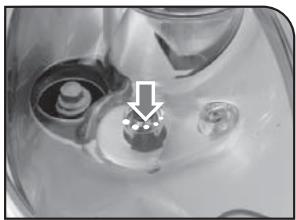
MOUTURE FINE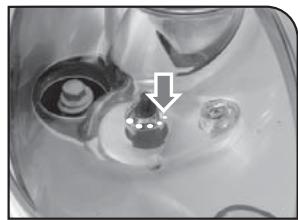

L'INFUSION DU CAFÉ PEUT ÊTRE INTERROMPUE À TOUT MOMENT EN APPUYANT SUR «STOP».
LA BUSE VAPEUR PEUT ATTEINDRE DES TEMPÉRATURES ÉLEVÉES : RISQUE DE BRÛLURE. NE PAS LA TOUCHER AVEC LES MAINS NUS.
Pour préparer 2 tasses, la machine distribue le premier café, puis interrompt brièvement la distribution afin de moudre la deuxième dose de café. La distribution du café reprend ensuite et se termine.
PRÉPARATION AVEC DES GRAINS ENTIERS
Cette procédure montre comment préparer un expresso. Pour préparer un autre type de café, appuyez sur l'icône appropriée. Utilisez des tasses à expresso ou à café adaptées afin que le café ne déborde pas.
Ajustez le bac d'égouttage en fonction de la hauteur des tasses.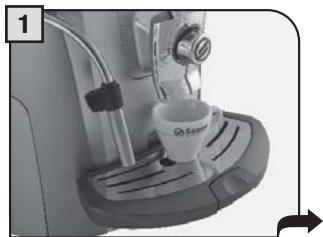
Placez une tasse si vous voulez un seul café. Placez deux tasses si vous voulez deux cafés.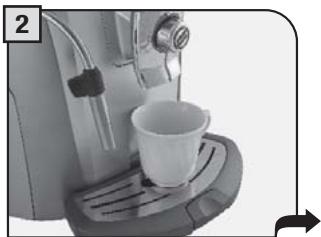
Choisissez une boisson et appuyez sur l'icône correspondante sur l'écran : une fois pour 1 tasse ou deux fois pour 2 tasses.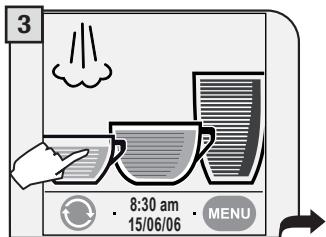
La machine commence à moudre la quantité de café définie.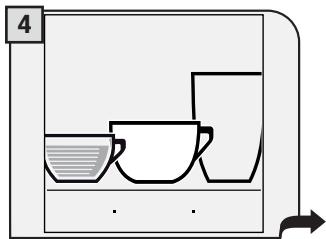
La machine commence à distribuer la boisson sélectionnée.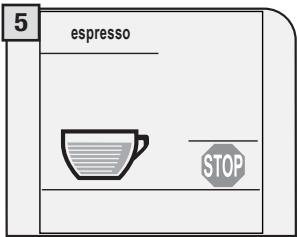
La machine arrête automatiquement la distribution en fonction de la quantité déterminée par le fabricant. Il est possible de personnaliser cette quantité (voir page 18).
PRÉPARATION AVEC DU CAFÉ MOULU
La machine permet d'utiliser du café moulu et du café décaféiné. Le café moulu doit être versé dans le doseur de dérivation à côté de la trémie à grains. Utilisez uniquement du café moulu spécialement pour machines expresso et jamais de grains de café ou de café instantané.

AVERTISSEMENT : NE METTEZ DU CAFÉ MOULU DANS LE DOSEUR DE DÉRIVATION QUE LORSQUE VOUS SOUHAITEZ PRÉPARER CE TYPE DE BOISSON.
Insérer une seule dose de café moulu à la fois. Il est impossible de distribuer deux tasses de café en même temps.
L'exemple ci-dessous montre comment préparer du café moulu. L'option personnalisée d'utilisation de café moulu est affichée à l'écran avec une icône à côté de la boisson choisie (voir page 9).
Placez une tasse sous la tête de distribution pour préparer un café.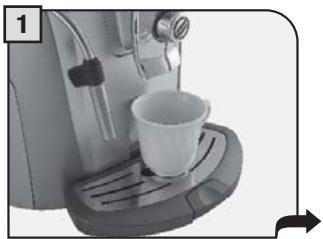
Appuyez sur l'icône appropriée. L'écran affiche l'écran suivant.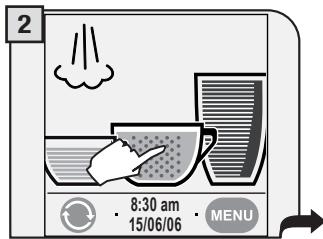
Un message rappelle à l'utilisateur de verser le café moulu dans le doseur de dérivation.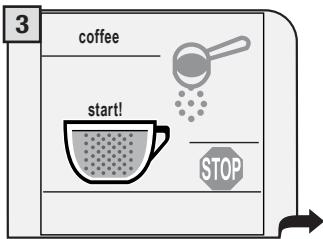
Versez une dose de café moulu dans le doseur de dérivation à l'aide de la cuillère doseuse fournie.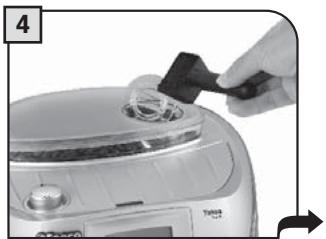
Appuyez sur « start ! » pour commencer la préparation.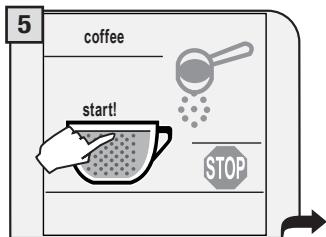
La machine commence à distribuer la boisson sélectionnée.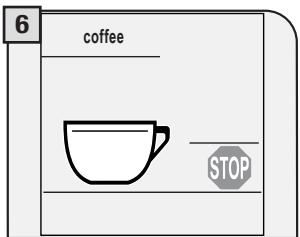
Remarque :
Si la préparation ne démarre pas dans les 30 secondes suivant l'apparition du message (3), la machine revient au menu principal et évacue le café moulu dans le bac à marc. Si aucun café moulu n'est versé dans le doseur de dérivation, seule de l'eau sera distribuée. Si la dose est excessive ou si 2 doses ou plus de café sont insérées, la machine ne préparera pas la boisson et le café dans le doseur de dérivation sera évacué dans le tiroir à marc.
DISTRIBUTION D'EAU CHAUDE

LA DISTRIBUTION PEUT ÊTRE PRÉCÉDÉE DE PETITS JETS D'EAU CHAUDE ET DES BRÛLURES SONT POSSIBLES. LA BUSE EAU CHAUDE/VAPEUR PEUT ATTEINDRE DES TEMPÉRATURES ÉLEVÉES : NE PAS LA TOUCHER À MAINS NUES. UTILISER UNIQUEMENT LA POIGNÉE APPROPRIÉE.
Placez un récipient sous la buse eau chaude / vapeur.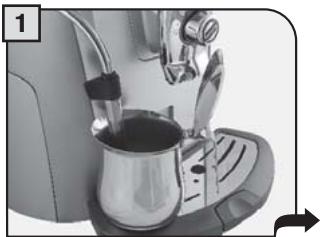
Appuyez sur l'icône vapeur.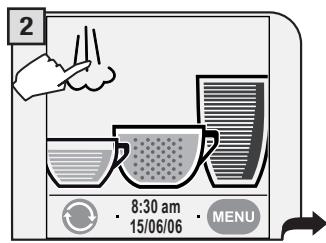
Sélectionnez eau chaude.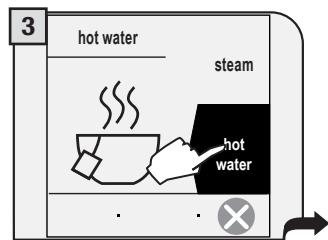
Tournez la manette sur la position.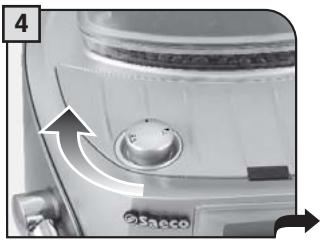
Attendez que la machine ait distribué la quantité d'eau souhaitée.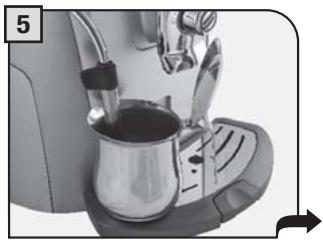
Lorsque la machine a distribué la quantité souhaitée, tournez la manette jusqu'à la position de repos (●).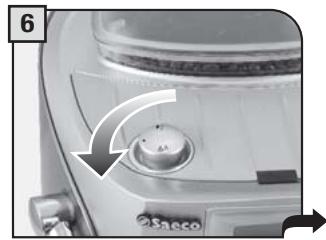
Appuyez sur O pour revenir au menu principal.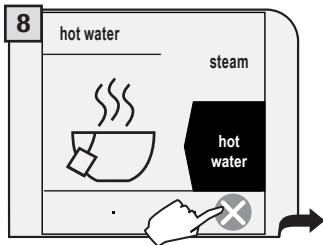
Remarque : si l'écran principal affiche déjà l'icône d'eau chaude, l'eau chaude peut être distribuée en tournant simplement la manette comme indiqué à l'étape 4.
DISTRIBUTION DE VAPEUR

LA DISTRIBUTION PEUT ÊTRE PRÉCÉDÉE DE PETITS JETS D'EAU CHAUDE ET DES BRÛLURES SONT POSSIBLES. LA BUSETTE EAU CHAUDE/VAPEUR PEUT ATTEINDRE DES TEMPÉRATURES ÉLEVÉES : NE PAS LA TOUCHER À MAINS NUES. UTILISEZ UNIQUEMENT LA POIGNÉE APPROPRIÉE.
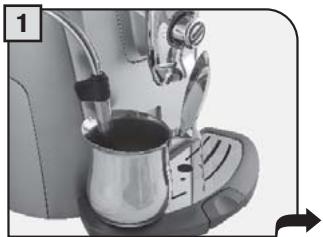
Placez un récipient contenant la boisson à faire mousser sous la busette eau chaude/vapeur.
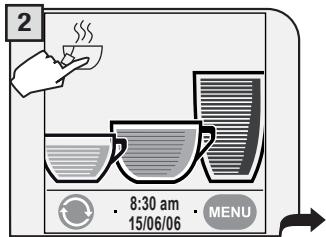
Appuyez sur l'icône vapeur.
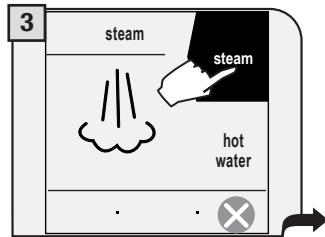
Sélectionnez vapeur.
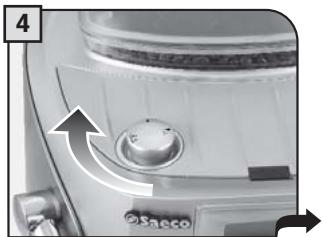
Tournez la manette sur la position. La machine peut prendre quelques secondes pour chauffer avant que la vapeur ne soit distribuée.
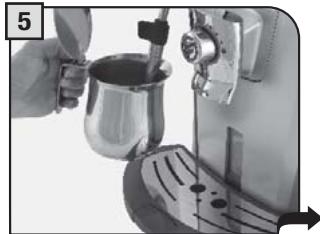
Chauffez la boisson en faisant tourner doucement le récipient pendant que la vapeur est distribuée.
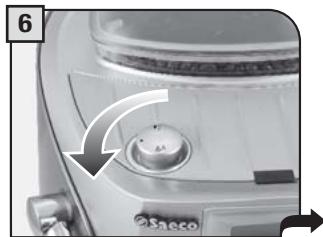
Lorsque vous avez terminé, tournez la manette jusqu'à la position de repos (●).
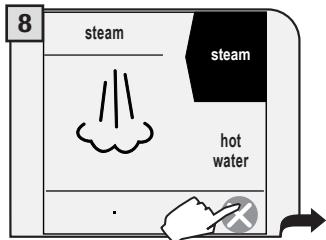
Appuyez sur O pour revenir au menu principal.
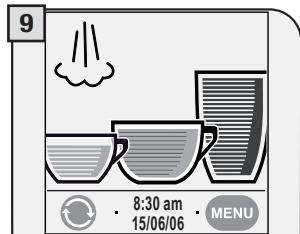
Après la distribution de vapeur, nettoyez la busette vapeur comme décrit à la page 30.
Remarque : si l'écran principal affiche déjà l'icône vapeur , la vapeur peut être distribuée en tournant simplement la molette comme indiqué à l'étape 4.
CAPPUCCINO

LA DISTRIBUTION PEUT ÊTRE PRÉCÉDÉE DE PETITS JETS D'EAU CHAUDE ET DES BRÛLURES SONT POSSIBLES. LA BUSE EAU CHAUDE/VAPEUR PEUT ATTEINDRE DES TEMPÉRATURES ÉLEVÉES : NE PAS LA TOUCHER À MAINS NUES. UTILISEZ UNIQUEMENT LA POIGNÉE APPROPRIÉE.
Remplissez 1/3 de la tasse avec du lait froid.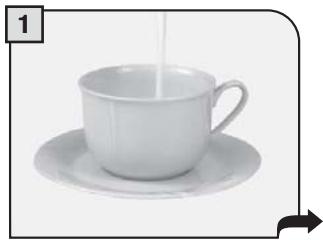
Sélectionnez la vapeur (voir étapes 2 et 3 à la page 15).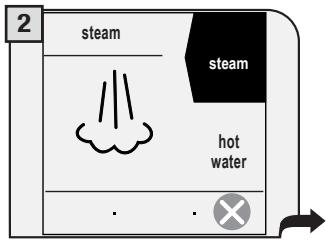
Immergez la buse eau chaude/vapeur dans le lait.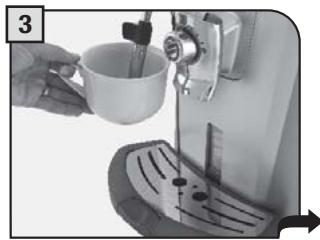
Tournez la molette sur la position. La machine peut prendre quelques secondes pour chauffer avant que la vapeur ne soit distribuée.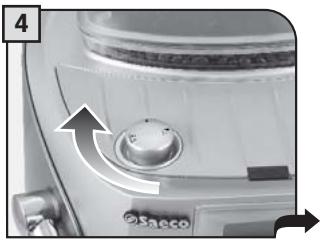
Faites mousser le lait en remuant doucement la tasse.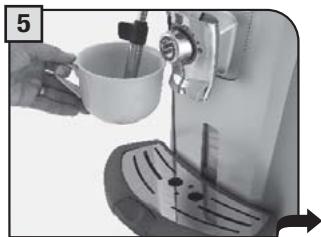
Lorsque vous avez terminé, tournez la molette jusqu'à la position de repos ().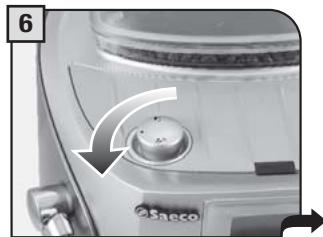
Appuyez sur pour revenir au menu principal.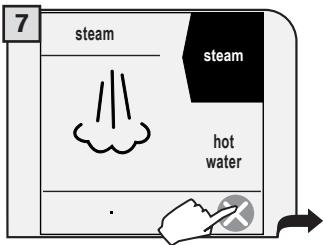
Placez la tasse sous la tête de distribution.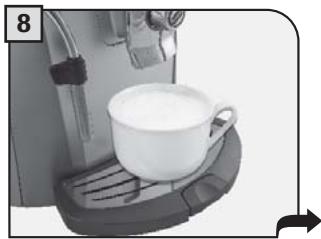
Appuyez une fois sur l'icône café pour préparer le café.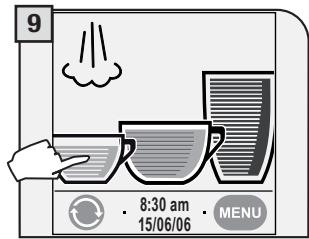
Après la distribution, nettoyez la buse vapeur comme décrit à la page 30.
Pour préparer 2 cappuccinos :
- faites mousser deux tasses de lait en suivant les étapes 1 à 6 ;
- Préparez deux cafés en suivant les étapes 7 à 9 (puis appuyez deux fois sur l'icône du café souhaité).
Cet appareil, qui peut être acheté séparément, vous permet de préparer facilement et confortablement de délicieux cappuccinos.
Avertissement : avant d'utiliser le Milk Island, lisez attentivement le manuel et toutes les précautions pour une utilisation correcte. i Remarque importante : la quantité de lait dans la carafe ne doit jamais être inférieure au niveau minimum "MIN" ni dépasser le niveau maximum "MAX". Nettoyez soigneusement tous les composants du Milk Island après utilisation. Pour garantir les meilleurs résultats lors de la préparation du cappuccino, nous recommandons d'utiliser du lait froid (0 - 8°C / 32 - 45°F), partiellement écrémé.
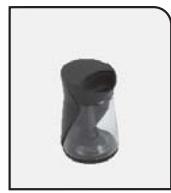
Milk Island - 04
Type MKI001
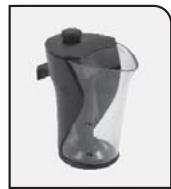
Milk Island - 08
Type MKI002
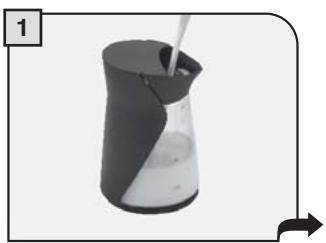
Remplissez la carafe à lait avec la quantité de lait souhaitée (entre les niveaux MIN et MAX indiqués).
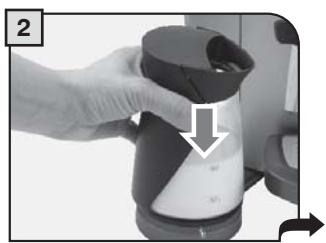
Placez la carafe à lait sur la base du Milk Island. Vérifiez que le voyant sur la base est vert.
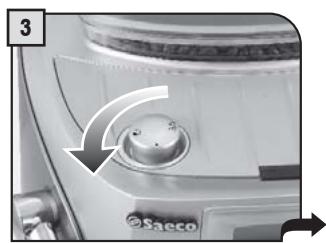
Tournez le bouton sur la position.
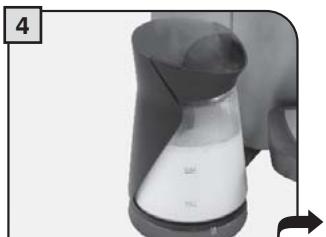
Attendez que le lait soit moussé.
La machine s'arrêtera automatiquement après avoir émis de la vapeur en continu pendant 2 minutes. Pour distribuer plus de vapeur, tournez le bouton sur la position (●) puis de nouveau sur la position [P].
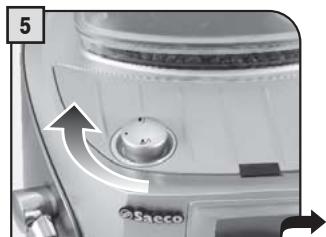
Lorsque la mousse de lait souhaitée est obtenue, tournez le bouton jusqu'à la position de repos (●).
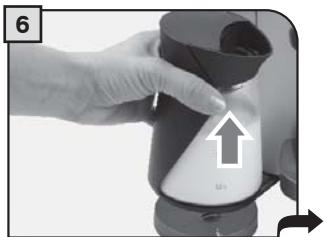
Retirez la carafe à l'aide de la poignée.
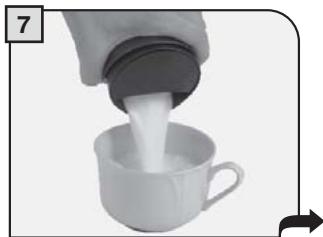
Faites tourner doucement la carafe et versez le lait dans la tasse.
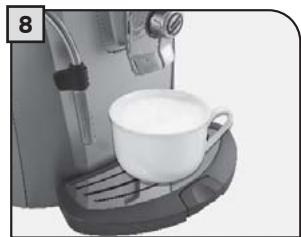
Placez la tasse avec le lait moussé sous la tête de distribution. Infusez le café dans la tasse.
MENU DE PROGRAMMATION DES BOISSONS
Chaque boisson peut être programmée selon vos goûts individuels.
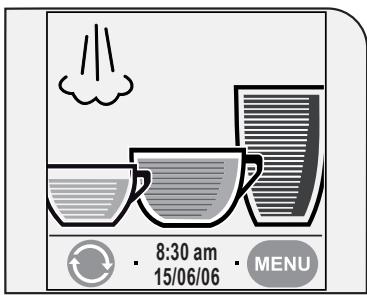
Une fois qu'une boisson a été personnalisée, la machine utilisera ces paramètres enregistrés lors de la préparation de cette boisson particulière. Pour modifier la quantité de café, vous devez réinitialiser la personnalisation.
Pour programmer une boisson :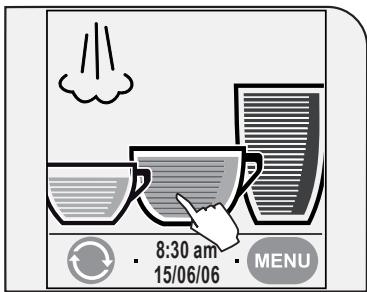
Maintenez enfoncée l'icône de la boisson souhaitée pendant deux secondes.
RÉGLAGES DU CAFÉ
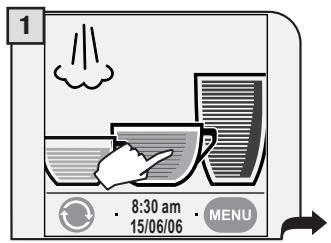
Entrez dans le menu du café à personnaliser (appuyez sur l'icône correspondante pendant deux secondes).
Dans cette phase, vous pouvez :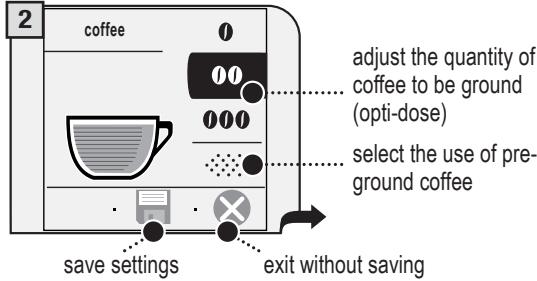
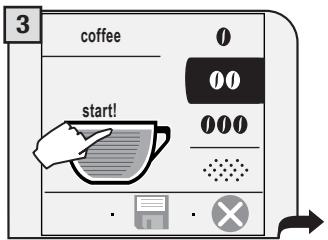
En appuyant sur « start ! », la machine effectuera un cycle d'infusion.
Après avoir appuyé sur « start ! », la machine effectuera un cycle d'infusion.
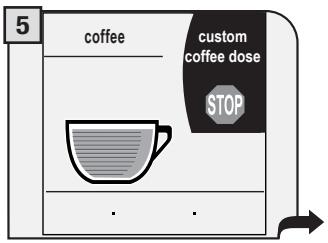
Pour préparer une quantité de café différente de celle prédéfinie par le fabricant, appuyez sur « dose de café personnalisée » avant la fin du cycle d'infusion en cours. Lorsque la quantité souhaitée est atteinte, appuyez sur « STOP ».
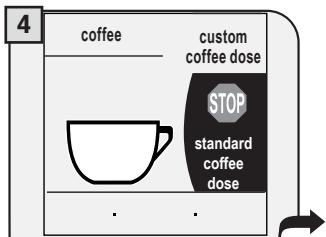
La machine démarrera et terminera automatiquement un cycle d'infusion selon les réglages standard.
Le cycle d'infusion ne peut être interrompu qu'en appuyant sur « STOP ».
Si l'icône « stop café » n'est pas enfoncée, le café peut déborder.
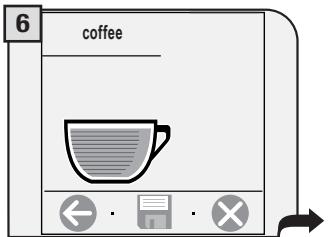
Une fois le brassage terminé, vous devez appuyer dans les cinq secondes pour enregistrer ce réglage personnalisé de dose de café.
Les options possibles sont les suivantes :
Appuyez pour enregistrer la quantité actuellement réglée ;
Appuyez pour quitter sans enregistrer ;
Appuyez sur pour revenir au menu de programmation.
RÉGLAGES DE LA MACHINE
Certaines fonctions de la machine peuvent être programmées selon vos préférences individuelles.
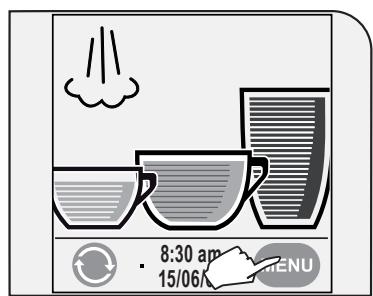
Appuyez sur « menu ».
Le menu de programmation principal apparaîtra.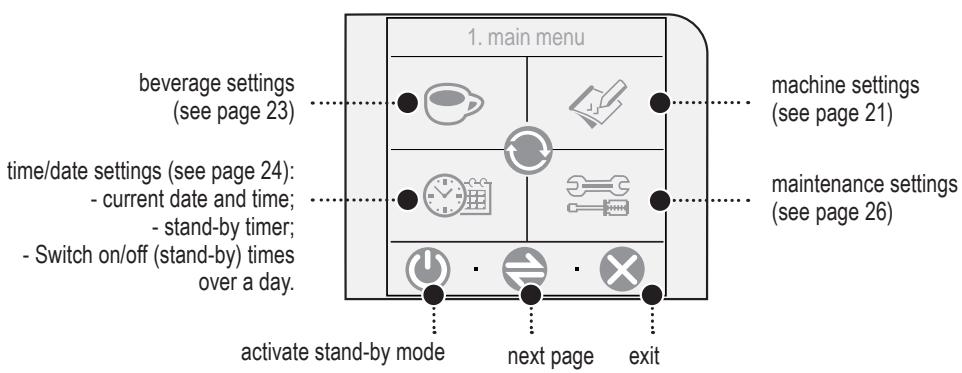
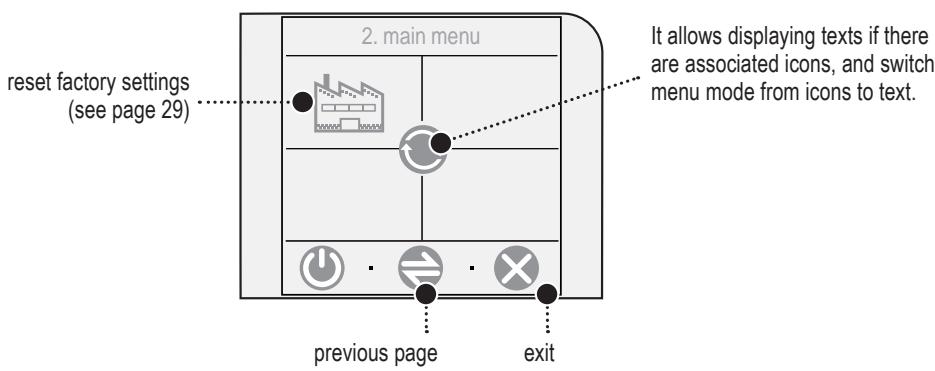
Après avoir réglé chacun des menus suivants, appuyez sur
- pour revenir à l'écran précédent SANS enregistrer les nouveaux réglages ; pour enregistrer ;
- pour revenir au menu principal SANS enregistrer les nouveaux réglages.
RÉGLAGES DE LA MACHINE

Pour modifier les réglages de fonctionnement de la machine, appuyez sur « réglages machine » dans le menu principal.
Cette fonction vous permet de régler la langue du menu et le contraste de l'affichage.
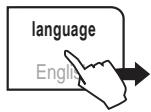
Modifier la langue d'affichage.
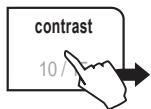
Régler le contraste de l'affichage.
Cette fonction active/désactive les tonalités acoustiques.
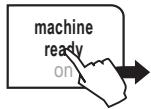
Activer/désactiver un signal sonore à chaque fois que la machine est prête.
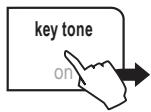
Activer/désactiver un signal sonore à chaque fois qu'une icône est pressée.
Cette fonction permet de contrôler la surface de chauffe des tasses.
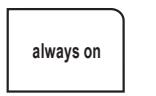
La surface de chauffe des tasses est toujours allumée lorsque la machine n'est pas en mode veille.
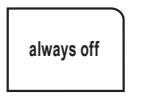
La surface de chauffe des tasses est toujours éteinte.
RÉGLAGES DE LA MACHINE
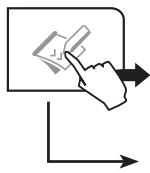

Cette fonction permet de définir divers réglages d'eau.
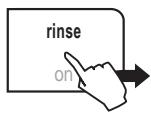
Activer/désactiver la fonction de rinçage pour nettoyer brièvement les circuits internes de la machine.
Cette fonction est activée par défaut par le fabricant.
Remarque : le cycle de rinçage est effectué à chaque démarrage de la machine, après la phase de chauffe.
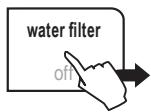
Activer/désactiver l'avertissement pour remplacer le filtre à eau.
Remarque importante.
Ce réglage ajuste automatiquement les paramètres qui permettent à l'utilisateur d'effectuer un entretien correct de la machine.
Sélectionnez « On » : uniquement lorsque le filtre à eau est installé dans le réservoir d'eau comme indiqué à la page 7.
Cette fonction est activée automatiquement après avoir sélectionné « recharger le filtre à eau ».
Sélectionnez « Off » : lorsqu'il n'y a pas de filtre à eau dans le réservoir d'eau.
Sélectionnez « recharger le filtre à eau » : lorsqu'un nouveau filtre à eau est installé dans le réservoir d'eau.
REMARQUE : si le filtre à eau n'est pas disponible, insérez le petit filtre blanc précédemment retiré (voir étape 1 - page 7) dans le réservoir.
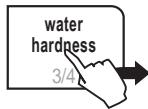
Réglez le niveau de dureté de l'eau de la machine. Cela permettra à la machine de demander le détartrage au bon moment.
Mesurez la dureté de l'eau comme indiqué à la page 6.
RÉGLAGES DES BOISSONS
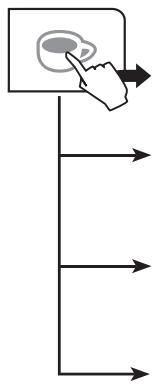
Ce menu permet de régler les paramètres généraux d'infusion des différents types de café. Appuyez sur « réglages des boissons » dans le menu principal.
Sélectionnez une boisson pour régler les fonctions et paramètres spécifiques.

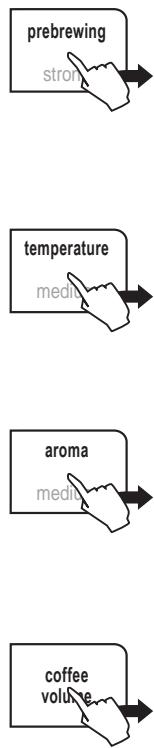
La pré-infusion humidifie légèrement le marc de café avant l'infusion afin de faire ressortir tout l'arôme du café et d'en améliorer la saveur.
Normal : la pré-infusion est activée.
Fort : la pré-infusion est plus longue afin de faire ressortir tout le goût du café.
Arrêt : la pré-infusion est désactivée.
Température pour l'infusion du café.
Aroma ajuste la quantité de café à moudre ou définit l'utilisation de café moulu.
Avec cette fonction, vous pouvez personnaliser la dose de café pour chaque boisson selon votre goût. Vous pouvez également choisir de préparer un café décaféiné en utilisant la fonction café moulu (voir page 8).
Le volume de café (quantité d'eau) à utiliser pour la préparation du café.
Remarque : ajustez la quantité en fonction des tasses que vous utiliserez.
Le réglage actuel est affiché à côté de chaque fonction.
RÉGLAGES DE L'HEURE ET DE LA DATE
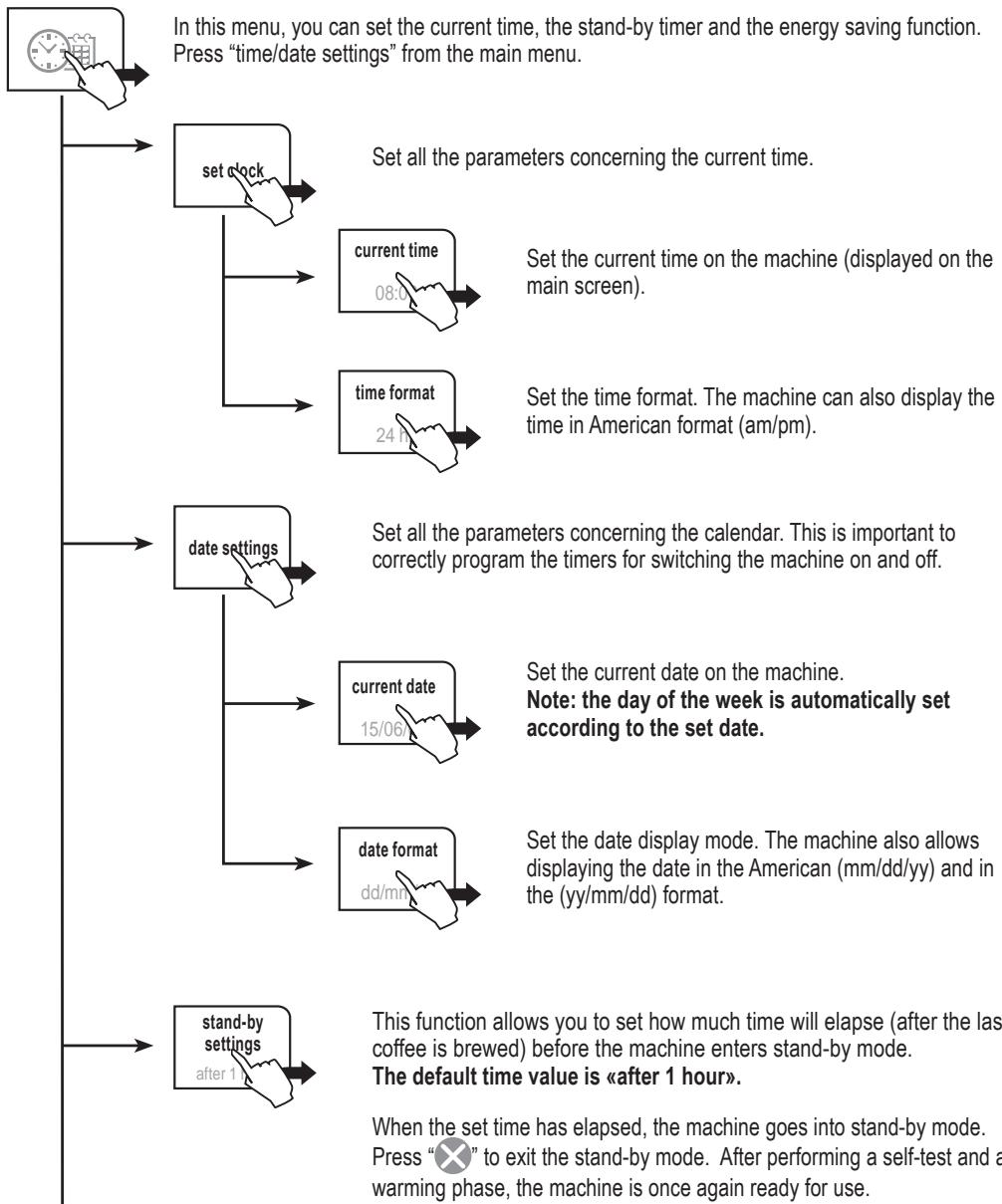
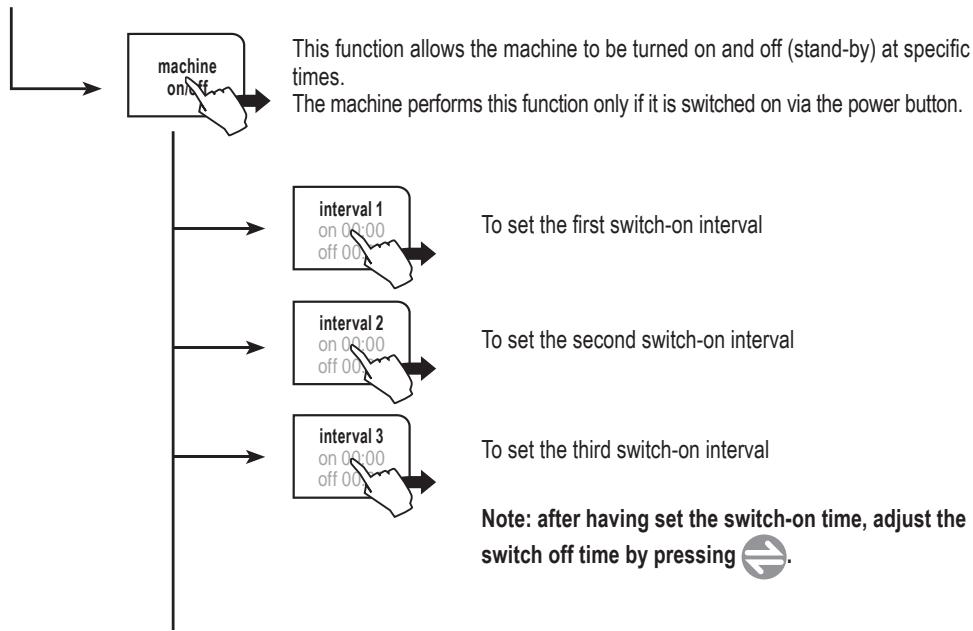
Pour régler correctement la fonction d'économie d'énergie, procédez comme suit :
- définissez les intervalles individuels de mise en marche/arrêt.
- choisissez les jours où ces intervalles seront actifs.
Assurez-vous que les intervalles de mise en marche ne se chevauchent pas.
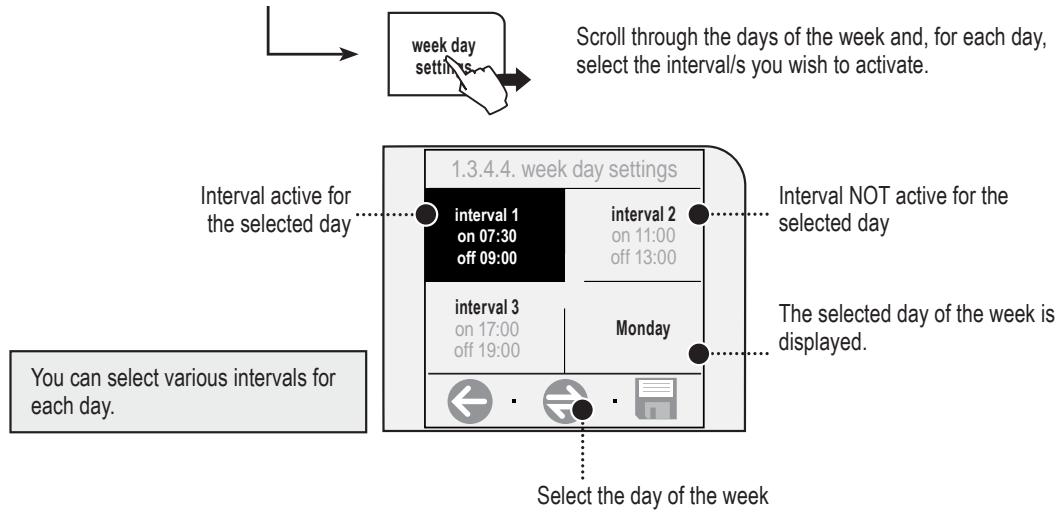
Remarque : les temps de veille définis à la page précédente sont toujours valables. Ils seront également activés pendant les intervalles actifs sélectionnés dans cette fonction. Si nécessaire, ajustez les temps de veille.
RÉGLAGES D'ENTRETIEN
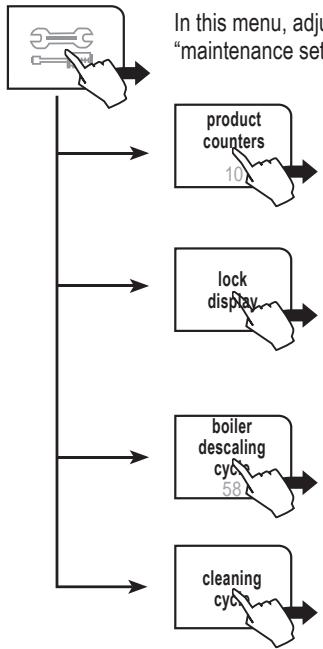
Dans ce menu, vous pouvez effectuer des réglages pour nettoyer/entretenir tous les circuits internes de la machine. Appuyez sur « réglages d'entretien » dans le menu principal.
Cette fonction indique combien de boissons ont été préparées pour chaque type de café depuis la dernière réinitialisation.
Cette fonction verrouille temporairement l'écran tactile (par exemple pour nettoyer l'écran). Pour réactiver l'écran, appuyez sur "déverrouiller" en bas à droite, puis (dans les deux secondes) sur "déverrouiller" en haut à gauche (ce message n'apparaît qu'après avoir appuyé sur l'icône précédente).
Cette fonction active le cycle de descente (la machine indique combien de litres peuvent être distribués avant la descente).
Cette fonction active le cycle de nettoyage du groupe d'infusion.
CYCLE DE NETTOYAGE
Cette fonction nettoie les circuits internes de la machine utilisés pour préparer le café.
Pour rincer le groupe d'infusion, il suffit de le nettoyer à l'eau comme indiqué à la page 31, régulièrement. Ce cycle de nettoyage approfondi (ci-dessous) complète l'entretien du groupe d'infusion. Nous recommandons d'effectuer ce cycle une fois par mois, ou toutes les 500 tasses de café, en utilisant les pastilles de nettoyage Saeco, disponibles séparément.
Remarque : avant d'effectuer cette fonction, assurez-vous que :
- un récipient suffisamment grand est placé sous la buse ;
- la pastille appropriée pour le nettoyage du groupe d'infusion a été insérée dans le doseur de café prémoulu ;
- le réservoir d'eau est plein.
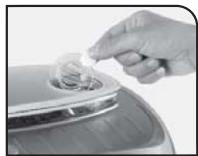
LE CYCLE DE NETTOYAGE NE PEUT PAS ÊTRE INTERROMPU. UNE PERSONNE DOIT ÊTRE PRÉSENTE PENDANT L'OPÉRATION.
Après avoir accédé au menu du cycle de nettoyage, assurez-vous que la pastille de nettoyage a été insérée comme indiqué ci-dessus. Appuyez sur "oui".
1.4.2. cycle de nettoyage

non
Avez-vous inséré la pastille de nettoyage et rempli le réservoir d'eau ?


Attendez la fin du cycle de nettoyage (environ 4 minutes). La machine reviendra au menu principal.
CYCLE DE DÉTARTRAGE DE LA CHAUDIÈRE
Dans ce menu, la machine effectue un cycle de détartrage automatique.
Le détartrage est nécessaire tous les 1 à 2 mois ou lorsque la machine l'indique. La machine doit être allumée et gérera automatiquement la distribution de l'agent détartrant.
UNE PERSONNE DOIT ÊTRE PRÉSENTE PENDANT L'OPÉRATION.
ATTENTION ! N'UTILISEZ JAMAIS DE VINAIGRE COMME DÉTARTRANT.
Veuillez utiliser la solution détartrante Saeco dans votre machine. Elle a été spécialement développée pour préserver les performances et la fonctionnalité de la machine tout au long de sa durée de vie et pour garantir, avec une utilisation régulière, un produit de haute
qualité. La solution détartrante Saeco doit être éliminée conformément aux instructions du fabricant et/ou aux réglementations du pays d'utilisation.
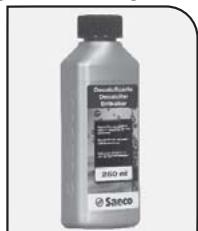
Remarque : avant de démarrer un cycle de détartrage, assurez-vous que :
- un récipient de taille adéquate est disponible ;
- LE FILTRE À EAU (S'IL EST INSÉRÉ) A ÉTÉ RETIRÉ.
Appuyez sur "cycle de détartrage de la chaudière"
Le détartrage est effectué à une température contrôlée. Si la machine est froide, vous devez attendre qu'elle atteigne la bonne température ; sinon, vous devez refroidir la chaudière comme suit :
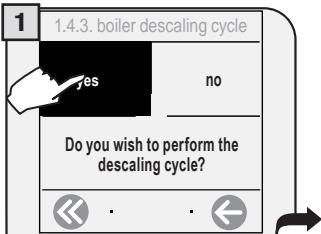
Appuyez sur "oui" pour démarrer.
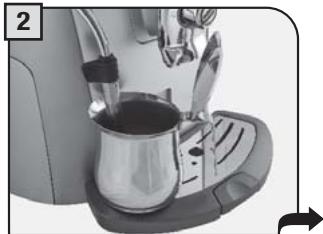
Placez un grand récipient sous le bec verseur d'eau chaude / vapeur.
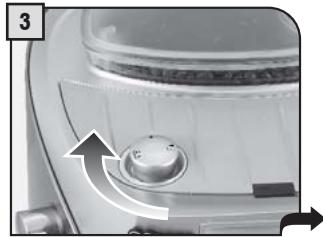
Tournez la manette sur la position.
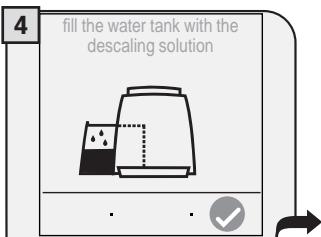
Lorsque le message ci-dessus apparaît, la chaudière est à la bonne température.
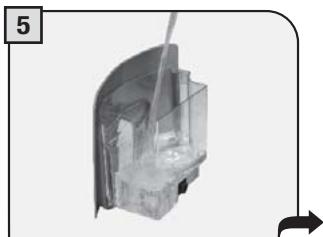
Versez la solution de détartrage dans le réservoir et remplissez-le d'eau. Insérez le réservoir dans la machine.
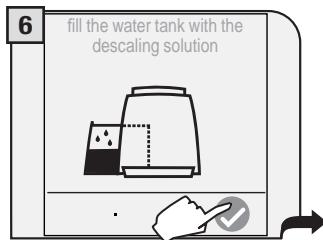
Appuyez sur la

touche pour démarrer.
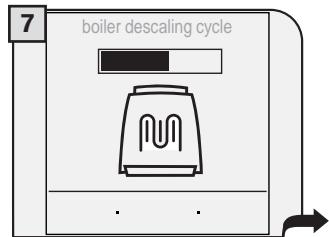
La machine commence à distribuer la solution de détartrage par la buse vapeur / eau chaude. La distribution se fait à intervalles prédéterminés, afin de laisser la solution agir.
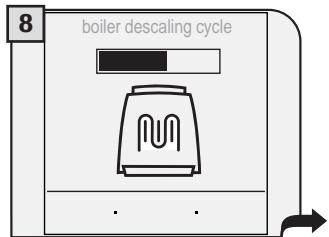
Les intervalles sont affichés comme ci-dessus afin de suivre la progression du cycle de détartrage.
Lorsque la solution est terminée, le message suivant apparaît à l'écran :
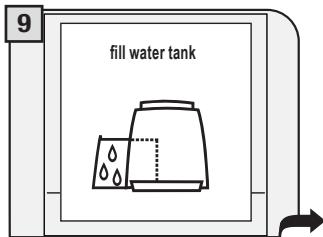
Retirez le réservoir d'eau, rincez-le à l'eau potable fraîche pour éliminer les traces de solution de détartrage, puis remplissez-le à nouveau d'eau potable fraîche.
Replacez le réservoir dans la machine.
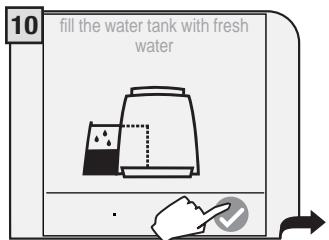
Rincez les circuits de la machine en appuyant sur l'icône.
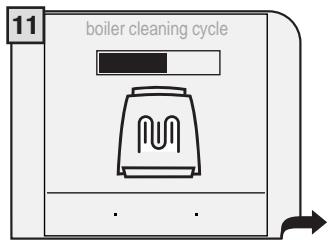
La machine effectue le cycle de rinçage. Pendant le cycle de rinçage, la machine peut demander de remplir le réservoir d'eau.
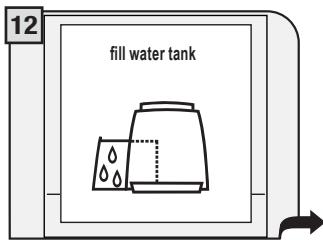
Une fois le cycle de rinçage terminé, l'écran ci-dessus apparaît. Retirez le réservoir d'eau, réinstallez le filtre à eau (si souhaité) et remplissez-le d'eau potable fraîche.
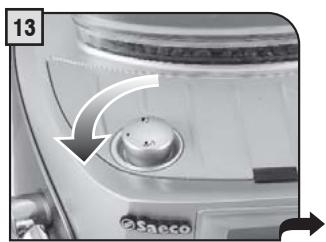
Tournez la manette jusqu'à la position de repos ().
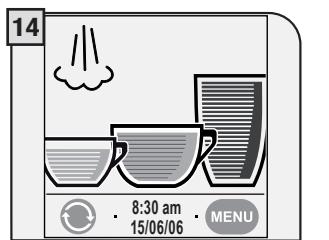
Lorsque le détartrage est terminé, revenez au menu principal.
REMARQUE : si le filtre à eau n'est pas utilisé, insérez le petit filtre blanc précédemment retiré (voir étape 1 - page 7) dans le réservoir.
PARAMÈTRES D'USINE
Ce menu vous permet de restaurer tous les paramètres d'usine.
Appuyez sur le bouton "paramètres d'usine".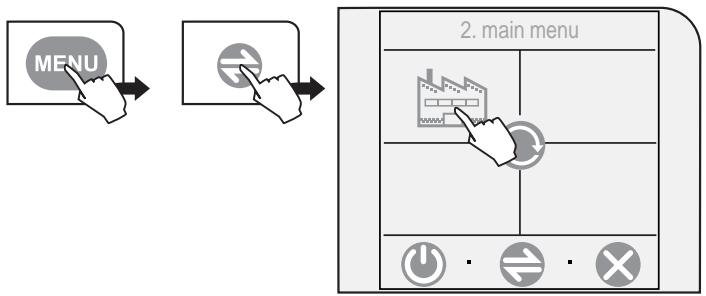
Si "oui" est sélectionné, une confirmation supplémentaire est demandée, avec les touches inversées.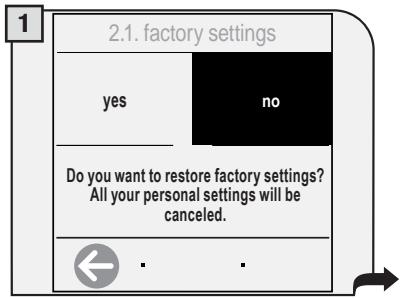
TOUS LES PARAMÈTRES PERSONNALISÉS SERONT PERDUS ET IRREMPLAÇABLES. APRÈS LA RESTAURATION DES PARAMÈTRES D'USINE, VOUS DEVEZ, SI VOUS LE SOUHAITEZ, REPROGRAMMER TOUTES LES FONCTIONS DE LA MACHINE.
En sélectionnant "oui", les paramètres d'usine sont restaurés.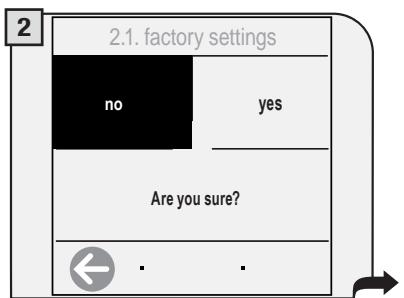
Tous les paramètres sont restaurés.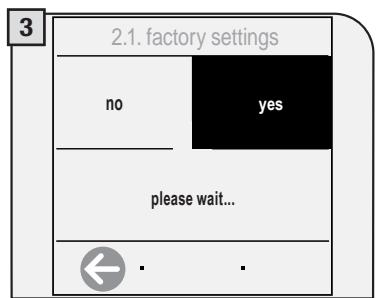
ENTRETIEN EN COURS DE FONCTIONNEMENT
Pendant le fonctionnement normal, le message "videz le tiroir à marc" apparaîtra. Cette opération doit être effectuée lorsque la machine est allumée.
Retirez le tiroir à marc.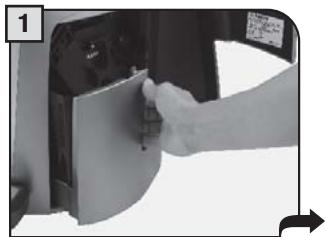
Videz-le et nettoyez-le.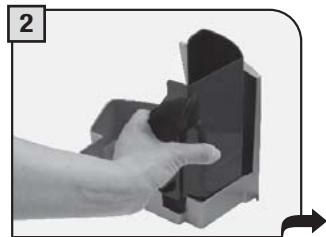
Le message pour vider le tiroir à marc s'affiche environ toutes les 14 cycles de café. Si vous retirez le marc avec la machine éteinte ou lorsque ce n'est pas signalé à l'écran, le compteur des cycles de café dans le tiroir n'est pas réinitialisé. Pour cette raison, la machine peut afficher le message "videz le tiroir à marc" même si le tiroir n'est pas plein.
NETTOYAGE GÉNÉRAL DE LA MACHINE
Le nettoyage décrit ci-dessous doit être effectué une fois par semaine. Remarque : si l'eau reste dans le réservoir pendant plusieurs jours, ne l'utilisez pas.
AVERTISSEMENT ! Ne jamais immerger la machine dans l'eau.
Éteignez la machine et débranchez-la.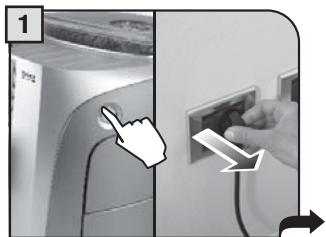
Nettoyez le réservoir et le couvercle.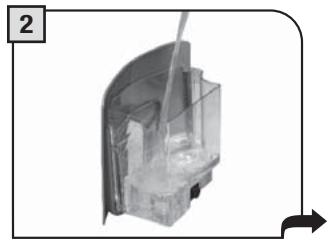
Retirez le bac d'égouttage, videz-le et lavez-le à l'eau savonneuse. Ne le lavez pas au lave-vaisselle.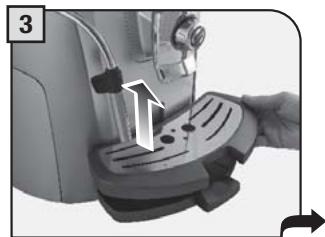
Retirez le manchon extérieur de la buse vapeur/eau chaude ; rincez-le soigneusement sous l'eau courante, puis réinsérez-le.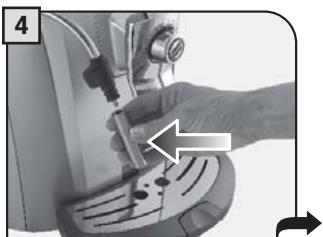
Retirez et lavez le support de la buse ; puis réinsérez-le.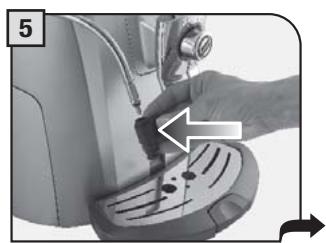
Nettoyez le doseur de dérivation avec un chiffon sec.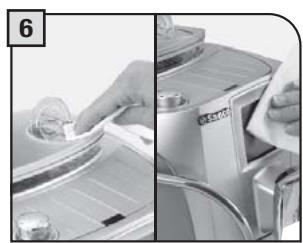
Essuyez l'écran.
NETTOYAGE DU GROUPE D'INFUSION
Le groupe d'infusion doit être nettoyé au moins une fois par semaine. Avant de retirer le groupe, retirez le tiroir à marc de café comme indiqué à la page 30.
Lavez le groupe d'infusion à l'eau tiède.
Lubrifiez le groupe d'infusion après environ 500 cycles d'infusion. Le lubrifiant pour groupe d'infusion peut être acheté auprès de Saeco ou des centres de service agréés.
AVERTISSEMENT ! Ne lavez pas le groupe d'infusion avec des détergents agressifs ou abrasifs ou des produits chimiques qui pourraient l'empêcher de fonctionner correctement. Ne le lavez pas au lave-vaisselle.
Appuyez sur le bouton PUSH pour retirer le groupe d'infusion.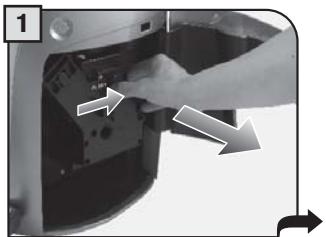
Lavez le groupe d'infusion et le filtre, puis séchez-les.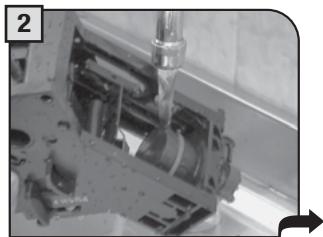
Lubrifiez les guides du groupe d'infusion à l'aide du lubrifiant fourni.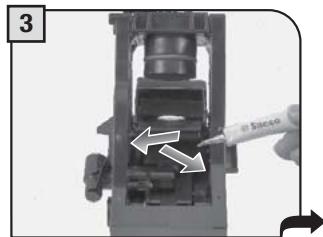
Appliquez le lubrifiant uniformément sur les deux guides latéraux.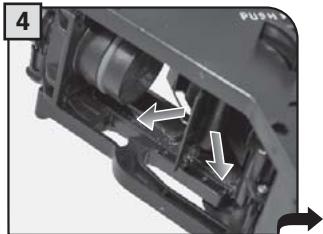
Assurez-vous que le groupe d'infusion est en position de repos ; les deux repères doivent correspondre.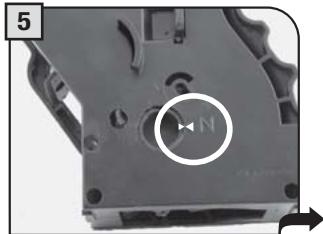
Assurez-vous que les composants sont dans la bonne position. Le crochet illustré doit être dans la bonne position ; pour vérifier sa position, appuyez fermement sur le bouton "PUSH".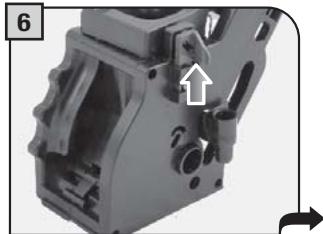
Le levier situé à l'arrière du groupe doit être en contact avec la base du groupe.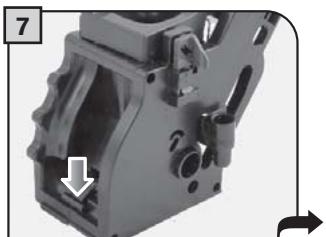
Insérez le groupe d'infusion lavé et séché. NE PAS APPUYER SUR LE BOUTON "PUSH".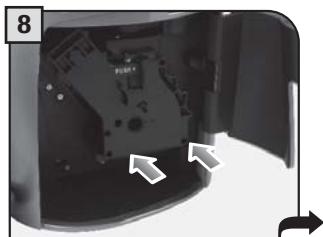
Insérez le tiroir à marc. Fermez la porte de service.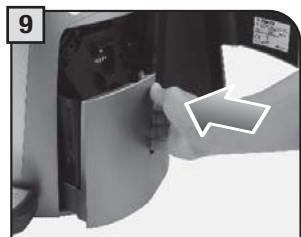
Fermez le couvercle du réservoir à grains de café.

COMMENT SUPPRIMER LE MESSAGE
Fermez le couvercle de la trémie à grains de café pour pouvoir préparer une boisson.
Ajoutez des grains de café.
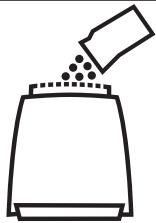
Remplissez la trémie à grains de café avec des grains de café.
Insérez le groupe d'infusion.

Insérez le groupe d'infusion à sa place (page 31).
Insérez le tiroir à marc de café.

Insérez le tiroir à marc.
MESSAGE GUIDE QUI APPARAÎT
COMMENT SUPPRIMER LE MESSAGE
Videz le tiroir à marc de café.
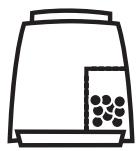
Retirez le tiroir à marc et videz le marc.
Remarque : le tiroir à marc ne doit être vidé que lorsque la machine le demande et lorsque la machine est allumée. Si vous videz le tiroir alors que la machine est éteinte, le compteur de cycles ne sera pas réinitialisé.
Porte ouverte
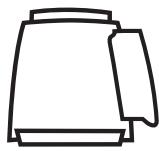
Fermez la porte de service pour pouvoir utiliser la machine.
Remplissez le réservoir d'eau
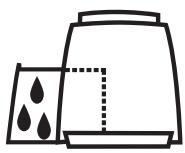
Retirez le réservoir d'eau et remplissez-le d'eau potable fraîche.
Videz le bac d'égouttage
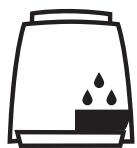
Ouvrez la porte de service et videz le bac d'égouttage situé sous le groupe d'infusion.
AVERTISSEMENT : CHAQUE FOIS QUE CE MESSAGE APPARAÎT, ASSUREZ-VOUS DE VIDER ÉGALEMENT LE TIROIR À MARC.
| GUIDEMESSAGE THAT APPEARS | HOW TO REMOVE THEMESSAGE | |
| close steam knob | Turn the knob in the direction shown until it reaches the rest position (●). | |
| change water filter | The water filter must be replaced in the following cases:1. 60 liters of water have been dispensed;2. 60 days have passed since its installation;3. 20 days have passed after the machine's last use.Note: this message appears only when the water filter function has been set to “on” (see page 22). | |
| carafe removed | The steam knob has been turned to the position and either the Milk Island has not been installed or the carafe is not positioned correctly. Install the Milk Island or position the carafe correctly.Otherwise, turn the knob until it is in the rest position (●). | |
| milk island removed | ||
| descale | A descending cycle must be performed on the machine's internal circuits (see page 27). | |
| Stand-by | Press “×” to exit energy saving or stand-by mode. | |
SOS
EN CAS D'URGENCE
DÉBRANCHEZ IMMÉDIATEMENT LE CORDON DE LA PRISE.
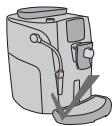
UTILISEZ L'APPAREIL UNIQUEMENT
- À l'intérieur.
- Pour préparer du café, de l'eau chaude et pour faire mousser le lait.
- Pour un usage domestique.
- Cet appareil n'est pas destiné à être utilisé par des personnes (y compris les enfants) dont les capacités physiques, sensorielles ou mentales sont réduites, ou qui manquent d'expérience et de connaissances, sauf si elles ont été supervisées ou instruites quant à l'utilisation de l'appareil par une personne responsable de leur sécurité. Les enfants doivent être surveillés pour s'assurer qu'ils ne jouent pas avec l'appareil.
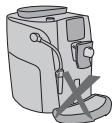
PRÉCAUTIONS D'UTILISATION DE LA MACHINE
- N'utilisez pas la machine à d'autres fins que celles indiquées ci-dessus, afin d'éviter tout danger.
- N'introduisez aucune substance autre que celles indiquées dans le manuel d'instructions.
- Lors du remplissage normal de tout réservoir, tous les réservoirs à proximité doivent être fermés.
- Remplissez le réservoir d'eau uniquement avec de l'eau potable fraîche : l'eau chaude et/ou tout autre liquide peut endommager la machine.
- N'utilisez pas d'eau gazeuse.
- Ne mettez pas les doigts ou toute autre matière que des grains de café dans le moulin à café.
- Avant de manipuler le moulin à café, éteignez l'interrupteur principal de la machine et débranchez le cordon.
- Ne pas mettre de café instantané ou de café en grains dans le récipient de café moulu.
- Utiliser uniquement le doigt pour actionner l'écran LCD.

BRANCHEMENT AU RÉSEAU ÉLECTRIQUE
Le branchement au réseau électrique doit être effectué conformément aux normes de sécurité en vigueur dans le pays de l'utilisateur.
La machine doit être branchée sur une prise qui est :
- compatible avec le type de fiche installé sur la machine ;
- dimensionnée de manière appropriée pour respecter les valeurs nominales indiquées sur la plaque signalétique de la machine.
- effectivement mise à la terre.
Le cordon d'alimentation ne doit pas :
- entrer en contact avec tout type de liquide : risque de choc électrique et/ou d'incendie ;
- être écrasé et/ou entrer en contact avec des surfaces tranchantes ; être utilisé pour déplacer la machine ; être utilisé s'il est endommagé ;
- être manipulé avec des mains humides ou mouillées ;
- être enroulé en spirale lorsque la machine est en fonctionnement.
- être trafiqué.
INSTALLATION
- Choisissez une surface plane, solide et fixe (avec une inclinaison ne dépassant pas 2°).
- N'installez pas la machine dans des zones où de l'eau pourrait être projetée.
- Température de fonctionnement optimale : 10 °C - 40 °C / 50 - 104 degrés Fahrenheit. Humidité maximale : 90 %.
- La machine doit être installée dans un endroit suffisamment éclairé, ventilé et hygiénique, et la prise électrique doit être facilement accessible.
- Ne placez pas la machine sur des surfaces chaudes !
- Installez-la à au moins 10 cm / 4 pouces des murs et des surfaces de cuisson.
- Ne l'utilisez pas dans des endroits où la température peut descendre à un niveau égal ou inférieur à 0 °C / 32 degrés Fahrenheit. Si la machine a été exposée à de telles conditions, informez le service client, qui devra effectuer un contrôle de sécurité.
- N'utilisez pas la machine à proximité de substances inflammables et/ou explosives.
- La machine ne doit pas être utilisée dans une atmosphère explosive ou volatile, ni là où il y a une forte concentration de poussières ou de substances huileuses en suspension dans l'air.
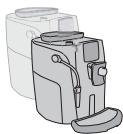
- N'installez pas la machine sur d'autres appareils.



DANGERS
- L'appareil ne doit pas être utilisé par des enfants ou des personnes qui n'ont pas été informées de son fonctionnement.
- L'appareil est dangereux pour les enfants. Lorsqu'il est laissé sans surveillance, débranchez-le de la prise électrique.
- Gardez l'emballage de la machine à café hors de portée des enfants.
- Ne dirigez jamais le jet d'eau chaude et/ou de vapeur vers vous-même ou vers d'autres personnes. Risque de brûlure.
- N'insérez pas d'objets à travers les ouvertures de l'appareil. (Danger ! Courant électrique !).
- Ne débranchez pas la fiche en tirant sur le cordon d'alimentation ou en le touchant avec des mains mouillées.
- Avertissement. Risque de brûlure au contact de l'eau chaude, de la vapeur et du bec verseur d'eau chaude.
PANNES
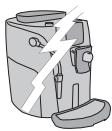
- N'utilisez pas l'appareil si une panne a été constatée ou est suspectée, par exemple après une chute.
- Toute réparation doit être effectuée par un centre de service client agréé.
- N'utilisez pas l'appareil avec un cordon d'alimentation défectueux. Le fabricant ou son centre de service client devra remplacer le câble d'alimentation s'il est endommagé. (Attention ! Courant électrique !)
- Éteignez l'appareil avant d'ouvrir la porte de service. Risque de brûlures !
NETTOYAGE / DÉTARTRAGE
- Pour le nettoyage des circuits lait et café, utilisez uniquement les détergents recommandés fournis avec la machine. Ces détergents ne doivent pas être utilisés à d'autres fins.
- Avant de nettoyer la machine, l'interrupteur principal doit être mis sur OFF (0), débranchée de la prise et refroidie.
- Évitez tout contact de l'appareil avec des éclaboussures d'eau ou son immersion dans l'eau.
- Ne séchez pas les pièces de la machine dans des fours conventionnels ou à micro-ondes.
- La machine et ses composants doivent être nettoyés et lavés après une certaine période de non-utilisation.
PIÈCES DE RECHANGE
Pour des raisons de sécurité, utilisez uniquement des pièces de rechange et des accessoires d'origine.
ÉLIMINATION DES DÉCHETS
- Les matériaux d'emballage peuvent être recyclés.
- Appareil : débranchez l'appareil et coupez le cordon d'alimentation.
- Apportez l'appareil et le cordon d'alimentation à un centre de service ou à une installation publique d'élimination des déchets.
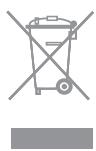
Ce produit est conforme à la directive européenne 2002/96/CE.
Le symbole sur le produit ou sur son emballage indique que ce produit ne peut pas être traité comme un déchet ménager. Il doit être remis au point de collecte applicable pour le recyclage des équipements électriques et électroniques.
En vous assurant que ce produit est éliminé correctement, vous aiderez à prévenir les conséquences négatives potentielles pour l'environnement et la santé humaine, qui pourraient autrement être causées par une manipulation inappropriée des déchets de ce produit. Pour des informations plus détaillées sur le recyclage de ce produit, veuillez contacter votre mairie, votre service d'élimination des déchets ménagers ou le magasin où vous avez acheté le produit.
SÉCURITÉ INCENDIE
En cas d'incendie, utilisez des extincteurs à dioxyde de carbone (CO₂).
N'utilisez pas d'eau ni d'extincteurs à poudre sèche.
INFORMATIONS SUPPLÉMENTAIRES POUR UNE UTILISATION CORRECTE DU FILTRE À EAU INTENZA
Pour utiliser correctement le filtre à eau Intenza, veuillez tenir compte des instructions suivantes :
- Conservez le filtre à eau Intenza dans un endroit frais où la température ambiante est comprise entre +1 °C et +50 °C (34 °F à 122 °F). Ne le conservez pas à la lumière directe du soleil.
- Lisez attentivement les instructions d'utilisation et les avertissements de sécurité fournis avec chaque filtre.
- Conservez ces instructions avec le manuel.
- Ces instructions complètent celles du manuel, car elles se concentrent sur l'application spécifique du filtre dans la machine.
DÉCLARATION CE DE CONFORMITÉ
CE 2006/95, CE 2004/118
CE 1992/31, CE 1993/68
SAECO INTERNATIONAL GROUP S.P.A
- Via Torretta, 240 - 40041 Gaggio Montano (Bo) - Italie
déclarons sous notre responsabilité que le produit :
MACHINE À CAFÉ AUTOMATIQUE
SUP 032AR
auquel se rapporte cette déclaration est conforme aux normes ou autres documents normatifs suivants :
- Sécurité des appareils électrodomestiques et analogues - Exigences générales EN 60335-1(2002) + A1(2004) + A2(2006) + A11(2004) + A12(2006)
- Sécurité des appareils électrodomestiques et analogues - Partie 2-15 Exigences particulières pour les appareils de chauffage des liquides EN 60335-2-15(2002) + A1(2005)
- Appareils électrodomestiques et analogues - Champs électromagnétiques - méthodes d'évaluation et de mesure EN 50366 (2003) + A1 (2006).
- Appareils électrodomestiques et analogues - Sécurité - Partie 2-14 Exigences particulières pour les machines de cuisine EN 60335-2-14 (2006).
- Compatibilité électromagnétique (CEM) - Exigences pour les appareils électroménagers, les outils électriques et les appareils similaires - Partie 1 : Émission EN 55014-1 (2006)
- Compatibilité électromagnétique (CEM) Partie 3 : Limites - Section 2 : Limites pour les émissions de courants harmoniques (courant d'entrée des appareils ≤ 16 A par phase) - EN 61000-3-2 (2006)
- Compatibilité électromagnétique (CEM) Partie 3 : Limites - Section 3 : Limitation des variations de tension, des fluctuations de tension et du papillotement dans les réseaux publics de distribution à basse tension, pour les appareils ayant un courant nominal ≤ 16 A par phase et non soumis à un raccordement conditionnel - EN 61000-3-3 (1995) + A1 (2001) + A2 (2005)
- Compatibilité électromagnétique - Exigences pour les appareils électroménagers, les outils électriques et les appareils similaires - Partie 2 : Immunité - Norme de famille de produits EN 55014-2 (1997) + A1 (2001)
Conformément aux dispositions des directives : CE 73/23, CE 89/336, CE 92/31, CE 93/68
Saeco
International Group S.p.A.
Via Torretta, 240
I-40041 Gaggio Montano, Bologne
Tél. : +39 0534 771111
Fax : +39 0534 31025
www.saeco.com
Le fabricant se réserve le droit de modifier les caractéristiques du produit sans préavis.



- TALEA
- TOUCH PLUS
- MANUEL D'UTILISATION ET D'ENTRETIEN
- GARANTIES IMPORTANTES
- CONSERVEZ CES INSTRUCTIONS
- ATTENTION
- INSTRUCTIONS POUR LE CORDON D'ALIMENTATION
- SOMMAIRE
- INFORMATIONS GÉNÉRALES
- DANS CES CAS, LA GARANTIE N'EST PAS VALABLE
- LE TRIANGLE D'AVERTISSEMENT INDIQUE TOUTES LES INSTRUCTIONS IMPORTANTES POUR LA SÉCURITÉ DE L'UTILISATEUR. VEUILLEZ SUIVRE CES INSTRUCTIONS ATTENTIVEMENT POUR PRÉVENIR DES BLESSURES GRAVES
- COMMENT UTILISER CES INSTRUCTIONS D'UTILISATION
- ACCESSOIRES
- MISE EN MARCHE DE LA MACHINE
- RÉGLAGE DE LA LANGUE
- RÉGLAGE DE LA DURETÉ DE L'EAU
- FILTRE À EAU INTENZA
- AROMA OPTI-DOSE (RÉGLE LA DOSE DE CAFÉ PAR TASSE)
- INTENSITÉ DU CAFÉ
- SBS - SYSTÈME D'INFUSION SAECO
- RÉGLAGE DE LA HAUTEUR DU BAC ÉGOUTTOIR
- SYSTÈME D'ADAPTATION SAECO
- RÉGLAGE DU MOULIN À CAFÉ
- PRÉPARATION AVEC DES GRAINS ENTIERS
- PRÉPARATION AVEC DU CAFÉ MOULU
- AVERTISSEMENT : NE METTEZ DU CAFÉ MOULU DANS LE DOSEUR DE DÉRIVATION QUE LORSQUE VOUS SOUHAITEZ PRÉPARER CE TYPE DE BOISSON
- INSÉRER UNE SEULE DOSE DE CAFÉ MOULU À LA FOIS. IL EST IMPOSSIBLE DE DISTRIBUER DEUX TASSES DE CAFÉ EN MÊME TEMPS
- REMARQUE
- DISTRIBUTION D'EAU CHAUDE
- DISTRIBUTION DE VAPEUR
- CAPPUCCINO
- MENU DE PROGRAMMATION DES BOISSONS
- RÉGLAGES DU CAFÉ
- RÉGLAGES DE LA MACHINE
- REMARQUE IMPORTANTE
- RÉGLAGES DES BOISSONS
- RÉGLAGES DE L'HEURE ET DE LA DATE
- RÉGLAGES D'ENTRETIEN
- CYCLE DE NETTOYAGE
- LE CYCLE DE NETTOYAGE NE PEUT PAS ÊTRE INTERROMPU. UNE PERSONNE DOIT ÊTRE PRÉSENTE PENDANT L'OPÉRATION
- CYCLE DE DÉTARTRAGE DE LA CHAUDIÈRE
- UNE PERSONNE DOIT ÊTRE PRÉSENTE PENDANT L'OPÉRATION
- ATTENTION ! N'UTILISEZ JAMAIS DE VINAIGRE COMME DÉTARTRANT
- PARAMÈTRES D'USINE
- ENTRETIEN EN COURS DE FONCTIONNEMENT
- NETTOYAGE GÉNÉRAL DE LA MACHINE
- NETTOYAGE DU GROUPE D'INFUSION
- COMMENT SUPPRIMER LE MESSAGE
- MESSAGE GUIDE QUI APPARAÎT
- SOS
- EN CAS D'URGENCE
- UTILISEZ L'APPAREIL UNIQUEMENT
- PRÉCAUTIONS D'UTILISATION DE LA MACHINE
- BRANCHEMENT AU RÉSEAU ÉLECTRIQUE
- INSTALLATION
- DANGERS
- PANNES
- NETTOYAGE / DÉTARTRAGE
- PIÈCES DE RECHANGE
- ÉLIMINATION DES DÉCHETS
- SÉCURITÉ INCENDIE
- INFORMATIONS SUPPLÉMENTAIRES POUR UNE UTILISATION CORRECTE DU FILTRE À EAU INTENZA
- SAECO INTERNATIONAL GROUP S.P.A
- SUP 032AR
- SAECO
- INTERNATIONAL GROUP S.P.A
Marque : SAECO
Modèle : TALEA TOUCH PLUS
Catégorie : Machine à café automatique