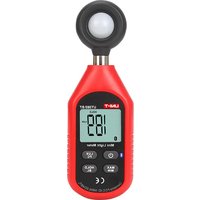
UT383 - Luxmètre Uni-T - Notice d'utilisation et mode d'emploi gratuit
Retrouvez gratuitement la notice de l'appareil UT383 Uni-T au format PDF.


| Type de produit | Luxmètre numérique |
| Marque | Uni-T |
| Modèle | UT383 |
| Dimensions | 108 x 58 x 27 mm |
| Poids | 80 g (sans piles) |
| Alimentation | 2 piles AAA 1,5 V |
| Plage de mesure | 0 - 200 000 Lux |
| Résolution | 0,1 Lux (jusqu'à 2000 Lux), 1 Lux au-delà |
| Précision | ±5 % (étalonné à la lampe standard) |
| Capteur | Photodiode au silicium avec filtre de correction de couleur |
| Affichage | LCD 3¾ digits, rétroéclairé |
| Fonctions principales | Mesure d'éclairement, Data Hold, arrêt automatique réglable, indicateur de pile faible |
| Taux d'échantillonnage | 2,5 fois par seconde |
| Entretien et nettoyage | Nettoyer avec un chiffon doux et sec. Ne pas utiliser de solvants. |
| Sécurité | Ne pas exposer le capteur à une lumière intense et directe. Stocker dans un endroit sec et à l'abri de la poussière. |
| Pièces détachées et réparabilité | Piles remplaçables. Appareil non réparable par l'utilisateur. Aucune pièce détachée disponible. |
| Informations générales | Notice en français disponible gratuitement au format PDF. Garantie 1 an. |
FOIRE AUX QUESTIONS - UT383 Uni-T
Questions des utilisateurs sur UT383 Uni-T
0 question sur cet appareil. Repondez a celles que vous connaissez ou posez la votre.
Poser une nouvelle question sur cet appareil
Téléchargez la notice de votre Luxmètre au format PDF gratuitement ! Retrouvez votre notice UT383 - Uni-T et reprennez votre appareil électronique en main. Sur cette page sont publiés tous les documents nécessaires à l'utilisation de votre appareil UT383 de la marque Uni-T.
MODE D'EMPLOI UT383 Uni-T
UT383
Mini Light Meters Operating Instruction
1. Introduction
UT383 is a stable, safe, reliable mini digital light meter, widely used in lightening enterprises, agriculture and animal husbandry, mining enterprises, laboratory, office, household, street lights construction and others.
This operating manual includes relevant safety information and warnings. Please read this manual carefully and observe all the cautions strictly.
Warning:
Before using the product, please read the operation safety rules carefully.
2. Out of the Box
Open the packing box and take out the meter. Please check carefully if any items are missing or damaged.
-
Main Unit----1
-
Operating manual ---- 1
3. Operation Safety
- Please check the meter and the accessories before using and beware of any damage or abnormal phenomenon. If you find the case is damaged or the LCD shows nothing, or you consider that the meter could not work properly anymore, please stop using it.
- Observe the operating instructions while measuring.
- Do not open the meter at will or change internal wiring to avoid damages to the meter.
- When the LCD displays "☐", replace the battery timely. Remove the battery if the meter is not used for a long time.
- Do not store or use the meter in high temperature, high humidity, flammable, combustible, or strong electromagnetic environment.
- Please use soft cloth and neutral detergent to clean the case for maintenance. Do not use grinding agent and solvent to avoid case corrosion and damaging the meter.
4. Product Outlook
- Illumination transducer
- Meter case
- LCD display
- Function keys

- Display Interface
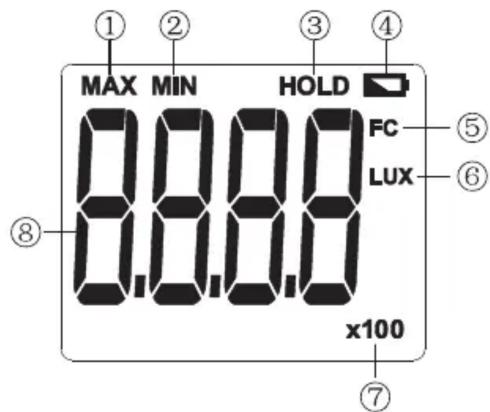
| 1 | Maximum measurement | 5 | Foot candle |
| 2 | Minimum measurement | 6 | Lux |
| 3 | Data hold | 7 | Value*10 or value*100 |
| 4 | Low battery | 8 | Illumination value |
6. Key Function and Setup
- ON/OFF:
Short press once to start up; short press again to power off.
Note: Product's auto power off feature can be disabled: Press and hold "HOLD" and then press "ON/OFF" key to enable/disable auto power off, LCD will display "APO OFF" to indicate status.
- LUX/FC:
Unit conversion key: Short press this key to select Lux or Foot candles.
- MAX/MIN:
Pressing this key can select maximum, minimum or normal value measurement; select maximum and the meter will always show the maximum reading; select minimum and the meter will always show the minimum reading.
- HOLD/BL:
HOLD: Short press this key to hold measurement; short press this key again to exit data hold and continue normal measurement.
BL: Long press this key to turn on backlight; long press this key again to turn off backlight.
7. Technical Specifications
- Illumination
| Function | Range | Resolution | Accuracy | Description |
| Illumination | 0~9999 Lux | 1 Lux | ±(4%rdg + 8dgts) | (regulate in the standard of 2856K color temperature flat lamp)Note: 1FC=10.76 Lux |
| ≥10000 Lux | 10 Lux | ±(5%rdg + 10dgts) | ||
| Range | 0~199,999 Lux | Auto-ranging | ||
| Sampling Time | 0.5s | Refresh sampling in 0.5s | ||
| Overload Indication | OL | Shows “OL” | ||
| MAX/MIN Measurement | MAX/MIN | Shows “MAX/MIN” | ||
| Data Hold | HOLD | Shows “HOLD” | ||
| Backlight | BL | Manually on and off | ||
| Auto Power Off | 5mins | Automatically power off after 5mins without operation | ||
| Low Battery | 3.0~3.5V | Shows low battery prompt when power is 3.0~3.5V |
2. General Type
a. LCD: 4 digits LCD display. The max display is 9999
b. Overload indication: When illumination is over 199,999 Lux, "OL" will be displayed
c. Battery low power display: Prompt "☐". New battery should be replaced in time
d. Sampling rate: 2/s
e. Sensor type: Silicon photocell
f. Impact strength: Can withstand the impact of landing from 1 meter height
g. Battery requirement: 1.5V batteries (AAA) ×3
h. Product size: 160×50×28mm
i. Weight: 118g
3. Environment Specification
a. Indoor use
b. Altitude height: 2000m
c. Safety: EN61326-1
d. Pollution level: 2
e. Working temperature and humidity: 0°C\~40°C (not greater than 80%RH) 40°C\~50°C (not greater than 45%RH)
f. Storage temperature and humidity: -20°C\~60°C (not greater than 75%RH)
4. Electrical Specifications
a. Accuracy: 0\~9999Lux, ±(4%rdg+8dgts) ≥10000Lux, ±(5%rdg+8dgts)
b. Environment temperature: 23°C±3°C
c. Environment humidity: ≤80%RH
5. General Maintenance
⚠ Warning: please do not open the case of meter to avoid affecting device accuracy or damage to the meter.
a. Maintenance and service of the meter should be accomplished by professional personnel or designated maintenance department.
b. Clean the case by dry cloth periodically, detergent with abrasive or solvent composition shall not be used.
6. Battery Installation and Replacement
a. The meter uses 3 pieces of AAA 1.5V batteries. Please see figure below for steps of battery installation and replacement.

UNI-T®
UNI-TREND TECHNOLOGY (CHINA) CO., LTD.
No6, Gong Ye Bei 1st Road,
Songshan Lake National High-Tech Industrial
Development Zone, Dongguan City,
Guangdong Province, China
Tel: (86-769) 8572 3888
http://www.uni-trend.com
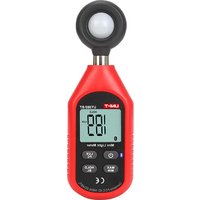
Marque : Uni-T
Modèle : UT383
Catégorie : Luxmètre