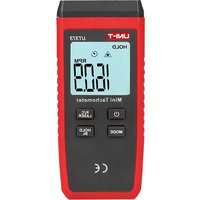
UT373 - Odomètre Uni-T - Notice d'utilisation et mode d'emploi gratuit
Retrouvez gratuitement la notice de l'appareil UT373 Uni-T au format PDF.


| Type de produit | Odomètre numérique |
| Marque | Uni-T |
| Modèle | UT373 |
| Affichage | LCD numérique rétroéclairé |
| Unités de mesure | km/h, miles/h, km, miles |
| Plage de vitesse | 0.1 à 999.9 km/h |
| Précision | ±0.1 km/h |
| Distance maximale | 99999 km ou miles |
| Alimentation | 1 pile CR2032 3V |
| Dimensions | 45 x 20 x 10 mm |
| Poids | 20 g (avec pile) |
| Fonctions principales | Mesure de vitesse instantanée, distance, temps de trajet, stockage de données |
| Entretien et nettoyage | Chiffon doux, sec ; éviter l'humidité et les solvants |
| Sécurité | Ne pas exposer à des températures extrêmes ; utiliser pile recommandée |
| Accessoires inclus | Pile CR2032, manuel d'utilisation |
| Réparabilité | Remplacement de pile simple ; pièces non disponibles séparément |
| Garantie | 1 an |
FOIRE AUX QUESTIONS - UT373 Uni-T
Questions des utilisateurs sur UT373 Uni-T
0 question sur cet appareil. Repondez a celles que vous connaissez ou posez la votre.
Poser une nouvelle question sur cet appareil
Téléchargez la notice de votre Odomètre au format PDF gratuitement ! Retrouvez votre notice UT373 - Uni-T et reprennez votre appareil électronique en main. Sur cette page sont publiés tous les documents nécessaires à l'utilisation de votre appareil UT373 de la marque Uni-T.
MODE D'EMPLOI UT373 Uni-T
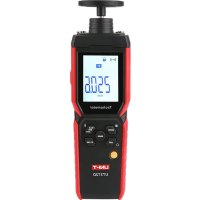
UT373
Mini Non-contact Tachometer User Manual
I. Instruction
UT373 is a stable, safe and reliable non-contact tachometer. The core of the design is the microcontroller. photoelectric speed sampling processing, unique design makes it a superior performance tachometer.
⚠ Warning:
To avoid electric shock or injury, please read Safety Instructions and Warnings before operating this product.
II. Open Box Inspection
Open the package box and take out the device. Please check whether the following items are deficient or damaged and contact your supplier immediately if they are.
1.Battery 1.5V AAA---- 3 pcs
2.Reflective strips----6pcs
3.User manual---- 1pcs
III. Safety Instruction
In this manual, a Warning identifies conditions and actions that pose hazard(s) to the user or the test device.
1) Before use, inspect the tachometer for any damage. Pay particular attention to the insulation cover and the display screen. Do not use the meter if it is not working properly
2) Follow the operation instructions
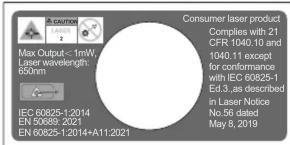
3) Do not point the laser directly into eyes.
4) Do not change the internal circuit.
5) When low power symbol ▼ appears, replace the battery as soon as possible. Remove the battery if the meter is left unused for long time.
6) Do not store or use the meter in high temperature, high humidity, explosive, or strong magnetic field environments.
7) Use soft cloth and detergent to clean the case, do not use abradants or solvents.
LASER SAFETY PRECAUTIONS:
This product emits a visible beam of laser light. Avoid exposure to the laser radiation. :
WARNING
- Do not press the PWR button while looking into the laser emission aperture. You may damage your eyes.
- Do not aim at eyes.
- Do not point the laser at people.
- Do not look at lasers with other optical instruments such as lenses or binoculars. You may damage your eyes.
- When not measuring, keep your fingers away from the PWR button to avoid accidentally emitting the laser.
- When not in use for an extended period, remove the battery.
- Do not disassemble, remodel, or repair the product. The laser emission may be harmful to your health. If the product is disassembled, remodeled, or repaired, it is no longer guaranteed by the manufacturer.
- Store the product in a place out of reach of children.
LASER RADIATION
AVOID DIRECT EYE EXPOSURE
CLASS 3R LASER PRODUCT
compliance with IEC/EN 60825-1, EN 50689.
IV. Symbols
| ⚠️ | Warning |
| ◀ | Low power |
| CE | Comply with European Union standards |
V. Structure(figure 1)
- Laser emission and receiving terminal
- Case
- Panel
- Display screen
- Functional buttons
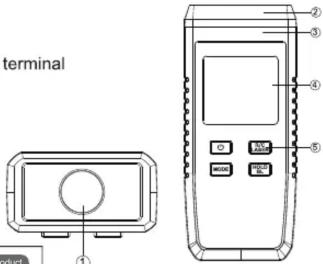
Figure 1

VI. Indicators (figure 2)
- Data hold
- Laser ON
- Maximum value
- Minimum value
- Low power
- Signal receiving
- Count measurement
- Auto power off
- RPM measurement
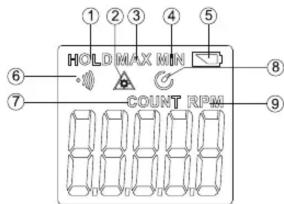
Figure2
VII. Buttons and setup
- ☐: Short press: Power ON/OFF, long press: switch ON/OFF auto power off function. ⚙ indicates auto power off.
- ☑️: Short press: switch between RPM and COUNT modes. Long press: turn ON/OFF the laser.
- Record: Under RPM mode: short press to see past records (maximum or minimum value); long press to delete the records. If there is signal input after power ON, maximum and minimum value will be recalculated. Under COUNT mode: press MODE to reset the count to zero.
- ☐: Short press to turn ON/OFF data hold function. Long press to turn ON/OFF backlight.
VIII. Operation instructions
- RPM measurement (see figure 3)
⚠ Warning:
To avoid injury and damage, keep the distance between tachometer and the object over 50mm.
1) Stop the rotating device
2) Cut the reflective strip(10mm *10mm) and place on rotating device.
3) Fix the meter to a location 50\~200mm from the rotating object.
4) Short press ☐ to turn on the meter, point the laser to the relective strip (vertical angle≤30°)
5) Turn on the rotating device to measure.
Note:
When measuring RPM<50, pulse period may be long. Keep the meter still to ensure accuracy. Wait for the above two pulse signals to be accurate.
The reading does not change if pulse period longer than 7 seconds.
If rotating speed>99999RPM, OL symbol appears to indicate overrange.

2. Count measurement
For illuminant objects
1) Fix the meter to a location 50\~200mm from the rotating object. (vertical angle≤30°)
2) Short press ☐ to turn on the meter and short press ☑ to select measurement mode. Point the laser to the objects to be measured.
3) After scanning the illuminant objects, the meter accumulate the count and display the quantity.
Note: Object to be measured should be illuminant.

Figure 4
For objects with external optical source.
1) Fix the meter to a location 50\~200mm from the rotating object. (vertical angle≤30°)
2) Fix the optical source to the location at the other side of objects and opposite to the meter.(figure5)
3) Short press to turn on the meter, long press to turn off the laser.
4) When the objects pass by the meter and optical source the meter will accumulate the count and display quantity.
Note: If quantity >99999, OL symbol appears to indicate overrange.
Press 📄 to reset the reading to 0.

Figure 5
IX. Technical specifications
- General specifications
● Maximum display: 99999
● Overrange display: OL
● Low power: - Refresh rate:1s\~7s(according to rotating rate)
● Sensor type: photosensitive diode and laser tube
● Measuring distance: 50mm\~200mm
- Drop test: 1m
● Battery: 1.5V(AAA)
2. Operating environment
- Indoor
● Altitude: ≤2000 meters
● Safety standards : EN61326-1, EN61326-2-2
● Class of pollution: 2
● Operating temperature:0°C\~50°C (32\~122°F) (≤80%RH)
● Storage temperature:-20°C\~+60°C (-4\~140°F) (≤80%RH)
3. Electric specifications
● Ambient temperature:23°C±5°C (64.4\~82.4°F)
● Ambient humidity: ≤80% RH
(1) RPM
| Range | Resolution | Accuracy |
| 10~9999.9r/min | 0.1r/min | ±(0.04%+2) |
| 10000~99999r/min | 1r/min |
(2) COUNT
| Range | Resolution | Max input frequency |
| 0~99999 | 1 digit | 10KHz, 5% of pulse width |
Warning
To avoid false reading and injury, please do not open the case of the meter.
X.Maintenance
1. General maintenance
a. The maintenance and service must be implemented by qualified professionals or designate departments.
b. Clean the case with a dry cloth. Do not use abradants or solvents.
2.Battery installation & replacement.
The meter uses three AAA 1.5V alkaline batteries for operation.
To install or replace the battery:
a. Unscrew the battery cover, remove the cover and install new batteries ensuring that the correct polarity is observed.
b. Use the batteries of the same type
c.Replace the battery and screw up.
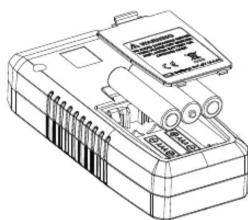
Figure 6
*The contents of this manual are subject to change without prior notice*
UNI-T®
UNI-TREND TECHNOLOGY (CHINA) CO., LTD.
No6, Gong Ye Bei 1st Road,
Songshan Lake National High-Tech Industrial
Development Zone, Dongguan City,
Guangdong Province, China
Tel: (86-769) 8572 3888
http://www.uni-trend.com

- UT373
- MINI NON-CONTACT TACHOMETER USER MANUAL
- INSTRUCTION
- OPEN BOX INSPECTION
- SAFETY INSTRUCTION
- STRUCTURE(FIGURE 1)
- INDICATORS (FIGURE 2)
- BUTTONS AND SETUP
- OPERATION INSTRUCTIONS
- COUNT MEASUREMENT
- FOR ILLUMINANT OBJECTS
- FOR OBJECTS WITH EXTERNAL OPTICAL SOURCE
- TECHNICAL SPECIFICATIONS
- OPERATING ENVIRONMENT
- ELECTRIC SPECIFICATIONS
- X.MAINTENANCE
- GENERAL MAINTENANCE
- 2.BATTERY INSTALLATION & REPLACEMENT
- UNI-T®
- UNI-TREND TECHNOLOGY (CHINA) CO., LTD
Marque : Uni-T
Modèle : UT373
Catégorie : Odomètre