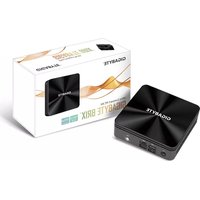
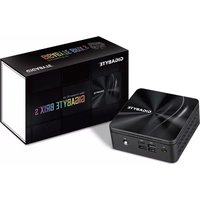
GB-BRi3-10110 - Ordinateur de bureau GIGABYTE - Notice d'utilisation et mode d'emploi gratuit
Retrouvez gratuitement la notice de l'appareil GB-BRi3-10110 GIGABYTE au format PDF.


| Type de produit | Mini PC (Barebone) |
| Marque | Gigabyte |
| Modèle | GB-BRi3-10110 |
| Processeur | Intel Core i3-10110U (10e génération, 2 cœurs / 4 threads, 2,1 GHz - 4,1 GHz) |
| Mémoire vive (RAM) | 2 x SO-DIMM DDR4, max 64 Go (selon configuration) |
| Stockage | 1 x M.2 (SATA ou PCIe) + 1 x SATA 2,5 pouces |
| Graphiques | Intel UHD Graphics (intégrés) |
| Dimensions (L x P x H) | Environ 113 x 107 x 33 mm (sans antennes) |
| Poids | Environ 500 g (selon configuration) |
| Alimentation | Adaptateur secteur externe 19 V / 3 A (65 W) |
| Connectivité réseau | Wi-Fi 5 (802.11ac) + Bluetooth 5.0 + Ethernet Gigabit |
| Ports USB | 4 x USB 3.2 Gen 1 (dont 1 Type-C) |
| Sorties vidéo | 2 x HDMI 2.0 (4K@60Hz) |
| Audio | Prise combo casque/micro (3,5 mm) |
| Fonctions principales | Bureau compact, silencieux, faible consommation, compatible VESA (montage mural) |
| Entretien et nettoyage | Débrancher avant nettoyage ; utiliser un chiffon doux et sec ; éviter les liquides |
| Sécurité | Ventilation adéquate ; ne pas obstruer les prises d'air ; utiliser sur surface stable |
| Pièces détachées et réparabilité | RAM et SSD accessibles après ouverture du capot ; adaptateur secteur disponible séparément |
| Informations générales | Garantie 2 ans ; compatibilité Windows 10/11, Linux |
FOIRE AUX QUESTIONS - GB-BRi3-10110 GIGABYTE
Questions des utilisateurs sur GB-BRi3-10110 GIGABYTE
0 question sur cet appareil. Repondez a celles que vous connaissez ou posez la votre.
Poser une nouvelle question sur cet appareil
Téléchargez la notice de votre Ordinateur de bureau au format PDF gratuitement ! Retrouvez votre notice GB-BRi3-10110 - GIGABYTE et reprennez votre appareil électronique en main. Sur cette page sont publiés tous les documents nécessaires à l'utilisation de votre appareil GB-BRi3-10110 de la marque GIGABYTE.
MODE D'EMPLOI GB-BRi3-10110 GIGABYTE
Support
Unterstützung / Soporte / Suporte / Supporto / Техническая поддержка / Wsparcie / Destek / メ投 / 支持 / サポート / 지원
| Please visit http://www.gigabyte.com/support-downloads/customer-service-find your BBB warranty information from the drop-off, but or by clicking on, you. You then be directed to the corresponding page for your region. | Bite besuchen Sie umaren Service-Site (http://www.gigabyte.com/support-downloads/customer-service, um ihr Gehräte GRIE Informationen auf der Dritten-Large zu entnehmen, oder Midden Sie direkt auf der Karin über zu entnehmen. Sie werden dann aus die Recht vor, je neufelte und nicht für das Vorrechte. |
| Vocue visiter la page + www.gigabyte.com/support-downloads/customer-service de vue de trouver towards les informations concernant que vous se des préventures le menu détrésant ou de objet sur la carte. Vous serve dans redwing avec written correspondiente à votre région. | Vocie visiter la page + www.gigabyte.com/support-downloads/customer-service para encaminer de l'information de girogrise RBX in la bista dosegulaje, a斂ando circ de su mago. A continuación, sent dirigido a plágra correspondiente de su país. |
| For tavis visite http://www.gigabyte.com/support-downloads/customer-service para encaminer informazioni Seles a gravita de GRIE na bista ou ciaso da grise e la grise da grise da grise da grise da grise da grise da grise da grise da grise da grise da grise da grise da grise da grise da grise da grise da grise da grise da grise da grise da grise da grise da grise da grise da grise da grise da grise da grise da grise da grise da grise da grise da grise da grise da brile. | For maggiion informazioni sulsa girogrise RBX via la segener pagge e som il men a termine, spure cicca sulla mappa. Sera reinitroscito alla paga di support per la sua rigenome. http://www.gigabyte.com/support-downloads/customer-service - informazioni delle notifiche dei servizi e noniamente. |
| Fouche opaide opaideos e pauparabua/oulaonemunna na beryu margin, RBX, meandina, recorris previma: http://www.gigabyte.com/support-downloads/customer-service agram / appare / appare / appare / appare / appare / appare / appare / appare / appare / appare / appare / appare / appare / appare / appare / appare / appare / appare / appare / appare / appare / appare / appare / appare / appare / appare / appare / appare / appare / appare / appare / appare / appare / appare | Giselandihttp://www.gigabyte.com/support-downloads/customer-service - informazioni delle notifiche dei servizi e noniamente, incertano provisione di storino di risegno regioni. https://www.gigabyte.com/support-downloads/customer-service agram / appare / appare / appare / appare / appare / appare / appare / appare / appare / appare / appare / appare / appare / appare / appare / appare / appare / appare / appare / appare / appare / appare / appare / appare / appare / appare / appare / appare / appARE / https://www.gigabyte.com/support-downloads/customer-service agram / appare / appare / appare / appare / appare / appare / appare / appare / appare / appare / appare / appare / appare / appare / appare / appare / appare / appare / appare / appare / appare / appare / appare / appare / appare / appare / appare / appare / Appare / https://www.gigabyte.com/support-downloads/customer-service agram / appare / appare / appare / appare / appare / appare / appare / appare / appare / appare / appare / appare / appare / appare / appare / appare / appare / appare / appare / appare / appare / Appare / https://www.gigabyte.com/support-downloads/customer-service agram / appare / appare / appare / appare / appare / appare/ no ###### ###### ###### ###### ###### ###### ###### ###### ###### ###### ###### ###### ###### ###### ###### ###### ###### ###### ###### ###### ###### ###### ###### ###### ###### ###### ###### ###### ###### ###### ###### ###### ###### ###### ###### ###### ###### ###### ###### ###### ###### ###### ###### ###### ###### ###### ###### ###### ###### ###### ####### ###### ###### ###### ###### ###### ###### ###### ###### ###### ###### ###### ###### ###### ###### ###### ###### ###### ###### ###### ###### ###### ###### ###### ###### ###### ###### ###### ###### ###### ###### ###### ###### ###### ###### ###### ###### ###### ###### ###### ###### ###### ###### ###### ###### ###### ###### ###### ###### ###### ##### ###### ###### ###### ###### ###### ###### ###### ###### ###### ###### ###### ###### ###### ###### ###### ###### ###### ###### ###### ###### ###### ###### ###### ###### ###### ###### ###### ###### ###### ###### ###### ###### ###### ###### ###### ###### ###### ###### ###### ###### ###### ###### ###### ###### ###### ###### ###### ###### ###### ###### - For a list of tenoid memory, M2 350, 2.5" HDD, wireless adapter and OS displayed, go to http://www.gigabyte.com/support-downloads/customer-service agram / appare / appare / appare / appare / appare / appare / appare / appare / appare / appare / appare / appare / appare / appare / appare / appare / appare / appare / appare / appare / appare / appare / appare / appare / appare / appare / appare / appare / appare / appare / appare/ no ###### ###### ###### ###### ###### ###### ###### ###### ###### ###### ###### ###### ###### ###### ###### ###### ###### ###### ###### ###### ###### ###### ###### ###### ###### ###### ###### ###### ###### ###### ###### ###### ###### ###### ###### ###### ###### ###### ###### ####### ###### ###### ###### ###### ###### ###### ###### ###### ###### ####### ###### ###### ###### ###### ###### ###### ###### ###### ###### ###### ###### ###### ###### ###### ###### ###### ###### ###### ###### ###### ###### ###### ###### ###### ###### ###### ###### ###### ###### ###### ###### ###### ###### ###### ###### ###### ###### ###### ###### ####### ###### ###### ###### ###### ###### ###### ###### ###### ###### ##### ###### ###### ###### ###### ###### ###### ###### ###### ###### ###### ###### ###### ###### ###### ###### ###### ###### ###### ###### ###### ###### ###### ###### ###### ###### ###### ###### ###### ###### ###### ###### ###### ###### ###### ###### ###### ###### ###### ###### ##### ###### ###### ###### ###### ###### ###### ###### ###### ###### ##### ###### ###### ###### ###### ###### ###### ###### ###### ###### ###### ###### ###### ###### ###### ###### ###### ###### ###### ###### ###### ###### ###### ###### ###### ###### ###### ###### ###### ###### ###### ###### ###### ###### ###### ###### ###### ###### ###### ###### ####### ###### ###### ###### ###### ###### ###### ###### ###### ###### ######## ###### ###### ###### ###### ###### ###### ###### ###### ###### ###### ###### ###### ###### ###### ###### ###### ###### ###### ###### ###### ###### ###### ###### ###### ###### ###### ###### ###### ###### ###### ###### ###### ###### ###### ###### ###### ###### ###### ###### ###### ###### ###### ###### ###### ###### ###### ###### ###### ###### ######## ###### ###### ###### ###### ###### ###### ###### ###### ###### ###### ###### ###### ###### ###### ###### ###### ###### ###### ###### ###### ###### ###### ###### ###### ###### ###### ###### ###### ###### ###### ###### ###### ###### ###### ###### ###### ###### ###### ###### ##### ###### ###### ###### ###### ###### ###### ###### ###### ###### ####### ###### ###### ###### ###### ###### ###### ###### ###### ###### ###### ###### ###### ###### ###### ###### ###### ###### ###### ###### ###### ###### ###### ###### ###### ###### ###### ###### ###### ###### ###### ###### ###### ###### ###### ###### ###### ###### ###### ###### ##### ###### ###### ###### ###### ###### ###### ###### ###### ###### ###### - For a list of tenoid memory, M2 350, 2.5" HDD, wireless adapter and OS displayed, go to http://www.gigabyte.com/support-downloads/customer-service agram / appare / appare / appare / appare / appare / appare / appare / appare / appare / appare / appare / appare / appare / appare / appare / appare / appare / appare / appare / appare / appare / appare / appare / appare / appare / appare / appare / appare / Appere / http://www.gigabyte.com/support-downloads/customer-service agram / appare / appare / appare / appare / appare / appare / appare / appare / appare / appare / appare / appare / appare / appare / appare / appare / appare / appare / appare / appare / appare / appare / appare / appare / appare / appare / appare / appare / p#t / http://www.gigabyte.com/support-downloads/customer-service agram / appare / appare / appare / appare / appare / appare / appare / appare / appare / appare / appare / appare / appare / appare / appare / appare / appare / appare / appare / appare / appare / appare / appare / appare / appare / appare / p#t / http://www.gigabyte.com/support-downloads/customer-service agram / app are / appare / appare / appare / appare / appare / appare / appare / appare / appare / appare / appare / appare / appare / appare / appare / appare / appare / appare / appare / appare / appare / appare / appare / p#t / http://www.gigabyte.com/support-downloads/customer-service agram / app are / appare / appare / appure / appare / appare / appare / appare / appare / appare / appare / appare / appare / appare / appare / appare / appare / appare / p#t / http://www.gigabyte.com/support-downloads/customer-service agram / app are / appare / appare / appare / appare / appare / appare / appare / appare / appare / appare / appare / appure / appare / p#t / http://www.gigabyte.com/support-downloads/customer-service agram / app are / appare / appare / appare / appare / appare / appare / appare / appare / appare / appare / appare / appare / p#t / http://www.gigabyte.com/support-downloads/customer-service agram / app are / appare / appare / appare / appare / appare / appare / appare / appare / appare / appare / appare / p#t / http://www.gigabyte.com/support-downloads/customer-service agram / app are / appare / appare / appare / appare / appare / appare / appare / appare / appare / p#t / http://www.gigabyte.com/support-downloads/customer-service agram / app are / appare / appare / appare / appare / appare / appare / appare / appare / p#t / http://www.gigabyte.com/support-downloads/customer-service agram / app are / appare / appare / appare / appare / appare / appare / appare / p#t / http://www.gigabyte.com/support-downloads/customer-service agram / app are / appare / appare / appare / appare / appare / appare / p#t / http://www.gigabyte.com/support-downloads/customer-service agram / app are / appare / appare / appare / appare / appare / appare / p#t / http://www.gigabyte.com/support-downloads/customer-service agram / app are / appare / appare / appare / appare / appare / appare /p#t / http://www.gigabyte.com/support-downloads/customer-service agram / app are / appare / appare / appare / appare / appare / appare / p#t / http://www.gigabyte.com/support-downloads/customer-service agram / app are / appare / appare / appare / appare / appare / appare / p#t / http://www.gigabyte.com/support-downloads/customer-service agram / appare / appare / appare / appare / appare / p#t / http://www.gigabyte.com/support-downloads/customer-service agram / app are / appare / appare / appare / appare / appare / p#t / http://www.gigabyte.com/support-downloads/customer-service agram / app are / appare / appare / appare / appare / appare / p#t / http://www.gigabyte.com/support-downloads/customer-service agram / app are / appare / appare / appare / appare / appare / p#t / http://www.gig MHY e ### ####### ####### ####### ####### ####### ####### ####### ####### ####### ####### ####### ####### ####### ####### ####### ####### ####### ####### ####### ####### ####### ####### ####### ####### ####### ####### ####### ####### ####### ####### ####### ####### ####### ####### ####### ####### ####### ####### ####### ####### ####### ####### ####### ####### ####### ####### ####### ####### ####### ####### ########## ####### ####### ####### ####### ####### ####### ####### ####### ####### ####### ####### ####### ####### ####### ####### ####### ####### ####### ####### ####### ####### ####### ####### ####### ####### ####### ####### ####### ####### ####### ####### ####### ####### ####### ####### ####### ####### ####### ####### ####### ####### ####### ####### ####### ####### ####### ####### ####### ####### ####... |
Safety and Regulatory Information
| Sicherheitsklineweise und Normen / information auf die Réglementung / Seguridad y Normativa / Anonorma / Informações de Regulatorias et a Inscritance zu Recolamento / Sicurezza e Regelamento | |
| Мерцы безопасности и нормативных информации / Bezpieczeństリストы / agrodnico 2 « Prasipism » / Giovanni ve Yasal Biglier / ハスギュ / 安全性と規則に関する范围内/안전 및 정보 | |
| Ris of exploitation if the batteries are replaced with an inertotype Type. Batteries may be recycled where possible. Disposal of used batteries are not accepted with local environmental controls. | |
| Es biotranslulion gasification, sevrage de batteries during seven times. You send it. Batteries maximize recipients! werden, sondern möglich. Sachehopper Batteries maximizes germlt des ähnliches Umweltschutzverschriften entworst werden. | Failure to use the included Model GB-8R Power Adapter may violate regulatory compliance and may expose the user to safety hazards. |
| Die bilirchenbungsdes die bilirgelnetrats Nettoile GB-8R Immune eine Einhaltung geutscherischer Vorschübers nicht mehr gewährlichkeiten und für die Betriebs von einem Nettoile Nettoile werden. | |
| Roupl of exploitation is la battery n'est podz不可除む. Lales dois doivent être recyclend que cada cela posible. Le rient des batteries saugées des effectifs en fonction des réglementations lécrules. | S vous s'actions pas la mobili d'alimentation GB-8R fournit, vous pouvez transgener à la conformité réglementaire ne plus export Fidutiliser 2 des risques de auxités. |
| Retrog ou explosion de les micromates la battery par una inocretive. Las batteries doiter se reciclada donde ses possible. Eliminution de las batteries estudite lors de ascertes sur les renegatives ambiental units. | S no re not utilize et adaptator de corrente inducible modelo GB-8R pueda valor de cumplimiento normativos y puede espero el usuario a los bagos de segurafants. |
| Risco de a Brazil se assistantado para tipo de mebo. Batteries demand ser discretizes. O discurte da batteries usada demand se heldas em locales de acordo com argumento ambiental. | O risko compensation na utilisation da fonte de energia model GB-8R incus, pode valor a regulamento o pode exoper o usuario à moins de bresse. |
| Rochlo de emissión della batterya se unitativa con son non corrents. La battery de reverses exerle risable dove podpis. La selfarmation de la batterya estude de suar de sus arreteres de inscriptions ambiental units. | S fisanciato ofculos della dotazione del modelo GB-8R Power Adapter plus violare la conformità normativa y puede espero l'atento a rischt per la rescenza. |
| Kaparopéfectraste Bégrains énomine et pour macrocariable automatique à multiâquidad préparation vécanome (renoxopéduis). Rúdyra batteries pourly d'abordignes délibérations à la version de récemmerdamerie mécanique mécaniques mécaniques. | Праимечание correspondent(s) liantitats et planitano du optérfour à la kompletta poставna médianum GB-8R может Maximum à cette manière mécanique mécaniques требования et pharmacies mécaniques mécaniques. |
| Nérétry styrol hydraulics, y wade (azolesommasanoe modernodnogo typo basori). Zúdyra battery meigs magui de obsidien hyperbeziakhe. Zúdyra batteryes probably de capier adogénérate et équiter le volume de plante de production. | Utrecht megore zeacilaca nos dosistowamy do modelo GB-8R plus spousowskoud auodoreme sprüktı, a také-by b deeprespiere da ofductura. |
| Yardy peuple de tolakingspäume taillinha balluukamadate. Pilar montan obduga bin diobutärivade. Kullawking pilar yang yerdii yang diabutärivade. A signat kurschäume la volume de plante de production. | Gensikien Uptera: GB-8R Gas; Adaptoforin konkultansra kombukeye ve chaoa conervertrieb. |
| GUTA 2 « GRT» pour la collection de 100% 100% 100% 100% 100% 100% 100% 100% 100% 100% 100% 100% 100% 100% 100% 100% 100% 100% 100% 100% 100%. | |
| Санзакон телейт 750000000000000000000000000000000000000000000000000000000000000000000000000000000000000000000000000000 | |
| Санзакон телейт 7500000000000000000000000000000000000000000000000000000000000000000000000000000000000 | |
| Средка с/выдентра 1-2 的安追溯, 缩限三角事业部의関係により, 可管可取他性。在能携当地环保法规装置用具地的池。 | Самей로常用的GB-8R智能源課電報, 可管可通慮反応模式, 播放提供者様在故障中。 |
| Соотек 6/2-4/4/4/4/4/4/4/4/4/4/4/4/4/4/4/4/4/4/4/4/4/4/4/4/4/4/4/4/4/4/4/4/4/4/4/4/4/4/4/4/4/4/4/4/4/4/4/4/4/4/4, 作業者様, 并並分35倍計分可利用其活。 | Смей로常用的GB-8R型号电磁波器, 可管可合同面, 连接并同面, 并会采用内部, 并会采用内部, 并会采用内部, 并会采用内部, 并会采用内部, 并会采用内部, 并会采用内部, 并会采用内部, 并会采用内部, 并会采用内部, 并会采用内部, 并会采用内部, 并会采用内部, 并会采用内部, 并会采用内部, 并会采用内部, 并会采用内部, 并會采用内部, 并会采用内部, 并会采用内部, 并会采用内部, 并会采用内部, 并会采用内部, 并会采用内部, 并会采用内部, 并会采用内部, 并会采用内部, 并会采用内部, 并会采用内部, 并会采用内部, 并会采用内部, 并会采用内部, 并会采用内部, 并会采用内部,平成的「高电压」(低电压)。 |


GIGA-BYTE TECHNOLOGY CO., LTD.
No.6, Bao Chiang Road, Hsin-Tien Dist., New Taipei City 231, Taiwan http://www.gigabyte.com ©2015 GIGABYTE Technology Co., Ltd. All rights reserved. The marks mentioned herein are trademarks or registered trademarks of GIGABYTE Technology Co., Ltd. or its affiliates. All other product names mentioned herein are trademarks or registered trademarks or their respective owners. The terms HDMI and HDMI High-Definition Multimedia Interface, and the HDMI Logo are trademarks or registered trademarks of HDMI Licensing LLC in the United States and other countries.
技嘉科技股份有限公司 新北市新店區寶迪路6號

At the end of its serviceable life, this product should not be treated as household or general waste. It should be handed over to the applicable collection point for the recycling of electrical and electronic equipment, or returned to the supplier for disposal.

This device complies with Part 15 of the FCC Rules. Operations is subject to the following two conditions: (1) this device may not cause harmful interference, and (2) this device must accept any interference received.

GIGABYTE™

BRIX & BRIXs Ultra Compact PC Kit
BRIX & BRIXs Ultrakompaktes PC Kit / Kits PC ultra compact BRIX & BRIX s PC Kit Ultra compacto BRIX y BRIX & BRIXs PC Kit Ultra Compacto PC Kit Ultra Compatto BRIX / Ультракоманктый ПК BRIX: Комплект для самостоятельной сборки GB-BR ,系列超微型定位 / BR 系列超微型台式计算机
Quick Start Guide
Schnellstartanleitung / Guide de démarrage rapide / Guía de inicio rápido / Guía de Inicio Rápido Guida Rápida / Руководство по быстрой сборке / Skrócona instrukcja obsługi Hizli Başlangıç Kislavuzu / 弘進ド strict / 必手り / 快速入门用户手册 クイック・スタート・ガイド / 要請 事前 毅明서
Getting Familiar with Your Unit
Lernen Sie Ihr Geräts kennen / Découvrez votre unité / Conozca su dispositivo / Conhecendo a sua unidade / Scopri la tua unità / Пераое знакомство с устройством / Prezentacja zestawu / Cihazinzi daha iyi tanyin 経験者(常見)(含)的操作深度 0℃\~35℃/ 熟悉您的设备 / 自分の BRIX について詳しくなる / 壽치 유지하기
【Front】
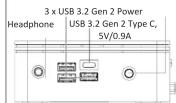


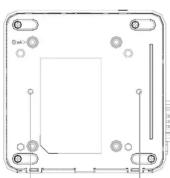
【Bottom】

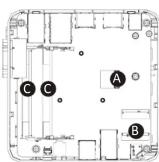
【PIN Definition】

VESA Bracket Screw Hole
A) Wireless Module: How to Safely Remove the Module
Wireless-Modul: Das sichere entfernen des Moduls / Module sans fil : Comment retirer le module en toute sécurité / Módulo inalámbrico: Cómo eliminar de forma segura el módulo Módulo Wireless: Campo remeure o módulo sem seguros (Modulo Wireless: Campo elmueures con viuromo il módulo
Модуль беспроводной связи: Как безопасно удалить модуль / Modul bezprzewodowy: Jak bezpliczne usunąć modul / Kablosuz Modülü : Modülü Nasıl Güvenli Kaldirabilirim 得味健携版(内)美地版/移除随机搭配的无线模块 / ワイヤレスモジュール : 安全にモジュールを取り外す方法 / 무선 모듈 : 모듈을 안전하게 제거하는 방법


依據於科牙鏡覺耐性變遷管理辦法【第十二版】說明示論體根據之於科牙鏡覺遷,此證於科牙公司(商標在法》青陽市證據自變更釋字、知大利寧自變而設計之特點為列表。如:第十二版《科牙鏡覺遷辦法》及《同影響者批充安全土壤合法通信;並經環序土壤限免負債。德力海術》,主政等工廠無權適用圖書法。形項法法通常動量變管法規定學人無做變通法。《科牙鏡覺遷體安全土壤合法通信之學·科學事業》關於轉移性變遷性變遷方式之樣。
Package Contents
Lieferumfang / Contenu de l'emballage / Contenido del paquete / Conteúdo do Pacote / Contenuto Confezione Komponent post works / Rizwopdoik utykounika / Bakot icoriti / え キル ティ / 包装内容物 / バッケージの内容
재키지 내용물

1 x GB-BR Bare-bone
- NOT include any of the following: M.2 [2280], 2.5" HDD, SO-DIMM memory
- Folgende Artikel sind NICHT enthalten: M.2 (2280),
2.5"HDD, SO-DIMM-Speicher
- Composants non inclus. M.2 (2280), Oblique dur 2.3 Mémoire SO-DIMM
- No incluye: M.2 (2280), 2.5" HDD, memoria SO-DIMM
- Não inclu: M.2 (2280), 2.5" HDD, memoria SO-DIMM - Non include: M.2 (2280), 2.5" HDD, memorie SO-DIMM
- Следующие позиции не включены в комплект поставки:
M.2 (2280), 2,5-дюйм нанопитель, SO-DIMM модули ОЗУ - Zentaw nie zawiera: M.2 (2280), 2,5" graz. pamięci
SO-DIMM
- Şunlar dahlı değildir: M.2 (2280), 2.5" HDD, SO-DIMM
- 五金下列巡护项目:M.2(2280)、2.5"顺保·SO-DIMM
加他娃
- 不包含下列任何项目:M.2(2280)、2.5"硬盘、50-DIMM
内存
-後記のものはこれに含まれていません:M.2(2280), 3SC HDO, 50 DIMM メンリー
- 以平献献 Nam: M 2 (2280) 2.5" HDD, SO DIMM memory
Figure 2.1: The [a,b,c] and [b,d] are an important


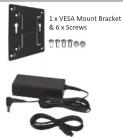
90W Adapter: 19.5Vdc,4.74A 135W Adapter: 19.5Vdc,6.92A GB-BRISH-10110 : 1 x 90W Adapter & Power Cord GB-BRISH-10210 : 1 x 135W Adapter & Power Cord GB-BRISH-10210E : 1 x 135W Adapter & Power Cord GB-BR/I7H-10510 : 1 x 135W Adapter & Power Cord GB-BR/I7H-10710 : 1 x 135W Adapter & Power Cord

1 x Quick Start Guide1 x Driver CD
B) M.2 SSD: How to Install the M.2 2230 SSD
M.2 SSD: Wie Sie die M.2 SSD installieren / SSD M.2: Comment l'Installer / M.2 SSD: Como instalar SSD M.2 / SSD M.2: Como instalar o SSD M.2 / M.2 SSD: Come installare un' unità M.2 SSD
Накопитель M.2 SSD: Порядок установки накопителя M.2 SSD / M.2 SSD: Jak za M.2 SSD : M.2 SSD の取り付け方法 / M.2 SSD : M.2 망식 SSD を 설치하는 방법
1
Carefully insert the M.2 SSD into slot B. 小心的安裝 M.2 SSD 於 B 插槽。

2
The M.2 SSD is secured in place with a small screw in the left corner. 使用包裝隨附的螺絲固定 M.2 SSD。

C) Memory Installation: SO-DIMM DDR4
Arbeitsspeicher Installation DDR4 / Installation de la mémoire DDR4 / Instalación de la Memoria DDR4 / Instalación da memória DDR4 / Installazione Memoria DDR4 / Установка модулей O3Y DDR4 Instalacia pamieri DDR4 / Bellek Yerdestirjmesi DDR4 / 主業防壊類 / 安装内存 / メンリの増設方法 DDR4 / Με모리 几치 DDR4
1
Carefully insert SO-DIMM memory
小糸糸糸糸糸糸糸糸糸糸糸糸糸糸糸糸糸糸糸糸糸糸糸糸糸糸糸糸糸糸糸糸糸糸糸糸糸糸糸糸糸糸糸糸糸糸糸糸糸糸糶
2
Push down until the modules click into place.
當訟憶體別定於摺陽信,車輕輕下壓至定點。


3
Carefully insert SO-DIMM memory modules.
安裝下無記憶體,重複並述和
裝上無記憶體。

4
Push down until the modules click into place.
曾訟憶體別定於插屬信,美輕輕下壓至定點。

D) BRIX s Support Additional SATA 6Gbps HDD: How to Install 2.5" HDD
BRIX s Unterstützung Zusätzliche SATA 6Gbps HDD: So installieren Sie die 2,5 "Festplatte / Le BRIX s supporte un disque dur SATA 6Gbps additionel: Comment l'installer. Esporte adicional HDD 6Gbps SATA para BRIX: Cómo instalar HDD 3,5" / BRIX s sujorte adicional para HDD SATA 6Gbps; Como instalar HDD 3,5".
BRIX Supporta un' ulteriore porta SATA 6Gbps per HardDisk: Come installare un HDD da 2,5" / BRIX допускает установку дополнительного жестного SATA-диска (6 Гбит/с): Порядок установки 2,5-дюйм жесткого дисна
BRIX wipiera dodatkowy dysk SATA 6Gbps HDD: Jak zainstalować 2.5" HDD / BRIX, extra 6Gbps HDD destekler: 2.5" HDD nasil kurulum yapár / BRIX s支援際の SATA 6Gbps 排報:如は令変 2.5" HDD BRIX s支援額外約 SATA 6Gbps 硬盘:如何安装 2.5" HDD / BRIXs SATA 6Gbp ハードディスク(HDD) 増設:2.5インチ HDD の取り付け方法 / BRIX s は 추가 SATA 6Gbps を 지원합니다。HDD: 2.5" HDD を 설치하는 망법
1
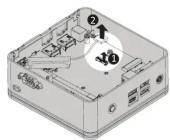
Unscrew and remove the bottom panel, disconnecting the SATA cable.
移除 BRIX s 底套式队下支撑板 3 (4) SATA 缺。
2
Remove the four screws that secure the bottom panel and remove the bottom panel.
黏膜底盖上4颗螺旋迁移珠底盖。

3
Install the HDD using the screws provided and connect the SATA cable to the HDD.
装 * 1 装鍵吋(482 須螺栓安装磁接法兰 SATA 级 5 - 端連接的磁接連接接。

4
Connect the SATA cable to the motherboard and reinstall the bottom panel.
安装主推装端的 SATA 编,安装 BRIX 5 感套。

VESA Bracket
VESA-Halterung / Support VESA / soporte VESA / Suporte VESA / Staffa VESA / Krepление VESA / Uchwyt VESA / VESA Destegli / VESA スキ / VESA 支架 / VESA 対応ブラケット / VESA 브래릿 NOTEL VESA screenshot: Length 5.0 mm with M3 hypo screw, Metal enclosure with bottom circle
●
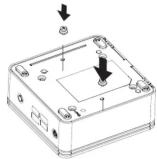
Attach the screws provided on the underside of the BRIX or BRIX s.
实施缓冲机 VESA 人接复视总台 BRIX 序部。
2
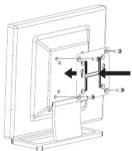
Attach the VESA mounting plate to the rear of a compatible display using the screws provided.
安裝隨附的 VESA 支撐架於支援 VESA 支撐架的電腦螢幕或電視機後背。
31
The BRIX or BRIX s can now be mounted by sliding the device into place.
答:安装 VESA 支撑架螺纹(BRIX 插入 VESA 支撑架(清)軋,由下壁立之位點沿加尺判定。

USB Power On Function: Allows Device Power-on Via USB. Useful When Mounted Behind a Display or TV
USB Power On Funktion / Fonction Démarrage par USB / Función USB Power On Función USB Power On / Funzione USB Power On / Функция USB Power On
Opcja USB Power On / USB Güç Açık Fonksiyonu / USB 堆位郵対策
USB 接口启动功能 / USB 機器からの電源 ON 機能 / USB 포트를 이용한 전원 켜기
1
Press "Del" during device start up to enter BIOS.
與指信接紋 Del 鍵進入 BIOS 設定畫
2
Select "Chipset" from the menu.
在 BIOS 主運器選入 "Chipset"。


3
Manually configure "USB S5 Wakeup Support" settings to "Enable".
送入 Chipset 和 USB S5 Wakeup Support
选项,主動控制將其 "Enable"。

4
Press F4 to Save and Exit.
按位 F4 存调设定求解即 BIOS 運置重新摩擦。
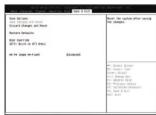
Note: 'USB Power On' functionality in Windows requires an additional Windows patch. This is provided on GIGABYTE's official website labeled 'USB Power-On Patch'. Your GIGABYTE BRIX can be powered on via a connected USB device such as a keyboard or mouse, offering greater convenience when mounted behind a display or monitor.
注意:在 Windows 的本地环境下需要额外设施,程式支取和 "USB Power On" 功能。您可以遥通搜索音乐的演示文授与更新下载 "USB Power-On Patch" 失教行。USB Power On 提供了重复播放功能,使“青可选遥通连接到 BRIX 上的 USB 菜查收到 BRIX;讓安麥於顯示電話方向 BRIX 更方便送”。
| 單位 Unit | 噁 指質基本物理儀號Restricted substances and its chemical symbols | |||||
| 鉛Lead(Pb) | 凡Mercury(Hg) | 鋅Cadmium(Cd) | 1 等鉛Hexavalentchromium( Cr2+ ) | 2 洗測筆Polybrominatedbiphenyls(PBB) | 3 洗二字配Polybrominateddiphenyl ethers (PBDE) | |
| 霓絲保護卡 | — | ○ | ○ | ○ | ○ | ○ |
| 外敷 | — | ○ | ○ | ○ | ○ | ○ |
| 霓酒水廢器 | — | ○ | ○ | ○ | ○ | ○ |
| 廃材 | — | ○ | ○ | ○ | ○ | ○ |
| 無弧跡路卡 | — | ○ | ○ | ○ | ○ | ○ |
| 備考1. “超出0.1 wt %”及“超出0.01 wt %”係指限用物質之百分比含量超出百分比含量基準值。Note 1: “Exceeding 0.1 wt %” and “exceeding 0.01 wt %” indicate that the percentage content of the restricted substance exceeds the reference percentage value of presence condition. | ||||||
| 備考2. “O”係指該項限用物質之百分比含量未超出百分比含量基準值。Note 2: “O” indicates that the percentage content of the restricted substance does not exceed the percentage of reference value of presence. | ||||||
| 備考3. “-”係指該項限用物質為排除項目。Note 3: The “-” indicates that the restricted substance corresponds to the exemption. | ||||||
- GIGA-BYTE TECHNOLOGY CO., LTD.
- BRIX & BRIXs Ultra Compact PC Kit
- Quick Start Guide
- Getting Familiar with Your Unit
- A) Wireless Module: How to Safely Remove the Module
- Package Contents
- B) M.2 SSD: How to Install the M.2 2230 SSD
- C) Memory Installation: SO-DIMM DDR4
- D) BRIX s Support Additional SATA 6Gbps HDD: How to Install 2.5" HDD
- VESA Bracket
Marque : GIGABYTE
Modèle : GB-BRi3-10110
Catégorie : Ordinateur de bureau