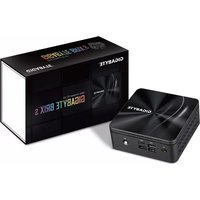
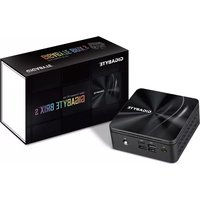
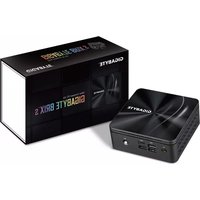
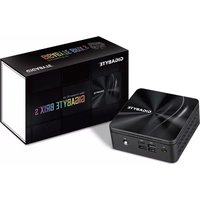
GB-BRR3H-4300 - Ordinateur de bureau GIGABYTE - Notice d'utilisation et mode d'emploi gratuit
Retrouvez gratuitement la notice de l'appareil GB-BRR3H-4300 GIGABYTE au format PDF.


| Type de produit | Mini PC (ultra-compact) |
| Marque | Gigabyte |
| Modèle | GB-BRR3H-4300 |
| Processeur | AMD Ryzen 3 4300U (4 cœurs, 2,7 GHz jusqu'à 3,7 GHz) |
| Mémoire RAM | 8 Go DDR4 (soudé, non extensible) |
| Stockage | 256 Go SSD M.2 NVMe |
| Graphiques | AMD Radeon Graphics (intégrés) |
| Connectivité réseau | Wi-Fi 5 (802.11ac), Bluetooth 5.0, Ethernet Gigabit |
| Ports avant | 2x USB 3.2 Gen2, 1x prise casque |
| Ports arrière | 2x HDMI 2.0, 1x DisplayPort 1.4, 2x USB 3.2 Gen2, 1x USB-C, 1x RJ45, 1x prise d'alimentation |
| Alimentation | Adaptateur secteur 19V, 3.42A (65W) |
| Système d'exploitation | Windows 10 Pro (pré-installé) |
| Dimensions (L x l x H) | 13,5 x 12,2 x 5,1 cm |
| Poids | 0,58 kg (sans adaptateur) |
| Ventilation | Ventilateur silencieux intégré |
| Fonctions principales | Bureau, multimédia, bureautique, streaming 4K |
| Entretien et nettoyage | Dépoussiérer avec un chiffon sec ; ne pas utiliser de produits chimiques |
| Sécurité | Verrou Kensington, TPM 2.0 intégré |
| Pièces détachées et réparabilité | SSD et RAM soudés ; seule la batterie CMOS est remplaçable |
| Informations générales | Support VESA 75x75 mm pour montage mural |
FOIRE AUX QUESTIONS - GB-BRR3H-4300 GIGABYTE
Questions des utilisateurs sur GB-BRR3H-4300 GIGABYTE
0 question sur cet appareil. Repondez a celles que vous connaissez ou posez la votre.
Poser une nouvelle question sur cet appareil
Téléchargez la notice de votre Ordinateur de bureau au format PDF gratuitement ! Retrouvez votre notice GB-BRR3H-4300 - GIGABYTE et reprennez votre appareil électronique en main. Sur cette page sont publiés tous les documents nécessaires à l'utilisation de votre appareil GB-BRR3H-4300 de la marque GIGABYTE.
MODE D'EMPLOI GB-BRR3H-4300 GIGABYTE
Support
Support / Support / Soporte / Suporte / Supporto / Поддержка / Wsparcie / Destek / 变援 / 支持 / サポート / 时间
| Please visit https://gigabyte.com/support to find your BRX warranty information on the drop-down list, or by clicking on the map. You will then be directed to the corresponding page for your region. | |
| Bito besuchen Sie https://gigabyte.com/support, our Internet 2004 German Entscheidungen in accordance with the Downdown List- oder Durchkilen auf die Karte zu finden. Sie werden dann auf die entsprechende Seite für ihre Region werteilgertet. | Odevised stroke https://gigabyte.com/support, aby posted information is givenwith BRX, wydienjeke (z z lityi nozijew) lub khalaje maps, napierste diplaje di proskewenna na stronv odopreduha da Tseporgo regiona. |
| Bito besuchen Sie https://gigabyte.com/support, our Internet 2004 German Entscheidungen in accordance with the Downdown List- oder Durchkilen auf die Karte zu finden. Sie werden dann auf die entsprechende Seite für ihre Region werteilgertet. | Lithm https://gigabyte.com/support/sayfum: zumiert endn et via eletan tildeten vetea hirta izirene tikayakik BRX@sagadharik zakindoda hota bihk bidwite. Data volume bilgare spata sevely (inserleitabres) |
| Vesible consider it or she https://gigabyte.com/support pour tous les informations relatives à votre gazelle BRX dans le bale déroulate au titre de la usage du point sur le plus par la usage de la usage. | https://www.gigabyte.com/support/ - 楼下式のプロセスを推進する BRX 前回調査 - 連接一下「開示」を連携 - 要請調査委託導引所列於「上記」中「上記」中「上記」中「上記」中「上記」中「上記」中「上記」中「上記」中「上記」中「上記」中「上記」中「上記」中「上記」中「上記」中「上記」中「上記」中「上記」中「上記」中「上記」中「上記」中「上記」 |
| Visits https://gigabyte.com/support para incorporir as sous informées de gazelle BRX x partir de la plus suspensa ou a ciasc no maps. Sera depuis precedente a para pangène correspondente a para saaa reglida. | https://www.gigabyte.com/support / 在地下利用中提供权利的 BRX 箱理信息 - 改着者点地图 - 周用会操作特别利用知识对流的类型。 |
| Visits https://gigabyte.com/support per informées en suivi che BRX d malen si accornimenti, o riscando sulla snua. Verente portui sul paige componente dita vostra regiona. | https://www.gigabyte.com/support - 併にクロロブグランノミーから BRX 保証関係をつけるとする - 地地をミノリクリしてください - 対視できるものペープドンである |
| Da nonnewary adaptable adenapulanan de penjabla rechneri care visit https://gigabyte.com/support e usingopture saquy capry (penyes) https://gigabyte.com/support e usingopture saquy capry (penyes) https://gigabyte.com/support e usingopture saquy capry (penyes) | https://www.gigabyte.com/support / 在地下利用中提供权利的 BRX 箱理信息 - 改着者点地图 - 周用会操作特别利用知识对流的类型。 |
| For a list of tested memory, N2 SDD 2,3 HDG, wireless adaptats et OS concurrent, go https://gigabyte.com/support / - To download! | https://www.gigabyte.com/support / 在地下利用中提供权利的 BRX 箱理信息 - 改着者点地图 - 周用会操作特别利用知识对流的类型。 |
| «Auta des genierten Aktiehische Keinesch, N2 SDD 2,3 HDG, WELAD Ablus und unterstituten Betriebsfontene Findes Sie unter https://gigabyte.com/support / «Ne uenterer Treiber and BOS-Updates Findes Sie unter https://gigabyte.com/support / #N2 SDD 2,3 HDG, WELAD Ablus und unterstituten Betriebsfontene Findes Sie unter https://gigabyte.com/support / #N2 SDD 2,3 HDG, WELAD Ablus und unterstituten Betriebsfontene Findes Sie unter https://gigabyte.com/support / #N2 SDD 2,3 HDG, WELAD Ablus und unterstituten Betriebsfontene Findes Sie unter https://gigabyte.com/support / #N2 SDD 2,3HD, WELAD Ablus und unterstituten Betriebsfontene Findes Sie unter https://gigabyte.com/support / #N2 SDD 2,3 HDG, WELAD Ablus und unterstituten Betriebsfontene Findes Sie unter https://gigabyte.com/support / #N2 SDD 2,3 HDG, WELAD Ablus und unterstituten Betriebsfontene Findes Sie unter https: https://gigabyte.com/support / #N2 SDD 2,3 HDG, WELAD Ablus und unterstituten Betriebsfontene Findes Sie unter https://gigabyte.com/support / #N2 SDD 2,3 HDG, WELAD Ablus und unterstituten Betriebsfontene Findes Sie unter https://gigabyte.com/support / #N2 SDD 2,3 HDG, WEN, WELAD Ablus und unterstituten Betriebsfontene Findes Sie unter https://gigabyte.com/support / #N2 SDD 2,3 HDG, WEN, WELAD Ablus und unterstituten Betriebsfontene Findes Sie unter https://gigabyte.com/support / #N2 SDD 2,3 HDG, WEN, WELAD Ablus und unterstituten Betriebsfonte sind / https://gigabyte.com/support / #N2 SDD 2,3 HDG, WEN, WELAD Ablus und unterstituten Betriebsfonte sind / https://gigabyte.com/support / #N2 SDD 2,3 HDG, WEN, WELAD Ablus und unterstituten Betriebsfonte sind / https://gigabyte.com/support / #N2 SDD 2,3 HDG | https://www.gigabyte.com/support / 在地下利用中提供权利的 BRX 箱理信息 - 改着者点地图 - 周用会操作特别利用知识对流的类型。 |
| «Počr obate na lista de les rémeses trimestres, des SSD/42,12 ou disques dans 2,37, de adaptateurs sans filai des systèmes dépliquation pin en https://www.gigabyte.com/support / «Počr ####» : 1650000000000000000000000000000000000000000000000000000000000000000000000000000000000000000000000000000 | «Test editris fonta listsat, N2 SDD 2,3 HDG, welskato adaptétraire et de vastdeklen OS-zorintes hanginde bilgiäk adreim https://www.gigabyte.com/support / Noportable support for the product, you can be able to use https://www.gigabyte.com/support / Noportable support for the product, you can be able to use https://www.gigabyte.com/support / Noportable support for the product, you can be able to use https://www.gigabyte.com/support / Noportable support for the product, you can be able to use https://www.gigabyte.com/support / Noportable support for the product, you can be able to use https://www.gigabyte.com/support / Noportable support for the product, you can be able to use https://www.gigabyte.com/support / Noportable support for the product, you can be able to use https://www.gigabyte.com/support / Noportable support for the product, you can be able to use https://www.gigabyte.com/support / Noportable support for the product, you can be able to use https://www.gigabyte.com/support / Noportable support for the products, you can be able to use https://www.gigabyte.com/support / Noportable support for the products, you can be able to use https://www.gigabyte.com/support / Noportable support for the products, you can be able to use https://www.gigabyte.com/support / Noportable support for the products, you can be able to use https://www.gigabyte.com/support / Noportable support for the products, you can be able to use http://www.gigabyte.com/support / Noportable support for the products, you can be able to use https://www.gigabyte.com/support / Noportable support for the products, you can be able to use https://www.gigabyte.com/support / Noportable support for the products, you can be able to use https://www.gigabyte.com/support / Noportable support for the products, you can be able to use https://www.gigabyte.com/support/ |
| «Počr subate la menina teistala, N2 SDD 2,3 HDG, adaptadores insoblikos OS-susoplativo, veya https://www.gigabyte.com/support / Noportable transfer adeners must en sušto ISO-suspativo, veya https://www.gigabyte.com/support / Noportable transfer adeners must en sušto ISO-suspativo, veya https://www.gigabyte.com/support / Noportable transfer adeners must en sušto ISO-suspativo, veya https://www.gigabyte.com/support / Noportable transfer adeners must en sušto ISO-suspativo, veya https://www.gigabyte.com/support / Noportable transfer adeners but not used to https://www.gigabyte.com/support / Noportable transfer adeners but not used to https://www.gigabyte.com/support / Noportable transfer adeners but not used to https://www.gigabyte.com/support / Noportable transfer adeners but not used to https://www.gigabyte.com/support / Noportable transfer adeners but not used to https://www.gigabyte.com/support / Noportable transfer adeners but not used to https://www.gibeta.com/support / Noportable transfer adeners but not used to https://www.gibeta.com/support / Noportable transfer adeners but not used to https://www.gibeta.com/support / Noportable transfer adeners but not used to https://www.gibeta.com/support / Noportable transfer adeners but not used to https://www.gibeta.com/support / Noportable transfer adeners but not used to https://www.gibeta.com/support / Noporable transfer adeners but not used to https://www.gibeta.com/support / Noporable transfer adeners but not used to https://www.gibeta.com/support / Noporable transfer adeners but not used to https://www.gibeta.com/support / Noporable transfer adeners but not used to https://www.gibeta.com/support / Noporable transfer adeners but not used to https://www.gibeta.com/support / Noporable transfer adenersbut not used to https://www.gibeta.com/support / Noporable transfer adenersbut not used to https://www.gibeta.com/support / Noporable transfer adenersbut not used to https://www.gibeta.com/support / Noporable transfer adenersbut not used to https://www.gibeta.com/support / Noporable transfer adenersbut not used to https://www.gibeta.com/support / Noporable transfer adenersbut not used to https//www.gibeta.com/support / Noporable transfer adenersbut not used to https://www.gibeta.com/support / Noporable transfer adenersbut not used to https://www.gibeta.com/support / Noporable transfer adenersbut not used to https://www.gibeta.com/support / Noporable transfer adenersbut not used to https://www.gibeta.com/support / Noporable transfer adenersbut not used to https://www.gibeta.censorship / Noporable transfer adenersbut not used to https://www.gibeta.com/support / Noporable transfer adenersbut not used to https://www.gibeta.com/support / Noporable transfer adenersbut not used to https://www.gibeta.com/support / Noporable transfer adenersbut not used to https://www.gibeta.com/support / Noporable transfer adenersbut not used to https://www.gibeta.com/support / Noporabletransfer adenersbut not used to https://www.gibeta.com/support / Noporabletransfer adenersbut not used to https://www.gibeta.com/support / Noporabletransfer adenersbut not used to https://www.gibeta.com/support / Noporabletransfer adenersbut not used to https://www.gibeta.com/support / Noporabletransfer adenersbut not used to https://www.gibeta.com/support / Noporabletransfer adenersbut not using to https://www.gibeta.com/support / Noporabletransfer adenersbut not used to https://www.gibeta.com/support / Noporabletransfer adenersbut not used to https://www.gibeta.com/support / Noporabletransfer adenersbut not used to https://www.gibeta.com/support / Noporabletransfer adenersbut not used to https://www.gibeta.com/support / Noporabletransfer adenersbut not used to https://www/gibeta.com/support / Noporabletransfer adenersbut not used to https://www.gibeta.com/support / Noporabletransfer adenersbut not used to https://www.gibeta.com/support / Noporabletransfer adenersbut not used to https://www.gibeta.com/support / Noporabletransfer adenersbut not used to https://www.gibeta.com/support / Noporabletransfer adenersbut not used to https://www.gibeta.com/support/Noporabletransfer adenersbut not used to https://www.gibeta.com/support/Noporabletransfer adenersbut not used to https://www.gibeta.com/support/Noporabletransfer adenersbut not used to https://www.gibeta.com/support/Noporabletransfer adenersbut not used to https://www.gibeta.com/support/Noporabletransfer adenersbut not used to https://www.gibeta.com/support/Noporabletransfer adainers but not used to https://www.gibeta.com/support/Noporabletransfer adainersbut not used to https://www.gibeta.com/support/Noporabletransfer adainersbut not used to https://www.gibeta.com/support/Noporabletransfer adainersbut not used to https://www.gibeta.com/support/Noporabletransfer adainersbut not used to https://www.gibeta.com/support/Noporabletransfer adainersbut not used to https://www.gibeta.com/support/Noporabletransfer adainersbut not used to https//www.gibeta.com/support/Noporabletransfer adainersbut not used to https://www.gibeta.com/support/Noporabletransfer adainersbut not used to https://www.gibeta.com/support/Noporabletransfer adainersbut not used to https://www.gibeta.com/support/Noporabletransfer adainersbut not used to https://www.gibeta.com/support/Noporabletransfer adainersbut not used to https://www.gibeta.censorship/Noporabletransfer adainersbut not used to https://www.gibeta.com/support/Noporabletransfer adainersbut not used to https://www.gibeta.com/support/Noporabletransfer adainersbut not used to https://www.gibeta.com/support/Noporabletransfer adainersbut not used to https://www.gibeta.com/support/Noporabletransfer adainersbut not used to https://www.gibeta.com/support/Noporable transfer adainersbut not used to https://www.gibeta.com/support/Noporabletransfer adainersbut not used to https://www.gibeta.com/support/Noporabletransfer adainersbut not used to https://www.gibeta.com/support/Noporabletransfer adainersbut not used to https://www.gibeta.com/support/Noporabletransfer adainersbut not used to https://www.gibeta.com/support/Noporabletransfer adainersbut not using to https://www.gibeta.com/support/Noporabletransfer adainersbut not used to https://www.gibeta.com/support/Noporabletransfer adainersbut not used to https://www.gibeta.com/support/Noporabletransfer adainersbut not used to https://www.gibeta.com/support/Noporabletransfer adainersbut not used to https://www.gibeta.com/support/Noporabletransfer adainersbut not used to https://www/gibeta.com/support/Noporabletransfer adainersbut not used to https://www.gibeta.com/support/Noporabletransfer adainersbut not used to https://www.gibeta.com/support/Noporabletransfer adainersbut not used to https://www.gibeta.com/support/Noporabletransfer adainersbut not used to https://www.gibeta.com/support/Noporabletransfer adainersbut not used to https://www.gibeta.com/support / Noporabletransfer adainersbut not used to https://www.gibeta.com/support/Noporabletransfer adainersbut not used to https://www.gibeta.com/support/Noporabletransfer adainersbut not used to https://www.gibeta.com/support/Noporabletransfer adainersbut not used to https://www.gibeta.com/support/Noporabletransfer adainersbut not used to https://www.gibeta.com/support/Noporabletransfer ad Indianapolis at www.haziparkas/OK/other areas/other areas/cash/mesh/mesh/mesh/mesh/mesh/mesh/mesh/mesh/mesh/mesh/mesh/mesh/mesh/mesh/mesh/mesh/mesh/mesh/mesh/mesh/mesh/mesh/mesh/mesh/mesh/mesh/mesh/mesh/mesh/mesh/mesh/mesh/mesh/mesh/mesh/mesh/mesh/mesh/mesh/mesh/mesh/mesh/mesh/mesh/mesh/mesh/mesh/mesh/mesh/mesh/mosh/mesh/mesh/mesh/mesh/mesh/mesh/mesh/mesh/mesh/mesh/mesh/mesh/mesh/mesh/mesh/mesh/mesh/mesh/mesh/mesh/mesh/mesh/mesh/mesh/mesh/mesh/mesh/mesh/mesh/mesh/mesh/mesh/mesh/mesh/mesh/mesh/mesh/mesh/mesh/mesh/mesh/mesh/mesh/mesh/mesh/mesh/mesh/mesh/mesh/mash/mesh/mesh/mesh/mesh/mesh/mesh/mesh/mesh/mesh/mesh/mesh/mesh/mesh/mesh/mesh/mesh/mesh/mesh/mesh/mesh/mesh/mesh/mesh/mesh/mesh/mesh/mesh/mesh/mesh/mesh/mesh/mesh/mesh/mesh/mesh/mesh/mesh/mesh/mesh/mesh/mesh/mesh/mesh/mesh/mesh/mesh/mesh/mesh/mesh/nomar/omar/omar/omar/omar/omar/omar/omar/omar/omar/omar/omar/omar/omar/omar/omar/omar/omar/omar/omar/omar/omar/omar/omar/omar/omar/omar/omar/omar/omar/omar/omar/omar/omar/oma/mar/omar/omar/omar/omar/omar/omar/omar/omar/omar/omar/omar/omar/omar/omar/omar/omar/omar/omar/omar/omar/omar/omar/omar/omar/omar/omar/omar/omar/omar/omar/omar/omar/omam/omar/omar/omar/omar/omar/omar/omar/omar/omar/omar/omar/omar/omar/omar/omar/omar/omar/omar/omar/omar/omar/omar/omar/omar/omar/omar/omar/omar/omar/omar/omar/omar/omar/mar/omar/omar/omar/omar/omar/omar/omar/omar/omar/omar/omar/omar/omar/omar/omar/omar/omar/omar/omar/omar/omar/omar/omar/omar/omar/omar/omar/omar/omar/omar/omar/omar/oma/omar/omar/omar/omar/omar/omar/omar/omar/omar/omar/omar/omar/omar/omar/omar/omar/omar/omar/omar/omar/omar/omar/omar/omar/omar/omar/omar/omar/omar/omar/omar/omar/omar/nomar/nomar/nomar/nomar/nomar/nomar/nomar/nomar/nomar/nomar/nomar/nomar/nomar/nomar/nomar/nomar/nomar/nomar/nomar/nomar/nomar/nomar/nomar/nomar/nomar/nomar/nomar/nomar/nomar/nomar/nomar/nomar/nomar/nonar/nomar/nomar/nomar/nomar/nomar/nomar/nomar/nomar/nomar/nomar/nomar/nomar/nomar/nomar/nomar/nomar/nomar/nomar/nomar/nomar/nomar/nomar/nomar/nomar/nomar/nomar/nomar/nomar/nomar/nomar/nomar/nomar/nomarm/nomar/nomar/nomar/nomar/nomar/nomar/nomar/nomar/nomar/nomar/nomar/nomar/nomar/nomar/nomar/nomar/nomar/nomar/nomar/nomar/nomar/nomar/nomar/nomar/nomar/nomar/nomar/nomar/nomar/nomar/nomar/nomar/nomar,nomar/nomar/nomar/nomar/nomar/nomar/nomar/nomar/nomar/nomar/nomar/nomar/nomar/nomar/nomar/nomar/nomar/nomar/nomar/nomar/nomar/nomar/nomar/nomar/nomar/nomar/nomar/nomar/nomar/nomar/nomar/nomar/nomar/noomar/nomar/nomar/nomar/nomar/nomar/nomar/nomar/nomar/nomar/nomar/nomar/nomar/nomar/nomar/nomar/nomar/nomar/nomar/nomar/nomar/nomar/nomar/nomar/nomar/nomar/nomar/nomar/nomar/nomar/nomar/nomar/nomar/nomara/nomar/nomar/nomar/nomar/nomar/nomar/nomar/nomar/nomar/nomar/nomar/nomar/nomar/nomar/nomar/nomar/nomar/nomar/nomar/nomar/nomar/nomar/nomar/nomar/nomar/nomar/nomar/nomar/nomar/nomar/nomar/nomar/nomar/omar/nomar/nomar/nomar/nomar/nomar/nomar/nomar/nomar/nomar/nomar/nomar/nomar/nomar/nomar/nomar/nomar/nomar/nomar/nomar/nomar/nomar/nomar/nomar/nomar/nomar/nomar/nomar/nomar/nomar/nomar/nomar/nonarn/nomar/nomar/nomar/nomar/nomar/nomar/nomar/nomar/nomar/nomar/nomar/nomar/nomar/nomar/nomar/nomar/nomar/nomar/nomar/nomar/nomar/nomar/nomar/nomar/nomar/nomar/nomar/nomar/nomar/nomar/nomar/nomar/nomar/sunn/nomar/nomar/nomar/nomar/nomar/nomar/nomar/nomar/nomar/nomar/nomar/nomar/nomar/nomar/nomar/nomar/nomar/nomar/nomar/nomar/nomar/nomar/nomar/nomar/nomar/nomar/nomar/nomar/nomar/nomar/nomar/nomar/nomar(nomar/nomar/nomar/nomar/nomar/nomar/nomar/nomar/nomar/nomar/nomar/nomar/nomar/nomar/nomar/nomar/nomar/nomar/nomar/nomar/nomar/nomar/nomar/nomar/nomar/nomar/nomar/nomar/nomar/nomar/nomar/nomar/nomar/nomon/nomar/nomar/nomar/nomar/nomar/nomar/nomar/nomar/nomar/nomar/nomar/nomar/nomar/nomar/nomar/nomar/nomar/nomar/nomar/nomar/nomar/nomar/nomar/nomar/nomar/nomar/nomar/nomar/nomar/nomar/nomar/nomar/nomar/polar/nomar/nomar/nomar/nomar/nomar/nomar/nomar/nomar/nomar/nomar/nomar/nomar/nomar/nomar/nomar/nomar/nomar/nomar/nomar/nomar/nomar/nomar/nomar/nomar/nomar/nomar/nomar/nomar/nomar/nomar/nomar/nomar/nomar nong/nomar/nomar/nomar/nomar/nomar/nomar/nomar/nomar/nomar/nomar/nomar/nomar/nomar/nomar/nomar/nomar/nomar/nomar/nomar/nomar/nomar/nomar/nomar/nomar/nomar/nomar/nomar/nomar/nomar/nomar/nomar/nomar/nomar.nonarn/nomar/nomar/nomar/nomar/nomar/nomar/nomar/nomar/nomar/nomar/nomar/nomar/nomar/nomar/nomar/nomar/nomar/nomar/nomar/nomar/nomar/nomar/nomar/nomar/nomar/nomar/nomar/nomar/nomar/nomar/nomar/nomar/nonarn/nonarn/nonarn/nonarn/nonarn/nonarn/nonarn/nonarn/nonarn/nonarn/nonarn/nonarn/nonarn/nonarn/nonarn/nonarn/nonarn/nonarn/nonarn/nonarn/nonarn/nonarn/nonarn/nonarn/nonarn/nonarn/nonarn/nonarn/nonarn/nonarn/nonarn/nonarn/nonarn/nonarn/oung/nonarn/nonarn/nonarn/nonarn/nonarn/nonarn/nonarn/nonarn/nonarn/nonarn/nonarn/nonarn/nonarn/nonarn/nonarn/nonarn/nonarn/nonarn/nonarn/nonarn/nonarn/nonarn/nonarn/nonarn/nonarn/nonarn/nonarn/nonarn/nonarn/nonarn/nonarn/nonarn/nonarnnonarn/nonarn/nonarn/nonarn/nonarn/nonarn/nonarn/nonarn/nonarn/nonarn/nonarn/nonarn/nonarn/nonarn/nonarn/nonarn/nonarn/nonarn/nonarn/nonarn/nonarn/nonarn/nonarn/nonarn/nonarn/nonarn/nonarn/nonarn/nonarn/nonarn/nonarn/nonarn/nonarn/nonsunnunnunnunnunnunnunnunnunnunnunnunnunnunnunnunnunnunnunnunnunnunnunnunnunnunnunnunnunnunnunnunnunnunnunnunnunnunnunnunnunnunnunnunnunnunnunnunnunnunnunkunnunnunnunnunnunnunnunnunnunnunnunnunnunnunnunnunnunnunnunnunnunnunnunnunnunnunnunnunnunnunnunnunnunnunnunnunnunnunnunnunnunnunnunnunnunnunnunnunnunlunnunnunnunnunnunnunnunnunnunnunnunnunnunnunnunnunnunnunnunnunnunnunnunnunnunnunnunnunnunnunnunnunnunnunnunnunnunnunnunnunnunnunnunnunnunnunnunnunnunndunnunnunnunnunnunnunnunnunnunnunnunnunnunnunnunnunnunnunnunnunnunnunnunnunnunnunnunnunnunnunnunnunnunnunnunnunnunnunnunnunnunnunnunnunnunnunnunnunnunhunnunnunnunnunnunnunnunnunnunnunnunnunnunnunnunnunnunnunnunnunnunnunnunnunnunnunnunnunnunnunnunnunnunnunnunnunnunnunnunnunnunnunnunnunnunnunnunnunnunmuhundnunnunnunnunnunnunnunnunnunnunnunnunnunnunnunnunnunnunnunnunnunnunnunnunnunnunnunnunnunnunnunnunnunnunnunnunnunnunnunnunnunnunnunnunnunnunnunnunnunnUNNUNNUNNUNNUNNUNNUNNUNNUNNUNNUNNUNNUNNUNNUNNUNNUNNUNNUNNUNNUNNUNNUNNUNNUNNUNNUNNUNNUNNUNNUNNUNNUNNUNNUNNUNNUNNUNNUNNUNNUNNUNNUNNUNNUNNUNNUNNUNNUNNUNNUNSUNNUNNUNNUNNUNNUNNUNNUNNUNNUNNUNNUNNUNNUNNUNNUNNUNNUNNUNNUNNUNNUNNUNNUNNUNNUNNUNNUNNUNNUNNUNNUNNUNNUNNUNNUNNUNNUNNUNNUNNUNNUNNUNNUNNUNNUNNUNNUNNUNNUNNAUNNUNNUNNUNNUNNUNNUNNUNNUNNUNNUNNUNNUNNUNNUNNUNNUNNUNNUNNUNNUNNUNNUNNUNNUNNUNNUNNUNNUNNUNNUNNUNNUNNUNNUNNUNNUNNUNNUNNUNNUNNUNNUNNUNNUNNUNNUNNUNNUNNUNMUNNUNNUNNUNNUNNUNNUNNUNNUNNUNNUNNUNNUNNUNNUNNUNNUNNUNNUNNUNNUNNUNNUNNUNNUNNUNNUNNUNNUNNUNNUNNUNNUNNUNNUNNUNNUNNUNNUNNUNNUNNUNNUNNUNNUNNUNNUNNUNNUNNUNNTUNNUNNUNNUNNUNNUNNUNNUNNUNNUNNUNNUNNUNNUNNUNNUNNUNNUNNUNNUNNUNNUNNUNNUNNUNNUNNUNNUNNUNNUNNUNNUNNUNNUNNUNNUNNUNNUNNUNNUNNUNNUNNUNNUNNUNNUNNUNNUNNUNNUNNHUNNUNNUNNUNNUNNUNNUNNUNN | |
Safety and Regulatory Information
Sicherheit und gesetzliche Bestimmungen / Informations sur la sécurité et la réglementation / Información sobre normativa y de seguridad / Informaciones de segurança e regulamentares / Informazioni di sicurezza e sui regolamenti /
| This product must be supplied with the plug in the adapter's power cord connected to a power socket with a grounding connection. | |
| Risk of exploitation if the battery is replaced with an income type. Batteries should be recycled while possible. Disposition of used Batteries must be in accordance with local environmental regulations. | |
| Ex bearing das Risiko einer Explosion, wenn der Aklu durch einen nicht gezeichnet Typsetzt wird. Akkau aufsch nach Möglichkeit recoult werden. Die Einflussen am keine bei Spalda i litsikvärn prässenti diacazionne ochtrya bioswieda. | Jedl bacteria zostanie wymihtena na batirng neinkelomega typu utreite ryzko wydouch. Ni mieq mezdwefo bacterie nabdy poddawu no insorg#####. Verte und die Abgivare aus demierte im Betrie um das bilanziary proppantir diacazionne ochtrya bioswieda. |
| Riazque diaposition la battery est remplacide per un type incorrect. Dans le measure de possible, les batteries doivent die re-cydesions. L'elimination des batteries assimilé dont le conforme à la réglemente contaminable locale. | Pit yarsta tipo bis je per i deaglutilina patima niki ovskas pilar. Pille-mörskene geni dioputzin/kmelt. Kulendem Pilar versiary yasakana yogun darak alimidatis. |
| Existre risiko de explosion si se sustituiva sur bateru von der dipo termico. Les batteries doivent recisierse siempre que ses possible. La diminution de les batteries assimilé direkte de uscience con las normes ambientales locales. | |
| Rice de explosion se e apisha e subsidista por un tipo incerto. Na pithe devem ser recisidua quando possible. A alletrazione di peiba dausse qui ser difuscono es conformate oregamente ambienta. | Forz non un beartheri del Avien il evastir che cannot beledrivo del air. Seiam可能因过载光。表面照度会保证报浆装置用咸的磁岩。若可以无 beartheri del Avien il evastir che cannot beledrivo del air. |
| Sottintire la battery con un type i non corrisi può comportan rischio di explosion. Se possible. Le batterie varine riccinie. La smittimento delle busie va sativa vietettende una route ambiente in vigore nella regione in cui di trava. | If aregneri el hydrol型材 - mit foroii coilingar su rile, el hydrol miroir itybril. I必须根据当时的环境保护及处理日密目标。 |
| Zamme Sonoma biopos non-hodderando la tota magnetmente (para) asphyxia Sistemiomor Sistemiomor Sistemiomor Sistemiomor Sistemiomor Sistemiomor Sistemiomor Sistemiomor Sistemiomor Sistemiomor Sistemiomor Sistemiomor Sistemiomor Sistemiomor Sistemiomor Sistemiomor Sistemiomor Sistemiomor Sistemiomor Sistemiomor Sistemiom or Sistemiomor Sistemiomor Sistemiomor Sistemiomor Sistemiomor Sistemiomor Sistemiomor Sistemiomor Sistemiomor Sistemiomor Sistemiomor Sistemiomor Sistemiomor Sistemiomor Sistemiomor Sistemiomor Sistemiomor Sistemiomor Sistemiomor Sistemiom- or Sistemiomor Sistemiomor Sistemiomor Sistemiomor Sistemiomor Sistemiomor Sistemiomor Sistemiomor Sistemiomor Sistemiomor Sistemiomor Sistemiomor Sistemiomor Sistemiomor Sistemiomor Sistemiomor Sistemiomor Sistemiomor Sistemiomor Sistemioma Sistemiomor Sistemiomor Sistemiomor Sistemiomor Sistemiomor Sistemiomor Sistemiomor Sistemiomor Sistemiomor Sistemiomor Sistemiomor Sistemiomor Sistemiomor Sistemiomor Sistemiomor Sistemiomor Sistemiomor Sistemiomor Sistemiomor Sistemiomar Sistemiomor Sistemiomor Sistemiomor Sistemiomor Sistemiomor Sistemiomor Sistemiomor Sistemiomor Sistemiomor Sistemiomor Sistemiomor Sistemiomor Sistemiomor Sistemiomor Sistemiomor Sistemiomor Sistemiomor Sistemiomor Sistemiomor Sistemiomur Sistemiomor Sistemiomor Sistemiomor Sistemiomor Sistemiomor Sistemiomor Sistemiomor Sistemiomor Sistemiomor Sistemiomor Sistemiomor Sistemiomor Sistemiomor Sistemiomor Sistemiomor Sistemiomor Sistemiomor Sistemiomor Sistemiomor Sistemiomum Sistemiomor Sistemiomor Sistemiomor Sistemiomor Sistemiomor Sistemiomor Sistemiomor Sistemiomor Sistemiomor Sistemiomor Sistemiomor Sistemiomor Sistemiomor Sistemiomor Sistemiomor Sistemiomor Sistemiomor Sistemiomor Sistemiomor Sistemiomom Sistemiomor Sistemiomor Sistemiomor Sistemiomor Sistemiomor Sistemiomor Sistemiomor Sistemiomor Sistemiomor Sistemiomor Sistemiomor Sistemiomor Sistemiomor Sistemiomor Sistemiomor Sistemiomor Sistemiomor Sistemiomor Sistemiomor SistemiomOR Sistemiomor Sistemiomor Sistemiomor Sistemiomor Sistemiomor Sistemiomor Sistemiomor Sistemiomor Sistemiomor Sistemiomor Sistemiomor Sistemiomor Sistemiomor Sistemiomor Sistemiomor Sistemiomor Sistemiomor Sistemiomor Sistemiomor SistemiomM Sistemiomor Sistemiomor Sistemiomor Sistemiomor Sistemiomor Sistemiomor Sistemiomor Sistemiomor Sistemiomor Sistemiomor Sistemiomor Sistemiomor Sistemiomor Sistemiomor Sistemiomor Sistemiomor Sistemiomor Sistemiomor Sistemiomor Sistemiomors Sistemiomor Sistemiomor Sistemiomor Sistemiomor Sistemiomor Sistemiomor Sistemiomor Sistemiomor Sistemiomor Sistemiomor Sistemiomor Sistemiomor Sistemiomor Sistemiomor Sistemiomor Sistemiomor Sistemiomor Sistemiomor Sistemiomor SistemiomS Sistemiomor Sistemiomor Sistemiomor Sistemiomor Sistemiomor Sistemiomor Sistemiomor Sistemiomor Sistemiomor Sistemiomor Sistemiomor Sistemiomor Sistemiomor Sistemiomor Sistemiomor Sistemiomor Sistemiomor Sistemiomor Sistemiomor Sistemiomm Sistemiomor Sistemiomor Sistemiomor Sistemiomor Sistemiomor Sistemiomor Sistemiomor Sistemiomor Sistemiomor Sistemiomor Sistemiomor Sistemiomor Sistemiomor Sistemiomor Sistemiomor Sistemiomor Sistemiomor Sistemiomor Sistemiomor Sistemiomori Sistemiomor Sistemiomor Sistemiomor Sistemiomor Sistemiomor Sistemiomor Sistemiomor Sistemiomor Sistemiomor Sistemiomor Sistemiomor Sistemiomor Sistemiomor Sistemiomor Sistemiomor Sistemiomor Sistemiomor Sistemiomor Sistemiomor Sistemiomora Sistemiomor Sistemiomor Sistemiomor Sistemiomor Sistemiomor Sistemiomor Sistemiomor Sistemiomor Sistemiomor Sistemiomor Sistemiomor Sistemiomor Sistemiomor Sistemiomor Sistemiomor Sistemiomor Sistemiomor Sistemiomor Sistemiomor SistemiomA Sistemiomor Sistemiomor Sistemiomor Sistemiomor Sistemiomor Sistemiomor Sistemiomor Sistemiomor Sistemiomor Sistemiomor Sistemiomor Sistemiomor Sistemiomor Sistemiomor Sistemiomor Sistemiomor Sistemiomor Sistemiomor Sistemiomor SistemiomB Sistemiomor Sistemiomor Sistemiomor Sistemiomor Sistemiomor Sistemiomor Sistemiomor Sistemiomor Sistemiomor Sistemiomor Sistemiomor Sistemiomor Sistemiomor Sistemiomor Sistemiomor Sistemiomor Sistemiomor Sistemiomor Sistemiomor SistemiomO Sistemiomor Sistemiomor Sistemiomor Sistemiomor Sistemiomor Sistemiomor Sistemiomor Sistemiomor Sistemiomor Sistemiomor Sistemiomor Sistemiomor Sistemiomor Sistemiomor Sistemiomor Sistemiomor Sistemiomor Sistemiomor Sistemiomor Sistemiomo Sistemiomor Sistemiomor Sistemiomor Sistemiomor Sistemiomor Sistemiomor Sistemiomor Sistemiomor Sistemiomor Sistemiomor Sistemiomor Sistemiomor Sistemiomor Sistemiomor Sistemiomor Sistemiomor Sistemiomor Sistemiomor Sistemiomor SistemiomD Sistemiomor Sistemiomor Sistemiomor Sistemiomor Sistemiomor Sistemiomor Sistemiomor Sistemiomor Sistemiomor Sistemiomor Sistemiomor Sistemiomor Sistemiomor Sistemiomor Sistemiomor Sistemiomor Sistemiomor Sistemiomor Sistemiomor Sistemiom# Sistemiomor Sistemiomor Sistemiomor Sistemiomor Sistemiomor Sistemiomor Sistemiomor Sistemiomor Sistemiomor Sistemiomor Sistemiomor Sistemiomor Sistemiomor Sistemiomor Sistemiomor Sistemiomor Sistemiomor Sistemiomor Sistemiomor SistemiomOr Sistemiomor Sistemiomor Sistemiomor Sistemiomor Sistemiomor Sistemiomor Sistemiomor Sistemiomor Sistemiomor Sistemiomor Sistemiomor Sistemiomor Sistemiomor Sistemiomor Sistemiomor Sistemiomor Sistemiomor Sistemiomor Sistemiomor Sistemiom OR Sistemiomor Sistemiomor Sistemiomor Sistemiomor Sistemiomor Sistemiomor Sistemiomor Sistemiomor Sistemiomor Sistemiomor Sistemiomor Sistemiomor Sistemiomor Sistemiomor Sistemiomor Sistemiomor Sistemiomor Sistemiomor Sistemiomor Sistemiom Or Sistemiomor Sistemiomor Sistemiomor Sistemiomor Sistemiomor Sistemiomor Sistemiomor Sistemiomor Sistemiomor Sistemiomor Sistemiomor Sistemiomor Sistemiomor Sistemiomor Sistemiomor Sistemiomor Sistemiomor Sistemiomor Sistemiomor Sistemiom-or Sistemiomor Sistemiomor Sistemiomor Sistemiomor Sistemiomor Sistemiomor Sistemiomor Sistemiomor Sistemiomor Sistemiomor Sistemiomor Sistemiomor Sistemiomor Sistemiomor Sistemiomor Sistemiomor Sistemiomor Sistemiomor Sistemiomor Sistemiom: Sistemiomor Sistemiomor Sistemiomor Sistemiomor Sistemiomor Sistemiomor Sistemiomor Sistemiomor Sistemiomor Sistemiomor Sistemiomor Sistemiomor Sistemiomor Sistemiomor Sistemiomor Sistemiomor Sistemiomor Sistemiomor Sistemiomor Sistemiomoor Sistemiomor Sistemiomor Sistemiomor Sistemiomor Sistemiomor Sistemiomor Sistemiomor Sistemiomor Sistemiomor Sistemiomor Sistemiomor Sistemiomor Sistemiomor Sistemiomor Sistemiomor Sistemiomor Sistemiomor Sistemiomor Sistemiomor Sistemiomotor Sistemiomor Sistemiomor Sistemiomor Sistemiomor Sistemiomor Sistemiomor Sistemiomor Sistemiomor Sistemiomor Sistemiomor Sistemiomor Sistemiomor Sistemiomor Sistemiomor Sistemiomor Sistemiomor Sistemiomor Sistemiomor Sistemiomor Sistemiomfor Sistemiomor Sistemiomor Sistemiomor Sistemiomor Sistemiomor Sistemiomor Sistemiomor Sistemiomor Sistemiomor Sistemiomor Sistemiomor Sistemiomor Sistemiomor Sistemiomor Sistemiomor Sistemiomor Sistemiomor Sistemiomor Sistemiomor Sistemiomoc Sistemiomor Sistemiomor Sistemiomor Sistemiomor Sistemiomor Sistemiomor Sistemiomor Sistemiomor Sistemiomor Sistemiomor Sistemiomor Sistemiomor Sistemiomor Sistemiomor Sistemiomor Sistemiomor Sistemiomor Sistemiomor Sistemiomor Sistemiomoro Sistemiomor Sistemiomor Sistemiomor Sistemiomor Sistemiomor Sistemiomor Sistemiomor Sistemiomor Sistemiomor Sistemiomor Sistemiomor Sistemiomor Sistemiomor Sistemiomor Sistemiomor Sistemiomor Sistemiomor Sistemiomor Sistemiomor Sistemiomorum Sistemiomor Sistemiomor Sistemiomor Sistemiomor Sistemiomor Sistemiomor Sistemiomor Sistemiomor Sistemiomor Sistemiomor Sistemiomor Sistemiomor Sistemiomor Sistemiomor Sistemiomor Sistemiomor Sistemiomor Sistemiomor Sistemiomor Sistemiomoron Sistemiomor Sistemiomor Sistemiomor Sistemiomor Sistemiomor Sistemiomor Sistemiomor Sistemiomor Sistemiomor Sistemiomor Sistemiomor Sistemiomor Sistemiomor Sistemiomor Sistemiomor Sistemiomor Sistemiomor Sistemiomor Sistemiomor Sistemiomorn Sistemiomor Sistemiomor Sistemiomor Sistemiomor Sistemiomor Sistemiomor Sistemiomor Sistemiomor Sistemiomor Sistemiomor Sistemiomor Sistemiomor Sistemiomor Sistemiomor Sistemiomor Sistemiomor Sistemiomor Sistemiomor Sistemiomor Sistemiom | |


GIGA-BYTE TECHNOLOGY CO., LTD.
No.6, Baoqiang Rd., Xindian Dist., New Taipei City 231, Taiwan http://www.gigabyte.com ©2019.GSARXTI Technology Co., Ltd. All rights reserved. The marks mentioned herein are trademarks or registered trademarks of GVSARXTI Technology Co., Ltd., on its affiliates
All other product names mentioned herein are trademarks or registered trademarks or their respective owners.
The terms HDMI and HDMI High-Definition Multimedia Interface, and the HDMI Logo are trademarks or registered trademarks of HDMI Licensing LLC in the United States and other countries
技嘉科技股份有限公司 新北市新店區寶強路6號


GIGABYTE™

BRIX S Ultra Compact PC Kit
BRIX S GB-BRR Ultrakompaktes PC Kit / Kit PC ultra compact BRIX S GB-BRR /
Kit de PC ultra compacto BRIX S GB-BRR / Kit PC BRIX S GB-BRR Ultra Compact /
Kit per PC BRIX S.GB-BRR Ultra Compatto / Ультракомпактный ПК ВRIX S.GB-BRR. Базовый комплект /
Testav: BRIX S, GB, RRR Ultra Compact DC / BRIX S, GB, RRR Ultra Kempala DC Kini
Zestaw BRIX 3 GB-BKR Ultra Compact PC / BRIX 3 GB-BKR Ultra Kompakt BRIX 3 GB-BRR 系列超速膨胀 (BRIX 3 GB-BRR 系列超速膨胀 PC 充体
BRIX S GB-BRR 系列超微型电脑 / BRIX S GB-BRR 系列超紧凑型 PC 套件
Quick Start Guide
Kurzanleitung / Guide de démarrage rapide / Guía de inicio rápido /
Guia de início rápido / Guida di avvio rapido / Краткое руководство /
Skrócona instrukcja obsługi / Hızlı Başlangıç Kılavuzu /
快速入門使用者手冊/快速入门指南/クイックスタートガイド/빠른 시작 가이드
Getting Familiar with Your Unit
Erste Schritte mit Ihrem Gerät / Se familiariser avec votre appareil / Familiarizándose con su unidad / Familiarizar-se com a unidade / Imparare a conoscere la propria unità / знакомство с изделиem /
Zapoznanie się z jednostką / Cihazinz Hakkında Bilgi Sahibi Olun / 認識您的装置 (※系統操作温度 0°C\~35°C) / 了解您的设备 (※系統操作温度 0°C\~35°C) / ユニットを知る / 기에 대해 알아보기
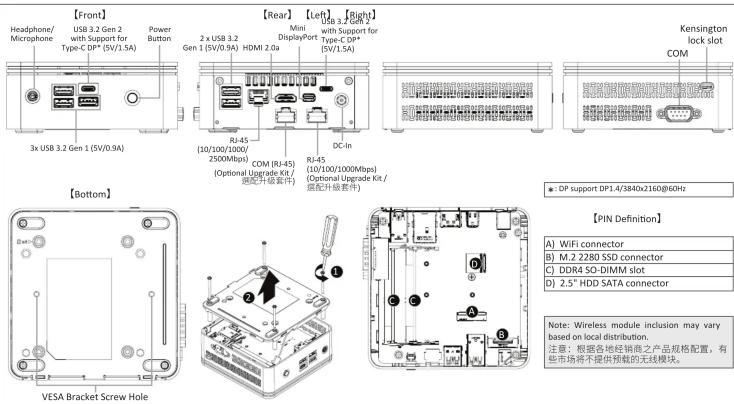
A) Wireless Module: How to Safely Remove the Module
Drahtlosmodul: Sicheres Entfernen des Moduls / Module sans fil : Comment retirer le module en toute sécurité / Módulo inalámbrico: Cómo quitar el módulo de forma segura /
Módulo sem fios: Como remover com segurança o modulo / Modulo senza cavi: Come rimuovere il modulo in sicurezza / Беспроводной модуль: Безопасное отсоединение модуля /
Modul bezorzewodow: Bezpieczne usuwanie modułu / Kablosuz Modül: Modül Güvenli Bir Sekilde nasıl Ckartılır / 無線模組:安全移除模組的方式 / 无线模块:如何安全移除模块 /
ワイヤレスモジュール: モジュールの安全な取り外し方法 / 무선 모듈: 모듈을 안전하게 제거하는 뱃법

Disconnect the two antennas
by manually lifting off the clips
that hold them in place.
向上移除连接松每线横组左
问上移除连接於無線候組左側頂端干線。
附录释义


Remove the screw in the
middle.
星期四定价每维模组中
公開固定於無線模組中
央頂端的螺絲。


Carefully pull the wireless
module from the slot.
由入的把每缩模组发1.2
小心的把無線模組從M.2

依據低功率電波軸射性電機管理辦法【第十二條】經型式認證合格之低功率射頻電機,非經許可公司、商號或使用者均不得擅自變更頻率、加大功率或變更期設計之特性及功能。【第十四條】低功率射頻電機之使用不得影響飛航安全及干擾合法通信;經發現有干擾現象時,應立即停用,並改善至無干擾時方得繼續使用。前項合法通信指依電信法規定作業之無線電通信。低功率射頻電機須忍受合法通信或工業、科學及醫療用電波軸射性電機設備之干擾。」
Package Contents
Lieferumfang / Contenu du colis / Contenido del paquete / Conteúdo da embalagem / Contenuto della confezione / Комплект поставки / Zawartość opakowania / Paket İçeriği / 包装内容物 / 包装内容 / 同梱品 / ッィ키지 포함 톜PG

1 x GB-BRR Bare-bone
- NOT Include any of the following: M.2 (2280), 2.5" HDD,
SO-DIMM memory
- Folgende Artikel sind NICHT enthalten: M.2 [2280],
2.5"HDD, SO-DIMM-Speicher
- Composites Non Inclus: M.2 (2.280), Disque Dur 2.5",
Membre SO-DIMM No incluye ML 2/22
- No incluye: M.2 (2260), 2.5" HDD, memória 50 DIMM
- NIO Indut. M.2 (1250), 1.3 - NIO, memons 3G-Dimem
- Non Include: M.2 (2280), 2.5" HDD, Memone SO-DIMM
- следующие позиция не включены в комплект поставки:
М.2 (2280), 2,5-дюям накопитель, SD-ДИМИ моду
- Zestaw nie CO DIMM
30-DIMM Surgas dabil deläldis: M 2 (2280) 3.5" HDD, SO DIMM
- yunnal dan hafra
不包含下列任何项目:M 2 (330%)、3.5" 硬碍、SO-DIMM 記導體
不包含下列任何项目:M.2(3280) 3.5" 硬盘 SD-DIMM 内存
(一)公告下列任何项目:1.2(120)、1.3、现金、30-50元。
-後記のものはこれに含まれていません:M.2(2260)、3F4 HDD 5G DIMM メンリー
2.3 HDD, SO-DIMMメヒット 마포한항목: M 2(2280) 2.5" HDD, SO-DIMM memory
1.2.1.10.1.2.3.4.5.6.7.8.9.10.11.12.13.14.15.16.17.18.19.20.21.22.23.24.25.26.27.28.29.30.31.32.33.34.35.36.37.38.39.40.41.42.43.44.45.46.47.48.49.50.51.52.53.54.55.56.57.58.59.60.61.62.63.64.65.66.67.68.69.70.71.72.73.74.75.76.77.78.79.80.81.82.83.84.85.86.87.88.89.90.91.92.93.94.95.96.97.98.99.100
B) M.2 SSD: How to Install the M.2 2280 SSD
M.2 SSD: Installation der M.2 2280 SSD / SSD M.2 : Comment installer le SSD M.2 2280 / SSD M.2 : Como instalar el SSD M.2 2280 / M.2 SSD: Como instalar o M.2 2280 SSD / SSD M.2 : Come installare l'SSD M.2 2280 / M.2 SSD: Uстановка модуля M.2 2280 SSD / M.2 SSD: Instalacja dysku SSD M.2 2280 / M.2 SSD: M.2 2280 SSD hasil Yüklenir / M.2 SSD : M.2 2280 SSD 安装方式 / M.2 SSD: 如何安装 M.2 2280 SSD / M.2 SSD : M.2 2280 SSD のインストール方法 / M.2 SSD: M.2 2280 SSD 出射 방법

Remove the small screw secured to the M.2 SSD slot B screw hole.
取下 M.2 SSD B 插槽螺絲孔上的螺絲。

Carefully insert the M.2 SSD into slot B.
小心地把 M.2 SSD 装入 B 插槽。
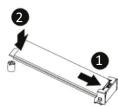

Insert the tab on the thermal plate into the slit near the connector, then secure the thermal plate and M.2 SSD in place with the previously removed screw.
把散熱片裝入插槽旁邊的缺口,然後用之前取下的螺絲將 M.2 SSD 與散熱片固定。
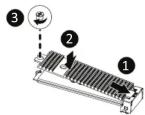
C) Memory Installation: SO-DIMM DDR4
Arbeitsspeicher Installation: SO-DIMM DDR4 / Installation de la mémoire : SO-DIMM DDR4 / Instalación de la memoria: SO-DIMM DDR4 / Instalación de memória: SO-DIMM DDR4 / Instalación della memoria: SO-DIMM DDR4 / Uстановка модулей памяти: SO-DIMM DDR4 / Instalacja pamięci: SO-DIMM DDR4 / Hafiza Yüklemesi: SO-DIMM DDR4 / 安装記憶體 : SO-DIMM DDR4 / 内存安装 : SO-DIMM DDR4 / メメリインストール : SO-DIMM DDR4 / ヒモ리 설치 : SO-DIMM DDR4

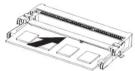
Carefully insert SO-DIMM memory modules 小心並由下至上安裝 SO-DIMM 記憶體於記憶體插槽。

. Push down until the modules click into place. 當記憶體固定於插槽後,再輕輕下壓至定點。

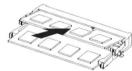
Carefully insert SO-DIMM memory modules. 安裝下層記憶體後,重覆前述動作安裝上層記憶體。

Push down until the modules click into place. 當記憶體固定於插槽後,再輕輕下壓至定點。


D) BRIX s Support Additional SATA 6Gbps HDD: How to Install 2.5" HDD
BRIX s Unterstützt Zusätzliche SATA 6Gbps HDD: So installieren Sie die 2,5 "Festplatte / Le BRIX s supporte un disque dur SATA 6Gbps additionel:
BRIX Supporta un' ulterioe porta SATA 6Gbps per HardDisk: Come installare un HDD da 2,5" / BRIX допускает установку дополнительного жесткого SATA-диска (6 Гбит/с): Порядок установки 2,5-дюйм жесткого диска BRIX wspiera dodatkowy dysk SATA 6Gbps HDD: Jak zainstalować 2,5" HDD / BRIX, extra 6Gbps HDD destekler: 2,5" HDD nasil kurulum yapılır / BRIX s 支援额外的 SATA 6Gbps 硬碟:如何安装 2,5" HDD
BRIX s 支援額外的 SATA 6Gbps 硬盘:如何安装 2.5" HDD / BRIXs SATA 6Gbp ハードディスク(HDD) 増設:2.5 インチ HDD の取り付け方法 / BRIX s 는 추가 SATA 6Gbps 을 지원합니다. HDD : 2.5" HDD 話 설치하는 방법

Unscrew and remove the bottom panel, and then disconnect the SATA cable.
移除 BRIX s 底蓋並取下主機板上的 SATA 線。

Install the HDD using the screws provided and connect the SATA cable to the HDD.
使用包裝隨附的四顆螺絲
安裝硬碟並將 SATA 線另一端連接於硬碟連接埠。


Connect the SATA cable to the motherboard and reinstall the bottom panel.
安裝主機板端的 SATA 線,裝回 BRIX s 底蓋。


Optional Upgrade Kit: How to Install the Upgrade Kit
NOTE: This system does not support the installation of both a upgrade kit board and an internal 2.5" HDD.

Unscrew and remove the rear panel.
鬆開螺絲並移除背蓋。


Remove the four screws that secure the bottom panel and remove the bottom panel. Then disconnect and remove the SATA cable included in the system.
鬆開底蓋上 4 顆螺絲並移除底蓋。然後拔除系統內的 SATA 傳輪線。
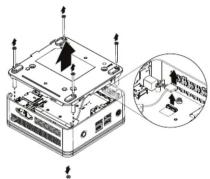

Install the upgrade kit board onto the bottom panel using the four screws provided.
用隨附的四顆螺絲將升級套件電路板固定在底蓋上。
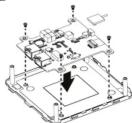

Connect the cable included in the upgrade kit to the upgrade kit board.
將升級套件隨附的傳輸線接到升級套件電路板。

Connect the other end of the cable to the SATA connector on the motherboard. 將傳輸線的另一端接到主板上的 SATA 接頭。


Install the new rear panel using the two screws provided.
裝上新背蓋,並用隨附的兩顆螺絲鎖固。

VESA Bracket
VESA Halterung / Support VESA / Soporte VESA / Suporte VESA / Staffa VESA / Кронштейн VESA / Wspornik VESA / VESA Braketi / VESA 支架 / VESA 支架 / VESA プラケット / VESA ブ래ット NOTE1 VESA screws: Length 5.0 mm with M3 type screws, Metal enclosure with bottom side.

Attach the screws provided on the underside of the BRIX S.
安裝隨附的 VESA 支撐架螺絲於 BRIX 底部。

Attach the VESA mounting plate to the rear of a compatible display using the screws provided.
安裝隨附的 VESA 支撐架於支援 VESA 支撐架的電腦螢幕或電視機後背。

The BRIX s can now be mounted by sliding the device into place.
將已安裝 VESA 支撐架螺絲的 BRIX 插入 VESA 支撐架的滑軌孔,向下壓至定位點後即可固定。
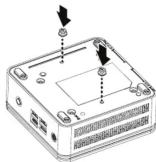
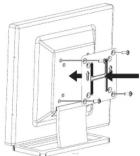

USB Power On Function: Allows Device Power-on Via USB. Useful When Mounted Behind a Display or TV
USB Power On Funktion / Fonction Démarrage par USB / Función USB Power On Função USB Power On / Funzione USB Power On / Функция USB Power On Opcja USB Power On / USB Güç Açık Fonksiyonu / USB 埠啟動功能 USB 接口启动功能 / USB 機器からの電源 ON 機能 / USB 포트를 이용한 전원 켜기

Press "Del" during device start up to enter BIOS.
開機後按啟 Del 鍵進入 BIOS 設定畫面。

Select "Chipset" from the menu.
在 BIOS 主選單選取 "Chipset"。

Manually configure "USB S5 Wakeup Support" settings to "Enable".
進入 Chipset 的 USB S5 Wakeup Supp 選項,手動控制將其 "Enable"。

Press F4 to Save and Exit.
按啟 F4 存儲設定並離開 BIOS 選單重新開機。


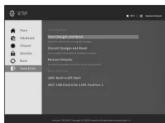
NOTE: "USB Power On" functionality in Windows requires an additional Windows patch. This is provided on GIGABYTE's official website labeled 'USB Power-On Patch'. Your GIGABYTE BRIX can be powered on via a connected USB device such as a keyboard or mouse, offering greater convenience when mounted behind a display or monitor.
注意:在 Windows 的版本環境下需要額外的應用程式來啟動 "USB Power On" 功能。你可以透過技嘉官網的產品支援與更新下載 "USB Power-On Patch" 來執行。USB Power On 提供了方便的開機功能,使用者可以透過連接到 BRIX 上的 USB 裝置啟動 BRIX;讓安裝於顯示器後方的 BRIX 更方便使用。
| 量元Unit | 現 和質及其化學符號Restricted substances and its chemical symbols | |||||
| 鉛Lead(Pb) | 及Mercury(Hg) | 鋸Cadmium(Cd) | 六華鎔Hexavalent chromium( Cr2+ ) | 多法聯等Polybrominated biphenyls(PBB) | 多法二等醚Polybrominated diphenyl ethers(PBDE) | |
| 電路恒總水 — | ○ ○ ○ ○ ○ | |||||
| 散熱器 ○ ○ | ○ ○ ○ ○ ○ | |||||
| 外殼 — ○ | ○ ○ ○ ○ ○ | |||||
| 電源非塵器 — | ○ ○ ○ ○ ○ | |||||
| 機材 — ○ | ○ ○ ○ ○ ○ | |||||
第1:“超出0.1wt%”及“超出0.01wt%”是指损害和损害之百分比含量超出百分比含量基準值。
Note 1: “Exceeding 0.1 wt %” and “exceeding 0.01 wt %” indicate that the percentage content of the restricted substance exceeds the reference percentage value of presence condition.
考2.“○”條指該項題和贊之百分比含量未超出百分比含量基準值。
Note 2: “○” indicates that the percentage content of the restricted substance does not exceed the percentage of reference value of presence.
编号3.“一”连拍该项现*拓赞名批编项目。
Note 3: The “-” indicates that the restricted substance corresponds to the exemption.
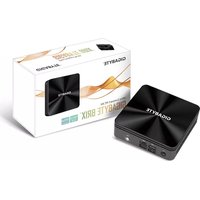
- GIGA-BYTE TECHNOLOGY CO., LTD.
- GIGABYTE™
- BRIX S Ultra Compact PC Kit
- Quick Start Guide
- Getting Familiar with Your Unit
- A) Wireless Module: How to Safely Remove the Module
- Package Contents
- B) M.2 SSD: How to Install the M.2 2280 SSD
- C) Memory Installation: SO-DIMM DDR4
- D) BRIX s Support Additional SATA 6Gbps HDD: How to Install 2.5" HDD
- Optional Upgrade Kit: How to Install the Upgrade Kit
- VESA Bracket
- USB Power On Function: Allows Device Power-on Via USB. Useful When Mounted Behind a Display or TV
Marque : GIGABYTE
Modèle : GB-BRR3H-4300
Catégorie : Ordinateur de bureau