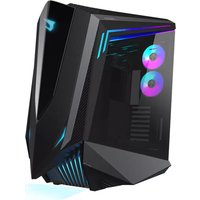
GB-AC700G - Unite Centrale GIGABYTE - Notice d'utilisation et mode d'emploi gratuit
Retrouvez gratuitement la notice de l'appareil GB-AC700G GIGABYTE au format PDF.


| Type de produit | Unité centrale |
| Marque | Gigabyte |
| Modèle | GB-AC700G |
| Dimensions (L x P x H) | 200 x 450 x 400 mm |
| Poids | 8 kg |
| Alimentation | 500 W |
| Processeur | Intel Core i5-10400 |
| Mémoire RAM | 8 Go DDR4 |
| Stockage | 256 Go SSD + 1 To HDD |
| Système d'exploitation | Windows 10 |
| Connectivité | Wi-Fi, Bluetooth, Ethernet |
| Ports | USB 3.0, USB Type-C, HDMI, DisplayPort, jack audio |
| Fonctions principales | Bureautique, multimédia, jeux légers |
| Entretien et nettoyage | Dépoussiérage régulier avec air comprimé, nettoyage des filtres |
| Sécurité | Verrou Kensington, mot de passe BIOS |
| Pièces détachées et réparabilité | RAM, disque dur, alimentation remplaçables |
| Informations générales | Garantie 2 ans, consommation énergétique 150W en veille |
FOIRE AUX QUESTIONS - GB-AC700G GIGABYTE
Questions des utilisateurs sur GB-AC700G GIGABYTE
0 question sur cet appareil. Repondez a celles que vous connaissez ou posez la votre.
Poser une nouvelle question sur cet appareil
Téléchargez la notice de votre Unite Centrale au format PDF gratuitement ! Retrouvez votre notice GB-AC700G - GIGABYTE et reprennez votre appareil électronique en main. Sur cette page sont publiés tous les documents nécessaires à l'utilisation de votre appareil GB-AC700G de la marque GIGABYTE.
MODE D'EMPLOI GB-AC700G GIGABYTE

AORUS
C700 GLASS
INSTALLATION GUIDE

Gigabyte provides limited product warranty. For the latest and current terms of the Limited Product Warranty, please visit http://www.gigabyte.com/support-downloads/customer-service.aspx.

This symbol on the product or in the instructions means that your electrical and electronic equipment should be disposed at the end its life separately from your household waste. There are separate collection system for recycling in the EU.
For more information, please contact the local authority or your retailer where you purchased the product.
符合中国《电器电子产品有害物质限制使用管理办法》标示
| 产品中有重物质的名称及含量 | ||||||
| 部件名称 | 有毒有害物质或无量 | |||||
| 铅(Pb) | 汞(Pb) | 预汇点 | 占价值比(%) | 多溴苯甲烷(Pb/g) | 多溴二苯醚(PBOH) | |
| 机械组 | X | O | O | O | O | O |
| 圆锥组 | X | O | O | O | O | O |
| 以岭体表 | X | O | O | O | O | O |
| 球膜 | X | O | O | O | O | O |
| 安装条件 | X | O | O | O | O | O |
| 电流 | X | O | O | O | O | O |
| 本表格须填5JT11364的或定量编制。○表示没有重物组合或非标有铅冶炼中的含量值在GB/T 26752规定的质量要求以下。X表示所有重物组合或非标有铅冶炼中的一种材料所中的质量值在GB/T 26752规定的质量要求,同时附有参考价是否留置为M5要求。 | ||||||
Asia (Headquarters)
GIGARBYTE TECHNOLOGY CO., LTD. Taiwan Address: No 5, Reqing Rd., Xindian Dist., New Taipei City 231, Taiwan
Tel: +886-2-8912-4000
http://www.gigabyte.com
China
GIGABYTE CHINA
Address: 24/F, HailTong Securities Tower, No.689 Guangdong Road, Shanghai, China
Tel. +8
Europe
G.B.T. TECHNOLOGY TRADING GMBH Germany
Address: Bullenkoppel 16, 22047 Hamburg, Deutschland
12.4.12 13.05 14.07
North A
G.B.T. INC. US
Address: 17358 Railroad Street, City of Industry, CA91748 USA
Tel: +1-626-854-9338
Assembly Drawing

A I/O panel
B Front panel
C Tempered glass side panels
D Vertical and horizontal graphics card Installation
E Top panel
F Detachable dust filter
G PSU mounting plate
3.5"/2.5" drive bays
2.5" drive bays
J PWM fans (Pre-installed 120mm*3)
K ARGB & PWM fans (Pre-installed 120mm*2)
Remove the panels

*Be careful when handling the tempered glass panel.
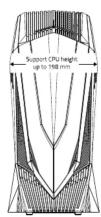
Maximum compatibility

ACCESSORY KIT
| Figure | Part's Name | Qty | Used For |
| Screw - A | 8 | PSU | |
| Screw - B | 54 | Motherboard(12) / SSD(40) / GPU (2) | |
| Screw - C | 8 | HDD | |
| Standoff – 6.5mm | 4 | Motherboard(9, pre-installed) | |
| Cable Tie | 8 | Cable management |
Install the vertical graphics card

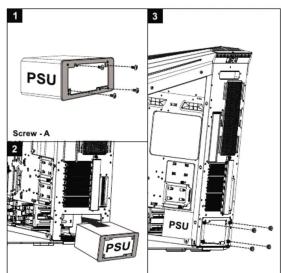
Install the power supply

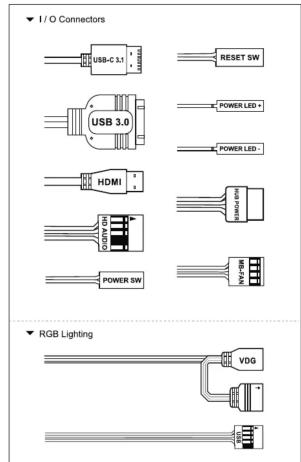
RGB & Fan control system
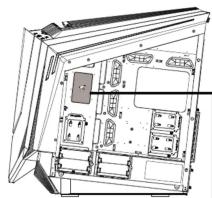
natural_image
Technical line drawing of an open computer case with internal compartments and connectors (no text or symbols)
RGB FUSION 2.0
With 16.7M customizable color options and numerous lighting effects, you can choose lighting effects or synchronize with other AORUS devices.
■ Please use the included hub (refer the below image) to connect the ARGB and PWM fans.
■ Users can control the RGB & Fan speed on the top I/O panel.
※ Mode Button: Adjust the modes between RGB FUSION 2.0.
※ RGB Button: Adjust the various colors.
※ FAN ± Button: Adjust the fan speed by each level.

flowchart
graph TD
    A["FAN SW+"] --> B["5V 3pin ARGB"]
    C["FAN SW-"] --> B
    D["RGB SW1"] --> B
    E["RGB SW2"] --> B
    F["POWER (Molex)"] --> B
    G["PWM FAN"] --> B
    H["For motherboard's V,D,G pin"] --> I["For motherboard's V,D,NP,G pin"]
    J["For motherboard's V,D,USB"] --> K["For motherboard's V,D,USB"]
    L["M8 FAN"] --> K
    M["M8 FAN USB"] --> K
    N["Select one 5V 3 pin ARGB connector to connect your MB."]
    O["Select another 5V 3 pin ARGB connector to connect your MB."]

Install water cooling radiators & cooling fans

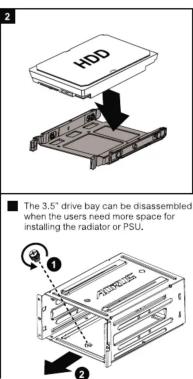
Install the internal 2.5" SSDs & 3.5" HDDs
3.5" HDD can be replaced by 2.5" SSD.

For 2.5" Cage

For 3.5" Cage

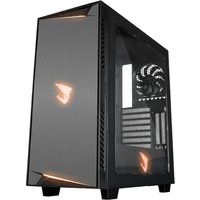
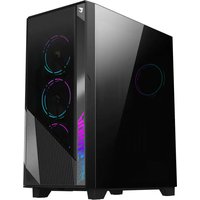
Marque : GIGABYTE
Modèle : GB-AC700G
Catégorie : Unite Centrale