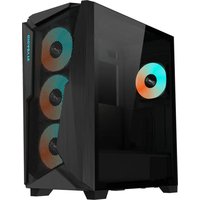
C301 GLASS - Unite Centrale GIGABYTE - Notice d'utilisation et mode d'emploi gratuit
Retrouvez gratuitement la notice de l'appareil C301 GLASS GIGABYTE au format PDF.


| Type de produit | Boîtier PC moyen tour |
| Marque | Gigabyte |
| Modèle | C301 Glass |
| Dimensions | 440 x 210 x 470 mm |
| Poids | 6 kg |
| Matériau principal | Acier SECC et verre trempé |
| Formats de carte mère supportés | ATX, Micro ATX, Mini ITX |
| Baies de stockage internes | 2 x 3,5 pouces + 2 x 2,5 pouces |
| Emplacements d'extension | 7 slots PCI |
| Ventilateurs inclus | 1 x 120 mm à l'arrière |
| Emplacements pour ventilateurs supplémentaires | Avant : 3 x 120 mm ou 2 x 140 mm Dessus : 2 x 120 mm ou 2 x 140 mm |
| Alimentation | Non incluse, format ATX |
| Ports I/O façade | 2 x USB 3.0, 1 x USB 3.1 Type-C, prise microphone/casque |
| Filtres anti-poussière | Oui, amovibles en façade et dessous |
| Fonctions principales | Panneau latéral en verre trempé, gestion des câbles, support watercooling |
| Entretien et nettoyage | Utiliser un chiffon doux et sec ; dépoussiérer régulièrement les filtres |
| Sécurité | Panneau latéral verrouillable, pieds antidérapants |
| Pièces détachées et réparabilité | Ventilateurs, filtres et vis standard ; facile à démonter |
FOIRE AUX QUESTIONS - C301 GLASS GIGABYTE
Questions des utilisateurs sur C301 GLASS GIGABYTE
0 question sur cet appareil. Repondez a celles que vous connaissez ou posez la votre.
Poser une nouvelle question sur cet appareil
Téléchargez la notice de votre Unite Centrale au format PDF gratuitement ! Retrouvez votre notice C301 GLASS - GIGABYTE et reprennez votre appareil électronique en main. Sur cette page sont publiés tous les documents nécessaires à l'utilisation de votre appareil C301 GLASS de la marque GIGABYTE.
MODE D'EMPLOI C301 GLASS GIGABYTE
GIGABYTE™

INSTALLATION GUIDE
安裝說明書 / 安裝说明书
Please visit www.gigabyte.com for more product information.
Warranty
Gigabyte provides limited product warranty. For the latest and current terms of the Limited Product Warranty, please visit http://www.gigabyte.com/support-downloads/customer-service.aspx.
WEEE Information
This symbol on the product or in the instructions means that your electrical and electronic
equipment should be disposed at the end of its life separately from your household waste.
There are separate collection systems for recycling in the EU.
For more information, please contact the local authority or your retailer where you purchased the product.
符合中国《电器电子产品有害物质限制使用管理办法》标示
产品中有害物质的名称及含量

| 部件名称 | 有毒有害物质或元素 | |||||
| 铅(Pb) | 汞(Hg) | 镉(Cd) | 六价铬(Cr(VI)) | 多溴联苯(PBB) | 多溴二苯醚(PBDE) | |
| 机箱组 | × | ○ | ○ | ○ | ○ | ○ |
| 面板组 | × | ○ | ○ | ○ | ○ | ○ |
| I/O模块 | × | ○ | ○ | ○ | ○ | ○ |
| 风扇 | × | ○ | ○ | ○ | ○ | ○ |
| 安装套件 | × | ○ | ○ | ○ | ○ | ○ |
| 电源 | × | ○ | ○ | ○ | ○ | ○ |
| 本表格依据SJ/T 11364的规定编制,○:表示该有害物质在该部件所有均质材料中的含量均在GB/T 26572规定的限量要求以下。X:表示该有害物质至少在该部件的某一均质材料中的含量超出GB/T 26572规定的限量要求。但所有部件都符合欧盟RoHS要求。 | ||||||
Asia (Headquarters)
GIGA-BYTE TECHNOLOGY CO., LTD.
Address: No.6, Baoqiang Rd., Xindian Dist., New Taipei City 231
Tel: +886-2-8912-4000
http://www.gigabyte.com
China
GIGABYTE CHINA
Address: 24/F, HaiTong Securities Tower, No.689 Guangdong Road, Shanghai, China
Tel: +86-21-6340-0912
Europe
G.B.T. TECHNOLOGY TRADING GMBH Germany
Address: Bullenkoppel 16, 22047 Hamburg, Deutschland
Tel: +49-40-25 33 040
North America
G.B.T. INC. USA
Address: 17358 Railroad Street, City of Industry, CA91748 USA
Tel: +1-626-854-9338
FITTING PACK / 安装套件 / 安装套件
| Figure | Part's Name | Qty | Used For |
| Screw A | 15 | PSU (4) / VGA holder kit (2) / HDD (8) / PCI Slot Cover (1) | |
| Screw B | 21 | Motherboard (9) / PCI-E Riser Cable (2) / SSD (8) / Backup(2) | |
| Screw C | 12 | Fan | |
| Standoff – 6.5mm | 12 | Motherboard(9, pre-installed), M-ATX Motherboard (3) | |
| Standoff – 20.3mm | 2 | VGA holder kit | |
| Nut setter | 1 | Standoff Installation | |
| Cable Tie | 4 | Cable management | |
| VGA holder kit A | 1 | Vertical VGA installation | |
| VGA holder kit B | 1 |
Max CPU Height : 170mm / Max GPU Length : 400mm / Max PSU Length : 180mm

THE I/O CONNECTORS AND RGB LIGHTING POWER
連接輸出接頭以及面板燈光電源/连接輸出接口以及面板灯光电源
▼ I/O Connectors
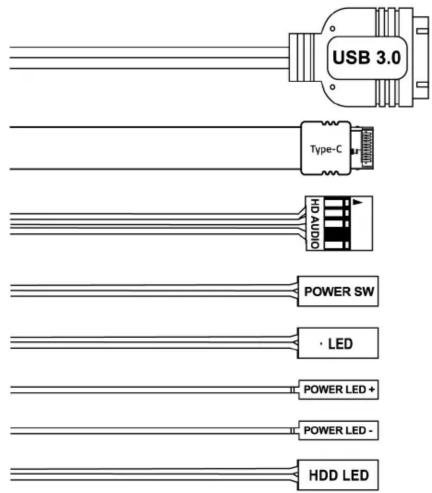
▼ RGB Lighting & Fan Splitter Cable

natural_image
Pure electrical connector diagram showing two types of cable or connector packages without any text, labels, or symbols.INSTALLATION / 安装說明 / 安装說明
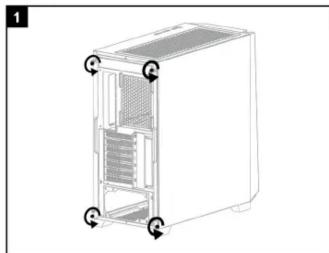
- Remove both side panels / 先拆下兩邊側板 / 先拆下两边側板
natural_image
Line drawing of a computer tower case with internal components and directional arrows indicating movement (no text or symbols)
natural_image
Line drawing of a computer case with two arrows indicating left and right motion (no text or symbols)*Be careful when handling the tempered glass panel.
*拿取強化玻璃側板時請小心
*拿取强化玻璃侧板时请小心
- Install the motherboard / 安裝主機板 / 安裝主板

natural_image
3D diagram of a computer motherboard with an open chassis and a highlighted internal component (no text or symbols)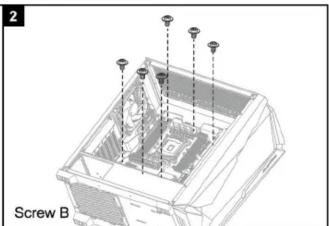
natural_image
3D mechanical assembly diagram showing a central component with multiple screw holes and mounting points (no text or symbols)*The quantity of standoff 6.5mm depends on motherboard's type.
*銅柱所需數量取決於主機板類型
*铜柱所需数量取决于主机板类型
- Install the power supply / 安装電源供應器 / 安装电源供应器
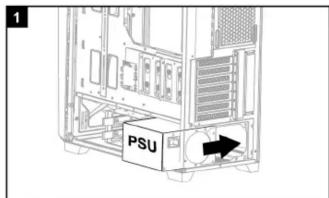

- Install the hard drive / 安装硬碟 / 安装硬盘
5.1 For 3.5" cage / 3.5" 插槽 / 3.5" 插槽
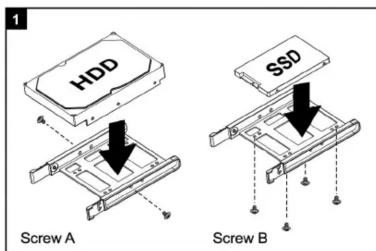

natural_image
Technical line drawing of a mechanical assembly or mounting bracket (no text or symbols visible)5.2 For 2.5" cage / 2.5" 插槽 / 2.5" 插槽
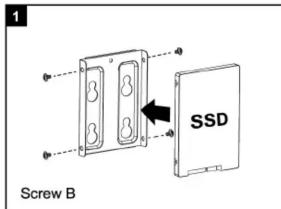

■ Remove the 3.5" Cage / 拆卸3.5" 插槽 / 拆卸3.5" 插槽

natural_image
Technical line drawing of a computer chassis showing internal components and housing (no text or labels)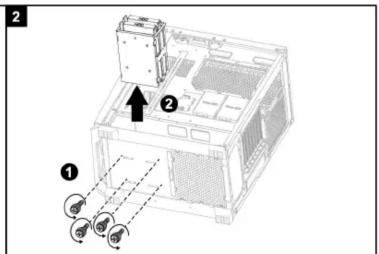
*The 3.5" cage can be disassembled when the users need more space for installing the PSU.
*依需求拆卸3.5"硬碟架可獲得更多的電源供應器安裝空間
*依需求拆卸3.5"硬碟架可获得更多的电源供应器安装空间
- Install the add-on cards / 安裝顯示卡 / 安裝显卡
4.1 Horizontal VGA card installation / 橫插式顯示卡安裝 / 橫插式显卡安裝

natural_image
Diagram of a computer tower interior showing internal components and directional arrows (no text or symbols)
natural_image
Technical diagram of a server rack with labeled components and directional arrows (no text or symbols)

natural_image
Line drawing of a server rack with multiple drive bays and ventilation slots (no text or symbols)4.2 Vertical VGA card installation (requires optional PCI-E x16 riser cable)
垂直式顯示卡安裝 (需額外添購PCIE延伸線) / 垂直式显卡安裝(需額外添购PCIE延伸线)


natural_image
Technical line drawing of a three-sided fan assembly mounted on a shelf (no text or symbols)- Install the additional system fan(not included)
安裝系統風扇(額外添購) / 安装系統风扇(額外添购)

- Cooling System Support / 散熱系統支援 / 散熱系統支持


1 Rear : 120mm x1
2 Top : 120mm x3 / 140mm x2
3 Front: 120mm x3 / 140mm x3

1 Rear : 120mm x1
2 Top : 120mm x3 / 140mm x2 / 240mm x1 / 280mm x1 / 360mm x1
3 Front : 120mm x3 / 140mm x2 / 240mm x1 / 280mm x1 / 360mm x1
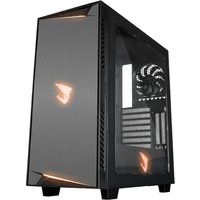
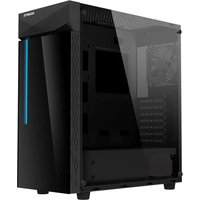
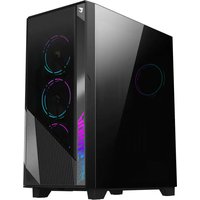
Marque : GIGABYTE
Modèle : C301 GLASS
Catégorie : Unite Centrale